ad blue MERCEDES-BENZ GLE SUV 2021 Owners Manual
[x] Cancel search | Manufacturer: MERCEDES-BENZ, Model Year: 2021, Model line: GLE SUV, Model: MERCEDES-BENZ GLE SUV 2021Pages: 545, PDF Size: 9.37 MB
Page 31 of 545

Te
ch nology Frequency rang eT ransmission output/magnetic field
st re ngth
Near-field communication 13.553–13.567 MHz ≤ 42 dBμA/m at10 m
Con venience central lo cking sy stem, garage
door opener, tyre pressure monitoring sy stem 433 MHz (433.05–434.79 MHz)≤
10mW ERP
Heater boos ter function remo tecontrol, garage
door opener 868 MHz (868.0–868.6 MHz
)≤25 mW ERP
Heater boos ter function remo tecontrol, garage
door opener 869 MHz (868.7–869.2 MHz
)≤25 mW ERP
RLAN 5.1 GHz UNII-1 (5150–5250 MHz) ≤ 25 mW EIRP
Blue tooth ®
, Kleer, RLAN, remo tecontrol, wire‐
less headphones 2.4 GHz ISM band (2400–2483.5 MHz
)≤100 mW EIRP
Sensor for interior pr otection, RLAN 5.8 GHz UNII-3 (5725–58 75MHz) ≤ 25 mW EIRP
Con venience central lo cking sy stem 7.25 GHz UWB (6.0–8.5 GHz) ≤ -41.3 dBm/MHz EIRP mean ≤ 0 dBm/MHz
EIRP peak
76 GHz radar 76–77 GHz ≤ 55 dBm peak EIRP28
General no tes
Page 32 of 545
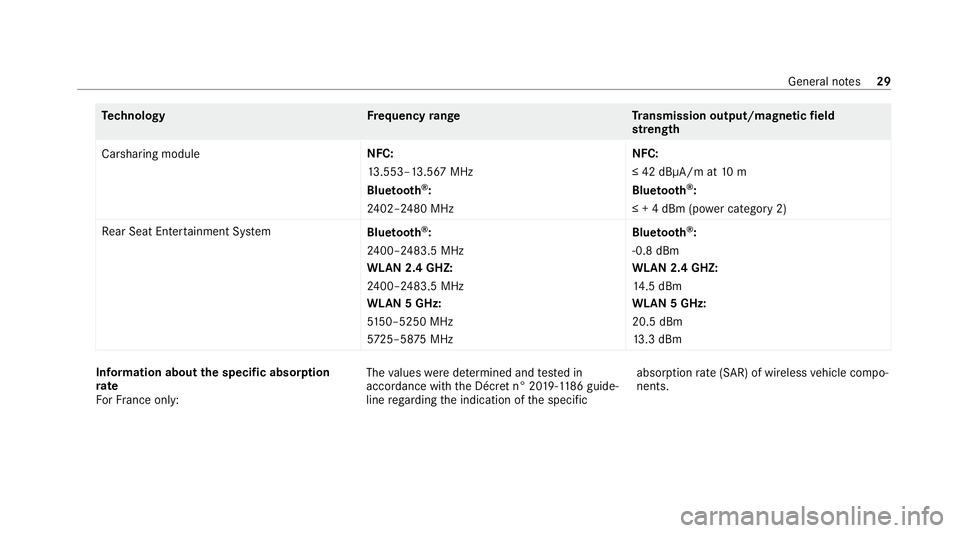
Te
ch nology Frequency rang eT ransmission output/magnetic field
st re ngth
Carsharing module NFC:
13
.553–13.567 MHz
Blue tooth ®
:
24 02–2480 MHz NFC:
≤ 42 dBμA/m at
10 m
Blue tooth ®
:
≤ + 4 dBm (p ower category 2)
Re ar Seat Ente rtainment Sy stem
Bluetooth ®
:
24 00–2483.5 MHz
WLAN 2.4 GHZ:
24 00–2483.5 MHz
WLAN 5 GHz:
51 50–5250 MHz
572 5–58 75MHz Blue
tooth ®
:
-0.8 dBm
WLAN 2.4 GHZ:
14 .5 dBm
WLAN 5 GHz:
20.5 dBm
13 .3 dBm In
fo rm ation about the specific absor ption
rate
Fo rFr ance on ly: The
values weredeterm ined and tested in
accordance with the Décre t n° 2019-118 6guide‐
line rega rding the indication of the specific absor
ption rate (SAR) of wireless vehicle compo‐
nents. General no
tes29
Page 139 of 545
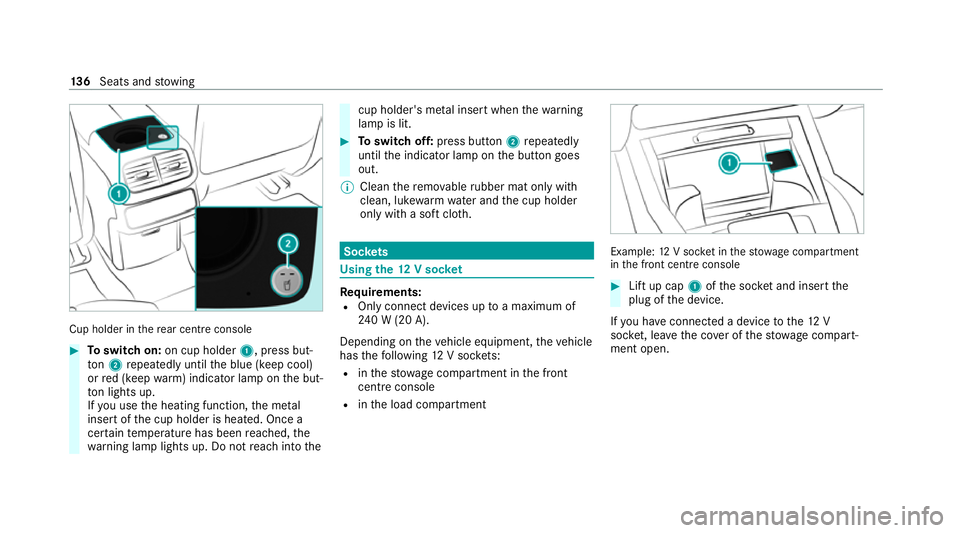
Cup holder in
there ar centre console #
Toswitch on: on cup holder 1, press but‐
to n2 repeatedly until the blue (keep cool)
or red (keep warm) indicator lamp on the but‐
to n lights up.
If yo u use the heating function, the me tal
inse rtof the cup holder is heated. Once a
cer tain temp erature has been reached, the
wa rning lamp lights up. Do not reach into the cup holder's me
tal inse rtwhen thewa rning
lamp is lit. #
Toswitch off: press button 2repeatedly
until the indicator lamp on the button goes
out.
% Clean there mo vable rubber mat only with
clean, luk ewarmwate r and the cup holder
only with a soft clo th. Soc
kets Using the
12V so cket Re
quirements:
R Only connect devices up toa maximum of
24 0 W (20 A).
Depending on theve hicle equipment, theve hicle
has thefo llowing 12V soc kets:
R inthestow age compartment in the front
cent reconsole
R inthe load compartment Example:
12V soc ket in thestow age compartment
in the front cent reconsole #
Lift up cap 1ofthe soc ket and insert the
plug of the device.
If yo u ha veconnected a device tothe12 V
soc ket, le ave the co ver of thestow age compart‐
ment open. 13 6
Seats and stowing
Page 170 of 545
#
Alw ays switch thest ationary heater off
in enclosed spaces without an air
ex traction sy stems, e.g. in garage s. #
Keep theta ilpipe and the area around
th eve hicle free from snow when the
engine or thest ationary heater are run‐
ning. #
Open a window on the windward side of
th eve hicle toensure an adequate sup‐
ply of fresh air. &
WARNING Risk offire due tohot station‐
ary heater components and exhaust
ga ses
Flammable materials such as lea ves, grass or
twigs may ignite. #
When thest ationary heater is swit ched
on, make sure that:
R hot vehicle parts do not come into
contact with flammable materials.
R theex haust gas can flow out of the
st ationary heater exhaust pipe
unhindered. R
theex haust gas does not come into
contact with flammable materials. *
NO
TEBattery discharge caused bysta‐
tionary heater or stationary ventilation
operation Ope
rating thest ationary heater or stationary
ve ntilation drains the batter y. #
After heating or ventilating theve hicle
twice, drive for a longer period of time. Re
quirements:
R The fuel tank is su fficiently full.
% Please no tethat if theta nk fill le vel is too
lo w, it can result in function restrictions dur‐
ing auxiliary heating operation. #
Set the desired temp erature using the0082
button. #
Press the003B button.
The red or blue indicator lamp on the003B
button will light up or go out. Indicator lamp colours:
R Blue: stationary ventilation is switched on.
R Red:thest ationary heater is swit ched on.
R Yello w: the departure time has been prese‐
lected.
The stationary heater/ ventilation will switch off
au tomatically af ter 50 minutes.
Operation using the app: thest ationary
heater/ ventilation can also be operated via the
Mercedes me connect app. You can find fur ther
information in the separate Owner's Manual at
https://moba.i.daimler.com/mar kets/ece-r ow/
baix/cars/connectme/en_GB/#emotions/
St artseite.html.
Setting thest ationary heater/ventilation via
th e multimedia sy stem #
Tocall up the air conditioning menu
(/ page 162). #
Select Auxiliary heating.
Selecting the departu retime #
Select the time TIME A: XX, TIME B: XXor
TIME C: XX. Climate control
167
Page 185 of 545
Clean
the brakes af ter driving off-road. If you
th en notice reduced braking ef fect or hear
scraping noises, ha vethe brake sy stem checked
at a qualified specialist workshop. Adapt your
driving style to thech anged braking characteris‐
tics.
* NO
TEDama gecaused bydriving over
obs tacles The
vehicle can be damaged by:
R driving onto high kerbs or unpa vedro ads.
R quickly driving over obs tacles su chas
ke rbs, speed bumps or po tholes.
R heavy objects hitting the underbody or
ch assis components. #
Do not drive over obs tacles that could
damage theve hicle. #
Check theve hicle regular lyfor dama ge
during off-road driving. #
Adjust theve hicle speed tosuit the
ro ad sur face conditions. #
Ifth ere is damage, consult a qualified
specialist workshop immediately. +
ENVIRONMENTAL
NOTEEnvironmental
dama gedue tonon-obser vance of pro‐
hibition signs Environmental pr
otection has priority. Treat
nature with respect. #
Be sure toobser veprohibition signs. Checklist before driving off-road
Check
thefo llowing points before driving off-
ro ad:
R Fuel le vel
R Vehicles with a diesel engine: AdBlue ®
le vel
R Engine oil le vel:fill engine oil tothe maxi‐
mum le velto ensure full gradeability
(/ page 352).
R Tyre-change tool kit and spare wheel
R Tyres and wheels %
Further information about special all-ter rain
tyres forre trofitting can be ob tained from a
qu alified specialist workshop.
Off-road driving
Re ad this section before driving your vehicle off-
ro ad. Practise bydriving over more gentle off-
ro ad terrain firs t.
R Obse rveth e no tes on the cross-country ABS
(/ page 214).
R Ifnecessa ry, select theF orG drive
program (vehicles with Off-road pac kage)
before driving off-road (/ page190).
R Before driving off-road, shift the transfer
case totheLO W RANGE off-roadgear (vehi‐
cles with Off- road pac kage ) (/ page 197).
R Select a vehicle le vel suitable for off-road ter‐
ra in (/ page 252). Toavo id damaging the
ve hicle, make sure there is alw ays suf ficient
ground clearance.
R Alw ayske ep the engine running and in gear
when driving on downhill gradients and
slopes. Obse rveth e no tes on driving in
mountainous terrain. 18 2
Driving and pa rking
Page 205 of 545
#
Insert fuel filler cap from abo veinto brac ket
2 . #
Comple tely inse rtthe pump nozzle into the
ta nk filler nec k,hook in place and refuel. #
Only fill th e fuel tank until the pump nozzle
switches off.
% Vehicles with a diesel engine: theta nk
fi ller neck is designed forre fuelling at diesel
fi lling pumps.
% Vehicles with a diesel engine: whenthe
fuel tank is compl etely em pty, top up with at
least 5 litres of diesel.
% Vehicles with a diesel engine: use afiller
neck with a lar gediame terfo rve hicles with
a diesel engine when topping up fuel from a
fuel can. Otherwise, thefiller neck cannot
slide into theta nk. #
Replace the cap on thefiller neck and turn
clockwise until it engages audibl y.#
Close fuel filler flap 1. Ad
Blue ®
(vehicles with a diesel engine only) Note
s onrefilling AdBlue ®
Ad Blue ®
is a wate r-soluble fluid forth e NOx
ex haust gas af tertre atment of diesel engines. In
order forth eex haust gas af tertre atment tofunc‐
tion proper ly, only use AdBlue ®
in accordance
wi th ISO 222 41 .
Ad Blue ®
is ch aracterised bythefo llowing:
R non-t oxic
R colourless and odourless
R non-flammable
If yo u open theAd Blue ®
tank, small amounts of
ammonia vapour may be released. Only fill the
Ad Blue ®
tank in well-ventilated areas.
Do not let AdBlue ®
come into contact wi thskin,
ey es or clo thes. Keep AdBlue ®
aw ay from chil‐
dren.
Do not ingest AdBlue ®
. If AdBlue ®
is swallo wed,
immediately rinse your mouth out thoroughly.
Drink plenty of water.Seek medical attention at
once. Obser
vethe no tes on operating fluids
(/ page 410).
Ad Blue ®
is available here:
R AdBlue ®
can be topped up byfast service at
a qu alified specialist workshop, e.g. a
Mercedes-Benz Service Centre.
R AdBlue ®
is available at many filling stations
from AdBlue ®
filling pumps.
R Alternativel y,Ad Blue ®
is available at qualified
specialist workshops, e.g. Mercedes-Benz
Service Centres, and at many filling stations
in Ad Blue ®
re fill canis ters or AdBlue ®
re fill
bottles.
% Ensure the connection between there fill
con tainer and vehicle filler neck does not
drip. 202
Driving and parking
Page 206 of 545
To
pping up AdBlue ®
* NOTEEngine damage duetoAd Blue ®
being in the fuel #
AdBlue ®
must not be used tofill the
fuel tank. #
Only use AdBlue ®
to fill th eAd Blue ®
ta nk. #
Do not overfill theAd Blue ®
tank. *
NO
TEContamination of theve hicle inte‐
ri or due toAd Blue ®
lea kage #
Afterto pping up, carefully close the
Ad Blue ®
re fill conta iner. #
Avoid car rying AdBlue ®
re fill conta iners
permanently in theve hicle. Re
quirements:
R The vehicle is unloc ked. The
following messages appear in order in the
multifunction display when theAd Blue ®
tank
requ irestopping up:
R Refill AdBlue See Owner’s Manual The
Ad Blue ®
leve l has fallen below there ser ve
ra nge. Top up AdBlue ®
immediately.
R Top up AdBlue Emergency op. in XXX miles
See Owner's ManualThe low AdBlue ®
level
will lead tolimited per form ance af terthe
re maining dis tance displ ayed has been
driven. Top up AdBlue ®
immediately.
R XX,X l Top up AdBlue Emer. op.: max. XXX
km/h Start not poss. in XXX kmThe low
AdBlue ®
leve l will lead tolimited per form‐
ance from the speed displa yed. Af terthe
re maining dis tance displ ayed has been cov‐
ered, it will no longer be possible tostart the
engine. Top up with at least the amount of
Ad Blue ®
displ ayed.
R XX,X l Top up AdBlue Switch on ignition, wait
60 sec. or eng. start not poss. TheAdBlue ®
ta nk is em pty. Yo u can no lon gerst art the
engine. Top up with at least the amount of Ad
Blue ®
displ ayed. Switch on the ignition
and waitfor appro ximately 60 seconds. Start
th e engine.
Yo u can see theAd Blue ®
ra nge and le vel in the
Service menu in the multifunction displa y.
% The AdBlue ®
ra nge shown depends strongly
on the driving style and operating condi‐
tions. The actual range can therefore deviate
from the calculated range. Driving and pa
rking 203
Page 207 of 545
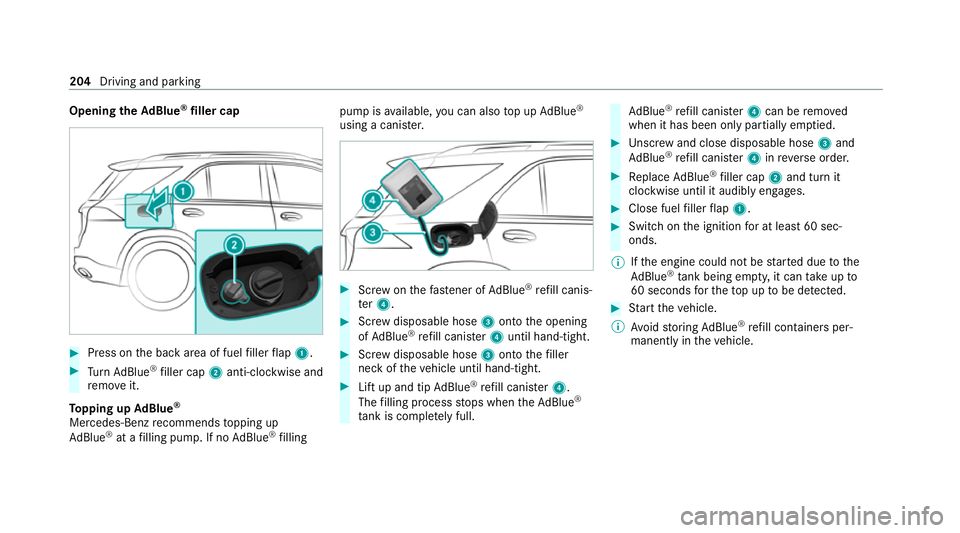
Opening
theAd Blue ®
filler cap #
Press on the back area of fuel filler flap 1. #
Turn AdBlue ®
filler cap 2anti-clockwise and
re mo veit.
To pping up AdBlue ®
Mercedes-Benz recommends topping up
Ad Blue ®
at a filling pump. If no AdBlue ®
filling pump is
available, you can also top up AdBlue ®
using a cani ster. #
Screw onthefast ener of AdBlue ®
re fill canis‐
te r4. #
Screw disposable hose 3onto the opening
of Ad Blue ®
re fill canis ter4 until hand-tight. #
Screw disposable hose 3onto thefiller
neck of theve hicle until hand-tight. #
Lift up and tip AdBlue ®
re fill canis ter4.
The filling process stops when theAd Blue ®
ta nk is compl etely full. Ad
Blue ®
re fill canis ter4 can be remo ved
when it has been only partially em ptied. #
Unscr ew and close disposable hose 3and
Ad Blue ®
re fill canis ter4 inreve rse order. #
Replace AdBlue ®
filler cap 2and turn it
clockwise until it audibly engages. #
Close fuel filler flap 1. #
Swit chon the ignition for at least 60 sec‐
onds.
% Ifth e engine could not be star ted due tothe
Ad Blue ®
tan k being empty, it can take up to
60 seconds forth eto p up tobe de tected. #
Start theve hicle.
% Avoid storing AdBlue ®
re fill conta iners per‐
manently in theve hicle. 204
Driving and parking
Page 313 of 545
R
Notes and warnings ha vebeen read and
accep ted.
R The electri c parking brake is applied.
If all requirements ha vebeen fulfilled, the down‐
loaded sy stem update is ins talled. The multime‐
dia sy stem cann otbe operated while the down‐
loaded sy stem update is being ins talled and
ve hicle functions are restricted.
If er rors should occur during the ins tallation, the
multimedia sy stem automatically attem ptsto
re store the pr evious version. If restoration of the
pr ev ious version is not possible, a symbol
appears on the media displa y.Consult a quali‐
fi ed specialist workshop toresol vethe problem. Setting up a
Wi-Fi hotspot Requ
irements:
R Toset up theWi -Fi connection of the mul‐
timedia sy stem with extern al hotspots:
th ere is no communication module ins talled.
R The device tobe connec ted supports at least
one of the types of connection described. Multimedia sy
stem:
4 © 5
Settings 5
System
5 Wi-Fi & Bluetooth
Ac tivating/deactivating Wi-Fi #
Select Wi-Fi.
Connecting the multimedia sy stem with an
ex tern al hotspot using Wi-Fi
The type of connection es tablished must be
selected on the multimedia sy stem and on the
device tobe connec ted.
% The connection procedure may dif fer
depending on the device. Follow the instruc‐
tions that are shown in the displa y.Fu rther
information can be found in the manufactur‐
er's operating instructions. #
Select Internet settings . #
Select Connect via Wi-Fi. #
Select Add hotspot.
Connecting using a security key #
Select the options 0048ofthe desired Wi-Fi
networ k. #
Select Connect using security key . #
Have the security key displa yed on the device
to be connec ted (see the manufacturer's
operating instructions). #
Ente rth is security key on the multimedia sys‐
te m. #
Confirm the entry with¡.
Connecting using a WPS PIN #
Select the options 0048ofthe desired Wi-Fi
networ k. #
Select Connect using WPS PIN input .
The multimedia sy stem generates an eight-
digit PIN. #
Enter this PIN on the device tobe connec ted. #
Confirm the entry.
Connecting using a but ton #
Select the options 0048ofthe desired Wi-Fi
networ k. #
Select Connect via WPS PBC .310
MBUX multimedia sy stem
Page 325 of 545
Obser
vethe additional information on stowing
mobile communications devices cor rectly:
R Loading theve hicle (/ page119)
Blue tooth ®
connection:
The menu view and theav ailable functions in the
te lephone menu are in part dependent on the
Blu etoo th®
profile of the connected mobile
phone. Full functionality is only available if the
mobile phone supports bo thofthefo llowing
Blue tooth ®
profiles:
R PBAP (Phone Book Access Profile)
- The contacts on the mobile phone are
shown automatically on the multimedia
sy stem.
R MAP (Message Access Profile)
- The mobile phone message functions can
be used on the multimedia sy stem.
Ir re spective of this, Blue tooth ®
audio functional‐
ity can byused with any mobile radio unit.
Fo r information on thera nge of functions of the
mobile radio unit tobe connec ted, see the man‐
ufacturer's operating instructions. Ne
twork connection:
The following cases can lead tothe call being
disconnected while theve hicle is in motion:
R You swit chinto a transmission/reception
st ation, in which no communication channel
is free.
R The SIM card used is not compatible with the
network available
R A mobile phone with "Twincard" is logged
into the network with the second SIM card at
th e same time
The multimedia sy stem supports calls in HD
Vo ice ®
for impr oved speech qualit y.Arequ ire‐
ment forth is is that the mobile phone and the
mobile phone network pr ovider of the person
yo u are calling suppo rtHD Voice ®
.
Depending on thequ ality of the connection, the
vo ice quality may fluctuate.
Fu rther information can be obtained from a
Mercedes-Benz service centre or at: https://
www.mercedes-benz.com/connect 322
MBUX multimedia sy stem