navigation MERCEDES-BENZ GLK-Class 2012 X204 Comand Manual
[x] Cancel search | Manufacturer: MERCEDES-BENZ, Model Year: 2012, Model line: GLK-Class, Model: MERCEDES-BENZ GLK-Class 2012 X204Pages: 182, PDF Size: 4.89 MB
Page 88 of 182

the
COMAND controllera nd pre ssW to
confi rm.
X Sel ect VehiclePos itionMap and
press
W toconfi rmor,ifthe cros shairis sho wn,
pre ssthe k back button.
Thi shi de sthe cros shair.
Ce nte ringon the destinatio n Thi
sfu nctio nrequires thataroute toa
destin ationhasbeen calculated.
X To show themenu: pressWthe COMAND
con troller.
X Select Positio n in
the navigation system
menu barbysliding VÆandturningcVd
the COMAND controller andpress Wto
con firm.
X Select Destina tionPositio nMap and
press Wtocon firm.
The cross hairiscen tered onthe
destin ation.
Centering onaninterm ediatestop
pos ition Thi
sfu nctio nrequires thataroute toa
destin ationhasbeen calculated.
X To show themenu: pressWthe COMAND
con troller.
X Select Positio n in
the navigation system
menu barbysliding VÆandturningcVd
the COMAND controller andpress Wto
con firm.
X Select Center MapOnStopove r and
press Wtocon firm.
The cross hairiscen tered onthe
int ermediate stopposition . Map
displa y
Sett ingthe map orienta tion Map
orient ation
: Current maporient ation
The following displaymodesarepossible:
R 0 Nort horient ation(themap view is
displayed sothat northis alway sup).
R ¤ Orient ationindirect ionoftravel (the
map isdisplayed sothat thedirect ionof
travel isalway sup; the orange pointofthe
icon point snort h).
R ¤ Bird's- eyeview (themap isdisplayed so
that thedirect ionoftravel isalway sup; the
map projec tionreproduces thecurvat ure
of the earth andtheorange pointofthe icon
point snort h). Ex
ample display: Bird's-eyeview
: Current crosshairposition
; Current maporient ation
X To show themenu: pressWthe COMAND
con troller .
X Select Navi in
the main function barby
sliding ZVandturningcVd theCOMAND
con troller andpress Wtocon firm. 86
Map
opera tionandsettingsNavigation
Page 90 of 182

X
Sel ect ArrivalTim e/Dis tance ,
Cur rentStr eet ,
Geo -coordinates or
Non e and
pressW toconfi rm.
X To exitthe men u:slide XVY theCOMAND
control ler.
Arri valtime /distan cetothe destinatio n Arri
valtime /distanc edispl ayswitche don
: Icon fordestina tion
; Dista ncetothe destina tion
= Icon foresti mate dtime ofarr ival
? Estima tedtime ofarr ival
Yo ucan onlysee this displ ayduring route
gu idance .While scrolling themap
(Y page 59),youwillsee additional data,e.g.
road names, depending onthe crosshair
position, ifthe digital mapsupports thisdata.
i During routecalculation, orifthe vehicle
is traveling onanon- digitized road,the
linear distance tothe destination isshown.
In this case, thedispla ywill begrayed out.Road
display Road
display active
: Road names ornumbers, e.g.for
highway s
Geo-coo rdinatedisplay Geo-coordinate
displayactive
: Current heightaboveaverage sealevel,
rounded
; Current vehicleposition: latitude
coordinates
= Current vehicleposition: longitude
coordinates
? Number ofGPS satellites currentlybeing
used
There mustbesufficient GPSreception forall
displa ystobe shown. Ifthis isnot thecase,
the displa ywill begrayed out.Height
displa y: may varyfrom theactual value,
because thenavigation systemusestheGPS
signals forthe calculation.
While scrolling themap (Ypage 59),youwill
see thegeo-coordinates ofthe crosshair
position. Heightdisplay: and number of
satellites used?are not displa yed. 88
Map
operat ionand settingsNavigat ion
Page 92 of 182

X
To switcho nnavigat ionmode: pressthe
g func tion button .
X To show themenu: pressWthe COMAND
con troller.
X Select Navi in
the main function barby
sliding ZVandturningcVd theCOMAND
con troller andpress Wtocon firm.
X Select Block Area and
press Wto
con firm.
If you have notyetsetany area tobe
avoided, youwillsee themap withthe
cross hair(option 1).
If you have previously setone ormore areas
to be avoided, youwillsee alist (option 2).
Opt ion 1:the map X
To scroll themap :slide theCOMAND
con troller XVY,ZVÆoraVb.
X To set the map scale: assoon asyou turn
cVd theCOMAND controller, thescale bar
appears. Turningclockwisezooms outfrom
the map, turningcount er-clockwise zooms
in.
X Turn cVd untilthedesired scaleisset.
X To app lyablock: pressWthe COMAND
con troller.
Ar ed square appears onthe map. X
To adj ust the size ofthe squa re:turn
cVd theCOMAND controller.
The square isenlarged orreduced. X
To confirm thesettings: pressW.
The listappears. Thepreviously selected
area tobe avoided hasbeen added and
activ ated.
X Follow theinst ruct ions listed under "Option
2: the list".
Opt ion 2:the listappears X
Select Avoid NewArea by
turn ingcVd
the COMAND controller andpress Wto
con firm.
The map withthecross hairappears.
X Proceed asdescribed under"Option 1:the
map" ifyou wish toset anew area tobe
avoided.
Switching anavoided areaon/off X
Select anent ryinthe listbyturn ingcVd
the COMAND controller andpress Wto
con firm.
The avoided areaisswitch edon O oroff
ª, depending onthe previous status.
Displaying andchanging anavoided
area X
Select anent ryinthe listbyturn ingcVd
the COMAND controller.
X Select Options by
sliding VYthe
COMAND controller andpress Wto
con firm. 90
Addit
ional settingsNavigation
Page 93 of 182

X
Sel ect Dis play / Cha
nge and
pressW to
confi rm.
The areato be avo ided isind icated inthe
map .
X To cha ngethe locati onofthe area: slide
the COMAND controllerXVY ,ZVÆ or
aVb .
The areais move don the map .
X To adjust thesize ofthe area: turn
cVd theCOMAND controller.
The areais enl arg edorred uce d.
X To confi rm the change:pre ssW the
CO MAND controller.
The list ap pe ars and thechange isenter ed.
De letin gas etarea X
Sele ctan ent ryinthelist byturnin gcVd
th eCOMA NDcontroller .
X Sele ctOpt ion s by
slidin gVY the
COMA NDcontroller andpres sW to
con firm.
X Sele ctDel ete and
pres sW tocon firm.
Aq uery appear sask ing whet hertheen try
sho uld bedelet ed.
X Se lec tYes or
No .
If you selectYes ,
th een try is delet ed.
If you sele ctNo ,
th epro cess will beabor ted. Off
-road routemem oryfunct ion
Swit chingth efu nct ion on/of f While
this fun ction isswit ched on,an off-road
rout eis rec ord edand store d.
i Off-road :the section ofroute isstill within
the area covered bythe digital mapbut
does notcont ainany suitable data,e.g.
because aroad hasnotbeen digitized.
X To switch onnavigation mode:pressthe
g funct ionbutton.
X To show themenu: pressWthe COMAND
cont roller. X
Select Navi in
the main functionbar by
sliding ZVandturning cVdtheCOMAND
cont roller andpress Wtoconfirm .
X Select SaveOff-road Route and
press
W toconfirm . X
Select SaveOff-road Route again
and
press Wtoconfirm .
Depending onthe previous state,switch
the option onO oroff ª.
X To exit themenu: slideXVY theCOMAND
cont roller.
Displaying memoryusage When
thememory is90% full,youseea
message tothis effect .You will also seea
message whenthememory iscompletely full.
X To confirm themessage: pressWthe
COMAND controller.
i Inorder tobe able tocont inue using the
"Record route"function,youshould delete
the route memory afterwards.
X To switch onnavigation mode:pressthe
g funct ionbutton .
X To show themenu: pressWthe COMAND
cont roller.
X Select Navi in
the main functionbar by
sliding ZVandturnin gcVd theCOMAND
cont roller andpress Wtoconf irm.
X Select SaveOff-road Route and
press
W toconf irm. Additional
settings
91Navigation Z
Page 95 of 182
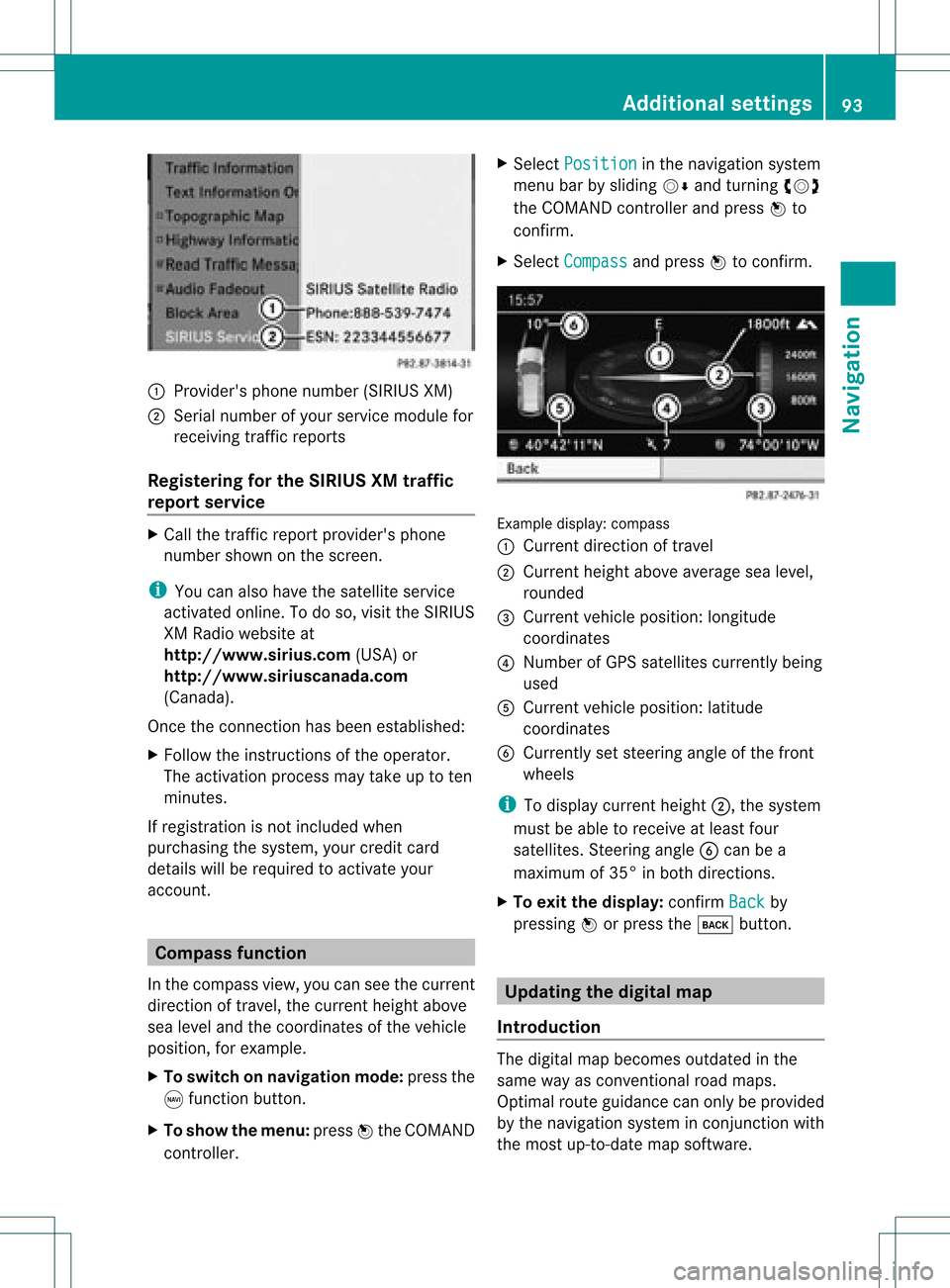
1
Provider's phonenumber (SIRIUSXM)
2 Serial number ofyour service module for
receivin gtraff icreport s
Registering forthe SIRIUS XMtraffic
repor tserv ice X
Call thetraff icrepo rtprov ider' sphon e
num bershown onthesc reen .
i You canalso have thesat ellit eser vice
act ivat edonline .Todo so, visit theSIRIUS
XM Radio website at
htt <0010002C00210021001700170017002000130009001200090015001300200003
000F000DB (USA)or
htt <0010002C00210021001700170017002000130009001200090015001300030001
000E000100040001B .com
(Canada) .
Once theconn ection hasbeen established:
X Follow theinstr uctions ofthe operator.
The activation processmaytake uptoten
minutes.
If registrat ionisnot included when
purchasing thesystem, yourcredit card
details willberequired toactivate your
account . Compass
function
In the compass view,youcan seethecurrent
direction oftravel, thecurrent heightabove
sea level andthecoordinat esofthe vehicle
position, forexample.
X To switch onnavigation mode:pressthe
g funct ionbutton .
X To show themenu: pressWthe COMAND
cont roller. X
Select Position in
the navigation system
menu barbysliding VÆandturnin gcVd
the COMAND controller andpress Wto
conf irm.
X Select Compass and
press Wtoconf irm. Example
display:compass
: Current direction oftravel
; Current heightaboveaverage sealevel,
rounded
= Current vehicleposition: longitude
coordinat es
? Number ofGPS satellites currentlybeing
used
A Current vehicleposition: latitude
coordinat es
B Currently setsteerin gangle ofthe front
wheels
i Todisplay current height;,thesystem
must beable toreceive atleast four
satellites. Steeringangle Bcan bea
maximum of35° inboth direction s.
X To exit thedisplay: confirmBack by
pressing Worpress thek button . Upda
tingthedigital map
Introdu ction The
digital mapbecomes outdatedinthe
same wayasconv ention alroad maps.
Optimal routeguidance canonly beprovided
by the navigation systeminconj unct ionwith
the most up-to- datemapsoftware. Additional
settings
93Navigation Z
Page 96 of 182
Information
aboutnew version sof the digital
map canbeobtained fromanauthoriz ed
Mercedes- BenzCenter .You canhave the
digital mapupdated atthe centerwith aDVD ,
or you can update themap yourself.
i The update process cantake along time
(over anhour), depending onthe size ofthe
digital map.Duringthis time, youwillonly
be able toswitch onradio mode andto
accept incomingcalls. Theupdate willbe
complet edmore quickly ifthe vehicle is
stat ionary.
If you carry outtheupdate withtheengin e
switch edoff and thestart erbatter yhas
insuffic ientpower, COMAND may
automatic allyswitch offduring theprocess
in order toprotec tthe batter y.Ifthis
occur s,rest artthe update withtheengin e
runn ing. G
WARN
ING
Never leavetheengin erunn inginan enclos ed
space. Theexhaust gasescontain carbon
monox ide.Inhaling exhaustgasesconstitutes
a health hazard andcould leadtoloss of
con sciousnes sor even death.
Upda tingprocess X
Inser tthe DVD intothe DVD changer
(Y page 126).
The update begins. COMAND checks
whether thedigital maponthe DVD is
compat iblewith thenavigation systemand
system software.
If this isthe case andtheDVD 'smap data
has notalready beeninstalled, COMAND
start supdating thedigital map.
If the map data hasalready beeninstalled,
the display showsversion dataanda
message tothis effec t.
X To confirm themessage: pressWthe
COMAND controller.
X Take theDVD outofthe slot.
While theupdate isrunn ing,youwillsee a
message tothis effec tand apro gressbar.The nav
igati on system isnot opera tional unti lthe
up date iscomp lete.
i Youcanno teje ctthe DVD during the
up date. Ifyo usw itch offCOMAND during
the update, the update isinte rrupte d.It
then continuesfrom where itwa s
inte rrupte dwh en the system isres tarte d.
CO MAND maypro mpt youto cha nge theDVD
du ring theupdate.
X Pre ssthe 8 load /eje ctbutton.
X Ta ke the DVD outof the slot.
X Inse rtthe requested DVD.
Once theupdate hasbe en succes sfully
comp leted ,yo uwi llsee ames sage tothis
eff ect.
X To confi rm the mes sage:pre ssW the
CO MAND controller.
X Ta ke the DVD outof the slot.
The update iscomp lete.
If the updateisnot succes sfully comp leted ,
yo uwi llsee ames sage tha tthe map update
is not possible.
X To confirm themessage: pressWthe
COMAND controller.
X Take theDVD outofthe slot. 94
Additional
settingsNavigation
Page 97 of 182

Problems
withthenavigation system Problem Possible
causes/co nsequences andM Solutions
COMAND
isunable to
cont inue route
guida nceafter the
journey hasbeen
interr upted. Route
guidanceiscanceled ifyou interr uptthejourney formore
than twohours.
"Interr upting thejourney" referstostopping thevehicle and
switching offCOMAND.
"Continuing routeguidance"refers toswitching COMAND backon
and driving on.
X Continue routeguidance(Ypage 70).
COMAND determines thevehicle's position.Depending onthe
driving situation, thismay take some time.
Route guidancemay berestric tedduring thedeterminat ionof
the vehicle's position.
When positioning iscomplete, routeguidanceisresumed with
navigation announcementsandroute guidancedisplay s. Problem Possible
causes/co nsequences andM Solutions
COMAND
isunable to
determine thevehicle's
position. COMAND
hastoredetermine theposition ofthe vehicle ifthe
vehicle hasbeen transport ed(e.g. byferry, bymotorail orafter
towing).
X Start thevehicle andpullaway .
COMAND determines thevehicle's position.Depending onthe
driving situation, thismay take some time.
Route guidancemay berestric tedduring thedeterminat ionof
the vehicle's position.
When positioning iscomplete, routeguidanceisresumed with
navigation announcementsandroute guidancedisplay s. Problems
withthenavigation system
95Navigation Z
Page 98 of 182
Problem Possible
causes/co nsequences andM Solutions
The
Navigation Unavailable message
appea rs. COMAND
hasanintegrated harddrive onwhich thedigital mapis
stored.
To protect thehard drive fromdamage, COMAND switchesitoff
at very high temperatures. Thenavigation systemwillthen be
temporarily unavailable.
X Let the vehicle andCOMAND cooldown.
X To hide themessage: switchCOMAND offand then onagain. If
an area ofthe hard diskhasamalfunction ,COMAND canno
longer access themap data inthis area, forexample when
calculating aroute.
X To hide themessage: switchCOMAND offand then onagain.
The navigation systemwillbeoperational againuntilithas to
access thefaulty areaofthe hard drive oncemore. Themessage
will then reappear.
X Consult anauthorized Mercedes-B enzCenter. Problem Possible
causes/co nsequences andM Solutions
You
seeamessage
informin gyou that the
DVD containing the
digital mapis
incompatible withthe
system software. The
DVD containing thedigital mapcannot beused forthe update.
X To confirm themessage: pressWthe COMAND controller.
X Ejec tthe DVD .
X Have thesystem software updatedatan authorized Mercedes-
Benz Center. Problem Possible
causes/co nsequences andM Solutions
The
map software
update hasfailed. The
DVD isdirty orscratc hed.
X Clea nthe DVD .
X Restart theupdate. There
isoverheating duetoexcessive temperatures inthe vehicle
interior.
X Wait untilthevehicle interior hascooled down.
X Restart theupdate. COMAND's
integralharddrive isfaulty.
X Consult anauthorized Mercedes-B enzCenter. 96
Problems
withthenavigation systemNavigation
Page 114 of 182
Using
theaddress book Intr
oduct ion G
WARN
ING
Please devoteyour attent ion first and
forem osttothe trafficsituatio nyou arein.
Befor eyour journ ey,please familiarize
yourself withtheaddress bookfunctions.
Only usetheCOMAND whenroadandtraffic
con dition spermit youtodo so. Othe rwise you
could beinvolv edinan acciden tinw hich you
or others couldbeinjured.
The address bookorganizes andstores
entr ieswhich areentered fromdifferent
sources (mobilephone,memory card,
COMAND telephone book,navigation
system).
You canusethese entriestomake telephone
calls andfornavigation.
i Each address bookentryconsist sof a
surname, firstname andcompany, andcan
cont ainuptofive telephone numbers,one
home address andone business address.
The address bookcanstore 1,000 entries.
i Address bookentriesremain storedwhen
the mobile phoneisdisconnec ted.
Therefore, youshould deleteyourpersonal
data using thereset functionbefore selling
your vehicle, forexample (Ypage 45). Calling
upthe address book
X Press theKfunct ionbutton.
You seethetelephone basicmenu orthe
address bookifit was open previously .
X With thetelephone basicmenu shown,
select Phone by
sliding VZtheCOMAND
cont roller andpress Wtoconfirm .
X Select Address Book from
themenu and
press Wtoconfirm . Address
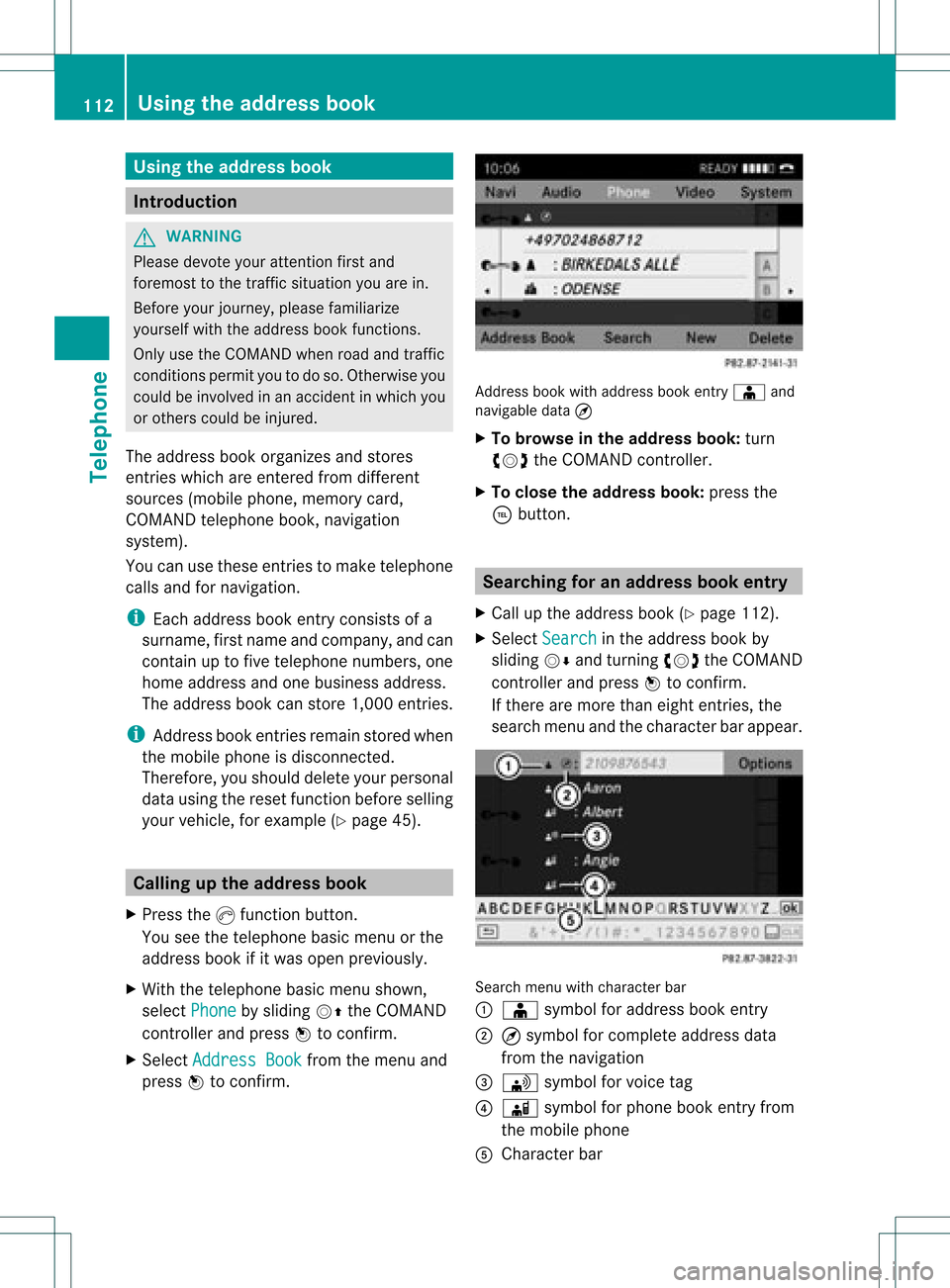
bookwithaddress bookentry Æ and
navigable data¤
X To browse inthe addr essbook: turn
cVd theCOMAND controller.
X To close theaddr essbook: pressthe
÷ button. Searching
foranadd ress book entry
X Call upthe address book(Ypage 112).
X Select Search in
the address bookby
sliding VÆandturning cVdtheCOMAND
cont roller andpress Wtoconfirm .
If there aremore thaneight entries, the
search menuandthecharacter barappea r. Search
menuwithcharacter bar
: Æ symbol foraddress bookentry
; ¤symbol forcomplete addressdata
from thenavigation
= \ symbol forvoice tag
? Ã symbol forphone bookentryfrom
the mobile phone
A Character bar 112
Using
theaddress bookTelephone
Page 115 of 182
X
Proceed asdescribed under"Searching for
a phone bookentry" (Ypage 106). Creating
anew entry inthe address
book
You canenteraddress datadirectly intothe
address book.Ifyou store telephone
numbers inthe COMAND phonebook,these
are also saved inthe address book.Ifyou
store anavigation destination,COMAND
creates anaddress bookentrywhich includes
the complet enavigable addressdata.
X Call upthe address book(Ypage 112).
X Select New in
the address bookbysliding
VÆ andturningcVd theCOMAND
cont roller andpress Wtoconf irm.
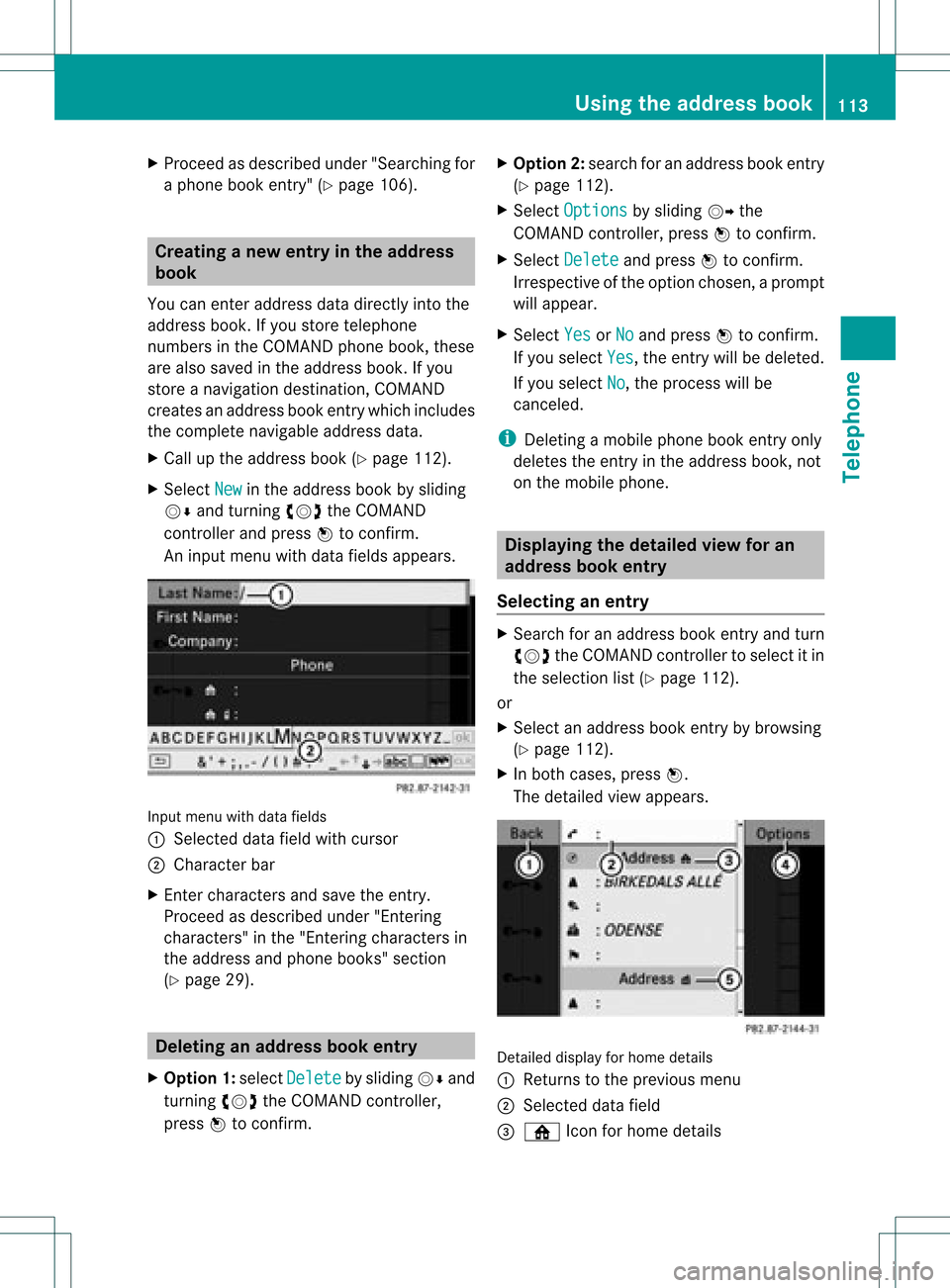
An input menu withdata fields appears. Input
menu withdata fields
: Select eddata fieldwithcursor
; Character bar
X En ter charact ersand save theentry.
Proceed asdescribed under"Entering
charact ers"inthe "Ent ering charact ersin
the address andphone books" section
(Y page 29). Deleting
anadd ress book entry
X Option 1:select Delete by
sliding VÆand
turn ingcVd theCOMAND controller,
press Wtoconf irm. X
Option 2:search foranaddress bookentry
(Y page 112).
X Select Options by
sliding VYthe
COMAND controller, pressWtoconf irm.
X Select Delete and
press Wtoconf irm.
Irrespec tiveofthe option chosen ,a prompt
will appear.
X Select Yes or
No and
press Wtoconf irm.
If you select Yes ,
the entrywill bedeleted.
If you select No ,
the process willbe
canc eled.
i Deletin gamobile phonebookentryonly
deletes theentryinthe address book,not
on the mobile phone. Displaying
thedeta iledview foran
add ress book entry
Selecting anentry X
Search foranaddress bookentryand turn
cVd theCOMAND controller toselect itin
the selection list(Ypage 112).
or
X Select anaddress bookentryby browsing
(Y page 112).
X In both cases, pressW.
The detailed viewappears. Det
ailed display forhome details
: Returns tothe previous menu
; Select eddata field
= ¸ Iconforhome details Using
theaddress book
113Telephone Z