ABS MERCEDES-BENZ GLK-Class 2012 X204 Owner's Manual
[x] Cancel search | Manufacturer: MERCEDES-BENZ, Model Year: 2012, Model line: GLK-Class, Model: MERCEDES-BENZ GLK-Class 2012 X204Pages: 316, PDF Size: 13.21 MB
Page 6 of 316
1, 2, 3 ...
115 V socket ...................................... 224
12 V socket see Sockets
4ETS
see ETS/4ETS (Electronic
Traction System)
4MATIC (permanent four-wheel
drive) .................................................. 153
A
ABS (Anti-lock Braking System) Display message ............................ 180
Function/notes ................................ 62
Important safety notes ....................62
Warning lamp ................................. 202
Activating/deactivating cooling
with air dehumidification ................. 121
Active light function ......................... 106
Active Light System Display message ............................ 191
Active service system PLUS
see ASSYST PLUS service interval
display
Additives (engine oil) ........................ 306
Air bags Display message ............................ 187
Front air bag (driver, front
passenger) ....................................... 41
Important safety notes ....................40
Knee bag .......................................... 42
PASSENGER AIRBAG OFF
indicator lamp .................................. 44
Pelvis air bag ................................... 43
Safety guidelines ............................. 39
Side impact air bag ..........................42
Window curtain air bag ....................44
Air-conditioning system
see Climate control
Air pressure
see Tire pressure
Air vents
Glove box ....................................... 126
Important safety notes ..................125
Rear ............................................... 126
Setting ........................................... 125
Setting the center air vents ...........126
Setting the side air vents ...............126
Alarm system
see ATA (Anti-Theft Alarm system)
Anti-lock Braking System
see ABS (Anti-lock Braking System)
Anti-Theft Alarm system
see ATA (Anti-Theft Alarm system)
Anti-theft system
ATA (Anti-Theft Alarm system) .........65
Approach/departure angle .............. 150
Ashtray ............................................... 222
ASSYST PLUS see ASSYST PLUS service interval
display
ATA (Anti-Theft Alarm system)
Activating/deactivating ...................65
Function ........................................... 65
Switching off the alarm ....................65
Audio menu (on-board computer) .... 172
Audio system see separate operating instructions
Authorized Mercedes-Benz Center
see Qualified specialist workshop
AUTO lights
Display message ............................ 191
see Lights
Automatic headlamp mode .............. 104
Automatic transmission Automatic drive program ...............138
Changing gear ............................... 137
Display message ............................ 197
Driving tips .................................... 137
Emergency running mode ..............140
Kickdown ....................................... 137
Problem (malfunction) ...................140
Program selector button ................137
Pulling away ................................... 133
Releasing the parking lock
manually ........................................ 140
Selector lever ................................ 135
Shift ranges ................................... 138
Starting the engine ........................132
Trailer towing ................................. 137
Transmission position display ........136
Transmission positions ..................1364Index
Page 7 of 316
Automatic transmission
emergency mode ............................... 140
B
Back support see Lumbar support
Backup lamp
Changing bulbs .............................. 113
Display message ............................ 190
Bag hook ............................................ 216
Ball coupling Installing ........................................ 161
Removing ....................................... 164
Storing ........................................... 164
BAS (Brake Assist System) ................. 62
Basic settings see Settings
Battery (SmartKey)
Checking .......................................... 72
Important safety notes ....................72
Replacing ......................................... 72
Battery (vehicle)
Charging ........................................ 260
Display message ............................ 193
Important safety notes ..................259
Jump starting ................................. 262
Belt
see Seat belts
Brake Assist System
see BAS (Brake Assist System)
Brake fluid
Display message ............................ 183
Notes ............................................. 306
Brake fluid level ................................ 242
Brake lamps Changing bulbs .............................. 113
Display message ............................ 189
Brakes
ABS .................................................. 62
BAS .................................................. 62
Brake fluid (notes) .........................306
Display message ............................ 180
Driving tips .................................... 146
Important safety notes ..................146
Maintenance .................................. 147
Parking brake ........................ 144, 148
Warning lamp ................................. 201
Breakdown
see Flat tire
see Towing away/tow-starting
Bulbs
see Changing bulbs
C
California Important notice for retail
customers and lessees ....................21
Calling up a malfunction
see Display messages
Capacities
see Technical data
Car
see Vehicle
Care
Carpets .......................................... 249
Car wash ........................................ 244
Display ........................................... 248
Exterior lights ................................ 247
Gear or selector lever ....................248
Matte finish ................................... 245
Notes ............................................. 243
Paint .............................................. 245
Plastic trim .................................... 248
Power washer ................................ 244
Rear view camera .......................... 247
Roof lining ...................................... 249
Seat belt ........................................ 249
Seat cover ..................................... 249
Sensors ......................................... 247
Steering wheel ............................... 248
Tail pipes ....................................... 247
Trim pieces .................................... 248
Washing by hand ........................... 244
Wheels ........................................... 245
Windows ........................................ 246
Wiper blades .................................. 246
Wooden trim .................................. 248
Cargo compartment cover ............... 216
Cargo compartment enlargement ... 214
Cargo compartment floor Opening/closing ............................ 219
Stowage well (under) .....................219
Index5
Page 10 of 316
Driving abroadMercedes-Benz Service .................243
Symmetrical low beam ..................102
Driving in mountainous terrain
Approach/departure angle ............150
Driving off-road
see Off-road driving
Driving safety systems
ABS (Anti-lock Braking System) .......62
BAS (Brake Assist System) ..............62
Electronic brake force distribution ...64
ESP ®
(Electronic Stability
Program) .......................................... 62
ETS/4ETS (Electronic Traction
System) ........................................... 63
Important safety information ...........61
Overview .......................................... 61
Driving systems
Cruise control ................................ 151
Display message ............................ 194
PARKTRONIC ................................. 154
Rear view camera .......................... 157
Driving tips
Automatic transmission .................137
Brakes ........................................... 146
Break-in period .............................. 130
Downhill gradient ........................... 146
Drinking and driving .......................145
Driving abroad ............................... 102
Driving in winter ............................. 148
Driving on flooded roads ................148
Driving on sand .............................. 150
Driving on wet roads ......................148
Driving over obstacles ...................150
Exhaust check ............................... 146
Fuel ................................................ 145
General .......................................... 145
Hydroplaning ................................. 148
Icy road surfaces ........................... 149
Limited braking efficiency on
salted roads ................................... 147
Off-road driving .............................. 149
Pedals ............................................ 145
Snow chains .................................. 272
Symmetrical low beam ..................102
Tire ruts ......................................... 150
Towing a trailer .............................. 159Traveling uphill ............................... 150
Wet road surface ........................... 147
DVD audio (on-board computer) ...... 173
DVD-Video (on-board computer) ...... 173
E
EASY-ENTRY feature Activating/deactivating .................177
Function/notes ................................ 96
EASY-EXIT feature
Crash-responsive ............................. 97
Function/notes ................................ 96
Switching on/off ........................... 177
EBD (electronic brake force
distribution) Display message ............................ 182
Function/notes ................................ 64
Electrical fuses
see Fuses
Electronic brake force distribution
see EBD (Electronic Brake force
Distribution)
Electronic Stability Program
see ESP ®
(Electronic Stability Program)
Electronic Traction System
see ETS/4ETS (Electronic
Traction System)
Emergency release
Driver's door .................................... 77
Vehicle ............................................. 77
Emergency spare wheel
Storage location ............................ 252
Stowing .......................................... 253
Emergency Tensioning Devices
Function ........................................... 54
Safety guidelines ............................. 39
Emergency unlocking
Tailgate ............................................ 82
Emissions purification
Service and warranty information ....20
Engine
Check Engine warning lamp ........... 206
Display message ............................ 191
Emergency starting ........................266
Engine number ............................... 302
Irregular running ............................ 134
Starting problems ..........................134
8Index
Page 21 of 316
W
Warning and indicator lamps ABS ................................................ 202
Brakes ........................................... 201
Check Engine ................................. 206
Coolant .......................................... 207
Cruise control ................................ 151
ESP ®
.............................................. 203
ESP ®
OFF ....................................... 204
Fuel tank ........................................ 206
Overview .......................................... 30
PASSENGER AIRBAG OFF
indicator lamp .................................. 44
Reserve fuel ................................... 206
Seat belt ........................................ 200
SRS ................................................ 205
Tire pressure monitor ....................209
Warranty ............................................ 301
Washer fluid Display message ............................ 198
see Windshield washer system
Wheel bolt tightening torque ........... 258
Wheel chock ...................................... 254
Wheels Changing a wheel .......................... 254
Checking ........................................ 271
Cleaning ......................................... 245
Important safety notes ..................270
Interchanging/changing ................294
Mounting a wheel .......................... 256
Removing a wheel ..........................256
Storing ........................................... 295
Tightening torque ........................... 258
Wheel size/tire size .......................295
Window curtain air bag
Display message ............................ 185
Operation ......................................... 44
Windows
Cleaning ......................................... 246
see Side windows
Windshield
Defrosting ...................................... 123
Windshield washer system .............. 241
Notes ............................................. 307
Windshield wipers
Problem (malfunction) ...................116
Rear window wiper ........................114Replacing the wiper blades ............114
Switching on/off ........................... 113
Winter driving
Important safety notes ..................272
Slippery road surfaces ...................149
Snow chains .................................. 272
Winter tires
M+S tires ....................................... 272
Wiper blades
Cleaning ......................................... 246
Important safety notes ..................114
Replacing (rear window) ................116
Replacing (windshield) ...................115
Wooden trim (cleaning
instructions) ...................................... 248Index19
Page 32 of 316
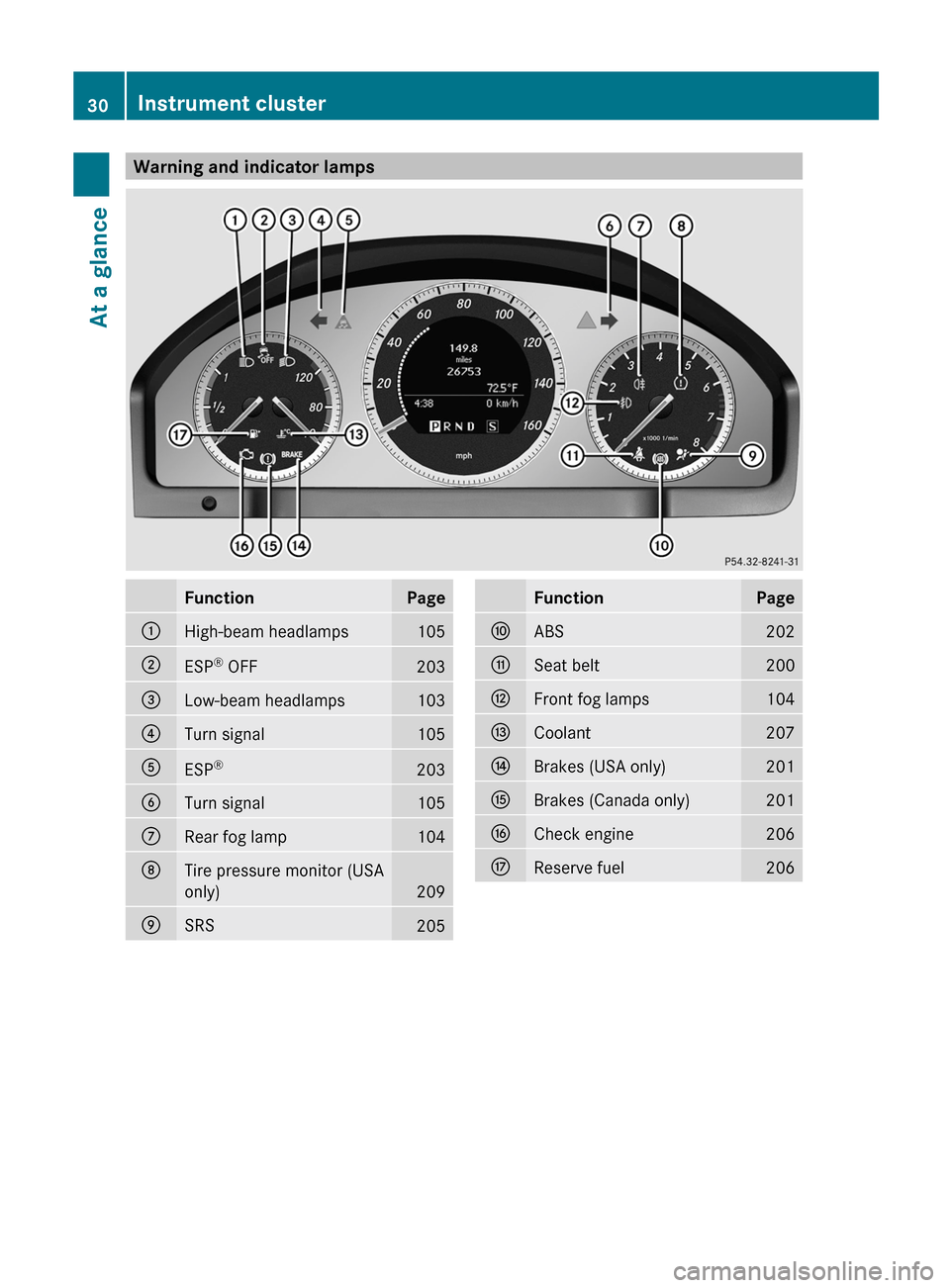
Warning and indicator lampsFunctionPage:High-beam headlamps105;ESP®
OFF203=Low-beam headlamps103?Turn signal105AESP ®203BTurn signal105CRear fog lamp104DTire pressure monitor (USA
only)
209
ESRS205FunctionPageFABS202GSeat belt200HFront fog lamps104ICoolant207JBrakes (USA only)201KBrakes (Canada only)201LCheck engine206MReserve fuel20630Instrument clusterAt a glance
Page 63 of 316
iUSA only:
This device complies with Part 15 of the
FCC Rules. Operation is subject to the
following two conditions:
1. This device may not cause harmful
interference, and
2. this device must accept any interference
received, including interference that may
cause undesired operation.
Any unauthorized modification to this
device could void the user's authority to
operate the equipment.
The product label with FCC ID and IC
certification number can be found in the
battery case of the SmartKey.
i Canada only:
This device complies with RSS-Gen of
Industry Canada. Operation is subject to
the following two conditions:
1. This device may not cause interference,
and
2. this device must accept any interference
received, including interference that may
cause undesired operation.
Any unauthorized modification to this
device could void the user's authority to
operate the equipment.
The product label with FCC ID and IC
certification number can be found in the
battery case of the SmartKey.
Driving safety systems
Driving safety systems overview
In this section, you will find information about
the following driving safety systems:
R ABS ( Anti-lock Braking System)
R BAS ( Brake Assist System)
R ESP ®
(E lectronic Stability Program)
R EBD ( Electronic Brake force Distribution)
Important safety notesGWARNING
The following factors increase the risk of
accidents:
R Excessive speed, especially in turns
R Wet and slippery road surfaces
R Following another vehicle too closely
The driving safety systems described in this
section cannot reduce these risks or prevent
the natural laws of physics from acting on the
vehicle. They cannot increase braking or
steering efficiency beyond that afforded by
the condition of the vehicle brakes and tires
or the traction afforded.
Only a safe, attentive, and skillful driver can
prevent accidents.
The capabilities of a vehicle equipped with the
driving safety systems described in this
section must never be exploited in a reckless
or dangerous manner which could jeopardize
the user's safety or the safety of others.
Always adjust your driving style to the
prevailing road and weather conditions and
keep a safe distance to other road users and
objects on the street.
If a driving system malfunctions, other driving
safety systems may also switch off. Observe
indicator and warning lamps that may come
on as well as messages in the multifunction
display that may appear.
i Please note that the driving safety
systems described only work as effectively
as possible when there is adequate contact
between the tires and the road surface. Pay
particular attention to the information
regarding tires, recommended minimum
tire tread depths etc. in the "Wheels and
tires" section ( Y page 270).
In wintry driving conditions, always use
winter tires (M+S tires) and if necessary,
snow chains. Only in this way will the
driving safety systems described in this
section work as effectively as possible.
Driving safety systems61SafetyZ
Page 64 of 316
ABS (Anti-lock Braking System)
Important safety notes
i Observe the "Important safety notes"
section ( Y page 61).
ABS regulates brake pressure in such a way
that the wheels do not lock when you brake.
This allows you to continue steering the
vehicle when braking.
ABS works from a speed of about
5 mph(8 km/h) upwards, regardless of road-
surface conditions. ABS works on slippery
surfaces, even when you only brake gently.
GWARNING
If the ABS malfunctions, other driving systems
such as the BAS or the ESP ®
are also switched
off. Observe indicator and warning lamps that
may come on as well as messages in the
multifunction display that may appear.
If the ABS malfunctions, the wheels may lock
during hard braking, reducing the steering
capability and extending the braking distance.
The ! warning lamp in the instrument
cluster lights up when the ignition is switched
on. It goes out when the engine is running.
Braking
If ABS intervenes when braking, you will feel
a pulsing in the brake pedal.
XIf ABS intervenes: continue to depress the
brake pedal with force until the braking
situation is over.XTo make a full brake application:
depress the brake pedal with full force.
The pulsating brake pedal can be an
indication of hazardous road conditions, and
functions as a reminder to take extra care
while driving.
GWARNING
Do not pump the brake pedal. Use firm, steady
brake pedal pressure instead. Pumping the
brake pedal defeats the purpose of the ABS
and significantly reduces braking
effectiveness.
BAS (Brake Assist System)
i Observe the "Important safety notes"
section ( Y page 61).
BAS operates in emergency braking
situations. If you depress the brake pedal
quickly, BAS automatically boosts the braking
force, thus shortening the stopping distance.
XKeep the brake pedal firmly depressed until
the emergency braking situation is over.
ABS prevents the wheels from locking.
The brakes will function as usual once you
release the brake pedal. BAS is deactivated.
GWARNING
If the BAS malfunctions, the brake system still
functions, but without the additional brake
boost available that the BAS would normally
provide in an emergency braking maneuver.
Therefore, the braking distance may increase.
ESP ®
(Electronic Stability Program)
Important safety notes
i See the "Important safety notes" section
( Y page 61).
If ESP ®
detects that the vehicle is deviating
from the direction desired by the driver, one
or more wheels are braked to stabilize the
vehicle. If necessary, the engine output is also
modified to keep the vehicle on the desired
course within physical limits. ESP ®
assists
the driver when pulling away on wet or
slippery roads. ESP ®
can also stabilize the
vehicle during braking.
If ESP ®
intervenes, the ä ESP®
warning
lamp flashes in the instrument cluster.
62Driving safety systemsSafety
Page 75 of 316
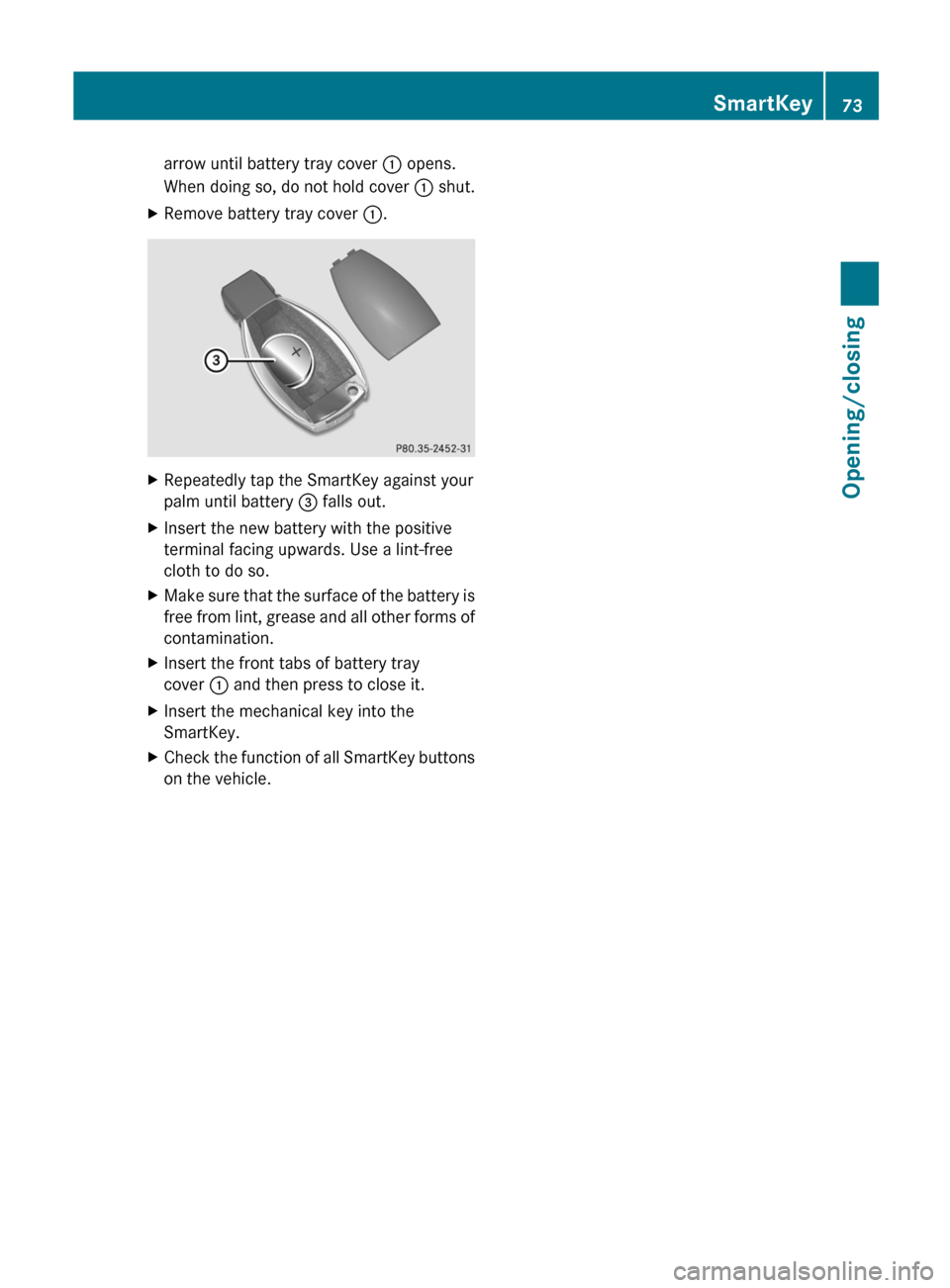
arrow until battery tray cover : opens.
When doing so, do not hold cover : shut.XRemove battery tray cover :.XRepeatedly tap the SmartKey against your
palm until battery = falls out.XInsert the new battery with the positive
terminal facing upwards. Use a lint-free
cloth to do so.XMake sure that the surface of the battery is
free from lint, grease and all other forms of
contamination.XInsert the front tabs of battery tray
cover : and then press to close it.XInsert the mechanical key into the
SmartKey.XCheck the function of all SmartKey buttons
on the vehicle.SmartKey73Opening/closingZ
Page 132 of 316
Useful information
i This Operator's Manual describes all
models and all standard and optional
equipment of your vehicle available at the
time of publication of the Operator's
Manual. Country-specific differences are
possible. Please note that your vehicle may
not be equipped with all features
described. This also applies to safety-
related systems and functions.
i Please read the information on qualified
specialist workshops ( Y page 23).
Breaking-in notes
The first 1000 miles (1500 km)
The more you look after the engine when it is
new, the more satisfied you will be with its
performance in the future.
R Drive at varying vehicle speeds and engine
speeds for the first 1000 miles (1500 km)
for this reason.
R Avoid overstraining the vehicle during this
period, e.g. driving at full throttle.
R Change gear in good time, at the latest
when the tachometer needle is 2
/ 3 of the
way to the red area in the tachometer
display.
R Do not manually shift to a lower gear to
brake the vehicle.
R If possible, do not depress the accelerator
pedal past the point of resistance
(kickdown).
R Only select shift ranges 3, 2 or 1 when
driving slowly, e.g. in mountainous terrain.
R If possible, drive in drive program E for the
first 1000 miles (1500 km).
After 1000 miles (1500 km), you can increase
the engine speed gradually and bring the
vehicle up to full speed.
i You should also observe these notes on
running in if the engine or parts of the drive
train on your vehicle have been replaced.
i Always observe the respective speed
restrictions.
Driving
Important safety notes
GWARNING
Make sure absolutely no objects are
obstructing the pedals' range of movement.
Keep the driver's footwell clear of all
obstacles. If there are any floormats or
carpets in the footwell, make sure the pedals
still have sufficient clearance.
During sudden driving or braking maneuvers
the objects could get caught between the
pedals. You could then no longer brake or
accelerate. This could lead to accidents and
injury.
GWARNING
On slippery road surfaces, never downshift in
order to obtain braking action. This could
result in drive wheel slip and reduced vehicle
control. Your vehicle's ABS will not prevent
this type of loss of control.
GWARNING
It is dangerous to shift the automatic
transmission out of parking position P or
neutral position N if the engine speed is
higher than idle speed. If your foot is not firmly
on the brake pedal, the vehicle could
accelerate quickly forward or in reverse. You
could lose control of the vehicle and hit
someone or something. Only shift into gear
when the engine is idling normally and when
your right foot is firmly on the brake pedal.
! Warm up the engine quickly. Do not use
the engine's full performance until it has
reached operating temperature.
Only shift the automatic transmission to
the desired drive position when the vehicle
is stationary.
130DrivingDriving and parking
Page 147 of 316
workshop, e.g. an authorized Mercedes-
Benz Center.
If you leave the vehicle parked for longer than
six weeks, the vehicle may suffer damage as
a result of lack of use.XVisit a qualified specialist workshop and
seek advice.
Driving tips
General driving tips
Important safety notes
GWARNING
Always remember that you must concentrate
primarily on driving the vehicle. The driver's
concentration must always be directed
primarily at road traffic. For your own safety
and that of others, we recommend that you
stop the vehicle at a safe place and in
accordance with the traffic conditions before
making or accepting a phone call.
Comply with all legal requirements if you use
the telephone while driving. Use the hands-
free system and only use the telephone when
road, weather and traffic conditions permit. In
some jurisdictions, it is forbidden for drivers
to use mobile phones while driving.
Only operate the audio system or COMAND
(Cockpit Management and Data System) in
compliance with all legal requirements and
when the road, weather and traffic conditions
permit. You may otherwise not be able to
observe the traffic conditions, endangering
yourself and others.
Remember that your vehicle covers a distance
of 44 feet (approximately 14 m) a second
when it is traveling at only 30 mph
(approximately 50 km/h).
Drive sensibly – save fuel
Observe the following tips to save fuel:
XThe tires should always be inflated to the
recommended tire pressure.XRemove unnecessary loads.XRemove roof racks when they are not
needed.XWarm up the engine at low engine speeds.XAvoid frequent acceleration or braking.XHave all maintenance work carried out as
indicated by the service intervals in the
Service Booklet or by the service interval
display.
Fuel consumption also increases when
driving in cold weather, in stop-and-go traffic
and in mountainous terrain.
Drinking and driving
GWARNING
Drinking and driving and/or taking drugs and
driving are very dangerous combinations.
Even a small amount of alcohol or drugs can
affect your reflexes, perceptions and
judgment.
The possibility of a serious or even fatal
accident are greatly increased when you drink
or take drugs and drive.
Do not drink or take drugs and drive or allow
anyone to drive who has been drinking or
taking drugs.
Pedals
GWARNING
Make sure absolutely no objects are
obstructing the pedals' range of movement.
Keep the driver's footwell clear of all
obstacles. If there are any floormats or
carpets in the footwell, make sure that the
pedals still have sufficient clearance.
During sudden driving or braking maneuvers,
the objects could get caught between the
pedals. You could then no longer brake or
Driving tips145Driving and parkingZ