clock MERCEDES-BENZ GLK-Class 2012 X204 Owner's Manual
[x] Cancel search | Manufacturer: MERCEDES-BENZ, Model Year: 2012, Model line: GLK-Class, Model: MERCEDES-BENZ GLK-Class 2012 X204Pages: 316, PDF Size: 13.21 MB
Page 8 of 316
Cargo netAttaching ....................................... 218
Important safety information .........217
Cargo tie down rings ......................... 215
Car wash (care) ................................. 244
CD player/CD changer (on-board
computer) .......................................... 173
Cell phone see Mobile phone
Center console
Lower section .................................. 33
Upper section .................................. 32
Central locking
Automatic locking (on-board
computer) ...................................... 177
Locking/unlocking (SmartKey) ........68
Changing bulbs
Brake lamps ................................... 113
High-beam headlamps ...................111
Important safety notes ..................108
License plate lighting .....................113
Low-beam headlamps ....................110
Overview of bulb types ..................109
Parking lamps ................................ 111
Rear fog lamp ................................ 113
Reversing lamps ............................ 113
Side marker lamps (front) ..............112
Standing lamps (front) ...................111
Tail lamps ...................................... 113
Turn signals (front) ......................... 112
Turn signals (rear) ..........................113
Child-proof locks
Important safety notes ....................59
Rear doors ....................................... 60
Children
In the vehicle ................................... 55
Restraint systems ............................ 55
Child seat
LATCH-type (ISOFIX) child seat
anchors ............................................ 58
Special seat belt retractor ...............57
Top Tether ....................................... 58
Cigarette lighter ................................ 222
Cleaning Trailer tow hitch ............................. 247Climate control
Automatic climate control (3-
zone) .............................................. 120
Controlling automatically ...............122
Cooling with air dehumidification ..121
Defrosting the windows .................124
Defrosting the windshield ..............123
Dual-zone automatic climate
control ........................................... 119
Important safety notes ..................118
Indicator lamp ................................ 122
Maximum cooling .......................... 123
Overview of systems ......................118
Problems with cooling with air
dehumidification ............................ 122
Problem with the rear window
defroster ........................................ 124
Rear control panel .........................120
Refrigerant ..................................... 306
Setting the air distribution .............122
Setting the airflow .........................123
Setting the air vents ......................125
Setting the temperature ................122
Switching air-recirculation mode
on/off ............................................ 124
Switching on/off ........................... 121
Switching residual heat on/off ......125
Switching the MONO function on/
off .................................................. 123
Switching the rear window
heating on/off ............................... 124
Clock (on-board computer) ............... 176
Coat hooks ......................................... 218
Cockpit Overview .......................................... 28
see Instrument cluster
Collapsible spare wheel
Inflating ......................................... 257
see Emergency spare wheel
COMAND
see separate operating instructions
Combination switch .......................... 105
Compass Calibrating ..................................... 236
Calling up ....................................... 235
Setting ........................................... 235
Consumption statistics (on-board
computer) .......................................... 1706Index
Page 31 of 316
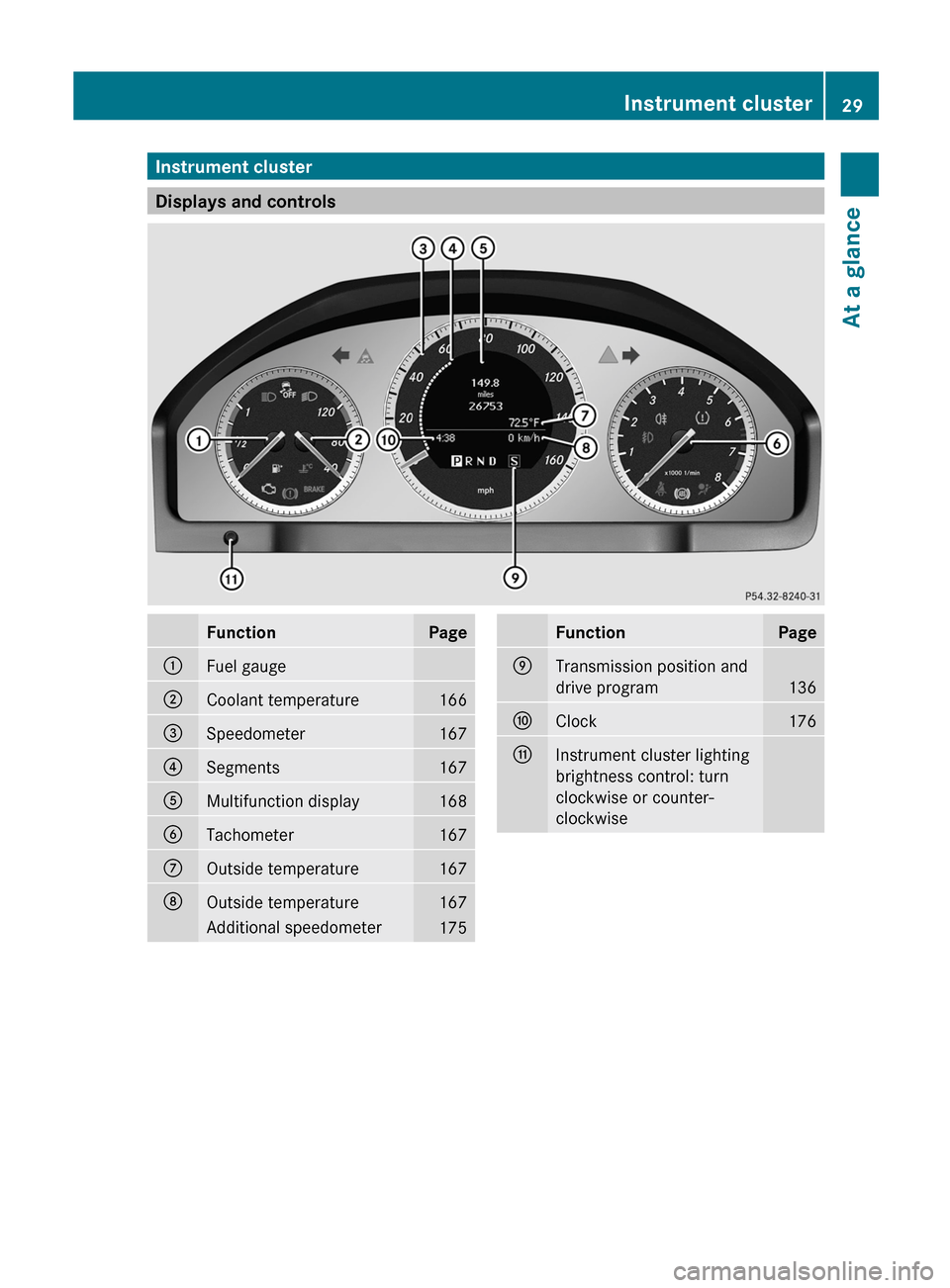
Instrument cluster
Displays and controls
FunctionPage:Fuel gauge;Coolant temperature166=Speedometer167?Segments167AMultifunction display168BTachometer167COutside temperature167DOutside temperature167Additional speedometer175FunctionPageETransmission position and
drive program
136
FClock176GInstrument cluster lighting
brightness control: turn
clockwise or counter-
clockwiseInstrument cluster29At a glance
Page 79 of 316
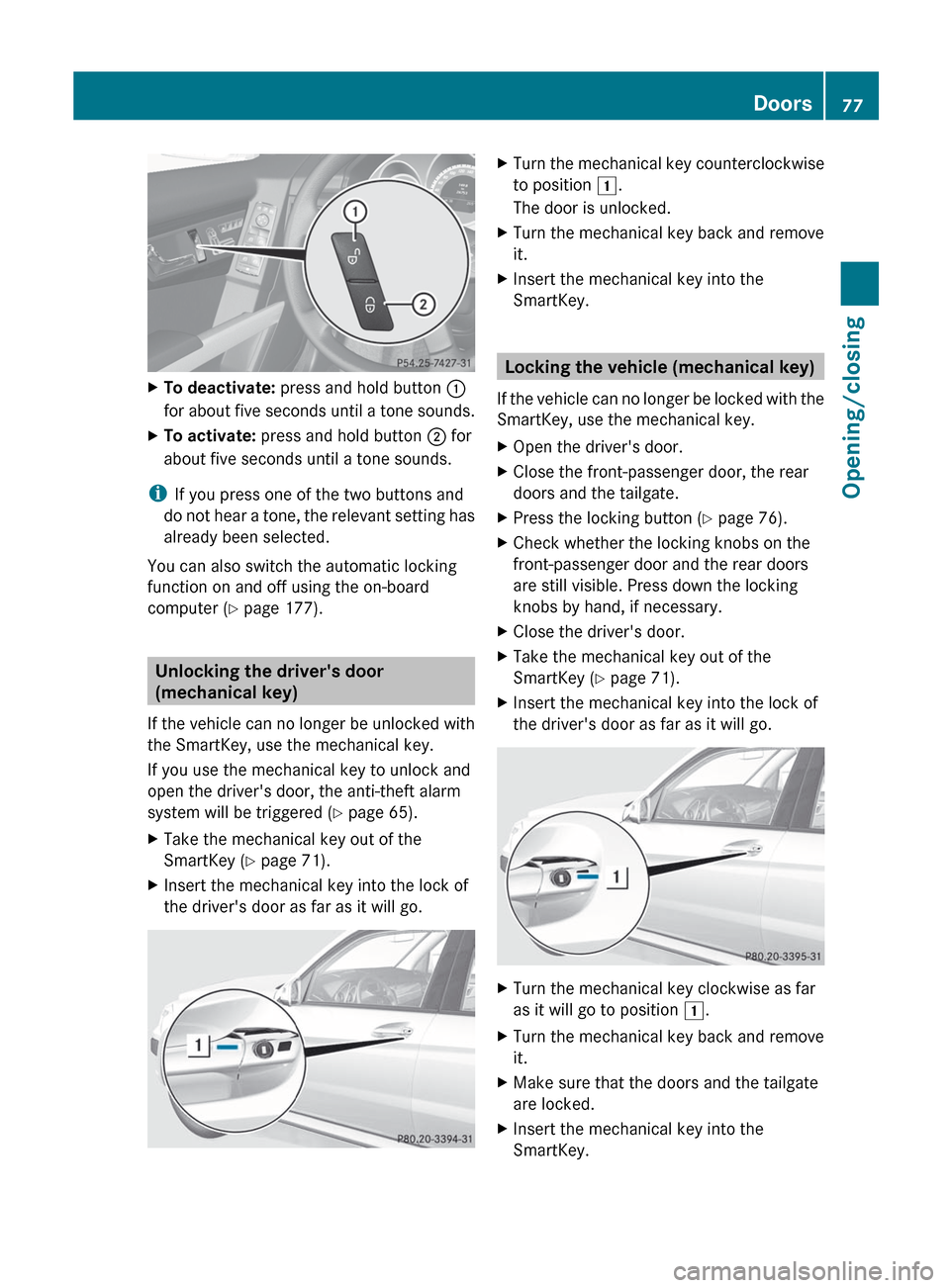
XTo deactivate: press and hold button :
for about five seconds until a tone sounds.XTo activate: press and hold button ; for
about five seconds until a tone sounds.
i If you press one of the two buttons and
do not hear a tone, the relevant setting has
already been selected.
You can also switch the automatic locking
function on and off using the on-board
computer ( Y page 177).
Unlocking the driver's door
(mechanical key)
If the vehicle can no longer be unlocked with
the SmartKey, use the mechanical key.
If you use the mechanical key to unlock and
open the driver's door, the anti-theft alarm
system will be triggered ( Y page 65).
XTake the mechanical key out of the
SmartKey ( Y page 71).XInsert the mechanical key into the lock of
the driver's door as far as it will go.XTurn the mechanical key counterclockwise
to position 1.
The door is unlocked.XTurn the mechanical key back and remove
it.XInsert the mechanical key into the
SmartKey.
Locking the vehicle (mechanical key)
If the vehicle can no longer be locked with the
SmartKey, use the mechanical key.
XOpen the driver's door.XClose the front-passenger door, the rear
doors and the tailgate.XPress the locking button ( Y page 76).XCheck whether the locking knobs on the
front-passenger door and the rear doors
are still visible. Press down the locking
knobs by hand, if necessary.XClose the driver's door.XTake the mechanical key out of the
SmartKey ( Y page 71).XInsert the mechanical key into the lock of
the driver's door as far as it will go.XTurn the mechanical key clockwise as far
as it will go to position 1.XTurn the mechanical key back and remove
it.XMake sure that the doors and the tailgate
are locked.XInsert the mechanical key into the
SmartKey.Doors77Opening/closingZ
Page 84 of 316
Tailgate emergency release
If the tailgate can no longer be opened from
outside the vehicle, use the emergency
release on inside of the tailgate.XTake the mechanical key out of the
SmartKey ( Y page 71).
To open the tailgate completely, a minimum
clearance of 6.90 ft (2.10 m) above the
ground is necessary.
! The tailgate swings upwards and to the
rear when opened. Therefore, make sure
that there is sufficient clearance above and
behind the tailgate.
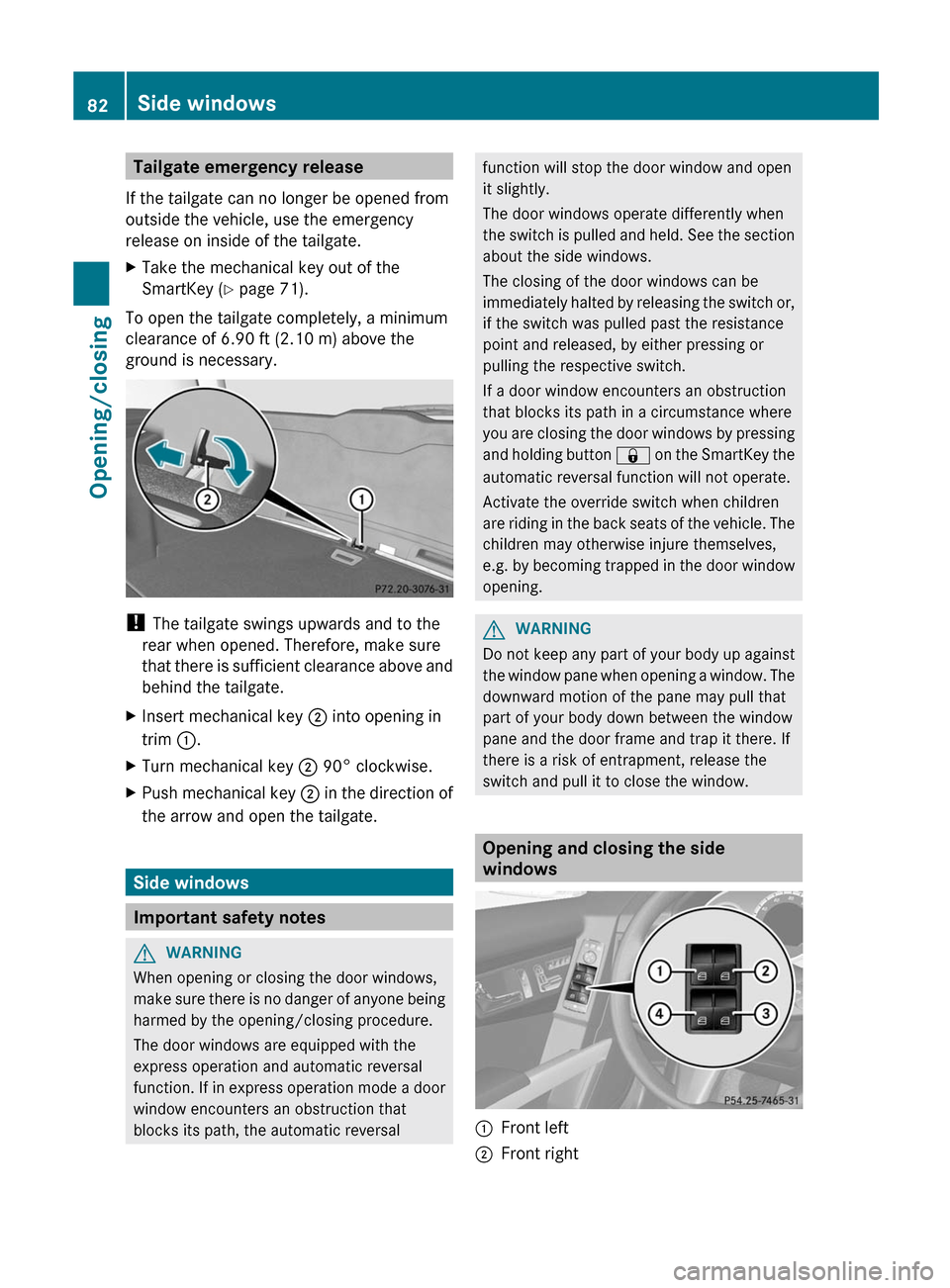
XInsert mechanical key ; into opening in
trim :.XTurn mechanical key ; 90° clockwise.XPush mechanical key ; in the direction of
the arrow and open the tailgate.
Side windows
Important safety notes
GWARNING
When opening or closing the door windows,
make sure there is no danger of anyone being
harmed by the opening/closing procedure.
The door windows are equipped with the
express operation and automatic reversal
function. If in express operation mode a door
window encounters an obstruction that
blocks its path, the automatic reversal
function will stop the door window and open
it slightly.
The door windows operate differently when
the switch is pulled and held. See the section
about the side windows.
The closing of the door windows can be
immediately halted by releasing the switch or,
if the switch was pulled past the resistance
point and released, by either pressing or
pulling the respective switch.
If a door window encounters an obstruction
that blocks its path in a circumstance where
you are closing the door windows by pressing
and holding button & on the SmartKey the
automatic reversal function will not operate.
Activate the override switch when children
are riding in the back seats of the vehicle. The
children may otherwise injure themselves,
e.g. by becoming trapped in the door window
opening.GWARNING
Do not keep any part of your body up against
the window pane when opening a window. The
downward motion of the pane may pull that
part of your body down between the window
pane and the door frame and trap it there. If
there is a risk of entrapment, release the
switch and pull it to close the window.
Opening and closing the side
windows
:Front left;Front right82Side windowsOpening/closing
Page 112 of 316
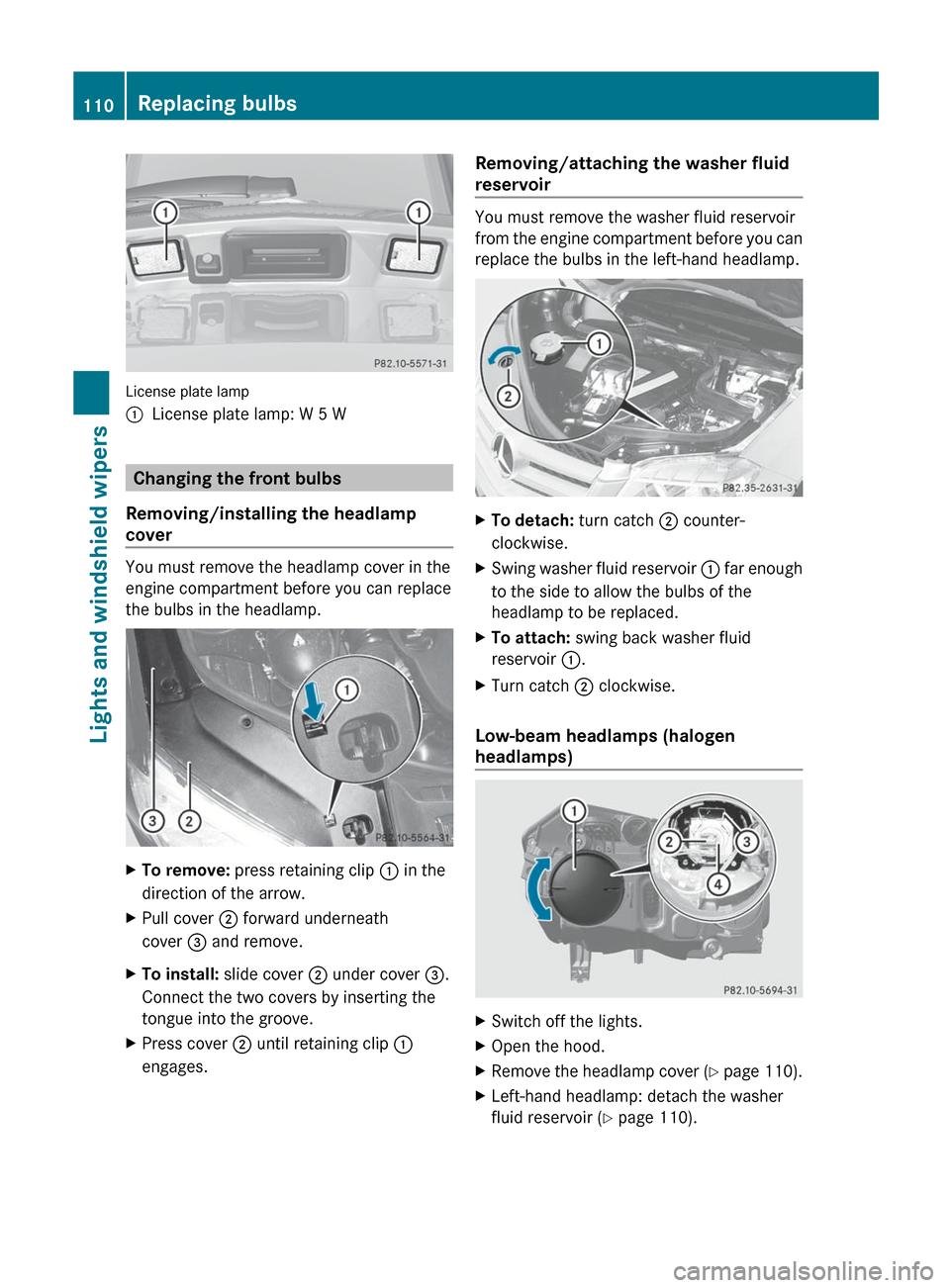
License plate lamp
:License plate lamp: W 5 W
Changing the front bulbs
Removing/installing the headlamp
cover
You must remove the headlamp cover in the
engine compartment before you can replace
the bulbs in the headlamp.
XTo remove: press retaining clip : in the
direction of the arrow.XPull cover ; forward underneath
cover = and remove.XTo install: slide cover ; under cover =.
Connect the two covers by inserting the
tongue into the groove.XPress cover ; until retaining clip :
engages.Removing/attaching the washer fluid
reservoir
You must remove the washer fluid reservoir
from the engine compartment before you can
replace the bulbs in the left-hand headlamp.
XTo detach: turn catch ; counter-
clockwise.XSwing washer fluid reservoir : far enough
to the side to allow the bulbs of the
headlamp to be replaced.XTo attach: swing back washer fluid
reservoir :.XTurn catch ; clockwise.
Low-beam headlamps (halogen
headlamps)
XSwitch off the lights.XOpen the hood.XRemove the headlamp cover (Y page 110).XLeft-hand headlamp: detach the washer
fluid reservoir ( Y page 110).110Replacing bulbsLights and windshield wipers
Page 113 of 316
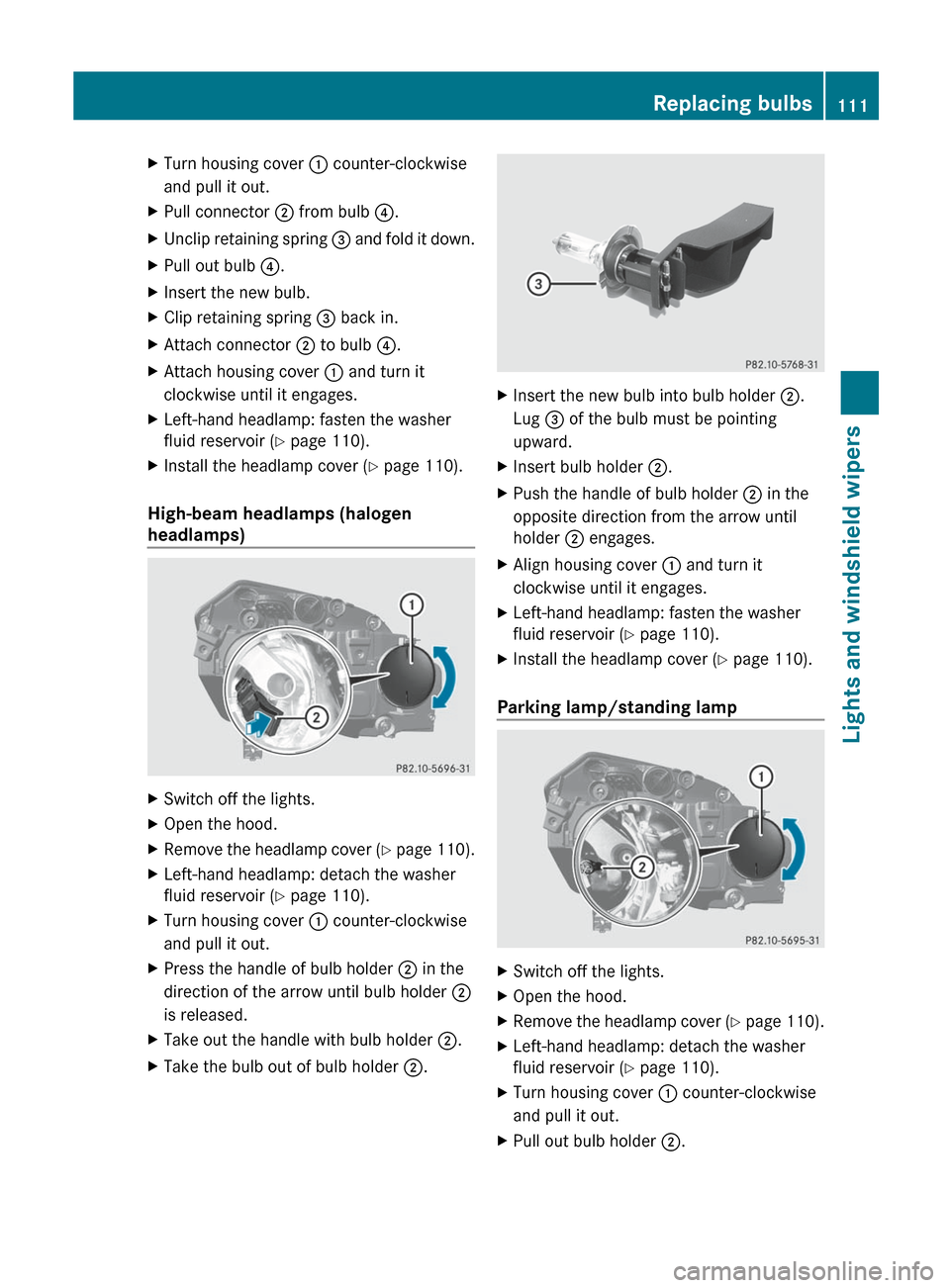
XTurn housing cover : counter-clockwise
and pull it out.XPull connector ; from bulb ?.XUnclip retaining spring = and fold it down.XPull out bulb ?.XInsert the new bulb.XClip retaining spring = back in.XAttach connector ; to bulb ?.XAttach housing cover : and turn it
clockwise until it engages.XLeft-hand headlamp: fasten the washer
fluid reservoir ( Y page 110).XInstall the headlamp cover ( Y page 110).
High-beam headlamps (halogen
headlamps)
XSwitch off the lights.XOpen the hood.XRemove the headlamp cover (Y page 110).XLeft-hand headlamp: detach the washer
fluid reservoir ( Y page 110).XTurn housing cover : counter-clockwise
and pull it out.XPress the handle of bulb holder ; in the
direction of the arrow until bulb holder ;
is released.XTake out the handle with bulb holder ;.XTake the bulb out of bulb holder ;.XInsert the new bulb into bulb holder ;.
Lug = of the bulb must be pointing
upward.XInsert bulb holder ;.XPush the handle of bulb holder ; in the
opposite direction from the arrow until
holder ; engages.XAlign housing cover : and turn it
clockwise until it engages.XLeft-hand headlamp: fasten the washer
fluid reservoir ( Y page 110).XInstall the headlamp cover ( Y page 110).
Parking lamp/standing lamp
XSwitch off the lights.XOpen the hood.XRemove the headlamp cover (Y page 110).XLeft-hand headlamp: detach the washer
fluid reservoir ( Y page 110).XTurn housing cover : counter-clockwise
and pull it out.XPull out bulb holder ;.Replacing bulbs111Lights and windshield wipersZ
Page 114 of 316
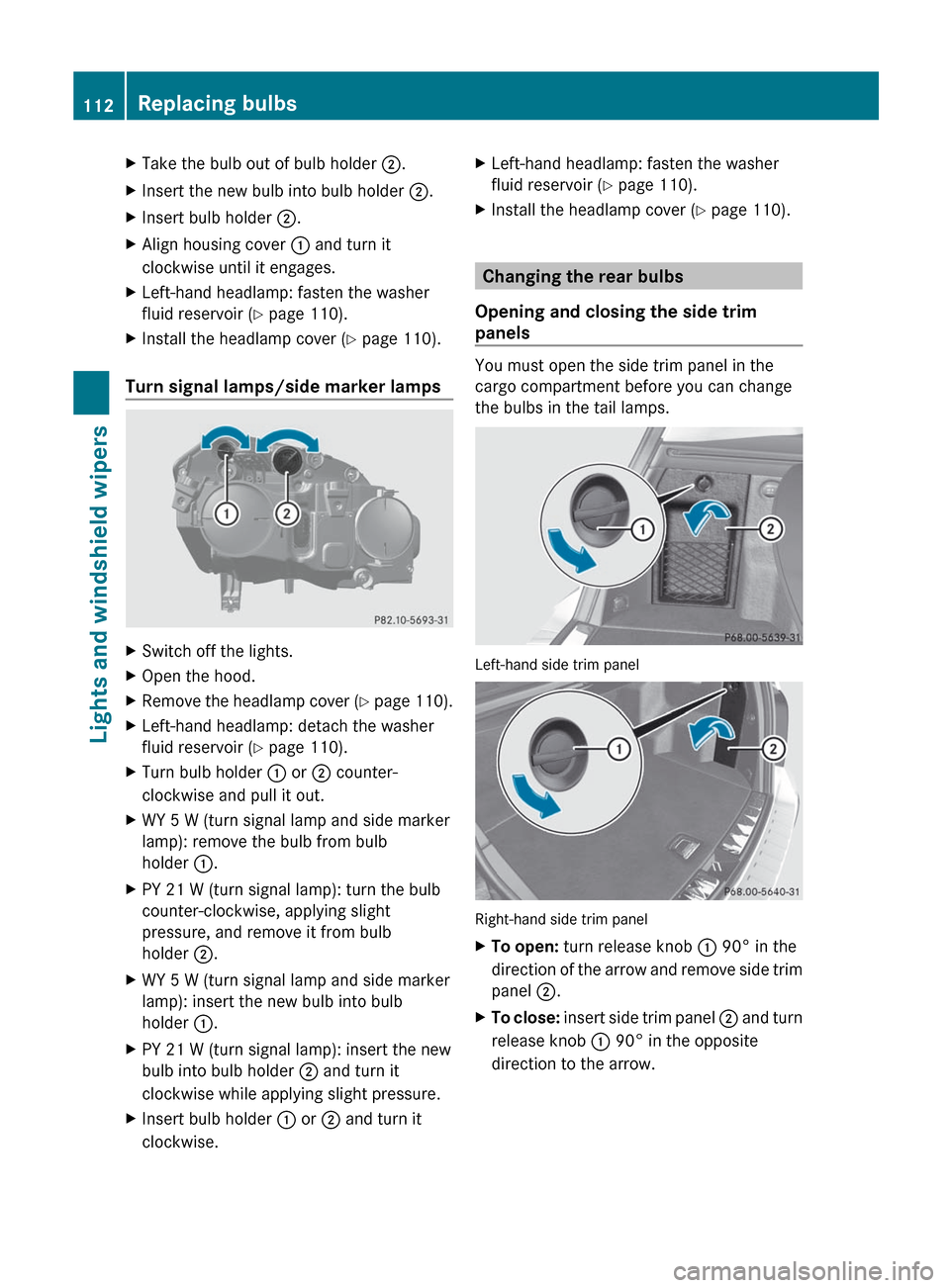
XTake the bulb out of bulb holder ;.XInsert the new bulb into bulb holder ;.XInsert bulb holder ;.XAlign housing cover : and turn it
clockwise until it engages.XLeft-hand headlamp: fasten the washer
fluid reservoir ( Y page 110).XInstall the headlamp cover ( Y page 110).
Turn signal lamps/side marker lamps
XSwitch off the lights.XOpen the hood.XRemove the headlamp cover (Y page 110).XLeft-hand headlamp: detach the washer
fluid reservoir ( Y page 110).XTurn bulb holder : or ; counter-
clockwise and pull it out.XWY 5 W (turn signal lamp and side marker
lamp): remove the bulb from bulb
holder :.XPY 21 W (turn signal lamp): turn the bulb
counter-clockwise, applying slight
pressure, and remove it from bulb
holder ;.XWY 5 W (turn signal lamp and side marker
lamp): insert the new bulb into bulb
holder :.XPY 21 W (turn signal lamp): insert the new
bulb into bulb holder ; and turn it
clockwise while applying slight pressure.XInsert bulb holder : or ; and turn it
clockwise.XLeft-hand headlamp: fasten the washer
fluid reservoir ( Y page 110).XInstall the headlamp cover ( Y page 110).
Changing the rear bulbs
Opening and closing the side trim
panels
You must open the side trim panel in the
cargo compartment before you can change
the bulbs in the tail lamps.
Left-hand side trim panel
Right-hand side trim panel
XTo open: turn release knob : 90° in the
direction of the arrow and remove side trim
panel ;.XTo close: insert side trim panel ; and turn
release knob : 90° in the opposite
direction to the arrow.112Replacing bulbsLights and windshield wipers
Page 115 of 316
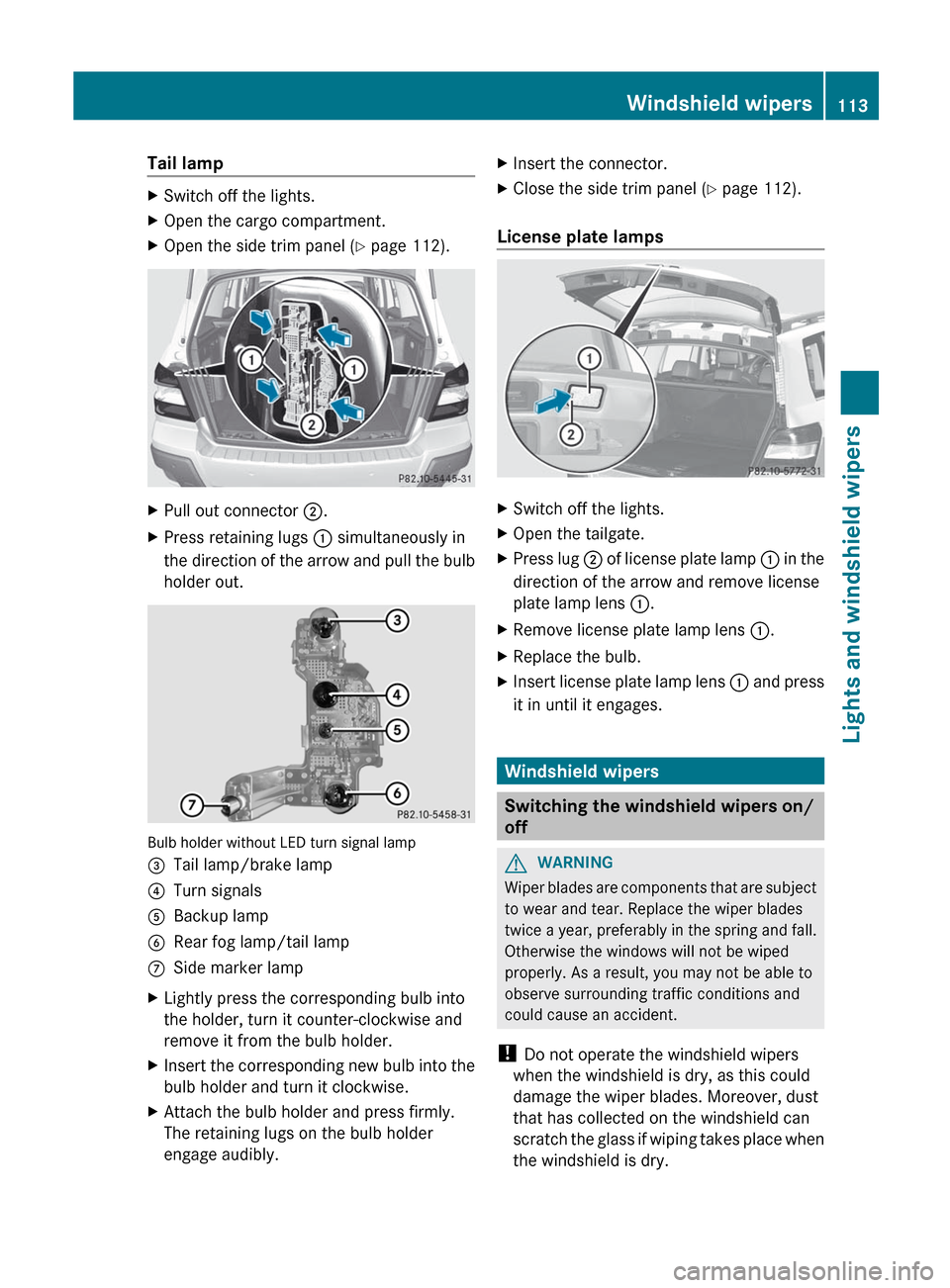
Tail lampXSwitch off the lights.XOpen the cargo compartment.XOpen the side trim panel (Y page 112).XPull out connector ;.XPress retaining lugs : simultaneously in
the direction of the arrow and pull the bulb
holder out.
Bulb holder without LED turn signal lamp
=Tail lamp/brake lamp?Turn signalsABackup lampBRear fog lamp/tail lampCSide marker lampXLightly press the corresponding bulb into
the holder, turn it counter-clockwise and
remove it from the bulb holder.XInsert the corresponding new bulb into the
bulb holder and turn it clockwise.XAttach the bulb holder and press firmly.
The retaining lugs on the bulb holder
engage audibly.XInsert the connector.XClose the side trim panel ( Y page 112).
License plate lamps
XSwitch off the lights.XOpen the tailgate.XPress lug ; of license plate lamp : in the
direction of the arrow and remove license
plate lamp lens :.XRemove license plate lamp lens :.XReplace the bulb.XInsert license plate lamp lens : and press
it in until it engages.
Windshield wipers
Switching the windshield wipers on/
off
GWARNING
Wiper blades are components that are subject
to wear and tear. Replace the wiper blades
twice a year, preferably in the spring and fall.
Otherwise the windows will not be wiped
properly. As a result, you may not be able to
observe surrounding traffic conditions and
could cause an accident.
! Do not operate the windshield wipers
when the windshield is dry, as this could
damage the wiper blades. Moreover, dust
that has collected on the windshield can
scratch the glass if wiping takes place when
the windshield is dry.
Windshield wipers113Lights and windshield wipersZ
Page 124 of 316
Problems with the cooling with air
dehumidification function
When you press the ¿ button, the
indicator lamp in the button flashes three
times or remains off. You can no longer switch
on the cooling with air dehumidification
function.
XConsult a qualified specialist workshop.
Setting climate control to automatic
GWARNING
If you switch off the cooling function, the
vehicle will not be cooled when weather
conditions are warm. The windows can fog up
more quickly. Window fogging may impair
visibility and endanger you and others.
In automatic mode, the set temperature is
maintained automatically at a constant level.
The system automatically regulates the
temperature of the dispensed air, the airflow
and the air distribution.
Automatic mode will achieve optimal
operation if cooling with air dehumidification
is also activated. If desired, cooling with air
dehumidification can be deactivated.
XTurn the SmartKey to position 2 in the
ignition lock.XSet the desired temperature.XTo activate: press the à button.
The indicator lamp in the à button lights
up. Automatic air distribution and airflow
are activated.XTo switch off: press the _ button.
or
XPress the K or I button.
The indicator lamp in the à button goes
out. Automatic air distribution and airflow
are deactivated.Setting the temperature
Different temperatures can be set for the
driver's and front-passenger sides.XTurn the SmartKey to position 2 in the
ignition lock.XTo increase/reduce: turn controls : and
D clockwise or counter-clockwise
( Y page 119). Only change the temperature
setting in small increments. Start at
72 ‡ (22 †).
Setting the air distribution
Air distribution settings
Dual-zone climate control: the air distribution
can be set individually for the driver's and
front-passenger sides.
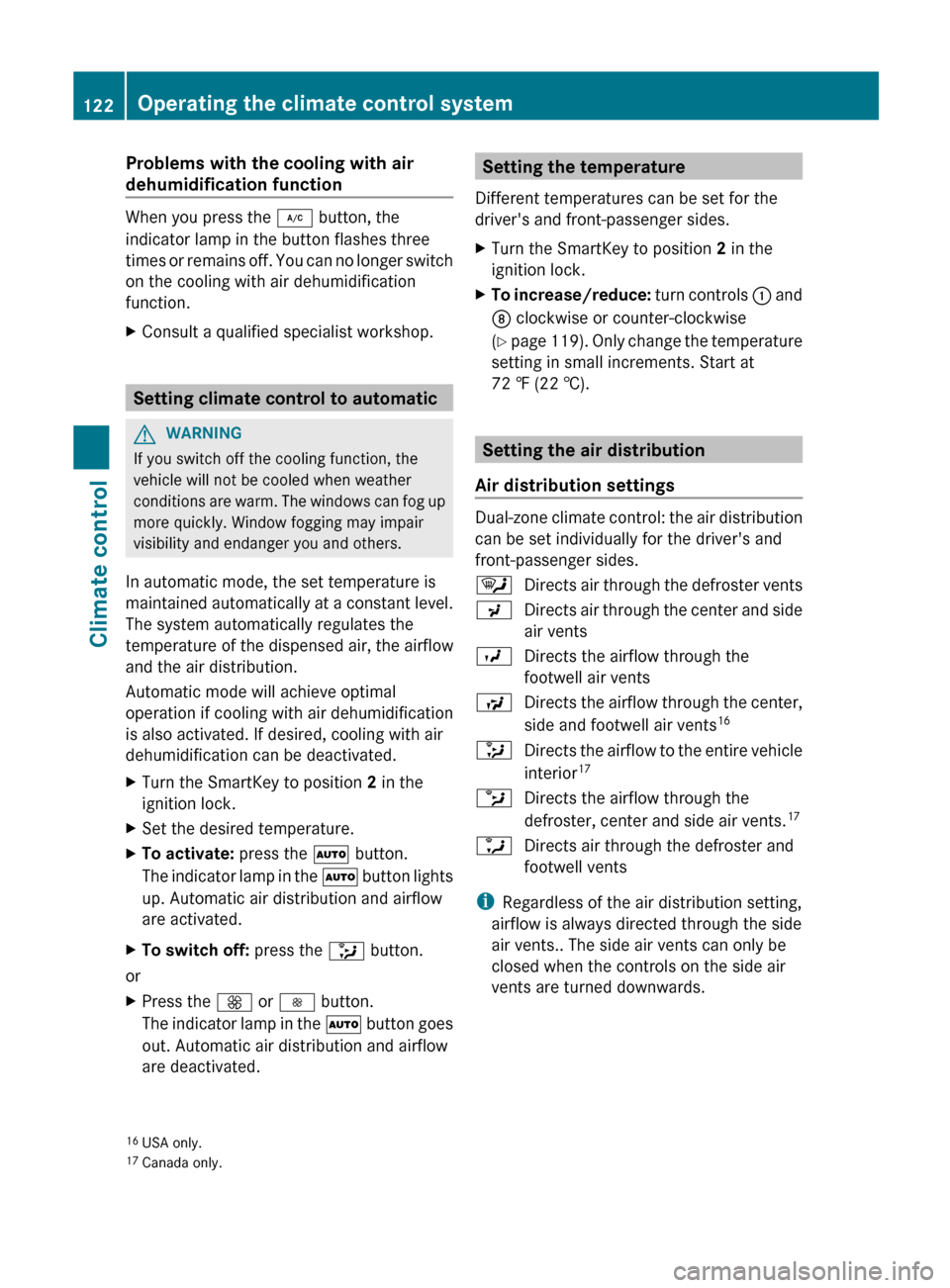
¯Directs air through the defroster ventsPDirects air through the center and side
air ventsODirects the airflow through the
footwell air ventsSDirects the airflow through the center,
side and footwell air vents 16_Directs the airflow to the entire vehicle
interior 17bDirects the airflow through the
defroster, center and side air vents. 17aDirects air through the defroster and
footwell vents
i Regardless of the air distribution setting,
airflow is always directed through the side
air vents.. The side air vents can only be
closed when the controls on the side air
vents are turned downwards.
16 USA only.
17 Canada only.122Operating the climate control systemClimate control
Page 125 of 316
XTurn the SmartKey to position 2 in the
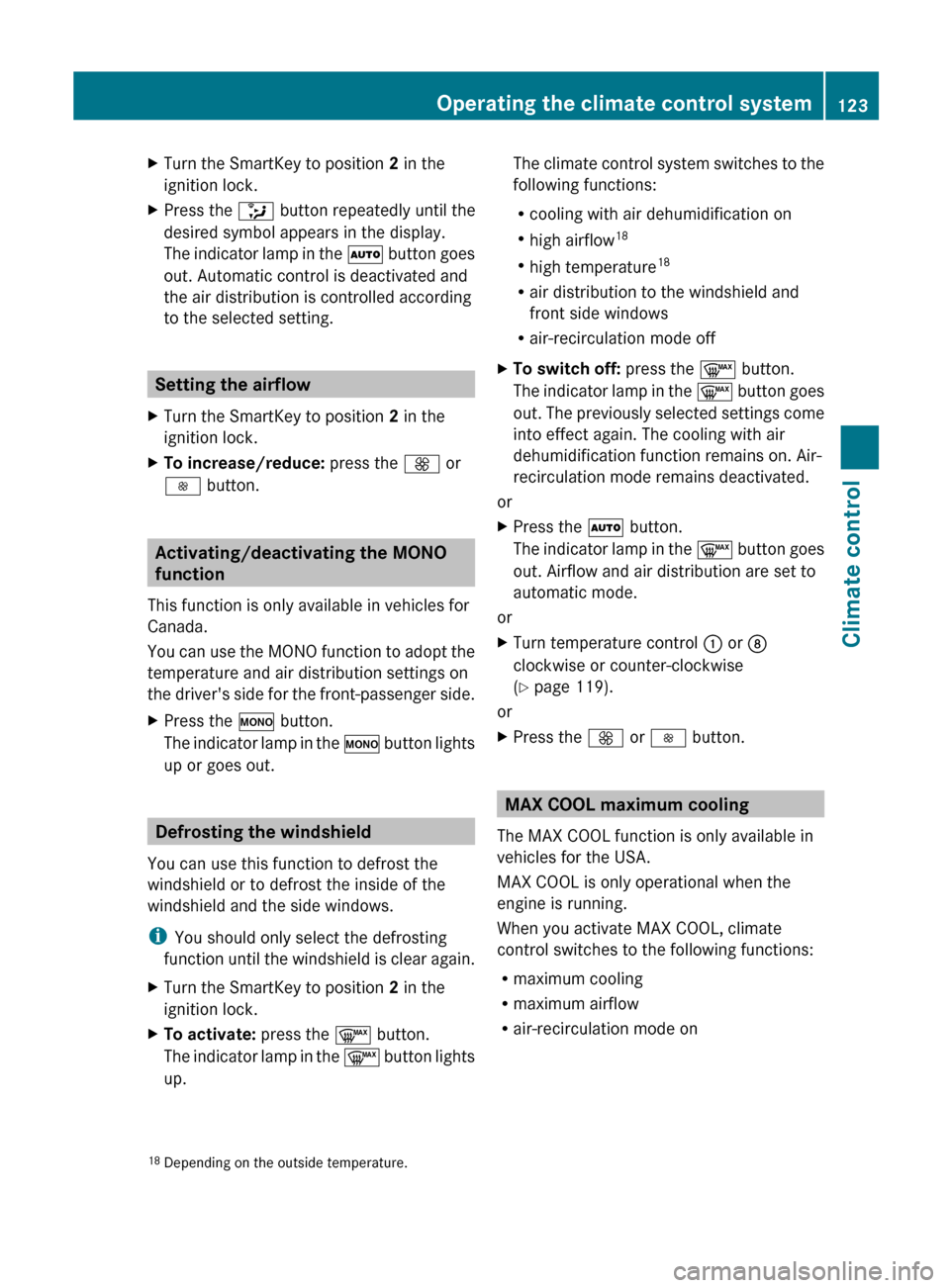
ignition lock.XPress the _ button repeatedly until the
desired symbol appears in the display.
The indicator lamp in the à button goes
out. Automatic control is deactivated and
the air distribution is controlled according
to the selected setting.
Setting the airflow
XTurn the SmartKey to position 2 in the
ignition lock.XTo increase/reduce: press the K or
I button.
Activating/deactivating the MONO
function
This function is only available in vehicles for
Canada.
You can use the MONO function to adopt the
temperature and air distribution settings on
the driver's side for the front-passenger side.
XPress the º button.
The indicator lamp in the º button lights
up or goes out.
Defrosting the windshield
You can use this function to defrost the
windshield or to defrost the inside of the
windshield and the side windows.
i You should only select the defrosting
function until the windshield is clear again.
XTurn the SmartKey to position 2 in the
ignition lock.XTo activate: press the ¬ button.
The indicator lamp in the ¬ button lights
up.The climate control system switches to the
following functions:
R cooling with air dehumidification on
R high airflow 18
R high temperature 18
R air distribution to the windshield and
front side windows
R air-recirculation mode offXTo switch off: press the ¬ button.
The indicator lamp in the ¬ button goes
out. The previously selected settings come
into effect again. The cooling with air
dehumidification function remains on. Air-
recirculation mode remains deactivated.
or
XPress the à button.
The indicator lamp in the ¬ button goes
out. Airflow and air distribution are set to
automatic mode.
or
XTurn temperature control : or D
clockwise or counter-clockwise
( Y page 119).
or
XPress the K or I button.
MAX COOL maximum cooling
The MAX COOL function is only available in
vehicles for the USA.
MAX COOL is only operational when the
engine is running.
When you activate MAX COOL, climate
control switches to the following functions:
R maximum cooling
R maximum airflow
R air-recirculation mode on
18Depending on the outside temperature.Operating the climate control system123Climate controlZ