service MERCEDES-BENZ GLK-Class 2013 X204 Owner's Guide
[x] Cancel search | Manufacturer: MERCEDES-BENZ, Model Year: 2013, Model line: GLK-Class, Model: MERCEDES-BENZ GLK-Class 2013 X204Pages: 378, PDF Size: 5.03 MB
Page 167 of 378
Servicing the brakes
!
If the red brake warning lamp lights up in
the instrumen tcluster and you hear a
warning tone while the engine is running,
the brake fluid level may be too low.
Observe additional warning messages in
the multifunction display.
The brake fluid level may be too low due to
brake pad wear or leaking brake lines.
Have the brake system checked
immediately. This work should be carried
out at a qualified specialist workshop.
All checks and maintenance work on the
brake system must be carried out at a
qualified specialist workshop. Consult a
qualified specialist workshop to arrange this.
Have brake pads installed and brake fluid
replaced at a qualified specialist workshop.
! Vehicles with 4MATIC: function or
performance tests may only be carried out
on a 2-axle dynamometer. If you are
planning to have the vehicle tested on such
a dynamometer, contact an authorized
Mercedes-Benz Center to obtain further
information first. Otherwise, you could
damage the drive train or the brake system.
! As the ESP ®
system operates
automatically, the engine and the ignition
must be switched off (SmartKey in position
0 or 1in the ignition lock) when:
R testing the parking brake on a brake
dynamometer.
R you intend to have the vehicle towed with
the front or rear axle raised (not
permitted for vehicles with 4MATIC).
Braking maneuvers triggere dautomatically
by ESP ®
may seriously damage the brake
system.
If the brake system has only been subjec tto
moderate loads, you should test the
functionality of yourb rakes at regular
intervals. To do so, press firmly on the brake
pedal when driving at a high speed. This
improves the grip of the brake pads. You can find a description of Brake Assist
(BAS) on (
Ypage 65).
Mercedes-Benz recommends that you only
have brake pads/linings installed on your
vehicle which have been approved for
Mercedes-Benz vehicles or which correspond
to an equivalent quality standard .Brake
pads/linings which have not been approved
for Mercedes-Benz vehicles or which are not
of an equivalent quality could affect your
vehicle's operating safety.
Mercedes-Benz recommends that you only
use brake fluid that has been specially
approved for yourv ehicle by Mercedes-Benz,
or which corresponds to an equivalent quality
standard. Brake fluid which has not been
approved for Mercedes-Benzv ehicles or
which is not of an equivalent quality could
affect your vehicle's operating safety.
Parking brake G
WARNING
If you must brake the vehicle with the parking
brake, the braking distanc eis considerably
longer and the wheels could lock. There is an
increased danger of skidding and accidents.
Only use the parking brake to brake the
vehicle when the service brake is faulty. Do
not apply the parking brake too firmly. If the
wheels lock, release the parking brake until
the wheels begin turning again.
If you brake the vehicle with the parking
brake, the brake lamps will not light up.
If you drive on wet roads or dirt-covered
surfaces, road salt and/or dirt could get into
the parking brake.
In order to prevent corrosion and a reduction
in the braking power of the parking brake,
observe the following:
R gently depress the parking brake from time
to time before beginning the journey.
R drive for approximately 110 yds (100 m)at
a maximum speed of 12 mph (20 km/h). Driving tips
165Driving and parking Z
Page 169 of 378
i
For more information on driving with
snow chains, see (Y page 331).
The outside temperature indicator is not
designed to serve as an ice-warning device
and is therefore unsuitable for that purpose.
Changes in the outside temperature are
displayed afte rashort delay.
Indicated temperatures just above the
freezing point do not guarantee that the road
surface is free of ice. The road may still be icy,
especially in wooded areas or on bridges. The
vehicle could skid if you fail to adapty our
driving style. Always adapt your driving style
and drive at a speed to suit the prevailing
weather conditions.
You should pay special attention to road
conditions when temperatures are around
freezing point. Off-road driving
Important safety notes G
WARNING
If you drive on a steep incline at an angle or
turn when driving on an incline, the vehicle
could slip sideways, tip and rollover. There is
a risk of an accident.
Always drive on a steep incline in the line of
fall (straight up or down) and do not turn the
vehicle.
When driving off-road, sand, mud and water,
possibly mixed with oil, for example, could get
into the brakes. This could result in a reduced
braking effect or in total brake failure and also
in increased wear and tear. The braking
characteristics change depending on the
material ingressing the brakes. Clean the
brakes after driving off-road. If you detect a
reduced braking effect or grinding noises,
have the brake system checked in a qualified
specialist workshop as soon as possible.
Adapt your driving style to the different
braking characteristics. Driving off-road increases the likelihood of
damage to the vehicle, which, in turn, can lead
to failure of the mechanical assembly or
systems. Adapt your driving style to suit the
terrain conditions. Drive carefully. Have
damage to the vehicle rectified immediately
at a qualified specialist workshop.
Do not switch to transmission position
N
when driving off-road. If you try to brake the
vehicle using the service brake, you could
lose control of the vehicle. If the gradient is
too steep for your vehicle, drive back down in
reverse gear.
General notes H
Environmental note
Protection of the environment is of primary
importance. Treat nature with respect.
Observe all prohibiting signs.
Read this section carefully before driving your
vehicle off-road. Practice by driving over more
gentle off-road terrain first.
Familiarize yourself with the characteristics
of your vehicle and the gear shift operation
before driving through difficult terrain.
Checklist before driving off-road !
If the engine oil warning lamp lights up
while the vehicle is in motion, stop the
vehicle in a safe place as soon as possible.
Check the engine oil level. The engine oil
warning lamp warning must not be ignored.
Continuing the journey while the symbol is
displayed could lead to engine damage.
Checklist after driving off-road Driving over rough terrain places greater
demands on your vehicle than driving on
normal roads. After driving off-road, check
the vehicle. This allows you to detect damage
promptly and reduce the risk of an accident
to yourself and other road users. Driving tips
167Driving and parking Z
Page 170 of 378
Driving on sand
Observe the following rules when driving on
sand:
R
selec tashift range appropriate to the
terrain.
R drive quickly to overcome the rolling
resistance. Otherwise the vehicle's wheels
could become stuck in loose ground.
R drive in the tracks of other vehicles if
possible.M ake sure that:
- the tire ruts are no ttoo deep.
- the sand is sufficiently firm.
- the ground clearance of the vehicle is
sufficient.
Tire ruts and gravel roads Observe the following rules when driving
along ruts in off-road terrain or on roads with
loose gravel:
! Check that the ruts are not too deep and
that your vehicle has sufficient clearance.
Otherwise, your vehicle could be damaged
or bottom out and get stuck.
Crossing obstacles !
Obstacles could damage the floor of the
vehicle or components of the chassis. Ask
passengers for guidance when driving over
large obstacles. The passenger should
always keep a safe distance from the
vehicle when doing so in order to avoid
injury as a result of unexpected vehicle
movements. After driving off-road or over
obstacles, check the vehicle for possible
damage, especially to the underbody and
the components of the chassis.
Observe the following rules when driving over
tree stumps, large stones and other
obstacles:
R avoid high engine speeds.
R select shift range 1. R
drive very slowly.
R try to drive straight over the center of
obstacles: front wheel first, then rear
wheel. Traveling uphill
Approach/departure angle G
WARNING
If you drive on a steep incline at an angle or
turn when driving on an incline, the vehicle
could slip sideways, tip and rollover. There is
a risk of an accident.
Always drive on a steep incline in the line of
fall (straight up or down) and do not turn the
vehicle.
R Observe the rules on off-road driving.
R Do not drive at an angle on slopes, inclines
or gradients, but instead follow the direct
line of fall. The maximum gradient-climbing
capability of your vehicle is 100%, which
corresponds to an approach/departure
angle of 45°. Note that the climbing ability
of your vehicle depends on the terrain
conditions.
R Before tackling steep downhill gradients,
select shift range 1.
R Drive slowly.
R Avoid high engine speeds. Drive at
appropriate engine speeds (maximum
3000 rpm).
R When driving down an incline, make use of
the engine's braking effect. Observe the
engine speed; do not overrev the engine.
R Check the brakes after prolonged off-road
driving.
i Hill start assist will aid you when pulling
away on a hill.
For more information, see "Hill start assist"
(Y page 144).
Do not switch to transmission position N
when driving off-road. If you try to brake the
vehicle using the service brake, you could 168
Driving tipsDriving and parking
Page 218 of 378
Useful information
i This Operator's Manual describes all
models and all standard and optional
equipment of your vehicle available at the
time of publication of the Operator's
Manual. Country-specific differences are
possible. Please note that your vehicle may
not be equipped with all features
described. This also applies to safety-
related systems and functions.
i Read the information on qualified
specialist workshops: (Y page 27).Important safety notes
G
WARNING
If you operate information systems and
communication equipment integrated in the
vehicle while driving, you will be distracted
from traffic conditions. You could also lose
control of the vehicle. There is a risk of an
accident.
Only operate the equipment when the traffic
situatio npermits .Ifyou are not sure that this
is possible, park the vehicle paying attention
to traffic conditions and operate the
equipment when the vehicle is stationary. G
WARNING
If the instrument cluster has failed or
malfunctioned, you may not recognize
function restrictions in systems relevant to
safety. The operating safety of your vehicle
may be impaired. There is a risk of an
accident.
Drive on carefully. Have the vehicle checked
at a qualified specialist workshop
immediately.
You must observe the legal requirements for
the country in which you are currently driving
when operating the on-board computer.
The on-board computer only shows messages
or warnings from certain systems in the multifunction display
.You should therefore
make sure your vehicle is operating safely at
all times. Otherwise, a vehicle that is not
operating safely may cause an accident.
For an overview, see the instrument panel
illustration (Y page 31). Displays and operation
Coolant temperature display
G
WARNING
Opening the hood when the engine is
overheated or when there is a fire in the
engine compartment could expose you to hot
gases or other service products. There is a
risk of injury.
Let an overheated engine cool down before
opening the hood. If there is a fire in the
engine compartment, keep the hood closed
and contact the fire department.
The coolant temperature gauge is in the
instrument cluster on the left-hand side.
Under normal operating conditions and with
the specified coolant level, the coolant
temperature may rise to 248 ‡ (120 †).
! Adisplay message is shown if the coolant
temperature is too high.
If the coolant temperature is over
248 ‡(120 †), do not continue driving. The
engine will otherwise be damaged. Tachometer
The red band in the tachometer indicates the
engine's overrevving range.
! Do not drive in the overrevving range, as
this could damage the engine.
The fuel supply is interrupted to protect the
engine when the red band is reached. 216
Displays and operationOn-board computer and displays
Page 225 of 378
Video DVD operation
X
Switch on COMAND and select video DVD;
see the separate operating instructions.
X Press the 0002or0005 button on the
steering wheel to select the Audio menu.
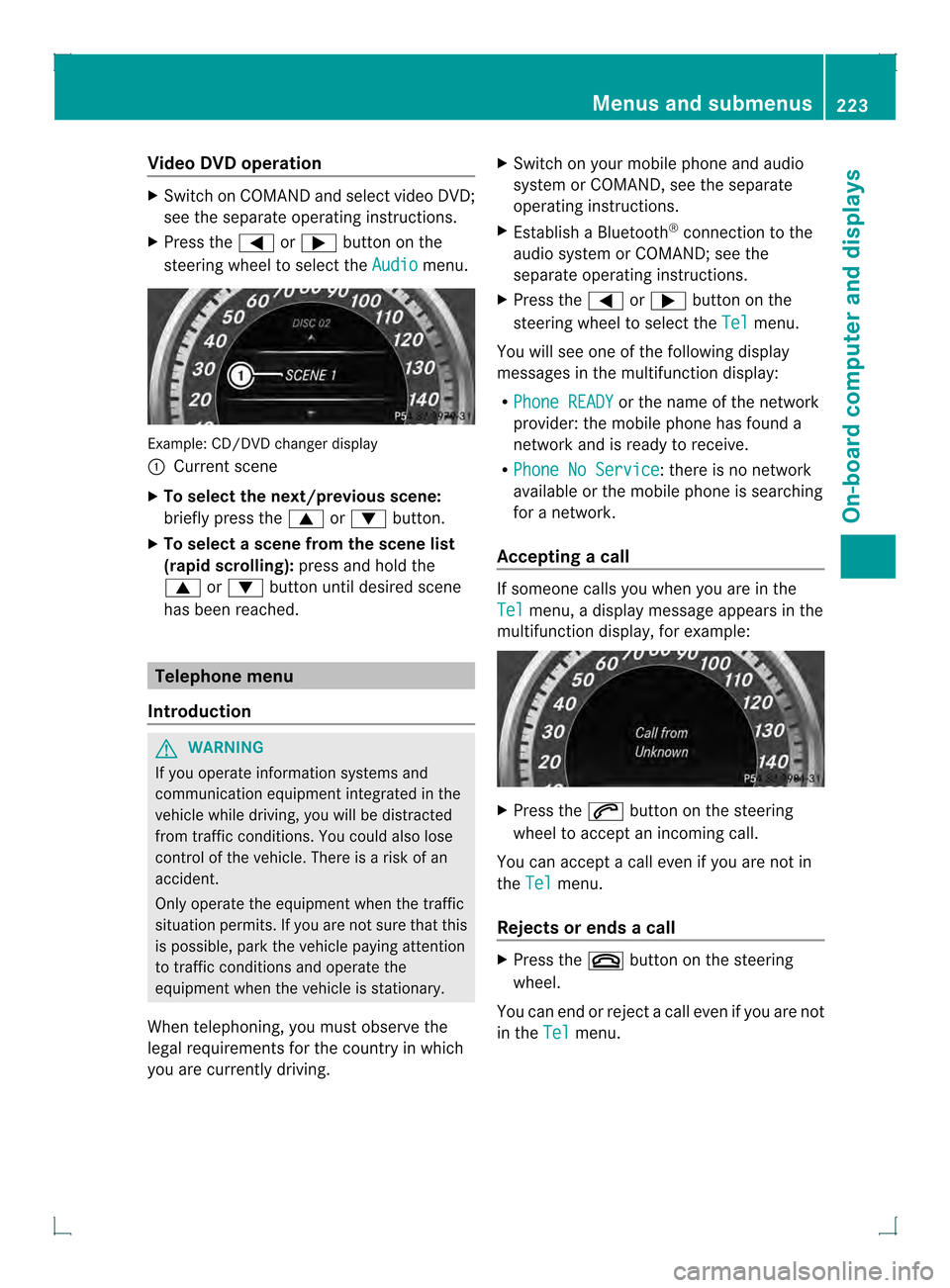
Example
:CD/DVD change rdisplay
0002 Current scene
X To select the next/previou sscene:
briefly press the 0003or0004 button.
X To select ascene from the scene list
(rapid scrolling): press and hold the
0003 or0004 buttonuntil desired scene
has been reached. Telephone menu
Introduction G
WARNING
If you operate informatio nsystems and
communication equipment integrated in the
vehicle while driving, you will be distracted
from traffic conditions. You could also lose
control of the vehicle. There is a risk of an
accident.
Only operate the equipmen twhen the traffic
situation permits. If you are not sure that this
is possible, park the vehicle paying attention
to traffic conditions and operate the
equipment when the vehicle is stationary.
When telephoning, you must observe the
legal requirements for the country in which
you are currently driving. X
Switch on your mobile phone and audio
system or COMAND, see the separate
operating instructions.
X Establish a Bluetooth ®
connection to the
audio system or COMAND; see the
separate operating instructions.
X Press the 0002or0005 button on the
steering wheel to select the Tel menu.
You will see one of the following display
messages in the multifunction display:
R Phone READY or the name of the network
provider: the mobile phone has found a
network and is ready to receive.
R Phone No Service : there is no network
available or the mobile phone is searching
for a network.
Accepting acall If someone calls you whe
nyou are in the
Tel menu, a display message appears in the
multifunction display, for example: X
Press the 0004button on the steering
wheel to accept an incoming call.
You can accept a call even if you are not in
the Tel menu.
Rejects or ends a call X
Press the 000Bbutton on the steering
wheel.
You can end or rejectacall eve nifyou are not
in the Tel menu. Menus and submenus
223On-board computer and displays Z
Page 228 of 378
When Lane Keeping Assist or Active Lane
Keeping Assist is activated, the
0001symbol
appears in the multifunction display when the
ignition is on.
For further information about Lane Keeping
Assist, see (Y page 200).
For further information about Active Lane
Keeping Assist, see (Y page 205).Maintenance menu
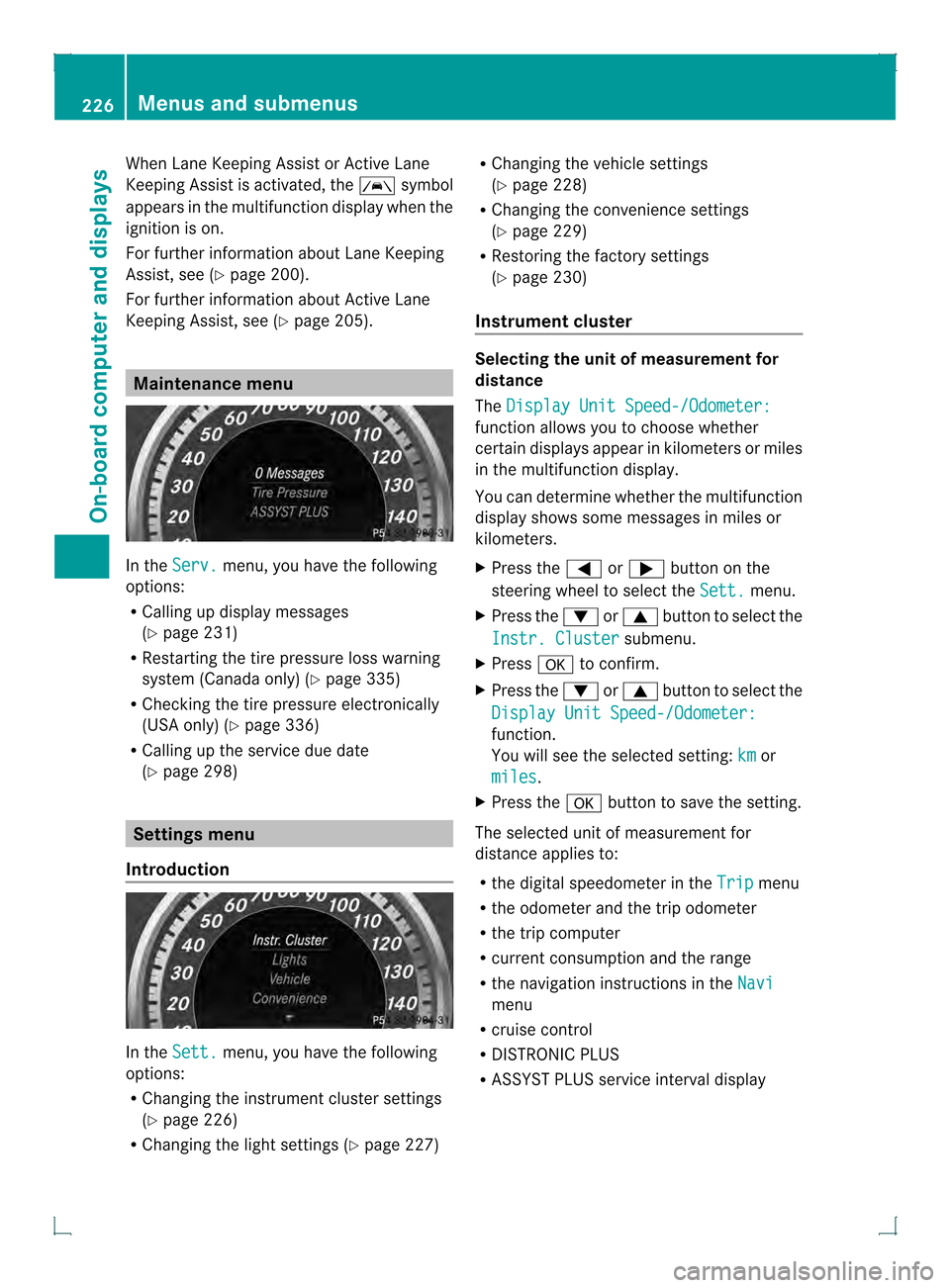
In the
Serv. menu, you have the following
options:
R Calling up display messages
(Y page 231)
R Restarting the tire pressure loss warning
system (Canada only) (Y page 335)
R Checking the tire pressure electronically
(USA only) (Y page 336)
R Calling up the service due date
(Y page 298) Settings menu
Introduction In the
Sett. menu, you have the following
options:
R Changing the instrument cluster settings
(Y page 226)
R Changing the light settings (Y page 227)R
Changing the vehicle settings
(Y page 228)
R Changing the convenience settings
(Y page 229)
R Restoring the factory settings
(Y page 230)
Instrument cluster Selecting the unit of measurement for
distance
The
Display Unit Speed-/Odometer: function allows you to choose whether
certain displays appear in kilometers or miles
in the multifunction display.
You can determine whether the multifunction
display shows some messages in miles or
kilometers.
X Press the 0002or0005 button on the
steering wheel to select the Sett. menu.
X Press the 0004or0003 button to select the
Instr. Cluster submenu.
X Press 000Bto confirm.
X Press the 0004or0003 button to select the
Display Unit Speed-/Odometer: function.
You will see the selected setting:
km or
miles .
X Press the 000Bbutton to save the setting.
The selected unit of measurement for
distance applies to:
R the digital speedometer in the Trip menu
R the odometer and the trip odometer
R the trip computer
R current consumption and the range
R the navigation instructions in the Navi menu
R cruise control
R DISTRONIC PLUS
R ASSYST PLUS service interval display 226
Menus and submenusOn-board computer and displays
Page 237 of 378
Display messages Possible causes/consequences and
0001 Solutions
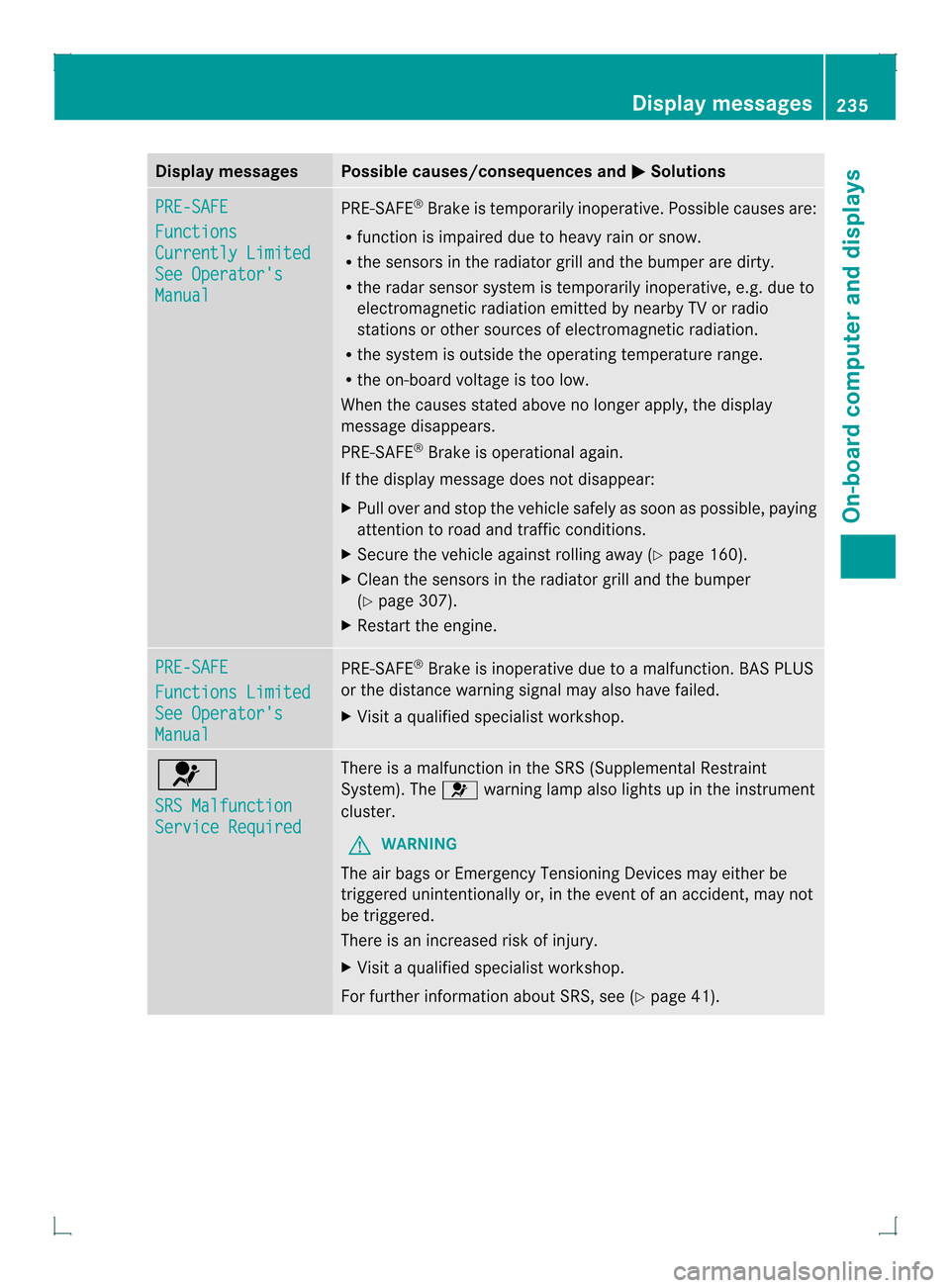
PRE-SAFE
Functions
Currently Limited
See Operator's
Manual PRE-SAFE
®
Brake is temporarily inoperative. Possible causes are:
R function is impaired due to heavy rain or snow.
R the sensors in the radiato rgrill and the bumper are dirty.
R the rada rsensor system is temporarily inoperative, e.g. due to
electromagnetic radiation emitted by nearby TV or radio
stations or other sources of electromagnetic radiation.
R the system is outside the operating temperature range.
R the on-board voltage is too low.
When the causes stated above no longer apply, the display
message disappears.
PRE-SAFE ®
Brake is operational again.
If the display message does not disappear:
X Pull over and stop the vehicle safely as soon as possible, paying
attention to road and traffic conditions.
X Secure the vehicle against rolling away (Y page 160).
X Clean the sensors in the radiator grill and the bumper
(Y page 307).
X Restart the engine. PRE-SAFE
Functions Limited
See Operator's
Manual PRE-SAFE
®
Brake is inoperative due to a malfunction. BAS PLUS
or the distance warning signal may also have failed.
X Visit a qualified specialist workshop. 0020
SRS Malfunction
Service Required There is a malfunction in the SRS (Supplemental Restraint
System). The
0020warning lamp also lights up in the instrument
cluster.
G WARNING
The air bags or Emergency Tensioning Devices may either be
triggered unintentionally or, in the event of an accident, may not
be triggered.
There is an increased risk of injury.
X Visit a qualified specialist workshop.
For further information about SRS, see (Y page 41). Display messages
235On-board computer and displays Z
Page 238 of 378
Display messages Possible causes/consequences and
0001 Solutions
0020
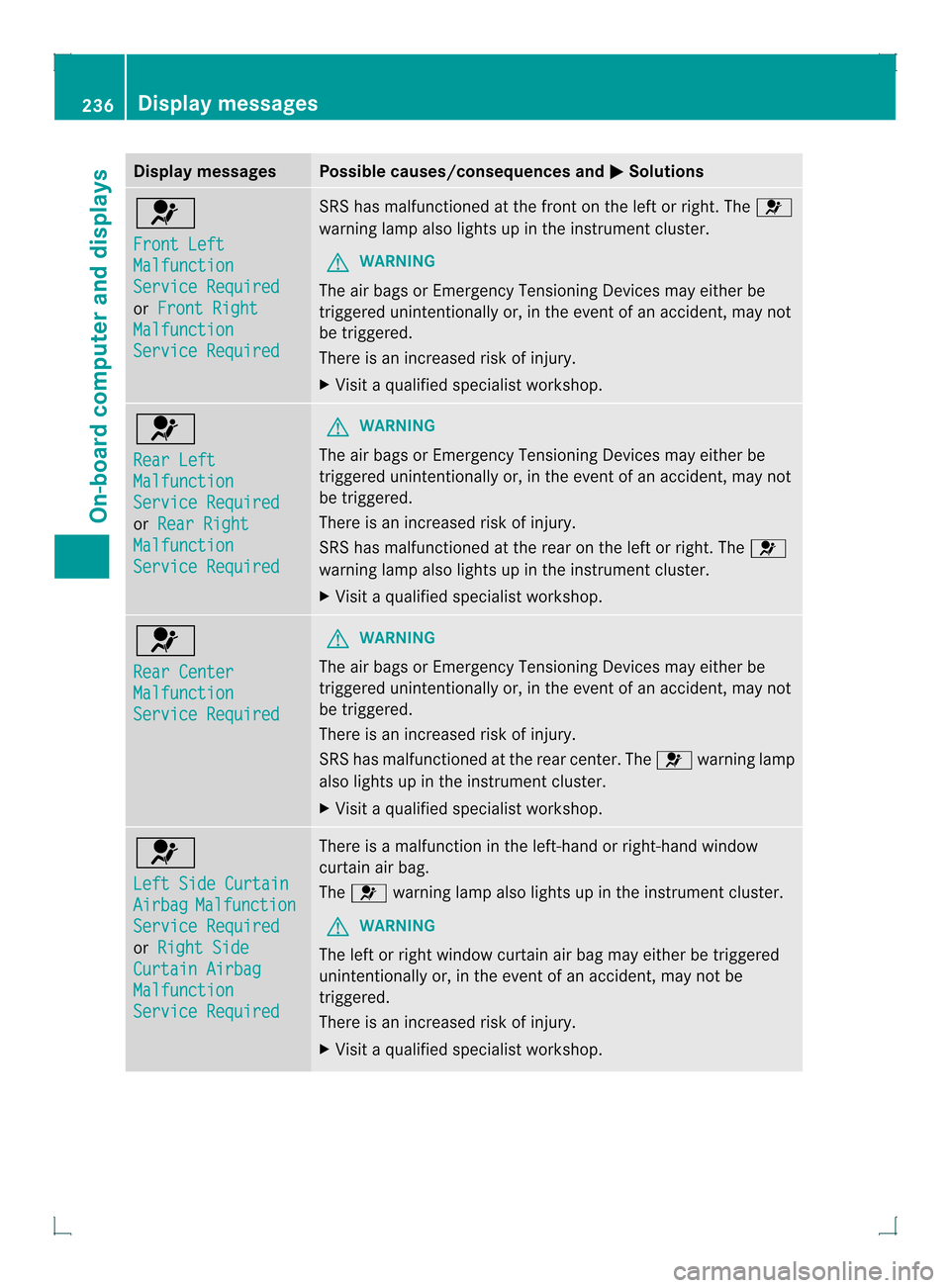
Front Left
Malfunction
Service Required
or
Front Right Malfunction
Service Required SRS has malfunctioned at the front on the left or right. The
0020
warning lamp also lights up in the instrumen tcluster.
G WARNING
The air bags or Emergency Tensioning Devices may either be
triggered unintentionally or, in the event of an accident, may not
be triggered.
There is an increased risk of injury.
X Visit a qualified specialist workshop. 0020
Rear Left
Malfunction
Service Required
or
Rear Right Malfunction
Service Required G
WARNING
The air bags or Emergency Tensioning Devices may either be
triggered unintentionally or, in the event of an accident, may not
be triggered.
There is an increased risk of injury.
SRS has malfunctione dat the rear on the left or right. The 0020
warning lamp also lights up in the instrument cluster.
X Visi taqualified specialist workshop. 0020
Rear Center
Malfunction
Service Required G
WARNING
The air bags or Emergency Tensioning Devices may either be
triggered unintentionally or, in the event of an accident, may not
be triggered.
There is an increased risk of injury.
SRS has malfunctioned at the rear center. The 0020warning lamp
also lights up in the instrument cluster.
X Visit a qualified specialist workshop. 0020
Left Side Curtain
Airbag Malfunction
Service Required
or
Right Side Curtain Airbag
Malfunction
Service Required There is a malfunction in the left-hand or right-hand window
curtain air bag.
The
0020 warning lamp also lights up in the instrument cluster.
G WARNING
The left or right window curtain air bag may either be triggered
unintentionally or, in the event of an accident, may not be
triggered.
There is an increased risk of injury.
X Visit a qualified specialist workshop. 236
Display messagesOn-board computer and displays
Page 257 of 378
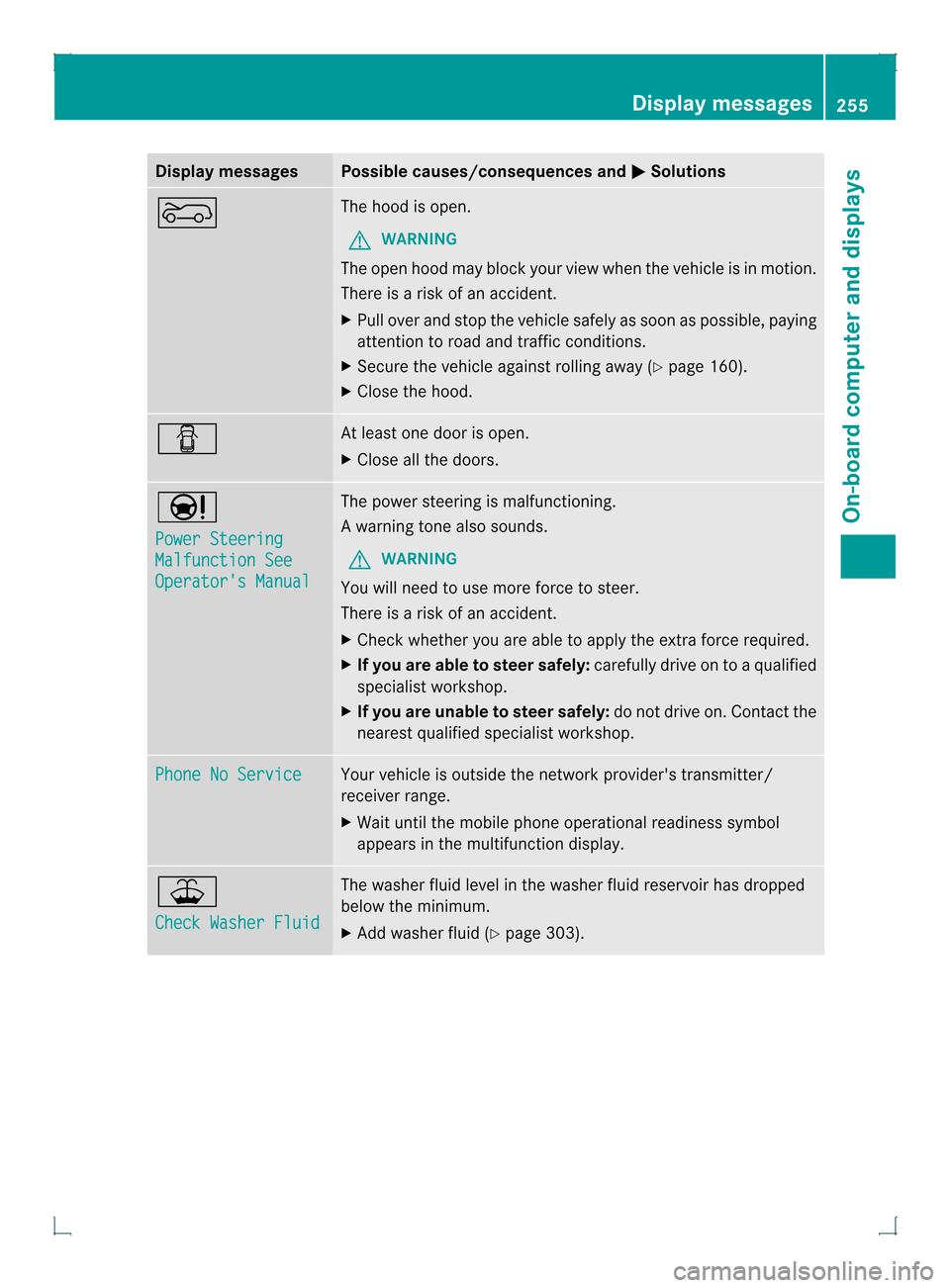
Display messages Possible causes/consequences and
0001 Solutions
0007 The hood is open.
G WARNING
The open hood may bloc kyour view when the vehicle is in motion.
There is a risk of an accident.
X Pull over and stop the vehicle safely as soon as possible, paying
attention to road and traffic conditions.
X Secure the vehicle against rolling away (Y page 160).
X Close the hood. 0003 At least one door is open.
X
Close all the doors. 0001
Power Steering
Malfunction See
Operator's Manual The power steering is malfunctioning.
Aw
arning tone also sounds.
G WARNING
You will need to use more force to steer.
There is a ris kofanaccident.
X Check whethe ryou are able to apply the extra force required.
X If you are able to steer safely: carefully drive on to a qualified
specialist workshop.
X If you are unable to steer safely: do not drive on. Contact the
nearest qualified specialist workshop. Phone No Service Your vehicle is outside the network provider's transmitter/
receiver range.
X Wait until the mobile phone operational readiness symbol
appears in the multifunction display. 001F
Check Washer Fluid The washer fluid level in the washer fluid reservoir has dropped
below the minimum.
X
Add washer fluid (Y page 303). Display messages
255On-board computer and displays Z
Page 285 of 378
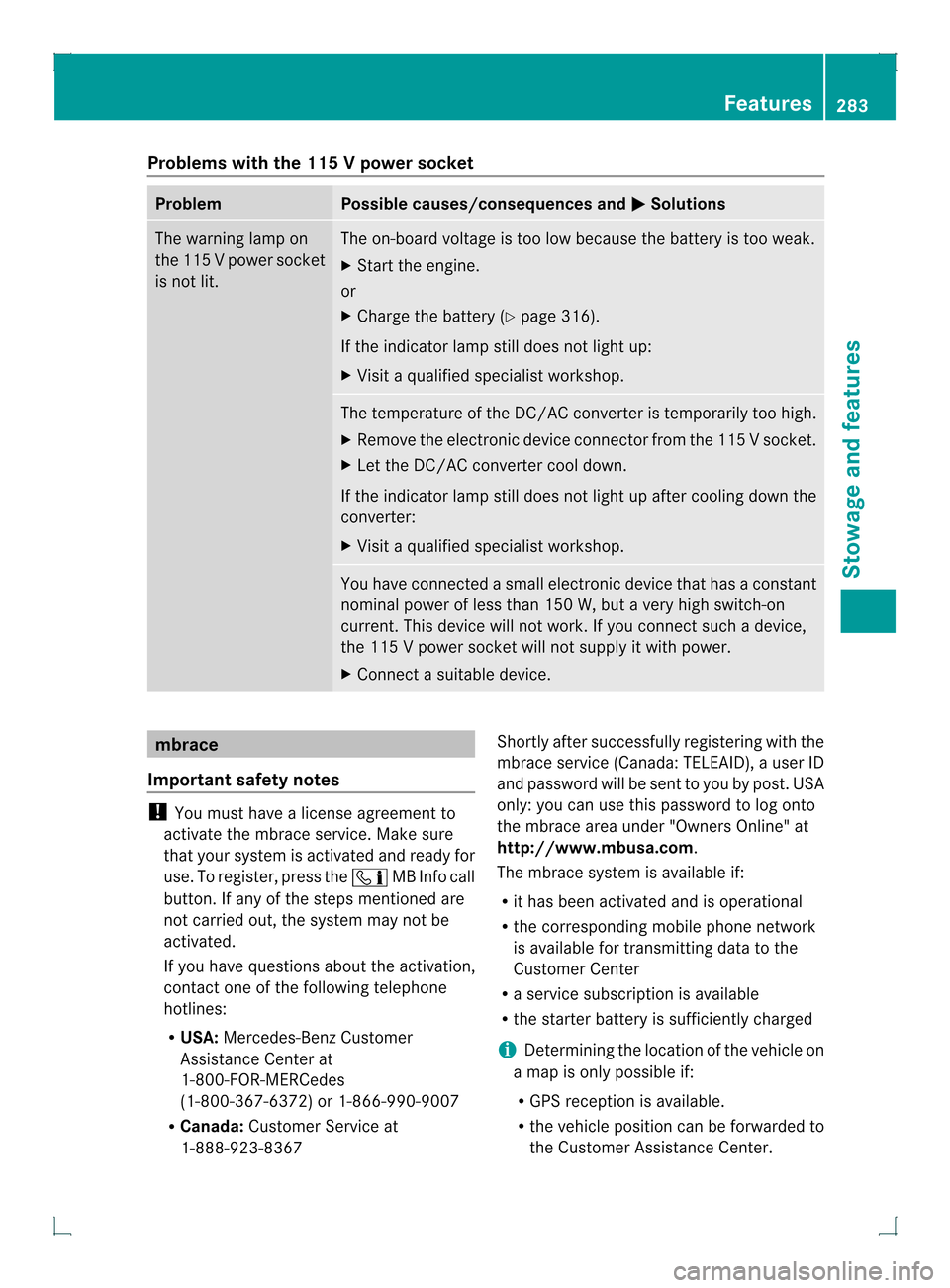
Problems with the 115
Vpower socket Problem Possible causes/consequences and
0001 Solutions
The warning lamp on
the 11
5Vpower socket
is not lit. The on-board voltage is too low because the battery is too weak.
X
Start the engine.
or
X Charge the battery (Y page 316).
If the indicator lamp still does not light up:
X Visit a qualified specialist workshop. The temperature of the DC/AC converter is temporarily too high.
X Remove the electronic device connector from the 115 V socket.
X Let the DC/AC converter cool down.
If the indicator lamp still does not light up after cooling down the
converter:
X Visit a qualified specialist workshop. You have connected a small electronic device that has a constant
nominal power of less than 150 W, but a very high switch-on
current. This device will not work. If you connect such a device,
the 115
Vpower socket will not supply it with power.
X Connect a suitable device. mbrace
Important safety notes !
You must have a license agreement to
activate the mbrace service. Make sure
that your system is activated and ready for
use. To register, press the 000AMB Info call
button. If any of the steps mentioned are
not carried out, the system may not be
activated.
If you have questions about the activation,
contact one of the following telephone
hotlines:
R USA: Mercedes-Benz Customer
Assistance Center at
1-800-FOR-MERCedes
(1-800-367-6372) or 1-866-990-9007
R Canada: Customer Service at
1-888-923-8367 Shortly after successfully registering with the
mbrace service (Canada: TELEAID), a user ID
and password will be sent to you by post. USA
only: you can use this password to log onto
the mbrace area under "Owners Online" at
http://www.mbusa.com.
The mbrace system is available if:
R
it has been activated and is operational
R the corresponding mobile phone network
is available for transmitting data to the
Customer Center
R a service subscription is available
R the starter battery is sufficiently charged
i Determining the location of the vehicle on
a map is only possible if:
R GPS reception is available.
R the vehicle position can be forwarded to
the Customer Assistance Center. Features
283Stowage and features Z