hood open MERCEDES-BENZ GLK-Class 2015 X204 Owner's Manual
[x] Cancel search | Manufacturer: MERCEDES-BENZ, Model Year: 2015, Model line: GLK-Class, Model: MERCEDES-BENZ GLK-Class 2015 X204Pages: 386, PDF Size: 7.16 MB
Page 13 of 386
Fuse allocation chart (vehicle tool
kit)
...................................................... 314
Fuses Allocation chart ............................ .328
Before changing ............................ .328
Dashboard fuse box ....................... 328
Fuse box in the cargo compart-
ment .............................................. 329
Fuse box in the engine compart-
ment .............................................. 329
Important safety notes .................. 328 G
Garage door opener Clearing the memory ..................... 298
General notes ................................ 295
Important safety notes .................. 295
Opening/closing the garage door .. 297
Programming (button in the rear-
view mirror) ................................... 295
Gear or selector lever (cleaning
guidelines) ......................................... 311
Genuine parts ...................................... 22
Glove box .......................................... .275
GTW (Gross Trailer Weight) (defini-
tion) .................................................... 353 H
Hazard warning lamps ......................119
Headlamps Adding fluid to cleaning system ..... 303
Cleaning system (function) ............ 119
Cleaning system (notes) ................ 379
Fogging up ..................................... 121
see Automatic headlamp mode
Head restraints
Adjusting ....................................... 102
Adjusting (electrically) ................... 103
Adjusting (manually) ..................... .103
Adjusting (rear) .............................. 104
Installing/removing (rear) .............. 104
Luxury ............................................ 103
see NECK-PRO head restraints/
NECK-PRO luxury head restraints
Heating
see Climate control High-beam headlamps
Changing bulbs .............................. 124
Display message ............................ 245
Switching on/off ........................... 119
Hill start assist .................................. 152
HOLD function Deactivating ................................... 185
Display message ............................ 251
Function/notes ............................ .184
Hood
Closing .......................................... .301
Display message ............................ 258
Important safety notes .................. 300
Opening ......................................... 300
Horn ...................................................... 32
Hydroplaning ..................................... 174 I
Ignition lock see Key positions
Immobilizer .......................................... 74
Indicator lamps see Warning and indicator lamps
Indicators
see Turn signals
Instrument cluster
Overview .......................................... 33
Settings ......................................... 230
Warning and indicator lamps ........... 34
Instrument cluster lighting .............. 231
Interior lighting ................................. 121
Automatic control .......................... 122
Delayed switch-off (on-board
computer) ...................................... 232
Emergency lighting ........................ 122
Manual control ............................... 122
Overview ........................................ 121
Reading lamp ................................. 121
Setting the brightness of the dis-
play/switch (on-board computer) .. 231 J
Jack Storage location ............................ 314
Using ............................................. 357
Jump starting (engine) ......................323 Index
11
Page 34 of 386
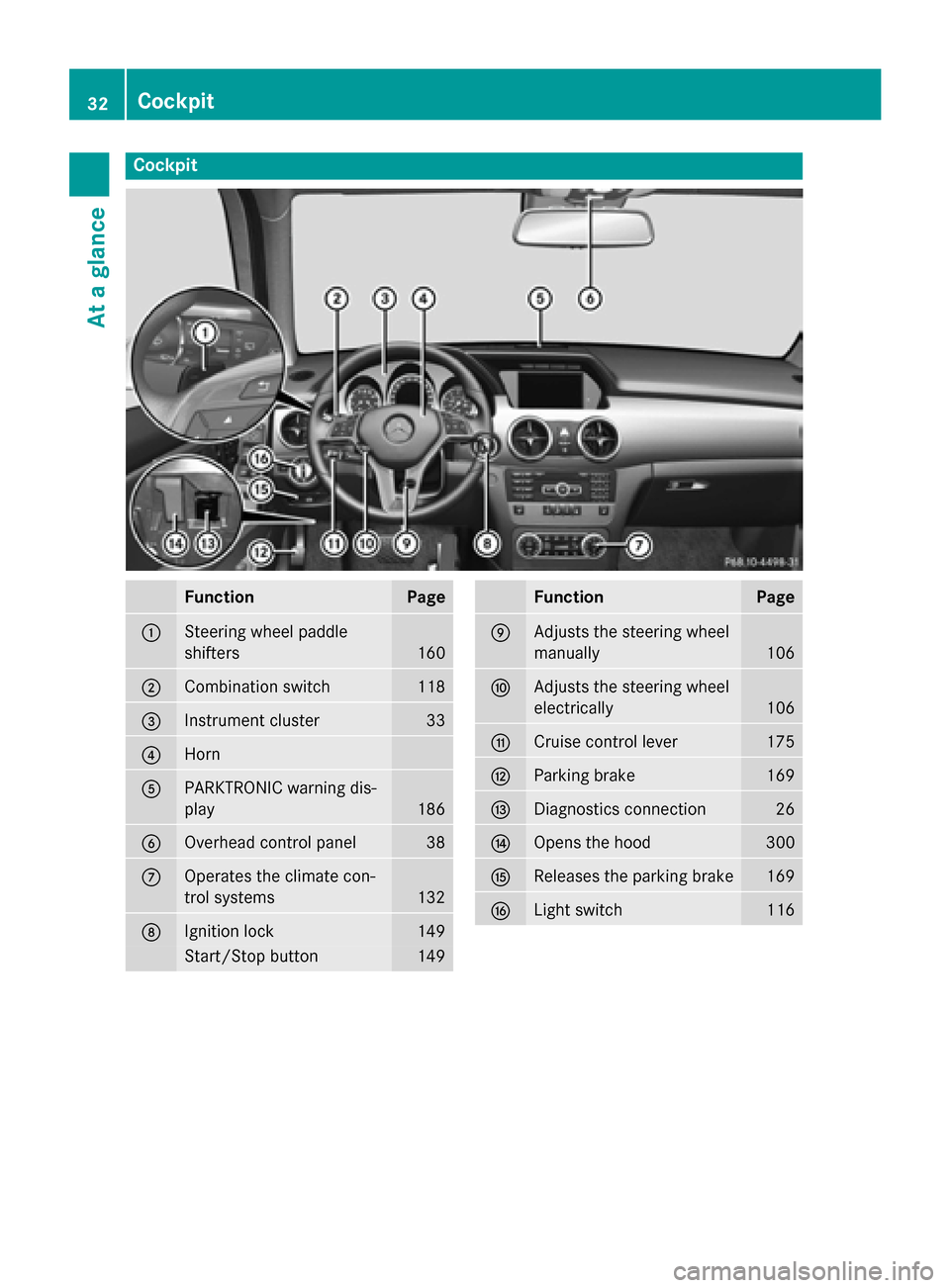
Cockpit
Function Page
0043
Steering wheel paddle
shifters
160
0044
Combination switch 118
0087
Instrument cluster 33
0085
Horn
0083
PARKTRONIC warning dis-
play
186
0084
Overhead control panel 38
006B
Operates the climate con-
trol systems
132
006C
Ignition lock 149
Start/Stop button 149 Function Page
006D
Adjusts the steering wheel
manually
106
006E
Adjusts the steering wheel
electrically
106
006F
Cruise control lever 175
0070
Parking brake 169
0071
Diagnostics connection 26
0072
Opens the hood 300
0073
Releases the parking brake 169
0074
Light switch 11632
CockpitAt a glance
Page 77 of 386
When leaving the vehicle, always take the
SmartKey with you and lock the vehicle. The
engine can be started by anyone with a valid
SmartKey that is left inside the vehicle.
i The immobilizer is always deactivated
when you start the engine.
In the event that the engine cannot be star- ted (yet the vehicle's battery is charged),
the system is not operational. Contact an
authorized Mercedes-Benz Center or call
1-800-FOR-MERCedes (in the USA) or
1-800-387-0100 (in Canada). ATA (anti-theft alarm system)
A visual and audible alarm is triggered if the
alarm system is armed and you open:
R a door
R the vehicle with the mechanical key
R the tailgate
R the hood
The alarm is not switched off, even if you
close the open door that triggered it, for
example.
i If the alarm continues for more than
30 seconds, the mbrace emergency call
system automatically notifies the Cus-
tomer Assistance Center. This is done
either by text message or data connection. The emergency call system sends the mes-sage or data provided that:
R you have subscribed to the mbrace ser-
vice.
R the mbrace service has been activated
properly.
R the necessary mobile phone network is
available. X
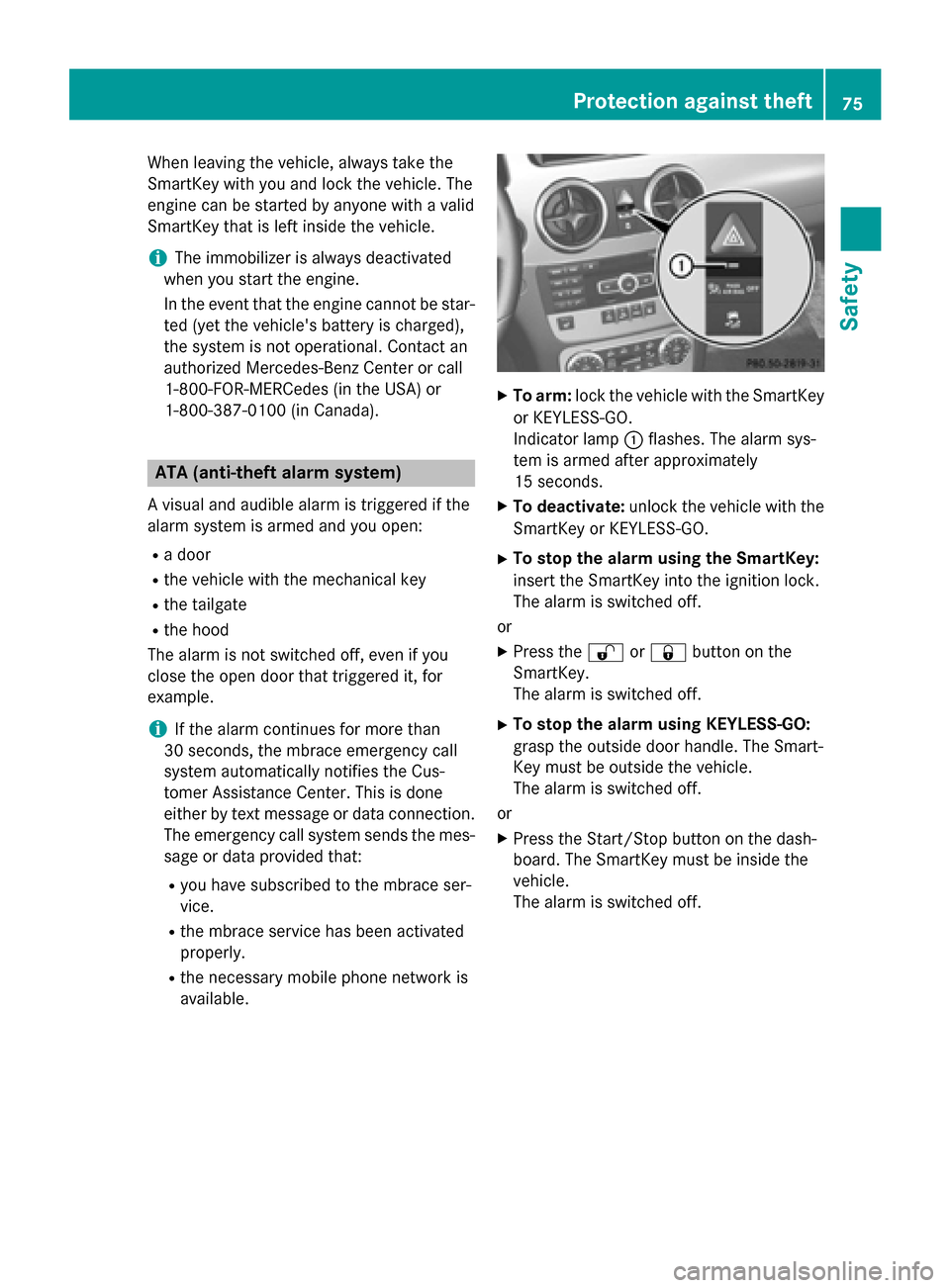
To arm: lock the vehicle with the SmartKey
or KEYLESS-GO.
Indicator lamp 0043flashes. The alarm sys-
tem is armed after approximately
15 seconds.
X To deactivate: unlock the vehicle with the
SmartKey or KEYLESS-GO.
X To stop the alarm using the SmartKey:
insert the SmartKey into the ignition lock.
The alarm is switched off.
or X Press the 0036or0037 button on the
SmartKey.
The alarm is switched off.
X To stop the alarm using KEYLESS-GO:
grasp the outside door handle. The Smart-
Key must be outside the vehicle.
The alarm is switched off.
or X Press the Start/Stop button on the dash-
board. The SmartKey must be inside the
vehicle.
The alarm is switched off. Protection against theft
75Safety Z
Page 126 of 386

Changing the front bulbs
Low-beam headlamps (halogen head-
lamps) X
Switch off the lights.
X Open the hood.
X Turn housing cover 0043counter-clockwise
and pull it out.
X At the bulb holder, push the bulb upwards,
disconnect it and pull it out of bulb
holder 0044.
X Insert the new bulb into bulb holder 0044,
push it down and secure it in place.
X Attach housing cover 0043and turn it clock-
wise until it engages.
High-beam headlamps, standing
lamps/parking lamps (halogen head-
lamps) X
Switch off the lights.
X Open the hood.
X Turn housing cover 0043counter-clockwise
and pull it out. X
Turn bulb counter-clockwise and pull it out.
X Insert the new bulb into bulb holder 0044and
turn it clockwise.
X Align housing cover 0043and turn it clock-
wise until it engages.
Cornering light function (Bi-Xenon
headlamps) X
Switch off the lights.
X Open the hood.
X Turn housing cover 0043counter-clockwise
and pull it out.
X Push the lever of holder 0044upwards until
holder 0044is released.
X Pull out bulb holder 0044.
X Take the bulb out of bulb holder 0044.
X Insert the new bulb into bulb holder 0044.
X Insert holder 0044from above and press it
until it engages.
X Align housing cover 0043and turn it clock-
wise until it engages.
Turn signal 124
Replacing bulbsLights and windshield wipers
Page 127 of 386
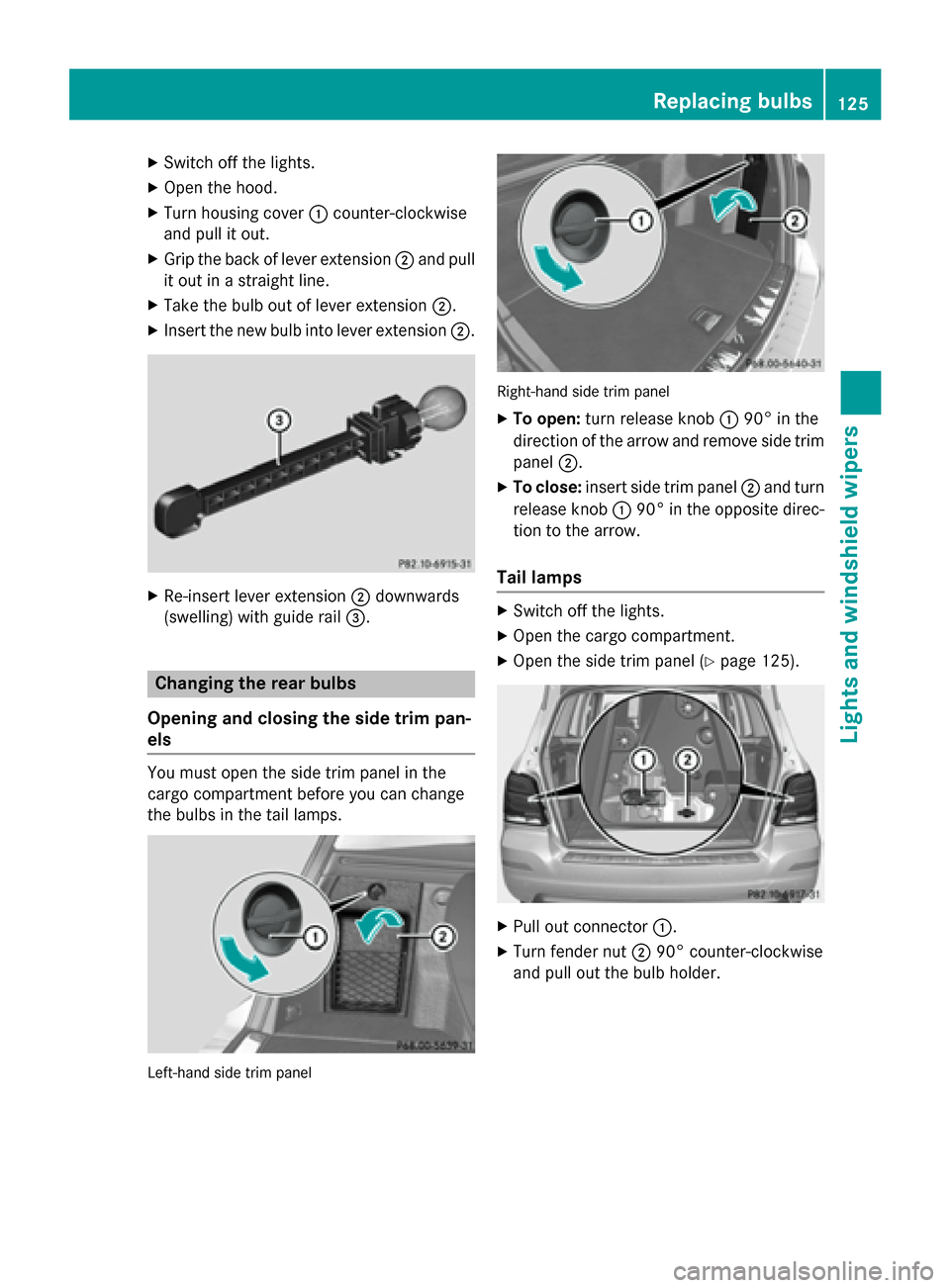
X
Switch off the lights.
X Open the hood.
X Turn housing cover 0043counter-clockwise
and pull it out.
X Grip the back of lever extension 0044and pull
it out in a straight line.
X Take the bulb out of lever extension 0044.
X Insert the new bulb into lever extension 0044.X
Re-insert lever extension 0044downwards
(swelling) with guide rail 0087.Changing the rear bulbs
Opening and closing the side trim pan-
els You must open the side trim panel in the
cargo compartment before you can change
the bulbs in the tail lamps.
Left-hand side trim panel Right-hand side trim panel
X To open: turn release knob 004390° in the
direction of the arrow and remove side trim panel 0044.
X To close: insert side trim panel 0044and turn
release knob 004390° in the opposite direc-
tion to the arrow.
Tail lamps X
Switch off the lights.
X Open the cargo compartment.
X Open the side trim panel (Y page 125). X
Pull out connector 0043.
X Turn fender nut 004490° counter-clockwise
and pull out the bulb holder. Replacing bulbs
125Lights and windshield wipers Z
Page 129 of 386
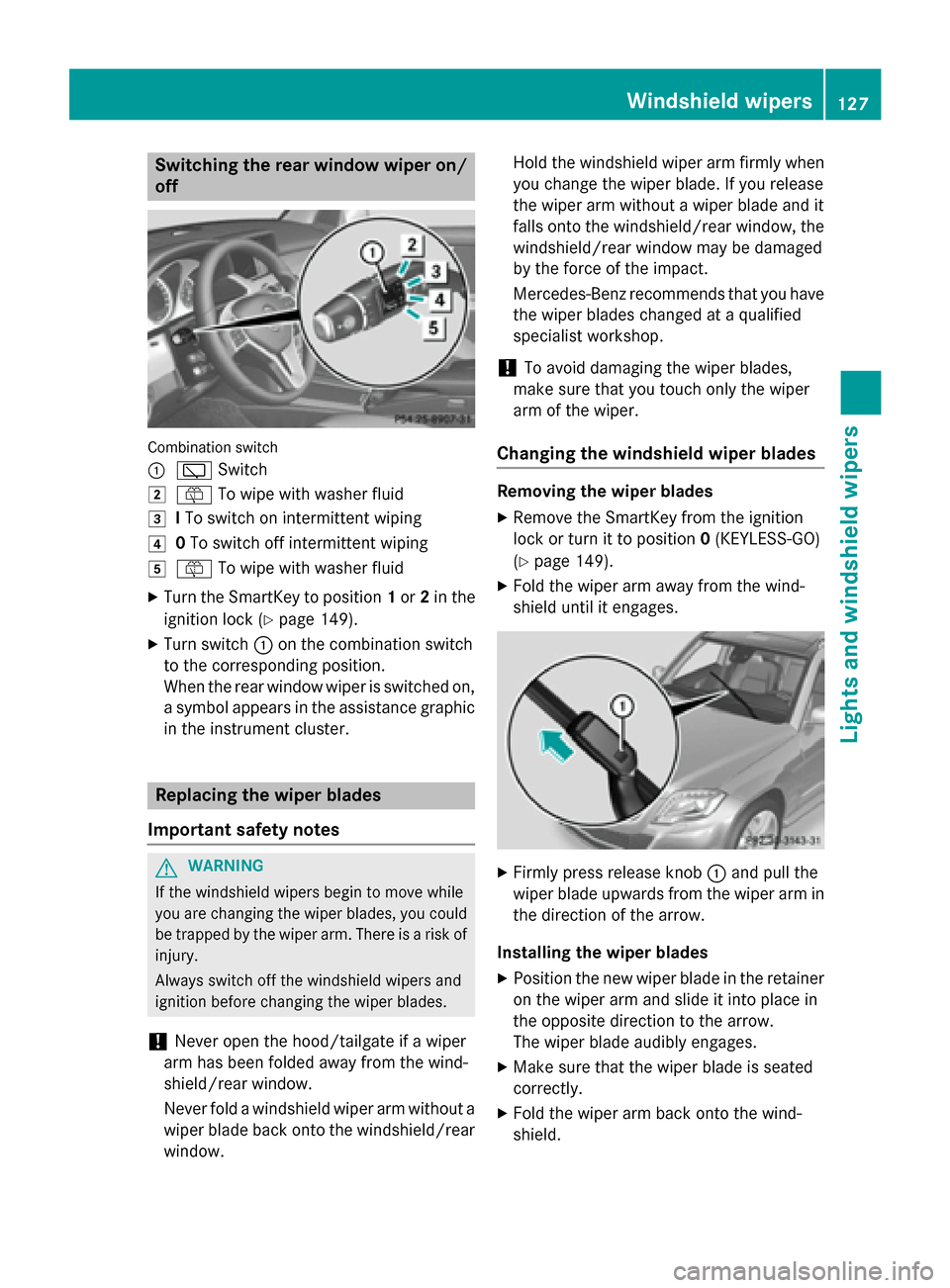
Switching the rear window wiper on/
off Combination switch
0043
00C5 Switch
0048 00E2 To wipe with washer fluid
0049 ITo switch on intermittent wiping
004A 0To switch off intermittent wiping
004B 00E2 To wipe with washer fluid
X Turn the SmartKey to position 1or 2in the
ignition lock (Y page 149).
X Turn switch 0043on the combination switch
to the corresponding position.
When the rear window wiper is switched on,
a symbol appears in the assistance graphic in the instrument cluster. Replacing the wiper blades
Important safety notes G
WARNING
If the windshield wipers begin to move while
you are changing the wiper blades, you could be trapped by the wiper arm. There is a risk of
injury.
Always switch off the windshield wipers and
ignition before changing the wiper blades.
! Never open the hood/tailgate if a wiper
arm has been folded away from the wind-
shield/rear window.
Never fold a windshield wiper arm without a
wiper blade back onto the windshield/rear window. Hold the windshield wiper arm firmly when
you change the wiper blade. If you release
the wiper arm without a wiper blade and it
falls onto the windshield/rear window, the
windshield/rear window may be damaged
by the force of the impact.
Mercedes-Benz recommends that you have the wiper blades changed at a qualified
specialist workshop.
! To avoid damaging the wiper blades,
make sure that you touch only the wiper
arm of the wiper.
Changing the windshield wiper blades Removing the wiper blades
X Remove the SmartKey from the ignition
lock or turn it to position 0(KEYLESS-GO)
(Y page 149).
X Fold the wiper arm away from the wind-
shield until it engages. X
Firmly press release knob 0043and pull the
wiper blade upwards from the wiper arm in the direction of the arrow.
Installing the wiper blades
X Position the new wiper blade in the retainer
on the wiper arm and slide it into place in
the opposite direction to the arrow.
The wiper blade audibly engages.
X Make sure that the wiper blade is seated
correctly.
X Fold the wiper arm back onto the wind-
shield. Windshield wipers
127Lights and windshield wipers Z
Page 146 of 386
Switching on/off
X
Turn the SmartKey to position 0in the igni-
tion lock (Y page 149) or remove it.
X To activate: press the004Bbutton.
The indicator lamp in the 004Bbutton lights
up.
i If the residual heat function is activated,
the windows may fog up on the inside.
X To deactivate: press the004Bbutton.
The indicator lamp in the 004Bbutton goes
out.
i Residual heat is deactivated automati-
cally:
R after approximately 30 minutes
R when the ignition is switched on
R if the battery voltage drops Setting the air vents
Important safety notes
G
WARNING
Very hot or very cold air can flow from the air vents. This could result in burns or frostbite in the immediate vicinity of the air vents. There
is a risk of injury.
Make sure that all vehicle occupants always
maintain a sufficient distance to the air out-
lets. If necessary, redirect the airflow to
another area of the vehicle interior.
In order to ensure the direct flow of fresh air
through the air vents into the vehicle interior,
please observe the following notes:
R keep the air inlet between the windshield
and the hood free of blockages, such as ice, snow or leaves.
R never cover the air vents or air intake grilles
in the vehicle interior.
i For virtually draft-free ventilation, adjust
the sliders of the air vents to the center
position. Setting the center air vents
X
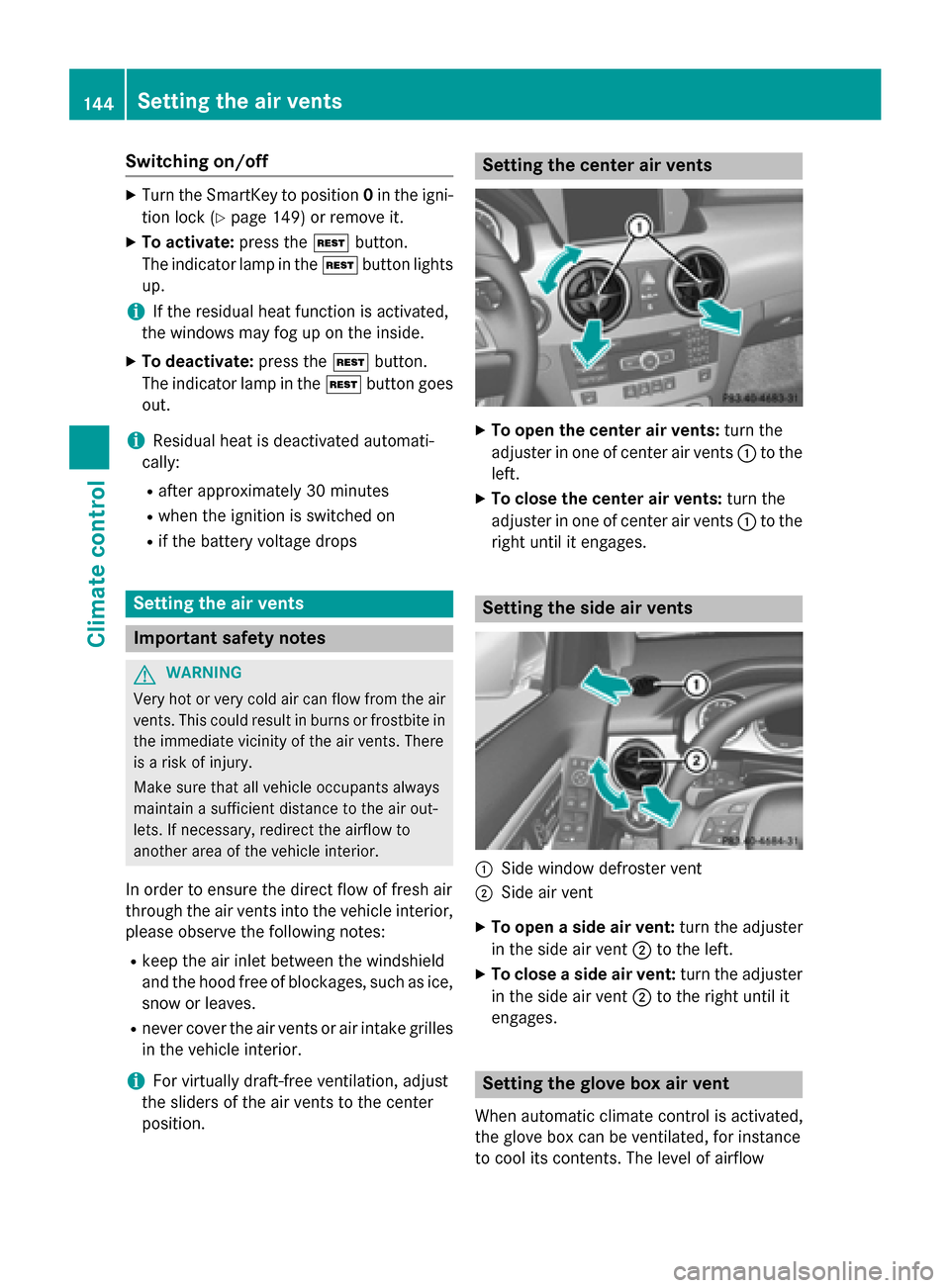
To open the center air vents: turn the
adjuster in one of center air vents 0043to the
left.
X To close the center air vents: turn the
adjuster in one of center air vents 0043to the
right until it engages. Setting the side air vents
0043
Side window defroster vent
0044 Side air vent
X To open a side air vent: turn the adjuster
in the side air vent 0044to the left.
X To close a side air vent: turn the adjuster
in the side air vent 0044to the right until it
engages. Setting the glove box air vent
When automatic climate control is activated,
the glove box can be ventilated, for instance
to cool its contents. The level of airflow 144
Setting the air ventsClimate control
Page 155 of 386
General notes
If the engine has been switched off automat-
ically by the ECO start/stop function, the
00A7 symbol is shown in the multifunction
display.
Every time you switch on the engine using the SmartKey or the Start/Stop button, the ECO
start/stop function is activated.
Automatic engine switch-off If the vehicle is braked to a standstill in
Dor N,
the ECO start/stop function switches off the engine automatically.
The ECO start/stop function is operational
when:
R the indicator lamp in the ECO button is lit
green.
R the outside temperature is within the range
that is suitable for the system.
R the engine is at normal operating temper-
ature.
R the set temperature for the vehicle interior
has been reached.
R the battery is sufficiently charged.
R the system detects that the windshield is
not fogged up when the air-conditioning
system is switched on.
R the hood is closed.
R the driver's door is closed and the driver's
seat belt is fastened.
i All of the vehicle's systems remain active
when the engine is stopped automatically.
i The HOLD function can also be activated
if the engine has been switched off auto-
matically. It is then not necessary to con-
tinue applying the brakes during the auto-
matic stop phase. When you depress the
accelerator pedal, the engine starts auto-
matically and the braking effect of the
HOLD function is deactivated.
i The engine can be switched off automat-
ically a maximum of four times (first stop
and three subsequent stops) in succession. Automatic engine start The engine starts automatically if:
R you switch off the ECO start/stop function
by pressing the ECO button.
R in transmission position Dor Nthe brake
pedal is released and the HOLD function is not active.
R you depress the accelerator pedal.
R you engage reverse gear R.
R you move the transmission out of position
P.
R you unfasten your seat belt or open the
driver's door.
R the vehicle starts to roll.
R the brake system requires this.
R the temperature in the vehicle interior devi-
ates from the set range.
R the system detects moisture on the wind-
shield when the air-conditioning system is
switched on.
R the battery's condition of charge is too low.
i Shifting the transmission to position
P
does not start the engine.
Deactivating/activating the ECO start/
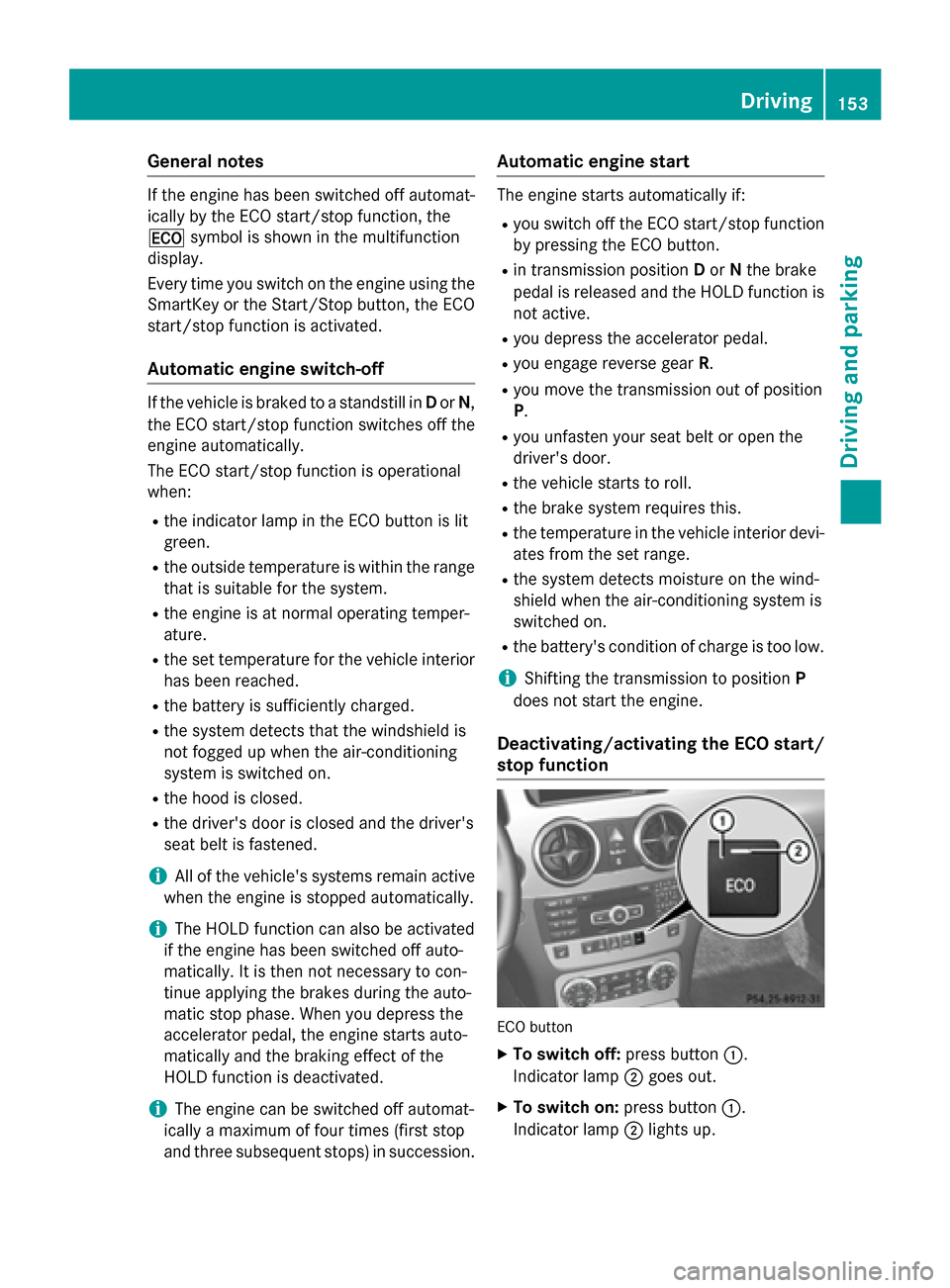
stop function ECO button
X To switch off: press button0043.
Indicator lamp 0044goes out.
X To switch on: press button0043.
Indicator lamp 0044lights up. Driving
153Driving and parking Z
Page 182 of 386
Stopping
G
WARNING
When leaving the vehicle, even if it is braked
only by DISTRONIC PLUS, it could roll away if:
R there is a malfunction in the system or in
the voltage supply.
R DISTRONIC PLUS has been deactivated
with the cruise control lever, e.g. by a vehi-
cle occupant or from outside the vehicle.
R the electrical system in the engine com-
partment, the battery or the fuses have
been tampered with.
R the battery is disconnected.
R the accelerator pedal has been depressed,
e.g. by a vehicle occupant.
There is a risk of an accident.
If you wish to exit the vehicle, always turn off
DISTRONIC PLUS and secure the vehicle
against rolling away.
Deactivating DISTRONIC PLUS (Y page 182).
If DISTRONIC PLUS detects that the vehicle in front is stopping, it brakes your vehicle until it
is stationary.
Once your vehicle is stationary, it remains
stationary and you do not need to depress the
brake.
i Depending on the specified minimum dis-
tance, your vehicle will come to a standstill
at a sufficient distance behind the vehicle in
front. The specified minimum distance is
set using the control on the cruise control
lever.
When DISTRONIC PLUS is activated, the
transmission is shifted automatically to posi- tion Pif:
R the driver's door is open and the driver's
seat belt is unfastened.
R the engine is switched off, unless it is auto-
matically switched off by the ECO start/
stop function.
R the hood is opened.
R a system malfunction occurs.
R the power supply is not sufficient. Setting a speed X
Press the cruise control lever up 0043for a
higher speed or down 0044for a lower speed.
X To adjust the set speed in 1 mph incre-
ments (1 km/h increments): briefly
press the cruise control lever up 0043or
down 0044to the pressure point.
Every time the cruise control lever is
pressed up 0043or down 0044the last speed
stored is increased or reduced.
X To adjust the set speed in 5 mph incre-
ments (10 km/h increments): briefly
press the cruise control lever up 0043or
down 0044beyond the pressure point.
Every time the cruise control lever is
pressed up 0043or down 0044, the last speed
stored is increased or reduced.
i DISTRONIC PLUS is not deactivated if you
depress the accelerator pedal. If you accel-
erate to overtake, DISTRONIC PLUS
adjusts the vehicle's speed to the last
speed stored after you have finished over-
taking.
Storing the current speed or calling up a
stored speed X
Briefly pull the cruise control lever towards
you 0085.
X Remove your foot from the accelerator
pedal.
DISTRONIC PLUS is activated. The first
time it is activated, the current speed is
stored. Otherwise, it sets the vehicle cruise
speed to the previously stored value.
Setting the specified minimum distance You can set the specified minimum distance
for DISTRONIC PLUS by varying the time span between one and two seconds. With this func-
tion, you can set the minimum distance that
DISTRONIC PLUS keeps to the vehicle in
front, dependent on vehicle speed. You can
see this distance in the multifunction display
(Y page 181). 180
Driving systemsDriving and parking
Page 187 of 386
Activating the HOLD function
X
Make sure that the activation conditions
are met.
X Depress the brake pedal.
X Quickly depress the brake pedal further
until 00D9 appears in the multifunction dis-
play.
The HOLD function is activated. You can
release the brake pedal.
i If depressing the brake pedal the first
time does not activate the HOLD function,
wait briefly and then try again.
Deactivating the HOLD function The HOLD function is deactivated automati-
cally if:
R you accelerate and the transmission is in
position Dor R.
R the transmission is in position P.
R you depress the brake pedal again with a
certain amount of pressure until 00D9dis-
appears from the multifunction display.
R you activate DISTRONIC PLUS.
When the HOLD function is activated in vehi-
cles with an automatic transmission, the
transmission is shifted automatically to posi- tion P if:
R the driver's door is open and the driver's
seat belt is unfastened.
R the engine is switched off, unless it is auto-
matically switched off by the ECO start/
stop function.
R the hood is opened.
R a system malfunction occurs.
R the power supply is not sufficient.
The horn will also sound at regular intervals if
the HOLD function is activated and you:
R switch the engine off, open the driver's
door and remove your seat belt.
R open the hood.
The sounding of the horn alerts you to the fact that the vehicle has been parked while the HOLD function is still activated. If you attempt
to lock the vehicle, the tone becomes louder.
The vehicle is not locked until the HOLD func- tion is deactivated.
i If the engine has been switched off, it
cannot be started again until the HOLD
function has been deactivated.
If there is a malfunction in the system or
power supply while the HOLD function is acti- vated, the Brake Immediately
Brake Immediately message is
shown in the multifunction display. Immedi-
ately depress the brake firmly until the warn-
ing message in the multifunction display goes
out.
You can also shift the transmission to position
P. This deactivates the HOLD function. 4MATIC (permanent four-wheel drive)
4MATIC ensures that all four wheels are per-
manently driven. Together with ESP ®
and
ETS, it improves the traction of your vehicle
whenever a drive wheel spins due to insuffi-
cient grip.
If you fail to adapt your driving style, 4MATIC
can neither reduce the risk of accident nor
override the laws of physics. 4MATIC cannot
take account of road, weather and traffic con- ditions. 4MATIC is only an aid. You are
responsible for the distance to the vehicle in
front, for vehicle speed, for braking in good
time and for staying in your lane.
If a drive wheel spins due to insufficient grip:
R Only depress the accelerator pedal as far as
necessary when pulling away.
R Accelerate less when driving.
! Never tow the vehicle with one axle
raised. This may damage the transfer case.
Damage of this sort is not covered by the
Mercedes-Benz Limited Warranty. All
wheels must remain either on the ground or be fully raised. Observe the instructions for
towing the vehicle with all wheels in full
contact with the ground. Driving systems
185Driving and parking Z