warning MERCEDES-BENZ GLK-CLASS SUV 2013 Repair Manual
[x] Cancel search | Manufacturer: MERCEDES-BENZ, Model Year: 2013, Model line: GLK-CLASS SUV, Model: MERCEDES-BENZ GLK-CLASS SUV 2013Pages: 380, PDF Size: 19.54 MB
Page 89 of 380
G
WARNING
The reversing feature does not react:
R to soft, light and thin objects, e.g. small
fingers
R over the last 4 mm
of the closing movement
R during resetting
R when closing the side window again
manually immediately after automatic
reversing
This means that the reversing feature cannot
prevent someone being trapped in these
situations. There is a risk of injury.
Make sure that no body parts are in close
proximity during the closing procedure. If
someone becomes trapped, press the switch
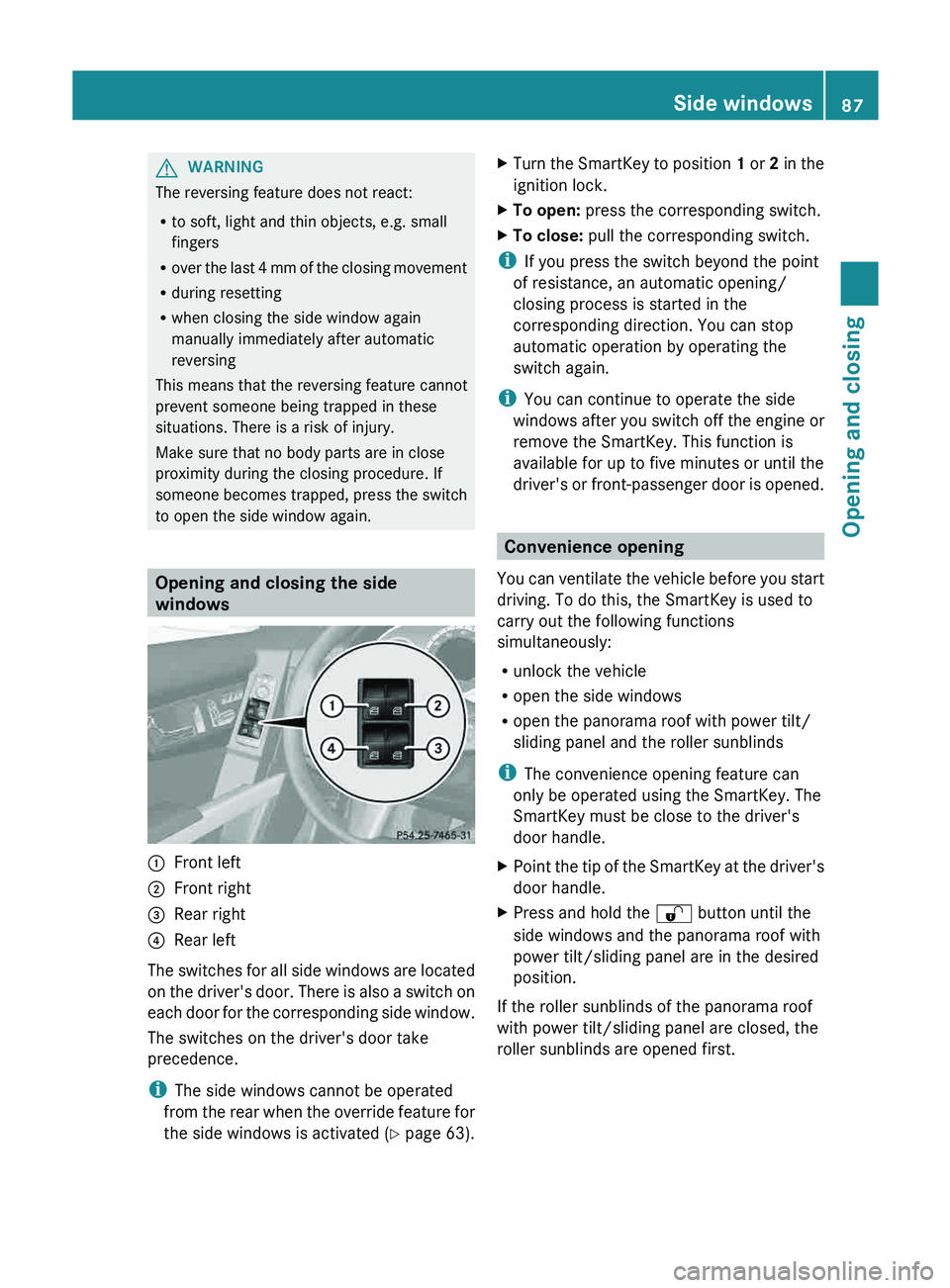
to open the side window again. Opening and closing the side
windows
0043
Front left
0044 Front right
0087 Rear right
0085 Rear left
The switches for all side windows are located
on the driver's door.
There
is also a switch on
each door for the corresponding side window.
The switches on the driver's door take
precedence.
i The side windows cannot be operated
from the rear when the override feature for
the side windows is activated ( Y page 63).X
Turn the SmartKey to position 1 or 2 in the
ignition lock.
X To open:
press the corresponding switch.
X To close: pull the corresponding switch.
i If you press the switch beyond the point
of resistance, an automatic opening/
closing process is started in the
corresponding direction. You can stop
automatic operation by operating the
switch again.
i You can continue to operate the side
windows after you switch off
the engine or
remove the SmartKey. This function is
available for up to five minutes or until the
driver's or front-passenger door is opened. Convenience opening
You can ventilate the vehicle
before you start
driving. To do this, the SmartKey is used to
carry out the following functions
simultaneously:
R unlock the vehicle
R open the side windows
R open the panorama roof with power tilt/
sliding panel and the roller sunblinds
i The convenience opening feature can
only be operated using the SmartKey. The
SmartKey must be close to the driver's
door handle.
X Point the tip of the SmartKey at the driver's
door handle.
X Press and hold the 0036 button until the
side windows and the panorama roof with
power tilt/sliding panel are in the desired
position.
If the roller sunblinds of the panorama roof
with power tilt/sliding panel are closed, the
roller sunblinds are opened first. Side windows
87Opening and closing Z
Page 90 of 380
X
Press and hold the 0036 button again until
the panorama roof with power tilt/sliding
panel is in the desired position.
X To interrupt convenience opening:
release the 0036 button. Convenience closing feature
General notes When you lock the vehicle, you can
simultaneously:
R
close the side windows
R close the panorama roof with power tilt/
sliding panel
On vehicles with a panorama
roof with power
tilt/sliding panel, you can then close the
roller sunblinds. G
WARNING
When the convenience closing feature is
operating, parts of the body could become
trapped in the closing area
of the side window
and the sliding sunroof. There is a risk of
injury.
Observe the complete closing procedure
when the convenience closing feature is
operating. Make sure that no body parts are
in close proximity during the closing
procedure.
Proceed as follows if someone is trapped:
With the SmartKey:
R release the 0037 button.
R press and hold the 0036 button until the
side windows and the sliding sunroof or the
panorama roof with power tilt/sliding
panel open again.
Using KEYLESS-GO:
R release the sensor surface on the door
handle.
R pull the door handle immediately and hold
it. The side windows and the sliding sunroof
or the panorama roof with power tilt/
sliding panel open.
Using the SmartKey i
The SmartKey must be close to the
driver's door handle.
X Point the tip of the SmartKey at the driver's
door handle.
X Press and hold the 0037 button until the
side windows and the panorama roof with
power tilt/sliding panel are fully closed.
X Make sure that all the side windows and the
panorama roof with power tilt/sliding
panel are closed.
On vehicles with a panorama roof with power
tilt/sliding panel:
X Press and hold the 0037 button again until
the roller sunblinds of the panorama roof
with power tilt/sliding panel close.
X To interrupt convenience closing:
release the 0037 button.
Using KEYLESS-GO The KEYLESS-GO key must be outside the
vehicle. All the doors must be closed.
X
Touch recessed sensor surface 0043 on the
door handle until the side
windows and the88
Side windows
Opening and closing
Page 91 of 380
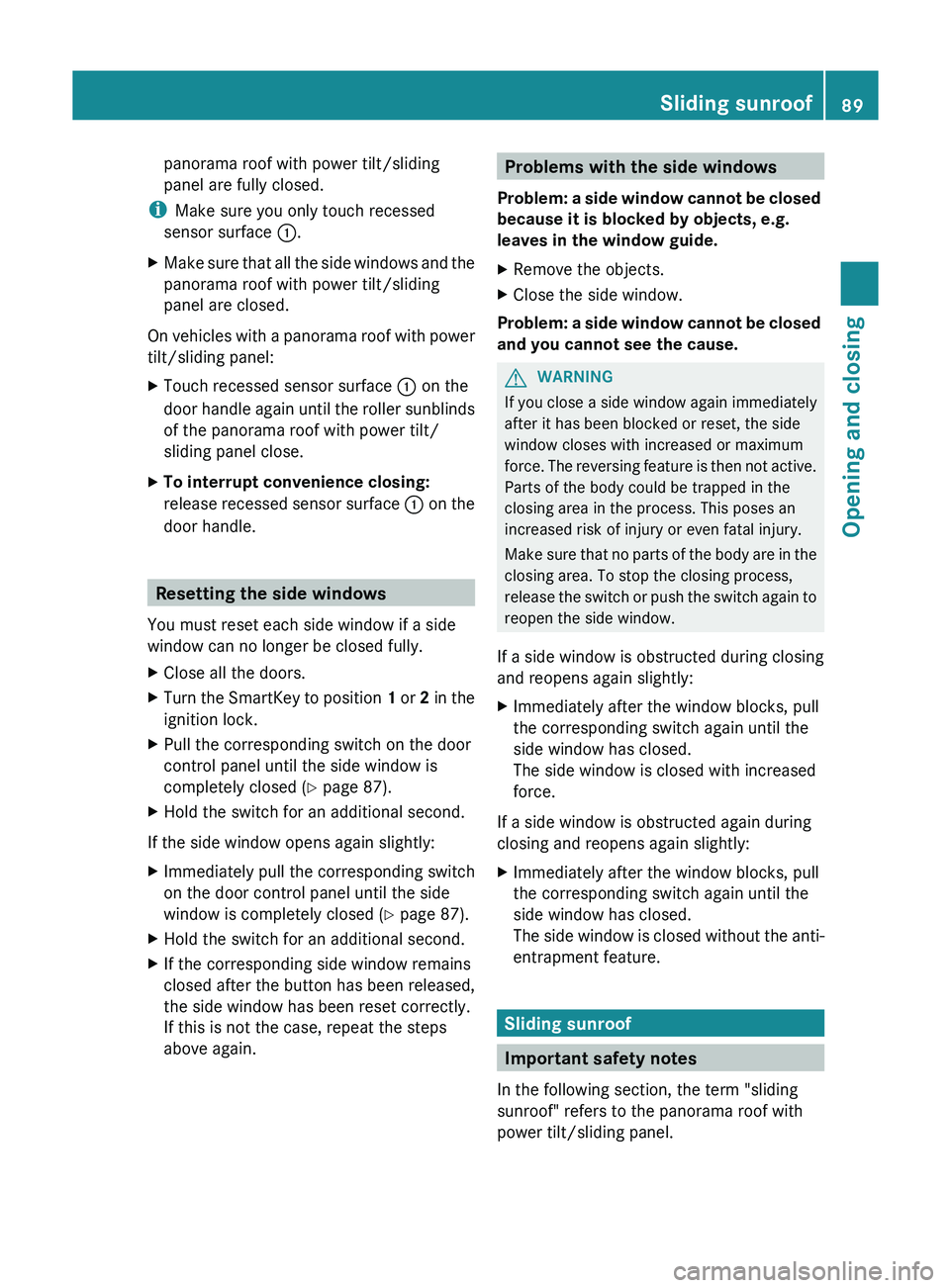
panorama roof with power tilt/sliding
panel are fully closed.
i Make sure you only touch recessed
sensor surface 0043.
X Make sure that all the side windows and the
panorama roof with power tilt/sliding
panel are closed.
On vehicles with a panorama roof with power
tilt/sliding panel:
X Touch recessed sensor surface 0043 on the
door handle again until the
roller sunblinds
of the panorama roof with power tilt/
sliding panel close.
X To interrupt convenience closing:
release recessed
sensor surface
0043
on the
door handle. Resetting the side windows
You must reset each side window if a side
window can no longer be closed fully.
X Close all the doors.
X Turn the SmartKey to position 1 or 2 in the
ignition lock.
X Pull the corresponding switch on the door
control panel until the side window is
completely closed
(Y page 87).
X Hold the switch for an additional second.
If the side window opens again slightly:
X Immediately pull the
corresponding switch
on the door control panel until the side
window is completely closed ( Y page 87).
X Hold the switch for an additional second.
X If the corresponding side window remains
closed after the button has been released,
the side window has been reset correctly.
If this is not the case, repeat the steps
above again. Problems with the side windows
Problem: a side window cannot
be closed
because it is blocked by objects, e.g.
leaves in the window guide.
X Remove the objects.
X Close the side window.
Problem: a side window cannot be closed
and you cannot see the cause. G
WARNING
If you close a side window again immediately
after it has been blocked or reset, the side
window closes with increased or maximum
force. The reversing feature is
then not active.
Parts of the body could be trapped in the
closing area in the process. This poses an
increased risk of injury or even fatal injury.
Make sure that no parts of the body are in the
closing area. To stop the closing process,
release the switch or push the switch again to
reopen the side window.
If a side window is obstructed during closing
and reopens again slightly:
X Immediately after the window blocks, pull
the corresponding switch again until the
side window has closed.
The side window is closed with increased
force.
If a side window is obstructed again during
closing and reopens again slightly:
X Immediately after the window blocks, pull
the corresponding switch again until the
side window has closed.
The side window is closed
without the anti-
entrapment feature. Sliding sunroof
Important safety notes
In the following section, the term "sliding
sunroof" refers to the panorama roof with
power tilt/sliding panel. Sliding sunroof
89
Opening and closing Z
Page 92 of 380
G
WARNING
While opening and closing the sliding sunroof,
body parts in close proximity could become
trapped. There is a risk of injury.
Make sure that no body parts are in close
proximity during the opening and closing
procedures.
If somebody becomes trapped:
R release the switch immediately, or
R during automatic operation, push the
switch briefly in any direction
The opening or closing procedure will be
stopped. G
WARNING
If children operate the sliding sunroof they
could become trapped, particularly if
they are
left unsupervised. There is a risk of injury.
When leaving the vehicle, always take the
SmartKey with you and lock the vehicle. Never
leave children unsupervised in the vehicle.
! Only open the sliding sunroof if it is free
of snow and ice. Otherwise, malfunctions
may occur.
Do not allow anything to protrude from the
sliding sunroof. Otherwise, the seals could
be damaged.
! The weather can change abruptly. It could
start to rain or snow. Make sure that the
sliding sunroof is closed when you leave the
vehicle. The vehicle electronics can be
damaged if water enters the vehicle
interior.
i Resonance noises can occur in addition
to the usual airflow noises when the sliding
sunroof is open. They are caused by minor
pressure fluctuations in the vehicle interior.
Change the position of the sliding sunroof
or open a side window slightly to reduce or
eliminate these noises. Sliding sunroof reversing feature
The sliding sunroof is equipped with an
automatic reversing feature. If a solid object
blocks or restricts the sliding sunroof during
the closing process, the sliding
sunroof opens
again automatically. However, the automatic
reversing feature is only an aid and does not
relieve you of the responsibility of paying
attention when closing the sliding sunroof. G
WARNING
The reversing feature does not react:
R to soft, light and thin objects, e.g. small
fingers
R over the last 4 mm
of the closing movement
R during resetting
R when closing the sliding sunroof again
manually immediately after automatic
reversing
This means that the reversing feature cannot
prevent someone being trapped in these
situations. There is a risk of injury.
Make sure that no body parts are in close
proximity during the closing procedure.
If somebody becomes trapped:
R release the switch immediately, or
R during automatic operation, push the
switch briefly in any direction
The closing process is stopped. 90
Sliding sunroof
Opening and closing
Page 93 of 380
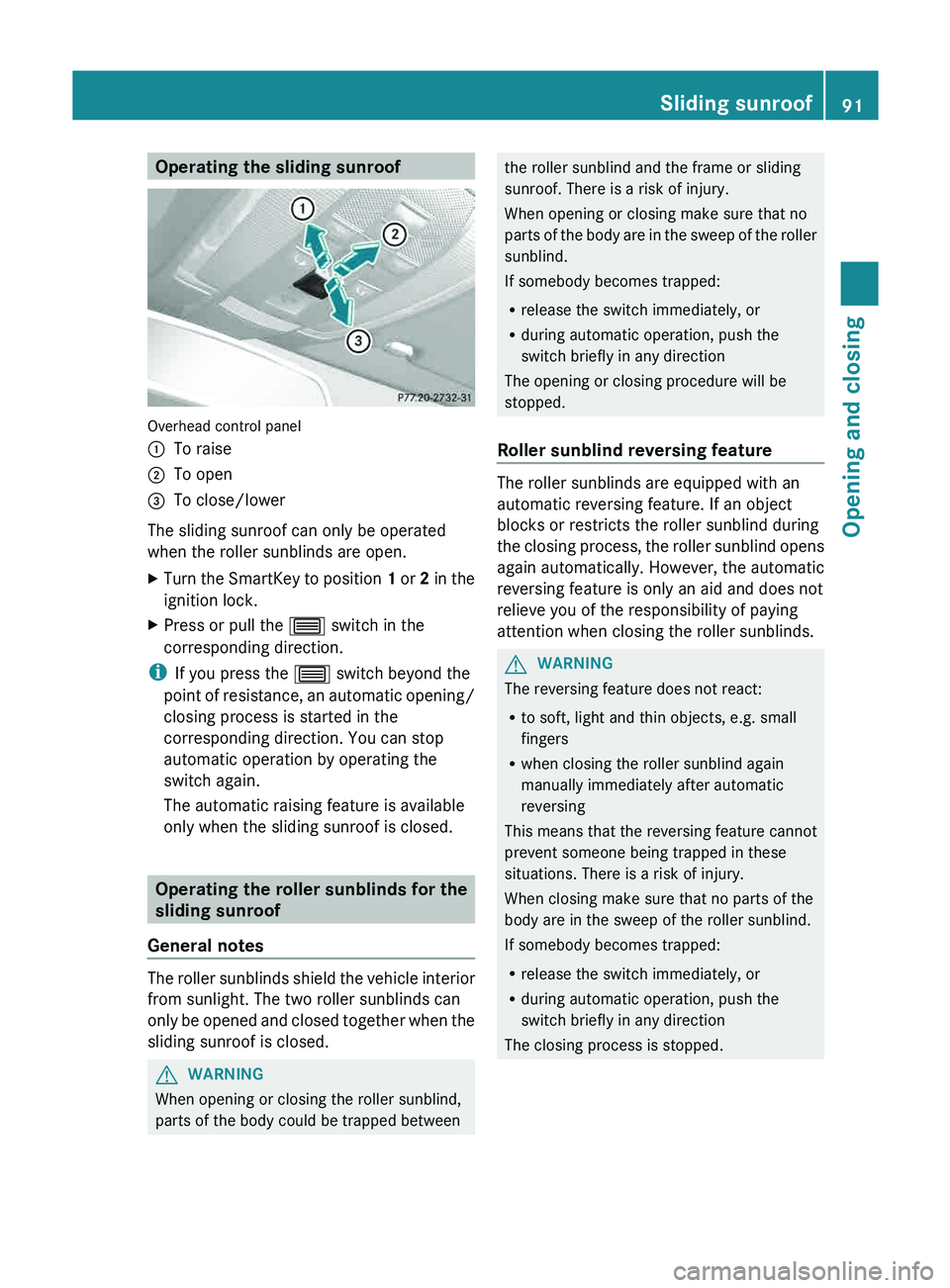
Operating the sliding sunroof
Overhead control panel
0043
To raise
0044 To open
0087 To close/lower
The sliding sunroof can only be operated
when the roller sunblinds are open.
X Turn the SmartKey to position 1 or
2 in the
ignition lock.
X Press or pull the 0057
switch in the
corresponding direction.
i If you press the 0057 switch beyond the
point of resistance, an automatic
opening/
closing process is started in the
corresponding direction. You can stop
automatic operation by operating the
switch again.
The automatic raising feature is available
only when the sliding sunroof is closed. Operating the roller sunblinds for the
sliding sunroof
General notes The roller sunblinds shield the vehicle interior
from sunlight. The two roller sunblinds can
only be opened and closed
together when the
sliding sunroof is closed. G
WARNING
When opening or closing the roller sunblind,
parts of the body could be trapped between the roller sunblind and the frame or sliding
sunroof. There is a risk of injury.
When opening or closing make sure that no
parts of the body
are
in the sweep of the roller
sunblind.
If somebody becomes trapped:
R release the switch immediately, or
R during automatic operation, push the
switch briefly in any direction
The opening or closing procedure will be
stopped.
Roller sunblind reversing feature The roller sunblinds are equipped with an
automatic reversing feature. If an object
blocks or restricts the roller sunblind during
the closing process, the
roller
sunblind opens
again automatically. However, the automatic
reversing feature is only an aid and does not
relieve you of the responsibility of paying
attention when closing the roller sunblinds. G
WARNING
The reversing feature does not react:
R to soft, light and thin objects, e.g. small
fingers
R when closing the roller sunblind again
manually immediately after automatic
reversing
This means that the reversing feature cannot
prevent someone being trapped in these
situations. There is a risk of injury.
When closing make sure that no parts of the
body are in the sweep of the roller sunblind.
If somebody becomes trapped:
R release the switch immediately, or
R during automatic operation, push the
switch briefly in any direction
The closing process is stopped. Sliding sunroof
91
Opening and closing Z
Page 94 of 380
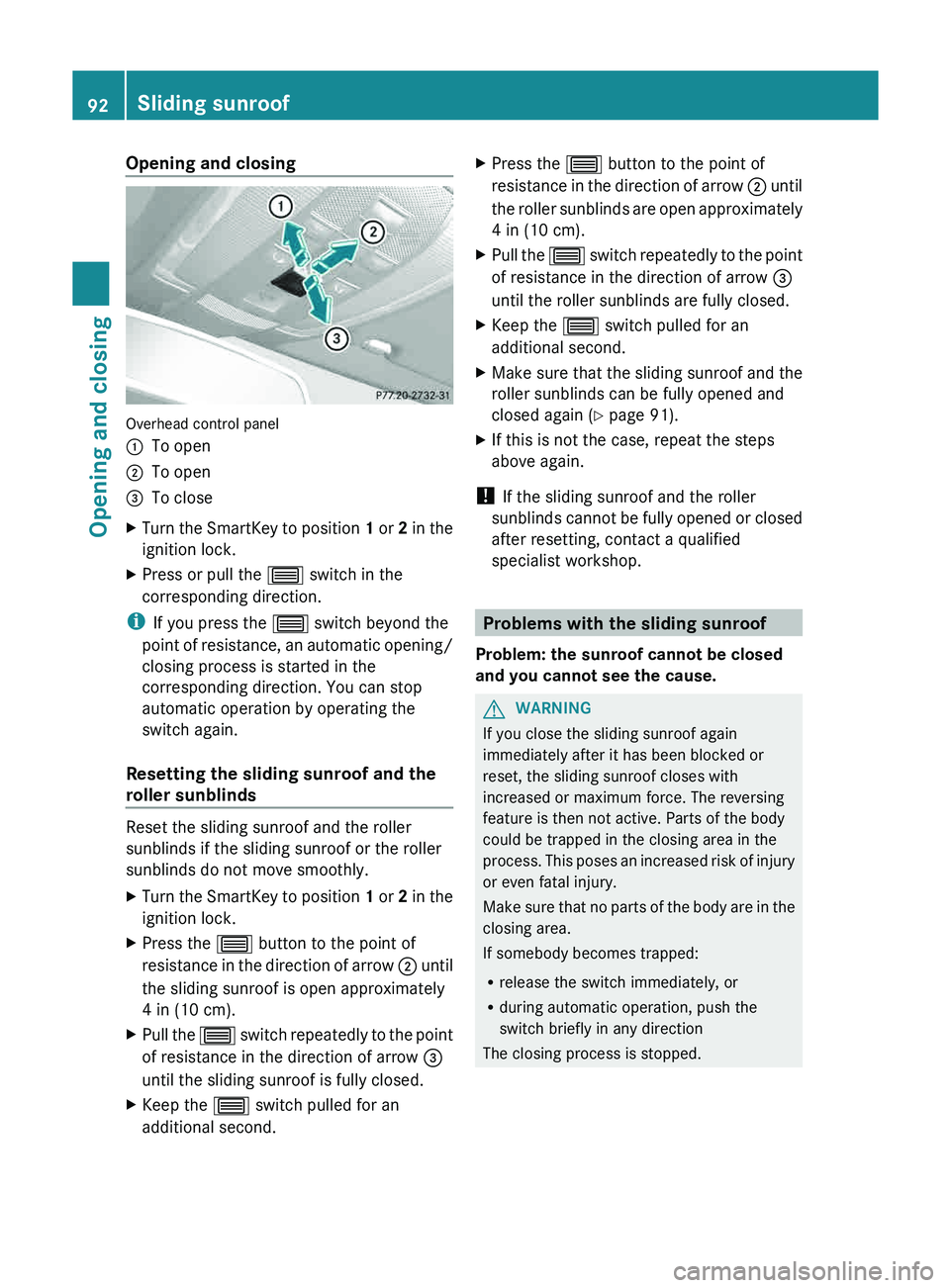
Opening and closing
Overhead control panel
0043
To open
0044 To open
0087 To close
X Turn the SmartKey to position 1 or
2 in the
ignition lock.
X Press or pull the 0057
switch in the
corresponding direction.
i If you press the 0057 switch beyond the
point of resistance, an automatic
opening/
closing process is started in the
corresponding direction. You can stop
automatic operation by operating the
switch again.
Resetting the sliding sunroof and the
roller sunblinds Reset the sliding sunroof and the roller
sunblinds if the sliding sunroof or the roller
sunblinds do not move smoothly.
X
Turn the SmartKey to position 1 or 2 in the
ignition lock.
X Press the
0057 button to the point of
resistance in the direction of
arrow 0044 until
the sliding sunroof is open approximately
4 in (10 cm).
X Pull the 0057 switch repeatedly to the
point
of resistance in the direction of arrow 0087
until the sliding sunroof is fully closed.
X Keep the 0057 switch pulled for an
additional second. X
Press the 0057 button to the point of
resistance in the direction of
arrow 0044 until
the roller sunblinds are open approximately
4 in (10 cm).
X Pull the 0057 switch
repeatedly to
the
point
of resistance in the direction of arrow 0087
until the roller sunblinds are fully closed.
X Keep the 0057 switch pulled for an
additional second.
X Make sure that the sliding sunroof and the
roller sunblinds can be fully opened and
closed again (
Y
page 91).
X If this is not the case, repeat the steps
above again.
! If the sliding sunroof and the roller
sunblinds cannot be fully
opened
or closed
after resetting, contact a qualified
specialist workshop. Problems with the sliding sunroof
Problem: the sunroof cannot be closed
and you cannot see the cause. G
WARNING
If you close the sliding sunroof again
immediately after it has been blocked or
reset, the sliding sunroof closes with
increased or maximum force. The reversing
feature is then not active. Parts of the body
could be trapped in the closing area in the
process. This poses an increased
risk of injury
or even fatal injury.
Make sure that no parts of the body are in the
closing area.
If somebody becomes trapped:
R release the switch immediately, or
R during automatic operation, push the
switch briefly in any direction
The closing process is stopped. 92
Sliding sunroof
Opening and closing
Page 99 of 380
settings with the memory function
(Y page 106).
Seats
Important safety notes
G
WARNING
The seats can still be adjusted when there is
no key in the ignition lock. For this reason,
children should never be left unsupervised in
the vehicle. They could otherwise become
trapped when adjusting the seat. G
WARNING
Make sure that the back of your head is
supported at eye level by the central area of
the head restraint. If your head is not
supported correctly by the head
restraint, you
could suffer a severe neck injury in the event
of an accident. Never drive if the head
restraints are not engaged and set correctly. G
WARNING
In order to avoid possible loss of vehicle
control, all seat, head restraint, steering
wheel and rear view mirror adjustments, as
well as fastening of seat belts, must be done
before setting the vehicle in motion. G
WARNING
Do not adjust the driver's seat while driving.
Adjusting the seat while driving could cause
the driver to lose control of the vehicle.
Never travel in a moving
vehicle with the seat
backrest in an excessively reclined position as
this can be dangerous. You could slide under
the seat belt in a collision. If you slide under
it, the seat belt would apply force at the
abdomen or neck. This could cause serious or
fatal injuries. The seat backrest and seat belts
provide the best restraint when the wearer is
in a position that is as upright as possible and
seat belts are properly positioned on the
body. G
WARNING
Your seat belt must be adjusted so that you
can correctly fasten your seat belt.
Observe the following points:
R adjust the seat backrest until
your arms are
slightly angled when holding the steering
wheel.
R adjust the seat to a comfortable seating
position that still allows you to reach the
accelerator/brake pedal safely. The
position should be as far back as possible
with the driver still able to operate the
controls properly.
R adjust the head restraint so that it is as
close to the head as possible and the center
of the head restraint supports the back of
the head at eye level.
R never place hands under the seat or near
any moving parts while a seat is being
adjusted.
Failure to do so could result in an accident
and/or serious personal injury. G
WARNING
According to accident statistics, children are
safer when properly restrained on the rear
seats than on the front-passenger
seat. Thus,
we strongly recommend that children be
placed in the rear seat whenever possible.
Regardless of seating position, children 12
years old and under must be seated and
properly secured in an appropriately sized
child restraint system or booster seat
recommended for the size and weight of the
child. For additional information, see the
"Children in the vehicle" section.
A child's risk of serious or fatal injuries is
significantly increased if the child restraints
are not properly secured in the vehicle and/
or the child is not properly secured in the child
restraint. G
WARNING
For your protection, drive only with properly
positioned head restraints. Seats
97
Seats, steering wheel and mirrors
Z
Page 101 of 380
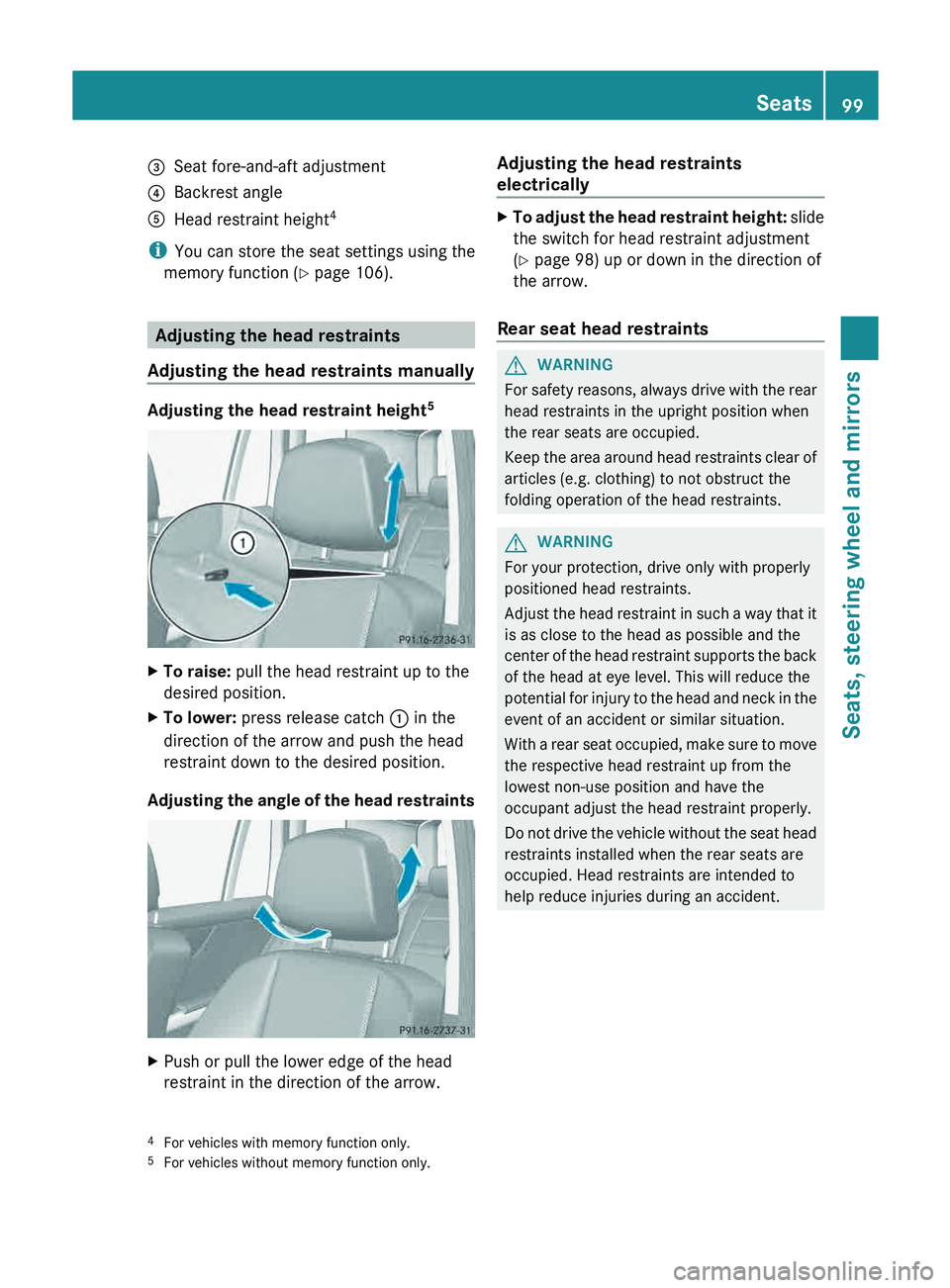
0087
Seat fore-and-aft adjustment
0085 Backrest angle
0083 Head restraint height 4
i You can store the seat settings using the
memory function ( Y page 106).Adjusting the head restraints
Adjusting the head restraints manually Adjusting the head restraint height
5X
To raise: pull the head restraint up to the
desired position.
X To lower: press release catch 0043 in the
direction of the arrow and push the head
restraint down to the desired position.
Adjusting the angle of the head restraints X
Push or pull the lower edge of the head
restraint in the direction of the arrow. Adjusting the head restraints
electrically X
To adjust the head restraint height: slide
the switch for head restraint adjustment
(Y page 98) up or down in the direction of
the arrow.
Rear seat head restraints G
WARNING
For safety reasons, always drive with the rear
head restraints in the upright position when
the rear seats are occupied.
Keep the area around head
restraints clear of
articles (e.g. clothing) to not obstruct the
folding operation of the head restraints. G
WARNING
For your protection, drive only with properly
positioned head restraints.
Adjust the head restraint in
such a way that it
is as close to the head as possible and the
center of the head restraint supports the back
of the head at eye level. This will reduce the
potential for injury to the head and neck in the
event of an accident or similar situation.
With a rear seat occupied, make sure to move
the respective head restraint up from the
lowest non-use position and have the
occupant adjust the head restraint properly.
Do not drive the vehicle without the seat head
restraints installed when the rear seats are
occupied. Head restraints are intended to
help reduce injuries during an accident.
4 For vehicles with memory function only.
5 For vehicles without memory function only. Seats
99
Seats, steering wheel and mirrors Z
Page 102 of 380
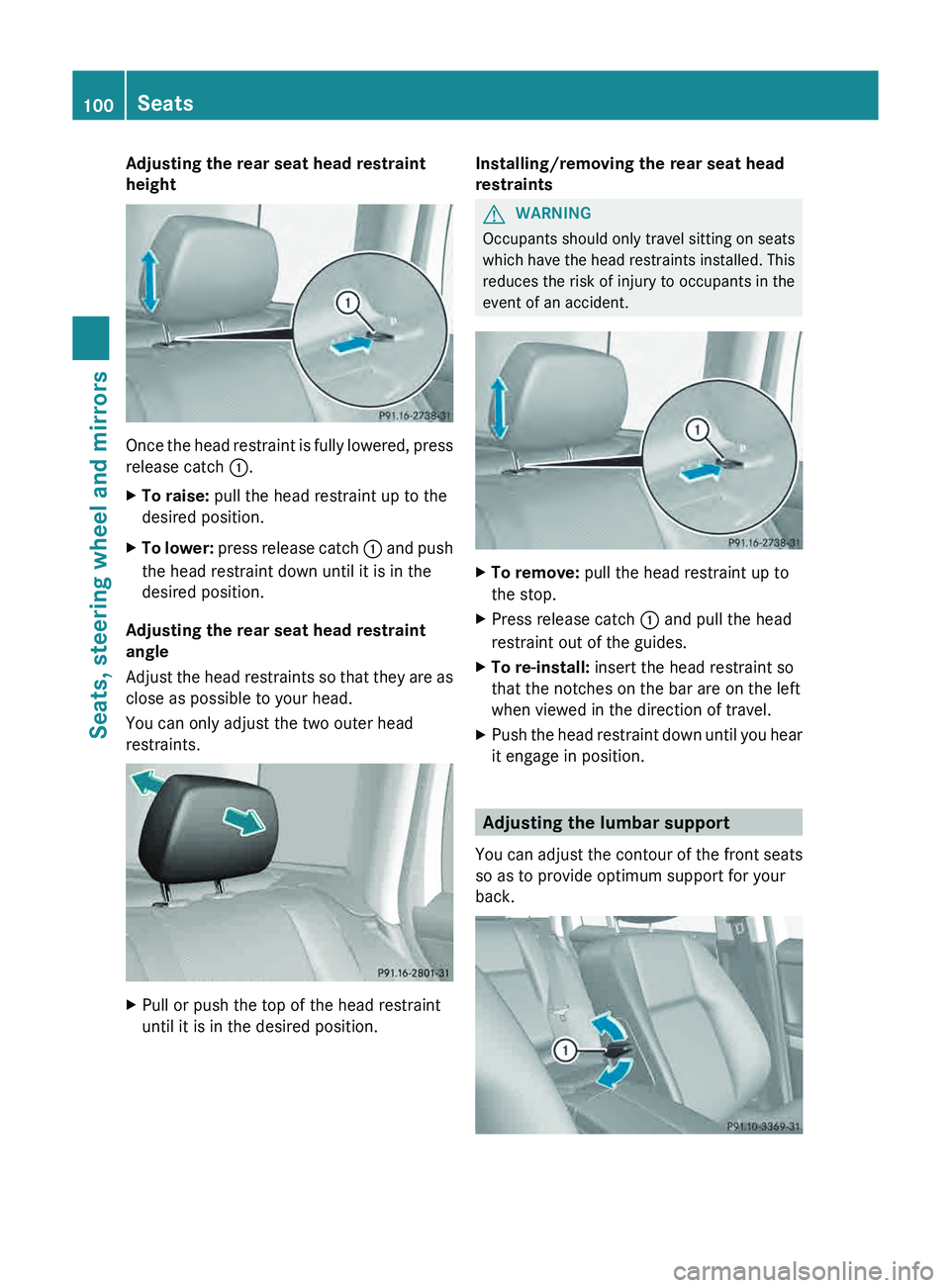
Adjusting the rear seat head restraint
height
Once the head restraint is fully lowered, press
release catch 0043.
X
To raise: pull the head restraint up to the
desired position.
X To lower: press release catch 0043 and push
the head restraint down until it is in the
desired position.
Adjusting the rear seat head restraint
angle
Adjust the
head restraints
so
that they are as
close as possible to your head.
You can only adjust the two outer head
restraints. X
Pull or push the top of the head restraint
until it is in the desired position. Installing/removing the rear seat head
restraints G
WARNING
Occupants should only travel sitting on seats
which have the head restraints
installed. This
reduces the risk of injury to occupants in the
event of an accident. X
To remove: pull the head restraint up to
the stop.
X Press release catch 0043 and pull the head
restraint out of the guides.
X To re-install: insert the head restraint so
that the notches on the bar are on the left
when viewed in the direction of travel.
X Push the head restraint down until you hear
it engage in position. Adjusting the lumbar support
You can
adjust the
contour
of the front seats
so as to provide optimum support for your
back. 100
Seats
Seats, steering wheel and mirrors
Page 103 of 380
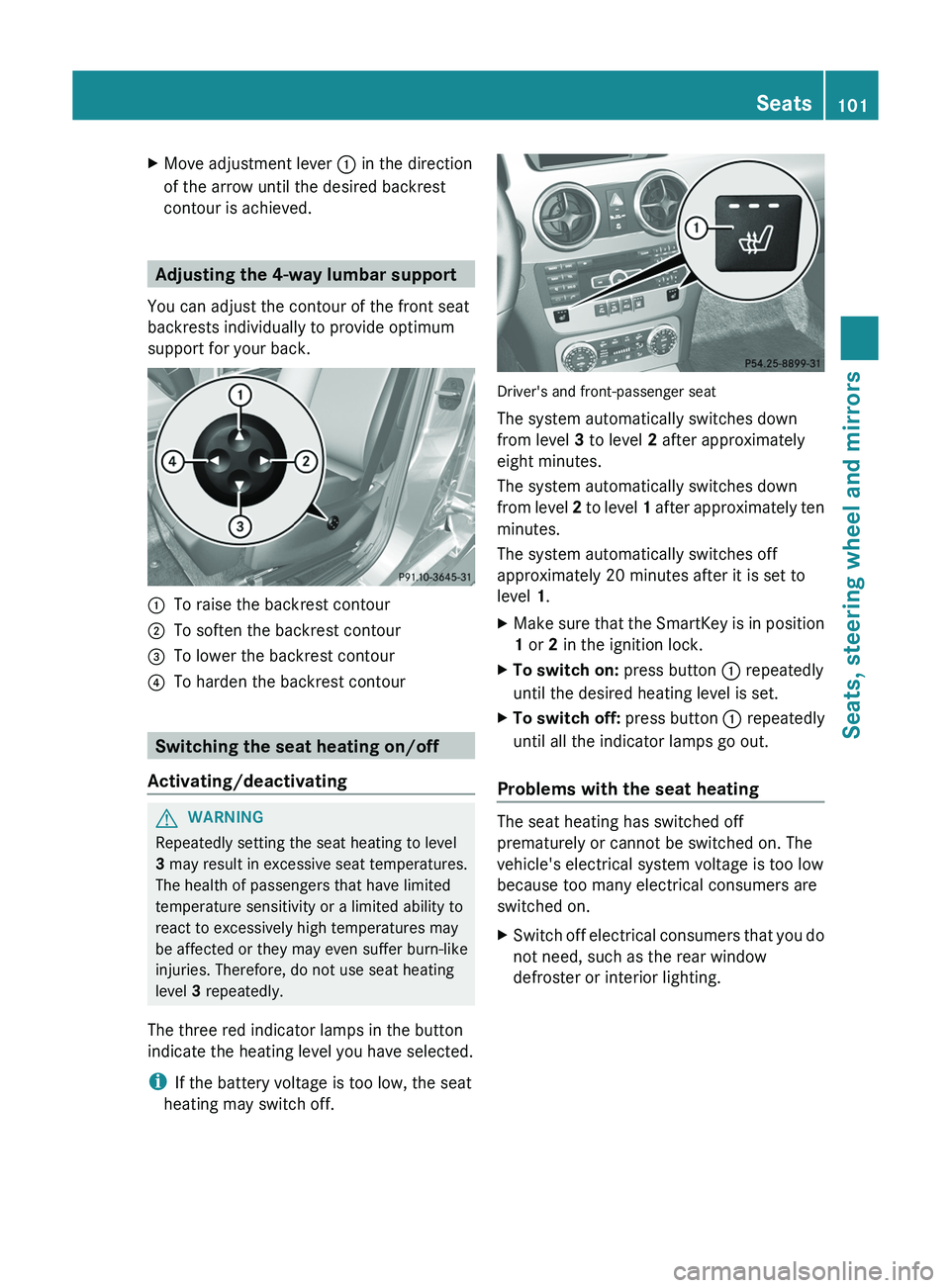
X
Move adjustment lever 0043 in the direction
of the arrow until the desired backrest
contour is achieved. Adjusting the 4-way lumbar support
You can adjust the contour of the front seat
backrests individually to provide optimum
support for your back. 0043
To raise the backrest contour
0044 To soften the backrest contour
0087 To lower the backrest contour
0085 To harden the backrest contour Switching the seat heating on/off
Activating/deactivating G
WARNING
Repeatedly setting the seat heating to level
3 may result in excessive seat temperatures.
The health of passengers that have limited
temperature sensitivity or a limited ability to
react to excessively high temperatures may
be affected or they may even suffer burn-like
injuries. Therefore, do not use seat heating
level 3 repeatedly.
The three red indicator lamps in the button
indicate the heating level you have selected.
i If the battery voltage is too low, the seat
heating may switch off. Driver's and front-passenger seat
The system automatically switches down
from level 3 to level 2 after approximately
eight minutes.
The system automatically switches down
from level
2 to level 1
after approximately ten
minutes.
The system automatically switches off
approximately 20 minutes after it is set to
level 1.
X Make sure that the SmartKey is in position
1 or 2 in the ignition lock.
X To switch on: press button 0043 repeatedly
until the desired heating level is set.
X To switch off: press button 0043 repeatedly
until all the indicator lamps go out.
Problems with the seat heating The seat heating has switched off
prematurely or cannot be switched on. The
vehicle's electrical system voltage is too low
because too many electrical consumers are
switched on.
X
Switch off electrical consumers that you do
not need, such as the rear window
defroster or interior lighting. Seats
101
Seats, steering wheel and mirrors Z