key MERCEDES-BENZ GLK-CLASS SUV 2014 Repair Manual
[x] Cancel search | Manufacturer: MERCEDES-BENZ, Model Year: 2014, Model line: GLK-CLASS SUV, Model: MERCEDES-BENZ GLK-CLASS SUV 2014Pages: 384, PDF Size: 48.23 MB
Page 138 of 384
Setting the temperature
Dual-zone automatic climate control Different temperatures can be set for the
driver's and front-passenger sides.
X Turn the SmartKey to position 2in the
ignition lock (Y page 145).
X To increase/reduce: turn control:or
B clockwise or counter-clockwise
(Y page 129).
Only change the temperature setting in
small increments. Start at 72 ‡ (22 †).
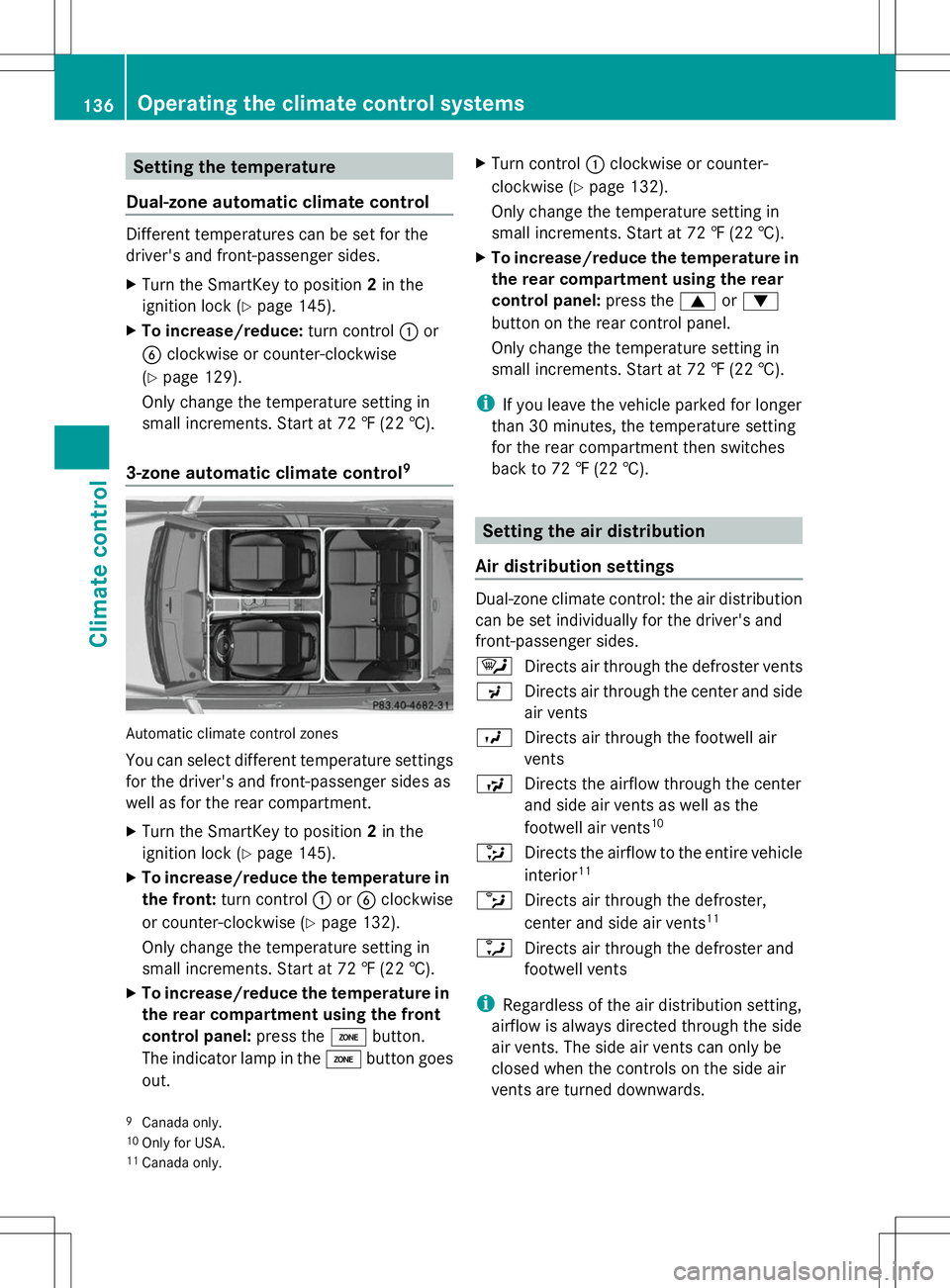
3-zone automatic climate control 9Automatic climate control zones
You can select different temperature settings
for the driver's and front-passenger sides as
well as for the rear compartment.
X Turn the SmartKey to position 2in the
ignition lock (Y page 145).
X To increase/reduce the temperature in
the front: turn control :orB clockwise
or counter-clockwise (Y page 132).
Only change the temperature setting in
small increments. Start at 72 ‡ (22 †).
X To increase/reduce the temperature in
the rear compartment using the front
control panel: press theábutton.
The indicator lamp in the ábutton goes
out. X
Turn control :clockwise or counter-
clockwise (Y page 132).
Only change the temperature setting in
small increments. Start at 72 ‡ (22 †).
X To increase/reduce the temperature in
the rear compartment using the rear
control panel: press the9or:
button on the rear control panel.
Only change the temperature setting in
small increments. Start at 72 ‡ (22 †).
i If you leave the vehicle parked for longer
than 30 minutes, the temperature setting
for the rear compartment then switches
back to 72 ‡ (22 †). Setting the air distribution
Air distribution settings Dual-zone climate control: the air distribution
can be set individually for the driver's and
front-passenger sides.
¯
Directs air through the defroster vents
P Directs air through the center and side
air vents
O Directs air through the footwell air
vents
S Directs the airflow through the center
and side air vents as well as the
footwell air vents 10
_ Directs the airflow to the entire vehicle
interior 11
b Directs air through the defroster,
center and side air vents 11
a Directs air through the defroster and
footwell vents
i Regardless of the air distribution setting,
airflow is always directed through the side
air vents. The side air vents can only be
closed when the controls on the side air
vents are turned downwards.
9 Canada only.
10 Only for USA.
11 Canada only. 136
Operating the climate control systemsClimate control
Page 139 of 384
Adjusting
X
Turn the SmartKey to position 2in the
ignition lock (Y page 145).
X Press the _button repeatedly until the
desired symbol appears in the display.
The indicator lamp in the Ãbutton goes
out. Automatic control is deactivated and
the air distribution is controlled according
to the selected setting. Setting the airflow
X Turn the SmartKey to position 2in the
ignition lock (Y page 145).
X To increase/reduce: press theKor
I button.
i You can use 3-zone automatic climate
control to set the airflow in the rear
compartment separately.
If the battery is not sufficiently charged,
blower output may be reduced. As soon as
the battery is sufficiently charged, full blower
output will be available. Switching the ZONE function on/off
This function is only available in vehicles for
Canada.
X To activate: press theábutton.
The indicator lamp in the ábutton lights
up.
Dual-zone automatic climate control: the
temperature setting for the driver's side is
not adopted for the front-passenger side.
3-zone automatic climate control: the
temperature setting for the driver's side is
not adopted for the front-passenger side
and the rear compartment.
When the buttons for temperature, airflow or
air distribution are pressed, the temperature
setting on the driver's side is not adopted for
the other climate control zones. X
To deactivate: press theábutton.
The indicator lamp in the ábutton goes
out.
Dual-zone automatic climate control: the
temperature setting for the driver's side is
adopted for the front-passenger side.
3-zone automatic climate control: the
temperature setting for the driver's side is
adopted for the front-passenger side and
the rear compartment. Defrosting the windshield
You can use this function to defrost the
windshield or to defrost the inside of the
windshield and the side windows.
i You should only select the "windshield
defrosting" function until the windshield is
clear again.
X Turn the SmartKey to position 2in the
ignition lock (Y page 145).
X To activate: press the¬button.
The indicator lamp in the ¬button lights
up.
The climate control system switches to the
following functions:
R high airflow
R high temperature
R air distribution to the windshield and
front side windows
R air-recirculation mode off
If the battery is not sufficiently charged,
blower output may be reduced. As soon as
the battery is sufficiently charged, full blower
output will be available.
X To deactivate: press the¬button.
The indicator lamp in the ¬button goes
out. The previously selected settings are
restored. Air-recirculation mode remains
deactivated.
or Operating the climate control systems
137Climate control
Page 140 of 384
X
Press the Ãbutton.
The indicator lamp in the ¬button goes
out. Airflow and air distribution are set to
automatic mode.
or
X Turn temperature control :orB
clockwise or counter-clockwise
(Y page 129), (Y page 132).
or
X Press the KorI button. MAX COOL maximum cooling
The MAX COOL function is only available in
vehicles for the USA.
MAX COOL is only operational when the
engine is running.
When you activate MAX COOL, climate
control switches to the following functions:
R maximum cooling
R maximum airflow
R air-recirculation mode on
X To activate: press theÙbutton.
The indicator lamp in the button lights up.
X To activate: press theÙbutton again.
The indicator lamp goes out. The previously
selected settings are restored. Defrosting the windows
Windows fogged up on the inside X
Activate the ¿cooling with air
dehumidification function.
X Activate automatic mode Ã.
X Adjust the side air vents so that the warmed
air is directed to the side windows.
X If the windows continue to fog up, activate
the ¬ "Windshield defrosting" function.
i You should only select this setting until
the windshield is clear again. Windows fogged up on the outside X
Activate the windshield wipers.
X Press the _button repeatedly until the
O orP symbol appears in the
display.
X Adjust the side air vents so that no air is
directed to the side windows. Rear window defroster
General notes The rear window defroster has a high current
draw. You should therefore switch it off as
soon as the rear window is clear. Otherwise,
the rear window defroster switches off
automatically after several minutes.
If the battery voltage is too low, the rear
window defroster may switch off.
Activating/deactivating
X
Turn the SmartKey to position 2in the
ignition lock (Y page 145).
X Press the ¤button.
The indicator lamp in the ¤button lights
up or goes out. 138
Operating the climate control systemsClimate control
Page 141 of 384
Problems with the rear window defroster
Problem Possible causes/consequences and
M
MSolutions The rear window
defroster has
deactivated
prematurely or cannot
be activated. The battery has not been sufficiently charged.
X
Switch off any consumers that are not required, e.g. reading
lamps, interior lighting or the seat heating.
When the battery is sufficiently charged, the rear window
defroster can be activated again. Activating/deactivating air-
recirculation mode
General notes You can deactivate the flow of fresh air if
unpleasant odors are entering the vehicle
from outside. The air already inside the
vehicle will then be recirculated.
If you switch on air-recirculation mode, the
windows can fog up more quickly, in
particular at low temperatures. Only use air-
recirculation mode briefly to prevent the
windows from fogging up.
The operation of air-recirculation mode is the
same for all control panels.
Activating/deactivating X
Turn the SmartKey to position 2in the
ignition lock (Y page 145).
X To activate: press thegbutton.
The indicator lamp in the gbutton lights
up.
i In the event of high pollution levels 12
or at
high outside temperatures, air-
recirculation mode is automatically
activated. When air-recirculation mode is
activated automatically, the indicator lamp
in the gbutton is not lit.
Outside air is added after about
30 minutes. X
To deactivate: press thegbutton.
The indicator lamp in the gbutton goes
out.
i Air-recirculation mode deactivates
automatically:
R after approximately five minutes at
outside temperatures below
approximately 41 ‡ (5 †)
R after approximately five minutes if
cooling with air dehumidification is
deactivated
R after approximately 30 minutes at
outside temperatures above
approximately 41 ‡(5 †) if the "Cooling
with air dehumidification" function is
activated Activating/deactivating the residual
heat function
General notes The residual heat function is only available in
vehicles for Canada with automatic climate
control.
It is possible to make use of the residual heat
of the engine to continue heating the vehicle
for approximately 30 minutes after the engine
has been switched off. The heating time
depends on the temperature that has been
set.
i
The blower will run at a low speed
regardless of the airflow setting.
12 3-zone automatic climate control only. Operating the climate control systems
139Climate control
Page 142 of 384
i
If you activate the residual heat function
at high temperatures, only the ventilation
will be activated. The blower runs at
medium speed.
Activating/deactivating X
Turn the SmartKey to position 0in the
ignition lock (Y page 145) or remove it.
X To activate: press theÌbutton.
The indicator lamp in the Ìbutton lights
up.
i If the residual heat function is activated,
the windows may fog up on the inside.
X To deactivate: press theÌbutton.
The indicator lamp in the Ìbutton goes
out.
i Residual heat is deactivated
automatically:
R after approximately 30 minutes
R when the ignition is switched on
R if the battery voltage drops Setting the air vents
Important safety notes
G
WARNING
Very hot or very cold air can flow from the air
vents. This could result in burns or frostbite in
the immediate vicinity of the air vents. There
is a risk of injury.
Make sure that all vehicle occupants always
maintain a sufficient distance to the air
outlets. If necessary, redirect the airflow to
another area of the vehicle interior.
In order to ensure the direct flow of fresh air
through the air vents into the vehicle interior,
please observe the following notes:
R keep the air inlet between the windshield
and the hood free of blockages, such as ice,
snow or leaves.
R never cover the air vents or air intake grilles
in the vehicle interior. i
For virtually draft-free ventilation, adjust
the sliders of the air vents to the center
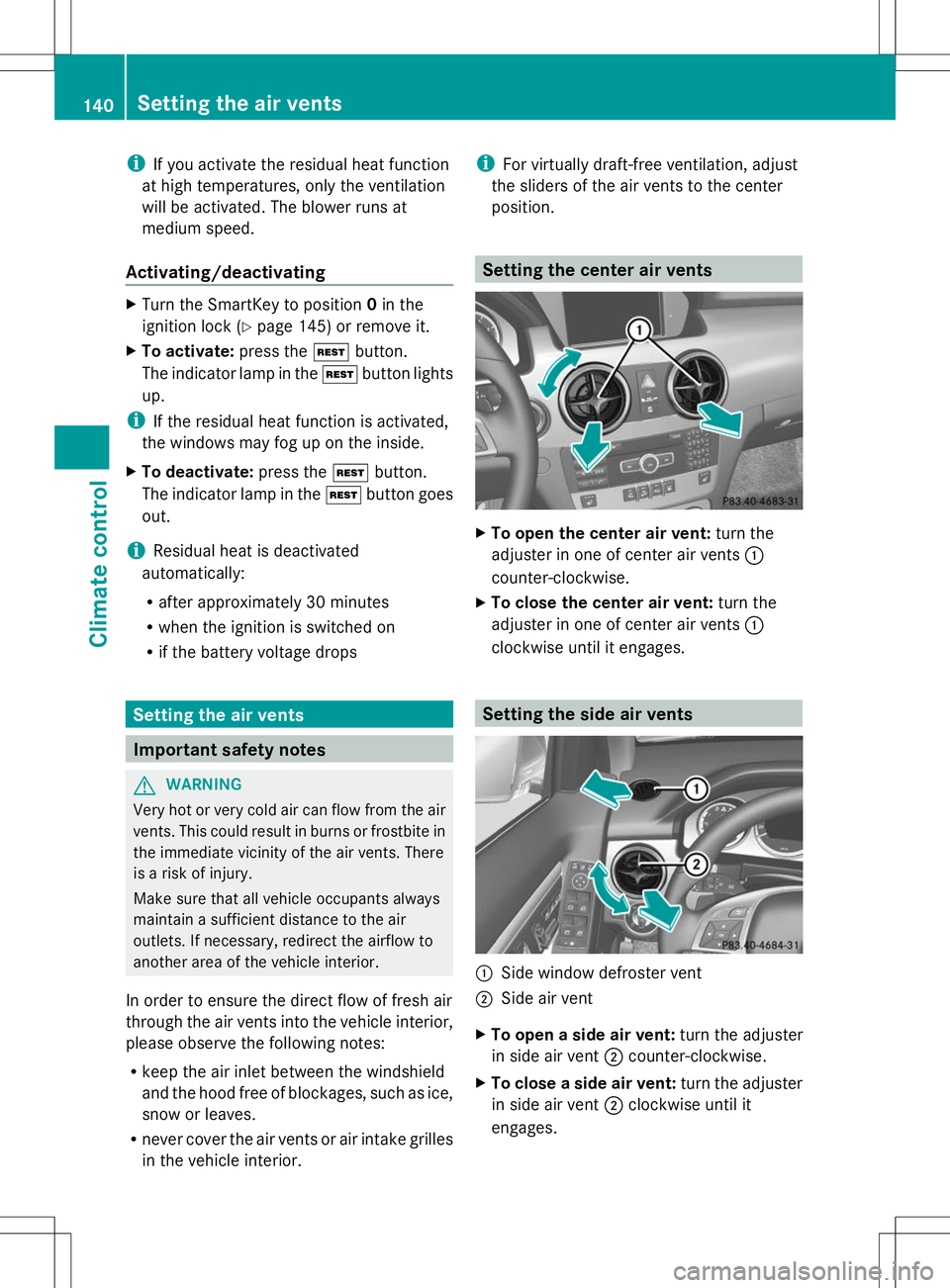
position. Setting the center air vents
X
To open the center air vent: turn the
adjuster in one of center air vents :
counter-clockwise.
X To close the center air vent: turn the
adjuster in one of center air vents :
clockwise until it engages. Setting the side air vents
:
Side window defroster vent
; Side air vent
X To open a side air vent: turn the adjuster
in side air vent ;counter-clockwise.
X To close a side air vent: turn the adjuster
in side air vent ;clockwise until it
engages. 140
Setting the air ventsClimate control
Page 147 of 384
Do not switch off the ignition while driving.
G
WARNING
If the parking brake has not been fully
released when driving, the parking brake can:
R overheat and cause a fire
R lose its hold function.
There is a risk of fire and an accident. Release
the parking brake fully before driving off.
! Warm up the engine quickly. Do not use
the engine's full performance until it has
reached operating temperature.
Only shift the automatic transmission to
the desired drive position when the vehicle
is stationary.
Where possible, avoid spinning the drive
wheels when pulling away on slippery
roads. You could otherwise damage the
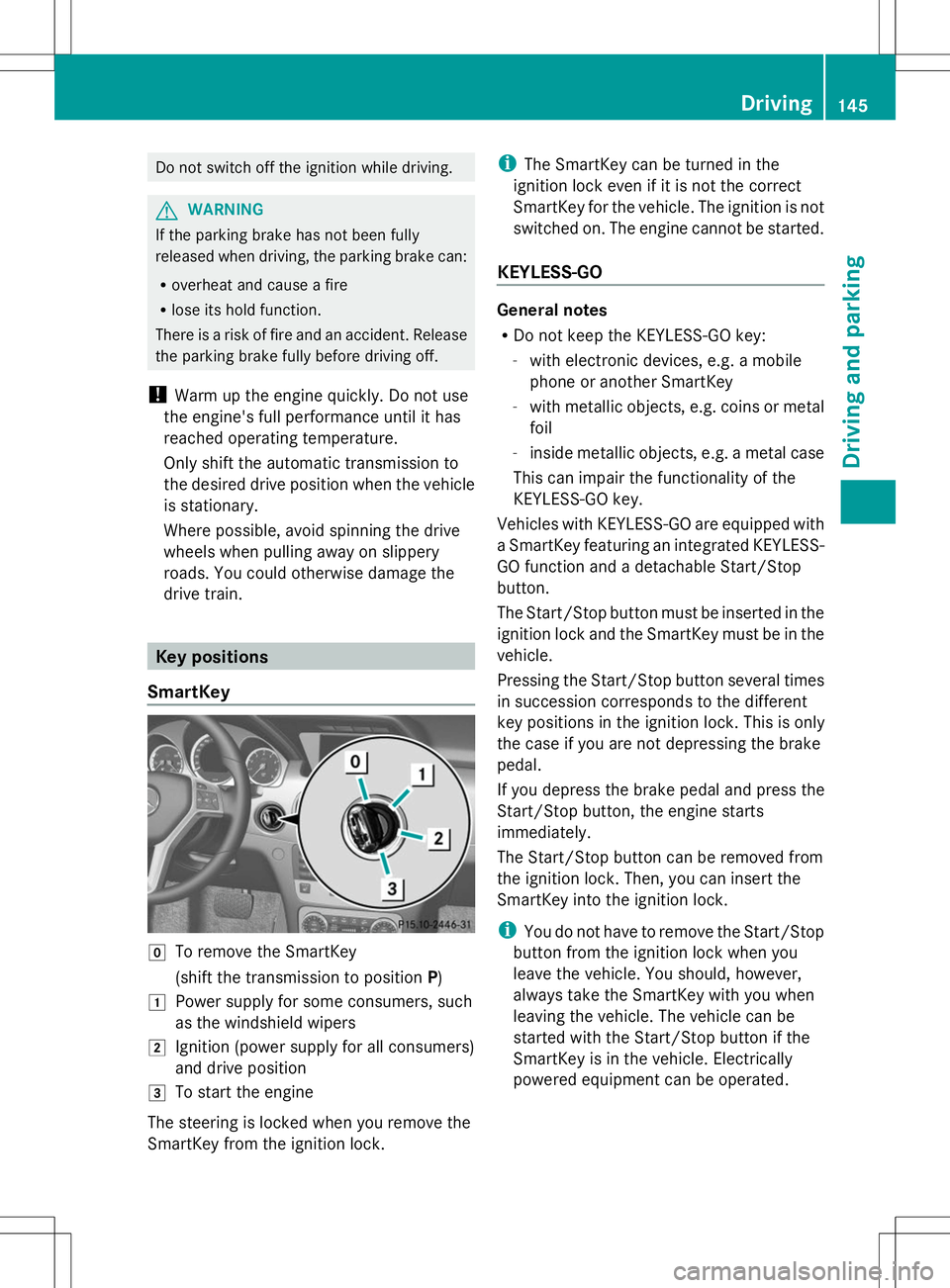
drive train. Key positions
SmartKey g
To remove the SmartKey
(shift the transmission to position P)
1 Power supply for some consumers, such
as the windshield wipers
2 Ignition (power supply for all consumers)
and drive position
3 To start the engine
The steering is locked when you remove the
SmartKey from the ignition lock. i
The SmartKey can be turned in the
ignition lock even if it is not the correct
SmartKey for the vehicle. The ignition is not
switched on. The engine cannot be started.
KEYLESS-GO General notes
R
Do not keep the KEYLESS-GO key:
-with electronic devices, e.g. a mobile
phone or another SmartKey
- with metallic objects, e.g. coins or metal
foil
- inside metallic objects, e.g. a metal case
This can impair the functionality of the
KEYLESS-GO key.
Vehicles with KEYLESS-GO are equipped with
a SmartKey featuring an integrated KEYLESS-
GO function and a detachable Start/Stop
button.
The Start/Stop button must be inserted in the
ignition lock and the SmartKey must be in the
vehicle.
Pressing the Start/Stop button several times
in succession corresponds to the different
key positions in the ignition lock. This is only
the case if you are not depressing the brake
pedal.
If you depress the brake pedal and press the
Start/Stop button, the engine starts
immediately.
The Start/Stop button can be removed from
the ignition lock. Then, you can insert the
SmartKey into the ignition lock.
i You do not have to remove the Start/Stop
button from the ignition lock when you
leave the vehicle. You should, however,
always take the SmartKey with you when
leaving the vehicle. The vehicle can be
started with the Start/Stop button if the
SmartKey is in the vehicle. Electrically
powered equipment can be operated. Driving
145Driving an d parking Z
Page 148 of 384
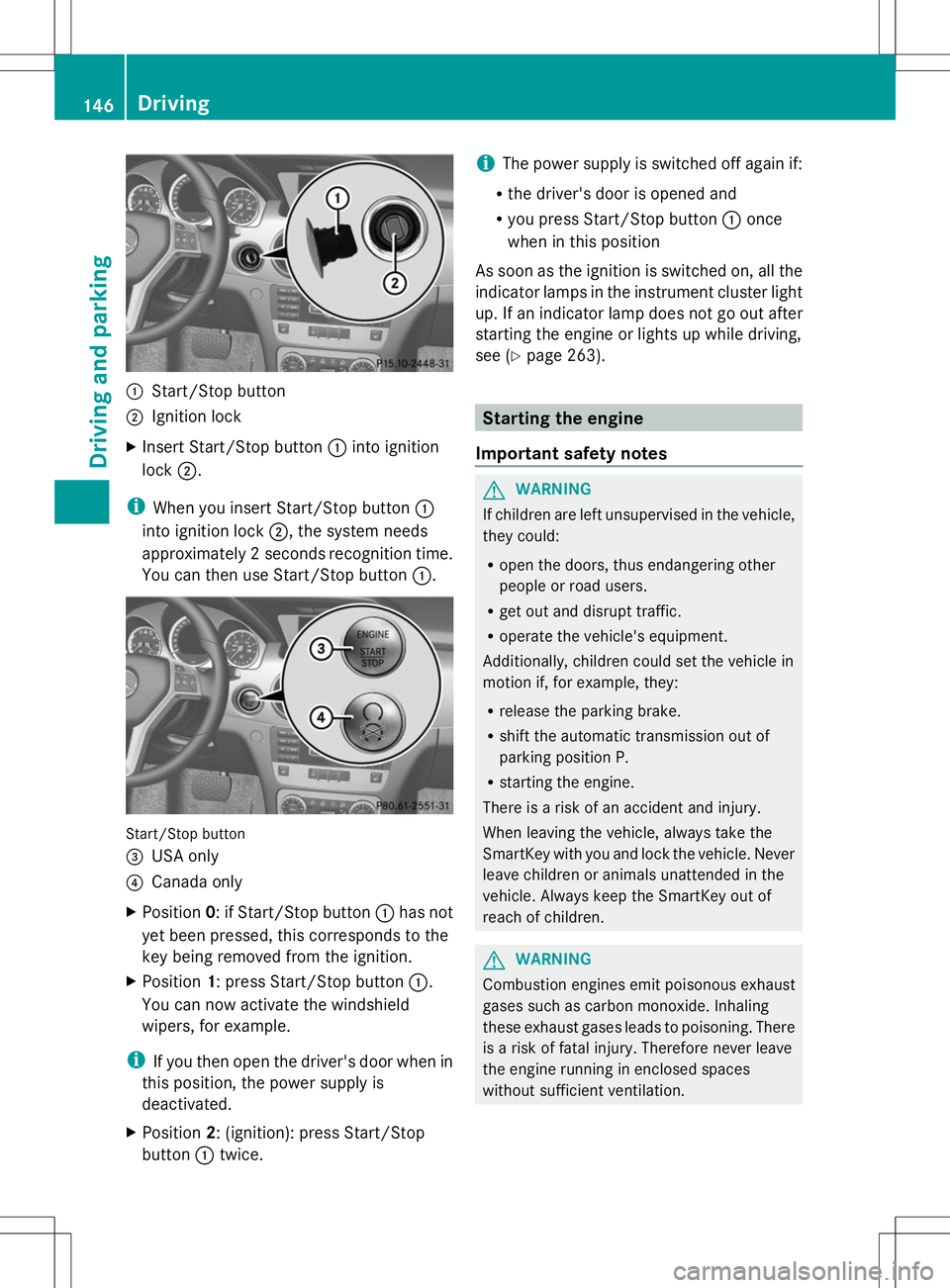
:
Start/Stop button
; Ignition lock
X Insert Start/Stop button :into ignition
lock ;.
i When you insert Start/Stop button :
into ignition lock ;, the system needs
approximately 2 seconds recognition time.
You can then use Start/Stop button :.Start/Stop button
=
USA only
? Canada only
X Position 0: if Start/Stop button :has not
yet been pressed, this corresponds to the
key being removed from the ignition.
X Position 1: press Start/Stop button :.
You can now activate the windshield
wipers, for example.
i If you then open the driver's door when in
this position, the power supply is
deactivated.
X Position 2: (ignition): press Start/Stop
button :twice. i
The power supply is switched off again if:
R the driver's door is opened and
R you press Start/Stop button :once
when in this position
As soon as the ignition is switched on, all the
indicator lamps in the instrument cluster light
up. If an indicator lamp does not go out after
starting the engine or lights up while driving,
see (Y page 263). Starting the engine
Important safety notes G
WARNING
If children are left unsupervised in the vehicle,
they could:
R open the doors, thus endangering other
people or road users.
R get out and disrupt traffic.
R operate the vehicle's equipment.
Additionally, children could set the vehicle in
motion if, for example, they:
R release the parking brake.
R shift the automatic transmission out of
parking position P.
R starting the engine.
There is a risk of an accident and injury.
When leaving the vehicle, always take the
SmartKey with you and lock the vehicle. Never
leave children or animals unattended in the
vehicle. Always keep the SmartKey out of
reach of children. G
WARNING
Combustion engines emit poisonous exhaust
gases such as carbon monoxide. Inhaling
these exhaust gases leads to poisoning. There
is a risk of fatal injury. Therefore never leave
the engine running in enclosed spaces
without sufficient ventilation. 146
DrivingDriving and parking
Page 149 of 384
G
WARNING
Flammable materials introduced through
environmental influence or by animals can
ignite if in contact with the exhaust system or
parts of the engine that heat up. There is a risk
of fire.
Carry out regular checks to make sure that
there are no flammable foreign materials in
the engine compartment or in the exhaust
system.
! Do not depress the accelerator pedal
when starting the engine.
General notes i
Vehicles with a gasoline engine: the
catalytic converter is preheated for up to
30 seconds after a cold start. The sound of
the engine may change during this time.
Automatic transmission X
Shift the transmission to position P.
The transmission position display in the
multifunction display shows P.
i You can also start the engine when the
transmission is in position N.
Starting procedure with the SmartKey i
To start the engine using the SmartKey
instead of KEYLESS-GO, pull the Start/
Stop button out of the ignition lock.
X To start a gasoline engine: turn the
SmartKey to position 3in the ignition lock
(Y page 145) and release it as soon as the
engine is running.
X To start a diesel engine: turn the
SmartKey to position 2in the ignition lock
(Y page 145).
The % preglow indicator lamp in the
instrument cluster lights up.
X When the %preglow indicator lamp
goes out, turn the SmartKey to position
3(Y page 145) and release it as soon as the
engine is running. i
You can start the engine without preglow
if the engine is warm.
Using KEYLESS-GO to start the engine You can start the engine if a valid SmartKey
with the integrated KEYLESS-GO function is
in the vehicle. Always take the SmartKey with
you when leaving the vehicle, even if you only
leave it for a short time. Pay attention to the
important safety notes.
i
The Start/Stop button can be used to
start the vehicle without inserting the
SmartKey into the ignition lock. The Start/
Stop button must be inserted in the ignition
lock and the SmartKey must be in the
vehicle.
X Depress the brake pedal and keep it
depressed.
X Press the Start/Stop button once
(Y page 145).
The engine starts. Pulling away
Automatic transmission G
WARNING
If the engine speed is above the idling speed
and you engage transmission position Dor
R, the vehicle could pull away suddenly. There
is a risk of an accident.
When engaging transmission position Dor R,
always firmly depress the brake pedal and do
not simultaneously accelerate.
i It is only possible to shift the transmission
from position Pto the desired position if
you depress the brake pedal. Only then is
the parking lock released. If you do not
depress the brake pedal, you can move the
DIRECT SELECT lever but the parking lock
remains engaged. Driving
147Driving and parking Z
Page 150 of 384
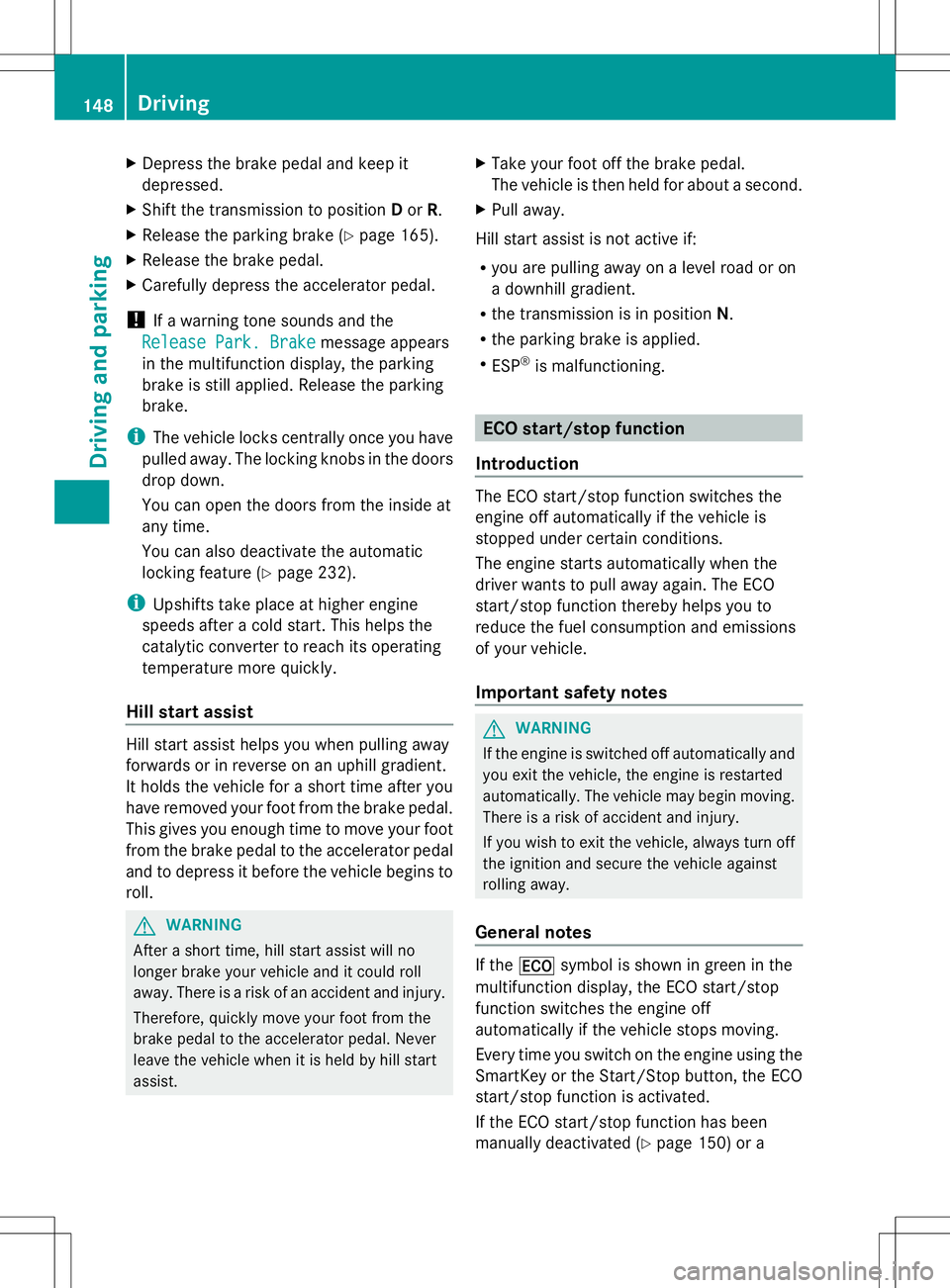
X
Depress the brake pedal and keep it
depressed.
X Shift the transmission to position Dor R.
X Release the parking brake (Y page 165).
X Release the brake pedal.
X Carefully depress the accelerator pedal.
! If a warning tone sounds and the
Release Park. Brake
Release Park. Brake message appears
in the multifunction display, the parking
brake is still applied. Release the parking
brake.
i The vehicle locks centrally once you have
pulled away. The locking knobs in the doors
drop down.
You can open the doors from the inside at
any time.
You can also deactivate the automatic
locking feature (Y page 232).
i Upshifts take place at higher engine
speeds after a cold start. This helps the
catalytic converter to reach its operating
temperature more quickly.
Hill start assist Hill start assist helps you when pulling away
forwards or in reverse on an uphill gradient.
It holds the vehicle for a short time after you
have removed your foot from the brake pedal.
This gives you enough time to move your foot
from the brake pedal to the accelerator pedal
and to depress it before the vehicle begins to
roll. G
WARNING
After a short time, hill start assist will no
longer brake your vehicle and it could roll
away. There is a risk of an accident and injury.
Therefore, quickly move your foot from the
brake pedal to the accelerator pedal. Never
leave the vehicle when it is held by hill start
assist. X
Take your foot off the brake pedal.
The vehicle is then held for about a second.
X Pull away.
Hill start assist is not active if:
R you are pulling away on a level road or on
a downhill gradient.
R the transmission is in position N.
R the parking brake is applied.
R ESP ®
is malfunctioning. ECO start/stop function
Introduction The ECO start/stop function switches the
engine off automatically if the vehicle is
stopped under certain conditions.
The engine starts automatically when the
driver wants to pull away again. The ECO
start/stop function thereby helps you to
reduce the fuel consumption and emissions
of your vehicle.
Important safety notes G
WARNING
If the engine is switched off automatically and
you exit the vehicle, the engine is restarted
automatically. The vehicle may begin moving.
There is a risk of accident and injury.
If you wish to exit the vehicle, always turn off
the ignition and secure the vehicle against
rolling away.
General notes If the
¤ symbol is shown in green in the
multifunction display, the ECO start/stop
function switches the engine off
automatically if the vehicle stops moving.
Every time you switch on the engine using the
SmartKey or the Start/Stop button, the ECO
start/stop function is activated.
If the ECO start/stop function has been
manually deactivated (Y page 150) or a148
DrivingDriving an
d parking
Page 153 of 384
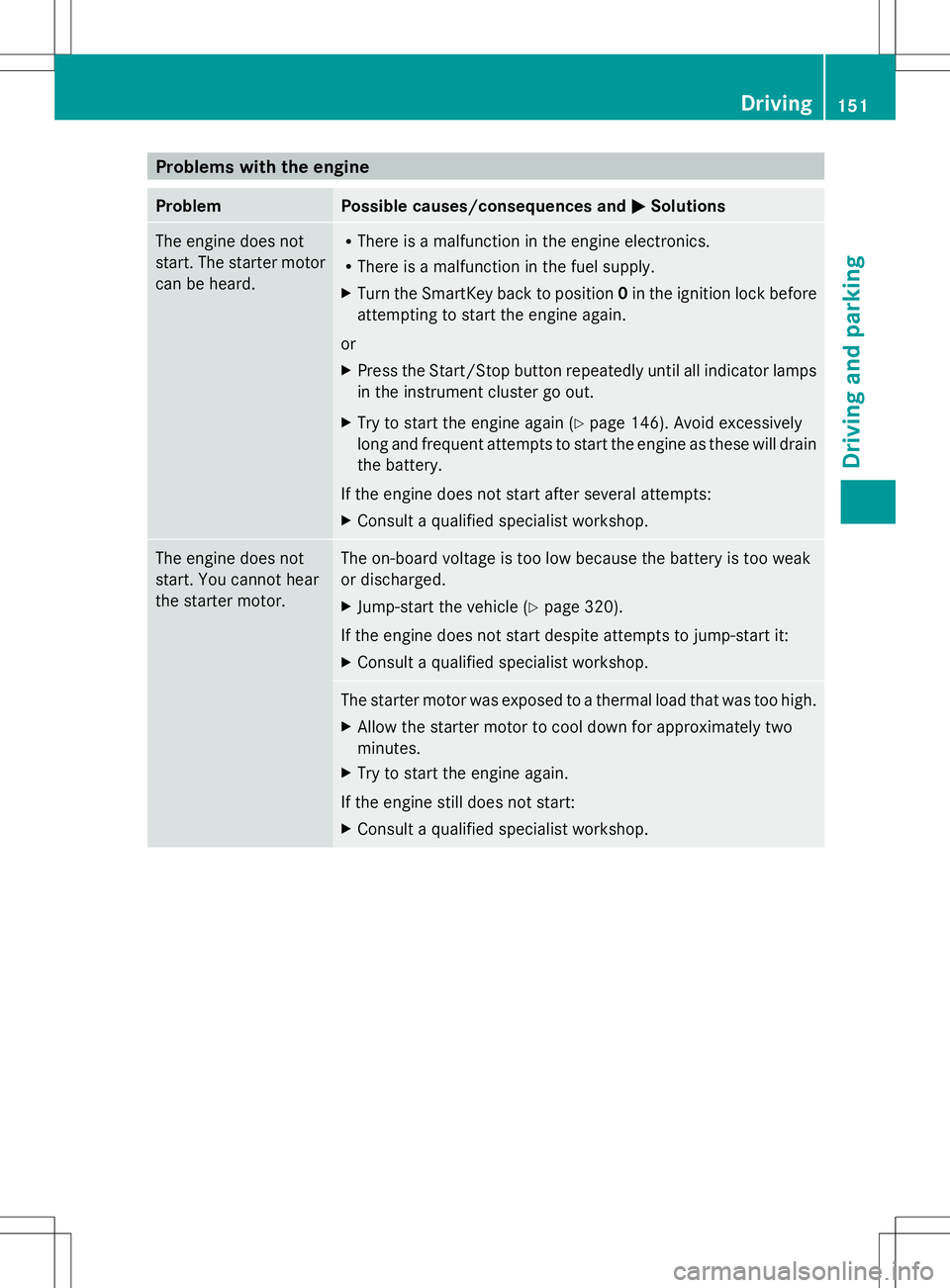
Problems with the engine
Problem Possible causes/consequences and
M
MSolutions The engine does not
start. The starter motor
can be heard. R
There is a malfunction in the engine electronics.
R There is a malfunction in the fuel supply.
X Turn the SmartKey back to position 0in the ignition lock before
attempting to start the engine again.
or
X Press the Start/Stop button repeatedly until all indicator lamps
in the instrument cluster go out.
X Try to start the engine again (Y page 146). Avoid excessively
long and frequent attempts to start the engine as these will drain
the battery.
If the engine does not start after several attempts:
X Consult a qualified specialist workshop. The engine does not
start. You cannot hear
the starter motor. The on-board voltage is too low because the battery is too weak
or discharged.
X
Jump-start the vehicle (Y page 320).
If the engine does not start despite attempts to jump-start it:
X Consult a qualified specialist workshop. The starter motor was exposed to a thermal load that was too high.
X
Allow the starter motor to cool down for approximately two
minutes.
X Try to start the engine again.
If the engine still does not start:
X Consult a qualified specialist workshop. Driving
151Driving and parking Z