light MERCEDES-BENZ GLK-CLASS SUV 2015 Owner's Guide
[x] Cancel search | Manufacturer: MERCEDES-BENZ, Model Year: 2015, Model line: GLK-CLASS SUV, Model: MERCEDES-BENZ GLK-CLASS SUV 2015Pages: 386, PDF Size: 26 MB
Page 76 of 386
In the event of snowfall or heavy rain, the rec-
ognition can be impaired.
Recognition by the radar sensor system is
also impaired in the event of:
R there is dirt on the sensors or anything else
covering the sensors
R there is interference by other radar sources
R there are strong radar reflections, for
example in parking garages
R a narrow vehicle traveling in front, e.g. a
motorbike
R a vehicle traveling in front on a different line
relative to the center of your vehicle
Following damage to the front end of the vehi-
cle, have the configuration and operation of
the radar sensors checked at a qualified spe-
cialist workshop. This also applies to colli-
sions at low speeds where there is no visible
damage to the front of the vehicle.
Function
X To activate/deactivate: activate or deac-
tivate PRE-SAFE ®
Brake in the on-board
computer ( Y page 229).
If the PRE-SAFE ®
Brake is not activated, the
æ symbol appears in the multifunction
display.
Starting at a speed of around 4 mph (7 km/h),
this function warns you if you rapidly
approach a vehicle in front. An intermittent
warning tone will then sound and the ·
distance warning lamp will light up in the
instrument cluster.
X Brake immediately to defuse the situation.
or
X Take evasive action provided it is safe to do
so.
PRE-SAFE ®
Brake can also brake the vehicle
automatically under the following conditions: R the driver and front-passenger have their
seat belts fastened and
R the vehicle speed is between approx-
imately 4 mph (7 km/h) and 124 mph
(200 km/h)
At speeds of up to approximately 40 mph
(70 km/h) PRE-SAFE ®
Brake can also detect
stationary objects. Examples of stationary
objects are stopped or parked vehicles.
iIf there is an increased risk of collision,
preventive passenger protection measures
(PRE-SAFE ®
) are activated.
If the risk of collision with the vehicle in front
remains and you do not brake, take evasive
action or accelerate significantly, the vehicle
may perform automatic emergency braking,
up to the point of full brake application. Auto- matic emergency braking is not performed
until immediately prior to an imminent acci-
dent.
You can prevent the intervention of the PRE-
SAFE ®
Brake at any time by:
R depressing the accelerator pedal further.
R activating kickdown.
R releasing the brake pedal.
The braking action of PRE-SAFE ®
Brake is
ended automatically if:
R you maneuver to avoid the obstacle.
R there is no longer any danger of a collision.
R there is no longer an obstacle detected in
front of your vehicle.
Protection against theft
Immobilizer
The immobilizer prevents your vehicle from
being started without the correct SmartKey.
X To activate with the SmartKey: remove
the SmartKey from the ignition lock.
X To activate with KEYLESS-GO: switch the
ignition off and open the driver's door.
X To deactivate: switch on the ignition.
74Protection against theft
Safety
Page 81 of 386
The turn signals flash once when unlocking
and three times when locking.
When it is dark, the surround lighting also
comes on if it is activated in the on-board
computer (Y page 231).
You can also set an audible signal to confirm that the vehicle has been locked. The audiblesignal can be activated and deactivated using
the on-board computer ( Y page 232).
X To unlock centrally: press the % but-
ton.
If you do not open the vehicle within approx-
imately 40 seconds of unlocking:
R the vehicle is locked again
R protection against theft is reactivated.
X To lock centrally: press the & button.
KEYLESS-GO
General notes
Bear in mind that the engine can be started by any of the vehicle occupants if there is a KEY-LESS-GO key in the vehicle.
Locking/unlocking centrally
You can start, lock or unlock the vehicle using
KEYLESS-GO. To do this, you only need carry the SmartKey with you. You can combine the
functions of KEYLESS-GO with those of a con- ventional SmartKey. Unlock the vehicle by
using KEYLESS-GO, for instance, and lock it
using the & button on the SmartKey.
When locking or unlocking with KEYLESS-GO,
the distance between the SmartKey and the
corresponding door handle must not be
greater than 3 ft (1 m). KEYLESS-GO checks whether a valid Smart-
Key is in the vehicle by periodically establish-
ing a radio connection between the vehicle
and the SmartKey. This happens:
R when the external door handles are
touched
R when starting the engine
R while the vehicle is in motion
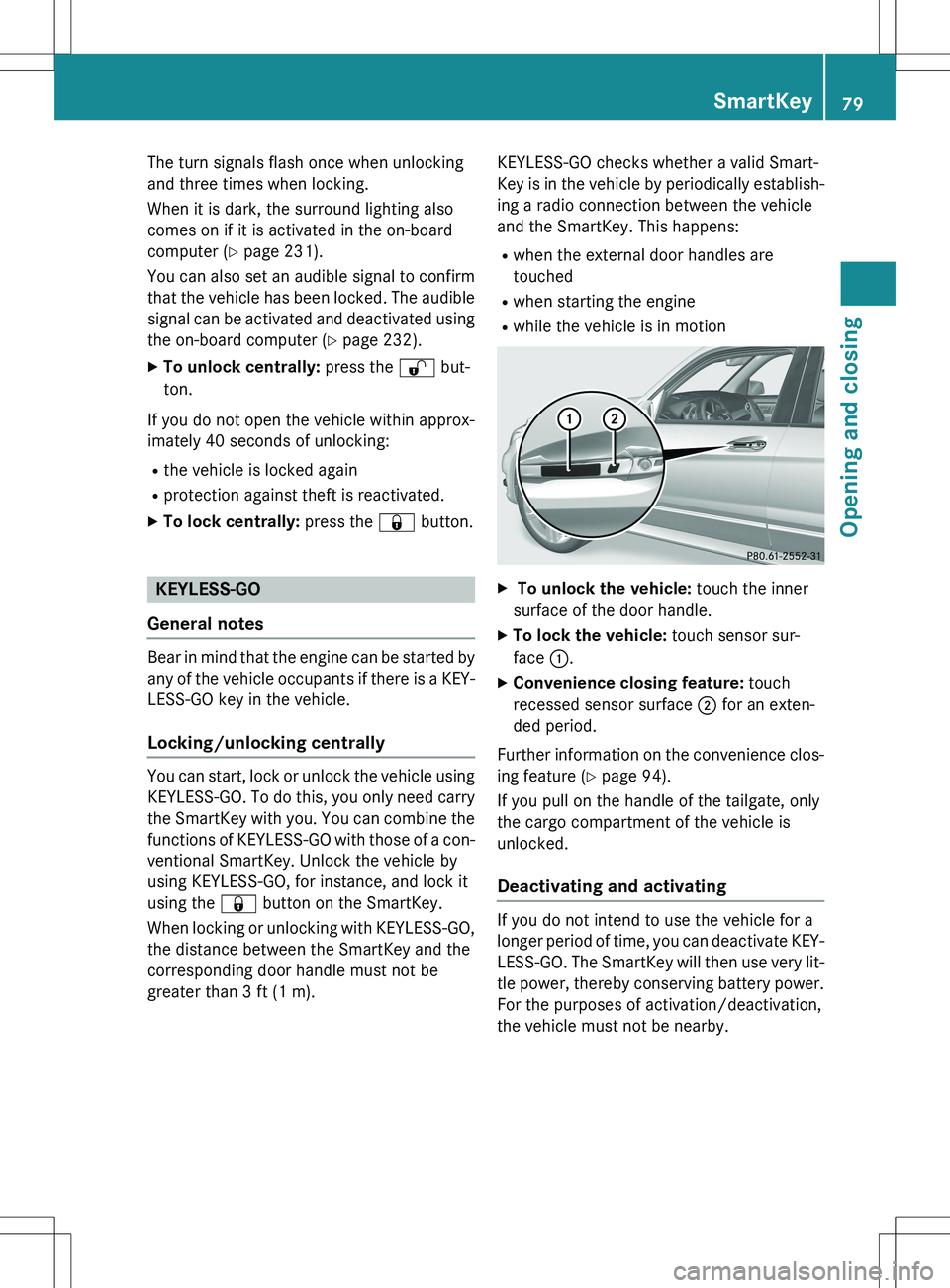
X To unlock the vehicle: touch the inner
surface of the door handle.
X To lock the vehicle: touch sensor sur-
face :.
X Convenience closing feature: touch
recessed sensor surface ; for an exten-
ded period.
Further information on the convenience clos-
ing feature ( Y page 94).
If you pull on the handle of the tailgate, only
the cargo compartment of the vehicle is
unlocked.
Deactivating and activating
If you do not intend to use the vehicle for a
longer period of time, you can deactivate KEY-
LESS-GO. The SmartKey will then use very lit-
tle power, thereby conserving battery power.
For the purposes of activation/deactivation,
the vehicle must not be nearby.
SmartKey79
Opening and closing
Z
Page 82 of 386
XTo deactivate: press the & button on
the SmartKey twice in rapid succession.
The battery check lamp of the SmartKey
( Y page 81) lights up twice briefly and
KEYLESS-GO is deactivated.
X To activate: press any button on the
SmartKey or insert the SmartKey into the
ignition lock.
KEYLESS-GO and all of its associated fea-
tures are available again.
Changing the settings of the locking
system
You can change the settings of the locking
system. This means that only the driver's door
and the fuel filler flap are unlocked when the
vehicle is unlocked. This is useful if you fre-
quently travel on your own.
X To change the setting: press and hold
down the % and & buttons simulta-
neously for approximately six seconds until
the battery check lamp ( Y page 81)
flashes twice.
iIf the setting of the locking system is
changed within the signal range of the vehi- cle, pressing the & or % button:
R locks or
R unlocks the vehicle
The SmartKey now functions as follows:
X To unlock the driver's door: press the
% button once.
X To unlock centrally: press the % but-
ton twice.
X To lock centrally: press the & button.
The KEYLESS-GO function is changed as fol-
lows:
X To unlock the driver's door: touch the
inner surface of the door handle on the
driver's door.
X To unlock centrally: touch the inner sur-
face of the door handle on the front-
passenger door or the rear door. X
To lock centrally: touch the outer sensor
surface on one of the door handles
( Y page 79).
X To restore the factory settings: press
and hold down the % and & buttons
simultaneously for approximately six sec-
onds until the battery check lamp flashes
twice.
Mechanical key
General notes
If the vehicle can no longer be locked or
unlocked with the SmartKey or the KEYLESS- GO key, use the mechanical key.
If you use the mechanical key to unlock and
open the driver's door, the anti-theft alarm
system will be triggered ( Y page 75).
X To end the alarm: insert the SmartKey into
the ignition lock.
iWith KEYLESS-GO: remove the Start/
Stop button from the ignition lock before-
hand.
If you unlock the vehicle using the mechanical key, the fuel filler flap will not be unlocked
automatically.
Removing the mechanical key
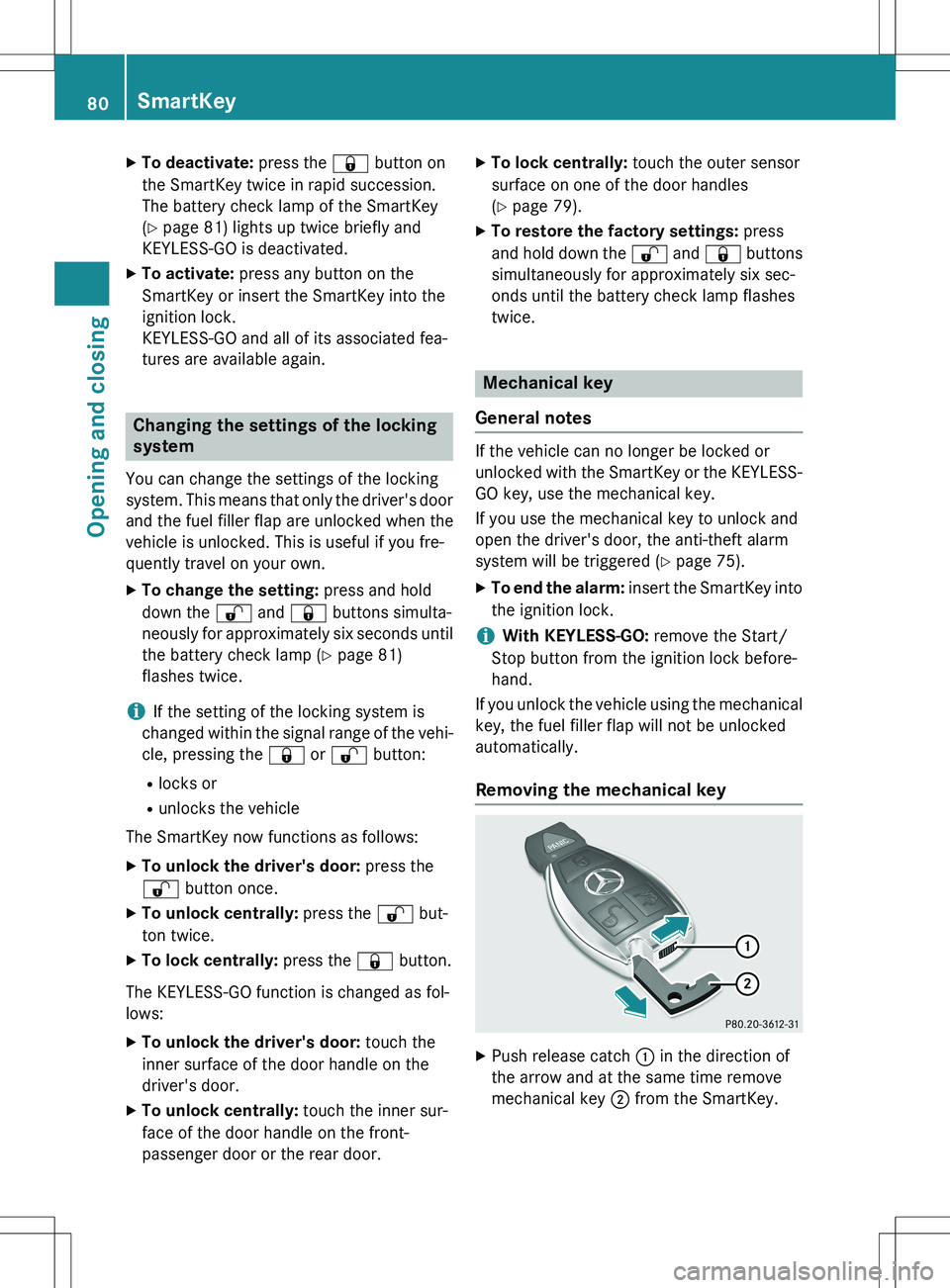
X Push release catch : in the direction of
the arrow and at the same time remove
mechanical key ; from the SmartKey.
80SmartKey
Opening and closing
Page 83 of 386
Inserting the mechanical key
XPush mechanical key ; completely into
the SmartKey until it engages, and release
catch : is back in its basic position.
SmartKey battery
Important safety notes
Mercedes-Benz recommends that you have
the batteries replaced at a qualified specialist workshop.
GWARNING
Batteries contain toxic and corrosive substan- ces. If batteries are swallowed, it can result in
severe health problems. There is a risk of fatal injury.
Keep batteries out of the reach of children. If
a battery is swallowed, seek medical attention immediately.
Checking the battery
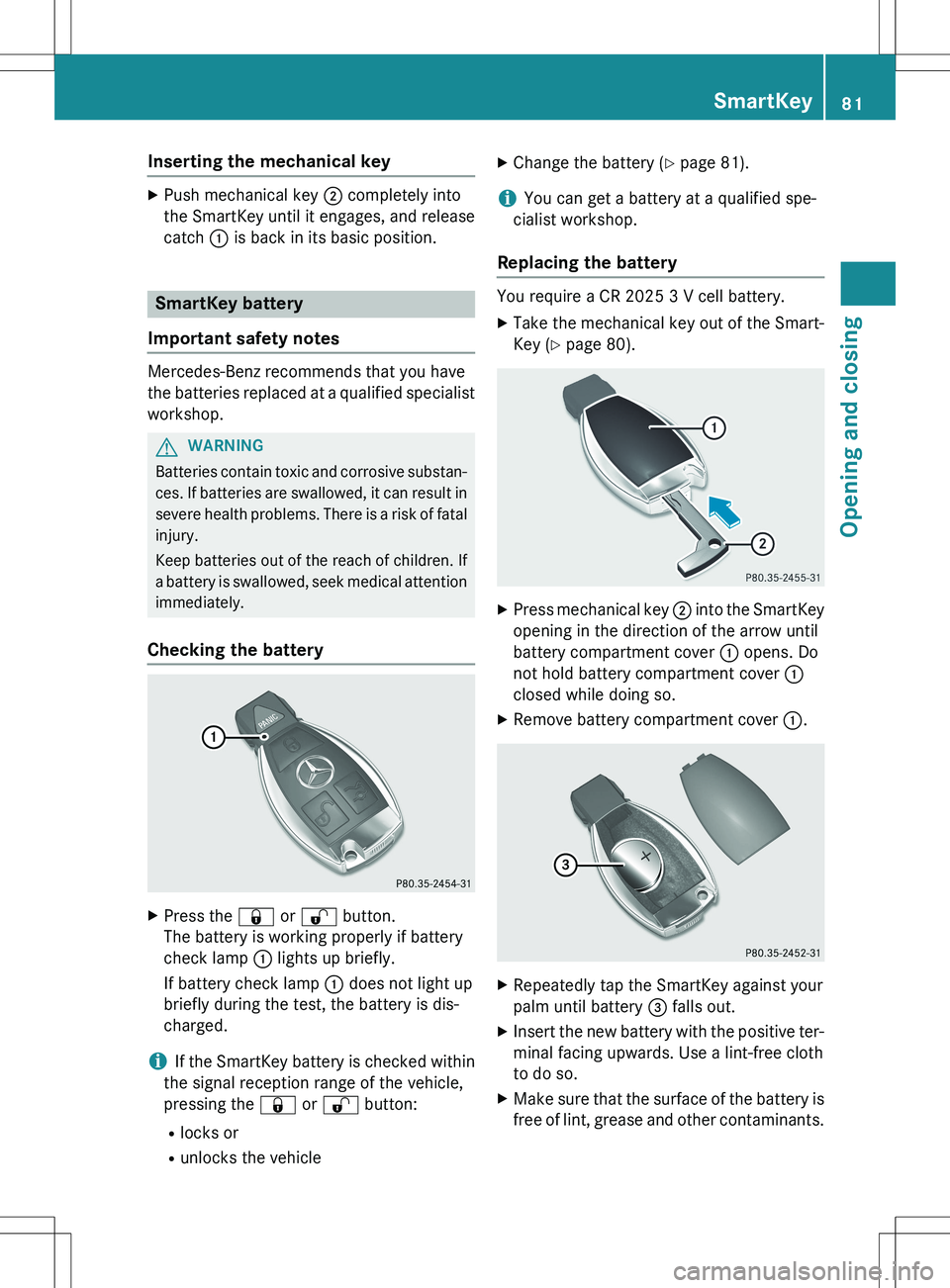
X Press the & or % button.
The battery is working properly if battery
check lamp : lights up briefly.
If battery check lamp : does not light up
briefly during the test, the battery is dis-
charged.
iIf the SmartKey battery is checked within
the signal reception range of the vehicle,
pressing the & or % button:
R locks or
R unlocks the vehicle X
Change the battery ( Y page 81).
iYou can get a battery at a qualified spe-
cialist workshop.
Replacing the battery
You require a CR 2025 3 V cell battery.
X Take the mechanical key out of the Smart-
Key ( Y page 80).
X
Press mechanical key ; into the SmartKey
opening in the direction of the arrow until
battery compartment cover : opens. Do
not hold battery compartment cover :
closed while doing so.
X Remove battery compartment cover :.
X
Repeatedly tap the SmartKey against your
palm until battery = falls out.
X Insert the new battery with the positive ter-
minal facing upwards. Use a lint-free cloth
to do so.
X Make sure that the surface of the battery is
free of lint, grease and other contaminants.
SmartKey81
Opening and closing
Z
Page 86 of 386
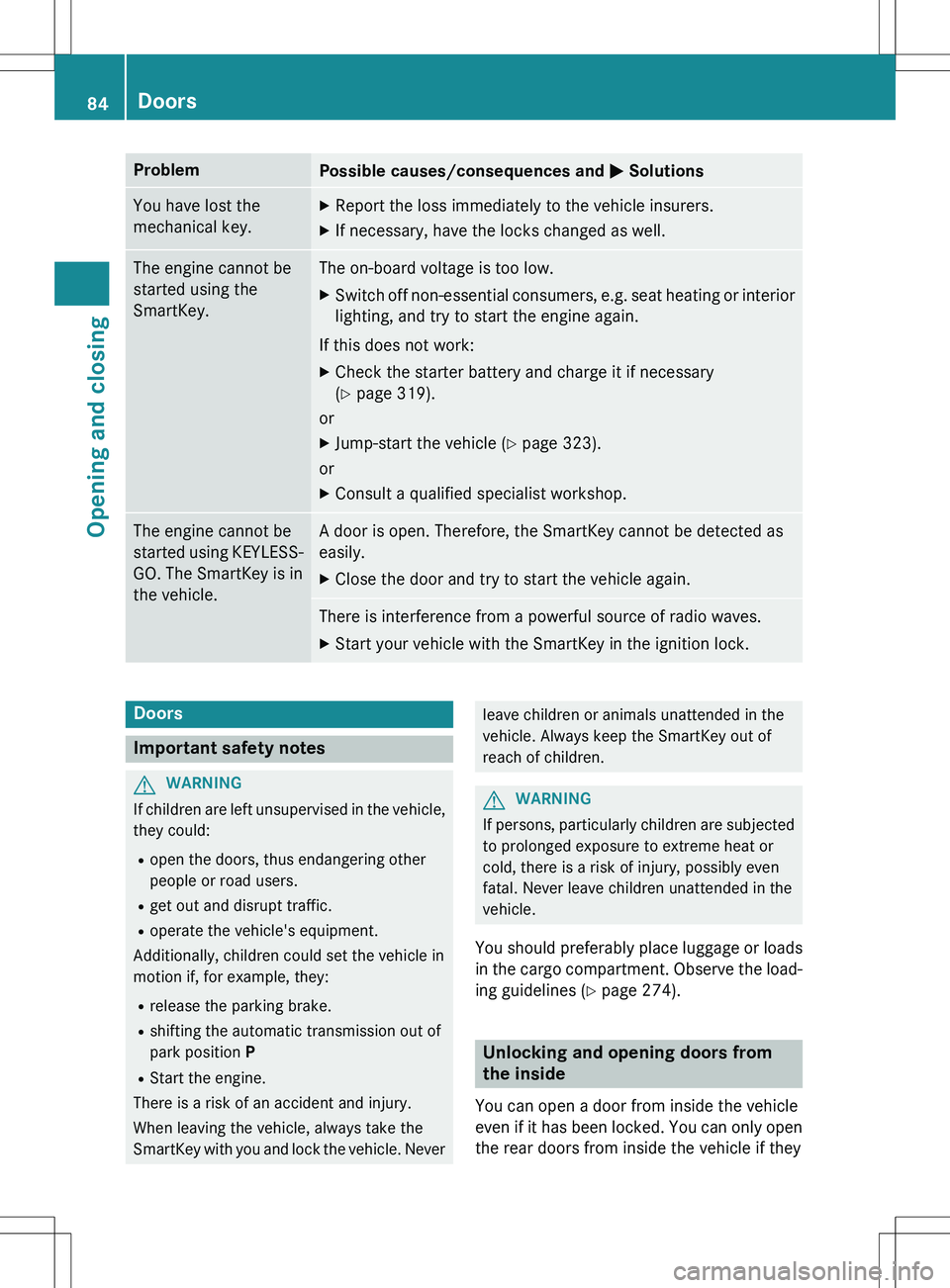
ProblemPossible causes/consequences and M Solutions
You have lost the
mechanical key.X
Report the loss immediately to the vehicle insurers.
X If necessary, have the locks changed as well.
The engine cannot be
started using the
SmartKey.The on-board voltage is too low.
X Switch off non-essential consumers, e.g. seat heating or i nterior
lighting, and try to start the engine again.
If this does not work:
X Check the starter battery and charge it if necessary
(Y page 319).
or
X Jump-start the vehicle ( Y page 323).
or
X Consult a qualified specialist workshop.
The engine cannot be
started using KEYLESS-
GO. The SmartKey is in
the vehicle.A door is open. Therefore, the SmartKey cannot be detected as
easily.
X Close the door and try to start the vehicle again.
There is interference from a powerful source of radio waves.
X Start your vehicle with the SmartKey in the ignition lock.
Doors
Important safety notes
GWARNING
If children are left unsupervised in the vehicle,
they could:
R open the doors, thus endangering other
people or road users.
R get out and disrupt traffic.
R operate the vehicle's equipment.
Additionally, children could set the vehicle in
motion if, for example, they:
R release the parking brake.
R shifting the automatic transmission out of
park position P
R Start the engine.
There is a risk of an accident and injury.
When leaving the vehicle, always take the
SmartKey with you and lock the vehicle. Never
leave children or animals unattended in the
vehicle. Always keep the SmartKey out of
reach of children.
GWARNING
If persons, particularly children are subjected to prolonged exposure to extreme heat or
cold, there is a risk of injury, possibly even
fatal. Never leave children unattended in the
vehicle.
You should preferably place luggage or loads
in the cargo compartment. Observe the load- ing guidelines ( Y page 274).
Unlocking and opening doors from
the inside
You can open a door from inside the vehicle
even if it has been locked. You can only open
the rear doors from inside the vehicle if they
84Doors
Opening and closing
Page 89 of 386
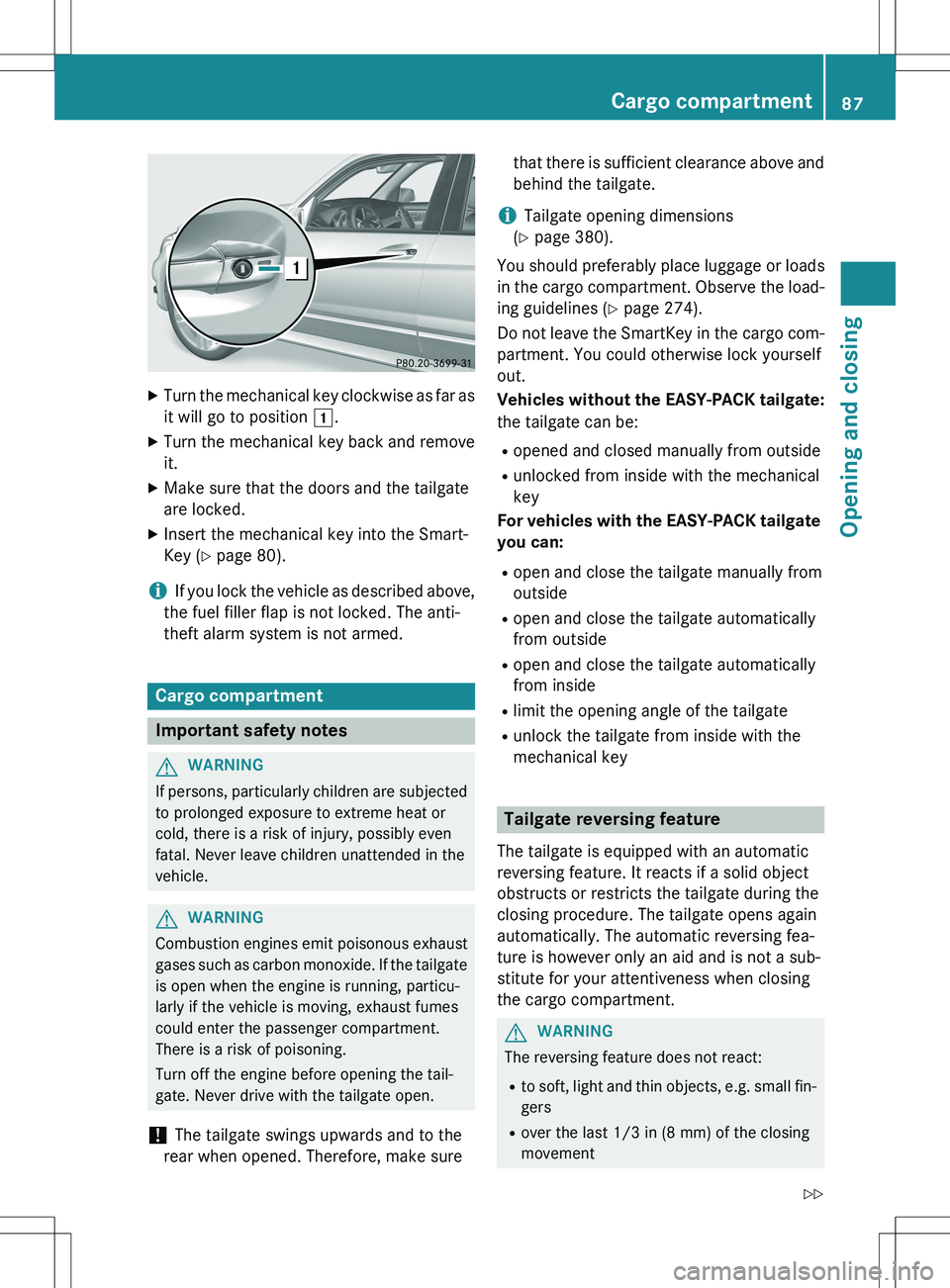
XTurn the mechanical key clockwise as far as
it will go to position 1.
X Turn the mechanical key back and remove
it.
X Make sure that the doors and the tailgate
are locked.
X Insert the mechanical key into the Smart-
Key ( Y page 80).
iIf you lock the vehicle as described above,
the fuel filler flap is not locked. The anti-
theft alarm system is not armed.
Cargo compartment
Important safety notes
GWARNING
If persons, particularly children are subjected to prolonged exposure to extreme heat or
cold, there is a risk of injury, possibly even
fatal. Never leave children unattended in the
vehicle.
GWARNING
Combustion engines emit poisonous exhaust
gases such as carbon monoxide. If the tailgateis open when the engine is running, particu-
larly if the vehicle is moving, exhaust fumes
could enter the passenger compartment.
There is a risk of poisoning.
Turn off the engine before opening the tail-
gate. Never drive with the tailgate open.
! The tailgate swings upwards and to the
rear when opened. Therefore, make sure that there is sufficient clearance above and
behind the tailgate.
iTailgate opening dimensions
( Y page 380).
You should preferably place luggage or loads
in the cargo compartment. Observe the load-
ing guidelines ( Y page 274).
Do not leave the SmartKey in the cargo com- partment. You could otherwise lock yourself
out.
Vehicles without the EASY-PACK tailgate:
the tailgate can be:
R opened and closed manually from outside
R unlocked from inside with the mechanical
key
For vehicles with the EASY-PACK tailgate you can:
R open and close the tailgate manually from
outside
R open and close the tailgate automatically
from outside
R open and close the tailgate automatically
from inside
R limit the opening angle of the tailgate
R unlock the tailgate from inside with the
mechanical key
Tailgate reversing feature
The tailgate is equipped with an automatic
reversing feature. It reacts if a solid object
obstructs or restricts the tailgate during the
closing procedure. The tailgate opens again
automatically. The automatic reversing fea-
ture is however only an aid and is not a sub-
stitute for your attentiveness when closing
the cargo compartment.
GWARNING
The reversing feature does not react:
R to soft, light and thin objects, e.g. small fin-
gers
R over the last 1/3 in (8 mm) of the closing
movement
Cargo compartment87
Opening and closing
Z
Page 94 of 386
GWARNING
If children are left unsupervised in the vehicle,they could:
R open the doors, thus endangering other
people or road users.
R get out and disrupt traffic.
R operate the vehicle's equipment.
Additionally, children could set the vehicle in
motion if, for example, they:
R release the parking brake.
R shifting the automatic transmission out of
park position P
R Start the engine.
There is a risk of an accident and injury.
When leaving the vehicle, always take the
SmartKey with you and lock the vehicle. Never
leave children or animals unattended in the
vehicle. Always keep the SmartKey out of
reach of children.
Side window reversing feature
The side windows are equipped with an auto-
matic reversing feature. If a solid object
blocks or restricts a side window during the
closing process, the side window opens again automatically. However, the automatic
reversing feature is only an aid and does not
relieve you of the responsibility of paying
attention when closing a side window.
GWARNING
The reversing feature does not react:
R to soft, light and thin objects, e.g. small fin-
gers
R over the last 1/6 in(4 mm) of the closing
movement
R during resetting
R when closing the side window again man-
ually immediately after automatic reversing
This means that the reversing feature cannot
prevent someone being trapped in these sit-
uations. There is a risk of injury.
Make sure that no body parts are in close
proximity during the closing procedure. If
someone becomes trapped, press the switch to open the side window again.
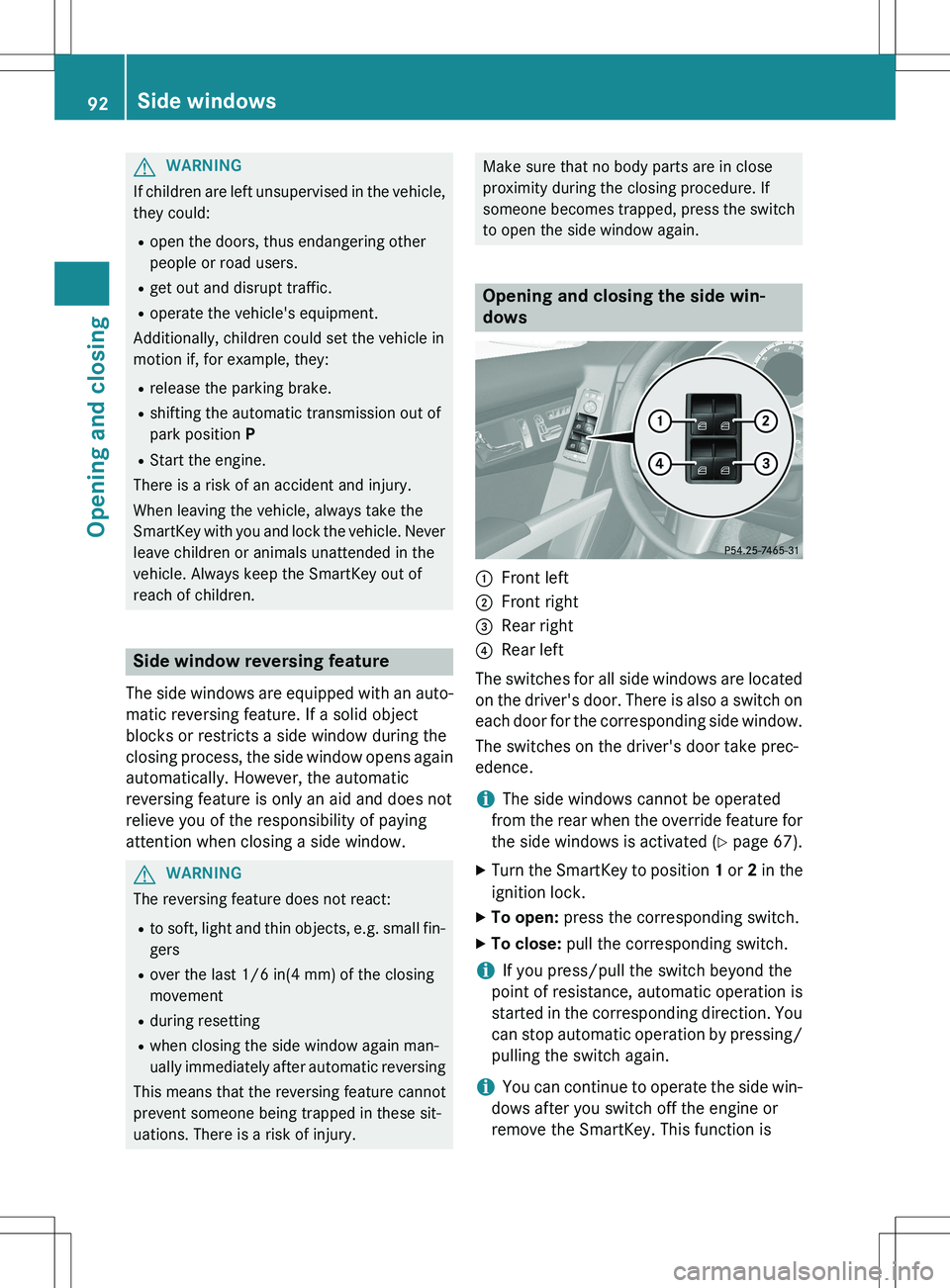
Opening and closing the side win-
dows
:Front left
;Front right
=Rear right
?Rear left
The switches for all side windows are located on the driver's door. There is also a switch on
each door for the corresponding side window.
The switches on the driver's door take prec-
edence.
iThe side windows cannot be operated
from the rear when the override feature for
the side windows is activated ( Y page 67).
X Turn the SmartKey to position 1 or 2 in the
ignition lock.
X To open: press the corresponding switch.
X To close: pull the corresponding switch.
iIf you press/pull the switch beyond the
point of resistance, automatic operation is
started in the corresponding direction. You
can stop automatic operation by pressing/ pulling the switch again.
iYou can continue to operate the side win-
dows after you switch off the engine or
remove the SmartKey. This function is
92Side windows
Opening and closing
Page 96 of 386
XTo interrupt convenience closing:
release the & button.
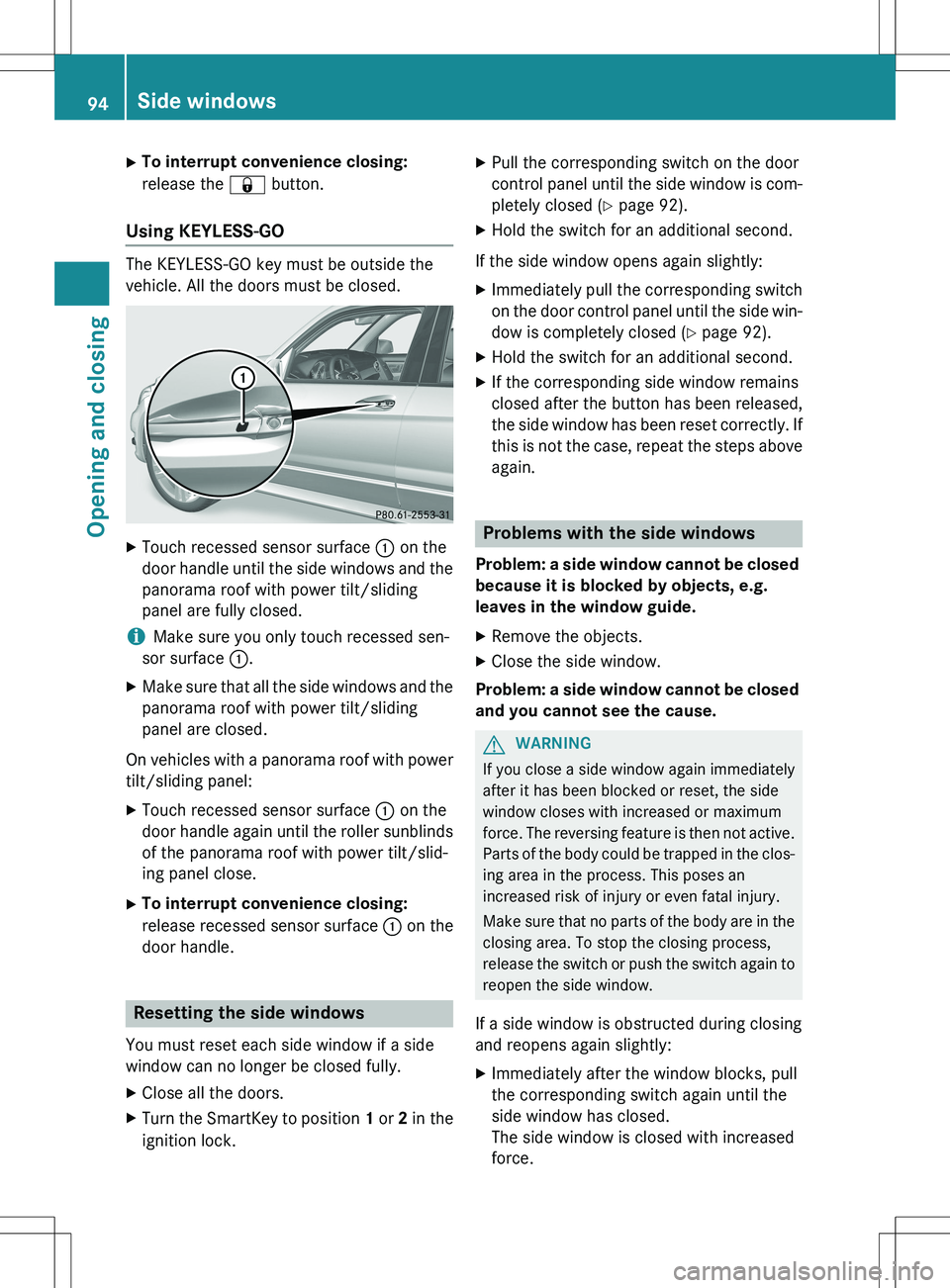
Using KEYLESS-GO
The KEYLESS-GO key must be outside the
vehicle. All the doors must be closed.
X
Touch recessed sensor surface : on the
door handle until the side windows and the panorama roof with power tilt/sliding
panel are fully closed.
iMake sure you only touch recessed sen-
sor surface :.
X Make sure that all the side windows and the
panorama roof with power tilt/sliding
panel are closed.
On vehicles with a panorama roof with power tilt/sliding panel:
X Touch recessed sensor surface : on the
door handle again until the roller sunblinds of the panorama roof with power tilt/slid-
ing panel close.
X To interrupt convenience closing:
release recessed sensor surface : on the
door handle.
Resetting the side windows
You must reset each side window if a side
window can no longer be closed fully.
X Close all the doors.
X Turn the SmartKey to position 1 or 2 in the
ignition lock. X
Pull the corresponding switch on the door
control panel until the side window is com-
pletely closed ( Y page 92).
X Hold the switch for an additional second.
If the side window opens again slightly: X Immediately pull the corresponding switch
on the door control panel until the side win-
dow is completely closed ( Y page 92).
X Hold the switch for an additional second.
X If the corresponding side window remains
closed after the button has been released,
the side window has been reset correctly. If
this is not the case, repeat the steps aboveagain.
Problems with the side windows
Problem: a side window cannot be closed
because it is blocked by objects, e.g.
leaves in the window guide.
X Remove the objects.
X Close the side window.
Problem: a side window cannot be closed
and you cannot see the cause.
GWARNING
If you close a side window again immediately
after it has been blocked or reset, the side
window closes with increased or maximum
force. The reversing feature is then not active. Parts of the body could be trapped in the clos-
ing area in the process. This poses an
increased risk of injury or even fatal injury.
Make sure that no parts of the body are in the closing area. To stop the closing process,
release the switch or push the switch again toreopen the side window.
If a side window is obstructed during closing
and reopens again slightly: X Immediately after the window blocks, pull
the corresponding switch again until the
side window has closed.
The side window is closed with increased
force.
94Side windows
Opening and closing
Page 97 of 386
If a side window is obstructed again during
closing and reopens again slightly:
X Immediately after the window blocks, pull
the corresponding switch again until the
side window has closed.
The side window is closed without the anti-
entrapment feature.
Sliding sunroof
Important safety notes
In the following section, the term "sliding sun-
roof" refers to the panorama roof with power tilt/sliding panel.
GWARNING
While opening and closing the sliding sunroof, body parts in close proximity could become
trapped. There is a risk of injury.
Make sure that no body parts are in close
proximity during the opening and closing pro-cedures.
If somebody becomes trapped:
R release the switch immediately, or
R during automatic operation, push the
switch briefly in any direction
The opening or closing procedure will be stop- ped.
GWARNING
If children operate the sliding sunroof they
could become trapped, particularly if they are left unsupervised. There is a risk of injury.
When leaving the vehicle, always take the
SmartKey with you and lock the vehicle. Never
leave children unsupervised in the vehicle.
! Only open the sliding sunroof if it is free of
snow and ice. Otherwise, malfunctions may
occur.
Do not allow anything to protrude from the sliding sunroof. Otherwise, the seals could
be damaged.
! The weather can change abruptly. It could
start to rain or snow. Make sure that the
sliding sunroof is closed when you leave the
vehicle. The vehicle electronics can be
damaged if water enters the vehicle inte-
rior.
iResonance noises can occur in addition to
the usual airflow noises when the sliding
sunroof is open. They are caused by minor
pressure fluctuations in the vehicle interior.
Change the position of the sliding sunroof
or open a side window slightly to reduce or
eliminate these noises.
Sliding sunroof reversing feature
The sliding sunroof is equipped with an auto- matic reversing feature. If a solid object
blocks or restricts the sliding sunroof during
the closing process, the sliding sunroof opensagain automatically. However, the automatic
reversing feature is only an aid and does not
relieve you of the responsibility of paying
attention when closing the sliding sunroof.
GWARNING
The reversing feature does not react:
R to soft, light and thin objects, e.g. small fin-
gers
R over the last 1/6 in(4 mm) of the closing
movement
R during resetting
R when closing the sliding sunroof again man-
ually immediately after automatic reversing
This means that the reversing feature cannot
prevent someone being trapped in these sit-
uations. There is a risk of injury.
Make sure that no body parts are in close
proximity during the closing procedure.
If somebody becomes trapped:
R release the switch immediately, or
R during automatic operation, push the
switch briefly in any direction
The closing process is stopped.
Sliding sunroof95
Opening and closing
Z
Page 98 of 386
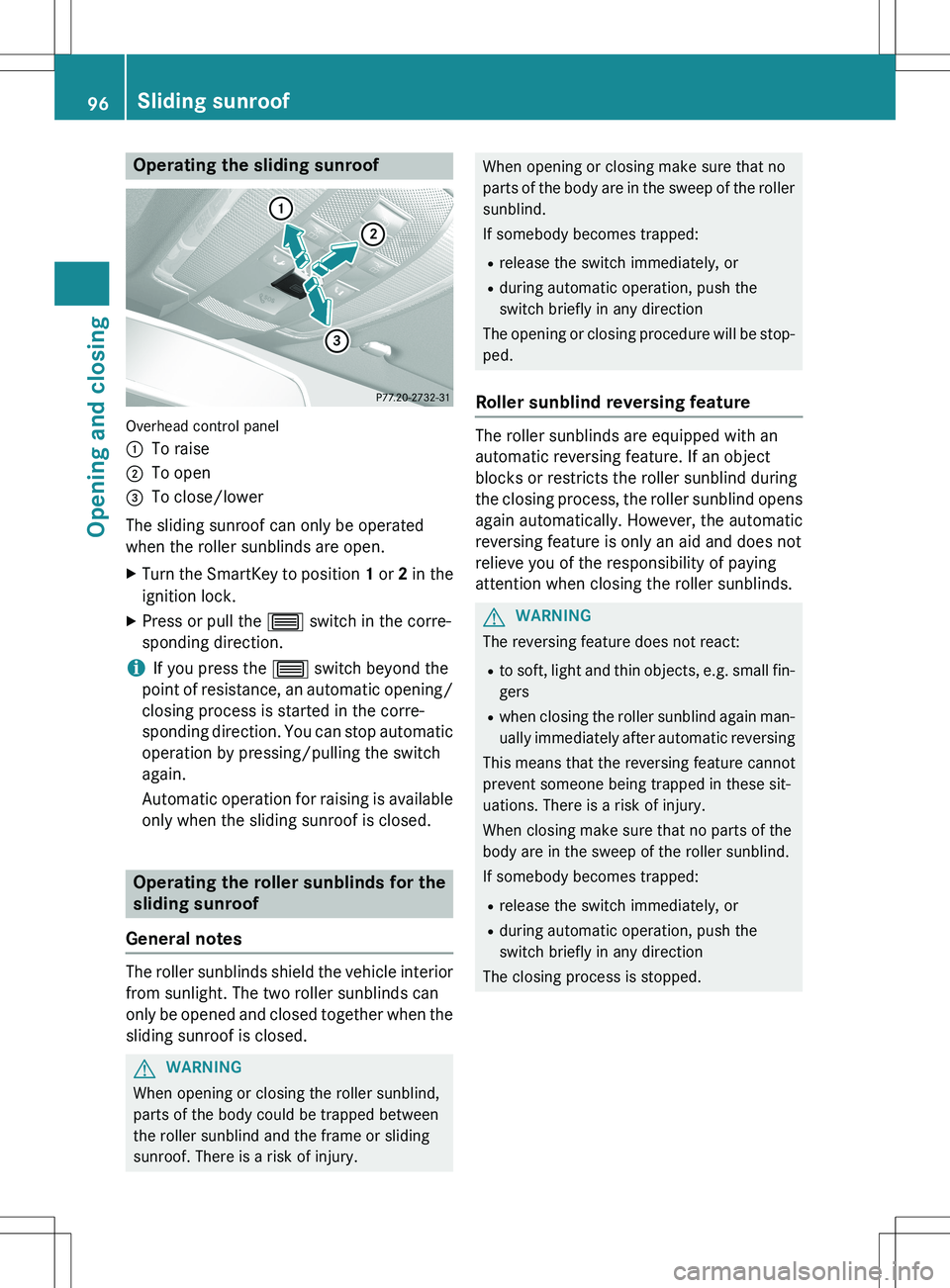
Operating the sliding sunroof
Overhead control panel :
To raise
;To open
=To close/lower
The sliding sunroof can only be operated
when the roller sunblinds are open. X Turn the SmartKey to position 1 or 2 in the
ignition lock.
X Press or pull the 3 switch in the corre-
sponding direction.
iIf you press the 3 switch beyond the
point of resistance, an automatic opening/ closing process is started in the corre-
sponding direction. You can stop automatic
operation by pressing/pulling the switch
again.
Automatic operation for raising is available only when the sliding sunroof is closed.
Operating the roller sunblinds for the
sliding sunroof
General notes
The roller sunblinds shield the vehicle interior from sunlight. The two roller sunblinds can
only be opened and closed together when the
sliding sunroof is closed.
GWARNING
When opening or closing the roller sunblind,
parts of the body could be trapped between
the roller sunblind and the frame or sliding
sunroof. There is a risk of injury.
When opening or closing make sure that no
parts of the body are in the sweep of the roller sunblind.
If somebody becomes trapped:
R release the switch immediately, or
R during automatic operation, push the
switch briefly in any direction
The opening or closing procedure will be stop-
ped.
Roller sunblind reversing feature
The roller sunblinds are equipped with an
automatic reversing feature. If an object
blocks or restricts the roller sunblind during
the closing process, the roller sunblind opens again automatically. However, the automatic
reversing feature is only an aid and does not
relieve you of the responsibility of paying
attention when closing the roller sunblinds.
GWARNING
The reversing feature does not react:
R to soft, light and thin objects, e.g. small fin-
gers
R when closing the roller sunblind again man-
ually immediately after automatic reversing
This means that the reversing feature cannot
prevent someone being trapped in these sit-
uations. There is a risk of injury.
When closing make sure that no parts of the
body are in the sweep of the roller sunblind.
If somebody becomes trapped:
R release the switch immediately, or
R during automatic operation, push the
switch briefly in any direction
The closing process is stopped.
96Sliding sunroof
Opening and closing