rear view mirror MERCEDES-BENZ GLK-CLASS SUV 2015 Owners Manual
[x] Cancel search | Manufacturer: MERCEDES-BENZ, Model Year: 2015, Model line: GLK-CLASS SUV, Model: MERCEDES-BENZ GLK-CLASS SUV 2015Pages: 386, PDF Size: 26 MB
Page 9 of 386
ChildrenRestraint systems ............................ 61
Special seat belt retractor ............... 64
Cigarette lighter ................................ 284
Cleaning
Mirror turn signal ........................... 309
Trailer tow hitch ............................. 310
Climate control
Automatic climate control (3-
zone) .............................................. 136
Controlling automatically ............... 139
Cooling with air dehumidification .. 137
Defrosting the windows ................. 142
Defrosting the windshield .............. 141
Dual-zone automatic climate con-
trol ............................................... .. 133
Important safety notes .................. 132
Indicator lamp ................................ 139
Information about using auto-
matic climate control ..................... 137
Information about using dual-zone
automatic climate control .............. 134
Maximum cooling .......................... 142
Overview of systems ...................... 132
Problem with the rear window
defroster ........................................ 143
Problems with cooling with air
dehumidification ............................ 139
Rear control panel ......................... 136
Refrigerant ..................................... 379
Refrigerant filling capacity ............. 380
Setting the air distribution ............. 140
Setting the air vents ...................... 144
Setting the airflow ......................... 141
Setting the climate mode (AIR
FLOW) ............................................ 139
Setting the temperature ................ 140
Switching air-recirculation mode
on/off ............................................ 1 43
Switching on/off ........................... 137
Switching residual heat on/off ...... 143
Switching the rear window
defroster on/off ............................ 142
Switching the ZONE function on/
off ................................................ .. 141
Coat hooks ......................................... 280
Cockpit
Overview .......................................... 32 see Instrument cluster
Collapsible spare wheel
Inflating ......................................... 3 67
see Emergency spare wheel
COMAND
see separate operating instructions
Combination switch .......................... 118
Consumption statistics (on-board
computer) .......................................... 223
Convenience closing feature .............. 93
Convenience opening feature ............ 93
Coolant (engine)
Checking the level ......................... 303
Display message ............................ 246
Filling capacity ............................... 379
Important safety notes .................. 378
Temperature gauge ........................ 220
Warning lamp ................................. 268
Cooling
see Climate control
Copyright ............................................. 29
Cornering light function
Changing bulbs .............................. 124
Display message ............................ 243
Function/notes ............................. 120
Crash-responsive emergency light-
ing ................................................... .... 122
Cruise control
Cruise control lever ....................... 175
Deactivating ................................... 176
Display message ............................ 254
Driving system ............................... 175
Function/notes ............................. 175
Important safety notes .................. 175
Setting a speed .............................. 176
Storing and maintaining current
speed ............................................. 17 5
Cup holder
Center console .............................. 282
Important safety notes .................. 282
Rear compartment ......................... 282
Customer Assistance Center
(CAC) ................................................... .. 27
Customer Relations Department ....... 27
Index7
Page 13 of 386
Fuse box in the engine compart-
ment .............................................. 329
Important safety notes .................. 328
G
Garage door opener
Clearing the memory ..................... 298
General notes ................................ 295
Important safety notes .................. 295
Opening/closing the garage door .. 297
Programming (button in the rear-
view mirror) ................................... 295
Synchronizing the rolling code ....... 296
Gear or selector lever (cleaning
guidelines) ......................................... 311
Genuine parts ...................................... 22
Glove box ........................................... 275
GTW (Gross Trailer Weight) (defini-
tion) ................................................... . 353
H
Hazard warning lamps ...................... 119
Head restraints
Adjusting ....................................... 102
Adjusting (electrically) ................... 103
Adjusting (manually) ...................... 103
Adjusting (rear) .............................. 103
Installing/removing (rear) .............. 104
Luxury ............................................ 1 03
see NECK-PRO head restraints/
NECK-PRO luxury head restraints
Headlamps
Adding fluid to cleaning system ..... 303
Cleaning system (function) ............ 119
Cleaning system (notes) ................ 379
Fogging up ..................................... 121
see Automatic headlamp mode
Heating
see Climate control
High-beam headlamps
Changing bulbs .............................. 124
Display message ............................ 245
Switching on/off ........................... 118
Hill start assist .................................. 152
HOLD function
Deactivating ................................... 185 Display message ............................ 250
Function/notes ............................. 184
Hood
Closing ........................................... 30 1
Display message ............................ 257
Important safety notes .................. 300
Opening ......................................... 300
Horn ................................................... ... 32
Hydroplaning ..................................... 173
I
Ignition lock
see Key positions
Immobilizer .......................................... 74
Indicator lamps
see Warning and indicator lamps
Indicators
see Turn signals
Instrument cluster
Overview .......................................... 33
Settings ......................................... 23 0
Warning and indicator lamps ........... 34
Instrument cluster lighting .............. 231
Interior lighting ................................. 121
Automatic control .......................... 122
Delayed switch-off (on-board
computer) ...................................... 232
Emergency lighting ........................ 122
Manual control ............................... 122
Overview ........................................ 121
Reading lamp ................................. 121
Setting the brightness of the dis-
play/switch (on-board computer) .. 231
J
Jack Storage location ............................ 314
Using ............................................. 357
Jump starting (engine) ...................... 323
K
Key positions
KEYLESS-GO .................................. 149
SmartKey ....................................... 149
KEYLESS-GO
Convenience closing feature ............ 94
Index11
Page 15 of 386
Remote fault diagnosis .................. 293
Remote vehicle locking .................. 292
Roadside Assistance button .......... 289
Search & Send ............................... 292
Self-test ......................................... 288
Speed alert .................................... 294
System .......................................... 288
Triggering the vehicle alarm ........... 295
Vehicle remote unlocking .............. 292
Mechanical key
Function/notes ................................ 80
Locking vehicle ................................ 86
Unlocking the driver's door .............. 86
Media Interface
see Separate operating instructions
Memory card (audio) ......................... 226
Memory function ............................... 112
Message memory (on-board com-
puter) .................................................. 2 35
Messages
see Display messages
Mirrors
see Exterior mirrors
see Rear-view mirror
see Vanity mirror (in the sun visor)
Mobile phone
Menu (on-board computer) ............ 227
Modifying the programming
(SmartKey) ........................................... 80
MOExtended tires .............................. 315
Mounting wheels
Lowering the vehicle ...................... 359
Mounting a new wheel ................... 358
Preparing the vehicle ..................... 356
Raising the vehicle ......................... 357
Removing a wheel .......................... 358
Securing the vehicle against roll-
ing away ........................................ 356
MP3
Operation ....................................... 226
see separate operating instructions
Multifunction display
Function/notes ............................. 222
Permanent display ......................... 231
Multifunction steering wheel
Operating the on-board computer .. 221
Overview .......................................... 35N
Navigation
Menu (on-board computer) ............ 225
see separate operating instructions
NECK-PRO head restraints
Operation ......................................... 54
Resetting triggered .......................... 55
NECK-PRO luxury head restraints
Operation ......................................... 54
Resetting when triggered ................. 55
Notes on breaking-in a new vehi-
cle ................................................... .... 148
O
Occupant Classification System
(OCS)
Faults .............................................. . 53
Operation ......................................... 49
System self-test ............................... 52
Occupant safety
Air bags ........................................... 44
Children in the vehicle ..................... 61
Occupant Classification System
(OCS) ............................................... 49
Pets in the vehicle ........................... 67
PRE-SAFE ®
(anticipatory occu-
pant protection) ............................... 54
SRS (Supplemental Restraint Sys- tem) ............................................... .. 43
System overview .............................. 42
OCS
Faults ............................................. .. 53
Operation ......................................... 49
System self-test ............................... 52
Odometer ........................................... 223
Off-road system
4MATIC .......................................... 185
Oil
see Engine oil
On-board computer
Assistance menu ........................... 228
Audio menu ................................... 226
Convenience submenu .................. 233
Display messages .......................... 235
Displaying a service message ........ 305
Factory settings submenu ............. 234
Index13
Page 16 of 386
Important safety notes .................. 220
Instrument cluster submenu .......... 230
Lighting submenu .......................... 231
Menu overview .............................. 223
Message memory .......................... 235
Navigation menu ............................ 225
Operation ....................................... 221
Service menu ................................. 230
Settings menu ............................... 230
Standard display ............................ 223
Telephone menu ............................ 227
Trip menu ...................................... 223
Vehicle submenu ........................... 232
Video DVD operation ..................... 227
Opening and closing the side trim
panels ................................................. 12 5
Operating safety
Declaration of conformity ................ 26
Important safety notes .................... 25
Operating system
see On-board computer
Operator's Manual
Vehicle equipment ........................... 23
Outside temperature display ........... 221
Overhead control panel ...................... 38
Override feature
Rear side windows ........................... 67
P
Paint code number ............................ 372
Paintwork (cleaning instructions) ... 307
Panic alarm .......................................... 42
Panorama roof with power tilt/
sliding panel
Important safety notes .................... 95
Opening/closing .............................. 96
Opening/closing the roller sun-
blind .............................................. ... 97
Problem (malfunction) ..................... 97
Resetting ......................................... 97
Parking ............................................... 168
Important safety notes .................. 168
Parking brake ................................ 169
Position of exterior mirror, front-
passenger side ............................... 111
Rear view camera .......................... 193
see PARKTRONIC Parking aid
Active Parking Assist ..................... 189
see Exterior mirrors
see PARKTRONIC
Parking assistance
see PARKTRONIC
Parking brake
Display message ............................ 237
Notes/function .............................. 169
Parking lamps
Changing bulbs .............................. 124
Switching on/off ........................... 118
PARKTRONIC
Deactivating/activating ................. 188
Driving system ............................... 186
Function/notes ............................. 186
Important safety notes .................. 186
Problem (malfunction) ................... 189
Range of the sensors ..................... 186
Trailer towing ................................. 188
Warning display ............................. 187
PASSENGER AIR BAG
Display message ............................ 242
PASSENGER AIR BAG OFF
Problem (malfunction) ..................... 53
PASSENGER AIR BAG OFF indicator
lamp ................................................... ... 49
PASSENGER AIRBAG
Problems (malfunction) .................. 242
Pets in the vehicle ............................... 67
Plastic trim (cleaning instruc-
tions) .................................................. 3 10
Power washers .................................. 306
Power windows
see Side windows
PRE-SAFE ®
(anticipatory occupant
protection)
Display message ............................ 238
Operation ......................................... 54
PRE-SAFE ®
Brake
Activating/deactivating ................. 229
Display message ............................ 239
Function/notes ................................ 73
Warning lamp ................................. 270
Program selector button .................. 159
Protection against theft
ATA (Anti-Theft Alarm system) ......... 75
14Index
Page 17 of 386
Immobilizer ...................................... 74
Protection of the environment
General notes .................................. 22
Pulling away
Automatic transmission ................. 152
Q
QR codeMercedes-Benz Guide App ................. 1
Rescue card ..................................... 28
Qualified specialist workshop ........... 27
R
Radar sensor system
Activating/deactivating ................. 233
Display message ............................ 250
Radio
Selecting a station ......................... 226
see separate operating instructions
Radio-wave reception/transmis-
sion in the vehicle
Declaration of conformity ................ 26
Reading lamp ..................................... 121
Rear compartment
Setting the air vents ...................... 145
Setting the airflow ......................... 141
Rear fog lamp
Display message ............................ 245
Switching on/off ........................... 118
Rear view camera
Cleaning instructions ..................... 309
Function/notes ............................. 193
Switching on/off ........................... 194
Rear window defroster
Problem (malfunction) ................... 143
Switching on/off ........................... 142
Rear window wiper
Replacing the wiper blade .............. 128
Switching on/off ........................... 127
Rear-view mirror
Anti-glare (manual) ........................ 109
Dipping (automatic) ....................... 110
Refrigerant (air-conditioning sys-
tem)
Important safety notes .................. 379
Refueling
Fuel gauge ....................................... 33 Important safety notes .................. 162
Refueling process .......................... 163
see Fuel
Remote control
Garage door opener ....................... 295
Programming (garage door
opener) .......................................... 29 5
Replacing bulbs
Important safety notes .................. 122
Overview of bulb types .................. 123
Reporting safety defects .................... 27
Rescue card ......................................... 28
Reserve (fuel tank)
see Fuel
Reserve fuel
Display message ............................ 248
Warning lamp ................................. 267
see Fuel
Residual heat (climate control) ........ 143
Reversing feature
Panorama sliding sunroof ................ 95
Roller sunblinds ............................... 96
Side windows ................................... 92
Tailgate ........................................... . 87
Roadside Assistance (breakdown) .... 24
Roller blind
see Roller sunblind
Roller sunblind
Opening/closing .............................. 97
Panorama roof with power tilt/
sliding panel ..................................... 96
Roof carrier ........................................ 281
Roof lining and carpets (cleaning
guidelines) ......................................... 312
Roof load (maximum) ........................ 380
Route (navigation)
see Route guidance (navigation)
Route guidance (navigation) ............ 225
S
Safety
Child restraint systems .................... 61
Children in the vehicle ..................... 61
Occupant Classification System
(OCS) ............................................... 49
Overview of occupant safety sys-
tems ................................................ 42
Index15
Page 40 of 386
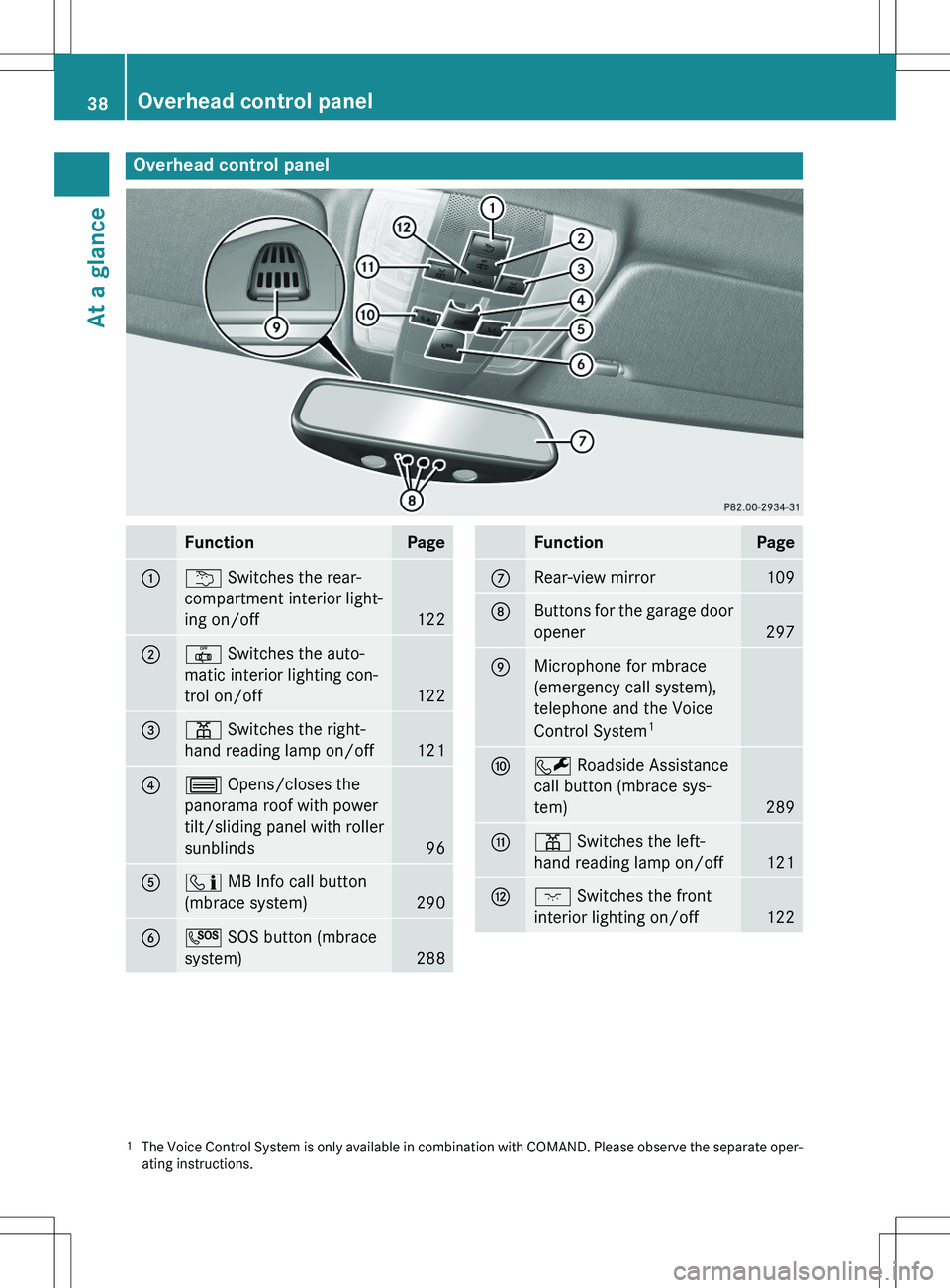
Overhead control panel
FunctionPage
:u Switches the rear-
compartment interior light-
ing on/off
122
;| Switches the auto-
matic interior lighting con-
trol on/off
122
=p Switches the right-
hand reading lamp on/off
121
?3 Opens/closes the
panorama roof with power
tilt/sliding panel with roller sunblinds
96
Aï MB Info call button
(mbrace system)
290
BG SOS button (mbrace
system)
288
FunctionPage
CRear-view mirror109
DButtons for the garage door opener
297
EMicrophone for mbrace
(emergency call system),
telephone and the Voice
Control System 1
FF
Roadside Assistance
call button (mbrace sys-
tem)
289
Gp Switches the left-
hand reading lamp on/off
121
Hc Switches the front
interior lighting on/off
122
1 The Voice Control System is only available in combinati on with COMAND. Please observe the separate oper-
ating instructions.
38Overhead control panel
At a glance
Page 102 of 386
Useful information
iThis Operator's Manual describes all
models and all standard and optional equip- ment of your vehicle available at the time of
publication of the Operator's Manual.
Country-specific differences are possible.
Please note that your vehicle may not be
equipped with all features described. This
also applies to safety-related systems and
functions.
iRead the information on qualified special-
ist workshops ( Y page 27).
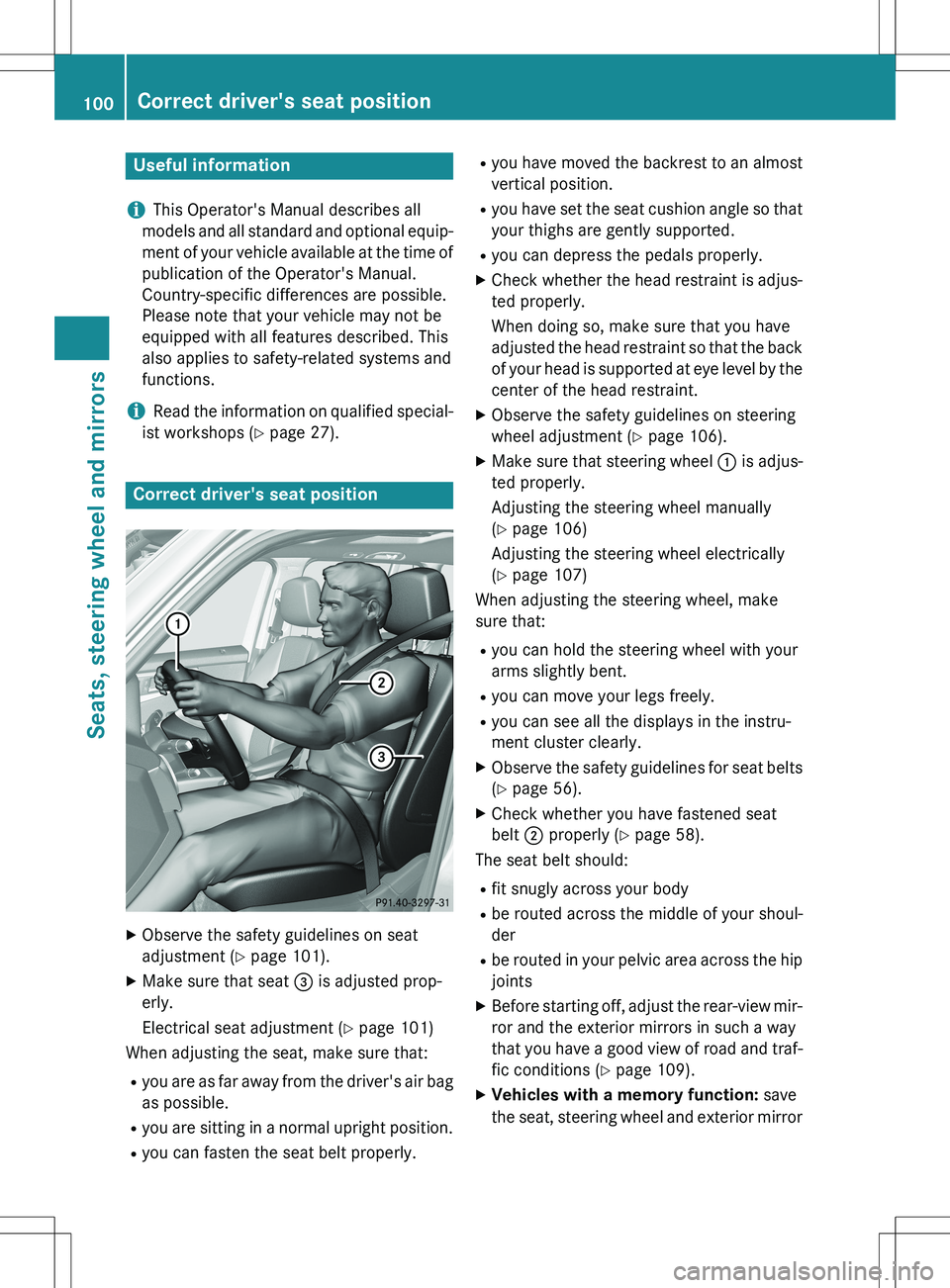
Correct driver's seat position
X
Observe the safety guidelines on seat
adjustment ( Y page 101).
X Make sure that seat = is adjusted prop-
erly.
Electrical seat adjustment ( Y page 101)
When adjusting the seat, make sure that:
R you are as far away from the driver's air bag
as possible.
R you are sitting in a normal upright position.
R you can fasten the seat belt properly. R
you have moved the backrest to an almost
vertical position.
R you have set the seat cushion angle so that
your thighs are gently supported.
R you can depress the pedals properly.
X Check whether the head restraint is adjus-
ted properly.
When doing so, make sure that you have
adjusted the head restraint so that the back of your head is supported at eye level by the
center of the head restraint.
X Observe the safety guidelines on steering
wheel adjustment ( Y page 106).
X Make sure that steering wheel : is adjus-
ted properly.
Adjusting the steering wheel manually
( Y page 106)
Adjusting the steering wheel electrically
( Y page 107)
When adjusting the steering wheel, make
sure that:
R you can hold the steering wheel with your
arms slightly bent.
R you can move your legs freely.
R you can see all the displays in the instru-
ment cluster clearly.
X Observe the safety guidelines for seat belts
( Y page 56).
X Check whether you have fastened seat
belt ; properly ( Y page 58).
The seat belt should:
R fit snugly across your body
R be routed across the middle of your shoul-
der
R be routed in your pelvic area across the hip
joints
X Before starting off, adjust the rear-view mir-
ror and the exterior mirrors in such a way
that you have a good view of road and traf-
fic conditions ( Y page 109).
X Vehicles with a memory function: save
the seat, steering wheel and exterior mirror
100Correct driver's seat position
Seats, steering wheel and mirrors
Page 106 of 386

XTo lower: press release catch : and push
the head restraint down until it is in the
desired position.
Adjusting the rear seat head restraint
angle
Adjust the head restraints so that they are as
close as possible to your head.
You can only adjust the two outer head
restraints.
X Pull or push the top of the head restraint
until it is in the desired position.
Removing/installing the rear seat head
restraints
X To remove: pull the head restraint up to
the stop.
X Press release catch : and pull the head
restraint out of the guides.
X To re-install: insert the head restraint so
that the notches on the bar are on the left
when viewed in the direction of travel.
X Push the head restraint down until you hear
it engage in position.
Adjusting the lumbar support
You can adjust the contour of the front seats so as to provide optimum support for your
back.
X Move adjustment lever : in the direction
of the arrow until the desired backrest con- tour is achieved.
Adjusting the 4-way lumbar support
You can adjust the contour of the front seat
backrests individually to provide optimum
support for your back.
:To raise the backrest contour
;To soften the backrest contour
=To lower the backrest contour
?To harden the backrest contour
104Seats
Seats, steering wheel and mirrors
Page 111 of 386
Crash-responsive EASY-EXIT feature
If the crash-responsive EASY-EXIT feature is
triggered in an accident, the steering columnwill move upwards when the driver's door is
opened. This occurs irrespective of the posi-
tion of the SmartKey in the ignition lock. This
makes it easier to exit the vehicle and rescue
the occupants.
The crash-responsive EASY-EXIT feature is
only operational if the EASY-EXIT/ENTRY fea- ture is activated in the on-board computer.
Mirrors
Rear-view mirror
X Anti-glare mode: flick anti-glare lever :
forwards or back.
Exterior mirrors
Adjusting the exterior mirrors
GWARNING
You could lose control of your vehicle if you do the following while driving:
R adjust the driver's seat, head restraint,
steering wheel or mirrors
R fasten the seat belt
There is a risk of an accident.
Adjust the driver's seat, head restraint, steer-
ing wheel and mirror and fasten your seat belt before starting the engine.
GWARNING
The exterior mirror on the front-passenger
side reduces the size of the image. Visible
objects are actually closer than they appear.
This means that you could misjudge the dis-
tance from road users traveling behind, e.g.
when changing lane. There is a risk of an acci-
dent.
For this reason, always make sure of the
actual distance from the road users traveling
behind by glancing over your shoulder.
The convex exterior mirrors provide a larger
field of vision.
The exterior mirrors are automatically heated
after starting the vehicle if the rear window
defroster is switched on and the outside tem- perature is low. Heating takes a maximum of
10 minutes.
iYou can also heat up the exterior mirrors
manually by switching on the rear window
defroster.
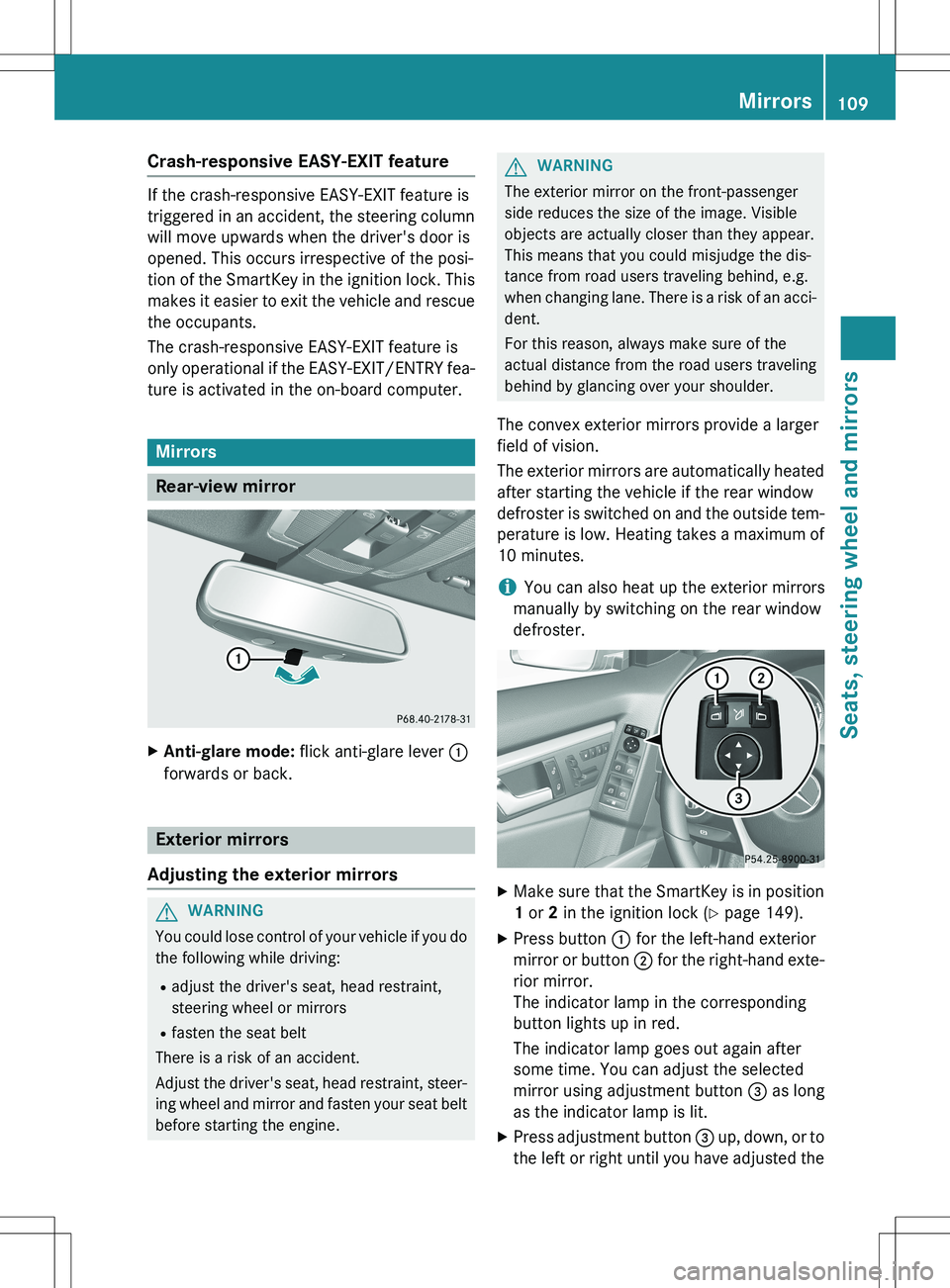
X Make sure that the SmartKey is in position
1 or 2 in the ignition lock ( Y page 149).
X Press button : for the left-hand exterior
mirror or button ; for the right-hand exte-
rior mirror.
The indicator lamp in the corresponding
button lights up in red.
The indicator lamp goes out again after
some time. You can adjust the selected
mirror using adjustment button = as long
as the indicator lamp is lit.
X Press adjustment button = up, down, or to
the left or right until you have adjusted the
Mirrors109
Seats, steering wheel and mirrors
Z
Page 113 of 386
If you come into contact with the electrolyte,
observe the following:R Rinse off the electrolyte from your skin
immediately with water.
R Immediately rinse the electrolyte out of
your eyes thoroughly with clean water.
R If the electrolyte is swallowed, immediately
rinse your mouth out thoroughly. Do not
induce vomiting.
R If electrolyte comes into contact with your
skin or hair or is swallowed, seek medical
attention immediately.
R Immediately change out of clothing which
has come into contact with electrolyte.
R If an allergic reaction occurs, seek medical
attention immediately.
The rear-view mirror and the exterior mirror
on the driver's side automatically go into anti-
glare mode if the following conditions are met simultaneously: R the ignition is switched on and
R incident light from headlamps strikes the
sensor in the rear-view mirror.
The mirrors do not go into anti-glare mode if
reverse gear is engaged or if the interior light-
ing is switched on.
Parking position for the exterior mir-
ror on the front-passenger side
Setting and storing the parking position
Using reverse gear
You can position the front-passenger side
exterior mirror in such a way that you can see
the rear wheel on that side as soon as you
engage reverse gear. You can store this posi-
tion.
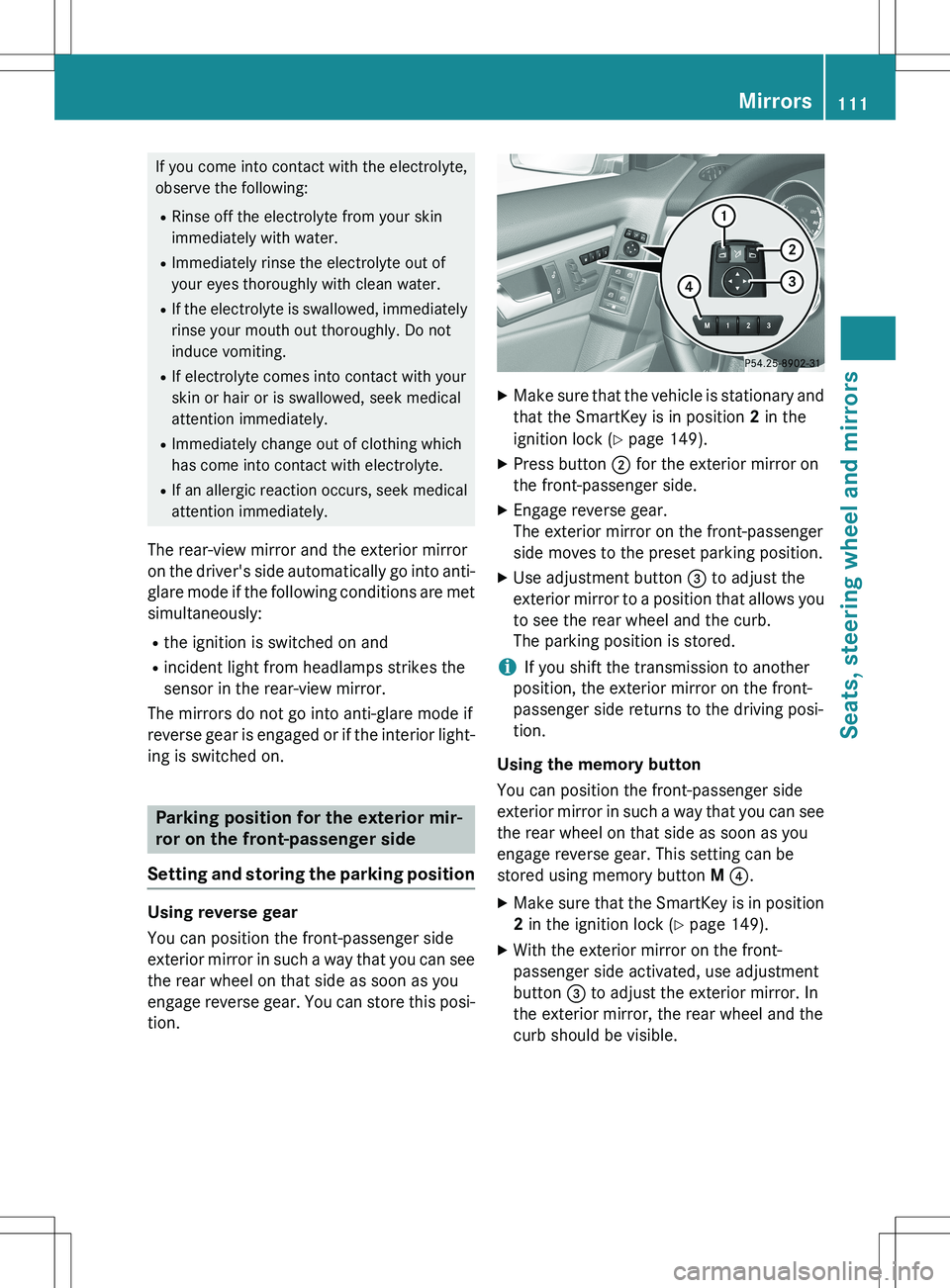
X Make sure that the vehicle is stationary and
that the SmartKey is in position 2 in the
ignition lock ( Y page 149).
X Press button ; for the exterior mirror on
the front-passenger side.
X Engage reverse gear.
The exterior mirror on the front-passenger
side moves to the preset parking position.
X Use adjustment button = to adjust the
exterior mirror to a position that allows you to see the rear wheel and the curb.
The parking position is stored.
iIf you shift the transmission to another
position, the exterior mirror on the front-
passenger side returns to the driving posi-
tion.
Using the memory button
You can position the front-passenger side
exterior mirror in such a way that you can see
the rear wheel on that side as soon as you
engage reverse gear. This setting can be
stored using memory button M ? .
X Make sure that the SmartKey is in position
2 in the ignition lock ( Y page 149).
X With the exterior mirror on the front-
passenger side activated, use adjustment
button = to adjust the exterior mirror. In
the exterior mirror, the rear wheel and the
curb should be visible.
Mirrors111
Seats, steering wheel and mirrors
Z