audio MERCEDES-BENZ GLK SUV 2008 Owners Manual
[x] Cancel search | Manufacturer: MERCEDES-BENZ, Model Year: 2008, Model line: GLK SUV, Model: MERCEDES-BENZ GLK SUV 2008Pages: 261, PDF Size: 8.67 MB
Page 7 of 261
1, 2, 3 ...
4MATIC (permanent four-wheel
drive)................................................... 105A
ABS (Anti-lock Brake System) Display message (luxury multi-
function steering wheel) .........183, 185
Display message (multi-function
steering wheel). .............................. 178
ABS (Anti-lock Braking System).......... 51
Warning lamp.................................. 201
Acceleration ........................................ 249
Accident Notes. ............................................. 205
Acoustic warning signal
see Warning tone
Active Service System PLUS
see Service interval display
Adaptive brake lamps ..........................52
Airbags Activation.......................................... 35
Control unit....................................... 35
Driver's ............................................. 38
Driver's knee airbag. .........................39
Front. ................................................ 38
Front passenger ................................ 38
PASSENGER AIRBAG OFF warning
lamp .............................................. 200
Sidebag............................................. 39
System.............................................. 37
Windowba g....................................... 39
Air conditioning
2-zone Thermatic ............................ 118
3-zone Thermotronic....................... 120
Activating/deactivating ..................121
Activating/deactivating air-recir-
culation mode. ................................ 125
Controlling automatically. ...............122
Convenience opening/closing
(air-recirculation mode). .................126
Cooling with air dehumidification ...121
Demisting the windscreen ..............124
Malfunction indicator lamp. ............199
Misted-up windows. ........................125
Rear window heating ......................125Setting the air distribution.
.............124
Setting the airflow .......................... 124
Setting the air vents .......................122
Setting the temperature .................122
Switching the residual heat func-
tion on/off ...................................... 126
Air-conditioning system
see Air conditioning
Air filter
Display message ............................. 195
Air pressure
see Tyre pressure
Antifreeze concentration................... 248
Anti-lock braking system see ABS
Anti-theft alarm system
see ATA
Anti-theft systems................................ 54
Ashtray ................................................ 138
ASSYST PLUS see Service interval display
ASSYST PLUS service indicator ........167
Calling up the date (on-board
computer). ...................................... 167
ATA (anti-theft alarm system) .............54
Switching off the alarm. ....................55
Audio
On-board computer (luxury multi-
function steering wheel) ...................98
Audio DVD
Operating (on-board computer,
luxury multi-function steering
wheel). .............................................. 99
AUTO lights
Display message ............................. 189
Automatic car wash ...........................168
Automatic transmission Changing gear yoursel f..................... 86
Driving tips ....................................... 87
Emergency running mode ...............209
Indicator in the multi-function dis-
play .................................................. 85
Malfunction..................................... 209
One-touch gearshifting. ....................86
Program selector button ...................87
Releasing the parking lock man-
ually. ............................................... 2154 Index
X204_AKB; 1; 5, en-GB
wobuchh,
Version: 2.11.4 2008-10-15T13:20:56+02:00 - Seite 4Dateiname: 6515_0671_02_buchblock.pdf; preflight
Page 13 of 261
Dipped-beam headlamps.
.................75
Display messages (luxury multi-
function steering wheel) .................194
Display messages (multi-function
steering wheel). .............................. 194
Foglamps. ................................... 75, 78
Hazard warning lamps. .....................76
Headlamp flasher.............................. 76
Headlamp range. .............................. 77
Light switch. ..................................... 74
Main-beam headlamps..................... .76
Motorway mode ................................ 78
Rear foglamp. ................................... 75
Switching the daytime driving
lights on/off (on-board computer,
luxury multi-function steering
wheel). ............................................ 102
Switching the exterior lighting
delayed switch-off on/off (on-
board computer, luxury multi-
function steering wheel) .................103
Switching the Intelligent Light
System on or off (on-board com-
puter, luxury multi-function steer-
ing wheel). ...................................... 103
Switching the surround lighting
on/off (on-board computer,
luxury multi-function steering
wheel). ............................................ 103
Turn signals. ..................................... 76
LIM indicator lamp
Cruise control. ................................ 108
Variable Speedtronic. .....................111
Loading guidelines .............................129
Locking Automatic. ........................................ 59
Emergency locking .........................214
From the inside (central locking
button) .............................................. 59
Luggage compartment enlarge-
ment.................................................... 132
Luggage compartment floor opening/closing. ............................ 136
stowage well, unde r........................ 136
Luggage cover .................................... 133
Luggage net Front-passenger footwell ................131Lumbar support
.................................... 65
4-way. ............................................... 65
Luxury multi-function steering
wheel..................................................... 93
Overview. .......................................... 29 M
Main-beam headlamps Display message ............................. 192
Maintenance
Battery ............................................ 232
Manual drive program .........................88
Maximum speed................................. 249
Memory card (on-board computer,
luxury multi-function steering
wheel).................................................... 99
Memory function.................................. 69
Menu (luxury multi-function steer-
ing wheel)
Audio. ............................................... 98
Menu overview................................. .95
Navigation......................................... 97
Service............................................ 101
Telephone. ........................................ 99
Trip computer. .................................. 95
Menu (multi-function steering wheel)
Menu overview................................. .92
Range/current fuel consumption...... 93
Setting the time/dat e.......................93
Standard display. .............................. 92
Trip computer. .................................. 92
Messages
see Display messages
see Warning and indicator lamps
Minispare emergency spare wheel
Technical data. ............................... 253
Mirrors
Sun visor......................................... 138
see Exterior mirrors or Rear-view mirror
Mobile phone...................................... 140
Installation. ..................................... 243
On-board computer (luxury multi-
function steering wheel) ...................99
Modifying the programming
Key. .................................................. 5810 Index
X204_AKB; 1; 5, en-GB
wobuchh,
Version: 2.11.4 2008-10-15T13:20:56+02:00 - Seite 10Dateiname: 6515_0671_02_buchblock.pdf; preflight
Page 14 of 261
MP3
Operating (on-board computer,
luxury multi-function steering
wheel). .............................................. 99
Multi-function display
Luxury multi-function steering
wheel. ............................................... 94
Multi-function steering wheel. ..........91
Multi-function steering wheel............. 91
Overview. .......................................... 28
Multi-function steering wheel (12-
button)
see Luxury multi-function steering wheel N
Navigation On-board computer (luxury multi-
function steering wheel) ...................97
NECK-PRO head restraints ..................40
Resetting after being triggered. ......215
Notes on running in a new vehicle ...144 O
Odometer Total distance recorder. ..............92, 95
Trip meter. .................................. 92, 95
Off-road
4MATIC ........................................... 105
DSR. ............................................... 105
Off-road ABS. .................................... 51
Off-road drive program. ..................107
Off-road ABS ......................................... 51
Off-road drive program (vehicles
with off-road engineering package) .107
Off-road driving Checklist......................................... 159
Information. .................................... 158
Off-road ESP ®
........................................ 54
Off-road terrain Off-road ESP. .................................... 54
Oil
Consumption. ................................. 148
Topping up. ..................................... 148
On-board computer (luxury multi-
function steering wheel) ......................93
Audio menu ...................................... 98Convenience submenu.
..................104
Display messages ........................... 176
Factory settings submenu ..............104
Instrument cluster submenu ...........101
Lights submenu. ............................. 102
Navigation menu. .............................. 97
Overview. .......................................... 95
Service menu .................................. 101
Settings menu ................................ 101
Standard display submenu................ 95
Telephone menu. .............................. 99
Time/date submenu. ......................102
Trip computer menu. ........................95
Vehicle submenu. ........................... 104
On-board computer (multi-func-
tion steering wheel)............................. 91
Display messages ........................... 176
Overview. .......................................... 92
Range. .............................................. 93
Standard display. .............................. 92
Time/date. ....................................... 93
Trip computer. .................................. 92
On-board computer menu (luxury
multi-function steering wheel).......... 101
One-touch gearshifting........................ 86
Operating system see On-board computer (luxury
multi-function steering wheel)
see On-board computer (multi-
function steering wheel)
Outside temperature display .............90
Override feature Rear side windows ............................ 50 P
Paint code........................................... 244
Panorama sliding sunroof................. 127
Rain closing feature. .......................128
Resetting. ....................................... 129
Parking .................................................. 84
Parking aid Exterior mirror on the front-
passenger side.................................. 69
Parktronic. ...................................... 113
Reversing camera. ..........................115
Parking brake ....................................... 84
Display message ............................. 185 Index
11 X204_AKB; 1; 5, en-GB
wobuchh,
Version: 2.11.4
2008-10-15T13:20:56+02:00 - Seite 11 Dateiname: 6515_0671_02_buchblock.pdf; preflight
Page 31 of 261
Multi-function steering wheel
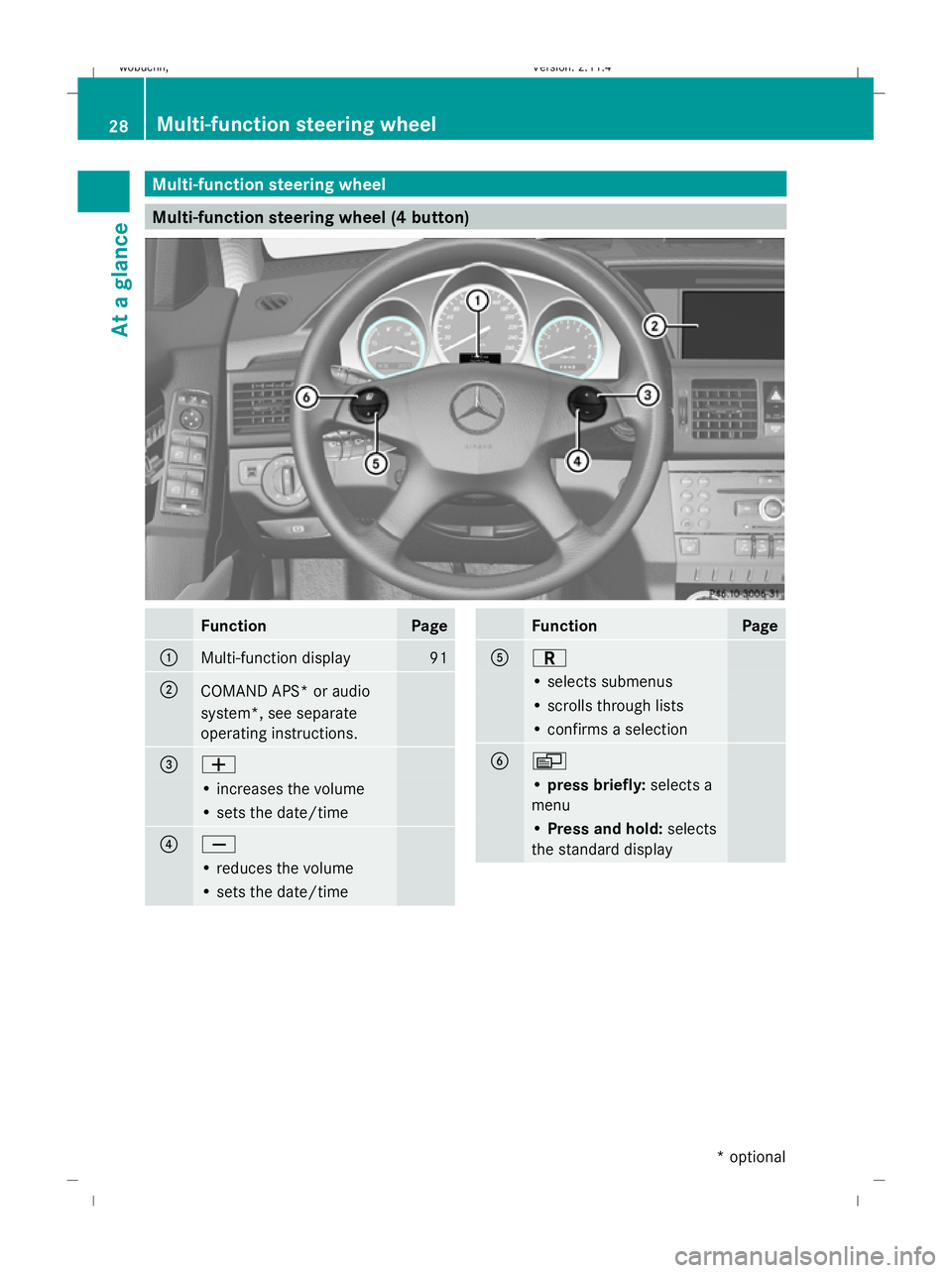
Multi-function steering wheel (4 button)FunctionPage
:Multi-function display91
;COMAND APS* or audio
system*, see separate
operating instructions.
=W
• increases the volume
• sets the date/time
?X
• reduces the volume
• sets the date/time
FunctionPage
AC
• selects submenus
• scrolls through lists
• confirms a selection
BV
•
press briefly: selects a
menu
• Press and hold: selects
the standard display
28Multi-function steering wheel
At a glance
* optional
X204_AKB; 1; 5, en-GB
wobuchh,
Version: 2.11.4
2008-10-15T13:20:56+02:00 - Seite 28 Dateiname: 6515_0671_02_buchblock.pdf; preflight
Page 32 of 261
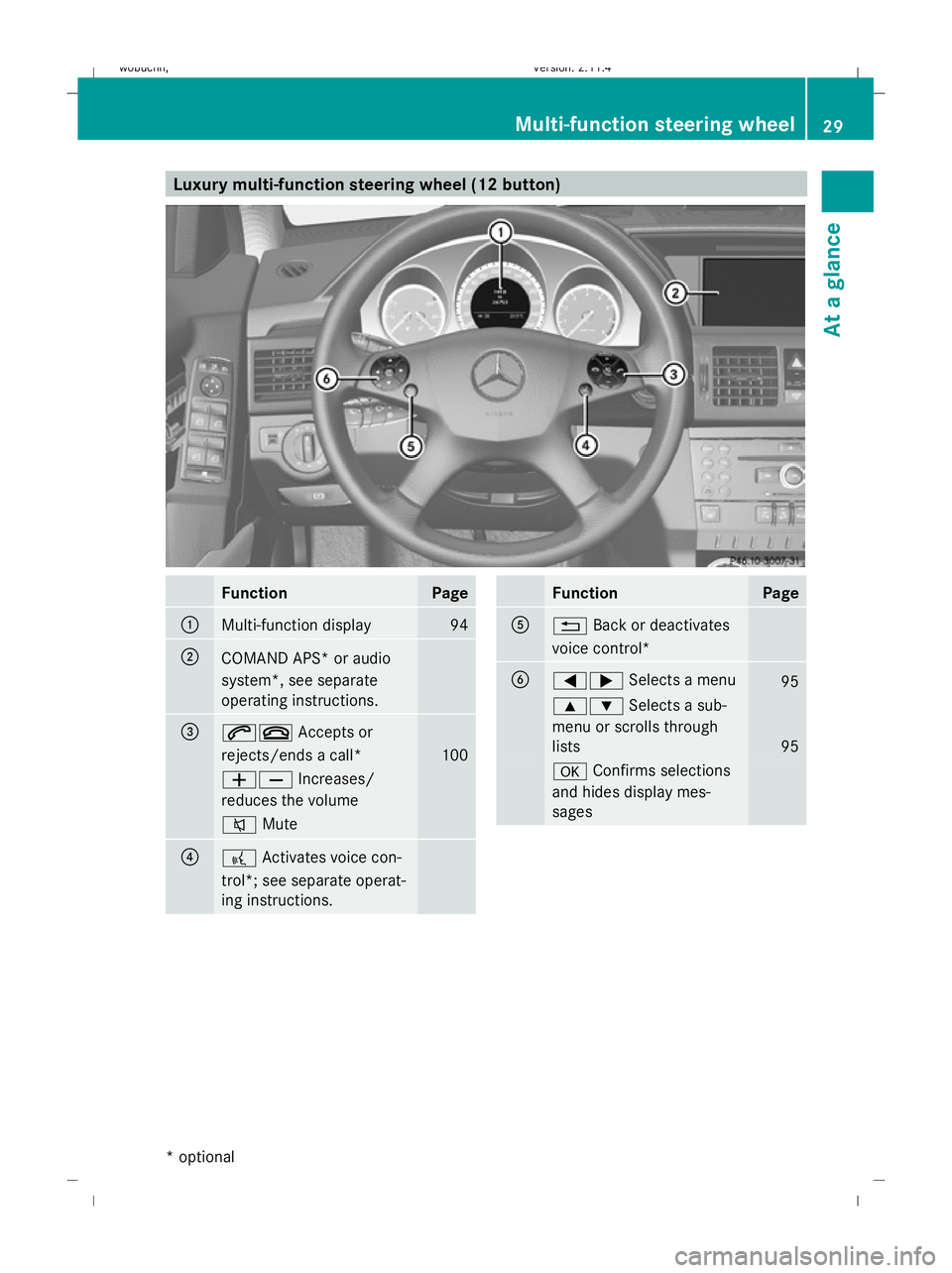
Luxury multi-function steering wheel (12 button)FunctionPage
:Multi-function display94
;COMAND APS* or audio
system*, see separate
operating instructions.
=6~
Accepts or
rejects/ends a call*
100
WX Increases/
reduces the volume
8 Mute
??Activates voice con-
trol*; see separate operat-
ing instructions.
FunctionPage
A% Back or deactivates
voice control*
B=; Selects a menu95
9:Selects a sub-
menu or scrolls through
lists
95
a Confirms selections
and hides display mes-
sages
Multi-function steering wheel 29
At a glance
* optional
X204_AKB; 1; 5, en-GB
wobuchh,
Version: 2.11.4 2008-10-15T13:20:56+02:00 - Seite 29ZDateiname: 6515_0671_02_buchblock.pdf; preflight
Page 33 of 261
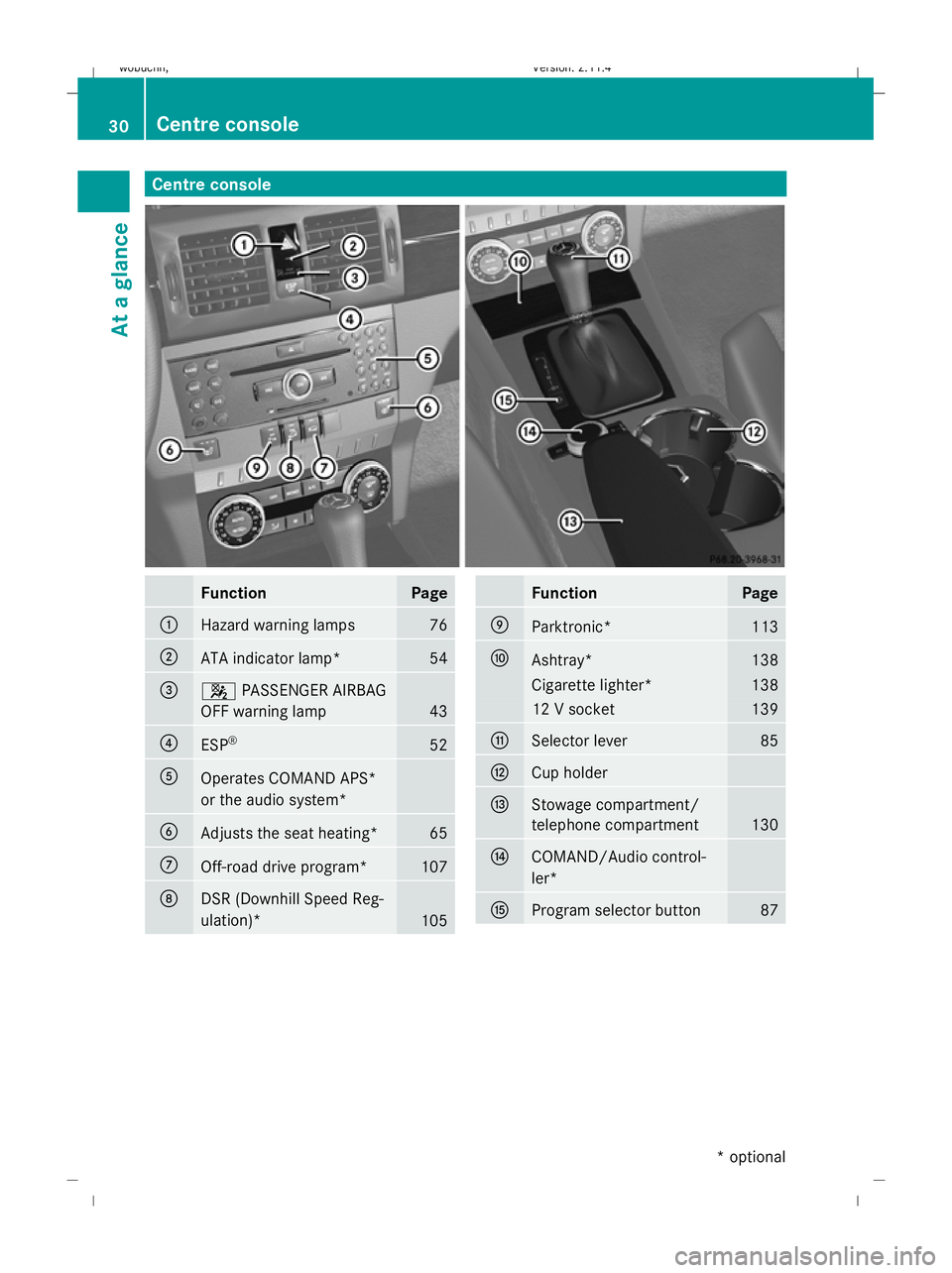
Centre consoleFunctionPage
:Hazard warning lamps76
;ATA indicator lamp*54
=4
PASSENGER AIRBAG
OFF warning lamp
43
?ESP ®52
AOperates COMAND APS*
or the audio system*
BAdjusts the seat heating*65
COff-road drive program*107
DDSR (Downhill Speed Reg-
ulation)*
105
FunctionPage
EParktronic*113
FAshtray*138
Cigarette lighter*138
12 V socket139
GSelector lever85
HCup holder
IStowage compartment/
telephone compartment
130
JCOMAND/Audio control-
ler*
KProgram selector button87
30Centre console
At a glance
* optional
X204_AKB; 1; 5, en-GB
wobuchh, Version: 2.11.4 2008-10-15T13:20:56+02:00 - Seite 30Dateiname: 6515_0671_02_buchblock.pdf; preflight
Page 96 of 261
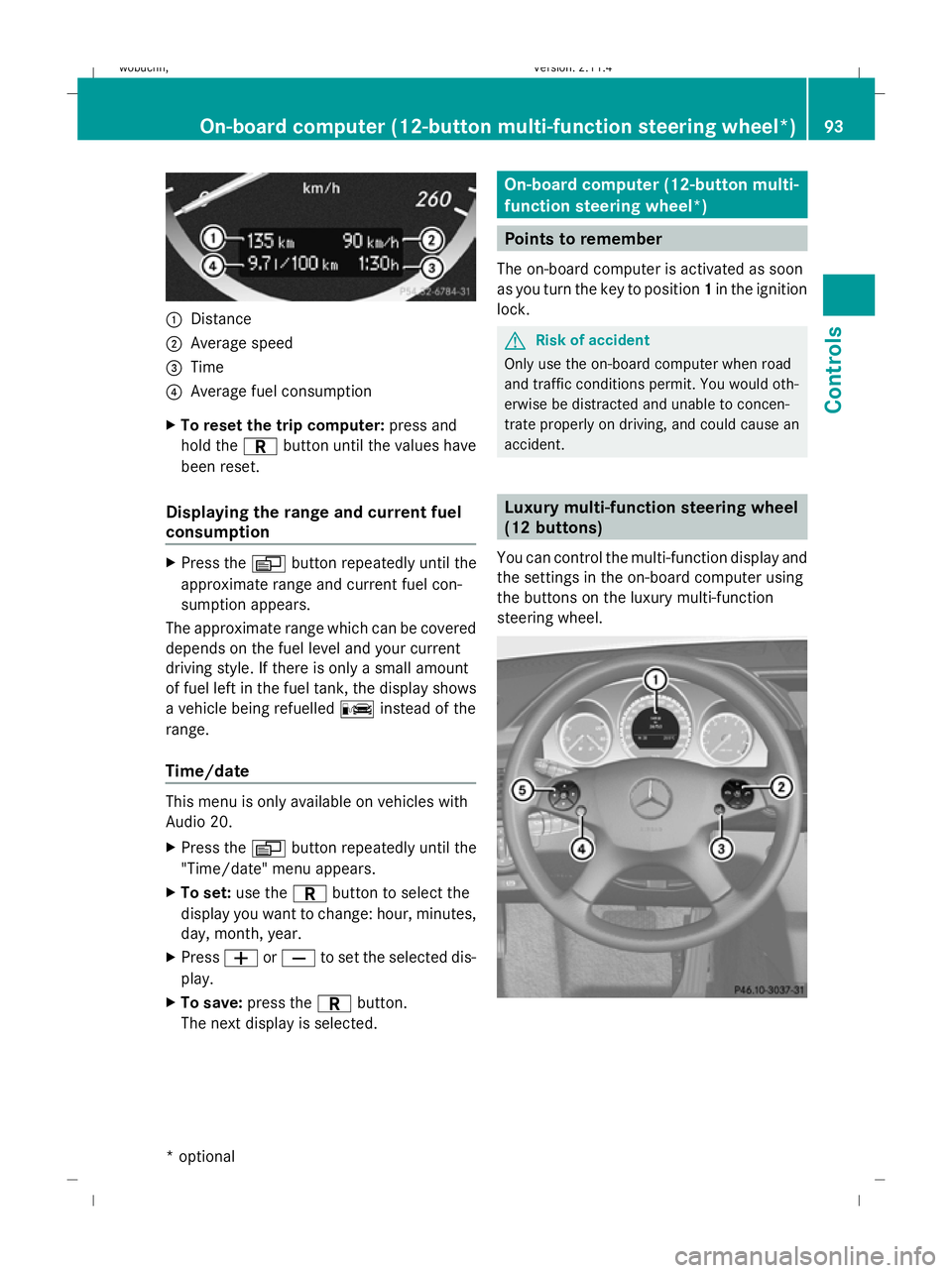
:
Distance
; Average speed
= Time
? Average fuel consumption
X To reset the trip computer: press and
hold the Cbutton until the values have
been reset.
Displaying the range and current fuel
consumption X
Press the Vbutton repeatedly until the
approximate range and current fuel con-
sumption appears.
The approximate range which can be covered
depends on the fuel level and your current
driving style. If there is only a small amount
of fuel left in the fuel tank, the display shows
a vehicle being refuelled Cinstead of the
range.
Time/date This menu is only available on vehicles with
Audio 20.
X
Press the Vbutton repeatedly until the
"Time/date" menu appears.
X To set: use the Cbutton to select the
display you want to change: hour, minutes,
day, month, year.
X Press WorX to set the selected dis-
play.
X To save: press the Cbutton.
The next display is selected. On-board computer (12-button multi-
function steering wheel*)
Points to remember
The on-board computer is activated as soon
as you turn the key to position 1in the ignition
lock. G
Risk of accident
Only use the on-board computer when road
and traffic conditions permit. You would oth-
erwise be distracted and unable to concen-
trate properly on driving, and could cause an
accident. Luxury multi-function steering wheel
(12 buttons)
You can control the multi-function display and
the settings in the on-board computer using
the buttons on the luxury multi-function
steering wheel. On-board computer (12-button multi-function steering
wheel*)93Cont
rols
* optional
X204_AKB; 1; 5, en-GB
wobuchh,
Version: 2.11.4
2008-10-15T13:20:56+02:00 - Seite 93 ZDateiname: 6515_0671_02_buchblock.pdf; preflight
Page 97 of 261
:
Multi-function display
;
6~Accepts or rejects/ends
a call
WX
increases/reduces the
volume
8 Mute =
?
Activates voice control*, see
separate operating instructions. ?
%
Press briefly:
back, deactivates voice control* and
fades out display messages
%Press and hold:
selects the standard display. A
=;
Calls up the menu bar and
selects menus 9:Press briefly:
selects a submenu or scrolls through
lists.
In the Audio menu, selects a stored
station, an audio track or a video
scene*.
In the Tel(telephone) menu,
switches to the telephone book and
selects a name or telephone number 9:
Press and hold:
in the Audio menu, selects the pre-
vious/next station or selects an
audio track or video scene* using the
fast scrolling feature.
In the Tel(telephone) menu, starts
rapid scrolling through the telephone
book a
Confirms selections and hides
display messages.
In the Tel(telephone) menu:
switches to the telephone book and
starts dialling. Multi-function display
To activate the multi-function display:
R switch on the ignition
R switch on the lights
R open the driver's door
Values, settings and display messages are
shown in the description field in the multi-
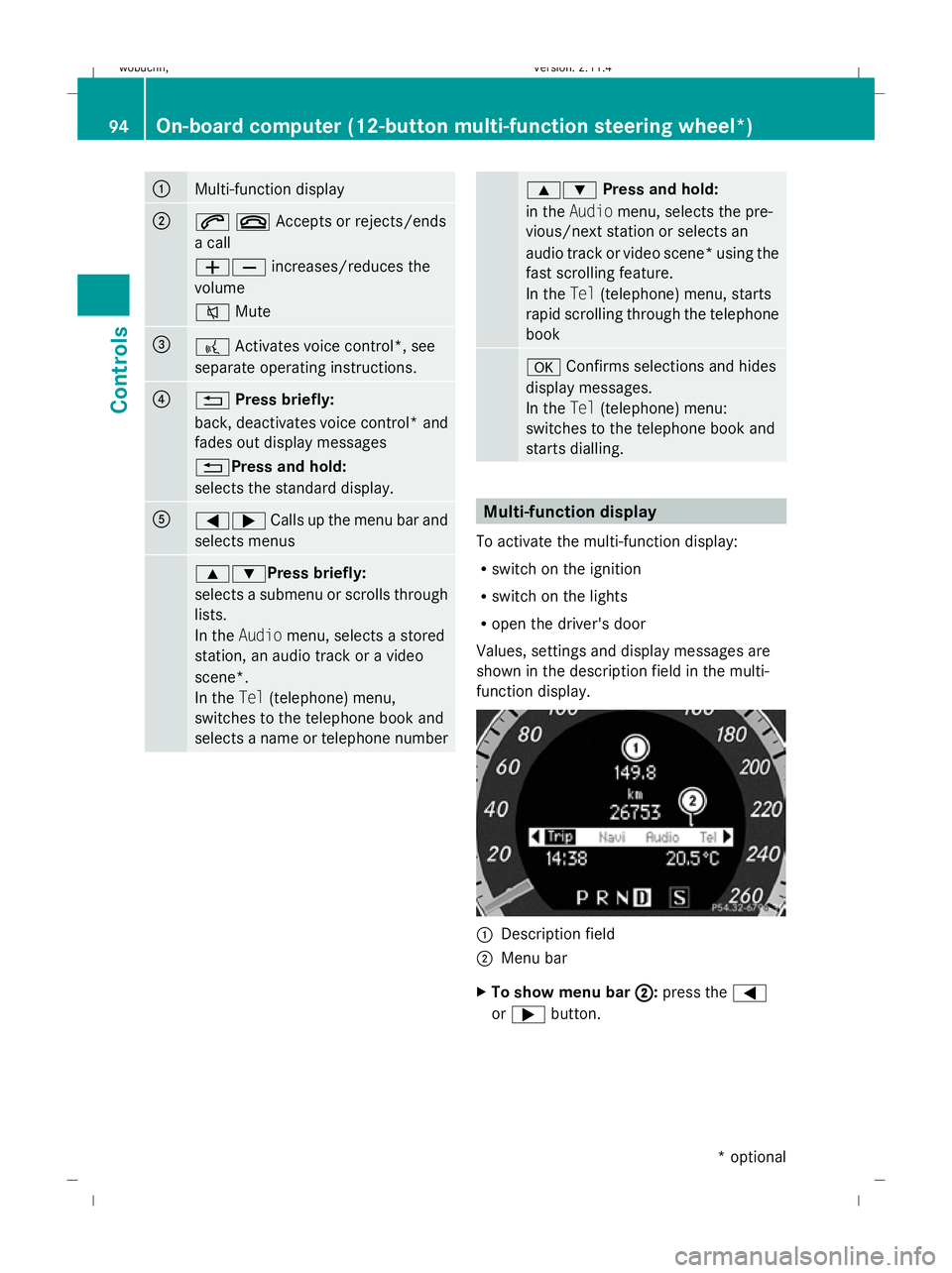
function display. :
Description field
; Menu bar
X To show menu bar ;
;: press the =
or ; button. 94
On-board computer (12-button multi-function steering wheel*)Controls
* optional
X204_AKB; 1; 5, en-GB
wobuchh
,V ersion: 2.11.4
2008-10-15T13:20:56+02:00 - Seite 94 Dateiname: 6515_0671_02_buchblock.pdf; preflight
Page 98 of 261
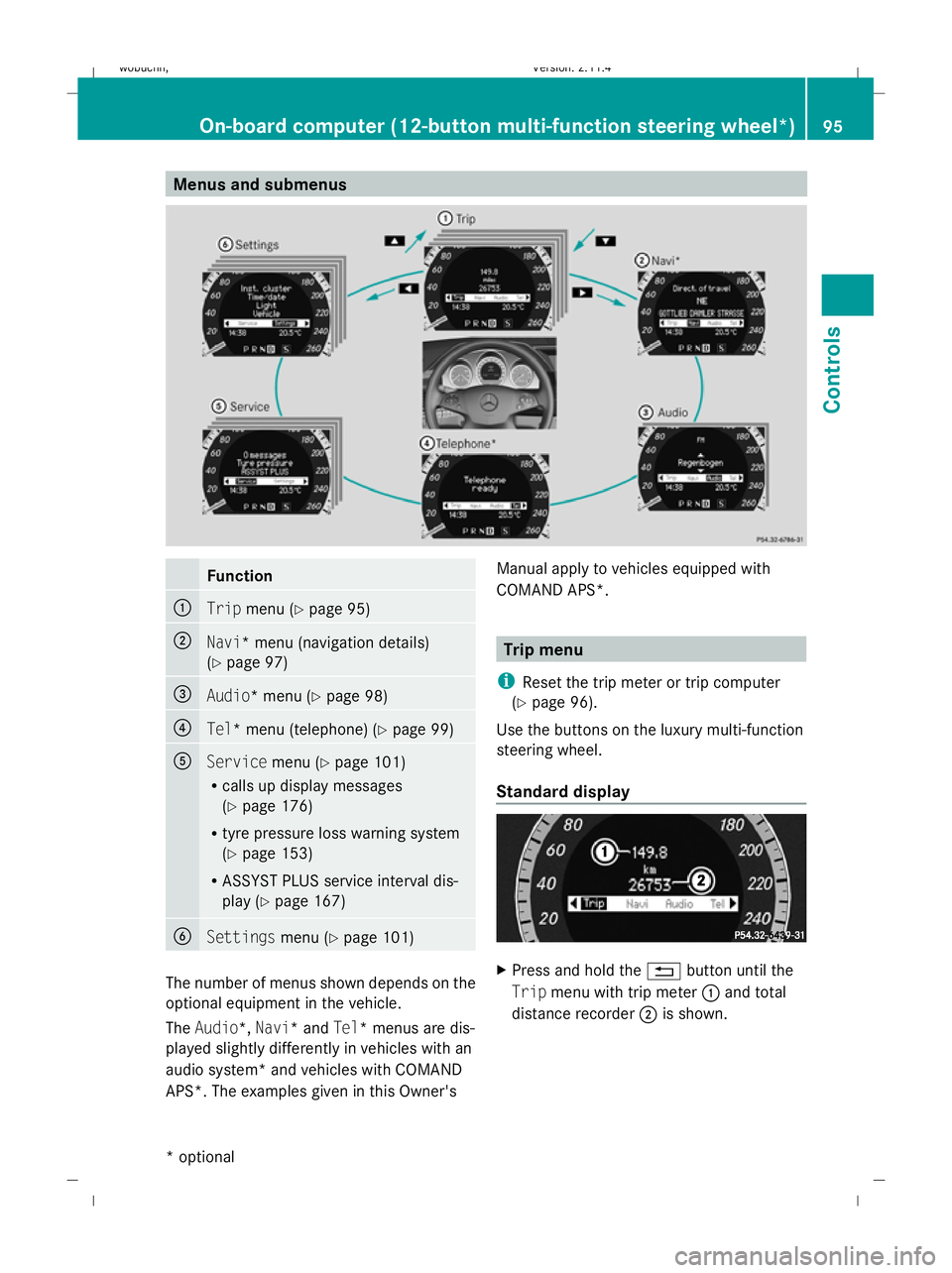
Menus and submenusFunction
:Trip
menu (Y page 95)
;Navi* menu (navigation details)
(Ypage 97)
=Audio* menu (Y page 98)
?Tel* menu (telephone) (Y page 99)
AServicemenu (Ypage 101)
R calls up display messages
(Y page 176)
R tyre pressure loss warning system
(Y page 153)
R ASSYST PLUS service interval dis-
play (Y page 167)
BSettings menu (Ypage 101)
The number of menus shown depends on the
optional equipment in the vehicle.
The Audio*, Navi* and Tel* menus are dis-
played slightly differently in vehicles with an
audio system* and vehicles with COMAND
APS*. The examples given in this Owner's Manual apply to vehicles equipped with
COMAND APS*.
Trip menu
i Reset the trip meter or trip computer
(Y page 96).
Use the buttons on the luxury multi-function
steering wheel.
Standard display
X Press and hold the %button until the
Trip menu with trip meter :and total
distance recorder ;is shown.
On-board computer (12-button multi-function steering wheel*) 95
Controls
* optional
X204_AKB; 1; 5, en-GB
wobuchh,
Version: 2.11.4
2008-10-15T13:20:56+02:00 - Seite 95Z Dateiname: 6515_0671_02_buchblock.pdf; preflight
Page 101 of 261
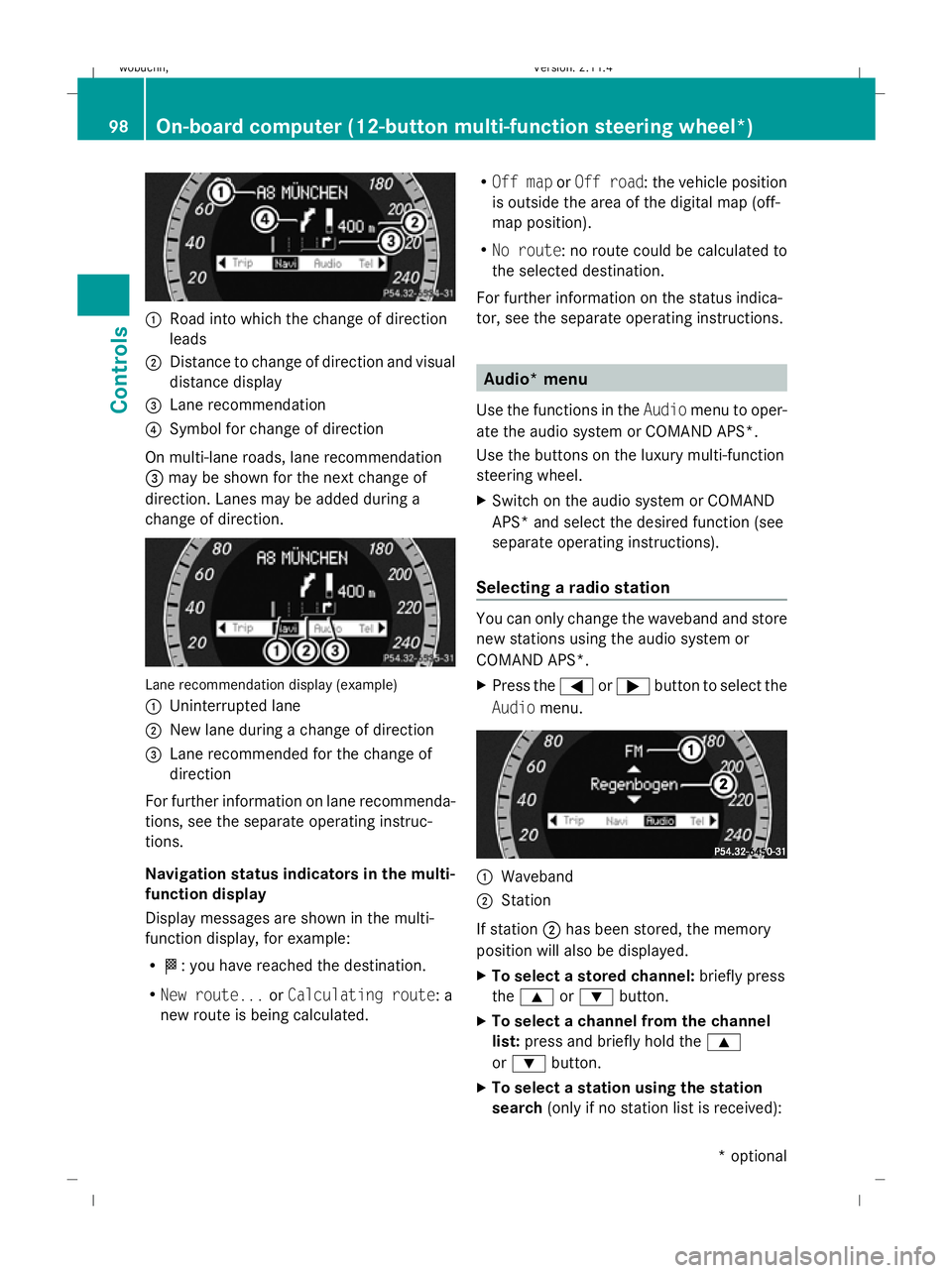
:
Road into which the change of direction
leads
; Distance to change of direction and visual
distance display
= Lane recommendation
? Symbol for change of direction
On multi-lane roads, lane recommendation
= may be shown for the next change of
direction. Lanes may be added during a
change of direction.Lane recommendation display (example)
: Uninterrupted lane
; New lane during a change of direction
= Lane recommended for the change of
direction
For further information on lane recommenda-
tions, see the separate operating instruc-
tions.
Navigation status indicators in the multi-
function display
Display messages are shown in the multi-
function display, for example:
R O: you have reached the destination.
R New route... orCalculating route: a
new route is being calculated. R
Off map orOff road : the vehicle position
is outside the area of the digital map (off-
map position).
R No route : no route could be calculated to
the selected destination.
For further information on the status indica-
tor, see the separate operating instructions.
Audio* menu
Use the functions in the Audiomenu to oper-
ate the audio system or COMAND APS*.
Use the buttons on the luxury multi-function
steering wheel.
X Switch on the audio system or COMAND
APS* and select the desired function (see
separate operating instructions).
Selecting a radio station
You can only change the waveband and store
new stations using the audio system or
COMAND APS*.
X Press the =or; button to select the
Audio menu.
:
Waveband
; Station
If station ;has been stored, the memory
position will also be displayed.
X To select a stored channel: briefly press
the 9 or: button.
X To select a channel from the channel
list: press and briefly hold the 9
or : button.
X To select a station using the station
search (only if no station list is received):
98On-board computer (12-button multi-function steering wheel*)
Controls
* optional
X204_AKB; 1; 5, en-GB
wobuchh,
Version: 2.11.4
2008-10-15T13:20:56+02:00 - Seite 98 Dateiname: 6515_0671_02_buchblock.pdf; preflight