buttons MERCEDES-BENZ GLK SUV 2012 Owners Manual
[x] Cancel search | Manufacturer: MERCEDES-BENZ, Model Year: 2012, Model line: GLK SUV, Model: MERCEDES-BENZ GLK SUV 2012Pages: 381, PDF Size: 12.68 MB
Page 16 of 381
Fuse box in the luggage compart-
ment
.............................................. 347
Important safety notes ..................346 G
Gear or selector lever (cleaning
instructions) ...................................... 322
Genuine Mercedes-Benz parts .........362
Glove compartment ..........................297 H
Handbrake see Parking brake
Hazard warning lamps ......................114
Headlamp Cleaning system (function) ............114
Cleaning system (notes) ................372
Headlamps
Misting up ...................................... 117
Topping up the cleaning system ....317
see Automatic headlamp mode
Head restraints
Adjusting ......................................... 98
Adjusting (electrically) .....................99
Adjusting (manually). .......................98
Adjusting (rear) ................................ 99
Fitting/removing (rear) ....................99
see NECK-PRO head restraints
see NECK-PRO head restraints/
NECK-PRO luxury head restraints
Heating
see Climate control
High-pressure cleaners ....................318
Hill start assist .................................. 150
HOLD function Display message (12-button mul-
tifunction steering wheel) ..............271
Display message (4-button multi-
function steering wheel) ................270
Function/notes ............................. 186 I
Ignition lock see Key positions
Immobiliser .......................................... 71Indicator and warning lamps
Coolant .......................................... 292
DISTRONIC PLUS ........................... 294
Engine diagnostics .........................291
Fuel tank ........................................ 292
Overview (12-button multifunc-
tion steering wheel) .........................34
Overview (4-button multifunction
steering wheel) ................................ 32
Indicator lamps
see Warning and indicator lamps
Insect protection on the radiator ....315
Inspection see ASSYST PLUS
Instrument cluster (12-button mul-
tifunction steering wheel)
Indicator and warning lamps ............34
Overview .......................................... 33
Settings ......................................... 238
Instrument cluster (4-button mul-
tifunction steering wheel)
Indicator and warning lamps ............32
Overview .......................................... 31
Instrument cluster lighting ..............239
Multifunction steering wheel with
4 buttons ....................................... 224
Intelligent Light System
Activating/deactivating (12-but-
ton multifunction steering wheel) ..240
Display message (12-button mul-
tifunction steering wheel) ..............263
Overview ........................................ 114
Interior lighting ................................. 117
Automatic control system ..............118
Delayed switch-off (12-button
multifunction steering wheel) ........241
Emergency lighting ........................118
Manual control ............................... 118
Overview ........................................ 117
Reading lamp ................................. 117
Setting brightness for display/
switches (on-board computer) .......239
Interior motion sensor ........................73
ISOFIX child seat securing system ....57 Index
13
Page 23 of 381
Side lamps
Changing bulbs .............................. 120
Switching on/off ........................... 112
Side windows
Convenience closing ........................90
Convenience opening ......................90
Important safety notes ....................88
Opening/closing .............................. 89
Problem (malfunction) .....................91
resetting .......................................... 91
Sliding sunroof
see Panorama sliding sunroof
Snow chains ...................................... 353
Socket Centre console .............................. 308
Luggage compartment ...................308
Rear compartment .........................308
Sockets
General notes ................................ 307
Spare wheel
Storage location ............................ 328
Storing ........................................... 328
Specialist workshop ............................ 27
Speed, controlling see Cruise control
Speed Limit Assist
Activating/deactivating the warn-
ing function ................................... .236
Displaying ...................................... 236
Display message (12-button mul-
tifunction steering wheel) ..............271
Display message in the multifunc-
tion displa y.................................... 203
Important safety notes ..................202
Speedometer
Activating/deactivating the addi-
tional speedometer ........................239
Digital ............................................ 231
In the instrument cluster (12-but-
ton multifunction steering wheel) ....33
In the instrument cluster (4-but-
ton multifunction steering wheel) ....31
Segments ...................................... 228
Selecting the unit of measure-
ment .............................................. 238
see Instrument cluster SPEEDTRONIC
Deactivating variable .....................177
Display message (12-button mul-
tifunction steering wheel) ..............275
Display message (4-button multi-
function steering wheel) ................270
Function/notes ............................. 176
Important safety notes ..................176
LIM indicator lamp .........................176
Permanent ..................................... 178
Selecting ........................................ 176
Variabl e......................................... 176
SRS (Supplemental Restraint Sys-
tem)
Display message (12-button mul-
tifunction steering wheel) ..............256
Display message (4-button multi-
function steering wheel) ................250
Introduction ..................................... 43
Warning lamp ................................. 291
Warning lamp (function) ................... 43
Starting (engine) ................................ 148
Steering Display message (12-button mul-
tifunction steering wheel) ..............281
Display message (4-button multi-
function steering wheel) ................279
Steering wheel
Adjusting (electrically) ...................102
Adjusting (manually). .....................102
Buttons (12-button multifunction
steering wheel) .............................. 228
Buttons (4-button multifunction
steering wheel) .............................. 225
Cleaning ......................................... 322
Gearshift paddles ........................... 159
Important safety notes ..................101
Storing settings (memory func-
tion) ............................................... 106
Steering wheel gearshift paddles ....159
Stowage areas ................................... 296
Stowage compartments Armrest (under) ............................. 297
Centre console .............................. 297
Cup holder ..................................... 305
Glove compartment .......................297
Important safety information .........296 20
Index
Page 55 of 381
The belt strap is tightened slightly when:
R you engage the belt tongue in the belt
buckle and you then turn the key to position
2 in the ignition lock.
R the key is in position 2in the ignition lock
and you then engage the belt tongue in the
buckle.
The seat-belt adjustment will apply a certain
tightening force if any slack is detected
between the occupant and the seat belt. Do
not hold on to the seat belt tightly while it is
adjusting. On vehicles with a luxury multi-
function steering wheel (12 buttons) you can
switch the seat-belt adjustment on and off
using the on-board computer (Y page 243).
The seat-belt adjustment is an integral part of
the PRE-SAFE ®
convenience function. More
information about PRE-SAFE ®
can be found
in the "PRE-SAFE ®
(preventative occupant
protection)" section (Y page 48).
Belt height adjustment You can adjust the seat belt height on the
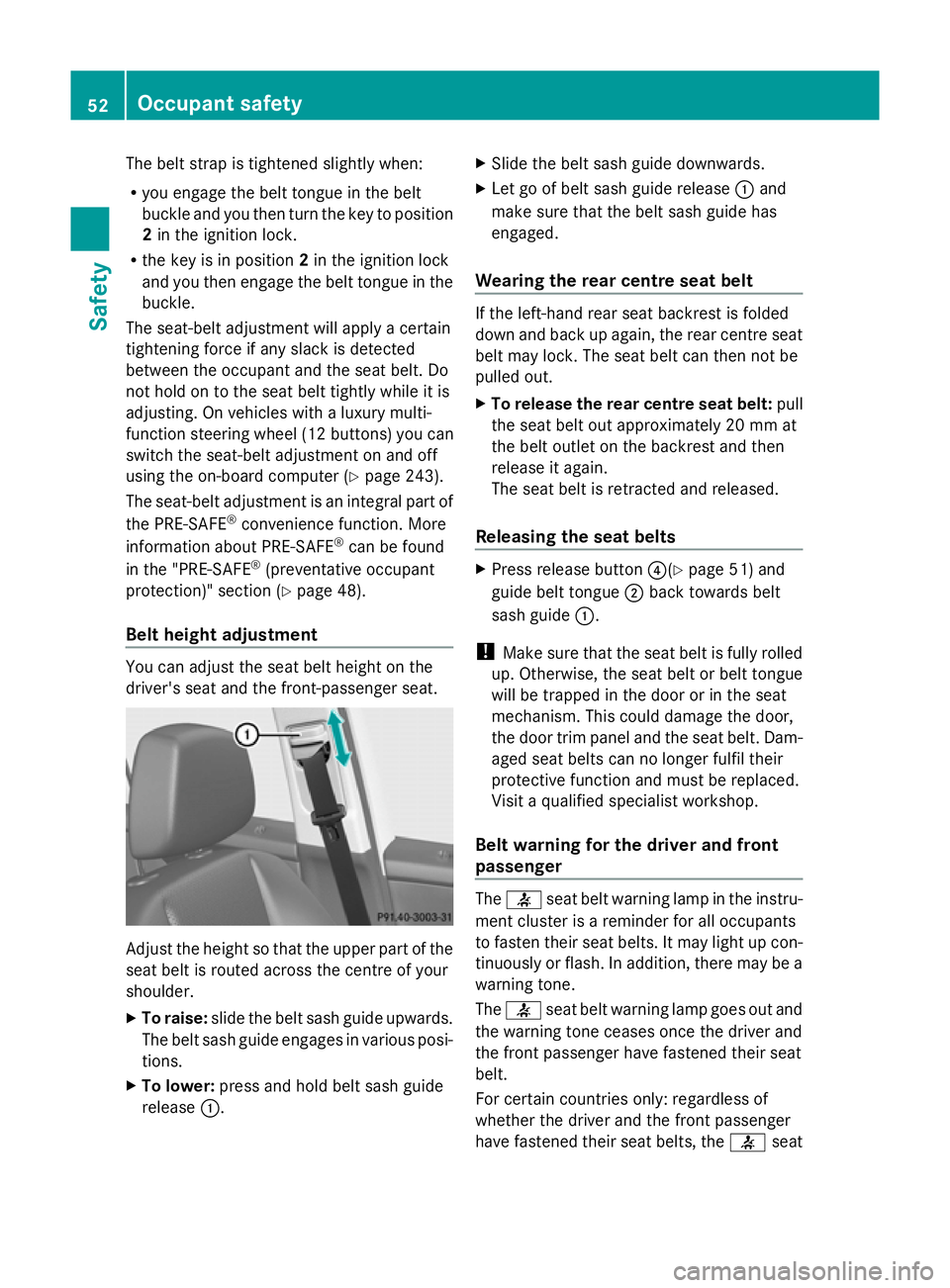
driver's seat and the front-passenger seat. Adjust the height so that the upper part of the
seat belt is routed across the centre of your
shoulder.
X To raise: slide the belt sash guide upwards.
The belt sash guide engages in various posi-
tions.
X To lower: press and hold belt sash guide
release :. X
Slide the belt sash guide downwards.
X Let go of belt sash guide release :and
make sure that the belt sash guide has
engaged.
Wearing the rear centre seat belt If the left-hand rear seat backrest is folded
down and back up again, the rear centre seat
belt may lock. The seat belt can then not be
pulled out.
X
To release the rear centre seat belt: pull
the seat belt out approximately 20 mm at
the belt outlet on the backrest and then
release it again.
The seat belt is retracted and released.
Releasing the seat belts X
Press release button ?(Ypage 51) and
guide belt tongue ;back towards belt
sash guide :.
! Make sure that the seat belt is fully rolled
up. Otherwise, the seat belt or belt tongue
will be trapped in the door or in the seat
mechanism. This could damage the door,
the door trim panel and the seat belt. Dam-
aged seat belts can no longer fulfil their
protective function and must be replaced.
Visit a qualified specialist workshop.
Belt warning for the driver and front
passenger The
7 seat belt warning lamp in the instru-
ment cluster is a reminder for all occupants
to fasten their seat belts. It may light up con-
tinuously or flash. In addition, there may be a
warning tone.
The 7 seat belt warning lamp goes out and
the warning tone ceases once the driver and
the front passenger have fastened their seat
belt.
For certain countries only: regardless of
whether the driver and the front passenger
have fastened their seat belts, the 7seat 52
Occupant safetySafety
Page 81 of 381
Changing the settings of the locking
system
You can change the settings of the locking
system. This means that only the driver's door
and the fuel filler flap are unlocked when the
vehicle is unlocked. This is useful if you fre-
quently travel on your own.
X To change the setting: press and hold
down the %and& buttons simulta-
neously for approximately six seconds until
the battery check lamp (Y page 79)
flashes twice.
i If the setting of the locking system is
changed within the signal range of the vehi-
cle, pressing the &or% button:
R locks or
R unlocks the vehicle
The key now functions as follows:
X To unlock the driver's door: press the
% button once.
X To unlock centrally: press the%but-
ton twice.
X To lock centrally: press the&button.
The KEYLESS-GO function is changed as fol-
lows:
X To unlock the driver's door: touch the
inner surface of the door handle on the
driver's door.
X To unlock centrally: touch the inner sur-
face of the door handle on the front-
passenger door or the rear door.
X To lock centrally: touch the outer sensor
surface on one of the door handles
(Y page 77).
X To restore the factory settings: press
and hold down the %and& buttons
simultaneously for approximately six sec-
onds until the battery check lamp flashes
twice. Emergency key element
General notes If the vehicle can no longer be locked or
unlocked with the key, use the emergency
key element.
If you use the emergency key element to
unlock and open the driver's door, the anti-
theft alarm system will be triggered
(Y
page 72).
There are several ways to turn off the alarm:
X To turn the alarm off with the key: press
the % or& button on the key.
or
X Insert the key into the ignition lock.
or
X To deactivate the alarm with KEYLESS-
GO: press the Start/Stop button in the igni-
tion lock. The key must be in the vehicle.
or
X Lock or unlock the vehicle using KEYLESS-
GO. The key must be outside the vehicle.
If you unlock the vehicle using the emergency
key element, the fuel filler flap will not be
unlocked automatically.
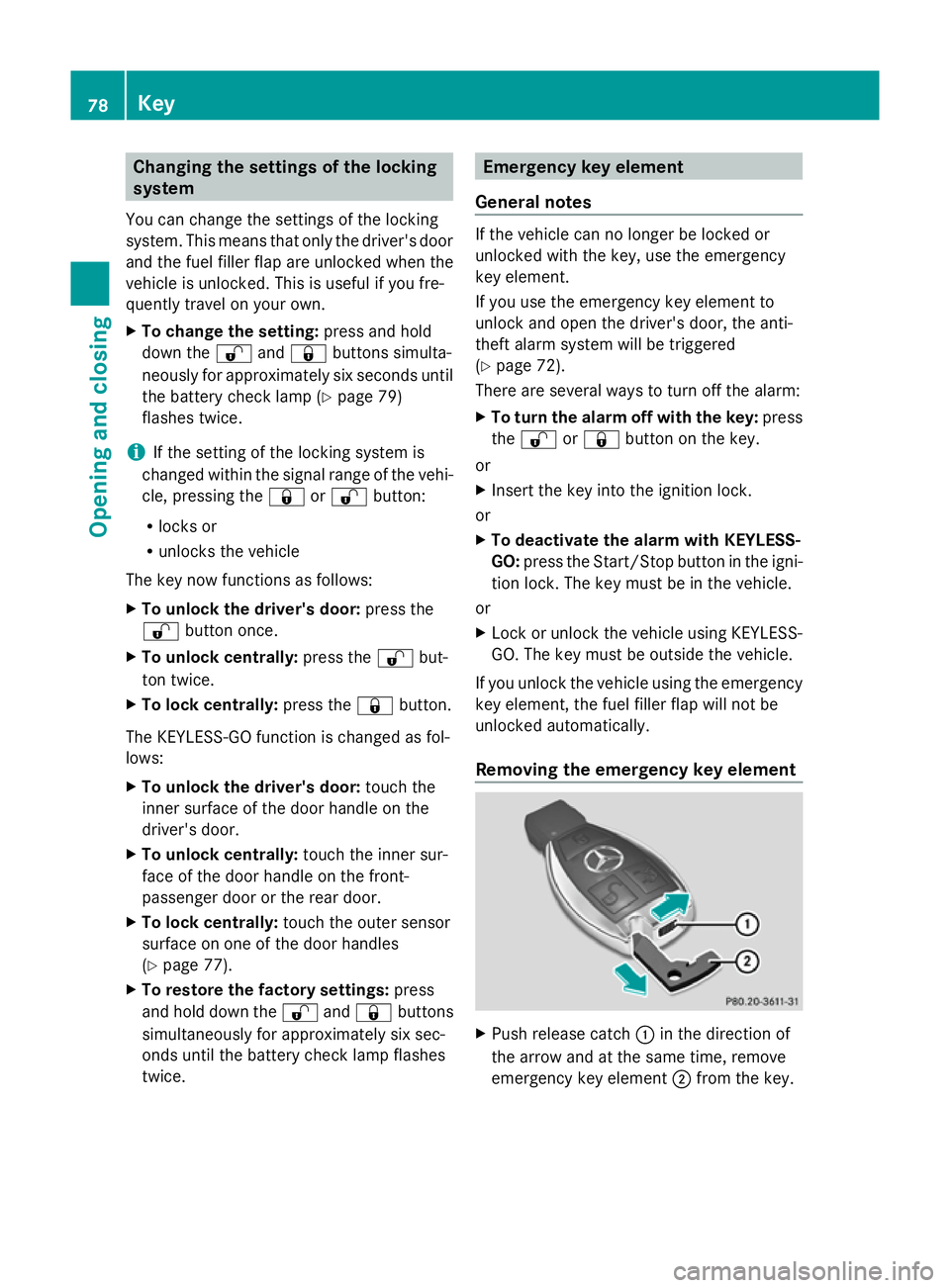
Removing the emergency key element X
Push release catch :in the direction of
the arrow and at the same time, remove
emergency key element ;from the key. 78
KeyOpening and closing
Page 83 of 381
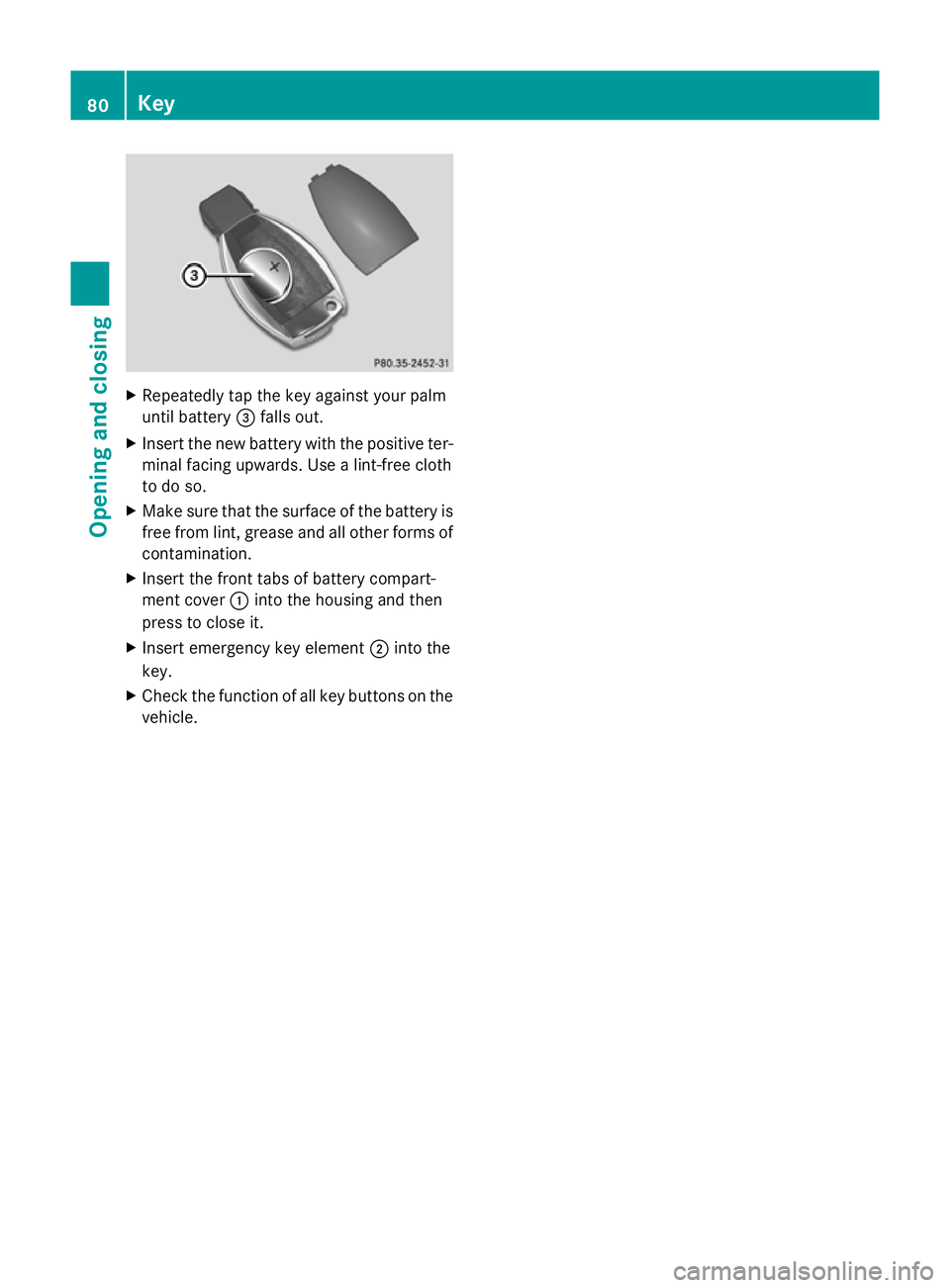
X
Repeatedly tap the key against your palm
until battery =falls out.
X Insert the new battery with the positive ter-
minal facing upwards. Use a lint-free cloth
to do so.
X Make sure that the surface of the battery is
free from lint, grease and all other forms of
contamination.
X Insert the front tabs of battery compart-
ment cover :into the housing and then
press to close it.
X Insert emergency key element ;into the
key.
X Check the function of all key buttons on the
vehicle. 80
KeyOpening and closing
Page 87 of 381
You could therefore be locked out if:
R the vehicle is being pushed.
R the vehicle is being towed.
R the vehicle is being tested on a dynamom-
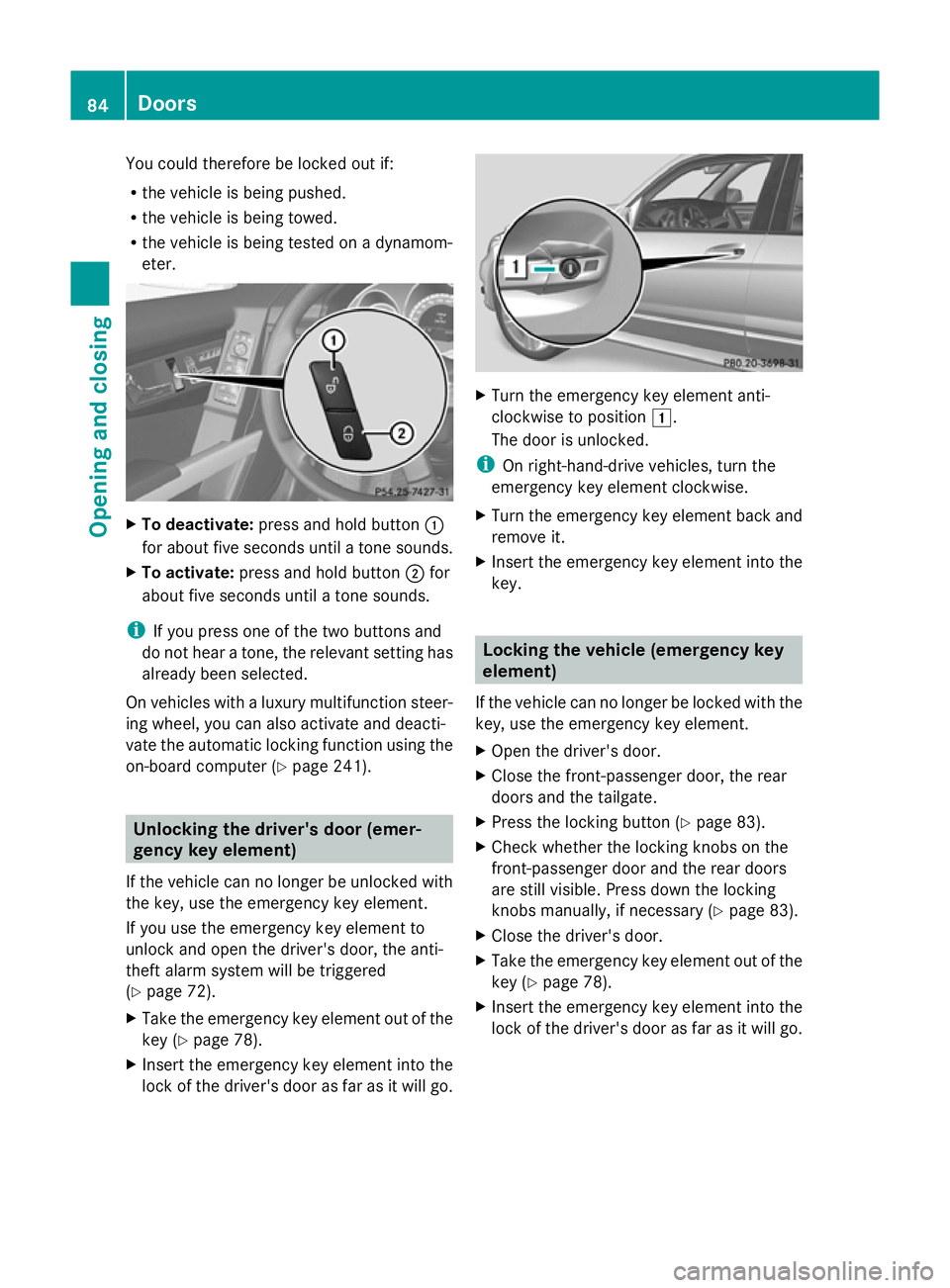
eter. X
To deactivate: press and hold button :
for about five seconds until a tone sounds.
X To activate: press and hold button ;for
about five seconds until a tone sounds.
i If you press one of the two buttons and
do not hear a tone, the relevant setting has
already been selected.
On vehicles with a luxury multifunction steer-
ing wheel, you can also activate and deacti-
vate the automatic locking function using the
on-board computer (Y page 241).Unlocking the driver's door (emer-
gency key element)
If the vehicle can no longer be unlocked with
the key, use the emergency key element.
If you use the emergency key element to
unlock and open the driver's door, the anti-
theft alarm system will be triggered
(Y page 72).
X Take the emergency key element out of the
key (Y page 78).
X Insert the emergency key element into the
lock of the driver's door as far as it will go. X
Turn the emergency key element anti-
clockwise to position 1.
The door is unlocked.
i On right-hand-drive vehicles, turn the
emergency key element clockwise.
X Turn the emergency key element back and
remove it.
X Insert the emergency key element into the
key. Locking the vehicle (emergency key
element)
If the vehicle can no longer be locked with the
key, use the emergency key element.
X Open the driver's door.
X Close the front-passenger door, the rear
doors and the tailgate.
X Press the locking button (Y page 83).
X Check whether the locking knobs on the
front-passenger door and the rear doors
are still visible. Press down the locking
knobs manually, if necessary ( Ypage 83).
X Close the driver's door.
X Take the emergency key element out of the
key (Y page 78).
X Insert the emergency key element into the
lock of the driver's door as far as it will go. 84
DoorsOpening and closing
Page 100 of 381
settings with the memory function
(Y
page 106). Seats
Important safety notes
G
WARNING
The seats can still be adjusted when there is
no key in the ignition lock. For this reason,
children should never be left unsupervised in
the vehicle. They could adjust the seats and
become trapped. G
WARNING
Only adjust the driver's seat when the vehicle
is stationary. You will otherwise be distracted
from the road and traffic conditions and you
could lose control of the vehicle as a result of
the seat moving. This could cause an acci-
dent. G
WARNING
If you adjust the seat height carelessly, you or
others could be trapped and thereby injured.
Children in particular could unintentionally
press the buttons to electrically adjust the
seats and become trapped.
Take care that:
R while moving the seats, your hands do not
get under the lever assembly of the seat
adjustment system.
R children in the vehicle do not slide their
hands under the levers. G
WARNING
Make sure that nobody can become trapped
when adjusting the seats.
Observe the notes on airbags.
Secure children as recommended; see the
"Children in the vehicle" section. G
WARNING
Make sure that the back of your head is sup-
ported at eye level by the central area of the head restraint. If your head is not supported
correctly by the head restraint, you could suf-
fer a severe neck injury in the event of an
accident. Never drive if the head restraints are
not engaged and set correctly.
G
WARNING
A seat belt can only offer its intended degree
of protection when the backrest is almost ver-
tical and the occupant is sitting upright. Avoid
seat positions that do not allow the seat belt
to be routed correctly. Adjust the backrest so
that it is as upright as possible. Never travel
with the backrest reclined too far backwards.
You could otherwise be seriously or even
fatally injured in the event of an accident or
sudden braking.
! To avoid damage to the seats and the seat
heating, observe the following information:
R do not spill any liquids on the seats. If
liquid is spilled on the seats, dry them as
soon as possible.
R if the seat covers are damp or wet, do not
switch on the seat heating. The seat
heating should also not be used to dry
the seats.
R clean the seat covers as recommended;
see the "Interior care" section.
R do not transport heavy loads on the
seats. Do not place sharp objects on the
seat cushions, e.g. knives, nails or tools.
The seats should only be occupied by
passengers, if possible.
R when the seat heating is in operation, do
not cover the seats with insulating mate-
rials, e.g. blankets, coats, bags, seat cov-
ers, child seats or booster seats.
! Make sure that there are no objects in the
footwell or behind the seats when moving
the seat back. There is a risk that the seats
and/or the objects could be damaged.
i The rear-compartment head restraints
can be removed (Y page 99). Seats
97Seats, steering wheel and mirrors Z
Page 104 of 381
The system automatically switches down
from level 3to level 2after approximately
eight minutes.
The system automatically switches down
from level 2to level 1after approximately ten
minutes.
The system automatically switches off
approximately 20 minutes after it is set to
level 1.
X Make sure that the key is in position 1or
2 in the ignition lock.
X To switch on: press button:repeatedly
until the desired heating level is set.
X To switch off: press button:repeatedly
until all the indicator lamps go out.
Problems with the seat heating The seat heating has switched off prema-
turely or cannot be switched on. The vehicle's
electrical system voltage is too low because
too many electrical consumers are switched
on.
X Switch off electrical consumers that you do
not need, such as the rear window heating
or interior lighting. Switching the seat ventilation on/off
Switching on/off The three blue indicator lamps in the buttons
indicate the ventilation level you have selec-
ted.
i If the battery voltage is too low, the seat
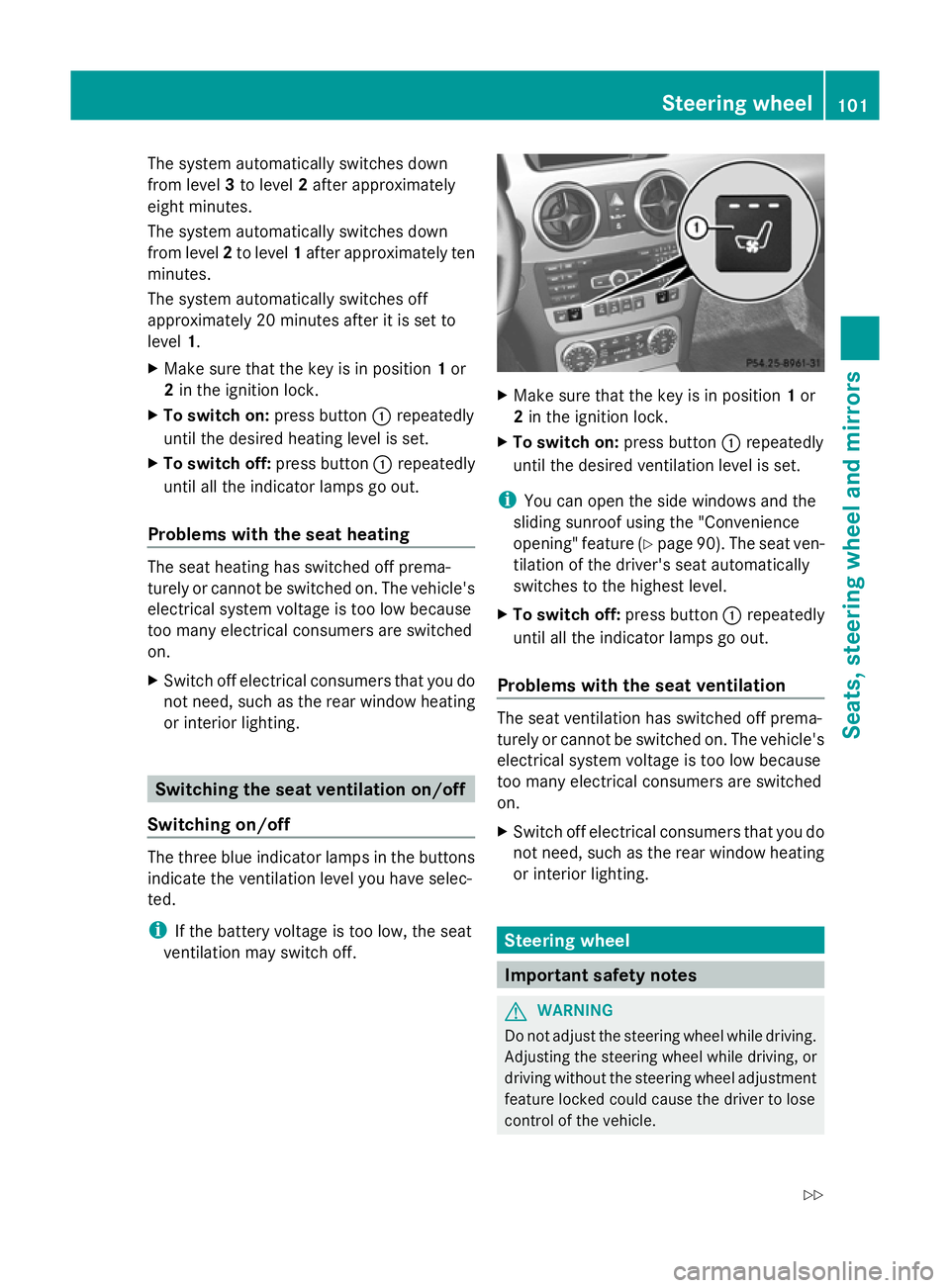
ventilation may switch off. X
Make sure that the key is in position 1or
2 in the ignition lock.
X To switch on: press button:repeatedly
until the desired ventilation level is set.
i You can open the side windows and the
sliding sunroof using the "Convenience
opening" feature (Y page 90). The seat ven-
tilation of the driver's seat automatically
switches to the highest level.
X To switch off: press button:repeatedly
until all the indicator lamps go out.
Problems with the seat ventilation The seat ventilation has switched off prema-
turely or cannot be switched on. The vehicle's
electrical system voltage is too low because
too many electrical consumers are switched
on.
X
Switch off electrical consumers that you do
not need, such as the rear window heating
or interior lighting. Steering wheel
Important safety notes
G
WARNING
Do not adjust the steering wheel while driving.
Adjusting the steering wheel while driving, or
driving without the steering wheel adjustment
feature locked could cause the driver to lose
control of the vehicle. Steering wheel
101Seats, steering wheel and mirrors
Z
Page 105 of 381
The electrical steering wheel adjustment fea-
ture can be operated at any time. Therefore,
do not leave children unattended in the vehi-
cle, or with access to an unlocked vehicle. A
child's unsupervised access to a vehicle could
result in an accident and/or serious personal
injury. Adjusting the steering wheel man-
ually
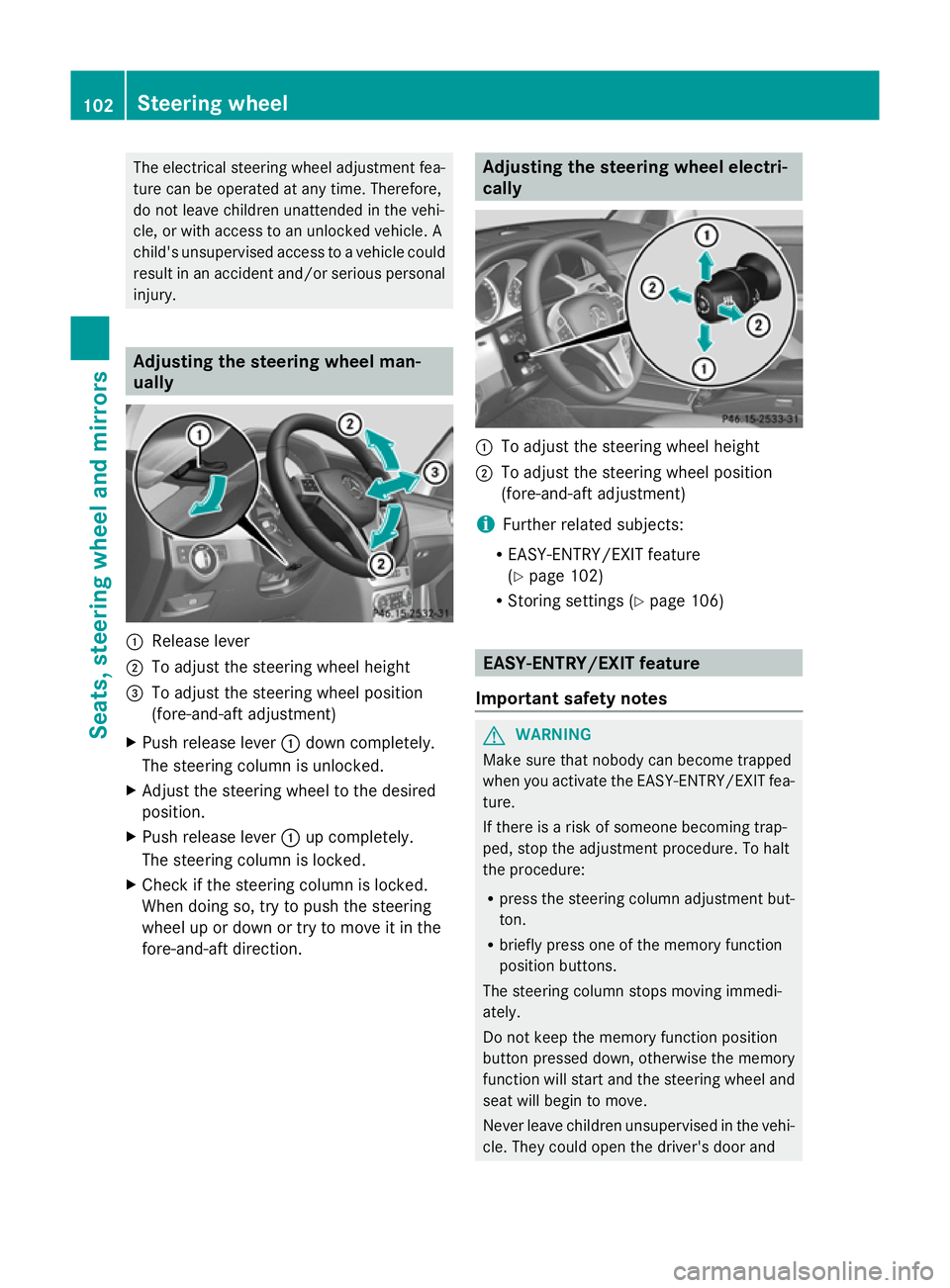
:
Release lever
; To adjust the steering wheel height
= To adjust the steering wheel position
(fore-and-aft adjustment)
X Push release lever :down completely.
The steering column is unlocked.
X Adjust the steering wheel to the desired
position.
X Push release lever :up completely.
The steering column is locked.
X Check if the steering column is locked.
When doing so, try to push the steering
wheel up or down or try to move it in the
fore-and-aft direction. Adjusting the steering wheel electri-
cally
:
To adjust the steering wheel height
; To adjust the steering wheel position
(fore-and-aft adjustment)
i Further related subjects:
R EASY-ENTRY/EXIT feature
(Y page 102)
R Storing settings (Y page 106) EASY-ENTRY/EXIT feature
Important safety notes G
WARNING
Make sure that nobody can become trapped
when you activate the EASY-ENTRY/EXIT fea-
ture.
If there is a risk of someone becoming trap-
ped, stop the adjustment procedure. To halt
the procedure:
R press the steering column adjustment but-
ton.
R briefly press one of the memory function
position buttons.
The steering column stops moving immedi-
ately.
Do not keep the memory function position
button pressed down, otherwise the memory
function will start and the steering wheel and
seat will begin to move.
Never leave children unsupervised in the vehi-
cle. They could open the driver's door and 102
Steering wheelSeats, steering wheel and mirrors
Page 132 of 381
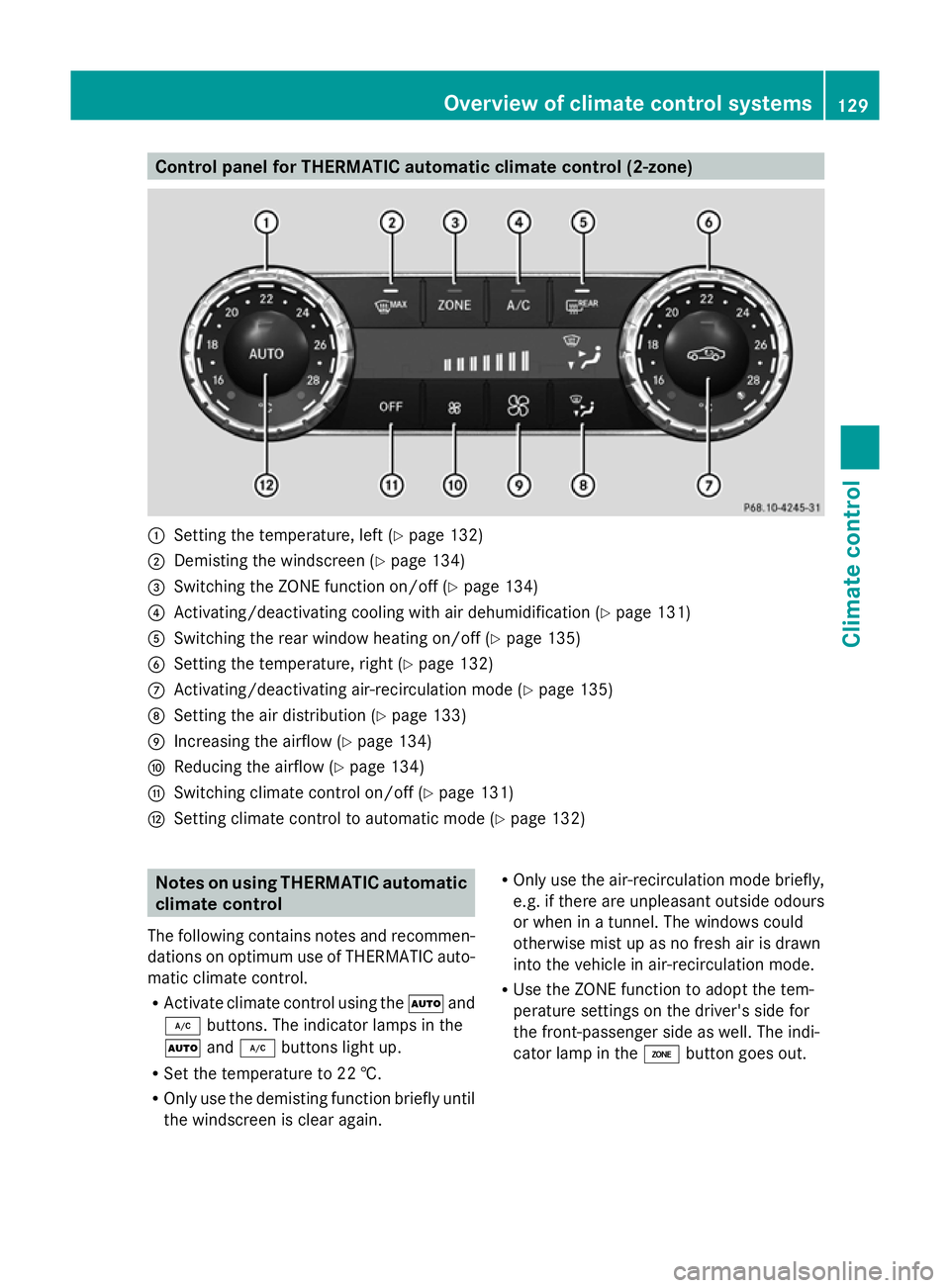
Control panel for THERMATIC automatic climate control (2-zone)
:
Setting the temperature, left (Y page 132)
; Demisting the windscreen (Y page 134)
= Switching the ZONE function on/off (Y page 134)
? Activating/deactivating cooling with air dehumidification (Y page 131)
A Switching the rear window heating on/off (Y page 135)
B Setting the temperature, right (Y page 132)
C Activating/deactivating air-recirculation mode (Y page 135)
D Setting the air distribution (Y page 133)
E Increasing the airflow (Y page 134)
F Reducing the airflow ( Ypage 134)
G Switching climate control on/off (Y page 131)
H Setting climate control to automatic mode (Y page 132)Notes on using THERMATIC automatic
climate control
The following contains notes and recommen-
dations on optimum use of THERMATIC auto-
matic climate control.
R Activate climate control using the Ãand
¿ buttons. The indicator lamps in the
à and¿ buttons light up.
R Set the temperature to 22 †.
R Only use the demisting function briefly until
the windscreen is clear again. R
Only use the air-recirculation mode briefly,
e.g. if there are unpleasant outside odours
or when in a tunnel. The windows could
otherwise mist up as no fresh air is drawn
into the vehicle in air-recirculation mode.
R Use the ZONE function to adopt the tem-
perature settings on the driver's side for
the front-passenger side as well. The indi-
cator lamp in the ábutton goes out. Overview of climate control systems
129Climate control Z