interior lights MERCEDES-BENZ GLK SUV 2012 Owners Manual
[x] Cancel search | Manufacturer: MERCEDES-BENZ, Model Year: 2012, Model line: GLK SUV, Model: MERCEDES-BENZ GLK SUV 2012Pages: 381, PDF Size: 12.68 MB
Page 8 of 381
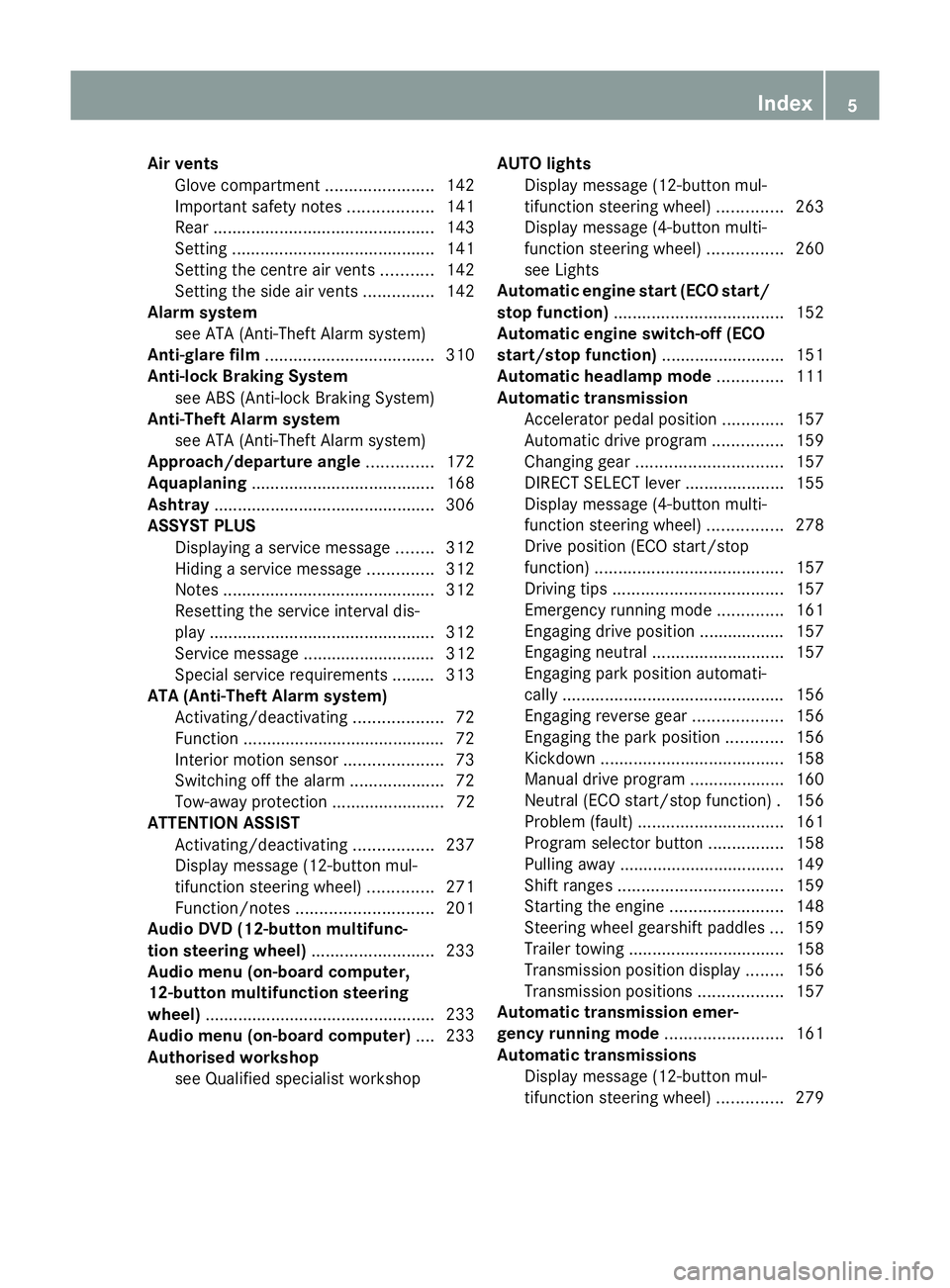
Air vents
Glove compartment .......................142
Important safety notes ..................141
Rear ............................................... 143
Setting ........................................... 141
Setting the centre air vents ...........142
Setting the side air vents ...............142
Alarm system
see ATA (Anti-Theft Alarm system)
Anti-glare film .................................... 310
Anti-lock Braking System see ABS (Anti-lock Braking System)
Anti-Theft Alarm system
see ATA (Anti-Theft Alarm system)
Approach/departure angle ..............172
Aquaplaning ....................................... 168
Ashtray ............................................... 306
ASSYST PLUS Displaying a service message ........312
Hiding a service message ..............312
Notes ............................................. 312
Resetting the service interval dis-
pla y................................................ 312
Service message ............................ 312
Special service requirements ......... 313
ATA (Anti-Theft Alarm system)
Activating/deactivating ...................72
Function .......................................... .72
Interior motion sensor .....................73
Switching off the alarm ....................72
Tow-away protection ........................ 72
ATTENTION ASSIST
Activating/deactivating .................237
Display message (12-button mul-
tifunction steering wheel) ..............271
Function/notes ............................. 201
Audio DVD (12-button multifunc-
tion steering wheel) ..........................233
Audio menu (on-board computer,
12-button multifunction steering
wheel) ................................................ .233
Audio menu (on-board computer) ....233
Authorised workshop see Qualified specialist workshop AUTO lights
Display message (12-button mul-
tifunction steering wheel) ..............263
Display message (4-button multi-
function steering wheel) ................260
see Lights
Automatic engine start (ECO start/
stop function) .................................... 152
Automatic engine switch-off (ECO
start/stop function) ..........................151
Automatic headlamp mode ..............111
Automatic transmission Accelerator pedal position .............157
Automatic drive program ...............159
Changing gea r............................... 157
DIRECT SELECT lever .....................155
Display message (4-button multi-
function steering wheel) ................278
Drive position (ECO start/stop
function) ........................................ 157
Driving tips .................................... 157
Emergency running mode ..............161
Engaging drive position .................. 157
Engaging neutral ............................ 157
Engaging park position automati-
call y............................................... 156
Engaging reverse gear ...................156
Engaging the park position ............156
Kickdown ....................................... 158
Manual drive program ....................160
Neutral (ECO start/stop function) .156
Problem (fault) ............................... 161
Program selector button ................158
Pulling away ................................... 149
Shift ranges ................................... 159
Starting the engine ........................148
Steering wheel gearshift paddle s... 159
Trailer towing ................................. 158
Transmission position displa y........ 156
Transmission positions ..................157
Automatic transmission emer-
gency running mode .........................161
Automatic transmissions Display message (12-button mul-
tifunction steering wheel) ..............279 Index
5
Page 12 of 381
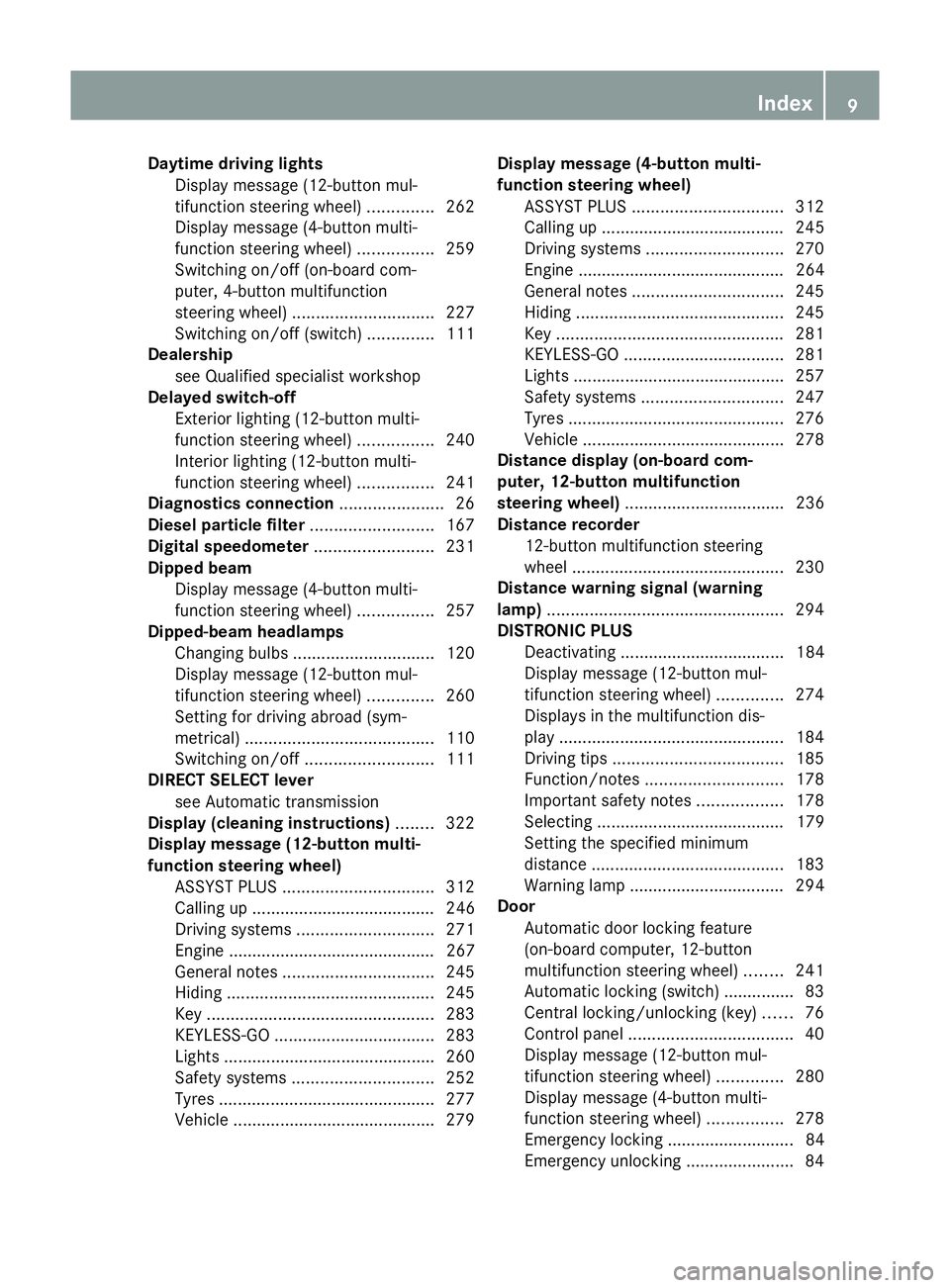
Daytime driving lights
Display message (12-button mul-
tifunction steering wheel) ..............262
Display message (4-button multi-
function steering wheel) ................259
Switching on/off (on-board com-
puter, 4-button multifunction
steering wheel) .............................. 227
Switching on/off (switch) ..............111
Dealership
see Qualified specialist workshop
Delayed switch-off
Exterior lighting (12-button multi-
function steering wheel) ................240
Interior lighting (12-button multi-
function steering wheel) ................241
Diagnostics connection ......................26
Diesel particle filter ..........................167
Digital speedometer .........................231
Dipped beam Display message (4-button multi-
function steering wheel) ................257
Dipped-beam headlamps
Changing bulbs .............................. 120
Display message (12-button mul-
tifunction steering wheel) ..............260
Setting for driving abroad (sym-
metrical) ........................................ 110
Switching on/off ........................... 111
DIRECT SELECT lever
see Automatic transmission
Display (cleaning instructions) ........322
Display message (12-button multi-
function steering wheel)
ASSYST PLUS ................................ 312
Calling up ....................................... 246
Driving systems ............................. 271
Engine ............................................ 267
General notes ................................ 245
Hiding ............................................ 245
Key ................................................ 283
KEYLESS-GO .................................. 283
Lights ............................................ .260
Safety systems .............................. 252
Tyres .............................................. 277
Vehicle .......................................... .279 Display message (4-button multi-
function steering wheel)
ASSYST PLUS ................................ 312
Calling up ....................................... 245
Driving systems ............................. 270
Engine ............................................ 264
General notes ................................ 245
Hiding ............................................ 245
Key ................................................ 281
KEYLESS-GO .................................. 281
Lights ............................................ .257
Safety systems .............................. 247
Tyres .............................................. 276
Vehicle .......................................... .278
Distance display (on-board com-
puter, 12-button multifunction
steering wheel) .................................. 236
Distance recorder 12-button multifunction steering
wheel ............................................. 230
Distance warning signal (warning
lamp) .................................................. 294
DISTRONIC PLUS Deactivating ................................... 184
Display message (12-button mul-
tifunction steering wheel) ..............274
Displays in the multifunction dis-
pla y................................................ 184
Driving tips .................................... 185
Function/notes ............................. 178
Important safety notes ..................178
Selecting ........................................ 179
Setting the specified minimum
distance ......................................... 183
Warning lamp ................................. 294
Door
Automatic door locking feature
(on-board computer, 12-button
multifunction steering wheel) ........241
Automatic locking (switch) .............. .83
Central locking/unlocking (key) ......76
Control panel ................................... 40
Display message (12-button mul-
tifunction steering wheel) ..............280
Display message (4-button multi-
function steering wheel) ................278
Emergency locking ........................... 84
Emergency unlocking .......................84 Index
9
Page 18 of 381
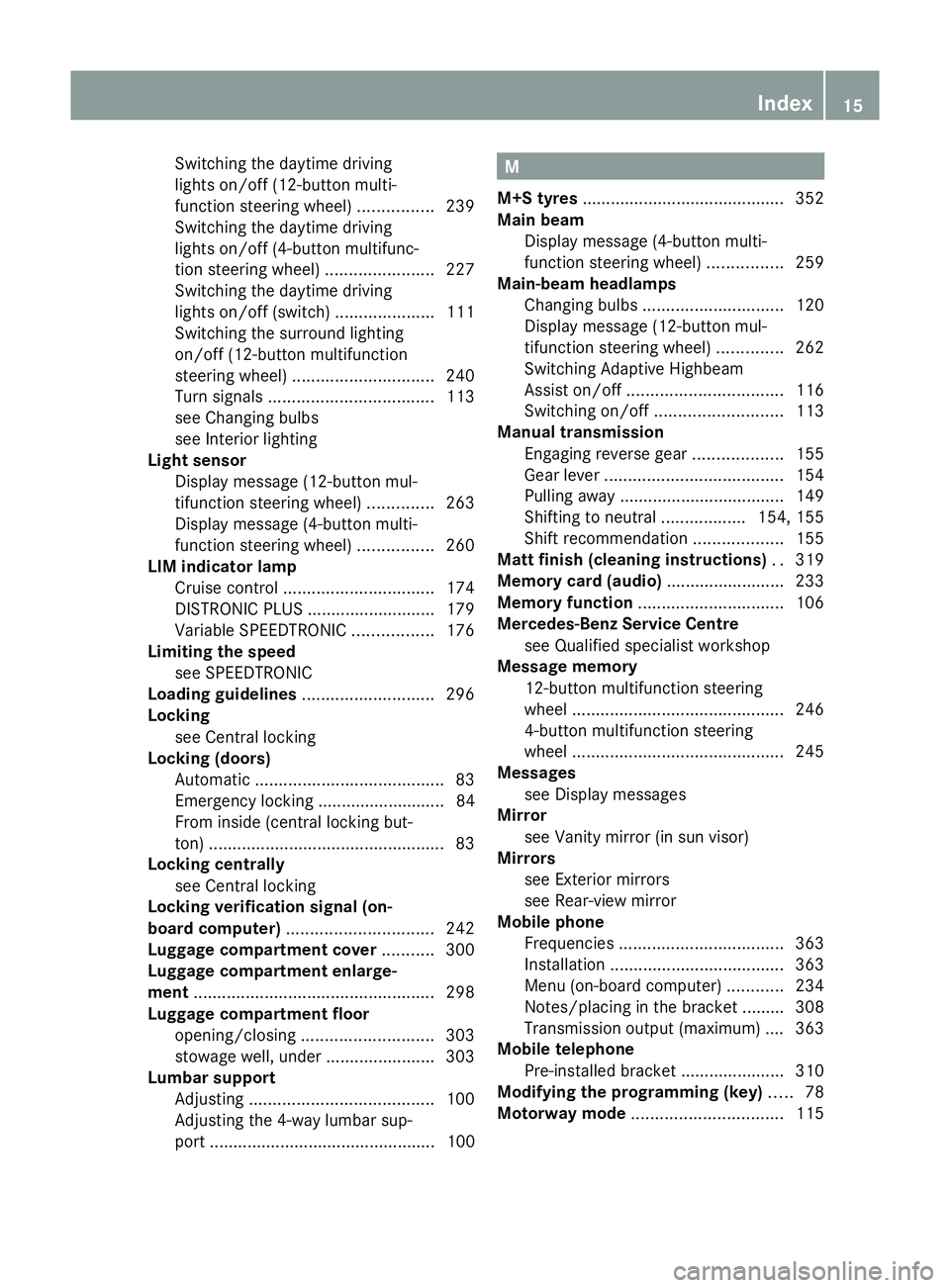
Switching the daytime driving
lights on/off (12-button multi-
function steering wheel)
................239
Switching the daytime driving
lights on/off (4-button multifunc-
tion steering wheel) .......................227
Switching the daytime driving
lights on/off (switch) .....................111
Switching the surround lighting
on/off (12-button multifunction
steering wheel) .............................. 240
Turn signals ................................... 113
see Changing bulbs
see Interior lighting
Light sensor
Display message (12-button mul-
tifunction steering wheel) ..............263
Display message (4-button multi-
function steering wheel) ................260
LIM indicator lamp
Cruise control ................................ 174
DISTRONIC PLUS ........................... 179
Variable SPEEDTRONIC .................176
Limiting the speed
see SPEEDTRONIC
Loading guidelines ............................296
Locking see Central locking
Locking (doors)
Automatic ........................................ 83
Emergency locking ........................... 84
From inside (central locking but-
ton) .................................................. 83
Locking centrally
see Central locking
Locking verification signal (on-
board computer) ............................... 242
Luggage compartment cover ...........300
Luggage compartment enlarge-
ment ................................................... 298
Luggage compartment floor opening/closing ............................ 303
stowage well, unde r....................... 303
Lumbar support
Adjusting ....................................... 100
Adjusting the 4-way lumbar sup-
port ................................................ 100 M
M+S tyres ........................................... 352
Main beam Display message (4-button multi-
function steering wheel) ................259
Main-beam headlamps
Changing bulbs .............................. 120
Display message (12-button mul-
tifunction steering wheel) ..............262
Switching Adaptive Highbeam
Assist on/off ................................. 116
Switching on/off ........................... 113
Manual transmission
Engaging reverse gear ...................155
Gear leve r...................................... 154
Pulling away ................................... 149
Shifting to neutral ..................154, 155
Shift recommendatio n................... 155
Matt finish (cleaning instructions) ..319
Memory card (audio) .........................233
Memory function ............................... 106
Mercedes-Benz Service Centre see Qualified specialist workshop
Message memory
12-button multifunction steering
wheel ............................................. 246
4-button multifunction steering
wheel ............................................. 245
Messages
see Display messages
Mirror
see Vanity mirror (in sun visor)
Mirrors
see Exterior mirrors
see Rear-view mirror
Mobile phone
Frequencies ................................... 363
Installation ..................................... 363
Menu (on-board computer) ............234
Notes/placing in the bracket ......... 308
Transmission output (maximum) .... 363
Mobile telephone
Pre-installed bracket ......................310
Modifying the programming (key) .....78
Motorway mode ................................ 115 Index
15
Page 46 of 381
from being propelled towards the point
of impact. It can thus reduce the risk of
injury.
In accidents in which an airbag is deployed,
it provides increased protection only if the
seat belt is worn correctly. G
WARNING
If service work is not carried out correctly, the
operating safety of your vehicle may be affec-
ted. This could cause you to lose control of
your vehicle and cause an accident. More-
over, the safety systems may no longer be
able to protect you or others as they are
designed to do.
Always have service work carried out at a
qualified specialist workshop. G
WARNING
Modifications to or work performed incor-
rectly on the following parts can result in the
restraint systems not functioning as intended:
R the restraint system, consisting of seat
belts and their anchorage points, belt ten-
sioners, belt force limiters and airbags
R the wiring
R networked electronic systems
Airbags and belt tensioners could fail to
deploy or be triggered in an accident despite
the deceleration force being sufficient to trig-
ger the systems, or could be triggered unin-
tentionally. For this reason, never make any
modifications to the restraint systems.
Therefore, you must not tamper with elec-
tronic components or their software. SRS (Supplemental Restraint System)
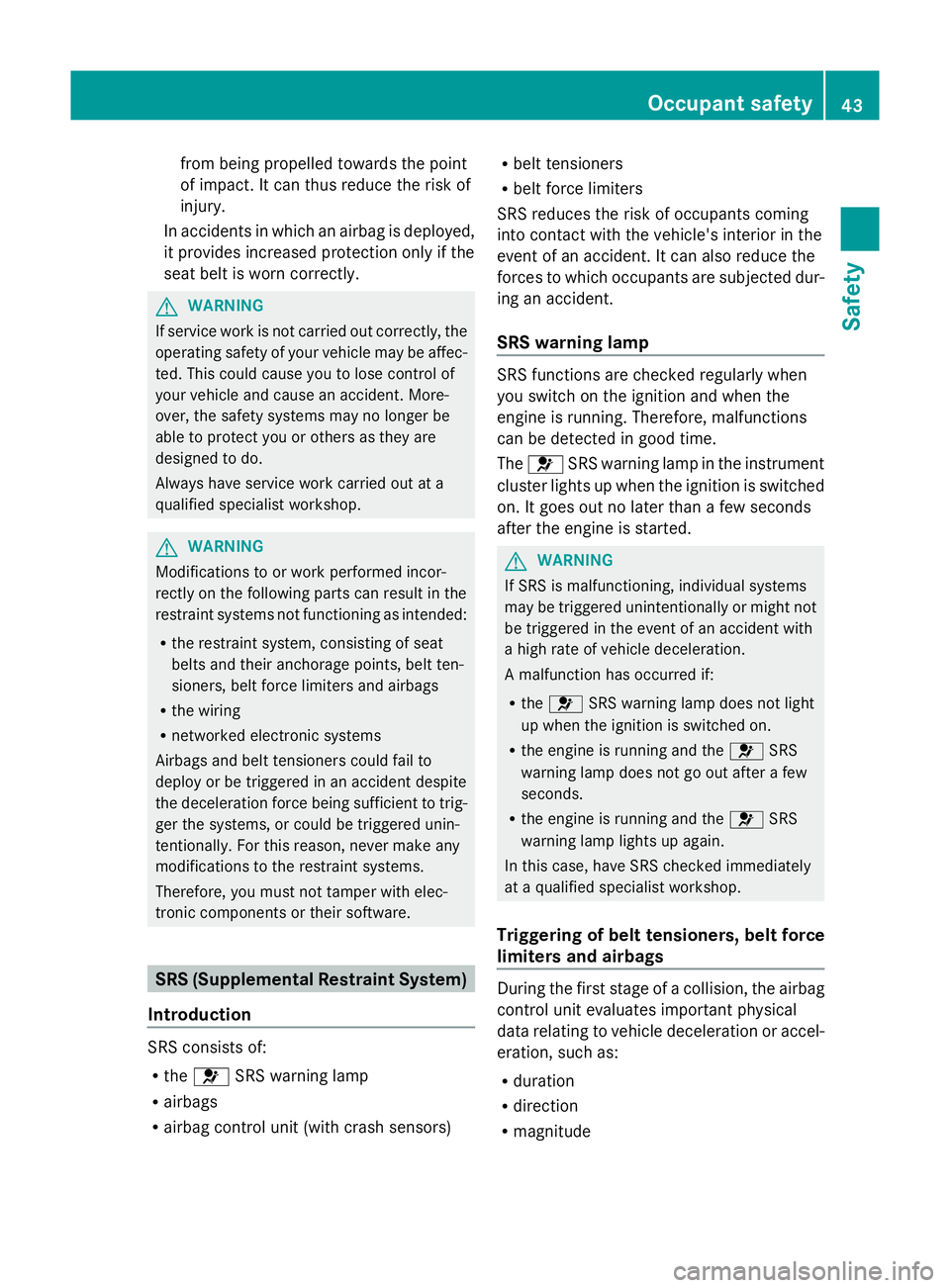
Introduction SRS consists of:
R
the 6 SRS warning lamp
R airbags
R airbag control unit (with crash sensors) R
belt tensioners
R belt force limiters
SRS reduces the risk of occupants coming
into contact with the vehicle's interior in the
event of an accident. It can also reduce the
forces to which occupants are subjected dur-
ing an accident.
SRS warning lamp SRS functions are checked regularly when
you switch on the ignition and when the
engine is running. Therefore, malfunctions
can be detected in good time.
The
6 SRS warning lamp in the instrument
cluster lights up when the ignition is switched
on. It goes out no later than a few seconds
after the engine is started. G
WARNING
If SRS is malfunctioning, individual systems
may be triggered unintentionally or might not
be triggered in the event of an accident with
a high rate of vehicle deceleration.
A malfunction has occurred if:
R the 6 SRS warning lamp does not light
up when the ignition is switched on.
R the engine is running and the 6SRS
warning lamp does not go out after a few
seconds.
R the engine is running and the 6SRS
warning lamp lights up again.
In this case, have SRS checked immediately
at a qualified specialist workshop.
Triggering of belt tensioners, belt force
limiters and airbags During the first stage of a collision, the airbag
control unit evaluates important physical
data relating to vehicle deceleration or accel-
eration, such as:
R
duration
R direction
R magnitude Occupant safety
43Safety Z
Page 57 of 381
be released. Only in rare cases will the bang
affect your hearing. The powder that is
released generally does not constitute a
health hazard. The 6SRS warning lamp
lights up. G
WARNING
If the seat belt tensioners have been trig-
gered, they provide no additional protection
in the event of another accident. Therefore,
have belt tensioners which have been trig-
gered replaced at a qualified specialist work-
shop.
Comply with safety regulations when dispos-
ing of belt tensioners. Any Mercedes-Benz
Service Centre can provide details of these
regulations.
! If the front-passenger seat is not occu-
pied, do not engage the seat belt tongue in
the buckle on the front-passenger seat.
Otherwise, the belt tensioner could be trig-
gered in the event of an accident. Children in the vehicle
Child restraint systems
Important safety notes G
WARNING
To reduce the risk of serious or even fatal
injury to the child in the event of a sudden
change in direction, braking or an accident:
R children less than 1.50 m tall and under
twelve years of age must always be secured
in special child restraint systems on a suit-
able vehicle seat. This is necessary
because the seat belts are not designed for
children.
R Do not drive with a child secured in a rear-
ward-facing child restraint system on the
front-passenger seat. Exception: if the vehi-
cle is equipped with automatic child seat
recognition on the front-passenger seat
and the child is secured in a child restraint system with transponders for automatic
child seat recognition
R if you secure a forward-facing child
restraint system to the front-passenger
seat, you must move the front-passenger
seat as far back as possible.
R children must never travel sitting on the lap
of another occupant. Due to the forces
which occur in the event of a sudden
change of direction, heavy braking or an
accident, it would not be possible to
restrain the child. The child could be thrown
against parts of the vehicle interior and be
seriously or even fatally injured. G
WARNING
The child restraint system cannot perform its
protective function if it is not correctly fitted
to a suitable vehicle seat. The child cannot be
restrained in the event of an accident, heavy
braking or sudden changes of direction. The
child could be seriously or even fatally injured.
For this reason, when fitting a child restraint
system, observe the manufacturer's installa-
tion instructions and the correct use of the
child restraint system.
Child restraint systems should be fitted to the
rear seats. Children are generally better pro-
tected there.
The entire base of the child restraint system
must always rest on the seat cushion. There-
fore, never place objects, e.g. a cushion,
under the child restraint system.
Only use child restraint systems with the orig-
inal cover designed for them. Only replace
damaged covers with genuine Mercedes-Benz
covers.
We recommend the use of child restraint sys-
tems which have been approved for
Mercedes-Benz vehicles.
If a child is travelling in your vehicle, secure
the child using a child restraint system which
is appropriate to the size, age and weight of
the child and recommended for Mercedes-
Benz vehicles. You should preferably fit the 54
Children in the vehicleSafety
Page 112 of 381
Useful information
............................110
Exterior lighting ................................ 110
Interior lighting ................................. 117
Replacing bulbs ................................. 118
Windscreen wipers ...........................122 109Lights and windscreen wipers
Page 120 of 381
the main-beam headlamps are switched on
automatically. The
Kindicator lamp in
the instrument cluster also lights up.
If you are driving at speeds below
45 km/h or other road users are recog-
nised or the roads are adequately lit:
the main-beam headlamps are switched off
automatically. The Kindicator lamp in
the instrument cluster goes out. The _
indicator lamp in the instrument cluster
stays on.
X To deactivate: move the combination
switch back to its normal position.
The _ indicator lamp in the instrument
cluster goes out. Headlamps misted up on the inside
The headlamps may mist up on the inside if
there is high atmospheric humidity.
X Switch on the lights and drive off.
The level of moisture diminishes, depend-
ing on the length of the journey and the
weather conditions (humidity and temper-
ature).
If the level of moisture does not diminish:
X Have the headlamps checked at a qualified
specialist workshop. Interior lighting
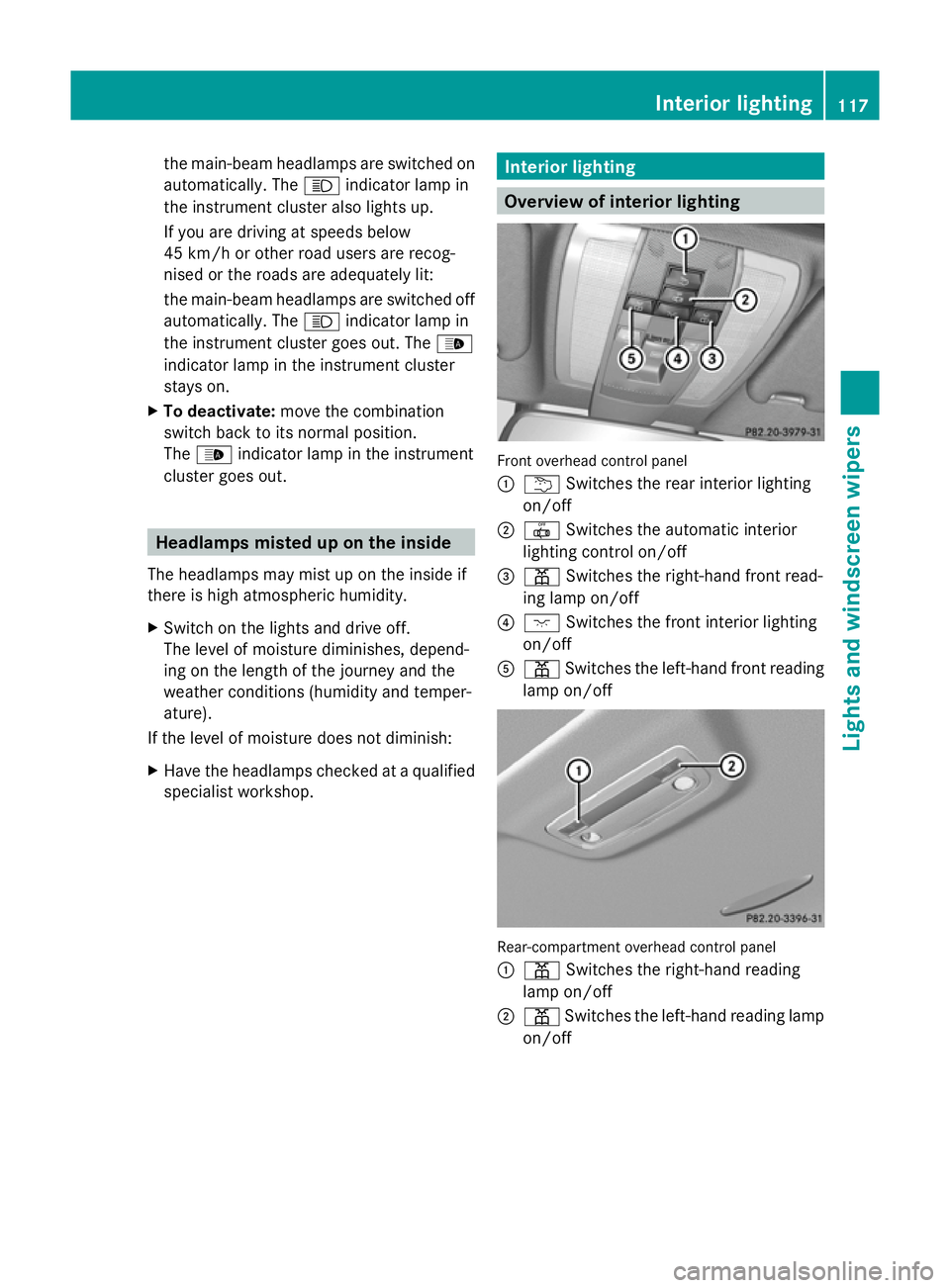
Overview of interior lighting
Front overhead control panel
:
u Switches the rear interior lighting
on/off
; | Switches the automatic interior
lighting control on/off
= p Switches the right-hand front read-
ing lamp on/off
? c Switches the front interior lighting
on/off
A p Switches the left-hand front reading
lamp on/off Rear-compartment overhead control panel
:
p Switches the right-hand reading
lamp on/off
; p Switches the left-hand reading lamp
on/off Interior lighting
117Lights andwindscreen wipers Z
Page 121 of 381
Interior lighting control
General notes In order to prevent the vehicle's battery from
discharging, the interior lighting functions are
automatically deactivated after some time
except for when the key is in position 2in the
ignition lock.
Automatic interior lighting control X
To activate/deactivate: press the|
button.
When the automatic interior lighting con-
trol is activated, the button is flush with the
overhead control panel.
The interior lighting automatically switches
on if you:
R unlock the vehicle
R open a door
R remove the key from the ignition lock
The interior lighting is activated for a short
time when the key is removed from the igni-
tion lock. You can activate this delayed
switch-off using the on-board computer
(Y page 241).
Manual interior lighting control X
To switch the front interior lighting on/
off: press the cbutton.
X To switch the rear interior lighting on/
off: press the ubutton.
X To switch the reading lamps on/off:
press the pbutton. Crash-responsive emergency lighting
The interior lighting is activated automatically
if the vehicle is involved in an accident.
X To switch off the crash-responsive
emergency lighting: press the hazard
warning lamp button.
or
X Lock and then unlock the vehicle using the
key. Replacing bulbs
Important safety notes
Xenon bulbs G
DANGER
Xenon bulbs are under high voltage. If you
touch the electrical contacts of a xenon bulb,
you could suffer an electric shock and be seri-
ously or even fatally injured. For this reason,
do not remove the cover of xenon bulbs.
Do not change the xenon bulbs yourself, but
have them replaced at a qualified workshop.
If your vehicle is equipped with xenon bulbs,
you can recognise this by the following: the
cone of light from the xenon bulbs moves
from the top to the bottom and back again
when you start the engine. For this to be
observed, the lights must be switched on
before starting the engine.
Bulbs and lamps are an important aspect of
vehicle safety. You must therefore make sure
that these function correctly at all times.
Have the headlamp setting checked regularly.
Other bulbs G
WARNING
Bulbs and lamps can be very hot. You should
therefore allow them to cool down before you
change them. Otherwise, you could be burned
if you touch them. 118
Replacing bulbsLights and windscreen wipers
Page 134 of 381
Notes on using THERMOTRONIC auto-
matic climate control
The following contains instructions and rec-
ommendations to enable you to get the most
out of your THERMOTRONIC automatic cli-
mate control.
R Activate climate control using the Ãand
¿ buttons. The indicator lamps in the
à and¿ buttons light up.
R In automatic mode, you can also use the
ñ button to set a climate mode
(FOCUS/MEDIUM/DIFFUSE). The
MEDIUM level is recommended.
R Set the temperature to 22 †.
R Only use the demisting function briefly until
the windscreen is clear again.
R Only use the air-recirculation mode briefly,
e.g. if there are unpleasant outside odours
or when in a tunnel. The windows could
otherwise mist up as no fresh air is drawn
into the vehicle in air-recirculation mode.
R Use the ZONE function to adopt the tem-
perature settings on the driver's side for
the front-passenger side and the rear com-
partment as well. The indicator lamp in the
á button goes out.
R Use the residual heat function if you want
to heat or ventilate the vehicle interior
when the ignition is switched off. The resid-
ual heat function can only be activated or
deactivated with the ignition switched off. Operating the climate control system
Switching climate control on/off
Points to observe before use i
If climate control is switched off, the air
supply and air circulation are also switched
off. Only use this setting for a brief period.
The windows could otherwise mist up.
i Switch on climate control primarily using
the à button ( Ypage 132). Switching on/off X
Turn the key to position 2in the ignition
lock.
X To switch on: press theÃbutton.
The indicator lamp in the Ãbutton lights
up. Airflow and air distribution are set to
automatic mode.
or
X Press the ^button.
The indicator lamp in the ^button goes
out. The previous settings are reactivated.
X To switch off: press the^button.
The indicator lamp in the ^button lights
up. Activating/deactivating the cooling
with air dehumidification function
Points to observe before use G
WARNING
If the "cooling with air dehumidification" func-
tion is deactivated, the air inside the vehicle
will not be cooled (during warm weather) or
dehumidified. The windows could mist up
more quickly. This may prevent you from
observing the traffic conditions, thereby caus-
ing an accident.
The cooling with air dehumidification function
is only available when the engine is running.
The air inside the vehicle is cooled and dehu-
midified according to the temperature selec-
ted.
Condensation may drip from the underside of
the vehicle when cooling mode is active. This
is normal and not a sign that there is a mal-
function.
i The cooling with air dehumidification
function uses refrigerant R134a. This
refrigerant does not contain chlorofluoro-
carbons, and therefore does not damage
the ozone layer. Operating the climate control system
131Climate control Z
Page 138 of 381
Windows misted up on the outside
X
Activate the windscreen wipers.
X Press the _button repeatedly until the
O orP symbol appears in the dis-
play.
i You should only select this setting until
the windscreen is clear again. Rear window heating
Switching on/off G
WARNING
Clear all windows of ice or snow before setting
off. Otherwise, impaired visibility could
endanger you and others.
The rear window heating has a high current
draw. You should therefore switch it off as
soon as the window is clear. It otherwise
switches off automatically after several
minutes.
If the battery voltage is too low, the rear win-
dow heating may switch off.
X Turn the key to position 2in the ignition
lock.
X Press the ¤button.
The indicator lamp in the ¤button lights
up or goes out.
Problems with the rear window heating The rear window heating has switched off
prematurely or cannot be activated.
X
Switch off any consumers that are not
required, e.g. reading lamps or interior
lighting.
When the battery is sufficiently charged,
the rear window heating is activated again
automatically. Activating/deactivating air-recircula-
tion mode
You can deactivate the flow of fresh air if
unpleasant odours are entering the vehicle
from outside. The air already inside the vehi-
cle will then be recirculated.
The operation of air-recirculation mode is the
same for all control panels. G
WARNING
Only switch over to air-recirculation mode
briefly at low outside temperatures. Other-
wise, the windows could mist up, thus impair-
ing visibility and endangering yourself and
others. This may prevent you from observing
the traffic conditions, thereby causing an
accident.
X Turn the key to position 2in the ignition
lock.
X To activate: press thegbutton.
The indicator lamp in the gbutton lights
up.
i In the event of high pollution levels 11
or at
high outside temperatures, air-recircula-
tion mode is automatically activated. When
air-recirculation mode is activated auto-
matically, the indicator lamp in the g
button is not lit.
Outside air is added after about
30 minutes.
X To deactivate: press thegbutton.
The indicator lamp in the gbutton goes
out.
11 THERMOTRONIC automatic climate control only. Operating the climate control system
135Climate control Z