trailer MERCEDES-BENZ GLS 2017 User Guide
[x] Cancel search | Manufacturer: MERCEDES-BENZ, Model Year: 2017, Model line: GLS, Model: MERCEDES-BENZ GLS 2017Pages: 390, PDF Size: 11.93 MB
Page 19 of 390
Function/notes ............................. 193
Important safety notes .................. 193
Parking .......................................... 195
PASSENGER AIR BAG
Display message ............................ 254
Indicator lamps ................................ 42
Problem (malfunction) ................... 254
Pets in the vehicle ............................... 62
Phone book
see also Digital Operator's Man-
ual .................................................. 287
Plastic trim (cleaning instruc-
tions) .................................................. 329
Power locks ......................................... 81
Power washers .................................. 325
Power windows
see Side windows
PRE-SAFE ®
(anticipatory occupant
protection)
Display message ............................ 251
Operation ......................................... 55
PRE-SAFE ®
PLUS (anticipatory
occupant protection PLUS)
Display message ............................ 251
Operation ......................................... 56
Protection against theft
ATA (Anti-Theft Alarm system) ......... 72
Immobilizer ...................................... 72
Protection of the environment
General notes .................................. 25
Pulling away
Automatic transmission ................. 141
General notes ................................ 141
Hill start assist ............................... 141
Trailer ............................................ 141
Q
QR code
Mercedes-Benz Guide App ................. 1
Rescue card ..................................... 30
Qualified specialist workshop ........... 29
R
RACETIMER (on-board computer) .... 241
Radiator cover ................................... 320 Radio
Selecting a station ......................... 234
see separate operating instructions
Radio mode
see also Digital Operator's Man-
ual .................................................. 287
Radio-wave reception/transmis-
sion in the vehicle
Declaration of conformity ................ 28
Reading lamp ..................................... 116
Rear bench seat
Folding forwards/back .................. 298
Rear compartment
Exit/entry position (3rd row of
seats) ............................................. 100
Setting the air vents ...................... 135
Setting the temperature ................ 131
Rear fog lamp
Display message ............................ 256
Switching on/off ........................... 113
Rear Seat Entertainment System
AUX jacks ...................................... 293
AUX jacks CD/DVD drive .............. 293
Rear seats
Adjusting ......................................... 98
Display message ............................ 272
Rear view camera
Cleaning instructions ..................... 328
Display in the multimedia system .. 198
Function/notes ............................. 197
Switching on/off ........................... 198
Rear window defroster
Problem (malfunction) ................... 133
Switching on/off ........................... 133
Rear window wiper
Replacing the wiper blade .............. 121
Switching on/off ........................... 120
Rear-view mirror
Anti-glare (manual) ........................ 107
Dipping (automatic) ....................... 109
Refrigerant (air-conditioning sys-
tem)
Important safety notes .................. 383
Refueling
Fuel gauge ....................................... 34
Important safety notes .................. 153
Refueling process .......................... 154
see Fuel Index 17
Page 23 of 390
Trailer loads ................................... 387
Vehicle data ................................... 384
Telephone
Accepting a call (multifunction
steering wheel) .............................. 236
Authorizing a mobile phone (con-
necting) ......................................... 291
Connecting a mobile phone (gen-
eral information) ........................... .2 90
Display message ............................ 272
Menu (on-board computer) ............ 235
Number from the phone book ....... .2 36
Redialing ........................................ 236
Rejecting/ending a call ................. 236
see also Digital Operator's Man-
ual ................................................. .2 87
Switching between mobile
phones .......................................... .2 92
Temperature
Coolant (display in the instrument
cluster) .......................................... 230
Coolant (on-board computer,
Mercedes-AMG vehicles) .............. .2 41
Engine oil (on-board computer,
Mercedes-AMG vehicles) .............. .2 41
Outside temperature ..................... .2 29
Setting (climate control) ................ 131
Transmission oil (on-board com-
puter, Mercedes-AMG vehicles) ..... 241
Through-loading feature ................... 297
Time
see separate operating instructions
Timing (RACETIMER) ......................... 241
Tire pressure
Calling up (on-board computer) ..... 353
Checking manually ........................ 352
Display message ............................ 268
Maximum ....................................... 352
Not reached (TIREFIT) .................... 334
Notes ............................................. 351
Reached (TIREFIT) .......................... 335
Recommended ............................... 349
Tire pressure loss warning system
General notes ................................ 352
Important safety notes .................. 352
Restarting ...................................... 353 Tire pressure monitor
Checking the tire pressure ele c-
tronica l ly ........................................ 355
Function/notes ............................ .3 53
General notes ................................ 353
Important safety notes .................. 354
Radio type approval for the tire
pressure monitor ........................... 356
Restarting ...................................... 355
Warning lamp ................................. 286
Warning message .......................... 355
TIREFIT kit
Important safety notes .................. 333
Storage location ............................ 331
Tire pressure not reached .............. 334
Tire pressure reached .................... 335
Using ............................................. 333
Tires
Aspect ratio (definition) ................. 365
Average weight of the vehicle
occupants (definition) .................... 364
Bar (definition) ............................... 364
Changing a wheel .......................... 366
Characteristics .............................. 364
Checking ........................................ 346
Curb weight (definition) ................. 365
Definition of terms ......................... 364
Direction of rotation ...................... 367
Display message ............................ 268
Distribution of the vehicle occu-
pants (definition) ............................ 366
DOT (Department of Transporta-
tion) (definition) ............................. 364
DOT, Tire Identification Number
(TIN) ............................................... 363
GAWR (Gross Axle Weight Rating)
(definition) ..................................... 364
GTW (Gross Trailer Weight) (defi-
nition) ............................................ 365
GVW (Gross Vehicle Weight) (def-
inition) ........................................... 365
GVWR (Gross Vehicle Weight Rat-
ing) (definition) .............................. 365
Important safety notes .................. 346
Increased vehicle weight due to
optional equipment (definition) ...... 364
Information on driving .................... 346
Kilopascal (kPa) (definition) ........... 365 Index 21
Page 24 of 390
Labeling (overview) ........................ 361
Load bearing index (definition) ...... 366
Load index .................................... .3 63
Load index (definition) ................... 365
M+S tires ....................................... 348
Maximum load on a tire (defini-
tion) ............................................... 365
Maximum loaded vehicle weight
(definition) ..................................... 365
Maximum permissible tire pres-
sure (definition) ............................ .3 65
Maximum tire load ......................... 363
Maximum tire load (definition) ....... 365
MOExtended tires .......................... 348
Optional equipment weight (defi-
nition) ............................................ 366
PSI (pounds per square inch) (def-
inition) .......................................... .3 65
Replacing ....................................... 366
Service life ..................................... 347
Sidewall (definition) ....................... 366
Snow chains .................................. 348
Speed rating (definition) ................ 365
Storing .......................................... .3 67
Structure and characteristics
(definition) ..................................... 364
Summer tires in winter .................. 348
Temperature .................................. 360
TIN (Tire Identification Number)
(definition) ..................................... 366
Tire bead (definition) ..................... .3 65
Tire pressure (definition) ................ 365
Tire pressures (recommended) ...... 364
Tire size (data) ............................... 371
Tire size designation, load-bearing
capacity, speed rating .................... 361
Tire tread ....................................... 347
Tire tread (definition) ..................... 365
Total load limit (definition) ............. 366
Traction ......................................... 360
Traction (definition) ....................... 366
Tread wear ..................................... 360
TWR (permissible trailer drawbar
noseweig ht) ( definition) ................. 366
Uni
form Tire Quality Grading
Standards ...................................... 359
Uniform Tire Quality Grading
Standards (definition) .................... 364 Wear indicator (definition) ............. 366
Wheel and tire combination ........... 371
Wheel rim (definition) .................... 364
see Flat tire
Tool
see Vehicle tool kit
Top Tether ............................................ 60
Tow-starting
Emergency engine starting ............ 343
Important safety notes .................. 341
Towing a trailer
Axle load, permissible .................... 387
Cleaning the trailer tow hitch ......... 329
Coupling up a trailer ...................... 225
Decoupling a trailer ....................... 226
Driving tips .................................... 222
ESP ®
(Electronic Stability Pro-
gram) ............................................... 68
Important safety notes .................. 221
Installing the ball coupling ............. 223
Lights display message .................. 256
Mounting dimensions .................... 387
Parking Assist PARKTRONIC .......... 190
Power supply ................................. 227
Pulling away with a trailer .............. 141
Removing the ball coupling ............ 227
Trailer loads ................................... 387
Towing away
Important safety guidelines ........... 341
Installing the towing eye ................ 342
Notes for 4MATIC vehicles ............ 343
Removing the towing eye ............... 342
Transporting the vehicle ................ 343
With both axles on the ground ....... 342
Towing eye ......................................... 331
Traffic reports
see also Digital Operator's Man-
ual .................................................. 287
Traffic Sign Assist
Display message ............................ 264
Function/notes ............................. 206
Important safety notes .................. 206
Instrument cluster display ............. 206
Trailer coupling
see Towing a traile r
Trai l er loads and drawbar nose-
weights ............................................... 22722
Index
Page 25 of 390
Trailer towing
Active Blind Spot Assist ................. 213
Active Lane Keeping Assist ............ 215
Blind Spot Assist ............................ 209
Permissible trailer loads and
drawbar noseweights ..................... 227
Transfer case ..................................... 153
Transmission
see Automatic transmission
Transmission position display ......... 148
Transporting the vehicle .................. 343
Traveling uphill
Brow of hill ..................................... 171
Driving downhill ............................. 172
Maximum gradient-climbing capa-
bility .............................................. .1 71
Trim pieces (cleaning instruc-
tions) ................................................. .3 30
Trip computer (on-board com-
puter) ................................................. .2 32
Trip odometer
Calling up ....................................... 232
Resetting (on-board computer) ...... 233
Trunk
see Tailgate
Turn signals
Display message ............................ 256
Replacing bulbs (front) ................... 119
Switching on/off ........................... 113
Two-way radio
Frequencies ................................... 376
Installation ..................................... 376
Transmission output (maximum) .... 376
TWR (Tongue Weight Rating) (defi-
nition) ................................................. 366
Type identification plate
see Vehicle identification plate
U
Unlocking
Emergency unlocking ....................... 81
From inside the vehicle (central
unlocking button) ............................ .8 0
Upshift indicator (on-board com-
puter, Mercedes-AMG vehicles) ...... .2 41 USB devices
Connecting to the Media Inter-
face ............................................... 292
V Vanity mirror (in the sun visor) ....... .3 04
Vehicle
Correct use ...................................... 29
Data acquisition ............................... 30
Display message ............................ 270
Equipment ....................................... 26
Individual settings .......................... 238
Limited Warranty ............................ .3 0
Loading .......................................... 356
Locking (in an emergency) ............... 81
Locking (SmartKey) .......................... 74
Lowering ........................................ 370
Maintenance .................................... 27
Operating safety .............................. 28
Parking .......................................... 159
Parking for a long period ................ 162
Pulling away ................................... 141
Raising ........................................... 368
Reporting problems ......................... 29
Securing from rolling away ............ 367
Towing away .................................. 341
Transporting .................................. 343
Unlocking (in an emergency) ........... 81
Unlocking (SmartKey) ...................... 74
Vehicle data ................................... 384
Vehicle battery
see Battery (vehicle)
Vehicle data ....................................... 384
Vehicle data (off-road driving)
Approach/departure angle ............ 386
Fording depth ................................ 385
Maximum gradient climbing abil-
ity .................................................. 386
Vehicle dimensions ........................... 384
Vehicle emergency locking ................ 81
Vehicle identification number
see VIN
Vehicle identification plate .............. 377
Vehicle level
AIRMATIC ...................................... 188
Vehicle level (display message) ....... 261
Vehicle tool kit .................................. 331Index 23
Page 71 of 390
Trailer stabilization is active above speeds of
about 37 mph (60 km/ h) .
ESP ®
trailer stabilization does not work if ESP ®
is deactivated or disabled because of a malfunc-
tion.
Crosswind Assist General information Strong crosswind gusts can impair the ability of
your vehicle to drive straight ahead. The cross-
wind driving assistance function integrated in
ESP ®
noticeably reduces these impairments.
ESP ®
intervenes automatically according to the
direction and intensity of the crosswinds affect-
ing your vehicle.
ESP ®
intervenes with stabilizing braking to
assist you in keeping the vehicle in the lane.
Crosswind Assist is active at vehicle speeds
above 50 mph (80 km/h) when driving straight
ahead or cornering gently.
Important safety notes Crosswind Assist does not work if ESP ®
is
switched off or deactivated because of a mal-
function.
EBD (electronic brake force distribu-
tion)
General information EBD monitors and controls the brake pressure
on the rear wheels to improve driving stability
while braking.
Important safety notes
i Observe the "Important safety notes" sec-
tion for driving safety systems ( Y
page 63).
G WARNING
If EBD is malfunctioning, the rear wheels can
lock, e.g. under full braking. This increases the
risk of skidding and an accident.
You should therefore adapt your driving style
to the different handling characteristics. Have
the brake system checked at a qualified spe-
cialist workshop. Observe information regarding indicator and
warning lamps ( Y
page 277) as well as display
messages ( Y
page 247).
ADAPTIVE BRAKE ADAPTIVE BRAKE enhances braking safety and
offers increased braking comfort. In addition to
the braking function, ADAPTIVE BRAKE also has
the HOLD function ( Y
page 185) and hill start
assist ( Y
page 141).
Active Brake Assist with cross-traffic
function
General information
i Pay attention to the important safety notes
in the "Driving safety systems" section
( Y
page 63).
Active Brake Assist with cross-traffic function
can help you to minimize the risk of a collision
with a vehicle in front or a pedestrian and reduce
the effects of such a collision. If the Active Brake
Assist with cross-traffic function detects a risk
of collision, you will be warned visually and
acoustically and, if necessary, your brake appli-
cation will be assisted according to the situa-
tion. If you do not react, the system can also
react by braking automatically. In the event of a
detected risk of collision due to crossing traffic,
you will also be visually and acoustically warned
as well as assisted by the brake boosting effect
according to the situation.
Active Brake Assist with cross-traffic function is
only available in vehicles with the Driving Assis-
tance Plus package.
For Active Brake Assist with cross-traffic func-
tion to assist you when driving, the radar sensor
system and the camera system must be opera-
tional.
If the radar sensor system or the camera system
is malfunctioning, Active Brake Assist with
cross-traffic function is restricted or no longer
available. The brake system is still available with
co mplete brake boosting effect and BAS.
The radar sensor system and camera system
help Active Brake Assist with cross-traffic func-
tion to detect obstacles that are in the path of
your vehicle for an extended period of time.
In addition, pedestrians in the path of your vehi-
cle can be detected.Driving safet y system s 69
Safet y Z
Page 115 of 390
The daytime running lamps improve the visibility
of your vehicle during the day. To do this, the
daytime running lamps function must be
switched on using the on-board computer
( Y
page 239).
If the engine is running and you turn the light
switch to ` or X , the manual settings
take precedence over the daytime running
lamps.
Low-beam headlamps Even if the light sensor does not detect that it is
dark, the parking lamps and low-beam head-
lamps switch on when the ignition is switched on
and the light switch is set to the X position.
This is a particularly useful function in the event
of rain and fog. X
To switch on the low-beam headlamps:
turn the SmartKey in the ignition lock to posi-
tion 2 or start the engine.X
Turn the light switch to X .
The green X indicator lamp in the instru-
ment cluster lights up.
Rear fog lamp The rear fog lamp improves visibility of your
vehicle for the traffic behind in the event of thick
fog. Please take note of the country-specific
regulations for the use of rear fog lamps. X
To switch on the rear fog lamp: turn the
SmartKey in the ignition lock to position 2 or
start the engine. X
Turn the light switch to X or q .X
Press the ^ button.
The yellow ^ indicator lamp in the instru-
ment cluster lights up. X
To switch off the rear fog lamp: press the
^ button.
The yellow ^ indicator lamp in the instru-
ment cluster goes out.
Parking lamps
! If the battery charge is very low, the parking
lamps or standing lamps are automatically
switched off to enable the next engine start.
Always park your vehicle safely and in a well lit
area, in accordance with the relevant legal
stipulations. Avoid using the ` parking
lamps over a period of several hours. If pos-
sible, switch on the right-hand d or left-
hand c standing lamps. X
To switch on: turn the light switch to ` .
The green ` indicator lamp in the instru-
ment cluster lights up.
Standing lamps Switching on the standing lamps ensures the
corresponding side of t he vehicle is illuminated.X
To switch on the standing lamps: the
SmartKey should not be in the ignition lock or
it should be in position 0 .X
Turn the light switch to c (left-hand side of
the vehicle) or d (right-hand side of the
vehicle).
Vehicles towing a trailer: both the right-hand
and left-hand standing lamps (tail lamps) are
always illuminated on the trailer.
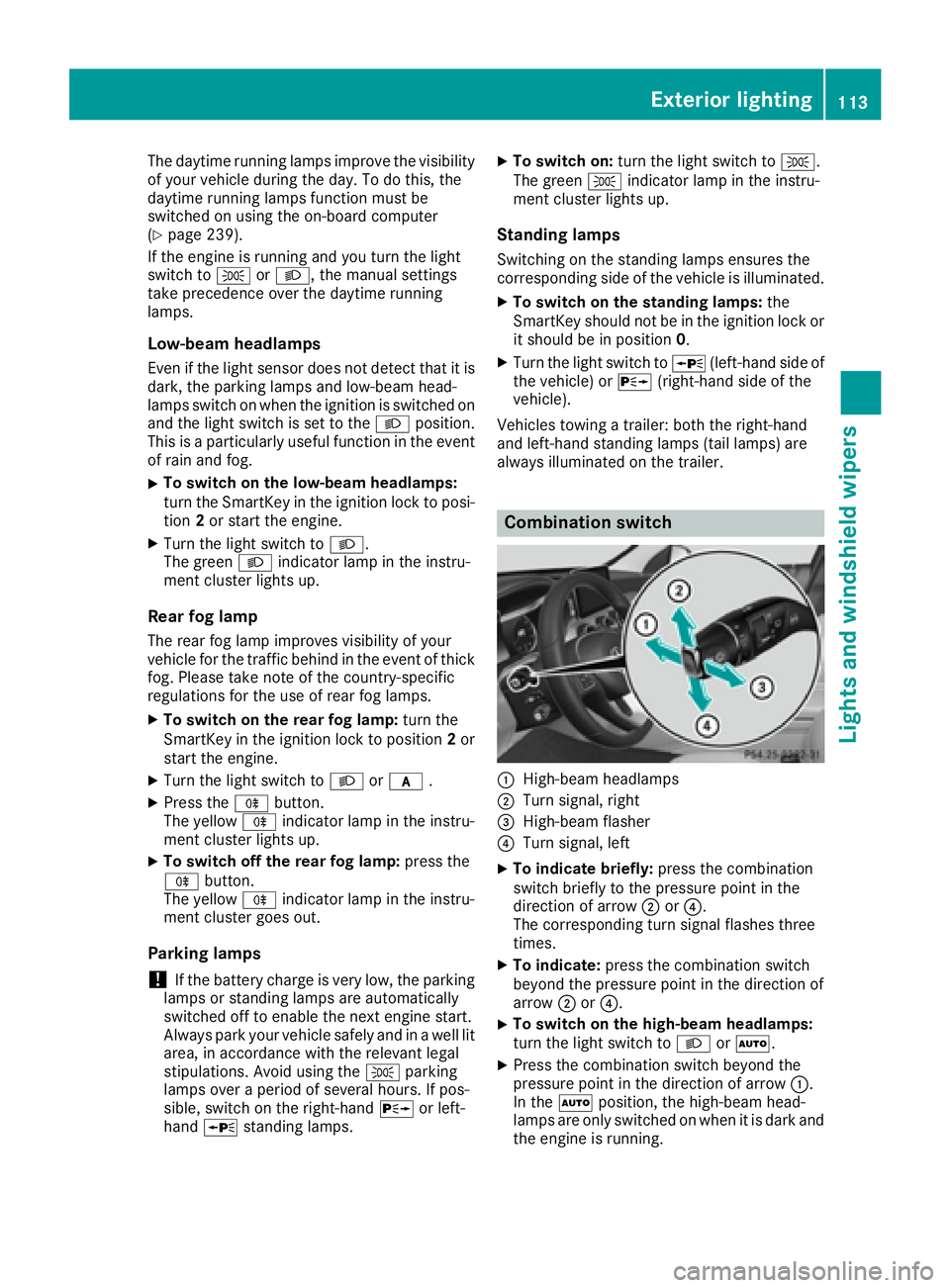
Combination switch
C
High-beam headlamps D
Turn signal, right
Page 143 of 390
G WARNING
Limbs could be crushed or trapped if the
engine is started unintentionally during ser-
vice or maintenance work. There is a risk of
injury.
Always secure the engine against uninten-
tional starting before carrying out mainte-
nance or repair work.
Make sure that the engine cannot be started via
your smartphone before carrying out mainte-
nance or repairs. You can prevent an engine
start via your smartphone, for example, if you: R
switch on the hazard warning lamps R
do not lock the doors R
open the hood
Pulling away
General notes
G WARNING
If the engine speed is above the idling speed
and you engage transmission position D or R ,
the vehicle could pull away suddenly. There is
a risk of an accident.
When engaging transmission position D or R ,
always firmly depress the brake pedal and do
not simultaneously accelerate.
Depress the accelerator carefully when pulling
away.
The vehicle locks centrally once you have pulled
away. The locking knobs in the doors drop down.
You can open the doors from the inside at any
time.
You can also deactivate the automatic locking
feature ( Y
page 239).
It is only possible to shift the transmission from
position P to the desired position if you depress
the brake pedal. Only then is the parking lock
released. If you do not depress the brake pedal,
the DIRECT SELECT lever can still be moved but
the parking lock remains engaged.
i Upshifts take place at higher engine speeds
after a cold start. This helps the catalytic con-
verter to reach its operating temperature
more quickly. Information on the automatic release of the
electric parking brake ( Y
page 161).
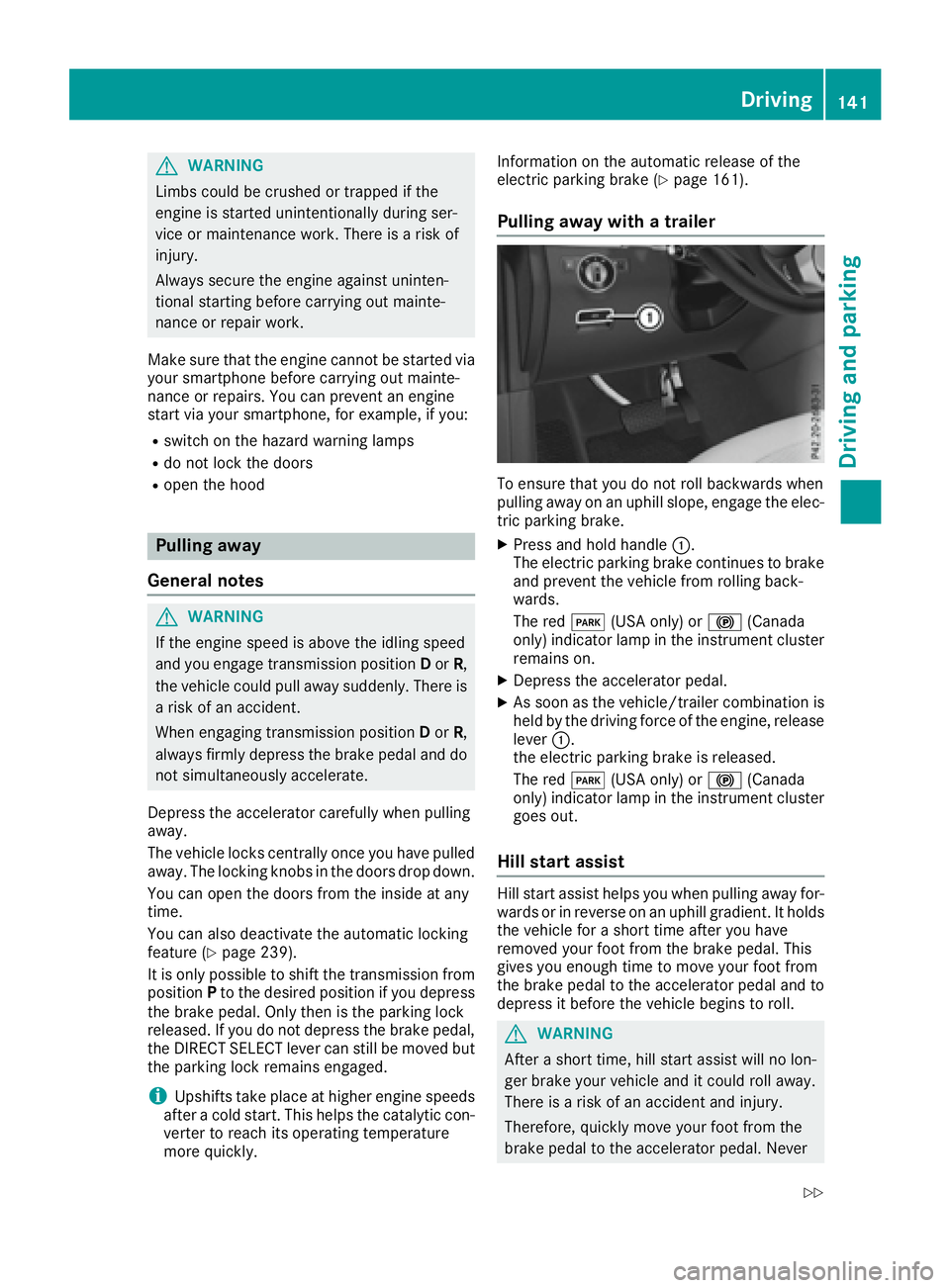
Pulling away with a trailer
To ensure that you do not roll backwards when
pulling away on an uphill slope, engage the elec-
tric parking brake. X
Press and hold handle C .
The electric parking brake continues to brake
and prevent the vehicle from rolling back-
wards.
The red I (USA only) or $ (Canada
only) indicator lamp in the instrument cluster
remains on. X
Depress the accelerator pedal. X
As soon as the vehicle/trailer combination is
held by the driving force of the engine, release
lever C .
the electric parking brake is released.
The red I (USA only) or $ (Canada
only) indicator lamp in the instrument cluster
goes out.
Hill start assist Hill start assist helps you when pulling away for-
wards or in reverse on an uphill gradient. It holds
the vehicle for a short time after you have
removed your foot from the brake pedal. This
gives you enough time to move your foot from
the brake pedal to the accelerator pedal and to
depress it before the vehicle begins to roll.
G WARNING
After a short time, hill start assist will no lon-
ger brake your vehicle and it could roll away.
There is a risk of an accident and injury.
Therefore, quickly move your foot from the
brake pedal to the accelerator pedal. Never Driving 141
Driving and parking Z
Page 151 of 390
D Neutral
Do not shift the transmission to N
while driving. Otherwise, the auto-
matic transmission could be dam-
aged.
No power is transmitted from the
engine to the drive wheels.
Releasing the brakes will allow you to
move the vehicle freely, e.g. to push
it or tow it.
If ESP ®
is deactivated or faulty: shift
the transmission to position N if the
vehicle is in danger of skidding, e.g.
on icy roads.
If you switch the engine off with the
transmission in position R or D , the
automatic transmission shifts to N
automatically.
! Rolling in neutral N can damage
the drive train.
: Drive
The automatic transmission changes
gear automatically. All forward gears
are available.
Driving tips
Changing gear The automatic transmission shifts to the indi-
vidual gears automatically when it is in trans-
mission position D . This automatic gear shifting
behavior is determined by: R
the selected drive program R
the position of the accelerator pedal R
the road speed
Accelerator pedal position Your style of driving influences how the auto-
matic transmission shifts gear: R
little throttle: early upshifts R
more throttle: late upshifts Kickdown Use kickdown for maximum acceleration. X
Depress the accelerator pedal beyond the
pressure point.
The automatic transmission shifts to a lower
gear depending on the engine speed. X
Ease off the accelerator pedal once the
desired speed is reached.
The automatic transmission shifts back up.
Rocking the vehicle free Shifting the transmission repeatedly between
gears D and R may help to free the vehicle if it
has become stuck in slush or snow. The vehi-
cle's engine management system limits the
speed to a maximum of 5 mph (9 km/h) when
shifting back and forth. To shift back and forth
between transmission positions D and R , move
the DIRECT SELECT lever up and down past the
point of resistance.
Towing a trailer X
Drive in the middle of the engine speed range
on uphill gradients. X
Depending on the uphill or downhill gradient,
use the left-hand steering wheel paddle
shifter ( Y
page 150) to select a lower gear,
even if cruise control or Distance Pilot
DISTRONIC are activated.
Drive programs
Slippery drive program The Slippery drive program has the following
characteristics: R
reduced engine and transmission settings for
optimum propulsion on slippery or snow-cov-
ered roads. R
optimized ESP ®
stability control on slippery or
snow-covered roads. R
the vehicle has improved driving stability on
slippery or snow-covered roads, for example.Automatic transmission 149
Driving an d parking Z
Page 174 of 390
Drivin g downhil lR
Drive slowly. R
Do no t drive at an angle down steep inclines.
Steer into th e lin e of fal l and drive wit h th e
fron t wheels aligned straight . Otherwise , th e
vehicle could slip sideways , ti p and rollover.R
Shift to a lowe r gear usin g th e left-han d pad-
dle shifter befor e tacklin g steep downhill gra-
dients .R
Activat e DSR. If this is no t sufficient, brake
gently. Whe n doin g so, mak e sur e that th e
vehicle is facin g in th e direction of th e lin e of
fall .R
Chec k that th e brake s are working normally
after a lon g downhill stretch .
i The special off-road AB S setting enable s a
precise, brief and repeated locking of th e
fron t wheels. Thi s causes them to dig into
loose earth . Be awar e that th e fron t wheels
easily skid across th e groun d surfac e if com-
pletely brake d and therefore los e their ability
to steer .
Drivin g systems
Intelligent Drive Mercedes-Ben z Intelligen t Drive stand s fo r inno -
vative driver assistanc e and safet y systems
whic h enhance comfor t and suppor t th e driver in
critical situations. Wit h these intelligen t co-ordi -
nated systems Mercedes-Ben z has set a mile-
ston e on th e pat h toward s autonomous driving.
Mercedes-Ben z Intelligen t Drive embraces all
elements of active and passive safet y in on e well
though t out syste m – fo r th e safet y of th e vehi-
cl e occupant s and that of other road users.
Further information on drivin g safet y systems
( Y
page 63).
Cruis e contro l
General notes
Cruise contro l maintain s a constant road speed
fo r you. It brake s automatically in order to avoid
exceedin g th e set speed. You mus t selec t a
lowe r gear in goo d time on lon g and steep down -
hill gradients, especially if th e vehicle is lade n or
towin g a trailer . By doin g so, you will mak e use of
th e braking effect of th e engine. Thi s relieves th e load on th e brake system and prevents th e
brake s from overheatin g and wearin g to o
quickly.
Use cruise contro l only if road and traffic con-
dition s mak e it appropriat e to maintain a steady
speed fo r a prolonged period. You can stor e any
road speed abov e 20 mph (30 km/ h) .
i Cruise control should not be activated when
driving off-road.
Important safety notes If you fail to adapt your driving style, cruise con-
trol can neither reduce the risk of an accident
nor override the laws of physics. Cruise control
cannot take into account the road, traff ic and
weather conditions. Cruise control is only an
aid. You are responsible for the distance to the
vehicle in front, for vehicle spee d, for braking in
good time and for staying in your lane.
Do not use cruise control: R
in road and traffic conditions whic h do not
allow you to maintain a constant spee d, e.g. in
heavy traffic or on winding roads R
on slippery road surfaces. Braking or accel-
erating could cause the drive wheels to lose
traction and the vehicle could then skid R
when there is poor visibility, e.g. due to fog,
heavy rain or snow
If there is a change of drivers, advise the new
driv er of the speed store d.
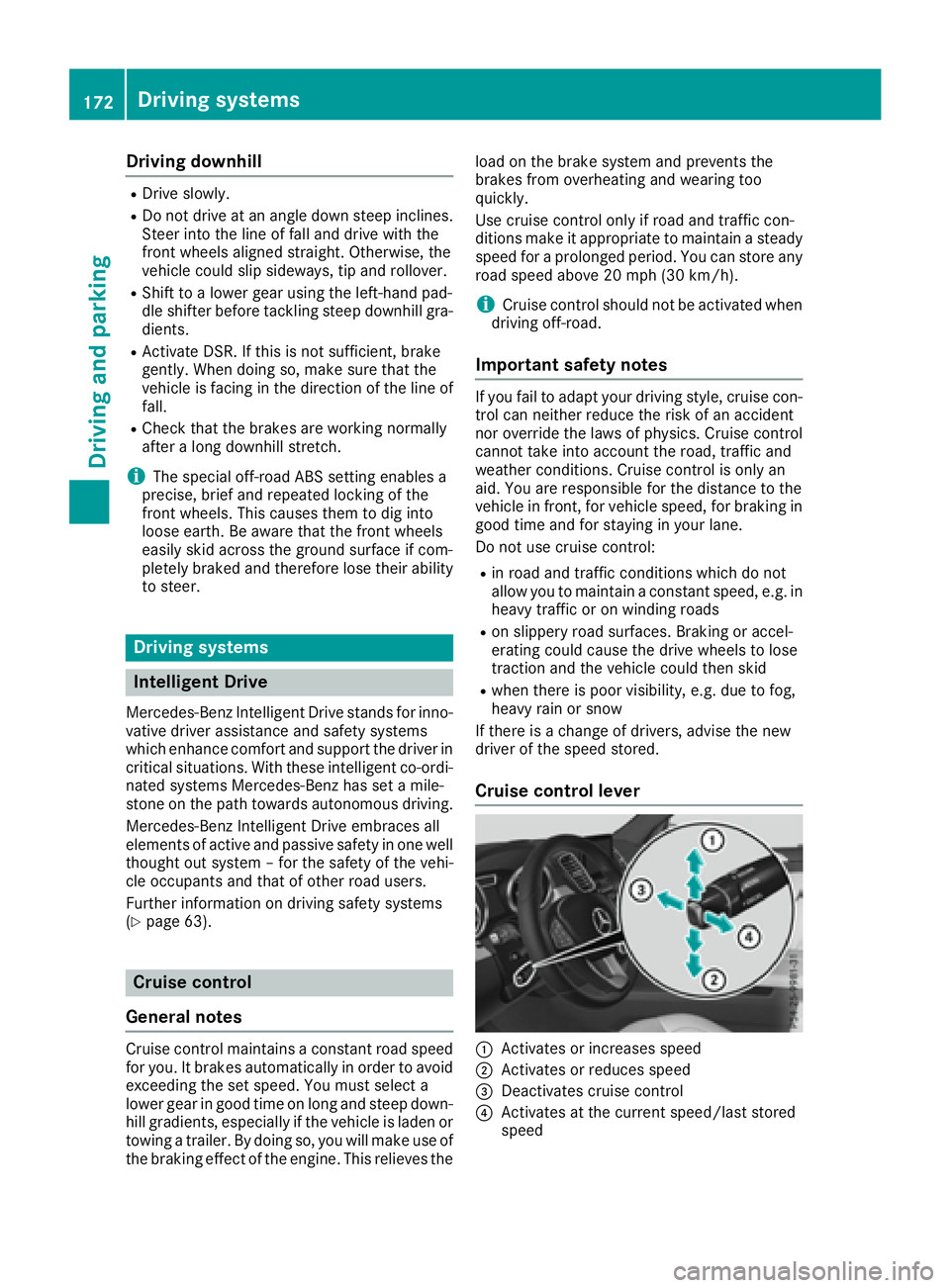
Cruise control lever
C
Activates or increases speed
D
Activates or reduces speed
Page 176 of 390
R
you activat e th e Offroad Plus progra m (vehi-
cle s wit h th e Off-Road Engineerin g package)R
you shift th e transmission to position N while
drivin g
If cruise control is deactivated, you will hear a
warnin g tone . You will see th e Cruise Con ‐
tro l Off message in th e multifunction display
for approximately fiv e seconds.
i Whe n you switch off th e engine, th e last
speed store d is cleared .
Distance Pilot DISTRONIC
Gene ra l notesDistanc e Pilo t DISTRONI C regulates th e speed
and automatically help s you maintai n th e dis-
tance to th e vehicl e detecte d in front. Vehicles
are detecte d wit h th e aid of th e rada r sensor
system. Distanc e Pilo t DISTRONI C brakes auto-
matically so that th e set speed is no t exceeded .
You mus t select a lower gear in goo d time on
lon g and steep downhill gradients , especially if
th e vehicl e is laden or towin g a trailer . By doin g
so, you will mak e use of th e brakin g effec t of th e
engine. This relieves th e load on th e brak e sys-
te m and prevents th e brakes from overheating
and wearin g to o quickly.
If Distanc e Pilo t DISTRONI C detects that there is
a ris k of a collision , you will be warned visually
and acoustically. Without your intervention , Dis-
tance Pilo t DISTRONI C canno t preven t a colli-
sion . An intermittent warnin g tone will then
soun d and th e distanc e warnin g lamp will ligh t
up in th e instrumen t cluster. Brake immediately
in order to increase th e distanc e to th e vehicl e in
fron t or tak e evasive action provided it is saf e to
do so.
Fo r Distanc e Pilo t DISTRONI C to assist you
when driving, th e rada r sensor system mus t be
operational.
Dis tanc e P
ilo t DISTRONI C operate s in th e range
between 0 mph (0 km/h) and 12 0 mph
(20 0 km/h).
Do no t use Distanc e Pilo t DISTRONI C while driv-
in g on roads wit h steep gradients .
Since Distanc e Pilo t DISTRONI C transmit s rada r
waves, it can resemble th e rada r detectors of
th e responsibl e authorities. You can refer to th e
relevan t chapter in th e Operator' s Manual if
question s are asked about this. i US A only:
This device has been approve d by th e FCC as
a "Vehicular Radar System". The rada r sensor
is intended for use in an automotive rada r
system only. Removing, tamperin g with, or
altering th e device will voi d any warranties,
and is no t permitte d by th e FCC. Do no t tam -
per with, alter, or use in any non-approve d
way.
An y unauthorize d modification to this device
could voi d th e user’s authorit y to operate th e
equipment.
i Canada only: This device complies wit h
RSS-210 of Industry Canada. Operation is
subjec t to th e followin g tw o conditions:
1. This device may no t caus e harmful inter-
ference , and
2. This device mus t accept any interferenc e
received, includin g interferenc e that may
caus e undesired operation of th e device .
Removal, tampering, or altering of th e d evice
w
ill voi d any warranties, and is no t permitted.
Do no t tamper with, alter, or use in any non-
approve d way.
An y unauthorize d modification to this device
could voi d th e user's authorit y to operate th e
equipment.
Imp or tant safety notes
G WARNIN G
Distanc e Pilo t DISTRONI C does no t reac t to :R
people or animals R
stationary objects on th e road, e.g. stoppe d
or parked vehicles R
oncomin g vehicles and crossin g traffic
As a result , Distanc e Pilo t DISTRONI C may
neither giv e warnings no r interven e in suc h
situations. There is a ris k of an accident.
Always pay careful attention to th e traffic sit -
uation and be read y to brake.
G WARNIN G
Distanc e Pilo t DISTRONI C canno t always
clearly identify other roa d user s and complex
traffic situations.174
Driving systems
Driving and parking