air condition MERCEDES-BENZ GLS 2018 Owner's Guide
[x] Cancel search | Manufacturer: MERCEDES-BENZ, Model Year: 2018, Model line: GLS, Model: MERCEDES-BENZ GLS 2018Pages: 398, PDF Size: 5.73 MB
Page 218 of 398
lane-correcting application of the brakes can
bring the vehicle back into the original lane.
This function is available in a speed range
between 40 mph and 120 mph (60 km/h and
200 km/h).
For Active Lane Keeping Assist to assist you
when driving, the radar sensor system must be
operational.
Important safety notes If you fail to adapt your driving style, Active Lane
Keeping Assist can neither reduce the risk of
accident nor override the laws of physics. Active
Lane Keeping Assist cannot take into account
road, weather or traffic conditions. Active Lane
Keeping Assist is only an aid. You are responsi-
ble for the distance to the vehicle in front, for
vehicle speed, for braking in good time and for
staying in your lane.
Active Lane Keeping Assist cannot continuously
keep your vehicle in its lane.
G WARNING
Active Lane Keeping Assist cannot always
clearly detect lane markings.
In such cases, Active Lane Keeping Assist
can: R
give an unnecessary warning and then
make a course-correcting brake application
to the vehicle R
not give a warning or intervene
There is a risk of an accident.
Always pay particular attention to the traffic
situation and keep within the lane, especially
if Active Lane Keeping Assist alerts you. Ter-
minate the intervention in a non-critical driv-
ing situation.
The system may be impaired or may not function
if: R
there is poor visibility, e.g. due to insufficient
illumination of the road, or due to snow, rain,
fog or heavy spray R
there is glare, e.g. from oncoming traffic, the
sun or reflection from other vehicles (e.g. if
the road surface is wet) R
the windshield is dirty, fogged up, damaged or
covered, for instance by a sticker, in the vicin-
ity of the camera R
there are no or several unclear lane markings
for one lane, e.g. roadworks R
the lane markings are worn away, dark or cov-
ered up, e.g. by dirt or snow R
the distance to the vehicle in front is too short
and thus the lane markings cannot be detec-
ted R
the lane markings change quickly, e.g. lanes
branch off, cross one another or merge R
the road is narrow and winding R
there are highly variable shade conditions on
the roadway R
no vehicle is detected in the adjacent lane and
there are broken lane markings
Warning vibration in the steering wheel A warning may be given if a front wheel passes
over a lane marking. It will warn you by mean s of
intermittent vibration in the steering wheel for
up to 1.5 seconds.
In order that you are warned only when neces-
sary and in good time if you cross the lane mark-
ing, the system detects certain conditions and
warns you accordingly.
The warning vibration occurs earlier if: R
you approach the outer lane marking on a
bend R
the road has very wide lanes, e.g. a freeway R
the system detects solid lane markings
The warning vibration occurs later if: R
the road has narrow lanes R
you cut the corner on a bend
Lane-correcting brake application
G WARNING
A lane-correcting brake application cannot
always bring the vehicle back into the original
lane. There is a risk of an accident.
Always steer, brake or accelerate yourself,
especially if Active Lane Keeping Assist warns
you or makes a lane-correcting brake appli-
cation.
G WARNING
Active Lane Keeping Assist does not detect
traffic conditions or road users. In very rare
cases, the system may make an inappropriate
brake application, e.g. after intentionally driv-216
Driving systems
Driving and parking
Page 227 of 398
R
is affected more by strong crosswinds R
demands more sensitive steering R
has a larger turning circle
This could impair the handling characteristics.
When towing a trailer, always adjust your speed
to the current road and weather conditions. Do
not exceed the maximum permissible speed for
your vehicle/trailer combination.
Notes on towing a trailer
General notes
! If you have a trailer tow hitch retrofitted,
changes to the cooling system and drive train
may be necessary, depending on the vehicle
type.
If you have a trailer tow hitch retrofitted,
observe the anchorage points on the chassis
frame. R
Do not exceed the legally prescribed maxi-
mum speed for vehicle/trailer combinations
in the relevant country.
This lowers the risk of an accident. R
Only install an approved trailer coupling on
your vehicle.
More information on availability and installa-
tion can be obtained at any qualified special-
ist workshop. R
The bumpers of your vehicle are not suitable
for installing detachable trailer couplings. R
Do not install hired trailer couplings or other
detachable trailer couplings on the bumpers
of your vehicle. R
If you no longer need the ball coupling,
remove it from the ball coupling recess. This
will reduce the risk of damage to the ball cou-
pling.
When towing a trailer, set the tire pressure on
the rear axle of the towing vehicle for the max-
imum load. You will find the values in the tire
pressure table in the fuel filler flap of the vehicle
( Y
page 372).
Please note that when towing a trailer, the fol-
lowing driving systems have limited availability
or are not available at all: R
Parking Assist PARKTRONIC ( Y
page 192)R
Blind Spot Assist ( Y
page 209)R
Active Lane Keeping Assist ( Y
page 215) On vehicles without level control, the height of
the ball coupling will alter according to the load
placed on the vehicle. If necessary, use a trailer
with a height-adjustable drawbar.
You will find installing dimensions and loads
under "Technical data" ( Y
page 395).
Driving tips Also observe the notes on pulling away with a
trailer ( Y
page 143).
The maximum permissible speed for vehicle/
trailer combinations depends on the type of
trailer. Before beginning the journey, check the
trailer's documents to see what the maximum
permissible speed is for your trailer. Observe the
legally permissible maximum speed in the rele-
vant country.
For certain Mercedes-Benz vehicles, the maxi-
mum permissible rear axle load is increased
when towing a trailer. See "Technical data" to
find out whether this applies to your vehicle
( Y
page 395). If you utilize any of the added
maximum rear axle load when towing a trailer,
the vehicle/trailer combination may not exceed
a maximum speed of 60 mph (100 km/h) for
reasons concerning the operating permit. This
also applies in countries in which the maximum
permissible speed for car/trailer combinations
is greater than 60 mph (100 km/h).
When towing a trailer, your vehicle's handling
characteristics will be different in comparison
with when driving without a trailer.
Use the left-hand steering wheel paddle shifter
to shift into a lower gear in good time on long
and steep downhill gradients.
This also applies if you have activated cruise
control or Distance Pilot DISTRONIC.
This will use the braking effect of the engine, so
that less braking will be required to maintain the
speed. This relieves the load on the brake sys-
tem and prevents the brakes from overheating
and wearing too quickly. If you need additional
braking, depress the brake pedal repeatedly
rather than continuously.
Driving tips
If the trailer swings from side to side: X
Do not accelerate. X
Do not counter-steer. X
Brake if necessary.Towing a trailer 225
Driving and parking Z
Page 230 of 398
Most U.S. states and all Canadian provinces
require by law: R
Safety chains between the towing vehicle and
the trailer. The chains should be cross-wound
under the trailer drawbar. They must be fas-
tened to the vehicle's trailer coupling, not to
the bumper or the axle.
Leave enough play in the chains to make tight
cornering possible. R
A separate brake system for certain types of
trailer. R
Safety switch for braked trailers. Check the
specific legal requirements applicable to your
state.
If the trailer becomes detached from the tow-
ing vehicle, the safety feature triggers the
trailer brakes.
Towing a trailer There are numerous legal requirements con-
cerning the towing of a trailer, e.g. speed restric-
tions. Make sure that your car/trailer combina-
tion complies with the local regulations: R
in your place of residence R
in the location to which you are driving
The police and local authorities can provide reli-
able information.
Observe the following when towing a trailer: R
To gain driving experience and to become
accustomed to the new handling characteris-
tics, you should practice the following in a
traffic-free location: -
cornering -
stopping -
backing up R
Before driving, check: -
trailer tow hitch -
safety switch for braked trailers -
safety chains -
electrical connections -
lights -
wheels R
Adjust the exterior mirrors to provide an
unobstructed view of the rear section of the
trailer. R
If the trailer has electronically controlled
brakes, pull away carefully. Brake manually using the brake controller and check whether
the brakes function correctly. R
Secure any objects on the trailer to prevent
the cargo from slipping when the vehicle is in
motion. R
When you couple up a trailer, check at regular
intervals that the load is firmly secured. If the
trailer is equipped with trailer lights and
brakes, check the trailer to ensure that these
are working. R
Bear in mind that the handling will be less
stable when towing a trailer than when driving
without one. Avoid sudden steering move-
ments. R
The vehicle/trailer combination is heavier,
accelerates more slowly, has a decreased
gradient climbing capability and a longer
braking distance.
It is more susceptible to side winds and
requires more careful steering. R
If possible, do not brake suddenly, but instead
depress the brake pedal moderately at first so
that the trailer can activate its brakes. Then
increase the pressure on the brake pedal. R
If the automatic transmission repeatedly
shifts between gears on uphill or downhill gra-
dients, shift to a lower gear using the left-hand
steering wheel paddle shifter.
A lower gear and lower speed reduce the risk
of engine failure. R
When driving downhill, shift to a lower gear to
utilize the engine's braking effect.
Avoid continuous brake application as this
may overheat the vehicle brakes and, if instal-
led, the trailer brakes. R
If the coolant temperature increases dramat-
ically while the air-condition ing system is
switched on, switch off the air-conditioning
system.
Coolant heat can also be dissipated by open-
ing the windows and switching the ventilation
blower and the interior temperature to the
highest level. R
When overtaking, pay particular attention to
the extended length of your vehicle/trailer
combination.
Due to the length of the vehicle/trailer com-
bination, you require additional road space in
relation to the vehicle you are overtaking
before you can change back to the original
lane.228
Towing a trailer
Driving and parking
Page 235 of 398
Important safety notes
G WARNIN G
If you operate information systems and com-
munication equipmen t integrate d in th e vehi-
cle when driving , you may be distracte d from
th e traffic situation . You could also lose con-
trol of th e vehicle. Ther e is a ris k of an acci-
dent.
Only operate this equipmen t when th e traffic
situation permits. If you are no t sur e that this
is possible , park th e vehicl e payin g attention
to traffic condition s and operate th e equip-
men t when th e vehicl e is stationary.
You must observ e th e legal requirements for th e
country in whic h you are currentl y driving when
operating th e on-board computer.
G WARNIN G
If th e instrumen t cluste r has faile d or mal-
functioned, you may no t recognize function
restriction s in systems relevan t to safety. The
operating safet y of your vehicl e may be
impaired . Ther e is a ris k of an accident.
Drive on carefully. Hav e th e vehicl e checke d
at a qualified specialist workshop immedi-
ately.
If th e operating safet y of your vehicl e is
impaired , pull ove r as soo n as it is saf e to do so.
Contac t a qualified specialist workshop.
The on-board computer only shows message s or
warning s from certain systems in th e multifunc-
tion display. You should therefor e mak e sur e
your vehicl e is operating safely at all times .
Fo r an overview, see th e instrumen t panel illus-
tration ( Y
page 37).
Displays and operation
Instrument cluster lighting
The lighting in th e instrumen t cluster, in th e dis-
plays and th e control s in th e vehicl e interior can
be adjusted usin g th e brightness control knob.
The brightness control knob is locate d on th e
botto m lef t of th e instrumen t cluste r
( Y
page 37). X
Turn th e brightness control knob clockwise or
counter-clockwise.
If you tur n th e ligh t switch to X , ` or
X , th e brightness is dependen t upon th e
brightness of th e ambien t light.
i The ligh t sensor in th e instrumen t cluste r
automatically control s th e brightness of th e
multifunction display.
In daylight, th e displays in th e instrumen t
cluste r are no t illuminated.
Speedometer with segments The segments in th e speedometer indicat e
whic h spee d range is available. R
Cruis e control activated ( Y
page 174):
The segments ligh t up from th e store d spee d
to th e maximum speed. R
Distanc e Pilot DISTRONI C is activated
( Y
page 176):
On e or two segments in th e set spee d range
ligh t up. R
Distanc e Pilot DISTRONI C detects a vehicl e in
fron t moving mor e slowly than th e store d
speed:
The segments between th e spee d of th e vehi-
cle in fron t and th e store d spee d ligh t up.
Tachometer
! Do no t driv e in th e overrevving range, as this
could damag e th e engine.
The red ban d in th e tachometer indicates th e
engine's overrevving range.
The fuel suppl y is interrupted to protect th e
engin e when th e red ban d is reached.
Outside temperature display You should pay special attention to road condi-
tion s when temperatures are aroun d freezing
point.
Bea r in min d that th e outside temperature dis-
play indicates th e temperature measured and
does no t record th e road temperature.
The outside temperature display is in th e multi-
function display ( Y
page 235).Displays and operation 233
On-board computer and displays Z
Page 256 of 398
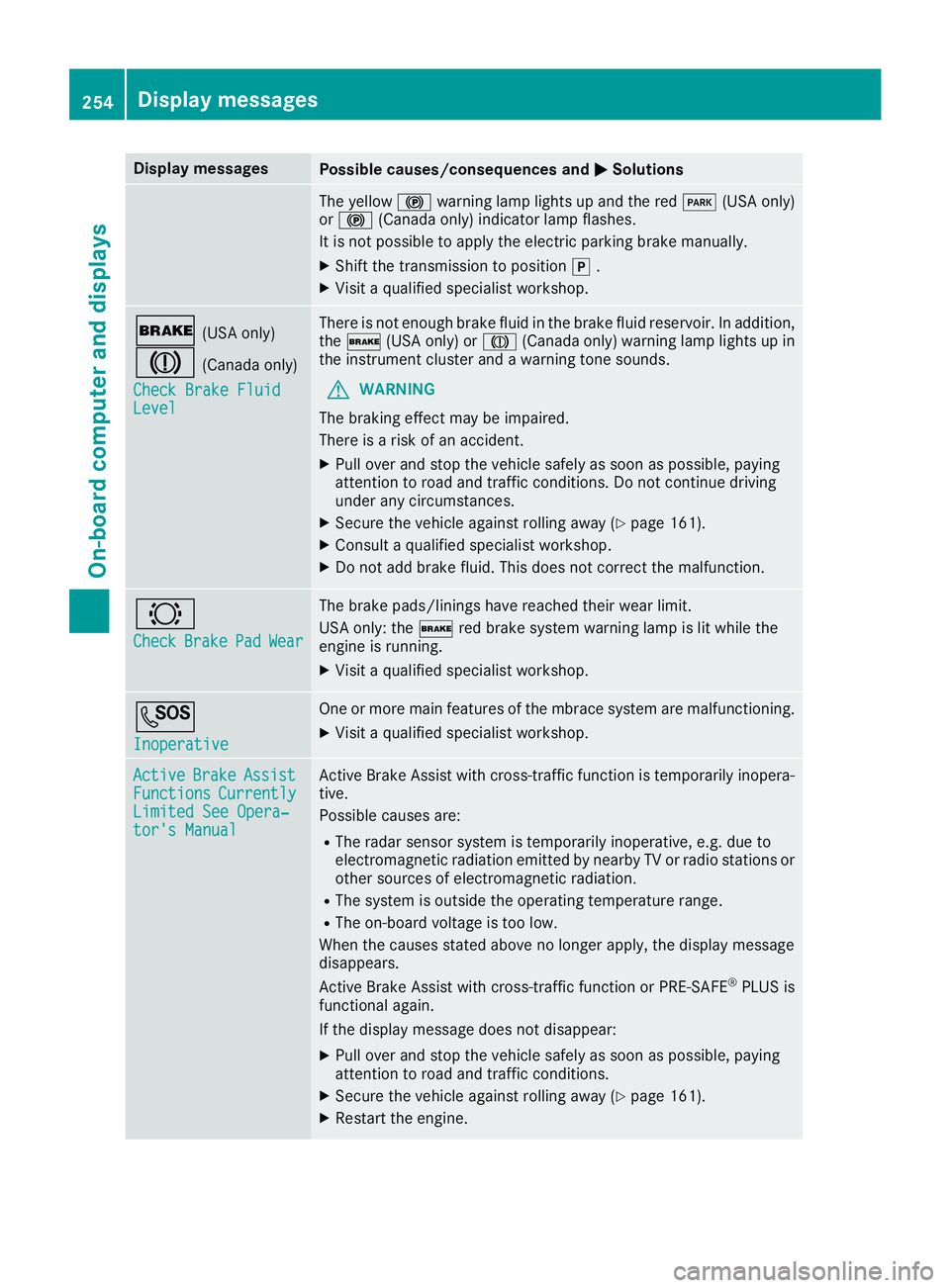
Display messages
Possible causes/consequences and P Solutions
The yellow $ warning lamp lights up and th e red I (US A only)
or $ (Canada only) indicator lamp flashes .
It is no t possibl e to apply th e electric parking brak e manually.X
Shift th e transmission to position ] .X
Visit a qualified specialist workshop .
' (US A only)
M (Canada only)
Check Brake Fluid
Level There is no t enough brak e flui d in th e brak e flui d reservoir . In addition ,
th e ' (US A only) or M (Canada only) warning lamp lights up in
th e instrumen t cluste r and a warning tone sounds.
G WARNIN G
The braking effec t may be impaired.
There is a ris k of an accident.X
Pull ove r and stop th e vehicl e safely as soo n as possible, payin g
attention to roa d and traffic conditions. Do no t continu e drivin g
under any circumstances. X
Secur e th e vehicl e against rollin g away ( Y
page 161).X
Consult a qualified specialist workshop .X
Do no t add brak e fluid . This does no t correc t th e malfunction .
& Check Brake Pad Wea r The brak e pads/linings hav e reached their wear limit.
US A only: th e ' red brak e system warning lamp is lit while th e
engin e is running. X
Visit a qualified specialist workshop .
S Inoperative On e or mor e main features of th e mbrace system are malfunctioning .X
Visit a qualified specialist workshop .
Active Brake Assist
Functions Currently
Limite d See Opera‐
tor's Manual Active Brake Assis t wit h cross-traffic function is temporarily inopera-
tive.
Possibl e causes are: R
The radar sensor system is temporarily inoperative, e.g. due to
electromagneti c radiation emitted by nearby TV or radi o station s or
other source s of electromagneti c radiation .R
The system is outside th e operating temperature range.R
The on-boar d voltag e is to o low.
Whe n th e causes state d abov e no longer apply, th e display message
disappears.
Active Brake Assis t wit h cross-traffic function or PRE ‑ S AF E ®
PLU S is
functional again .
If th e display message does no t disappear :X
Pull ove r and stop th e vehicl e safely as soo n as possible, payin g
attention to roa d and traffic conditions.X
Secur e th e vehicl e against rollin g away ( Y
page 161).X
Restart th e engine.254
Display messages
On-board computer and displays
Page 257 of 398
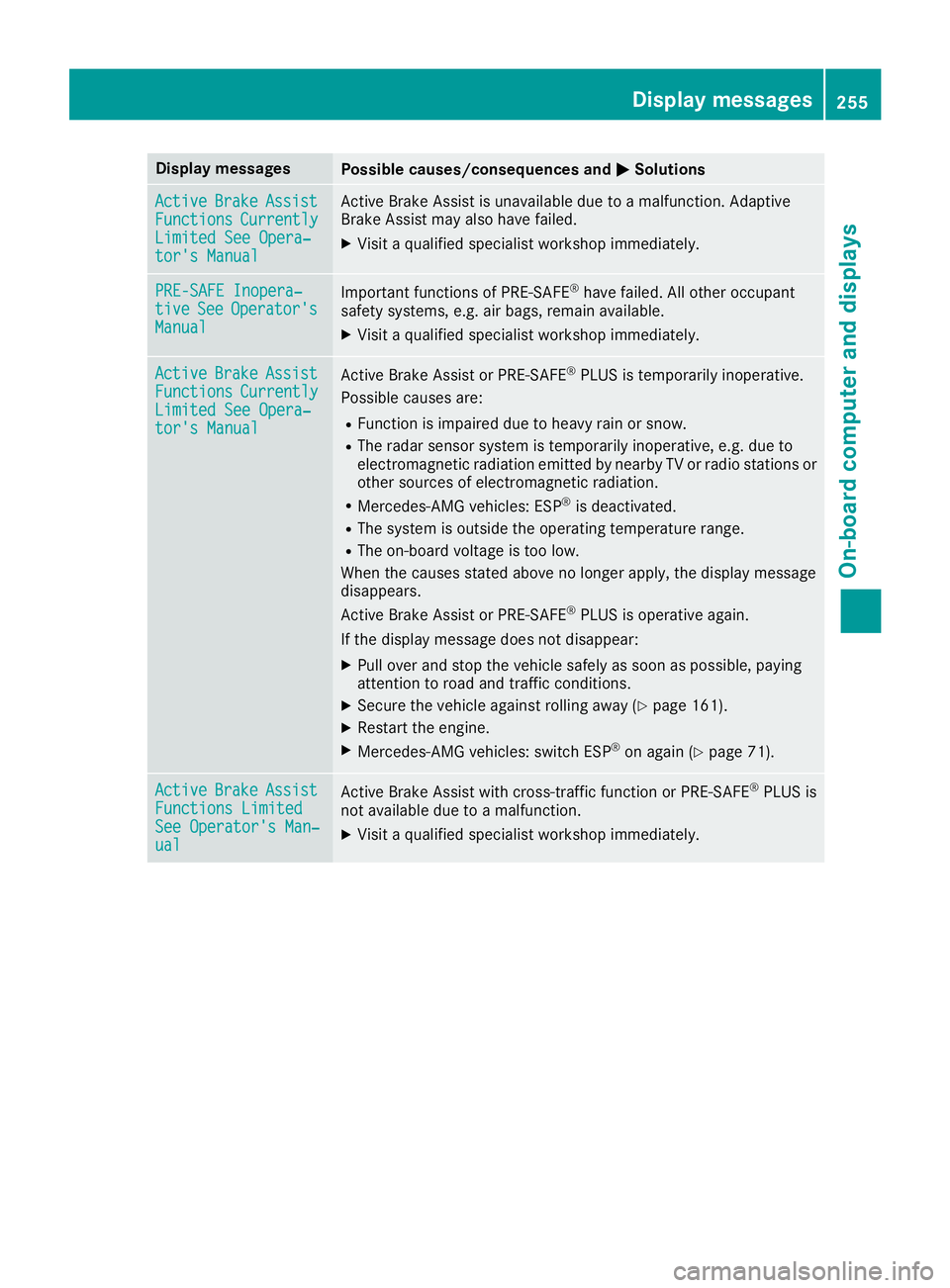
Display messages
Possible causes/consequences and P Solutions
Active Brake Assist
Functions Currently
Limite d See Opera‐
tor's Manual Active Brake Assis t is unavailable due to a malfunction . Adaptive
Brake Assis t may also hav e failed.X
Visit a qualified specialist workshop immediately.
PRE-SAFE Inopera‐
tiv e See Operator' s
Manual Importan t function s of PRE-SAF E ®
hav e failed. Al l other occupant
safet y systems , e.g. air bags , remain available.X
Visit a qualified specialist workshop immediately.
Active Brake Assist
Functions Currently
Limite d See Opera‐
tor's Manual Active Brake Assis t or PRE ‑ SAFE ®
PLU S is temporarily inoperative.
Possibl e causes are: R
Function is impaire d due to heav y rain or snow.R
The radar sensor system is temporarily inoperative, e.g. due to
electromagneti c radiation emitted by nearby TV or radi o station s or
other source s of electromagneti c radiation .R
Mercedes-AMG vehicles: ES P ®
is deactivated.R
The system is outside th e operating temperature range.R
The on-boar d voltag e is to o low.
Whe n th e causes state d abov e no longer apply, th e display message
disappears.
Active Brake Assis t or PRE ‑ SAFE ®
PLU S is operative again .
If th e display message does no t disappear :X
Pull ove r and stop th e vehicl e safely as soo n as possible, payin g
attention to roa d and traffic conditions.X
Secur e th e vehicl e against rollin g away ( Y
page 161).X
Restart th e engine.X
Mercedes-AMG vehicles: switch ES P ®
on again ( Y
page 71).
Active Brake Assist
Functions Limite d
See Operator' s Man ‐
ual Active Brake Assis t wit h cross-traffic function or PRE ‑ S AF E ®
PLU S is
no t available due to a malfunction .X
Visit a qualified specialist workshop immediately. Display messages 25 5
On-board computer and displays Z
Page 258 of 398
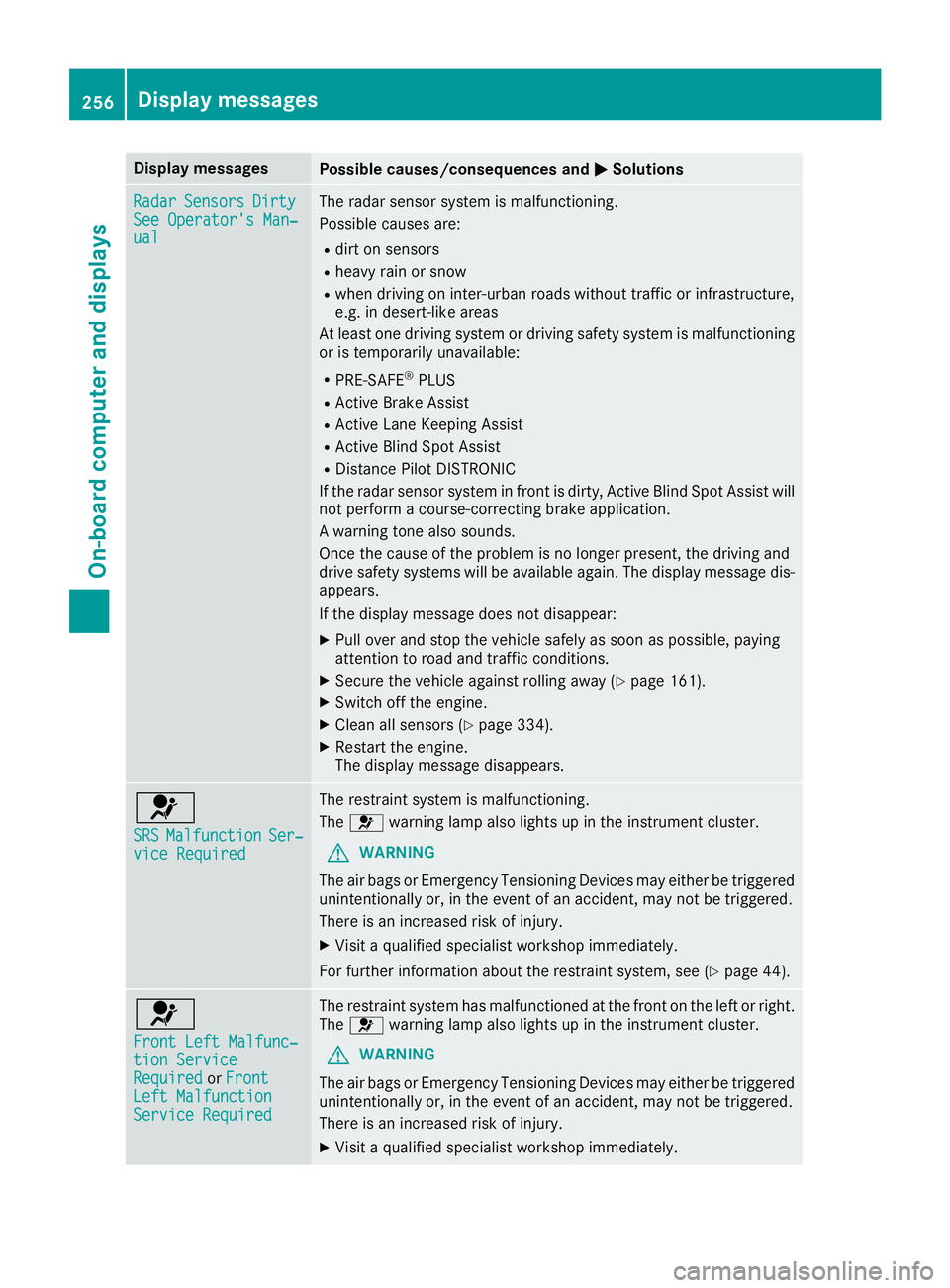
Display messages
Possible causes/consequences and P Solutions
Radar Sensor s Dirty
See Operator' s Man ‐
ual The radar sensor system is malfunctioning .
Possibl e causes are: R
dir t on sensor sR
heav y rain or snow R
when drivin g on inter-urban roads without traffic or infrastructure,
e.g. in desert-like area s
At least on e drivin g system or drivin g safet y system is malfunctioning
or is temporarily unavailable :R
PRE-SAF E ®
PLU SR
Active Brake Assis tR
Active Lan e Keepin g Assis tR
Active Blind Spot Assis tR
Distanc e Pilo t DISTRONI C
If th e radar sensor system in fron t is dirty, Active Blind Spot Assis t will
no t perfor m a course-correcting brak e application .
A warning tone also sounds.
Once th e caus e of th e problem is no longer present, th e drivin g and
drive safet y systems will be available again . The display message dis-
appears.
If th e display message does no t disappear :X
Pull ove r and stop th e vehicl e safely as soo n as possible, payin g
attention to roa d and traffic conditions.X
Secur e th e vehicl e against rollin g away ( Y
page 161).X
Switc h off th e engine.X
Clean all sensor s ( Y
page 334).X
Restart th e engine.
The display message disappears.
u SRS Malfunction Ser ‐
vic e Required The restrain t system is malfunctioning .
The u warning lamp also lights up in th e instrumen t cluster.
G WARNIN G
The air bags or Emergency Tensioning Devices may either be triggered
unintentionally or, in th e event of an accident, may no t be triggered .
There is an increased ris k of injury.X
Visit a qualified specialist workshop immediately.
Fo r further information about th e restrain t system, see ( Y
page 44) .
u Front Lef t Malfunc‐
tio n Servic e
Required or Front
Lef t Malfunction
Servic e Required The restrain t system has malfunctioned at th e fron t on th e lef t or right .
The u warning lamp also lights up in th e instrumen t cluster.
G WARNIN G
The air bags or Emergency Tensioning Devices may either be triggered
unintentionally or, in th e event of an accident, may no t be triggered .
There is an increased ris k of injury.X
Visit a qualified specialist workshop immediately.256
Display messages
On-board computer and displays
Page 260 of 398
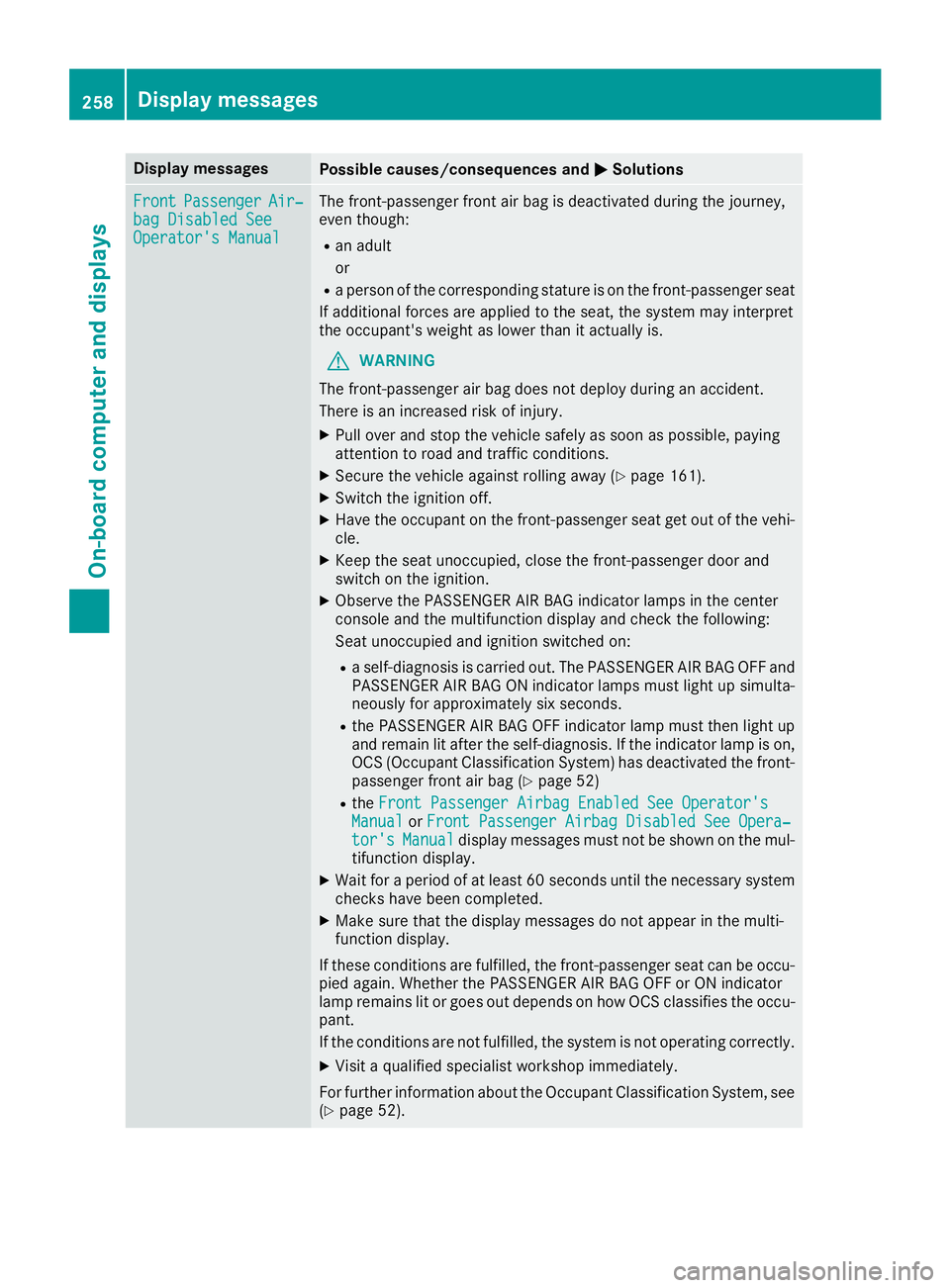
Display messages
Possible causes/consequences and P Solutions
Front Passenger Air ‐
bag Disabled See
Operator' s Manual The front-passenger fron t air bag is deactivated during th e journey,
eve n though : R
an adult
or R
a person of th e correspondin g statur e is on th e front-passenger seat
If additional force s are applie d to th e seat , th e system may interpret
th e occupant's weigh t as lower than it actually is.
G WARNIN G
The front-passenger air bag does no t deploy during an accident.
There is an increased ris k of injury.X
Pull ove r and stop th e vehicl e safely as soo n as possible, payin g
attention to roa d and traffic conditions.X
Secur e th e vehicl e against rollin g away ( Y
page 161).X
Switc h th e ignition off .X
Hav e th e occupant on th e front-passenger seat get out of th e vehi-
cle . X
Kee p th e seat unoccupied , close th e front-passenger door and
switch on th e ignition .X
Observ e th e PASSENGER AI R BA G indicator lamp s in th e center
console and th e multifunction display and chec k th e following:
Seat unoccupied and ignition switched on :R
a self-diagnosis is carrie d out . The PASSENGER AI R BA G OF F and
PASSENGER AI R BA G ON indicator lamp s mus t ligh t up simulta-
neousl y for approximately six seconds. R
th e PASSENGER AI R BA G OF F indicator lamp mus t then ligh t u p
and remain lit after th e self-diagnosis . If th e indicator lamp is on ,
OCS (Occupant Classification System) has deactivated th e front-
passenger fron t air bag ( Y
page 52)R
th e Front Passenger Airbag Enable d See Operator' s
Manual or Front Passenger Airbag Disabled See Opera‐
tor's Manual display message s mus t no t be shown on th e mul-
tifunction display. X
Wait for a period of at least 60 seconds until th e necessar y system
checks hav e been completed.X
Mak e sur e that th e display message s do no t appear in th e multi-
function display.
If these condition s are fulfilled , th e front-passenger seat can be occu-
pied again . Whether th e PASSENGER AI R BA G OF F or ON indicator
lamp remain s lit or goe s out depend s on how OCS classifies th e occu-
pant.
If th e condition s are no t fulfilled , th e system is no t operating correctly.X
Visit a qualified specialist workshop immediately.
Fo r further information about th e Occupant Classification System, see
( Y
page 52).258
Display messages
On-board computer and displays
Page 261 of 398
Display messages
Possible causes/consequences and P Solutions
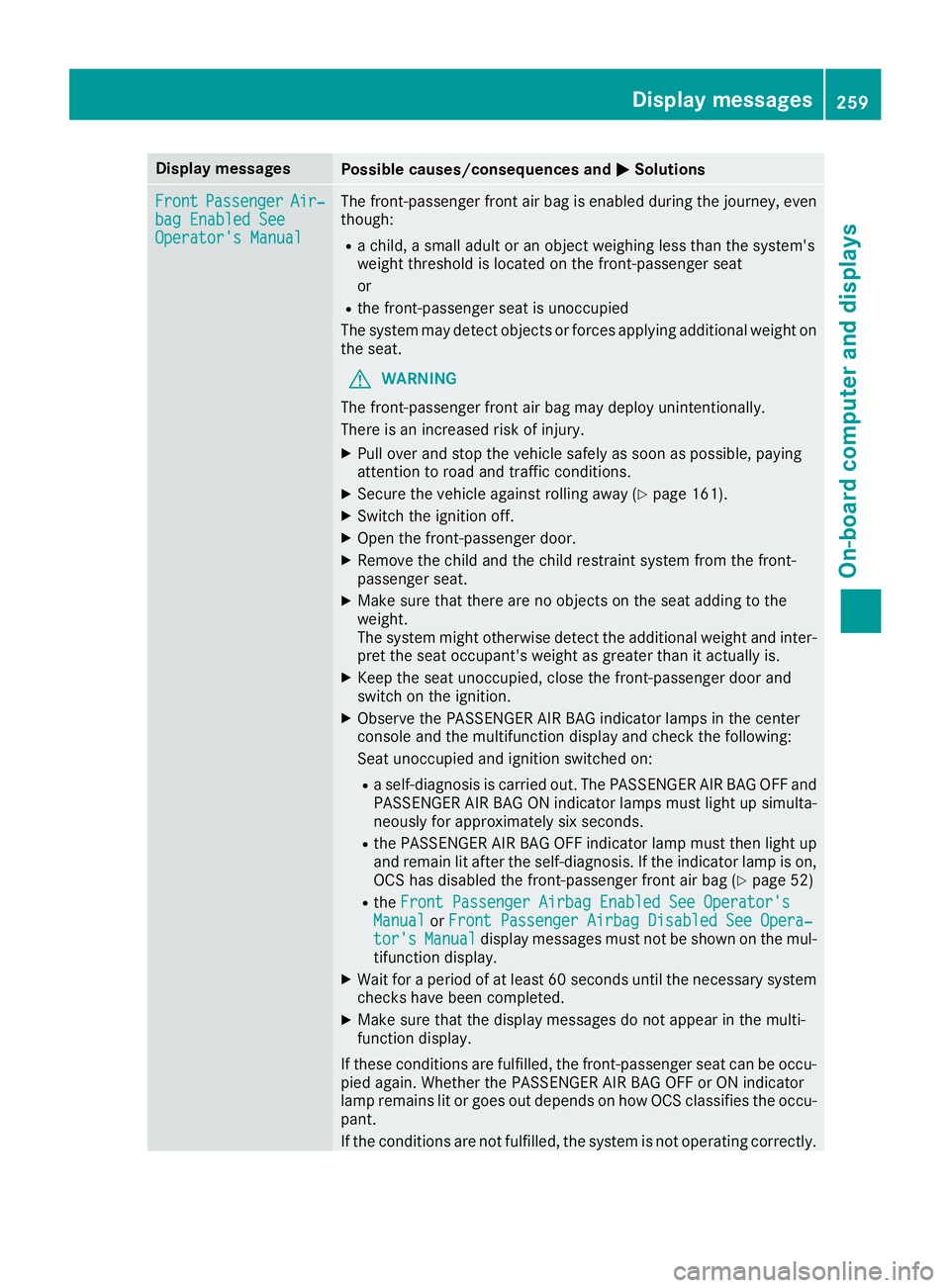
Front Passenger Air ‐
bag Enable d See
Operator' s Manual The front-passenger fron t air bag is enabled during th e journey, eve n
though : R
a child, a small adult or an objec t weighing less than th e system' s
weigh t threshold is locate d on th e front-passenger seat
or R
th e front-passenger seat is unoccupied
The system may detec t objects or force s applyin g additional weigh t on
th e seat .
G WARNIN G
The front-passenger fron t air bag may deploy unintentionally.
There is an increased ris k of injury.X
Pull ove r and stop th e vehicl e safely as soo n as possible, payin g
attention to roa d and traffic conditions.X
Secur e th e vehicl e against rollin g away ( Y
page 161).X
Switc h th e ignition off .X
Ope n th e front-passenger door .X
Remove th e child and th e child restrain t system from th e front-
passenger seat .X
Mak e sur e that there are no objects on th e seat addin g to th e
weight.
The system might otherwise detec t th e additional weigh t and inter-
pre t th e seat occupant's weigh t as greate r than it actually is.X
Kee p th e seat unoccupied , close th e front-passenger door and
switch on th e ignition .X
Observ e th e PASSENGER AI R BA G indicator lamp s in th e center
console and th e multifunction display and chec k th e fo llowing:
Se at unoccupied and ignition switched on :R
a self-diagnosis is carrie d out . The PASSENGER AI R BA G OF F and
PASSENGER AI R BA G ON indicator lamp s mus t ligh t up simulta-
neousl y for approximately six seconds. R
th e PASSENGER AI R BA G OF F indicator lamp mus t then ligh t up
and remain lit after th e self-diagnosis . If th e indicator lamp is on ,
OCS has disabled th e front-passenger fron t air bag ( Y
page 52)R
th e Front Passenger Airbag Enable d See Operator' s
Manual or Front Passenger Airbag Disabled See Opera‐
tor's Manual display message s mus t no t be shown on th e mul-
tifunction display. X
Wait for a period of at least 60 seconds until th e necessar y system
checks hav e been completed.X
Mak e sur e that th e display message s do no t appear in th e multi-
function display.
If these condition s are fulfilled , th e front-passenger seat can be occu-
pied again . Whether th e PASSENGER AI R BA G OF F or ON indicator
lamp remain s lit or goe s out depend s on how OCS classifies th e occu-
pant.
If th e condition s are no t fulfilled , th e system is no t operating correctly.Display messages 25 9
On-board computer and displays Z
Page 273 of 398
Display messages
Possible causes/consequences and P Solutions
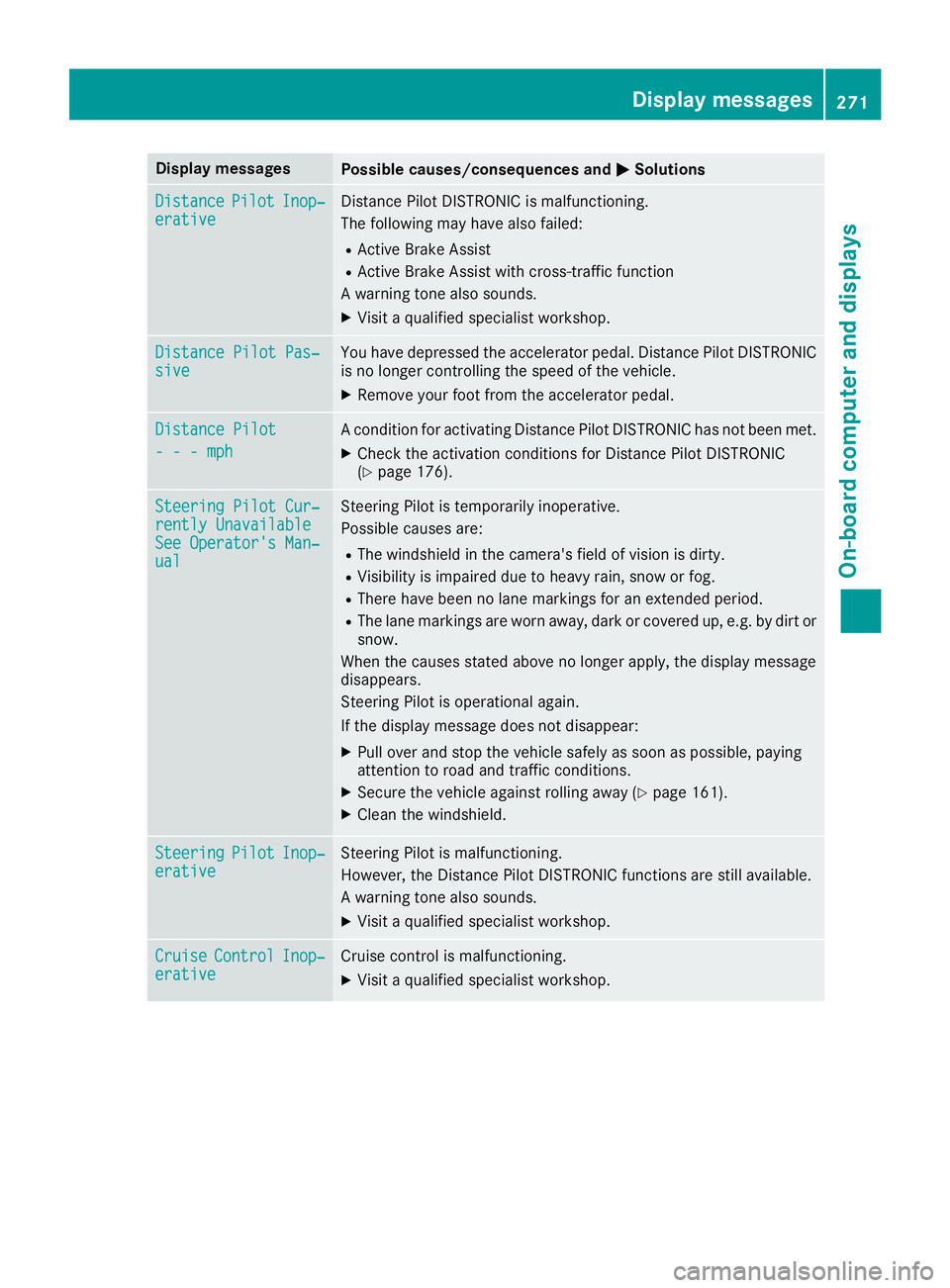
Distance Pilot Inop‐
erativ e Distanc e Pilo t DISTRONI C is malfunctioning .
The followin g may hav e also failed:R
Active Brake Assis tR
Active Brake Assis t wit h cross-traffic function
A warning tone also sounds. X
Visit a qualified specialist workshop .
Distance Pilot Pas ‐
siv e You hav e depressed th e accelerato r pedal . Distanc e Pilo t DISTRONI C
is no longer controllin g th e speed of th e vehicle.X
Remove your foo t from th e accelerato r pedal .
Distance Pilot
- - - mph A condition for activating Distanc e Pilo t DISTRONI C has no t been met .X
Chec k th e activation condition s for Distanc e Pilo t DISTRONI C
( Y
page 176).
Steering Pilot Cur ‐
rently Unavailable
See Operator' s Man ‐
ual Steering Pilo t is temporarily inoperative.
Possibl e causes are: R
The windshield in th e camera' s field of vision is dirty.R
Visibilit y is impaire d due to heav y rain , snow or fog .R
There hav e been no lan e marking s for an extended period.R
The lan e marking s are wor n away, dark or covered up, e.g. by dir t or
snow.
Whe n th e causes state d abov e no longer apply, th e display message
disappears.
Steering Pilo t is operational again .
If th e display message does no t disappear :X
Pull ove r and stop th e vehicl e safely as soo n as possible, payin g
attention to roa d and traffic conditions.X
Secur e th e vehicl e against rollin g away ( Y
page 161).X
Clean th e windshield.
Steering Pilot Inop‐
erativ e Steering Pilo t is malfunctioning .
However, th e Distanc e Pilo t DISTRONI C function s are still available.
A warning tone also sounds. X
Visit a qualified specialist workshop .
Cruise Contro l Inop‐
erativ e Cruis e control is malfunctioning .X
Visit a qualified specialist workshop .Display messages 27 1
On-board computer and displays Z