light MERCEDES-BENZ GLS 2019 User Guide
[x] Cancel search | Manufacturer: MERCEDES-BENZ, Model Year: 2019, Model line: GLS, Model: MERCEDES-BENZ GLS 2019Pages: 398, PDF Size: 7.3 MB
Page 17 of 398
Mirror
Vanity mirror (sun visor) ............... .305
Mirror turn signal
Cleaning ......................................... 330
Mirrors
see Exterior mirrors
see Rear-view mirror
see Vanity mirror (in the sun visor)
Mobile phone
Connecting (Bluetooth ®
inter-
face) .............................................. 291
Connecting (device manager) ....... .292
Frequencies ................................... 382
Installation ..................................... 382
Menu (on-board computer) ............ 237
Transmission output (maximum) .... 382
Modifying the programming
(SmartKey) .......................................... .79
MOExtended tires .............................. 336
Mounting wheels
Lowering the vehicle ...................... 377
Mounting a new wheel ................... 376
Preparing the vehicle .................... .373
Raising the vehicle ......................... 374
Removing a wheel .......................... 375
Securing the vehicle against roll-
ing away ........................................ 374
MP3
Operation ....................................... 236
see also Digital Operator's Man-
ual ................................................. .287
Multifunction display
Function/notes ............................ .232
Permanent display ......................... 240
Multifunction steering wheel
Operating the on-board computer .. 231Overview .......................................... 38
Multimedia system
Switching on and off ..................... .288
Music files
see also Digital Operator's Man-
ual.................................................. 287 N
Navigation Entering a destination .................... 289
Menu (on-board computer) ............ 234 see also Digital Operator's Man-
ual .................................................. 287
Notes on breaking-in a new vehi-
cle ....................................................... 139 O
Occupant Classification System
(OCS) Conditions ....................................... 52
Faults ............................................... 55
Operation ......................................... 52
System self-test ............................... 54
Occupant safety
Air bags ........................................... 49
Automatic measures after an acci-
dent ................................................. 59
Belt warning ..................................... 48
Children in the vehicle ..................... 59
Important safety notes .................... 44
Introduction to the restraint sys-
tem .................................................. 44
Occupant Classification System
(OCS) ............................................... 51
PASSENGER AIR BAG indicator
lamps ............................................... 45
Pets in the vehicle ........................... 65
PRE-SAFE ®
(anticipatory occu-
pant protection) ............................... 58
PRE-SAFE ®
PLUS (anticipatory
occupant protection PLUS) .............. 59
Restraint system warning lamp ........ 45
Seat belt .......................................... 45
OCS
Faults ............................................... 55
Operation ......................................... 52
Odometer ........................................... 233
Off-road driving
Approach/departure angle ............ 391
Checklist after driving off-road ...... 168
Checklist before driving off-road .... 168
General information ....................... 167
Important safety notes .................. 166
Maximum gradient climbing abil-
ity .................................................. 392
Maximum water depth ................... 390
Traveling uphill ............................... 169
Off-road lights .................................... 118 Index
15
Page 18 of 398
Off-Road program (vehicles with-
out Off-Road Engineering package)
Function/notes ............................. 216
Off-road programs (vehicles with
Off-Road Engineering package)
Function/notes ............................. 217
Off-road drive program .................. 217
Offroad Plus drive program ............ 218
Off-road programs (vehicles with
the Off-Road Engineering package)
Displays in the COMAND display ... 220
Off-road system
4MATIC .......................................... 215
DSR ............................................... 215
LOW RANGE off-road gear .............2 18
Off-road 4ETS .................................. 70
Off-road ABS ................................... .67
Off-road ESP ®
..................................71
Off-road programs (vehicles with
Off-Road Engineering package) ...... 217
Oil
see Engine oil
On and Offroad menu (on-board
computer) .......................................... 242
On-board computer
Active Distance Assist
DISTRONIC .................................... 178
AMG menu .....................................2 42
Assistance menu ........................... 238
Audio menu ................................... 236
Convenience submenu .................. 241
Display messages .......................... 245
Displaying a service message ....... .325
Factory settings submenu ............. 242
Important safety notes .................. 230
Instrument cluster submenu .......... 240
Lighting submenu .......................... 240
Menu overview .............................. 233
Message memory .......................... 245
Navigation menu ............................ 234
On and Offroad menu .................... 242
Operation ....................................... 231
RACETIMER ................................... 243
Service menu ................................. 239
Settings menu ............................... 240
Standard displa y............................ 233
Telephone menu ............................ 237
Trip menu ...................................... 233 Vehicle submenu ........................... 241
Video DVD operation ..................... 236
Operating safety
Declaration of conformity ................ 30
Important safety notes .................... 30
Operating system
see On-board computer
Operation
Digital Operator's Manua l................ 26
Operator's Manual
Overview .......................................... 28
Vehicle equipment ........................... 28
Outside temperature display ........... 230
Overhead control panel ...................... 42
Override feature
Rear side window s........................... 65 P
Paddle shifters see Steering wheel paddle shifters
Paint code number ............................ 383
Paintwork (cleaning instructions) ... 328
Panic alarm .......................................... 44
Panorama roof with power tilt/
sliding panel
Important safety notes .................... 92
Opening/closing the roller sun-
blind ................................................. 95
Operating ......................................... 94
Operating the roller sunblinds for
the sliding sunroof ........................... 94
Problem (malfunction) ..................... 96
Reversing feature ............................. 93
Parking
Important safety notes .................. 158
Parking brake ................................ 159
Position of exterior mirror, front-
passenger side ............................... 112
Rear view camera .......................... 196
see PARKTRONIC
Parking aid
see 360° camera
see Exterior mirrors
see PARKTRONIC
Parking Assist PARKTRONIC
Deactivating/activating ................. 191
Driving system ............................... 189 16
Index
Page 24 of 398
Display message ............................ 268
Distribution of the vehicle occu-
pants (definition) ............................ 372
DOT (Department of Transporta-
tion) (definition) ............................. 370
DOT, Tire Identification Number
(TIN) ............................................... 370
GAWR (Gross Axle Weight Rating)
(definition) .................................... .371
GTW (Gross Trailer Weight) (defi-
nition) ............................................ 371
GVW (Gross Vehicle Weight) (def-
inition) .......................................... .371
GVWR (Gross Vehicle Weight Rat-
ing) (definition) .............................. 371
Important safety notes .................. 352
Increased vehicle weight due to
optional equipment (definition) ...... 371
Information on driving .................... 352
Kilopascal (kPa) (definition) ........... 371
Labeling (overview )........................ 367
Load bearing index (definition) ...... 372
Load index ..................................... 369
Load index (definition) ................... 371
M+S tire s....................................... 354
Maximum load on a tire (defini-
tion) ............................................... 371
Maximum loaded vehicle weight
(definition) ..................................... 371
Maximum permissible tire pres-
sure (definition) ............................. 371
Maximum tire load ......................... 369
Maximum tire load (definition) ....... 371
MOExtended tire s.......................... 353
Optional equipment weight (defi-
nition) ............................................ 372
PSI (pounds per square inch) (def-
inition) ........................................... 372
Replacing ....................................... 372
Service life ..................................... 353
Sidewall (definition) ....................... 372
Snow chains .................................. 354
Speed rating (definition) ................ 371
Storing ........................................... 373
Structure and characteristics
(definition) ..................................... 370
Summer tires in winter .................. 354
Temperature .................................. 366 TIN (Tire Identification Number)
(definition) ..................................... 372
Tire bead (definition) ...................... 372
Tire pressure (definition) ................ 372
Tire pressures (recommended) ...... 371
Tire size (data) ............................... 377
Tire size designation, load-bearing
capacity, speed rating .................... 367
Tire tread ....................................... 353
Tire tread (definition) ..................... 372
Total load limit (definition) ............. 372
Traction ......................................... 366
Traction (definition) ....................... 372
Tread wear ..................................... 366
TWR (permissible trailer drawbar
noseweight) (definition) ................. 372
Uniform Tire Quality Grading
Standards ...................................... 366
Uniform Tire Quality Grading
Standards (definition) .................... 370
Wear indicator (definition) ............. 372
Wheel and tire combination ........... 377
Wheel rim (definition) .................... 371
see Flat tire
Tool
see Vehicle tool kit
Top Tether ............................................ 63
Tow-starting
Emergency engine starting ............ 349
Important safety notes .................. 346
Towing
Permitted towing methods ............ 347
Towing a trailer
Axle load, permissibl e.................... 392
Cleaning the trailer tow hitch ......... 331
Coupling up a traile r...................... 224
Decoupling a trailer ....................... 226
Driving tip s.................................... 222
Important safety notes .................. 221
Installing the ball coupling ............. 223
Lights display message .................. 257
Mounting dimensions .................... 392
Parking Assist PARKTRONIC .......... 189
Power supply ................................. 227
Pulling away with a traile r.............. 143
Removing the ball coupling ............ 226
Trailer load s................................... 392 22
Index
Page 35 of 398
nance requirements as well as technical events
and malfunctions.
This information generally documents the con-
dition of a component, a module, a system or the
surroundings, such as:
R Operating states of system components (e.g.
fill levels, battery status, tire pressure)
R Status messages concerning the vehicle or its
individual components (e.g. wheel rpm/
speed, deceleration, lateral acceleration, indi- cation of whether seat belts are fastened)
R Malfunctions and defects in important system
components (e.g. lights, brakes)
R Information about events leading to vehicle
damage
R System responses in special driving situa-
tions (e.g. air bag deployment, intervention of
stability control systems)
R Ambient conditions (e.g. temperature, rain
sensor)
In addition to performing the actual control unit
function, this data is used by manufacturers to
detect and rectify malfunctions and to optimize vehicle functions. Most of this data is volatile
and processed only in the vehicle itself. Only a
small part of the data is stored in event or mal-
function memories.
When you use services, the technical data from
the vehicle can be read out by service network
employees (e.g. workshops, manufacturers) or
third parties (e.g. breakdown services). Services
can include repair services, maintenance pro-
cesses, warranty cases and quality assurance
measures. The data are read out via the con-
nection for the diagnostics connection in the
vehicle, which is required by law. The relevant
offices in the service network or third parties
collect, process and use the data. This data
documents the vehicle's technical states, is
used to help in finding malfunctions and improv-
ing quality and is sent to the manufacturer
where necessary. In addition, the manufacturer is subject to product liability. The manufacturerneeds technical data from vehicles for this pur-
pose.
Malfunction memories in the vehicle can be
reset by a service center during repair or service
work.
You can incorporate data into the vehicle's com- fort and infotainment functions yourself as part
of the selected equipment. These include, for example:
R Multimedia data such as music, films or pho-
tos for playback in an integrated multimedia
system
R Address book data for use in conjunction with
an integrated hands-free system or an inte-
grated navigation system
R Navigation destinations that have been
entered
R Data about using Internet services
This data can be saved locally in the vehicle or
located on a device that you have connected to
the vehicle (e.g. smartphone, USB memory stick or MP3 player). If this data is saved in the vehi-
cle, you can delete it at any time. This data is
sent to third parties only at your request, par-
ticularly when you use online services in accord- ance with the settings that you have selected.
You can save and change comfort settings/
customizations in the vehicle at any time.
Depending on the equipment in question, these can include:
R Seat and steering wheel position settings
R Suspension and climate control settings
R Custom settings such as interior lighting
If your vehicle is equipped appropriately, you
can connect your smartphone or another mobile end device to the vehicle. You can control this by
means of the control elements integrated in the vehicle. The smartphone's picture and sound
can be output via the multimedia system. Spe-
cific items of information are also sent to your
smartphone.
Depending on the type of integration, this can
include:
R General vehicle information
R Position data
This allows the use of selected smartphone
apps, such as navigation or music player apps.
There is no additional interaction between the
smartphone and the vehicle, particularly active
access to vehicle data. The type of additional
data processing is determined by the provider of the app being used. Whether you can configure
settings for it and, if so, which ones, depends on
the app and your smartphone's operating sys-
tem. Data stored in the vehicle
33Introduction Z
Page 38 of 398
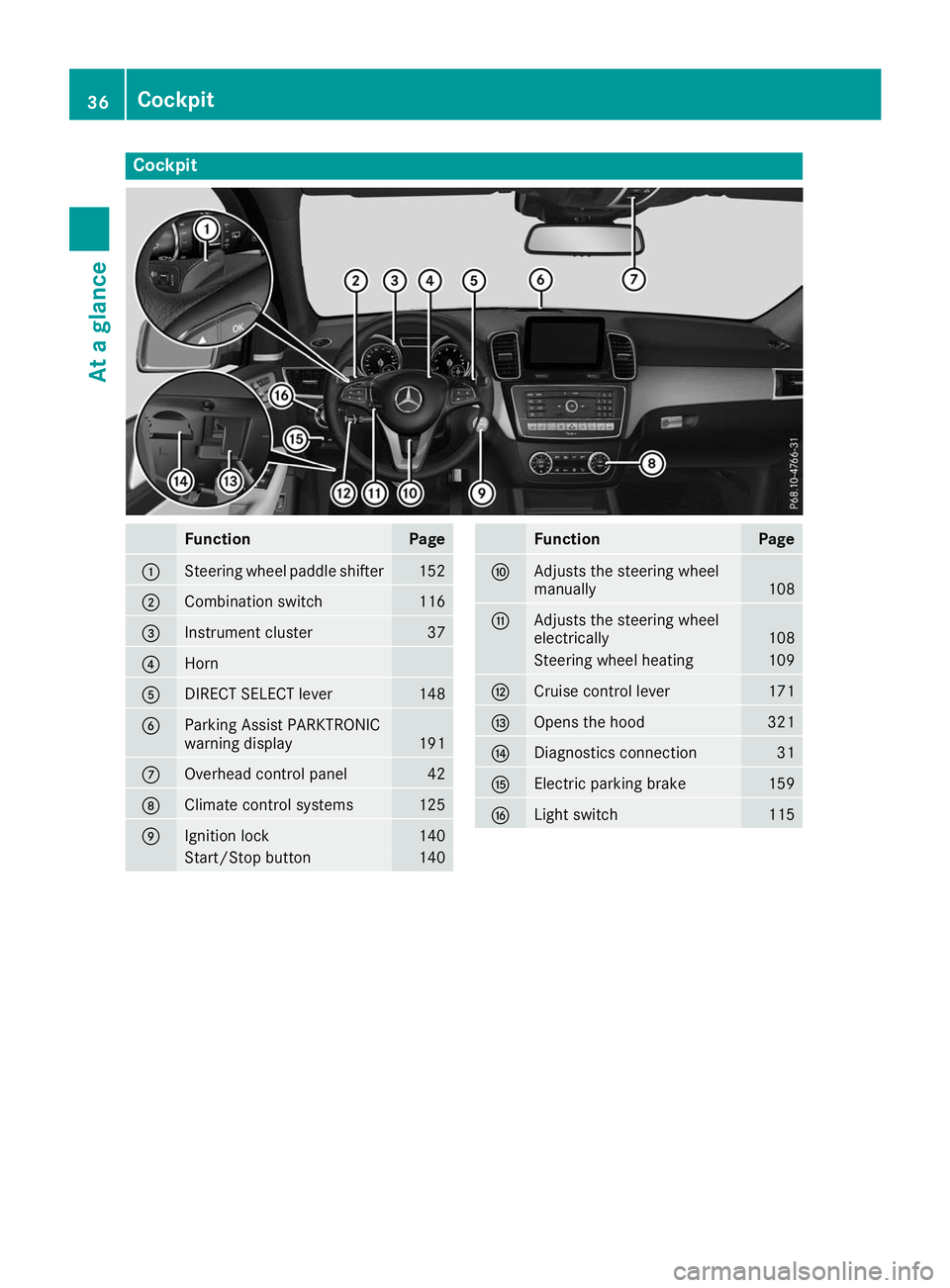
Cockpit
Function Page
0043
Steering wheel paddle shifter 152
0044
Combination switch 116
0087
Instrument cluster 37
0085
Horn
0083
DIRECT SELECT lever 148
0084
Parking Assist PARKTRONIC
warning display
191
006B
Overhead control panel 42
006C
Climate control systems 125
006D
Ignition lock 140
Start/Stop button 140 Function Page
006E
Adjusts the steering wheel
manually
108
006F
Adjusts the steering wheel
electrically
108
Steering wheel heating 109
0070
Cruise control lever 171
0071
Opens the hood 321
0072
Diagnostics connection 31
0073
Electric parking brake 159
0074
Light switch 11536
CockpitAt a glance
Page 39 of 398
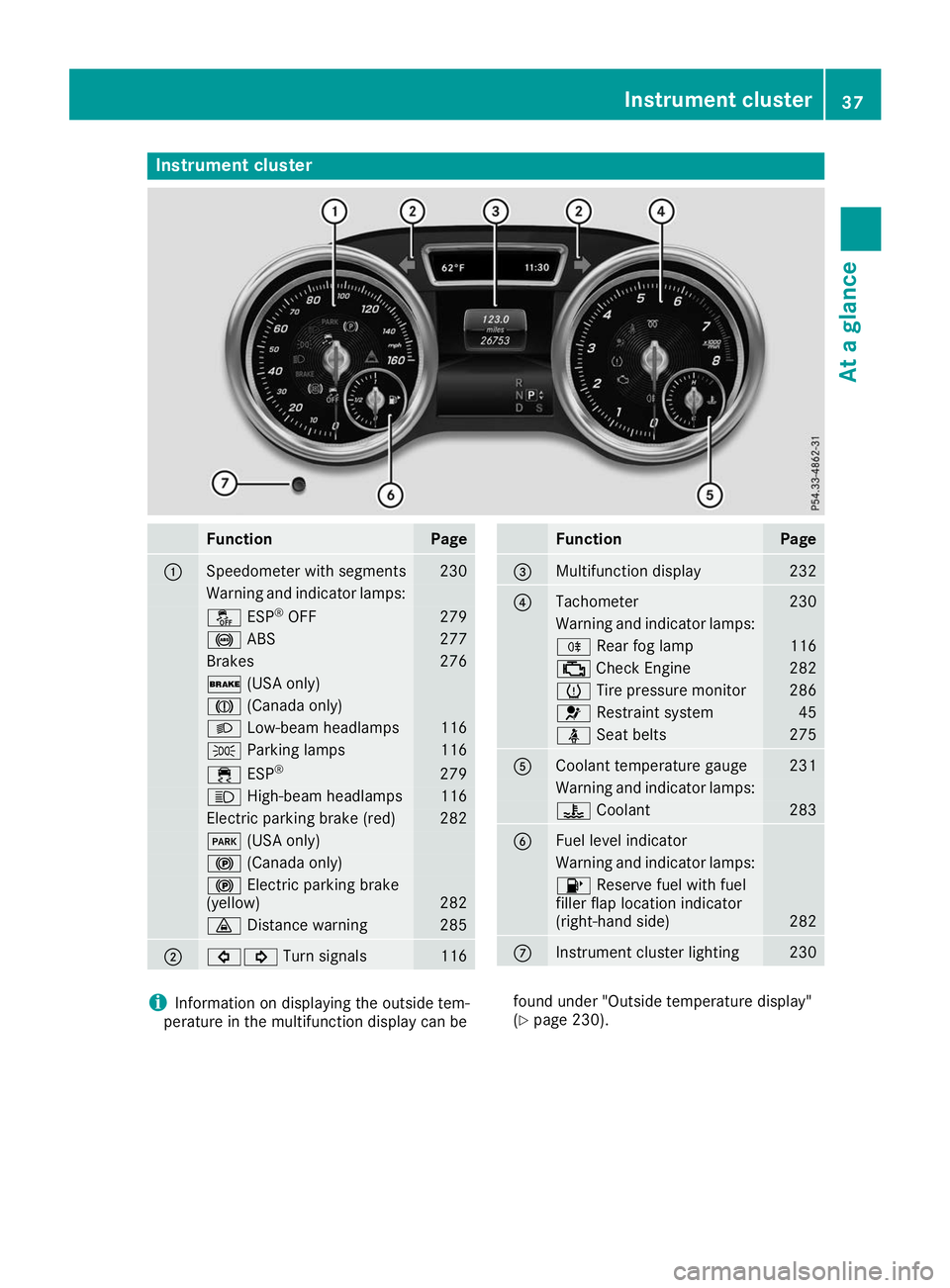
Instrument cluster
Function Page
0043
Speedometer with segments 230
Warning and indicator lamps:
00BB
ESP®
OFF 279
0025
ABS 277
Brakes 276
0027
(USA only) 004D
(Canada only) 0058
Low-beam headlamps 116
0060
Parking lamps 116
00E5
ESP® 279
0057
High-beam headlamps 116
Electric parking brake (red) 282
0049
(USA only) 0024
(Canada only) 0024
Electric parking brake
(yellow) 282
00BA
Distance warning 285
0044
003E003D
Turn signals 116 Function Page
0087
Multifunction display 232
0085
Tachometer 230
Warning and indicator lamps:
005E
Rear fog lamp 116
00B9
Check Engine 282
0077
Tire pressure monitor 286
0075
Restraint system 45
00E9
Seat belts 275
0083
Coolant temperature gauge 231
Warning and indicator lamps:
00AC
Coolant 283
0084
Fuel level indicator
Warning and indicator lamps:
00B6
Reserve fuel with fuel
filler flap location indicator
(right-hand side) 282
006B
Instrument cluster lighting 230
i
Information on displaying the outside tem-
perature in the multifunction display can be found under "Outside temperature display"
(Y
page 230). Instrument cluster
37At a glance
Page 42 of 398
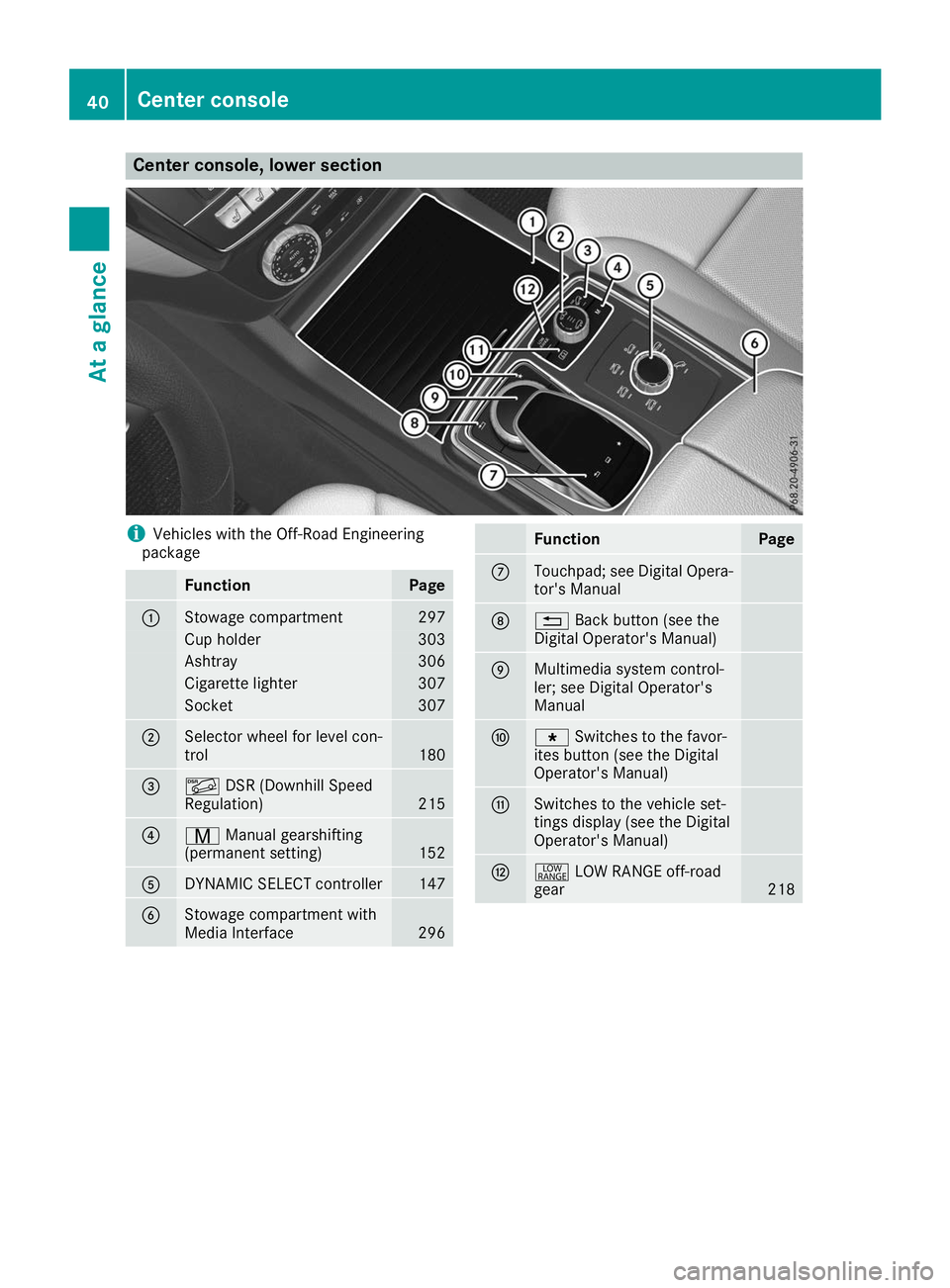
Center console, lower section
i
Vehicles with the Off-Road Engineering
package Function Page
0043
Stowage compartment 297
Cup holder 303
Ashtray 306
Cigarette lighter 307
Socket 307
0044
Selector wheel for level con-
trol
180
0087
00C6
DSR (Downhill Speed
Regulation) 215
0085
008D
Manual gearshifting
(permanent setting) 152
0083
DYNAMIC SELECT controller 147
0084
Stowage compartment with
Media Interface
296 Function Page
006B
Touchpad; see Digital Opera-
tor's Manual 006C
0038
Back button (see the
Digital Operator's Manual) 006D
Multimedia system control-
ler; see Digital Operator's
Manual 006E
007D
Switches to the favor-
ites button (see the Digital
Operator's Manual) 006F
Switches to the vehicle set-
tings display (see the Digital
Operator's Manual)
0070
002E
LOW RANGE off-road
gear 21840
Center consoleAt a glance
Page 43 of 398
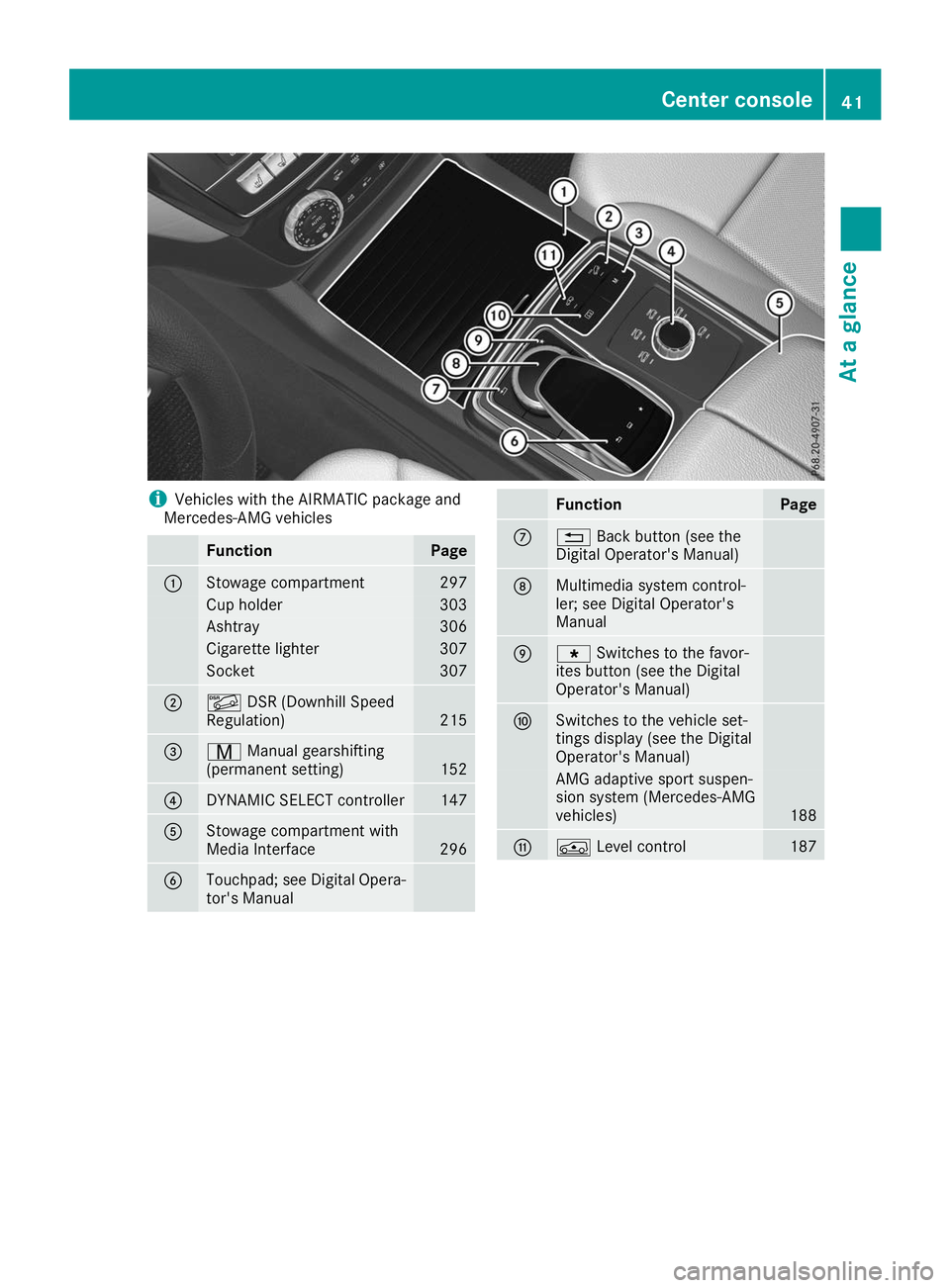
i
Vehicles with the AIRMATIC package and
Mercedes-AMG vehicles Function Page
0043
Stowage compartment 297
Cup holder 303
Ashtray 306
Cigarette lighter 307
Socket 307
0044
00C6
DSR (Downhill Speed
Regulation) 215
0087
008D
Manual gearshifting
(permanent setting) 152
0085
DYNAMIC SELECT controller 147
0083
Stowage compartment with
Media Interface
296
0084
Touchpad; see Digital Opera-
tor's Manual Function Page
006B
0038
Back button (see the
Digital Operator's Manual) 006C
Multimedia system control-
ler; see Digital Operator's
Manual
006D
007D
Switches to the favor-
ites button (see the Digital
Operator's Manual) 006E
Switches to the vehicle set-
tings display (see the Digital
Operator's Manual)
AMG adaptive sport suspen-
sion system (Mercedes-AMG
vehicles)
188
006F
00C4
Level control 187Center console
41At a glance
Page 44 of 398
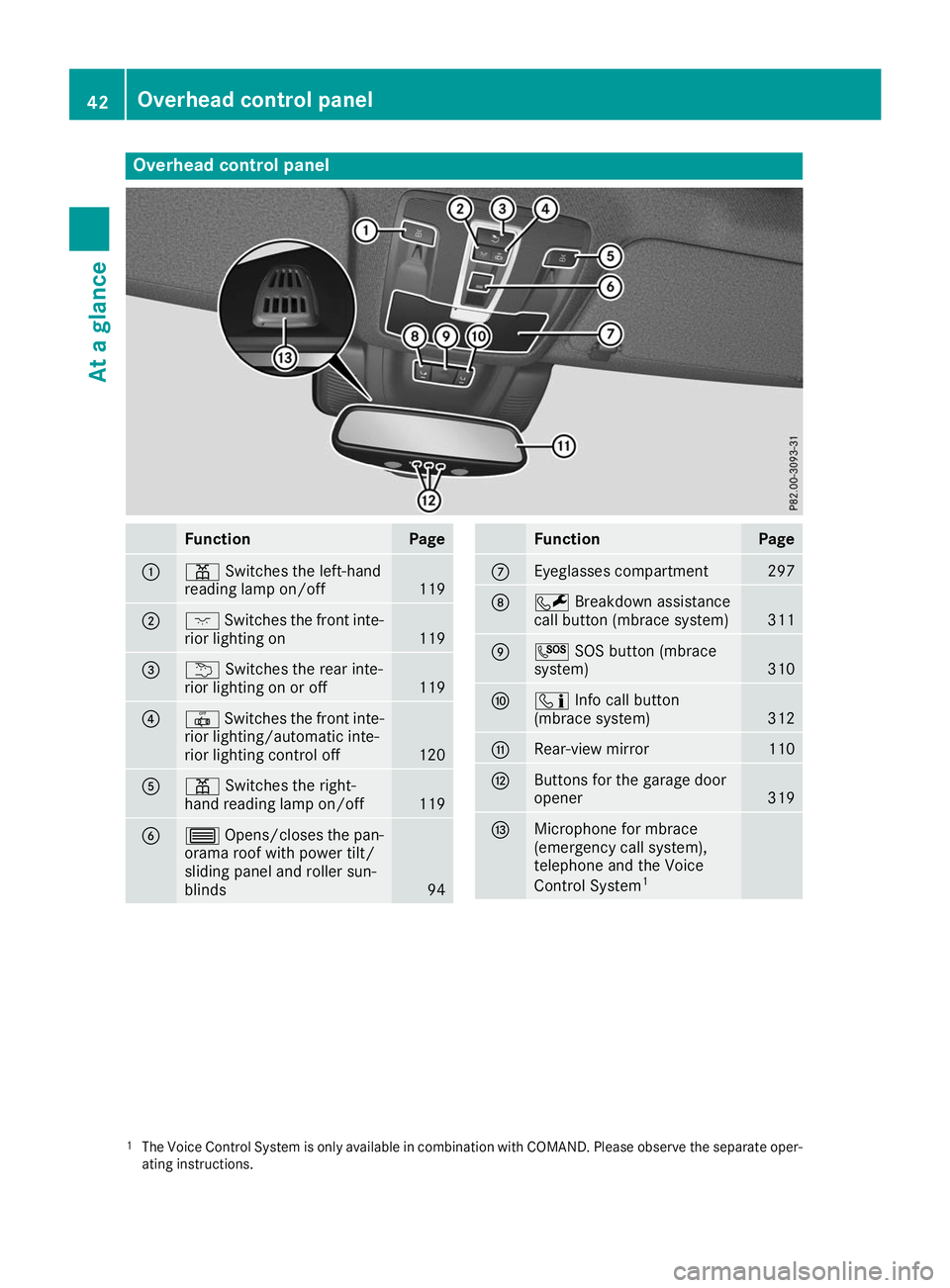
Overhead control panel
Function Page
0043
003D
Switches the left-hand
reading lamp on/off 119
0044
004A
Switches the front inte-
rior lighting on 119
0087
0042
Switches the rear inte-
rior lighting on or off 119
0085
0033
Switches the front inte-
rior lighting/automatic inte-
rior lighting control off 120
0083
003D
Switches the right-
hand reading lamp on/off 119
0084
0057
Opens/closes the pan-
orama roof with power tilt/
sliding panel and roller sun-
blinds 94 Function Page
006B
Eyeglasses compartment 297
006C
0052
Breakdown assistance
call button (mbrace system) 311
006D
0053
SOS button (mbrace
system) 310
006E
00D9
Info call button
(mbrace system) 312
006F
Rear-view mirror 110
0070
Buttons for the garage door
opener
319
0071
Microphone for mbrace
(emergency call system),
telephone and the Voice
Control System
1 1
The Voice Control System is only available in combination with COMAND. Please observe the separate oper-
ating instructions. 42
Overhead control panelAt a glance
Page 47 of 398
Restraint system warning lamp
The functions of the restraint system are
checked after the ignition is switched on and at
regular intervals while the engine is running.
Therefore, malfunctions can be detected in
good time.
The 0075 restraint system warning lamp on the
instrument cluster lights up when the ignition is switched on. It goes out no later than a few sec-
onds after the vehicle is started. The compo-
nents of the restraint system are in operational
readiness.
A malfunction has occurred if the 0075restraint
system warning lamp:
R does not light up after the ignition is switched
on
R does not go out after a few seconds with the
engine running
R lights up again while the engine is running G
WARNING
If the restraint system is malfunctioning,
restraint system components may be trig-
gered unintentionally or may not deploy as
intended during an accident. This can affect
for example the Emergency Tensioning
Device or the air bag. This poses an increased risk of injury or even fatal injury.
Have the restraint system checked and
repaired in a qualified specialist workshop as
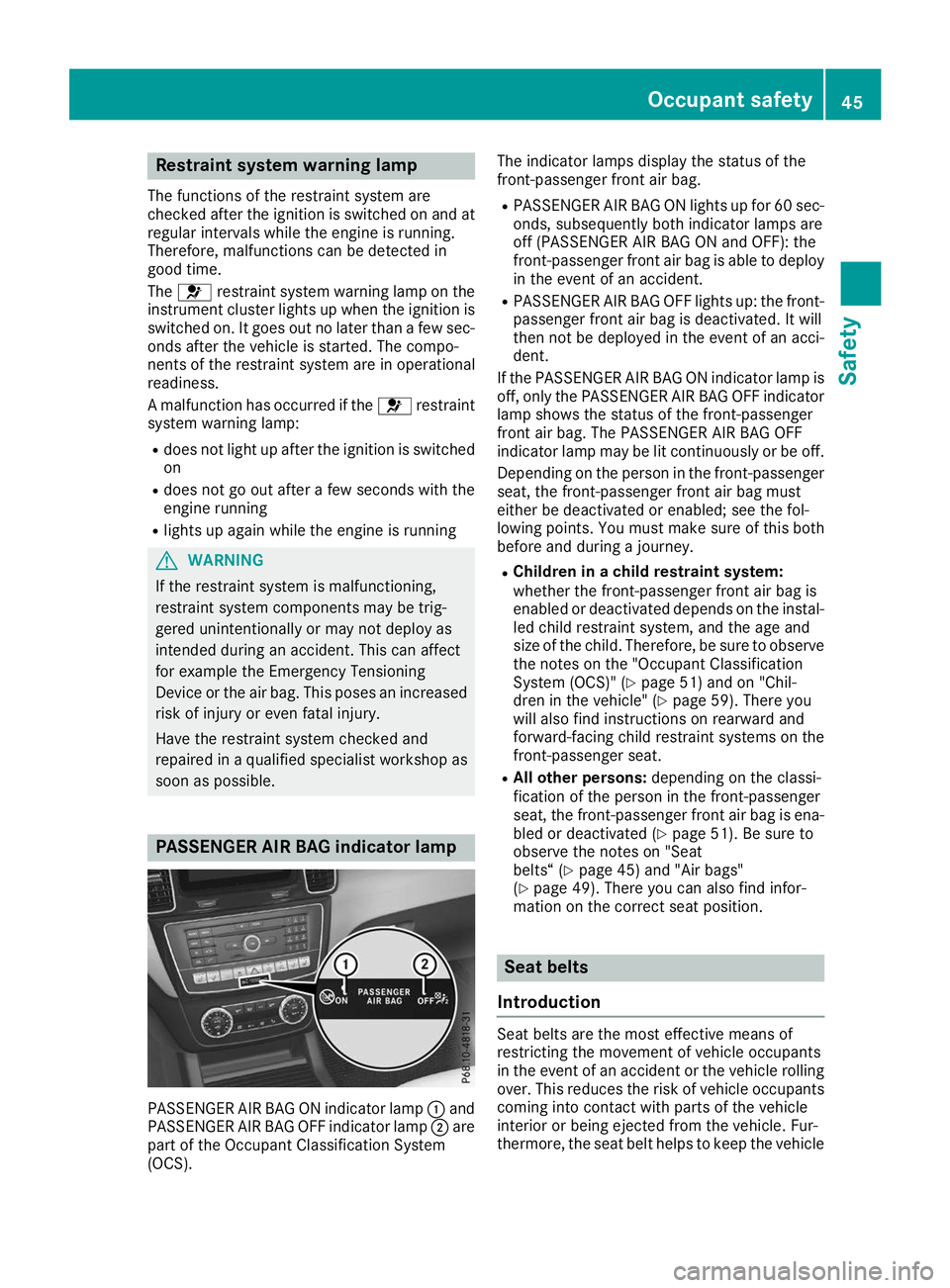
soon as possible. PASSENGER AIR BAG indicator lamp
PASSENGER AIR BAG ON indicator lamp
0043and
PASSENGER AIR BAG OFF indicator lamp 0044are
part of the Occupant Classification System
(OCS). The indicator lamps display the status of the
front-passenger front air bag.
R PASSENGER AIR BAG ON lights up for 60 sec-
onds, subsequently both indicator lamps are
off (PASSENGER AIR BAG ON and OFF): the
front-passenger front air bag is able to deploy in the event of an accident.
R PASSENGER AIR BAG OFF lights up: the front-
passenger front air bag is deactivated. It will
then not be deployed in the event of an acci-
dent.
If the PASSENGER AIR BAG ON indicator lamp is
off, only the PASSENGER AIR BAG OFF indicator lamp shows the status of the front-passenger
front air bag. The PASSENGER AIR BAG OFF
indicator lamp may be lit continuously or be off.
Depending on the person in the front-passenger seat, the front-passenger front air bag must
either be deactivated or enabled; see the fol-
lowing points. You must make sure of this both
before and during a journey.
R Children in a child restraint system:
whether the front-passenger front air bag is
enabled or deactivated depends on the instal-
led child restraint system, and the age and
size of the child. Therefore, be sure to observe
the notes on the "Occupant Classification
System (OCS)" (Y page 51) and on "Chil-
dren in the vehicle" (Y page 59). There you
will also find instructions on rearward and
forward-facing child restraint systems on the
front-passenger seat.
R All other persons: depending on the classi-
fication of the person in the front-passenger
seat, the front-passenger front air bag is ena-
bled or deactivated (Y page 51). Be sure to
observe the notes on "Seat
belts“ (Y page 45) and "Air bags"
(Y page 49). There you can also find infor-
mation on the correct seat position. Seat belts
Introduction Seat belts are the most effective means of
restricting the movement of vehicle occupants
in the event of an accident or the vehicle rolling
over. This reduces the risk of vehicle occupants
coming into contact with parts of the vehicle
interior or being ejected from the vehicle. Fur-
thermore, the seat belt helps to keep the vehicle Occupant safety
45Safety Z