radio MERCEDES-BENZ GLS 2019 User Guide
[x] Cancel search | Manufacturer: MERCEDES-BENZ, Model Year: 2019, Model line: GLS, Model: MERCEDES-BENZ GLS 2019Pages: 398, PDF Size: 7.3 MB
Page 238 of 398
Audio menu
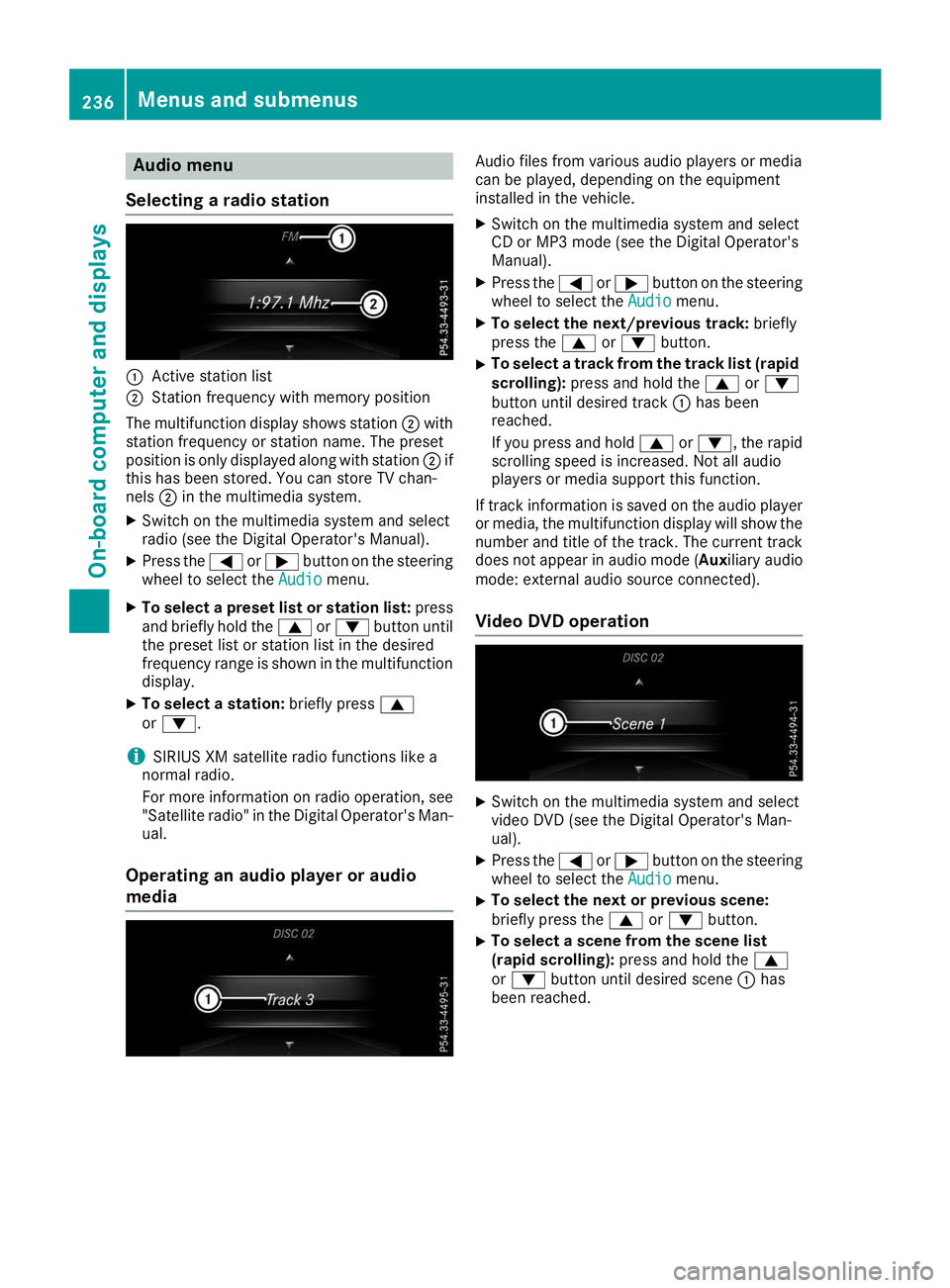
Selecting a radio station 0043
Active station list
0044 Station frequency with memory position
The multifunction display shows station 0044with
station frequency or station name. The preset
position is only displayed along with station 0044if
this has been stored. You can store TV chan-
nels 0044in the multimedia system.
X Switch on the multimedia system and select
radio (see the Digital Operator's Manual).
X Press the 0059or0065 button on the steering
wheel to select the Audio Audiomenu.
X To select a preset list or station list: press
and briefly hold the 0063or0064 button until
the preset list or station list in the desired
frequency range is shown in the multifunction
display.
X To select a station: briefly press0063
or 0064.
i SIRIUS XM satellite radio functions like a
normal radio.
For more information on radio operation, see "Satellite radio" in the Digital Operator's Man-
ual.
Operating an audio player or audio
media Audio files from various audio players or media
can be played, depending on the equipment
installed in the vehicle.
X Switch on the multimedia system and select
CD or MP3 mode (see the Digital Operator's
Manual).
X Press the 0059or0065 button on the steering
wheel to select the Audio Audiomenu.
X To select the next/previous track: briefly
press the 0063or0064 button.
X To select a track from the track list (rapid
scrolling): press and hold the 0063or0064
button until desired track 0043has been
reached.
If you press and hold 0063or0064, the rapid
scrolling speed is increased. Not all audio
players or media support this function.
If track information is saved on the audio player
or media, the multifunction display will show the number and title of the track. The current track
does not appear in audio mode ( Auxiliary audio
mode: external audio source connected).
Video DVD operation X
Switch on the multimedia system and select
video DVD (see the Digital Operator's Man-
ual).
X Press the 0059or0065 button on the steering
wheel to select the Audio Audiomenu.
X To select the next or previous scene:
briefly press the
0063or0064 button.
X To select a scene from the scene list
(rapid scrolling):
press and hold the 0063
or 0064 button until desired scene 0043has
been reached. 236
Menus and sub
menusOn-board computer and displays
Page 253 of 398
Display messages
Possible causes/consequences and
0050
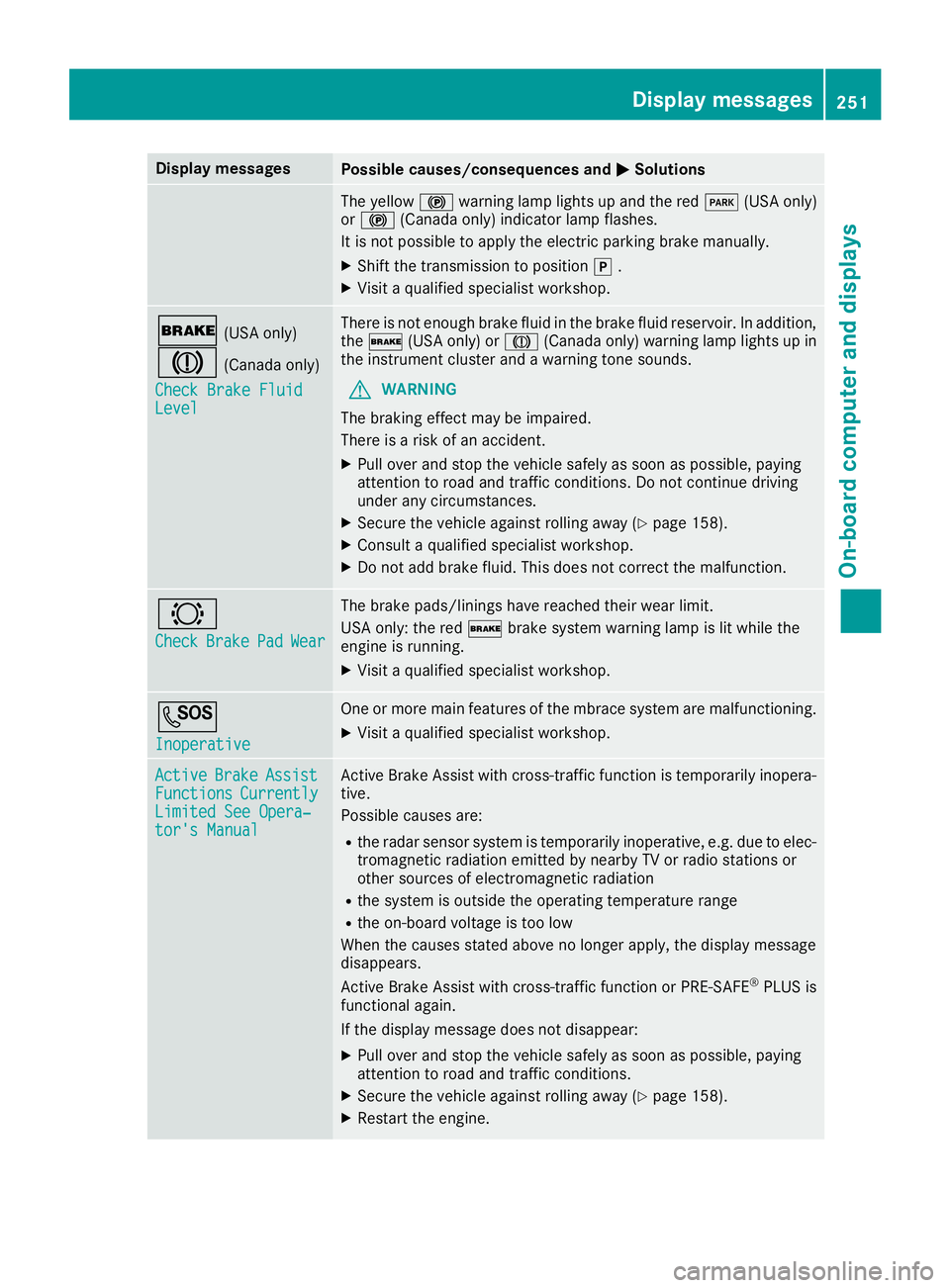
0050Solutions The yellow
0024warning lamp lights up and the red 0049(USA only)
or 0024 (Canada only) indicator lamp flashes.
It is not possible to apply the electric parking brake manually.
X Shift the transmission to position 005D.
X Visit a qualified specialist workshop. 0027
(USA only)
004D (Canada only)
Check Brake Fluid Check Brake Fluid
Level Level There is not enough brake fluid in the brake fluid reservoir. In addition,
the 0027 (USA only) or 004D(Canada only) warning lamp lights up in
the instrument cluster and a warning tone sounds.
G WARNING
The braking effect may be impaired.
There is a risk of an accident.
X Pull over and stop the vehicle safely as soon as possible, paying
attention to road and traffic conditions. Do not continue driving
under any circumstances.
X Secure the vehicle against rolling away (Y page 158).
X Consult a qualified specialist workshop.
X Do not add brake fluid. This does not correct the malfunction. 0026
Check Check
Brake
BrakePad
PadWear
Wear The brake pads/linings have reached their wear limit.
USA only: the red
0027brake system warning lamp is lit while the
engine is running.
X Visit a qualified specialist workshop. 0053
Inoperative Inoperative One or more main features of the mbrace system are malfunctioning.
X Visit a qualified specialist workshop. Active
Active
Brake
BrakeAssist
Assist
Functions
Functions Currently
Currently
Limited See Opera‐
Limited See Opera‐
tor's Manual tor's Manual Active Brake Assist with cross-traffic function is temporarily inopera-
tive.
Possible causes are:
R the radar sensor system is temporarily inoperative, e.g. due to elec-
tromagnetic radiation emitted by nearby TV or radio stations or
other sources of electromagnetic radiation
R the system is outside the operating temperature range
R the on-board voltage is too low
When the causes stated above no longer apply, the display message
disappears.
Active Brake Assist with cross-traffic function or PRE ‑SAFE®
PLUS is
functional again.
If the display message does not disappear:
X Pull over and stop the vehicle safely as soon as possible, paying
attention to road and traffic conditions.
X Secure the vehicle against rolling away (Y page 158).
X Restart the engine. Display
messages
251On-board computer and displays Z
Page 254 of 398
Display messages
Possible causes/consequences and
0050
0050Solutions Active
Active
Brake
Brake Assist
Assist
Functions Limited
Functions Limited
See Operator's Man‐ See Operator's Man‐
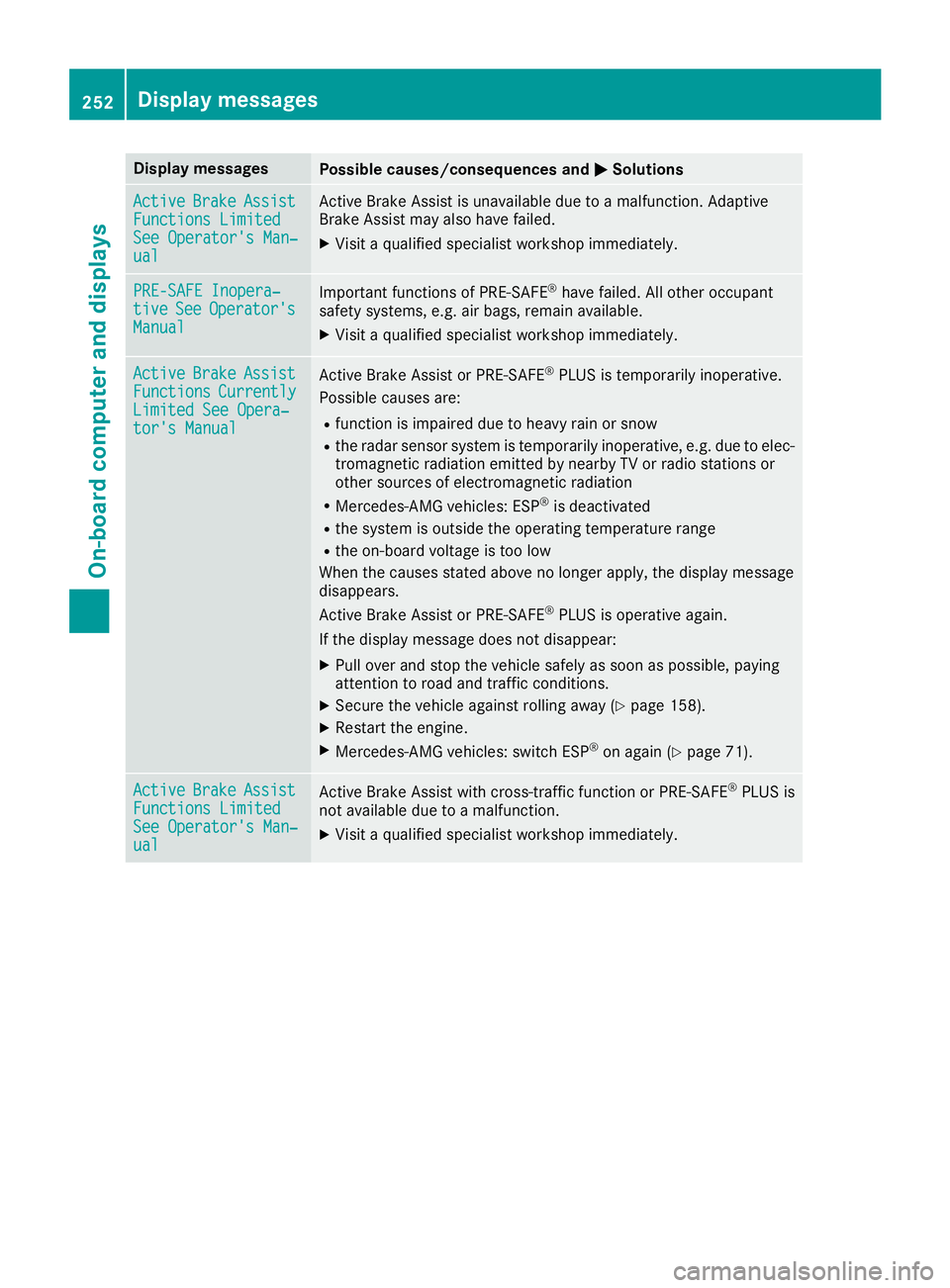
ual ual Active Brake Assist is unavailable due to a malfunction. Adaptive
Brake Assist may also have failed.
X Visit a qualified specialist workshop immediately. PRE-SAFE Inopera‐
PRE-SAFE Inopera‐
tive tive
See
See Operator's
Operator's
Manual
Manual Important functions of PRE-SAFE
®
have failed. All other occupant
safety systems, e.g. air bags, remain available.
X Visit a qualified specialist workshop immediately. Active
Active
Brake
Brake Assist
Assist
Functions
Functions Currently
Currently
Limited See Opera‐
Limited See Opera‐
tor's Manual tor's Manual Active Brake Assist or PRE‑SAFE
®
PLUS is temporarily inoperative.
Possible causes are:
R function is impaired due to heavy rain or snow
R the radar sensor system is temporarily inoperative, e.g. due to elec-
tromagnetic radiation emitted by nearby TV or radio stations or
other sources of electromagnetic radiation
R Mercedes-AMG vehicles: ESP ®
is deactivated
R the system is outside the operating temperature range
R the on-board voltage is too low
When the causes stated above no longer apply, the display message
disappears.
Active Brake Assist or PRE‑SAFE ®
PLUS is operative again.
If the display message does not disappear:
X Pull over and stop the vehicle safely as soon as possible, paying
attention to road and traffic conditions.
X Secure the vehicle against rolling away (Y page 158).
X Restart the engine.
X Mercedes-AMG vehicles: switch ESP ®
on again (Y page 71). Active Active
Brake
Brake Assist
Assist
Functions Limited
Functions Limited
See Operator's Man‐ See Operator's Man‐
ual ual Active Brake Assist with cross-traffic function or PRE
‑SAFE®
PLUS is
not available due to a malfunction.
X Visit a qualified specialist workshop immediately. 252
Display
messagesOn-board computer and displays
Page 267 of 398
Display messages
Possible causes/consequences and
0050
0050Solutions Blind Spot Assist
Blind Spot Assist
Currently Unavaila‐ Currently Unavaila‐
ble See Operator's ble See Operator's
Manual Manual
orActive
Active
Blind Spot Assist
Blind Spot Assist
Currently Unavaila‐ Currently Unavaila‐
ble See Operator's ble See Operator's
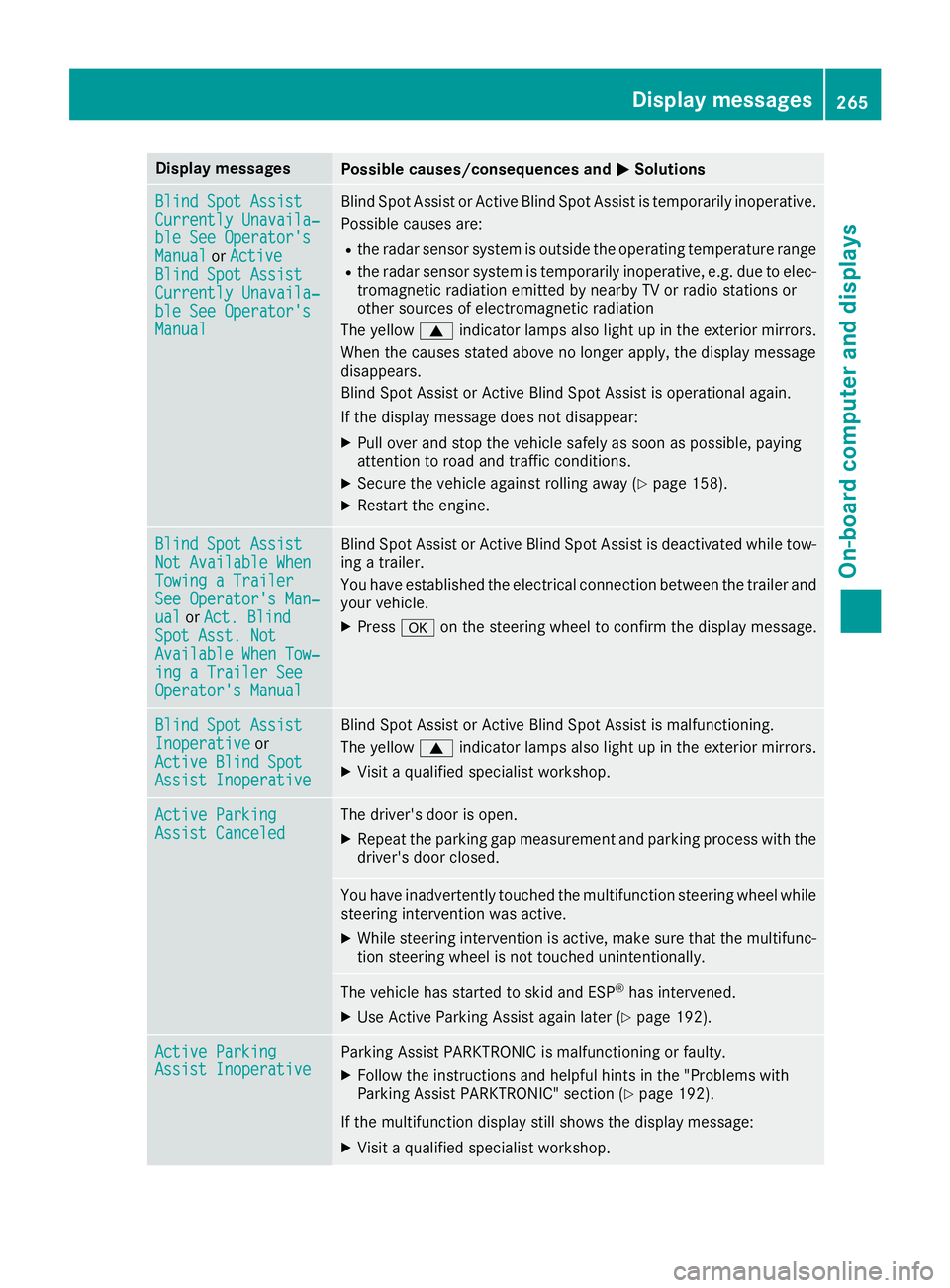
Manual Manual Blind Spot Assist or Active Blind Spot Assist is temporarily inoperative.
Possible causes are:
R the radar sensor system is outside the operating temperature range
R the radar sensor system is temporarily inoperative, e.g. due to elec-
tromagnetic radiation emitted by nearby TV or radio stations or
other sources of electromagnetic radiation
The yellow 0063indicator lamps also light up in the exterior mirrors.
When the causes stated above no longer apply, the display message
disappears.
Blind Spot Assist or Active Blind Spot Assist is operational again.
If the display message does not disappear:
X Pull over and stop the vehicle safely as soon as possible, paying
attention to road and traffic conditions.
X Secure the vehicle against rolling away (Y page 158).
X Restart the engine. Blind Spot Assist Blind Spot Assist
Not Available When Not Available When
Towing a Trailer Towing a Trailer
See Operator's Man‐ See Operator's Man‐
ual ual
orAct. Blind
Act. Blind
Spot Asst. Not
Spot Asst. Not
Available When Tow‐ Available When Tow‐
ing a Trailer See ing a Trailer See
Operator's Manual Operator's Manual Blind Spot Assist or Active Blind Spot Assist is deactivated while tow-
ing a trailer.
You have established the electrical connection between the trailer and
your vehicle.
X Press 0076on the steering wheel to confirm the display message. Blind Spot Assist Blind Spot Assist
Inoperative Inoperative
or
Active Blind Spot
Active Blind Spot
Assist Inoperative Assist Inoperative Blind Spot Assist or Active Blind Spot Assist is malfunctioning.
The yellow
0063indicator lamps also light up in the exterior mirrors.
X Visit a qualified specialist workshop. Active Parking Active Parking
Assist Canceled Assist Canceled The driver's door is open.
X Repeat the parking gap measurement and parking process with the
driver's door closed. You have inadvertently touched the multifunction steering wheel while
steering intervention was active.
X While steering intervention is active, make sure that the multifunc-
tion steering wheel is not touched unintentionally. The vehicle has started to skid and ESP
®
has intervened.
X Use Active Parking Assist again later (Y page 192).Active Parking
Active Parking
Assist Inoperative Assist Inoperative Parking Assist PARKTRONIC is malfunctioning or faulty.
X Follow the instructions and helpful hints in the "Problems with
Parking Assist PARKTRONIC" section (Y page 192).
If the multifunction display still shows the display message:
X Visit a qualified specialist workshop. Display
messages
265On-board computer and displays Z
Page 268 of 398
Display messages
Possible causes/consequences and
0050
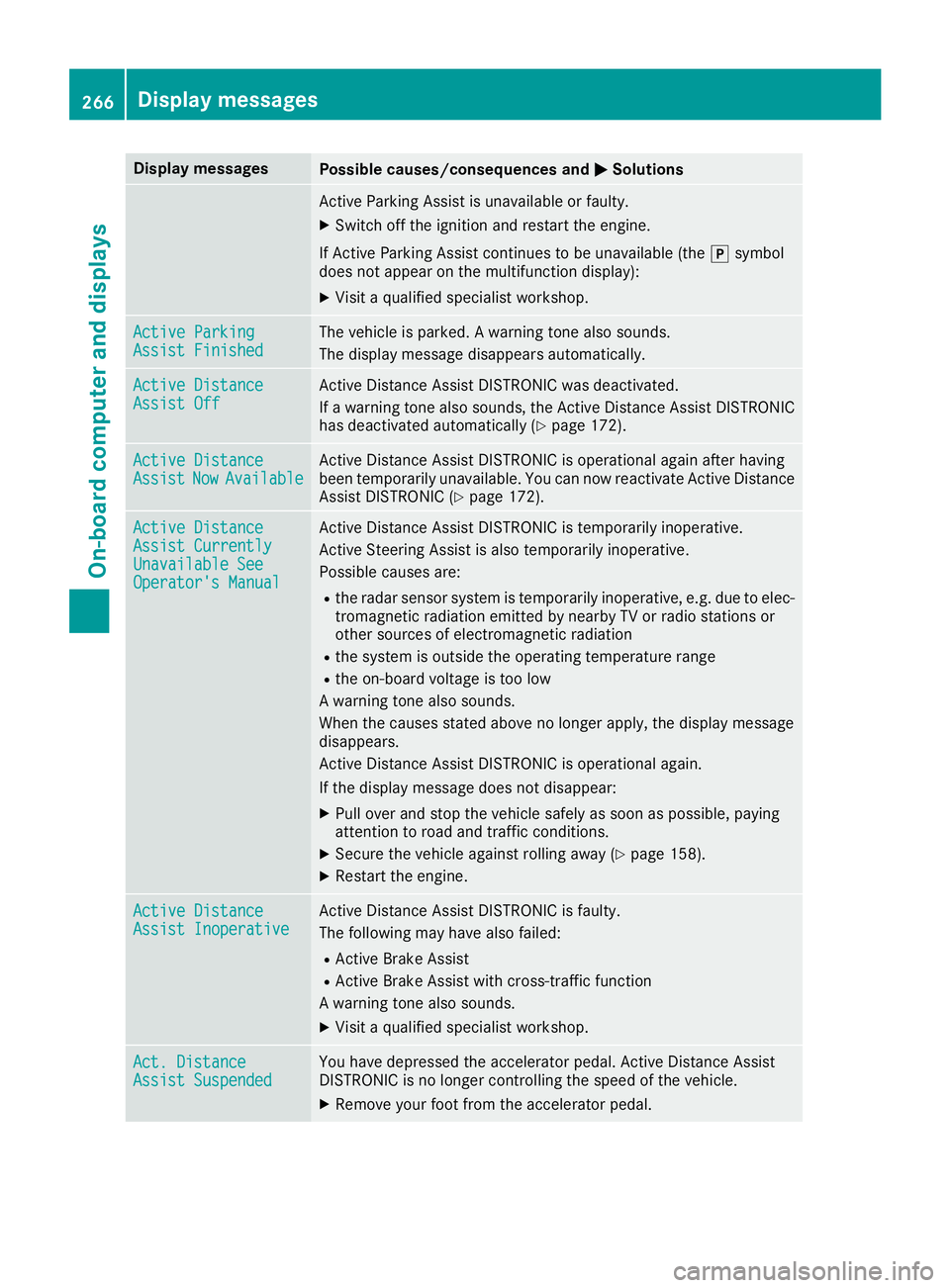
0050Solutions Active Parking Assist is unavailable or faulty.
X Switch off the ignition and restart the engine.
If Active Parking Assist continues to be unavailable (the 005Dsymbol
does not appear on the multifunction display):
X Visit a qualified specialist workshop. Active Parking
Active Parking
Assist Finished Assist Finished The vehicle is parked. A warning tone also sounds.
The display message disappears automatically. Active Distance
Active Distance
Assist Off Assist Off Active Distance Assist DISTRONIC was deactivated.
If a warning tone also sounds, the Active Distance Assist DISTRONIC
has deactivated automatically (Y page 172).Active Distance Active Distance
Assist Assist
Now
NowAvailable
Available Active Distance Assist DISTRONIC is operational again after having
been temporarily unavailable. You can now reactivate Active Distance
Assist DISTRONIC (Y page 172).Active Distance Active Distance
Assist Currently Assist Currently
Unavailable See Unavailable See
Operator's Manual Operator's Manual Active Distance Assist DISTRONIC is temporarily inoperative.
Active Steering Assist is also temporarily inoperative.
Possible causes are:
R the radar sensor system is temporarily inoperative, e.g. due to elec-
tromagnetic radiation emitted by nearby TV or radio stations or
other sources of electromagnetic radiation
R the system is outside the operating temperature range
R the on-board voltage is too low
A warning tone also sounds.
When the causes stated above no longer apply, the display message
disappears.
Active Distance Assist DISTRONIC is operational again.
If the display message does not disappear:
X Pull over and stop the vehicle safely as soon as possible, paying
attention to road and traffic conditions.
X Secure the vehicle against rolling away (Y page 158).
X Restart the engine. Active Distance Active Distance
Assist Inoperative Assist Inoperative Active Distance Assist DISTRONIC is faulty.
The following may have also failed:
R Active Brake Assist
R Active Brake Assist with cross-traffic function
A warning tone also sounds.
X Visit a qualified specialist workshop. Act. Distance Act. Distance
Assist Suspended Assist Suspended You have depressed the accelerator pedal. Active Distance Assist
DISTRONIC is no longer controlling the speed of the vehicle.
X Remove your foot from the accelerator pedal. 266
Display
messagesOn-board computer and displays
Page 271 of 398
Display messages
Possible causes/consequences and
0050
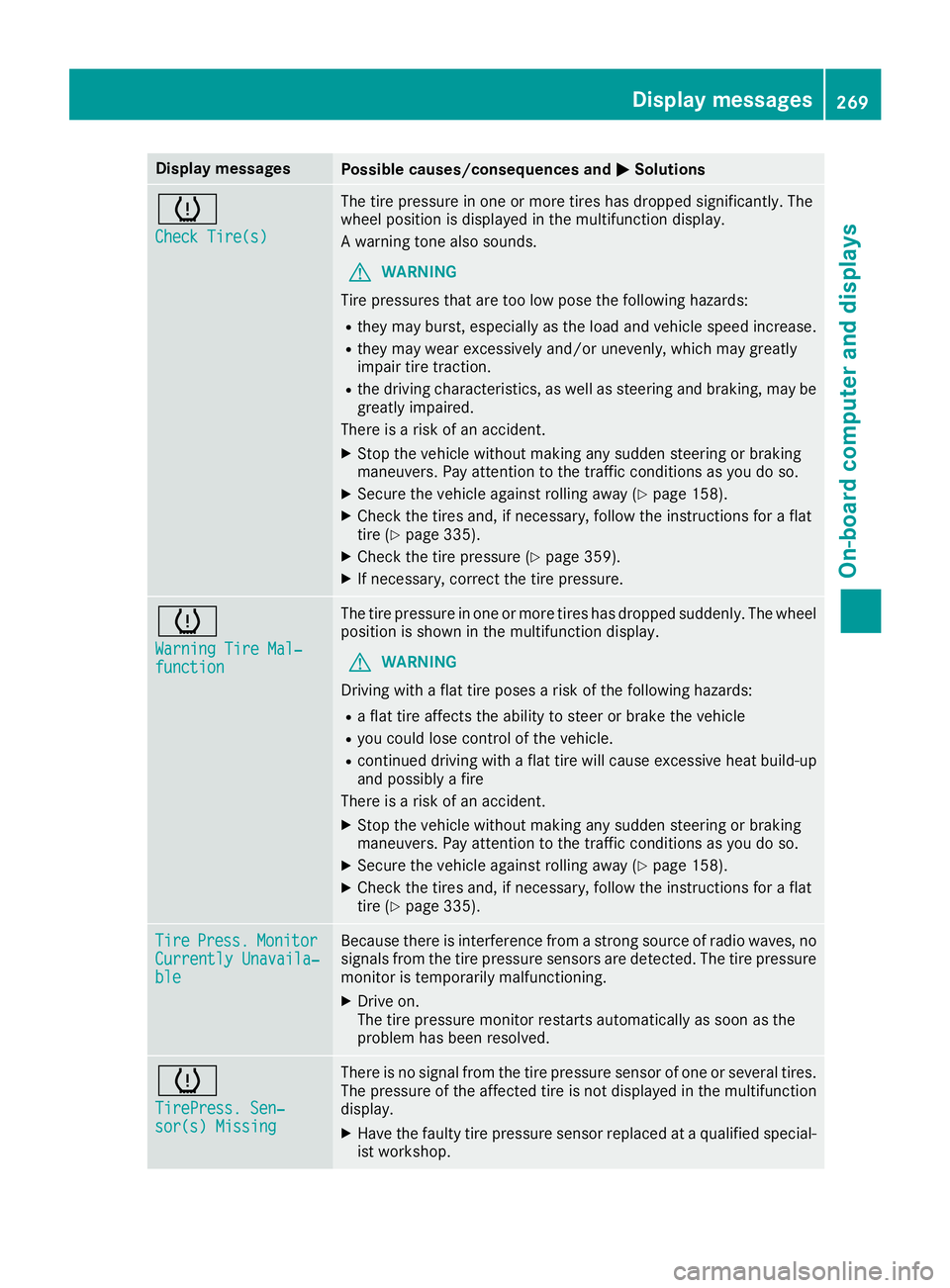
0050Solutions 0077
Check Tire(s) Check Tire(s) The tire pressure in one or more tires has dropped significantly. The
wheel position is displayed in the multifunction display.
A warning tone also sounds.
G WARNING
Tire pressures that are too low pose the following hazards: R they may burst, especially as the load and vehicle speed increase.
R they may wear excessively and/or unevenly, which may greatly
impair tire traction.
R the driving characteristics, as well as steering and braking, may be
greatly impaired.
There is a risk of an accident.
X Stop the vehicle without making any sudden steering or braking
maneuvers. Pay attention to the traffic conditions as you do so.
X Secure the vehicle against rolling away (Y page 158).
X Check the tires and, if necessary, follow the instructions for a flat
tire (Y page 335).
X Check the tire pressure (Y page 359).
X If necessary, correct the tire pressure. 0077
Warning Tire Mal‐ Warning Tire Mal‐
function function The tire pressure in one or more tires has dropped suddenly. The wheel
position is shown in the multifunction display.
G WARNING
Driving with a flat tire poses a risk of the following hazards: R a flat tire affects the ability to steer or brake the vehicle
R you could lose control of the vehicle.
R continued driving with a flat tire will cause excessive heat build-up
and possibly a fire
There is a risk of an accident.
X Stop the vehicle without making any sudden steering or braking
maneuvers. Pay attention to the traffic conditions as you do so.
X Secure the vehicle against rolling away (Y page 158).
X Check the tires and, if necessary, follow the instructions for a flat
tire (Y page 335). Tire Tire
Press.
Press. Monitor
Monitor
Currently Unavaila‐
Currently Unavaila‐
ble ble Because there is interference from a strong source of radio waves, no
signals from the tire pressure sensors are detected. The tire pressure monitor is temporarily malfunctioning.
X Drive on.
The tire pressure monitor restarts automatically as soon as the
problem has been resolved. 0077
TirePress. Sen‐ TirePress. Sen‐
sor(s) Missing sor(s) Missing There is no signal from the tire pressure sensor of one or several tires.
The pressure of the affected tire is not displayed in the multifunction
display.
X Have the faulty tire pressure sensor replaced at a qualified special-
ist workshop. Display
messages
269On-board computer and displays Z
Page 276 of 398
Display messages
Possible causes/consequences and
0050
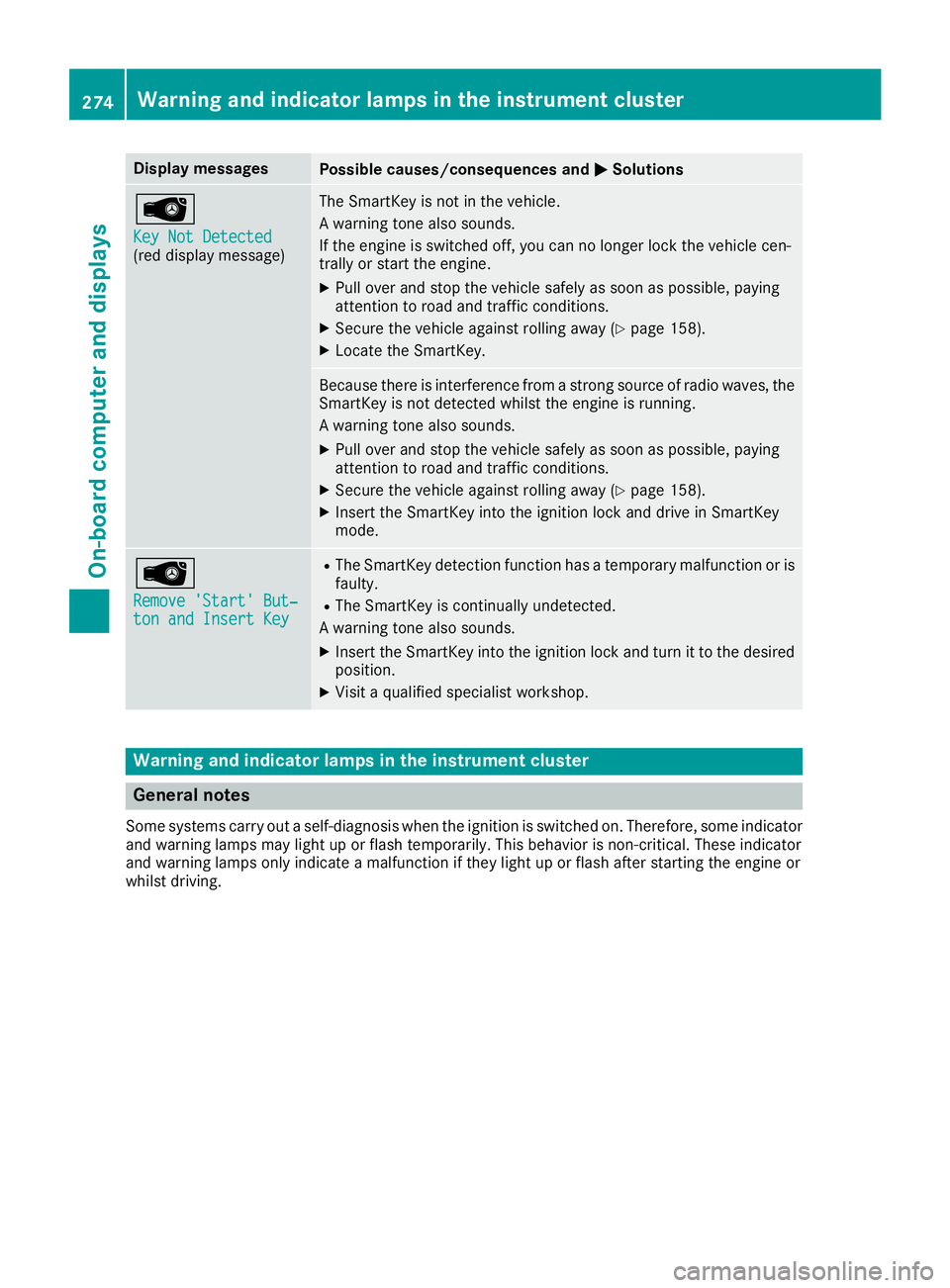
0050Solutions 00AF
Key Not Detected Key Not Detected
(red display message) The SmartKey is not in the vehicle.
A warning tone also sounds.
If the engine is switched off, you can no longer lock the vehicle cen-
trally or start the engine.
X Pull over and stop the vehicle safely as soon as possible, paying
attention to road and traffic conditions.
X Secure the vehicle against rolling away (Y page 158).
X Locate the SmartKey. Because there is interference from a strong source of radio waves, the
SmartKey is not detected whilst the engine is running.
A warning tone also sounds.
X Pull over and stop the vehicle safely as soon as possible, paying
attention to road and traffic conditions.
X Secure the vehicle against rolling away (Y page 158).
X Insert the SmartKey into the ignition lock and drive in SmartKey
mode. 00AF
Remove 'Start' But‐ Remove 'Start' But‐
ton and Insert Key ton and Insert Key R
The SmartKey detection function has a temporary malfunction or is
faulty.
R The SmartKey is continually undetected.
A warning tone also sounds.
X Insert the SmartKey into the ignition lock and turn it to the desired
position.
X Visit a qualified specialist workshop. Warning and indicator lamps in the instrument cluster
General notes
Some systems carry out a self-diagnosis when the ignition is switched on. Therefore, some indicator and warning lamps may light up or flash temporarily. This behavior is non-critical. These indicator
and warning lamps only indicate a malfunction if they light up or flash after starting the engine or
whilst driving. 274
Wa
rning and indi cator lamps in the instrument clusterOn-board computer and displays
Page 289 of 398
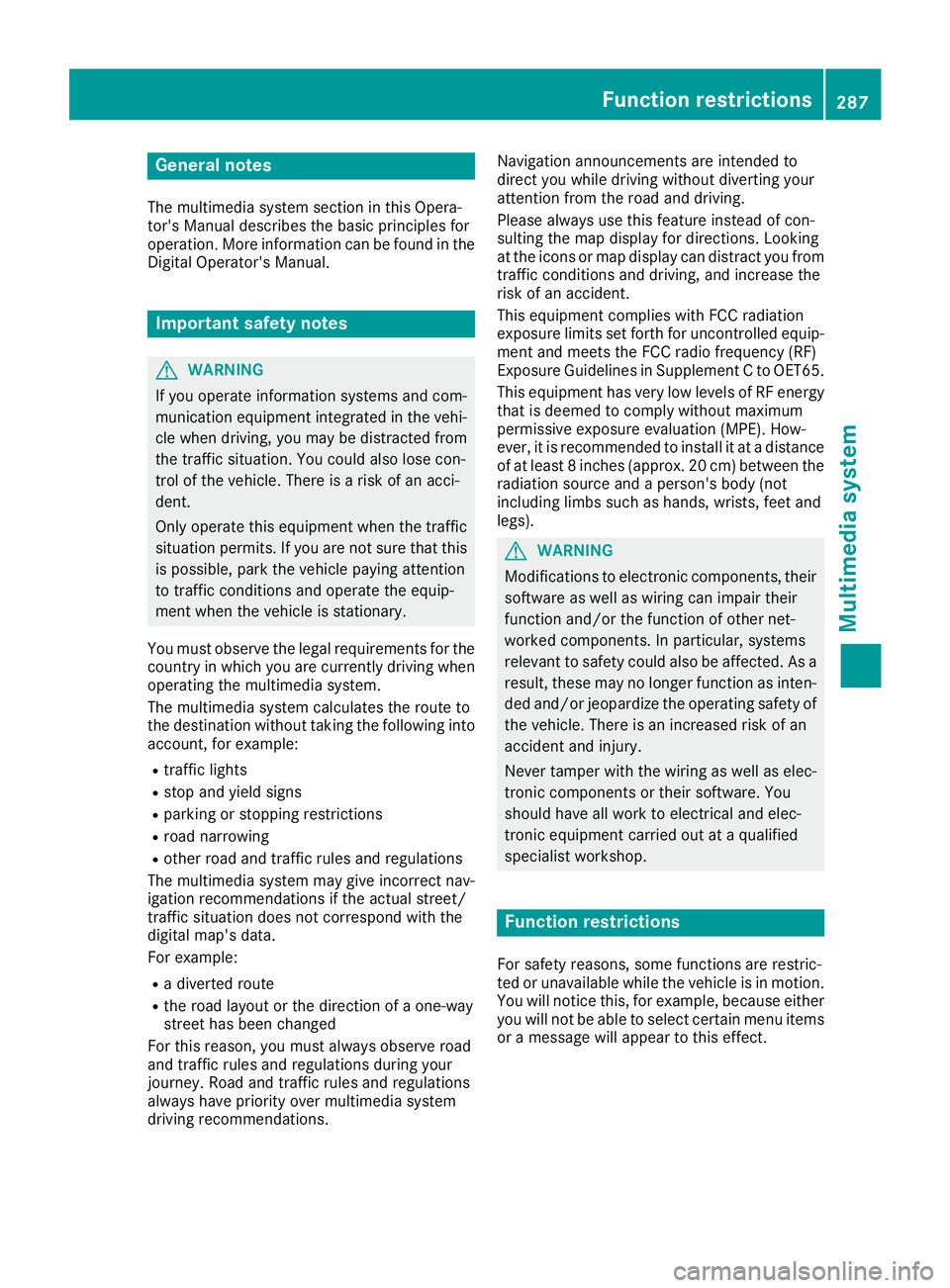
General notes
The multimedia system section in this Opera-
tor's Manual describes the basic principles for
operation. More information can be found in the Digital Operator's Manual. Important safety notes
G
WARNING
If you operate information systems and com-
munication equipment integrated in the vehi- cle when driving, you may be distracted from
the traffic situation. You could also lose con-
trol of the vehicle. There is a risk of an acci-
dent.
Only operate this equipment when the traffic
situation permits. If you are not sure that this
is possible, park the vehicle paying attention
to traffic conditions and operate the equip-
ment when the vehicle is stationary.
You must observe the legal requirements for the country in which you are currently driving whenoperating the multimedia system.
The multimedia system calculates the route to
the destination without taking the following into
account, for example:
R traffic lights
R stop and yield signs
R parking or stopping restrictions
R road narrowing
R other road and traffic rules and regulations
The multimedia system may give incorrect nav-
igation recommendations if the actual street/
traffic situation does not correspond with the
digital map's data.
For example:
R a diverted route
R the road layout or the direction of a one-way
street has been changed
For this reason, you must always observe road
and traffic rules and regulations during your
journey. Road and traffic rules and regulations
always have priority over multimedia system
driving recommendations. Navigation announcements are intended to
direct you while driving without diverting your
attention from the road and driving.
Please always use this feature instead of con-
sulting the map display for directions. Looking
at the icons or map display can distract you from
traffic conditions and driving, and increase the
risk of an accident.
This equipment complies with FCC radiation
exposure limits set forth for uncontrolled equip-
ment and meets the FCC radio frequency (RF)
Exposure Guidelines in Supplement C to OET65.
This equipment has very low levels of RF energy that is deemed to comply without maximum
permissive exposure evaluation (MPE). How-
ever, it is recommended to install it at a distance
of at least 8 inches (approx. 20 cm) between the
radiation source and a person's body (not
including limbs such as hands, wrists, feet and
legs). G
WARNING
Modifications to electronic components, their software as well as wiring can impair their
function and/or the function of other net-
worked components. In particular, systems
relevant to safety could also be affected. As a
result, these may no longer function as inten-
ded and/or jeopardize the operating safety of
the vehicle. There is an increased risk of an
accident and injury.
Never tamper with the wiring as well as elec-
tronic components or their software. You
should have all work to electrical and elec-
tronic equipment carried out at a qualified
specialist workshop. Function restrictions
For safety reasons, some functions are restric-
ted or unavailable while the vehicle is in motion. You will notice this, for example, because either
you will not be able to select certain menu items or a message will appear to this effect. Function restrictions
287Multimedia system Z
Page 290 of 398
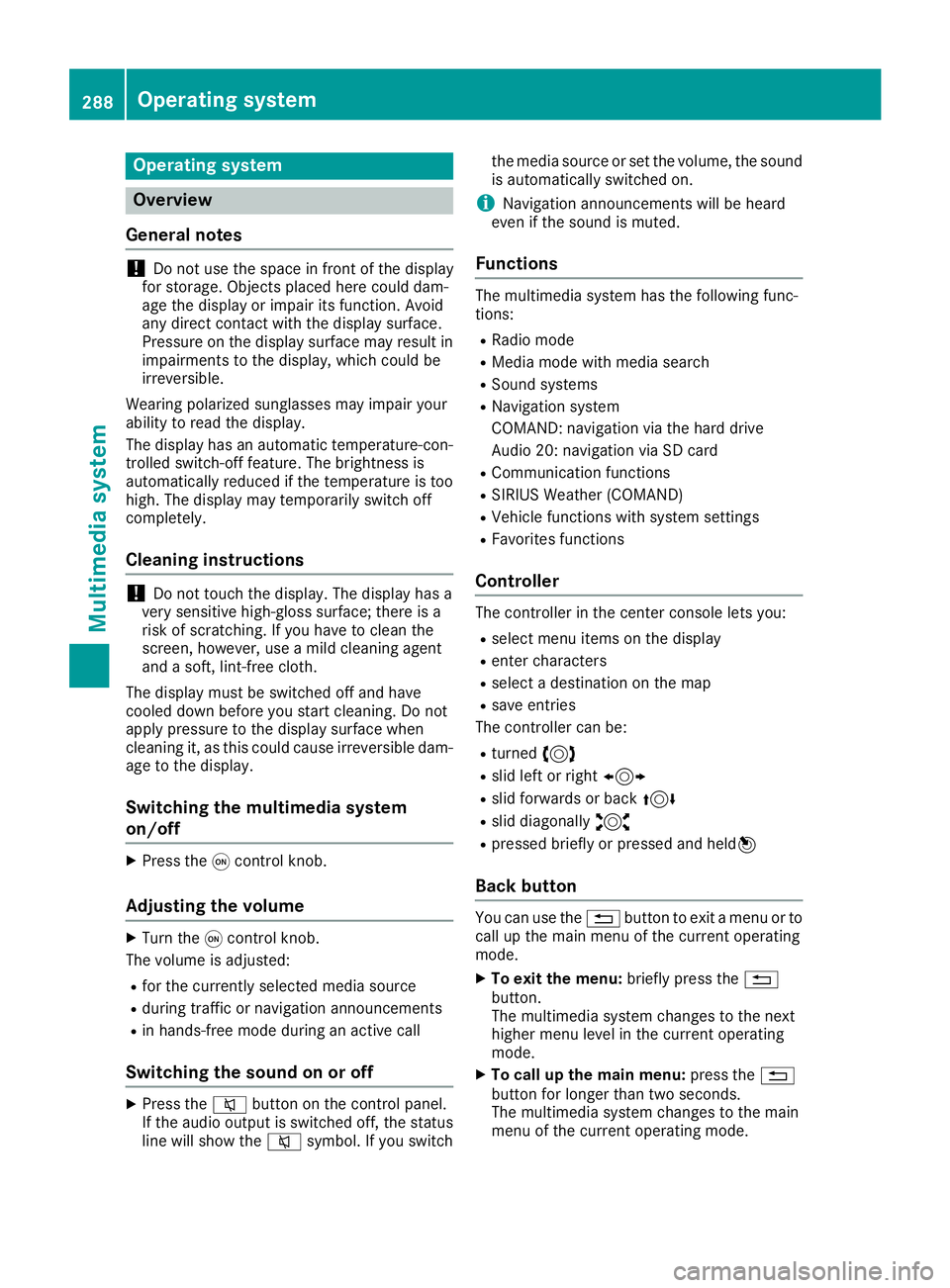
Operating system
Overview
General notes !
Do not use the space in front of the display
for storage. Objects placed here could dam-
age the display or impair its function. Avoid
any direct contact with the display surface.
Pressure on the display surface may result in
impairments to the display, which could be
irreversible.
Wearing polarized sunglasses may impair your
ability to read the display.
The display has an automatic temperature-con- trolled switch-off feature. The brightness is
automatically reduced if the temperature is too
high. The display may temporarily switch off
completely.
Cleaning instructions !
Do not touch the display. The display has a
very sensitive high-gloss surface; there is a
risk of scratching. If you have to clean the
screen, however, use a mild cleaning agent
and a soft, lint-free cloth.
The display must be switched off and have
cooled down before you start cleaning. Do not
apply pressure to the display surface when
cleaning it, as this could cause irreversible dam-
age to the display.
Switching the multimedia system
on/off X
Press the 0043control knob.
Adjusting the volume X
Turn the 0043control knob.
The volume is adjusted:
R for the currently selected media source
R during traffic or navigation announcements
R in hands-free mode during an active call
Switching the sound on or off X
Press the 0063button on the control panel.
If the audio output is switched off, the status
line will show the 0063symbol. If you switch the media source or set the volume, the sound
is automatically switched on.
i Navigation announcements will be heard
even if the sound is muted.
Functions The multimedia system has the following func-
tions:
R Radio mode
R Media mode with media search
R Sound systems
R Navigation system
COMAND: navigation via the hard drive
Audio 20: navigation via SD card
R Communication functions
R SIRIUS Weather (COMAND)
R Vehicle functions with system settings
R Favorites functions
Controller The controller in the center console lets you:
R select menu items on the display
R enter characters
R select a destination on the map
R save entries
The controller can be:
R turned 3
R slid left or right 1
R slid forwards or back 4
R slid diagonally 2
R pressed briefly or pressed and held 7
Back button You can use the
0038button to exit a menu or to
call up the main menu of the current operating
mode.
X To exit the menu: briefly press the0038
button.
The multimedia system changes to the next
higher menu level in the current operating
mode.
X To call up the main menu: press the0038
button for longer than two seconds.
The multimedia system changes to the main
menu of the current operating mode. 288
Operating systemMultimedia system
Page 319 of 398
Programming
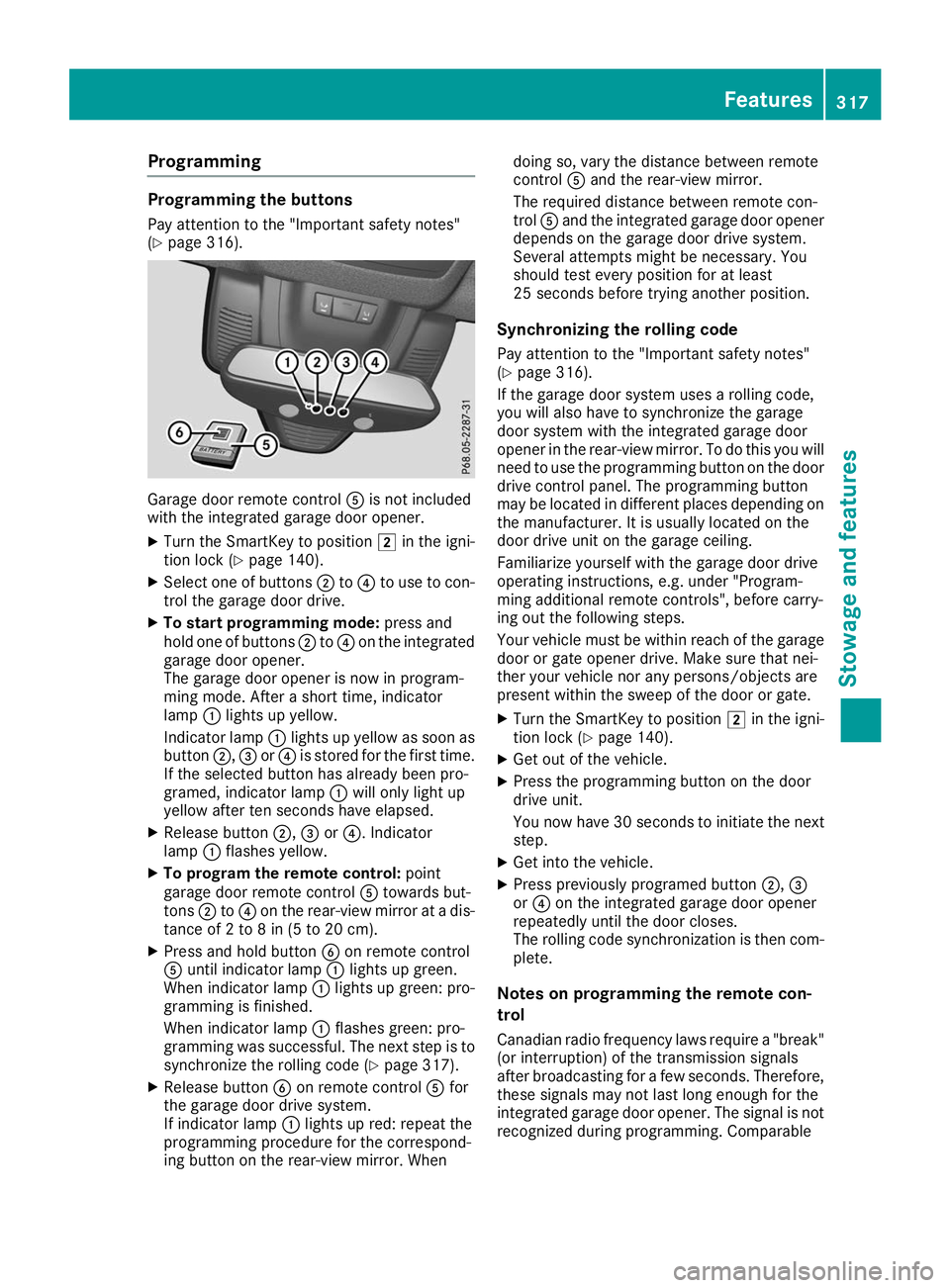
Programming the buttons
Pay attention to the "Important safety notes"
(Y page 316). Garage door remote control
0083is not included
with the integrated garage door opener.
X Turn the SmartKey to position 0048in the igni-
tion lock (Y page 140).
X Select one of buttons 0044to0085 to use to con-
trol the garage door drive.
X To start programming mode: press and
hold one of buttons 0044to0085 on the integrated
garage door opener.
The garage door opener is now in program-
ming mode. After a short time, indicator
lamp 0043lights up yellow.
Indicator lamp 0043lights up yellow as soon as
button 0044,0087or0085 is stored for the first time.
If the selected button has already been pro-
gramed, indicator lamp 0043will only light up
yellow after ten seconds have elapsed.
X Release button 0044,0087or0085. Indicator
lamp 0043flashes yellow.
X To program the remote control: point
garage door remote control 0083towards but-
tons 0044to0085 on the rear-view mirror at a dis-
tance of 2 to 8 in (5 to 20 cm).
X Press and hold button 0084on remote control
0083 until indicator lamp 0043lights up green.
When indicator lamp 0043lights up green: pro-
gramming is finished.
When indicator lamp 0043flashes green: pro-
gramming was successful. The next step is to synchronize the rolling code (Y page 317).
X Release button 0084on remote control 0083for
the garage door drive system.
If indicator lamp 0043lights up red: repeat the
programming procedure for the correspond-
ing button on the rear-view mirror. When doing so, vary the distance between remote
control
0083and the rear-view mirror.
The required distance between remote con-
trol 0083and the integrated garage door opener
depends on the garage door drive system.
Several attempts might be necessary. You
should test every position for at least
25 seconds before trying another position.
Synchronizing the rolling code
Pay attention to the "Important safety notes"
(Y page 316).
If the garage door system uses a rolling code,
you will also have to synchronize the garage
door system with the integrated garage door
opener in the rear-view mirror. To do this you will
need to use the programming button on the door
drive control panel. The programming button
may be located in different places depending on the manufacturer. It is usually located on the
door drive unit on the garage ceiling.
Familiarize yourself with the garage door drive
operating instructions, e.g. under "Program-
ming additional remote controls", before carry-
ing out the following steps.
Your vehicle must be within reach of the garage
door or gate opener drive. Make sure that nei-
ther your vehicle nor any persons/objects are
present within the sweep of the door or gate.
X Turn the SmartKey to position 0048in the igni-
tion lock (Y page 140).
X Get out of the vehicle.
X Press the programming button on the door
drive unit.
You now have 30 seconds to initiate the next
step.
X Get into the vehicle.
X Press previously programed button 0044,0087
or 0085 on the integrated garage door opener
repeatedly until the door closes.
The rolling code synchronization is then com- plete.
Notes on programming the remote con-
trol
Canadian radio frequency laws require a "break" (or interruption) of the transmission signals
after broadcasting for a few seconds. Therefore,
these signals may not last long enough for the
integrated garage door opener. The signal is not recognized during programming. Comparable Features
317Stowage and features Z