service MERCEDES-BENZ GLS 2020 Owner's Manual
[x] Cancel search | Manufacturer: MERCEDES-BENZ, Model Year: 2020, Model line: GLS, Model: MERCEDES-BENZ GLS 2020Pages: 682, PDF Size: 23.3 MB
Page 385 of 682
R
The service hasbeen activated atan aut hor‐
ized Mercedes-B enzCent er. Multimedia
system:
4 © 5
Navigation 5
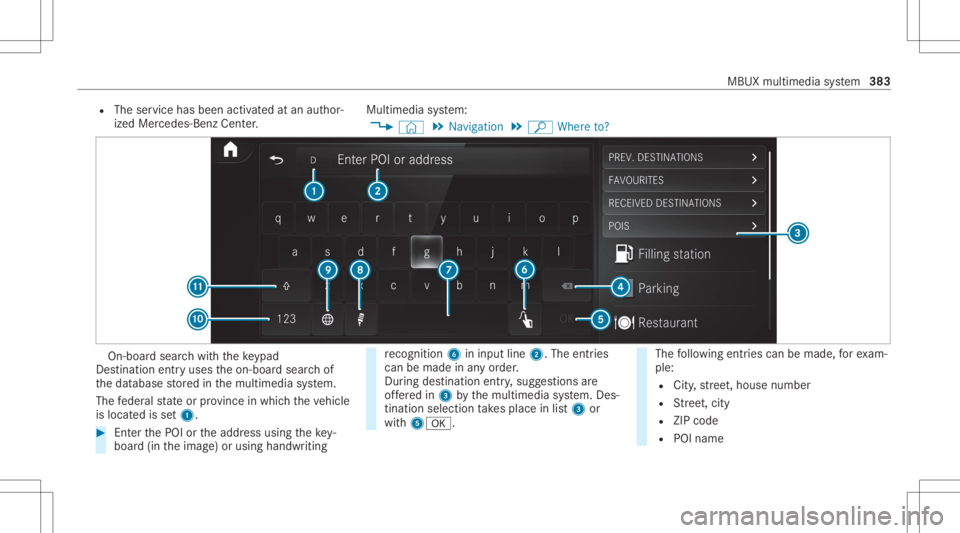
ª Where to? On-
boar dsear chwithth eke ypad
De stinat ionentryuses theon- boar dsear chof
th edat abase stor ed inthemultimedia system.
The feder alstat eor prov inc ein whic hth eve hicle
is locat edisset1. #
EnterthePOI ortheaddr essusing theke y‐
boar d(in theimag e)or using handwr iting re
cogni tion6ininpu tline 2. The entries
can bemad ein anyor der .
Dur ing destina tion entry,sugg estions are
of fere din 3 bythemultimedia system. Des‐
tinat ionselect iontake splace inlist3 or
wit h50076. The
follo wing entries can bemade, forex am‐
ple:
R City ,st re et,house number
R Street,cit y
R ZIP code
R POI name MBUX
multime diasystem 383
Page 386 of 682
R
POI categor ies,e.g. Gas Station
R City ,POI name
R Telephon enumb er,if th is isavailable for
th ePOI
R Cont actname #
Alternativ ely,use voice input 8. #
Toswitc hto handwr itingrecognit ion:
selec t6. #
Write th ech aract eron theto uc hpad. Thelet‐
te rs can bewritten next to eac hot her or
abo veeac hot her (/ page363). #
Toretur nto entr yusing theke yboar d:
select _.
or #
Press theto uc hpad. #
Todel etean entr y:select 4.
The charact ersar edele tedindividually .
or #
Ifch aract ersha ve been entered in2, select
£ next to theinput line.
The com pleteent ryisdele ted. #
Toswitc hto upper -case orlowe r-case let‐
te rs:sel ect B. #
Toswitc hto dig its, special ch aract ers
and symbo ls:sele ctA.
123 chang estoABC.
Dis play B chang esto#+=. #
Select Band switc hto addit ionalspec ial
ch aract ers. #
Toent eraspa ce:selec t7. #
Tosetth elangu age:selec t9. #
Sele ctthelanguag e.
% This function isuseful forcountr iesinwhi ch
se veralch aract ersets aresuppo rted. An
ex am ple isRu ssia, whichuses Cyrillicand
Latin charact ers. #
Tochang eth est at e: sele ctindi catorfor
fe der alstat eor prov inc e1. #
Selec tth est at ein 1. #
Enterth ecount ryindic ator ,e.g. CAforCa n‐
ada .
The listis filt er ed. #
Selec tth ecount ryon list3.
The destinat ioncan beent ered. #
Tochang eth est at eor prov ince: select the
st at eor thepr ov inc ein list3. #
Toacc epta des tinatio n:sele ctthedes tina‐
tion inlist3. #
Ifth edes tinat ionisambiguous, selectthe
des tination inthelis t.
The destinat ionaddr essissho wn. The route
can becalc ulated.
Using online search
% Requiremen ts:themedia displaysho wsan
In te rn et connecti onwith adouble- arrow
symbol inthest atus line.
On line sear chisno tav ailable inall coun tries.
De stinat ionentryuses onlinemap services. If
th eon- boar dsear chfinds nosuitab lede stina‐
tion sor ifyo uch ang ecoun tries, theonline
sear chisavailable.
Fo rth edes tinat ionyoucan enteran add ress, a
POI ora3 wo rdaddr ess.
% Entera 3 wo rdaddr ess(/ page38 7). 38
4
MBU Xmult imed iasystem
Page 387 of 682
#
Select countryind icator1. #
Select thepr ov ider forth eonline service
fr om thecount ries list.
or #
Ifth eon- boar dsear chdeliv ersno results,
ent erthedes tinat ionintheinput line. The
ent ryorder isno tre leva nt, e.g.st re et and
cit y.Use thefunc tionsdescr ibedforth eon-
boar dsear ch.
The sear chresults aredispla yed. #
Select thedes tinat ioninthelis t.
The detailed viewforth ero uteis displ ayed.
Selecting prev ious destina tions
Re quirement s:
R Prev ious destination sar estor ed.
R Fordes tinatio nsug gestions: youha ve cre‐
at ed apr ofile (/ page 350) .
R The Allow Destinati onSugge stions option is
swi tched on(/ page355) .
R The multimedi asy stem has already gather ed
suf ficie ntdata inorder tosho wdes tination
sugg estions. Multimedia
system:
4 © 5
Navigation 5
ª Where to?
5 PREV. DESTINA TIONS
The follo wing entries can beselect edinthepr e‐
vious destinat ions:
R Des tinat ionsugg estion s(/ page404)
R Des tinat ions
R Routes #
Select thedes tinat ionorroute
The destinatio naddr essissho wn. The route
can becalc ulated.
% Youcan save apr ev ious destination orades‐
tin ation suggestion asafa vo rite
( / pag e404).
Using thefa vo rite s, yo uha ve quick acc ess to
th edes tinat ions (/page389).
Selecting aPOI
Re quirement s:
R Foruse ofper sonal POIs:a USB devic eis
conne cted with themultimedia system. R
Personal POIs withth eGPS Exch ang efo rm at
(.g px) have been save din the"P ersonalPOI"
fo lder ontheUSB device.
Multimedia system:
4 © 5
Navigation 5
ª Where to?
5 POIS
Sear ching using categor ies(no rout eguid‐
ance ) #
Select thecat egor y.
or #
Select AllCategories. #
Select thecat egor yand thesub-cat egory(if
av ailable).
The sear chtake splace inthevicin ityofthe
ve hicle's current positio n.The searchre sult
ar esor tedby distance inascend ingorder .
The POIssho wthefo llo wing informatio n:
R direct ion ofthelinear distance tothePOI
(ar row)
R nam eof POI
R linear distance tothePOI MBUX
multimedia system 385
Page 389 of 682
Selec
tingacont actfordes tinatio nen try
Re quirement s:
R Amobile phoneis con nectedto themultime‐
dia system (/ page42 4).
Multimedia system:
4 © 5
Navigation 5
ª Where to?
5 CONTACTS
Using thecontact list #
Sele ctacon tact.
The cont actdetails aredispla yed. #
Select theaddr ess.
Using searchentr y #
Entera name ortelephon enumb er,fo rex am‐
ple, intoth esear chfield. #
Select 0076. #
Select thecon tact. #
Sele cttheaddr ess.
The destinat ionaddr essissho wn. The route
can becalc ulated. %
Routeguidan cetoacon tact address isrelia‐
ble inthefo llo wing cases :
R thecon tact address iscom plet e.
R thecon tact data matc hesthemap data
in thedigit almap.
Ent ering geo-coor dinates
Multimedia system:
4 © 5
Navigation 5
ª Where to?
5 GEO-COO RDINATES #
Select LatitudeorLongit ude. #
Select geo-coor dinatesaslatitude andlongi‐
tude coordinat esindegr ees, minut esand
seconds. Todo this swipe upordown
re spectiv ely.
The map showstheposition . #
Conf irm theent rywit h0076. #
Tosetth edes tina tion: select¥ or
¦. #
Calculat eth ero ute(/ page39 0).
Ent ering thedes tina tion asa3 wo rdaddr ess
Re quirement s: R
Sear ching fora des tination using 3wo rd
addr esse sis poss ibleintheonline search
( / pag e382 ).
R The media displaysho wsanInte rn et connec‐
tion with adouble -arrow symbol inthest atus
line .
Mult imed iasystem:
4 © 5
Navigation 5
ª Where to?
% Sear ching fora des tination using 3wo rd
addr esse sis no tposs ibleinall coun tries and
in all lang uages. #
Select thecount ryindic ator. #
Selec tth epr ov ider forth eonline service
fr om thecount ries list.
or #
Ifth eon- boar dsear chdeliv ersno sear ch
re sults, enterthedes tinat ionaddr essasa3
wo rdaddr ess. Separateeac hof thewo rds
wit hafull stop.
The sear chresults aredispla yed. #
Select thedes tinat ioninthelis t.
The destinat ionaddr essissho wn. The route
can becalc ulated. MB
UX mult imed iasystem 38
7
Page 399 of 682
#
Ifth erear ealr ead yfo ur intermediat edes‐
tinatio ns:sele ctYes inthepr om pt.
The gasst atio nis ent ered inthero uteov er‐
vie w. Intermedia tedes tination 4is dele ted.
Ro uteguidan cebegin s.
St arting theaut oma ticser vice station
sear ch
Re quirement s:
R ATTENTION ASSISTand theSuggest Rest
Area function areactiv ated (/ page288).
R Ther ear eser vice statio nsalon gth ero ute
sec tionahead.
Dr iving situatio n
The follo wing notificat ion issho wninthemedia
displa yATTE NTION ASSISTTap here tosearch
for rest areas. #
Conf irm theno tification .
The service statio nsear chstar ts.The availa‐
ble servicest atio nsalon gth ero uteor inthe
vicinity oftheve hicle's current positio nar e
di spl ayed. #
Select aser vice statio n.
The servicest atio naddr essisdispla yed. #
Calculat eth ero ute(/ page39 0).
The servicest atio nis setas thedes tinat ion
or thene xt int ermediat edes tinat ion. #
Ifth erear ealr ead yfo ur intermediat edes‐
tinatio ns:sele ctYes inthepr om pt.
The service statio nis ent ered inthero ute
ove rview. Intermedia tedes tination 4is
dele ted. Ro uteguidan cebegin s.
Sho wing ast or ed rout eon thema p
Re quirement s:
R AUSB device withstor ed routes isco nn ec‐
te dwit hth emultimedia system
(/ page460).
R The routeis stor ed inthe"R out es" folder
wit hth eGPS Exch ang efo rm at(.gpx) .
Mult imed iasystem:
4 © 5
Navigation 5
ª Where to?
5 SAVED ROUTES #
Select aro ute. #
Select Show onMap. #
Movethemap (/page41 0). St
arting asa ve dro ut e
Re quirement s:
R AUSB device withstor ed routes isco nn ec‐
te dwit hth emultimedia system
(/ page460).
R The routeis stor ed inthe"R out es" folder
wit hth eGPS Exch ang efo rm at(.gpx) .
Mult imed iasystem:
4 © 5
Navigation 5
ª Where to?
5 SAVED ROUTES #
Select aro ute. #
Select Start Rout eGuid. from Beginning of
Rout eor Start Rout eGuidan cefrom Curr .
Posi tion.
Ro uteguidan cestar ts.
% The routecan besave dwit hf inthe
menu (/page390) .
Re cor dingaro ute
Re quirement s:
R AUSB device iscon nectedwit hth emultime‐
dia system (/ page460). MBUX
multimedia system 39
7
Page 403 of 682
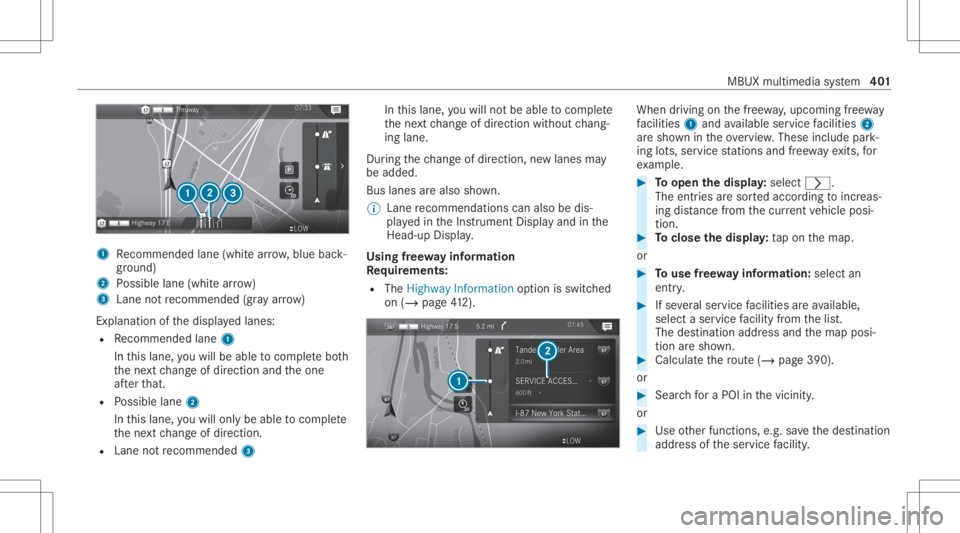
1
Recomme ndedlane (whit ear row ,blue back‐
gr ound)
2 Possible lane(whit ear ro w)
3 Laneno tre comme nded(gray arro w)
Ex planat ionofthedispla yedlanes:
R Recomme ndedlane 1
In this lane, youwill beable tocom plet ebo th
th ene xt chang eof dir ect ion and theone
af te rth at.
R Possible lane2
In this lane, youwill onlybe able tocom plet e
th ene xt chang eof dir ect ion.
R Lan eno tre comme nded3 In
this lane, youwill notbe able tocom plet e
th ene xt chang eof dir ect ion without chang ‐
ing lane .
Dur ing thech ang eof dir ect ion,ne wlane sma y
be added.
Bus lanesar ealso shown.
% Lanere comme ndations canalso be dis‐
pl ay ed intheIns trument Displayand inthe
Hea d-up Display.
Using free wa yinf ormation
Re quirement s:
R The Highway Informat ionoption isswitc hed
on (/ page41 2). Wh
endrivin g on thefree wa y,upco mingfree wa y
fa cil ities 1 and available servicefa cil ities 2
ar esho wnintheove rview. These include park‐
ing lots, ser vice statio nsand free wa yex its, for
ex am ple. #
Toopen thedisp lay: select 0048.
The entriesaresor tedaccor dingtoinc reas‐
ing distance from thecur rent vehicle posi‐
tion. #
Toclose thedisp lay: tapon themap.
or #
Touse free wa yinf ormation: selectan
entr y. #
Ifse veralser vice facil ities areav ailable,
selec ta ser vicefa cil ity from thelis t.
The destinat ionaddr essand themap posi‐
tion aresho wn. #
Calculat eth ero ute(/ page39 0).
or #
Sea rchfo ra POI inthevicin ity.
or #
Use other funct ions, e.g.save thedes tinat ion
addr essoftheser vice facil ity . MBUX
multime diasy stem 40
1
Page 408 of 682
#
Select Start Route Guid.from Beginning of
Ro ute orStart Route Guidance fromCurr.
Pos ition.
Ro uteguidan cestar ts from theselect ed
position . Ro
uteguidanc ewith current traf fic re por ts Tr
af fic inf orma tion overview
Tr af fic re por tsarere cei vedusing LiveTr af fic
Inf ormation andareused forro uteguidan ce.
This serviceis una vailable insome countries.
% Ther ema ybe differe nces betwee nth etraf fic
re por tsrecei vedand theactual road and
traf fic condi tions.
Im por tant informa tionon LiveTr af fic Inf orma‐
tion:
R Current traffic repor tsarere cei vedvia the
Int erne tconnection.
R The traf fic situ ation isup datedat shor t,re gu‐
lar interva ls.
R Informatio nfrom theser vice prov ider canbe
sho wn(/ page406) . Inf
ormatio non theve hicle's position isregular ly
sent toDai mle rAG .The data isimmed iatelyre n‐
de redanon ymous byDai mle rAG and forw arded
to thetra ffic dat apr ov ider .Usin gth is dat a,traf‐
fi c re por tsreleva nt totheve hicle's position are
sent totheve hicle. Thevehicle actsasasensor
fo rth eflow oftraf fic and helpstoimprove the
qu alit yof thetraf fic re por ts.
If yo udo notwa nttotrans mitth eve hicle posi‐
tion, youha ve thefo llo wing option s:
R Youdeac tivateth eser vice intheMer cedes
me portal.
R Youha ve theser vice deactiv ated atan
aut hor ized Mercedes- BenzCenter.
Sho wing informat ionfrom theser vice pro‐
vid erforLi ve Traf fic Inf orma tion
Re quirement s:
R The vehicle iseq uipped withLiv eTr af fic
Inf ormation. Multime
diasystem:
4 © 5
Navigation 5
¡ 5
Traffic #
Select Provider Information.
The logo oftheser vice prov ider forLiv eTr af‐
fi c Inf ormati onissho wn.
% Further information onLiveTr af fic Inf orma‐
tion canbecalled up on thehome screen
using Mercedes me&Apps (/page44 5).
% Youha ve thefo llo wing option sfo rex tendi ng
th esubscr iption :
R atan aut hor ized Mercedes- BenzCenter
R withacall totheMer cedes- BenzCus‐
to mer Assis tance Center via theme but‐
to n
Sho wing traf fic inf orma tion
Re quirement s:
R The Traff icdispla yis switc hedon
(/ page408).
R The follo wing traf fic di spl aysar eswitc hedon
(/ page408):
Traffic Incident s
Free Flowing Traffic 406
MBUX multimedia system
Page 416 of 682
#
Tomo vean area on thema p:swipe inany
dir ect ion onthecon trol element . #
Tochang eth esize ofthear ea: tapor press
on thecon trol element . #
Swipe upordown onthecon trol element . #
Select 0076.
The Avoid areahasbeen set.messag e
appear s.The area isent ered intoth elis t. #
Totak eacco untof an area forthe rout e:
sele ctan area from thelis t. #
ActivateAvoi dArea .
The disp lay bu tton isacti vated.
If ro uteguidan ceisact ive, ane wrouteis cal‐
culat ed.
If th er eis no routeye t,th ese tting iscar ried
ove rto thene xt routeguidan ce.
The routecan include anarea that isto be
av oided inthefo llo wing cases :
R thedes tinat ionislocat edinan area that
is to be avo ided.
R thero uteinc ludes highways ormulti-lane
ex pressw ayswhic hpass thro ugh anarea
to be avo ided. R
ther eis no sensible alternativ ero ute.
Dele tingan area
Mult imed iasystem:
4 © 5
Navigation 5
Z
5 Advan ced5
Route 5
Avoid Option s
5 Avoid Areas #
Todel etean area: selec tan area inthelis t. #
Select Delete. #
Conf irm thepr om ptwit hYes . #
Todel eteall areas: ifat leas ttw oar eas to
av oid arese t,select Delete All. #
Conf irm thepr om ptwit hYes .
Map data update overvie w
Up datin gat the author izedMer cedes -Ben z
Ce nter
The digit almap sge ner ated bythemap software
become outdatedinthesame wayas conven‐
tion alroad maps .Op tim alrouteguidan cecan
on lybe prov ided bythena vig ation system in
con junc tion withth emos tup-t o-dat emap data.
Inf ormation aboutnewversions ofthedigit al map
canbeobt ained from anaut hor ized
Mer cedes- BenzCenter.
Yo ucan have updat estothedigit almap imple‐
ment edther e.
% Addition alcos tscan beincur redin this con ‐
nec tion .
Online mapupd ate
The onlin emap updat eser vice from Mer cedes
me connectcan beused toupdat eth emap
dat a.
Re quiremen ts:
R Mer cedes meconnectis available.
R Youha ve auser accoun tfo rth eMer cedes
me portal.
R The service isavailable.
R The servicehas been activat ed.
% The online map updat eser viceis no tav aila‐
ble inall coun tries.
The follo wing option sar eav ailable forth e
updat e:
R Forone region (automatic mapupdat e) 41
4
MBUX multimedia system
Page 418 of 682
#
ActivateAuto Zoom.
The disp lay bu tton isacti vated. The map
scale issetaut omatic allydependin gon your
dr ivin gspee dand thetype ofroad.
% The automat icallyselec tedmap scale canbe
ch ang edman ually.Aftera fe w sec ond s,this
is aut omat icallyre se t.
Displa yingthesat ellit ema p
Multi media system:
4 © 5
Navigation 5
Z
5 Advan ced #
Select View. #
Select MapElemen ts. #
Switc hSatellit eMap onoroff.
If th edispla ybutt onisactiv ated, satellit e
maps aredispla yedin map scales from 2mi
(2 km).
If th edispla ybutt onisdeactiv ated, satellit e
maps areno tdispla yedin map scales from
2 mi (2km) to20 mi(20 km).
% The satellite maps forth ese map scales are
no tav ailable inall coun tries. Displ
aying thera ng e
Re quirement s:
R The multim ediasystem suppor tsthefunc ‐
tion .
Multimedia system:
4 © 5
Navigation 5
Z
5 Advan ced #
Select View. #
Select MapElemen ts. #
ActivateRa nge.
The disp lay bu tton isacti vated.
The rang eis sho wnonthemap withth efo llo w‐
ing displa ys:
R Forga soline anddiesel vehicles: green dis‐
pla y
When thelowe rre ser vecap acityisreac hed then
th era ng edispl ayon themap isswitc hedoff.
% The rang edispl ayon themap isno tav ailable
in all coun tries. Displ
aying weather information andother
map contents
Re quirement s:
R Mer cedes meconnectis available.
R Youha ve auser accoun tfo rth eMer cedes
me portal.
R The service isavailable.
R The servicehas been activat ed atan aut hor ‐
ize dMer cedes-Ben zCent er.
Mult imed iasystem:
4 © 5
Navigation 5
Z
5 Advan ced #
Select View. #
Select MapElemen ts. #
Scrollup and showtheONLIN EMAP CON-
TENT categor y.
The available services aredispla yed. The
ser vices arepr ov ided byMer cedes mecon‐
nect . #
Switc hon aser vice, e.g.Weather.
Cur rent we ather informat ionisdispla yedon
th ena vig ation map,e.g.temp eratur eor 41
6
MBUX multimedia system
Page 419 of 682
clou
dco ver.The service information isno t
sho wninall map scales, e.g.weather sym‐
bols.
Fu rther information aboutavailable services and
about displayinginformat ioninthemap scales
can befound intheMer cedes mePortal:
ht tp s:// me. secure.m erced es-ben z.com
Sho wing mapvie win themu ltifunct iondis‐
pla yof theins trum ent clus ter
Multimedia system:
4 © 5
Navigation 5
Z
5 Advan ced #
Select View. #
Select MapOrient ation. #
Scrollup and showtheINSTRUME NTCLUS-
TER VIEW categor y. #
Tosetth ema pscale automa tically: switc h
on Auto Zoom.
The displa ybutt onisactiv ated. The map
scale issetaut omatically depending onyour
dr ivin gspee dand thetype ofroad. #
Toselect maporientation: selectanoption.
The 003Bdo tindicat esthecur rent sel ecti on.
The follo wing option sar eav ailable:
R 2DHead ingUpoptio n:the2D map view
is aligned tothedir ect ion oftra vel.
R 2DNort hUp option :th e2D map viewis
displa yedso that north is alw aysat the
to p.
R 3Doption :th e3D map viewisaligned to
th edir ect ion oftrav el. Pa
rking service No
teson thepa rking service &
WARNIN GRisk ofacci dent andinjury
due tonotob ser ving themaximum per‐
mitt edaccess height
If th eve hicle height exceeds themaximum
per mitt edaccess heightforpar king garage s
and unde rground parking lots, theve hicle
ro of as wellas other vehicle partscould be
damag ed. Ther
ecould bearisk ofinjur yto theve hicle
occupants. #
Beforedr iving intoapar king garage or
under ground parking lotobser vethe
locall ysign postedaccess height. #
Ifth eve hicle height, including anyaddi‐
tional equipment, exceed sth emaxi‐
mum permitt edaccess height,donot
dr ive int oth epar king garage orunder‐
gr ound parking lot. This
service isno tav ailable inall coun tries.
Select ingparking options
* NO
TEBef oresel ecti ngthepar king
op tion The
datais based oninformation prov ided by
th ere spectiv eser vice prov ider .
Mer cedes Benzacc epts no liability forth e
acc uracy oftheinf ormation prov ided relatin g
to thepar king garage /pa rking lot. #
Alw aysobser vethelocal Information
and conditions . MBUX
multimedia system 41
7