warning MERCEDES-BENZ GLS 2020 Owner's Guide
[x] Cancel search | Manufacturer: MERCEDES-BENZ, Model Year: 2020, Model line: GLS, Model: MERCEDES-BENZ GLS 2020Pages: 682, PDF Size: 23.3 MB
Page 316 of 682
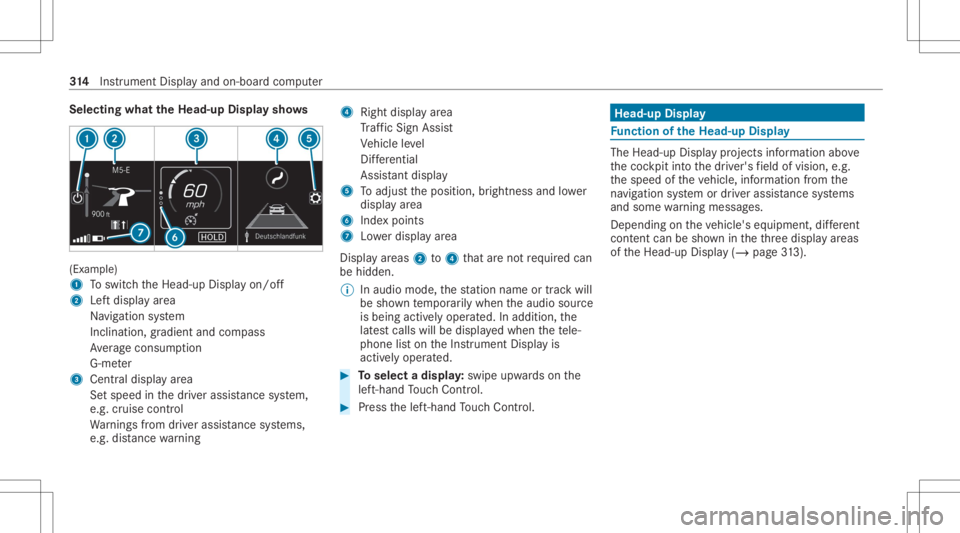
Selec
tingwhat theHead -upDispla ysho ws (Ex
am ple)
1 Toswitc hth eHead-up Displayon/ off
2 Leftdispla yar ea
Na vig ation system
Inc lination ,gr adient andcompass
Av erag econ sum ption
G-me ter
3 Centraldispl ayarea
Se tspee din thedr iver assis tance system,
e.g. cruise control
Wa rnings from driver assis tance systems,
e.g. distance warning 4
Right displa yar ea
Tr af fic Sign Assist
Ve hicle leve l
Dif fere ntia l
Assi stant displa y
5 Toadjus tth eposition ,br ightn essand lowe r
displa yar ea
6 Inde xpoint s
7 Lowe rdisp lay ar ea
Displa yar eas 2to4 that areno tre qu ired can
be hidden .
% Inaudio mode, thest atio nnam eor trac kwill
be sho wntemp orarily when theaudio source
is being activelyoper ated. Inaddition, the
lat estcalls willbedispla yedwhen thete le‐
phon elis ton theIns trument Displayis
activ elyoper ated. #
Toselect adispla y:swipe upwards on the
lef t-hand Touc hCon trol. #
Press thelef t-hand Touc hCon trol. Hea
d-up Disp lay Fu
nction oftheHead -upDispla y The
Head- upDis playpr oje ctsinf ormat ionabove
th ecoc kpit intoth edr iver's field ofvision, e.g.
th espeed oftheve hicle, information from the
na vig ation system ordriver assis tance systems
and some warning mess ages.
Depe ndingon theve hicle's equipment, differe nt
cont entcan besho wnintheth re edispla yar eas
of theHead-up Display(/ page31 3). 31
4
Instrument Displayand on-boar dcom puter
Page 351 of 682
Yo
ucan selectthepr ofile:
R When entering (/ page35 1)
R Using thehome screen (/page336)
The profile settings areactiv ated assoon asa
pr ofile isselect ed.
% When youcall upyour profile, thedr iver's
seat, steer ing wheel andoutside mirrors can
be set.
If yo ucall upyour profile when drivin gth en
th edr iver's seat position willnotbe adjus‐
te d.
Yo ucan cancelthese tting process withth e
fo llo wing actions :
R Tapon thePosition ingSeat andSteering
Wheel… Pleasetaptocanc el.warning on
th emedia display.
R Press one oftheseat operating buttons
in thedr iver's door . Pr
ofile cont ent
Depen dingontheve hicle equipment, thefo llo w‐
ing settings canbestor ed inyour profile, for
ex am ple:
R Driver' sseat ,st eer ing wheel andmirrorse t‐
tings
R Driver's seat memor y
R Radio (including statio nlis t)
R Lastdes tinatio ns
R Climat econ trol
R Ambien tlight ing
R DYNA MIC SELE CTI(individua l)
R Instrument Display,Hea d-up Display and
st yle (displa yst yle of themultimedia system)
R Themes, suggestion sand favo rite s
% Settings fordr iver assi stanc esy stems can‐
no tbe save din thepr ofile. Mer
cedes meconnect profile
If yo uuse apr ofile from Mer cedesme conn ect ,
th efo llo wing onlinefunc tionsar eav ailable, for
ex am ple:
R Youcan configur eth ese ttings intheve hicle
using theMer cedes meapp andthe
Mer cedes meportal.
R Youcan synchronize your profile on
Mer cedesme conn ect withth epr ofile inthe
ve hicle (/page35 1).
R Youcan add aper son alprofile pho tothat is
sho wnintheve hicle.
R Youcan take your profile and someof your
se tting swit hyo uin ne wvehicles.
Re quirement sfo rusi ng Mercedes mecon‐
nect profiles:
Fo rth eve hicle owner :
R Youha ve aMer cedesme user accoun t.
R The vehicle hasbeen connectedwithth e
user accoun t.
R The person alizatio nser viceis act ivat ed. MB
UX mult imed iasystem 34
9
Page 353 of 682
Selec
tingapr ofile
Multimedia system:
4 © 5
f Profiles
% When youcall upyour profile, thedr iver's
seat, steer ing wheel andoutside mirrors can
be set.
Yo ucan cancelthese tting process withth e
fo llo wing actions :
R Tapon thePosition ingSeat andSteering
Wheel… Pleasetaptocanc el.warning on
th emedia display.
R Press one oftheseat operating buttons
in thedr iver's door . #
Select apr ofile. #
Press the0076 buttontoconf irm themes‐
sag e.
The profile isloaded andactiv ated.
% Alternativ ely,th epr ofile can already be
select edwhen theve hicle isent ered
(/ page35 1).
Sync hronizing apr ofile
Re quirement s: R
Youha ve aMer cedesme user accoun t.
R The vehicle isconn ectedwithyo ur Mer cedes
me user accoun t.
R The person alizatio nser viceis act ivat ed on
Mer cedesme conn ect .
Mult imed iasystem:
4 © 5
f Profiles
5 General Setting s
Sync hroniz ation enables thefo llo wing:
R Youcan configur eth eve hicle settin gsusing
th eMer cedes meapp.
R The profile on Mer cedes meconnect andthe
pr ofile intheve hicle arealigned (profile man‐
ag ement). #
ActivateSyn chro nize Profiles Auto matica lly.
Th epr ofiles intheve hicle areaut omatically
sync hronized withth epr ofiles onMer cedes
me connect when theignition isswitc hedon
and off.
or #
Select Synchroniz eProfiles Now.
Af tersele cting this op tion ,th epr ofiles inthe
ve hicle aresync hronized withth epr ofiles on
Mer cedes meconnect .
% During sync hroniz ation thepr ofile listand
th epr ofile func tionsar ebloc ked.
% Noteon data protection: ifyo udo notwish
to shar eyo ur dat awit hMer cedesme, make
sur eth at theaut omatic synchroniz ation is
switc hedoffand donotselect Synchroniz e
Profiles Now.
Sho wing thepr ofile selecti onwhen entering
Re quirement s:
R Atleas tone profile has been creat ed.
Multim ediasystem:
4 © 5
f Profiles
If th eop tion isactiv ated, youcan seeapr ofile as
soo nas youget in. #
Selec tGener alSet tings. MBU
Xmultim ediasystem 35
1
Page 381 of 682
Ins
tallth ese updat es,orelse thesecur ityofyour
mult imed iasystem cann otbe ensur ed.
% Ifaut omatic softwareupdat esareactiv ated,
th esy stem updat eswill bedownloaded auto‐
maticall y(/ page37 8).
As soon asan upd ateis available fordo wnloa d,
a cor responding messageappea rson themedia
displa y.
Yo uha ve thefo llo wing selectionoption s:
R Accept andInstall
The updat ewill bedownloaded inthebac k‐
gr ound.
R Information
Inf ormation aboutthepending system
updat eis displa yed.
R Later
The updat ecan bedownloaded manuallyata
lat er time (/page37 8).
Dee psy stem updates
Dee psy stem updat esaccess vehicle orsystem
se ttings andcanther efor eonl ybe car ried out when
theve hicle isstatio naryand theignition is
switc hedoff.
If th edo wnload ofadeep system updat eis com‐
ple tedand theupdat eis ready forins tallation ,
yo uwill beinformed ofthis afte rth ene xt igni‐
tion cycle, forex am ple.
% Park theve hicle safely inasuit able location
bef orest ar tin gth eins tallation .
Re quiremen tsforth eins tallation :
R The ignit ionisswitc hedoff.
R Notesand warnings have been read and
acc epted.
R The elect ric pa rking brak eis applied.
If all requ iremen tsareme t,th eupdat ewill be
ins talled. Themultim ediasystem cann otbe
oper ated while theupdat eis being installed and
ve hicle functionsarere strict ed.
If er ro rs should occurduring theins tallation ,th e
multime diasystem automaticall yatt em ptsto
re stor eth epr ev ious version. Ifre stor ation ofthe
pr ev ious version isno tpossible ,a symbol
appear son themedia display.Please consulta qu
alif ied spec ialistwo rkshop toresol vethe
pr oblem. Re
setting themu ltim edia system (rese tfun c‐
tion) Multi
media system:
4 © 5
Set ting s5
System 5
Reset
Pe rsonal datais dele ted, forex am ple:
R Statio npr ese ts
R Con nectedmobile phones
R Indiv idual userprofiles
% The gues tpr ofile isrese twhen these ttings
ar ere stor ed tothefa ct or yse ttings.
A pr om ptappear sag ain asking whe ther you
re all ywish torese t. #
Select Yes.
The multimedia system isrese tto thefa ct or y
se ttings. Ifyo uha ve seta PIN foryo ur sys‐
te m, this will also berese t. MBUX
multimedia system 37
9
Page 409 of 682
Del
ay
Mu ltimed iasystem:
4 © #
Select Navigation.
The map showsthefo llo wing traf fic inf ormati on:
R traf fic inci dents ,fo rex am ple:
- roadw orks
- road bloc ks
- warning mess ages
When routeguidan ceisact ive, thesymbols
fo rtr af fic inci dents willbe sho wnincolo ron
th ero ute. Offth ero uteth ey aregr ay .
R warning mess agesymbols:
- Symbo lÔ
- road safetyno tes, e.g. when approaching
th eend ofatraf fic jam
If th eve hicle approaches adang erarea
on thero ute, awa rning mess ageis dis‐
pla yedon themap. Inaddition, anaudible
no tification canfollo wahazar dwa rning.
R traf fic flow informatio n: -
traf fic jam (red line)
- slow-mo ving traf fic (or ang eline)
- hea vytraf fic (yel lo w line)
- free-f lowi ng traf fic (gr een line)
R displ ayfortr af fic del ayson thero utelas ting
at leas ton emin ute
Disp laying traf fic incid ents
Re quirement s:
R The Traff icInc ident sdispla yis switc hedon
(/ page408 ).
Multime diasystem:
4 © 5
Navigation 5
¡ 5
Traffic #
Select Traffic Announc ement s.
If th er ear etraf fic re por ts,youwill see alis t.
Tr af fic re por tsinclude accidentsand other
tr af fic eve nts, forex am ple. Thelistis sor ted
acc ordin gto dis tance and showsthetraf fic
re por tsrecei vedbo th on and offth ero ute.
A traf fic re por tsho wsthefo llo wing informa‐
tion :
R Street num beror stre et nam e R
Traf fic inci dent symbo l
On thero ute: color
Of fth ero ute: gra y
R Cause
R Street symbol fora traf fic inci dent onthe
ro ute
R Distance from current vehicle position #
Select atraf fic re por t0048.
The detailed informatio nis sho wn, forex am‐
ple thero utesec tion.
Sho wing traf fic incid entsin thevicinit yof
th ema p #
Sele ctatraf fic inci dent symbo lon themap.
The details about thetraf fic inci dent aredis‐
pl ay ed. #
Select 0062. #
Select Traffic Incidents inVicinit y.
The map showsthetraf fic inci dent symbo ls
in thevicinit y.
Tr af fic inci dent informati onisdispl aye din
th est atus line:
R Traf fic inci dent symbo l MBUX
multime diasy stem 40
7
Page 410 of 682
R
Cause ofthetra ffic inc ident ,e.g. con‐
st ru ction work
R Warning mess age(highligh tedre d) #
Toselect atraf fic incid entsym bol: selec t
0047 or0048. #
Toselect amap section: tapon the
to uc hsc reen.
or #
Press theTo uc hCon trol or theto uc hpad. #
Movethemap. #
Toretur nto thena vig ation map:tap on
G.
or #
Press theG buttonontheTo uc hCon trol
or on theto uc hpad.
Swit ching thetraf fic inf orma tion displa yon
Mult imed iasystem:
4 © 5
Navigation 5
Z #
ActivateTra ffic.
The disp lay bu tton isacti vated. Ac
tiv atin gIn ciden ts,Free Flo wand Dela y #
Sele ctAdv anced. #
Sele ctView. #
Sele ctMap Elements. #
IntheTRAFF ICcat egor y,act ivat eth eTraffic
Inc idents, FreeFlowing TrafficandDelay
ent ries.
The displa ybutt ons areactiv ated.
If tra ffic inf ormatio nhas been recei ved, then
tra ffic inc ident ssuc has roadw orks ,ro ad
bloc ks,local area repor ts(e.g. fog) and warn‐
ing mess ages aredispla yed.
The traffic dela yis displa yedfo rth ecur rent
ro ute. Traf fic del ayslas ting oneminut eor
long erareta ke nint oconsi deratio n.
Sho wing loca lar ea mes sages
Mu ltimed iasystem:
4 © 5
Navigation 5
¡ 5
Traffic #
Select AreaAlerts.
Local area messag esaresho wn, forex am ple
fo gor hea vyrain. #
Selec ta local area mess age.
The details aredispla yed. Car
-to-X -Comm unication Car
-to-X -Comm unication overview
The follo wing requ iremen tsappl yfo rusi ng Car-
to -X-C ommu nication:
R The vehicle iseq uipped withamultimedia
sy stem featur ingnavig atio nand acom mun i‐
cat ion modul ewit han act ivat ed, integrated
SIM card.
R Car-to -X-C ommu nicationis acti vated.
% Car-to-X-Commun icationisavailable in
selec tedcount ries.
The comm unication moduleautomatic allyes tab‐
lishes anInterne tcon nection onceth eignition is
switc hedon.Ifth er ear ean yhazar dwa rnings ,
th ey will beprov ided shortly th er eaf ter.Dep end‐
ing onthemobile phoneconnect ion,thepr ov i‐
sion take splace from within asecond upto
about amin ute. 408
MBUXmult imed iasystem
Page 468 of 682
Memor
yslo tsareav ailab lein station prese ts #
Select 0074.
or #
Press and hold onthera dio statio n.
Re plac inganentry in the station prese ts #
Press and hold onanentr yin thest atio npr e‐
se ts. #
Select Yes. Edit
ingstation prese ts Mul
timedi asy stem:
4 © 5
Radio
Mo ving station s #
Press and hold ast or ed statio n. #
Select Mov e. #
Movethest atio nto thene wposition .
Dele ting station s #
Press and hold ast atio n. #
Select Delete. Re
plac ingast ation #
Press and hold ast atio n. #
Select Replac eRadio Statio n. Sho
wing accidentrepor ts Mu
ltimed iasystem:
4 © 5
Radio 5
Z
% The availabilit yof thefunc tion isdependent
on thecount ry. #
Swi tchDisp layEmerg encyWarning son or
of f. Di
spl aying radio text Multimedia
system:
4 © 5
Radio 5
Z 5
General #
Switc hRadio TextInformation onoroff. Sat
ellit era dio In
fo rm ation onthesat ellit era dio
SIRI USXM®
sat ellite radio offers mor eth an 175
digit al-quality radio chann elsprov iding 100%
commer cial-free musi c,spor ts,news and enter‐
ta inm ent,fo rex am ple. SIRIUS XMsatellit era dio
em ploysaflee tof high-per form anc esat ellit esto
br oadcas tar ound thecloc kth ro ughout theUS A
and Canada. Thesatellit era dio progr am isavail‐
able fora mont hlyfe e. Inf ormation aboutthis
can beobt ained from aSir ius XM®
Ser vice Cen‐
te rand athttp://www .siriusxm.com (USA)or
http://www .siriusxm.ca (Canada ).
% Sirius ,XM and allrelat ed mar ksand logos
ar etrademar ksofSir ius XM Radio Inc.and
its subsidiar ies.Allother mar ks,ch ann el
nam esand logos areth epr oper tyof their
re spectiv eow ner s.All rights reser ved.
Sat ellit era dio restriction s
Sat ellit era dio mode maybe temp orarily una vail‐
able orinterru pte dfo ra va riet yof reason s.
Thes einc lude environ men talor topog raphical
con dition sbe yond thecon trol of Mer cedes- Benz 466
MBUX multimedia system
Page 496 of 682
Flat
tire No
teson flat tires &
WARNIN GRisk ofacci dent dueto aflat
tir e
A flat tirese verely affects thedr iving charac‐
te rist ics aswellas thesteer ing and braking
of theve hicle.
Ti re swith outrun-flat charact eristics : #
Donotdr ive on withaflat tire. #
Chan getheflat tireimm ediat elywit han
emer gency sparewheel orspar ewheel.
Alt ernat ivel y, consu ltaqu alif ied spe‐
cialis two rkshop.
Ti re swith run-flat charact eristics : #
Obse rveth einf ormation andwarning
no teson MOExt ended tires (run-f lat
tir es). In
theeve ntofaflat tire, thefo llo wing option s
ar eav ailable dependingon your vehicle's equip‐
ment :
R Vehicl eswith MOExt endedtir es: itis pos‐
sibl eto continu eth ejour neyfo ra shor t
per iod oftime. Makesur eyo uobse rveth e
no teson MOExt ended tires (run-f lattires)
(/ page49 4).
R Vehicl eswith aTIREF ITkit: youcan repair
th etir eso that itis poss ibletocontinu eth e
jou rney fora shor tper iod oftime. Todo this,
use theTIREFI Tkit (/ page495).
R Vehicl eswith Mercedes meconne ct:yo u
can makeacal lfo rbr eakdo wnassi stanc evia
th eove rhead control panel inthecase ofa
br eakdo wn(/ page44 2).
R Allvehicl es:chang eth ewheel
(/ page538).
% The emer gency sparewheel isonl yav ailable
in cer tain coun tries. No
teson MOExt ended tires (run-fl attire) &
WARNIN GRisk ofacci dent whendr ivi ng
in eme rgency mode
When driving inemer gency mod e,thehan‐
dling charact eristic sar eim pair ed.e.g.when
cor ner ing,when accelerating stro ng lyand
when brakin g. #
Donotexc eed theper missible maxi‐
mum speed forMOExt ended tires. #
Avoid anyabr uptst eer ing and driving
maneuv ersas wellas drivin gove r
obs tacle s(cu rbs, pothol es, off-r oa d).
Thi sap plies, in pa rticular ,to aloaded
ve hicle. #
Stop driving intheemer gency mod eif
yo uno tic e:
R ban gingno ise
R vehicle vibration
R smok ewhic hsmells likeru bber
R con tinuous ESP®
int erve ntio n
R crac ks intireside walls 49
4
Breakdo wnassis tance
Page 497 of 682
#
Afterdr iving inemerg encymode have
th erims checkedby aqu alif ied spec ial‐
is two rkshop withre ga rd totheir further
use. #
The defective tir emus tbe replaced in
eve rycase . Wi
th MOExt ended tires (run-f lattire), youcan
co ntinue todrive yo ur vehicle evenif th er eis a
tot alloss ofpressur ein on eor mor etir es. How‐
eve r,th etir eaf fect ed mus tno tsho wan ycle arly
vis ible da mag e.
Yo ucan recogni zeMOExt endedtir es by the
MOExt ended marking whichappear son theside
wa llof thetir e.
Ve hicl eswith tirepr ess urelos swa rning sys‐
te m: MOExt endedtires ma yonly beused incon‐
junc tionwi th an act ivat ed tirepr essur eloss
wa rning system.
Ve hicl eswith tirepr ess uremonit oring sys‐
te m: MOExt endedtires ma yonly beused incon‐
junc tionwi th an act ivat ed tirepr essur emon itor‐
ing system. If
apr essur eloss warning mess ageappear sin
th emultifunc tiondispla y,proceed asfollo ws :
R Chec kth etir efo rdama ge.
R Ifdr iving on,obser vethefo llo wing notes.
Dr iving distance possible inemer gency
mode afte rthe pres sur elo ss wa rning: Load
condit ion Driving distance pos‐
sible inemer gency
mode
Pa rtiall yladen 50miles (80km)
Fu lly laden 19mile s(30 km) The
driving distance possi ble in eme rgency
mod ema yva ry dependin gon thedr iving style.
Obser vethemaximum permissible speedof
50 mph(80 km/h).
If atir ehas gone flat and cannotbe replaced
wit han MOEx tende dtir e, youcan useast and‐
ar dtir eas ate mp orarymeasur e. TIREFIT
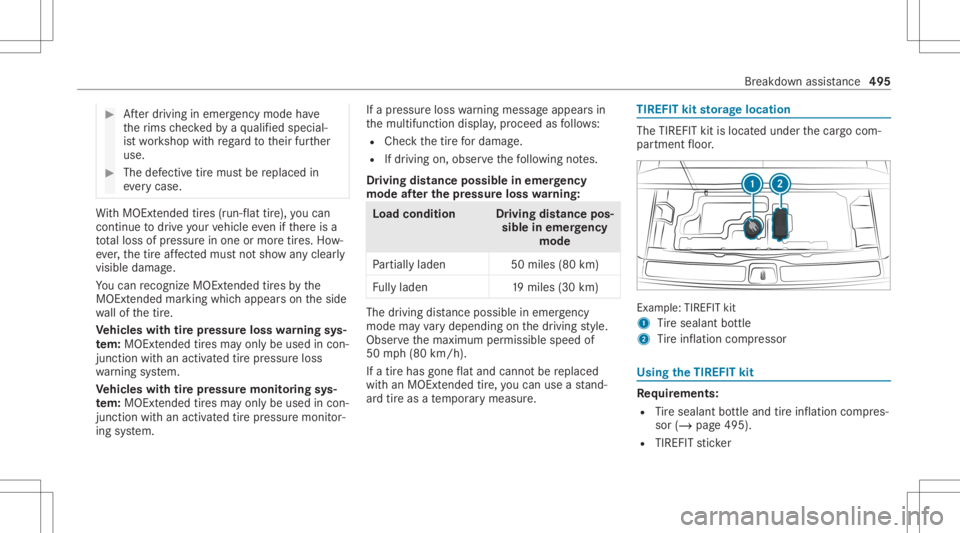
kitstorage location The
TIREF ITkit islocat edunder thecar gocom‐
par tmen tfloor . Ex
am ple: TIREFIT kit
1 Tire seala ntbottle
2 Tire inflation compressor Using
theTIR EFIT kit Re
quirement s:
R Tire seala ntbottle and tireinf lation compres‐
sor (/ page495).
R TIREFIT sticke r Br
ea kdo wnassista nce 49
5
Page 504 of 682
*
NO
TEDama ging thebatt eryth ro ugh
ove rvolt age When
chargin gusin gabat tery charge rwit h‐
out amaximu mchargin gvo ltag e, thebatt ery
or theve hicle electr onics maybe damag ed. #
Onlyuse batterych arge rs wit hamax i‐
mum chargin gvo ltag eof 14.8 V. &
WARNIN GRisk ofexplosion from hydro‐
ge nga signiting
A batt eryge ner ates hydrog en gasdur ing the
ch argin gpr oce ss.Ifth er eis ashor tcir cuit or
spar ksstar tto form ,th er eis adang erofthe
hy drog en gasigniting. #
Mak esur eth at thepositiv ete rm inal of
th econ nect edbatt erydoes notcome
int ocon tact with vehicle parts. #
Neverpla ceme talobje ctsor tools ona
batt ery. #
When connectin gand disconn ectingth e
batt ery, yo umus tobse rveth edescr i‐
bed order forth ebatt eryclam ps. #
When giving star tin gassis tance, alwa ys
mak esur eth at youon lyconnect bat‐
te ry term inals withident icalpolar ity. #
Dur ing star tin gassis tance, youmus t
obse rveth edescr ibedorder forcon‐
necting anddisconnecting thejum per
cables. #
Donotcon nect ordiscon nectthebat‐
te ry cla mp swhile theengine isrunning . &
WARNIN GRisk ofexplosion during
ch argin gpr oce ssand star tin gassis tance
Dur ing thech argin gpr oce ssand star tin g
assis tance, thebatt eryma yre lease anexplo‐
siv ega smixtur e. #
Avoid fire ,open flames ,cr eat ing spar ks
and smoking. #
Mak esur eth at ther eis suf ficie ntventi‐
la tio ndu ring thech argin gpr oce ssand
dur ing star tin gassis tance. #
Donotle an ove ra batt ery. &
WARNIN GRisk ofexplosion from afro‐
zen battery
A disc hargedbatt eryma yfreeze attemp era‐
tur es slightl yabo veorbelo wfreezing point.
Dur ing star tin gassis tance orbatter ych arg‐
ing ,bat tery gasma ybe released. #
Alw aysth aw afroz en bat tery out firs t
bef orech argin git or per form ing star t‐
ing assis tance. If
th eindicat or/warning lampsintheins trument
clus terdo notlig ht up atlow temp eratur es,itis
ve ry likelyth at thedisc hargedbatt eryhas fro‐
zen .In this case youma yne ither jump-start the
ve hicle norcharge thebatt ery.
The service life of abatt eryth at has been
th awe dma ybe dramaticall yshor tened .The
st ar tin gch aract eristic sma ybe impair ed,espe ‐
ciall yat low temp eratur es.
It is recomme ndedthat youha ve ath aw ed bat‐
te ry checkedat aqu alif ied spec ialistwo rkshop. 502
Breakdo wnassis tance