audio MERCEDES-BENZ GLS 2020 Owners Manual
[x] Cancel search | Manufacturer: MERCEDES-BENZ, Model Year: 2020, Model line: GLS, Model: MERCEDES-BENZ GLS 2020Pages: 682, PDF Size: 23.3 MB
Page 25 of 682
Mer
cede s-Benz GenuineParts
+ ENVIR
ONMENT ALNOTEEnvironme ntal
da ma gecau sed bynotus ing recy cle d
re condi tionedcom pone nts Dai
mle rAG offers recy cle dre condi tioned
com pone ntsand parts wit hth esame qualit y
as newpar ts.The same entitlemen tfr om the
Limit edWarrant yis valid asforne wpar ts. #
Use recy cle dre condi tionedcom po‐
nents andparts from Daimler AG. *
NO
TEImpairment oftheoper ating effi‐
cie ncy ofthere stra int systems from
ins talling accessor ypar tsor from repair s
or we lding Air
bags andEmerge ncy Tensi oni ng Device s,
as wellas con trol unit sand sensorsfo rth e
re stra int systems, maybe installed inthefo l‐
lo wing areas ofyour vehicle:
R Door s
R Door pillars R
Doo rsi lls
R Sea ts
R Cockpit
R Instrument cluster
R Cen terconsole
R Lateral roof frame #
Donotins tallacc essor ypar tssuc has
audio systems inthese areas. #
Donotcar ryout repair sor we lding. #
Have afte rm arke tins tallation ofacc es‐
sor ies carried out ataqu alif ied spec ial‐
is two rkshop. Yo
uco uld jeopar dizeth eoper ating safetyof your
ve hicle ifyo uuse parts,tir es and wheel sas well
as acc essor iesreleva nt tosaf etywhic hha ve not
be en approve dby Mer cedes-Ben z.Saf ety-re le‐
va nt systems, e.g.thebr ak esy stem, maymal‐
func tion.Onl yuse Mercedes- BenzGenuineP arts
or par tsof equal qualit y.Onl yuse tires, wheels
and accessor iesthat have been specif ically
appr ovedfo ryo ur vehicle model. Mer
cedes-Ben zGenuineP arts aresubject to
st rict qualit ycon trol. Eac hpar thas been spe‐
ciall yde veloped, manufactured orselec tedfo r
Mer cedes-Ben zve hicles andfine-tu nedforth em.
Ther efor e, onl yMer cedes- BenzGenuineP arts
should beused.
Mor eth an 300,0 00 differe nt Mer cedes-B enz
Ge nui neP arts areav ailable forMer cedes-Benz
model s.
All author ized Mercedes-B enzCent ersmaint ain
a supply ofMer cedes-B enzGenuineP arts for
nece ssaryser vice andrepair work.In addition,
st ra tegically locatedpar tsdeliv erycent erspr o‐
vide forqu ick and reliable partsser vice .
Alw aysspecify theve hicle identif ication number
(VIN) (/page552) when order ing Mer cedes-
Benz GenuineP arts. Oper
ator's Manual
This Oper ator's Manual describesallmodels and
all standar dand optio nal equipme ntavailable for
yo ur vehicle atthetime ofthis Opera tor's Man‐
ua lgoing topress. Countr y-specif icdif fere nces
ar epo ssi ble. No tethat your vehicle mayno tbe Gener
alno tes 23
Page 33 of 682
R
System react ionsin spec ialdrivin gsit uatio ns
(e. g.airbag deployment,int erve ntio nof sta‐
bilit ycon trol systems)
R Ambien tcon ditions (e.g.temp eratur e,rain
sen sor)
In addition toprov iding theactual control unit
func tion,th is dat aassis tsthemanuf acturerin
de tecting andrectify ingmal functi onsand opti‐
mizi ngvehicle functions. Themajority ofthis
dat ais temp orar yand isonl ypr ocessed inthe
ve hicle itself. Onlya small portion ofthedat ais
st or ed intheeve ntor fault mem ory.
When your vehicle isser viced, tech nica lda ta
fr om theve hicle canberead out byser vice net‐
wo rkem ployees (e.g. workshops, manufactur‐
er s) or third par ties (e.g. breakdo wnservice s).
Ser vice sinc lude repair services, maintenanc e
pr ocesses ,wa rrant yclaim sand qualit yassur ‐
anc emeas ures, forex am ple. Theread out isper‐
fo rm ed via theleg ally prescr ibed portfo rth e
diagnos ticsconnection intheve hicle. The
re spectiv eser vice networklocations orthird
par ties collec t,pr oces sand usethedat a.The y
documen tte ch nica lst atus esoftheve hicle, assis
tin findi ng ma lfunctio nsand improv ing
qu alit yand aretrans mittedto themanuf acturer,
if neces sary.Fu rther mor e,themanuf actureris
subject toproduct liability .Fo rth is, themanu‐
fa ctur errequ ires tech nica lda ta from vehicles.
Fa ult mem ories intheve hicle canberese tby a
ser vice outle tas par tof repair ormaint enanc e
wo rk.
Dep endingontheselect edequipment, youcan
im por tdat aint ove hicle convenie nce and info‐
ta inm ent func tionsyo urself .
This includes, forex am ple:
R Mult imed iadat asuc has music ,fi lms orpho‐
to sfo rpla yba ckinan integr ated multim edia
sy stem
R Address book datafo ruse inconnection with
an integr ated hands-fr eesystem oran inte‐
gr ated navig ation system
R Entere dna vig ation destinations
R Dat aabout theuse ofInt erne tser vices
This datacan besave dlocall yin theve hicle orit
is locat edon ade vice whichyo uha ve connect ed
to theve hicle (e.g.asmar tphone, USBflash dr
ive or MP3 player). Ifth is dat ais stor ed inthe
ve hicle, youcan deleteitat anytim e.This data
is sen tto third par ties onlyat your requ est,par‐
ticular lywhen youuse onlineser vices inacc ord‐
anc ewit hth ese ttings that youha ve select ed.
Yo ucan stor eor chang econ venie nce setting s/
ind ividu aliza tionin theve hicle atanytime.
Depending ontheeq uipment, this inc ludes, for
ex am ple:
R Setting sfo rth eseat andsteer ing wheel posi‐
tion s
R Suspension andclimat econ trol settings
R Cus tomizations suchas interior ligh ting
If yo ur vehicle isaccor dinglyeq uipped ,yo ucan
co nn ect your smar tphon eor ano ther mobile end
de vice totheve hicle. Youcan contro lth is by
means ofthecon trol element sint egr ated inthe
ve hicle. Imagesand audiofrom thesmar tphon e
can beoutput viathemultimedia system. Cer‐
ta in inf ormatio nis simult aneousl ytransf erredto
yo ur smar tphon e. Gen
eral no tes 31
Page 307 of 682
R
Spor t
R Progressive
R Unde rstated
R Stand ardDisp lays Sho
wing displa yco nten ton the inst ru men t
cl us ter
Ad dition aldispla ycon tent can also be sho wnon
th eins trument cluster.
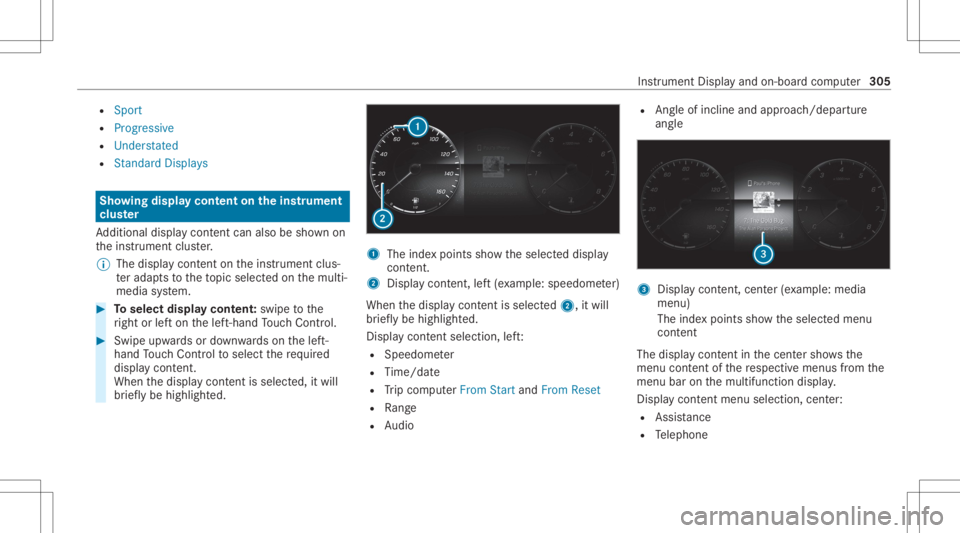
% The displa ycont entontheins trument clus‐
te rada ptsto theto pic select edon themulti‐
media system. #
Toselect displaycont ent:swipe tothe
ri ght orlefton thelef t-hand Touc hCon trol. #
Swip eupw ards ordown wardson thelef t-
hand Touc hCon trol to select there qu ired
displa ycon tent.
Whe nth edispla ycon tent issel ect ed,it wi ll
br iefly be high lighted. 1
The inde xpoint ssho wtheselect eddispla y
con tent.
2 Disp lay cont ent, left (exa mp le:speedom eter)
When thedispla ycon tent issel ect ed2, itwi ll
br iefly be high lighted.
Displa ycon tent sel ecti on, left:
R Spee dometer
R Time/dat e
R Trip com puterFro mStart and FromReset
R Range
R Audio R
Angle of inclin eand appr oach/depar ture
ang le 3
Displa ycon tent, cent er(exa mp le:media
men u)
The inde xpoint ssho wtheselect edmenu
con tent
The displ aycont entinthecent ersho wsthe
menu contentofthere spectiv emenus from the
menu baronthemultifunc tiondispla y.
Dis play cont entmenu selectio n,cent er:
R Assi stanc e
R Telephon e Ins
trumen tDisp lay and on-boar dcom puter 305
Page 315 of 682
wa
rdson thelef t-hand Touc hCon trol to
select thedesir edtelephon enumb er. #
Press thelef t-hand Touc hCon trol.
The telephon enumb erwill bedialed.
The follo wing displa ysma yapp ear instead ofthe
te lephon enumb ersdialed:
R Please Wait:th eapplication isstar tin g.Ifa
Blue tooth®
connecti ontothemobile phone
is no tes tablished, themenu forau thor izing
and conn ectin gamobile phonewillbedis‐
pla yedon themultimedia system
(/ page42 4).
R Updating Data…:th ecall listis being upda‐
te d.
R Import ingCont acts: contacts arebei ng
im por tedfrom themobile phoneorast or ag e
medium.
Ac cep tingor rejec tingan inco min gca ll
Ve hicl eswith Head-up Display:when you
re cei veacall, theInc oming Callmessag ewill
appear ontheHead-up Display. #
Swi peupwa rdsor down wardson thelef t-
hand Touc hCon trol and select0061 (Acc ep t)
or 0076 (Reject ). #
Press thelef t-hand Touc hCon trol.
Yo uma yacc eptor reject thecall using the0061
or 0076 buttononthesteer ing wheel. Se
tting theHead -upDispla yusing theon-
boar dcom puter On-boar
dcom puter:
4 HEAD-UP DISPLA Y
The follo wing Head- upDisp lay se ttings canbe
selec ted:
R Position
R Brightness
R Displa ys
R Messag es
R Assis tance status
R Telephon e
R Audio
R Voice Cont rolSy stem #
Tochoose ase tting: swipe totheright on
th elef t-hand Touc hCon trol.
Se tting smen u5 will besele cted. #
Tocall uptheSe ttings menu :pr ess the
lef t-hand Touc hCon trol. #
Toadjus tth eposit ion:swipe upwards or
do wn wardson thelef t-hand Touc hCon trol. #
Toadjus tth ebr ight ness: swipe tothelef t
or right onthelef t-hand Touc hCon trol. #
Tosetmessag es,assis tance status, tele‐
phone, audioand theVo ice Contr olSy s‐
te m: pres sth elef t-hand Touc hCon trol.
The listof setting optio ns will bedispl ayed. #
Swipe upwards ordown wardson thelef t-
hand Touc hCon trol and selectase tting by
pr essing thelef t-hand Touc hCon trol. In
stru ment Displa yand on-boar dcom puter 31
3
Page 316 of 682
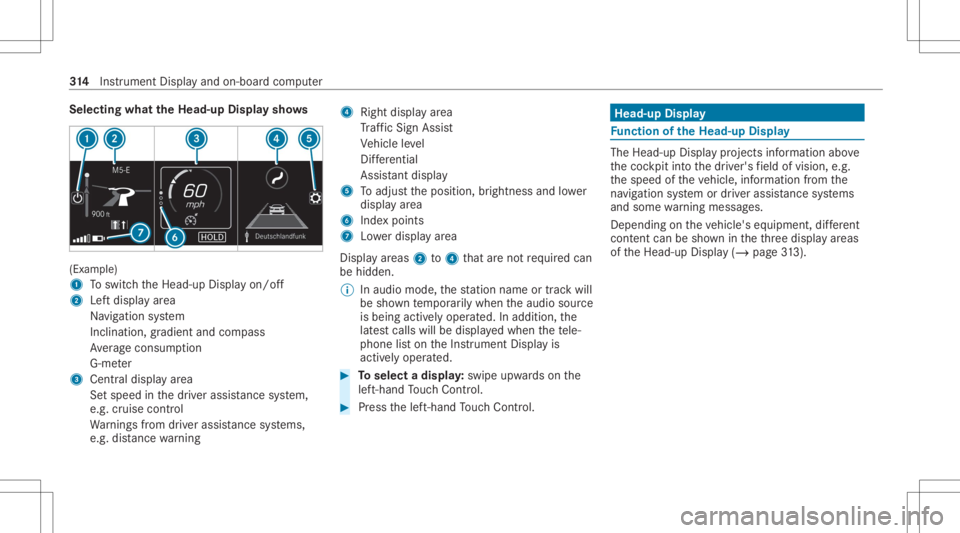
Selec
tingwhat theHead -upDispla ysho ws (Ex
am ple)
1 Toswitc hth eHead-up Displayon/ off
2 Leftdispla yar ea
Na vig ation system
Inc lination ,gr adient andcompass
Av erag econ sum ption
G-me ter
3 Centraldispl ayarea
Se tspee din thedr iver assis tance system,
e.g. cruise control
Wa rnings from driver assis tance systems,
e.g. distance warning 4
Right displa yar ea
Tr af fic Sign Assist
Ve hicle leve l
Dif fere ntia l
Assi stant displa y
5 Toadjus tth eposition ,br ightn essand lowe r
displa yar ea
6 Inde xpoint s
7 Lowe rdisp lay ar ea
Displa yar eas 2to4 that areno tre qu ired can
be hidden .
% Inaudio mode, thest atio nnam eor trac kwill
be sho wntemp orarily when theaudio source
is being activelyoper ated. Inaddition, the
lat estcalls willbedispla yedwhen thete le‐
phon elis ton theIns trument Displayis
activ elyoper ated. #
Toselect adispla y:swipe upwards on the
lef t-hand Touc hCon trol. #
Press thelef t-hand Touc hCon trol. Hea
d-up Disp lay Fu
nction oftheHead -upDispla y The
Head- upDis playpr oje ctsinf ormat ionabove
th ecoc kpit intoth edr iver's field ofvision, e.g.
th espeed oftheve hicle, information from the
na vig ation system ordriver assis tance systems
and some warning mess ages.
Depe ndingon theve hicle's equipment, differe nt
cont entcan besho wnintheth re edispla yar eas
of theHead-up Display(/ page31 3). 31
4
Instrument Displayand on-boar dcom puter
Page 341 of 682
#
Tomo vethedigita lma p:swipe inany
dir ect ion. #
Touse handwr itingtoent ercharact ers:
wr ite th ech aract erwit hon efing er on the
to uc hsc reen.
Tw o-fing erswipe #
Tozoo minand outofthe map: movetwo
fi ng ersto get her orapar t. #
Toenlar georreduce thesize ofase cti on
of awe bsit e:mo vetwofing ersto get her or
apar t. #
Totur nthe map: turncou nter-clo ckwise or
cloc kwis eusing twofing ers.
To uc hing ,holdi ngand moving #
Tomo vethema p:touc hth eto uc hsc reen
and moveyour fing er inanydi re ction. #
Tosetth evo lum eon ascale: touc hth e
to uc hsc reen and movethefing er tothelef t
or right. To
uc hing andholdi ng #
Tosave thedes tina tion inthema p:touc h
th eto uc hsc reen and hold until amessag eis
sho wn. #
Tocall upagl obal menu intheap plica ‐
tions :to uc hth eto uc hsc reen and hold until
th eOPTIONS menuappear s.
Se tting acous ticoper ation feedba ckforthe
to uc hscr een
Mul timedi asy stem:
4 © 5
Set ting s5
System
5 Contr ols
The func tion issuppor tedby theselect ionina
lis t. #
Select Acoustic Operatin gFeedback. #
SetNormal, LoudorOff.
If th efunc tion isactiv ated youwill hear a
clic kingsoun dwhen scrolling inalis t.When
th ebeginnin gor end ofthelis tis reac hed
yo uwill hear another clic king sound. To
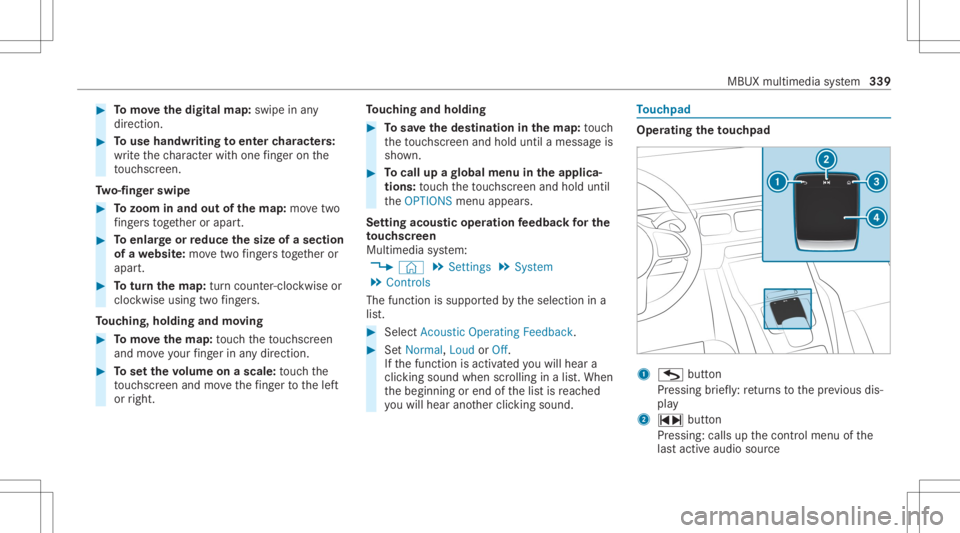
uc hpad Oper
ating theto uc hpad 1
G button
Pr essi ngbrief ly:re tur ns tothepr ev ious dis‐
pla y
2 ~ button
Pr essin g:calls upthecon trol menu ofthe
las tact ive audio source MBU
Xmultim ediasystem 339
Page 343 of 682
Multimedia
system:
4 © 5
Set ting s5
System 5
Audio #
Switc hRead OutHandwrit ingRecognit ionon
or off.
If th efunc tion isactiv ated, charact ersar e
re ad aloud asthey arewr itten on theto uc h‐
pad.
Ac tiv atin g/deac tivatin ghap ticope ratin g
fe edba ckforthe touc hpad
Mul timedi asy stem:
4 © 5
Set ting s5
System
5 Contr ols
The func tion suppor tsyouwhen makingentries
on theto uc hpad andwhen selecting men us. #
Swit chHap ticOpe ratingFeed back on oroff.
Whe nth efunc tion isactiv ated, ata ctil efe ed‐
bac kin thefo rm ofavibr ation iseffect ed
whe nth eto uc hpad isoperat ed. Se
tting acou stic oper ating feedba ckforthe
to uc hpad
Mul timedi asy stem:
4 © 5
Set ting s5
System
5 Contr ols
The func tion issuppor tedby theselect ionina
lis t. #
Select Acoustic Operatin gFeedback. #
SetNormal, LoudorOff.
If th efunc tion isactiv ated youwill hear a
clic kingsoun dwhen scrolling inalis t.When
th ebeginnin gor end ofthelis tis reac hed
yo uwill hear another clic king sound.
Selecting ast ation andtrac kusin gth e
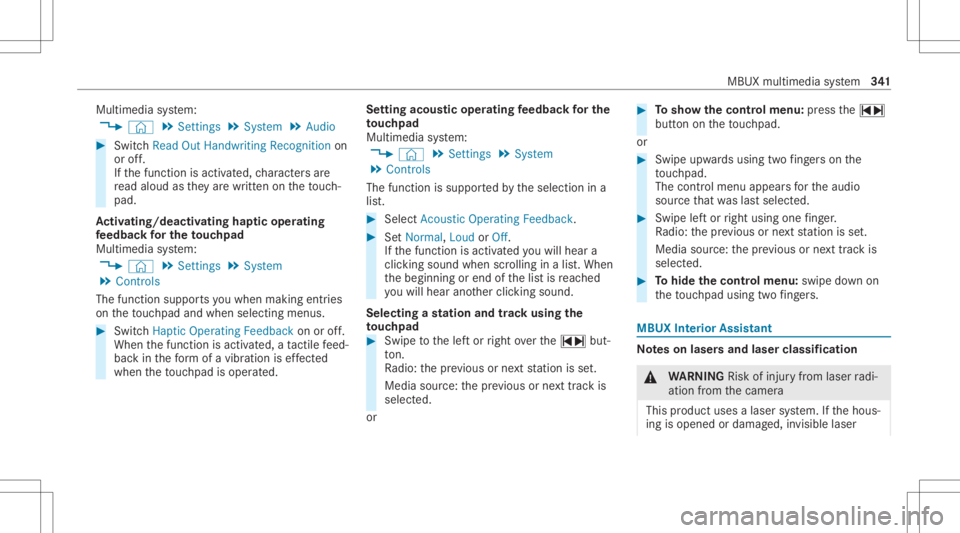
to uc hpad #
Swip eto thelef tor right over the~ but‐
to n.
Ra dio: thepr ev ious ornext statio nis set.
Media source:thepr ev ious ornext trac kis
selec ted.
or #
Tosho wthecontr olmenu :pr ess the~
butt onontheto uc hpad.
or #
Swip eupw ards usin gtw ofing erson the
to uc hpad.
The contro lmen uappear sfo rth eaudio
sour cethat wa slas tselect ed. #
Swipe leftor right using onefing er.
Ra dio: thepr ev ious ornext statio nis set.
Media source:thepr ev ious ornext trac kis
selec ted. #
Tohide thecontr olmenu :swipe down on
th eto uc hpad usingtw ofing ers. MBUX
Inte rior Assis tant No
teson laser sand laser classif ication &
WARNIN GRisk ofinju ryfrom laserradi‐
ation from thecamer a
This product usesalaser system. Ifth ehous‐
ing isopened ordamag ed,invisible laser MBUX
multimedia system 34
1
Page 354 of 682
#
ActivateSho wPro file Sel ecti onWh enGet-
ting In.
Wh entheve hicle isstar ted, themedia dis‐
pla ysho wstheactiv epr ofile. Them
es Ov
ervie wof themes
Yo ucan configur eth eve hicle settin gsaccor ding
to your prefer en ces and save as ath eme. A
th eme canbecalled upanytime viathehome
scr een. Thereis then no need tomak eth e
desir edsettings again.
Ther ear epr e-def inedthemes available, e.g.
Jour ney,Efficie ncy and Lounge.
Ex am ple forthe use ofthemes
Fo rre cur ring drivi ng situa tions, such aslon g
dr ives on thefree wa y,yo ucan save your prefer‐
re dse ttings inath eme intheve hicle.
Yo ucan save thefo llo wing settings inath eme,
fo rex am ple:
R Displays(e.g. navig ation maportach ome ter)
R Prefer redra dio statio n R
Favoreddr ive pr ogr am
These settings aresa ve dunder thename you
wish when setting upath eme (/page352). On
th ene xt free wa yjo ur ne yyo ucan selectthis
th eme andther eb yre stor eyo ur setting s.
Cont entofath eme
Dep endingonvehicle equipment thefo llo wing
se ttings canbesave din ath eme:
R Setting oftheIns trument Display
(/ page30 1)
R Setting oftheHead-up Display(/ page31 3)
R Setting oftheambient lighting(/page16 0)
R Activeau dio sou rce, e.g. radio orUSB
R Startin gsc reen forth emedia display
R Visual style (/ page369)
R DYNA MIC SELE CTdrive pr ogr am
(/ page19 8)
R Eco star t/ stop setting (/ page19 4)
R Navig ation system settings
% Atheme contains thecur rently activeset‐
tings intheve hicle. Calling
upthemes
Multi media system:
4 © #
When thehome screen issho wn, swipe up
until THEMES appear s. #
Select ath eme.
Cr eating newthemes
Re quirement s:
R The settings whichar eto be save din the
th eme areactiv e.
The overvie wsho wsthese ttings whichcan
be save din ath eme (/page352).
Multimedia system:
4 © 5
THE MES #
Select 0081Create Theme.
The settings whichar esa ve din theth eme
ar esho wn. #
Select Continue0048. #
Select additional settings whichar eto be
sa ve din theth eme.
R Select Audio, tosave theactiv eaudio set‐
ting sin theth eme. 352
MBUX multimedia system
Page 355 of 682
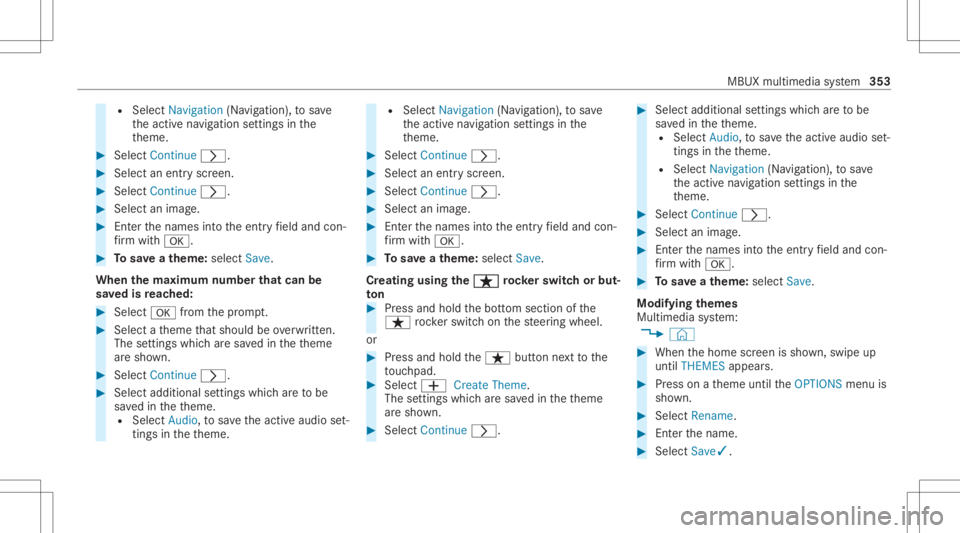
R
Select Nav igati on (Navigation ),to save
th eactiv ena vig ation settings inthe
th eme. #
Select Continue0048. #
Select anent ryscr een. #
Select Continue 0048. #
Select animag e. #
Enterthenames intoth eent ryfield and con‐
fi rm with0076. #
Tosave ath eme: selectSav e.
When thema xim um num berthat can be
sa ve dis reac hed: #
Select 0076from thepr om pt. #
Select ath eme that shoul dbe ove rwritt en.
The setting swh ich ar esa ve din theth eme
ar esho wn. #
Select Continue0048. #
Select additional settings whichar eto be
sa ve din theth eme.
R Select Audio, tosave theactiv eaudio set‐
ting sin theth eme. R
Select Navigation (Navigation ),to save
th eactiv ena vig ation settings inthe
th eme. #
Select Continue0048. #
Select anent ryscr een. #
Select Continue 0048. #
Select animag e. #
Enterthenames intoth eent ryfield and con‐
fi rm with0076. #
Tosave ath eme: selectSav e.
Cr eat ing using theß ß
rock er switc hor but ‐
to n #
Press and hold thebo ttom sect ionofthe
ß rock er switc hon thesteer ing wheel.
or #
Press and hold theß buttonnext to the
to uc hpad. #
Select 0081 CreateThem e.
The setting swhic har esa ve din theth eme
ar esho wn. #
Select Continue0048. #
Select additional settings whichar eto be
sa ve din theth eme.
R Select Audio, tosave theactiv eaudio set‐
ting sin theth eme.
R Select Navigation (Navigation ),to save
th eactiv ena vig ation settings inthe
th eme. #
Select Continue0048. #
Select animag e. #
Enterth enames intoth eent ryfield and con‐
fi rm with0076. #
Tosave ath eme: selectSav e.
Mod ifyin gth emes
Multi media system:
4 © #
When thehome screen issho wn, swipe up
until THEMES appear s. #
Press onath eme until theOPTIONS menuis
sho wn. #
Select Rename. #
Enterth ename. #
Select Save✓. MBUX
multimedia system 353
Page 363 of 682
Switc
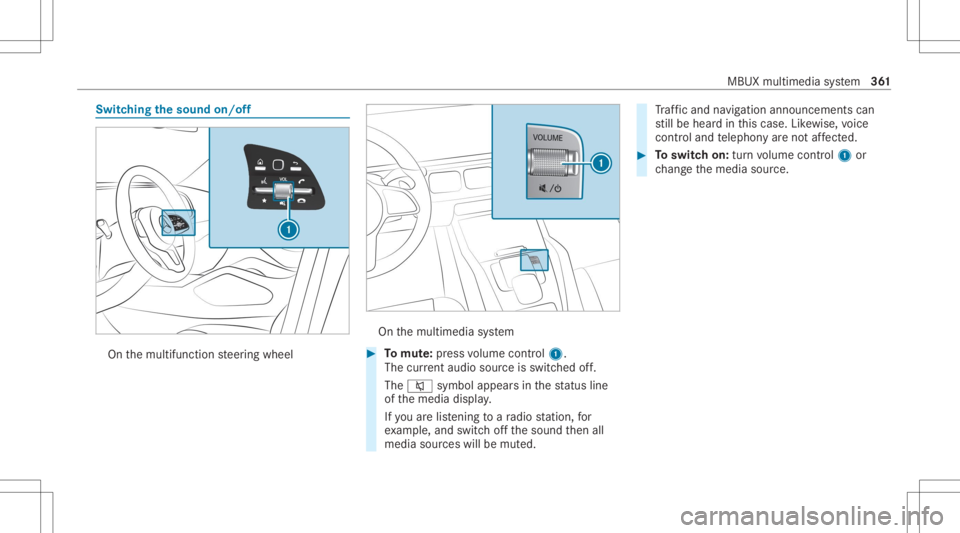
hingthesound on/off On
themultifunc tionsteer ing wheel On
themultimedia system #
Tomut e:pres svo lume control 1.
The current audio sou rceis switc hedoff.
The 0063 symbol appearsin thest atus line
of themedia display.
If yo uar elis tening toara dio statio n,for
ex am ple, and switchoffth esound then all
media sourceswillbemut ed. Tr
af fic and navig ation annou ncements can
st ill be hear din this case. Likewise, voice
con trol and telephon yar eno taf fect ed. #
Toswitc hon: turnvo lume control 1 or
ch ang eth emedia source. MBUX
multimedia system 36
1