ad blue MERCEDES-BENZ GLS 2020 Owners Manual
[x] Cancel search | Manufacturer: MERCEDES-BENZ, Model Year: 2020, Model line: GLS, Model: MERCEDES-BENZ GLS 2020Pages: 682, PDF Size: 23.3 MB
Page 36 of 682
Cop
yright Fr
ee and open- sourcesof tware In
fo rm atio non lice nsefo rfr ee and open-sou rce
sof twareused inyour vehicle canbefound on
th edat acar rier inyour vehicle document wallet
and withupdat eson thefo llo wing websit e:
htt p:// www .mercedes- benz.com/open source Re
gis tere dtrademar ks R
Bluetoo th®
is are gis tere dtra demar kof Blue‐
to othSIG, Inc.
R DTS™ isare gis tere dtra demar kof DT S,Inc.
R Dolb y®
and MLP ™arere gis tere dtrademar ks
of DOLB YLabor ator ies.
R Bab ySmar t™,ESP®
and PRE-S AFE®
arere g‐
is te re dtra demar ksofDaimler AG.
R HomeL ink®
is are gis tere dtrademar kof
Johnson Controls.
R iPod ®
and iTune s®
arere gis tere dtra demar ks
of Apple Inc. R
Burmes ter®
is are gis tere dtra demar kof
Bur mes terAu diosy steme GmbH.
R Micr osoft®
and Windo wsMedia ®
arere gis‐
te re dtra demar ksofMicr osoftCor poration.
R SIRIUS ®
is are gis tere dtra demar kof Sir ius
XM Radio Inc.
R HD Radio™ isare gis tere dtrademar kof iBiq‐
uity Digit alCor poration.
R Graceno te®
is are gis tere dtrademar kof
Gr aceno te,Inc .
R ZAGA TSurve y®
and relat ed brands arere gis‐
te re dtra demar ksofZag atSur vey, LL C. 34
Generalno tes
Page 147 of 682
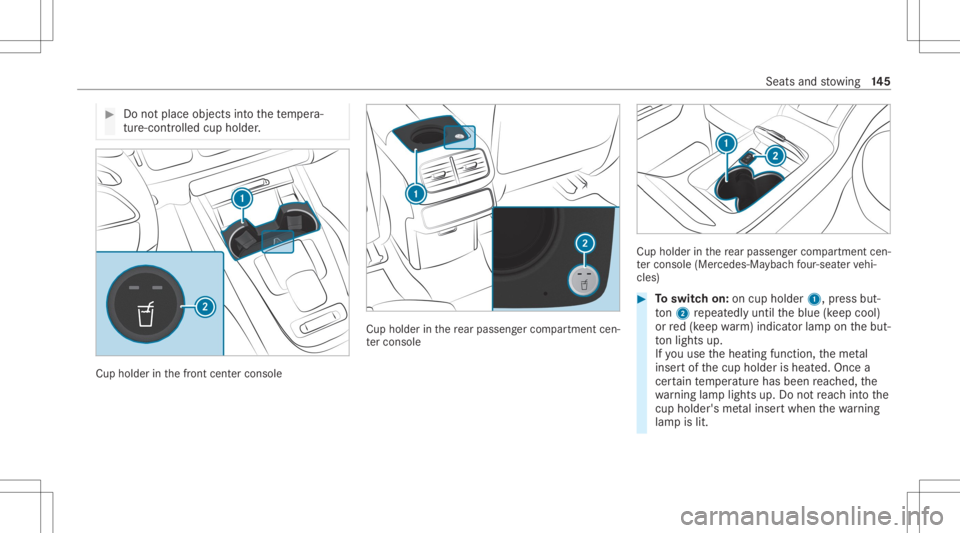
#
Donotpl ace objects intoth ete mp era‐
tur e-co ntro lled cup holder . Cup
holder inthefront cent ercons ole Cup
holder inthere ar passe nger com partment cen‐
te rconsole Cup
holderinthere ar passe nger com partment cen‐
te rconsole (Mercedes-Ma ybachfour -seat ervehi‐
cles) #
Toswitc hon: oncup holder 1,press but‐
to n2 repeat edly until theblue (keep cool)
or red(keep warm)indic ator lam pon thebut‐
to nlights up.
If yo uuse theheating function,th eme tal
inse rtof thecup holder isheat ed.Onc ea
cer tain temp eratur ehas been reac hed, the
wa rning lam plight sup. Donotre ac hint oth e
cup holder 'sme talinse rtwhen thewa rning
lam pis lit. Seat
sand stow ing 14
5
Page 315 of 682
wa
rdson thelef t-hand Touc hCon trol to
select thedesir edtelephon enumb er. #
Press thelef t-hand Touc hCon trol.
The telephon enumb erwill bedialed.
The follo wing displa ysma yapp ear instead ofthe
te lephon enumb ersdialed:
R Please Wait:th eapplication isstar tin g.Ifa
Blue tooth®
connecti ontothemobile phone
is no tes tablished, themenu forau thor izing
and conn ectin gamobile phonewillbedis‐
pla yedon themultimedia system
(/ page42 4).
R Updating Data…:th ecall listis being upda‐
te d.
R Import ingCont acts: contacts arebei ng
im por tedfrom themobile phoneorast or ag e
medium.
Ac cep tingor rejec tingan inco min gca ll
Ve hicl eswith Head-up Display:when you
re cei veacall, theInc oming Callmessag ewill
appear ontheHead-up Display. #
Swi peupwa rdsor down wardson thelef t-
hand Touc hCon trol and select0061 (Acc ep t)
or 0076 (Reject ). #
Press thelef t-hand Touc hCon trol.
Yo uma yacc eptor reject thecall using the0061
or 0076 buttononthesteer ing wheel. Se
tting theHead -upDispla yusing theon-
boar dcom puter On-boar
dcom puter:
4 HEAD-UP DISPLA Y
The follo wing Head- upDisp lay se ttings canbe
selec ted:
R Position
R Brightness
R Displa ys
R Messag es
R Assis tance status
R Telephon e
R Audio
R Voice Cont rolSy stem #
Tochoose ase tting: swipe totheright on
th elef t-hand Touc hCon trol.
Se tting smen u5 will besele cted. #
Tocall uptheSe ttings menu :pr ess the
lef t-hand Touc hCon trol. #
Toadjus tth eposit ion:swipe upwards or
do wn wardson thelef t-hand Touc hCon trol. #
Toadjus tth ebr ight ness: swipe tothelef t
or right onthelef t-hand Touc hCon trol. #
Tosetmessag es,assis tance status, tele‐
phone, audioand theVo ice Contr olSy s‐
te m: pres sth elef t-hand Touc hCon trol.
The listof setting optio ns will bedispl ayed. #
Swipe upwards ordown wardson thelef t-
hand Touc hCon trol and selectase tting by
pr essing thelef t-hand Touc hCon trol. In
stru ment Displa yand on-boar dcom puter 31
3
Page 333 of 682
Ve
hicl evo ice comm ands Vo
ice comm and Colloquialexam ple Function
Temperature colder Iwould liketoreduce thetemper a-
ture Lo
we rsthete mp eratur eof theair con ditionin gsy stem.
Air recirc ulation on Iwould liketoactivat ethe aircirc u-
lation Switc
hesonair recir cul ation mod efo rth eair con ditionin gsy stem.
Autom aticclimate control driver onIwould liketoswitch onthe auto-
matic climate control forthe driv-
er's seat Switc
hesonaut omatic climatecon trol forth edr iver's orfront passeng er
side.
Ambien tlight blue Iwould liketoset the inter iorlight-
ing toblue Switc
hestheambiance light,e.g.toblue.
Wave massage driveron Iwould liketoswitch onthe wave
massage forthe driver' sseat Switc
hesonthewav emassag efo rth edr iver's orfront passeng erseat.
Massage driver'sseatoff Switchthe driver's sidemassage
off Switc
hesoffth emassag efunc tion forth edr iver's orfront passeng erseat.
Seat heating driveron Iwould liketoswitch onthe seat
heating forthe driver's seat Switc
hesontheseat heating forth edr iver's orfront passeng erseat.
Seat heating frontpassenger level
2 Seat
heating front-passenger on
level 2 Se
tstheseat heating forth edr iver's orfront passeng erseat toleve l2. Vo
ice Cont rolSy stem 33
1
Page 373 of 682
If
atime zone issetth etime issetaut omaticall y
using thetime zone.The time canbeadjus tedby
a max imum ofplus ormin us60 min utes. #
Adjus tth etime using theslide control.
Se tting theda te #
Select Set Date . #
Seta da te.
% Invehicles withGPS, adat ecanno tbe set
eve nwi th act ive man ualtimeadjus tment s.
The dateis then setaut omaticall yth ro ugh
th eselect edtime zone. Switc
hingvoice amplif ication tothere ar
on/ off(v ehic leswith long wheelbase) Re
quirement s:
R Your vehicle iseq uipped withth eBur mes ter®
sur round soun dsy stem ortheBur mes ter®
high-end 3Dsurround soun dsy stem.
R The ignition isswitc hedon.
R Door s,side windo wsand thepanor amaroof
wit hpo we rtilt/sli dingpanel areclosed . R
Atleas tone seat beltisfastened onthere ar
ben chseat.
Multimedia system:
4 © 5
Set ting s5
System 5
Audio
5 Voice Amplific ation
The func tion suppor tscomm unication between
th edr iver and front passeng erwit hpasseng ers
in there ar com partment .When voice amplif ica‐
tion tothere ar isact ivat ed, thesignals picked
up bythemicr ophone aream plif ied and played
bac kove rth espeak ersin there ar com partment ,
depen dingupon vehicle noise leve ls. An auto‐
matic adjustment occursbased onspeak ervol‐
ume andambien tnois ein order toimprov e
speec hint elligi bility andmaint ainthenatura l‐
ness ofspeec h. #
Activateor deacti vate thefunc tion.
Se tting theint ensit yof thevo ice amplif ica‐
tion #
Selec tVoice Amplificat ion-Int ensit y. #
Setth eint ensit yon thecon trol.
Depen dingontheint ensit yse t,th evo ice
am plif icat ion tothere ar isinc reased or
re duced. Blue
tooth® Inf
orma tion abou tBlu etoo th®
Bl ue tooth®
tech nol ogy isast andar dfo rshor t-
ra ng ewi reless datatransf erup toappr oximat ely
32. 8ft (10 m).
Yo ucan useBlue tooth®
to connect your mob ile
phon eto themultimedia system and usethefo l‐
lo wing functions,forex am ple:
R Han ds-free system withaccess tothefo llo w‐
ing option s:
- con tacts (/ page 429)
- call lists (/ page432)
R Interne tconnection (/page44 9)
R List ening tomusi cvia Blue tooth®
audio
(/ page46 0)
R Trans ferring busine sscar ds(vCar ds)intoth e
ve hicle MBUX
multimedia system 37
1
Page 374 of 682
Blu
etoo th®
is are gis tere dtra demar kof Blue‐
to othSpecial Interes tGr oup (SIG) Inc.
% Interne tconn ection viaBlue tooth®
is no t
av ailable inall coun tries.
Ac tiv atin g/deac tivatin gBlue tooth®
Multimedia system:
4 © 5
Set ting s5
System
5 Wi-Fi &Bluetoot h #
Switc hBluetoot hon oroff. Wi
-Fi Wi
-Fico nne ctio nove rview
Yo ucan useWi-Fi toestablish acon nection with
a Wi -Fi networkand toacc ess theInt erne tor
ot her networkde vices.
The follo wing connection option sar eav ailable:
R Wi-Fi conne ction
The Wi-Fi conne ctionto aWi -Fi-ca pable
de vice ,e.g .a mob ile pho neorata ble tPC is
es tab lished.
R Multim ediasystem asaWi -Fi hotspo t Usi
ngthis func tion,a ta ble tPC ornotebook
can becon nected, forex am ple. Theconnec‐
te dde vice canusethedat ata riff of theve hi‐
cle. Amaximum ofthre ede vices canbecon ‐
nect edwithth eho tspo tat thesame time.
% The useoftheve hicle datata riff by extern al
de vic es isno tav ailable inall coun tries.
To estab lish acon nection ,yo ucan usethefo l‐
lo wing methods:
R WPS PIN
The conn ection toasec ureWi -Fi networkis
mad evia aPIN .
R WPS PBC
The conne ctionto asec ureWi -Fi networkis
mad eby pressing abutt on(push button).
R Secur itykey
The conn ection toasec ureWi -Fi networkis
mad evia asecu rity key.
Se tting upWi-Fi
Re quirement s: R
Tosetup theWi -Fico nne ctio nof themu l‐
tim edia system withne wde vices: ther eis
no comm unication moduleinstalled.
R The device tobe con nectedsuppor tsone of
th eth re emeans ofcon nect iondescr ibed.
Multimedia system:
4 © 5
Set ting s5
System
5 Wi-Fi &Bluetoot h
Ac tiv atin g/deac tivatin gWi -Fi #
Sele ctWi-Fi .
If Wi -Fi issw itched on,youcan conn ect the
multime diasystem withex tern al ho tspo ts.If
Wi -Fi isde acti vated, comm unicationviaWi-Fi
to all devic es isint erru pte d.This also means
th at acon nectionto thecomm unication
module cannotbe established. Thensome
func tionssuc has dynamic routeguidan ce
wit hLiv eTr af fic Inf ormati onareno tav aila‐
ble.
Connect ingthemu ltim edia system witha
ne wde vice viaWi-Fi
Thi sfunction isavailable ifacom mun ication
modul eis no tins talled. 37
2
MBUX multimedia system
Page 375 of 682
The
type ofconn ection established mustbe
select edon themultimedia system and onthe
de vice tobe con nected.
% The connection procedur ema ydif fer
dependin gon thede vice. Followtheins truc‐
tion sth at aresho wninthedispla y.Fu rther
inf ormation (seethemanuf acturer'soper at‐
ing instruction s). #
Select Internet Setting s. #
Select Connec tvia Wi-Fi. #
Select AddHotspot.
Connecting usingasecur itykey #
Select theop tion s0048 ofthedesir edWi-Fi
ne twork. #
Select Connect UsingSecu rityKey. #
Have thesecur itykeydisp laye don thede vice
to be con nected(see themanuf acturer's
oper ating instruction s). #
Enterth is secur itykeyon themultimedia sys‐
te m. #
Conf irm theent rywit h¡. %
Alldevic es suppor ta sec urity keyas a
mean sof conn ection .
Connec ting using aWPS PIN #
Selec tth eop tion s0048 ofthedesir edWi-Fi
ne twork. #
Select Connect viaWPS PINInpu t.
The multime diasy stem gener ates an eight-
di gitPIN . #
Enterthis PIN onthede vice tobe con nected. #
Conf irm theent ry.
Connect ingusin gabut ton #
Select theop tion s0048 ofthedesir edWi-Fi
ne twork. #
Select Connect viaWPS PBC. #
Select "Connect viaWPS PBC"in theop tion s
on thede vice tobe con nected(see theman‐
uf actur er'soper ating instruction s). #
Press theWPS buttononthede vice tobe
con nected. #
Select Continueinthemultimedia system. Ac
tiv atin gaut omati cco nn ectio n #
Select Connect viaWi-Fi. #
Select theop tion s0048 ofthedesir edWi-Fi
ne twork. #
ActivatePe rma nent InternetConnecti on.
Co nnectin gwi th akno wnWi-Fi #
Sele ctConnect viaWi-Fi . #
Sele ctaWi -Fi network.
The conn ection ises tablished again.
Se tting upaWi -Fiho tspo t
Mul timed iasystem:
4 © 5
Set ting s5
System
5 Wi-Fi &Bluetoot h
Conf iguringthemu ltim edia system asaWi -
Fi ho tspo t
The type ofconnection established depends on
th ede vice tobe con nected. The func tion must
be suppor tedby themultimedia system and by
th ede vice tobe con nected. The type ofcon nec‐
tion established mustbe select edon themulti‐
media system and onthede vice tobe con nec‐
te d. MBUX
multimedia system 37
3
Page 403 of 682
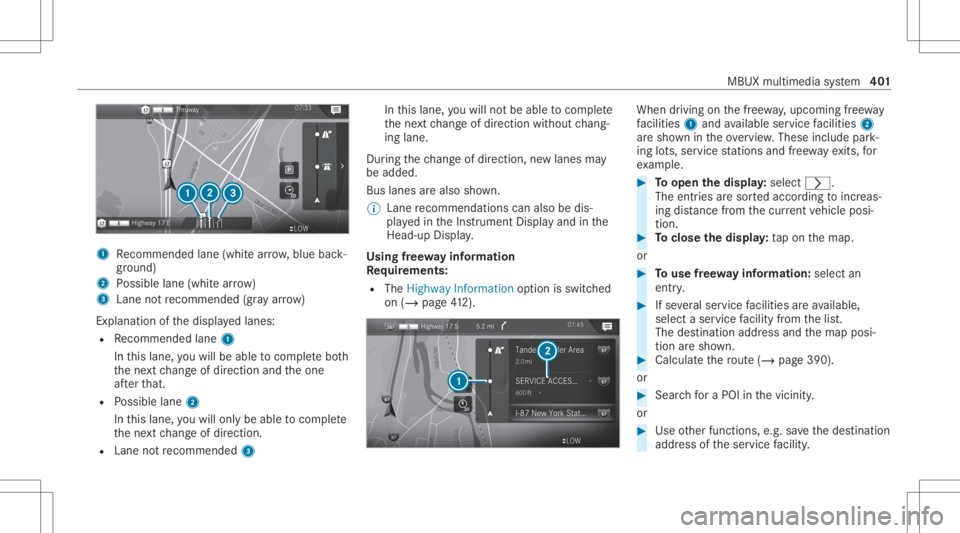
1
Recomme ndedlane (whit ear row ,blue back‐
gr ound)
2 Possible lane(whit ear ro w)
3 Laneno tre comme nded(gray arro w)
Ex planat ionofthedispla yedlanes:
R Recomme ndedlane 1
In this lane, youwill beable tocom plet ebo th
th ene xt chang eof dir ect ion and theone
af te rth at.
R Possible lane2
In this lane, youwill onlybe able tocom plet e
th ene xt chang eof dir ect ion.
R Lan eno tre comme nded3 In
this lane, youwill notbe able tocom plet e
th ene xt chang eof dir ect ion without chang ‐
ing lane .
Dur ing thech ang eof dir ect ion,ne wlane sma y
be added.
Bus lanesar ealso shown.
% Lanere comme ndations canalso be dis‐
pl ay ed intheIns trument Displayand inthe
Hea d-up Display.
Using free wa yinf ormation
Re quirement s:
R The Highway Informat ionoption isswitc hed
on (/ page41 2). Wh
endrivin g on thefree wa y,upco mingfree wa y
fa cil ities 1 and available servicefa cil ities 2
ar esho wnintheove rview. These include park‐
ing lots, ser vice statio nsand free wa yex its, for
ex am ple. #
Toopen thedisp lay: select 0048.
The entriesaresor tedaccor dingtoinc reas‐
ing distance from thecur rent vehicle posi‐
tion. #
Toclose thedisp lay: tapon themap.
or #
Touse free wa yinf ormation: selectan
entr y. #
Ifse veralser vice facil ities areav ailable,
selec ta ser vicefa cil ity from thelis t.
The destinat ionaddr essand themap posi‐
tion aresho wn. #
Calculat eth ero ute(/ page39 0).
or #
Sea rchfo ra POI inthevicin ity.
or #
Use other funct ions, e.g.save thedes tinat ion
addr essoftheser vice facil ity . MBUX
multime diasy stem 40
1
Page 425 of 682
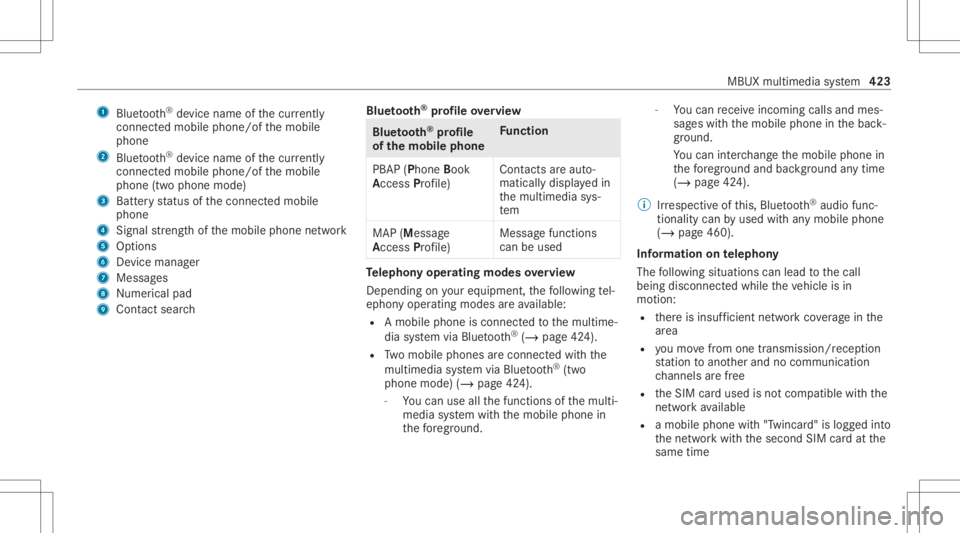
1
Bluetoo th®
de vice name ofthecur rently
conne cted mob ile pho ne/o fth emobile
phone
2 Blue tooth®
de vice name ofthecur rently
conne cted mob ile pho ne/o fth emobile
phone (twophone mode)
3 Batt eryst atus ofthecon nect edmobile
phone
4 Signal stre ngt hof themobile phonenetwork
5 Option s
6 Device manag er
7 Messag es
8 Nume rical pad
9 Contact search Blue
tooth®
pr ofile ove rview Blue
tooth®
pr ofile
of the mobi lephon eFu
nction
PB AP (Phone Book
Access Profile) Cont
actsar eaut o‐
matic allydispla yedin
th emultimedia sys‐
te m
MAP (Messag e
Access Profile) Messag
efunc tions
can beused Te
lephon yoper ating mod esove rview
Depen dingonyour equipme nt,th efo llo wing tel‐
ephon yoper atingmodes areav ailable:
R Amobi lephon eis con nectedto themultime‐
dia system viaBlue tooth®
(/ pag e42 4).
R Twomobile phones areconn ectedwithth e
multime diasystem viaBlue tooth®
(tw o
phone mode) (/page42 4).
- Youcan useallthefunc tionsof themulti‐
media system withth emobile phonein
th efo re grou nd . -
Youcan recei veinc omin gcalls andmes‐
sag eswit hth emobile phoneinthebac k‐
gr ound.
Yo ucan interch ang eth emobile phonein
th efo re grou nd and background anytim e
(/ page42 4).
% Irre spectiv eof this, Blue tooth®
audio func‐
tio nalit ycan byused withan ymob ilephon e
(/ page46 0).
Inf orma tionon telephon y
The follo wing situat ionscanlead tothecall
being discon nectedwhile theve hicle isin
mo tion:
R ther eis insuf ficie ntnetworkco verage inthe
ar ea
R youmo vefrom one transmis sion/reception
st atio nto ano ther and nocomm unication
ch ann elsarefree
R theSIM cardused isno tcom patible withth e
ne tworkav ailable
R amobi lephon ewit h"T winc ard" islogg edinto
th ene tworkwit hth esecon dSIM cardat the
same time MBUX
multimedia system 423
Page 426 of 682
The
multimedia system suppor tscalls inHD
Vo ice ®
forim prov ed speec hqu alit y.Arequ ire‐
men tfo rth is isthat themobile phoneandthe
mobil ephone networkpr ov ider oftheper son
yo uar ecalli ngsuppo rtHD Voice ®
.
Depe ndingon thequ alit yof thecon nect ion,the
vo ice qualit yma yfluct uat e.
Connect ingamob ilephone
Re quirement s:
R Blue tooth®
is act ivat ed on themobile phone
(see themanuf acturer'soper ating instruc‐
tion s).
R Blue tooth®
is act ivat ed on themultimedia
sy stem (/ page37 2).
Mul timediasystem:
4 © 5
Phone
Sear ching fora mob ile pho ne #
Select í. #
Select Connect NewDevice. Co
nnectin gamob ile pho ne(au thor ization
usi ng Secure Sim plePairing) #
Selec ta mobile phone. #
Acode isdispla yedin themultimedia system
and onthemobile phone. #
Ifth ecodes match: con firm thecode on
th emobile phone.
% Forolde rmobil ephone models,ent eraone
to sixt een-digit numbercodeonthemobile
phone andonthemultimedia system for
aut hor izat ion.
% Upto15 mobil ephones canbeauthor ized
on themultimedia system.
Au thor ized mobile phones arere connect ed
au tomatical ly.
% The conn ectedmobile phonecanalso be
used asBlue tooth®
audio equipme nt
(/ page46 0).
Connect ingasecond mobilephone (two
ph one mod e)
Re quirement s:
R Atleas tone mobile phoneis alr eady connec‐
te dto themultimedia system viaBlue tooth®
. Multimedia
system:
4 © 5
Phone #
Select í. #
Select Connec tNew Devic e. #
Select themobile phone. #
Select Devicename 1+Devic ename 2.
The select edmobile phoneiscon nect edto
th emultimedia system.
Int erch angi ngmobi lephone s(tw ophone
mode)
Mul timedi asy stem:
4 © 5
Phone
Bo th mobil ephones aresho wnindivi duallyin
sepa rate tabs. #
Select theta bwit hth edesir edmobile
phone.
The mobile phoneintheselect edtabis the
mobil ephone inthefo re grou nd .
Wi th theexc eption oftelephon ese ttings ,th e
submenus inthete lephon emen ure lat eto
th emobile phoneinthefo re grou nd .In the 42
4
MBUX multimedia system