ECO mode MERCEDES-BENZ GLS 2021 Owner's Manual
[x] Cancel search | Manufacturer: MERCEDES-BENZ, Model Year: 2021, Model line: GLS, Model: MERCEDES-BENZ GLS 2021Pages: 510, PDF Size: 7.26 MB
Page 246 of 510
R
theOf f-road orOff-road Plus (onlyve hicles
wit hOf f-road package )dr ive pr ogr am has
been select ed
R theignition isswitc hedon
R alldoor sand thehood areclosed
R thetransmission isno teng aged inposition
005D
R ther eis no trailer coupled
R theve hicle isoutdoor s
R thede tected late ra linc linat ionoftheve hicle
mus tno texc eed appr ox.15 °
R thesy stem iswit hin itsoper ating temp era‐
tur e
R theon- boar dvo ltag eis suf ficie ntly high
Mu ltimed iasystem:
4 © 5
Set ting s5
Assist ance
5 Offr oad Assist ant
Re covery mode
Re covery mode assiststh edr iver when pulling
aw ay on rough terrain, suchas san dor snow . #
Select Recove ryMod e. #
Select Start .
Re covery mode isactiv ated. #
Select Stoptostop reco very mode.
Re covery mode isau tomatical lydeactiv ated in
th efo llo wing situat ions:
R youar eact uall ytrave ling faster than 9mp h
(1 5 km/ h)
R afte ra ru nning timeof30 seco nds
R itis de tected that an obj ect has hitthe
und erbody oftheve hicle hard
R notall conditions areme t
% Further information onreco very mode
(/ page239) .
Indiv idual wheelcon trol
Individ ualwhee lcontr olenabl estheve hicle leve l
to be setsepar ately foreac hwhee l. #
Select IndividualWheel Ctrl.. #
Setth eve hicle leve lfo rth edesir edwheel.
% Youcan also usetheto uc hdispl aytosetth e
le ve lfo rtw oor mor ewhee lsat thesame
time. #
Select Resettosetall wheels tothedef ault
se tting.
Individual wheelcontrol isaut omatic allydeacti‐
va tedin thefo llo wing situat ions:
R youar etra veling faster than 9mp h
(1 5 km/ h)
R itis de tected that an obj ect has hitthe
und erbody oftheve hicle hard
R notall conditions areme t
% Further information onindividua lwheel con‐
tr ol (/ page24 0). Pa
rking Assis tPA RK TRONI C Fu
nction ofParking Assis tPA RK TRONI C
Pa rking AssistPA RK TRONI Cis an elec tron ic
par kingassi stanc esy stem withultr asound. It
monit orsth ear ea around your vehicle using mul‐
tiple sensor son thefront bum perand onthe
re ar bum per.Pa rking AssistPA RK TRONI Csho ws
yo uth edis tance betwee nyo ur vehicle anda
de tected obs tacle visually and audibly . 24
4
Driving and parking
Page 272 of 510
designed
forth ere qu iremen tsof trailer
opera tion. #
Donotch ang eth eball neckor the
tr ai le rhi tc h. The
values approvedby themanuf acturercan be
fo und ontheidentif ication platesand inthe
"T ec hn ical data"sec tionunde r"T ra iler hitch"for
th eto wing vehicle (/page406). &
WARNIN GSw erving oftheve hicle/
tr ailer combination duetoinc reased
spee d
Yo uco uld lose contro lof theve hicle/tr ailer
combination.
The vehicle/tr ailercombination mayeve ntip
ove r. #
Under nocircums tances should yo utry
to stra ight entheve hicle/tr ailercombi‐
nation byinc reasin gth espeed. #
Reduce your spee dand donotco unt er‐
st eer . #
Ifneces sary,appl yth ebr ak es. *
NO
TEDama getotheengine asare sult
of ove rheating #
Ifyo ure trof itatrai le rhi tc h, mod ifica ‐
tio ns totheengine cooling system may
be neces sary,dependin gon theve hicle
model.
When retrof itti ng atrai le rhi tc h, ob serveth e
fa stening pointson thech assis . Re
trof itti ng atrai le rhi tc his pe rm issible onlyif a
trailer loadisspec ified inyour vehicle docu‐
ments. Ifth is is no tth ecase, theve hicle isno t
appr ovedfo rtr ail er oper ation.
Fu rther information canbeobt ained ataqu ali‐
fi ed specialis two rkshop.
If th etrailer coupling isde tach able, itis esse n‐
tial tocom plywith theoper ating instruction sof
th etrailer coupling manufacturer.
Couple anduncouple thetrailer carefull y.Ifyo u
do notcon nectth etra iler totheto wing vehicle
cor rectl y,thetrailer maybecome detach ed. Obser
vethefo llo wing noteson theto ngu e
we ight :
R Donotuse ato ngu ewe ight that exceed sor
fa lls belo wtheper missible tongu ewe ight
R Use ato ngu ewe ight asclos eas possible to
th emaximum tongu ewe ight
Do notex ceed thefo llo wing values:
R Perm issible towing capac ity
R Perm issible rear axle load oftheto wing vehi‐
cle
R Perm issible gross mass oftheto wing vehicle
R Perm issible gross mass ofthetra iler
R Maximum permissible speedofthetra iler
En sur eth efo llo wing beforest ar tin gajo ur ne y:
R The tirepr essur eon there ar axle oftheto w‐
ing vehicle issetfo ra maximu mloa d
R The lighting ofthecon nect edtrailer isoper a‐
tion al
In theeve ntofincr eased rear axle load, theve hi‐
cle/tra ilercombination mayno texc eed amaxi‐
mum speed of62 mph(1 00 km/h) forre ason s 27
0
Driving and parking
Page 282 of 510
Selec
tingwhat theHead -upDispla ysho ws (Ex
am ple)
1 Switc hestheHead-up Displayon/ off
2 Leftdispla yar ea
Na vig ation system
Inc lination ,gr adient andcompass
Av erag econ sum ption
G-me ter
3 Centraldispl ayarea
Se tspee din thedr iver assis tance system,
e.g. cruise control
Wa rnings from driver assis tance systems,
e.g. distance warning 4
Right displa yar ea
Tr af fic Sign Assist
ve hicle leve l
Dif fere ntia l
Assi stant displa y
5 Toadjus tth eposition ,br ightn essand lowe r
displa yar ea
6 Inde xpoint s
7 Lowe rdisp lay ar ea
Displa yar eas 2to4 that areno tre qu ired can
be hidden .
% Inaudio mode, thest atio nnam eor trac kwill
be sho wntemp orarily when theaudio source
is being activelyoper ated. Inaddition, the
lat estcalls willbedispla yedwhen thete le‐
phon elis ton theIns trument Displayis
activ elyoper ated. #
Toselect adispla y:swipe upwards on the
lef t-hand Touc hCon trol. #
Press thelef t-hand Touc hCon trol. Swit
ching theHead -upDispla yon/of fvia the
mu ltim edia system Multi
media system:
4 © 5
Set ting s5
Quick Access #
Select HUD.
The Head-up Displayis activ ated. 280
Instrument Displayand on-boar dcom puter
Page 303 of 510
Te
lephone menuoverview 1
Blue tooth®
de vice name ofthecur rently
conne cted mob ile pho ne/o fth emobile
phone
2 Blue tooth®
de vice name ofthecur rently
conne cted mob ile pho ne/o fth emobile
phone (twophone mode)
3 Batt eryst atus ofthecon nect edmobile
phone 4
Signal stre ngt hof themobile phonenetwork
5 Option s
6 Device manag er
7 Messag es
8 Nume rical pad
9 Contact search Te
lephon yoper ating mod esove rview
Depen dingonyour equipme nt,th efo llo wing tel‐
ephon yoper atingmodes areav ailable:
R Amobi lephon eis con nectedto themultime‐
dia system viaBlue tooth®
. MBUX
multimedia system 30
1
Page 304 of 510
R
Twomobile phones areconn ectedwithth e
multime diasystem viaBlue tooth®
(tw o
phone mode).
- Youcan useallthefunc tionsof themulti‐
media system withth emobile phonein
th efo re ground.
- Youcan recei veinc omin gcalls andmes‐
sag eswit hth emobile phoneinthebac k‐
gr ound.
Yo ucan interch ang eth emobile phonein
th efo re ground andbackground .
Connect ingamob ilephone
Re quirement s:
R Blue tooth®
is act ivat ed on themobile phone
(see themanuf acturer'soper ating instruc‐
tion s).
R Blue tooth®
is act ivat ed on themultimedia
sy stem. Multimedia
system:
4 © 5
Phone
Sear ching fora mob ile pho ne #
Select í. #
Select Connect NewDevice.
Co nnectin gamob ile pho ne
Au thor ization follo ws usin gsec uresim ple pair‐
ing . #
Select amob ilephon e.
A co de isdispl ayed inthemultimedia system
and onthemobile phone. #
Ifbo th code smatc h,conf irm thecode onthe
mobil ephone.
Fu nctions inthete lephon ymenu
In thete lephon ymen uyo uha ve thefo llo wing
func tions,forex am ple:
R Mak ingcalls ,e.g .:
- R Accep ta cal l
- k EndCall
- i Create Conf. Call
- Accep ting orrejecti ngawa itin gcall R
Managin gcon tacts, e.g.:
- Downl oading mob ile pho necont acts
- Managi ngthefo rm atofacon tact's name
- Saving acont actasafa vo rite
R Recei ving andsend ingmess ages, e.g.:
- Usingthere ad-al oudfunction
- Dictating ane wmes sage Mer
cede sme and apps Mer
cede sme connect Inf
ormation onMer cede sme connect
Mer cedes meconnect consistsof multi pleserv‐
ices.
Yo ucan usethefo llo wing service svia themulti‐
media system and theove rhead control panel,
fo rex am ple:
R Accid ent and Brea kdo wnManag eme nt(me
bu tton orsitu ation-de pendentdispl ayinthe
multime diasystem)
R Concier geSer vice (mebutton), ifacti vated 302
MBUX multimedia system
Page 311 of 510
Smar
tphone integratio n Wi
th Smar tphoneIntegr ation, youcan usecer‐
ta in func tionson your mob ilephon evia themul‐
timedia system displa y.
Onl yone mobile phoneatatime canbeconnec ‐
te dvia Smar tphon eInt egratio nto themultime‐
dia system. Also foruse withtw ophone mode
wit hsmar tphone integr ation, onlyoneadditional
mobil ephone canbeconnect edusing Blue ‐
to oth®
wit hth emultimedia system.
The fullrang eof func tions forSmar tphone Inte‐
gr ation isonly possi blewithan Interne tconnec‐
tion. Theappropr iat eapplication mustbe down‐
loaded onthemobile phonetouse Smartphon e
In te gr ation. Themobile phonemustbe switc hed
on and conn ectedtoaUS Bpor twit hth eç
symbol onthemultimedia system using asuit a‐
ble cable.
Apps forSmar tphone Integr ation
R Mer cedes-Benz Link(impleme ntation ofthe
function using theMer cedes- BenzLinkcon‐
tr ol bo x)
R Apple CarPla y® R
Android Auto
Yo ucan star tSm artphon eIn te gr atio nusin gth e
Mercedes me&Apps menu.
Yo ucan endSm artphon eIn te gr atio nby discon ‐
nec tingth econ nect ingcable between the
mobil ephone andmultime diasystem.
Ov ervie wof transf erre dve hicl edata
When using Smar tphone Integr ation, certain
ve hicle datais transf erredto themobile phone.
This enables youto get thebes tout ofselect ed
mobile phoneservices. Vehicle datais no t
dir ectl yaccessible.
The follo wing system information istransmit ted:
R Softwarere lease ofthemultimedia system
R System ID(anon ymized)
The transf erofthis dat ais used toalter how
con tent isdispl ayed tocor respond tothedr iving
situation .
The follo wing positiondatais transm itted:
R Coor dinat es
R Speed R
Com pass direct ion
R Accel erati on dire ction
Thi sda ta isused bythemobile phoneto
im prove theaccur acyofthena vig ation (e.g.for
continu ation inatunnel ). Mer
cedes -Ben zeme rgency callsystem Inf
orma tion ontheMer cedes- Benzemer‐
ge ncy callsystem Yo
ur vehicle iseq uipped withth eMer cedes- Benz
emer gency callsy stem ("eCall ").This featur ecan
help save lives intheeve ntofan acci dent. eCall
in no wayre places assistance prov ided from
dialing 911.
Mer cedes-Ben zeCal lonl yfunct ionsinareas
wher emobile phonecoverage isavailable from
th ewir eless service prov ider s.Insuf ficie ntnet‐
wo rkcoverage from thewir eless service prov id‐
er sma yre sult inan emerg encycallnotbeing
tr ansmitt ed.
eCal lis ast andar dfeatur ein your Mer cedes-
Ben zve hicle. Inorder tofunction asintended ,
th esy stem relies onthetra nsmiss ionofdat a MBUX
multimedia system 309
Page 316 of 510
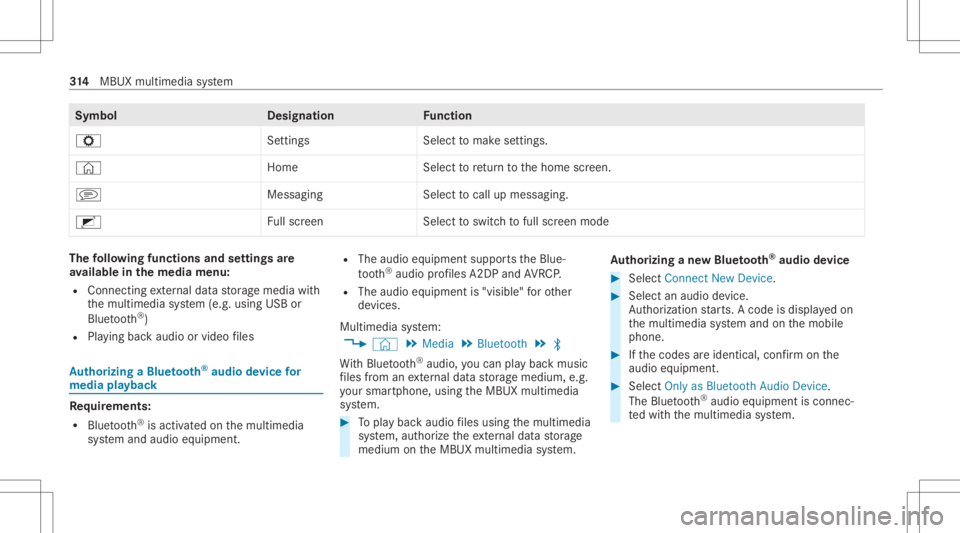
Symbol
Designation Function
Z Settings Selecttomak ese ttings.
© HomeSelecttoretur nto thehome screen.
j MessagingSelecttocal lup mess aging.
2 Fullscr een Selectto switc hto full screen mode The
follo wing functionsandsettings are
av ailab lein themed iamenu :
R Conn ecting extern al dat ast or ag emedia with
th emultimedia system (e.g. using USBor
Blue tooth®
)
R Playing backaudio orvideo files Au
thorizing aBlu etoo th®
audio devic efo r
medi apla yba ck Re
quirement s:
R Blue tooth®
is act ivat ed on themultimedia
sy stem and audio equipment. R
The audio equipment supportstheBlue‐
to oth®
audio profiles A2DP and AVRC P.
R The audio equipment is"visible" forot her
de vices.
Multimedia system:
4 © 5
Media 5
Bluetoot h5
00A5
Wi th Blu etoo th®
audio, youcan playbac kmusi c
fi les from anextern al dat ast or ag emedium, e.g.
yo ur smar tphon e,usin gth eMBUX multimedia
sy stem. #
Topla ybac kaudio files using themultimedia
sy stem, author ize theex tern al dat ast or ag e
medium ontheMBUX multimedia system. Au
thorizing ane wBlu etoo th®
audio devic e #
Select Connect NewDevice . #
Select anaudio device.
Au thor ization star ts.A cod eis displa yedon
th emultimedia system and onthemobile
phone. #
Ifth ecodes areidentic al,con firm onthe
audio equipme nt. #
Select Onlyas Bluet oothAudi oDe vic e.
The Blue tooth®
audio equipme ntiscon nec‐
te dwit hth emultimedia system. 31
4
MBUX multimedia system
Page 331 of 510
R
Incar washes withacon veyo rsy stem: neu‐
tra l005C iseng aged.
% Drive st ra ight andinto thecent erofthe
guide rails ofthecar wash topreve ntdam‐
ag eto thetir es and rims.
% Incar washes withacon veyo rsy stem: ifyo u
wo uld liketo lea vetheve hicle while itis
being washed, makesur eth eSmar tKey is
locat edintheve hicle. Theparkposition 005D
is other wise automaticall yeng aged.
% If,afte rth ecar wash, youre mo vethewa x
fr om thewindshield andwiper rubber s,this
will preve ntsme aring and reduce wiper
noise.
Au tomatic carwa sh mode
In car wash mode, theve hicle isprepar edfor
dr iving intoth eaut omatic carwash. Car wash
mode canbeactiv ated ataspeed ofup to
12 mp h(20 km/h) (/page330).
The follo wing settings aremade whencarwash
mode isactiv ated:
R The outside mirrors arefo lded in. R
The rain sen sor isdeact ivat ed topreve ntthe
winds hieldwasher system from star tin gup
aut omat ically.
R The rear wind owwiper isdeact ivat ed.
R Mer cedes- Mayba chvehicl es:theru nning
bo ards arere tract ed.
R The aircond itioni ng system issetto air-reci r‐
culat ionmode .
R Parking AssistPA RK TRONI Cis deac tiva ted.
R Vehicl eswith surround viewcamer a:the
fr ont imageisact ivat ed afte rapp rox. eight
seco nds.
R Vehicl eswith AIRMA TIC:theve hicle is
ra ised tothemaximum possiblechassis
le ve l(/ page 231).
If rising take slong erthan 25 sec onds, the
fo llo wing mess ageappear son themultifunc ‐
tion displa y:
Preparation forAutom aticCarWash Incom-
plete SeeMedia Display .Af tersome time,
th eve hicle automatically continues rising. R
Vehicl eswith E-AC TIVE BODY CONT ROL:
th eve hicle israised tothemaximum possi‐
ble chassis leve l(/ page24 0).
If rising take slong erthan 25 sec onds, the
fo llo wing mess ageappear son themultifunc ‐
tion displa y:
Preparation forAutom aticCarWash Incom-
plete SeeMedia Display .Af tersome time,
th eve hicle automatically continues rising.
If one ofthese ttings cann otbe select ed,this is
displa yedby a% behindth ere spectiv ese t‐
ting.
Ab ove aspee dof 12 mp h(20 km/h) carwash
mode isaut omatically deactivated.
The follo wing settings arere se twhen carwash
mode isdeactiv ated:
R The outside mirrors arefo lded out.
R The rain sen sor isact ivat ed.
R The rear wind owwiper isact ivat ed.
R The aircon ditionin gsy stem issetto fresh air
mode. Mai
ntenance andcare329
Page 332 of 510
R
Parking AssistPA RK TRONI Cis rese tto the
pr ev iousl yselec tedse tting.
R Mer cedes-Ma ybachve hicl es:theru nning
bo ards remain retract ed.
R Vehicl eswith surround viewcamer a:the
fr ont imageisdeact ivat ed atspeeds above
11 mp h(1 8 km/h).
R Vehicl eswith AIRMA TIC:theve hicle islow‐
er ed tothepr ev iousl yse tch assis leve l.
R Vehicl eswith E-AC TIVE BODY CONT ROL:
th eve hicle islowe redto thepr ev iousl yse t
ch assis leve l. Ac
tiv atin g/deac tivatin gaut omati ccar wash
mode Re
quirement s:
R The vehicle isstatio nary.
R The engine isrunning . Mu
ltimed iasystem:
4 © 5
Set ting s5
Quick Access
Ac tiv atin gaut omati ccar wash mode #
Select AutomaticCarWash Mode. #
Select Start .
If one ofthese ttings cann otbe select ed,this is
displa yedby a% behindth ere spectiv ese t‐
ting.
% Foran overvie wof these ttings made when
activ ating automatic carwash mode
(/ page328).
Deactiv atingautomatic carwash mode #
Select Stop.
The automatic carwash settin gsarere se t.
% The automatic carwash mode isaut omati‐
cally deactiv ated assoon asaspeed of
12 mp h(20 km/h) isexc eeded. No
teson using apo we rwa sher &
WARNIN GRisk ofan acci dent when
us ing powe rwa sher swit hro und -spr ay
nozzl es
The waterje tcan caus eex tern all yin visi ble
damag e.
Com ponentsdamag edinthis wa yma yune x‐
pec tedly fail. #
Donotuse apo we rwa sher withro und -
spra yno zzles. #
Have damag edtires orchassis parts
re placed immediat ely. To
avo iddamag eto your vehicle, observethefo l‐
lo wing when usingapo we rwa sher :
R Keep theSmar tKey atleas t10 ft(3 m) away
fr om theve hicle. Other wise theta ilg ate
could openunintentio nally.
R Maint ainadis tance ofat leas t11 .8 in
(30 cm) totheve hicle.
R Vehicl eswith decorativ efo il: par tsof your
ve hicle areco veredwit hadecora tivefo il. 330
Maintenanceand care
Page 339 of 510
#
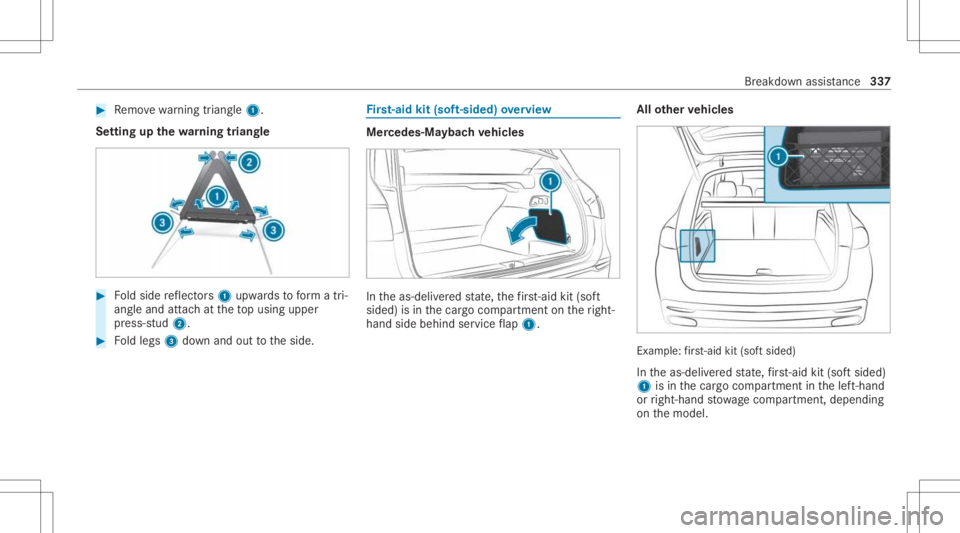
Remo vewarning triang le1.
Se tting upthewa rning triang le #
Foldside reflect ors1 upw ards toform atri‐
ang leand attachat theto pusing upper
pr ess-s tud2. #
Foldlegs 3down and outtotheside. Fi
rs t-aid kit(sof t-si ded) overview Mer
cedes‑M aybac hve hicl es In
theas-deliv ered stat e, thefirs t-ai dkit (sof t
si de d) isin thecar gocom partmen ton theright-
hand sidebehind service flap 1. All
other vehicl es Ex
am ple:fi rs t-ai dkit (sof tsi de d)
In theas-deliv ered stat e, firs t-ai dkit (sof tsi de d)
1 isin thecar gocom partmen tin thelef t-hand
or right-h andstow agecom partment ,depen ding
on themodel. Br
eakdo wnassis tance 33
7