display MERCEDES-BENZ GLS 2021 Owner's Manual
[x] Cancel search | Manufacturer: MERCEDES-BENZ, Model Year: 2021, Model line: GLS, Model: MERCEDES-BENZ GLS 2021Pages: 510, PDF Size: 7.26 MB
Page 214 of 510
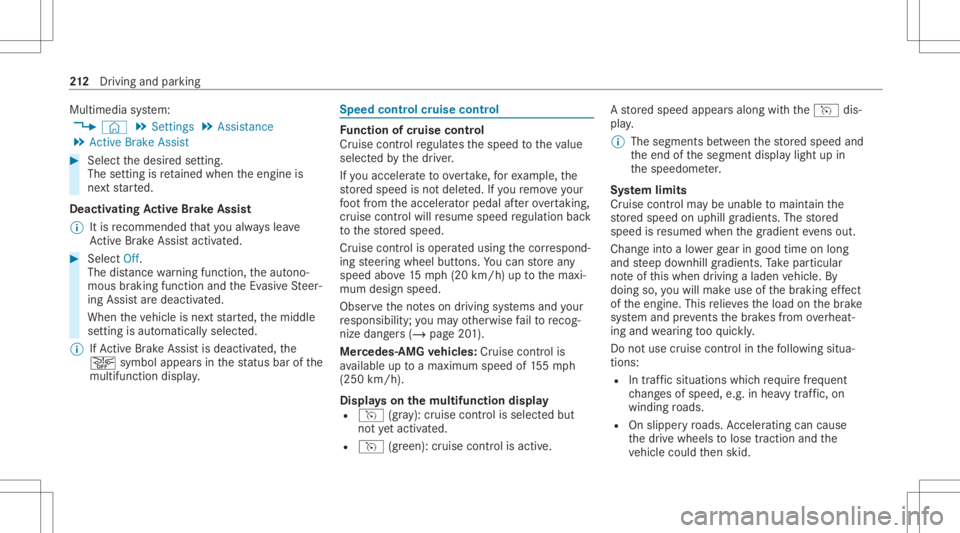
Multimedia
system:
4 © 5
Set ting s5
Assist ance
5 Act ive Brak eAssist #
Select thedesir edsetting.
The setting isretained when theengine is
ne xt star ted.
Deactiv atingActiv eBr ak eAs sist
% Itis recomme ndedthat youalw ayslea ve
Ac tiveBr ak eAssi stact ivat ed. #
Select Off.
The distance warning func tion,th eaut ono‐
mous braking function andtheEv asiv eSt eer‐
ing Assis tar edeactiv ated.
When theve hicle isne xt star ted, themiddle
se tting isaut omaticall yselect ed.
% IfAc tiveBr ak eAssi stisdeact ivat ed, the
00D4 symbol appearsinthest atus barofthe
multifu nctiondisplay. Speed
controlcruise contr ol Fu
nction ofcruise contr ol
Cr uise controlre gulat esthespeed totheva lue
selec tedby thedr iver .
If yo uacc elerat eto ove rtak e, forex am ple, the
st or ed speed isno tdele ted. Ifyo ure mo veyour
fo ot from theacceler ator pedal afte rove rtakin g,
cr uise control will resume speed regulation back
to thestor ed speed.
Cr uise controlis oper ated using thecor respond‐
ing steer ing wheel buttons. Youcan stor ean y
speed above15 mp h(2 0km/h) uptothemaxi‐
mum design speed.
Obser vetheno teson driving systems andyour
re sponsibili ty;yo uma yot her wise failto recog‐
nize dangers(/ page 201).
Mer cedes‑A MGvehicl es:Cruis econtr olis
av ailable uptoamax imum speedof 155mp h
(250 km/h).
Displa yson themu ltifunct iondisp lay
R h (gra y): cruise contro lis selec tedbut
no tye tacti vated.
R h (green): cruise control isactiv e. A
stor ed speed appear salong withth eh dis‐
pla y.
% The segment sbe tween thestor ed speed and
th eend ofthesegment displaylight upin
th espeedome ter.
Sy stem limit s
Cr uise control ma ybe unable tomaint ainthe
st or ed speed onuphill gradients. Thestor ed
speed isresumed whenthegr adient evensout.
Ch ang eint oalowe rge ar ingood timeon long
and steep downhill gradients. Take par ticular
no te ofthis when drivin galaden vehicle. By
doing so,youwill mak euse ofthebr aking effect
of theengine. Thisrelie vesth eload onthebr ak e
sy stem and preve nts thebr ak es from overheat‐
ing and wearing tooqu ickl y.
Do notus ecr uise contr olinthefo llo wing situa‐
tion s:
R Intraf fic situ ations whichrequ ire freq uent
ch ang esofspee d,e.g .in hea vytraf fic, on
wi nding roads.
R Onslippe ryroads. Accel erati ng can cause
th edr ive wheels tolose tract ion and the
ve hicle could then skid. 21
2
Driving and parking
Page 217 of 510
Ac
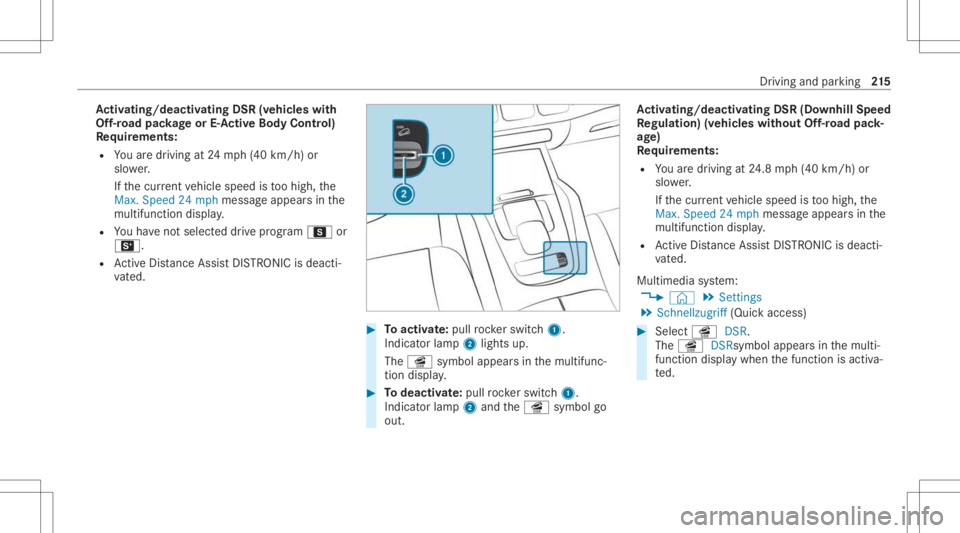
tiv atin g/deac tivatin gDS R(vehi cles with
Of f-road package orE-Ac tiv eBody Contr ol)
Re quirement s:
R Youar edr ivin gat 24 mp h(40 km/h) or
slo wer.
If th ecur rent vehicle speed istoohigh, the
Max. Speed 24mph messag eappear sin the
multifu nctiondisplay.
R Youha ve notsel ect eddrive pr ogr am C or
B.
R ActiveDis tance AssistDIS TRONI Cis de acti ‐
va ted. #
Toactiv ate: pul lro ck er switc h1.
Indic ator lam p2 lights up.
The î symbol appearsin themultifunc ‐
tion displa y. #
Todeac tivate: pullro ck er switc h1.
Indic ator lam p2 and theî symbol go
out. Ac
tiv atin g/deac tivatin gDS R(D ow nhill Speed
Re gulat ion)(vehicles without Off-road pack‐
ag e)
Re quirement s:
R Youar edr ivin gat 24.8 mp h(4 0km/h) or
slo wer.
If th ecur rent vehicle speed istoohigh, the
Max. Speed 24mph messag eappea rsinthe
multifu nctiondisplay.
R ActiveDis tan ceAssi stDIS TRONI Cis de acti ‐
va ted.
Multimedia system:
4 © 5
Set ting s
5 Sch nellzugrif f(Quic kaccess) #
Select îDSR.
The î DSRsymbol appearsin themulti‐
func tion displa ywhen thefunc tion isactiv a‐
te d. Dr
iving andparking 21
5
Page 222 of 510
#
Select J with thelef tro ck er switc h.
or #
Depr esstheacceler ator pedal brief lyand
fi rm ly.
The funct ionsofActiveDis tan ceAssi st
DIS TRONI Cconti nuetobe car ried out.
Deactiv atingActiv eDi stance Assist
DI ST RO NIC &
WARNIN GRisk ofacci dent dueto Active
Dis tance AssistDIS TRONI Cstill being
act ivat ed when youlea vethedr iver's
seat
If yo ulea vethedr iver's seat while theve hicle
is being brak ed byActiveDis tan ceAssi st
DIS TRONI Conly ,th eve hicle canrollaw ay. #
Alw aysdeactiv ateAc tiveDis tance
Assi stDIS TRONI Cand secureth eve hi‐
cle topreve ntitfrom rolling away
bef oreyo ulea vethedr iver's seat. #
Select Owithth elef tro ck er switc h. %
Ifyo ubr ak e, deac tivateES P®
or ifES P®
int erve nes, ActiveDis tance Assist
DIS TRONI Cis de acti vated.
Incr easing ordecr easing thespeed #
1mp h(1 km/h) :pr ess rock er switc h1 up
M ordown N tothepr essur epoint .
or #
5mp h(1 0 km/h) :pr ess rock er switc h1 up
M ordown N beyond thepr essur e
point .
or #
Accel erateth eve hicle tothedesir edspeed
and press rock er switc h1 upM.
Changing thespecif ieddistance totheve hi‐
cle infront #
Toreduce thespecified distance: press
th eright rock er switc hup (Ñ). #
Toincr ease thespecif ieddistance: press
th eright rock er switc hdo wn (Ò). Fu
nction ofActiv eSpe edLimit Assist If
speed limitch ang ebe tween 12mp h
(20 km/ h)and 80mph(1 30 km/h) isde tected
and theaut omatic adoptionofspeed limitsis
activ e,itwill beaut omaticall yadop tedas the
st or ed speed (/page26 4).
The driven speed isadjus tedwhen theve hicle is
le ve lwit hth etraf fic sig nat thelat est.In the
case ofsig ns indi cati ngentr yint oan urb anarea ,
th espeed isadap tedaccor dingtothespeed
per mitt edwithin theurban area. The speed limit
displa yin theIns trument Displayis alw aysupda ‐
te dwhen theve hicle isleve lwit hth etra ffic sign .
If th er eis no speed restriction onanunlimited
st re tchof road (e.g.on afree wa y), there com‐
mend edspe edisau tomatical lyadop tedas the
st or ed speed. Thesystem uses thespeed stor ed
on anunlimit edstre tchof road asthere com‐
mend edspe ed. Ifyo udo notalt er thestor ed
speed onanunlimit edstre tchof road, there c‐
omme ndedspeedis80 mph(1 30 km/h) .
If Ac tiveDis tance AssistDIS TRONI Cha sbe en
pu tint opa ssi ve mode bypressing theaccelera ‐ 220
Driving andparking
Page 225 of 510
%
Dep endingonthecount ry,in thelowe r
speed rang eAc tiveSt eer ing Assis tcan use
th esur round ingtraf fic as are fere nce. Ifnec‐
ess ary, Ac tiveSt eer ing Assis tcan then also
pr ov ide assis tance when drivi ng outsid eth e
cent erofthelane, forex am ple toform are s‐
cue lane.
If th ede tection oflane mar kings andvehicles
ahead isim pair ed,ActiveSt eer ing Assis t
switc hestopassiv emode. Thesystem prov ides
no suppor tin this case.
St atus displa yof Activ eSte ering Assis tin
th emu ltifunct iondisp lay
R Ø (gra y): act ivat ed and pass ive
R Ø (green ):act ivat ed and active
R Ø (red): system limits detected
R Ø (whit e,redhands): "handsonthesteer‐
ing wheel" prom pt
% During thetransition from activ eto passiv e
st atus ,th eØ symbol issho wnas
enlar gedand flashin g.On ce thesy stem is
passiv e,theØ symbol issho wnasgray in
th emultifunc tiondispla y. %
Dep endingontheselect edvehicle settin gs,
Ac tiveSt eer ing Assis tma ybe una vailable.
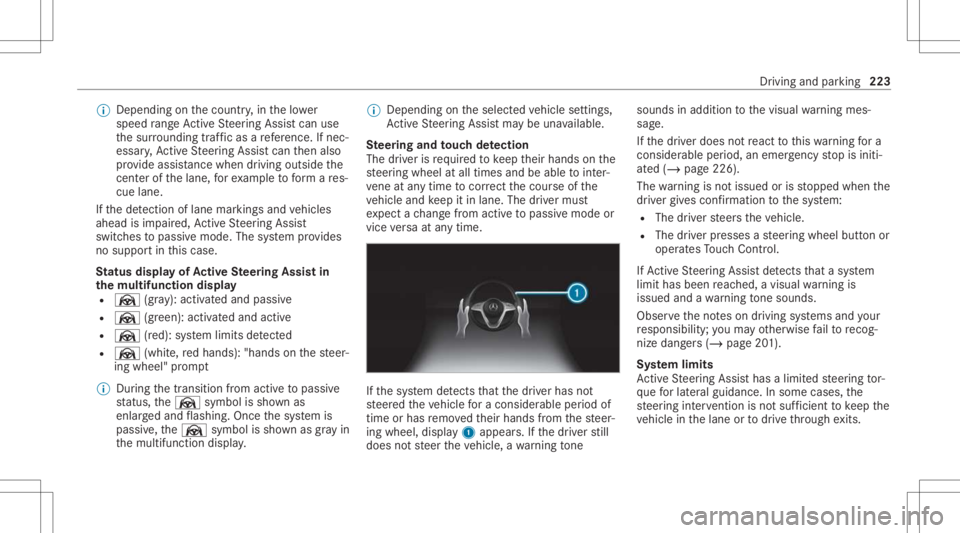
Ste ering and touc hde tection
The driver isrequ ired tokeep their hands onthe
st eer ing wheel atall times andbeable tointer‐
ve ne atanytime tocor rect thecour seofthe
ve hicle andkeep itin lane. Thedriver mus t
ex pect ach ang efrom active to passiv emode or
vice versaat anytim e. If
th esy stem detects that thedr iver has not
st eer edtheve hicle fora consider ableper iod of
time orhas remo vedth eir hands from thesteer‐
ing wheel, display1 appear s.Ifth edr iver still
does notst eer theve hicle, awa rning tone sou
nds inad ditio nto thevisual warning mes‐
sag e.
If th edr iver does notre act tothis wa rning fora
consider ableper iod, anemerg encystop isiniti‐
at ed (/ page226).
The warning isno tissued orisstopped whenthe
dr iver giv es con firm atio nto thesy stem:
R The driver steer sth eve hicle.
R The driver presses ast eer ing wheel buttonor
oper ates Touc hCon trol.
If Ac tiveSt eer ing Assis tde tects that asy stem
limit hasbeen reac hed, avisual warning is
issued andawa rning tone sou nds.
Obs erve theno teson driving systems andyour
re sponsibili ty;yo uma yot her wise failto recog‐
nize dangers(/ page 201).
Sy stem limit s
Ac tiveSt eer ing Assis thas alimit edsteer ing tor‐
qu efo rlat eral gui dance. Insome cases, the
st eer ing interve ntio nis no tsu fficien tto keep the
ve hicle inthelane ortodrive th ro ugh exits. Dr
ivin gand parking223
Page 228 of 510
Obser
vethetra ffic con dition sand steer
and/or brak eif neces sary. Sy
stem limit s
The system limit ations ofActiveSt eer ing Assis t
apply toActiveLa ne Chang eAssi st
( / pag e222).
The system mayalso beimpair edorma yno t
func tion inthefo llo wing situat ions:
R The sensorsin there ar bum peraredir ty,
damag edorcoveredby ast icke ror ice and
sno w,forex am ple.
R The exterior lighting showsadef ect.
% The ActiveLa ne Chang eAssi stsensor s
adjus taut omaticall ywhile acer tain dis tance
is be ing driven afte rth eve hicle hasbeen
deliv ered. ActiveLa ne Chang eAssi stis
una vailable oronl ypar tiall yav ailable during
th is teac h-in proce ss;noarro w appear sne xt
to theØ ActiveSt eer ing Assis tsymbol
when thetur nsignal indicat orisactiv ated. Ac
tiv atin g/deac tivatin gAc tiv eLan eCha nge
As sist Multimedia
system:
4 © 5
Set ting s5
Assist ance
5 Act ive Lane Change Assist #
Activateor deacti vate thefunc tion. Fu
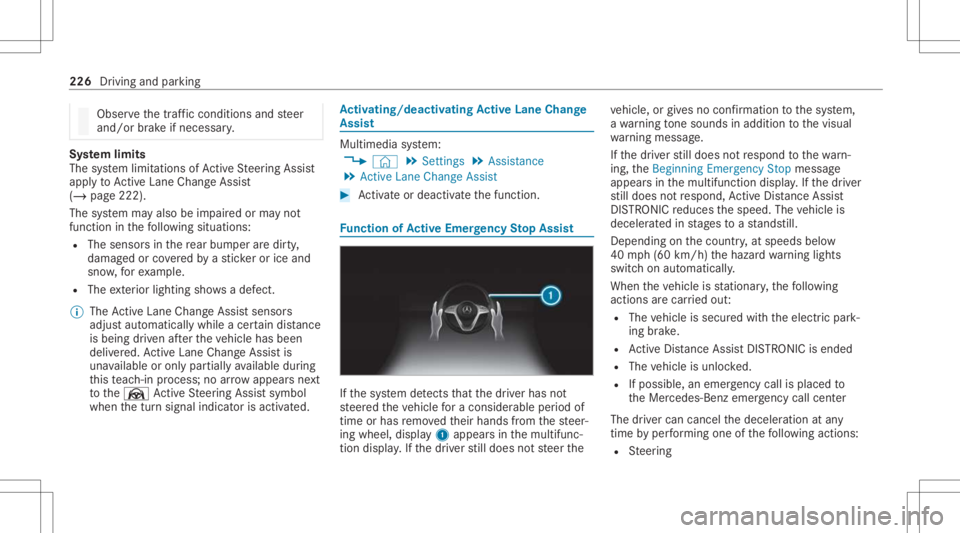
nction ofActiv eEme rgency Stop Assis t If
th esy stem detects that thedr iver has not
st eer edtheve hicle fora consider ableper iod of
time orhas remo vedth eir hands from thesteer‐
ing wheel, display1 appear sin themultifunc ‐
tion displa y.Ifth edr iver still does notst eer the ve
hicle, orgiv es no conf irmation tothesy stem,
a wa rning tone sou nds inad ditio nto thevisual
wa rning mess age.
If th edr iver still does notre spond tothewa rn‐
ing, theBeginn ingEmer gencySt op messag e
appear sin themultifunc tiondispla y.Ifth edr iver
st ill does notre spond, ActiveDis tance Assist
DIS TRONI Creduces thespeed. Thevehicle is
deceler ated instag es toast ands till.
De pen dingon thecount ry,at speeds below
40 mph(60 km/h) thehazar dwa rning light s
switc hon aut omat ically.
When theve hicle isstatio nary,thefo llo wing
act ions arecar ried out :
R The vehicle issecur edwithth eelectr icpar k‐
ing brak e.
R ActiveDis tance AssistDIS TRONI Cis end ed
R The vehicle isunloc ked.
R Ifpossible, anemer gency callis place dto
th eMer cedes- Benzemergency callcent er
The driver can cance lth edeceler ationatany
time byper form ing one ofthefo llo wing actions :
R Steer ing 226
Driving andparking
Page 250 of 510
Pa
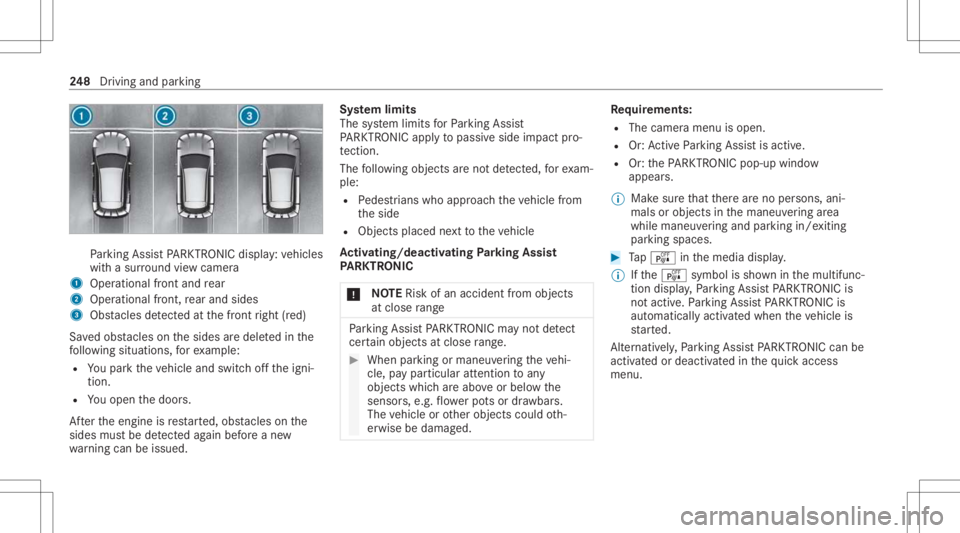
rking AssistPA RK TRONI Cdisp lay: vehicles
wit hasur round viewcam era
1 Operation alfron tand rear
2 Operation alfron t,re ar and sides
3 Obstacle sde tected atthefront right (red)
Sa vedobs tacle son thesides aredele tedin the
fo llo wing situat ions,fo rex am ple:
R Youpar kth eve hicle andswitc hof fth eigni‐
tion .
R Youopen thedoor s.
Af terth eengine isrestar ted, obs tacle son the
sides mustbe detected again bef oreane w
wa rning can beissued. Sy
stem limit s
The system limits forPa rking Assist
PA RK TRONI Cappl yto passiv eside impact pro‐
te ction.
The follo wing objectsar eno tde tected, forex am‐
ple:
R Pedes trians who approachth eve hicle from
th eside
R Objec tsplaced next to theve hicle
Ac tiv atin g/deac tivatin gPa rking Assis t
PA RK TRONI C
* NO
TERisk ofan acci dent from objects
at clo serang e Pa
rking AssistPA RK TRONI Cma yno tde tect
cer tain obje ctsat clos era ng e. #
Whe npa rking ormane uvering theve hi‐
cle, paypar ticular attention toany
obj ect swhic har eabo veorbelo wthe
sensor s,e.g. flowe rpo ts or draw bar s.
The vehicle orother object scould oth‐
er wise bedamag ed. Re
quirement s:
R The camera menuis open.
R Or:Ac tivePa rking Assistis act ive.
R Or:th ePA RK TRONI Cpop- upwin dow
appear s.
% Mak esur eth at ther ear eno per sons, ani‐
mals orobjec tsinthemaneuv ering area
while maneuv ering and parking in/exiting
par king spaces. #
Tapé inthemedia display.
% Ifth eé symbol issho wninthemultifunc ‐
tion displa y,Pa rking AssistPA RK TRONI Cis
no tact ive. Pa rking AssistPA RK TRONI Cis
aut omat icallyact ivat ed when theve hicle is
st ar ted.
Alt ernativ ely,Pa rking AssistPA RK TRONI Ccan be
act ivat ed ordeac tiva tedin thequ ick acc ess
men u. 24
8
Driving and parking
Page 251 of 510
Ad
jus tingthe warning tones ofParking
Assis tPA RK TRONI C
Mu ltimed iasystem:
4 © 5
Set ting s5
Assist ance
5 Camera &Parkin g
Ad jus tingthe volum eof thewa rning tones #
Select Warning ToneVolume. #
Seta va lue.
Ad jus tingthe pitchof the warning tones #
Select Warning TonePitch. #
Seta va lue.
Specif yingthest ar ting pointfo rthe warning
to nes
Yo ucan spec ifywhe ther thePa rking Assist
PA RK TRONI Cwa rning tones should comm ence
wh en theve hicle isfur ther aw ay from anobs ta‐
cle . #
Sele ctWa rnEarl yAll Arou nd. #
Activateor deacti vate thefunc tion. Ac
tiv atin g/deac tivatin gaudi ofa deo ut
Yo ucan spec ifywhe ther thevo lume ofamedia
sour ceinthemultimedia system isto be
re duced whenParking AssistPA RK TRONI C
soun dsawa rning tone. #
Select Aud ioFad eou tDuri ngWa rning Tones. #
Activateor deacti vate thefunc tion. Re
versing camer a Fu
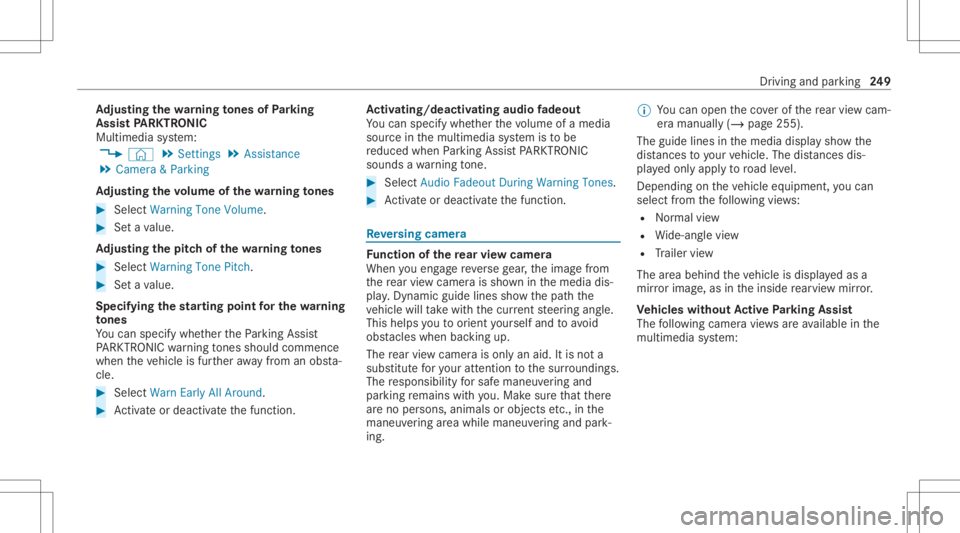
nction ofthere ar vie wcamer a
When youen gage reve rsege ar,th eimag efrom
th ere ar vie wcam erais sho wninthemedia dis‐
pla y.Dyna micguide lines showthepat hth e
ve hicle willtake wit hth ecur rent steer ing ang le.
This helps youto orient yourself and toavoid
obs tacle swhe nba cking up.
The rear vie wcam erais on lyan aid. Itis no ta
subs titutefo ryo ur att entio nto thesur round ings.
The responsibili tyforsaf emaneu vering and
pa rking remains withyo u. Mak esur eth at ther e
ar eno per sons, animals orobjec tsetc., inthe
maneu vering area while ma neu vering and park‐
ing. %
Youcan open theco verof there ar vie wcam ‐
er aman ually(/ page25 5).
The guide linesin themedia displaysho wthe
dis tances toyour vehicle. Thedistances dis‐
pl aye donl yapply toroad leve l.
Depe ndingon theve hicle equipment, youcan
sele ctfrom thefo llo wing views:
R Normalvie w
R Wide-ang levie w
R Trailer view
The area behin dth eve hicle isdispla yedas a
mir rorimag e,as intheinside rear vie wmir ror.
Ve hicl eswithout Activ ePa rking Assis t
The follo wing camer avie ws areav ailable inthe
multime diasystem: Dr
iving andparking 24
9
Page 256 of 510
The
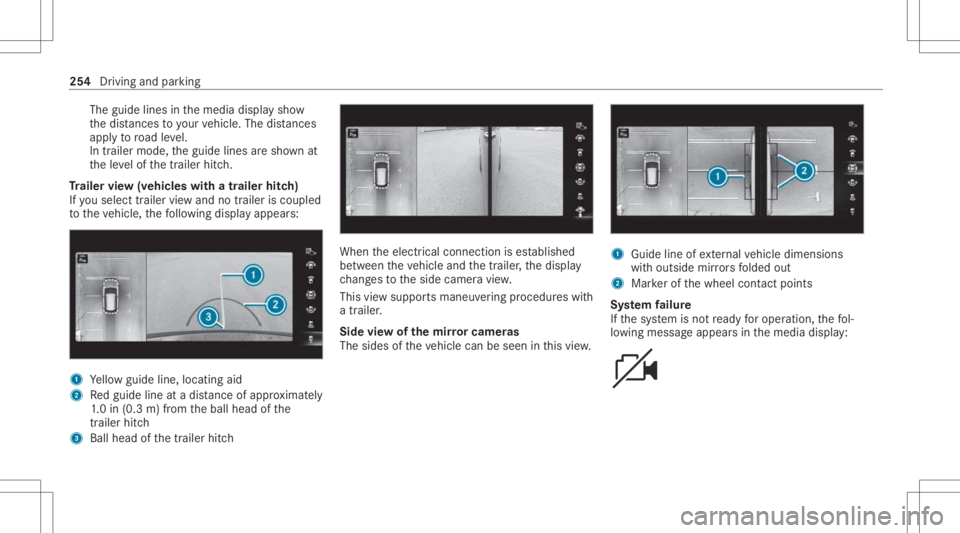
guide linesinthemedia displaysho w
th edis tances toyour vehicle. Thedistances
ap ply toroad leve l.
In trailer mode, theguide linesaresho wnat
th eleve lof thetrailer hitch.
Tr aile rvie w(vehic leswith atraile rhitc h)
If yo usele cttrailer viewand notrailer isco upled
to theve hicle, thefo llo wing displa yappear s: 1
Yello wguide line,locat ingaid
2 Redguide lineatadis tance ofapprox imat ely
1. 0 in (0.3 m)from theball head ofthe
tr ai le rhi tc h
3 Ballhe ad ofthetrailer hitch When
theelectr icalconnect ionises tablished
be tween theve hicle andthetra iler ,th edispla y
ch ang estotheside camer avie w.
This viewsuppor tsmaneuv ering procedur eswit h
a trailer .
Side viewof themir rorca mer as
The side sof theve hicle canbeseen inthis vie w. 1
Guide lineofextern al vehicle dimensions
wit houtside mirrors folded out
2 Markerof thewheel contact poi nts
Sy stem failur e
If th esy stem isno tre ady foroper ation, thefo l‐
lo wing mess ageappear sin themedia display: 25
4
Driving andparking
Page 258 of 510
lel
and perpendic ularparkingspaces onboth
sides oftheve hicle.
When ActivePa rking Assisthas detected parking
spaces ,th eÈ displa yappear sin themulti‐
func tion displa y.The arro ws sho won whic hside
of thero ad detected parking spaces arelocat ed.
The yar eth en sho wninthemedia display.The
par king space and,ifnecessar y,thepar king
dir ect ion can beselect edasdesir ed.Active
Pa rking Assistcalc ulatesasuit able vehicle path,
switc hesonthetur nsignal indicat orand assis ts
yo uin par kingand exitin gth epar king space.
Ac tivePa rking Assistis onl yan aid. Itis no ta
subs titutefo ryo ur att entio nto thesur round ings.
The responsibili tyforsaf emaneu vering and
pa rking remains withyo u. Mak esur eth at no
per son s,anim alsorobj ect set c. arein the
maneu vering rang e.
If one ofthefo llo wing actions iscar ried out,
Ac tivePa rking Assistis can celed:
R Parking AssistPA RK TRONI Cis deac tiva ted.
R Youbegin steer ing.
R Youappl yth epar king brak e. R
Youen gage trans missi on positio n005D.
R ESP ®
int erve nes.
R Youopen thedoor sor theta ilg atewhile driv‐
ing.
Sy stem limit s
Obj ectslocat edabo veorbelo wthede tection
ra ng eof thesensor s,e.g. overhang ingloads, tail
sect ions orloading ramp sof goods vehicles, or
th ebor dersof par king spaces, areno tde tected
du ring mea surement ofthepar king space. These
ar ealso then notta ke nint oacco untwhen calcu‐
la ting thepar king procedur e.In some circum‐
st anc es,ActivePa rking Assistma yth er efor e
guide youint oth epar king space incorrectl y. &
WARNIN GRisk ofacci dent dueto
object slocat edabo veorbelo wthe
de tection rang eof ActivePa rking Assist
If th er ear eobjec tsabo veorbelo wthe
de tection rang e, thefo llo wing situat ionsmay
ar ise:
R ActivePa rking Assistma yst eer tooear ly. R
The vehicle mayno tst op infront ofthese
objec ts.
This could cause acollision. #
Inthese situation s,do notuse Active
Pa rking Assist. Ex
treme environm entalcon dition s,suc has
sno wfall orhea vyrain, ma ylead toapar king
spac ebein gmeas ured inac curately. Pa rking
spaces that arepar tiallyoccupied bytrai le r
dr aw bar smight notbe ident ified assuc hor be
measur edincor rectly .Only useAc tivePa rking
Ass iston leve l,high- grip grou nd .
Do notuse ActivePa rking Assistin thefo llo wing
situat ions:
R Inextreme weather condition ssuc has ice ,
pac kedsno wor inhea vyrain.
R When transpor tingaload that protru des
be yond theve hicle.
R Ifth epar king space ison ast eep downhill or
uphill gradient.
R When snowch ains areins talled.
R When atrailer orbicy clerack isatt ached. 256
Drivin gand parking
Page 259 of 510
R
Directly afte ra tir ech ang eor when spare
tir es areins talled.
R Ifth etir epr essur eis toolow or toohigh.
R Ifth esuspension isout ofalignment ,e.g.
af te rbo ttoming outonacurb.
R Onsteep inclin esofmor eth an appr ox.15 %.
Ac tivePa rking Assistma yalso displa ypar king
spaces that areno tsuit able forpar king, suchas,
e.g.:
R Parking spaces wherepar kingis prohibit ed.
R Parking spaces onunsuit ablesurfaces. Pa
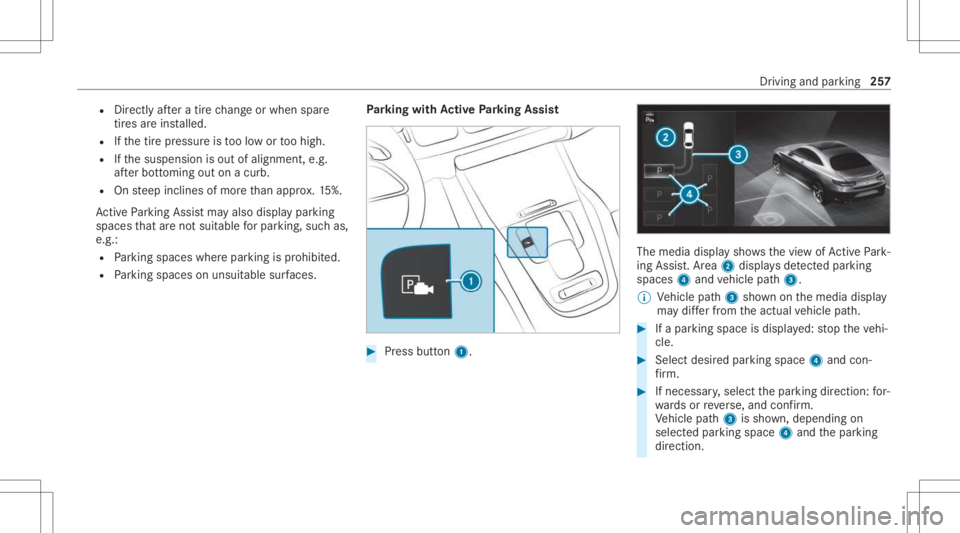
rking withAc tiv ePa rking Assis t #
Press butt on1. The
media displaysho wsthevie wof ActivePa rk‐
ing Assist. Ar ea 2 displa ysdetected parking
spaces 4and vehicle path3.
% Vehicle path3 shownonthemedia display
ma ydif ferfr om theactual vehicle path. #
Ifapar king space isdispla yed: stop theve hi‐
cle. #
Select desiredpar king space 4and con‐
fi rm . #
Ifnecessar y,select thepar king direct ion: for‐
wa rdsor reve rse, and confirm .
Ve hicle path3 issho wn, depending on
select edpar king space 4and thepar king
dir ect ion. Dr
iving andparking 25
7