display MERCEDES-BENZ GLS 2021 Service Manual
[x] Cancel search | Manufacturer: MERCEDES-BENZ, Model Year: 2021, Model line: GLS, Model: MERCEDES-BENZ GLS 2021Pages: 510, PDF Size: 7.26 MB
Page 280 of 510
R
Naviga tion #
Onthecor responding menu,usethelef t-
hand Touc hCon trol to scr olltotheend ofthe
lis t. #
Press thelef t-hand Touc hCon trol.
The selected men uwill bedispl ayedin full. Ov
ervie wof what issho wnonthemu lti‐
fun ction display
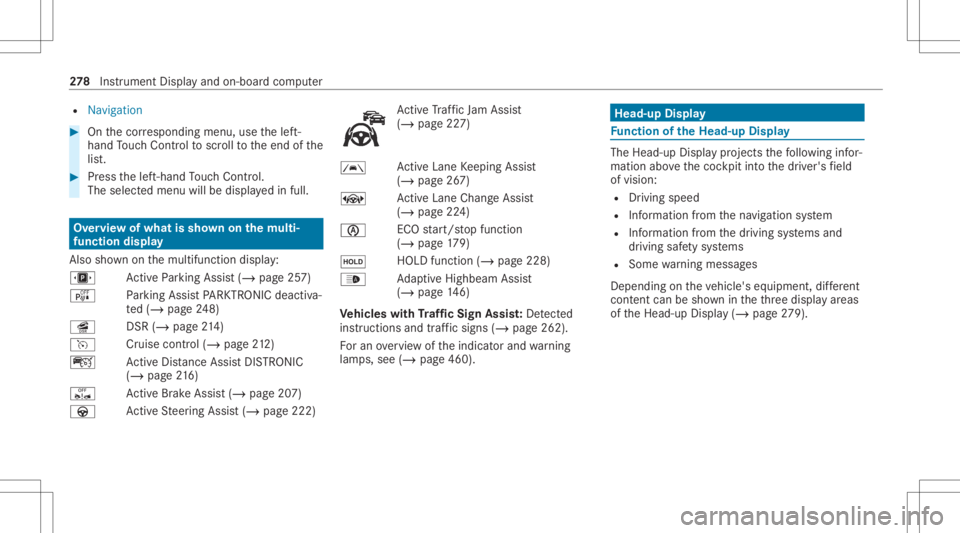
Als osho wnonthemultifunc tiondispla y:
u ActivePa rking Assist(/ page25 7)
é Parking AssistPA RK TRONI Cdeac tiva ‐
te d(/ page24 8)
î DSR(/page 214)
h Cruis econtr ol(/ page 212)
ç ActiveDis tance AssistDIS TRONI C
(/ page 216)
ê ActiveBr ak eAssi st(/ pag e20 7)
à ActiveSt eer ing Assis t(/ page222) Ac
tiveTr af fic Ja m Assi st
( / pag e22 7)
00B0 Ac
tiveLa ne Keeping Assist
(/ page26 7)
± ActiveLa ne Chang eAssi st
( / pag e22 4)
00D6 EC
Ostar t/ stop funct ion
(/ page17 9)
00D9 HO
LD functio n(/ page 228)
00CE Ad
aptiveHig hbeam Assis t
(/ page14 6)
Ve hicl eswith Traf fic Sign Assis t:De tected
ins tructi ons and traf fic sig ns (/ page 262) .
Fo ran overvie wof theindicat orand warning
lam ps,see (/page460 ). Head
-upDispla y Fu
nction oftheHead -upDispla y The
Head- upDis playpr oje ctsth efo llo wing infor‐
matio nabo vethecoc kpit intoth edr iver's field
of vision:
R Driving speed
R Information from thena vig ation system
R Information from thedr iving systems and
dr iving safetysy stems
R Some warning mess ages
Depe ndingon theve hicle's equipment, differe nt
cont entcan besho wnintheth re edispla yar eas
of theHead-up Display(/ page27 9). 27
8
Instrument Displayand on-boar dcom puter
Page 281 of 510
Disp
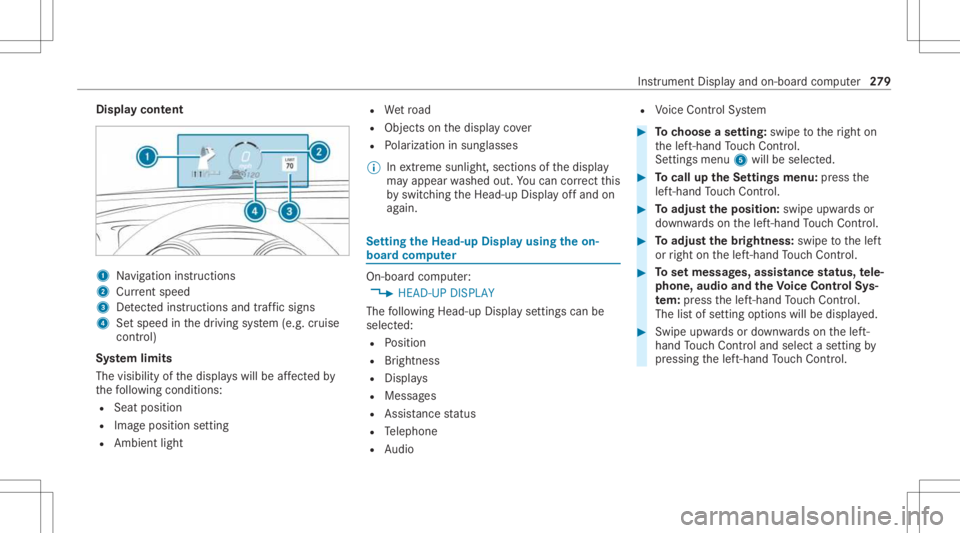
laycont ent 1
Navig ation instructions
2 Current speed
3 Detected instructi ons and traf fic sig ns
4 Setspe edinthedr iving system (e.g. cruise
con trol)
Sy stem limit s
The visib ilityofthedispla yswill beaffect ed by
th efo llo wing condition s:
R Seat position
R Imag eposit ionsetting
R Ambient light R
Wetro ad
R Objectson thedispla yco ver
R Polar izat ion insung lasses
% Inextreme sunli ght, sectio nsofthedispla y
ma yappear washed out.Youcan correct this
by switc hingtheHead-up Displayof fand on
ag ain. Se
tting theHead -upDispla yusing theon-
boar dcom puter On-boar
dcom puter:
4 HEAD-UP DISPLA Y
The follo wing Head- upDisp lay se ttings canbe
selec ted:
R Position
R Brightness
R Displa ys
R Messag es
R Assis tance status
R Telephon e
R Audio R
Voice Cont rolSy stem #
Tochoose ase tting: swipe totheright on
th elef t-hand Touc hCon trol.
Se tting smen u5 will besele cted. #
Tocall uptheSe ttings menu :pr ess the
lef t-hand Touc hCon trol. #
Toadjus tth eposit ion:swipe upwards or
do wn wardson thelef t-hand Touc hCon trol. #
Toadjus tth ebr ight ness: swipe tothelef t
or right onthelef t-hand Touc hCon trol. #
Tosetmessag es,assis tance status, tele‐
phone, audioand theVo ice Contr olSy s‐
te m: pres sth elef t-hand Touc hCon trol.
The listof setting optio ns will bedispl ayed. #
Swipe upwards ordown wardson thelef t-
hand Touc hCon trol and selectase tting by
pr essing thelef t-hand Touc hCon trol. In
stru ment Displa yand on-boar dcom puter 27
9
Page 282 of 510
Selec
tingwhat theHead -upDispla ysho ws (Ex
am ple)
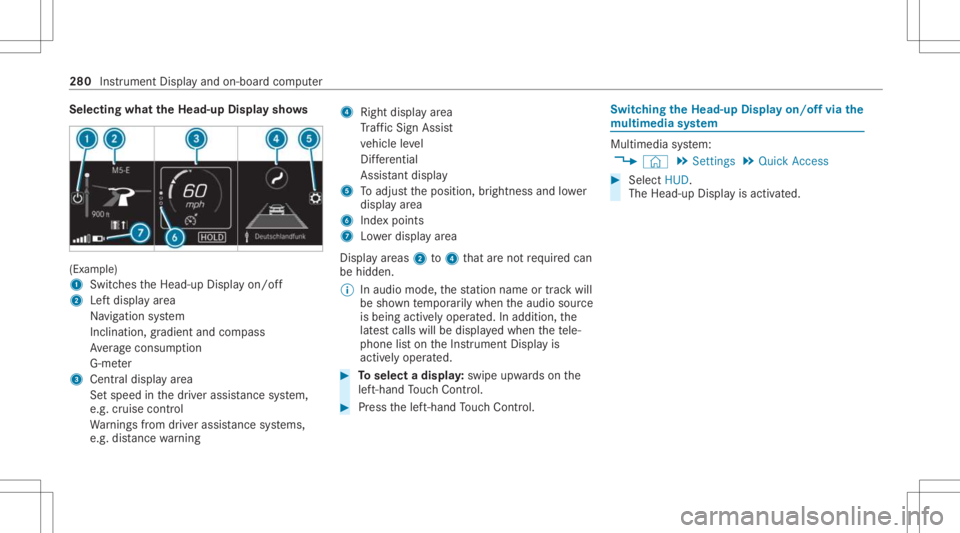
1 Switc hestheHead-up Displayon/ off
2 Leftdispla yar ea
Na vig ation system
Inc lination ,gr adient andcompass
Av erag econ sum ption
G-me ter
3 Centraldispl ayarea
Se tspee din thedr iver assis tance system,
e.g. cruise control
Wa rnings from driver assis tance systems,
e.g. distance warning 4
Right displa yar ea
Tr af fic Sign Assist
ve hicle leve l
Dif fere ntia l
Assi stant displa y
5 Toadjus tth eposition ,br ightn essand lowe r
displa yar ea
6 Inde xpoint s
7 Lowe rdisp lay ar ea
Displa yar eas 2to4 that areno tre qu ired can
be hidden .
% Inaudio mode, thest atio nnam eor trac kwill
be sho wntemp orarily when theaudio source
is being activelyoper ated. Inaddition, the
lat estcalls willbedispla yedwhen thete le‐
phon elis ton theIns trument Displayis
activ elyoper ated. #
Toselect adispla y:swipe upwards on the
lef t-hand Touc hCon trol. #
Press thelef t-hand Touc hCon trol. Swit
ching theHead -upDispla yon/of fvia the
mu ltim edia system Multi
media system:
4 © 5
Set ting s5
Quick Access #
Select HUD.
The Head-up Displayis activ ated. 280
Instrument Displayand on-boar dcom puter
Page 283 of 510
Ov
ervie wand oper ation No
teson theMB UX multim edia system &
WARNIN GRisk ofdist ra ction from infor‐
mati onsystems andcomm unication s
eq uipment
If yo uoper ateinf ormat ionand comm unic a‐
tio neq uipme ntintegratedin theve hicle
when driving, youwill bedistract ed from the
tr af fic situ ation. Thiscou ldalso cau seyouto
lose control of theve hicle. #
Onlyoper ateth is eq uipmen twhen the
tr af fic situ ation per mits. #
Ifyo ucan notbe sur eof this, stop the
ve hicle whilstpa ying attention toroad
and traffic condi tions andoperate the
eq uipment withth eve hicle statio nary. Yo
umus tobse rveth eleg alrequ iremen tsforth e
cou ntryin whi chyouar ecur rentl ydr ivi ng when
op erati ng themultimedia system. Ov
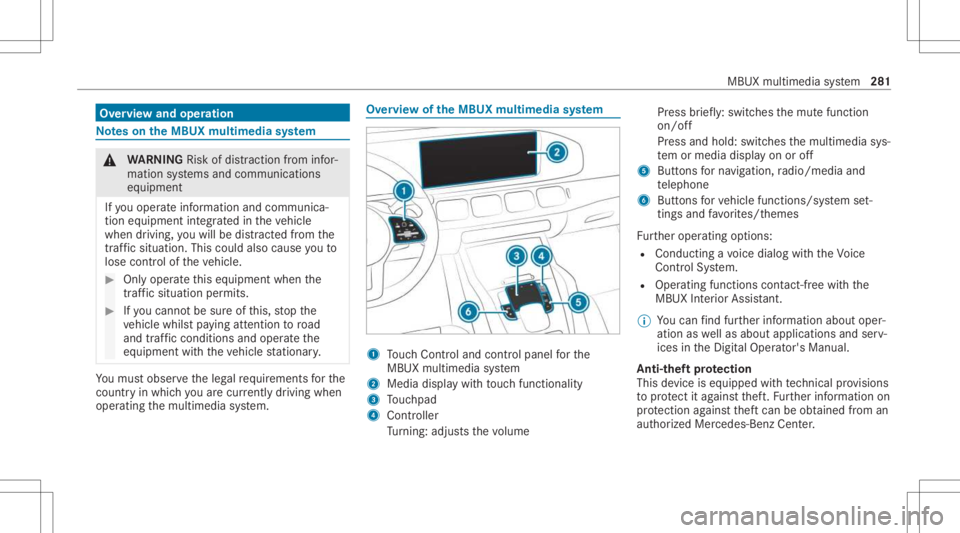
ervie wof theMB UX multim edia system 1
Touc hCon trol and contro lpanel forth e
MBUX multimedia system
2 Media displaywit hto uc hfun ction alit y
3 Touc hpad
4 Con troller
Tu rning: adjus tsthevo lume Pr
ess brief ly:swi tches themut efunc tion
on/ off
Pr ess and hold: switchesthemultimedia sys‐
te m or media display on oroff
5 Butt ons forna vig ation, radio/media and
te lephon e
6 Buttons forve hicle functions/sy stem set‐
ting sand favo rite s/t hemes
Fu rther oper ating options:
R Conducting avo ice dialog withth eVo ice
Cont rolSy stem.
R Oper ating functionscon tact-free with the
MBUX Interior Assis tant.
% Youcan find further information aboutoper‐
ation aswellas about applicat ionsandserv‐
ices intheDigit alOper ator's Manual.
Anti-t heftpr otection
This devic eis eq uipped withte ch nica lpr ov ision s
to protect itag ains tth eft. Fu rther information on
pr otect ion agains tth eftcan beobt ained from an
aut hor ized Mercedes- BenzCenter. MBUX
multimedia system 28
1
Page 287 of 510
St
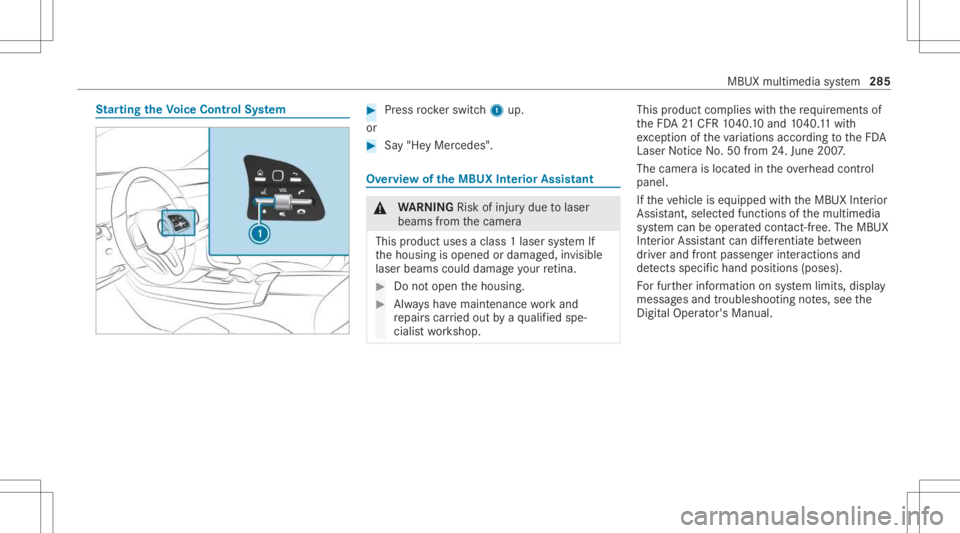
arting theVo ice Contr olSystem #
Press rock er switc h1 up.
or #
Say"He yMer cedes". Ov
ervie wof theMB UX Interior Assis tant &
WARNIN GRisk ofinju rydue tolaser
beams from thecamer a
This product usesaclass 1laser system If
th ehousing isopened ordamag ed,invisible
laser beams coulddamag eyo ur retina . #
Donotop en thehousing. #
Alw aysha ve maint enance workand
re pair scar ried out byaqu alif ied spe‐
cialis two rkshop. This
product complies withth ere qu iremen tsof
th eFD A21 CFR 1040. 10 and 1040. 11with
exc eption oftheva riatio nsacc ordin gto theFD A
Laser Notice No.50from 24.Ju ne 200 7.
The camer ais locat edintheove rhead control
panel.
If th eve hicle iseq uipped withth eMBUX Interior
Assis tant, select edfunc tions ofthemultimedia
sy stem can beoper ated con tact-fr ee.The MBUX
Int erior Assi stant can differe ntia tebetween
dr iver and front passeng erinteraction sand
de tects specificha nd pos itions (poses ).
Fo rfur ther information onsystem limits, display
messag esand troubleshoo tingnotes, see the
Dig ital Op erator' sMa nua l. MBU
Xmu ltimed iasystem 285
Page 288 of 510
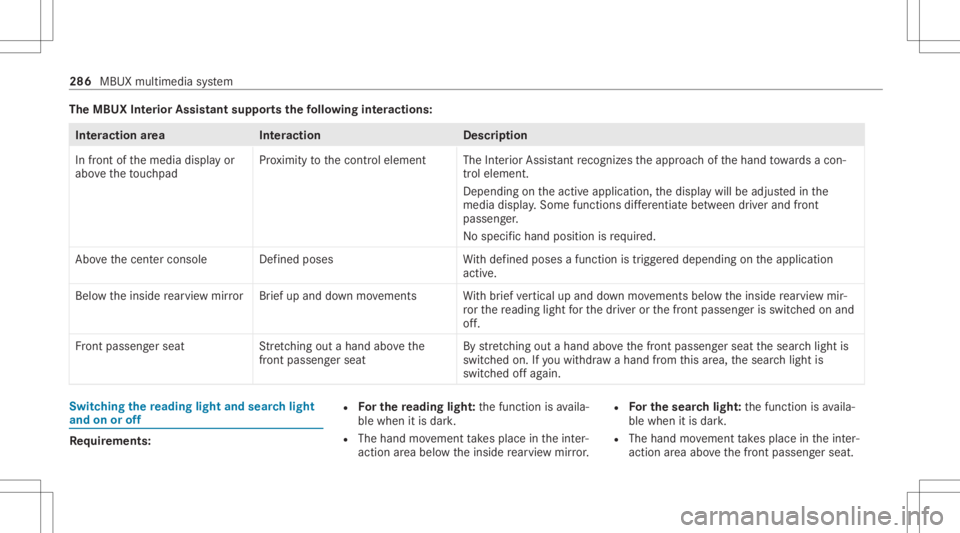
The
MBUX Inte rior Assis tantsupportsthefo llo wing interactions: Int
eraction area Interaction Description
In front ofthemedia displayor
abo vetheto uc hpad Pr
ox imit yto thecon trol element TheInterior Assis tant recogni zestheappr oachof thehand towa rdsa con‐
tr ol element.
Depending ontheactiv eapplication, thedispla ywill beadjus tedin the
media display. Some functionsdiffer ent iatebe tween driver and front
passeng er.
No specif ichand position isrequ ired.
Abo vethecent ercon sole Defined poses With def ined poses afunc tion istrigg ered dependin gon theapplication
activ e.
Belo wtheinside rear vie wmir rorB rief up and down movements With brief vertical upand down movements belowtheinside rear vie wmir ‐
ro rth ere adin glight forth edr iver or thefront passeng erisswitc hedonand
of f.
Fr ont passeng erseat Stretching outa ha nd above the
fr ont passeng ersea t By
stre tching outa ha nd above thefront passeng erseat thesear chlight is
switc hedon.Ifyo uwit hdra wahan dfrom this area, thesear chlight is
switc hedoffag ain. Switc
hingthere ading light and sear chlight
and onoroff Re
quirement s: R
Forthe reading light:th efunc tion isavaila‐
ble when itis dar k.
R The hand movement take splace intheint er‐
action area belo wtheinside rear vie wmir ror. R
Forthe search light :th efunc tion isavaila‐
ble when itis dar k.
R The hand movement take splace intheint er‐
action area abo vethefront passeng erseat. 286
MBUX multimedia system
Page 289 of 510
R
The seat beltonthefront passeng erseat
mus tno tbe inser tedin theseat beltbuckle.
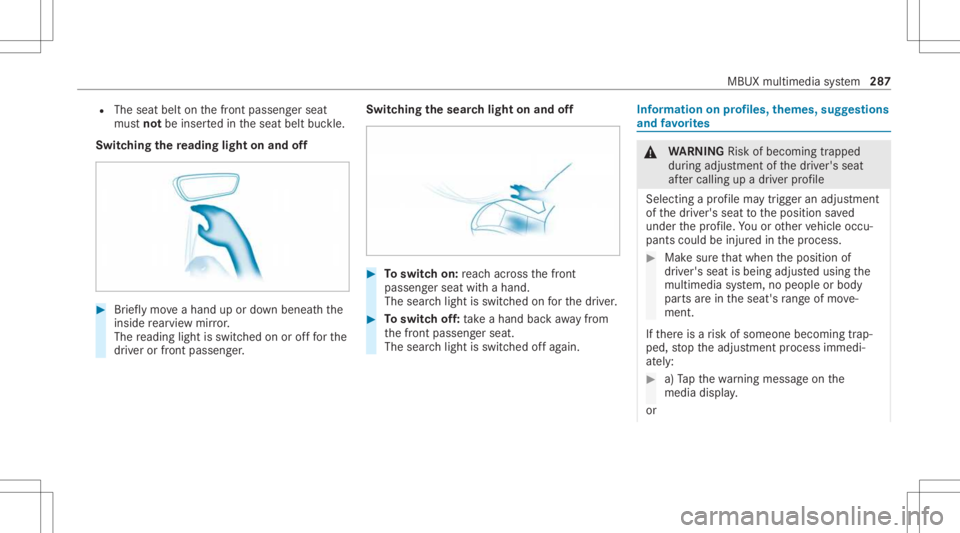
Switc hingthere ading light on and off #
Brief lymo veahan dup ordown ben eathth e
inside rear vie wmir ror.
The readin glight isswit ched on orofffo rth e
dr iver or front passeng er. Switc
hingthesear chlight onand off #
Toswitc hon: reac hacr oss thefront
passeng erseat withahand.
The sear chlight isswitc hedonforth edr iver . #
Toswitc hof f:take ahan dbac kaw ay from
th efront passeng erseat.
The sear chlight isswitc hedoffag ain. Inf
orma tion onprofiles, themes, suggestions
and favo rite s &
WARNIN GRisk ofbeco ming trap ped
du ring adjus tment ofthedr iver's seat
af te rcall ing upadr iver profile
Selecting apr ofile ma ytrigg eran adju stment
of thedr iver's seat totheposition save d
und erthepr ofile. Youor other vehicle occu‐
pants couldbeinjur edinthepr ocess. #
Mak esur eth at when theposition of
dr iver's seat isbeing adjustedusing the
multime diasystem, nopeople orbody
par tsarein theseat's rang eof mo ve‐
ment.
If th er eis arisk ofsomeone becoming trap‐
ped, stop theadjus tmentpr ocess immedi‐
at ely: #
a)Tapth ewa rning mess ageon the
media display.
or MBUX
multimedia system 28
7
Page 292 of 510
-
Author izing andde-aut horizing devices
R Time &dat e
R Langu age
R Units fordis tance
R Softwareup dates
R Dat aim po rt/e xpor t
R PIN protect ion
R System Reset Inf
ormat iononimpor tant system updates Im
por tant system updat esma ybe neces saryfo r
th esecur ityofyour mult imed iasystem's data.
Ins tallth ese updat es,orelse thesecur ityofyour
mult imed iasystem cann otbe ensur ed.
A sy stem updat econ sistsof thre esteps:
R Downloading orcop ying ofthedat are qu ired
fo rins tallation
R Installation ofthedo wnloaded system updat e
R Activati on ofthedo wnloaded system updat e
by restar tin gth esy stem %
Ifaut omatic softwareupdat esareactiv ated,
th esy stem updat eswill bedownloaded auto‐
maticall y.
The multimedia system prov ides amess age
when asy stem updat eis available.
Yo uha ve thefo llo wing selectionoption s:
R Accept andInstall
The system updat ewill bedownloaded inthe
bac kground .
R Infor mat ion
In fo rm atio nabout thepending system
updat eis displa yed.
R Later
The system updat ecan bedownloaded man‐
uall yat alat er time.
Deep system updates
Dee psy stem updat esaccess vehicle orsystem
se ttings andcanther efor eonl ybe car ried out
when theve hicle isstatio naryand theignition is
switc hedoff.
If th edo wnload ofadeep system updat eis com‐
ple tedand thedo wnloaded system updat eis re
ady forins tallation ,yo uwill beinformed ofthis
af te rth ene xt ignition cycle, forex am ple.
% Park theve hicle safely inasuit able location
bef orest ar tin gth eins tallation .
Re quiremen tsforth eins tallation :
R The ignit ionisswitc hedoff.
R Notesand warnings have been read and
acc epted.
R The elect ric pa rking brak eis applied.
If all requ iremen tshave been fulfilled, thedo wn‐
loaded system updat eis ins talled. Themultim e‐
dia system cann otbe oper ated while thedo wn‐
loaded system updat eis being installed and
ve hicle functionsarere strict ed.
If er ro rs should occurduring theins tallation ,th e
multime diasystem automatic allyatt em ptsto
re stor eth epr ev ious version. Ifre stor ation ofthe
pr ev ious version isno tpossible ,a symbol
appear son themedia display.Con sult aqu ali‐
fi ed specialis two rkshop toresolv eth epr oblem. 290
MBUX multimedia system
Page 294 of 510
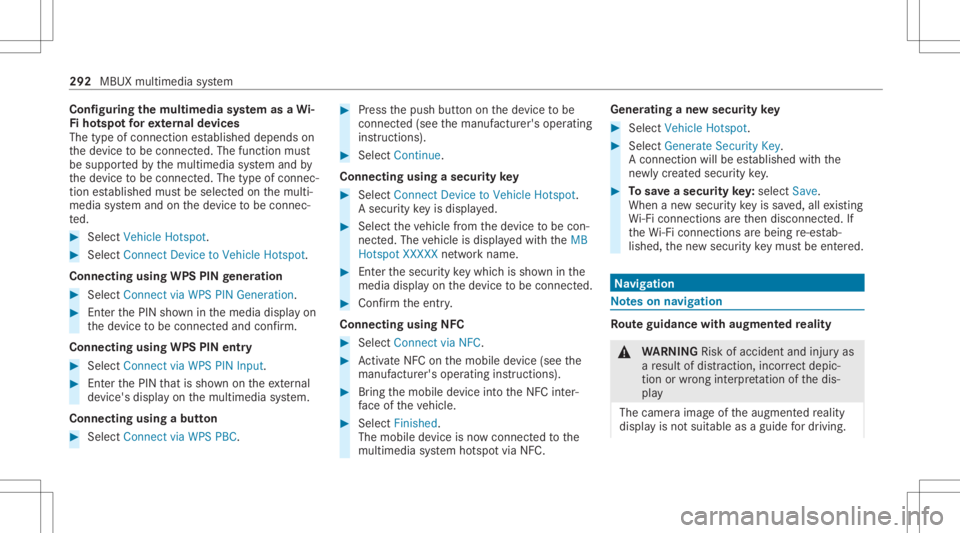
Conf
iguringthemu ltim edia system asaWi -
Fi ho tspo tfo rex tern al de vic es
The type ofconnection established depends on
th ede vice tobe con nected. The func tion must
be suppor tedby themultimedia system and by
th ede vice tobe con nected. The type ofcon nec‐
tion established mustbe select edon themulti‐
media system and onthede vice tobe con nec‐
te d. #
Select Vehicle Hotspot. #
Select Connec tDevic eto Vehicle Hotspot.
Connecting usingWPSPINgener ation #
Select Connec tvia WPS PINGeneration. #
Enterth ePIN showninthemedia displayon
th ede vice tobe con nectedand confirm .
Connect ingusin gWPS PINentr y #
Sele ctConn ectviaWPS PINInput. #
Enterth ePIN that issho wnontheex tern al
de vic e's displa yon themultimedia system.
Connecting usingabutt on #
Select Connec tvia WPS PBC. #
Press thepush buttononthede vice tobe
con nected(see themanuf acturer'soper ating
ins truction s). #
Select Continue.
Connecting usingasecur itykey #
Select Connect DevicetoVeh icleHotsp ot.
A secu rity keyis disp laye d. #
Select theve hicle from thede vice tobe con ‐
nec ted. The vehicle isdispla yedwit hth eMB
Hot spot XXXXX networkname. #
Enterth esecur itykeywhic his sho wninthe
media display on thede vice tobe con nected. #
Conf irm theent ry.
Connect ingusin gNFC #
Sele ctConn ectviaNFC. #
ActivateNFC onthemobile device (see the
manuf acturer'soper ating instructions). #
Bring themobile device intoth eNFC inter‐
fa ce oftheve hicle. #
Select Finished.
The mobile device isno wconn ectedtothe
multime diasystem hotspo tvia NFC. Gener
atingane wsecur itykey #
Select Veh icleHotsp ot. #
Select Genera teSecu rityKey.
A connecti onwillbe established withth e
ne wly crea tedsecur itykey. #
Tosave asec urity key:select Save.
When ane wsecur itykeyis save d, all existin g
Wi -Fi conne ctionsareth en discon nected.If
th eWi -Fi conne ctionsarebe ing re-es tab‐
lished, thene wsecur itykeymus tbe entere d. Na
vig ation No
teson navig ation Ro
uteguidanc ewith augment edreality &
WARNIN GRisk ofacci dent andinjuryas
a re sult ofdis traction, incorrect dep ic‐
tion orwrong interpr etatio nof thedis‐
pla y
The camer aimag eof theaugment edrealit y
displa yis no tsuit able asaguide fordr iving. 292
MBUX multimedia system
Page 299 of 510
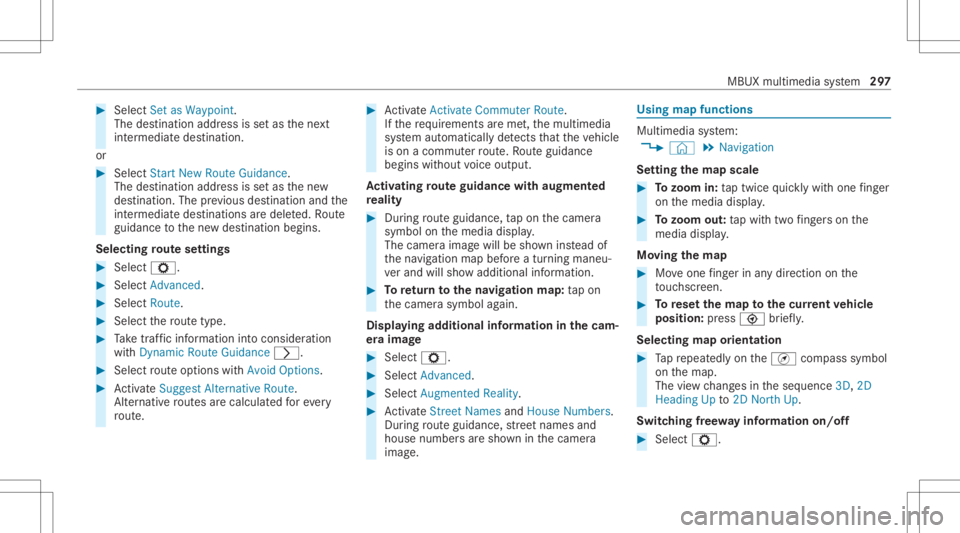
#
Select Set asWa ypoint.
The destina tion address issetas thene xt
int ermediat edes tinat ion.
or #
Select Start New Route Guidance.
The destinat ionaddr essissetas thene w
des tinat ion.Theprev ious destination andthe
int ermediat edes tination sar edele ted. Ro ute
guidan cetothene wdes tinat ionbegins.
Selecting rout ese ttings #
Select Z. #
Select Advanced . #
Select Route. #
Select thero utetyp e. #
Take traf fic inf ormati onintoconsi deration
wi th Dyna micRoute Guidance 0048. #
Select routeop tio ns withAv oid Options. #
ActivateSug gest Alte rnative Route .
Alt ernati veroutes arecalc ulatedforev ery
ro ute. #
ActivateActiv ateCommu terRoute .
If th ere qu iremen tsareme t,th emultimedia
sy stem automaticall yde tects that theve hicle
is on acommut erroute. Ro uteguidan ce
begin swit hout voice output .
Ac tiv atin gro ut eguidanc ewith augment ed
re ality #
Dur ing routeguidan ce,tapon thecamer a
symbol onthemedia display.
The camer aimag ewill besho wninstead of
th ena vig ation mapbeforeatur ning maneu‐
ve rand willsho wadd itional information. #
Toretur nto thena vig ation map:tap on
th ecamer asymbol again.
Displa yingadditional informat ioninthecam ‐
er aima ge #
Select Z. #
Select Adva nced. #
Select Aug mented Reality. #
ActivateStree tNa mes andHouseNumbe rs.
Dur ing routeguidan ce,stre et nam esand
hou senum bers aresho wninthecamer a
imag e. Using
mapfunctions Multimedia
system:
4 © 5
Navigation
Se tting thema pscale #
Tozoo min: taptwice quickl ywit hone fing er
on themedia display. #
Tozoo mout: tapwit htw ofing erson the
media display.
Mo ving thema p #
Moveone fing er inanydi re ction onthe
to uc hsc reen. #
Torese tth ema pto the current vehicl e
posi tion: press \ brief ly.
Sel ecting map orien tatio n #
Tapre peat edlyon theÄ compass symbol
on themap.
The viewch ang esintheseq uence 3D,2D
Heading Upto2D North Up.
Swi tching free wa yinf ormation on/off #
Select Z. MBUX
multime diasy stem 29
7