turn signal MERCEDES-BENZ GLS-Class SUV 2017 X166 Owner's Manual
[x] Cancel search | Manufacturer: MERCEDES-BENZ, Model Year: 2017, Model line: GLS-Class SUV, Model: MERCEDES-BENZ GLS-Class SUV 2017 X166Pages: 390, PDF Size: 9.71 MB
Page 9 of 390
Roof lining...................................... 33 0
Se at belt ........................................ 330
Seat cover .................................... .330
Sensors ......................................... 328
Side running board ........................ 327
Steering wheel ............................... 329
Trim pieces ....................................3 30
Washing by hand ........................... 325
Wheels ...........................................3 26
Windows ........................................ 327
Wiper blades .................................. 327
Wooden trim .................................. 330
Cargo compartment cover
Notes/how to use ......................... 300
Cargo compartment enlargement
Important safety notes .................. 297
Cargo compartment floor
Important safety notes .................. 301
Opening/closing ............................ 301
Stowage well (under) ..................... 301
Cargo tie down rings ......................... 299
CD
see also Digital Operator's Man-
ual ..................................................2 87
CD player (on-board computer) ........235
Center console
Lower section .................................. 37
Upper section .................................. 36
Central locking
Automatic locking (on-board com-
puter) ............................................. 239
Locking/unlocking (SmartKey) ........7 4
Child
Restraint system .............................. 58
Child seat
Forward-facing restraint system ...... 61
LATCH-type (ISOFIX) child seat
anchors ............................................ 59
On the front-passenger seat ............ 61
Rearwar d-fac
ing restraint system .... 61
Top Tether ...................................... .60
Child-proof locks
Important safety notes .................... 61
Rear doors ...................................... .62
Children
Special seat belt retractor .............. .57
Cigarette lighter ................................ 306 Cleaning
Mirror turn signal .......................... .327
Trailer tow hitch .............................3 29
Climate control
3-zone automatic climate control
with additional rear-compartment
climate control ............................... 127
Automatic climate control (3-
zone) .............................................. 125
Controlling automatically ...............1 30
Cooling with air dehumidification .. 130
Defrosting the windows ................. 132
Defrosting the windshield .............. 132
Dual-zone automatic climate con-
trol ................................................. 123
General notes ................................ 123
Indicator lamp ................................ 130
Ionization ....................................... 134
Maximum cooling .......................... 132
Notes on using the automatic cli-
mate control .................................. 129
Overview of systems ......................1 23
Problem with the rear window
defroster ........................................ 133
Problems with cooling with air
dehumidification ............................ 130
Rear control panel ......................... 125
Rear control panel (3-zone auto-
matic climate control with addi-
tional rear-compartment climate
control) .......................................... 127
Refrigerant ..................................... 383
R
efrigerant filling capacity ............. 384
Setting the air distribution ............. 131
Setting the air vents ......................1 34
Setting the airflow ......................... 131
Setting the climate mode (AIR
FLOW) ............................................ 130
Setting the temperature ................ 131
Switching air-recirculation mode
on/off ............................................ 133
Switching on/off ........................... 129
Switching residual heat on/off ...... 133
Switching the rear window
defroster on/off ............................ 133
Switching the ZONE function
on/off ............................................ 132
Coat hooks ......................................... 300
Index7
Page 14 of 390
Fuel filler flapOpening ........................................ .155
Fuel filter (display message) ............ 260
Fuel level
Calling up the range (on-board
computer) ...................................... 233
Fuel tank
Capacity ........................................ 379
Problem (malfunction) ................... 156
Fuses
Allocation chart .............................3 43
Before changing .............................3 44
Dashboard fuse box ....................... 344
Fuse box in the engine compart-
ment .............................................. 344
Fuse box under rear bench seat .... 345
Important safety notes .................. 343
G
Garage door opener
Clearing the memory ..................... 318
General notes ................................ 315
Important safety notes .................. 315
Opening/closing the garage doo r..3 17
Problems when programming ........3 17
Programming (button in the rear-
view mirror) ................................... 316
Synchronizing the rolling code ....... 316
Gear indicator (on-board com-
puter, Mercedes-AMG vehicles) ....... 241
Genuine parts ...................................... 25
Glove box ...........................................2 95
Google™ Local Search
see also Digital Operator's Man-
ual ..................................................2 87
GTW (Gross Trailer Weight) (defini-
tion) .................................................... 365
H
Handbrake
see Parking brake
Hazard warning lamps ......................114
Head restraints
Adjusting ......................................... 96
Adjusting (electrically) ..................... 97
Adjusting (manually) ........................ 96 Adjusting (rear) ................................ 97
Installing/removing (rear) ................ 98
Luxury .............................................. 97
Headlamps
Fogging up ..................................... 116
see Automatic headlamp mode
Heating
see Climate control
High beam flasher .............................1 13
High-beam headlamps
Adaptive Highbeam Assist ............. 115
Display message ............................ 256
Replacing bulbs .............................1 19
Switching on/off ........................... 113
Highway mode ................................... 114
Hill start assist .................................. 141
HOLD function
Deactivating ................................... 185
Display message ............................ 264
Function/notes .............................1 85
Home address
see also Digital Operator's Man-
ual ..................................................2 87
Hood
Closing ...........................................3 20
Display message ............................ 272
Important safety notes .................. 319
Opening ......................................... 319
Horn ...................................................... 33
Hydroplaning ..................................... 166
I
Ignition lock
see Key positions
Immobilizer .......................................... 72
Indicator lamps
see Warning and indicator lamps
Indicators
see Turn signals
Insect protection on the radiator .... 320
Instrument cluster
Overview .......................................... 34
Warning and indicator lamps ........... 34
Instrument cluster lighting .............. 229
Intelligent Light System
Activating/deactivating ................. 239
Overview ........................................ 114
12Index
Page 15 of 390
Interior lightingAutomatic control .......................... 117
Emergency lighting ........................ 117
General notes ................................ 117
Manual control .............................. .116
Overview ........................................ 116
Reading lamp ................................. 116
iPod
®
see also Digital Operator's Man-
ual ..................................................2 87
J
Jack
Storage location ............................ 331
Using ............................................. 368
Jump starting (engine) ......................338
K
Key positions
KEYLESS-GO .................................. 138
SmartKey ....................................... 138
KEYLESS-GO
Activating ......................................... 75
Convenience closing feature ............ 88
Deactivation ..................................... 75
Display message ............................ 273
Locking ............................................ 75
Removing the Start/Stop button ... 139
Start function ................................... 76
Start/Stop button .......................... 138
Starting the engine ........................ 140
Unlocking ......................................... 75
Kickdown
Driving tips ....................................1 49
Manual gearshifting ....................... 152
Knee bag .............................................. 47
L
Lamps
see Warning and indicator lamps
Lane Keeping Assist
Activating/deactivating ................. 238
Display message ............................ 264
Function/information .................... 209
see Active Lane Keeping Assist
Lap time (RACETIMER) ...................... 241LATCH-type (ISOFIX) child seat
anchors
................................................ 59
Level control
AIRMATIC ...................................... 188
Level control (display message) ...... 261
Level control (vehicle with the Off-
Road Engineering package)
Basic settings ................................ 182
Function/notes ............................. 182
Important safety notes .................. 182
License plate lamp (display mes-
sage) ................................................... 256
Light function, active
Display message ............................ 256
Light sensor (display message) ....... 256
Lights
Activating/deactivating the Intel-
ligent Light System ........................ 239
Active light function ....................... 114
Adaptive Highbeam Assist ............. 115
Automatic headlamp mode ............ 112
Fog lamps (extended) .................... 115
Hazard warning lamps ................... 114
High beam flasher .......................... 113
High-beam headlamps ................... 113
Highway mode ............................... 114
Light switch ................................... 112
Low-beam headlamps .................... 113
Off-road lights ................................ 115
Parking lamps ................................ 113
Rear fog lamp ................................ 113
Standing lamps .............................. 113
Switching the daytime running
lamps on/off (on-board com-
puter) ............................................. 239
Turn signals ................................... 113
see Interior lighting
see Replacing bulbs
Loading guidelines ............................ 294
Locking
see Central locking
Locking (doors)
Automatic ........................................ 81
Emergency locking ........................... 81
From inside (central locking but-
ton) .................................................. 80
Index13
Page 16 of 390
Locking centrallysee Central locking
Locking verification signal (on-
board computer) .............................. .239
LOW RANGE
Display message ............................ 263
Off-road gear ................................. 219
LOW RANGE off-road gear ................ 219
Low-beam headlamps
Display message ............................ 256
Replacing bulbs .............................1 18
Switching on/off ........................... 113
Lumbar support
Adjusting (on the seat) .................. 103
Luxury head restraints ....................... 97
M
M+S tires............................................ 348
Malfunction message
see Display messages
Matte finish (cleaning instruc-
tions) ..................................................3 26
mbrace
Call priority ....................................3 11
Display message ............................ 250
Downloading destinations
(COMAND) ..................................... 312
Downloading routes ....................... 314
Emergency call .............................. 309
General notes ................................ 308
Geo fencing ................................... 315
Locating a stolen vehicle ...............3 13
MB info call button ........................ 311
Remote fault diagnosis .................. 313
Remote vehicle locking .................. 313
Roadside Assistance button .......... 310
Search & Send ............................... 312
Self-test ......................................... 309
Speed alert .................................... 314
System .......................................... 308
Triggering the vehicle alarm ........... 315
Vehicle remote unlocking .............. 313
Mechanical key
Function/notes ................................ 76
General notes .................................. 76
Inserting .......................................... 76
Locking vehicle ................................ 81 Removing ......................................... 76
Unlocking the driver's door .............. 81
Media Interface
USB port in the armrest of the
center console ............................... 295
see Digital Operator's Manual
Memory card (audio) ......................... 235
Memory function ............................... 110
Mercedes-Benz Intelligent Drive
360°camera .................................. 201
Active Blind Spot Assist ................. 210
Active Lane Keeping Assist ............ 213
ATTENTION ASSIST ........................ 205
Blind Spot Assist ............................ 207
Distance Pilot DISTRONIC ............. 174
Distance Pilot DISTRONIC with
Steering Pilot ................................. 180
General notes ................................ 172
Lane Keeping Assist ...................... 209
Parking Assist PARKTRONIC .......... 190
Parking Pilot .................................. 193
PRE-SAFE
®PLUS (anticipatory
occupant protectio n P
LUS) .............. 56
Rear view camera .......................... 197
Traffic Sign Assist .......................... 206
Message memory (on-board com-
puter) .................................................. 244
Mirror
Vanity mirror (sun visor) ................ 304
Mirror turn signal
Cleaning ......................................... 327
Mirrors
see Exterior mirrors
see Rear-view mirror
see Vanity mirror (in the sun visor)
Mobile phone
Connecting (Bluetooth
®inter-
face) .............................................. 290
Connecting another mobile
phone ............................................ 292
Frequencies ................................... 376
Installation ..................................... 376
Menu (on-board computer) ............ 235
Transmission output (maximum) .... 376
Modifying the programming
(SmartKey) ........................................... 76
MOExtended tires .............................. 332
14Index
Page 20 of 390
Remote controlGarage door opener ....................... 315
Programming (garage door
opener) .......................................... 316
Replacing bulbs
General notes ................................ 117
High-beam headlamps ................... 119
Important safety notes .................. 117
Installing/removing the cover
(front wheel arch) .......................... 118
Low-beam headlamps .................... 118
Overview of bulb types .................. 118
Turn signals (front) ......................... 119
Reporting safety defects .................... 30
Rescue card ......................................... 30
Reserve (fuel tank)
see Fuel
Reserve fuel
Display message ............................ 259
Warning lamp ................................. 283
Residual heat (climate control) ........ 133
Restraint system
Display message ............................ 252
Introduction ..................................... 41
Warning lamp ................................. 282
Warning lamp (function) ................... 42
Reversing feature
Panorama sliding sunroof ................ 90
Roller sunblinds ............................... 91
Side windows ................................... 86
Sliding sunroof ................................. 90
Tailgate ............................................ 82
Reversing lamps (display mes-
sage) ................................................... 256
Roadside Assistance (breakdown) .... 27
Roller sunblind
Panorama roof with power tilt/
sliding panel ..................................... 91
Rear side windows ......................... 304
Roof carrier ........................................ 302
Roof lining and carpets (cleaning
guidelines) ......................................... 330
Roof load (maximum) ........................ 384
Route (navigation)
see Route guidance (navigation) Route guidance
see also Digital Operator's Man-
ual .................................................. 287
Route guidance (navigation) ............ 233
S
Safety
Children in the vehicle ..................... 57
see Occupant safety
see Operating safety
Safety system
see Driving safety systems
SD card
Inserting ........................................ 292
Inserting/removing ........................ 292
Removing ....................................... 292
SD memory card
see also Digital Operator's Man-
ual .................................................. 287
Selecting ........................................ 235
Search & Send
see also Digital Operator's Man-
ual .................................................. 287
Seat belts
Adjusting the driver's and front-
passenger seat belt ......................... 45
Adjusting the height ......................... 44
Cleaning ......................................... 330
Correct usage .................................. 44
Fastening ......................................... 44
Important safety guidelines ............. 43
Introduction ..................................... 42
Releasing ......................................... 45
Switching belt adjustment on/off
(on-board computer) ...................... 240
Warning lamp ................................. 275
Warning lamp (function) ................... 45
Seats
Adjusting (electrically) ..................... 96
Adjusting the 4-way lumbar sup-
port ................................................ 103
Adjusting the head restraint ............ 96
Calling up a stored setting (mem-
ory function) .................................. 111
Cleaning the cover ......................... 330
Correct driver's seat position ........... 94
Entry position (3rd row of seats) .... 100
18Index
Page 25 of 390
Trailer towingActive Blind Spot Assist ................. 213
Active Lane Keeping Assist ............ 215
Blind Spot Assist ............................ 209
Permissible trailer loads and
drawbar noseweights ..................... 227
Transfer case ..................................... 153
Transmission
see Automatic transmission
Transmission position display ......... 148
Transporting the vehicle .................. 343
Traveling uphill
Brow of hill ..................................... 171
Driving downhill ............................. 172
Maximum gradient-climbing capa-
bility ...............................................1 71
Trim pieces (cleaning instruc-
tions) ..................................................3 30
Trip computer (on-board com-
puter) ..................................................2 32
Trip odometer
Calling up ....................................... 232
Resetting (on-board computer) ...... 233
Trunk
see Tailgate
Turn signals
Display message ............................ 256
Replacing bulbs (front) ................... 119
Switching on/off ........................... 113
Two-way radio
Frequencies ................................... 376
Installation ..................................... 376
Transmission output (maximum) .... 376
TWR (Tongue Weight Rating) (defi-
nition) ................................................. 366
Type identification plate
see Vehicle identification plate
U
UnlockingEmergency unlocking ....................... 81
From inside the vehicle (central
unlocking button) .............................8 0
Upshift indicator (on-board com-
puter, Mercedes-AMG vehicles) .......241 USB devices
Connecting to the Media Inter-
face ............................................... 292
V
Vanity mirror (in the sun visor) ........304
Vehicle
Correct use ...................................... 29
Data acquisition ............................... 30
Display message ............................ 270
Equipment ....................................... 26
Individual settings .......................... 238
Limited Warranty .............................3 0
Loading .......................................... 356
Locking (in an emergency) ............... 81
Locking (SmartKey) .......................... 74
Lowering ........................................ 370
Maintenance .................................... 27
Operating safety .............................. 28
Parking .......................................... 159
Parking for a long period ................ 162
Pulling away ................................... 141
Raising ........................................... 368
Reporting problems ......................... 29
Securing from rolling away ............ 367
Towing away .................................. 341
Transporting .................................. 343
Unlocking (in an emergency) ........... 81
Unlocking (SmartKey) ...................... 74
Vehicle data ................................... 384
Vehicle battery
see Battery (vehicle)
Vehicle data ....................................... 384
Vehicle data (off-road driving)
Approach/departure angle ............ 386
Fording depth ................................ 385
Maximum gradient climbing abil-
ity .................................................. 386
Vehicle dimensions ........................... 384
Vehicle emergency locking ................ 81
Vehicle identification number
see VIN
Vehicle identification plate .............. 377
Vehicle level
AIRMATIC ...................................... 188
Vehicle level (display message) ....... 261
Vehicle tool kit .................................. 331
Index23
Page 36 of 390
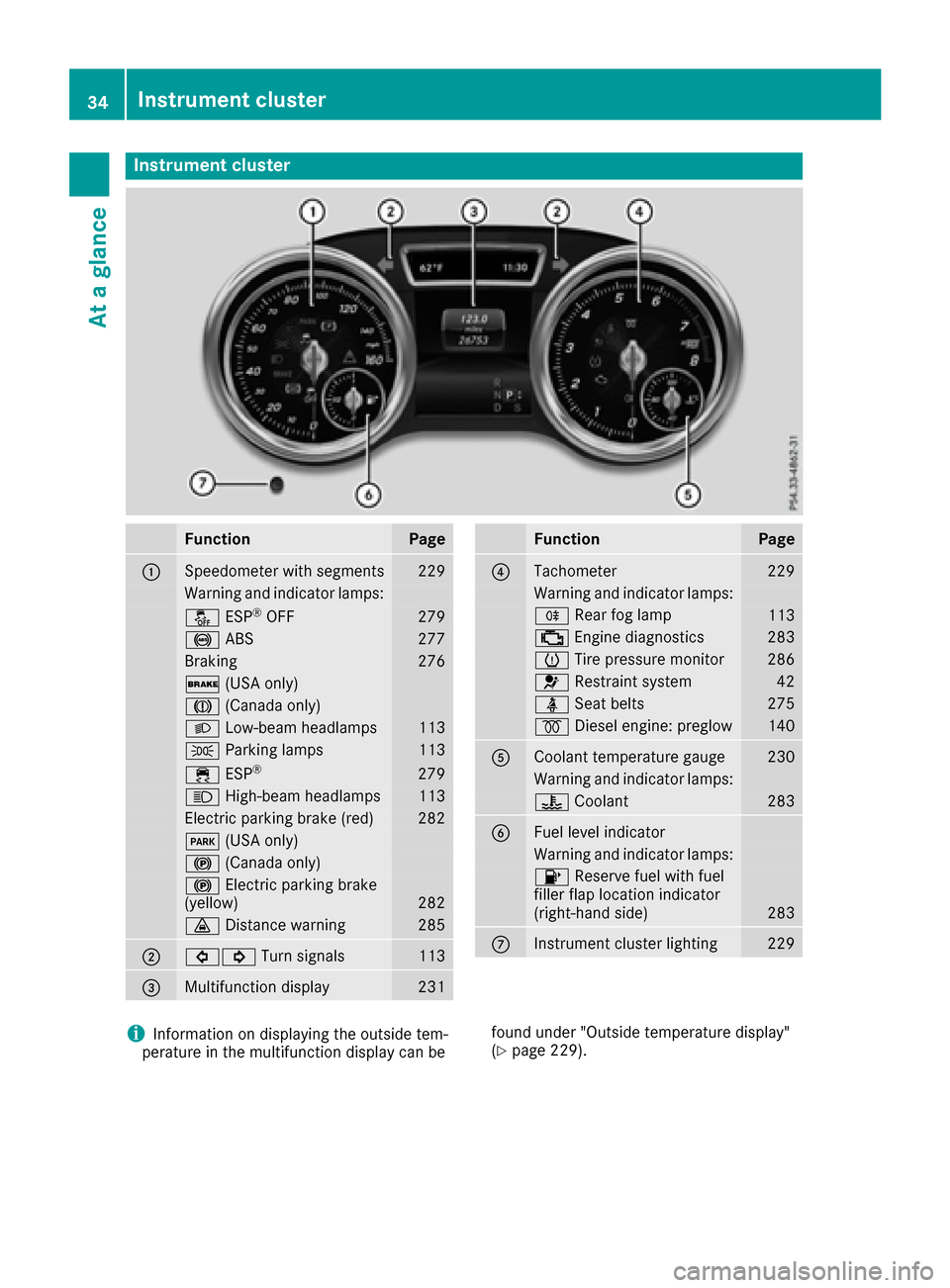
Instrument cluster
FunctionPage
:Speedometer wit hsegments22 9
Warning and indicator lamps:
å ESP®OF F279
! ABS277
Braking276
$ (USAonly)
J (Canada only)
LLow-beam headlamps113
T Parking lamp s113
÷ ESP®27 9
K High-beam headlamps113
Electric parking brak e(red)28 2
F (USAonly)
! (Canada only)
!Electric parking brak e
(yellow)28 2
· Distanc ewarning28 5
;#! Turn signals113
=Multifunction display231
FunctionPag e
?Tachometer229
Warning and indicator lamps:
R Rear fog lamp113
; Enginediagnostics28 3
h Tirepressur emonitor28 6
6 Restrain tsystem42
ü Seat belt s275
% Diesel engine: preglow140
ACoolan ttemperature gauge23 0
Warning and indicator lamps:
? Coolan t283
BFue llevel indicator
Warning and indicator lamps:
8 Reserve fuel wit hfuel
filler flap location indicator
(right-hand side )
283
CInstrumen tcluste rlighting22 9
iInformation on displayin gth eoutside tem-
peratur ein th emultifunction display can be foun
dunder "Outside temperature display"
(Ypage 229).
34Instrument cluster
At a glance
Page 76 of 390
SmartKey
Important safety notes
GWARNING
If children are left unsupervised in the vehicle,
they could:
Ropen the doors, thus endangering other
people or road users.
Rget out and disrupt traffic.
Roperate the vehicle's equipment.
Additionally, children could set the vehicle in
motion if, for example, they:
Rrelease the parking brake.
Rshifting the automatic transmission out of
park position P
RStart the engine.
There is a risk of an accident and injury.
When leaving the vehicle, always take the
SmartKey with you and lock the vehicle. Never
leave children or animals unattended in the
vehicle. Always keep the SmartKey out of
reach of children.
GWARNING
If you attach heavy or large objects to the
SmartKey, the SmartKey could be uninten-
tionally turned in the ignition lock. This could
cause the engine to be switched off. There is a risk of an accident.
Do not attach any heavy or large objects to the
SmartKey. Remove any bulky key rings before
inserting the SmartKey into the ignition lock.
!Keep the SmartKey away from strong mag-
netic fields. Otherwise, the remote control
function could be affected.
Strong magnetic fields can occur in the vicin-
ity of powerful electrical installations.
Do not keep the SmartKey:
Rwith electronic devices, e.g. a mobile phone
or another SmartKey.
Rwith metallic objects, e.g. coins or metal foil.
Rinside metallic objects, e.g. a metal case.
This can affect the functionality of the Smart- Key. Do not keep the KEYLESS-GO or KEYLESS-GO
Start function key in the temperature-controlled
cup holder. Otherwise, the KEYLESS-GO or KEY-
LESS-GO Start function key will not be detected.
Vehicles with KEYLESS-GO start function:
do
not keep the SmartKey in the cargo compart-
ment. Otherwise, the SmartKey may not be
detected, e.g. when starting the engine using
the Start/Stop button.
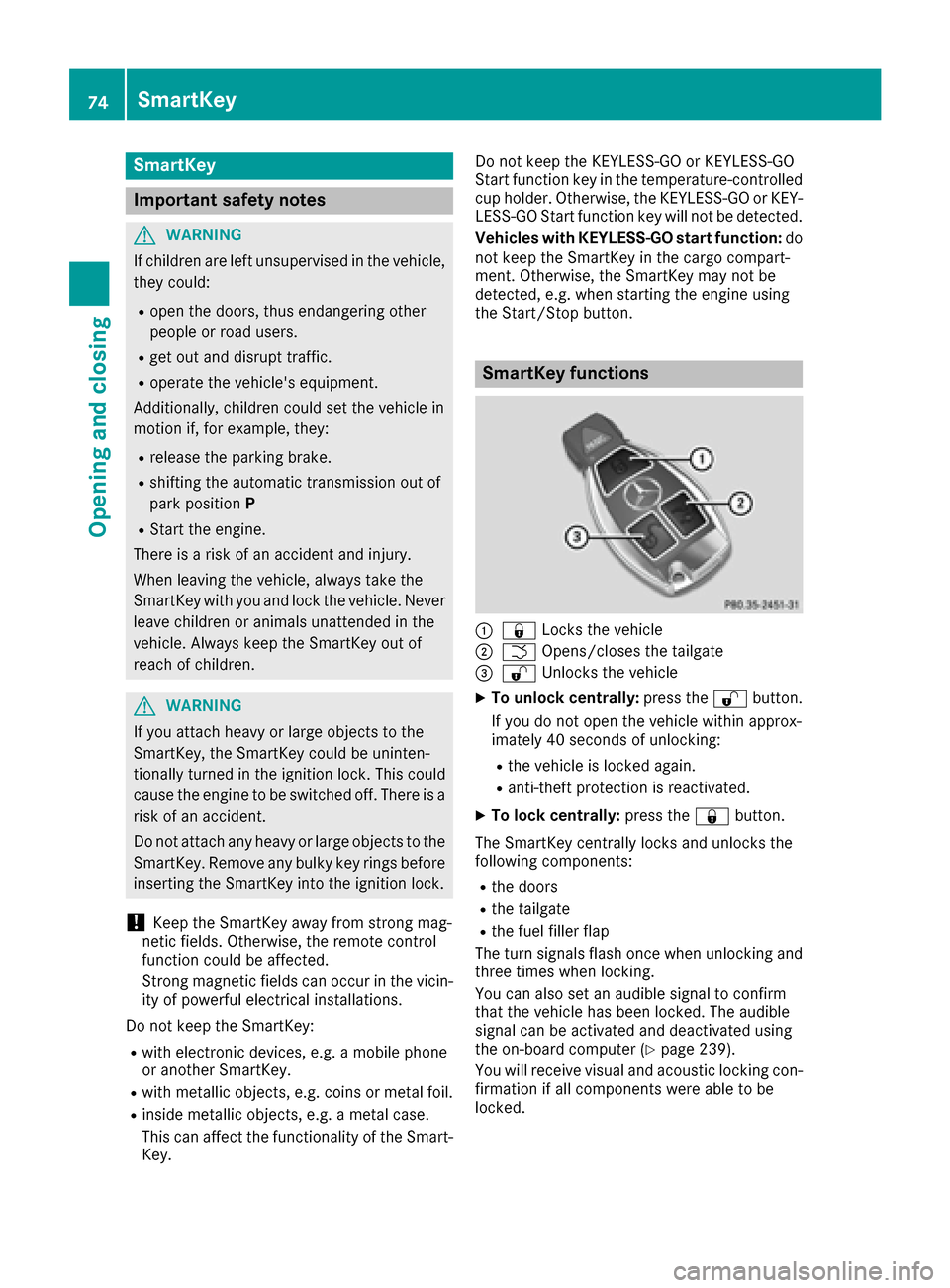
SmartKey functions
:& Locks the vehicle
;FOpens/closes the tailgate
=%Unlocks the vehicle
XTo unlock centrally: press the%button.
If you do not open the vehicle within approx-
imately 40 seconds of unlocking:
Rthe vehicle is locked again.
Ranti-theft protection is reactivated.
XTo lock centrally: press the&button.
The SmartKey centrally locks and unlocks the
following components:
Rthe doors
Rthe tailgate
Rthe fuel filler flap
The turn signals flash once when unlocking and
three times when locking.
You can also set an audible signal to confirm
that the vehicle has been locked. The audible
signal can be activated and deactivated using
the on-board computer (
Ypage 239).
You will receive visual and acoustic locking con-
firmation if all components were able to be
locked.
74SmartKey
Opening and closing
Page 115 of 390
The daytime running lamps improve the visibility
of your vehicle during the day. To do this, the
daytime running lamps function must be
switched on using the on-board computer
(
Ypage 239).
If the engine is running and you turn the light
switch to TorL, the manual settings
take precedence over the daytime running
lamps.
Low-beam headlamps
Even if the light sensor does not detect that it is
dark, the parking lamps and low-beam head-
lamps switch on when the ignition is switched on and the light switch is set to the Lposition.
This is a particularly useful function in the event
of rain and fog.
XTo switch on the low-beam headlamps:
turn the SmartKey in the ignition lock to posi- tion 2or start the engine.
XTurn the light switch to L.
The green Lindicator lamp in the instru-
ment cluster lights up.
Rear fog lamp
The rear fog lamp improves visibility of your
vehicle for the traffic behind in the event of thick
fog. Please take note of the country-specific
regulations for the use of rear fog lamps.
XTo switch on the rear fog lamp: turn the
SmartKey in the ignition lock to position 2or
start the engine.
XTurn the light switch to Lorc .
XPress the Rbutton.
The yellow Rindicator lamp in the instru-
ment cluster lights up.
XTo switch off the rear fog lamp: press the
R button.
The yellow Rindicator lamp in the instru-
ment cluster goes out.
Parking lamps
!If the battery charge is very low, the parking
lamps or standing lamps are automatically
switched off to enable the next engine start.
Always park your vehicle safely and in a well lit
area, in accordance with the relevant legal
stipulations. Avoid using the Tparking
lamps over a period of several hours. If pos-
sible, switch on the right-hand Xor left-
hand W standing lamps.
XTo switch on: turn the light switch to T.
The green Tindicator lamp in the instru-
ment cluster lights up.
Standing lamps
Switching on the standing lamps ensures the
corresponding side of the vehicle is illuminated.
XTo switch on the standing lamps: the
SmartKey should not be in the ignition lock or
it should be in position 0.
XTurn the light switch toW(left-hand side of
the vehicle) or X(right-hand side of the
vehicle).
Vehicles towing a trailer: both the right-hand
and left-hand standing lamps (tail lamps) are
always illuminated on the trailer.
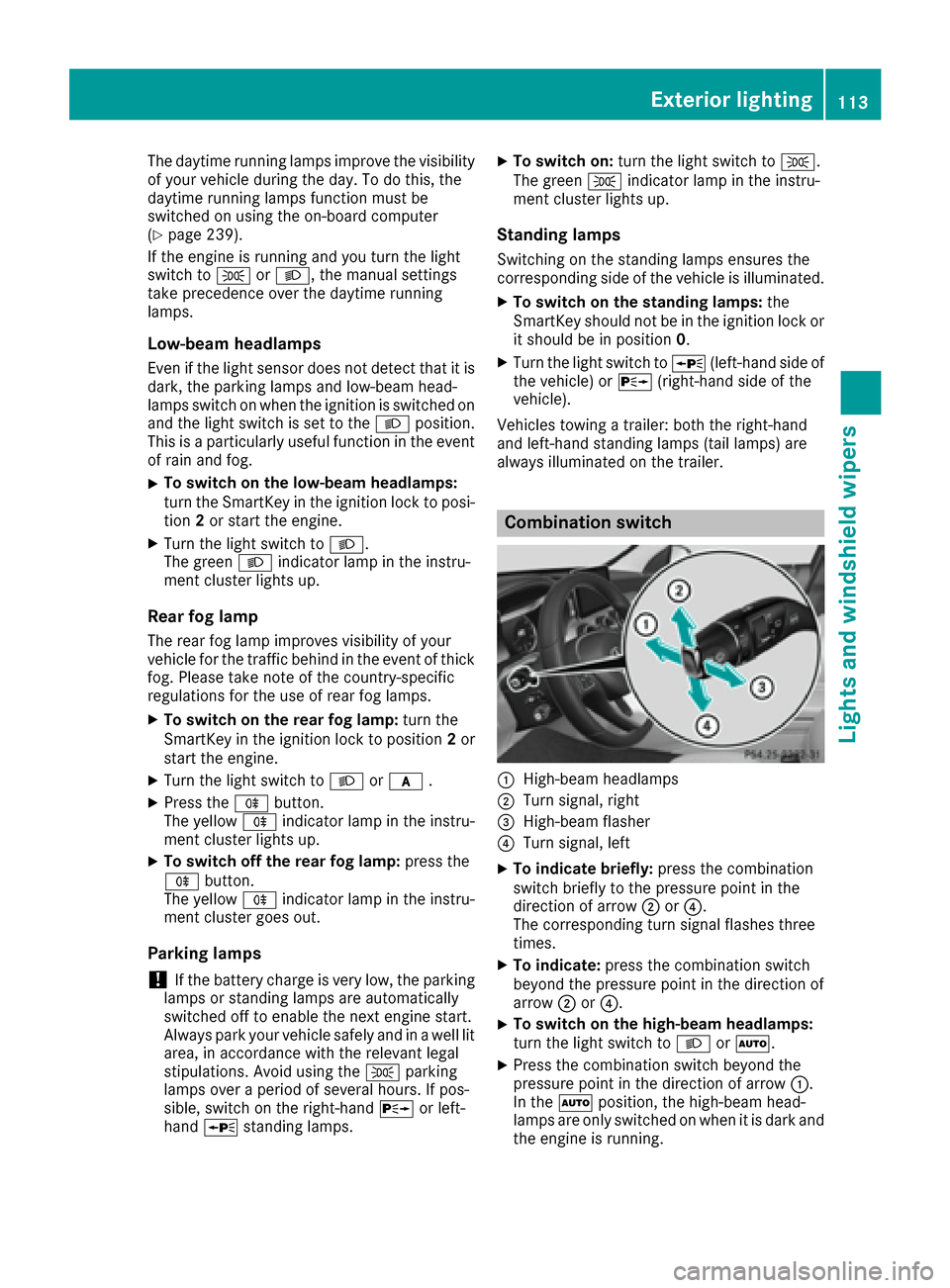
Combination switch
:High-beam headlamps
;Turn signal, right
=High-beam flasher
?Turn signal, left
XTo indicate briefly: press the combination
switch briefly to the pressure point in the
direction of arrow ;or?.
The corresponding turn signal flashes three
times.
XTo indicate: press the combination switch
beyond the pressure point in the direction of
arrow ;or?.
XTo switch on the high-beam headlamps:
turn the light switch to LorÃ.
XPress the combination switch beyond the
pressure point in the direction of arrow :.
In the Ãposition, the high-beam head-
lamps are only switched on when it is dark and
the engine is running.
Exterior lighting113
Lights and windshield wipers
Z
Page 116 of 390
The blueKindicator lamp in the instru-
ment cluster lights up when the high-beam
headlamps are switched on.
XTo switch off the high-beam head-
lamps: move the combination switch back to
its normal position.
The blue Kindicator lamp in the instru-
ment cluster goes out.
Vehicles with Adaptive Highbeam Assist: if
Adaptive Highbeam Assist is activated, it auto-
matically controls activation and deactivation of
the high-beam headlamps (
Ypage 115).
Hazard warning lamps
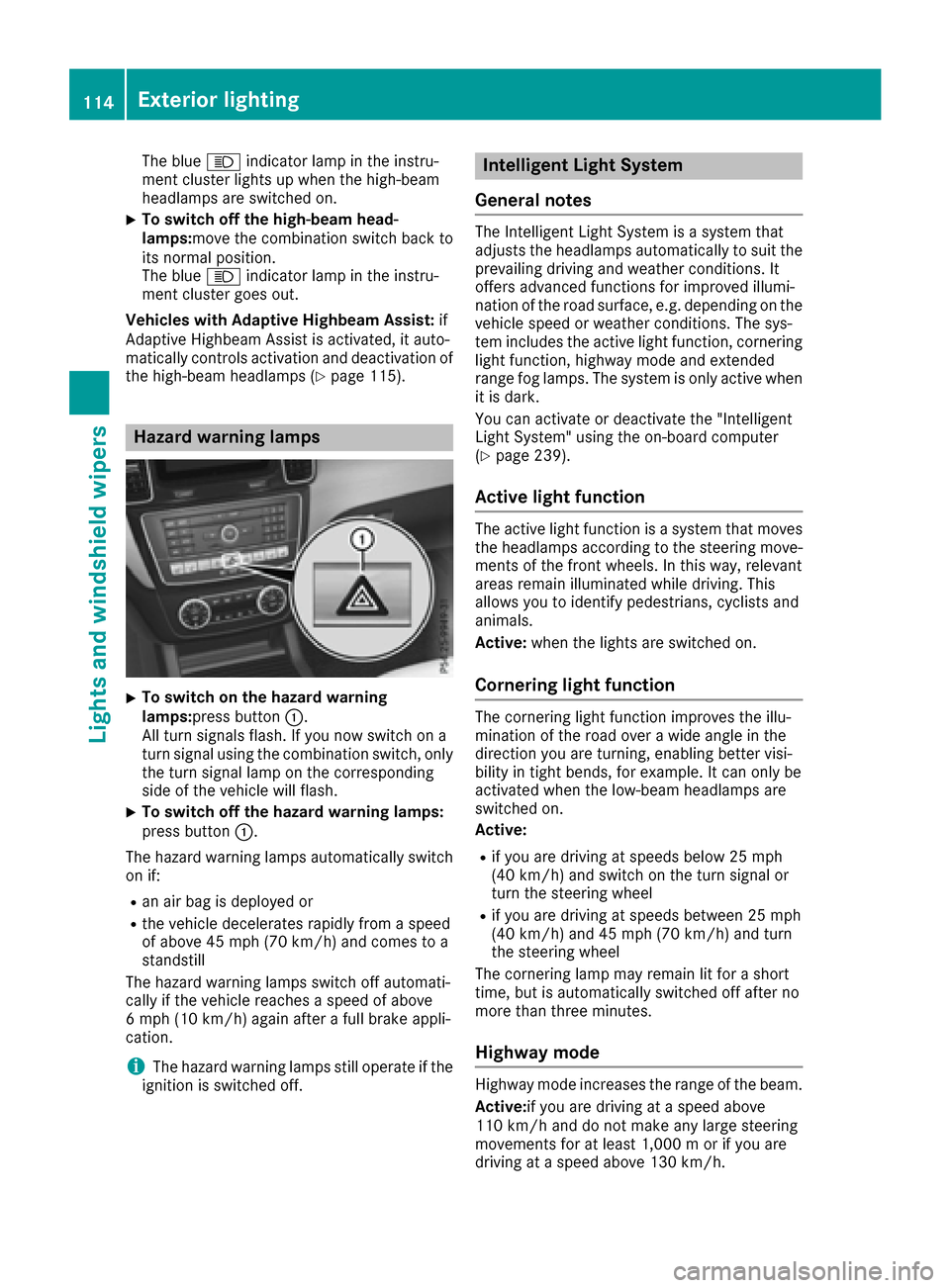
XTo switch on the hazard warning
lamps: press button :.
All turn signals flash. If you now switch on a
turn signal using the combination switch, only
the turn signal lamp on the corresponding
side of the vehicle will flash.
XTo switch off the hazard warning lamps:
press button :.
The hazard warning lamps automatically switch
on if:
Ran air bag is deployed or
Rthe vehicle decelerates rapidly from a speed
of above 45 mph (70 km/h) and comes to a
standstill
The hazard warning lamps switch off automati-
cally if the vehicle reaches a speed of above
6 mph (10 km/h) again after a full brake appli-
cation.
iThe hazard warning lamps still operate if the
ignition is switched off.
Intelligent Light System
General notes
The Intelligent Light System is a system that
adjusts the headlamps automatically to suit the
prevailing driving and weather conditions. It
offers advanced functions for improved illumi-
nation of the road surface, e.g. depending on the
vehicle speed or weather conditions. The sys-
tem includes the active light function, cornering
light function, highway mode and extended
range fog lamps. The system is only active when
it is dark.
You can activate or deactivate the "Intelligent
Light System" using the on-board computer
(
Ypage 239).
Active light function
The active light function is a system that moves
the headlamps according to the steering move-
ments of the front wheels. In this way, relevant
areas remain illuminated while driving. This
allows you to identify pedestrians, cyclists and
animals.
Active: when the lights are switched on.
Cornering light function
The cornering light function improves the illu-
mination of the road over a wide angle in the
direction you are turning, enabling better visi-
bility in tight bends, for example. It can only be
activated when the low-beam headlamps are
switched on.
Active:
Rif you are driving at speeds below 25 mph
(40 km/h) and switch on the turn signal or
turn the steering wheel
Rif you are driving at speeds between 25 mph
(40 km/h) and 45 mph (70 km/h) and turn
the steering wheel
The cornering lamp may remain lit for a short
time, but is automatically switched off after no
more than three minutes.
Highway mode
Highway mode increases the range of the beam.
Active: if you are driving at a speed above
110 km/h and do not make any large steering
movements for at least 1,000 m or if you are
driving at a speed above 130 km/h.
114Exterior lighting
Lights and windshield wipers