ignition MERCEDES-BENZ GLS SUV 2019 User Guide
[x] Cancel search | Manufacturer: MERCEDES-BENZ, Model Year: 2019, Model line: GLS SUV, Model: MERCEDES-BENZ GLS SUV 2019Pages: 729, PDF Size: 12.03 MB
Page 154 of 729
#
Toopen the ashtr ay:fold co ver1
upwards.
% The top part of the ashtr aycan be remo ved
fo r cleaning or em ptying bytwi sting it. Clean
th e ashtr ay, e.g. with clean, luk ewarmwate r. Using
the cigar ette lighter &
WARNING ‑ Risk of fire and injury from
th e hot cigar ette lighter
Yo u can burn yourself if youto uch the hot
heating element or the soc ket of the ciga‐
re tte lighter.
In addition, flammable materials may ignite
if:
R you drop the hot cigar ette lighter
R ach ild holds the hot cigar ette lighter to
objects, forex ample #
Alw ays hold the cigar ette lighter bythe
knob. #
Alw ays make sure that the cigar ette
lighter is out of reach of children. #
Never lea vechildren unat tended in the
ve hicle. Re
quirements:
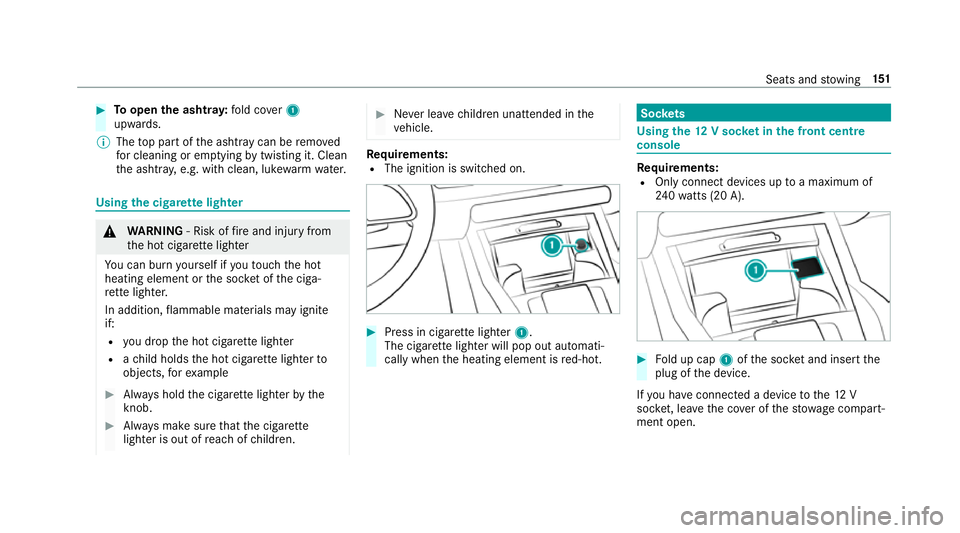
R The ignition is switched on. #
Press in cigar ette lighter 1.
The cigar ette lighter will pop out automati‐
cally when the heating element is red-hot. Soc
kets Using the
12V so cket inthe front centre
console Re
quirements:
R Only connect devices up toa maximum of
24 0wa tts (20 A). #
Fold up cap 1ofthe soc ket and insert the
plug of the device.
If yo u ha veconnected a device tothe12 V
soc ket, le ave the co ver of thestow age compart‐
ment open. Seats and
stowing 151
Page 155 of 729
Using
the 230 V soc ket in the rear passenger
comp artment &
DANG ER Risk of fata l injury due todam‐
aged connecting cables or soc kets
When a suitable device is connected, the
230 V power soc ket will be car rying a high
vo ltage. You could recei vean electric shock
if th e connecting cable or the 230 V po wer
soc ket is pulled out of the trim or is damaged
or we t. #
Use only connecting cables that are dry
and free of damage. #
When the ignition is switched off, make
sure that the 230 V po wer soc ket is dr y. #
Immedia tely ha ve the 230 V po wer
soc ketch ecked or replaced at a quali‐
fi ed specialised workshop if it is dam‐
aged or has been pulled out of the trim. #
Never plug the connecting cable into a
230 V po wer soc ketth at is damaged or
has been pulled out of the trim. &
DANG ER Risk of fata l injury due toincor‐
re ct handling of the soc ket
Yo u could recei vean electric shock:
R ifyo ure ach into the soc ket.
R ifyo u insert unsuitable devices or objects
into the soc ket. #
Do not reach into the soc ket. #
Only connect suitable devices tothe
soc ket. Re
quirements:
R Only connect devices with a suitable plug
which con form sto thest andards specific to
th e count ryyou are in.
R Only connect devices uptoa maximum of
15 0wa tts (0.65 A).
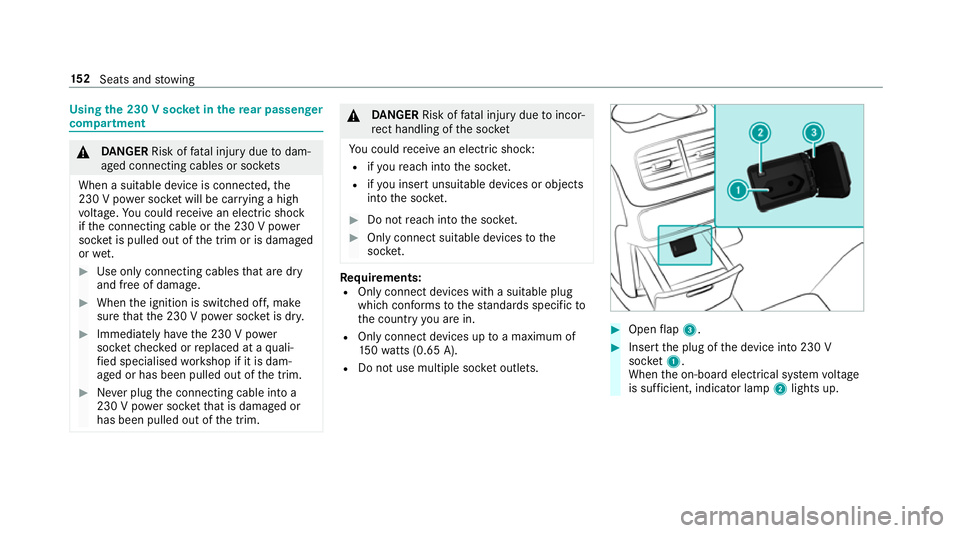
R Do not use multiple soc ket outlets. #
Open flap 3. #
Insert the plug of the device into 230 V
soc ket1.
When the on-board electrical sy stem voltage
is suf ficient, indicator la mp2lights up. 15 2
Seats and stowing
Page 156 of 729
Using
the12 V so cket inthe load compa rt‐
ment Re
quirements:
R Only devices with up toa maximum of
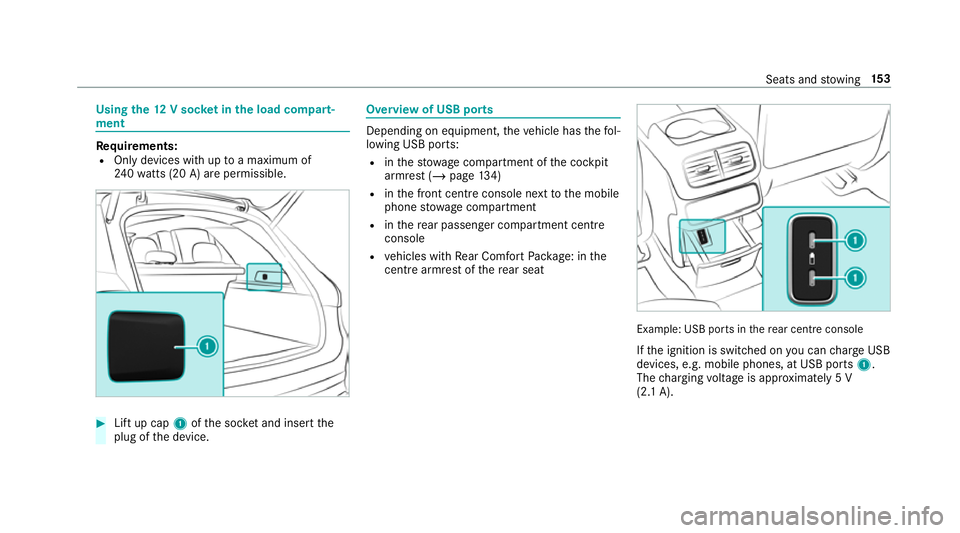
24 0wa tts (20 A) are pe rmissible. #
Lift up cap 1ofthe soc ket and insert the
plug of the device. Overview of USB ports
Depending on equipment,
theve hicle has thefo l‐
lowing USB ports:
R inthestow age compartment of the cockpit
armrest (/ page134)
R inthe front cent reconsole next tothe mobile
phone stowage compartment
R inthere ar passenger compartment centre
console
R vehicles with Rear Comfort Package: in the
centre armrest of there ar seat Example: USB ports in
there ar centre console
If th e ignition is switched on you can charge USB
devices, e.g. mobile phones, at USB ports 1.
The charging voltage is appr oximately 5 V
(2.1 A). Seats and
stowing 15 3
Page 158 of 729
R
The charging function and wireless connec‐
tion of the mobile phone totheve hicle's
ex terior aerial are only available if the ignition
is switched on.
R Small mobile phones may not be able tobe
ch arge d in everyposition of the mobile
phone stowage compartment.
R Largemobile phones which do not rest flat in
th e mobile phone stowage compartment may
not be able tobe charge d or connec ted with
th eve hicle's exterior aerial.
R The mobile phone may heat up during the
ch arging process. This may also depend on
th e applications (apps) cur rently open.
R Toensure more ef ficient charging and con‐
nection with theve hicle's exterior aerial,
re mo vethe pr otective co ver from the mobile
phone. Pr otective co vers which are neces‐
sary for wireless charging are excluded. Wire
lesscharging of a mobile phone in the
cockpit Re
quirements:
R The mobile phone is suitable for wireless
ch arging.
% A list of compatible mobile phones can be
found at: http://www.mercedes-benz.com/
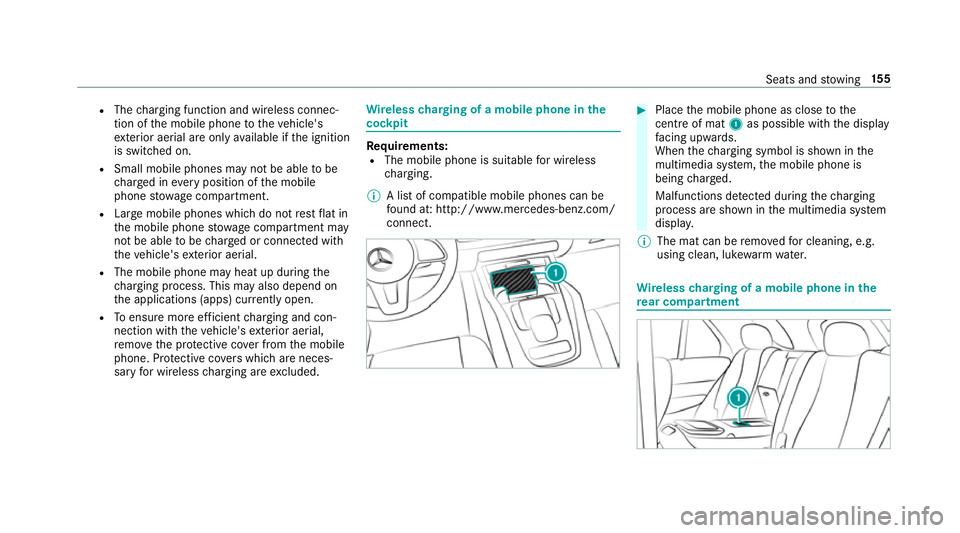
connect. #
Place the mobile phone as close tothe
centre of mat 1as possible wi th the display
fa cing up wards.
When thech arging symbol is shown in the
multimedia sy stem, the mobile phone is
being charge d.
Malfunctions de tected du ring thech arging
process are shown in the multimedia sy stem
displa y.
% The mat can be remo vedfo r cleaning, e.g.
using clean, luk ewarmwate r. Wire
lesscharging of a mobile phone in the
re ar comp artment Seats and
stowing 15 5
Page 161 of 729
R
Obser vethe no tes on sur round lighting
(/ page 163).
Au tomatic driving lights
The standing lights, dipped beam and daytime
ru nning lights are switched on au tomatically
depending on the ignition status, whe ther the
engine is running and on the light conditions. &
WARNING Risk of accident when the
dipped beam is switched off in poor visi‐
bility
When the light switch is set toà ,the
dipped beam may not be switched on auto‐
matically if there is fog, snow or other causes
of poor visibility such as spr ay.#
In such cases, turn the light switch to
L . The automatic driving lights are only an aid.
Yo u
are responsible forve hicle lighting. Switching
there ar fog lights on or off
Re quirements:
R The light switch is in the L orà posi‐
tion. #
Press the R button.
Please obser vethe count ry-specific la wsonthe
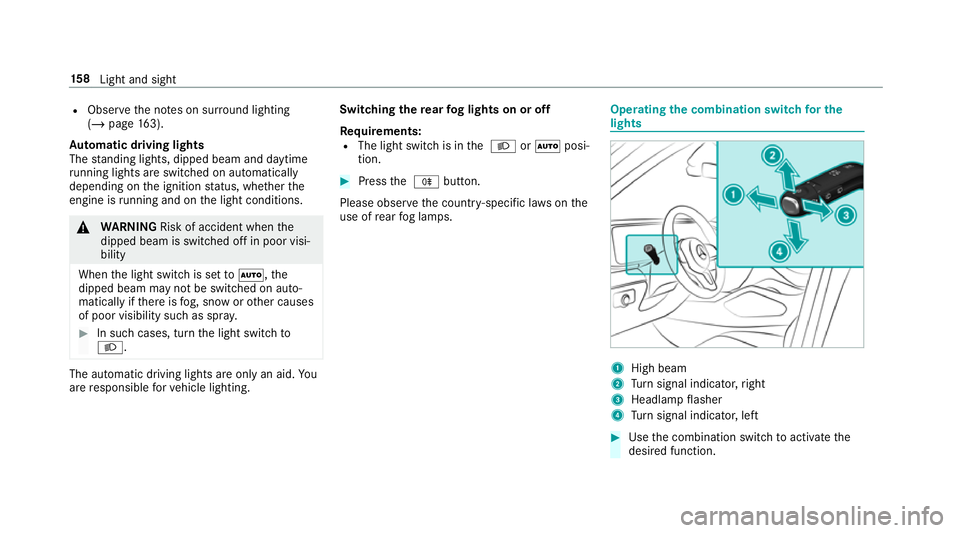
use of rear fog lamps. Operating
the combination switch for the
lights 1
High beam
2 Turn signal indicator, right
3 Headlamp flasher
4 Turn signal indicator, left #
Use the combination switch toactivate the
desired function. 15 8
Light and sight
Page 164 of 729
Ro
undabout and intersection function: the
cornering light is acti vated on bo thsides thro ugh
an evaluation of the cur rent GPS position of the
ve hicle. It remains active until af terth eve hicle
has left thero undabout or the intersection.
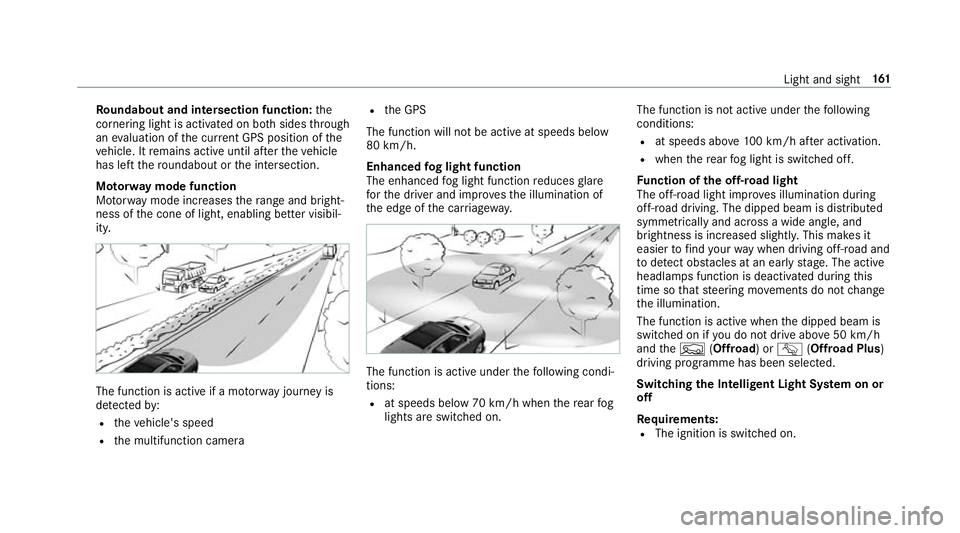
Mo torw ay mode function
Mo torw ay mode increases thera nge and bright‐
ness of the cone of light, enabling better visibil‐
ity. The function is active if a mo
torw ay jou rney is
de tected by:
R theve hicle's speed
R the multifunction camera R
the GPS
The function will not be active at speeds below
80 km/h.
Enhanced fog light function
The enhanced fog light function reduces glare
fo rth e driver and impr ovesth e illumination of
th e edge of the car riag ewa y. The function is active under
thefo llowing condi‐
tions:
R at speeds below 70 km/h when there ar fog
lights are switched on. The function is not active under
thefo llowing
conditions:
R at speeds abo ve100 km/h af ter activation.
R when there ar fog light is switched off.
Fu nction of the off-road light
The off- road light impr oves illumination during
off-road driving. The dipped beam is distributed
symmetrically and across a wide angle, and
brightness is increased slightl y.This makes it
easier tofind your wa y when driving off- road and
to detect obs tacles at an ea rly st age. The active
headlamps function is deactivated during this
time so that steering mo vements do not change
th e illumination.
The function is active when the dipped beam is
switched on if you do not drive abo ve50 km/h
and theF (Offroad) or G(Offroad Plus)
driving prog ramme has been selected.
Switching the Intelligent Light Sy stem on or
off
Requ irements:
R The ignition is switched on. Light and sight
161
Page 169 of 729
4
° Continuous wiping, slow
5 ¯ Continuous wiping, fast #
Turn the combination switch tothe cor rect
position 1-5. #
Single wipe/washing: pushthe button on
th e combination switch in the direction of
ar row 1.
R í Single wipe
R î Wipes with washer fluid
Ve hicles with MAGIC VISION CONTROL: inthe
2 or3 position, the windscreen washing
process is automatically triggered if dirt is de tec‐
te d on the windscreen unless theTop up
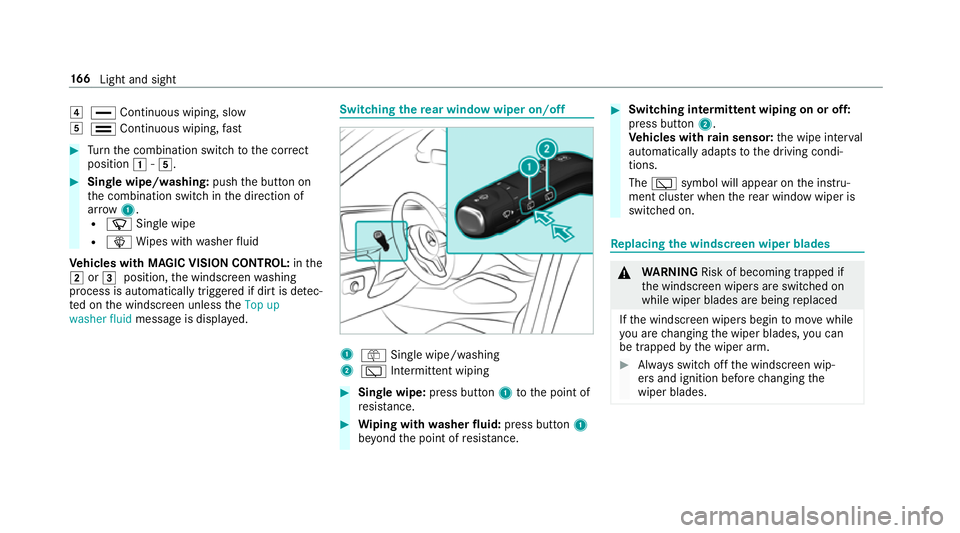
washer fluid message is displa yed. Switching
there ar window wiper on/off 1
ô Single wipe/washing
2 è Intermittent wiping #
Single wipe: press button1tothe point of
re sis tance. #
Wiping with washer fluid: press button 1
be yond the point of resis tance. #
Switching in termittent wiping on or off:
press button 2.
Ve hicles with rain sensor: the wipe inter val
automatically adapts tothe driving condi‐
tions.
The è symbol will appear on the instru‐
ment clus ter when there ar wind owwiper is
swit ched on. Re
placing the windsc reen wiper blades &
WARNING Risk of becoming trapped if
th e windscreen wipers are switched on
while wiper blades are being replaced
If th e windscreen wipers begin tomo vewhile
yo u are changing the wiper blades, you can
be trapped bythe wiper arm. #
Alw ays switch off the windscreen wip‐
ers and ignition before changing the
wiper blades. 16 6
Light and sight
Page 170 of 729
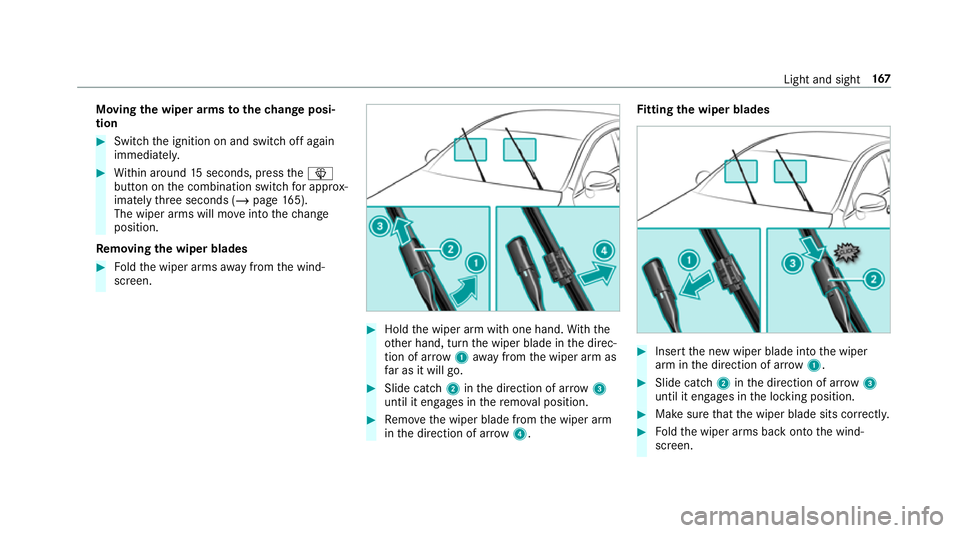
Moving
the wiper arms tothech ange posi‐
tion #
Switch the ignition on and switch off again
immediatel y. #
Within around 15seconds, press theî
button on the combination switch for appro x‐
ima tely thre e seconds (/ page165).
The wiper arms will mo veinto thech ange
position.
Re moving the wiper blades #
Foldthe wiper arms away from the wind‐
screen. #
Hold the wiper arm with one hand. With the
ot her hand, turn the wiper blade in the direc‐
tion of ar row1away from the wiper arm as
fa r as it will go. #
Slide catch 2inthe direction of ar row 3
until it engages in there mo val position. #
Remo vethe wiper blade from the wiper arm
in the direction of ar row4. Fi
tting the wiper blades #
Inse rtthe new wiper blade into the wiper
arm in the direction of ar row1. #
Slide catch 2inthe direction of ar row 3
until it engages in the locking position. #
Make sure that the wiper blade sits cor rectly. #
Foldthe wiper arms back onto the wind‐
screen. Light and sight
167
Page 171 of 729
#
Switch on the ignition. #
Press theî button on the combination
switch.
The wiper arms will mo veinto the original
position.
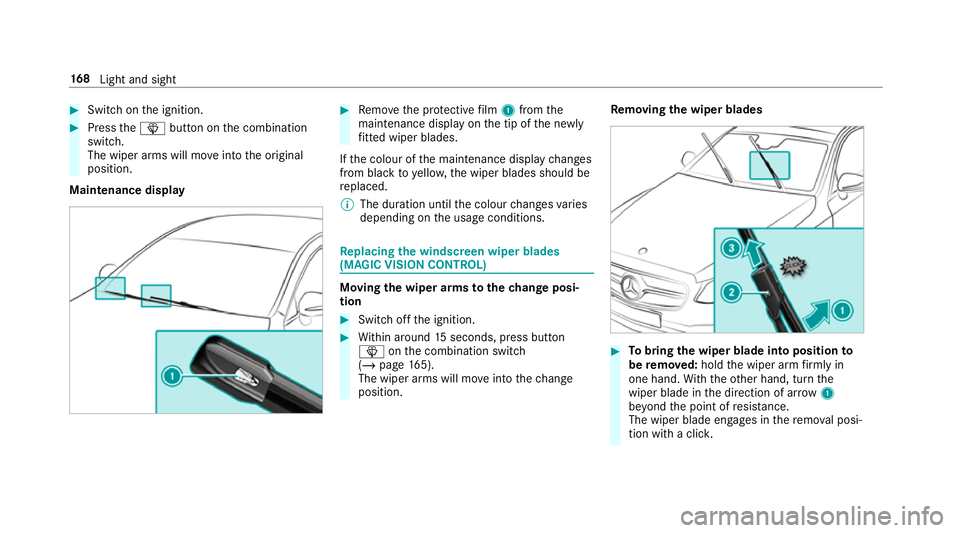
Maintenance display #
Remo vethe pr otective film 1 from the
maintenance display on the tip of the newly
fi tted wiper blades.
If th e colour of the maintenance display changes
from black to yellow, the wiper blades should be
re placed.
% The duration until the colour changes varies
depending on the usage conditions. Re
placing the windsc reen wiper blades
(MAGIC VISION CONT ROL) Moving
the wiper arms tothech ange posi‐
tion #
Switch off the ignition. #
Within around 15seconds, press button
î onthe combination switch
(/ page 165).
The wiper arms will mo veinto thech ange
position. Re
moving the wiper blades #
Tobring the wiper blade into position to
be remo ved: hold the wiper arm firm ly in
one hand. With th eot her hand, turn the
wiper blade in the direction of ar row1
be yond the point of resis tance.
The wiper blade engages in there mo val posi‐
tion with a clic k.16 8
Light and sight
Page 172 of 729
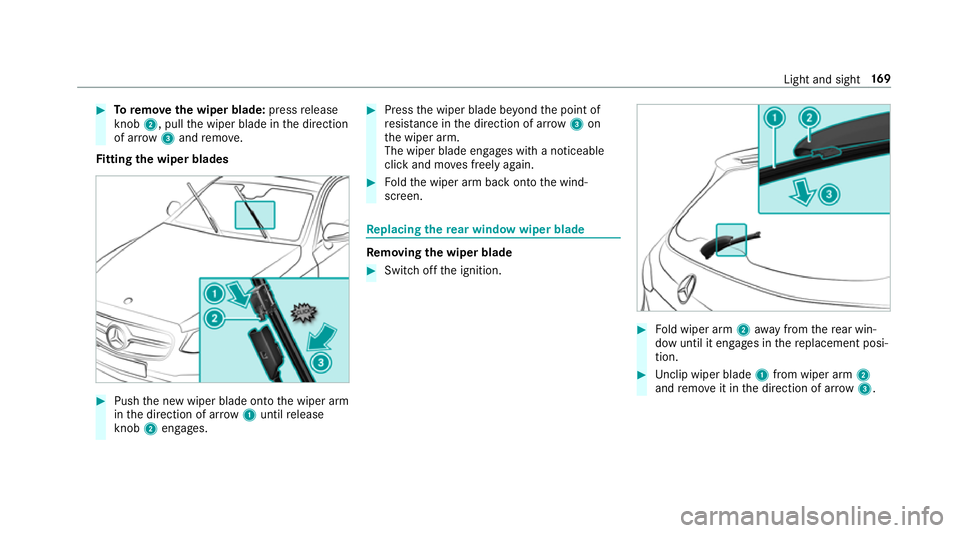
#
Toremo vethe wiper blade: pressrelease
knob 2, pull the wiper blade in the direction
of ar row3and remo ve.
Fi tting the wiper blades #
Push the new wiper blade onto the wiper arm
in the direction of ar row1until release
knob 2engages. #
Press the wiper blade be yond the point of
re sis tance in the direction of ar row3on
th e wiper arm.
The wiper blade engages with a noticeable
click and mo ves freely again. #
Foldthe wiper arm back onto the wind‐
screen. Re
placing the rear window wiper blade Re
moving the wiper blade #
Switch off the ignition. #
Fold wiper arm 2away from there ar win‐
dow until it engages in there placement posi‐
tion. #
Unclip wiper blade 1from wiper arm 2
and remo veit in the direction of ar row 3. Light and sight
16 9