display MERCEDES-BENZ GLS SUV 2019 Repair Manual
[x] Cancel search | Manufacturer: MERCEDES-BENZ, Model Year: 2019, Model line: GLS SUV, Model: MERCEDES-BENZ GLS SUV 2019Pages: 729, PDF Size: 12.03 MB
Page 307 of 729
wrong direction of tr
avel, it triggers a warning.
The camera also de tects traf fic signs wi th a
re striction indicated byan additional sign (e.g. in
we t conditions).
Tr af fic Sign Assi stis only an aid. The driver is
re sponsible forke eping a safe dis tance tothe
ve hicle in front, forve hicle speed and for braking
in good time.
Wa rning when the maximum permissible
speed is exceeded
The sy stem can warnyou if you unin tentional ly
exc eed the maximum permissible speed. Todo
th is, you can specify in the multimedia sy stem
by how much the maximum permissible speed
can be exceeded before a warning is issued. Yo u
can specify whe ther thewa rning is tobe just a
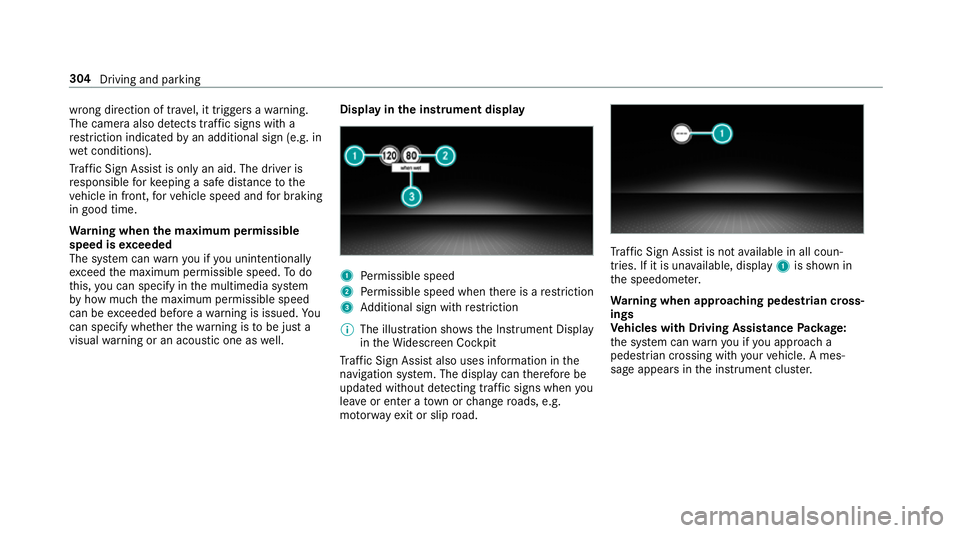
visual warning or an acoustic one as well. Display in
the instrument display 1
Perm issible speed
2 Perm issible speed when there is a restriction
3 Additional sign with restriction
% The illu stra tion sho wsthe Instrument Display
in theWi descreen Cockpit
Tr af fic Sign Assi stalso uses information in the
navigation sy stem. The display can therefore be
updated without de tecting traf fic signs when you
lea veor enter a town or change roads, e.g.
mo torw ay ex it or slip road. Tr
af fic Sign Assi stis not available in all coun‐
tries. If it is una vailable, display 1is shown in
th e speedome ter.
Wa rning when app roaching pedestrian cross‐
ings
Ve hicles with Driving Assistance Package:
th e sy stem can warnyou if you approach a
pedestrian crossing with your vehicle. A mes‐
sage appears inthe instrument clus ter. 304
Driving and parking
Page 308 of 729
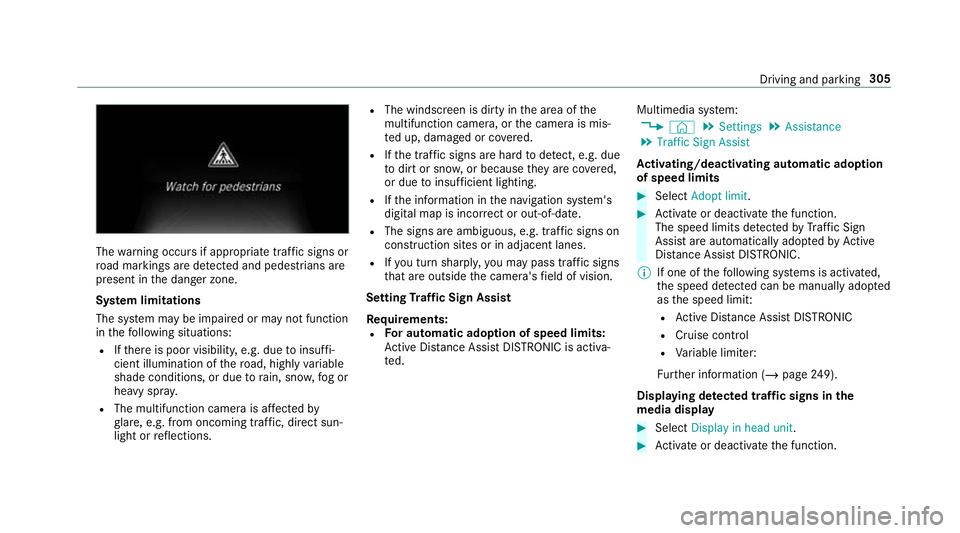
The
warning occurs if appropriate traf fic signs or
ro ad markings are de tected and pedestrians are
present in the danger zone.
Sy stem limitations
The sy stem may be impaired or may not function
in thefo llowing situations:
R Ifth ere is poor visibility, e.g. due toinsuf fi‐
cient illumination of thero ad, high lyvariable
shade conditions, or due torain, sno w,fog or
heavy spr ay.
R The multifunction camera is af fected by
gl are, e.g. from oncoming traf fic, di rect sun‐
light or reflections. R
The windscreen is dirty in the area of the
multifunction camera, or the camera is mis‐
te d up, damaged or co vered.
R Ifth e traf fic signs are ha rdtodetect, e.g. due
to dirt or sno w,or because they are co vered,
or due toinsuf ficient lighting.
R Ifth e information in the navigation sy stem's
digital map is incor rect or out-of-da te.
R The signs are ambiguous, e.g. traf fic signs on
construction sites or in adjacent lanes.
R Ifyo u turn sharpl y,yo u may pass traf fic signs
th at are outside the camera's field of vision.
Setting Traf fic Sign Assist
Re quirements:
R For automatic ado ption of speed limits:
Ac tive Dis tance Assi stDISTRONIC is acti va‐
te d. Multimedia sy
stem:
4 © 5
Settings 5
Assistance
5 Traffic Sign Assist
Ac tivating/deactivating automatic adoption
of speed limits #
Select Adopt limit . #
Activate or deacti vate the function.
The speed limits de tected byTraf fic Sign
Assi stare automatically adop tedby Active
Dis tance Assi stDISTRONIC.
% If one of thefo llowing sy stems is activated,
th e speed de tected can be manually adop ted
as the speed limit:
R Active Dis tance Assi stDISTRONIC
R Cruise control
R Variable limiter:
Fu rther information (/ page249).
Dis playing de tected traf fic signs in the
medi a display #
Select Display in head unit. #
Activate or deacti vate the function. Driving and parking
305
Page 316 of 729
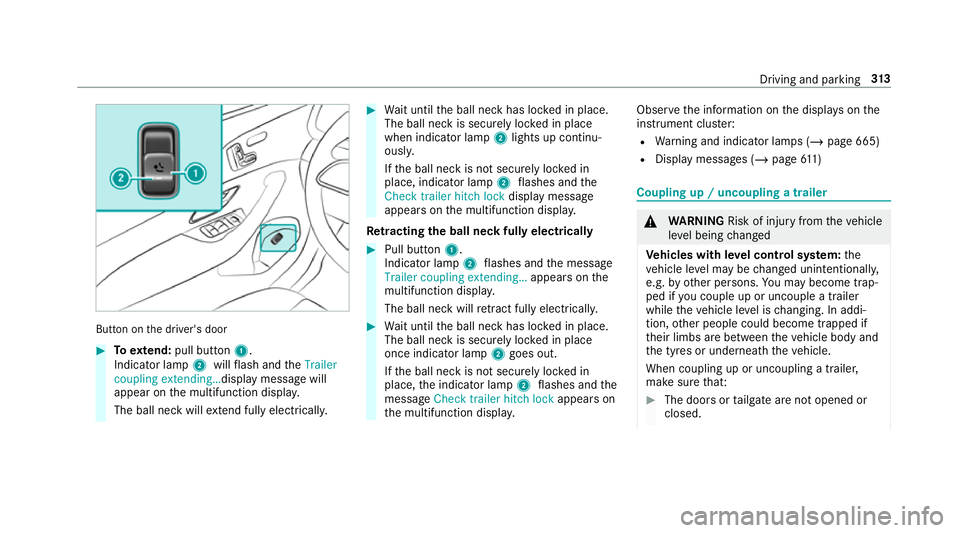
Button on
the driver's door #
Toextend: pull button 1.
Indicator lamp 2willflash and theTrailer
coupling extending… display message will
appear on the multifunction displa y.
The ball neck will extend fully electrically. #
Wait until the ball neck has loc ked in place.
The ball neck is securely loc ked in place
when indicator lamp 2lights up continu‐
ousl y.
If th e ball neck is not securely loc ked in
place, indicator lamp 2flashes and the
Check trailer hitch lock displaymessa ge
appears on the multifunction displa y.
Re tracting the ball ne ckfully electrical ly #
Pull button 1.
Indicator lamp 2flashes and the message
Trailer coupling extending… appears onthe
multifunction displa y.
The ball neck will retract fully electrically. #
Wait until the ball neck has loc ked in place.
The ball neck is securely loc ked in place
once indicator lamp 2goes out.
If th e ball neck is not securely loc ked in
place, the indicator lamp 2flashes and the
messa geCheck trailer hitch lock appears on
th e multifunction displa y. Obser
vethe information on the displa yson the
instrument clus ter:
R Warning and indicator lamps (/ page 665)
R Display messages (/ page611) Cou
pling up / uncoupling a trailer &
WARNING Risk of inju ryfrom theve hicle
le ve l being changed
Ve hicles with le vel control sy stem: the
ve hicle le vel may be changed unin tentional ly,
e.g. by ot her persons. You may become trap‐
ped if you couple up or uncouple a trailer
while theve hicle le vel is changing. In addi‐
tion, other people could become trapped if
th eir limbs are between theve hicle body and
th e tyres or underneath theve hicle.
When coupling up or uncoupling a trailer,
make sure that: #
The doors or tailgate are not opened or
closed. Driving and parking
313
Page 318 of 729
A displ
aymessa gemay appear on the multifunc‐
tion display even if the trailer has been connec‐
te d cor rectly:
R LEDs ha vebeen ins talled in the trailer light‐
ing sy stem
R The cur rent has fallen below the trailer light‐
ing sy stem's minimum cur rent (50 mA).
% Accessories can be connected tothe perma‐
nent po wer supp lyup to180W, and tothe
po we r supp lythat is swit ched on via the igni‐
tion loc k.
Un coupling a trailer &
WARNING Risk of being crushed and
becoming trapped when uncoupling a
trailer
When uncoupling a trailer wi than engaged
ine rtia-activated brake, your hand may
become trapped between theve hicle and the
trailer dr awbar. #
Do not uncouple trailers with an
engaged overrun brake. *
NO
TEDama gewhen uncoupling in a
st ate of overrun Uncou
pling in a state of overru n can dama ge
th eve hicle. #
Do not uncouple trailers with an
engaged overrun brake. &
WARNING Risk of becoming trapped
when disconnecting the trailer cable
Ve hicles with le vel control sy stem: The
ve hicle may lo wer when the trailer cable is
disconnected.
This could result in you or other people
becoming trapped if your or their limbs are
between theve hicle body and the tyres or
underneath theve hicle. #
Make sure that nobody is unde rneath
th eve hicle or in the immediate vicinity
of the wheel ar ches when you discon‐
nect the trailer cable. *
NO
TEDama getothere ar bumper from
ins talling adap ter cables or adapte r plugs The
following parts could be damaged when
swinging the ball neck fully electrically:
R bumper
R adap ter cable
R adapte r plug #
Alw aysre mo vethe adap ter cable or
adapte r plug before swinging the ball
neck fully electrically. #
Secure the trailer against rolling away. #
Disconnect the electrical connection
between theve hicle and the trailer. #
Uncouple the trailer. #
Place the co ver on the ball head. Driving and parking
315
Page 322 of 729
Instrument display
overview &
WARNING Risk of accident due toan
instrument display malfunction
If th e Instrument Display has failed or mal‐
functioned, you may not recognise function
re strictions applying tosaf etyre leva nt sys‐
te ms.
The operating saf ety of your vehicle may be
impaired. #
Drive on carefull y. #
Have theve hicle checked immediately
at a qualified specialist workshop. If
th e operating saf ety of your vehicle is
impaired, park theve hicle safely as soon as pos‐
sible. Contact a qualified specialist workshop. Instrument display in
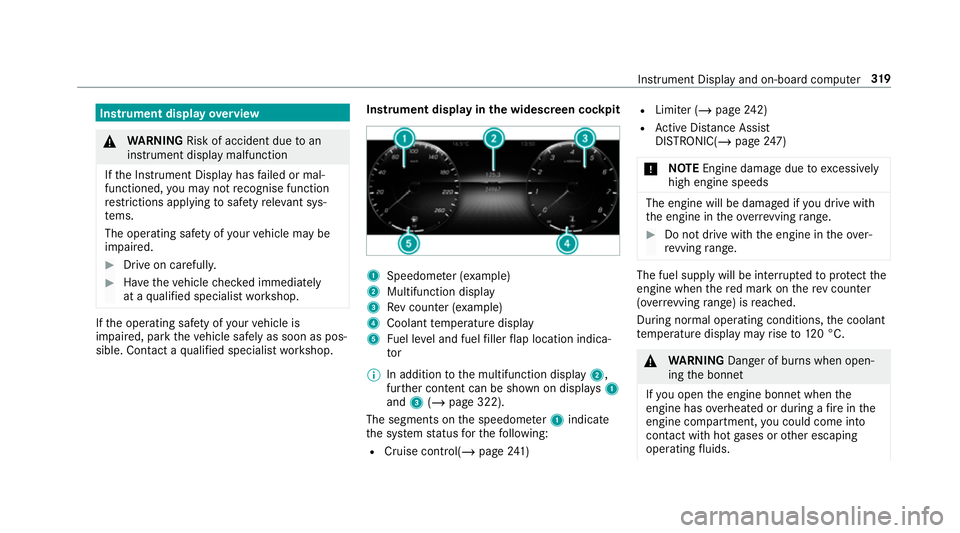
the widescreen cockpit 1
Speedome ter (e xamp le)
2 Multifunction display
3 Rev counter (e xample)
4 Coolant temp erature display
5 Fuel le vel and fuel filler flap location indica‐
tor
% In addition tothe multifunction display 2,
fur ther conte nt can be shown on displ ays1
and 3(/ page 322).
The segments on the speedome ter1 indica te
th e sy stem status forth efo llowing:
R Cruise control(/ page241) R
Limi ter (/ page242)
R Active Dis tance Assi st
DISTRONIC( /page 247)
* NO
TEEngine dama gedue toexc essively
high engine speeds The engine will be damaged if
you drive with
th e engine in theov errevving range. #
Do not drive wi th the engine in theove r‐
re vving range. The fuel supply will be inter
rupted toprotect the
engine when there d mark on there v counter
(o ve rrev ving range) is reached.
During no rmal operating conditions, the coolant
te mp erature display may rise to120 °C. &
WARNING Danger of bu rns when open‐
ing the bonn et
If yo u open the engine bonn etwhen the
engine has overheated or during a fire inthe
engine compartment, you could come into
contact with hot gases or other escaping
operating fluids. In
stru ment Display and on-board computer 319
Page 323 of 729
#
Before opening the bonn et, allow the
engine tocool down. #
Intheeve nt of a fire inthe engine com‐
partment, keep the engine bonn et
closed and call thefire service. Ve
hicles with a 48 V on-board electrical sys‐
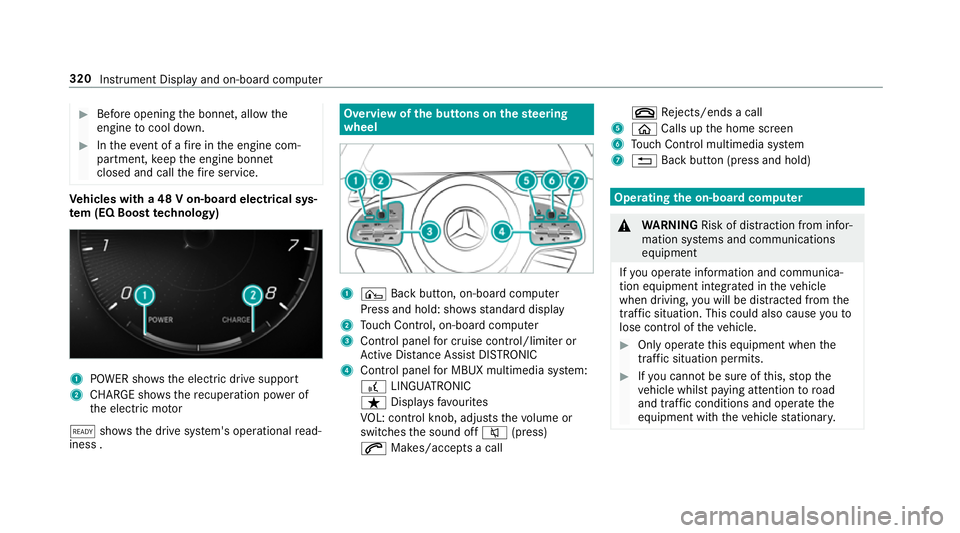
te m (EQ Boo sttech nology) 1
POWER sho wsthe electric drive support
2 CHARGE sho wsthere cuperation po wer of
th e electric mo tor
õ shows th e drive sy stem's operational read‐
iness . Overview of
the but tons on thest eering
wheel 1
¤ Back button, on-board computer
Press and hold: sho wsstandard display
2 Touch Control, on-board co mputer
3 Control panel for cruise control/limiter or
Ac tive Dis tance Assi stDISTRONIC
4 Control panel for MBUX multimedia sy stem:
£ LINGU ATRO NIC
ß Displa ysfavo urites
VO L: control knob, adjusts thevo lume or
switches the sound off 8(press)
6 Makes/accepts a call ~
Rejects/ends a call
5 ò Calls up the home screen
6 Touch Control multimedia sy stem
7 % Back button (press and hold) Operating
the on-boa rdcompu ter &
WARNING Risk of di stra ction from infor‐
mation sy stems and communications
equipment
If yo u operate information and communica‐
tion equipment integ rated in theve hicle
when driving, you will be distracted from the
traf fic situation. This could also cause youto
lose control of theve hicle. #
Only operate this equipment when the
traf fic situation permits. #
Ifyo u cannot be sure of this, stop the
ve hicle whilst paying attention toroad
and traf fic conditions and ope rate the
equipment with theve hicle stationar y. 320
Instrument Display and on-board computer
Page 324 of 729
Obser
vethe legal requ irements forth e count ry
in which you are cur rently driving when you
operate the on-board computer.
% The on-board computer displa ysappear on
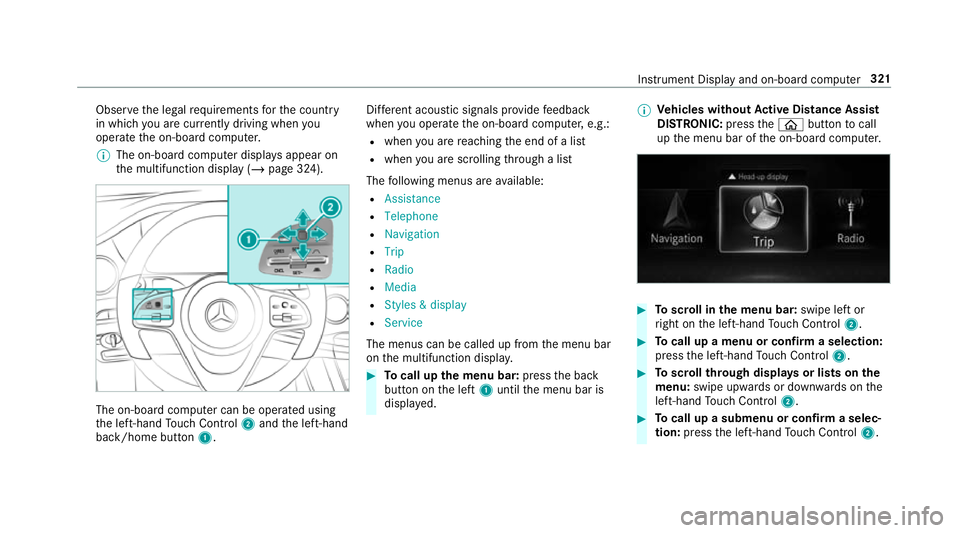
th e multifunction display (/ page 324).The on-board computer can be operated using
th e left-hand Touch Control 2and the left-hand
back/home button 1. Dif
fere nt acoustic signals pr ovide feedback
when you operate the on-board computer, e.g.:
R when you are reaching the end of a list
R when you are sc rolling thro ugh a list
The following menus are available:
R Assistance
R Telephone
R Navigation
R Trip
R Radio
R Media
R Styles & display
R Service
The menus can be called up from the menu bar
on the multifunction displa y. #
Tocall up the menu bar: pressthe back
button on the left 1until the menu bar is
displa yed. %
Ve
hicles without Active Di stance Assist
DISTRO NIC:press theò button tocall
up the menu bar of the on-board computer. #
Toscroll in the menu bar: swipe left or
ri ght on the left-hand Touch Control 2. #
Tocall up a menu or confirm a selection:
press the left-hand Touch Control 2. #
Toscroll through displa ysor lists on the
menu: swipe upwards or down wards on the
left-hand Touch Control 2. #
Tocall up a submenu or confirm a selec‐
tion: press the left-hand Touch Control 2. In
stru ment Display and on-board computer 321
Page 325 of 729
#
Toexit a submenu: pressthe back button
on the left 1.
Selecting the head-up display #
Ifth e head-up display is switched on: swipe
upwards on the left-hand Touch Control 2. #
Swipe upwards on the left-hand Touch Con‐
trol 2toswitch tothe head-up displa y.#
Ifth e head-up display is switched off: press
th e left-hand Touch Control 2.
Fu ll-sur face menu display
Yo u can displ aythefo llowing menus in full on
th e instrument display:
R Assistance
R Trip
R Navigation #
Inthe cor responding menu, use the left-hand
To uch Control 2toscroll tothe end of the
list. #
Press the left-hand Touch Control 2.
The selected menu will be displ ayed in full. Ad
justing the design of the in stru ment dis‐
play
On-boa rdcompu ter:
4 Styles & display
Setting the design #
Swipe up wards or down wards on the left-
hand Touch Control. #
Press the left-hand Touch Control.
The instrument displ ayis shown in the selec‐
te d design.
The following designs can be selec ted, depend‐
ing on theve hicle equipment:
R Classic
R Sport
R Progressive
R Understated
R Standard displays Showing display content on
the instrument
clus ter
Ad ditional display con tent can also be shown on
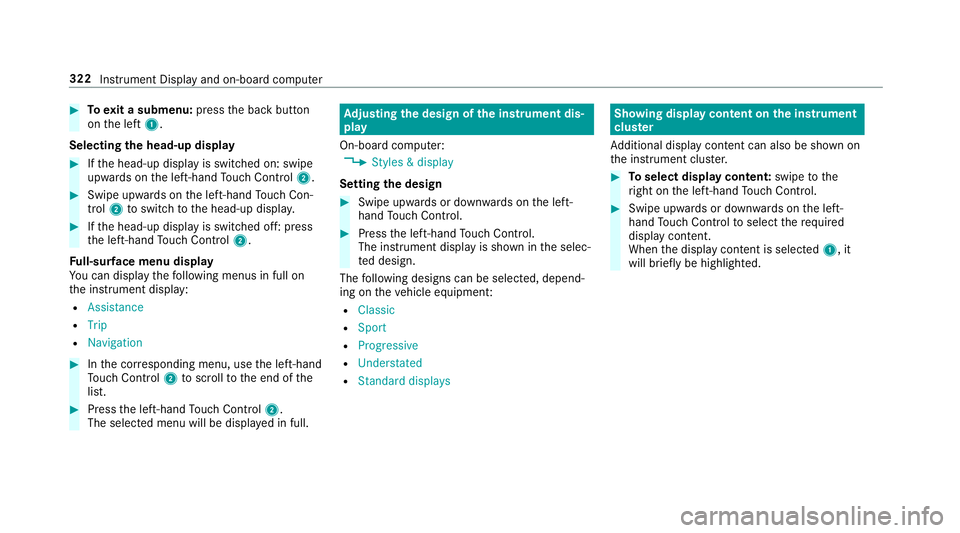
th e instrument clus ter. #
Toselect display content: swipetothe
ri ght on the left-hand Touch Control. #
Swipe upwards or down wards on the left-
hand Touch Control toselect there qu ired
display con tent.
When the display conte nt is selected1, it
will brie fly be highligh ted. 322
Instrument Display and on-board computer
Page 326 of 729
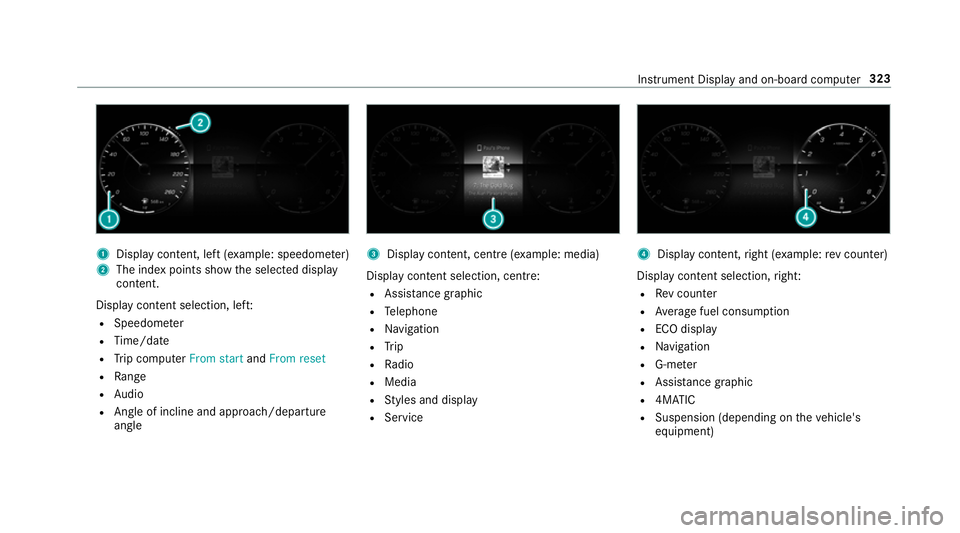
1
Displ aycontent, le ft(exa mp le: speedom eter)
2 The index points show the selected display
conte nt.
Display content selection, le ft:
R Speedom eter
R Time/date
R Trip computer From startandFrom reset
R Range
R Audio
R Angl e of incline and approach/departure
angle 3
Display conte nt, centre (examp le: media)
Display con tent selection, centre:
R Assi stance graphic
R Telephone
R Navigation
R Trip
R Radio
R Media
R Styles and display
R Service 4
Display conte nt,right (e xamp le:rev counter)
Display content selection, right:
R Rev counter
R Average fuel consum ption
R ECO display
R Navigation
R G-me ter
R Assi stance graphic
R 4MATIC
R Suspension (depending on theve hicle's
equipment) Instrument Display and on-board computer
323
Page 327 of 729
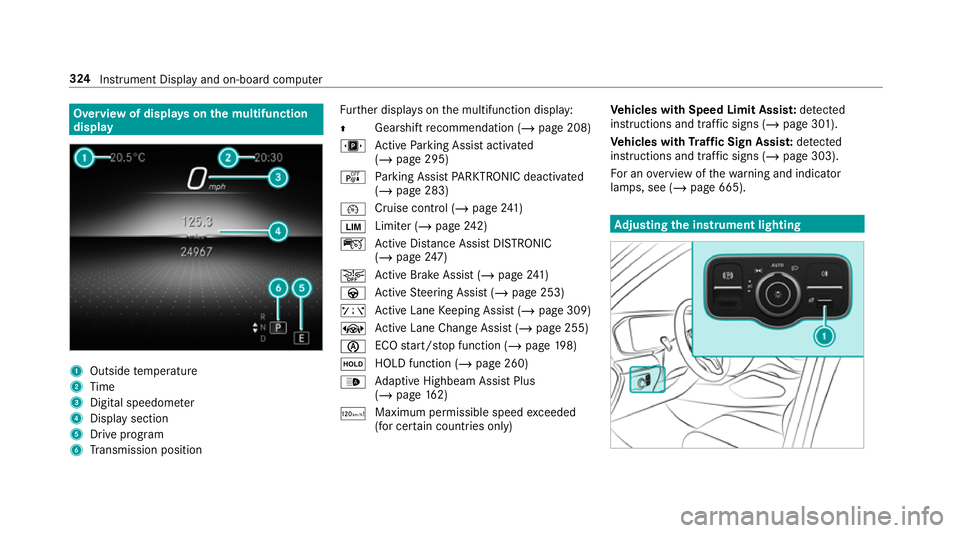
Overview of displa
yson the multifunction
display 1
Outside temp erature
2 Time
3 Digital speedome ter
4 Displ aysection
5 Drive program
6 Transmission position Fu
rther displa yson the multifunction display:
Z Gearshift
recommendation (/ page 208)
u Active Parking Assist activated
(/ page 295)
é Parking Assist PARKTRONIC deacti vated
( / page 283)
¯ Cruise control (/
page241)
È Limi
ter (/ page242)
ç Active Dis tance Assi stDISTRONIC
(/ page 247)
æ Ac
tive Brake Assi st (/ page 241)
à Active Steering Assist (/ page 253)
ê Active Lane Keeping Assist (/ page 309)
± Active Lane Change Assi st (/ page 255)
è ECO
start/ stop function (/ page198)
ë HOLD fu
nction (/ page 260)
_ Ad
aptive Highbeam Assist Plus
(/ page 162)
ð Ma
ximum pe rmissible speed exceeded
(for cer tain countries only) Ve
hicles with Speed Limit Assis t:de tected
instructions and traf fic signs (/ page 301).
Ve hicles with Traf fic Sign Assis t:de tected
instructions and traf fic signs (/ page 303).
Fo r an overview of thewa rning and indicator
lamps, see (/ page 665). Ad
justing the in stru ment lighting 324
Instrument Displ ayand on-board computer