ABS MERCEDES-BENZ GLS SUV 2019 Owners Manual
[x] Cancel search | Manufacturer: MERCEDES-BENZ, Model Year: 2019, Model line: GLS SUV, Model: MERCEDES-BENZ GLS SUV 2019Pages: 729, PDF Size: 12.03 MB
Page 14 of 729
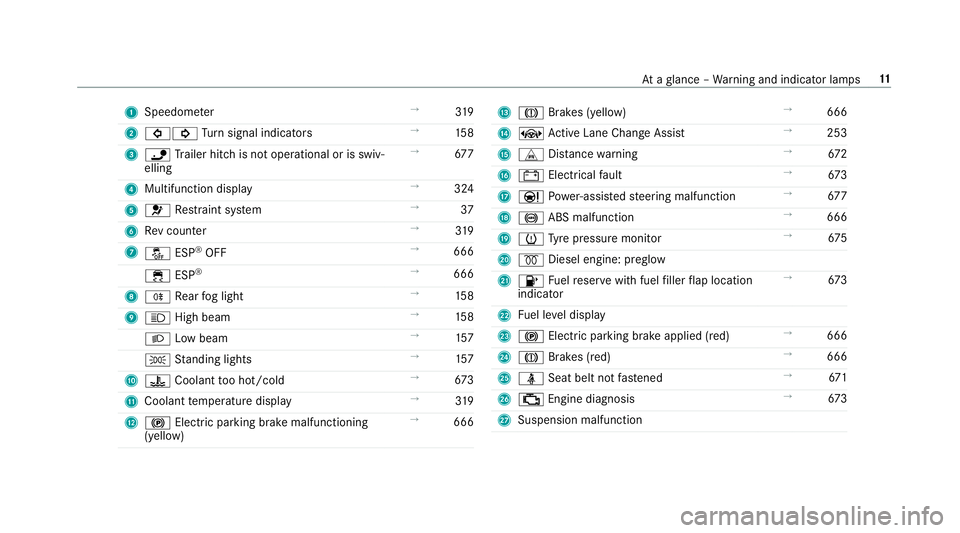
1
Speedom eter →
319
2 #! Turn signal indicators →
15 8
3 ï Trailer hit chis not operational or is swiv‐
elling →
677
4 Multifunction display →
324
5 6 Restra int sy stem →
37
6 Rev counter →
319
7 å ESP®
OFF →
666
÷ ESP®
→
666
8 R Rear fog light →
15 8
9 K High beam →
15 8
L Low beam →
157
T Standing lights →
157
A ? Coolant too hot/cold →
673
B Coolant temp erature display →
319
C ! Electric pa rking brake malfunctioning
(yellow) →
666 D
J Brakes (yellow) →
666
E ± Active Lane Change Assi st→
253
F L Distance warning →
672
G # Electrical fault →
673
H Ð Powe r-assis tedsteering malfunction →
677
I ! ABS malfunction →
666
J h Tyre pressure monitor →
675
K % Diesel engine: preglow
L 8 Fuelreser vewith fuel filler flap location
indicator →
673
M Fuel le vel display
N ! Electric parking brake applied (red) →
666
O J Brakes (red) →
666
P ü Seat belt not fastened →
671
Q ; Engine diagnosis →
673
R Suspension malfunction At
aglance – Warning and indicator lamps 11
Page 28 of 729
&
WARNING Risk offire due toflammable
materials on hot parts of theex haust
sy stem
Flammable material such as lea ves, grass or
twigs may ignite if they come into contact
wi th hot parts of theex haust sy stem. #
When driving on unpa vedro ads or off-
ro ad, regular lych eck theve hicle under‐
side. #
Remo vetrapped plants or other flam‐
mable material, in particular. #
Ifth ere is damage, consult a qualified
specialist workshop immediately. *
NO
TEDama getotheve hicle In
thefo llowing situations, in particular, there
is a risk of damage totheve hicle:
R theve hicle becomes grounded, e.g. on a
high kerb or an unpa vedro ad R
theve hicle is driven toofast over an
obs tacle, e.g. a kerb, speed bump or pot‐
hole
R a heavy object strike sth e underbody or
ch assis components
In situations such as this, the body, the
underbody, chassis components, wheels or
tyres could be damaged without the damage
being visible. Components damaged in this
wa y can unexpec tedly fail or, in the case of
an accident, may not absorb the loads that
arise as intended.
If th e underbody panelling is damaged, flam‐
mable materials such as lea ves, grass or
twigs can collect between the underbody and
th e underbody panelling. These materials
may ignite if they come into contact wi thhot
parts on theex haust sy stem. #
Have theve hicle checked and repaired
immediately at a qualified specialist
wo rkshop.
or #
If driving saf ety is impaired while con‐
tinuing your journe y,pull over and stop
th eve hicle immediately in accordance
with the traf fic conditions, and contact
a qu alified specialist workshop. Ve
hicles with a 48 V on-board electrical sys‐
te m (EQ Boo sttech nology) &
DANG ER Risk of fata l injury bytouching
damaged high-voltage co mponents
Ve hicles with a 48 V on-board electrical sys‐
te m contain individual high-voltage compo‐
nents. These high-voltage components are
under high voltage.
If yo u modify co mponent parts of these high-
vo ltage components or touch damaged com‐
ponent parts, you may be electrocuted.
High voltage components may be damaged
in an accident, although the damage may not
be visible. #
Never per form modifications tocompo‐
nent pa rts of high-voltage components. General no
tes25
Page 77 of 729
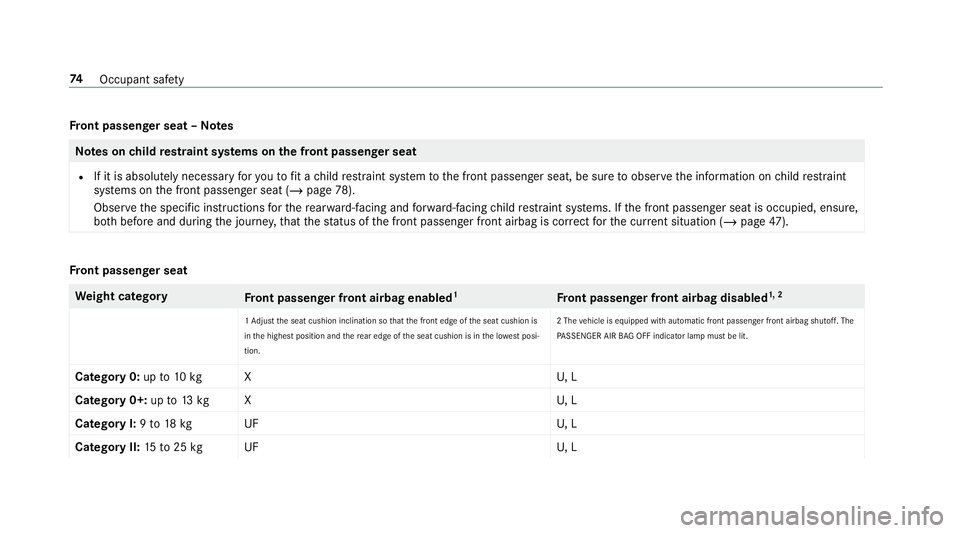
Fr
ont passenger seat – NotesNote
s onchild restra int sy stems on the front passenger seat
R If it is absolutely necessary foryo uto fit a child restra int sy stem tothe front passenger seat, be sure toobser vethe information on child restra int
sy stems on the front passenger seat (/ page78).
Obser vethe specific instructions forth ere ar wa rd-facing and forw ard-facing child restra int sy stems. If the front passenger seat is occupied, ensure,
bo th before and during the journe y,that thest atus of the front passenger front airbag is cor rect forth e cur rent situation (/ page 47). Fr
ont passenger seat We
ight category
Front passenger front airbag enabled 1
Front passenger front airbag disabled 1, 2
1 Ad just the seat cushion inclination so that the front edge of the seat cushion is
in the highest position and there ar edge of the seat cushion is in the lo west posi‐
tion. 2 The
vehicle is equipped with automatic front passenger front airbag shutoff. The
PA SSENGER AIR BAG OFF indicator lamp must be lit.
Category 0: upto10 kg XU , L
Category 0+: upto13 kg XU , L
Category I: 9to 18 kg UF U, L
Category II: 15to25 kg UF U, L74
Occupant saf ety
Page 80 of 729
Make sure
you obse rveth efo llowing informa‐
tion:
R Neverfit a rear wa rd-facing child restra int
sy stem tothe front passenger seat
R Alw aysfit a rear wa rd-facing child restra int
sy stem toa suitable rear seat
- Suitability of seats for attaching belt-
secured child restra int sy stems
(/ page 72)
- Secu rethech ild restra int sy stem with the
seat belt on there ar seat (/ page75).
R Notes on rear wa rd-facing and forw ard-facing
ch ild restra int sy stems on the front
passenger seat (/ page77) Note
s onrear wa rd-facing and forw ard-facing
ch ild restra int sy stems on the front
passenger seat &
WARNING Risk of inju ryor death from
using a rear wa rd-facing child restra int
sy stem when the front passenger front
airbag is enabled
If yo u secure a child in a rear wa rd-facing
ch ild restra int sy stem on the front passenger
seat and thePA SSENGER AIR BAG OFF indi‐
cator lamp is off, the front passenger airbag
can deploy in theeve nt of an accident.
The child could be stru ck bythe airbag.
Alw ays ensure that the front passenger air‐
bag is disabled. The PASSENGER AIR BAG
OFF indicator lamp must be lit.
NEVER use a rear wa rd-facing child restra int
sy stem on a seat pr otected byan ENABLED
FRONT AIRB AGin front of it, DE ATH or SERI‐
OUS INJU RYtotheCH ILD can occur. Obser
vethe specific instructions forth ere ar‐
wa rd-facing and forw ard-facing child restra int
sy stems (/ page78). Wa
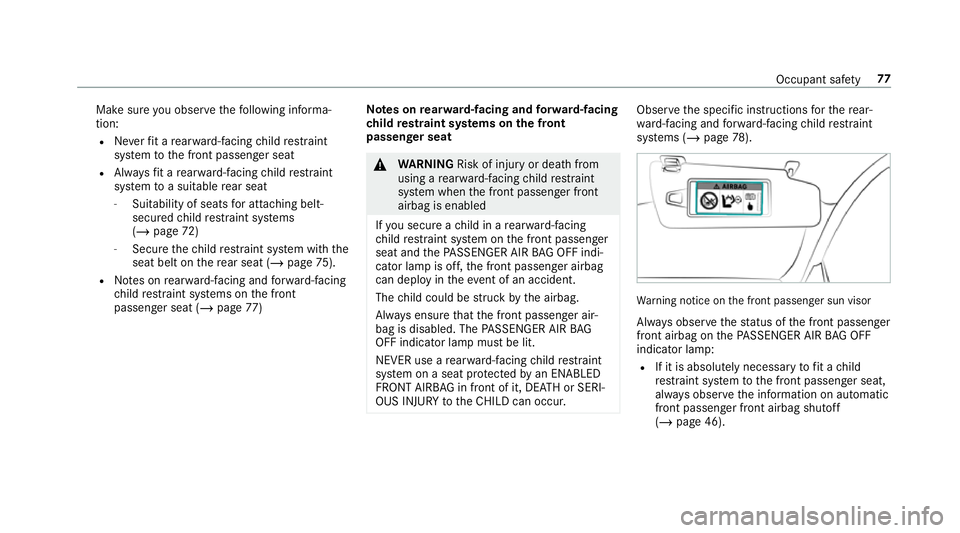
rning notice on the front passenger sun visor
Alw ays obser vethest atus of the front passenger
front airbag on thePA SSENGER AIR BAG OFF
indicator lamp:
R If it is absolutely necessary tofit a child
re stra int sy stem tothe front passenger seat,
alw ays obser vethe information on automatic
front passenger front airbag shutoff
(/ page 46). Occupant saf
ety77
Page 199 of 729
th
e sy stem. Clean the brakes af ter driving off-
ro ad. If youth en notice reduced braking ef fect
or hear scraping noises, ha vethe brake sy stem
ch ecked at a qualified specialist workshop.
Ad just your driving style to thech anged braking
ch aracteristics.
* NO
TEDama gecaused bydriving over
obs tacles The
vehicle can be damaged by:
R driving up on high kerbs or unpa ved
ro ads.
R quickly driving over obs tacles su chas
ke rbs, speed bumps or po tholes.
R heavy objects hitting the underbody or
ch assis components. #
Do not drive over obs tacles that could
damage theve hicle. #
Check theve hicle regular lyfor dama ge
during off-road driving. #
Adjust theve hicle speed tosuit the
ro ad sur face conditions. #
Ifth ere is damage, consult a qualified
specialist workshop immediately. +
ENVIRONMENTAL
NOTEEnvironmental
dama gedue tonon-obser vance of pro‐
hibition signs Environmental pr
otection has priority. Treat
nature with respect. #
Be sure toobser veprohibition signs. Checklist before driving off-road
Check
thefo llowing points before driving off-
ro ad:
R Fuel le vel
R Vehicles with a diesel engine: AdBlue ®
le vel
R Engine oil le vel:fill engine oil up tothe maxi‐
mum le velto ensure full gradeability
(/ page 534).
R Tyre-change tool kit and spare wheel
R Tyres and wheels %
Information about special all-ter rain tyres for
re trofitting is available from any qualified
specialist workshop.
Off-road driving
Re ad this section before driving your vehicle off-
ro ad. Practise bydriving over more gentle off-
ro ad terrain firs t.
R Obse rveth e no tes on the cross-country ABS
(/ page 229).
R If necessar y,select theF orG drive
program (vehicles with an Off-road pac kage)
before driving off-road (/ page 204).
R Before driving off-road, shift the transfer
case totheLO W RANGE off-roadgear (vehi‐
cles with an Offroad pac kage ) (/ page 211).
R Select a vehicle le vel suitable for off-road ter‐
ra in (/ page 265). Toavo id damaging the
ve hicle, make sure there is alw ays suf ficient
ground clearance.
R Alw ayske ep the engine running and in gear
when driving on downhill gradients and
slopes. Obse rveth e no tes on driving in
mountainous terrain. 19 6
Driving and pa rking
Page 213 of 729
R
Speed
R ope rating status of the engine
R traf fic situation Tr
ansfer case Fu
nction of the transfer case &
WARNING Risk of skidding and having
an accident when in LOW RANGE on slip‐
pery road sur faces
If yo u select theLO W RANGE off-road gear
on a slippe ryroad sur face, the wheels could
lose traction in thefo llowing situations:
R ifyo ure lease the accelera tor pedal when
th eve hicle is in motion.
R if off-road ABS inter venes when braking.
If th e wheels lose traction, it will no longer be
possible tosteer theve hicle. #
Never select theLO W RANGE off-road
ge ar when driving on slippe ryroad sur‐
fa ces. &
WARNING Risk of accident when the
trans fer case is in neutral position
The transfer case can be in neutral position if
yo u do not wait until shift operation is com‐
ple te. The po wer transmission tothe driven
wheels is then inter rupted. The vehicle may
th ereby inadver tently rollaw ay. #
Wait until the transfer case shift opera‐
tion is comple te. This function is only
available in vehicles with
Off-road pac kage.
Shift the transfer case tothe on-ro ad position
HIGH RANGE or intotheLO W RANGE off-road
ge ar.
Do not swit choff the engine during shift opera‐
tion and do not shift the automatic transmission
to ano ther position. Shift
ranges
HIGH RANGE LOW RANGE
Ro ad position for all
normal on-road driv‐
ing situations. Off-road
gear for driv‐
ing off-road, when
fo rd ing and on steep
uphill or downhill
inclines. Properties of
theLO W RANGE off-road gear:
R reduced maximum speed: 50 km/h
R increased tractive po wer
R the transmission ratio changes byappr ox‐
imately a factor of thre e.
R increased drive torque
Do not use LOW RANGE in thefo llowing situa‐
tions:
R when driving on public roads. 210
Driving and pa rking
Page 231 of 729
%
Standby mode is automatically deactivated
when the ignition is switched on.
Ac tivating/deactivating standby mode (park‐
ing up theve hicle)
Re quirements:
R The engine is switched off.
Multimedia sy stem:
4 © 5
Settings 5
Fahrzeug (Vehicle) #
Switch Standby mode on or off.
When you activate the function, a prom pt
appears. #
Select Yes.
St andby mode is activated. Driving and driving saf
ety sy stems Driving sy
stems and your responsibility Yo
ur vehicle is equipped with driving sy stems
which assist you in driving, parking and manoeu‐
vring theve hicle. The driving sy stems are aids
and do not relie ve you of your responsibility per‐
ta ining toroad traf fic la w.Pay attention tothe traf
fic conditions at all times and inter vene
when necessa ry. Be aware of the limitations
re ga rding the safe use of these sy stems. Information about
radar senso rs Some driving and driving sa
fety sy stems use
ra dar sensors tomonitor the area in front of,
behind or next totheve hicle (depending on the
ve hicle's equipment).
Depending on theve hicle's equipment, thera dar
sensors are integrated behind the bumpers
and/or behind the Mercedes star. Keep these
parts free of dirt, ice and slush (/ page545).
The se nsors mu stnot be co vered, forex ample
by cycle rack s, overhanging loads, sticke rs,fo il
or foils toprotect against stone chipping. In the
eve nt of dama getothe bumpers or radiator
grille, or following a collision impacting the
bumpers or radiator grille, ha vethe function of
th era dar sensors checked at a qualified special‐
ist workshop. The driving sy stems and driving
saf ety sy stems may no longer function proper ly
in such cases. Overview of driving sy
stems and driving
saf ety sy stems In
this section, you will find information about
th efo llowing driving sy stems and driving saf ety
sy stems:
R 360° Camera (/ page 289)
R ABS (Anti-lock Braking System)
(/ page 229)
R Active Dis tance Assi stDISTRONIC
(/ page 247)
R Adaptive Brake Lights (/ page241)
R AIRMATIC (/ page 262)
R Active Brake Assi st (/ page 235)
R Active Lane Keeping Assist (/ page 309)
R ATTENTION ASSIST (/ page 300)
R BAS (Brak eAssist System) (/ page 229)
R Hill Start Assist (/ page 259)
R E-AC TIVE BODY CONTROL (/ page 269)
R EBD ( Electronic Brakeforc eDistribution)
(/ page 235) 228
Driving and parking
Page 232 of 729
R
ESP ®
(E lectronic Stability Program)
(/ page 230)
R Speed Limit Assist (/ page 301)
R Active Speed Limit Assi st (/ page 251)
R HOLD function (/ page 260)
R STEER CONTROL (/ page 235)
R Active Steering Assist (/ page 253)
R Limiter (/ page242)
R Active Parking Assist (/ page 293)
R Parking Assist PARKTRONIC ( /page 279)
R Reversing camera (/ page 286)
R Cruise control (/ page241)
R Function of Blind Spot Assi stand Active Blind
Spot Assi stwith exitwa rning (/ page 306)
R Traf fic Sign Assi st (/ page 303) Fu
nction of ABS (Anti-lock Braking Sy stem) ABS
regulates the brake pressure in critical driv‐
ing situations:
R During braking, e.g. at full brake application
or insuf ficient tyre traction, the wheels are
pr eve nted from lo cking.
R Vehicle steerability while braking is ensured.
If ABS inter venes when braking, you will feel a
pulsing in the brake pedal. The pulsating brake
pedal can be an indication of hazardous road
conditions and can ser veas a reminder totake
ex tra care while driving.
Sy stem limitations
R ABS is active from speeds of appr ox.
8 km/h.
R ABS may be impai red or may not function if a
malfunction has occur red and theye l‐
low ! ABSwarning lamp lights up contin‐
uously in the instrument clus ter af terthe
engine is star ted. Fu
nctions of Off-road ABS Off-road ABS is specially adap
tedfo r driving off-
ro ad:
R The front wheels lock cyclically during brak‐
ing.
R The braking dis tance is sho rtened due tothe
digging-in ef fect.
Sy stem limits
R Off- road ABS functions at speeds below
40 km/h.
R If Off- road ABS inter venes, the ability tosteer
may be restricted. Fu
nction of BAS (Brake Assist Sy stem) &
WARNING Risk of an accident caused by
a malfunction in BAS (Brake Assi stSys‐
te m)
If BA S is malfunctioning, the braking dis tance
in an eme rgency braking situation is
increased. Driving and parking
229
Page 233 of 729
#
Dep ress the brake pedal with full force
in emer gency braking situations. ABS
pr eve nts the wheels from locking. BA
S suppo rts yo ur eme rgency braking situation
with additional brake forc e.
If yo u depress the brake pedal quickl y,BA S is
acti vated:
R BAS au tomatical lyboosts the brake pres‐
sure.
R BAS can sho rten the braking dis tance.
R ABS pr events the wheels from locking.
The brakes will function as usual once you
re lease the brake pedal. BAS is deactivated. Fu
nctions of ESP ®
(Electronic Stability Pro‐
gr am) &
WARNING Risk of skidding if ESP ®
is
malfunctioning
If ESP ®
is malfunctioning, ESP ®
cannot car ry
out vehicle stabilisation. In addition, other
driving saf ety sy stems are switched off. #
Drive on carefull y. #
Have ESP ®
ch ecked at a qualified spe‐
cialist workshop. &
WARNING Risk of skidding if ESP ®
is
deactivated
If yo u deactivate ESP ®
, ESP ®
cannot car ry
out vehicle stabilisation. #
ESP ®
should on lybe deactivated in the
fo llowing situations. ESP
®
can monitor and impr ovedriving stability
and traction in thefo llowing situations, within
ph ysical limits:
R When pulling away on wet or slippe rycar ria‐
ge wa ys.
R When braking.
R Vehicles with trailer hitch: in trailer opera‐
tion from speeds of 65 km/h, if theve hicle/
trailer combination begins tosw ay from side
to side.
R Instro ng side winds when you are driving
fa ster than 80 km/h.
If th eve hicle deviates from the direction desired
by the driver, ESP ®
can stabilise theve hicle by
inter vening in thefo llowing ways:
R One or more wheels are braked.
R The engine output is adap ted according to
th e situation.
ESP ®
is deactivated if theå ESP®
OFF warn‐
ing lamp lights up continuously in the instrument
clus ter:
R Driving stability will no lon ger be impr oved. 230
Driving and parking
Page 456 of 729
Multimedia sy
stem:
4 © 5
Phone
Sear ching for a mobile phone #
Select .
#
Select Connect new device .
Connecting a mobile phone (authorisation
using Secu reSimple Pairing) #
Select a mobile phone. #
A code is displa yed in the multimedia sy stem
and on the mobile phone. #
Ifth e codes match: confirm the code on
th e mobile phone.
% For older mobile phone models, enter a one
to sixteen-digit number code on the mobile
phone and on the multimedia sy stem for
authorisation.
% Upto15 mobile phones can be auth orised
on the multimedia sy stem.
Auth orised mobile phones are reconnected
au tomatical ly. %
The connected mobile phone can also be
used as Blue tooth®
audio equipment
(/ page 500).
Connecting a second mobile phone (two
phone mode)
Requ irements:
R Atleast one mobile phone is already connec‐
te dto the multimedia sy stem via Blue tooth®
.
Multimedia sy stem:
4 © 5
Phone #
Select .
#
Select Connect new device. #
Select the mobile phone. #
Select
The selected mobile phone is connected to
th e multimedia sy stem. Fu
nctions of the mobile phone in two phone
mode
Fu nctions overview Mobile phone in
the
fo re gr ound Mobile phone in
the
bac kground
Fu llra nge of func‐
tions Incoming calls and
messa
ges Inter
changing mobile phones (two phone
mode)
Multimedia sy stem:
4 © 5
Phone
Bo th mobile phones are shown individually in
sepa rate tabs. #
Select theta b with the desired mobile
phone.
The mobile phone in the selected tab is the
mobile phone in thefo re ground.
Wi th th eexc eption of telephone settings, the
submenus in thete lephone menu relate to
th e mobile phone in thefo re ground. In the
te lephone settings, settings can be made for
bo th mobile phones. MBUX multimedia sy
stem 453