wipers MERCEDES-BENZ GLS SUV 2019 Owners Manual
[x] Cancel search | Manufacturer: MERCEDES-BENZ, Model Year: 2019, Model line: GLS SUV, Model: MERCEDES-BENZ GLS SUV 2019Pages: 729, PDF Size: 12.03 MB
Page 5 of 729
Symbols
........................................................ 5At
agl ance .................................................... 6
Cockpit ........................................................... 6
Wa rning and indicator lamps ........................ 10
Overhead contro l panel ................................ 12
Door control panel and seat adjustment ....... 14
Control settings in there ar compartment .... .16
Emergencies and breakdowns ...................... 18Digital Owner's Manual
.............................20
Calling up the Digital Owner's Manual ..........20 Genera
l notes............................................. 22
Pr otection of the environment ......................22
Ta ke -ba ckof end-of-life vehicles ...................22
Mercedes-Benz Genuine Parts ......................23
Owner's Manual ............................................ 24
Operating saf ety .......................................... .24
Declaration of Conformity ............................ 26
Diagno stics connection ................................ 30
Qualified specialist workshop ....................... 31
Ve hicle registration ....................................... 31Cor
rect use of theve hicle ............................32
Information on the REA CHregulation ........... 32
Implied warranty .......................................... .32
QR code forre scue card ...............................32
Data storage .................................................32
Copyright ...................................................... 35 Occupant saf
ety......................................... 36
Re stra int sy stem ...........................................36
Seat belts ..................................................... 38
Airbags ......................................................... 42
PRE-SAFE ®
sy stem ....................................... 50
Safely transporting children in theve hi‐
cle ................................................................52
No tes on pets in theve hicle .......................... 81 Opening and closing
.................................. 82
Ke y .............................................................. .82
Doo rs............................................................ 86
Load compa rtment ....................................... 92
Ro ller sunblinds ............................................ 97
Side windo ws................................................ 97
Sliding sunroof ............................................ 102
Anti-theft pr otection ................................... 108 Seats and
stowing .................................... 11 2
No tes on the cor rect driver's seat posi‐
tion .............................................................. 11 2
Seats ........................................................... 11 3
St eering wheel ............................................ 12 8
Easy entry and exitfeature ........................ .130
Operating the memory function .................. 131
St ow age areas ............................................ 13 3
Cup holders ................................................ 14 8
Ashtr ayand cigar ette lighter ...................... .150
Soc kets ....................................................... 151
Wi reless charging of the mobile phone
and connection with theex terior aerial ...... 154
Fitting/removing thefloor mats ................. 15 6 Light and sight
......................................... 157
Exterior lighting .......................................... 157
Interior lighting ........................................... 16 4
Wi ndsc reen wipers and windscreen
wa sher sy stem ............................................ 16 5
Mir rors ........................................................ 17 0
Operating the sun visors ............................. 173
Area pe rmeable toradio wav es on the
windscreen ................................................ .174 2
Contents
Page 168 of 729
Ac
tivating welcome lighting #
Select Colour. #
Select Welcome.
When theve hicle is unloc ked, a special ambi‐
ent lighting sequence will run.
Ac tivating dependency on air conditioning
settings #
Select Colour. #
Select Climate.
If ch anges are made tothete mp erature set‐
ting in theve hicle, the colour of the ambient
lighting will change brief ly. Switching
the interior lighting switch-off
delay time on or off Multimedia sy
stem:
4 © 5
Settings 5
Lights
5 Int. light. del. shut-off #
Switch the lighting switch-off delay time on
or off.
When this function is active, the interior light‐
ing lights up again briefly af terth eve hicle
has been loc ked. Wi
ndscreen wipers and windscreen washer
sy stem Switching
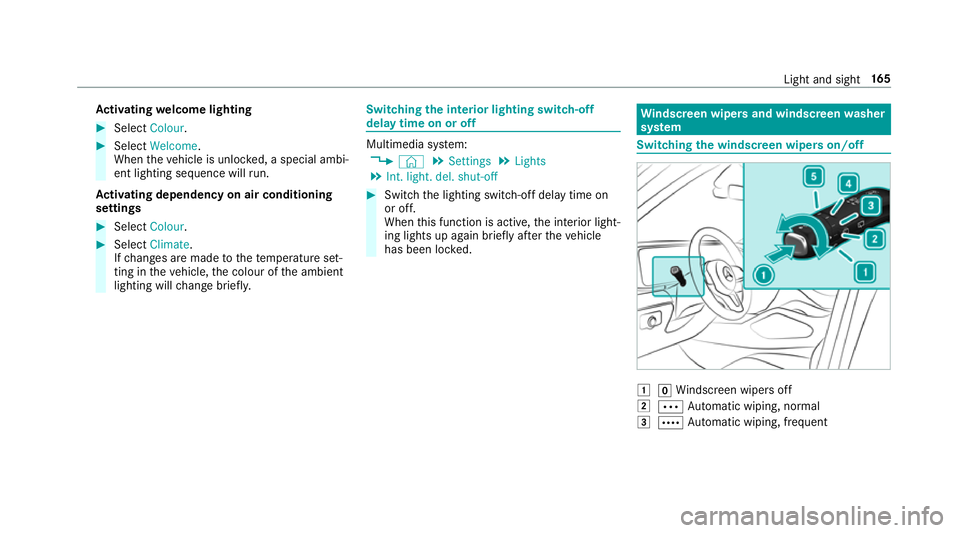
the windscreen wipers on/off 1
gWindsc reen wipers off
2 Ä Automatic wiping, normal
3 Å Automatic wiping, frequent Light and sight
16 5
Page 169 of 729
4
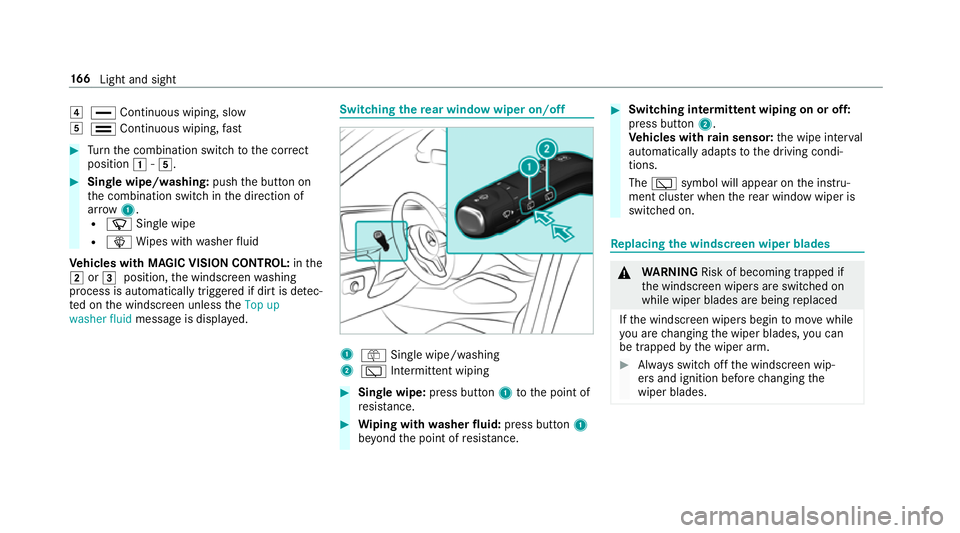
° Continuous wiping, slow
5 ¯ Continuous wiping, fast #
Turn the combination switch tothe cor rect
position 1-5. #
Single wipe/washing: pushthe button on
th e combination switch in the direction of
ar row 1.
R í Single wipe
R î Wipes with washer fluid
Ve hicles with MAGIC VISION CONTROL: inthe
2 or3 position, the windscreen washing
process is automatically triggered if dirt is de tec‐
te d on the windscreen unless theTop up
washer fluid message is displa yed. Switching
there ar window wiper on/off 1
ô Single wipe/washing
2 è Intermittent wiping #
Single wipe: press button1tothe point of
re sis tance. #
Wiping with washer fluid: press button 1
be yond the point of resis tance. #
Switching in termittent wiping on or off:
press button 2.
Ve hicles with rain sensor: the wipe inter val
automatically adapts tothe driving condi‐
tions.
The è symbol will appear on the instru‐
ment clus ter when there ar wind owwiper is
swit ched on. Re
placing the windsc reen wiper blades &
WARNING Risk of becoming trapped if
th e windscreen wipers are switched on
while wiper blades are being replaced
If th e windscreen wipers begin tomo vewhile
yo u are changing the wiper blades, you can
be trapped bythe wiper arm. #
Alw ays switch off the windscreen wip‐
ers and ignition before changing the
wiper blades. 16 6
Light and sight
Page 182 of 729
Deactivating
rear climate control #
Select REAR OFF.
Re ar climate control is deactivated. Ac
tivating/deactivating the climate control
syn chro nisation function via the control
panel Climate control can be set centrally using
the
synchronisation function. The temp erature and
air distribution setting forth e driver side is adop‐
te d automatically for all clima tecontrol zones. #
Press the 0 button.
The synchronisation function is deactivated if
th e settings for one of theot her climate zones
are changed. Ac
tivating/deactivating the climate control
syn chro nisation function using the multime‐
dia sy stem Climate control can be set centrally using
the
synchronisation function. The driver's settings fo
rte mp erature, air quantity and air distribution
are adop ted automatically for all clima tezones. #
Call up the air conditioning menu
(/ page 177). #
Select First row of seats. #
Select SYNC.
Depending on the pr evious status, the func‐
tion is activated or deactivated. Demisting
the windo ws Wi
ndo wsmis ted up on the inside #
Press theà button. #
Ifth e windo wscontinue tomist up: press the
¬ button.
Wi ndo wsmis ted up on the outside #
Switch on the windscreen wipers. #
Press theà button. Switching air-recirculation mode on/off
#
Press theg button.
The interior air will be recirculated. Air-reci
rculation mode automatically swit ches to
fresh air mode af ter some time.
% If air-recirculation mode is switched on, the
windo wsmay mist up more quickl y.Switch
on ai r-re circulation mode only brie fly. Switches
there sidual heat on/off Re
quirements:
R theve hicle is par ked.
It is possible tomake use of there sidual heat
from the engine tocontinue heating or ventilat‐
ing the front compartment of theve hicle for
appr oximately 30 minutes, depending on the
te mp erature set. #
Toactivate: press button Á.
Re sidual heat will be switched off automaticall y. Switching
there sidual heat in there ar
on/off Re
quirements:
R theve hicle is par ked. Climate control
17 9
Page 536 of 729
#
Intheeve nt of a fire inthe engine com‐
partment, keep the engine bonn et
closed and call thefire service. &
WARNING Risk of inju rydue tomoving
parts
Cer tain components in the engine compart‐
ment may continue tomo veor suddenly
mo veagain even af terth e ignition has been
switched off, e.g. the cooler fan.
Ma kesure of thefo llowing before per form ing
ta sks in the engine compartmen t:#
Switch the ignition off. #
Neverto uch the danger zone sur round‐
ing moving co mponent parts, e.g. the
ro tation area of thefa n. #
Remo vejewe llery and watches. #
Keep items of clo thing and hair away
from moving parts. &
WARNING Risk of inju ryfrom touching
co mp onent parts under voltage
The ignition sy stem and the fuel injection
sy stem workunder high voltage. If youto uch
co mp onent parts which are under voltage,
yo u could recei vean electric shoc k. #
Neverto uch co mponents of the ignition
sy stem or the fuel injection sy stem
when the ignition is switched on. &
WARNING Risk of bu rns from hot com‐
ponent parts in the engine compartment
Cer tain components in the engine compart‐
ment can be very hot, e.g. the engine, the
ra diator and parts of theex haust sy stem. #
Allow the engine tocool down and only
to uch co mponent parts described in
th efo llowing. &
WARNING Risk of inju ryfrom using the
windscreen wipers while the engine bon‐
net is open
When the engine bonn etis open, and the
windscreen wipers are set in motion, you can
be trapped bythe wiper linkage. #
Alw ays switch off the windscreen wip‐
ers and ignition before opening the
engine bonn et. Maintenance and care
533
Page 548 of 729
Note
s on care of car parts &
WARNING Risk of entrapment if the
windscreen wipers are swit ched on while
th e windscreen is being cleaned
If th e windscreen wipers are set in motion
while you are cleaning the windscreen or
wiper blades, you can be trapped bythe
wiper arm. #
Alw ays switch off the windscreen wip‐
ers and the ignition before cleaning the
windscreen or wiper blades. &
WARNING Risk of bu rns from tailpipes
and tailpipe trim
The tailpipe and tailpipe trim can become
ve ry hot. If you come into contact with these
parts of theve hicle, you could burn yourself. #
Alw ays be particular lycareful around
th eta ilpipe and theta ilpipe trim. #
Allow theve hicle parts tocool down
before youto uch them. Obser
vethefo llowing information: Note
s on cleaning and car eA voiding vehicle damage
Wheels/rims Usewate r and acid-free wheel cleaners. R
Do not use acidic wheel cleaners toremo vebrake dust.
This could damage wheel bolts and brake components.
R Toavoid cor rosion of the brake discs and brakepads, drive
th eve hicle for a few minutes af ter cleaning before parking
it. The brake discs and brakepads warm up and dry out.
Wi ndo ws
Cleanthe windo wsonthe inside and outside using a damp
clo thand cleaning agents recommended byMercedes-Benz. Do not use dry clo
ths or abrasive or sol vent-based cleaning
agents toclean the inside of windo ws.
Wi per blades
Fold out the wiper blades and clean them using a damp clo th.D o not clean the wiper blades too of ten. Maintenance and care
545
Page 571 of 729
Obser
vethe no tes on electrical fuses
(/ page 567).
Opening &
WARNING Risk of inju ryfrom using the
windscreen wipers while the engine bon‐
net is open
When the engine bonn etis open, and the
windscreen wipers are set in motion, you can
be trapped bythe wiper linkage. #
Alw ays switch off the windscreen wip‐
ers and ignition before opening the
engine bonn et. #
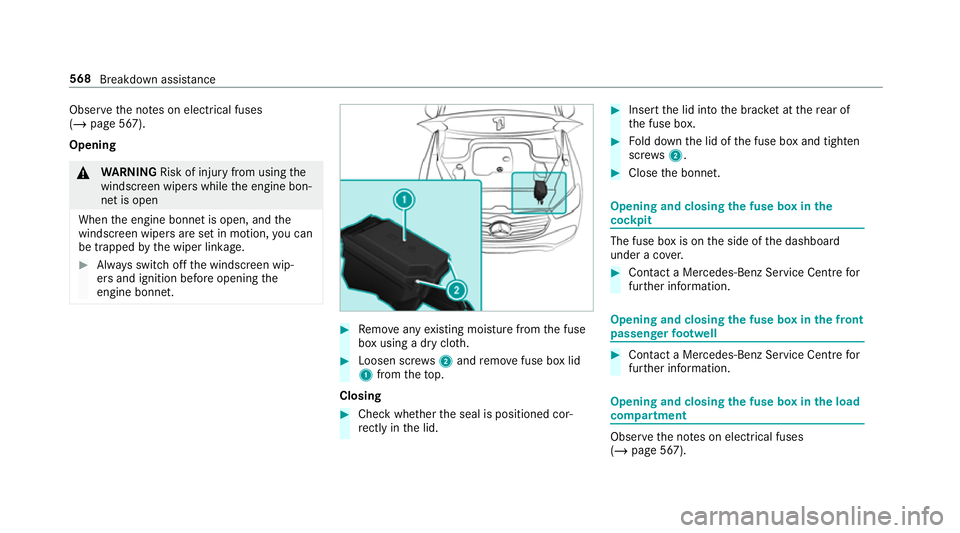
Remo veany existing moisture from the fuse
box using a dry clo th. #
Loosen scr ews2 and remo vefuse box lid
1 from theto p.
Closing #
Check whe ther the seal is positioned cor‐
re ctly in the lid. #
Insert the lid into the brac ket at there ar of
th e fuse box. #
Fold down the lid of the fuse box and tighten
scr ews2. #
Close the bonn et. Opening and closing
the fuse box in the
cockpit The fuse box is on
the side of the dashboard
under a co ver. #
Con tact a Mercedes-Benz Service Centre for
fur ther information. Opening and closing
the fuse box in the front
passenger foot we ll #
Contact a Mercedes-Benz Service Cent refor
fur ther information. Opening and closing
the fuse box in the load
compa rtment Obse
rveth e no tes on electrical fuses
(/ page 567). 568
Breakdown assis tance
Page 705 of 729
Ti
e-down eyes ...................................... 14 4
Loading guidelines .................................. 13 3
Loads Securing .............................................. 13 3
Locking/unlocking Activating/deactivating the auto‐
matic locking feature ............................ .90
Ad ditional door lock .............................. 86
Digital Vehicle Keyst icke r ..................... 88
Emer gency key ...................................... 91
KEYLESS-GO .......................................... 89
Mobile phone ........................................ 88
Opening theta ilgate .............................. 92
Smartphone .......................................... 88
Un locking/opening the doors from
th e inside ............................................... 87
Low beam (symm etrical dipped beam) ................. 157
Switching on/off ................................. 157
LO W RANGE
Shifting ................................................ 211
Lu bricant additives
see Additives Lu
ggage
Securing .............................................. 13 3
Lu mbar support
see Lumbar support (4-w ay)
Lu mbar support (4-w ay).......................... 11 6 M
MAGIC VISION CONTROL Windsc reen wipers .............................. 16 8
Maintenance see ASS YST PLUS
Malfunction Parking Assist PARKTRONIC ................ 281
Re stra int sy stem .................................... 37
Managing e-mails In Car Of fice ........................................ 469
Manoeuv ring Assist
see Trailer Manoeuv ring Assi st
Map .................................................. 433, 438
Av oiding an area ..................................4 42
Av oiding an area (o verview) ................ .442
Changing an area ................................ 442
Del eting an area .................................. 443Displ
aying Qibla .................................. 444
Displ aying the compass ......................4 44
Displ aying the map version .................. 441
Displ aying the next intersecting
st re et ................................................... 441
Displ aying thera nge ............................ 445
Displ aying the satellite map ................4 44
Displ aying the tra ffic map .................. .433
Displ aying weather information .......... .445
Map data ............................................. 443
Moving ................................................ 439
Selecting POI symbols .........................4 40
Selecting text information ................... 441
Selecting the map orientation .............4 39
Setting the map scale .......................... 438
Setting the map scale automatically ... 444
Showing in the multifunction display
of the instrument clus ter .................... .445
Switching mo torw ay information
on/off .................................................. 441
Up dating .............................................4 43
Massage prog rammes
Overview .............................................. 124
Re setting the settings .......................... 12 5702
Index
Page 713 of 729
Ra
nge
Ad Blue ®
............................................... 325
Displaying ............................................ 326
REA CHregulation ...................................... 32
Re ading light
see Interior lighting
Re alwo od (Care) .................................... .547
Re ar climate control
Setting (MBUX) ................................... .178
Re ar comp artment display
Locking (child saf ety lock) .................. .394
Switching on/off ................................. 394
Re ar display
Home screen overview ........................ 522
Overview ............................................ .522
Re ar door (child saf ety lock) .................... 79
Re ar fog light
Switching on/off .................................1 58
Re ar of theve hicle
Lo we ring .............................................. 14 0
Re ar seat
see Seat Re
ar seat belt
St atus display ........................................ 42
Re ar seat belt status display .................... 42
Re ar Seat Entertainment Sy stem
Ad justing the brightness ..................... 526
Ad justing there ar seats ...................... 524
Calling up services, apps and web
br ows er ............................................... 527
Calling up the device manager ............ 526
Climate control .................................... 525
Controlling playback ............................5 28
Headphones overview ........................ .523
Information about media mode ........... 527
Operating saf ety .................................. 521
Overview .............................................. 521
Overview of services, apps and web
br ows er ............................................... 527
Overview of there ar displa ys.............. 522
Overview of the sound settings ........... 529
Re setting there ar seat ........................ 524
Selecting a massage program ............ .524
Selecting sound settings ..................... 530
Setting the language ........................... 526
Setting the sensitivity forth ere ar
display ................................................ .526 Showing sy
stem information ............... 526
Switching navigation on ......................5 26
Switching off the display ..................... 522
Switching on media mode ...................5 28
Switching on thera dio ........................ 529
Switching on theTV ............................ 529
Re ar window
Changing the wiper blade .................... 16 9
Re ar window heater ................................ 175
Re ar window wipers
Ac tivating/deactivating ...................... .166
Re ar-view mir ror
see Outside mir rors
Re cycling
see Take -ba ckof end-of-life vehicles
Re ducing agent
see AdBlue ®
Re fuelling
Re fuelling theve hicle ........................... 212
To pping up AdBlue ®
............................. 216
Re gistration
Ve hicle ................................................... 31710
Index
Page 727 of 729
Setting up a hotspot ............................ 393
Setting up an Internet connection ....... 488
Wi ndow airbag ...........................................42
Wi ndo ws
see Side windo ws
Wi ndo ws(Care) ...................................... .545
Wi ndscreen ...................................... 168, 175
Defrosting ............................................ 175
Infrared reflective ................................ 174
Ra dio wav es ......................................... 174
Re placing wiper blades (MAGIC
VISION CONTROL) ............................... 16 8
Wi ndscreen
see Windsc reen
see Windshield
Wi ndscreen heating ................................ 181
Wi ndscreen heating
see Windsc reen heating
Wi ndscreen washer fluid ........................ 605
No tes .................................................. 605
Wi ndscreen washer sy stem
To pping up ...........................................5 37Wi
ndscreen wipers
Changing the wiper blades .................. 16 6
Re placing wiper blades (MAGIC
VISION CONTROL) ............................... 16 8
Switching on/off ................................. 16 5
Wi ndshield ............................................... 16 6
Changing the wiper blades .................. 16 6
Wi nter operation
Snow chains ........................................ 570
Wi nter tyres
Setting the permanent speed limita‐
tion ...................................................... 24 5
Wi per blades
Ca re .................................................... 545
Re placing .............................................1 66
Re placing (MAGIC VISION CONTROL)
.............................................................1 68
Wire lesscharging
Fu nction/no tes ................................... 154
Mobile phone ....................................... 15 5
Mobile phone (rear) ............................. 15 5
Wire lessvehicle comp onents
Declaration of con form ity ...................... 26 Wo
rkout prog ram
Overview ..............................................1 24
Wo rkshop
see Qualified specialist workshop
Wr iting e-mails
In Car Of fice ........................................ 470724
Index