turn signal MERCEDES-BENZ GLS SUV 2020 User Guide
[x] Cancel search | Manufacturer: MERCEDES-BENZ, Model Year: 2020, Model line: GLS SUV, Model: MERCEDES-BENZ GLS SUV 2020Pages: 549, PDF Size: 9.9 MB
Page 294 of 549
Exiting a pa
rking space with Active Parking
Assist
Re quirements:
R The vehicle has been par ked with Active
Pa rking Assist.
Please no tethat you are responsible forth eve hi‐
cle and sur roundings during the entire parking
procedure. #
Start theve hicle. #
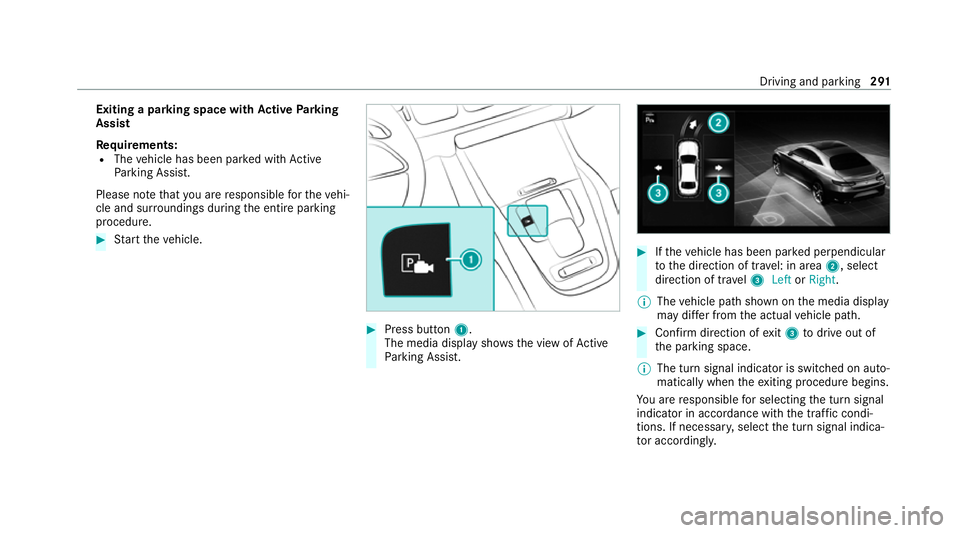
Press button 1.
The media display sho wsthe view of Active
Pa rking Assist. #
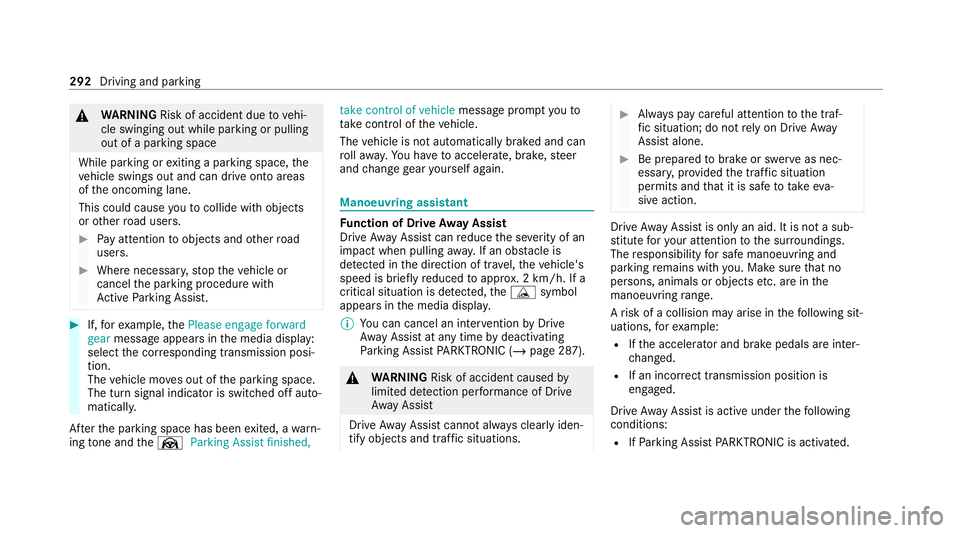
Ifth eve hicle has been par ked perpendicular
to the direction of tra vel: in area 2, select
direction of tra vel3 Left orRight .
% The vehicle path shown on the media display
may dif fer from the actual vehicle path. #
Confirm direction of exit3 todrive out of
th e parking space.
% The turn signal indicator is switched on auto‐
matically when theex iting procedure begins.
Yo u are responsible for selecting the turn signal
indicator in accordance with the traf fic condi‐
tions. If necessar y,select the turn signal indica‐
to r according ly. Driving and pa
rking 291
Page 295 of 549
&
WARNING Risk of accident due tovehi‐
cle swinging out while parking or pulling
out of a parking space
While parking or exiting a parking space, the
ve hicle swings out and can drive onto areas
of the oncoming lane.
This could cause youto collide wi thobjects
or other road users. #
Pay attention toobjects and other road
users. #
Where necessar y,stop theve hicle or
cancel the parking procedure with
Ac tive Parking Assist. #
If,forex ample, thePlease engage forward
gear message appears in the media display:
select the cor responding transmission posi‐
tion.
The vehicle mo ves out of the parking space.
The turn signal indicator is switched off auto‐
maticall y.
Af terth e parking space has been exited, a warn‐
ing tone and theØ Parking Assist finished, take control of vehicle
message promptyouto
ta ke control of theve hicle.
The vehicle is not automatically braked and can
ro llaw ay.Yo u ha vetoaccelerate, brake, steer
and change gear yourself again. Manoeuv
ring assistant Fu
nction of Drive Away Assist
Drive AwayAssi stcan reduce the se verity of an
impact when pulling away. If an obs tacle is
de tected in the direction of tr avel, theve hicle's
speed is brief lyreduced toappr ox. 2 km/h. If a
critical situation is de tected, theÉ symbol
appears in the media displa y.
% You can cancel an inter vention byDrive
Aw ayAssi stat any time bydeactivating
Pa rking Assist PARKTRONIC (/ page 287). &
WARNING Risk of accident caused by
limited de tection per form ance of Drive
Aw ayAssi st
Drive AwayAssi stcannot al ways clearly iden‐
tify objects and traf fic situations. #
Alw ays pay careful attention tothe traf‐
fi c situation; do not rely on Drive Away
Assi stalone. #
Be prepared tobrake or swer veas nec‐
essar y,prov ided the tra ffic situation
permits and that it is safe totake eva‐
sive action. Drive
AwayAssi stis only an aid. It is not a sub‐
st itute foryo ur attention tothe sur roundings.
The responsibility for safe manoeuvring and
parking remains with you. Make sure that no
persons, animals or objects etc. are in the
manoeuvring range.
A risk of a collision may arise in thefo llowing sit‐
uations, forex ample:
R Ifth e accelera tor and brake pedals are inter‐
ch anged.
R If an incor rect transmission position is
engaged.
Drive AwayAssi stis active under thefo llowing
conditions:
R IfPa rking Assist PARKTRONIC is activated. 292
Driving and parking