alarm MERCEDES-BENZ GLS SUV 2020 Owners Manual
[x] Cancel search | Manufacturer: MERCEDES-BENZ, Model Year: 2020, Model line: GLS SUV, Model: MERCEDES-BENZ GLS SUV 2020Pages: 549, PDF Size: 9.9 MB
Page 105 of 549
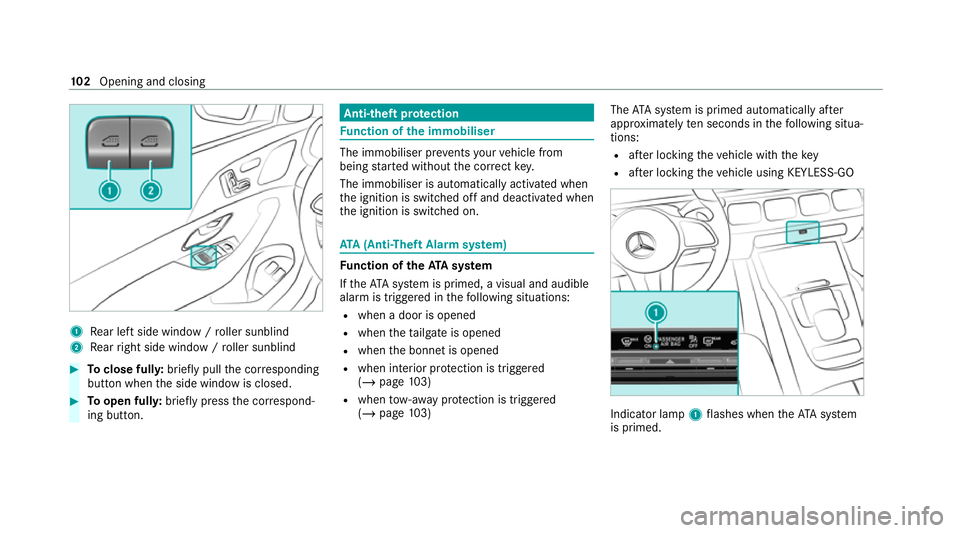
1
Rear left side wind ow/ro ller sunblind
2 Rear right side window / roller sunblind #
Toclose full y:brief lypull the cor responding
button when the side window is closed. #
Toopen full y:brief lypress the cor respond‐
ing button. Anti-theft pr
otection Fu
nction of the immobiliser The immobiliser pr
events your vehicle from
being star ted without the cor rect key.
The immobiliser is automatically activated when
th e ignition is switched off and deactivated when
th e ignition is switched on. ATA
(Anti-Theft Alarm sy stem) Fu
nction of theATA system
If th eATA system is primed, a visual and audible
alarm is triggered in thefo llowing situations:
R when a door is opened
R when theta ilgate is opened
R when the bonn etis opened
R when interior pr otection is triggered
(/ page 103)
R when tow- aw ay protection is triggered
(/ page 103) The
ATA sy stem is primed automatically af ter
appr oximately ten seconds in thefo llowing situa‐
tions:
R afte r locking theve hicle with thekey
R afte r locking theve hicle using KEYLESS-GO Indicator lamp
1flashes when theAT A sy stem
is primed. 102
Opening and closing
Page 106 of 549
The
ATA sy stem is deactivated automatically in
th efo llowing situations:
R afte r unlocking theve hicle with thekey
R afte r unlocking theve hicle using KEYLESS-
GO
R afte r pressing thest art/ stop button with the
ke y in thestow age compartment
(/ page 189)
% When the Mercedes‑Benz emer gency call
sy stem is active and the alarm stay s on for
more than 30 seconds, a message is auto‐
matically sent tothe Cus tomer Assis tance
Centre (/ page 344).
Deactivating theATA #
Press theÜ, ßorp button on the
key.
or #
Press thest art/ stop button with theke y in
th estow age compartment (/ page189)
Deactivating the ala rmusing KEYLESS-GO #
Grasp the outside door handle with thekey
outside theve hicle. Fu
nction of tow- aw ay protection An audible and visual alarm is triggered if an
alteration
to yourvehicle's angle of inclination is
de tected while tow- aw ay protection is primed.
To w- aw ay protection is automatically primed
af te r appro ximately 60 seconds:
R afte r locking theve hicle with thekey
R afte r locking theve hicle using KEYLESS-GO
To w- aw ay protection is only primed when thefo l‐
lowing components are closed:
R doors
R tailgate
To w- aw ay protection is automatically deactiva‐
te d:
R afte r pressing theÜ orp button on
th ekey
R afte r pressing thest art/ stop button with the
ke y in thestow age compartment
(/ page 189)
R afte r unlocking theve hicle using KEYLESS-
GO R
when using HANDS-FREE ACCESS
In fo rm ation on collision de tection on a pa rked
ve hicle (/ page 223). Priming/deactivating
tow- aw ay protection Multimedia sy
stem:
4 © 5
Settings 5
Quick access #
Prime or deactivate Tow-away protection .
To w- aw ay protection is primed again in thefo l‐
lowing cases:
R The vehicle is unloc ked again.
R A door is opened.
R The vehicle is loc ked again.
% Ifqu ick access is una vailable, select the
Vehicle submenu in theSettings main menu
to prime or deactivate tow- aw ay protection. Fu
nction of interior pr otection When interior pr
otection is primed, a visual and
audible alarm is triggered if mo vement is de tec‐
te d in theve hicle interior. Opening and closing
103
Page 107 of 549
Interior pr
otection is primed automatically af ter
appr oximately ten seconds:
R afte r locking theve hicle with thekey
R afte r locking theve hicle using KEYLESS-GO
Interior pr otection is only primed when thefo l‐
lowing components are closed:
R doors
R tailgate
Interior pr otection is automatically deactivated:
R afte r pressing theÜ orp button on
th ekey
R afte r pressing thest art/ stop button with the
ke y in thestow age compartment
(/ page 189)
R afte r unlocking theve hicle using KEYLESS-
GO
R when using HANDS-FREE ACCESS
The following situations can lead toafa lse
alarm:
R moving objects such as masc ots in theve hi‐
cle interior R
when the side window is open
R when the sliding sunroof is open
R when the panoramic sliding sunroof is open Priming/deactivating interior pr
otection Multimedia sy
stem:
4 © 5
Settings 5
Quick access #
Prime or deactivate Interior motion sensor.
Interior pr otection is primed again in thefo llow‐
ing cases:
R The vehicle is unloc ked again.
R A door is opened.
R The vehicle is loc ked again.
% Ifqu ick access is una vailable, select the
Vehicle menu under Settingstoprime or
deactivate interior pr otection. 104
Opening and closing
Page 193 of 549
Ensu
rethefo llowing before starting the engine:
R the legal stipulations in the area where your
ve hicle is par ked allow engine starting via
smartphone.
R it is safe tostart and runth e engine where
yo ur vehicle is par ked.
R The fuel tank is su fficiently full.
St arting theve hicle (Remo teOnline) &
WARNING Risk of crushing or entrap‐
ment due tounin tentional starting of the
engine
Limbs could be crushed or trapped if the
engine is star ted unintentionally during
service or maintenance work. #
Alw ays secure the engine against unin‐
te ntional starting before car rying out
maintenance or repair work. Re
quirements:
R park position jis selected.
R the anti- theft alarm sy stem is not activated.
R the panic alarm is not activated. R
the hazard warning light sy stem is switched
off.
R the bonn etis closed.
R the doors are closed and loc ked.
R the windo wsand sliding sun roof are closed. #
Start theve hicle using the smartphone.
Af tereve ryengine start, the engine runs for
te n minu tes.
Yo u can car ryout a maximum of two consecu‐
tive starting attem pts. Yo u must start theve hicle
once with theke y before trying tostart the
engine again with the smartphone. you can stop
th eve hicle again at any time.
% Further information can be found in the
smartphone app.
Securing the engine against starting before
car rying out maintenance or repair work: #
switch on the hazard warning light sy stem.
or #
unlock the doors.
or #
open a side window or the sliding sunroof. Ru
nning-in no tes To
preser vethe engine during thefirs t15 00 km:
R drive at varying road speeds and engine
speeds.
R do not drive at speeds greater than
14 0 km/h.
R drive theve hicle in drive program A
or ;.
R shift tothe next highest gear at theve ry lat‐
est when the needle reaches the last third
before there d area in there v counter.
R do not shift down a gear manually in order to
brake.
R avoidove rstraining theve hicle, e.g. driving at
full thro ttle.
R do not depress the accelera tor pedal past
th e pressure point (kickdown).
R only increase the engine speed gradually and
accelera tetheve hicle tofull speed af ter
15 00 km. 19 0
Driving and pa rking
Page 227 of 549
R
the connection toonline services is inter rup‐
te d.
R theAT A (anti-theft alarm sy stem) is not avail‐
able.
R the interior pr otection and tow- aw ay protec‐
tion functions are not available.
R the function for de tecting collisions on a
pa rked vehicle is not available.
If th efo llowing conditions are fulfilled, standby
mode can be activated or deactivated using the
multimedia sy stem:
R The engine is switched off.
R The ignition is switched on.
Exceeding theve hicle's displa yed non-opera‐
tional time may cause incon venience, i.e. it can‐
not be guaranteed that thest ar ter battery will
re liably start the engine.
The star ter battery must be charge dfirs t in the
fo llowing situations:
R The vehicle's non-operational time must be
ex tended. R
The Battery charge insufficient for standby
mode messa geappears in the media displa y.
% Standby mode is automatically deactivated
when the ignition is switched on.
Ac tivating/deactivating standby mode (park‐
ing up theve hicle)
Re quirements:
R The engine is switched off.
Multimedia sy stem:
4 © 5
Settings 5
Vehicle #
Activate or deacti vate Standby mode. #
Select Yes. Driving and driving saf
ety sy stems Driving sy
stems and your responsibility Yo
ur vehicle is equipped with driving sy stems
which assist you in driving, parking and manoeu‐
vring theve hicle. The driving sy stems are only
aids. They are not a substitute foryo ur attention
to the sur roundings and do not relie ve you of
yo ur responsibility per taining toroad traf fic la w. The driver is alw
aysre sponsible for maintaining
a safe dis tance totheve hicle in front, forve hicle
speed, for braking in good time and forst ay ing
in lane. Pay attention tothe tra ffic conditions at
all times and inter vene when necessa ry. Be
aw are of the limitations rega rding the safe use of
th ese sy stems.
Driving sy stems can neither reduce therisk of
accident if youfa ilto adapt your driving style nor
ove rride the la wsof ph ysics. They cannot alw ays
ta ke into account road, weather or traf fic condi‐
tions. In
fo rm ation on vehicle sensors and cameras Some driving and driving saf
ety sy stems use
cameras as well as radar or ultrasonic sensors
to monitor the area in front of, behind or next to
th eve hicle. 224
Driving and parking
Page 453 of 549
Display messages
Possible causes/consequences and M
MSolutions
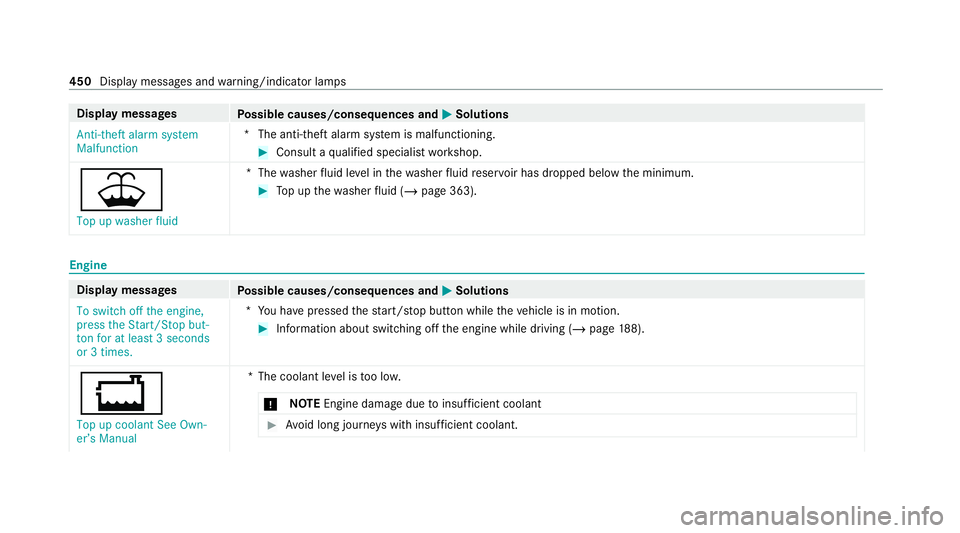
Anti-theft alarm system
Malfunction *T
he anti-theft alarm sy stem is malfunctioning. #
Consult a qualified specialist workshop.
¥ Top up washer fluid *T
hewasher fluid le vel in thewa sher fluid reser voir has dropped below the minimum. #
Top up thewa sher fluid (/ page 363). Engine
Display messages
Possible causes/consequences and M MSolutions
To switch off the engine,
press the Start/Stop but-
ton for at least 3 seconds
or 3 times. *Y
ou ha vepressed thest art/ stop button while theve hicle is in motion. #
Information about switching off the engine while driving (/ page188).
+
Top up coolant See Own-
er’s Manual *T
he coolant le vel is too lo w.
* NO
TEEngine dama gedue toinsuf ficient coolant #
Avoid long journe yswith insuf ficient coolant. 450
Display messages and warning/indicator lamps
Page 511 of 549
Air-recirculation mode..............................
17 7
Air-water duct Keeping free.......................................... 364
Airbag Activation................................................ 40
Cushionbag............................................. 45
Fr ont airbag (driver, front passenger)...... 45
Ins tallation locations.............................. .45
Knee airbag............................................ .45
Overview................................................. 45
PA SSENGER AIR BAG indicator lamp....... 50
Pr otection................................................ 46
Re duced pr otection.................................47
Side airba g.............................................. 45
Wi ndow airba g......................................... 45
Ai rflow
Setting................................................... 174
AIRM ATIC
Setting.................................................. .265
Suspension........................................... 262
Alarm sy stem
see ATA (anti-theft alarm sy stem)
All-wheel drive see 4MATIC Ambient lighting
Setting (multimedia sy stem)..................1 64
Android Auto
see Smartphone integration
Animals Pets in theve hicle................................... 77
Anti-lock braking sy stem
see ABS (Anti-lock Braking Sy stem)
Anti-skid chains
see Snow chains
Anti-theft pr otection
Ad ditional door loc k................................ .81
Immobiliser........................................... 102
Anticipatory occupant pr otection
see PRE- SAFE®
(anticipatory occu‐
pant pr otection)
see PRE-SAFE ®
PLUS (anticipatory
occupant pr otection plus)
Apple CarPlay ®
see Smartphone integration
Assistance sy stems
see Driving saf ety sy stem ASS
YST PLUS
Battery disconnection pe riods.............. 358
Displaying the service due dat e............. 357
Fu nction/no tes..................................... 357
Re gular maintenance work.................... 357
Special service requ irements................ 357
ATA (anti-theft ala rmsystem)
Deactivating the alarm.......................... 103
Fu nction................................................ 102
Fu nction of interior pr otection............... 103
Priming/deactivating interior pr otec‐
tion........................................................ 104
Priming/deactivating tow- aw ay pro‐
te ction................................................... 103
To w- aw ay protection function................1 03
AT TENTION ASSI ST
Fu nction................................................ 232
Setting................................................... 233
Sy stem limitations................................. 232
At tention assistant
see ATTENTION ASSIST
Au thorised workshop
see Qualified specialist workshop 508
Index
Page 516 of 549
D
Dashboa rd
see Cockpit
Data acquisition Vehicle.................................................... 34
Data pr otection rights
Data storage............................................ 38
Data storage
Data pr otection rights............................. 38
Electro nic control units........................... 34
Online service s........................................ 37
Ve hicle.................................................... 34
Deactivating the alarm (A TA ).................... 103
Deale rship
see Qualified speciali stwo rkshop
Declaration of conformity Electromagnetic compatibility.................26
Jack......................................................... 30
Specific absor ption rate.......................... 26
TIREFIT kit............................................... 31
Wi reless vehicle components.................. 26
Decorative foil (cleaning instructions) .... 368DeNOx agent
see AdBlue ®
De stination entry
En tering a POI or address...................... 326
De tecting inat tentiveness
see ATTENTION ASSIST
Diagnostics connection ..............................31
Diesel Low outside temp eratures..................... 420
No tes....................................................4 20
Digital Owner's Manual .............................. 20
Dinghy towing
see Tow- bar sy stem
Dipped beam Setting................................................... 16 2
DIRECT SELECT le ver
Engaging drive position......................... 206
Engaging neutral................................... 205
Engaging pa rkposition.......................... 206
Enga ging park position automatically....2 06
Engaging reve rsege ar........................... 205
Fu nction................................................ 204
Displ ay(care) ............................................ .370 Display (MBUX multimedia sy
stem)
Home screen........................................ .312
Display (multimedia sy stem)
Operating.............................................. .313
Display (on-boa rdcompu ter)
Displ ays on the multifunction displa y.... 308
Displ aymessage
Calling up (on-board compu ter)............. 433
No tes....................................................4 33
Display messages ¯ - - - km/h ...................................... 461
ç - - - km/h ..................................... 462
È - - - km/h ...................................... 461
# 12V battery See Owner's Man‐
ual......................................................... 479
Û 48 V battery See Owner's Man‐
ual......................................................... 480
: Active Light Sy stem inoperative... 440
¯ AdBlue sy stem fault Emer. op.:
max. XXX km/h Start not poss. in
XXX km................................................. .487 Index
513
Page 519 of 549
Ac
tive Blind Spot Assi stcur rently
una vailable See Owner's Manual ...........467
Ac tive Blind Spot Assi stinope rative ...... 467
Ac tive Blind Spot Assi stnot available
when towing a trailer See Owner's
Manual .................................................. 467
Ac tive Brake Assi stFunctions cur‐
re ntly limited See Owner's Manual........ 477
Ac tive Brake Assi stFunctions limited
See Owner's Manual.............................. 478
Ac tive Dis tance Assi stavailable again ...4 63
Ac tive Dis tance Assi stcur rently
una vailable See Owner's Manual ...........462
Ac tive Dis tance Assi stinope rative ........ 462
Ac tive Lane Keeping Assist cur rently
una vailable See Owner's Manual ...........468
Ac tive Lane Keeping Assist inopera‐
tive........................................................ 468 Ac
tive Steering Assist cur rently
una vailable due tomultiple emer‐
ge ncy stops...........................................4 65
Ac tive Steering Assist cur rently
una vailable See Owner's Manual ...........464
Ac tive Steering Assist inoperative ......... 464
Ac tive Stop-and-Go Assist cur rently
una vailable see Owner's Manual ...........465
Ac tive Stop-and-Go Assist inopera‐
tive See Owner's Manual....................... 466
Ad aptive Highbeam Assist Plus cur‐
re ntly una vailable See Owner's Man‐
ual......................................................... 441
Ad aptive Highbeam Assist Plus inop‐
erative.................................................. .441
Anti-theft alarm sy stem Malfunction ..... 450
Apply brake todeselect Park (P)
position................................................. 453
Apply brake toselect D or R..................4 53
Apply brake toselect R......................... 453 Au
xilia rybattery malfunction ................ 455
Beginning emer gency stop.................... 465
Blind Spot Assist cur rently una vaila‐
ble See Owner's Manual ........................ 466
Blind Spot Assist inope rative ................. 467
Blind Spot Assi stnot available when
to wing a trailer See Owner's Manual .....4 67
Cann otstart engine See Owner's
Manual................................................. .481
Cruise cont rol and Limiter inope rative... 461
Cruise control inope rative..................... 461
Cruise control off................................... 461
Device de tected at diagnostics con‐
nection See Owner's Manual................. 478
Drive sy stem Malfunction Stop
Switch engine off.................................. 452
Drive sy stem Malfunction Visit work‐
shop......................................................4 52
Fr ont-passenger airbag disabled See
Owner's Manual....................................4 35516
Index
Page 542 of 549
Ve
hicle data
Angle of app roach/departur e............... 428
Disp laying (DYNAMIC SELECT).............. 204
Fo rding dep th........................................ 428
Maximum gradient climbing ability........ 428
Ro of load............................................... 427
Ve hicle height........................................4 26
Ve hicle length........................................4 26
Ve hicle width.........................................4 26
Wheelbase............................................. 426
Ve hicle dimensions ................................... 426
Ve hicle identification number
see VIN
Ve hicle identification plate
EU general operating pe rmit number..... 41 5
Maximum permissible gross vehicle
we ight.................................................... 41 5
Pa int code............................................. .415
Pe rm issible axle load............................ .415
VIN.........................................................4 15
Ve hicle interior
Cooling or heating (Remo teOnline).......1 89
Ve hicle key
see Key Ve
hicle le vel
Setting individual wheel control............. 276
Ve hicle maintenance
see ASS YST PLUS
Ve hicle tool kit
TIREFIT kit............................................. .376
To wing eye............................................ 389
Ve ntilating
Con venience opening.............................. 94
Ve ntilation
see Climate cont rol
Ve nts
see Air vents
VIN Identification plate................................. 41 5
Seat....................................................... 41 5
Wi ndsc reen............................................ 41 5
Vi sion
Demisting windo ws................................ 17 7
Wi ndsc reen heating............................... 17 9 W
Wa rning lamps
see Warning/indicator lamps
Wa rning sy stem
see ATA (anti-theft alarm sy stem)
Wa rning triangle
Re moving............................................... 372
Setting up.............................................. 373
Wa rning/indicator lamp
! ABSwarning lamp....................... .502
æ Active Brake Assi stwa rning
lamp...................................................... 500
J Brake sy stem warning lamp
(red)...................................................... 499
J Brake sy stem warning lamp
(yellow).................................................. 498
ÿ Coolant warning lamp (red).......... 495
ÿ Coolant warning lamp (yellow).... .496
! Electric parking brake indicator
lamp (red).............................................. 498
# Electrical fault warning lamp........ 497 Index
539