climate settings MERCEDES-BENZ GLS SUV 2020 Owners Manual
[x] Cancel search | Manufacturer: MERCEDES-BENZ, Model Year: 2020, Model line: GLS SUV, Model: MERCEDES-BENZ GLS SUV 2020Pages: 549, PDF Size: 9.9 MB
Page 6 of 549
Light and sight
......................................... 15 6
Exterior lighting .......................................... 15 6
Interior lighting ...........................................1 63
Wi ndsc reen wipers and windscreen
wa sher sy stem ............................................ 16 5
Mir rors ........................................................ 17 0
Area pe rmeable toradio wav es on the
windscreen ................................................ .173
Infrared-reflective windscreen function ...... 173Climate control
......................................... 174
Overview of climate contro l systems ........... 174
Operating the climate control sy stem ......... 175 Driving and pa
rking ................................. 187
Driving ........................................................ 187
DY NA MIC SELECT switch ............................2 01
Au tomatic transmission .............................. 204
Tr ans fer case .............................................. 209
Fu nction of the 4MATIC ...............................2 11
Re fuelling .................................................... 211
Pa rking ........................................................ 217
Driving and driving sa fety sy stems .............2 24
Tr ailer hit ch................................................ 295 Bicycle
rack function .................................. 300
Ve hicle towing instructions ........................ .302 Instrument display and on-board
comp
uter.................................................. 304
No tes on the instrument display and on-
board computer .......................................... 304
Instrument display overview ...................... .305
Overview of the buttons on thesteering
wheel ..........................................................3 06
Operating the on-board computer .............. 306
Overview of what is shown on the multi‐
function display .......................................... 308
Head-up display .......................................... 308 MBUX multimedia sy
stem ....................... 311
Overview and operation .............................. 311
Sy stem settings .......................................... 320
Na vigation .................................................. 324
Te lephone .................................................. .330
Mercedes me and apps .............................. 333
Mercedes-Benz emer gency call sy stem ...... 342
Ra dio, media & TV...................................... 349
Sound settings ........................................... 355 Main
tenance and care ............................. 357
ASS YST PLUS service inter val display ........ 357
Engine compartment .................................. 358
Cleaning and care ...................................... .364 Breakdown assistance
............................372
Emergency ................................................. .372
Flat tyre ...................................................... 374
Battery (vehicle) ......................................... 380
To w- starting or towing away ....................... 385
Electrical fuses ........................................... 390 Wheels and tyres
..................................... 393
No tes on noise or unusual handling char‐
acteristics .................................................. .393
No tes on regular lyinspecting wheels and
tyres .......................................................... .393
No tes on snow chains ................................ 393
Ty re pressure .............................................. 394
Wheel change ............................................ .397
Emergency spare wheel .............................. 407
Collapsible spare wheel .............................. 409 Contents
3
Page 20 of 549
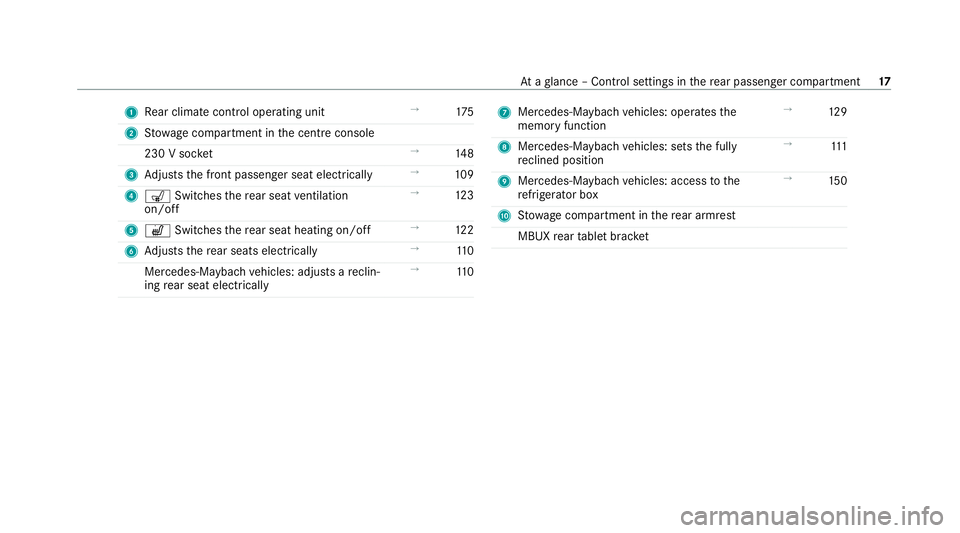
1
Rear climate control operating unit →
175
2 Stow age compartment in the cent reconsole
230 V soc ket →
14 8
3 Adjusts the front passenger seat electrically →
109
4 s Switches there ar seat ventilation
on/o ff →
12 3
5 w Switches there ar seat heating on/off →
12 2
6 Adjusts there ar seats electrically →
11 0
Mercedes-Maybach vehicles: adjusts a reclin‐
ing rear seat electrically →
11 0 7
Mercedes-Maybach vehicles: operates the
memory function →
12 9
8 Mercedes-Maybach vehicles: sets the fully
re clined position →
111
9 Mercedes-Maybach vehicles: access tothe
re frigerator box →
15 0
A Stow age compartment in there ar armrest
MBUX rear tablet brac ket At
aglance – Control settings in there ar passenger compartment 17
Page 39 of 549
In cer
tain cases, it may be requ ired tostore data
th at wo uld ha veotherwise been used only tem‐
porarily. This may be the case if theve hicle has
de tected a malfunction, forex ample.
If yo u use services, such as repair services and
maintenance work,st ored operational data as
we ll as theve hicle identification number can be
re ad out and used. They can be read out by
service network emplo yees, such as workshops
and manufacturers or third parties, such as
breakdown services. The same is true in the
case of warranty claims and quality assurance
measures.
In general, there ad out is per form ed via the
legally prescribed port forth e diagnostics con‐
nection in theve hicle. The operational data that
are read out document tech nical states of the
ve hicle or of individual components and assist in
th e diagnosis of malfunctions, compliance with
wa rranty obligations and quality impr ovement.
To that end, these data, in particular information
about component loads, tech nical events, mal‐
functions and other faults may be transmit ted
along with theve hicle identification number to
th e manufacturer. Furthermore, the manufac‐ turer is subject
toproduct liability. Forth is rea‐
son the manufacturer also uses operational data
from theve hicle, forex ample, forre calls. These
da ta can also be used toexamine the cus tom‐
er's warranty and guarantee claims.
Fa ult memories in theve hicle can be reset by a
service outlet or at your requ est as part of repair
or maintenance work.
Con venience and inf otainment functions
Yo u can store con venience settings and individ‐
ual settings in theve hicle and change or reset
th em at any time.
Depending on theve hicle equipment, this
includes thefo llowing settings, forex ample:
R seat and steering wheel positions
R suspension and climate control settings
R individual settings, such as interior lighting
Depending on the selected equipment, you can
import data into vehicle inf otainment functions
yo urself. Depending on
theve hicle equipment, this
includes thefo llowing data, forex ample:
R multimedia data, such as music, films or pho‐
to sfo r playback in an integrated multimedia
sy stem
R address book data for use in connection with
an integrated hands-free sy stem or an inte‐
grated navigation sy stem
R entered navigation destinations
R data about the use of Internet services
These data for con venience and inf otainment
functions may be sa ved locally in theve hicle or
th ey may be located on a device which you ha ve
connected totheve hicle, such as a smartphone,
USB flash drive or MP3 pla yer.If yo u ha ve
entered these data yourself, you can dele tethem
at any time.
This data is transmit ted from theve hicle tothird
parties only at your requ est. This applies, in par‐
ticular, when you use online services in accord‐
ance with the settings that you ha veselected. 36
General no tes
Page 167 of 549
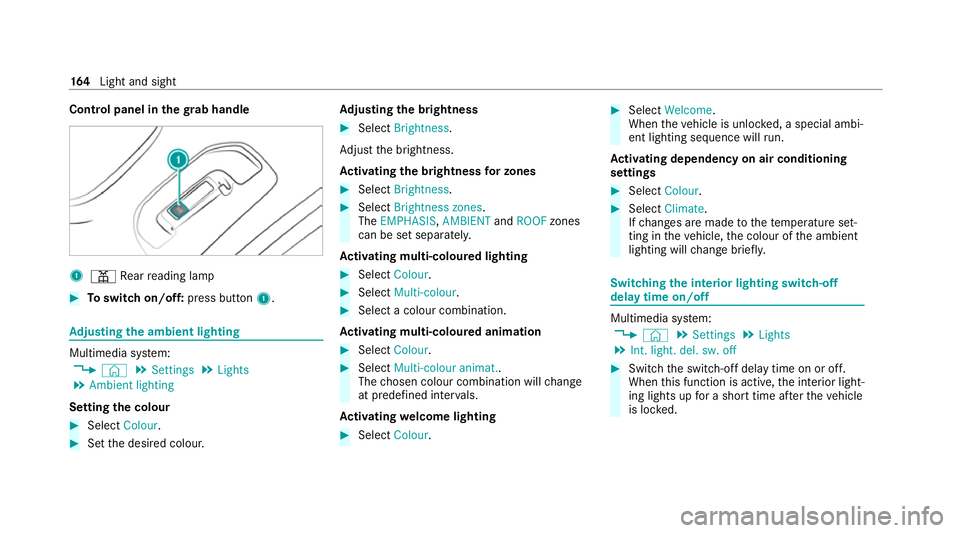
Control panel in
thegr ab handle 1
p Rear reading lamp #
Toswitch on/off: press button1. Ad
justing the ambient lighting Multimedia sy
stem:
4 © 5
Settings 5
Lights
5 Ambient lighting
Setting the colour #
Select Colour. #
Set the desired colour. Ad
justing the brightness #
Select Brightness .
Ad just the brightness.
Ac tivating the brightness for zones #
Select Brightness . #
Select Brightness zones .
The EMPHASIS ,AMBIENT andROOF zones
can be set separately.
Ac tivating multi-coloured lighting #
Select Colour. #
Select Multi-colour. #
Select a colour combination.
Ac tivating multi-coloured animation #
Select Colour. #
Select Multi-colour animat..
The chosen colour combination will change
at predefined inter vals.
Ac tivating welcome lighting #
Select Colour. #
Select Welcome.
When theve hicle is unloc ked, a special ambi‐
ent lighting sequence will run.
Ac tivating dependency on air conditioning
settings #
Select Colour. #
Select Climate.
If ch anges are made tothete mp erature set‐
ting in theve hicle, the colour of the ambient
lighting will change brief ly. Switching
the interior lighting switch-off
delay time on/off Multimedia sy
stem:
4 © 5
Settings 5
Lights
5 Int. light. del. sw. off #
Switch the switch-off delay time on or off.
When this function is active, the interior light‐
ing lights up for a short time af terth eve hicle
is loc ked. 16 4
Light and sight
Page 177 of 549
Overview of climate control sy
stems Note
s on climate control An interior air
filter in combination with the pre‐
fi lter in the engine compartment must alw ays be
used so that the air conditioning sy stem, pollu‐
tion le vel monitoring and the air filtration work
cor rectl y.Make sure that thefilter is ins talled
cor rectly and thefilter housing in the engine
compartment is closed cor rectly using the cap
and alw ays tightly sealed when in operation. Use
fi lters recommended and appr ovedby
Mercedes-Benz. Alw ays ha veservice workcar‐
ri ed out at a qualified specialist workshop. Overview of
the air conditioning control
panel The indicator lamps on
the buttons indicate that
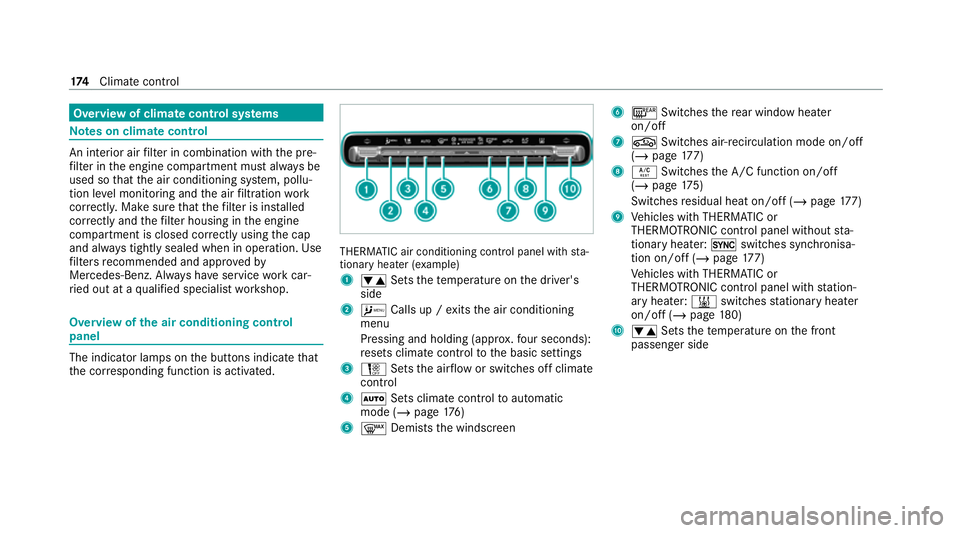
th e cor responding function is activated. THERMATIC air conditioning contro
l panel withsta‐
tionary heater (e xamp le)
1 w Setsthete mp erature on the driver's
side
2 A Calls up / exits the air conditioning
menu
Pressing and holding (appr ox.fo ur seconds):
re sets climate contro lto the basic settings
3 H Setsthe air flow or switches off climate
control
4 Ã Sets climate control toautomatic
mode (/ page176)
5 ¬ Demists the windscreen 6
¤ Switches there ar wind owheater
on/off
7 g Switches air-recirculation mode on/off
(/ page 177)
8 Á Switches the A/C function on/off
(/ page 175)
Switches residual heat on/off (/ page177)
9 Vehicles with THERMATIC or
THERMOTRONIC contro l panel withoutsta‐
tionary heater: 0switches synchronisa‐
tion on/off (/ page177)
Ve hicles with THERMATIC or
THERMOTRONIC contro l panel withstation‐
ary heater: &switches stationary heater
on/off (/ page180)
A w Setsthete mp erature on the front
passenger side 174
Climate cont rol
Page 178 of 549
Overview of
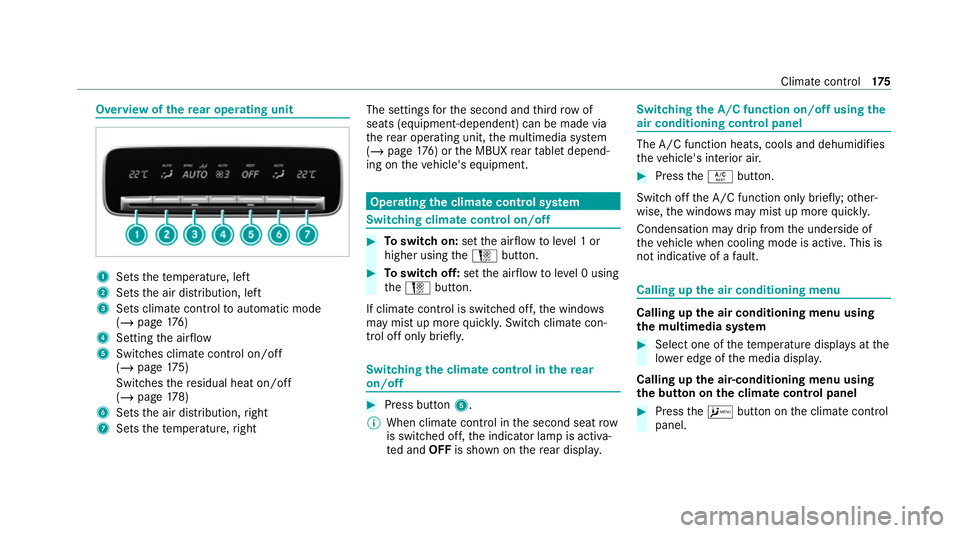
there ar operating unit 1
Sets thete mp erature, left
2 Sets the air distribution, left
3 Sets climate control toautomatic mode
(/ page 176)
4 Setting the air flow
5 Switches climate control on/off
(/ page 175)
Switches there sidual heat on/off
(/ page 178)
6 Sets the air distribution, right
7 Sets thete mp erature, right The settings
forth e second and third row of
seats (equipment-dependent) can be made via
th ere ar operating unit, the multimedia sy stem
(/ page 176) or the MBUX rear tablet depend‐
ing on theve hicle's equipment. Operating
the clima tecont rol sy stem Switching clima
tecont rol on/off #
Toswitch on: setthe air flow toleve l 1 or
higher using theH button. #
Toswitch off: setthe air flow toleve l 0 using
th eH button.
If climate control is switched off, the windo ws
may mist up more quickl y.Switch climate con‐
trol off only brie fly. Switching
the clima tecont rol in there ar
on/off #
Press button 5.
% When clima tecontrol in the second seat row
is switched off, the indicator lamp is activa‐
te d and OFFis shown on there ar displa y. Switching
the A/C function on/off using the
air conditioning control panel The A/C function heats, cools and dehumidi
fies
th eve hicle's interior air. #
Press theÁ button.
Switch off the A/C function only brief ly;ot her‐
wise, the windo wsmay mist up more quickl y.
Condensation may drip from the underside of
th eve hicle when cooling mode is active. This is
not indicative of a fault. Calling up
the air conditioning menu Calling up
the air conditioning menu using
th e multimedia sy stem #
Select one of thete mp erature displa ysatthe
lo we r edge of the media displa y.
Calling up the air-conditioning menu using
th e but ton on the clima tecont rol panel #
Press theA button on the climate control
panel. Climate control
175
Page 180 of 549
%
Maybach vehicles are fitted wi thone and
two rows of seats. #
Set the air flow.
Controlling there ar climate control automat‐
ical ly #
Select REAR AUTO .
Re ar climate control is controlled automati‐
call y.
Deactivating rear climate control #
Select REAR OFF.
Re ar climate control is deactivated. Ac
tivating/deactivating the climate control
syn chro nisation function via the air condi‐
tioning control panel Climate control can be set centrally using
the
synchronisation function. The temp erature and
air distribution setting forth e driver's side will be
adop ted automatically for all clima tecontrol
zones. #
Press the0 button. The synchronisation function will be deactivated
if th e settings for one of theot her climate zones
are changed. Ac
tivating/deactivating the climate control
syn chro nisation function via the multimedia
sy stem Climate control can be set centrally using
the
synchronisation function. The driver's settings
fo rte mp erature, air quantity and air distribution
are adop ted automatically for all clima tezones. #
Call up the air conditioning menu
(/ page 175). #
Select First row of seats . #
Select SYNC. Demisting the windo
ws Wi
ndo wsmis ted up on the inside #
Press theà button. #
Ifth e windo wscontinue tomist up: press the
¬ button. Wi
ndo wsmis ted up on the outside #
Switch on the windscreen wipers. #
Press theà button. Switching air-recirculation mode on/off
#
Press theg button.
The interior air will be recirculated.
Air-reci rculation mode automatically swit ches to
fresh air mode af ter some time.
% If air-recirculation mode is switched on, the
windo wsmay mist up more quickl y.Switch
on ai r-re circulation mode only brie fly. Switches
there sidual heat on/off Re
quirements:
R theve hicle is par ked.
It is possible tomake use of there sidual heat
from the engine tocontinue heating or ventilat‐
ing the front compartment of theve hicle for
appr oximately 30 minutes, depending on the
te mp erature set. Climate control
17 7
Page 529 of 549
Displ
aying weather information............ .329
Moving.................................................. 328
Selecting the map orientation............... 328
Setting the map scale............................ 328
Switching mo torw ay information on/
off......................................................... 328
Massage prog rammes
Overview................................................ 121
Re setting the settings............................1 22
Massage prog rams
Selecting the front seats........................ 121
Massage settings Resetting...............................................1 22
Maximum gross vehicle weight ................ 41 5
Maximum permissible gross vehicle
we ight ........................................................ .415
Maximum speed see Limiter
MBUX Interior Assistant Switching there ading light forthe
driver and front passenger on/off
con tact-free........................................... 318Switching
the sear chlight forthe
driver on/off.......................................... 318
MBUX Interior Assistant (multimedia sy stem)
Overview............................................... .315
MBUX multimedia sy stem
Ac tivating/deactivating standby
mode.................................................... .224
Con figuring drive program I...................203
No tes..................................................... 311
Overview................................................3 11
Setting route-based speed adap tation... 24 3
Setting there ar climate control............ .176
St andby mode function........................ .223
Media Overview of the functions and sym‐
bols....................................................... 349
Media mode Connecting Blue tooth®
audio equip‐
ment...................................................... 351
Medical aids ................................................ .33
Memory function Function................................................ 127
Head-up display — Calling up stored
settings................................................. 12 8Head-up display —
Storing settings........ 12 8
Operating..............................................1 28
Outside mir rors — Calling up stored
settings................................................. 12 8
Outside mir rors —St oring settings........1 28
Seat — Calling up stored settings........... 12 8
Seat — Storing settings.......................... 12 8
Memory function in there ar
passenger comp artment
Fu nction................................................ 12 8
Operating rear seat s.............................. 12 9
Operating the front passenger seat
and rear seat........................................ .130
Menu (on-board comp uter)
Head-up displa y..................................... 309
Overview............................................... 306
Mercedes me app Information............................................ 339
Mercedes me calls Arranging a service appointment.......... 337
Calling the Mercedes-Benz Cus tomer
Centr e................................................... 336 526
Index