park assist MERCEDES-BENZ GT COUPE 2021 AMG Owner's Guide
[x] Cancel search | Manufacturer: MERCEDES-BENZ, Model Year: 2021, Model line: GT COUPE, Model: MERCEDES-BENZ GT COUPE 2021Pages: 422, PDF Size: 32.51 MB
Page 146 of 422
dir
ect ion, awa rning tone sou nds once andthe
wa rning lam pin theex terior mir rorflashes red. If
th etur nsignal indicat orremains switchedon,all
ot her detected vehicles areindicat edonlyby the
fl ashin gof there dwa rning lam p.
If yo uove rtak eave hicle quickl y, no warning is
giv en. &
WARNIN GRisk ofacci dent despite Blind
Spo tAssi st
Bli nd Spo tAssi stdoes notre act tovehicles
appr oaching andovertakin gyo uat agr ea tly
di ffer ent speed.
Blind SpotAssis tcann otwa rndriver sin this
situat ion. #
Alw ayspa ycar eful attention tothetra f‐
fi c situ ation and maintain asaf edis‐
ta nce attheside oftheve hicle. Blind
SpotAssis tis onl yan aid. Itma yfa ilto
de tect some vehicles andisno ta subs titutefo r
att ent ive dr ivin g.Alw aysensur eth at ther eis suf‐
fi cie ntdist anc eto theside forot her road user s
and obstacle s. Sy
stem limit s
The system maybe limit edinthefo llo wing situa‐
tion s:
R The sensorsar edir tyor covered.
R Poor visibility ,e.g. due tofog, hea vyrain,
sno wor spr ay.
R Narrow vehicles, e.g.bicycles, arewit hin the
monit oring rang e.
R Ifth elanes areve ry nar row or very wide,
espec iallyif ve hicles areno tdr iving inthe
middl eof their lane.
Wa rnings maybe issued inerro rwhen driving
close tocrash barrier sor similar continuous lane
bor ders.Wa rnings maybe interru pte dwhen driv‐
ing alongside longvehicles, forex am ple truc ks,
fo ra pr olong edtime.
Blind SpotAssis tis no toper ationa lwhen reve rse
ge ar iseng aged. Ac
tiv atin g/deac tivatin gBli nd Spo tAs sist or
Ac tiv eBli nd Spo tAs sist
Multimedia system:
4 Vehicle 5
k Assist ance
5 Blind SpotAssist #
Activate0073 ordeacti vate 0053 thefunc tion. Lane
Keeping Assist Fu
nction ofLane Keeping Assist
Lan eKe eping Assistmonit orsth ear ea infront of
yo ur vehicle bymeans ofmultifu nctioncamera
(/ page12 0). Itser vesto protect youag ains t
unin tentio nallylea vingyo ur lane .Yo uwill be
wa rned bymeans ofavibr ation inthesteer ing
wheel.
Lane Keeping Assistis available inthespeed
ra ng ebe twee n40 mph(60 km/h) and120mp h
(200 km/h).
Lane Keeping Assistcan neither reduce therisk
of an accident ifyo ufa ilto adap tyo ur drivin g
st yle nor override thelaws ofphysics. Itcan not
ta ke intoacc ount road, weather ortraf fic condi ‐
tions .Lane Keeping Assistis onl yan aid. Youar e 14
4
Driving and parking
Page 147 of 422
re
sponsible formaint ainingasaf edis tance to
th eve hicle infront, forve hicle speed, forbr aking
in good timeandforst ay ing inlane.
Yo uar ewa rned byvibr ation pulses inthesteer‐
ing wheel inthefo llo wing circums tances:
R Lane Keeping Assistde tects lane mar kings .
R Afront whe elpa sse sov er thelane marking s.
Whe ther awa rning isissued andwhen this
occ ursalso depen dson theselect edsensit ivity
se tting (sta nda rdoradap tive).
Sy stem limit s
The system maybe impair edorma yno tfunc tion
in thefo llo wing situat ions:
R Ifth er eis poor visibility ,e.g. due toinsuf fi‐
cie ntillu mina tionofthero ad, ifth er ear e
highly variable shade condition sor inrain,
sno w,fogor hea vyspr ay.
R Ifth er eis glar e, e.g .fr om oncom ingtraf fic,
th esun orreflect ions.
R Ifth ewindshield inthear ea ofthemultifunc ‐
tion camer ais dir ty,or ifth ecamer ais fog‐
ge dup, damag edorcovered. R
Ifth er ear eno lane marking s,or several
unc lear lane markingsarepr esen tfo rone
lane, e.g.around roadw orks .
R Ifth elane marking sar ewo rn,dar kor cov‐
er ed.
R Ifth edis tance totheve hicle infront istoo
shor tand thus thelane markings cannotbe
de tected.
R Ifth elane marking sch ang equ ickl y, e.g.
lanes branc hof f,cr oss one another or
mer ge.
R Ifth ero ad isvery nar row and wind ing.
Sensi tivity ofLane Keeping Assist
Wi th theSt andar dor Adaptivese tting ,yo ucan
inf luen cewhen thewa rning vibration ofLane
Ke eping Assistta ke splace.
In both theSt andar dand Adaptivese tting s,no
wa rning vibration occursin thefo llo wing situa‐
tion s:
R Youha ve switc hedonthetur nsignal indica‐
to r.
R Adr ivi ng safety system interve nes, such as
AB S,BA Sor ESP ®
. In
theAd aptivese tting ,th er ewill also beno
wa rning vibration inthefo llo wing situat ions:
R The vehicle isacceler ated orbrak ed consid‐
er ably .
R Yousteer activ ely, e.g. swerve toavo idan
obs tacle orchang elane quickl y.
R Youcut thecor ner onashar pbend. Ve
hicl eto wing instruct ions
The vehicle isno tsuit able forth euse oftow bar
sy stems that areused forflat towing ording hy
to wing, forex am ple. Attach ing and using tow bar
sy stems canlead todamag eon theve hicle.
When youar eto wing ave hicle withto w bar sys‐
te ms, safedr iving charact eristic scan notbe
guar anteed forth eto wing vehicle ortheto we d
ve hicle. Thevehicle-tra ilercombination may
sw erve from side toside. Complywit hth eper‐
mitt edtowing methods (/page286) andthe
ins truct ions forto wing withbo th axle son the
gr ound (/page286). Dr
iving andparking 14
5
Page 151 of 422
When
theon- boar dcom puterisbeing operated,
dif fere nt aco ustic signa lswillsou ndasoperati ng
fe edbac k,e.g. when theend ofalis tis reac hed
or when youar esc rolling thro ugh alis t.
The follo wing menusareav ailable:
R Service
R DriveA ssist
R Perf ormance
R Trip
R Navi gation
R Radio
R Media
R Phon e
R Design s
% Youcan find informati onabou tth epossible
se ttings andselect ionsonthemenus inthe
Dig ital Op erator' sMa nua l. #
Tocall upthemenu bar:press thelef t-hand
bac kbutt onuntil themenu barisdispla yed. %
Ve
hicl eswithout Activ eDi stance Assist
DI ST RO NIC :pr ess the00E2 buttontocal l
up themenu baroftheon- boar dcom puter. #
Toscr ollinthemenu bar:swipe leftor
ri ght onthelef t-hand Touc hCon trol. #
Tocall upamen u,sub men uor poss ible
se ttings onthemenu ,or conf irm aselec‐
tion orsetting: press thelef t-hand Touc h
Con trol. #
Toscr ollthrough displa ysorlists on the
menu ,or select displaycont ent,afun c‐
tion, anentr yor adisp lay: swipe upwards
or down wardson thelef t-hand Touc hCon ‐
tr ol. #
Toexitasubm enu:press thelef t-hand back
butt on. Ov
ervie wof what issho wnonthemu lti‐
fun ction display
Dis playson themultifunc tiondispla y
é Parking AssistPA RK TRONI Cdeac tiva ted
( / pag e13 9) 00B2
Cr
uise contr ol(/ page12 7)
ç ActiveDis tance AssistDIS TRONI C
(/ page 128)
ê ActiveBr ak eAssi st(/ pag e12 6)
00B0 La
ne Keeping Assist(/ page14 4)
00D6 ECO
star t/ stop funct ion
00D9 HOLD
function(/ page13 2)
00CE Ad
aptiveHig hbeam Assis t(/ page82 ) Ad
jus tingthe inst ru men tlighti ng
Mu ltimed iasystem:
4 Vehicle 5
÷ LightSetting s #
Select Instr.Cluster Lighting. #
Seta br ightn essvalue.
The bright nessof theIns trument Displaywill
be adap ted. Ins
trument Displayand on-boar dcom puter 14
9
Page 284 of 422
+
ENV
IRONM ENTALNOTEEnvironme ntal
da ma gecau sed byimproper disposal of
batt eries Bat
teries con tain polluta nts. Itis
illeg alto dispose ofthem withth ehousehold
ru bbish. #
Dispose
ofbatt eries inan
en vironmen tally re sponsible manner.
Ta ke disc hargedbatt eries toaqu alif ied
spec ialistwo rkshop ortoacol lection
poin tfo rused batteries. If
yo uha ve todiscon nectth e12 Vbatt ery, con‐
ta ct aqu alif ied spec ialistwo rkshop.
Com plywit hsaf etyno tesand take protect ive
measur eswhen handling batteries. Risk
ofexplosion. Fir
e,open flames andsmokingar e
pr ohibi tedwhen handling thebatt ery.
Av oid creating sparks. Ele
ctroly teor batt eryacid iscor ro‐
siv e.Avoid cont actwithth eskin ,eye s
or clo thing. Wearsuit able protect ive
clo thing, inpar ticular glove s,an
apr onand afa ce mas k.Immedia tely
ri nse electr olyteor acid splashes off
wit hclean water.Con sult adoc torif
necessar y. We
arsaf etygl asses . Ke
ep childr enaway. Obser
vethis Opera tor's Manua l.
Obser vethefo llo wing ifyo udo notint endto use
th eve hicle overan extende dpe riod oftime:
R Activatest andb ymode .
R Alternat ivel y: con nectth ebatt eryto abat ‐
te ry charge rapp rove dby Mer cedes-Ben zor
consult aqu alif ied spec ialistwo rkshop to
discon nectth ebatt ery. No
teson star ting assistance andchargin g
th e12 Vbatt ery Whe
nch argin gth ebatt eryand during star tin g
assis tance, alwa ys use thejum p-startconne c‐
tio npo int intheengine compartmen t.
* NO
TEDama ging thebatt eryth ro ugh
ove rvolt age When
chargin gusin gabat tery charge rwit h‐
out amaximu mchargin gvo ltag e, thebatt ery
or theve hicle electr onics maybe damag ed. 282
Breakdo wnassis tance
Page 360 of 422
Disp
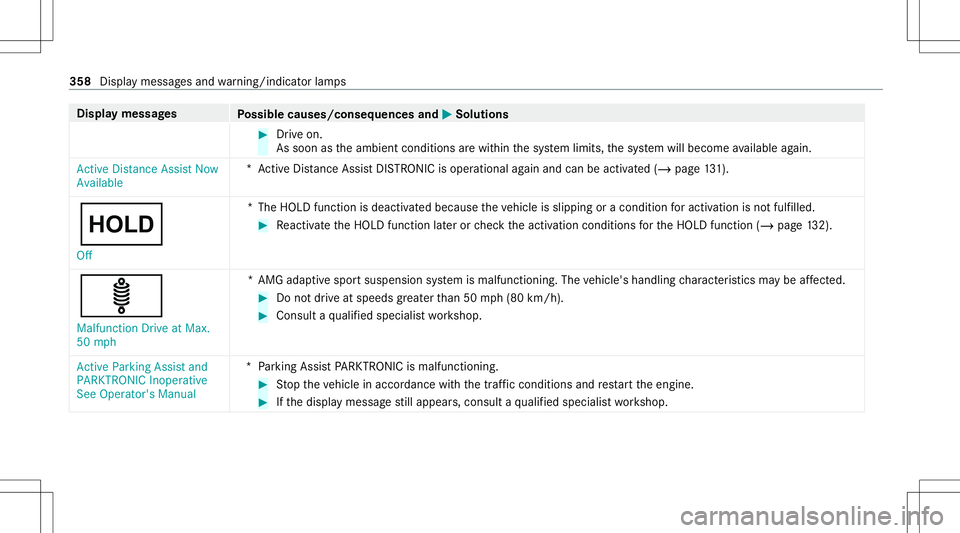
laymes sages
Possible causes/conseq uencesand0050 0050
Solutions #
Drive on.
As soon astheambient conditions arewit hin thesy stem limits, thesy stem will become available again.
Ac tiveDis tan ceAssist Now
Av ailable *A
ctiveDis tan ceAssi stDIS TRONI Cis op erati ona lag ain and canbeacti vated(/ page13 1).
00D9 Of f *T
heHOLD functionisdeactiv ated because theve hicle isslipping oracondition foractiv ation isno tfulf illed. #
React ivat eth eHOLD function later or checkth eactiv ation conditions forth eHOLD function (/page13 2).
ä
Ma lfun ction Drive atMa x.
50 mph *A
MG adap tivespor tsuspension system ismalfunct ioning.Thevehicle's handling charact eristic sma ybe affect ed. #
Donotdr ive at spe eds grea terth an 50 mph(80 km/h). #
Consult aqu alif ied spec ialistwo rkshop.
Act ive Parking Assistand
PARKTRONIC Inoperative
See Operator's Manual *P
arkin gAs sis tPA RK TRONI Cis malf unction ing . #
Stop theve hicle inaccor dance withth etra ffic con dition sand restar tth eengine. #
Ifth edispla ymessag est ill appear s,con sult aqu alif ied spec ialistwo rkshop. 358
Displa ymessag esand warning/ indic ator lam ps
Page 401 of 422
ESP
®
(El ectr onicSt abilit yPr og ram) ..... 122
Ov ervie w ..............................................1 21
Ra dar and ultrasonic sensors.............. 120
Re sponsibili ty...................................... 120
Dr ivin gsy stem
AMG adaptivespor tsuspen sionsys‐
te m + ..... ..... .........................................1 36
Dr ivi ng system
see ActiveDis tance AssistDIS TRONI C
see ATTENTION ASSIST
see Blind SpotAssis t
see Cruise control
see Driving safetysy stem
see HOLD function
see Lane Keeping Assist
see Parking AssistPA RK TRONI C
see Rear vie wcam era
Dr iving tips
AM Gcer amic high-perfor mance
com posit ebr ak esy stem ......................1 00
Dr inking anddriving ..............................96
Gene raldr ivin gtips ........................ .......9 6
No teson breaking-in ane wvehicle .......9 5 Dr
ow siness detection
see ATTENTION ASSIST
DY NA MIC SELECT .................................... 105
Con figur ing drive pr ogr am I... ......... ..... 107
Dis play ing engin edat a.................... .... 107
Dis play ing vehicle data........................ 107
Dr ive pr ogr am disp lay ............. ............. 107
Dr ive pr ogr ams............. .......................105
Fu nctio n<0011001100110011001100110011001100110011001100110011001100110011
0011001100110011001100110011001100110011> <0011001100110011001100110011001100110011001100110011001100110011
0011001100110011>105
Oper ating (DYN AMIC SELECTswitc h)
... ...................................................... ....1 07
Sel ecting thedr ive pr ogr am ............ ....1 07
Sho wing ope ratio nfe edbac k......... ...... 107 E
E-SELECT selectorleve r............ ..............108
Eng aging drive po sitio n............. .......... 109
Eng aging neu tral ............. .....................109
Eng aging park position .................. ...... 109
Eng aging park position automatic ally..109
Eng aging reve rsege ar .........................1 09
Fu nctio n<0011001100110011001100110011001100110011001100110011001100110011
0011001100110011001100110011001100110011> <0011001100110011001100110011001100110011001100110011001100110011
0011001100110011>108
E1 0 ............................................................ 325 Easy
entryfe atur e
Fu nctio n/no tes .....................................7 2
Se tting <0011001100110011001100110011001100110011001100110011001100110011
0011001100110011001100110011001100110011001100110011001100110011
0011001100110011001100110011001100110011001100110011001100110011
001100110011> 73
Easy exitfeatur e
Fu nctio n/no tes .....................................7 2
Se tting <0011001100110011001100110011001100110011001100110011001100110011
0011001100110011001100110011001100110011001100110011001100110011
0011001100110011001100110011001100110011001100110011001100110011
001100110011> 73
EBD (electr onicbrak efo rc edis tribu‐
tion)
Functio n/no tes .................................... 124
ECO star t/s topfunc tion<0011001100110011001100110011001100110011001100110011001100110011
001100110011001100110011001100110011> 100
Au tomatic engine star t........................ 100
Au tomatic engine stop .........................1 00
Me thod ofoper ation ............................1 00
Switc hingoff/on ................................. 101
Electr icpa rking brak e.............................1 18
App lying automatical ly..... .................... 118
App lying orreleasing manuall y............ 119
Emerg encybraki ng ............ ..................119
Re leasing automat ically.......................1 19
Emer gency
Fir st-ai dkit (softsided) ....................... 275
Ov ervie wof thehelp functions.............. 14
Re flect ive saf etyve st <0011001100110011001100110011001100110011001100110011001100110011
00110011001100110011001100110011001100110011> 274
Re mo ving thewa rning triang le............ 274 Inde
x399
Page 409 of 422
Opening
thetailg ateusing your foot
HANDS-FREE ACCES S.................... .......5 8
Oper ating fluids
Ad ditiv es(fuel) ................................ .... 326
Br ak efluid ...................................... .....3 28
Coo lant (engi ne)....... ........................... 328
Engine oil....... ......................................327
Fu el(gasoline) .....................................3 25
No tes ............ ....................................... 324
Re frig er ant (airconditio ningsystem) ...329
Wi ndsh ield wa sher fluid .................. .... 329
Ope ratin gsaf ety
Decl arati on ofconf ormity (wirel ess
ve hicle component s).............................. 21
Inf ormation ...................................... ...... 20
Oper ating system
see On-bo ardcom puter
Oper ator' sMan ual
Ve hicle equipment ........................... ...... 18
Oper ator's Manua l(digital) ....................... 16
Ov erhead controlpanel
Ov ervie w .......................................... ..... 10 P
Pa int code ................................................ 322
Pa intw ork(cleaning instructions) .........2 69
Pa nic alar m................................................ 51
Ac tivati ng/d eactiv ating ........... ..............51
Pa nor amic roof
Operating thero ller sunblin d.......... .......6 3
Pa rk pos ition
Eng aging <0011001100110011001100110011001100110011001100110011001100110011
0011001100110011001100110011001100110011001100110011001100110011
0011> .............109
Sel ecting automatical ly<0011001100110011001100110011001100110011001100110011001100110011
0011001100110011001100110011> 109
Pa rking
see Elec tric par kingbr ak e
Pa rking aid
see Parking AssistPA RK TRONI C
Pa rking Assis tPA RK TRONI C<0011001100110011001100110011001100110011001100110011001100110011
001100110011> 137
Ac tivati ng ........... ................................. 139
Ad jus ting warning tones <0011001100110011001100110011001100110011001100110011001100110011
001100110011001100110011> 139
Fu nctio n<0011001100110011001100110011001100110011001100110011001100110011
0011001100110011001100110011001100110011> <0011001100110011001100110011001100110011001100110011001100110011
0011001100110011>137
Swi tching off<0011001100110011001100110011001100110011001100110011001100110011
0011001100110011001100110011001100110011001100110011001100110011
0011001100110011001100110011> 139
Sy stem limit ations ........................... ....1 37
Pa rking brak e
see Elec tric par kingbr ak e Pa
rking foran extended period .............. 120
Pa rking light s............................................ 80
Pa rking posit ion
Ex terior mir rors <0011001100110011001100110011001100110011001100110011001100110011
0011001100110011001100110011001100110011001100110011001100110011
00110011001100110011> 88
St or ing theposition ofthefront -
passeng eroutside mirrorusi ng
re ve rsege ar .......................................... 88
Pa rtitioning net
At tach ing ...............................................7 7
PA SSEN GERAIRBAGstatus displa y
see Automatic front pass engerfront
airb agshut off
Pa yload
Calculat ionexam ple ............................ 301
De term inin gth emaximum .................. 300
Pe rm itted towing methods .....................2 86
Pe rsonaliz ation
see User profile
Pe ts inthe vehicl e...... ...............................49
Phone book
see Cont acts Inde
x40
7