service MERCEDES-BENZ M-Class 2001 W163 Comand Manual
[x] Cancel search | Manufacturer: MERCEDES-BENZ, Model Year: 2001, Model line: M-Class, Model: MERCEDES-BENZ M-Class 2001 W163Pages: 164, PDF Size: 2.2 MB
Page 82 of 164
80
Introduction AudioTe l e p h o n eNavigation Index
S y s te m s e ttin g s
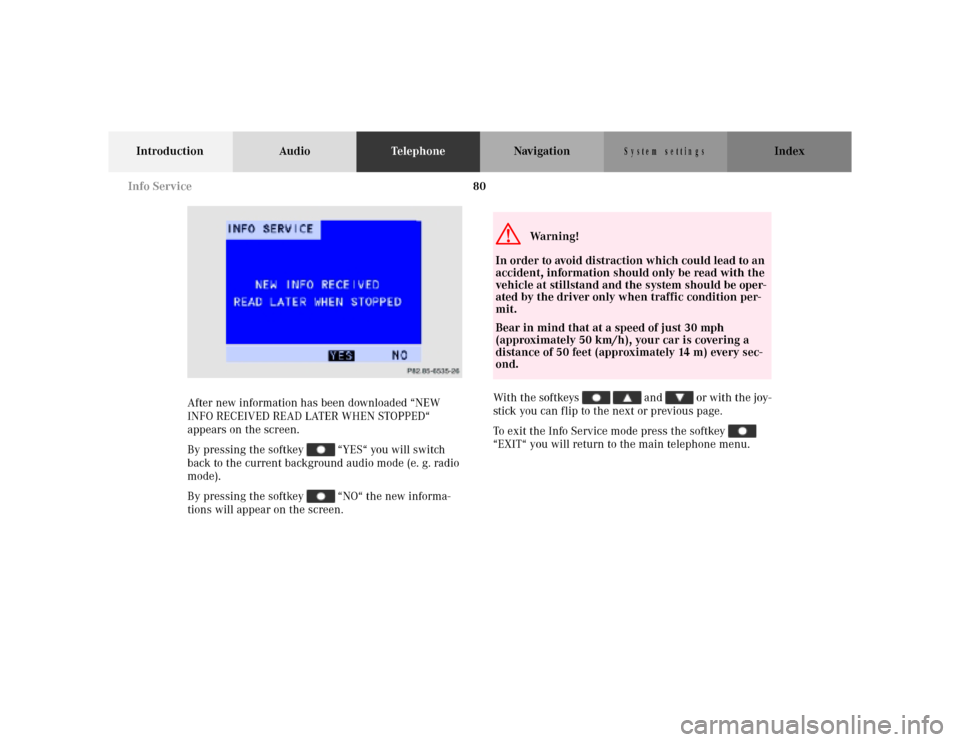
After new information has been downloaded “NEW
INFO RECEIVED READ LATER WHEN STOPPED“
appears on the screen.
By pressing the softkey “YES“ you will switch
back to the current background audio mode (e. g. radio
mode).
By pressing the softkey “NO“ the new informa-
tions will appear on the screen.With the softkeys and or with the joy-
stick you can flip to the next or previous page.
To exit the Info Service mode press the softkey
“EXIT“ you will return to the main telephone menu.
P82.85-6535-26
G
Wa r n i n g !
In order to avoid distraction which could lead to an
accident, information should only be read with the
vehicle at stillstand and the system should be oper-
ated by the driver only when traffic condition per-
mit.
Bear in mind that at a speed of just 30 mph
(approximately 50 km/h), your car is covering a
distance of 50 feet (approximately 14 m) every sec-
ond.
Info Service
Page 84 of 164
82
Introduction Audio TelephoneNavigationIndex
S y s te m s e ttin g s
Before you use the navigation systemG
Wa r n i n g !
During route guidance, you will not receive any
information on traffic lights, stop or yield signs, no
parking or no stopping zones, one-way streets, nar-
row bridges and similar traffic regulation data.
Please always strictly observe traffic regulations
while driving. Traffic regulations always have pri-
ority over any route recommendations given. Study
the manual and select route before driving, do not
watch display screen or operate buttons while the
vehicle is in motion - let voice notifications guide
you. Stop at a safe location before using buttons or
correcting screen. Drive carefully and always obey
traffic laws and road signs even if they contradict
system instructions.
For your safety you should only enter destinations
when the vehicle is stationary. When the vehicle is
in motion, a passenger should enter the destina-
tion.
G
Wa r n i n g !
The CD reader contains a Class 1 laser product.
There is a danger of invisible laser radiation if the
cover is opened or damaged.
Do not remove the cover. The CD reader does not
contain any parts which can be serviced by the
user. For safety reasons, have any service work
which may be necessary performed only by quali-
fied personnel. Notes
Page 162 of 164
160
Introduction Audio Telephone NavigationIndex
S y s te m s e ttin g s
R
Recent Route editing ....................................................... 120
Redial ....................................................................................74
Requesting and displaying Info Services ....................... 79
Road obstructed.................................................................131
Route guidance................................................................. 124
S
Saving the current vehicle position .............................. 109
Scanning (tape) .................................................................. 37
Scanning (CD) .................................................................... 56
Selecting a station
(FM or AM mode) ............................................................19
Selecting CDs (MCS with CD changer) .......................... 53
Selecting the language.................................................... 147
Selecting the off-route recalculation mode.................. 146
Selecting the route calculation mode ........................... 144
Select time display............................................................. 59
Setting map screen orientation ..................................... 139
Setting points of interest icon options ..........................141
Setting the display dimming characteristics............... 157
Setting type of guidance display ................................... 137
Setting voice prompt type/frequency........................... 135
Skip blanks ......................................................................... 38
Speed-dialing ...................................................................... 75Switching between
the light mode and the dark mode ............................ 155
Switching CD operation on and off ................................. 50
Switching navigation operation on and off .................... 88
Switching radio operation on and off ............................. 18
Switching tape operation on and off ............................... 33
Switching telephone operation on and off ..................... 66
T
The principle of route guidance..................................... 122
Today’s Plan .......................................................................115
Track select ......................................................................... 54
V
Viewing GPS Information ............................................... 149
Viewing the Maneuver List during guidance .............. 130
Viewing Software Information ....................................... 150
W
Weather band...................................................................... 22