operating range MERCEDES-BENZ M-Class 2011 W164 User Guide
[x] Cancel search | Manufacturer: MERCEDES-BENZ, Model Year: 2011, Model line: M-Class, Model: MERCEDES-BENZ M-Class 2011 W164Pages: 372, PDF Size: 16.23 MB
Page 242 of 372
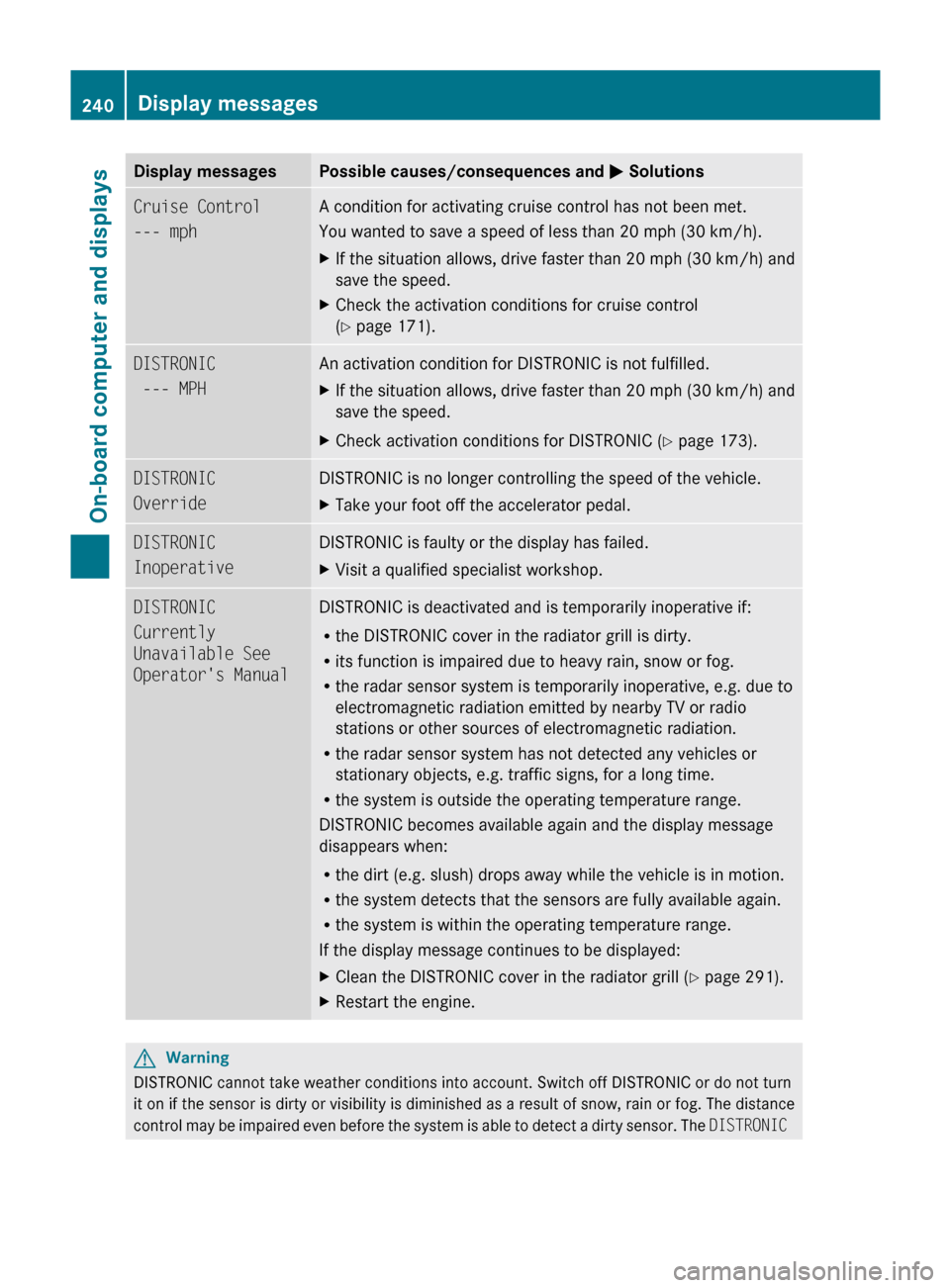
Display messagesPossible causes/consequences and M SolutionsCruise Control
--- mph A condition for activating cruise control has not been met.
You wanted to save a speed of less than 20 mph (30 km/h).XIf the situation allows, drive faster than 20 mph (30 km/h) and
save the speed.XCheck the activation conditions for cruise control
( Y page 171).DISTRONIC
--- MPH An activation condition for DISTRONIC is not fulfilled.XIf the situation allows, drive faster than 20 mph (30 km/h) and
save the speed.XCheck activation conditions for DISTRONIC ( Y page 173).DISTRONIC
OverrideDISTRONIC is no longer controlling the speed of the vehicle.XTake your foot off the accelerator pedal.DISTRONIC
InoperativeDISTRONIC is faulty or the display has failed.XVisit a qualified specialist workshop.DISTRONIC
Currently
Unavailable See
Operator's ManualDISTRONIC is deactivated and is temporarily inoperative if:
R the DISTRONIC cover in the radiator grill is dirty.
R its function is impaired due to heavy rain, snow or fog.
R the radar sensor system is temporarily inoperative, e.g. due to
electromagnetic radiation emitted by nearby TV or radio
stations or other sources of electromagnetic radiation.
R the radar sensor system has not detected any vehicles or
stationary objects, e.g. traffic signs, for a long time.
R the system is outside the operating temperature range.
DISTRONIC becomes available again and the display message
disappears when:
R the dirt (e.g. slush) drops away while the vehicle is in motion.
R the system detects that the sensors are fully available again.
R the system is within the operating temperature range.
If the display message continues to be displayed:XClean the DISTRONIC cover in the radiator grill ( Y page 291).XRestart the engine.GWarning
DISTRONIC cannot take weather conditions into account. Switch off DISTRONIC or do not turn
it on if the sensor is dirty or visibility is diminished as a result of snow, rain or fog. The distance
control may be impaired even before the system is able to detect a dirty sensor. The DISTRONIC
240Display messagesOn-board computer and displays
BA 164.1 USA, CA Edition B 2011; 1; 2, en-USd2mskotVersion: 3.0.3.52010-04-21T17:25:06+02:00 - Seite 240
Page 247 of 372
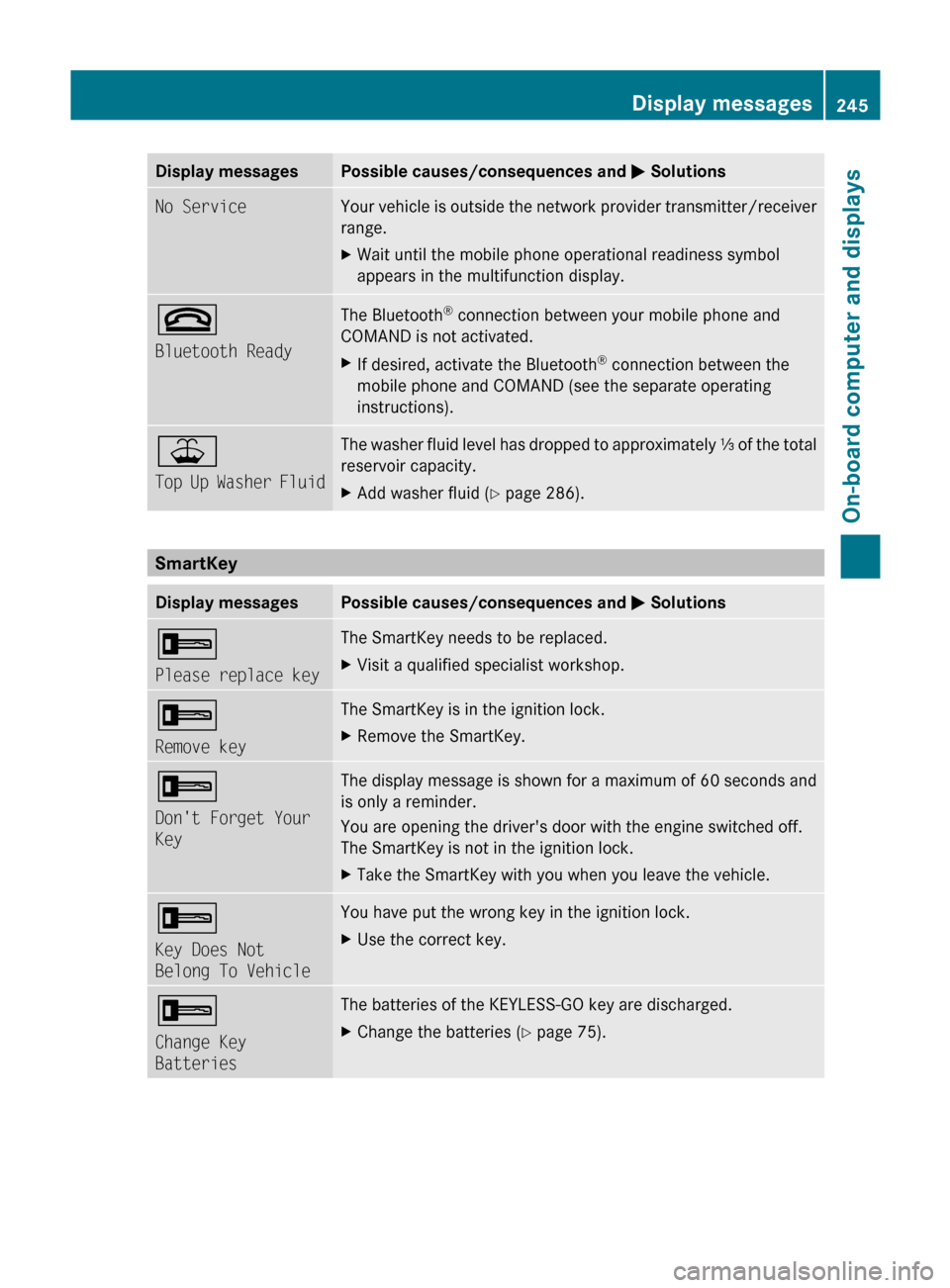
Display messagesPossible causes/consequences and M SolutionsNo ServiceYour vehicle is outside the network provider transmitter/receiver
range. XWait until the mobile phone operational readiness symbol
appears in the multifunction display.~
Bluetooth ReadyThe Bluetooth ®
connection between your mobile phone and
COMAND is not activated.XIf desired, activate the Bluetooth ®
connection between the
mobile phone and COMAND (see the separate operating
instructions).¥
Top Up Washer FluidThe washer fluid level has dropped to approximately ⅓ of the total
reservoir capacity.XAdd washer fluid ( Y page 286).
SmartKey
Display messagesPossible causes/consequences and M Solutions+
Please replace keyThe SmartKey needs to be replaced. XVisit a qualified specialist workshop.+
Remove keyThe SmartKey is in the ignition lock.XRemove the SmartKey.+
Don't Forget Your
KeyThe display message is shown for a maximum of 60 seconds and
is only a reminder.
You are opening the driver's door with the engine switched off.
The SmartKey is not in the ignition lock.XTake the SmartKey with you when you leave the vehicle.+
Key Does Not
Belong To VehicleYou have put the wrong key in the ignition lock.XUse the correct key.+
Change Key
BatteriesThe batteries of the KEYLESS-GO key are discharged.XChange the batteries ( Y page 75).Display messages245On-board computer and displaysBA 164.1 USA, CA Edition B 2011; 1; 2, en-USd2mskotVersion: 3.0.3.52010-04-21T17:25:06+02:00 - Seite 245Z
Page 277 of 372
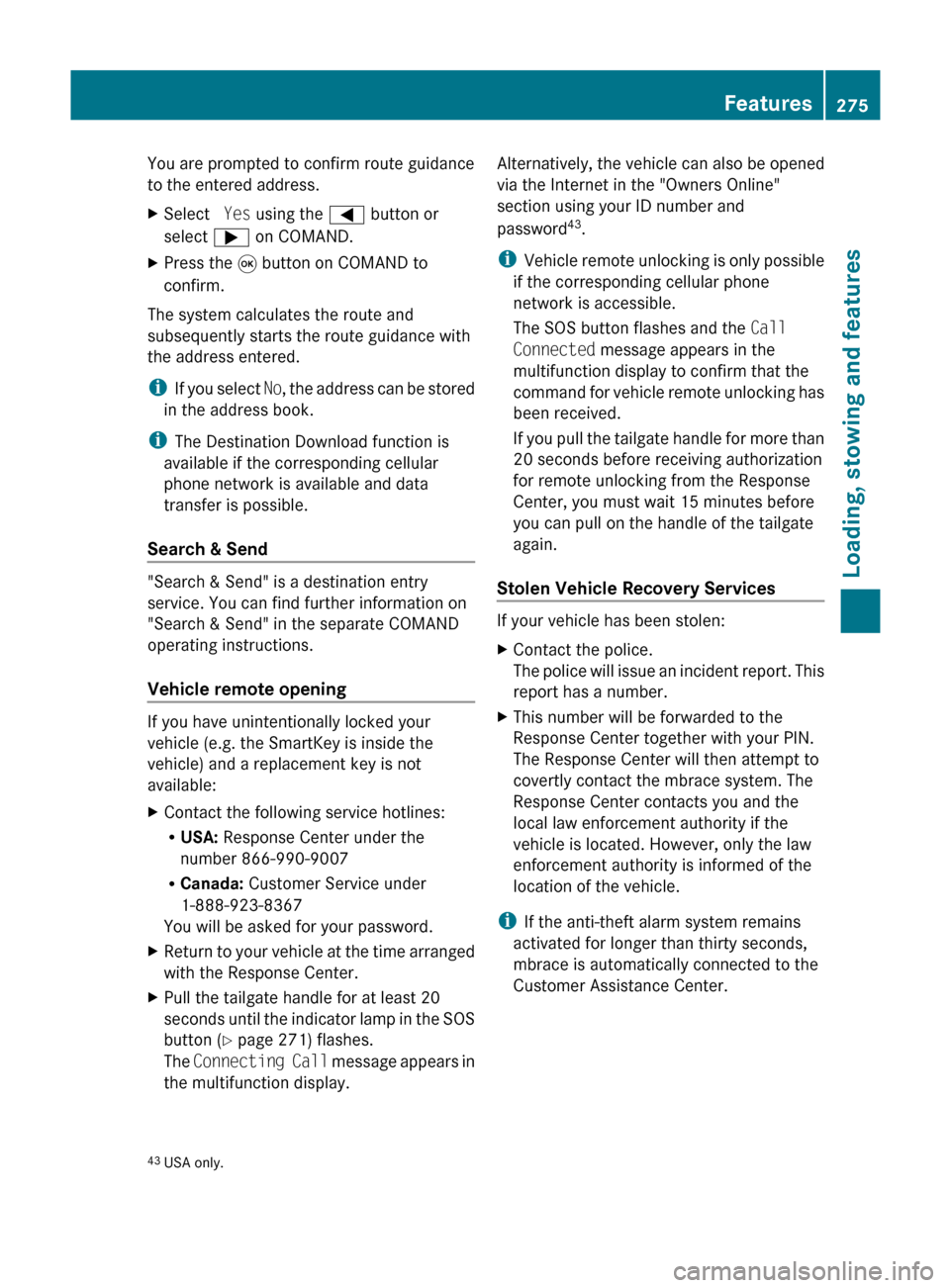
You are prompted to confirm route guidance
to the entered address.XSelect Yes using the = button or
select ; on COMAND.XPress the 9 button on COMAND to
confirm.
The system calculates the route and
subsequently starts the route guidance with
the address entered.
i If you select No, the address can be stored
in the address book.
i The Destination Download function is
available if the corresponding cellular
phone network is available and data
transfer is possible.
Search & Send
"Search & Send" is a destination entry
service. You can find further information on
"Search & Send" in the separate COMAND
operating instructions.
Vehicle remote opening
If you have unintentionally locked your
vehicle (e.g. the SmartKey is inside the
vehicle) and a replacement key is not
available:
XContact the following service hotlines:
R USA: Response Center under the
number 866-990-9007
R Canada: Customer Service under
1-888-923-8367
You will be asked for your password.XReturn to your vehicle at the time arranged
with the Response Center.XPull the tailgate handle for at least 20
seconds until the indicator lamp in the SOS
button ( Y page 271) flashes.
The Connecting Call message appears in
the multifunction display.Alternatively, the vehicle can also be opened
via the Internet in the "Owners Online"
section using your ID number and
password 43
.
i Vehicle remote unlocking is only possible
if the corresponding cellular phone
network is accessible.
The SOS button flashes and the Call
Connected message appears in the
multifunction display to confirm that the
command for vehicle remote unlocking has
been received.
If you pull the tailgate handle for more than
20 seconds before receiving authorization
for remote unlocking from the Response
Center, you must wait 15 minutes before
you can pull on the handle of the tailgate
again.
Stolen Vehicle Recovery Services
If your vehicle has been stolen:
XContact the police.
The police will issue an incident report. This
report has a number.XThis number will be forwarded to the
Response Center together with your PIN.
The Response Center will then attempt to
covertly contact the mbrace system. The
Response Center contacts you and the
local law enforcement authority if the
vehicle is located. However, only the law
enforcement authority is informed of the
location of the vehicle.
i If the anti-theft alarm system remains
activated for longer than thirty seconds,
mbrace is automatically connected to the
Customer Assistance Center.
43 USA only.Features275Loading, stowing and featuresBA 164.1 USA, CA Edition B 2011; 1; 2, en-USd2mskotVersion: 3.0.3.52010-04-21T17:25:06+02:00 - Seite 275Z
Page 280 of 372
some U.S. gate operators are designed to
"time-out" in the same manner.
If you live in Canada or have difficulties
programming the garage door opener
(regardless of where you live) when using the
programming steps (see above), proceed as
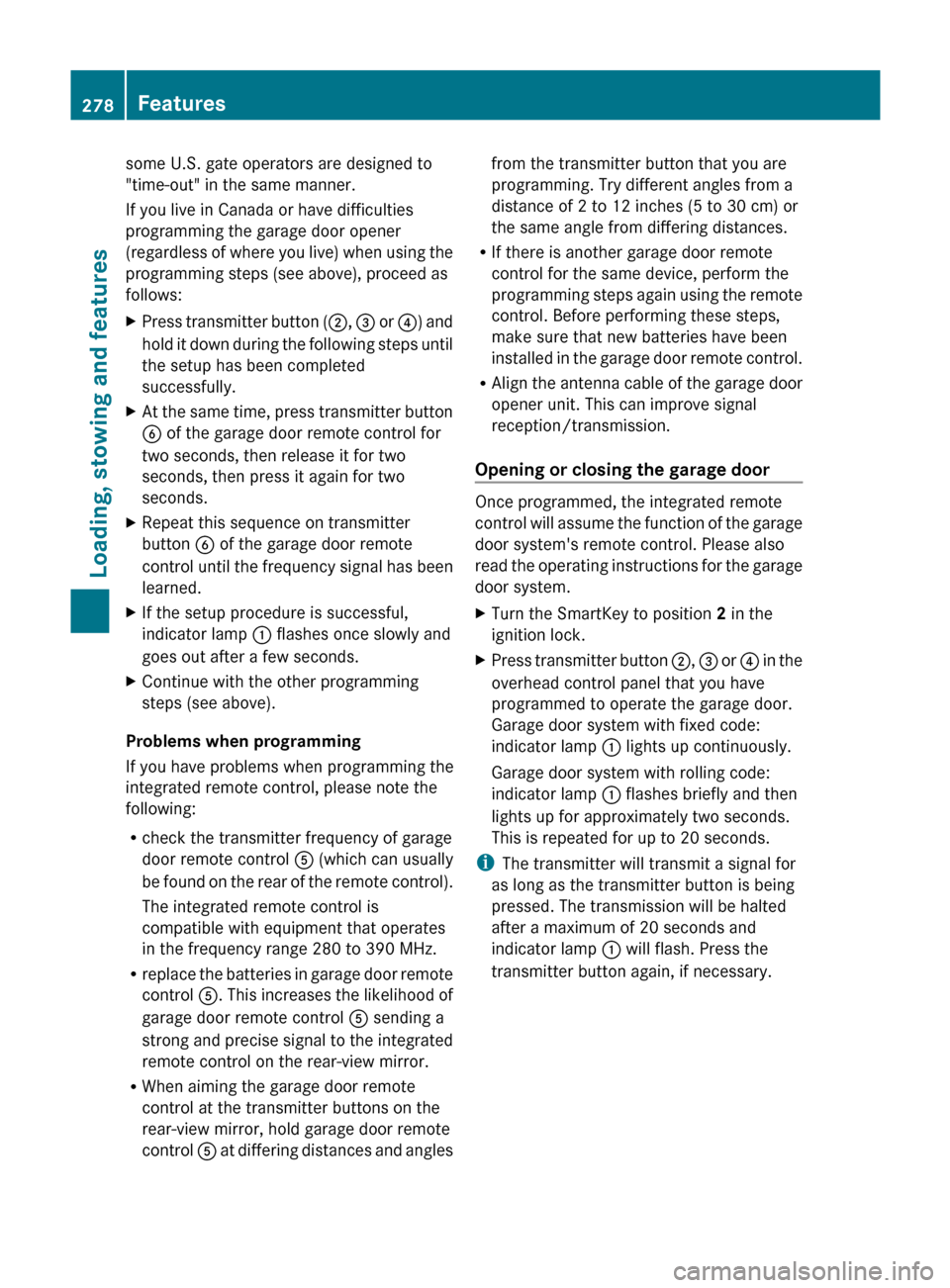
follows:XPress transmitter button ( ;, = or ?) and
hold it down during the following steps until
the setup has been completed
successfully.XAt the same time, press transmitter button
B of the garage door remote control for
two seconds, then release it for two
seconds, then press it again for two
seconds.XRepeat this sequence on transmitter
button B of the garage door remote
control until the frequency signal has been
learned.XIf the setup procedure is successful,
indicator lamp : flashes once slowly and
goes out after a few seconds.XContinue with the other programming
steps (see above).
Problems when programming
If you have problems when programming the
integrated remote control, please note the
following:
R check the transmitter frequency of garage
door remote control A (which can usually
be found on the rear of the remote control).
The integrated remote control is
compatible with equipment that operates
in the frequency range 280 to 390 MHz.
R replace the batteries in garage door remote
control A. This increases the likelihood of
garage door remote control A sending a
strong and precise signal to the integrated
remote control on the rear-view mirror.
R When aiming the garage door remote
control at the transmitter buttons on the
rear-view mirror, hold garage door remote
control A at differing distances and angles
from the transmitter button that you are
programming. Try different angles from a
distance of 2 to 12 inches (5 to 30 cm) or
the same angle from differing distances.
R If there is another garage door remote
control for the same device, perform the
programming steps again using the remote
control. Before performing these steps,
make sure that new batteries have been
installed in the garage door remote control.
R Align the antenna cable of the garage door
opener unit. This can improve signal
reception/transmission.
Opening or closing the garage door
Once programmed, the integrated remote
control will assume the function of the garage
door system's remote control. Please also
read the operating instructions for the garage
door system.
XTurn the SmartKey to position 2 in the
ignition lock.XPress transmitter button ;, = or ? in the
overhead control panel that you have
programmed to operate the garage door.
Garage door system with fixed code:
indicator lamp : lights up continuously.
Garage door system with rolling code:
indicator lamp : flashes briefly and then
lights up for approximately two seconds.
This is repeated for up to 20 seconds.
i The transmitter will transmit a signal for
as long as the transmitter button is being
pressed. The transmission will be halted
after a maximum of 20 seconds and
indicator lamp : will flash. Press the
transmitter button again, if necessary.
278FeaturesLoading, stowing and features
BA 164.1 USA, CA Edition B 2011; 1; 2, en-USd2mskotVersion: 3.0.3.52010-04-21T17:25:06+02:00 - Seite 278