display MERCEDES-BENZ M-Class 2011 W164 Owner's Guide
[x] Cancel search | Manufacturer: MERCEDES-BENZ, Model Year: 2011, Model line: M-Class, Model: MERCEDES-BENZ M-Class 2011 W164Pages: 372, PDF Size: 16.23 MB
Page 45 of 372
GWarning!
If the 4 2 indicator lamp
illuminates when an adult or someone larger
than a small individual is in the front
passenger seat, have the front passenger
reposition himself or herself in the seat until
the 4 2 indicator lamp goes out,
or check whether objects are caught under or
around the seat.
In the event of a collision, the air bag control
unit will not allow front passenger front air bag
deployment when the OCS has classified the
front passenger seat occupant as weighting
as much as or less than a typical 12-month-
old child in a standard child restraint or if the
front passenger seat is classified as being
empty.
When the OCS senses that the front
passenger seat occupant is classified as
being up to or less than the weight of a typical
12-month-old child in a standard child
restraint, the 4 2 indicator lamp
will illuminate when the engine is started and
remain illuminated, indicating that the front
passenger front air bag is deactivated.
When the OCS senses that the front
passenger seat is classified as being empty,
the 4 2 indicator lamp will
illuminate when the engine is started and
remain illuminated, indicating that the front
passenger front air bag is deactivated.
When the OCS senses that the front
passenger seat occupant is classified as
being heavier than the weight of a typical
12-month-old child seated in a standard child
restraint or as being a small individual (such
as a young teenager or a small adult), the
4 2 indicator lamp will illuminate
for approximately 6 seconds when the engine
is started and then, depending on occupant
weight sensor readings from the seat, remain
illuminated or go out. With the 4
2 indicator lamp illuminated, the
front passenger front air bag is deactivated.
With the 4 2 indicator lamp out,
the front passenger front air bag is activated.
When the OCS senses that the front
passenger seat occupant is classified as an
adult or someone larger than a small
individual, the 4 2 indicator lamp
will illuminate for approximately 6 seconds
when the engine is started and then goes out,
indicating that the front passenger front air
bag is activated.
If the 4 2 indicator lamp is
illuminated, the front passenger front air bag
is deactivated and will not be deployed.
If the 4 2 indicator lamp is not
illuminated, the front passenger front air bag
is activated and will be deployed
R in the event of certain frontal impacts
R if impact exceeds a preset deployment
threshold
R independently of the side impact air bags
If the front passenger front air bag is
deployed, the rate of inflation will be
influenced by
R the rate of relevant vehicle deceleration as
assessed by the air bag control unit
R the front passenger’s weight category as
identified by the OCS
For further information, see "Air bag display
messages" ( Y page 224).GWarning
Accident statistics show that children
secured in the rear seats are safer than
children secured in the front-passenger seat.
For this reason, we strongly advise that you
always secure children in the rear seats.
Regardless of the seat position, children
under 12 years must be secured correctly in
a suitable infant or child restraint system or
booster seat suitable for the size and weight
of the child.
The infant or child restraint system must be
correctly secured using the vehicle's seat
belt, the seat belt and Top Tether belt or the
lower anchorages and the Top Tether belt in
Occupant safety43SafetyBA 164.1 USA, CA Edition B 2011; 1; 2, en-USd2mskotVersion: 3.0.3.52010-04-21T17:25:06+02:00 - Seite 43Z
Page 49 of 372
Problems with the occupant classification systemProblemPossible causes/consequences and M SolutionsUSA only: The
42
indicator lamp
illuminates and
remains illuminated
when the weight of a
typical adult or an
individual that is the
size of a typical adult
has been detected on
the passenger seat; the
system then
determines the
occupant cannot be a
child.The OCS is malfunctioning.XHave the OCS checked as soon as possible at an authorized
Mercedes-Benz Center.XRead and observe the additional display messages in the
multifunction display ( Y page 224).GWarning
If the 42 indicator lamp illuminates and remains illuminated when the weight of a
typical adult or someone larger than a small individual has been detected on the passenger seat,
the system then determines the occupant cannot be a child. Do not allow any occupant to use
the passenger seat until the system has been repaired.
ProblemPossible causes/consequences and M SolutionsThe 42
indicator lamp does not
illuminate and/or does
not remain illuminated
when the weight of a
typical 12-month-old
child in a standard child
restraint or less/
unoccupied child
restraint has been
detected on the front-
passenger seat.The OCS is malfunctioning.XMake sure there is nothing between the seat cushion and the
child seat.XCheck the installation of the child restraint system.XMake sure there are no objects applying additional weight onto
the seat.XMake sure there are no objects applying additional weight onto
the seat. Head restraints that press against the roof or books
that are behind or trapped between the seat, for example, apply
force to the seat. OCS senses such forces as additional weight.XIf the 42 indicator lamp does not illuminate, have
the OCS checked as soon as possible at an authorized
Mercedes-Benz Center. Do not transport a child on the front-
passenger seat until the OCS has been repaired.XRead and observe the additional display messages in the
multifunction display ( Y page 224).Occupant safety47SafetyBA 164.1 USA, CA Edition B 2011; 1; 2, en-USd2mskotVersion: 3.0.3.52010-04-21T17:25:06+02:00 - Seite 47Z
Page 67 of 372
2. This device must withstand any
interference received, including
interference that may cause undesired
operation of the device.
Any unauthorized modification to this
device could void the user's authority to
operate the equipment.
Driving safety systems
Overview of driving safety systems
In this section, you will find information about
the following driving safety systems:
R ABS ( Anti-lock Braking System)
R BAS ( Brake Assist System)
R ESP ®
(E lectronic Stability Program)
R EBD ( Electronic Brake-power Distribution)
Important safety guidelines
GWarning
The following factors increase the risk of
accidents:
R Excessive speed, especially in turns
R Wet and slippery road surfaces
R Following another vehicle too closely
The driving safety systems described in this
section cannot reduce these risks or prevent
the natural laws of physics from acting on the
vehicle. They cannot increase braking or
steering efficiency beyond that afforded by
the condition of the vehicle brakes and tires
or the traction afforded.
Only a safe, attentive, and skillful driver can
prevent accidents.
The capabilities of a vehicle equipped with the
driving safety systems described in this
section must never be exploited in a reckless
or dangerous manner which could jeopardize
the user's safety or the safety of others.
Always adjust your driving style to the
prevailing road and weather conditions and
keep a safe distance to other road users and
objects on the street.
If a driving system malfunctions, other driving
safety systems may also switch off. Observe
indicator and warning lamps that may come
on as well as messages in the multifunction
display that may appear.GWarning!
HYBRID vehicles: It is imperative that you read
the HYBRID Supplemental Operating
Instructions included in your vehicle literature
portfolio. You may otherwise not receive all
necessary safety information and warning for
the operation of your vehicle.
i In wintry driving conditions, always use
winter tires (M+S tires) and if necessary,
snow chains. Only in this way will the
driving safety systems described in this
section work as effectively as possible.
ABS (Anti-lock Braking System)
Important safety information
GWarning
Observe "Important safety instructions"
( Y page 65).
GWarning!
Do not pump the brake pedal. Use firm, steady
brake pedal pressure instead. Pumping the
brake pedal reduces the braking effect.
ABS regulates brake pressure in such a way
that the wheels do not lock when you brake.
This allows you to continue steering the
vehicle when braking.
ABS works from a speed of about
5 mph (8 km/h) upwards, regardless of road-
surface conditions. ABS works on slippery
surfaces, even when you only brake gently.
The ! warning lamp in the instrument
cluster lights up when the ignition is switched
on. It goes out when the engine is running.
Driving safety systems65SafetyBA 164.1 USA, CA Edition B 2011; 1; 2, en-USd2mskotVersion: 3.0.3.52010-04-21T17:25:06+02:00 - Seite 65Z
Page 68 of 372
Braking
If ABS intervenes when braking, you will feel
a pulsing in the brake pedal.
XIf ABS intervenes: continue to depress the
brake pedal with force until the braking
situation is over.XTo make a full brake application:
depress the brake pedal with full force.GWarning
If the ABS malfunctions, other driving systems
such as the BAS or the ESP ®
are also switched
off. Observe indicator and warning lamps that
may come on as well as messages in the
multifunction display that may appear.
If the ABS malfunctions, the wheels may lock
during hard braking, reducing the steering
capability and extending the braking distance.
The pulsating brake pedal can be an
indication of hazardous road conditions and
functions as a reminder to take extra care
while driving.
Off-road ABS (vehicles with 4MATIC)
An ABS system specifically suited to off-road
terrain is activated automatically if the off-
road drive program (Y page 193) is activated
or the LOW RANGE off-road gear
( Y page 194) is selected.
At a speed below 18 mph (30 km/h) the front
wheels lock periodically when braking. The
digging-in effect achieved in the process
reduces the stopping distance on off-road
terrain. This limits steering capability.
BAS (Brake Assist)
GWarning
Observe "Important safety instructions"
( Y page 65).
BAS operates in emergency braking
situations. If you depress the brake pedal
quickly, BAS automatically boosts the braking
force, thus shortening the stopping distance.XKeep the brake pedal firmly depressed until
the emergency braking situation is over.
ABS prevents the wheels from locking.
The brakes will function as usual once you
release the brake pedal. BAS is deactivated.
GWarning
If the BAS malfunctions, the brake system still
functions, but without the additional brake
boost available that the BAS would normally
provide in an emergency braking maneuver.
Therefore, the braking distance may increase.
ESP ®
(Electronic Stability Program)
Important safety guidelines
GWarning
Observe "Important safety instructions"
( Y page 65).
If ESP ®
detects that the vehicle is deviating
from the direction desired by the driver, one
or more wheels are braked to stabilize the
vehicle. If necessary, the engine output is also
modified to keep the vehicle on the desired
course within physical limits. ESP ®
assists
the driver when pulling away on wet or
slippery roads. ESP ®
can also stabilize the
vehicle during braking.
If ESP ®
intervenes, the d warning lamp
flashes in the instrument cluster.
GWarning
Never switch off the ESP ®
when you see the
d warning lamp flashing in the instrument
cluster. In this case proceed as follows:
R When driving off, apply as little throttle as
possible.
R While driving, ease up on the accelerator
pedal.
R Adapt your speed and driving style to the
prevailing road conditions.
66Driving safety systemsSafety
BA 164.1 USA, CA Edition B 2011; 1; 2, en-USd2mskotVersion: 3.0.3.52010-04-21T17:25:06+02:00 - Seite 66
Page 71 of 372
emergency braking situations, for example.
You could lose control of the vehicle and
cause an accident.
Adapt your driving style to the changed
driving characteristics.
Distance warning function (vehicles
with DISTRONIC)
This function warns you from a speed of
approximately 20 mph (30 km/h), if:
R for a period of several seconds, the
distance to the vehicle in front is too short
for the speed at which you are traveling.
The · distance warning lamp in the
instrument cluster will light up.
R you are approaching the vehicle in front
rapidly. An intermittent warning tone will
then sound and the · distance warning
lamp in the instrument cluster will light up.
You must apply the brakes yourself in order
to maintain the appropriate distance to the
vehicle in front and prevent a collision.
GWarning!
If the distance warning lamp · in the
instrument cluster comes on while driving
and/or an intermittent warning sounds,
immediate attention on the part of the driver
is required. As required by the traffic
situation, apply the brakes and navigate
around a possible obstacle. However, do not
drive by relying on the distance warning
function, as this will result in an emergency
braking application. This will not always
enable you to avoid a collision, especially
when traveling on varying road surface
conditions and with varying driver reaction.
Complex driving situations are not always
fully recognized by the distance warning
function. This could result in wrong or missing
distance warnings.
XTo activate/deactivate: activate or
deactivate the distance warning function in
the on-board computer ( Y page 219).
After activation, the Ä symbol is
displayed in the lower multifunction
display.
Anti-theft systems
Immobilizer
The immobilizer prevents your vehicle from
being started without the correct SmartKey.
When leaving the vehicle, always take the
SmartKey with you and lock the vehicle. The
engine can be started by anyone with a valid
SmartKey that is left inside the vehicle.
XTo activate with the SmartKey: remove
the SmartKey from the ignition lock.XTo activate with KEYLESS-GO: switch the
ignition off and open the driver's door.XTo deactivate: switch on the ignition.
i
The immobilizer is always deactivated
when you start the engine.
In the event that the engine cannot be
started when the starter battery is fully
charged, the immobilizer may be faulty.
Contact an authorized Mercedes-Benz
Center or call 1-800-FOR-MERCedes (in
USA) or 1-800-387-0100 (in Canada).
ATA (Anti-Theft Alarm system)
A visual and audible alarm is triggered if the
alarm system is armed and you open:
R a door
R the vehicle with the mechanical key
R the tailgate
R the hood
The alarm is not switched off, even if you
close the open door that has triggered it, for
example.
Anti-theft systems69SafetyBA 164.1 USA, CA Edition B 2011; 1; 2, en-USd2mskotVersion: 3.0.3.52010-04-21T17:25:06+02:00 - Seite 69Z
Page 76 of 372
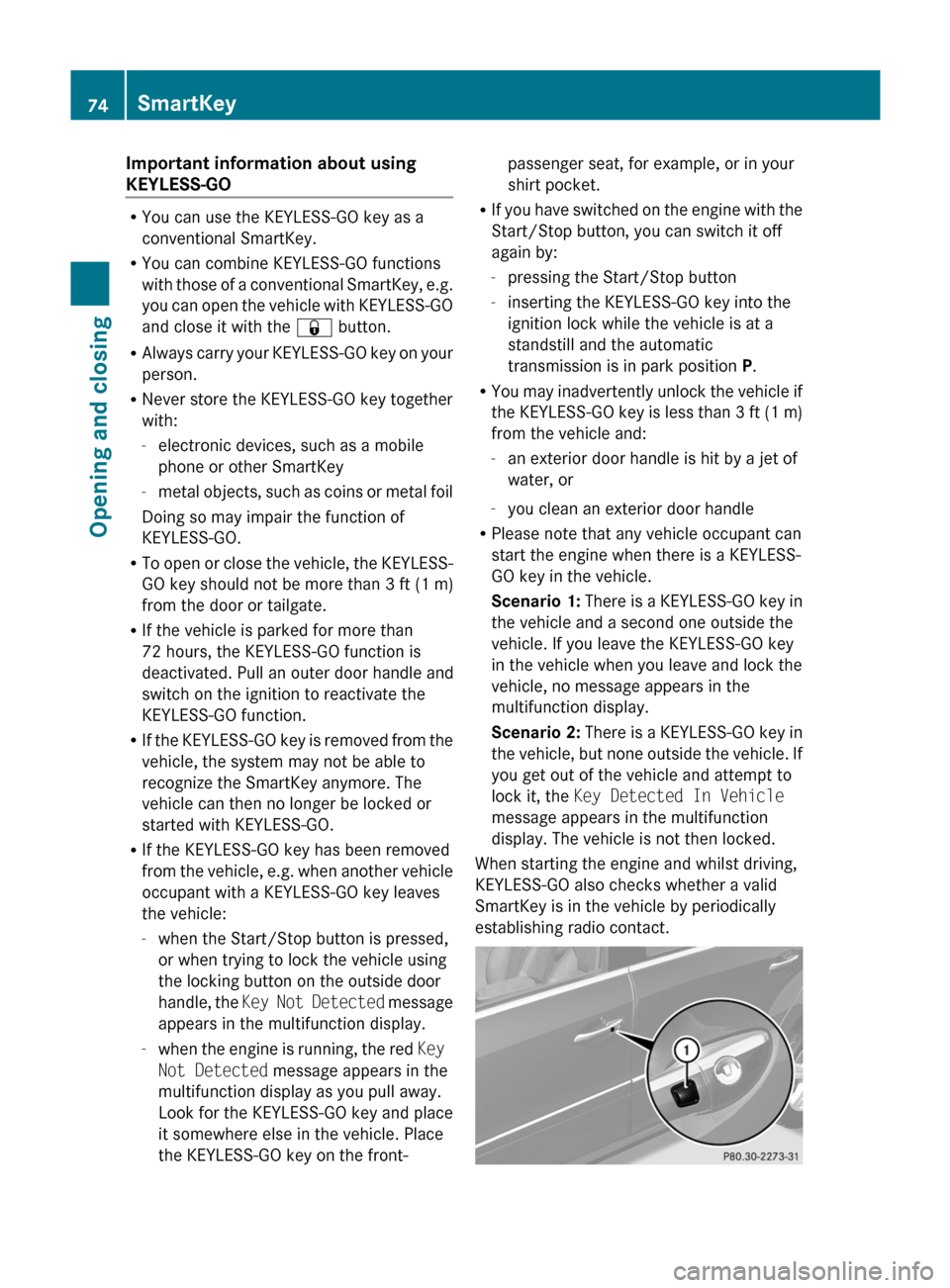
Important information about using
KEYLESS-GO
R You can use the KEYLESS-GO key as a
conventional SmartKey.
R You can combine KEYLESS-GO functions
with those of a conventional SmartKey, e.g.
you can open the vehicle with KEYLESS-GO
and close it with the & button.
R Always carry your KEYLESS-GO key on your
person.
R Never store the KEYLESS-GO key together
with:
- electronic devices, such as a mobile
phone or other SmartKey
- metal objects, such as coins or metal foil
Doing so may impair the function of
KEYLESS-GO.
R To open or close the vehicle, the KEYLESS-
GO key should not be more than 3 ft (1 m)
from the door or tailgate.
R If the vehicle is parked for more than
72 hours, the KEYLESS-GO function is
deactivated. Pull an outer door handle and
switch on the ignition to reactivate the
KEYLESS-GO function.
R If the KEYLESS-GO key is removed from the
vehicle, the system may not be able to
recognize the SmartKey anymore. The
vehicle can then no longer be locked or
started with KEYLESS-GO.
R If the KEYLESS-GO key has been removed
from the vehicle, e.g. when another vehicle
occupant with a KEYLESS-GO key leaves
the vehicle:
- when the Start/Stop button is pressed,
or when trying to lock the vehicle using
the locking button on the outside door
handle, the Key Not Detected message
appears in the multifunction display.
- when the engine is running, the red Key
Not Detected message appears in the
multifunction display as you pull away.
Look for the KEYLESS-GO key and place
it somewhere else in the vehicle. Place
the KEYLESS-GO key on the front-
passenger seat, for example, or in your
shirt pocket.
R If you have switched on the engine with the
Start/Stop button, you can switch it off
again by:
- pressing the Start/Stop button
- inserting the KEYLESS-GO key into the
ignition lock while the vehicle is at a
standstill and the automatic
transmission is in park position P.
R You may inadvertently unlock the vehicle if
the KEYLESS-GO key is less than 3 ft (1 m)
from the vehicle and:
- an exterior door handle is hit by a jet of
water, or
- you clean an exterior door handle
R Please note that any vehicle occupant can
start the engine when there is a KEYLESS-
GO key in the vehicle.
Scenario 1: There is a KEYLESS-GO key in
the vehicle and a second one outside the
vehicle. If you leave the KEYLESS-GO key
in the vehicle when you leave and lock the
vehicle, no message appears in the
multifunction display.
Scenario 2: There is a KEYLESS-GO key in
the vehicle, but none outside the vehicle. If
you get out of the vehicle and attempt to
lock it, the Key Detected In Vehicle
message appears in the multifunction
display. The vehicle is not then locked.
When starting the engine and whilst driving,
KEYLESS-GO also checks whether a valid
SmartKey is in the vehicle by periodically
establishing radio contact.74SmartKeyOpening and closing
BA 164.1 USA, CA Edition B 2011; 1; 2, en-USd2mskotVersion: 3.0.3.52010-04-21T17:25:06+02:00 - Seite 74
Page 94 of 372
Vehicle equipment
i This manual describes all the standard
and optional equipment of your vehicle
which was available at the time of
purchase. Country-specific differences are
possible. Bear in mind that your vehicle
may not feature all functions described
here. This also refers to safety-related
systems and functions.
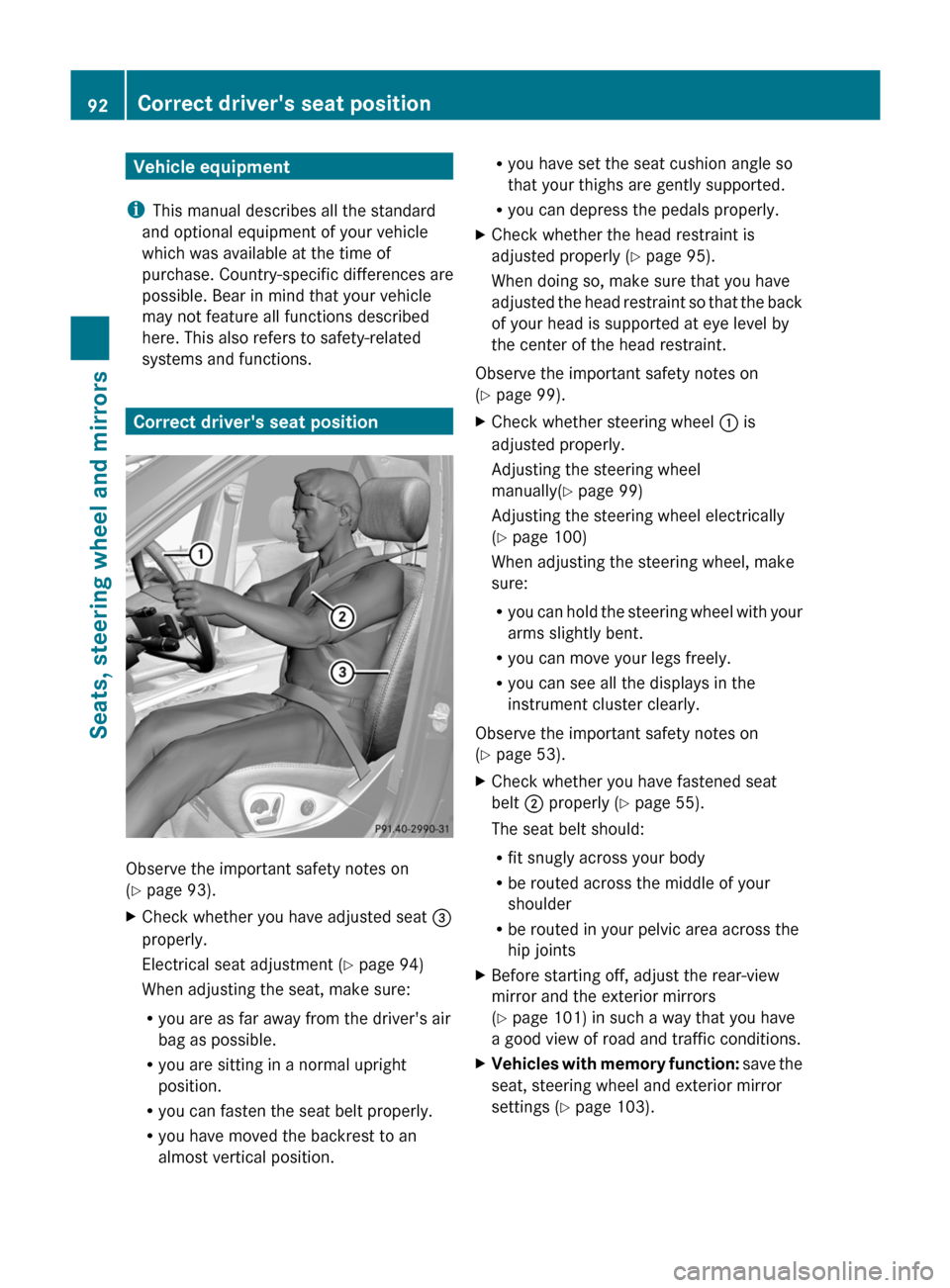
Correct driver's seat position
Observe the important safety notes on
( Y page 93).
XCheck whether you have adjusted seat =
properly.
Electrical seat adjustment ( Y page 94)
When adjusting the seat, make sure:
R you are as far away from the driver's air
bag as possible.
R you are sitting in a normal upright
position.
R you can fasten the seat belt properly.
R you have moved the backrest to an
almost vertical position.R you have set the seat cushion angle so
that your thighs are gently supported.
R you can depress the pedals properly.XCheck whether the head restraint is
adjusted properly ( Y page 95).
When doing so, make sure that you have
adjusted the head restraint so that the back
of your head is supported at eye level by
the center of the head restraint.
Observe the important safety notes on
( Y page 99).
XCheck whether steering wheel : is
adjusted properly.
Adjusting the steering wheel
manually( Y page 99)
Adjusting the steering wheel electrically
( Y page 100)
When adjusting the steering wheel, make
sure:
R you can hold the steering wheel with your
arms slightly bent.
R you can move your legs freely.
R you can see all the displays in the
instrument cluster clearly.
Observe the important safety notes on
( Y page 53).
XCheck whether you have fastened seat
belt ; properly ( Y page 55).
The seat belt should:
R fit snugly across your body
R be routed across the middle of your
shoulder
R be routed in your pelvic area across the
hip jointsXBefore starting off, adjust the rear-view
mirror and the exterior mirrors
( Y page 101) in such a way that you have
a good view of road and traffic conditions.XVehicles with memory function: save the
seat, steering wheel and exterior mirror
settings ( Y page 103).92Correct driver's seat positionSeats, steering wheel and mirrors
BA 164.1 USA, CA Edition B 2011; 1; 2, en-USd2mskotVersion: 3.0.3.52010-04-21T17:25:06+02:00 - Seite 92
Page 125 of 372
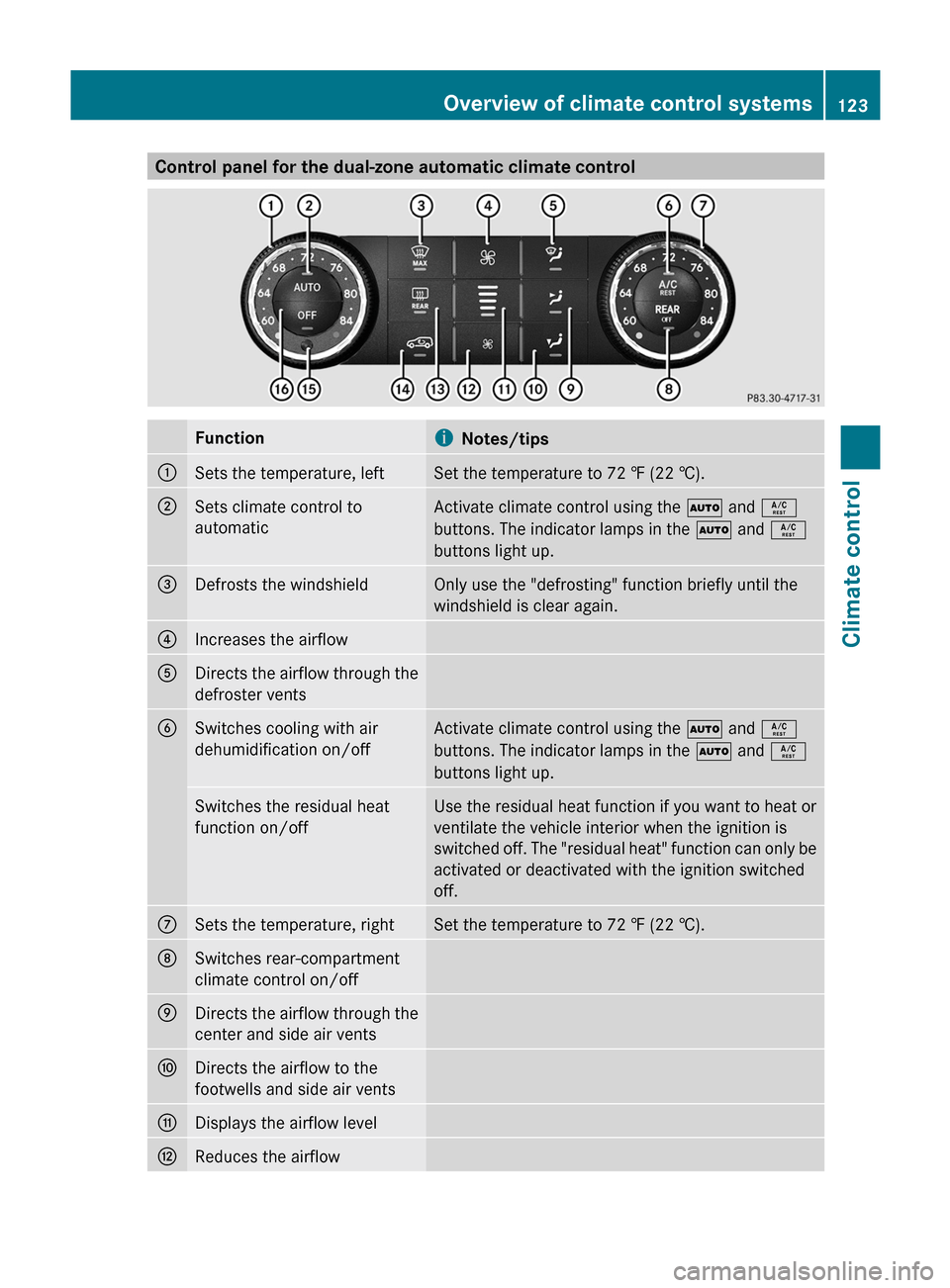
Control panel for the dual-zone automatic climate controlFunctioniNotes/tips:Sets the temperature, leftSet the temperature to 72 ‡ (22 †).;Sets climate control to
automaticActivate climate control using the à and Á
buttons. The indicator lamps in the à and Á
buttons light up.=Defrosts the windshieldOnly use the "defrosting" function briefly until the
windshield is clear again.?Increases the airflowADirects the airflow through the
defroster ventsBSwitches cooling with air
dehumidification on/offActivate climate control using the à and Á
buttons. The indicator lamps in the à and Á
buttons light up.Switches the residual heat
function on/offUse the residual heat function if you want to heat or
ventilate the vehicle interior when the ignition is
switched off. The "residual heat" function can only be
activated or deactivated with the ignition switched
off.CSets the temperature, rightSet the temperature to 72 ‡ (22 †).DSwitches rear-compartment
climate control on/offEDirects the airflow through the
center and side air ventsFDirects the airflow to the
footwells and side air ventsGDisplays the airflow levelHReduces the airflowOverview of climate control systems123Climate controlBA 164.1 USA, CA Edition B 2011; 1; 2, en-USd2mskotVersion: 3.0.3.52010-04-21T17:25:06+02:00 - Seite 123Z
Page 127 of 372

FunctioniNotes/tips=Defrosts the windshieldOnly use the "defrosting" function briefly until the
windshield is clear again.?Increases the airflowADirects the airflow through the
defroster ventsBSwitches cooling with air
dehumidification on/offActivate climate control using the à and Á
buttons. The indicator lamps in the à and Á
buttons light up.Switches the residual heat
function on/offUse the residual heat function if you want to heat or
ventilate the vehicle interior when the ignition is
switched off. The "residual heat" function can only be
activated or deactivated with the ignition switched
off.CSets the temperature, rightSet the temperature to 72 ‡ (22 †).DSwitches rear-compartment
climate control on/offEDirects the airflow through the
center and side air ventsFDirects the airflow to the
footwells and side air ventsGDisplays the airflow levelHReduces the airflowISwitches the rear window
heating on/offJActivates/deactivates air-
recirculation modeOnly use "air-recirculation" mode briefly, e.g. if there
are unpleasant outside odors or when in a tunnel. The
windows could otherwise fog up as, in air-
recirculation mode, no fresh air is drawn into the
vehicle.KInterior temperature sensorLSwitches climate control on/
offActivate climate control using the à and Á
buttons. The indicator lamps in the à and Á
buttons light up.Rear control panelMIncreases the airflowOverview of climate control systems125Climate controlBA 164.1 USA, CA Edition B 2011; 1; 2, en-USd2mskotVersion: 3.0.3.52010-04-21T17:25:06+02:00 - Seite 125Z
Page 129 of 372
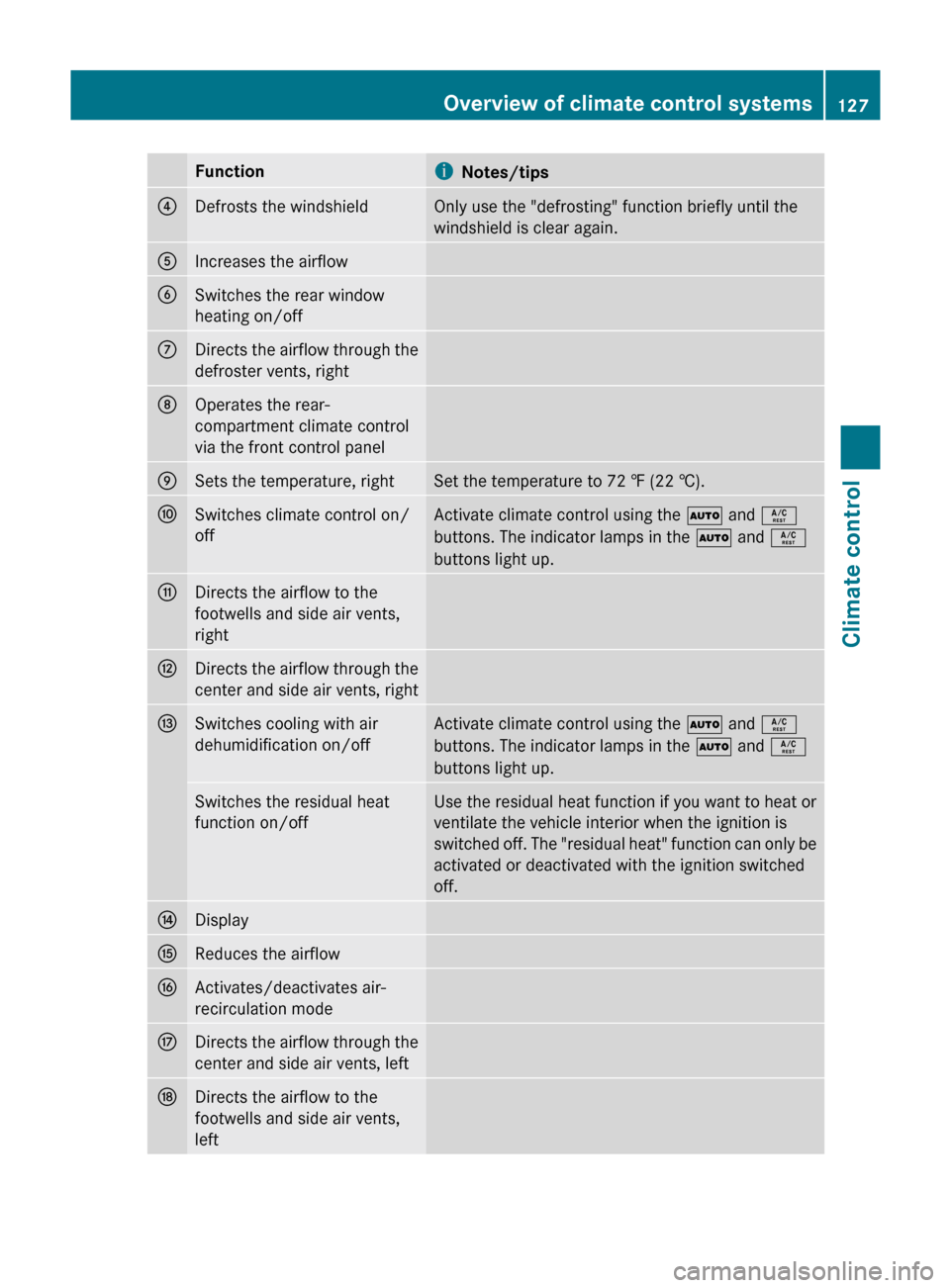
FunctioniNotes/tips?Defrosts the windshieldOnly use the "defrosting" function briefly until the
windshield is clear again.AIncreases the airflowBSwitches the rear window
heating on/offCDirects the airflow through the
defroster vents, rightDOperates the rear-
compartment climate control
via the front control panelESets the temperature, rightSet the temperature to 72 ‡ (22 †).FSwitches climate control on/
offActivate climate control using the à and Á
buttons. The indicator lamps in the à and Á
buttons light up.GDirects the airflow to the
footwells and side air vents,
rightHDirects the airflow through the
center and side air vents, rightISwitches cooling with air
dehumidification on/offActivate climate control using the à and Á
buttons. The indicator lamps in the à and Á
buttons light up.Switches the residual heat
function on/offUse the residual heat function if you want to heat or
ventilate the vehicle interior when the ignition is
switched off. The "residual heat" function can only be
activated or deactivated with the ignition switched
off.JDisplayKReduces the airflowLActivates/deactivates air-
recirculation modeMDirects the airflow through the
center and side air vents, leftNDirects the airflow to the
footwells and side air vents,
leftOverview of climate control systems127Climate controlBA 164.1 USA, CA Edition B 2011; 1; 2, en-USd2mskotVersion: 3.0.3.52010-04-21T17:25:06+02:00 - Seite 127Z