engine MERCEDES-BENZ M-Class 2011 W164 Manual Online
[x] Cancel search | Manufacturer: MERCEDES-BENZ, Model Year: 2011, Model line: M-Class, Model: MERCEDES-BENZ M-Class 2011 W164Pages: 372, PDF Size: 16.23 MB
Page 193 of 372
recognize dangers in time, cause an accident
and injure yourself and others.
Collision warning
If a vehicle is detected in the monitoring range
of Blind Spot Assist and you switch on the turn
signal, a double warning tone sounds. Red
warning lamp : flashes. If the turn signal
remains on, detected vehicles are indicated
by the flashing of red warning lamp :. There
are no further warning tones.
Switching on Blind Spot Assist
XMake sure that the radar sensor system
( Y page 217) and Blind Spot Assist
( Y page 219) are activated in the on-board
computer.XTurn the key to position 2 in the ignition
lock.
Warning lamps : light up red in the
exterior mirrors for approximately 1.5
seconds and then turn yellow.
Towing a trailer
When you attach a trailer, make sure you have
correctly established the electrical
connection. This can be accomplished by
checking the trailer lighting. In this event,
Blind Spot Assist is deactivated. The indicator
lamp lights up yellow in the exterior mirrors
and the message: Blind Spot Assist
Currently Unavailable See
Operator's Manual appears in the
multifunction display.
i The indicator lamps in the exterior mirrors
can be switched off.
To do this, you must deactivate Blind Spot
Assist when:
R the key is in position 2 in the ignition
lock.
R the engine is not running.
R the electrical connection to the trailer
has been established.
Off-road driving systems
4MATIC (permanent four-wheel drive)
4MATIC ensures that all four wheels are
permanently driven. Together with ESP ®
and
4ETS , it improves the traction of your vehicle
whenever a drive wheel spins due to
insufficient grip.
GWarning!
If a drive wheel is spinning due to insufficient
traction:
R While driving off, apply as little throttle as
possible.
R While driving, ease up on the accelerator
pedal.
R Adapt your speed and driving style to the
prevailing road conditions.
Failure to observe these guidelines could
cause the vehicle to skid.
The 4MATIC cannot prevent accidents
resulting from excessive speed.
! Never tow the vehicle with one axle
raised. This may damage the transfer case.
Damage of this sort is not covered by the
Mercedes-Benz Limited Warranty. All
wheels must remain either on the ground
or be fully raised. Observe the instructions
for towing the vehicle with all wheels in full
contact with the ground.
i In wintry driving conditions, the maximum
effect of 4MATIC can only be achieved if
you use winter tires ( M+S tires), with snow
chains if necessary.
! When testing the parking brake, operate
the vehicle only briefly (for a maximum of
ten seconds) on a brake test dynamometer.
When doing this, turn the key to position
0 or 1 in the ignition. Failure to do this can
cause damage to the drive train or the
brake system.
! Function or performance tests may only
be performed on a 2-axle dynamometer. If
you wish to operate the vehicle on such a
Off-road driving systems191Driving and parkingBA 164.1 USA, CA Edition B 2011; 1; 2, en-USd2mskotVersion: 3.0.3.52010-04-21T17:25:06+02:00 - Seite 191Z
Page 195 of 372
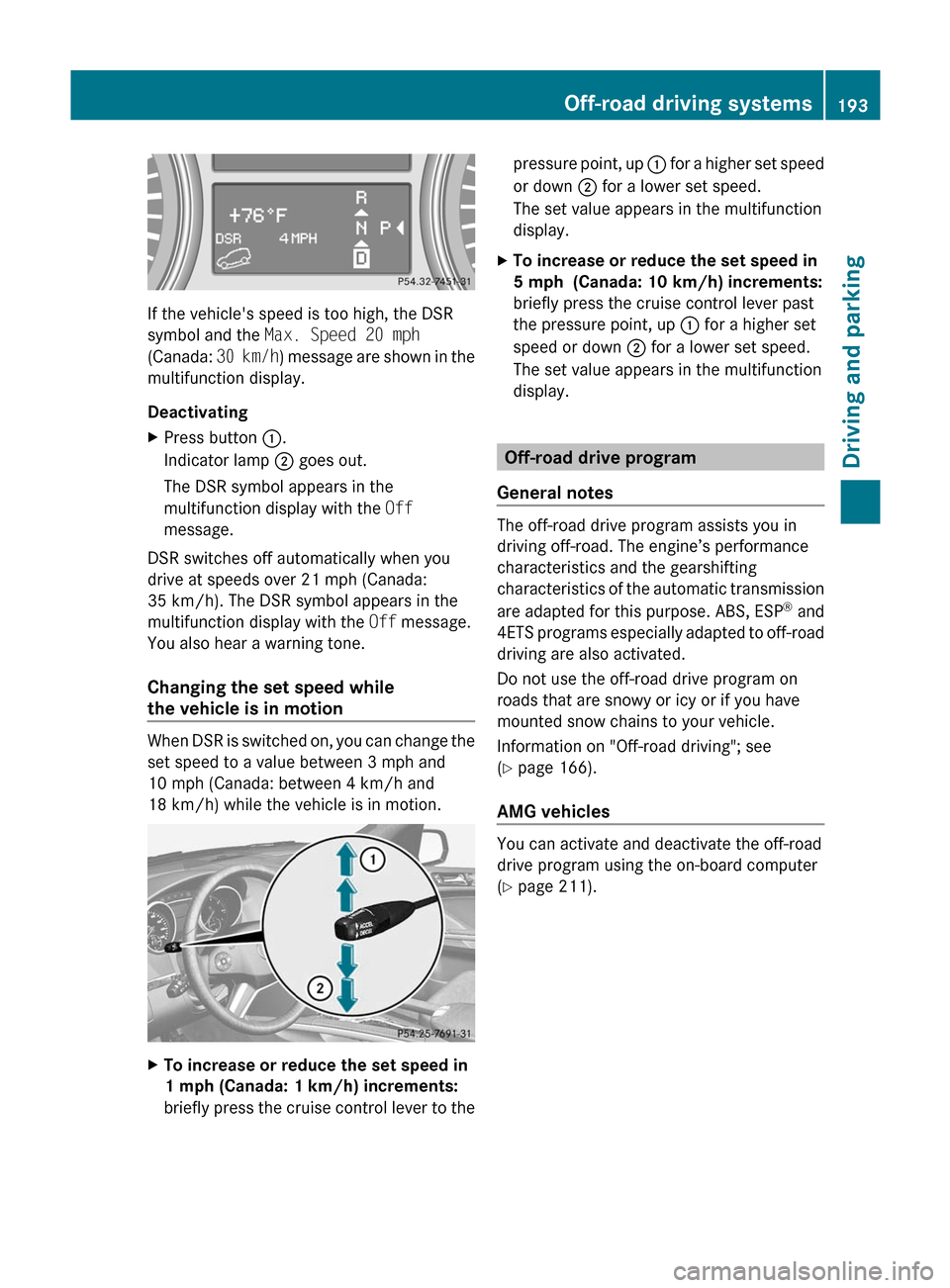
If the vehicle's speed is too high, the DSR
symbol and the Max. Speed 20 mph
(Canada: 30 km/h) message are shown in the
multifunction display.
Deactivating
XPress button :.
Indicator lamp ; goes out.
The DSR symbol appears in the
multifunction display with the Off
message.
DSR switches off automatically when you
drive at speeds over 21 mph (Canada:
35 km/h). The DSR symbol appears in the
multifunction display with the Off message.
You also hear a warning tone.
Changing the set speed while
the vehicle is in motion
When DSR is switched on, you can change the
set speed to a value between 3 mph and
10 mph (Canada: between 4 km/h and
18 km/h) while the vehicle is in motion.
XTo increase or reduce the set speed in
1 mph (Canada: 1 km/h) increments:
briefly press the cruise control lever to thepressure point, up : for a higher set speed
or down ; for a lower set speed.
The set value appears in the multifunction
display.XTo increase or reduce the set speed in
5 mph (Canada: 10 km/h) increments:
briefly press the cruise control lever past
the pressure point, up : for a higher set
speed or down ; for a lower set speed.
The set value appears in the multifunction
display.
Off-road drive program
General notes
The off-road drive program assists you in
driving off-road. The engine’s performance
characteristics and the gearshifting
characteristics of the automatic transmission
are adapted for this purpose. ABS, ESP ®
and
4ETS programs especially adapted to off-road
driving are also activated.
Do not use the off-road drive program on
roads that are snowy or icy or if you have
mounted snow chains to your vehicle.
Information on "Off-road driving"; see
( Y page 166).
AMG vehicles
You can activate and deactivate the off-road
drive program using the on-board computer
( Y page 211).
Off-road driving systems193Driving and parkingBA 164.1 USA, CA Edition B 2011; 1; 2, en-USd2mskotVersion: 3.0.3.52010-04-21T17:25:06+02:00 - Seite 193Z
Page 196 of 372
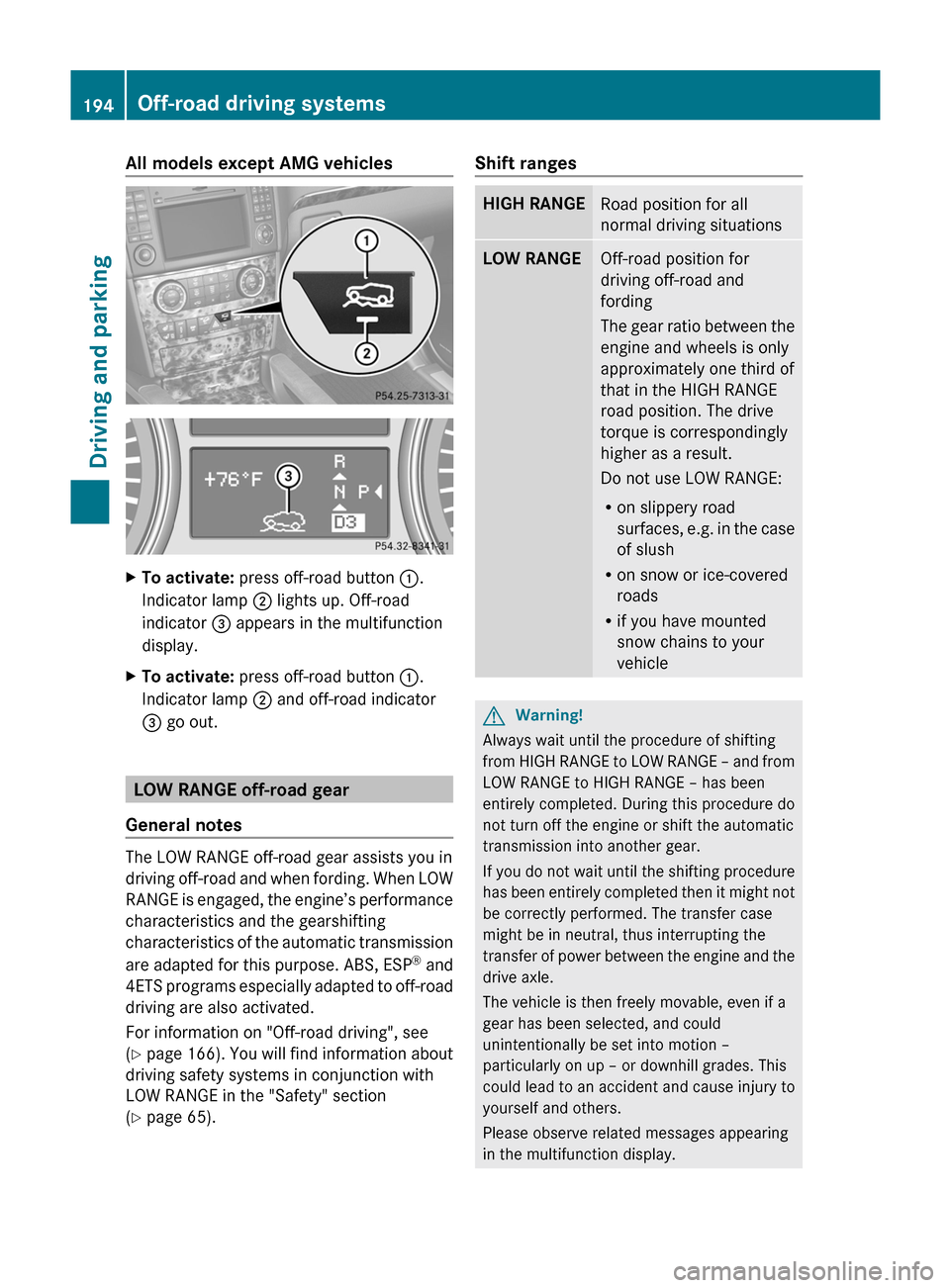
All models except AMG vehiclesXTo activate: press off-road button :.
Indicator lamp ; lights up. Off-road
indicator = appears in the multifunction
display.XTo activate: press off-road button :.
Indicator lamp ; and off-road indicator
= go out.
LOW RANGE off-road gear
General notes
The LOW RANGE off-road gear assists you in
driving off-road and when fording. When LOW
RANGE is engaged, the engine’s performance
characteristics and the gearshifting
characteristics of the automatic transmission
are adapted for this purpose. ABS, ESP ®
and
4ETS programs especially adapted to off-road
driving are also activated.
For information on "Off-road driving", see
( Y page 166) . You will find information about
driving safety systems in conjunction with
LOW RANGE in the "Safety" section
( Y page 65).
Shift rangesHIGH RANGERoad position for all
normal driving situationsLOW RANGEOff-road position for
driving off-road and
fording
The gear ratio between the
engine and wheels is only
approximately one third of
that in the HIGH RANGE
road position. The drive
torque is correspondingly
higher as a result.
Do not use LOW RANGE:
R on slippery road
surfaces, e.g. in the case
of slush
R on snow or ice-covered
roads
R if you have mounted
snow chains to your
vehicleGWarning!
Always wait until the procedure of shifting
from HIGH RANGE to LOW RANGE – and from
LOW RANGE to HIGH RANGE – has been
entirely completed. During this procedure do
not turn off the engine or shift the automatic
transmission into another gear.
If you do not wait until the shifting procedure
has been entirely completed then it might not
be correctly performed. The transfer case
might be in neutral, thus interrupting the
transfer of power between the engine and the
drive axle.
The vehicle is then freely movable, even if a
gear has been selected, and could
unintentionally be set into motion –
particularly on up – or downhill grades. This
could lead to an accident and cause injury to
yourself and others.
Please observe related messages appearing
in the multifunction display.
194Off-road driving systemsDriving and parking
BA 164.1 USA, CA Edition B 2011; 1; 2, en-USd2mskotVersion: 3.0.3.52010-04-21T17:25:06+02:00 - Seite 194
Page 197 of 372
From HIGH RANGE to LOW RANGE
! Only carry out the gear change process if:
R the engine is running
R the transmission is in position N
R you are not driving faster than
25 mph (40 km/h)
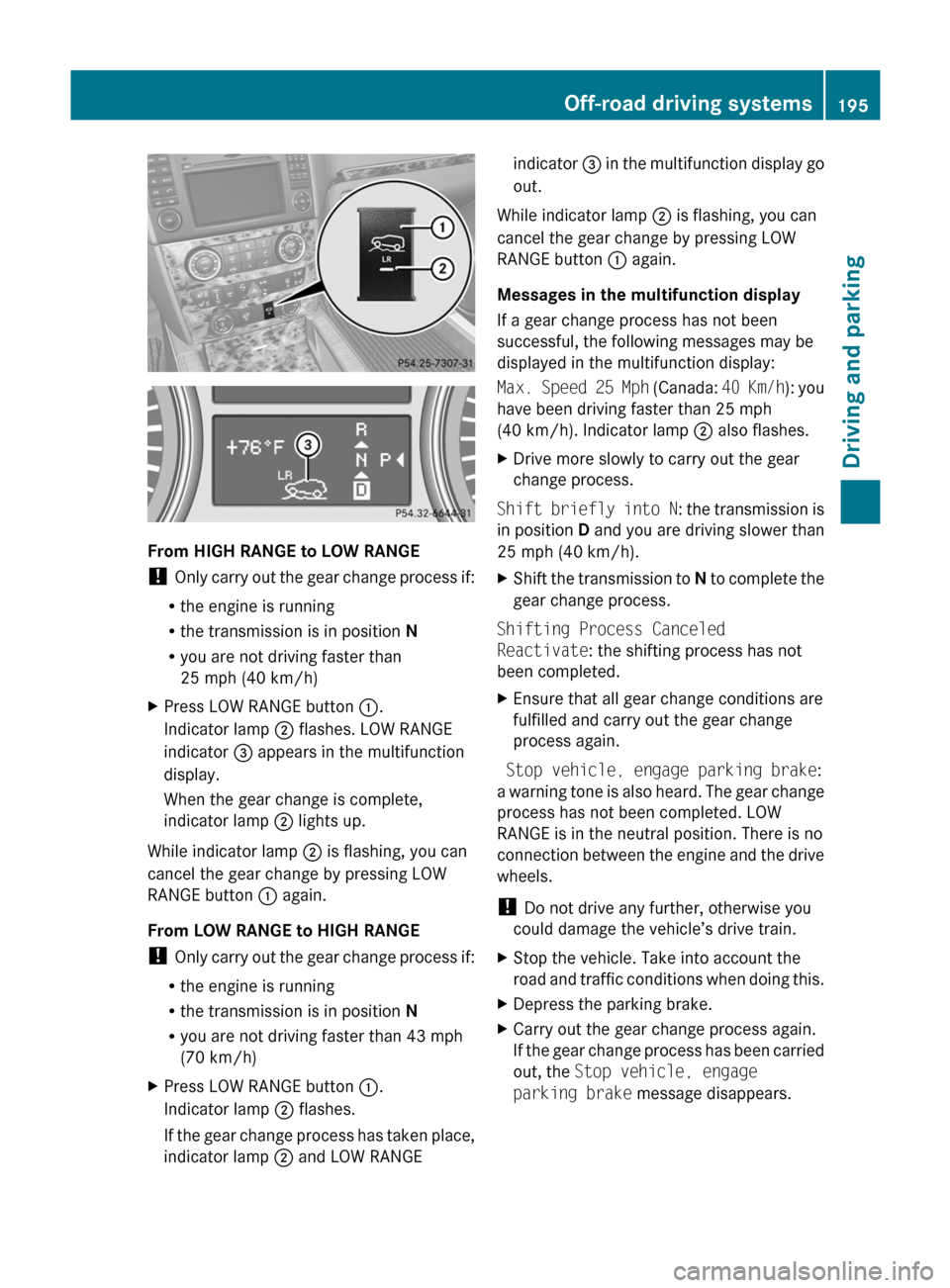
XPress LOW RANGE button :.
Indicator lamp ; flashes. LOW RANGE
indicator = appears in the multifunction
display.
When the gear change is complete,
indicator lamp ; lights up.
While indicator lamp ; is flashing, you can
cancel the gear change by pressing LOW
RANGE button : again.
From LOW RANGE to HIGH RANGE
! Only carry out the gear change process if:
R the engine is running
R the transmission is in position N
R you are not driving faster than 43 mph
(70 km/h)
XPress LOW RANGE button :.
Indicator lamp ; flashes.
If the gear change process has taken place,
indicator lamp ; and LOW RANGEindicator = in the multifunction display go
out.
While indicator lamp ; is flashing, you can
cancel the gear change by pressing LOW
RANGE button : again.
Messages in the multifunction display
If a gear change process has not been
successful, the following messages may be
displayed in the multifunction display:
Max. Speed 25 Mph (Canada: 40 Km/h): you
have been driving faster than 25 mph
(40 km/h). Indicator lamp ; also flashes.
XDrive more slowly to carry out the gear
change process.
Shift briefly into N : the transmission is
in position D and you are driving slower than
25 mph (40 km/h).
XShift the transmission to N to complete the
gear change process.
Shifting Process Canceled
Reactivate : the shifting process has not
been completed.
XEnsure that all gear change conditions are
fulfilled and carry out the gear change
process again.
Stop vehicle, engage parking brake :
a warning tone is also heard. The gear change
process has not been completed. LOW
RANGE is in the neutral position. There is no
connection between the engine and the drive
wheels.
! Do not drive any further, otherwise you
could damage the vehicle’s drive train.
XStop the vehicle. Take into account the
road and traffic conditions when doing this.XDepress the parking brake.XCarry out the gear change process again.
If the gear change process has been carried
out, the Stop vehicle, engage
parking brake message disappears.Off-road driving systems195Driving and parkingBA 164.1 USA, CA Edition B 2011; 1; 2, en-USd2mskotVersion: 3.0.3.52010-04-21T17:25:06+02:00 - Seite 195Z
Page 198 of 372
Differential lock
General notes
i Differential locks are available only in
vehicles with the Off-Road Pro engineering
package.
Your vehicle is equipped with the following:
R A differential lock for the transfer box: this
controls the balance between the front and
rear axles.
R A differential lock for the rear axle: this
controls the balance between the wheels
and the rear axle.
Differential locks improve the vehicle's
traction. 4ETS ( Y page 67)controls the
balance between the wheels on the front axle.
Information on "Off-road driving"; see
( Y page 166).
Information about the differential and
differential locks
When the vehicle is driving around a curve,
the wheels on the outside of the curve have
to cover a greater distance and therefore
have to turn faster than the wheels on the
inside. The differential, a transmission in the
drive train, balances these different rotational
speeds out, making cornering possible.
The disadvantage of a differential: the wheels
with the least grip are driven the hardest.
Example: one wheel on a driven axle is on a
snow-covered surface and therefore has no
traction. This wheel has the most driving
force, since the differential distributes most
of the force to the wheel with the least
resistance. The wheel on the opposite side of
this axle, which is on a solid surface and could
therefore enable traction, does not have any
driving force. 4ETS eliminates this
disadvantage and ensures good steerability
by braking the spinning wheel automatically
and thereby directing more force to the wheel
that is on a solid surface and can provide
traction.
ESP ®
and 4ETS are traction systems that are
ideally suited to road driving and driving on
easily negotiable off-road terrain. The LOW
RANGE off-road gear also improves off-road
capability.
Difficult off-road conditions require additional
measures, such as locking one or more
differentials. Your vehicle has two differential
locks: one (central) differential lock for the
transfer case and one differential lock for the
rear axle. Both differential locks can be
activated using the selector wheel on the
center console. When the (central)
differential for the transfer case is locked, the
speed of the front wheels is the same as the
speed of the rear wheels. When the
differential for the rear axle is locked, both of
the rear wheels turn at the same speed,
independent of their individual torques. Note
that activating the differential locks
significantly reduces the steerability of the
vehicle.
For your safety, the safety of others and to
prevent damage to the vehicle, the
differential locks must not be activated on
paved roads. Note that the differential
function is necessary when driving on paved
roads and that the differentials must never be
locked on paved roads. Otherwise, the
vehicle can no longer be steered. The
differential locks must therefore only be
activated when driving off-road, and then only
if activating the other driving systems (4ETS,
ESP ®
and LOW RANGE off-road gear) is no
longer sufficient.
Engaging the differential locks
! Drive off slowly when the differential
locks are engaged.
Function or performance tests may only be
performed on a 2-axle dynamometer. If you
wish to operate the vehicle on such a
dynamometer, please consult an
authorized Mercedes-Benz Center
beforehand. You could otherwise damage
the drive train or the brake system.
196Off-road driving systemsDriving and parking
BA 164.1 USA, CA Edition B 2011; 1; 2, en-USd2mskotVersion: 3.0.3.52010-04-21T17:25:06+02:00 - Seite 196
Page 199 of 372

Automatic mode
Use automatic mode ; for all driving
situations, including driving off-road or when
fording.
In automatic mode, the differential locks are
engaged and disengaged according to driving
requirements. This guarantees sufficient
traction for most driving situations with
unrestricted vehicle steerability.
XStart the engine.
The differential locks are in automatic
mode. The indicator lamp in selector
wheel : lights up above symbol for
automatic mode ;.
Engaging manually
GWarning!
Never drive on a paved surface with the center
and rear axle differential locks manually
engaged. Ability to steer the vehicle is greatly
reduced when the differential locks are
manually engaged, increasing the risk of an
accident.
For safety reasons, the locks are
automatically released at a vehicle speed
above 31 mph (50 km/h). Nevertheless, you
should only manually lock the differential if
absolutely necessary because engaged locks
will restrict the vehicle drivetrain while
cornering and cause the vehicle to chatter.
This could cause you to lose control of the
vehicle and cause an accident.
! The differential locks must not be
activated when the vehicle is being towed
or while the wheels are spinning.
Only engage the differential locks manually if
traction in automatic mode is insufficient.
At speeds of up to 19 mph (30 km/h), you
can engage the differential locks manually.XStart the engine.XTurn selector wheel : to desired position
= or ?.
The indicator lamp in selector wheel :
lights up at the corresponding symbol.
The engaged differential appears in the
multifunction display:
AThe differential lock for the transfer case
is locked.
If you have not previously selected the off-
road menu ( Y page 213) in the on-board
computer, the message disappears after
about five seconds.
The differential locks are not controlled
automatically. The steerability of the vehicle
is restricted considerably. Drive carefully and
accelerate gently for optimum traction.
! If the differential locks are activated
manually, the wheels scuff on the road
when cornering since the rotation
difference between the wheels is no longer
balanced out.
You can switch back to automatic mode at
any time. For safety reasons, the differential
locks disengage automatically at speeds
above 31 mph (50 km/h). If you stop the
vehicle and switch off the ignition for longer
than ten seconds, the differential locks
switch back to automatic mode.
Off-road driving systems197Driving and parkingBA 164.1 USA, CA Edition B 2011; 1; 2, en-USd2mskotVersion: 3.0.3.52010-04-21T17:25:06+02:00 - Seite 197Z
Page 201 of 372
XMake sure that the automatic transmission
is set to position P.XApply the vehicle's parking brake.XStart the engine.XVehicles with the AIRMATIC package:
select highway level.XVehicles with the adaptive damping
system: set ADS to AUTO or COMF .XSwitch off the engine.XClose all doors and the tailgate.XCouple up the trailer.XEstablish all electrical connections.
i
Vehicles with the AIRMATIC package:
with a trailer attached, the vehicle will
always remain at highway level. When
coupling up a trailer, please observe the
following:
R if highway level has not been set
manually, the vehicle will automatically
sink to highway level as soon as it
reaches a speed of 5 mph (8 km/h).
R high-speed level is not available.
These restrictions apply to all accessories
powered through a connection to the trailer
power socket of your vehicle, e.g. a bicycle
carrier.
Towing a trailer
There are numerous legal requirements
concerning the towing of a trailer, e.g. speed
restrictions. Make sure that your vehicle/
trailer combination complies with the local
requirements not only in your area of
residence but also at any location to which
you are traveling. The police and local
authorities can provide reliable information.
Please observe the following when towing a
trailer:
R To acquaint yourself with driving with a
trailer and with the resulting changes to
handling, you should practice cornering,
stopping and reversing in a traffic-free
location.
R Before driving, check:
- the trailer coupling
- the safety switch for braked trailers
- the safety chains
- the electrical connections
- the lights
- the wheels
R Adjust the exterior mirrors to provide an
unobstructed view of the rear section of the
trailer.
R If the trailer features electronically
controlled brakes, pull away the vehicle/
trailer combination carefully, manually
brake using the brake controller, and check
the brakes for correct function.
R Secure any objects on the trailer to prevent
the cargo from slipping when the vehicle is
in motion.
R If you couple up a trailer, regularly check
the cargo for secure fastening and make
sure that the trailer lamps and (if
applicable) the trailer brakes are
functioning correctly.
R Bear in mind that the handling will be less
stable when towing a trailer than when
driving without one. Avoid sudden steering
movements.
R The vehicle/trailer combination is heavier,
accelerates more slowly, has a decreased
gradient climbing capability and a longer
braking distance.
It is more susceptible to side winds and
requires more careful steering.
R If possible, avoid abrupt braking. Depress
the brake pedal moderately at first, so that
the trailer can activate its own brakes. Then
increase the pressure on the brake pedal.
R If the automatic transmission continues to
shift back and forth between two gears
when driving up or downhill, restrict the
shift range. Select shift range 4, 3, 2, or 1.
A lower gear and lower speed reduce the
risk of engine failure.Towing a trailer199Driving and parkingBA 164.1 USA, CA Edition B 2011; 1; 2, en-USd2mskotVersion: 3.0.3.52010-04-21T17:25:06+02:00 - Seite 199Z
Page 202 of 372
ROn long and steep gradients that are
difficult to drive down in shift range 1,
switch to the off-road drive program.
R When driving downhill, shift to a lower gear
to utilize the engine's braking effect.
Avoid continuous brake application as this
may overheat the vehicle brakes and, if
installed, the trailer brakes.
R If the coolant temperature increases
dramatically while the air-conditioning
system is switched on, switch off the air-
conditioning system.
Coolant heat can additionally be dissipated
by opening the windows and by setting the
blower fan and the interior temperature to
maximum.
R When overtaking, pay particular attention
to the extended length of your vehicle/
trailer combination.
Due to the length of your vehicle/trailer
combination, you will have to travel an
additional distance beyond the vehicle you
are overtaking before returning to the
previous lane.
Decoupling a trailer
GWarning!
Vehicles with air suspension program: While
you are coupling or decoupling a trailer, make
sure nobody locks or unlocks the vehicle and/
or opens or closes doors or the tailgate.
The vehicle’s level could change and you
could endanger yourself and/or others as a
result.
Make sure that you do not operate the ADS
switch or the vehicle level control system
when coupling/decoupling the trailer.
XMake sure that the automatic transmission
is set to position P.XApply the vehicle's parking brake.XStart the engine.XClose all doors and the tailgate.XApply the trailer's parking brake.GWarning!
Vehicles with air suspension program: As
soon as you disconnect the electrical
connection between the trailer and the
vehicle, the vehicle will lower. To help avoid
personal injury, make sure no one is near the
wheel housing or underneath the vehicle
before the electrical connection is
disconnected.
When you decouple the trailer, the vehicle is
temporarily raised because the springs are
relieved of load. Be especially careful during
this process, as you could otherwise injure
yourself and/or others. Make sure that any
persons remaining in the vehicle do not press
the switches for vehicle level control or the
ADS.
XDetach the trailer cable and decouple the
trailer.XDetach the trailer cable and decouple the
trailer.XSwitch off the engine.
Permissible trailer load and drawbar
noseweight
Weight specifications
The Gross Trailer Weight (GTW) is the
combined weight of the trailer together with
the cargo and equipment loaded on the
trailer. Permissible gross weight:
R Vehicles with 4MATIC: 7200 lb (3265 kg)
R Vehicles without 4MATIC: 4630 lb
(2100 kg)
The permissible Trailer drawbar Weight
Rating (TWR) is the maximum weight
permitted on the trailer drawbar:
R Vehicles with 4MATIC: 576 lb (261 kg) limit
for Mercedes-Benz-approved trailer
couplings
R Vehicles without 4MATIC: 370 lb (168 kg)
limit for Mercedes-Benz-approved trailer
couplings
200Towing a trailerDriving and parking
BA 164.1 USA, CA Edition B 2011; 1; 2, en-USd2mskotVersion: 3.0.3.52010-04-21T17:25:06+02:00 - Seite 200
Page 206 of 372
Vehicle equipment
i This manual describes all the standard
and optional equipment of your vehicle
which was available at the time of
purchase. Country-specific differences are
possible. Bear in mind that your vehicle
may not feature all functions described
here. This also refers to safety-related
systems and functions.
Important safety guidelines
You will find an illustration of the instrument
cluster in the "At a glance" section
( Y page 28).
GWarning
A driver's attention to the road and traffic
conditions must always be his/her primary
focus when driving.
For your safety and the safety of others,
selecting features through the multifunction
steering wheel should only be done by the
driver when traffic and road conditions permit
it to be done safely.
Bear in mind that at a speed of just 30 mph
(approximately 50 km/h ), your vehicle is
covering a distance of 44 feet (approximately
14 m) every second.
GWarning!
No messages will be displayed if either the
instrument cluster or the multifunction
display is inoperative.
As a result, you will not be able to see
information about your driving conditions,
such as
R speed
R outside temperature
R warning/indicator lamps
R malfunction/warning messages
R failure of any systems
Driving characteristics may be impaired.
If you must continue to drive, do so with added
caution. Contact an authorized Mercedes-
Benz Center as soon as possible.GWarning!
HYBRID vehicles: It is imperative that you read
the HYBRID Supplemental Operating
Instructions included in your vehicle literature
portfolio. You may otherwise not receive all
necessary safety information and warning for
the operation of your vehicle.
GWarning
Malfunction and warning messages are only
indicated for certain systems and are
intentionally not very detailed. The
malfunction and warning messages are
simply a reminder with respect to the
operation of certain systems. They do not
replace the owner's and/or driver's
responsibility to maintain the vehicle's
operating safety. Have all required
maintenance and safety checks performed on
the vehicle. Bring the vehicle to an authorized
Mercedes-Benz Center to address the
malfunction and warning messages.
Displays and operation
Tachometer
The red band in the tachometer indicates the
engine's overrevving range.
! Do not drive in the overrevving range, as
this could damage the engine.
The fuel supply is interrupted to protect the
engine when the red band is reached.
Outside temperature display
The outside temperature display is in the
multifunction display.
204Displays and operationOn-board computer and displays
BA 164.1 USA, CA Edition B 2011; 1; 2, en-USd2mskotVersion: 3.0.3.52010-04-21T17:25:06+02:00 - Seite 204
Page 210 of 372
FunctionFAdditional functions menu (Y page 219)GTrip computer menu (Y page 219)HTelephone menu (Y page 220)Standard display menu
Standard displayXPress V or U on the steering wheel
to select the standard display.
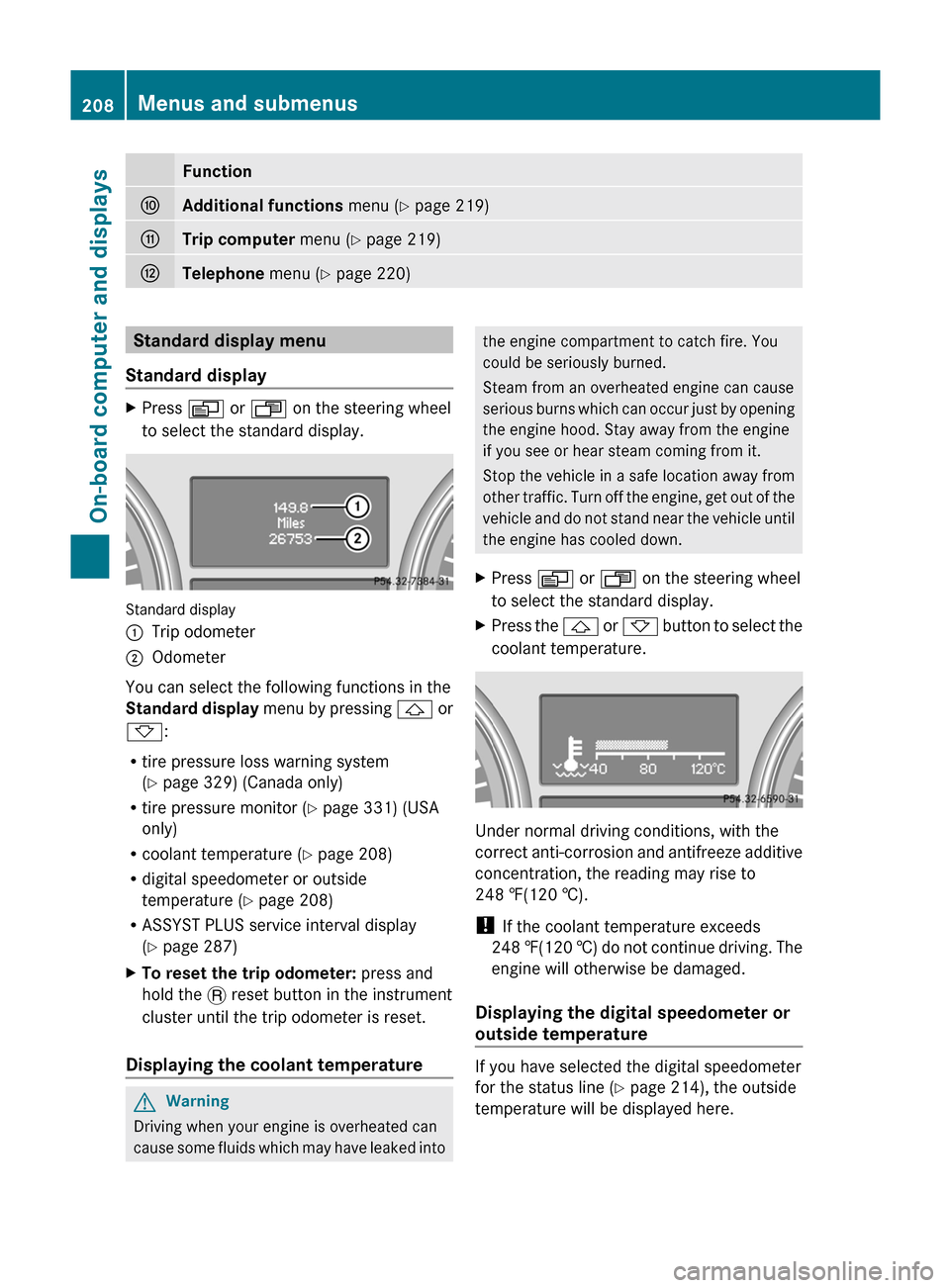
Standard display
:Trip odometer;Odometer
You can select the following functions in the
Standard display menu by pressing & or
* :
R tire pressure loss warning system
( Y page 329) (Canada only)
R tire pressure monitor ( Y page 331) (USA
only)
R coolant temperature ( Y page 208)
R digital speedometer or outside
temperature ( Y page 208)
R ASSYST PLUS service interval display
( Y page 287)
XTo reset the trip odometer: press and
hold the . reset button in the instrument
cluster until the trip odometer is reset.
Displaying the coolant temperature
GWarning
Driving when your engine is overheated can
cause some fluids which may have leaked into
the engine compartment to catch fire. You
could be seriously burned.
Steam from an overheated engine can cause
serious burns which can occur just by opening
the engine hood. Stay away from the engine
if you see or hear steam coming from it.
Stop the vehicle in a safe location away from
other traffic. Turn off the engine, get out of the
vehicle and do not stand near the vehicle until
the engine has cooled down.XPress V or U on the steering wheel
to select the standard display.XPress the & or * button to select the
coolant temperature.
Under normal driving conditions, with the
correct anti-corrosion and antifreeze additive
concentration, the reading may rise to
248 ‡(120 †).
! If the coolant temperature exceeds
248 ‡(120 †) do not continue driving. The
engine will otherwise be damaged.
Displaying the digital speedometer or
outside temperature
If you have selected the digital speedometer
for the status line ( Y page 214), the outside
temperature will be displayed here.
208Menus and submenusOn-board computer and displays
BA 164.1 USA, CA Edition B 2011; 1; 2, en-USd2mskotVersion: 3.0.3.52010-04-21T17:25:06+02:00 - Seite 208