clock MERCEDES-BENZ M-Class 2011 W164 Owner's Manual
[x] Cancel search | Manufacturer: MERCEDES-BENZ, Model Year: 2011, Model line: M-Class, Model: MERCEDES-BENZ M-Class 2011 W164Pages: 372, PDF Size: 16.23 MB
Page 8 of 372
Cargo tie down rings ......................... 260
CD player/CD changer (on-board
computer) .......................................... 212
Center console ..................................... 31
Central locking Automatic locking (on-board
computer) ...................................... 217
SmartKey ......................................... 72
Changing bulbs
Headlamps ..................................... 111
Changing gears .................................. 146
Changing the programming SmartKey ......................................... 75
Checklist
After driving off-road ...................... 168
Before driving off-road ...................167
Child-proof locks
Rear doors ....................................... 63
Special seat belt retractor ...............61
Children
In the vehicle ................................... 58
Restraint systems ............................ 59
Child seat
Automatic recognition .....................48
Automatic recognition/air bag
deactivation, self-test ......................50
ISOFIX (LATCH-type child seat
anchors) ........................................... 61
Special seat belt retractor ...............61
Top Tether ....................................... 62
Troubleshooting ............................... 51
Cigarette lighter ................................ 267
Climate control Activating/deactivating .................128
Activating/deactivating air-
recirculation mode .........................133
Controlling automatically ...............130
Cooling with air dehumidification ..129
Defrosting the windshield ..............132
Demisting the windows .................. 133
Dual-zone automatic climate
control ........................................... 123
Important safety information .........122
Indicator lamp ................................ 130
Multi-zone automatic climate
control ........................................... 124
Problems with "cooling with air
dehumidification" ........................... 130Problems with the rear window
heating .......................................... 133
Rear control panel .................125, 128
Refrigerant ..................................... 362
Setting the air distribution .............132
Setting the airflow .........................132
Setting the air vents ......................135
Setting the temperature ................131
Setting the temperature (rear
compartment) ................................ 131
Switching the MONO function on/
off .................................................. 132
Switching the rear window
heating on/off ............................... 133
Switching the residual heat
function on/off .............................. 134
Clock (on-board computer) ............... 215
Cockpit ................................................. 27
Collapsible spare wheel Inflating ......................................... 309
see Emergency spare wheel
Combination switch .......................... 109
Compass ............................................ 279
Calling up ....................................... 279
Consumption statistics (on-board
computer) .......................................... 219
Convenience closing feature .............. 86
Convenience opening feature ............ 86
Coolant (engine) Checking the level .........................285
Display message ............................ 233
Notes ............................................. 362
Temperature gauge ........................ 208
Cooling
see Climate control
Cornering light (display message) ... 230
Crash-responsive emergency
lighting ............................................... 111
Cruise control .................................... 171
Cruise control lever .......................172
Display message ............................ 239
Cup holder ......................................... 265
Center console .............................. 265
Rear compartment .........................266
Current fuel consumption (on-
board computer) ............................... 2206IndexBA 164.1 USA, CA Edition B 2011; 1; 2, en-USd2mskotVersion: 3.0.3.52010-04-21T17:25:06+02:00 - Seite 6
Page 30 of 372

Instrument cluster
Overview
FunctionPage:Speedometer;Sets the instrument cluster
lighting: dimmer=Reset button?Sets the instrument cluster
lighting: brighterFunctionPageATachometer204BFuel gaugeCMultifunction display206DClock21528Instrument clusterAt a glance
BA 164.1 USA, CA Edition B 2011; 1; 2, en-USd2mskotVersion: 3.0.3.52010-04-21T17:25:06+02:00 - Seite 28
Page 82 of 372
Unlocking the driver's door
(mechanical key)
If the vehicle can no longer be unlocked
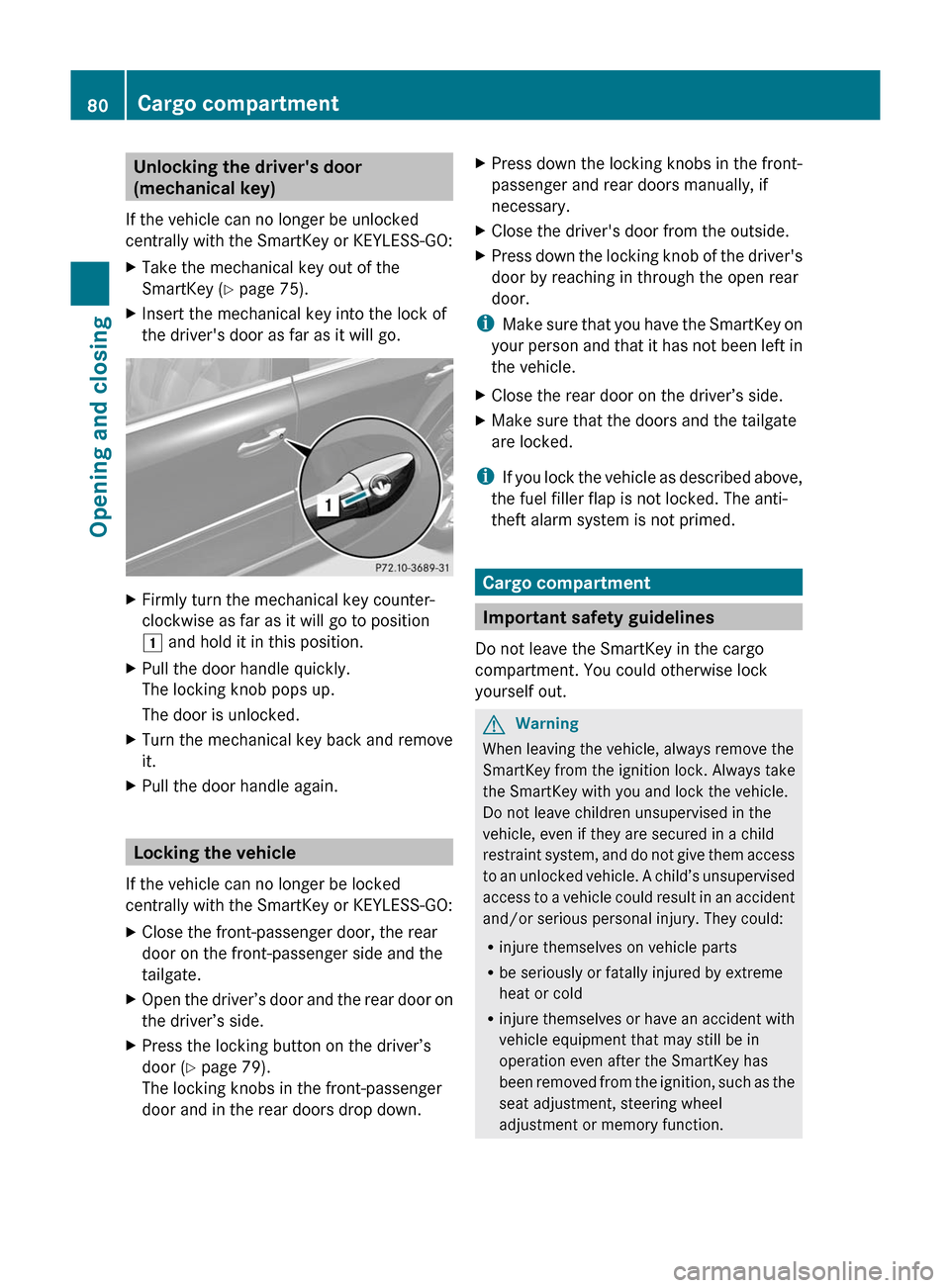
centrally with the SmartKey or KEYLESS-GO:XTake the mechanical key out of the
SmartKey ( Y page 75).XInsert the mechanical key into the lock of
the driver's door as far as it will go.XFirmly turn the mechanical key counter-
clockwise as far as it will go to position
1 and hold it in this position.XPull the door handle quickly.
The locking knob pops up.
The door is unlocked.XTurn the mechanical key back and remove
it.XPull the door handle again.
Locking the vehicle
If the vehicle can no longer be locked
centrally with the SmartKey or KEYLESS-GO:
XClose the front-passenger door, the rear
door on the front-passenger side and the
tailgate.XOpen the driver’s door and the rear door on
the driver’s side.XPress the locking button on the driver’s
door ( Y page 79).
The locking knobs in the front-passenger
door and in the rear doors drop down.XPress down the locking knobs in the front-
passenger and rear doors manually, if
necessary.XClose the driver's door from the outside.XPress down the locking knob of the driver's
door by reaching in through the open rear
door.
i Make sure that you have the SmartKey on
your person and that it has not been left in
the vehicle.
XClose the rear door on the driver’s side.XMake sure that the doors and the tailgate
are locked.
i If you lock the vehicle as described above,
the fuel filler flap is not locked. The anti-
theft alarm system is not primed.
Cargo compartment
Important safety guidelines
Do not leave the SmartKey in the cargo
compartment. You could otherwise lock
yourself out.
GWarning
When leaving the vehicle, always remove the
SmartKey from the ignition lock. Always take
the SmartKey with you and lock the vehicle.
Do not leave children unsupervised in the
vehicle, even if they are secured in a child
restraint system, and do not give them access
to an unlocked vehicle. A child’s unsupervised
access to a vehicle could result in an accident
and/or serious personal injury. They could:
R injure themselves on vehicle parts
R be seriously or fatally injured by extreme
heat or cold
R injure themselves or have an accident with
vehicle equipment that may still be in
operation even after the SmartKey has
been removed from the ignition, such as the
seat adjustment, steering wheel
adjustment or memory function.
80Cargo compartmentOpening and closing
BA 164.1 USA, CA Edition B 2011; 1; 2, en-USd2mskotVersion: 3.0.3.52010-04-21T17:25:06+02:00 - Seite 80
Page 115 of 372
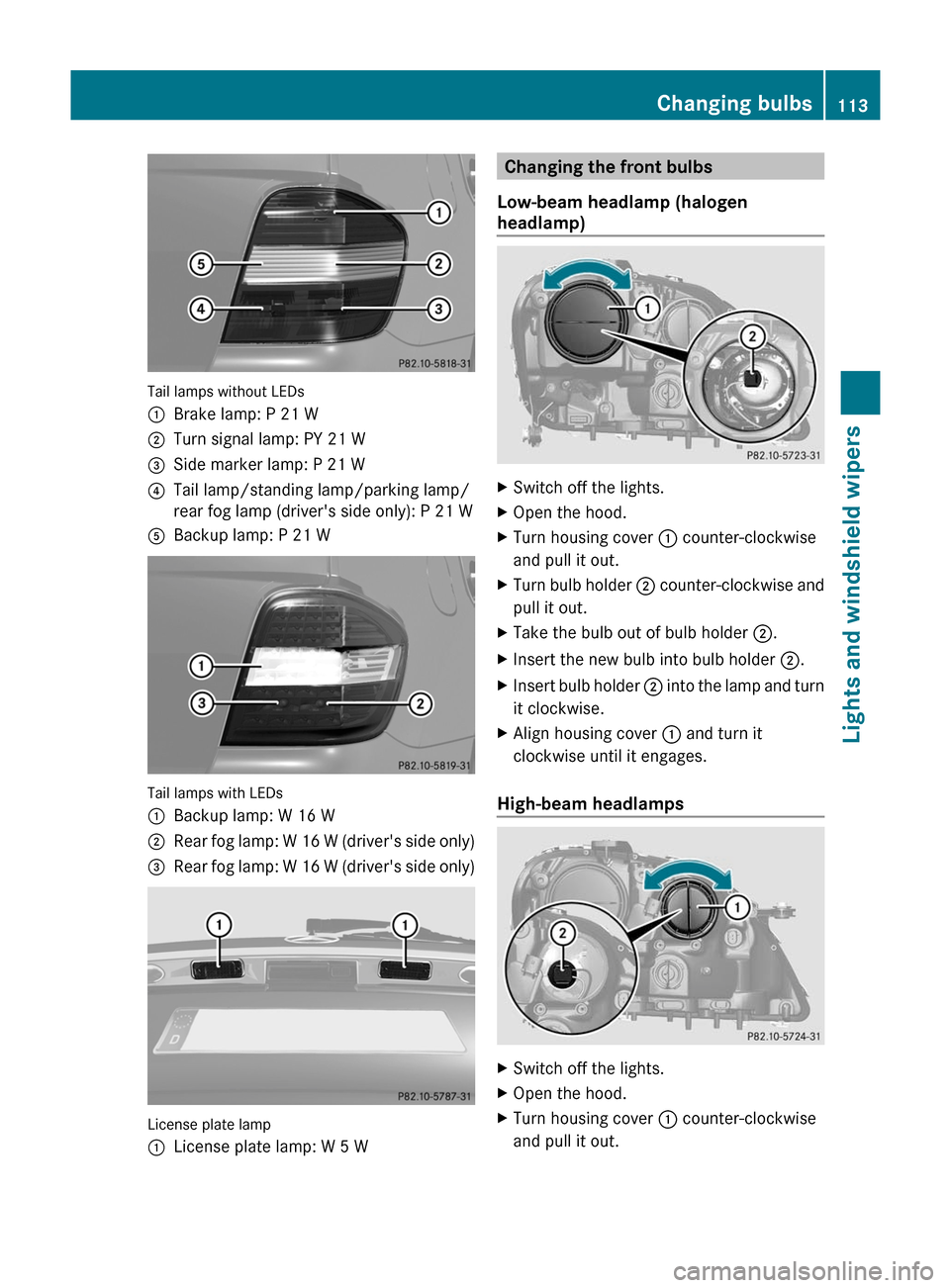
Tail lamps without LEDs
:Brake lamp: P 21 W;Turn signal lamp: PY 21 W=Side marker lamp: P 21 W?Tail lamp/standing lamp/parking lamp/
rear fog lamp (driver's side only): P 21 WABackup lamp: P 21 W
Tail lamps with LEDs
:Backup lamp: W 16 W;Rear fog lamp: W 16 W (driver's side only)=Rear fog lamp: W 16 W (driver's side only)
License plate lamp
:License plate lamp: W 5 WChanging the front bulbs
Low-beam headlamp (halogen
headlamp)XSwitch off the lights.XOpen the hood.XTurn housing cover : counter-clockwise
and pull it out.XTurn bulb holder ; counter-clockwise and
pull it out.XTake the bulb out of bulb holder ;.XInsert the new bulb into bulb holder ;.XInsert bulb holder ; into the lamp and turn
it clockwise.XAlign housing cover : and turn it
clockwise until it engages.
High-beam headlamps
XSwitch off the lights.XOpen the hood.XTurn housing cover : counter-clockwise
and pull it out.Changing bulbs113Lights and windshield wipersBA 164.1 USA, CA Edition B 2011; 1; 2, en-USd2mskotVersion: 3.0.3.52010-04-21T17:25:06+02:00 - Seite 113Z
Page 116 of 372
XTurn bulb holder ; counter-clockwise and
pull it out.XTake the bulb out of bulb holder ;.XInsert the new bulb into bulb holder ;.XInsert bulb holder ; into the lamp and turn
it clockwise.XAlign housing cover : and turn it
clockwise until it engages.
Standing lamps/parking lamps
XSwitch off the lights.XOpen the hood.XTurn bulb holder : counter-clockwise and
pull it out.XTake the bulb out of bulb holder :.XInsert the new bulb into bulb holder :.XInsert bulb holder : into the lamp and turn
it clockwise.
Turn signal lamps/side marker lamps
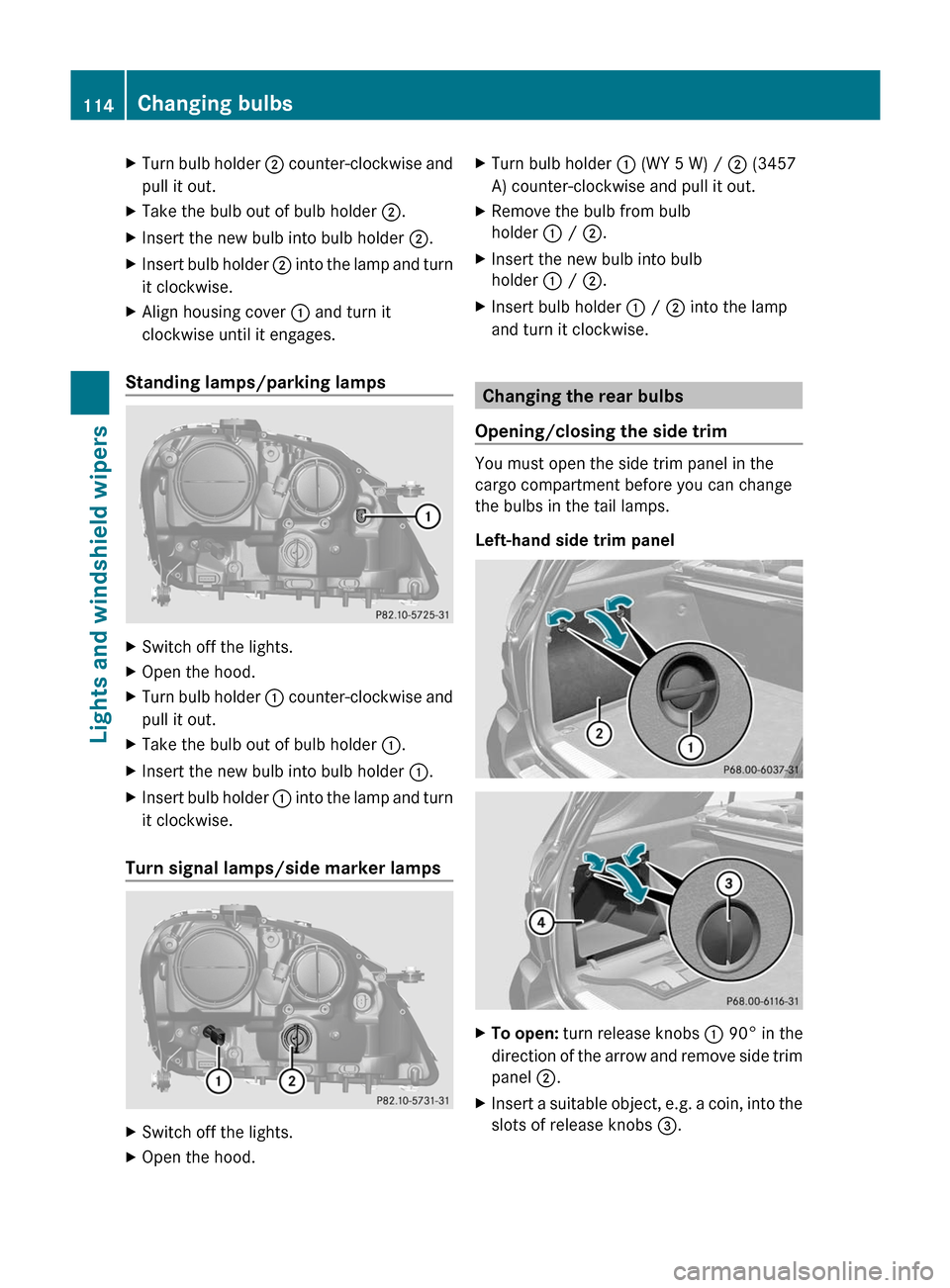
XSwitch off the lights.XOpen the hood.XTurn bulb holder : (WY 5 W) / ; (3457
A) counter-clockwise and pull it out.XRemove the bulb from bulb
holder : / ; .XInsert the new bulb into bulb
holder : / ; .XInsert bulb holder : / ; into the lamp
and turn it clockwise.
Changing the rear bulbs
Opening/closing the side trim
You must open the side trim panel in the
cargo compartment before you can change
the bulbs in the tail lamps.
Left-hand side trim panel
XTo open: turn release knobs : 90° in the
direction of the arrow and remove side trim
panel ;.XInsert a suitable object, e.g. a coin, into the
slots of release knobs =.114Changing bulbsLights and windshield wipers
BA 164.1 USA, CA Edition B 2011; 1; 2, en-USd2mskotVersion: 3.0.3.52010-04-21T17:25:06+02:00 - Seite 114
Page 117 of 372
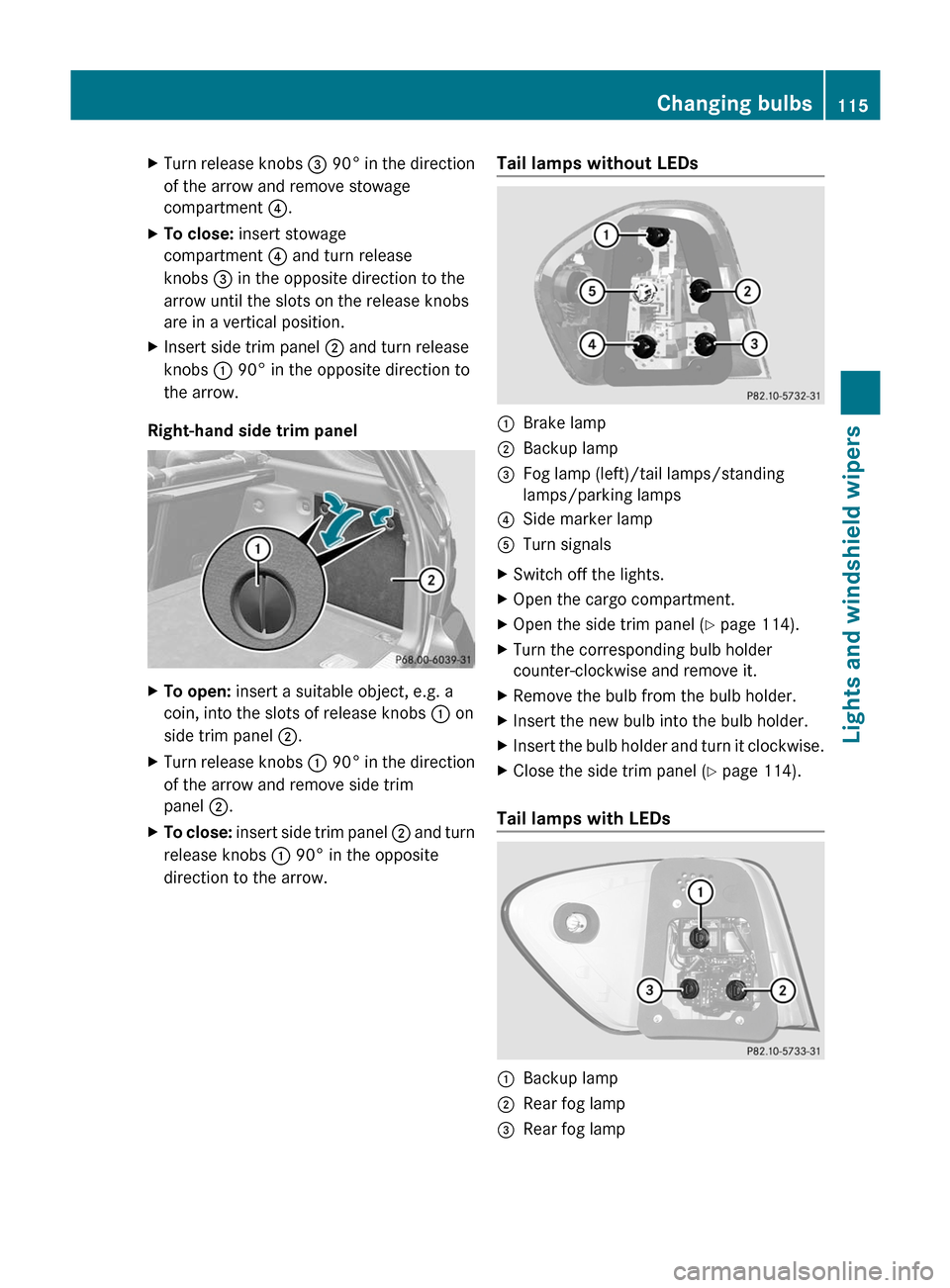
XTurn release knobs = 90° in the direction
of the arrow and remove stowage
compartment ?.XTo close: insert stowage
compartment ? and turn release
knobs = in the opposite direction to the
arrow until the slots on the release knobs
are in a vertical position.XInsert side trim panel ; and turn release
knobs : 90° in the opposite direction to
the arrow.
Right-hand side trim panel
XTo open: insert a suitable object, e.g. a
coin, into the slots of release knobs : on
side trim panel ;.XTurn release knobs : 90° in the direction
of the arrow and remove side trim
panel ;.XTo close: insert side trim panel ; and turn
release knobs : 90° in the opposite
direction to the arrow.Tail lamps without LEDs:Brake lamp ;Backup lamp =Fog lamp (left)/tail lamps/standing
lamps/parking lamps ?Side marker lampATurn signals XSwitch off the lights.XOpen the cargo compartment.XOpen the side trim panel ( Y page 114).XTurn the corresponding bulb holder
counter-clockwise and remove it.XRemove the bulb from the bulb holder.XInsert the new bulb into the bulb holder.XInsert the bulb holder and turn it clockwise.XClose the side trim panel ( Y page 114).
Tail lamps with LEDs
:Backup lamp ;Rear fog lamp =Rear fog lamp Changing bulbs115Lights and windshield wipersBA 164.1 USA, CA Edition B 2011; 1; 2, en-USd2mskotVersion: 3.0.3.52010-04-21T17:25:06+02:00 - Seite 115Z
Page 118 of 372
XSwitch off the lights.XOpen the cargo compartment.XOpen the side trim panel (Y page 114).XTurn the corresponding bulb holder
counter-clockwise and remove it.
XRemove the bulb from the bulb holder.XInsert the new bulb into the bulb holder.XInsert the bulb holder and turn it clockwise.XClose the side trim panel (Y page 114).
License plate lamp
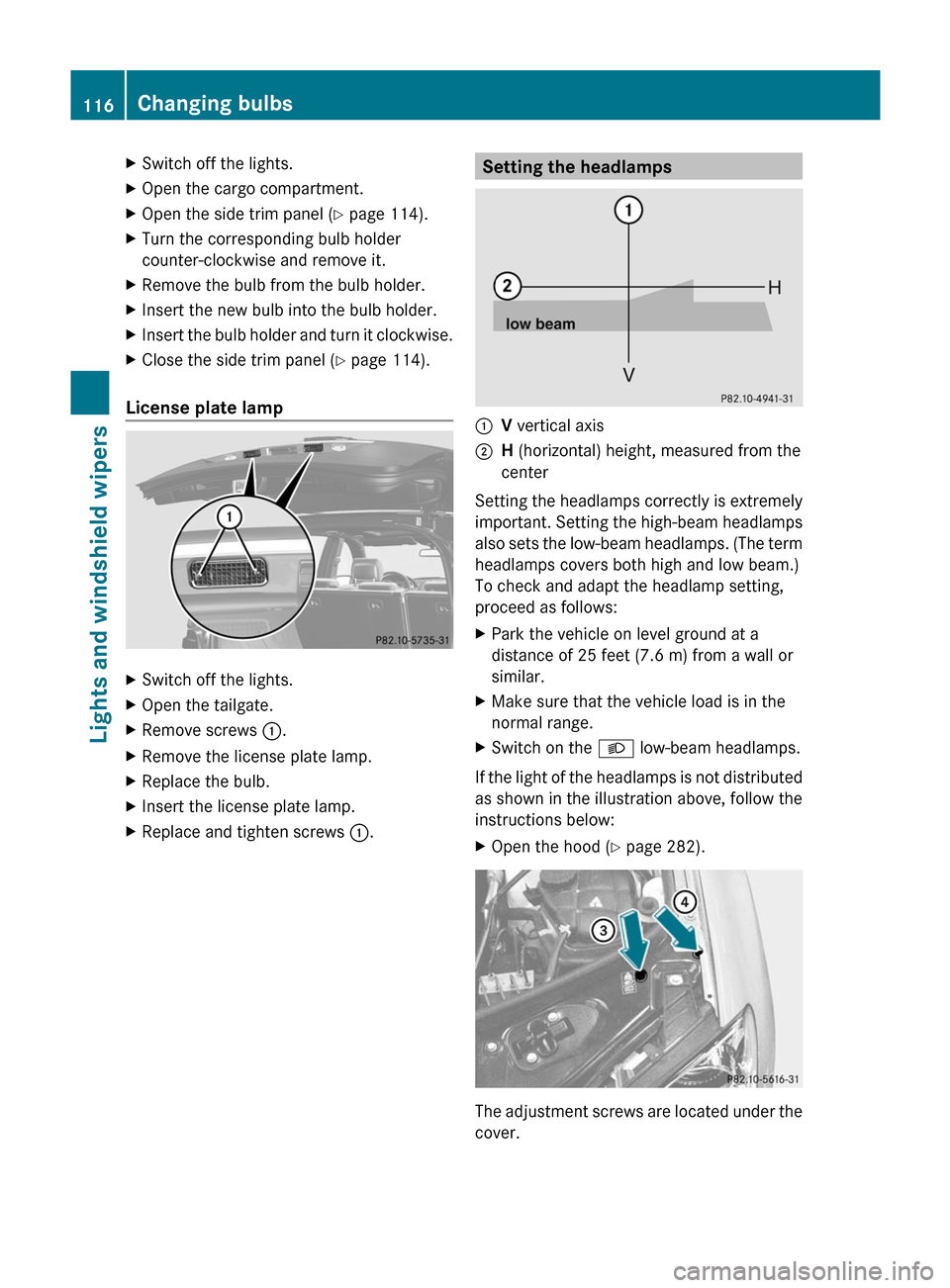
XSwitch off the lights.XOpen the tailgate.XRemove screws :.XRemove the license plate lamp.XReplace the bulb.XInsert the license plate lamp.XReplace and tighten screws :.Setting the headlamps:V vertical axis;H (horizontal) height, measured from the
center
Setting the headlamps correctly is extremely
important. Setting the high-beam headlamps
also sets the low-beam headlamps. (The term
headlamps covers both high and low beam.)
To check and adapt the headlamp setting,
proceed as follows:
XPark the vehicle on level ground at a
distance of 25 feet (7.6 m) from a wall or
similar.
XMake sure that the vehicle load is in the
normal range.
XSwitch on the L low-beam headlamps.
If the light of the headlamps is not distributed
as shown in the illustration above, follow the
instructions below:
XOpen the hood (Y page 282).
The adjustment screws are located under the
cover.
116Changing bulbsLights and windshield wipers
BA 164.1 USA, CA Edition B 2011; 1; 2, en-USd2mskotVersion: 3.0.3.52010-04-21T17:25:06+02:00 - Seite 116
Page 119 of 372

XInsert a suitable tool into the openings in
the cover. The directions of arrow =
and ? indicate the angle at which the tool
needs to be inserted in order to reach the
adjustment screws.XTurn both screws uniformly until the
vertical setting corresponds to :. Turn the
screws clockwise to adjust the headlamp
upwards and counterclockwise to adjust it
downwards.
Gradation:
R Screw at arrow =: 0.67˚ angle of
inclination
R Screw at arrow ?: 0.50˚ angle of
inclination
The left and right headlamp need to be
adjusted individually.
i If it is not possible to adjust the
headlamps accurately, have the
adjustment performed at an authorized
Mercedes-Benz Center.
Windshield wipers
Important safety guidelines
GWarning!
Wiper blades are components that are subject
to wear and tear. Replace the wiper blades
twice a year, preferably in the spring and fall.
Otherwise the windows will not be wiped
properly. As a result, you may not be able to
observe surrounding traffic conditions and
could cause an accident.
! Do not operate the windshield wipers
when the windshield is dry, as this could
damage the wiper blades. Moreover, dust
that has collected on the windshield/rear
window can scratch the glass if wiping
takes place when the windshield/rear
window is dry.
If it is necessary to switch on the windshield
wipers in dry weather conditions, always
use washer fluid when operating the
windshield wipers.
Switching the windshield wipers on/
off
Combination switch
1$ Windshield wipers off2Ä Intermittent wipe, low 133Å
Intermittent wipe, high 144°
Continuous wipe, slow5¯ Continuous wipe, fastBí Single wipe/ î To wipe the
windshield using washer fluidXSwitch on the ignition.XTurn the combination switch to the
corresponding position.
! Intermittent wiping with rain sensor: due
to optical influences and the windshield
becoming dirty in dry weather conditions,
the windshield wipers may be activated
inadvertently. This could then damage the
windshield wiper blades or scratch the
windshield.
For this reason, you should always switch
off the windshield wipers in dry weather.
In the Ä or Å position, the appropriate
wiping frequency is set automatically
according to the intensity of the rain. In
13 Rain sensor set to low sensitivity.
14 Rain sensor set to high sensitivity.Windshield wipers117Lights and windshield wipersBA 164.1 USA, CA Edition B 2011; 1; 2, en-USd2mskotVersion: 3.0.3.52010-04-21T17:25:06+02:00 - Seite 117Z
Page 133 of 372

set. Automatic air distribution remains
activated.
or
XPress one of the M or O buttons.
Automatic air distribution is deactivated.
Air distribution is controlled according to
the position set. Automatic airflow remains
activated.
Setting the temperature
Dual-zone automatic climate control
Different temperatures can be set for the
driver's and front-passenger sides.
XTurn the SmartKey to position 2 in the
ignition lock.XTo increase/reduce: turn controls : and
C clockwise or counter-clockwise
( Y page 123).
Only change the temperature setting in
small increments. Start at 72 ‡ (22 †).
Multi-zone automatic climate control
Climate zones of multi-zone automatic climate
control
You can select different temperature settings
for the driver's and front-passenger sides as
well as for the rear compartment.
XTo increase/reduce the front-
compartment temperature using the front control panel: turn the SmartKey in
the ignition lock to position 2.XTurn thumbwheels : and C17
/E 18
clockwise or counter-clockwise
( Y page 124).
Only change the temperature setting in
small increments. Start at 72 ‡ (22 †).
For USA only:
XTo increase/reduce the rear-
compartment temperature using the
front control panel: turn the SmartKey in
the ignition lock to position 2.XPress the ± button.XTurn control C clockwise or counter-
clockwise ( Y page 124).
Only change the temperature setting in
small increments. Start at 72 ‡ (22 †).
For Canada only:
XTo increase/reduce the rear-
compartment temperature using the
front control panel: turn the SmartKey in
the ignition lock to position 2.XPress the Y button.
The display changes to rear-compartment
climate control.XTurn control E clockwise or counter-
clockwise ( Y page 124).
Only change the temperature setting in
small increments. Start at 72 ‡ (22 †).
i To return to the standard display, press
the Y button.
i The rear display changes to the standard
display automatically after three seconds.
XTo increase/reduce the temperature in
the rear compartment using the rear
control panel: turn the SmartKey in the
ignition lock to position 2.XTurn thumbwheel N17
/R 18
clockwise or
counter-clockwise ( Y page 124).
Only change the temperature setting in
small increments. Start at 72 ‡ (22 †).17 USA only.
18 Canada only.Operating the control systems131Climate controlBA 164.1 USA, CA Edition B 2011; 1; 2, en-USd2mskotVersion: 3.0.3.52010-04-21T17:25:06+02:00 - Seite 131Z
Page 135 of 372

dehumidification function remains on. Air-
recirculation mode remains deactivated.
or
XPress the ^ button.
or
XPress the à button.
or
XTurn the temperature control clockwise or
counter-clockwise.
or
XPress the K or I button.
Defrosting the windows
Windows fogged up on the inside
XActivate the "cooling with air
dehumidification" function Á.XActivate automatic mode Ã.XIf the windows continue to fog up, activate
the defrosting function ( Y page 132).
i
You should only select this setting until
the windshield is clear again.
Windows fogged up on the outside
XSwitch on the windshield wipers.XPress the P/\ 22
or O /c 22
air distribution button.
i You should only select this setting until
the windshield is clear again.
Rear window heating
Activating/deactivating
GWarning
Any accumulation of snow and ice should be
removed from the rear window before driving.
Visibility could otherwise be impaired,
endangering you and others.
The rear window heating has a high current
draw. You should therefore switch it off as
soon as the window is clear as it only switches
off automatically after several minutes.
If the battery voltage is too low, the rear
window heating may switch off.XTurn the SmartKey to position 2 in the
ignition lock.XPress the ª button.
The indicator lamp in the ª button lights
up or goes out.
Problems with the rear window heating
If the indicator lamp in the ª rear window
heating button flashes, the on-board voltage
is too low or the roof is open. The rear window
heating has deactivated itself prematurely or
cannot be activated.
XSwitch off any consumers that are not
required, e.g. reading lamps or interior
lighting.
When the battery is sufficiently charged,
the rear window heating is activated again
automatically.
Activating/deactivating air-
recirculation mode
You can deactivate the flow of fresh air if
unpleasant odors are entering the vehicle
from outside. The air already inside the
vehicle will then be recirculated.
The operation of the air-recirculation mode is
the same for all control panels.
GWarning
Fogged windows impair visibility,
endangering you and others. If the windows
begin to fog on the inside, switching off the
air recirculation mode immediately should
clear interior window fogging. If interior
window fogging persists, make sure the air
conditioning is activated, or press the ¬
button.
22 Canada only.Operating the control systems133Climate controlBA 164.1 USA, CA Edition B 2011; 1; 2, en-USd2mskotVersion: 3.0.3.52010-04-21T17:25:06+02:00 - Seite 133Z