reset MERCEDES-BENZ M-Class 2012 W166 Owner's Guide
[x] Cancel search | Manufacturer: MERCEDES-BENZ, Model Year: 2012, Model line: M-Class, Model: MERCEDES-BENZ M-Class 2012 W166Pages: 396, PDF Size: 14.48 MB
Page 230 of 396
Res
ettingvalues Yo
ucan resetthe valuesof the followi ng
functi ons:
R Tri podo mete r
R Tri pcomp uter"Fro mstar t"
R Tri pcomp uter"Fro mres et"
X Pre ssthe = or; button onthe
stee ring wheel tosel ect the Trip menu
.
X Pre ssthe 9 or: button tosel ect the
functi onthat youwi sh tores et.
X Pre ssa. Re
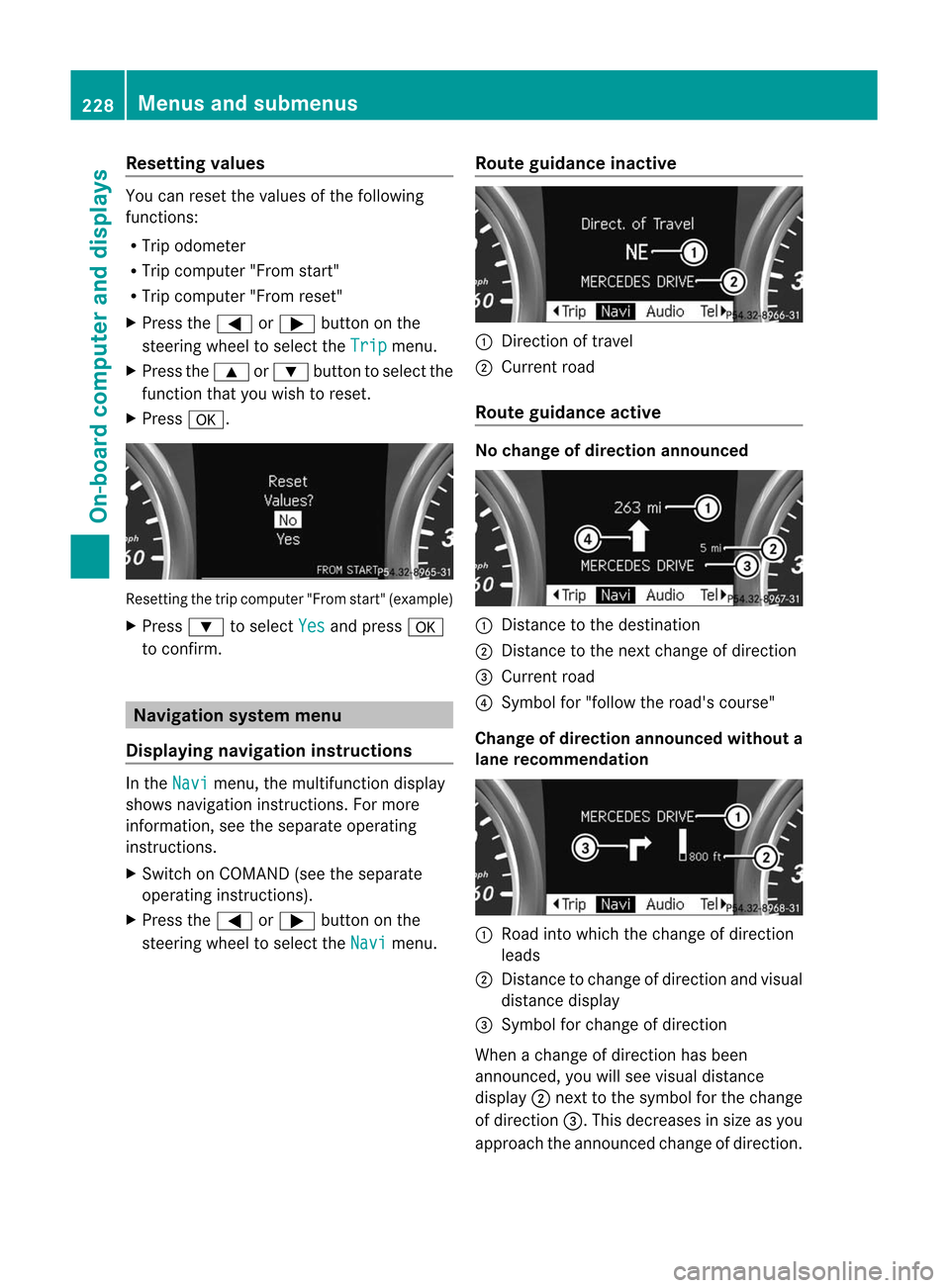
setti ngthe trip comp uter"From start" (example)
X Pres s: tosel ect Yes and
pres sa
to confirm . Navig
ationsys tem menu
Di splay ingnavi gatio nins tructio ns In
the Navi menu
,the multifunction displa y
show snavi gationinstru ctions. Formore
inform ation,see theseparateope rating
instru ctions.
X Swi tch onCOM AND (seethe separate
ope ratinginstru ctions) .
X Pres sthe = or; button onthe
steer ingwhe elto sel ect the Navi menu
. Route
guidanc einac tive :
Directi onoftrave l
; Current road
Route guidanc eacti ve No
chan geofdirec tionanno unced :
Dista ncetothe destinati on
; Dista ncetothe next chang eof dir ectio n
= Current road
? Symb olfor "follow the road's cour se"
Chan geofdirec tionanno uncedwithout a
lane recommen dation :
Road into whichthe chang eof dir ectio n
lea ds
; Dista ncetochang eof dir ectio nand visual
di sta nce displ ay
= Sym bolfor cha nge ofdirecti on
Whe nach angeof directi onhasbee n
annou nced,youwi llsee visuald istanc e
display ;nex ttothe symbol forthe change
of direction =.Thisdecreases insize asyou
approach theannounced changeofdirection. 228
Menus
andsubmenusOn-board computer and displays
Page 239 of 396
wheel
whentheeasy-e ntry/e xitfeat ure is
act ivat ed.
To stop steerin gwheel movemen t,mov e
st eerin gwheel adjustment lever orpres sone
of themem oryposit ionbutt ons.
Do not leave childrenunat tended inthe
vehic le,orwith access toan unloc kedvehic le.
Childre ncould open thedriver's doorand
uninten tionally activate theeasy-entry/ex it
feature, whichcouldresult inan accident
and/or serious personal injury.
X Press the= or; button onthe
steering wheeltoselect the Sett. menu.
X Press the: or9 button toselect the Convenience submenu.
X Press thea button toconf irm.
X Press the: or9 button toselect the Easy
Entry/Exit funct
ion.
You willsee theselected setting: Enabled
or Disabled .
X Press thea button tosave thesetting.
Switching thebelt adjustm enton/off
For further informat iononbelt adjustmen t
(Y page 52).
X Press the= or; button onthe
steering wheeltoselect the Settings
menu.
X Press the: or9 button toselect the Convenience submenu.
X Press thea button toconf irm.
X Press the: or9 button toselect the Belt
Adjustment funct
ion.
You willsee theselected setting: Enabled
or Disabled .
X Press thea button tosave thesetting.
Switching theFold inmirr orswhen
locking function on/off
If you switch onthe Fold Mirrors in when
Locking funct
ion,theexter iormirrors foldin
when youlock thevehicle. Ifyou unlock the
vehicle andthen open thedriver's orfront - passenger
door,theexter iormirrors foldout
again.
If you have switched thefunct iononand you
fold theexter iormirrors inusing thebutton
on the door (Ypage 103), theywillnotfold
out automatically. Theexter iormirrors can
then onlybefolded outusing thebutton on
the door.
X Press the= or; button onthe
steering wheeltoselect the Sett. menu.
X Press the: or9 button toselect the Convenience submenu.
X Press thea button toconf irm.
X Press the: or9 toselect the Fold
Mirrors
inwhen Locking: funct
ion.
You willsee theselected setting: Enabled
or Disabled .
X Press thea button tosave thesetting.
Resetting tofactory settings For
safety reasons, the Daytime
Running Lights: funct
ioninthe Lights submenu
is
only reset when thevehicle isstation ary.
X Press the= or; button onthe
steering wheeltoselect the Settings
menu.
X Press the: or9 button toselect the Factory
Setting submenu.
X Press thea button toconf irm.
The Reset
AllSettings? message
appears.
X Press the: or9 button toselect No or Yes .
X Press thea button toconf irmthe
selection.
If you select Yes ,
the multifunct iondisplay
shows aconf irmation message. Menus
andsubmenus
237On-board computer and displays Z
Page 320 of 396
Please
bearthefollow inginmind Resetting
theservice interval display
Aq ualifi edspec ialist workshop,e.g. an
auth orizedMer cedes- BenzCent er,will reset
the servic eint erval display afterthe
nec essary servicework hasbeen carried out.
Furt herinfor mation ,on maint enanc efor
example, canbeobtained atan authoriz ed
Mercedes- BenzCenter ordirect lyfrom
Mercedes- Benz.
! Ifthe servic eint erval display hasbeen
reset unintentionally, havethesetting
corr ectedataMercedes- BenzCenter .
Have servic ework carried outasdescribed
in the Serv iceBook let.This may other wise
lead toincr eased wearanddamage tothe
major assemblies orthe vehicle.
Driving abroad
An ext ensive Mercedes- BenzServ icenetwork
is also available inother countries.Youcan
obtain furtherinfor mation fromany
authoriz edMercedes- BenzCenter . Care
Notes
oncare
Regular careofyour vehicle isacon dition for
retain ingthe quality inthe long term.
Use care product sand cleanin gagents
recom mended andapproved byMercedes-
Ben z. G
WARN
ING Many
cleanin gproduct scan behazardous.
Some arepoisonous, othersare flammable.
Always followtheinstruct ions onthe
particular container .Always openyour
vehic le'sdoors orwindows whencleaningthe
inside .
Never usefluids orsolven tsthat arenot
design edfor clean ingyour vehic le.
Always lockaway cleaningproduc tsand keep
the mout ofreach ofchildr en. !
For clean ingyour vehic le,do not use any
of the followin g:
R dry, rough orhard cloths
R abrasive cleaningagent s
R solven ts
R clean ingagent scon tain ingsolven ts
Do not scrub.
Do not touc hthe surfac esorprot ective
films withhard objects, e.g. arin gor ice
scr aper. Youcould otherwise scratc hor
damage thesurfac esand protective film. H
Envir
onment alnote Disp
oseofempt ypack aging andclean ing
clot hsinan env iron men tally respo nsible
mann er.
! Donot park thevehic lefor anext ended
period straight afterclean ingit,part icularly
aft erhavin gclean edthe wheels withwheel
clean er.Wheel cleanerscould cause
inc reased corrosio nofthe brake discsand
brake pads/linings. Forthis reason, you
should driveforafew minutes after
cleaning. Brakingheatsthebrake discsand
the brake pads/linings, thusdrying them.
The vehicle canthen beparked. Exterior
care
Automat iccar wash G
WARNING Braking
efficiency isreduced afterwashing
the vehicle. Thiscould cause anaccident. For
this reason, youmust driveparticularly
carefully afterwashing thevehicle untilthe
brakes havedried.
You canwash thevehicle inan automatic car
wash fromthevery start.
! Never cleanyourvehicle inaTouchless
Automatic CarWash asthese usespecial
cleaning agents.Thesecleaning agentscan
damage thepaintwork orplastic parts. 318
CareMaintenance and care
Page 346 of 396
X
Remo vetheto win geye require dfor fron tal
or rear couplin gfrom theveh icleto ol kit
(Y page 328).
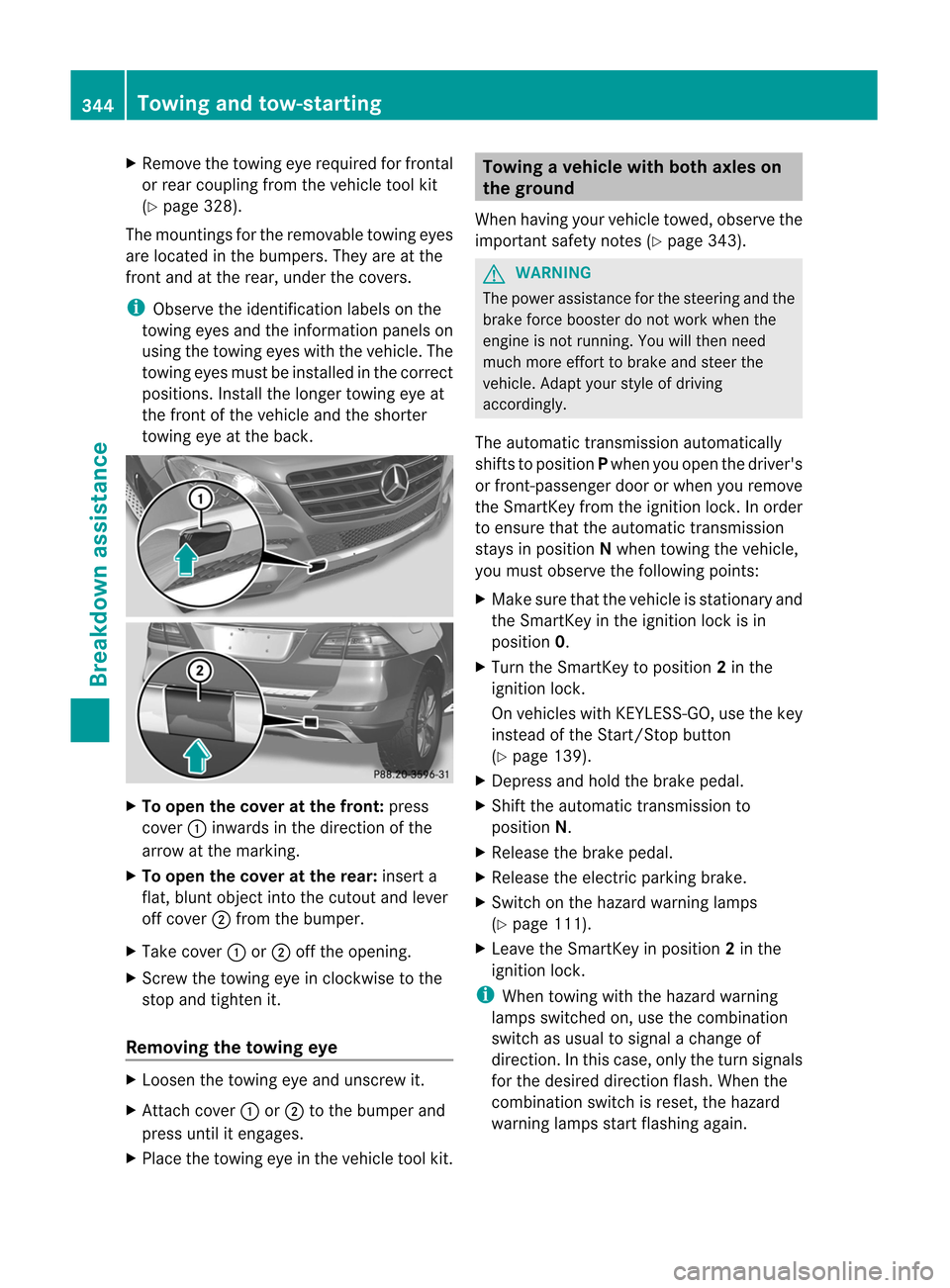
The moun ting sfor therem ovabletowin geyes
are locate din thebump ers.They areatthe
front andatthe rear, under thecovers. i
Observe
theidentification labelson the
towing eyesandtheinformation panelson
using thetowing eyeswiththevehicle. The
towing eyesmust beinstalled inthe correct
positions. Installthe longer towing eyeat
the front ofthe vehicle andtheshorter
towing eyeatthe back. X
To open thecover atthe front: press
cover :inwards inthe direction ofthe
arrow atthe marking.
X To open thecover atthe rear: insert a
flat, blunt object intothecutout andlever
off cover ;from thebumper.
X Take cover :or; offthe opening.
X Screw thetowing eyeinclockwise tothe
stop andtighten it.
Removing thetowing eye X
Loosen thetowing eyeand unscrew it.
X Att ach cover :or; tothe bumper and
press untilitengages.
X Place thetowing eyeinthe vehicle toolkit. Towing
avehicle withboth axles on
th egrou nd
When havingyour vehicletowed, obser vethe
impor tantsafe tyno tes(Y page 343). G
WAR
NING The
power assistancefor thest eerin gand the
brak efor ce boos terdonot work when the
eng ineisnot running.You willthen nee d
muc hmor eeff ort tobrak eand steer the
veh icle.Adapt yourstyle ofdriving
accor dingly.
The automatic transmission automatic ally
shift sto position Pwhen youopen thedriver's
or fron t-passenger doororwhen youremov e
the Smart Keyfrom theignit ionlock .In order
to ensure thattheautomatic transmission
stays inposition Nwhen towing thevehicle,
you must observe thefollowing points:
X Make surethatthevehicle isstat ionary and
the Smart Keyinthe ignit ionlock isin
position 0.
X Turn theSmart Keytoposition 2in the
ignit ionlock .
On vehicles withKEYL ESS-GO, usethekey
inst ead ofthe Start/ Stop butto n
(Y page 139).
X Depres sand hold thebrake pedal.
X Shift theautomatic transmission to
position N.
X Release thebrake pedal.
X Release theelect ricparkin gbrake.
X Switc hon the hazard warning lamps
(Y page 111).
X Leave theSmart Keyinposition 2in the
ignit ionlock . i
When
towing withthehazard warning
lamps switchedon, use thecombin ation
switch asusual tosignal achang eof
direct ion.Inthis case, onlytheturn signals
for the desired directionflash. When the
combin ationswitch isreset ,the hazard
warning lampsstartflashing again. 344
Towing
andtow-st artingBreakdown assistance