Key MERCEDES-BENZ M-Class 2012 W166 Repair Manual
[x] Cancel search | Manufacturer: MERCEDES-BENZ, Model Year: 2012, Model line: M-Class, Model: MERCEDES-BENZ M-Class 2012 W166Pages: 396, PDF Size: 14.48 MB
Page 156 of 396
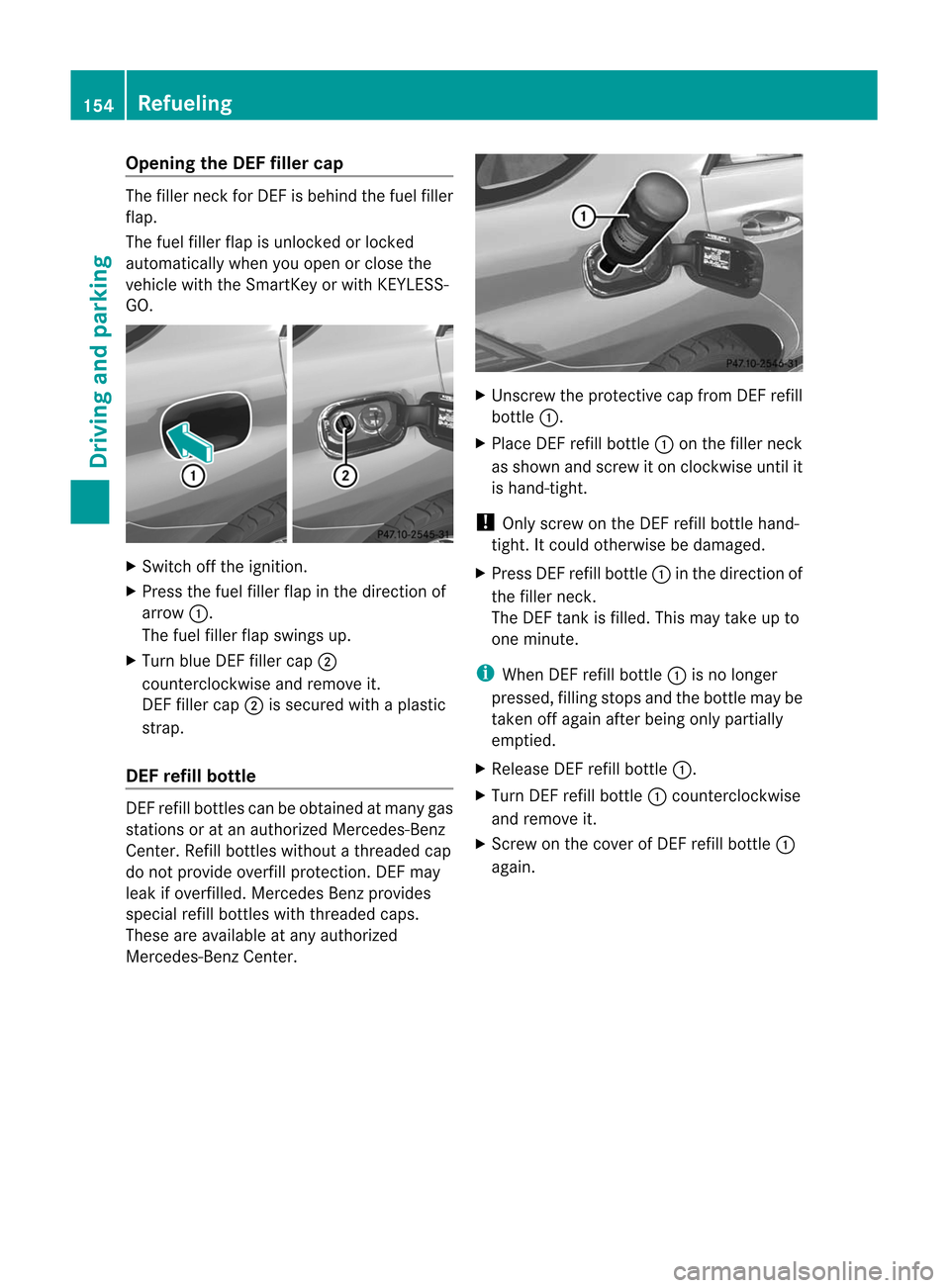
Opening
theDEF filler cap The
filler neckfor DE Fisbehind thefuel filler
flap.
The fuel filler flapisunlocked orlocked
automaticall ywhen youopen orclose the
vehicle withtheSmartKey orwith KEYLES S-
GO. X
Switch offthe ignition.
X Press thefuel filler flapinthe direction of
arrow :.
The fuel filler flapswings up.
X Turn blueDEFfiller cap;
counterc lockwise andremove it.
DEF filler cap;issecured withaplastic
strap.
DEF refill bottle DEF
refill bottles canbeobtained atmany gas
stations oratan authorized Mercedes-Benz
Center. Refillbottles without athreaded cap
do not provide overfillprotection.DEF may
leak ifoverfilled. Mercedes Benzprovides
special refillbottles withthreaded caps.
These areavail able atany authorized
Mercedes-Benz Center. X
Unscrew theprotect ivecap from DEFrefill
bottle :.
X Place DEFrefill bottle :onthe filler neck
as shown andscrew iton clockwise untilit
is hand-tight.
! Only screw onthe DEF refill bottle hand-
tight. Itcould otherwise bedamaged .
X Press DEFrefill bottle :inthe direction of
the filler neck.
The DEF tank isfilled. Thismay take upto
one minute. i
When
DEFrefill bottle :isno longer
pressed, fillingstops andthebottle maybe
taken offagai nafter being only partially
emptie d.
X Rel eas eDEF refillbottle :.
X Turn DEFrefillbottle :counterclo ckwise
and remove it.
X Screw onthe cover ofDEF refillbottle :
aga in. 154
Refuel
ingDriving and parking
Page 157 of 396
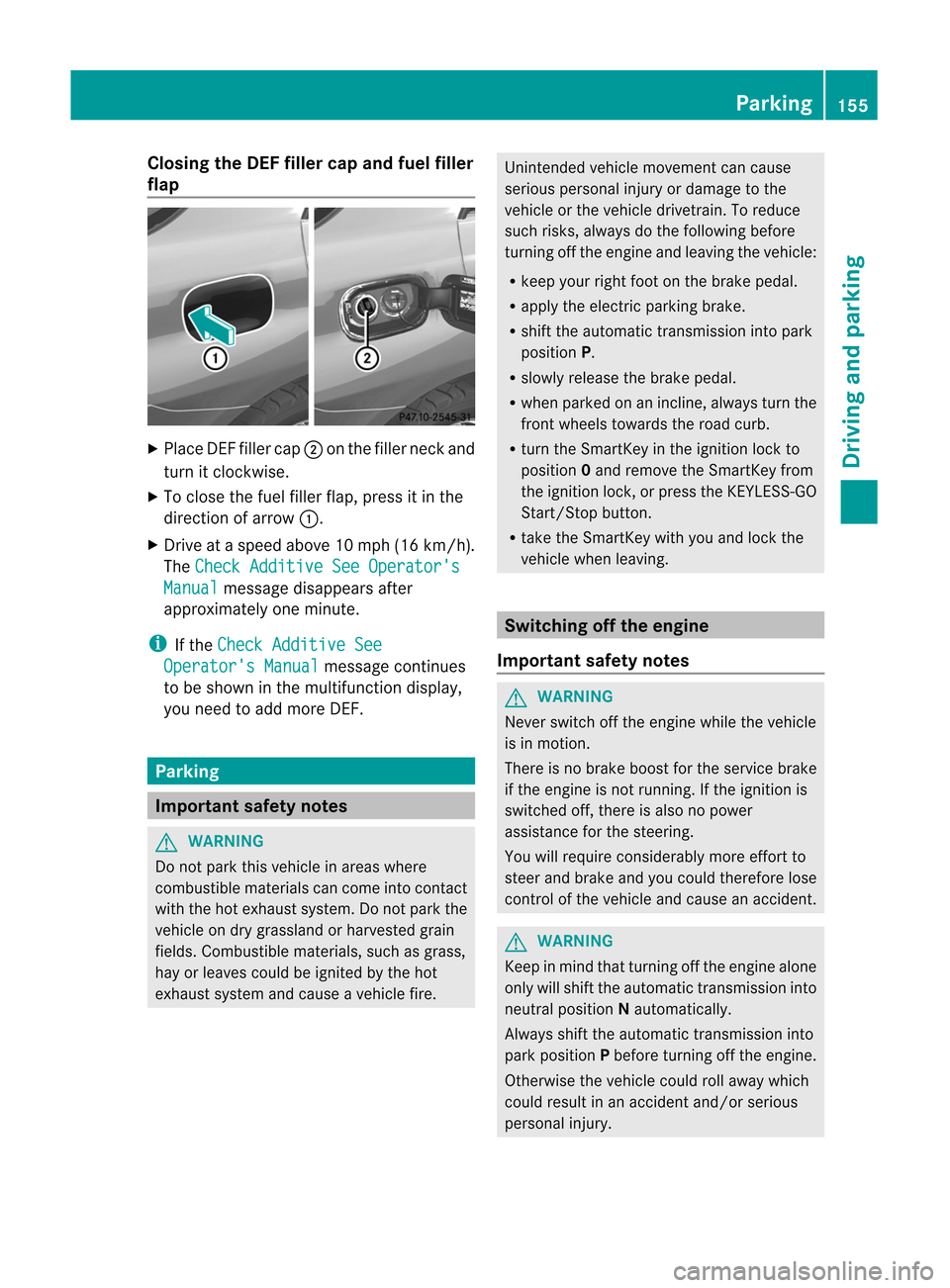
Closing
theDEF filler capand fuel filler
fla p X
Plac eDE Ffiller cap;onthe filler neckand
tur nit clo ckwi se.
X To closethe fuel fillerf lap, press itin the
direc tionofarrow :.
X Dr ive ataspeed above10mph (16km/h) .
The Chec
kAddi tive SeeOperator's Manu
al mess
agedisappears after
approx imatelyone minute. i
If
the Chec
kAddi tive See Oper
ator'sManu al mess
agecontinues
to be shown inthe mult ifunc tiondisplay,
you need toadd moreDE F. Par
king Imp
ortant safety notes G
WARN
ING Do
not park thisvehic lein areas where
com bustib lemat erials cancom eint ocon tact
with thehot exhaust system. Donot park the
vehic leon dry grass landorharve stedgrain
fields. Combust iblematerials, suchasgrass ,
hay orleaves couldbeignit edbythe hot
exh aust systemand cause avehic lefire . Unin
tended vehic lemov emen tcan cause
serio usperso nalinjury ordamage tothe
vehic leor the vehic ledrive train. Toreduc e
such risks,always dothe followin gbefor e
tur nin goff the engineand leavin gthe vehic le:
R keep yourright footonthe brak epedal.
R apply theelect ricpark ingbrak e.
R shift theautom atictransm ission intopark
posit ionP.
R slowly release thebrak epedal.
R when parkedon anincline, always turnthe
front wheels towards theroad curb.
R turn theSmartKey inthe ignition lockto
position 0and remove theSmartKey from
the ignition lock,orpress theKEYLES S-GO
Start /Stopbutton.
R take theSmartKey withyouand lock the
vehicle whenleaving. Switching
offthe engine
Import antsafety notes G
WARNING Never
switch offthe engine whilethevehicle
is in motion.
There isno brake boostforthe service brake
if the engine isnot running. Ifthe ignition is
switched off,there isalso nopower
assistance forthe steering.
You willrequire considerably moreeffort to
steer andbrake andyoucould therefore lose
cont rolofthe vehicle andcause anaccident. G
WARNING Keep
inmind thatturning offthe engine alone
only willshift theautomatic transmission into
neutral position Nautomatically .
Always shifttheautomatic transmission into
park position Pbefore turning offthe engine.
Otherwise thevehicle couldrollaway which
could result inan accident and/orserious
personal injury. Park
ing
155Driving and parking Z
Page 158 of 396
X
App lythe electri cpark ing brak e.
X Sh ift thetrans mis sion toposi tionP.
Using theSm artKey X
Turn theSm artKey toposi tion0 inthe
ign ition lockand remove it.
The imm obiliz erisact ivat ed. i
If
you turnoff theen gin ewit hth e
Sm artKey and then rem ove itfrom the
ign ition lockor open afron tdoor ,th e
auto matictrans mis sion shiftsto P
auto maticall y.
Using KEYLESS- GO X
Pre sstheSt art /S topbut ton( Ypage 139).
The engin estops andallthe indicat or
lamps inthe instrument clustergoout. i
If
you usetheStart/ Stop butt ontoswitc h
off the engin e,the automatic transmission
shift sto Nautomatic ally.Ifyou then open
one ofthe fron tdoors, theautomatic
trans mission shiftstoP. i
In
an emergenc y,the engine canbe
turned offwhile thevehicle isin motion by
pressing andholding theStart /Stopbutton
for three seconds. Elec
tric par king brake
General information i
The
electric parking brakeperforms a
funct iontest atregular intervalswhile the
engine isswitched off.The sounds thatcan
be heard whilethisisoccurrin gare normal. G
WARNIN
G When
leaving thevehicle, alwaysremove the
Smart Keyfrom thestart erswitch, takeitwith
you, andlock thevehicle. Donot leave
children unattendedinthe vehicle, orwith
access toan unlocked vehicle.Children could
release theparking brakeand/or shiftthe
automatic transmission outofpark position P,
either ofwhich couldresult inan accident
and/or serious personal injury. Applying/releasing
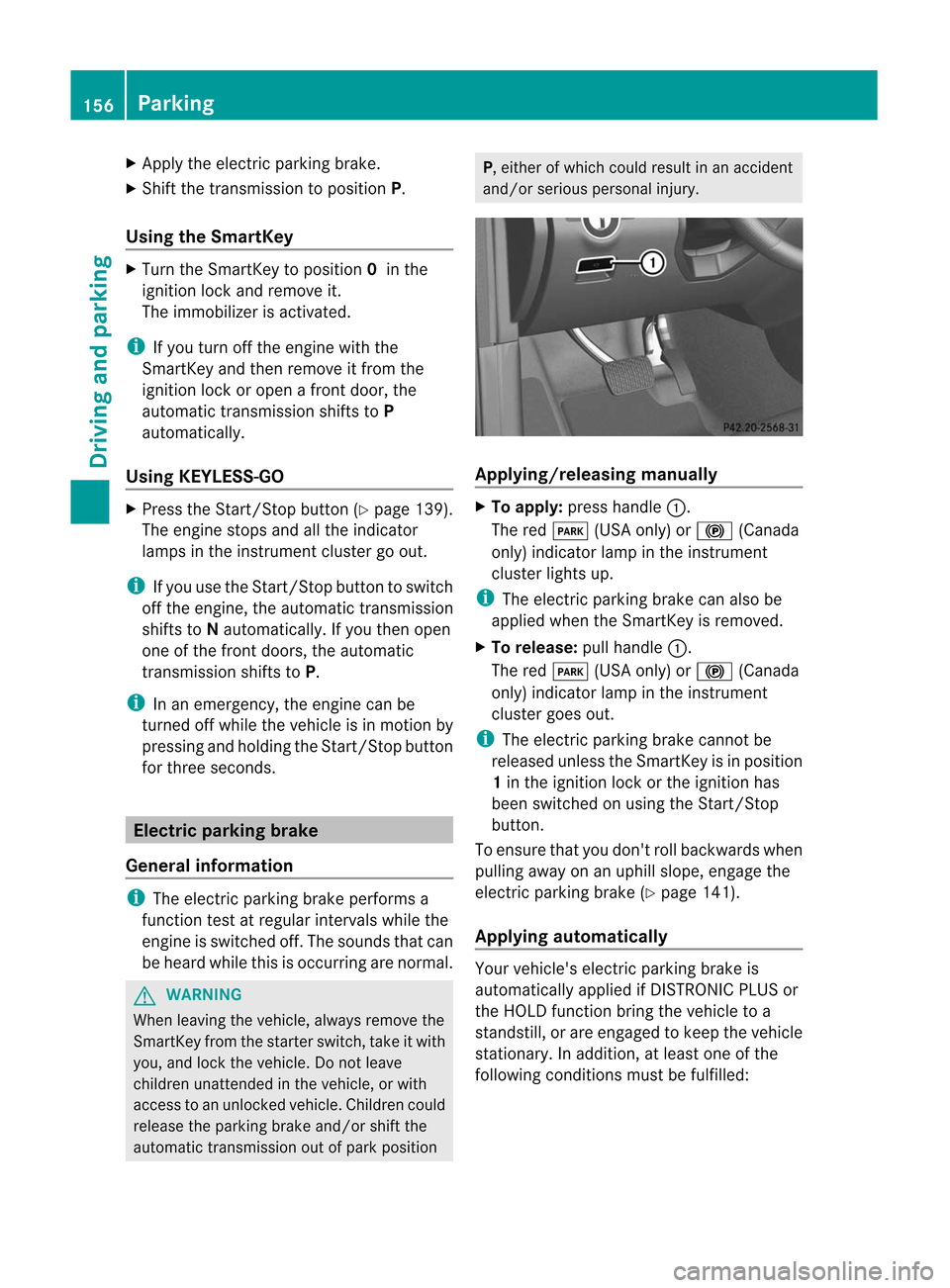
manually X
To app ly:press handle :.
The redF (USAonly)or! (Canada
only) indicator lampinthe instr ument
cluster lightsup. i
The
electric parking brakecanalso be
applied whentheSmart Keyisremoved.
X To release: pullhandle :.
The redF (USAonly)or! (Canada
only) indicator lampinthe instr ument
cluster goesout. i
The
electric parking brakecannotbe
released unlesstheSmart Keyisin position
1 in the ignition lockorthe ignition has
been switched onusing theStart /Stop
button .
To ensure thatyoudon't rollbackwards when
pulling awayonanuphill slope, engage the
electric parking brake(Ypage 141).
Applying automat ically Your
vehicle's electricparking brakeis
automatically appliedifDIS TRONIC PLUSor
the HOLD functionbring thevehicle toa
standst ill,orare engaged tokeep thevehicle
station ary.Inaddition, atleast oneofthe
following conditionsmust befulfilled: 156
Par
kingDriving and parking
Page 162 of 396
Limi
tedbraking performa nce onsalt -
tr eat edroa ds G
WAR
NING The
layer ofsalt ontheb rake discs andthe
brake pads/linings maycauseadelay inthe
brakin geffec t,resultin gin asignific antly
longer brakingdistanc e,which couldleadto
an acciden t.
To avoid thisdanger, youshould:
R occ asionally brakecarefully, without
puttin gother roadusers atrisk, when you
are driving onsalted roads. Thishelps to
remov eany salt that may have startedto
build upon the brake discsandthebrake
pads/linin gs.
R maint ainagreater distancetothe vehicle
ahead anddrive withparticular care.
R carefully applythebrakes atthe end ofa
trip and immediately aftercommen cinga
new trip,sothat saltresidues areremoved
from thebrake discs.
Servicing thebrakes !
Ifthe red brake warning lamplights upin
the instr ument cluster andyouhear a
warning tonewhile theengine isrunnin g,
the brake fluidlevel maybetoo low.
Observe additional warningmessages in
the multifunct iondisplay .
The brake fluidlevel maybetoo low due to
brake padwear orleaking brakelines.
Have thebrake system checked
immediately. Thiswork should becarried
out atan authorized Mercedes-B enz
Center.
All check sand mainten ancework onthe
brake system mustbecarried outata
quali fiedspecialist workshop only.Have this
work carried outatan authorized Mercedes-
Benz Center.
Have thebrake padsreplaced andthebrake
fluid renewed ataquali fiedspecialist
workshop, e.g.anauthorized Mercedes-B enz
Center. G
WARNING If
brake padsorbrake fluidother thanthose
recommen dedareused, thebraking
properties ofthe vehicle canbedegraded to
an exten tthat safe braking issubstantially
impaired. Thiscould result inan accident.
! Afunct ionorperformance testshould
only becarried outona2 -axl e
dy nam ome ter.Ifyo uar eplanni ngtohave
the vehicleteste don such ady nam ome ter,
conta ctan author izedMer cedes-B enz
Ce nter toobtainfu rthe rinfo rma tionfir st.
Othe rwise, youcou ldda ma gethe drive
trai nor the brakesystem .
! Asthe ESP ®
sy stem opera tes
au toma tically, the engineand theigniti on
mu stbe switch edoff (Sma rtKeyin po sitio n
0 or 1in the igniti onlock orStar t/Stop
bu tton inpo sitio n0 or 1) wh ile the electri c
pa rking brakeisbe ing teste don abra ke
dy nam ome ter(ma ximu m10secon ds).
Brak ingtrigger edautomatic allybyESP®
may seriously damagethebrake system.
If your brake system issubject onlyto
moderate loads,youshould testthe
func tionality ofyour brakes atregular
int ervals bypressing firmlyonthe brake pedal
at high speeds. Thisimproves thegrip ofthe
brake pads. G
WARN
ING Make
surethatyoudonot endanger other
road users whenyouapply thebrakes.
You canfind adescript ionofBrak eAssist
(BAS )on (Ypage 61)orofBA SPLUS on
(Y page 62). 160
Driving
tipsDriving and parking
Page 184 of 396
For
safety reasons, thevehi clecan only be
low ered with alldoo rsand thetailga teclos ed.
Low ering isinterru ptedifadoo rorthe tailgate
is opened andwillcont inue after thedoor is
closed again.
! When driving onextrem elyrough terrain,
select ahigh vehicle levelingood time.
Make surethatthere isalwa yssufficient
ground clearance toprevent damage tothe
vehicle.
! Remove thekey from theignition before
raising oneormore wheels withthe
appropria teequipment.
For information aboutdriving off-road, see
(Y page 162).
Basic settings
The exten ttowhich thevehicle israised or
lowered depends onthe basic setting
selected. Selectraisedlevelforoff-road
driving orhighway /high-speed levelfor
normal roads.
The individual vehiclelevelsdifferfrom
highway levelasfollows:
R +/- 0in (+/- 0mm) atthe highway level
R –0.6 in(–15 mm)atthe high-speed level
R +2. 3in (+ 60 mm) atthe raised level
Raised level
Only select raised levelwhen thisis
appropriate forthe road condit ions.
Otherwise, fuelconsumpt ionmay increase
and handling maybeaffect ed. X
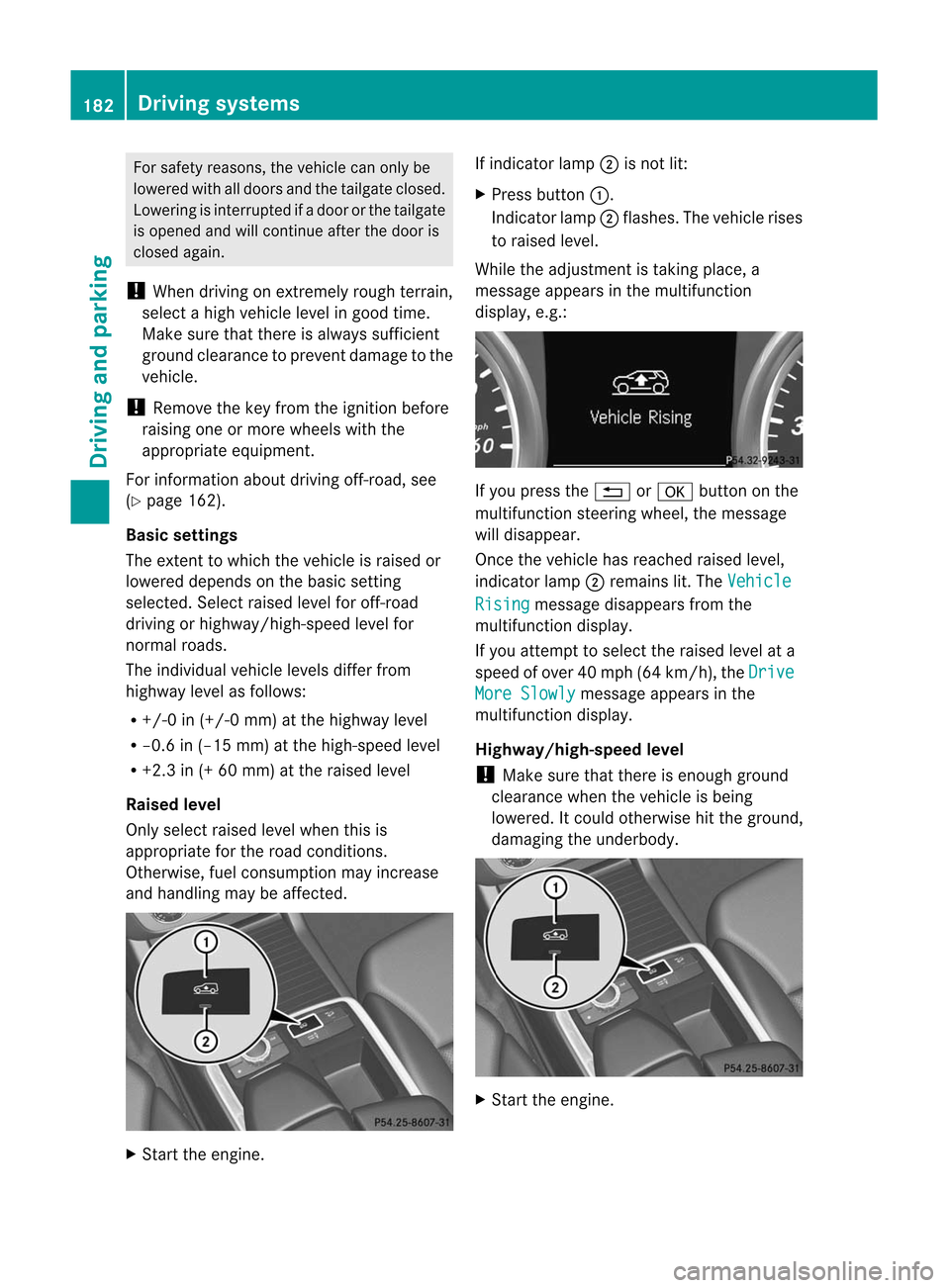
Start theengine. If
indicator lamp;isnot lit:
X Press button :.
Indicat orlamp ;flashes. Thevehicle rises
to raised level.
While theadjustmen tistaking place,a
message appearsinthe multifunction
displa y,e.g.: If
you press the% ora button onthe
multifunction steeringwheel,themessage
will disapp ear.
Once thevehicle hasreached raisedlevel,
indicator lamp;remains lit.The Vehicle
Rising message
disappearsfrom the
multifunction display.
If you attempt toselect theraised levelata
speed ofover 40mph (64km/h), the Drive
More
Slowly message
appearsinthe
multifunction display.
Highway/high-speed level
! Make surethatthere isenough ground
clearance whenthevehicle isbeing
lowered. Itcould otherwise hitthe ground,
damagi ngthe underbody . X
Start theengine. 182
Driving
systemsDriving and parking
Page 187 of 396
segments.
PARKTRONIC isoperational if
yell ow segments showingoperational
readiness =light up.
The selected transmission positionandthe
direction inwhich thevehicle isrolling
determine whichwarning displayis active
when theengine isrunning. Tra
nsmission
position Warning
display D
Front
areaactivated R,
Nor the vehicle
is rolling
backwards Rear
andfront areas
activated P
No
areas activated One
ormore segments lightupasthe vehicle
approa chesanobstacle, depending onthe
vehicle's distancefromtheobstacle.
From the:
R sixth segment onwards, youwillhear an
intermitt entwarning tonefor
approximately twoseconds.
R seventh segment onwards, youwillhear a
warning toneforapproximately two
seconds. Thisindicates thatyouhave now
reached theminimum distance.
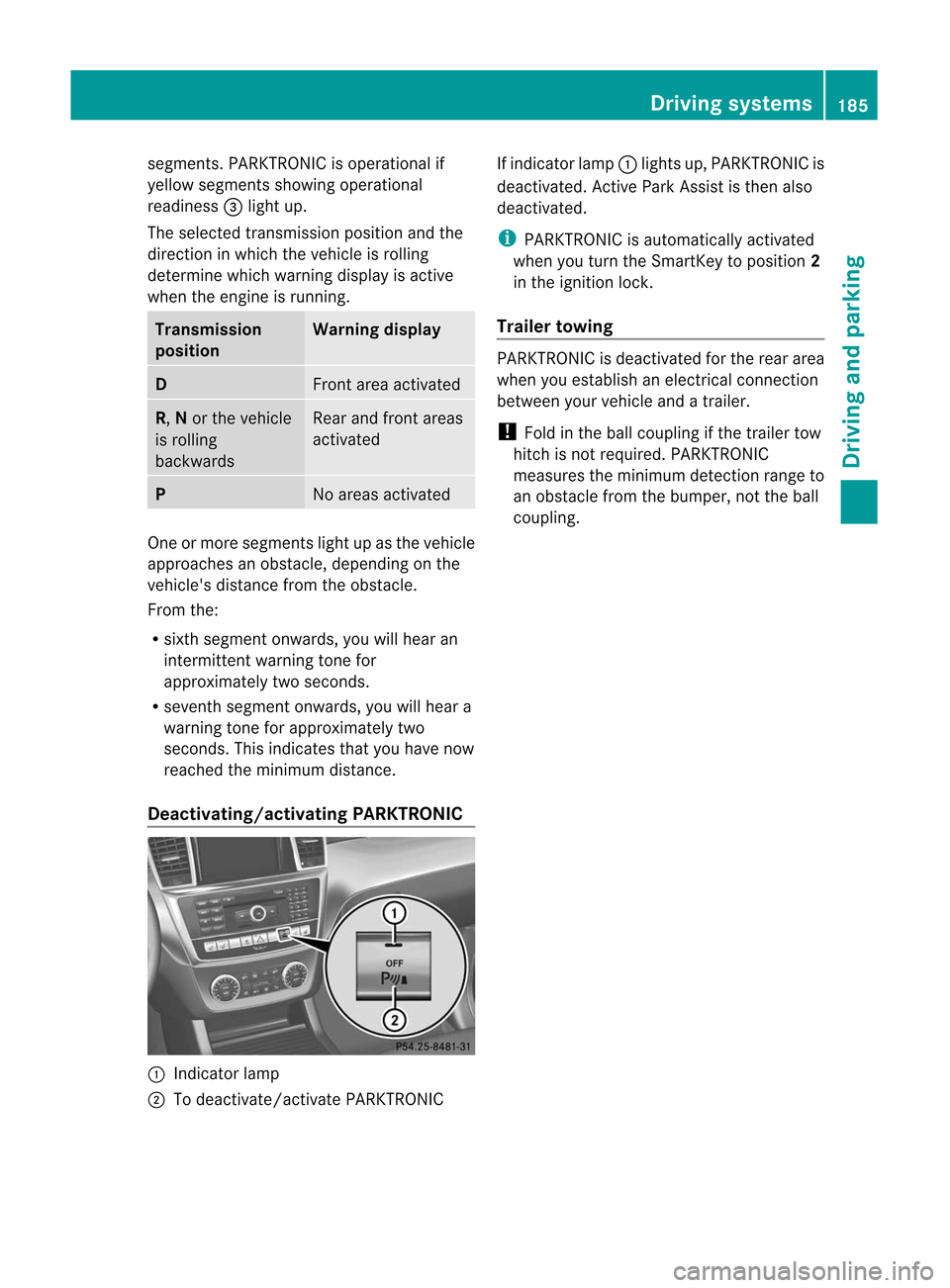
Deac tivating/activating PARKTRONIC:
Indicator lamp
; Todeactivate/activate PARKTRONIC If
indicator lamp:lights up,PARKTRONIC is
deactivated. Active Park Assist isthen also
deactivated. i
PARKTRONIC
isautomaticall yactivated
when youturn theSmartKey toposition 2
in the ignition lock.
Tra iler towing PARKTRONIC
isdeactivated forthe rear area
when youestablish anelectrical connection
between yourvehicle andatrailer.
! Fold inthe ball coupling ifthe trailer tow
hitch isnot required. PARKTRONIC
measures theminimum detection rangeto
an obstacle fromthebumper, nottheball
coupling. Driving
systems
185Driving and parking Z
Page 193 of 396
Acti
vating/d eactivating therea rview
cam era X
To activ ate: make surethattheSmar tKey
is in posit ion2in the ignit ionlock .
X Make surethatthe"rear viewcamer a"
func tion isselec tedinCOMAN D(see the
separate operating instructionsfor
COMAND).
X Engage reverse gear.
The area behind thevehicle isshown inthe
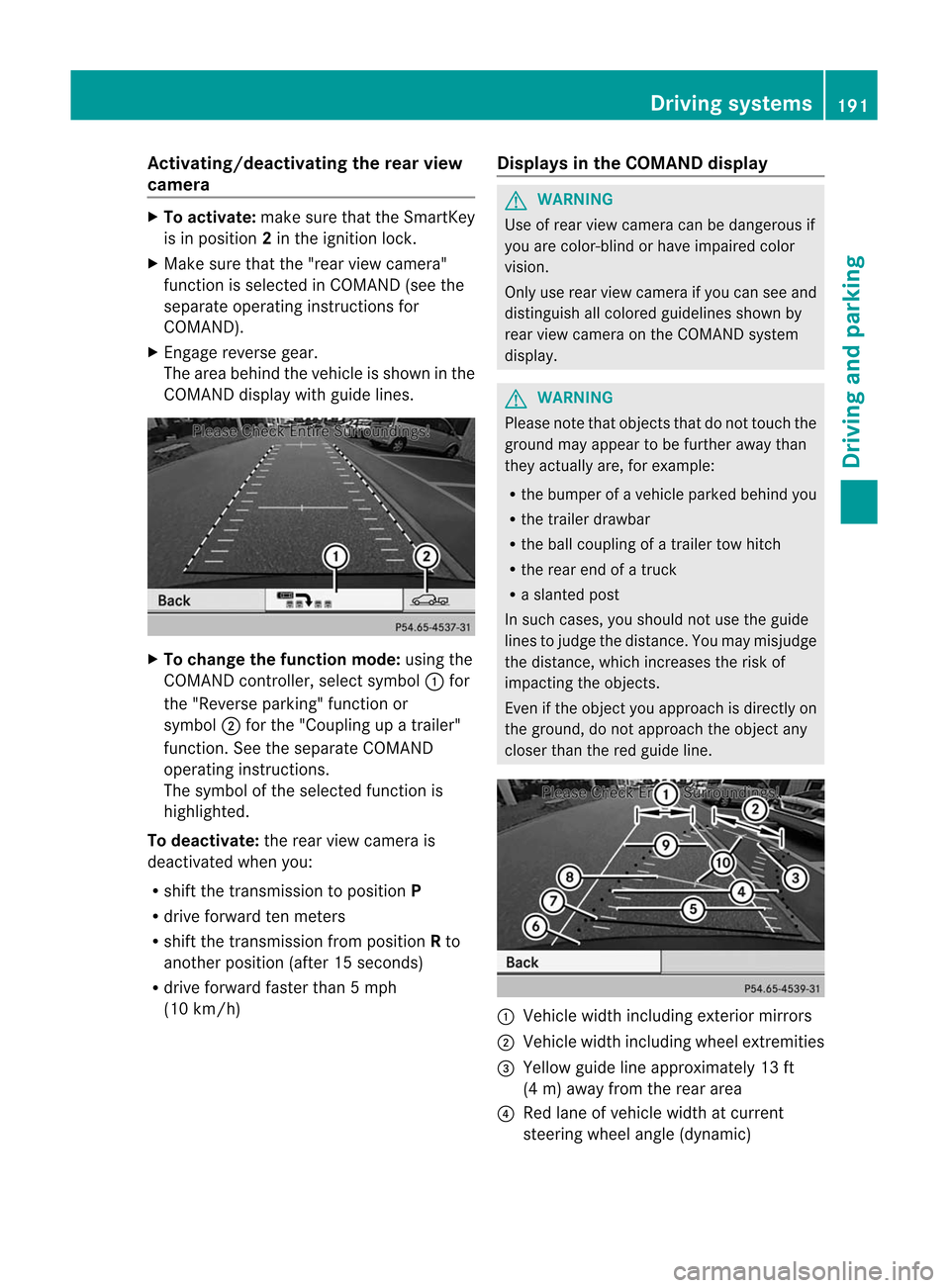
COMAND displaywith guide lines. X
To change thefunction mode:usingthe
COMAND controller, select symbol :for
the "Reverse parking"functionor
symbol ;for the "Cou pling upatrailer"
function .See the separate COMAND
operatin ginst ruct ions.
The symbol ofthe select edfunc tion is
highlighted.
To deactiva te:the rear view camera is
deactivat edwhen you:
R shift thetran smission toposition P
R drive forward tenmeter s
R shift thetran smission fromposition Rto
anoth erposition (after15secon ds)
R drive forward fasterthan5mph
(10 km/ h) Displays
inthe COMAND display G
WARN
ING Use
ofrear view camera canbedangerous if
you arecolor- blindorhave impaired color
vision.
Only userear view camera ifyou can seeand
distin guish allcolored guidelines shownby
rear view camera onthe COMAND system
display. G
WARN
ING Please
notethat objec tsthat donot touch the
ground mayappear tobe furth eraway than
they actually are,forexample:
R the bumper ofavehicle parkedbehindyou
R the trailer drawbar
R the ball coupling ofatrailer towhitch
R the rear endofatruc k
R aslanted post
In such cases, youshould notuse theguide
lines tojudge thedistanc e.You may misjudge
the distanc e,which increases therisk of
impactin gthe objec ts.
Even ifthe objec tyou approach isdirectly on
the ground, donot approach theobject any
closer thanthered guide line. :
Vehicle widthincluding exteriormirrors
; Vehicle widthincluding wheelextremities
= Yellow guidelineapproximately 13ft
(4 m) away fromtherear area
? Red lane ofvehicle widthatcurrent
steering wheelangle(dynamic) Driving
systems
191Driving and parking Z
Page 207 of 396
user
s.Alwa ysmak esure that there is
suff icientdist anceon theside forother traff ic
or obst acles.An inap propriat ebrak e
applic ationm aybe interr upte dat any timeif
you steer sligh tlyintheoppos itedire ction or
acc eler ate.
You arerespon sible fordriv ingatappro priate
spee ds,brak ingingood time,and steeri ng
cor rectly. Always adaptyourdrivingstyle to
suit theprev ailingroad andweat her
con dition s.Always payattent ion totraff ic
con dition sand your surroundings. Other wise,
you may failtorec ogn izedang ersintim e,
caus ean acc iden tand inju reyoursel fand
othe rs.
The rewillbe either nooronl ya we ak cou rse-
corr ectingbra keapplica tionif:
R there arevehi cles orobsta cles,e.g.crash
barri ers,locatedonboth sidesof you r
vehi cle.
R avehi cleapp roache syou tooclose lyat the
side .
R you have adopted asporty drivingstyle with
high cornering speeds.
R you clearlybrake oraccel erate.
R adrivi ngsafe tysys tem intervenes, e.g.
ESP ®
or PRE-SAFE ®
Brake.
R ESP ®
is swi tched off.
R the off-road programisswitched on.
R aloss oftire pressure oradefective tireis
detected.
Switching onActive BlindSpotAssist
X Make surethattheradar sensor system
(Y page 236)andActive Blind SpotAssist
(Y page 232)areactivated inthe on-board
computer.
X Turn theSmartKey toposition 2in the
ignition lock.
Warning lamps:light upred inthe
exterior mirrorsforapproximately 1.5
seconds andthen turnyellow. Tra
iler towing
When youattach atrailer, makesureyouhave
correct lyestablished theelectrical
conn ection. Thiscanbeaccomplished by
checkin gthe trailer lighting. ActiveBlind Spot
Assist isthen deactivated. Theindicator lamp
lights upyell owinthe exterior mirrorsandthe Active
BlindSpotAssist Currently Unavailable
SeeOperator's Manual message
appearsinthe multifunction
displa y.
Active LaneKeeping Assis t Importa
ntsafety notes
Act iveLane Keeping Assistmonitors thearea
in front ofyour vehicle bymeans ofacamera
at the top ofthe windshiel d.Act ive Lane
Keeping Assistdetects lanemarkings onthe
road andwarns youbefore youleave your
lane unintent ionally.Ify ou do not react tothe
warning, alane-cor rectingapplication ofthe
brakes canbring thevehicle backintothe
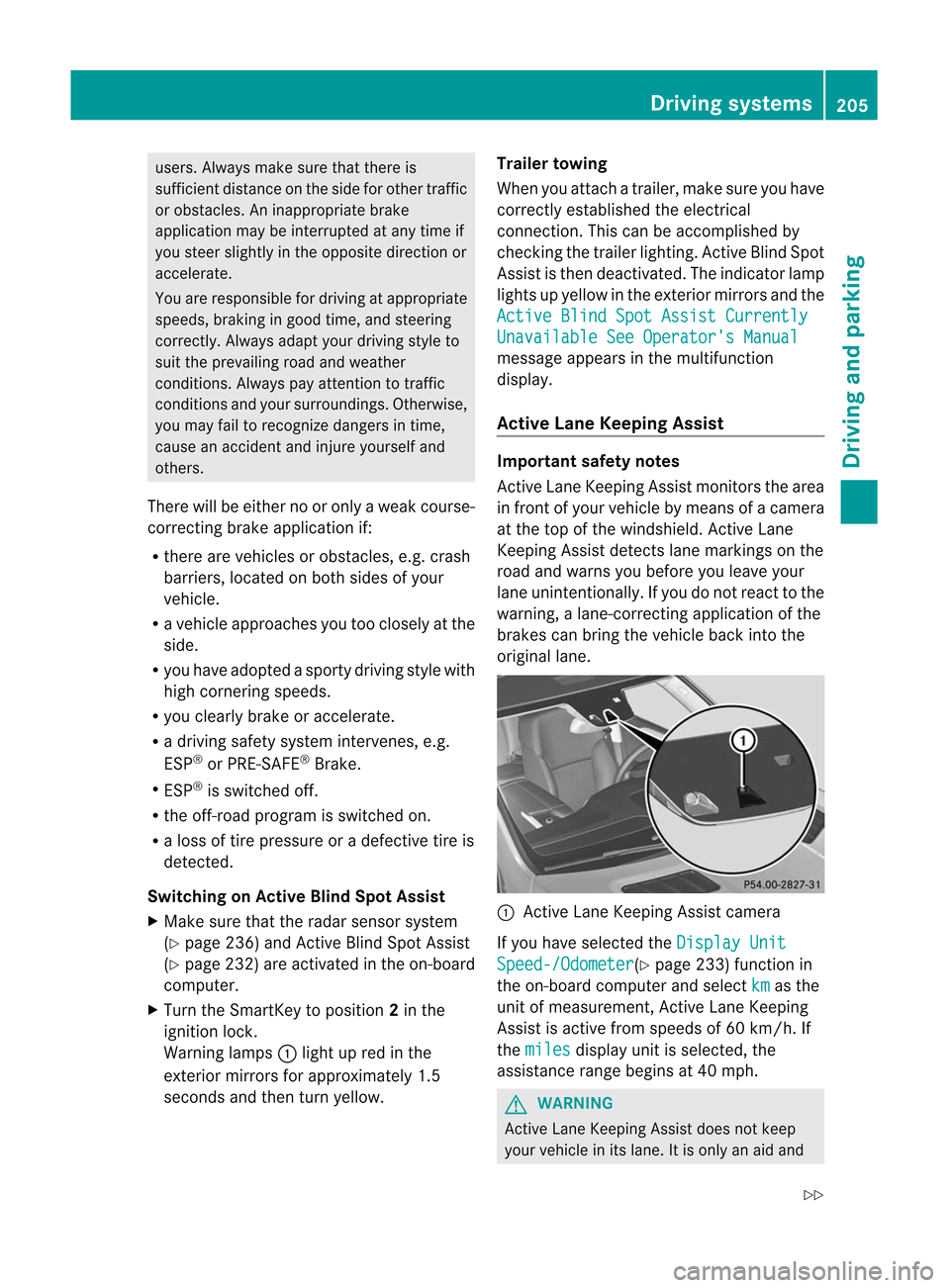
original lane. :
Active Lane Keeping Assistcamera
If you have selected the Display
Unit Speed-/Odome
ter (Y
page 233)functionin
the on-board computer andselect km as
the
unit ofmeasurement, Active Lane Keeping
Assist isactive fromspeeds of60 km/ h.If
the miles display
unitisselected, the
assistance rangebegins at40 mph. G
WARNIN
G Act
ive Lane Keeping Assistdoesnotkeep
your vehicle inits lane. Itis only anaid and Driving
systems
205Driving and parking
Z
Page 225 of 396
!
Ifthe coolant temperature istoo high a
displa ymessage isshown.
If the coolant temperature risesabove
248 ‡(120 †),donot drive anyfurther as
this could damage theengine. Tachometer
The redband inthe tachometer indicatesthe
engine's overrevving range.
! Donot drive inthe overrevving range,as
this could damage theengine.
The fuel suppl yis interrupted toprotect the
engine whenthered band isreached. Outside
tempera turedisplay
The outside temperature displayis in the
multifunction display(Y page 224). G
WARNING The
outside temperature indicatorisnot
designed toserve asan ice-warning device
and istherefore unsuitablefor that purpose.
Indicated temperatures justabove the
freezing pointdonot guara nteethattheroad
surface isfree ofice. The road maystillbeicy,
especial lyin wooded areasoron bridges.
Changes inthe outside temperature are
displa yedafter ashort delay. Speedometer
withsegments
The segments inthe speedometer indicate
which speed rangeisavail able.
Cruise control(Ypage 167)activated:
The segments lightupfrom thestored speed
to the maximum speed.
DISTRONIC PLUS(Ypage 169)activated:
One ortwo segments inthe setspeed range
light up.
DISTRONIC PLUSdetects avehicle infront :The
segments betweenthespeed ofthe
vehicle infront andthestored speedlightup. Operating
theon-board computer
Overview The
on-board computer isactivated assoon
as you turn theSmartKey toposition 1in the
ignition lock.
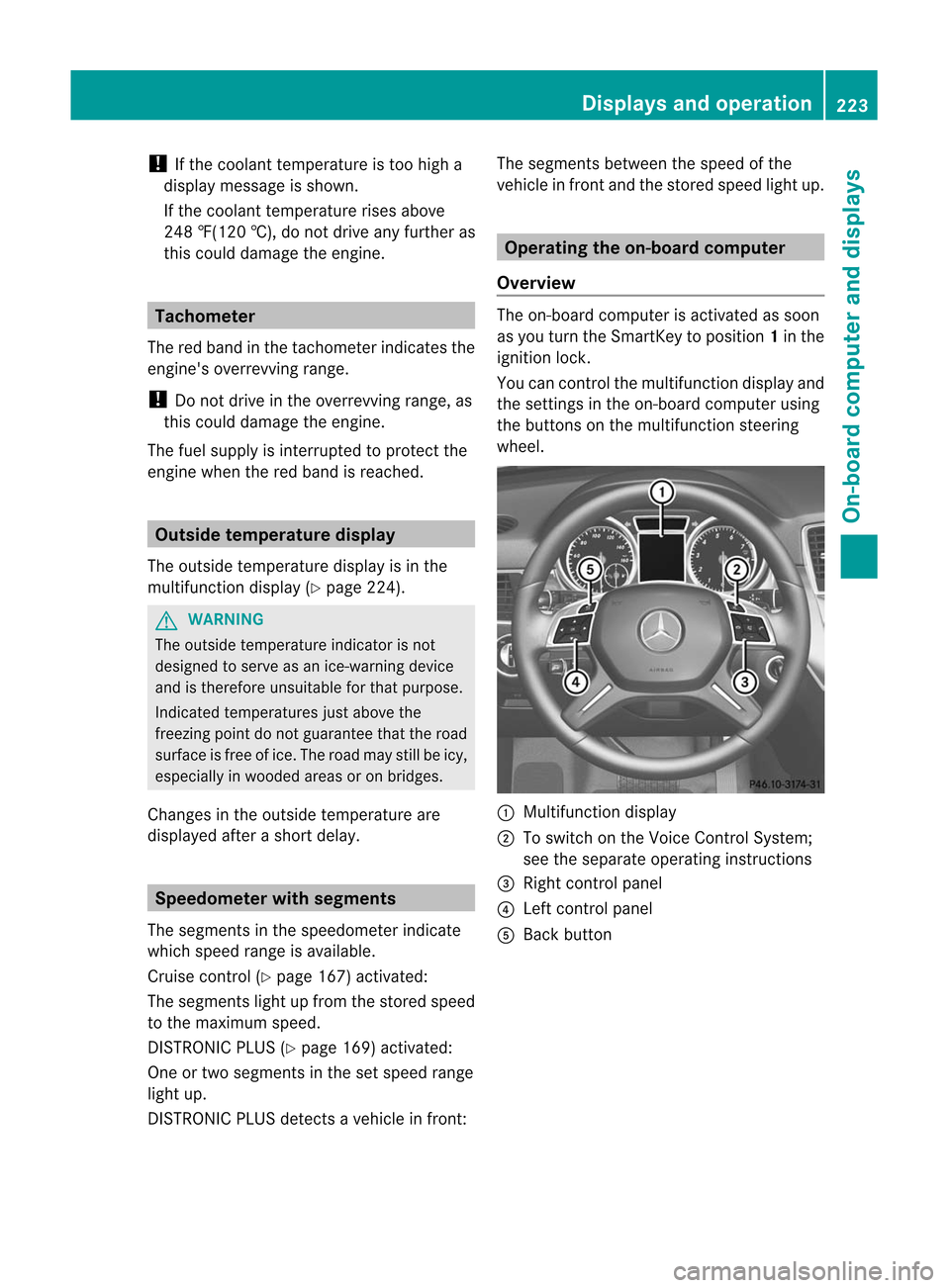
You cancont rolthe multifunction displayand
the settings inthe on-board computer using
the buttons onthe multifunction steering
wheel. :
Multifunction display
; Toswitch onthe Voice Control System;
see theseparate operating instructions
= Right controlpanel
? Left controlpanel
A Back button Dis
plays andoperation
223On-board computer and displays Z
Page 237 of 396
Setting
theambient lightingcolor
X Press the= or; button onthe
steering wheeltoselect the Settings
menu.
X Press the: or9 button toselect the Light submenu.
X Press thea button toconf irm.
X Press the: or9 button toselect the Ambient
lightcolor funct
ion.
X Press thea button toconf irm.
X Press the: or9 button toset the
color to SOLAR , NEUTRAL or POLAR .
X Press thea or% button tosave the
settin g.
Activating/deactivating surround
lighting andexterior lightingdelayed
switch-off
If you have activated the Lighting: funct
ion
and thelight switch isin the c orÃ
position, thefollowing functionsareactive
when itis dark:
R Surr ound lighting: theexterior lighting
remains litfor 40seconds afterunlocking
with thekey. Ifyou start theengine, the
surround lightingisswitched offand the
automatic headlampmode isactivated
(Y page 110).
R Exterior lightingdelayed switch-off: the
exterior lightingremains litfor 60seconds
after theengine hasbeen switched off.If
you close allthe doors, theexterior lighting
goes offafter 15seconds.
If you activate the Lighting: funct
ion,the
following lightupdepending onthe vehicle's
equipment:
R the parking lamps
R the daytime runninglamps
R the side marker lamps
R the surround lightinginthe exterior mirrors
X Press the= or; button onthe
steering wheeltoselect the Sett. menu.
X Press the: or9 button toselect the Lights submenu. X
Press thea button toconf irm.
X Press the: or9 button toselect the Locator
Lighting: funct
ion.
You willsee theselected setting: Enabled
or Disabled .
X Press thea button tosave thesettin g.
Deactivat ingdelay edswitch-of fofthe
exterior lightingtemporarily:
X Before leaving thevehicle, turnthe
SmartK eytoposition 0in the ignition lock.
X Turn theSmartK eytoposition 2in the
ignition lockandback toposition 0.
The exterior lightingdelayedswitch-off is
deactivated.
Delayed switch-off ofthe exterior lightingis
reactivated thenext time youstart the
engine.
Activating/deactivating theinterior
lighting delayed switch-off
If you activate the Interior
Lighting Delay funct
ion,theinterior lighting remains
on for 20seconds afteryouremove the
SmartK eyfrom theignition lock.
X Press the= or; button onthe
steering wheeltoselect the Settings
menu.
X Press the: or9 button toselect the Lights submenu.
X Press thea button toconfirm .
X Press the: or9 button toselect the Interior
LightingDelay: funct
ion.
You willsee theselected setting: Enabled
or Disabled .
X Press thea button tosave thesettin g.
Vehicle Activating/deactivating
theautom atic
door locking feature
If you select the Automatic
DoorLock: funct
ion,thevehicle iscent rally locked above
a speed ofaround 9mph(15 km/ h). Menus
andsubm enus
235On-board computer and displays Z