Key MERCEDES-BENZ M-Class 2012 W166 Manual PDF
[x] Cancel search | Manufacturer: MERCEDES-BENZ, Model Year: 2012, Model line: M-Class, Model: MERCEDES-BENZ M-Class 2012 W166Pages: 396, PDF Size: 14.48 MB
Page 246 of 396
Disp
laymessa ges Poss
iblecauses/c onseq uences and M Solu
tions The
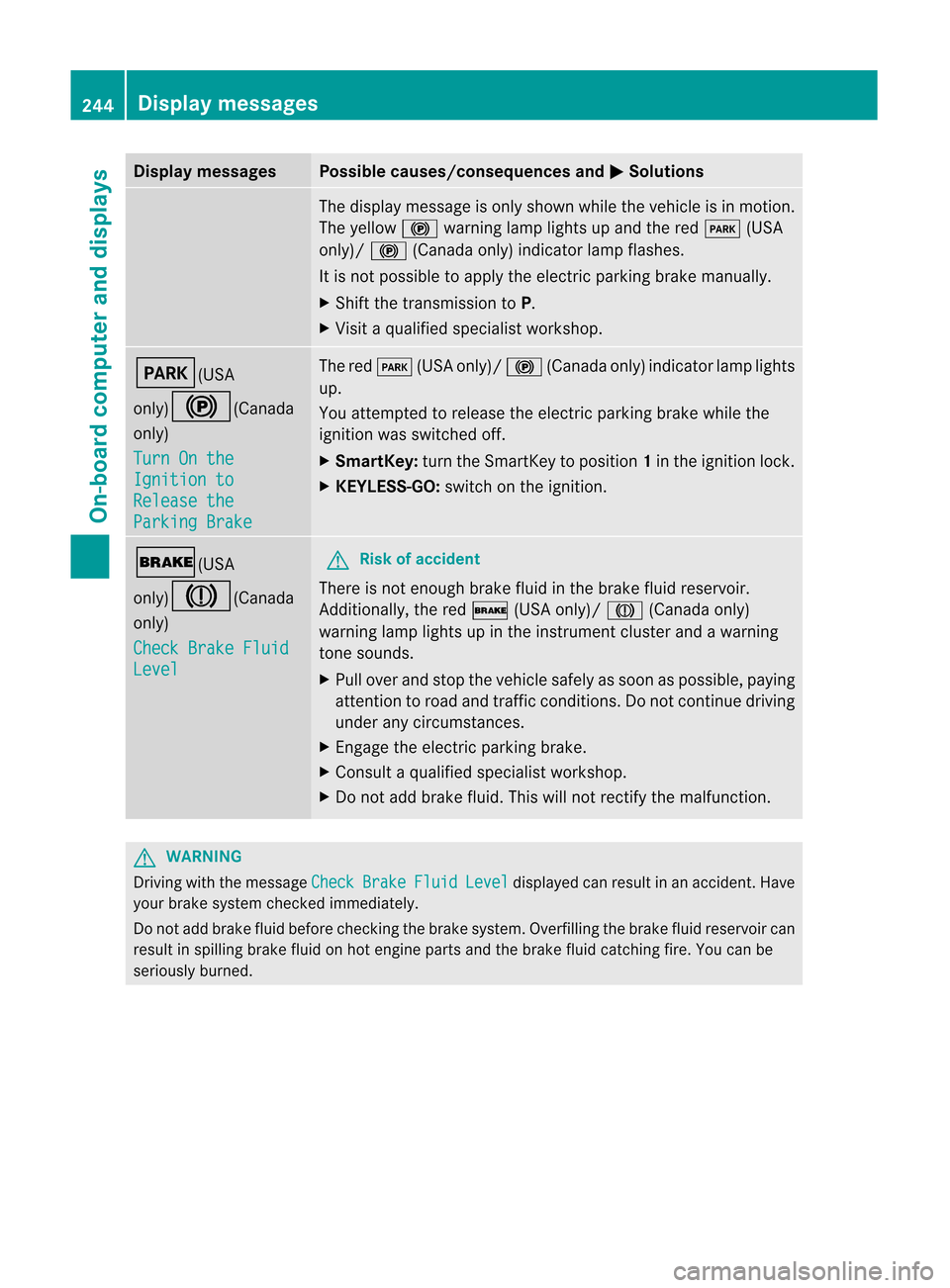
displaymes sage ison lysho wnwhile theveh icleis in mot ion.
The yello w! warning lamp lightsup and thered F (USA
on ly)/ ! (Canadaonly) indic ato rlamp flashes.
It is no tp ossible toapply theelectric parking brakemanually .
X Shift thetrans mission toP.
X Visit aquali fiedspecialist workshop. F(USA
only)!(Canada
only)
Turn
Onthe Ignition
to Release
the Parking
Brake The
redF (USAonly)/ !(Canada only)indicator lamplights
up.
You attempt edtorelease theelectric parking brakewhilethe
ignition wasswitched off.
X Smar tKey: turntheSmart Keytoposition 1in the ignition lock.
X KEYL ESS-GO: switchonthe ignition. $(USA
only)J(Canada
only)
Check
BrakeFluid Level G
Risk
ofaccident There
isnot enough brakefluidinthe brake fluidreservoir.
Additionally, thered $ (USAonly)/ J(Canada only)
warning lamplights upinthe instr ument cluster andawarning
ton esounds.
X Pull over andstop thevehicle safelyassoon aspossible, paying
atten tiontoroad andtraffic conditions.Donot cont inue driving
under anycircumst ances.
X En gage theelectric parking brake.
X Consult aquali fiedspecialist workshop.
X Do not add brake fluid.Thiswillnotrect ifythe malfunct ion. G
WARNIN
G Drivin
gwith themessage Check Brake Fluid Level display
edcan result inan accident .Have
your brakesyst emcheck edimm ediat ely.
Do notadd brake fluidbefore checkingthe brake system. Overfillingthebrake fluidreserv oircan
result inspilling brakefluidonhot engin eparts andthebrake fluidcatching fire.Youcanbe
seriously burned. 244
Display
messagesOn-board computer and displays
Page 269 of 396
Disp
laymessa ges Poss
iblecauses/c onseq uences and M Solu
tions Pho
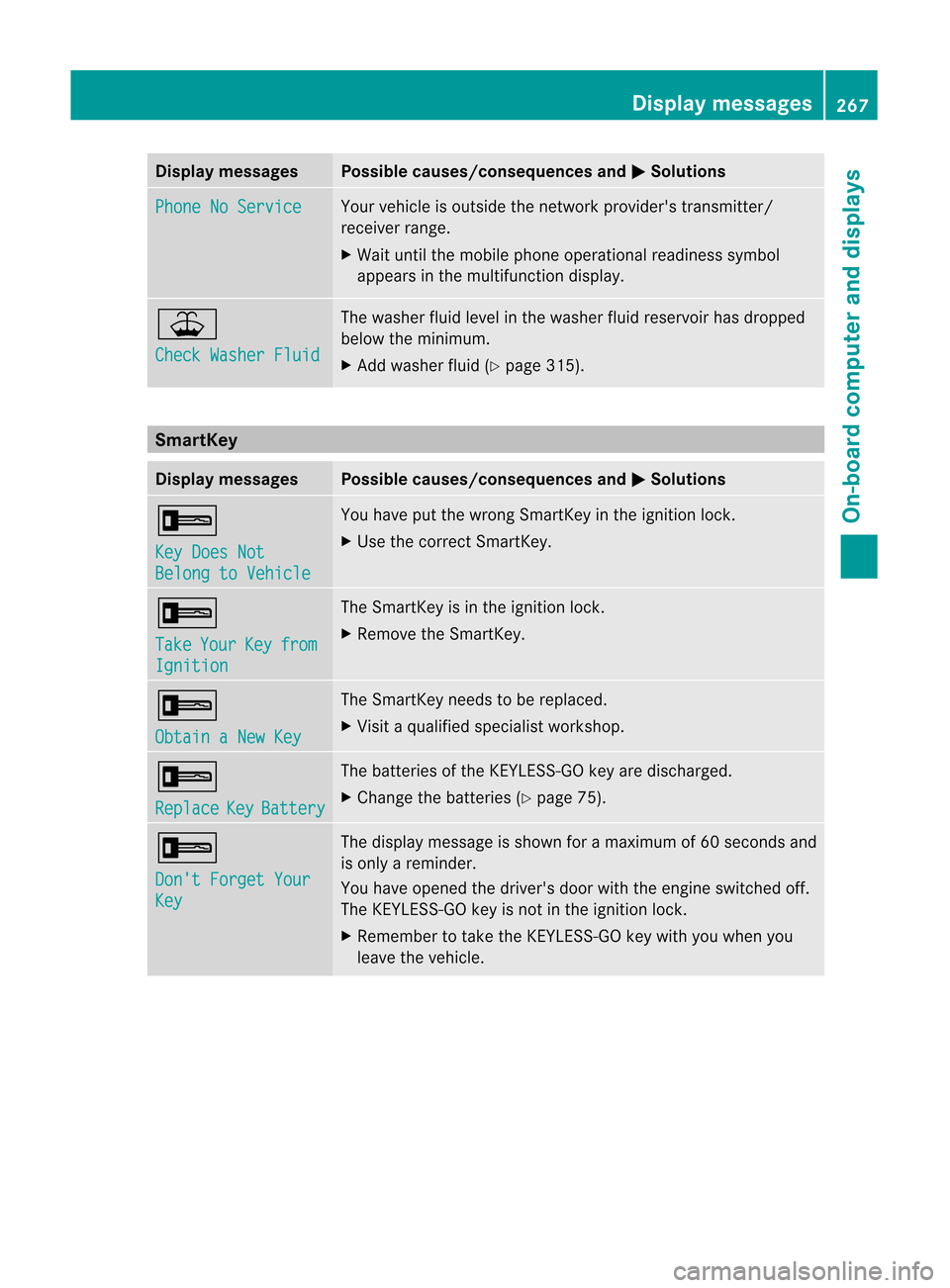
neNoSer vice Your
vehicleis out side thene twork provider'strans mitter/
rec eiverran ge.
X Wait untilth emob ilepho neoper ationalread iness sym bol
appea rsinthemult ifunction disp lay. ¥
Che
ckWasher Fluid The
wash erflui dlev elin thew asher fluidreservoir has dropped
below themin imum .
X Ad dwashe rfluid (Y page 315). Sma
rtKey Displa
ymessag es Possibl
ecaus es/conseq uencesandM Solut
ions +
Key
DoesNot Bel
ong toVehicle You
have putthewron gSm artKey intheign itio nlock.
X Use thecorrec tSmart Key. +
Take Your Key from
Ignition The
Smart Keyisin the ignition lock.
X Remove theSmart Key. +
Obtain
aNew Key The
Smart Keyneeds tobe replaced.
X Visit aquali fiedspecialist workshop. +
Replace Key Battery The
batteries ofthe KEYLE SS-GO key aredischarged.
X Change thebatteries (Ypage 75). +
Don't
Forget Your Key The
display message isshown foramaximum of60 seconds and
is only areminder.
You have opened thedriver's doorwiththeengine switched off.
The KEYLE SS-GO key isnot inthe ignition lock.
X Remember totake theKEYLE SS-GO key with youwhen you
leave thevehicle. Display
messages
267On-board computer and displays Z
Page 270 of 396
Disp
laymessa ges Poss
iblecauses/c onseq uences and M Solu
tions +
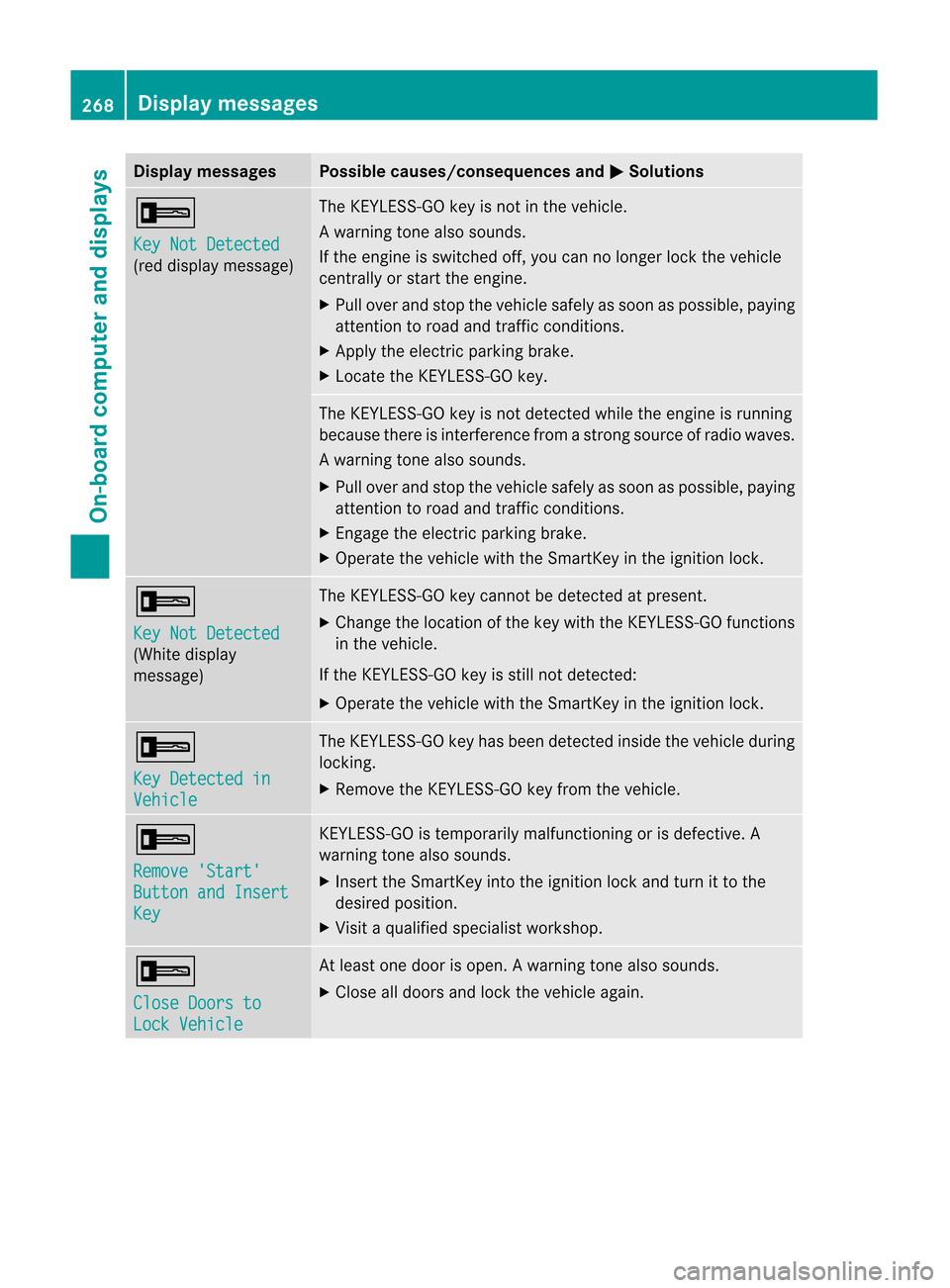
Key
NotDetected (re
ddisp laymes sage ) The
KEYLE SS-GO keyis no tin theveh icle.
Aw arning tone also soun ds.
If th een gin eis swit ched off,you can nolonger lockthe vehicle
cent rally orstart theengine.
X Pull over andstop thevehicle safelyassoon aspossible, paying
attent iontoroad andtraffic condition s.
X Apply theelectric parking brake.
X Locate theKEYLE SS-GO key. The
KEYLE SS-GO key isnot detect edwhile theengine isrunning
because thereisinterfer encefromastron gsource ofradio waves.
Aw arning tone also soun ds.
X Pull overand stop thevehiclesa fel yas soo naspossible ,pay ing
attent iontoroad andtraffic conditions.
X Engage theelectric parking brake.
X Operate thevehicle withtheSmartKey inthe ignition lock. +
Key
NotDetected (White
display
message) The
KEYLES S-GOkeycannot bedetected atpresent.
X Change thelocation ofthe key with theKEYLES S-GOfunction s
in the vehicle.
If the KEYLES S-GOkeyisstill notdetected:
X Operate thevehicle withtheSmartKey inthe ignition lock. +
Key
Detected in Vehicle The
KEYLES S-GOkeyhas been detected insidethevehicle during
locking.
X Remove theKEYLES S-GOkeyfrom thevehicle. +
Remove
'Start' Button
andInsert Key KEYLES
S-GOistemporarily malfunctioning orisdefective. A
warning tonealsosounds.
X Insert theSmartKey intotheignition lockandturn itto the
desired position.
X Visit aqual ified speciali stworkshop. +
Close
Doorsto Lock
Vehicle At
least onedoor isopen. Awarning tone also soun ds.
X Close alldoor sand lockthe vehicle again. 268
Display
messagesOn-board computer and displays
Page 287 of 396
Do
not pile lugga georcar gohighe rthan the
seat backrests.
If so equipp ed,alwa ysuse thecargo netwhen
transport ingcargo. Thecargo netcannot
secure hardorheavy objects.
Parcel netscannot securehardorheavy
object s.
Keep compartmen tlids clos ed.This willhelp
to prev entstored obje ctsfro mbeing thrown
about andinjuring vehicleocc upant sdurin g
R brak ing
R vehic lemane uvers
R an acc ident
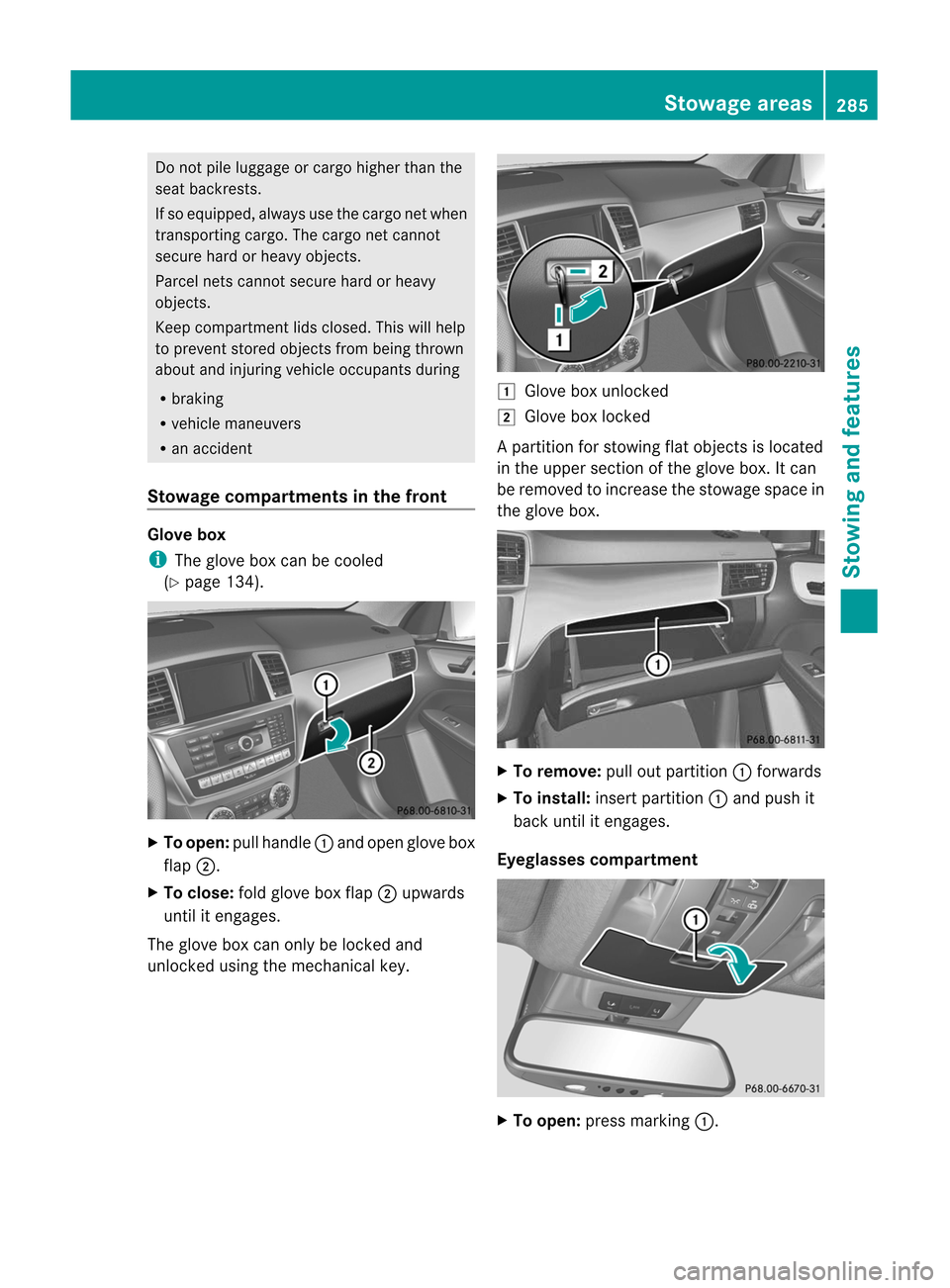
Stowa gecomp artm ents inthefront Glove
box i
The
glove boxcanbecoole d
(Y page 134). X
To open: pullhandle :and open glove box
flap ;.
X To close: foldglove boxflap ;upwards
unt ilit engag es.
The glove boxcanonly belock edand
unloc kedusing themec hanic alkey. 1
Glove boxunloc ked
2 Glove boxlocked
Ap artition for stowin gflat object sis loc ate d
in theupper sectionof theglov ebox .It can
be rem ovedto inc reas eth est owage spacein
th eglov ebox . X
To rem ove: pulloutpart ition : forwards
X To inst all:insert part ition : and push it
back untilit en gages .
Eyegla ssescomp artm ent X
To open :pres smar king:. St
owage areas
285Stowing and features Z
Page 297 of 396
X
Turn theSmart Keytoposition 2in the
ignition lock.
X To switch oncooli ngfunction: press
switch =repeatedly untiltheblue
indicator lampinthe switch lightsup.
X To switch onwarm ingfunction: press
switch =repeatedly untilthered indicator
lamp inthe switch lightsup.
X To switch offfunction: pressswitch =
repeatedly untiltheindicator lampinthe
switch goesout.
When usingthewarming functionabove a
cert aintemperat ure,residual heatindicator
lamp ;lights up.This means thatthemetal
insert ofthe cup holder ishot.
Cup holder inthe rear seat armrest !
Donot siton orsupport yourbody weight
on the rear seat armrest whenitis folded
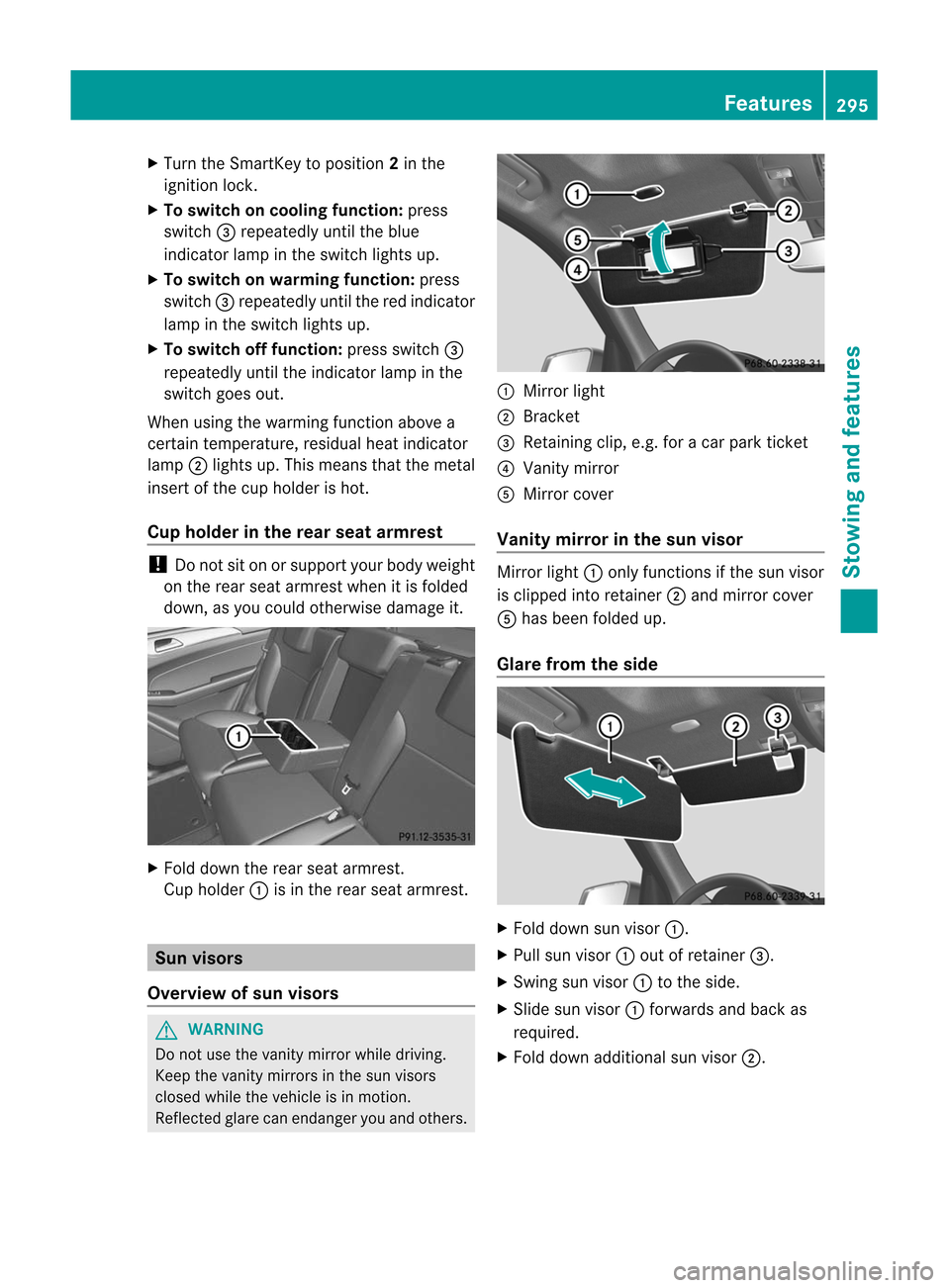
down, asyou could otherwise damageit. X
Fold down therear seat armrest .
Cup holder :isin the rear seat armrest . Sun
visors
Overview ofsun visors G
WARNIN
G Do
not use thevanity mirror whiledriving.
Keep thevanity mirrors inthe sun visors
closed whilethevehicle isin motion .
Reflected glarecanendanger youand others. :
Mirror light
; Brack et
= Retaining clip,e.g.foracar park ticket
? Vanity mirror
A Mirror cover
Vanit ymirr orinthe sun visor Mirror
light:only funct ionsifthe sun visor
is clipped intoretainer ;and mirror cover
A has been folded up.
Glare fromtheside X
Fold down sunvisor :.
X Pull sunvisor :out ofretainer =.
X Swing sunvisor :tothe side.
X Slide sunvisor :forwards andback as
required.
X Fold down additional sunvisor ;. Featur
es
295Stowing and features Z
Page 298 of 396
Asht
ray
Asht rayin thefront -com partmen t
cent erconsole !
The hold erund ertheasht rayisno th eat
resist ant.Befor eplacing litcigaret tesinthe
ashtray, makesurethattheashtray is
properly engaged. Otherwise, theholder
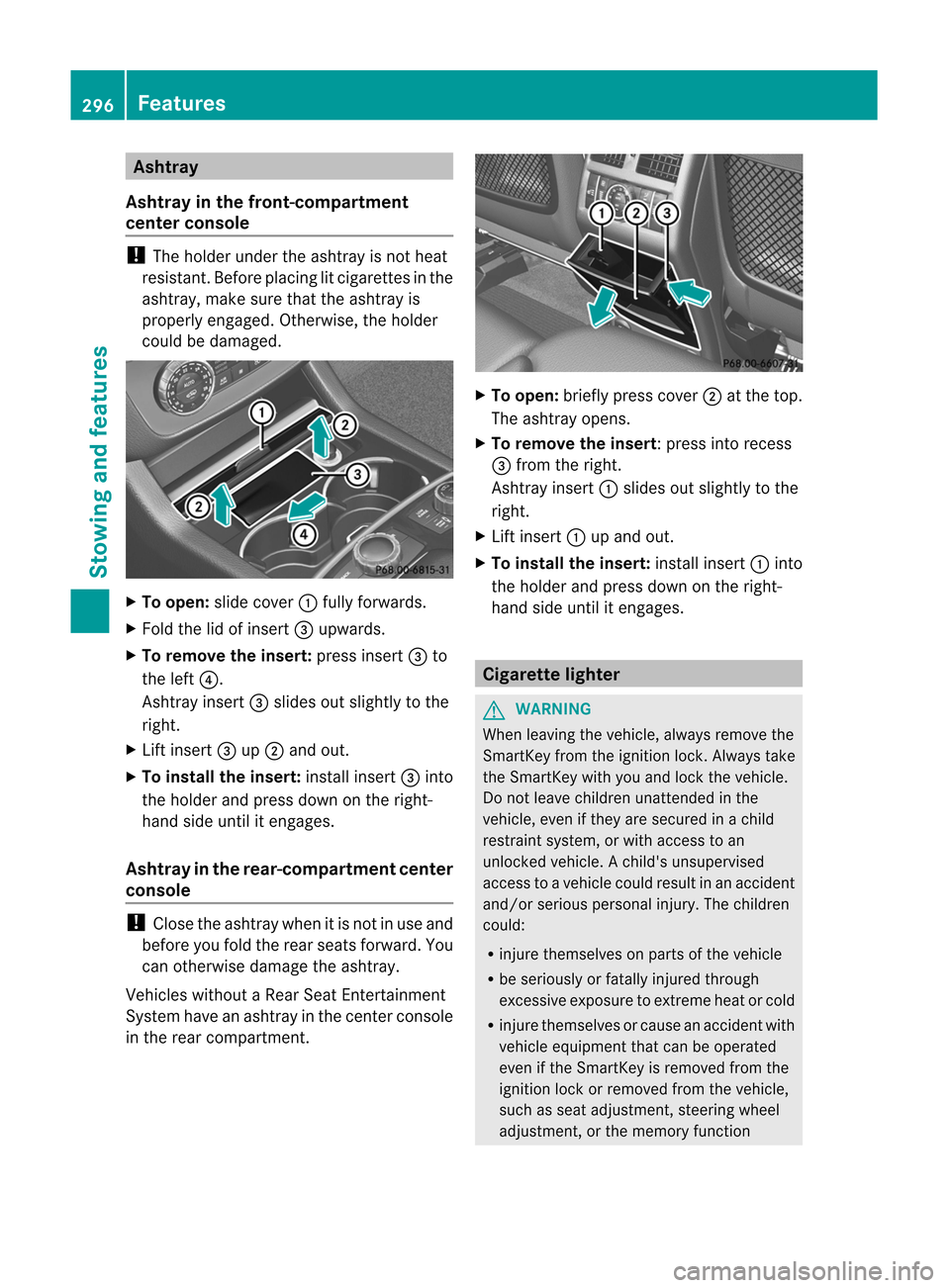
could bedamaged. X
To open: slidecover :fully forwards.
X Fold thelidofinsert =upwards.
X To rem ove theinsert: pressinsert =to
the left ?.
Asht rayinsert =slides outslightly tothe
right.
X Lift insert =up; and out.
X To install theinsert: installinsert =into
the holder andpress downonthe right-
hand sideuntil itengages.
Ashtr ayinthe rear -comp artment center
console !
Close theashtray whenitis not inuse and
before youfold therear seats forward. You
can other wisedamage theashtray.
Vehicles withoutaRear SeatEntert ainmen t
System haveanashtray inthe centercon sole
in the rear compart ment. X
To open: briefly presscover ;atthe top.
The ashtray opens.
X To rem ove theinsert:p ressintorecess
= from theright.
Ashtray insert:slid esout slightly tothe
right.
X Lift insert :upand out.
X To install theinse rt:install insert:into
the hold erand press downonthe right-
hand sideuntil itengages. Cigarette
lighter G
WARNING When
leaving thevehicle, alwaysremove the
SmartK eyfrom theignition lock.Always take
the SmartK eywith youand lock thevehicle.
Do not leave children unattendedinthe
vehicle, evenifthey aresecured inachild
restraint system,orwith access toan
unlocked vehicle.Achild's unsupervised
access toavehicle couldresult inan accident
and/or serious personal injury.Thechildren
could:
R injure themselves onparts ofthe vehicle
R be seriously orfatally injured through
excessive exposuretoextrem eheat orcold
R injure themselves orcause anaccident with
vehicle equipment thatcanbeoperated
even ifthe SmartKey isremoved fromthe
ignition lockorremoved fromthevehicle,
such asseat adjustment ,steering wheel
adjustment ,or the memory function 296
FeaturesStowing and features
Page 299 of 396
If
childre nopen adoor, theycould injure other
person sor get out ofthe vehicle andinjure
them selves orbe injured byfollowing traffic.
Do not expose thechild restraint system to
direct sunlight .The child restraint system's
metal parts, forexample, couldbecome very
hot, andthechild could beburned onthese
parts. G
WARNING Never
touchtheheating element orsides of
the lighter; theyareextrem elyhot. Hold the
knob only.
Make sureanychildren traveling withyoudo
not injure themselves orstart afire with the
hot cigarette lighter.
! The cigarette lighterinthe cent erconsole
in the front compartmen tis not inten ded
for operating thetire inflation compressor. X
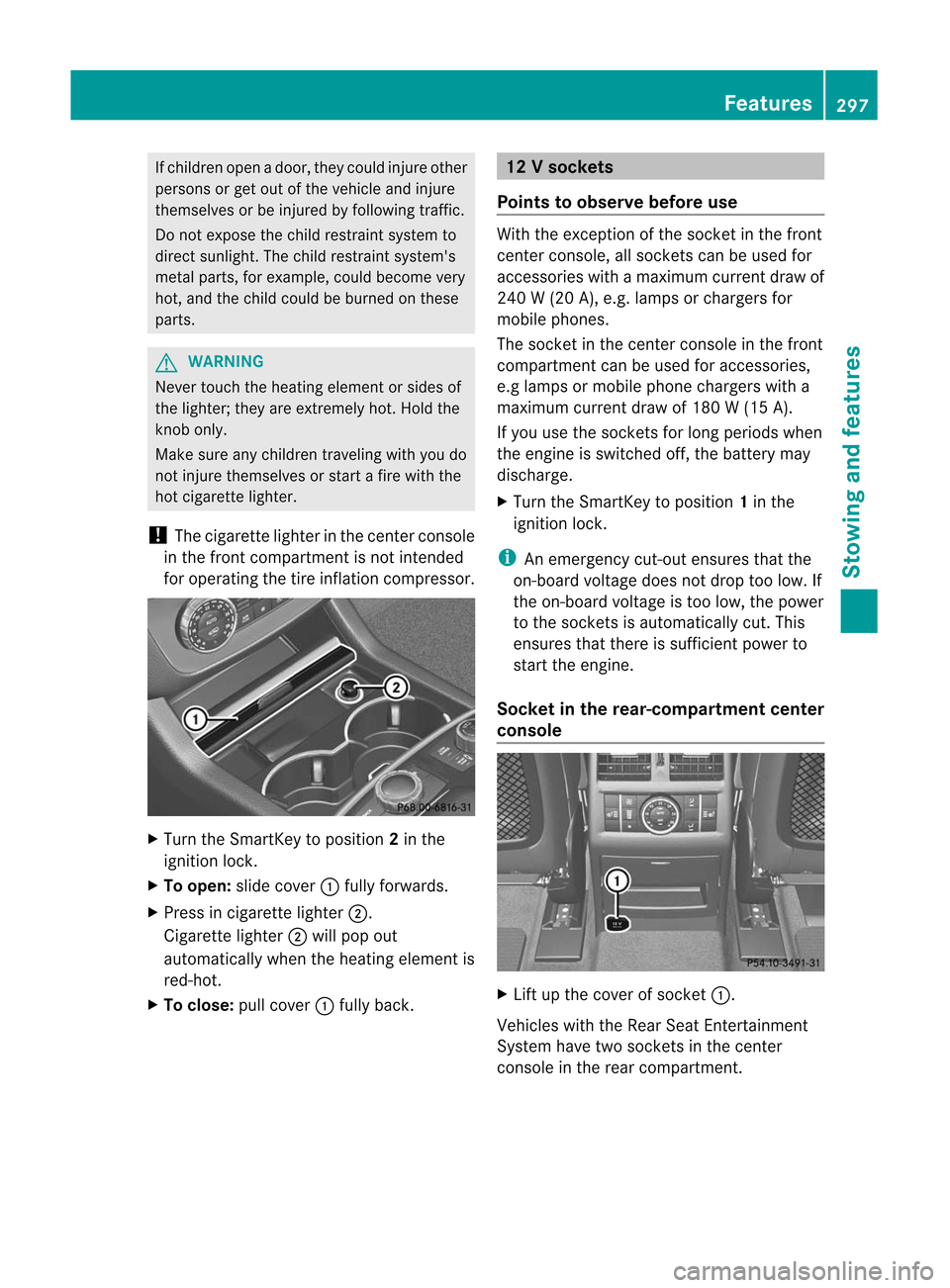
Turn theSmartK eytoposition 2in the
ignition lock.
X To open: slidecover :fully forwards.
X Press incigarette lighter;.
Ciga rettelighter ;will pop out
automatically whentheheating element is
red-hot.
X To close :pull cover :fully back. 12
Vsocket s
Point sto obser vebefor euse Wit
hth eexc eption ofthesoc ket inthefron t
cen terc onsole, allsocket scan be used for
acc essorie swit hamax imum curren tdraw of
240 W(20 A),e.g. lamp sor charge rsfor
mobil ephones.
The socket inthe center console inthe front
compartment canbeuse dfor accesso ries,
e.g lamp sor mobil ephone chargerswith a
maximu mcurrent drawof180 W(15 A).
If you usethesockets forlong periods when
the engine isswi tched off,thebattery may
discha rge.
X Turn theSmartKey toposi tion 1in the
ignitio nlock. i
An
emergenc ycut- out ensures thatthe
on-board voltagedoesnotdrop toolow. If
the on-board voltageistoo low, thepower
to the socket sis automatically cut.This
ensures thatthere issufficient powerto
start theengine.
Socket inthe rear -compa rtment center
consol e X
Lift upthe cover ofsocket :.
Vehicles withtheRear SeatEntert ainment
System havetwosocket sin the cent er
console inthe rear compartm ent. Featur
es
297Stowing and features Z
Page 306 of 396
Vehi
cle remo teope ning If
yo uha ve uni ntentio nallylocked your
veh icle(e .g. the Sma rtKey isstil lin the
veh icle) and arep laceme ntSma rtKey isnot
ava ilab le,the vehiclecan beopene dby a
Mer cedes-Be nzCu stom erAssi stance Center.
The vehiclecan beopene drem otelyup tofou r
da ys afte rthe ignition waslastswitched off.
X Contact thefollowing servicehotlines:
R USA: Mercedes-Ben zCustome r
As sist anc eCen terund er1-80 0-FO R-
ME RCedes (1-800-36 7-63 72)or
1-8 88- 990- 9007
R Canada: Customer Serviceat
1-8 88- 923- 8367
You willbeasked foryour password.
X Return toyour vehicle atthe time agreed
upon withtheMercedes-B enzCustomer
Assist anceCenter.
X Pull thetailgate handleforatleast 20
seconds untiltheindicator lampinthe SOS
button (Ypage 300)flashes.
The Connecting
Call message
appears
on the multifunct iondisplay .
Alter natively, thevehicle canalso beopened
via the Internet oran iPhone inthe "Owners
Online" sectionusingyourIDnumber and
password 23
. i
Vehicle
remoteunlockin gis only possible
if the correspon dingmobile phonenetwork
is accessible.
The SOS button flashes andthe Call
Connected message
appearsinthe
multifunct iondisplay toconf irmthat the
comman dfor vehicle remote unlockin ghas
been received.
If you pull thetailgate handleformore than
20 seconds beforereceiving authorization
for remote unlockin gfrom theMercedes-
Benz Customer AssistanceCenter, you
must wait15minutes beforeyoucan pull
the tailgate handleagain. Vehicle
remoteclosin g If
you forget tolock your vehicle butareno
longer inthe vicinit yof the vehicle, itcan be
locked foryou bythe Mercedes-B enz
Customer AssistanceCenter.
The vehicle canbelocked remotely uptofour
days after theignition waslastswitched off.
X Contact thefollowing servicehotlines:
R USA: Mercedes-B enzCustomer
Assist anceCenter under1-800-FOR-
MERCedes(1- 800-367-6372 )or
1-8 88-990- 9007
R Canada: Customer Serviceat
1-8 88-923- 8367
You willbeasked foryour PIN.
The next time youareinyour vehicle and
switch onthe ignition, the Tele Aid: Doors
Locked
byRemote message
appearsinthe
multifunct iondisplay .
Alter natively, thevehicle canalso belocked
via the Internet oran iPhone inthe "Owners
Online" sectionusingyourIDnumber and
password. i
The
vehicle valetlockin gfeature is
availa blewhen therelevant mobilephone
network isavaila bleand data conn ection is
possible.
Service forrecovering astolen vehic le If
yo ur veh icleha sbe en stol en:
X Noti fythe police.
The police willissu eanum bered incident
rep ort.
X Thi snum berw illbe forwarded tothe
Merc edes- BenzCustome rAssistance
Center together withyour PIN.
The Mercedes-Benz CustomerAssistance
Center thenattempts tolocate thembrace
system. TheMercedes-Benz Customer
Assistance Centercontacts youand the
local lawenforcemen tagency ifthe vehicle
is located. However, onlythelaw
23 USA only. 304
Featur
esStowing and features
Page 309 of 396
X
Turn theSmart Keytoposition 2in the
ignition lock.
X Press theprogramming buttonofthe door
or gate drive (seethedoor orgate drive
operating instructions ,e.g. under
"Programming ofadditional remote
cont rols"). i
You
now normally have30seconds to
initiate thenext step.
X Press thepreviously programmed
tran smitt erbutton ofthe HomeLin k®
integr atedgarage dooropener repeatedly
in succession untilthedoor opens.
The rolling codesynchron izationisthen
complete.
Notes onprogr ammingthe remot e
control
Canadian radiofrequency lawsrequire a
"break" (orinter ruption) ofthe tran smission
signals afterbroadcasting forafew seconds .
These signals maynottheref orelast long
enough forthe integr atedgarage dooropener
to recogn izethe signal during programming.
Comparable withCanadian law,some U.S.
garage dooropeners alsohave abuilt-in
"interr uption".
If you liveinCanada orhave difficulties
programming thegarage dooropener
(regardless ofwhere youlive) when usingthe
programming steps(seeabove), proceed as
follows:
X Press andhold oneoftran smitt er
button s; to? ofthe integr atedgarage
door opener.
Indicat orlamp :start sto flash yellow
after ashort period.
X Release thetran smitt erbutton .
X Press transmitt erbutton Bofthe garage
door remote controland hold fortwo
seconds, thenrelease fortwo seconds,
then press againandhold fortwo seconds. X
Repeat thissequence ontran smitt er
button Bofthe garage doorremot e
cont roluntil indicator lamp:isgreen.
Repeat theprocess ifindicator lamp:
turns red.
X Contin uewith theother programming
steps (seeabove).
Problems whenprogramming
If you areexperienc ingproblems
programming theintegr atedgarage door
opener onthe rear-view mirror,takenoteof
the following instructions :
R check thetran smission frequency of
garage doorremot econt rolA (usual ly
found onthe reverse sideofthe remot e
cont rol).
The integr atedgarage dooropener is
compatible withdevices thatcanbe
operated withunits inafrequency rangeof
280 to390 MHz.
R change thebatteries ingarage doorremot e
cont rolA.T hisincreases theprobabil ity
that garage doorremote controlA will
send astron gand precise signaltothe
integrated garagedooropener onthe rear-
view mirror.
R when programming, holdgarage door
remote controlA atdifferent distances
and angles fromthetransmit terbutton that
you areprogramming. Trydifferent angles
at adistance between 2and 12inches (5
to 30 cm) orthe same angle atvarying
distances.
R ifanother remotecontrolfor the same
garage doordrive isavaila ble,repeat the
same programming stepswiththisremote
cont rol.Before youperform thesteps ofthe
operation, makesurethatthere arenew
batteries inthe garage doorremote
cont rol.
R note thatsome remote controlsonly
transmit foralimited amount oftime (the
indicator lamponthe remote controlgoes Features
307Stowing and features Z
Page 310 of 396

out).
Press theremote controlbutton again
before itstops transmitting.
R align theanten nacable ofthe garage door
opener unit.Thiscanimprove signal
reception /transmission.
Opening/cl osingthegara gedoor Once
programmed, theintegr atedgarage
door opener willassume thefunct ionofthe
garage doorsystem's remotecontrol.Please
also read theoperating instructions forthe
garage doorsystem.
X Turn theSmart Keytoposition 2in the
ignition lock.
X Press transmitterbutton ;,=or? inthe
overhead controlpanel thatyouhave
programmed tooperate thegarage door.
Garage doorsystem withafixed code:
indicator lamp:lights upgreen.
Garage doorsystem witharolling code:
indicator lamp:flashes green. i
The
trans mitterwill trans mitasignal for
as long asthe trans mitterbutton isbeing
pressed. Afteramaximum often seconds,
trans mission istermin atedandindicator
lamp :flashes yellow.Press the
transmitter buttonagain,ifnecessary .
Cle aring thememory ofthe integ rated
garage dooropeneron the rear-view
mirror X
Turn theSmartKey toposi tion 2in the
ignitio nlock.
X Press transmitterbutton s; and ?.
The indicator lamplights upyellow .
X Press andhold trans mitterbutton s;
and ?until theindicator lampturns green. i
Make
surethatyouclear thememory of
the integr atedgarage dooropener before
selling thevehicle. Compass
Calling upthe compass Infor
mation onoperating thecompass canbe
found inthe separate COMAND operating
instr uctions. Floo
rmats G
WARNIN
G Whenever
youareusing afloormat, makesure
there isenough clearance andthat the
floormat issecurely fastened.
The floormat shouldalwaysbe securely
fastened usingthefastenin gequipment .
Befor edriving off,chec kthat thefloormat is
securely inplace andadjust itifnec essary. A
loose floormat couldslipand hinder proper
func tioningofthe pedals.
Do not place several floormat son top ofeach
other asthis may impair pedalmoveme nt. Floorm
aton the driver' sside (example)
X Driver's seat/front-passenger seat:
slide therespect iveseat back.
X Rear seats: slidetherespect iveseat
forwards.
X To install: placethefloormat inthe
foot well.
X Press studs:ontoretain ers;.
X To rem ove: pullthefloormat off
retain ers;.
X Remove thefloormat . 308
Featur
esStowing and features