keyless MERCEDES-BENZ M-Class 2012 W166 Owner's Manual
[x] Cancel search | Manufacturer: MERCEDES-BENZ, Model Year: 2012, Model line: M-Class, Model: MERCEDES-BENZ M-Class 2012 W166Pages: 396, PDF Size: 14.48 MB
Page 10 of 396
Disp
lay(clea ning instructi ons) ........ 323
Di splay messag es
Ca lling up (on-boa rdcompu ter)..... 238
Driving systems ............................. 258
Engine ..................... .............. .........254
Gene ralnotes ................................ 238
Hidi ng(on-boa rdcompu ter)........... 238
KEYLESS-GO .................................. 267
Ligh ts.... ................ ...................... ...2 50
Safety systems .............................. 239
Service intervaldisplay .................. 317
SmartKey ....................................... 267
Tire s....... ........................................ 263
Vehi cle...........................................2 65
Di stanc edisplay (on-bo ard
co mputer) .......................................... 232
Di stanc ereco rder ............................. 227
see Odome ter
see Trip odom eter
Di stanc ewarni ng(warning lamp)....279
DI STRONIC PLUS
Activating .......................................172
Activatio ncondition s..................... 172
Cru isecontrol lever....................... 172
Deactiva ting....... ............................ 176
Displ aymessa ge............................ 261
Displ aysin the multifunctio n
dis pla y........................................... 173
Driving tips.................................... 177
Function/notes .....................169,171
Importa ntsafe tynotes .................. 169
Setting thespeci fiedminimu m
dis tance ......................................... 176
Warni nglamp ....... ....... .............. ..... 279
Do ors
Automa ticlocking (on-board
compu ter)...................................... 235
Automa ticlocking (switch) .............. .79
Cen tral loc kin g/unlo cking
(Sm artKey) .......................................7 2
Con trol pan el................................... 35
Displ aymessa ge............................ 266
Emergency locking........................... 80
Emergency unlocking ....................... 80
Importa ntsafe tynotes .................... 78
Openi ng(from inside)...................... 79
Do wnh illSpee dRegula tion
see DSR(Do wnh illSpe edRegulat ion) Drink
ingand driving ......................... 158
Drin kshol der
see Cuph older
Driver's door
see Doors
Driver's seat
see Seats
Driving abroad
Mercedes-B enzServic e................. 318
Symmetri callow beam.................. 108
Driv inginmountain ousterrain
Approa ch/dep artureangl e............ 166
Driv inglamps
see Daytime running lamps
Driv ingoff-road
see Off-road driving
Driv ingsafety systems
4ETS (Electroni cTracti onSystem) ...63
ABS (Anti-lock BrakingSystem) .......61
ADAPTIVE BRAKE............................. 65
BAS (Brake AssistSystem) .............. 61
BAS PLUS (Brake AssistSystem
PLUS) .............................. .................6 2
Ele ctroni cbrake force distributio n... 65
ESP ®
(Ele ctronic Stability
Progra m).......................................... 63
Importa ntsafe tyinforma tion........... 61
Overvi ew.......................................... 60
PRE-SAFE ®
Brake .............. ...............65
STEER CONTR OL............................. 67
Driv ingsyste ms
Active BlindSpotAssist ................. 202
Active Curve System ...................... 181
Active Driving Assistance
packa ge......................................... 202
Active LaneKeepingAssist ............ 205
Active ParkingAssist ..................... 186
ATTENTION ASSIST........................ 194
Blind SpotAssist ..................... ....... 198
Cru isecontrol ................................ 167
Displ aymessa ge............................ 258
DISTRONI CPLUS ........................... 169
HOLD function ............................... 179
Lane KeepingAssist ...................... 200
Lane Tracki ngpacka ge.................. 198
Level control (vehiclewith
AIRMATIC package)....................... 1818
In
dex
Page 11 of 396
Night
ViewAssist Plus................... 195
PARKT RONIC................................. 183
Rea rview came ra.......................... 190
Driv ingtips
Automa tictransmis sion................. 147
Brakes ........................................... 159
Break-in period.............................. 138
DISTRONI CPLUS ........................... 177
Downhi llgrad ient........................... 159
Drinking anddriving....................... 158
Driving abroad ............................... 108
Driving inwinter .............................162
Driving onfloo ded road s................ 161
Driving onsand .............................. 165
Driving onwet road s...................... 161
Driving overobsta cles................... 165
Exhaus tcheck ............................... 158
Fuel .............. ..................... ............. 158
Gene ral.......................................... 157
Hydr oplaning ................................. 161
Icy road surfaces........................... 162
Limi tedbraking effici ency on
sal ted road s................................... 160
Off-road driving.............................. 163
Off-road fording............................. 161
Ped als. ........................................... 158
Snow chains.................................. 353
Symmetri callow beam.................. 108
Tire ruts ......................................... 165
Tow ingatrail er.............................. 210
Trave linguphill....... ....... ....... ..........166
Wet road surface........................... 159
DSR (Dow nhil lSpee dRegula tion)
Dis play mess age............................ 259
Function/notes ............................. 208
DVD audio (on-bo ardcomputer) ......230
DVD video(o n-bo ardcomputer) ......230 E
EA
SY-E NTRY feature
Activating/d eactivating ................. 236
Function/notes ............................. 102
EA SY-E XITfeature
Cra sh-resp onsive........................... 102
Function/notes ............................. 102
Switchi ngon/off ........................... 236
EA SY-P ACKload-s ecuring kit........... 291EBD
(elec tronic brakeforce
distributi on)
Displ aymessa ge............................ 241
Function/notes ................................65
Ele ctric alfuses
see Fuse s
Ele ctroni cbrake forcedistributi on
see EBD (electronic brakeforce
dis tribu tion)
Ele ctroni cStabil ityProgram
see ESP®
(Electroni cStab ility Pro gram)
El ec tron icTrac tionSys tem
se e4ETS (Electr onicTra ctio nSy ste m)
Eme rgencyr elease
Dr iver 'sdoor .................................... 80
Vehi cle............................................. 80
Emerge ncyspare wheel
Storage location ............................ 329
Emerge ncyTensi oningDevic es
Function .............. ..................... ........53
Safe tyguideline s............................. 39
Emerge ncyunlo cking
Tai lga te............................................ 84
Emis sions purific ation
Service andwarranty informa tion....21
Eng ine
Che ckEngine warning lamp ....... ....276
Displ aymessa ge............................ 254
Emergency starting........................ 345
Engine number....... ........................382
Irregu larr unn ing............................ 143
Starting problems .......................... 143
Starting theengine withthe
SmartKey ....................................... 140
Starting with KEYLESS-GO .............141
Switchi ngoff .................................. 155
Eng ineelectroni cs
Prob lem(malfunction) ................... 143
Eng ineoil
Addi ng........................................... 314
Additi ves........................................ 388
Che cking theoilleve l....... .............. 313
Che cking theoilleve lusi ng the
dip stick .......................................... 313
Displ aymessa ge............................ 256
Fill ing capa city............................... 384
Notes aboutoil grad es....... ............ 388 In
dex
9
Page 76 of 396
2.
this devicemust accep tany inte rference
rece ived,incl uding inte rference thatm ay
caus eunde sired oper ation.
An yunaut horizedmod ificatio ntothis
device couldvoidtheuser’s authority to
operate theequipment.
The Product labelwithFCCIDand IC
cert ification numbercanbefound inthe
battery caseofthe Smart Key.
Import antnotes onthe use ofKEY LESS-
GO R
The KEYLE SS-GO key can beused likea
conv ention alkey.
R You cancombine KEYLESS-GO funct ions
with those ofaconv ention alkey, e.g.
unlock withKEYLE SS-GO and lock with the
& button .
R Always carryyourKEYLE SS-GO key onyour
person.
R Do not keep theKEYLE SS-GO key toget her
with:
- electron icdevices, e.g.amobile phone
or another key
- metallic objects,e.g. coins ormetal foil.
This canaffect thefunct ionality of
KEYLE SS-GO.
R When lockingand unlockin gusing
KEYLE SS-GO, thedistance between the
Smart Keyand thecorrespon dingdoor
handle mustnotexceed 3ft (1 m).
R Ifthe KEYLE SS-GO key isremoved fromthe
vehicle, itis possible thatthesystem may
not recogn izethe Smart Key.Thevehicle
can then notbelocked orstart edusing
KEYLE SS-GO.
R Ifthe KEYLE SS-GO key has been removed
from thevehicle, e.g.ifapassenger leaves
the vehicle withaKEYL ESS-G Okey : X
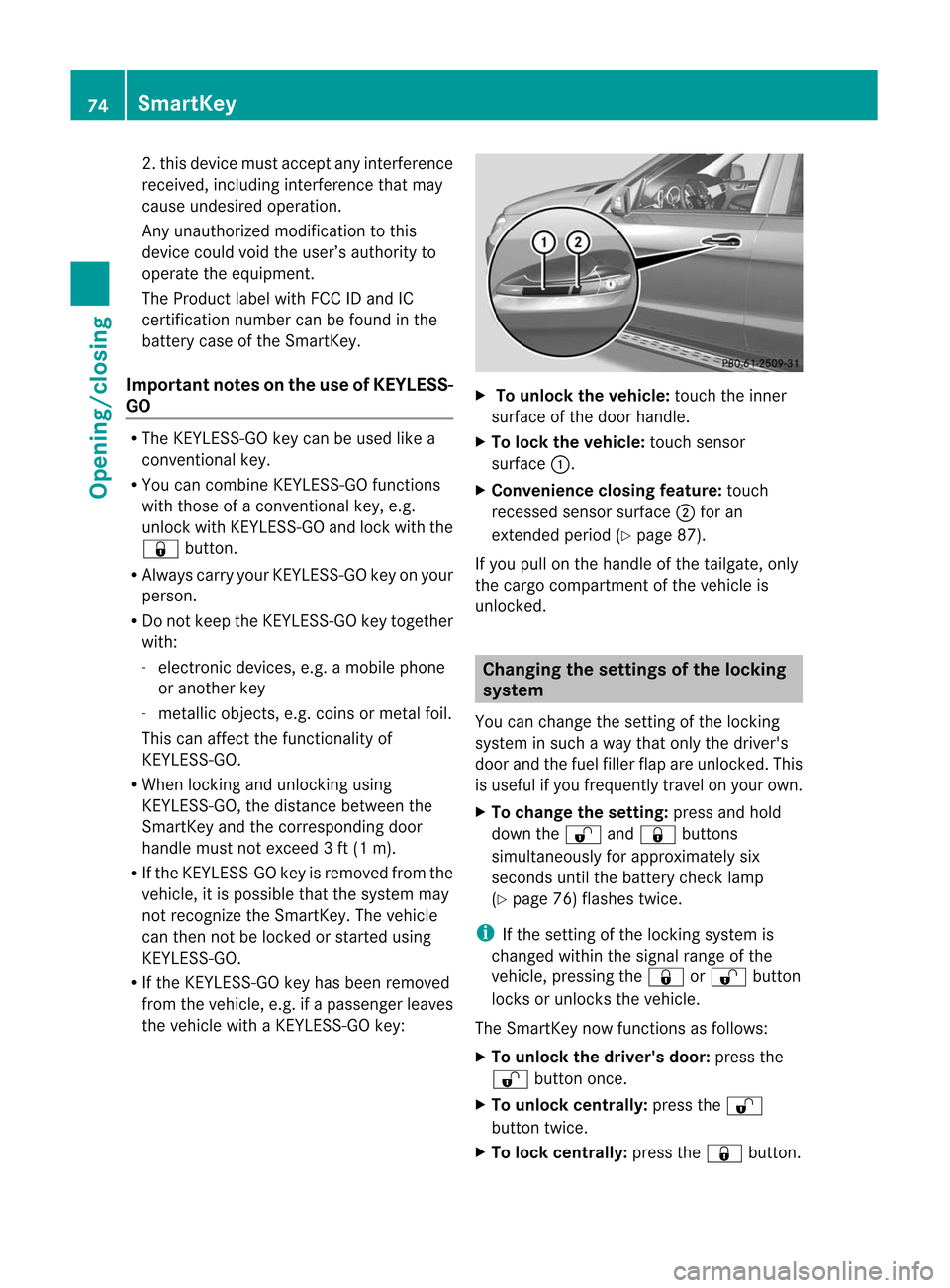
To unl ockt he vehi cle:touch theinner
surfa ceofthe door handl e.
X To loc kthe vehi cle:touch sensor
surfa ce:.
X Co nven ienceclo singfeature: touch
recesse dsensor surface; for an
extended period(Ypag e87).
If you pullon the handl eofthe tailgate, only
the cargo compartmen tof the vehicle is
unlocked. Changing
thesettings ofthe lockin g
system
You canchange thesettin gofthe locking
system insuch away that only thedriver's
door andthefuel filler flapareunlocked. This
is useful ifyou frequently travelonyour own.
X To change thesetting: pressandhold
down the% and& buttons
simultaneously forapproximately six
seconds untilthebattery checklamp
(Y page 76)flashes twice. i
If
the settin gof the locking systemis
changed withinthesignal rangeofthe
vehicle, pressing the& or% button
locks orunlocks thevehicle.
The SmartK eynow funct ionsasfollows:
X To unlock thedriver's door:pressthe
% button once.
X To unlock centrally: pressthe%
button twice.
X To lock centrally: pressthe& button. 74
Smar
tKeyOpening/closing
Page 85 of 396
chil
drenarearou nd.Tostop theclosing
procedu re,doone ofthe follo wing:
R Press orpul lthe remote tailgate opening/
closing switchonthe driver' sdoor.
R Press thetailgate closing switch.
R Press theKEYLESS-GO locking/closing
switch.
R Pul loutsid ehandl eon the tailgate.
R When noSmartKey isinserted inthe starter
switch (vehicleswith KEYLESS-GO: Make
sure thevehicl e'son-board electronics
have status 0):Press button Fonthe
SmartKey.
You canclose thetailgate automatical lyusi ng
the SmartKey, theclosi ngbutton 4
or the
locking button5
. Clo
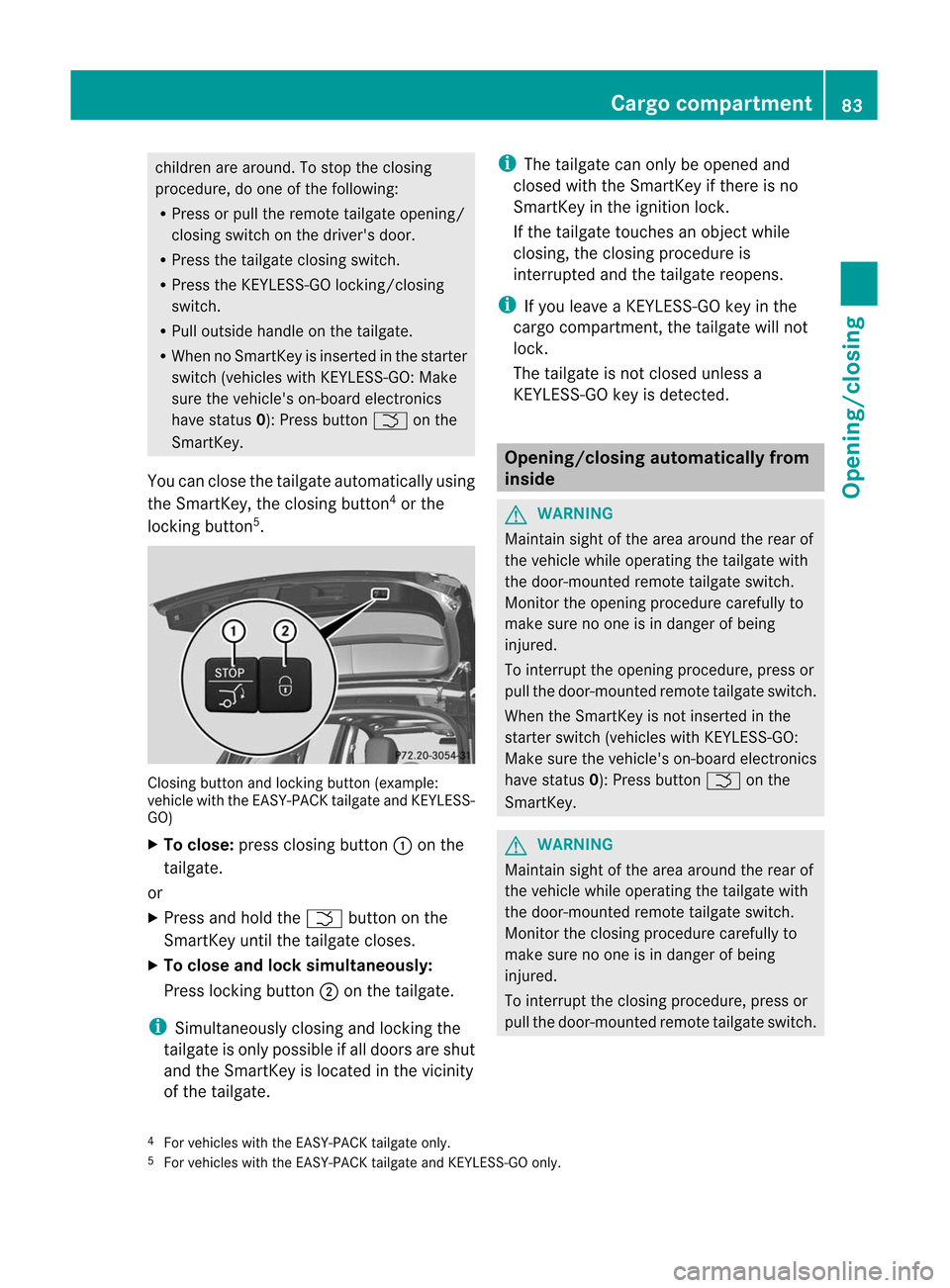
sing button andlocking button(examp le:
vehicl ewith theEASY-PACK tailgateand KEYLESS-
GO)
X To clo se: press closingbutton :onthe
tail gate.
or
X Press andhold theF button onthe
SmartKey untilthetailgate closes .
X To clo seand locksimu ltaneously:
Press lockingbutt on; onthe tailgat e. i
Simult
aneously closingand lockingthe
tailgat eis only possible ifall doors areshut
and theSmar tKey islocat edinthe vicin ity
of the tailgat e. i
The
tailgat ecan only beopene dand
close dwith theSmar tKey ifther eis no
Smar tKey inthe ignit ionlock .
If the tailgat etouc hesanobjec twhile
closing, theclosing procedure is
interrupted andthetailgate reopens. i
If
you leave aKEYLE SS-GO key inthe
cargo compartmen t,the tailgate willnot
lock.
The tailgate isnot closed unlessa
KEYLE SS-GO key isdetect ed. Opening/c
losingautomatically from
inside G
WARNING Maintain
sightofthe area around therear of
the vehicle whileoperating thetailgate with
the door-mount edremote tailgate switch.
Monitor theopening procedure carefullyto
make surenoone isin danger ofbeing
injured.
To interrupt theopening procedure, pressor
pull thedoor-mount edremote tailgate switch.
When theSmartK eyisnot inserted inthe
starter switch(vehicles withKEYLES S-GO:
Make surethevehicle's on-board electronic s
have status 0):Press button Fonthe
SmartK ey. G
WARNING Maintain
sightofthe area around therear of
the vehicle whileoperating thetailgate with
the door-mount edremote tailgate switch.
Monitor theclosing procedure carefullyto
make surenoone isin danger ofbeing
injured.
To interrupt theclosing procedure, pressor
pull thedoor-mount edremote tailgate switch.
4 For vehicles withtheEAS Y-PACK tailgateonly.
5 For vehicles withtheEAS Y-PACK tailgateandKEYLES S-GOonly. Cargo
compar tment
83Opening/closing Z
Page 89 of 396
Using
theSma rtKey i
The
Smar tKeymust beclose tothe
driver' sdoor handle.
X Point thetipofthe Smar tKeyatthe driver' s
door handle.
X Press andhold the& buttonunt ilthe
side windows andthesliding sunrooforthe
panorama roofwith power tilt/sliding
panel arefully closed.
X Make surethatallthe side windows andthe
sliding sunroof orpanorama roofwith
power tilt/sliding panelareclosed.
On vehicles withapanorama roofwith power
tilt/sliding panel:
X Press andhold the& button againuntil
the roller sunblinds ofthe panorama roof
with power tilt/sliding panelclose.
X To interru ptconve nienceclosi ng:
release the& button.
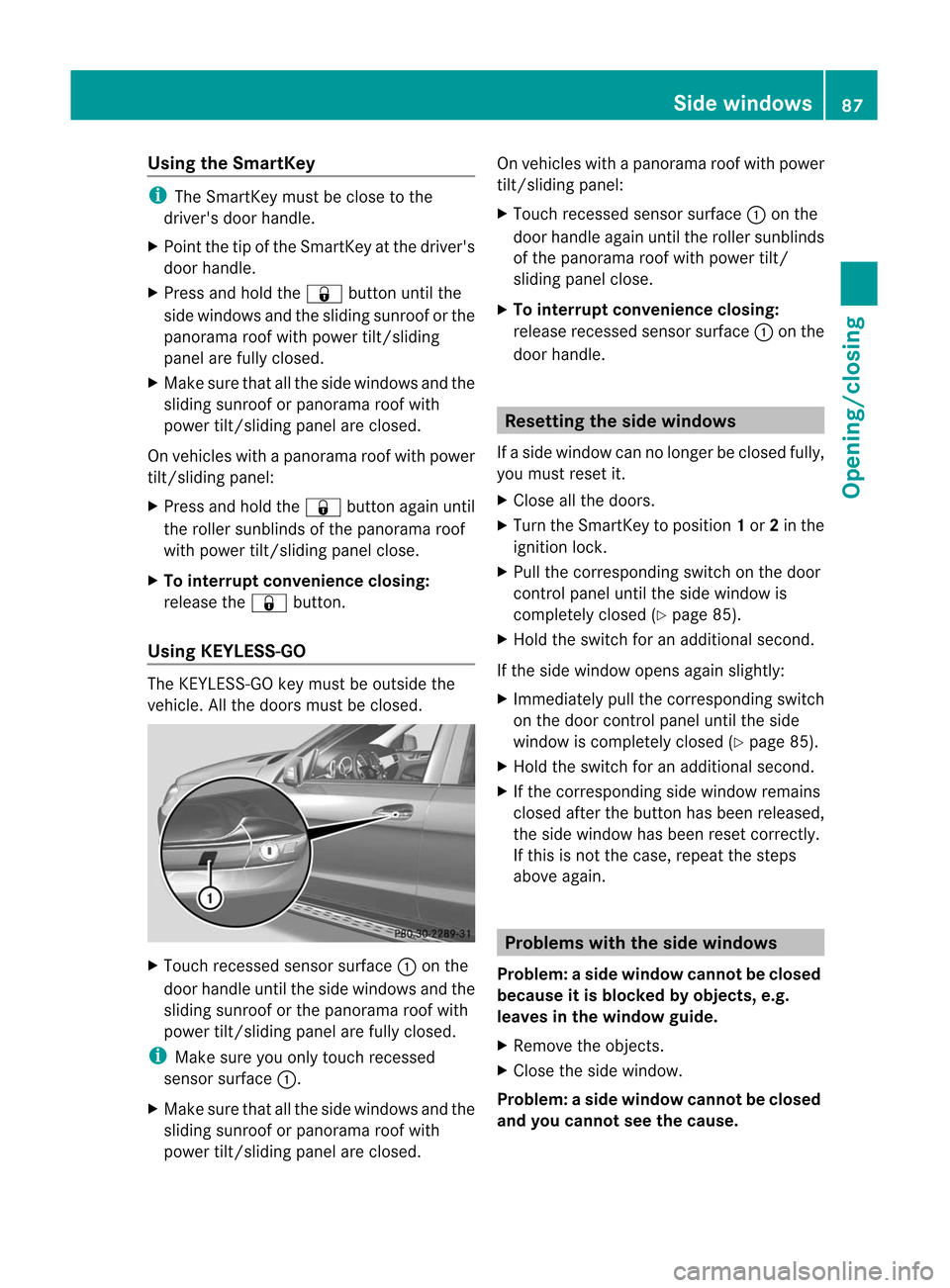
Using KEYLESS-GO The
KEYLE SS-GO key must beoutside the
vehicle. Allthe doors mustbeclosed. X
Touch recessed sensorsurface :onthe
door handle untiltheside windows andthe
sliding sunroof orthe panorama roofwith
power tilt/sliding panelarefully closed. i
Make
sureyouonly touch recessed
sensor surface :.
X Make surethatallthe side windows andthe
sliding sunroof orpanorama roofwith
power tilt/sliding panelareclosed. On
vehicles withapanorama roofwith power
tilt/sliding panel:
X Touch recessed sensorsurface :onthe
door handle againuntiltheroller sunblinds
of the panorama roofwith power tilt/
sliding panelclose.
X To interru ptconve nienceclosi ng:
release recessed sensorsurface :onthe
door handle. Resetting
theside window s
If aside window cannolonger beclosed fully,
you must reset it.
X Close allthe doors.
X Turn theSmartK eytoposition 1or 2in the
ignition lock.
X Pull thecorresponding switchonthe door
cont rolpanel untiltheside window is
completely closed(Ypage 85).
X Hold theswitch foranadditional second.
If the side window opensagainslightly:
X Immediately pullthecorresponding switch
on the door controlpanel untiltheside
window iscompletely closed(Ypage 85).
X Hold theswitch foranadditional second.
X Ifthe corresponding sidewindow remains
closed afterthebutton hasbeen released,
the side window hasbeen reset correct ly.
If this isnot thecase, repeat thesteps
above again. Problems
withtheside window s
Problem: aside window cannotbeclosed
because itis blocked byobject s,e.g.
leaves inthewindow guide.
X Remove theobje cts.
X Close theside window.
Problem :asidewindow cannotbeclosed
and youcannot seethecause. Side
windows
87Opening/closing Z
Page 103 of 396
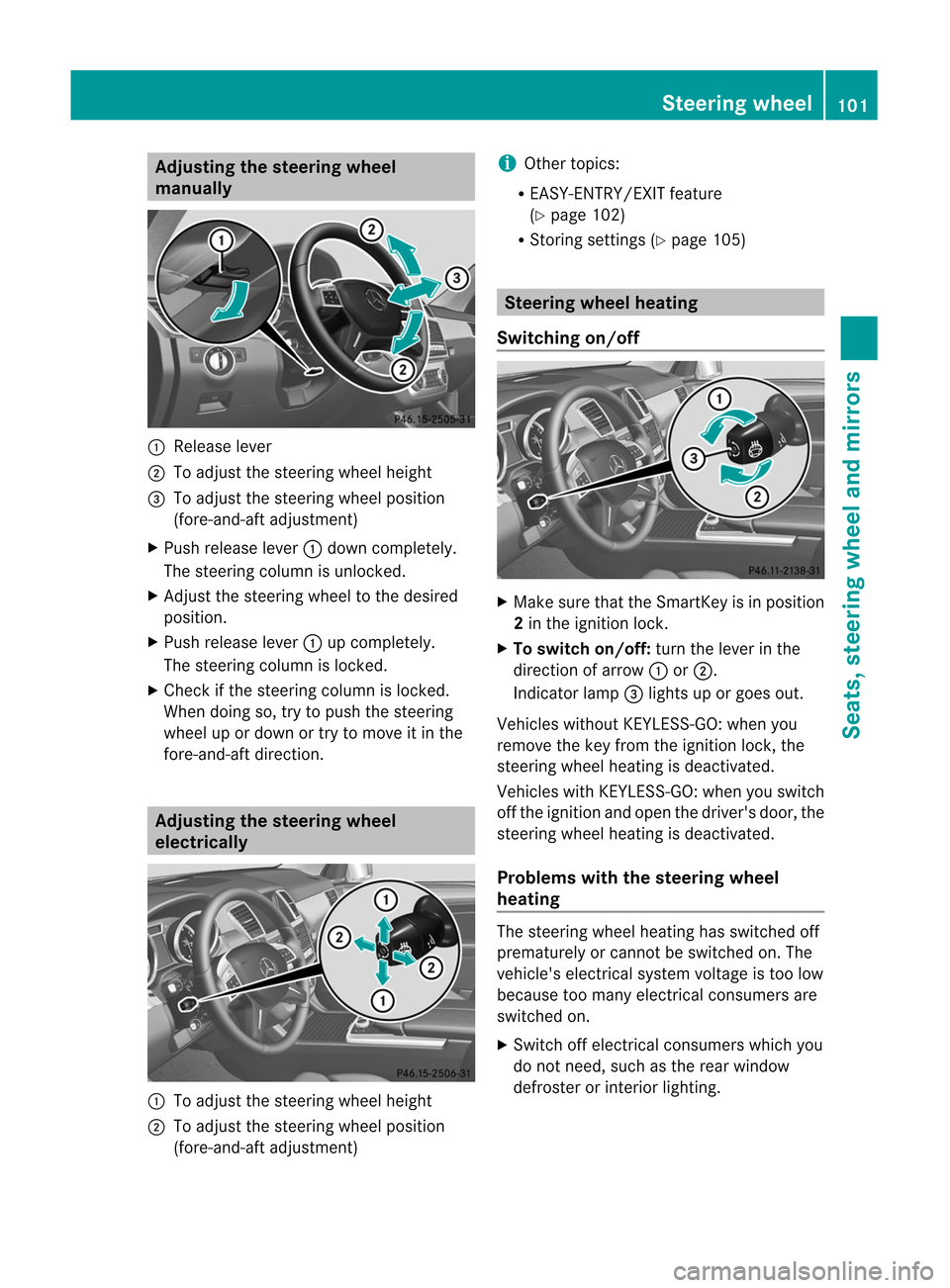
Adj
usting thest eer ing wheel
ma nua lly :
Releas elev er
; Toadj ust thest eer ing whee lheig ht
= Toadj ust thest eer ing whee lpos ition
(fo re- and -aftadj ust men t)
X Push release lever: down comple tely.
The steer ing column isunl ocked.
X Ad jus tthe steering wheeltothe desired
position.
X Push release lever:upcompletely.
The steering columnislocked.
X Check ifthe steering columnislocked.
When doingso,trytopush thesteering
wheel upordown ortry tomove itin the
fore-and- aftdirection. Adjust
ingthe steering wheel
elec trically :
Toadjust thesteering wheelheight
; Toadjust thesteering wheelposition
(fore-and-aft adjustment) i Other
topics:
R EAS Y-ENTRY/EXI Tfeature
(Y page 102)
R Stor ingsettin gs(Ypage 105) Steering
wheelheating
Switching on/off X
Make surethattheSmartK eyisin position
2 in the ignition lock.
X To switch on/off: turnthelever inthe
direction ofarrow :or;.
Indicator lamp=lights uporgoes out.
Vehicles withoutKEYLESS-GO: when you
remove thekey from theignition lock,the
steering wheelheating isdeactivated.
Vehicles withKEYLE SS-GO: when youswitch
off the ignition andopen thedriver's door,the
steering wheelheating isdeactivated.
Problems withthesteering wheel
heating The
steering wheelheating hasswitched off
prematurely orcannot beswitched on.The
vehicle's electrical systemvoltage istoo low
because toomany electrical consumers are
switched on.
X Switch offelectrical consumers whichyou
do not need, suchasthe rear window
defroster orinterior lighting. Steering
wheel
101Seats, steering wheel and mirrors Z
Page 141 of 396
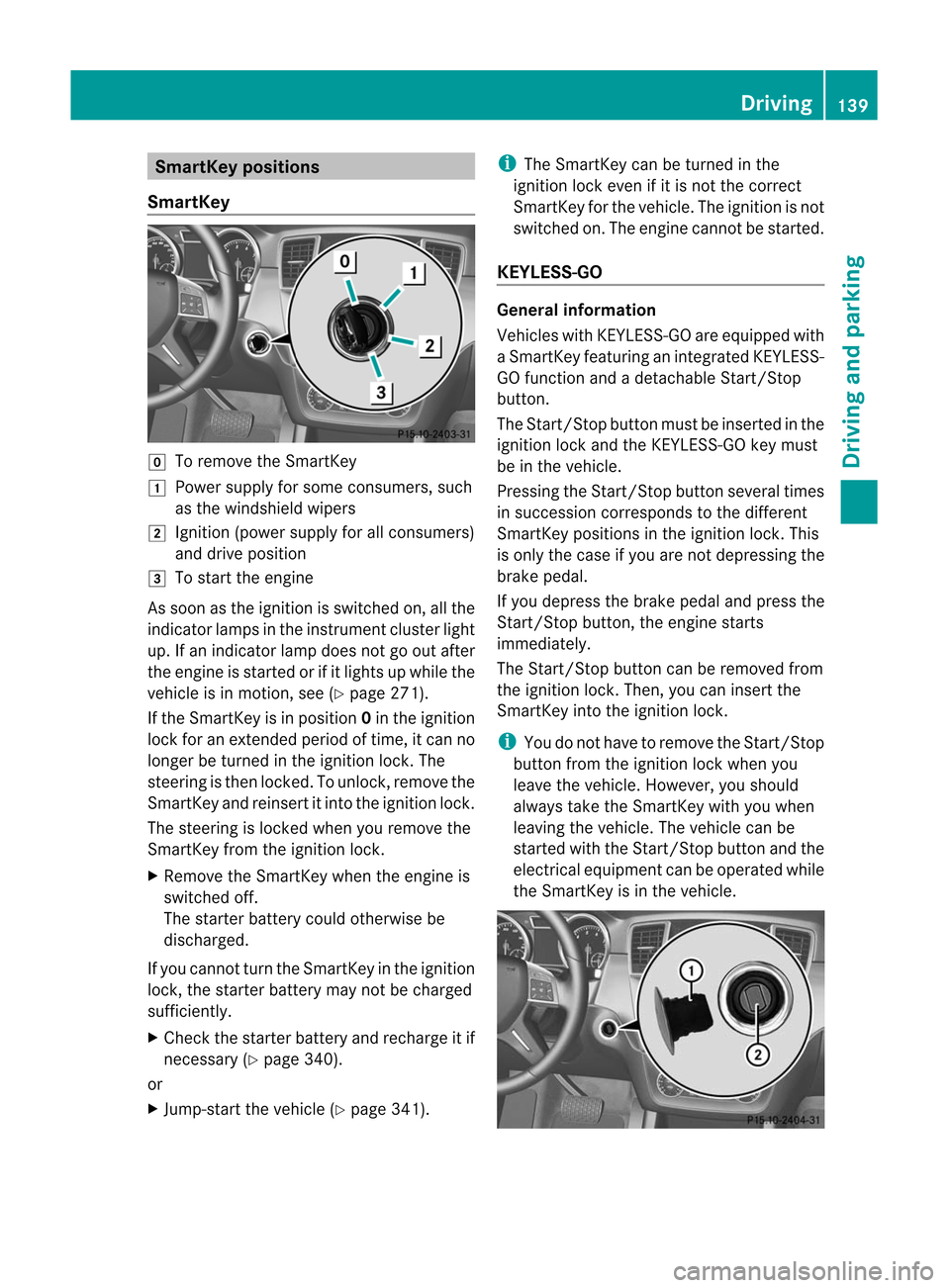
Smar
tKeypositions
Smar tKey g
Toremove theSmartK ey
1 Power supply forsome consumers, such
as the windshield wipers
2 Ignition (powersupplyforallconsumers)
and drive position
3 Tostart theengine
As soon asthe ignition isswitched on,allthe
indicator lampsinthe instrumen tcluster light
up. Ifan indic atorlamp doesnotgoout after
the engineisstart ed orifit light sup while the
vehic leisin mot ion, see(Ypage 271).
If the SmartKey isin posit ion0in the ignit ion
lock foranext ende dperiod oftim e,itcan no
long erbe turned inthe ignit ionlock .The
steering isthen locked. Tounlock, remove the
SmartK eyand reinsert itinto theignition lock.
The steering islocked whenyouremove the
SmartK eyfrom theignition lock.
X Remove theSmartK eywhen theengine is
switched off.
The starter battery couldotherwise be
discharged.
If you cannot turntheSmartK eyinthe ignition
lock, thestarter battery maynotbecharged
sufficiently.
X Check thestarter battery andrecharge itif
necessary (Ypage 340).
or
X Jump-start thevehicle (Ypage 341). i
The
SmartK eycan beturned inthe
ignition lockeven ifit is not thecorrect
SmartK eyfor the vehicle. Theignition isnot
switched on.The engine cannot bestarted.
KEY LESS-GO General
informat ion
Vehicles withKEYLE SS-GO are equipp edwith
aS martKey featuringanintegrated KEYLESS-
GO function andadetacha bleStart/St op
button.
The Start/St opbutton mustbeinserted inthe
ignitio nlock andtheKEYLESS-GO keymust
be inthe vehicl e.
Pressi ngthe Start/St opbutton severaltimes
in successi oncorrespond sto the differe nt
SmartKey positions inthe ignitio nlock. This
is only thecase ifyou arenot depressing the
brake pedal.
If you depress thebrake pedalandpress the
Start /Stopbutton ,the engine starts
immediately.
The Start /Stopbutton canberemoved from
the ignition lock.Then, youcan insert the
Smart Keyinto theignition lock. i
You
donot have toremove theStart /Stop
button fromtheignition lockwhen you
leave thevehicle. However, youshould
alwa ystake theSmart Keywith youwhen
leaving thevehicle. Thevehicle canbe
start edwith theStart /Stopbutton andthe
electric alequipment canbeoperated while
the Smart Keyisin the vehicle. Driving
139Driving and parking Z
Page 143 of 396
i
You
canstartthe engine without preglow
if the engine iswarm. i
You
canalso usethetouch-st artfunct ion.
To do this, turntheSmartK eytoposition 3
(Y page 139)andrelease itimmediately.
The engine thenstarts automatically .
Using KEYLESS-GO tostar tthe eng ine G
WARNING As
long asthe SmartKey isin you rvehicle, the
vehicle canbestart ed.Therefor e,never leave
children unattended inthe vehicle, asthey
could otherwiseacciden tallystart theengine.
When leaving thevehicle, alwaystake the
Smart Keywith youand lock thevehicle. Do
not leave children unattended inthe vehicle,
or with access toan unlock edvehicle. A
child's unsupervised accesstoavehicle could
result inan acciden tand/o rserious personal
injury. i
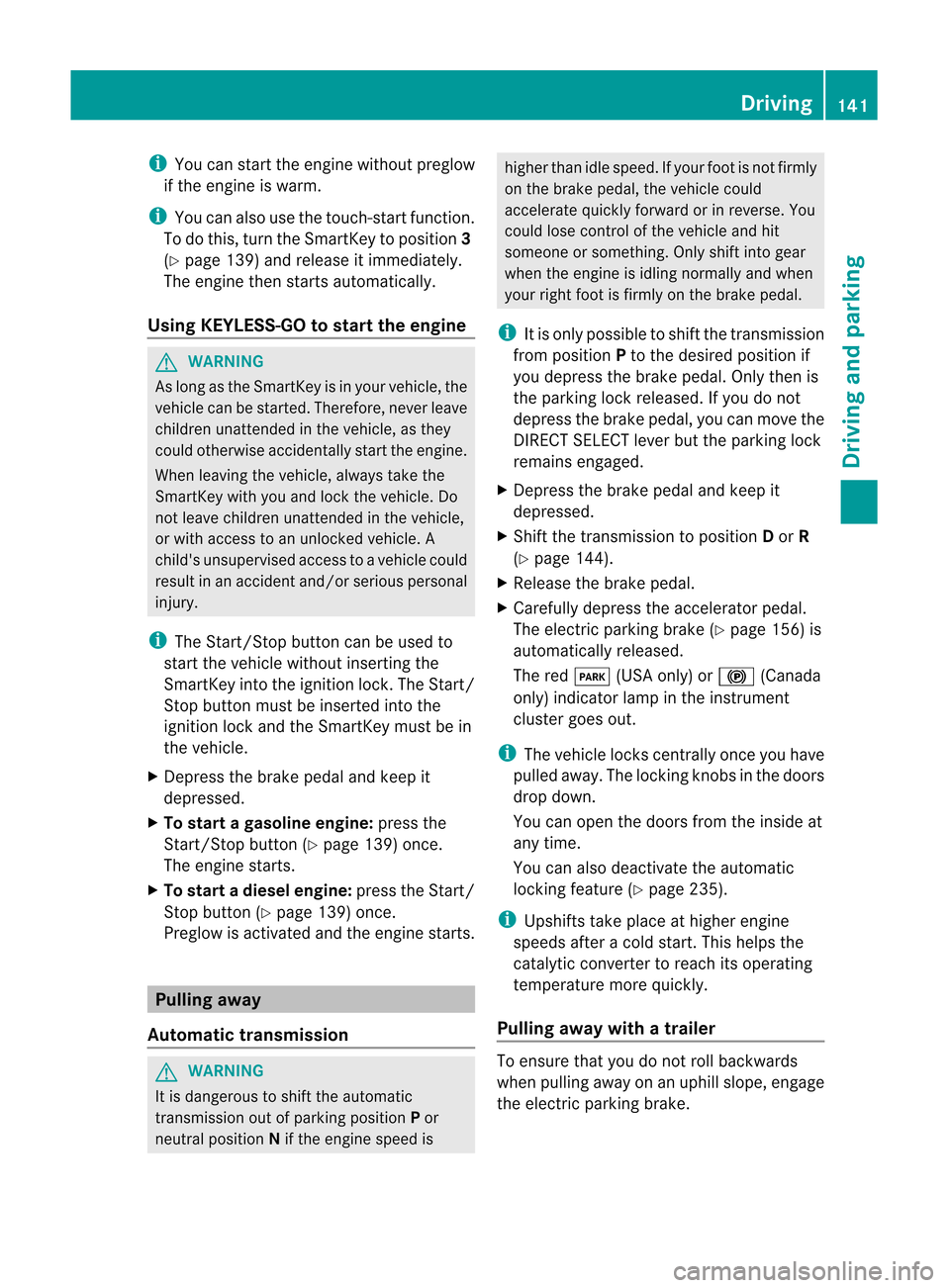
The
Start/ Stop button canbeused to
start thevehicle without insertingthe
Smart Keyintothe ignition lock.TheStart/
St op button mustbeinsert edinto the
ignition lockandtheSmart Keymust bein
the vehicle.
X Depress thebrake pedalandkeep it
depressed.
X To star tag asolineeng ine:press the
Start/Stop button(Ypag e139) once.
The engine starts.
X To start adiesel engine: presstheStart/
St op butt on(Ypage 139)onc e.
Preglow isact ivated andtheengin estar ts. Pulling
away
Autom atic transm ission G
WARN
ING It
is danger oustoshift theautomat ic
tr ansm ission outofparkin gposition Por
neutral position Nifthe engine speedis higher
thanidlespeed. Ifyour footisnot firmly
on the brake pedal, thevehicle could
accelerate quicklyforward orinreverse. You
could losecontrolofthe vehicle andhit
someone orsomethin g.Only shiftintogear
when theengine isidling normally andwhen
your right footisfirmly onthe brake pedal. i
It
is only possible toshift thetrans mission
from position Pto the desired position if
you depress thebrake pedal. Onlythenis
the parking lockreleased. Ifyou donot
depress thebrake pedal, youcan move the
DIRECT SELECT lever buttheparking lock
remains engaged.
X Depress thebrake pedalandkeep it
depressed.
X Shift thetrans mission toposition Dor R
(Y page 144).
X Relea sethe brake pedal.
X Carefully depresstheaccelerator pedal.
The electric parking brake(Ypage 156)is
automatically released.
The redF (USAonly)or! (Canada
only) indicator lampinthe instr ument
cluster goesout. i
The
vehicle lockscentrally once youhave
pulled away.The locking knobsinthe doors
drop down.
You canopen thedoors fromtheinside at
any time.
You canalso deactivate theautomatic
locking feature(Ypage 235). i
Upshifts
takeplace athigher engine
speeds afteracold start. Thishelps the
catalytic convertertoreach itsoperating
temperature morequickly.
Pulling awaywithatra iler To
ensure thatyoudonot rollbackwards
when pullingaway onanuphill slope, engage
the electric parking brake. Driving
141Driving and parking Z
Page 147 of 396
X
When thevehicle isstat ionary, depress the
brake pedal.
X Push theDIRE CTSELECT leveruppast the
first point ofresistan ce.
Shift ingtoneutr alN X
When thevehicle isstat ionary, depress the
brake pedal.
X Push theDIRE CTSELECT leverupordown
to the first point ofresistan ce.
If the engine hasbeen switched off,the
automatic transmission automatic ally
switches toN.
Rema ininginneutr alN
If the automatic transmission isto remain in
neutr alN, e.g. forwashing thevehicle incar
washes withatowing device, pleaseobserve
the following instruct ions: G
WARN
ING When
leaving theSmart Keyinthe start er
switch, donot leave children unattended in
the vehicle. Itis possible forchildren toswitch
on the ignition whichcouldresult in
unsupervised useofvehicle equipment.
Unsuperv iseduseofvehicle equipment could
result inan accident and/orserious personal
injury.
Using theSma rtKey:
R make surethattheignition isswitched on.
R when thevehicle isstat ionary, depress the
brake pedalandkeep itdepressed.
R shift toneutr alN.
R release thebrake pedal.
R ifapplied, releasetheelectr icparking
brake.
R switch offthe ignition andleave the
Smart Keyinthe ignition lock.
Using KEYLESS-GO:
R make surethattheignition isswitched on.
R when thevehicle isstat ionary, depress the
brake pedalandkeep itdepressed.
R engage parkposition P. R
release thebrake pedal.
R remove theStart/ Stop button fromthe
ignition lock.
R insert theSmart Keyinto theignition lock.
R switch onthe ignition .
R depress thebrake pedalandkeep it
depressed.
R shift toneutr alN.
R release thebrake pedal.
R ifapplied, releasetheelectr icparking
brake.
R switch offthe ignition andleave the
Smart Keyinthe ignition lock.
Shift ingtotransmission positionD X
When thevehicle isstat ionary, depress the
brake pedal.
X Push theDIRE CTSELECT leverdown past
the first point ofresistan ce. Tr
ansmission positiondisplay
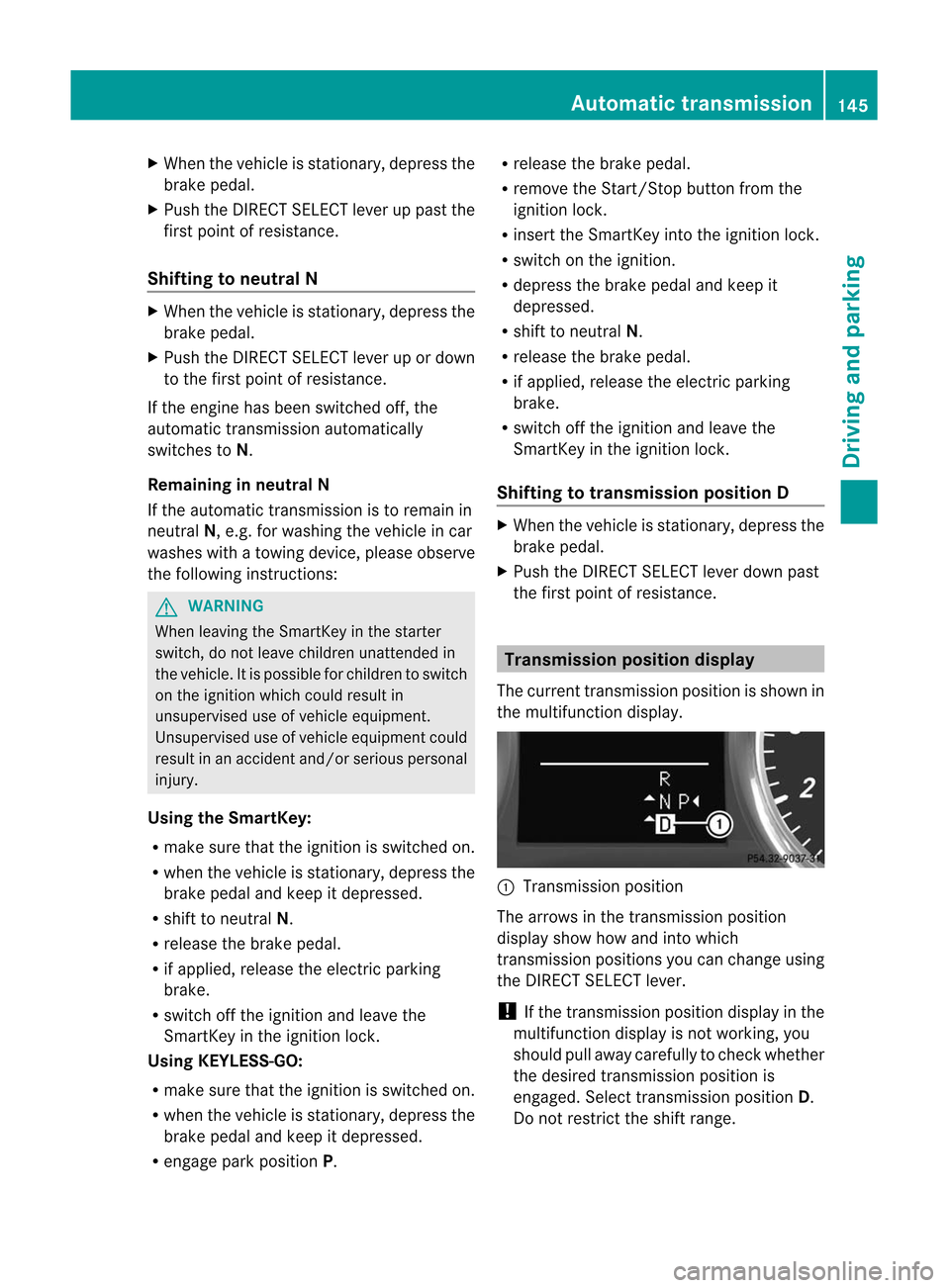
The curren ttransmis sionposition isshow nin
the multifu nctio ndisplay. :
Tran smiss ionposit ion
The arrows inthe transm ission position
display showhowandintowhich
tr ansm ission positionsyoucan chan geusing
the DIRECT SELECT lever .
! Ifthe transm ission positiondisplay inthe
mult ifunc tiondisplay isnot work ing,you
should pullaway carefully tochec kwhether
the desired transmission positionis
engaged. Selecttransmission positionD.
Do not restrict theshift range. Automat
ictransmission
145Driving and parking Z
Page 158 of 396
X
App lythe electri cpark ing brak e.
X Sh ift thetrans mis sion toposi tionP.
Using theSm artKey X
Turn theSm artKey toposi tion0 inthe
ign ition lockand remove it.
The imm obiliz erisact ivat ed. i
If
you turnoff theen gin ewit hth e
Sm artKey and then rem ove itfrom the
ign ition lockor open afron tdoor ,th e
auto matictrans mis sion shiftsto P
auto maticall y.
Using KEYLESS- GO X
Pre sstheSt art /S topbut ton( Ypage 139).
The engin estops andallthe indicat or
lamps inthe instrument clustergoout. i
If
you usetheStart/ Stop butt ontoswitc h
off the engin e,the automatic transmission
shift sto Nautomatic ally.Ifyou then open
one ofthe fron tdoors, theautomatic
trans mission shiftstoP. i
In
an emergenc y,the engine canbe
turned offwhile thevehicle isin motion by
pressing andholding theStart /Stopbutton
for three seconds. Elec
tric par king brake
General information i
The
electric parking brakeperforms a
funct iontest atregular intervalswhile the
engine isswitched off.The sounds thatcan
be heard whilethisisoccurrin gare normal. G
WARNIN
G When
leaving thevehicle, alwaysremove the
Smart Keyfrom thestart erswitch, takeitwith
you, andlock thevehicle. Donot leave
children unattendedinthe vehicle, orwith
access toan unlocked vehicle.Children could
release theparking brakeand/or shiftthe
automatic transmission outofpark position P,
either ofwhich couldresult inan accident
and/or serious personal injury. Applying/releasing
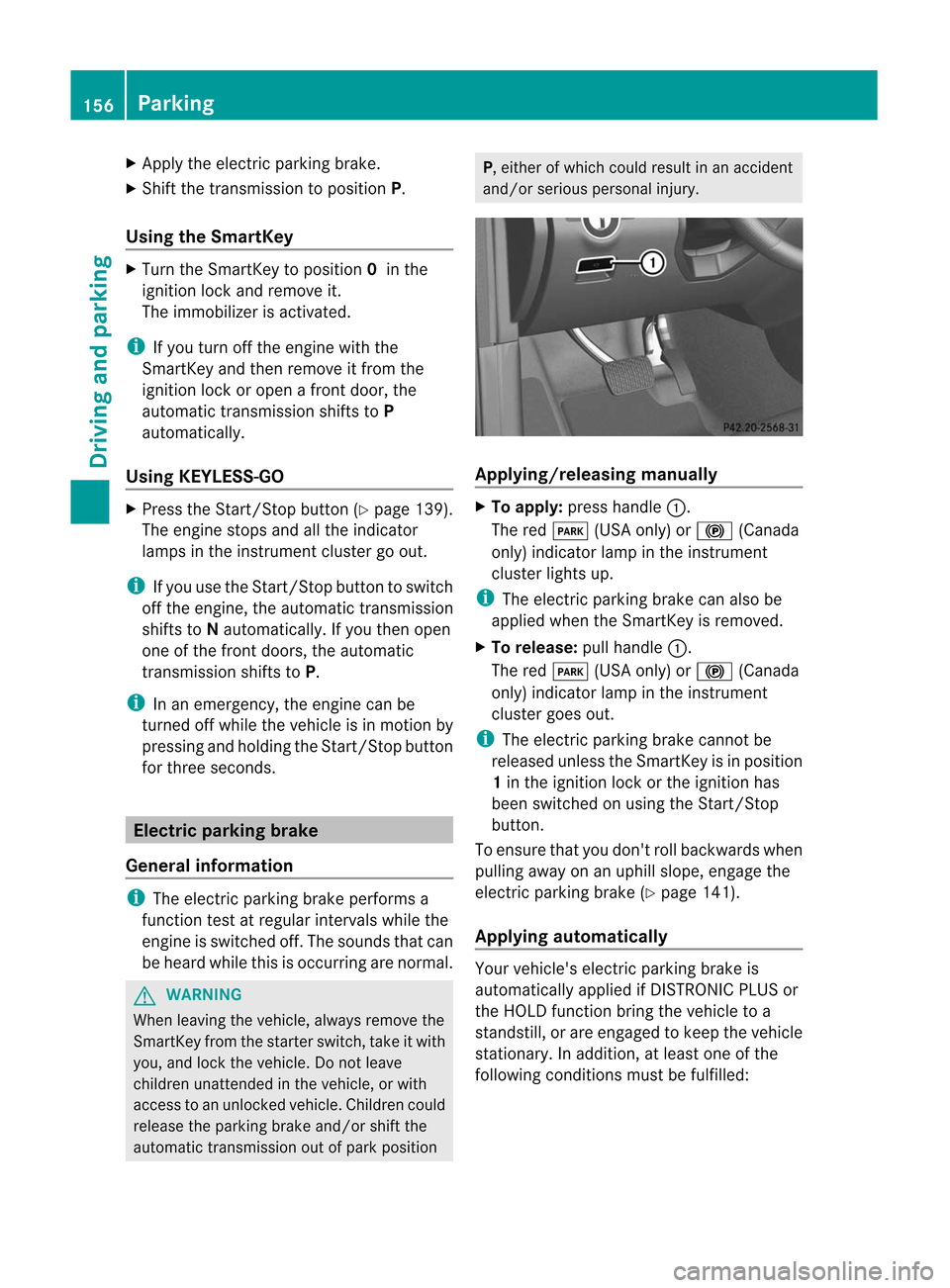
manually X
To app ly:press handle :.
The redF (USAonly)or! (Canada
only) indicator lampinthe instr ument
cluster lightsup. i
The
electric parking brakecanalso be
applied whentheSmart Keyisremoved.
X To release: pullhandle :.
The redF (USAonly)or! (Canada
only) indicator lampinthe instr ument
cluster goesout. i
The
electric parking brakecannotbe
released unlesstheSmart Keyisin position
1 in the ignition lockorthe ignition has
been switched onusing theStart /Stop
button .
To ensure thatyoudon't rollbackwards when
pulling awayonanuphill slope, engage the
electric parking brake(Ypage 141).
Applying automat ically Your
vehicle's electricparking brakeis
automatically appliedifDIS TRONIC PLUSor
the HOLD functionbring thevehicle toa
standst ill,orare engaged tokeep thevehicle
station ary.Inaddition, atleast oneofthe
following conditionsmust befulfilled: 156
Par
kingDriving and parking