Key MERCEDES-BENZ M-Class 2013 W166 Owners Manual
[x] Cancel search | Manufacturer: MERCEDES-BENZ, Model Year: 2013, Model line: M-Class, Model: MERCEDES-BENZ M-Class 2013 W166Pages: 458, PDF Size: 6.24 MB
Page 237 of 458
indicator lamp goes out and Blind Spot Assist
is operational.
If a vehicle is detected within the monitoring
range of Blind Spot Assist at speeds above
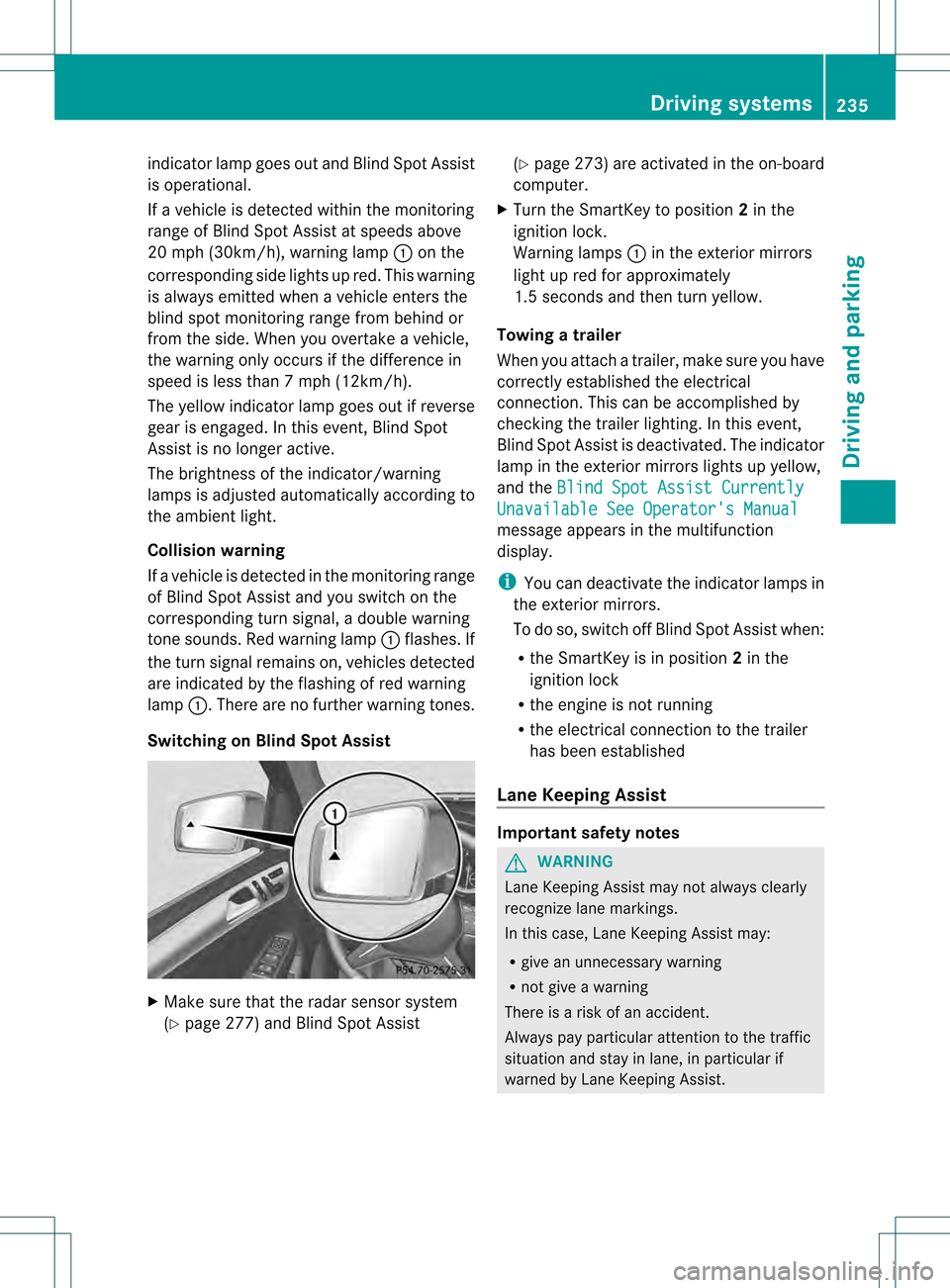
20 mph (30km/h), warning lamp 0002on the
corresponding side lights up red. This warning
is always emitted when a vehicle enters the
blind spot monitoring rang efrom behind or
from the side .When you overtake a vehicle,
the warning only occurs if the difference in
speed is less than 7mph (12km/h).
The yellow indicator lamp goes out if reverse
gear is engaged. In this event, Blind Spot
Assist is no longer active.
The brightness of the indicator/warning
lamps is adjusted automatically according to
the ambient light.
Collision warning
If a vehicle is detected in the monitoring range
of Blind Spot Assist and you switch on the
corresponding turn signal, a double warning
tone sounds. Red warning lamp 0002flashes. If
the turn signal remains on, vehicles detected
are indicated by the flashing of red warning
lamp 0002.There are no further warning tones.
Switching on Blind Spot Assist X
Make sure that the radar sensor system
(Y page 277) and Blind Spot Assist (Y
page 273) are activated in the on-board
computer.
X Turn the SmartKey to position 2in the
ignition lock.
Warning lamps 0002in the exterior mirrors
light up red for approximately
1.5 seconds and then turn yellow.
Towing atrailer
When you attach a trailer, make sure you have
correctly established the electrical
connection. This can be accomplished by
checking the trailer lighting. In this event,
Blind Spo tAssist is deactivated. The indicator
lamp in the exterior mirrors lights up yellow,
and the Blind Spot Assist Currently Unavailable See Operator's Manual
message appears in the multifunction
display.
i
You can deactivate the indicator lamps in
the exterior mirrors.
To do so, switch off Blind Spot Assist when:
R the SmartKey is in position 2in the
ignition lock
R the engine is not running
R the electrical connection to the trailer
has been established
Lane Keeping Assist Important safety notes
G
WARNING
Lane Keeping Assist may not always clearly
recognize lane markings.
In this case, Lane Keeping Assist may:
R give an unnecessary warning
R not give a warning
There is a risk of an accident.
Always pay particular attention to the traffic
situation and stay in lane, in particular if
warned by Lane Keeping Assist. Driving systems
235Driving and parking Z
Page 242 of 458
If Active Blind Spot Assist detects a risk of a
lateral collision in the monitoring range, a
course-correcting brake application is carried
out. This is meant to assist you in avoiding a
collision.
If a course-correcting brake application
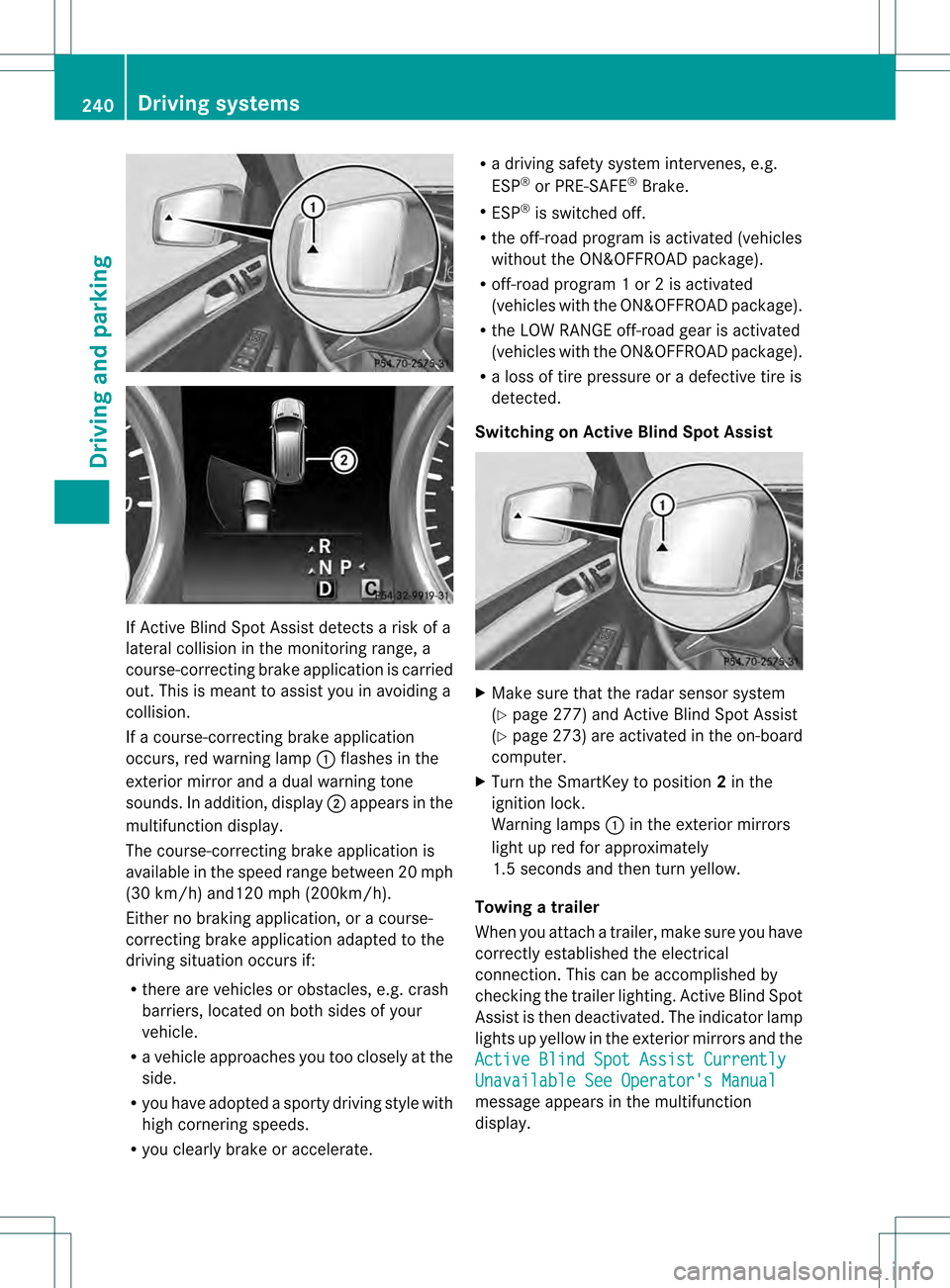
occurs, red warning lamp 0002flashes in the
exterior mirror and a dual warning tone
sounds. In addition, display 0003appears in the
multifunction display.
The course-correcting brake application is
available in the speed range betwee n20m ph
(30 km/h) and120 mph (200km/h).
Either no braking application, or a course-
correcting brake application adapted to the
driving situation occurs if:
R there are vehicles or obstacles, e.g. crash
barriers, located on both sides of your
vehicle.
R a vehicle approaches you too closely at the
side.
R you have adopted a sporty driving style with
high cornering speeds.
R you clearly brake or accelerate. R
a driving safety system intervenes, e.g.
ESP ®
or PRE-SAFE ®
Brake.
R ESP ®
is switched off.
R the off-road program is activated (vehicles
without the ON&OFFROA Dpackage).
R off-road program 1 or 2 is activated
(vehicles with the ON&OFFROAD package).
R the LOW RANGE off-road gear is activated
(vehicles with the ON&OFFROAD package).
R a loss of tire pressure or a defective tire is
detected.
Switching on Active Blind Spot Assist X
Make sure that the radar sensor system
(Y page 277) and Active Blind Spot Assist
(Y page 273) are activated in the on-board
computer.
X Turn the SmartKey to position 2in the
ignition lock.
Warning lamps 0002in the exterior mirrors
light up red for approximately
1.5 seconds and then turn yellow.
Towing atrailer
When you attach a trailer, make sure you have
correctly established the electrical
connection. This can be accomplished by
checking the trailer lighting .Active Blind Spot
Assist is then deactivated. The indicator lamp
lights up yellow in the exterior mirrors and the
Active Blind Spot Assist Currently Unavailable See Operator's Manual
message appears in the multifunction
display. 240
Driving systemsDriving and parking
Page 246 of 458
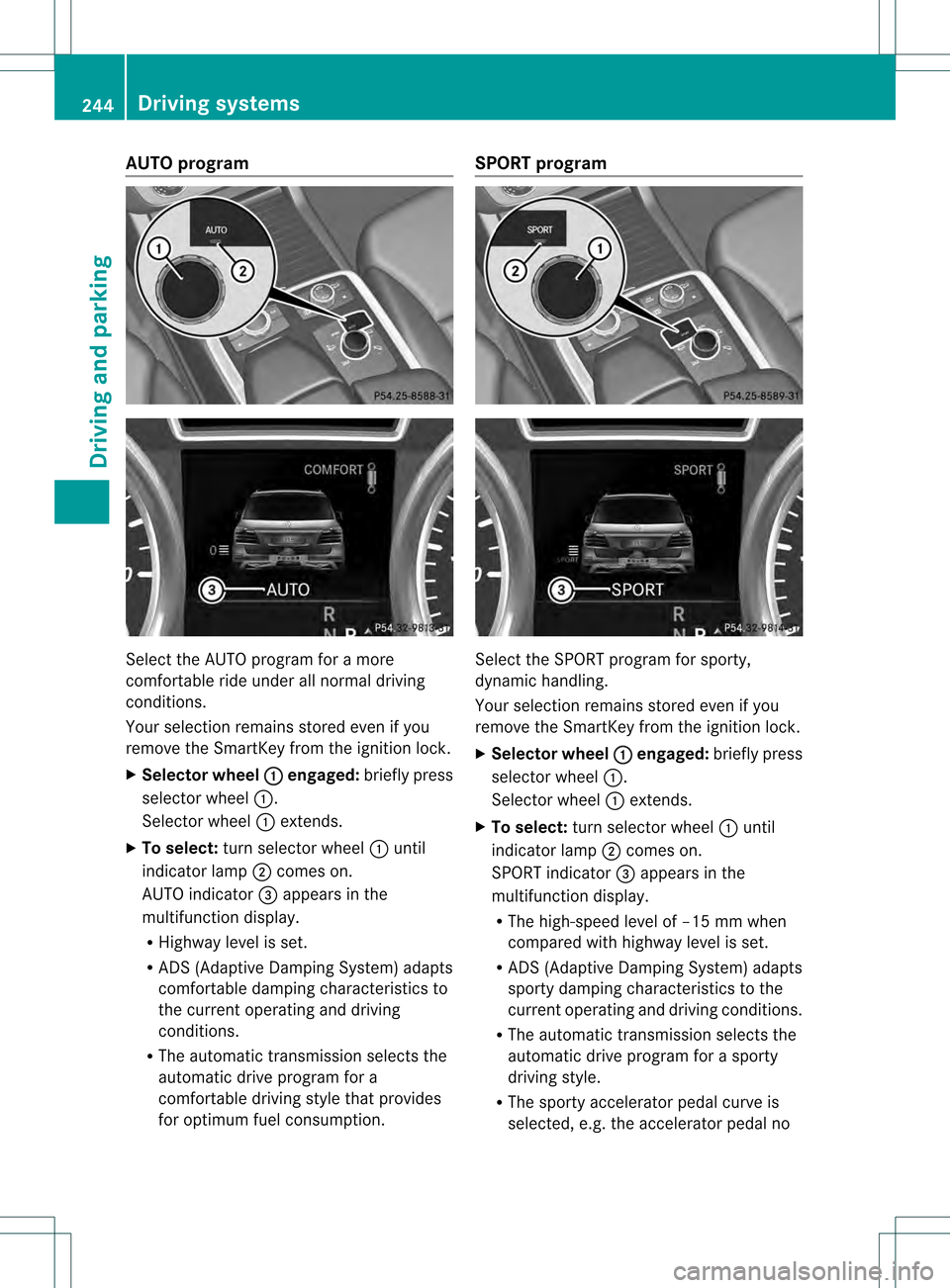
AUTO program
Select the AUTO program for a more
comfortable ride under all normal driving
conditions.
Your selection remains store
deven if you
remove the SmartKey from the ignition lock.
X Selector wheel 0002 engaged:
briefly press
selector wheel 0002.
Selector wheel 0002extends.
X To select: turn selector wheel 0002until
indicator lamp 0003comes on.
AUTO indicator 001Fappears in the
multifunction display.
R Highway level is set.
R ADS (Adaptive Damping System) adapts
comfortable damping characteristics to
the current operating and driving
conditions.
R The automatic transmission selects the
automatic drive program for a
comfortable driving style that provides
for optimu mfuel consumption. SPORT program
Selec
tthe SPORT program for sporty,
dynamic handling.
Your selection remains stored even if you
remove the SmartKey from the ignition lock.
X Selector wheel 0002 engaged:
briefly press
selector wheel 0002.
Selector wheel 0002extends.
X To select: turn selector wheel 0002until
indicator lamp 0003comes on.
SPORT indicator 001Fappears in the
multifunction display.
R The high-speed level of –15 mm when
compared with highway level is set.
R ADS (Adaptive Damping System) adapts
sporty damping characteristics to the
current operating and driving conditions.
R The automatic transmission selects the
automatic drive program for a sporty
driving style.
R The sporty accelerator pedal curve is
selected, e.g. the accelerator pedal no 244
Driving systemsDriving and parking
Page 254 of 458
Messages in the multifunction display
If a gearc
hange process has not been successful, the following messages may be displayed
in the multifunction display: Display messages Possible causes/consequences and
0001 Solutions
LOW RANGE Max.
Speed 40 km/h You have been driving faster than 40 km/h. Additionally, the
indicator lamp on the button in the center console blinks.
X
Drive more slowly to carry out the gear change process. LOW RANGE Shift to
Position N Briefly The transmission is in position
Dand you are driving at below
40 km/h.
X Shift the transmission to Nto complete the gear change
process. LOW RANGE Shifting
Canceled Please
Reactivate The gear change process was not carried out.
X
Ensure that all gear change conditions are fulfilled and carry out
the gear change process again. LOW RANGE Stop
Apply Parking Brake Aw
arning tone also sounds. The gear change proces shas no tbeen
completed. LOW RANGE is in the neutral position .There is no
connection between the engine and the drive wheels.
! Do not drive any further. You could otherwise damage the
vehicle's drive train.
X Stop the vehicle. Take into account the road and traffic
conditions when doing this.
X Depress the electric parking brake (Y page 180).
X Carry out the gear change process again.
If the gear change process has been carried out, the LOW RANGE
Stop Apply Parking Brake message disappears.
ON&OFFROAD menu in the COMAND
display (vehicles with the
ON&OFFROAD package) You can display some driving systems, driving
programs and additional information in the
COMAND display.
X Make sure that the SmartKey is in position
2in the ignition lock.
X Make sure that COMAND is activated, see
the separate COMAND operating
instructions.
X Press function button 0002.
The corresponding displays appearint he
COMAND display:
R level control
R steering angle
R vehicle's angle of inclination 252
Driving systemsDriving and parking
Page 258 of 458

X
Pull protective cap 0002in the direction of the
arrow, out of the ball coupling recess.
X Place protective cap 0002in the ball coupling
recess. Ball coupling recess
Holes in the ball coupling and ball coupling recess
X Inser tthe ball coupling horizontally into ball
coupling recess 0003in the direction of the
arrow until the holes in ball coupling 001Fare
in line with the holes in ball coupling
recess 001E. Bolt X
Slide bolt 001Cinto the hole in the ball
coupling recess and the ball coupling to the
stop. Bolt and spring cotter
X
Secure the bolt using spring cotter 001D. Correctly installed and secured ball coupling
X
Check the ball coupling, bolt and spring
cotter for correct installation.
If the ball coupling cannot be correctly
mounted, remove the ball coupling. Under
these circumstances, the ball coupling must
not be used for trailer towing.
If the ball coupling cannot be locked and the
key cannot be removed, remove the ball
coupling and clean it. If the ball coupling can
still not be installed (locked) after it has been
cleaned, remove the ball coupling. The trailer
tow hitch must then not be used to tow a
trailer, as safe operation cannot be
guaranteed.
Have the entire trailer tow hitch checked at a
qualified specialist workshop. 256
Towing
atrailerDriving an d parking
Page 266 of 458
vehicle and do not stand near the vehicle until
the engine has cooled down.
! Adisplay message is shown if the coolant
temperature is too high.
If the coolant temperature is over
248 ‡(120 †), do not continue driving. The
engine will otherwise be damaged.
The coolan ttemperature gauge is in the
instrument cluster on the right-hand side
(Y page 33).
Under normal operating conditions and with
the specified coolant level, the coolant
temperature may rise to 248 ‡ (120 †). Tachometer
! Do not drive in the overrevving range, as
this could damage the engine.
The red band in the tachometer indicates the
engine's overrevving range.
The fuel supply is interrupted to protec tthe
engine when the red band is reached. Outside temperature display
You should pay special attention to road
conditions when temperatures are around
freezing point.
The outside temperature display is in the
multifunction display (Y page 265).
Changes in the outside temperature are
displayed after a short delay. Speedometer with segments
The segments in the speedometer indicate
which speed range is available.
R Cruise control activated (Y page 192):
The segments light up from the stored
speed to the maximum speed.
R DISTRONIC PLUS activated (Y page 194):One or two segments in the set speed
range light up.
R DISTRONIC PLUS detectsav ehicle in front:
The segments between the speed of the
vehicle in fron tand the stored speed light
up. Operating the on-board computer
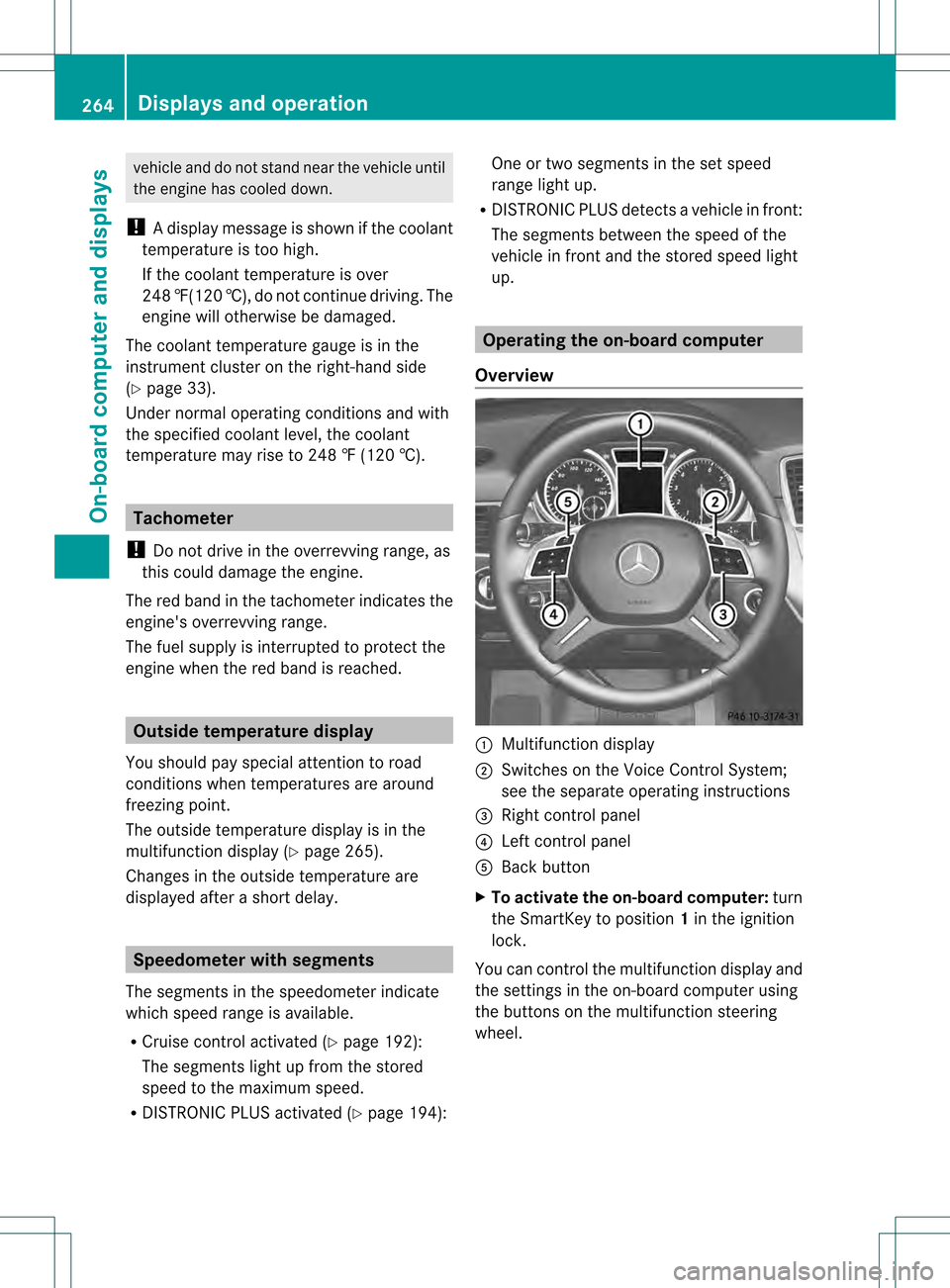
Overview 0002
Multifunctio ndisplay
0003 Switches on the Voice Control System;
see the separate operating instructions
001F Right control panel
001E Left control panel
001C Back button
X To activat ethe on-board computer: turn
the SmartKey to position 1in the ignition
lock.
You can control the multifunction display and
the settings in the on-board computer using
the buttons on the multifunction steering
wheel. 264
Displays and operationOn-board computer and displays
Page 277 of 458
X
Press the 0002or0005 button on the
steering wheel to select the Sett. menu.
X Press the 0004or0003 button to select the
Lights submenu.
X Press 000Bto confirm.
X Press 0004or0003 to select the Daytime Running Lights: function.
If the Daytime Running Lights: have
been switched on, the cone of light and the
0004 symbol in the multifunction display
are shown in red.
X Press the 000Bbutton to save the setting.
Further information on daytime running
lamps (Y page 120).
Switching Adaptive Highbeam Assist on/
off
X Press the 0002or0005 button on the
steering wheel to select the Sett. menu.
X Press the 0004or0003 button to select the
Lights submenu.
X Press 000Bto confirm.
X Press the 0004or0003 button to select the
Adaptive Highbeam function.
If the Adaptive Highbeam function has
been switched on, the cone of light and the
0005 symbol in the upper multifunction
display are shown in red.
X Press the 000Bbutton to save the setting.
For further information about Adaptive
Highbeam Assist, see (Y page 126).
Setting the brightness of the ambient
lighting
X Press the 0002or0005 button on the
steering wheel to select the Sett. menu.
X Press the 0004or0003 button to select the
Lights submenu.
X Press 000Bto confirm.
X Press the 0004or0003 button to select the
Amb. Light +/-. function.
You will see the selected setting.
X Press 000Bto confirm. X
Press the 0004or0003 button to adjust the
brightness to any level from Off to
Level 5 (bright).
X Press the 000Bor0007 button to save the
setting.
Setting the ambient lighting color
X Press the 0002or0005 button on the
steering wheel to select the Sett. menu.
X Press the 0004or0003 button to select the
Lights submenu.
X Press 000Bto confirm.
X Press the 0004or0003 button to select the
Ambient Light Color function.
X Press 000Bto confirm.
X Press the 0004or0003 button to set the
color to SOLAR ,
NEUTRAL or
POLAR .
X Press the 000Bor0007 button to save the
setting.
Surround lighting and exterior lighting
delayed switch-off
X Press the 0002or0005 button on the
steering wheel to select the Sett. menu.
X Press the 0004or0003 button to select the
Light submenu.
X Press 000Bto confirm.
X Press 0004or0003 to select the
Surround Lighting function.
When the Surround Lighting function is
activated, the light cone and the area
around the vehicle are displayed in red in
the multifunction display.
X Press the 000Bbutton to save the setting.
Deactivating delayed switch-off of the
exterior lighting temporarily:
X Before leaving the vehicle, turn the
SmartKey to position 0in the ignition lock.
X Turn the SmartKey to position 2in the
ignition lock.
The exterior lighting delayed switch-off is
deactivated. Menus and submenus
275On-board computer and displays Z
Page 278 of 458
Delayed switch-off of the exterior lighting is
reactivated the next time you start the
engine.
If you have activated the
SurroundLighting functio
nand the light switch is set
to 0006, the following functions are activated
when it is dark:
R Surround lighting: the exteriorlighting
remains lit for 40 seconds after unlocking
with the SmartKey. If you start the engine,
the surround lighting is switched off and
the automatic headlamp mode is activated
(Y page 120).
R Exterior lighting delayed switch-off: the
exterior lighting remains lit for
60 seconds after the engine is switched off.
If you close all the doors and the tailgate,
the exterior lighting goes off after
5s econds.
i Depending on your vehicle's equipment,
when the surround lighting and delayed
switch-off exterior lighting are on, the
following light up:
R Parking lamps
R Daytime running lamps
R Side marker lamps
R Surround lighting in the exterior mirrors
Activating/deactivating the interior
lighting delayed switch-off
If you activate the Interior LightingDelay function, the interior lighting remains
on for 20seconds after you remove the
SmartKey from the ignition lock.
X Press the 0002or0005 button on the
steering wheel to select the Sett. menu.
X Press the 0004or0003 button to select the
Lights submenu.
X Press 000Bto confirm.
X Press 0004or0003 to select the
Interior Lighting Delay function.
When the Interior Lighting Delay function is activated, the vehicle interior is displayed in red in the multifunction
display.
X Press the 000Bbutton to save the setting.
Vehicle submenu Activating/deactivating the automatic
door locking mechanism
If you activate the
Automatic Door Lock function, the vehicle is centrally locked above
a speed of around 9 mph (15 km/h).
X Press the 0002or0005 button on the
steering wheel to select the Sett. menu.
X Press 0004or0003 to select the Vehicle submenu.
X Press 000Bto confirm.
X Press 0004or0003 to select the
Automatic Door Lock function.
When the Automatic Door Lock function
is activated, the vehicle doors are displayed
in red in the multifunction display.
X Press the 000Bbutton to save the setting.
For further information on the automatic
locking feature, see (Y page 86).
Activating/deactivating the acoustic
locking verification signal
If you switch on the Acoustic Lock function,
an acoustic signal sounds when you lock the
vehicle.
X Press the 0002or0005 button on the
steering wheel to select the Sett. menu.
X Press 0004or0003 to select the Vehicle submenu.
X Press 000Bto confirm.
X Press the 0004or0003 button to select the
Acoustic Lock function.
If the Acoustic Lock function is activated,
the 000B symbol in the multifunction
display lights up red.
X Press the 000Bbutton to save the setting. 276
Menus and submenusOn-board computer and displays
Page 281 of 458
blue. Avoid driving at full engine output during
this time.
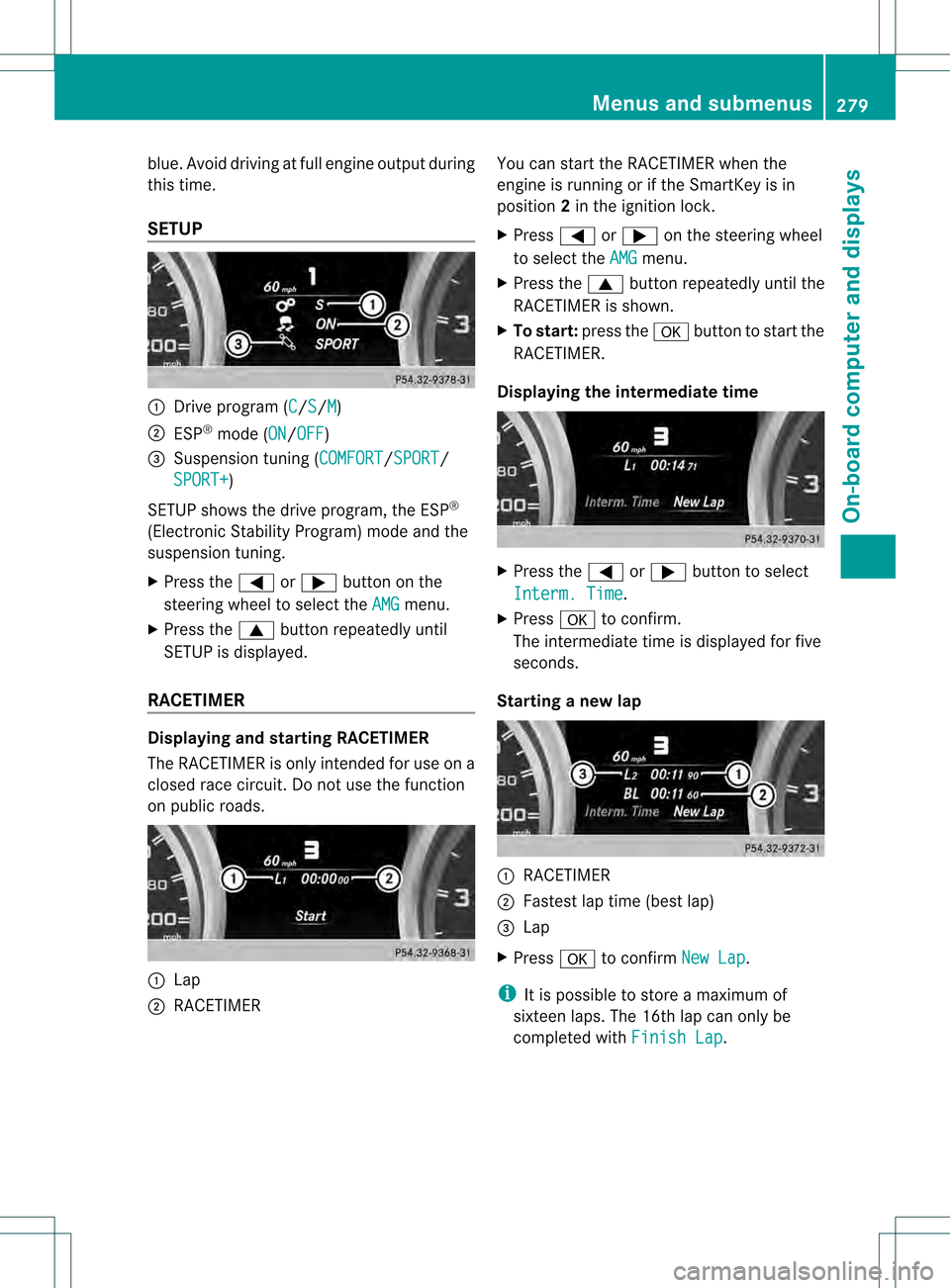
SETUP 0002
Drive program (C /S /M )
0003 ESP ®
mode (ON /OFF )
001F Suspension tuning (COMFORT /SPORT /
SPORT+ )
SETUP shows the drive program, the ESP ®
(Electronic Stability Program) mode and the
suspension tuning.
X Press the 0002or0005 button on the
steering wheel to select the AMG menu.
X Press the 0003button repeatedly until
SETUP is displayed.
RACETIMER Displaying and starting RACETIMER
The RACETIMER is only intended for use on a
closed race circuit. Do not use the function
on public roads. 0002
Lap
0003 RACETIMER You can start the RACETIMER when the
engine is running or if the SmartKey is in
position
2in the ignition lock.
X Press 0002or0005 on the steering wheel
to select the AMG menu.
X Press the 0003button repeatedly until the
RACETIMER is shown.
X To start: press the 000Bbutton to start the
RACETIMER.
Displaying the intermediate time X
Press the 0002or0005 button to select
Interm. Time .
X Press 000Bto confirm.
The intermediate time is displayed for five
seconds.
Starting a new lap 0002
RACETIMER
0003 Fastest lap time (best lap)
001F Lap
X Press 000Bto confirm New Lap .
i It is possible to store a maximum of
sixteen laps. The 16th lap can only be
completed with Finish Lap .Menus and submenus
279On-board computer and displays Z
Page 282 of 458
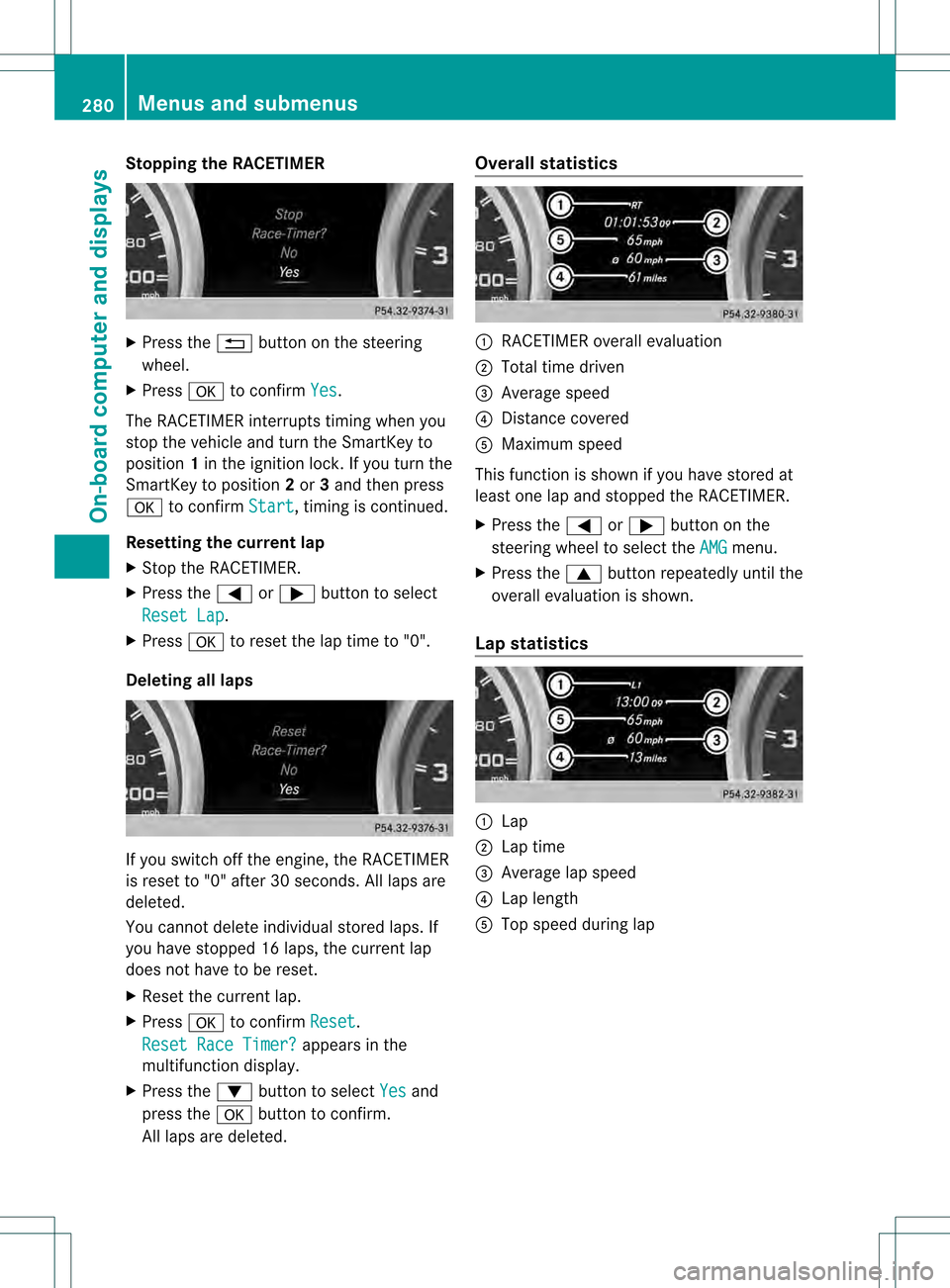
Stopping the RACETIMER
X
Press the 0007button on the steering
wheel.
X Press 000Bto confirm Yes .
The RACETIMER interrupts timing when you
stop the vehicle and turn the SmartKey to
position 1in the ignition lock. If you turn the
SmartKey to position 2or 3and then press
000B to confirm Start , timing is continued.
Resetting the current lap
X Stop the RACETIMER.
X Press the 0002or0005 button to select
Reset Lap .
X Press 000Bto reset the lap time to "0".
Deleting all laps If you switch off the engine, the RACETIMER
is reset to "0" after 30 seconds. All laps are
deleted.
You cannot delete individual stored laps. If
you have stopped 16 laps, the current lap
does not have to be reset.
X Reset the current lap.
X Press 000Bto confirm Reset .
Reset Race Timer? appears in the
multifunction display.
X Press the 0004button to select Yes and
press the 000Bbutton to confirm.
All laps are deleted. Overall statistics
0002
RACETIMER overall evaluation
0003 Total time driven
001F Average speed
001E Distance covered
001C Maximum speed
This function is shown if you have stored at
least one lap and stopped the RACETIMER.
X Press the 0002or0005 button on the
steering wheel to select the AMG menu.
X Press the 0003button repeatedly until the
overall evaluation is shown.
Lap statistics 0002
Lap
0003 Lap time
001F Average lap speed
001E Lap length
001C Top speed during lap 280
Menus and submenusOn-board computer and displays