sensor MERCEDES-BENZ M-Class 2013 W166 User Guide
[x] Cancel search | Manufacturer: MERCEDES-BENZ, Model Year: 2013, Model line: M-Class, Model: MERCEDES-BENZ M-Class 2013 W166Pages: 458, PDF Size: 6.24 MB
Page 69 of 458
At speeds below 20 mph (30 km/h), the front
wheels lock cyclically during braking .The
digging-in effect achieved in the process
reduces the stopping distance on off-road
terrain. This limits steering capability. BAS (Brake Assist System)
i Observe the "Important safety notes"
section (Y page 66). G
WARNING
If BAS is malfunctioning, the braking distance
in an emergency braking situation is
increased. There is a risk of an accident.
In an emergency braking situation, depress
the brake pedal with full force. ABS prevents
the wheels from locking.
BAS operates in emergency braking
situations. If you depress the brake pedal
quickly, BAS automatically boosts the braking
force, thus shortening the stopping distance.
The brakes will function as usual once you
release the brake pedal. BAS is deactivated. BAS PLUS (Brake Assist System
PLUS)
i Observe the "Important safety notes"
section (Y page 66).
BAS PLUS is only available in vehicles
equipped with DISTRONIC PLUS.
For BAS PLUS to assist you when driving, the
radar sensor system must be:
R activated (Y page 277)
R operational
With the help of the radar sensor system, BAS
PLUS can detect obstacles that are in the
path of your vehicle for an extended period of
time.
If the radar sensor system is malfunctioning,
BAS PLUS will not be available. The brake
system is still available with complete brake
boosting effect and BAS. BAS PLUS provides braking assistance in
hazardous situations at speeds greater than
4 mph (7 km/h).
At speeds of up to approximately 40 mph
(70 km/h), BAS PLUS can also detect
stationary objects. Examples of stationary
objects are stopped or parked vehicles.
To prevent a front-end collision, BAS PLUS
calculates the brake force necessary if:
R
you approach an obstacle, and
R BAS PLUS has detected arisk of collision
At as pee dless than 20 mp h(30 km/h) : if
you depress the brake pedal, BASP LUS is
activated. The increase in brake pressure will
be carried out at the last possible moment.
At a speed greater than 20 mph
(30 km/h):ify ou depress the brake pedal
sharply, BAS PLUS automatically raises the
brake pressure to a value adapted to the
traffic situation.
If BAS PLUS demands particularly high
braking force, preventative passenger
protection measures (PRE-SAFE ®
) are
activated simultaneously.
X Keep the brake pedal depressed until the
emergency braking situation is over.
ABS prevents the wheels from locking.
BAS PLUS is deactivated and the brakes
function as usual, if:
R you release the brake pedal.
R there is no longer any danger of a rear-end
collision.
R no obstacle is detected in front of your
vehicle.
If you have activated DSR (Y page 246), BAS
PLUS is likewise deactivated. G
WARNING
BAS PLUS cannot always clearly identify
objects and complex traffic situations. BAS
PLUS cannot intervene in these cases. There
is a risk of an accident.
Always pay careful attention to the traffic
situation and be ready to brake. Driving safety systems
67Safety Z
Page 70 of 458
In particular, the detection of obstacles can
be impaired if:
R
there is dirt on the sensors or anything else
covering the sensors.
R snow or heavy rain
R interference by other radars ources
R there are strong radar reflections, for
example in parking garages
R a narrow vehicle traveling in front, e.g. a
motorbike
R a vehicle traveling in front on a different line
relative to the center of your vehicle G
WARNING
BAS PLUS does not react:
R to people or animals
R to oncoming vehicles
R to crossing traffic
R when cornering
As aresult, BAS PLUS may not intervene in all
critical situations. There is a risk of an
accident.
Always pay careful attention to the traffic
situation and be ready to brake.
Following damage to the fron tend of the
vehicle, have the configuratio nand operation
of the rada rsensors checked at a qualified
specialist workshop. This also applies to
collisions at low speeds where there is no
visible damage to the fron tofthe vehicle. COLLISION PREVENTION ASSIST
General notes COLLISION PREVENTION ASSIST consists of
Adaptive Brake Assist and the distance
warning function, which are described in the
following. Distance warning function Important safety notes
i
Observe the "Important safety notes"
section (Y page 66). G
WARNING
The distance warning function does not react:
R to people or animals
R to oncoming vehicles
R to crossing traffic
R when cornering
Thus, the distance warning function cannot
provide a warning in all critical situations.
There is a risk of an accident.
Always pay careful attention to the traffic
situation and be ready to brake.
The distance warning function cannot always
clearly identify objects and complex traffic
situations.
In such cases, the distance warning function
may:
R give an unnecessary warning
R not give a warning
Always pay careful attention to the traffic
situation and do not rely solely on the
distance warning function.
Function
X To activate/deactivate: activate or
deactivate the distance warning function in
the on-board computer (Y page 272).
When the distance warning function is
activated, the multifunction display shows
the 0003 symbol, as long as the HOLD
function is not switched on (Y page 207). On
vehicles with Active Parking Assist, the
0003 symbol is displayed when Pis engaged
or you are driving faster than 22 mph
(35 km/h).
The distance warning function can help you
to minimize the risk of a front-end collision
with a vehicle ahead or reduce the effects of
such a collision. If the distance warning 68
Driving safety systemsSafety
Page 71 of 458
function detects that there is a risk of a
collision, you will be warned visually and
acoustically.T he distance warning function
cannot prevent a collision without your
intervention.
Starting at a speed of around 20 mph
(30 km/h), this function warns you if you
rapidly approach a vehicle in front.An
intermitten twarning tone will then sound and
the 000F distance warning lamp will light up
in the instrument cluster.
X Brake immediately in order to increase the
distance from the vehicle in front.
or
X Take evasive action, provide ditis safe to
do so.
For the distance warning function to assist
you when driving, the function must be
activated in the on-board computer and be
operational (Y page 272).
Due to the nature of the system, particularly
complicated driving conditions may cause the
system to display unnecessary warnings.
With the help of the radar sensor system, the
distance warning function can detect
obstacles that are in the path of your vehicle
for an extended period of time.
At speeds up to 40 mph (70 km/h), the
distance warning function may also detect
stationary obstacles, for example stopped or
parked vehicles.
If you approach an obstacle and the distance
warning function detects a risk of a collision,
the system will initially alert you both visually
and acoustically.
In particular, the detection of obstacles can
be impaired if:
R there is dirt on the sensors or anything else
covering the sensors
R snow or heavy rain
R interference by other radar sources
R there are strong radar reflections, for
example in parking garages R
a narrow vehicle traveling in front, e.g. a
motorbike
R a vehicle traveling in front on a different line
relative to the center of your vehicle
Following damage to the front end of the
vehicle, have the configuration and operation
of the radar sensor checked at a qualified
specialist workshop. This also applies to
collisions at low speeds where there is no
visible damage to the front of the vehicle.
Adaptive Brake Assist i
Observe the "Important safety notes"
section (Y page 66). G
WARNING
Adaptive Brake Assist cannot always clearly
identify objects and complex traffic
situations. In these cases, Adaptive Brake
Assist may not intervene. There is a risk of an
accident.
Always pay careful attention to the traffic
situation and be ready to brake. G
WARNING
Adaptive Brake Assist does not react:
R to people or animals
R to oncoming vehicles
R to crossing traffic
R to stationary obstacles
R when cornering
As a result, Adaptive Brake Assist may not
intervene in all critical conditions. There is a
risk of an accident.
Always pay careful attention to the traffic
situation and be ready to brake.
Adaptive Brake Assist provides braking
assistance in hazardous situations at speeds
greater than 20 mph (30 km/h) and uses
radar sensor technology to assess the traffic
situation.
With the help of Adaptive Brake Assist, the
distance warning signal can detect obstacles Driving safety systems
69Safety Z
Page 72 of 458
tha
tare in the path of yourv ehicle for an
extended period of time.
Should you approach an obstacle and
Adaptive Brake Assist has detected a risk of
collision, Adaptive Brake Assist calculates the
braking force necessary to avoid a rear-end
collision. Should you apply the brakes
vigorously, Adaptive Brake Assist will
automatically increase the braking force to a
level suitable for the traffic conditions.
X Keep the brake pedal depressed until the
emergency braking situation is over.
ABS prevents the wheels from locking.
The brakes will work normally again if:
R you release the brake pedal.
R there is no longer any danger of a rear-end
collision.
R no obstacle is detected in fron tofyour
vehicle.
Adaptive Brake Assist is then deactivated.
If Adaptive Brake Assist requires particularly
high brake pressure, preventive passenger
protection measures (PRE-SAFE ®
) are
deployed simultaneously.
Up to vehicle speeds of around 155 mph
(250 km/h), adaptive Brake Assist is capable
of reacting to moving objects that have
already been recognized as such at least once
over the period of observation. Adaptive
Brake Assist does not react to stationary
obstacles.
If Adaptive Brake Assist is not available due
to a malfunction in the radar sensor system,
the brake system remains available with full
brake boosting effect and BAS.
In particular, the detection of obstacles can
be impaired if there is:
R dirt on the sensors or anything else
covering the sensors
R snow or heavy rain
R interference by other radar sources
R there are strong radar reflections, for
example in parking garages R
a narrow vehicle traveling in front, e.g. a
motorbike
R a vehicle traveling in front on a different line
relative to the center of your vehicle
Following damage to the front end of the
vehicle, have the configuration and operation
of the radar sensor checked at a qualified
specialist workshop. This also applies to
collisions at low speeds where there is no
visible damage to the front of the vehicle. ESP
®
(Electronic Stability Program)
General notes i
Observe the "Important safety notes"
section (Y page 66).
ESP ®
monitors driving stability and traction,
i.e. power transmission between the tires and
the road surface.
If ESP ®
detects that the vehicle is deviating
from the direction desired by the driver, one
or more wheels are braked to stabilize the
vehicle. The engine output is also modified to
keep the vehicle on the desired course within
physical limits. ESP ®
assists the driver when
pulling away on wet or slippery roads. ESP ®
can also stabilize the vehicle during braking.
ETS/4ETS (Electronic Traction System) ETS/4ETS traction control is part of ESP
®
.
Traction control brakes the drive wheels
individually if they spin. This enables you to
pull away and accelerate on slippery surfaces,
for example if the road surface is slippery on
one side. In addition, more drive torque is
transferred to the wheel or wheels with
traction.
Traction control remains active, even if you
deactivate ESP ®
. 70
Driving safety systemsSafety
Page 75 of 458
the vehicle/traile
rcombination has
stabilized.
Trailer stabilization is active above speeds of
about 37 mph (60 km/h).
Trailer stabilization does not work if ESP ®
is
deactivated because of a malfunction. EBD (electronic brake force
distribution)
i Observe the "Important safety notes"
section (Y page 66). G
WARNING
If EBD has malfunctioned, the rear wheels can
still lock, e.g. under full braking. This
increases the risk of skidding and an accident.
You should therefore adapt your driving style
to the different handling characteristics. Have
the brake system checked at a qualified
specialist workshop.
Observe information regarding indicator and
warning lamps (Y page 319) as well as
display messages (Y page 285).
EBD monitors and controls the brake
pressure on the rear wheels to improve
driving stability while braking. ADAPTIVE BRAKE
ADAPTIVE BRAKE enhances braking safety
and offers increased braking comfort. In
addition to the braking function, ADAPTIVE
BRAKE also has the HOLD function
(Y page 207) and hill start assist
(Y page 161). PRE-SAFE
®
Brake
i Observe the "Important safety notes"
section (Y page 66).
PRE-SAFE ®
Brake is only available in vehicles
with DISTRONIC PLUS. If PRE-SAFE
®
Brake is to aid you, the radar
sensor system must be:
R activated (Y page 277)
R operational
With the help of the radar sensor system,
PRE-SAFE ®
Brake can detect obstacles that
are in front of your vehicle for an extended
period of time.
PRE-SAFE ®
Brake can help you to minimize
the risk of a collision with a vehicle ahead or
reduce the effects of such a collision. If PRE-
SAFE ®
Brake has detected a risk of collision,
you will be warned visually and acoustically
as well as by automatic braking. PRE-SAFE ®
Brake cannot prevent a collision without your
intervention.
Starting at a speed of around
4 mph (7 km/h), this function warns you if
you very quickly approach a vehicle in front.
An intermittent warning tone will then sound
and the 000Fdistance warning lamp will light
up in the instrument cluster.
X Brake immediately in order to increase the
distance from the vehicle in front.
or
X Take evasive action provided it is safe to do
so.
From a speed of approximately
4 mph (7 km/h), if the driver and front
passenger have fastened their seat belts,
PRE-SAFE ®
Brake can brake the vehicle
automatically at speeds up to approximately
124 mph (200 km/h).
Due to the nature of the system, particularly
complicated driving conditions may cause
unnecessary warnings or the unnecessary
intervention of PRE-SAFE ®
Brake.
You can prevent the intervention of the PRE-
SAFE ®
Brake at any time by:
R depressing the accelerator pedal further
R activating kickdown
R releasing the brake pedal Driving safety systems
73Safety Z
Page 76 of 458
The braking action of PRE-SAFE
®
Brake is
ended automatically if:
R you maneuver to avoid the obstacle.
R there is no longer any danger of a rear-end
collision.
R there is no longer an obstacle detected in
front of your vehicle.
If you have activated DSR (Y page 246), PRE-
SAFE ®
Brake is deactivated.
At speeds of up to approximately 40 mph
(70 km/h) ,PRE-SAFE ®
Brake can also detect
stationary objects .Examples of stationary
objects are stopped or parked vehicles.
If you approach an obstacle and PRE-SAFE ®
Brake detects a ris kofacollision, the system
will alert you both visuall yand acoustically. If
you do not brake or take evasive action, the
system will warn you by automatically braking
the vehicle gently .Ifthere is an increased risk
of collision, preventative passenger
protection measures (PRE-SAFE ®
) are
activated (Y page 54). If, at speeds over
20 mph (30 km/h), a risk of collision remains
and you do not brake, take evasive action or
significantly accelerate, automatic braking
may be performed up to alevel of automatic
emergency braking. Automatic emergency
braking is not performed until immediately
prior to an accident that can no longer be
avoided. G
WARNING
PRE-SAFE ®
Brake will initially brake your
vehicle by a partial application of the brakes
if a danger of collision is detected. There may
be a collision unless you also brake.
Automatic emergency brakin gcannot prevent
a collision .There is a risk of an accident.
Always apply the brakes yourself and try to
take evasive action. G
WARNING
PRE-SAFE ®
Brake cannot always clearly
identify objects and complex traffic
conditions. In these cases, PRE-SAFE
®
Brake may:
R give an unnecessary warning and then
brake the vehicle
R not give a warning or intervene
There is a risk of an accident.
Always pay particular attention to the traffic
situation and be ready to brake, especially if
PRE-SAFE ®
Brake warns you. Terminate the
intervention in a non-critical driving situation.
In particular, the detection of obstacles can
be impaired if:
R there is dirt on the sensors or anything else
covering the sensors
R snow or heavy rain
R interference by other radar sources
R there are strong radar reflections, for
example in parking garages
R a narrow vehicle traveling in front, e.g. a
motorbike
R a vehicle traveling in front on a different line
relative to the center of your vehicle G
WARNING
PRE-SAFE ®
Brake does not react:
R to people or animals
R to oncoming vehicles
R to crossing traffic
R when cornering
As a result, PRE-SAFE ®
Brake may neither
give warnings nor intervene in all critical
situations. There is a risk of an accident.
Always pay careful attention to the traffic
situation and be ready to brake.
In order to maintain an appropriate distance
from the vehicle in front and thus prevent a
collision, you must apply the brakes yourself.
X To activate/deactivate: activate or
deactivate PRE-SAFE ®
Brake in the on-
board computer (Y page 272).
When PRE-SAFE ®
Brake is activated, the
0003 symbol appears in the multifunction
display as long as the HOLD function is 74
Driving safety systemsSafety
Page 77 of 458
deactivated (Y
page 207). On vehicles with
Active Parking Assist, the 0003symbol is
displayed when Pis engaged or you are
driving faster than 22 mph (35 km/h).
Following damage to the fron tend of the
vehicle, have the configuratio nand operation
of the rada rsensors checked at a qualified
specialist workshop. This also applies to
collisions at low speeds where there is no
visible damage to the fron tofthe vehicle. STEER CONTROL
i Observe the "Important safety notes"
section (Y page 66).
STEER CONTROL helps you by transmitting a
noticeable steering force to the steering
wheel in the direction required for vehicle
stabilization.
This steering assistance is provided in
particular if:
R both right wheels or both left wheels are on
a wet or slippery road surface when you
brake
R the vehicle starts to skid
If ESP ®
is malfunctioning, you will not receive
steering support from STEER CONTROL.
Power steering will, however, continue to
function. Theft deterrent locking system
Immobilizer
X To activate with the SmartKey: remove
the SmartKey from the ignition lock.
X To activate with KEYLESS-GO: switch the
ignition off and open the driver's door.
X To deactivate: switch on the ignition.
The immobilizer prevents your vehicle from
being started without the correct SmartKey.
When leaving the vehicle, always take the
SmartKey with you and lock the vehicle. Anyone can start the engine if a valid
SmartKey has been left inside the vehicle.
i
The immobilizer is always deactivated
when you start the engine.
In the event that the engine cannot be
started when the starter battery is fully
charged, the immobilizer may be faulty.
Contact an authorized Mercedes-Benz
Center or call 1-800-FOR-MERCedes (in the
USA) or 1-800-387-0100 (in Canada). ATA (anti-theft alarm system)
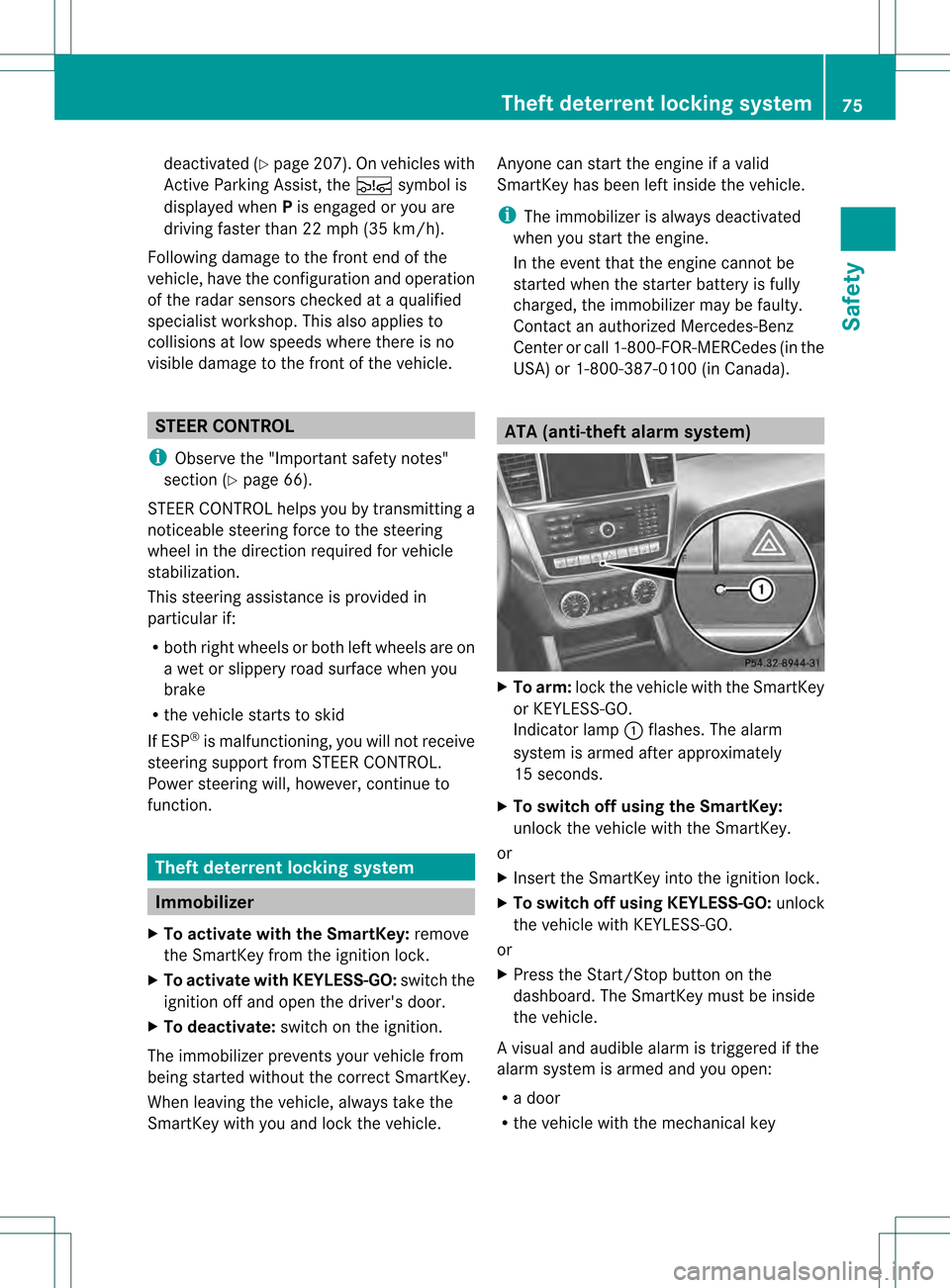
X
To arm: lock the vehicle with the SmartKey
or KEYLESS-GO.
Indicator lamp 0002flashes. The alarm
system is armed after approximately
15 seconds.
X To switch off using the SmartKey:
unlock the vehicle with the SmartKey.
or
X Insert the SmartKey into the ignition lock.
X To switch off using KEYLESS-GO: unlock
the vehicle with KEYLESS-GO.
or
X Press the Start/Stop button on the
dashboard. The SmartKey must be inside
the vehicle.
Av isual and audible alarm is triggered if the
alarm system is armed and you open:
R a door
R the vehicle with the mechanical key Theft deterrent locking system
75Safety Z
Page 82 of 458
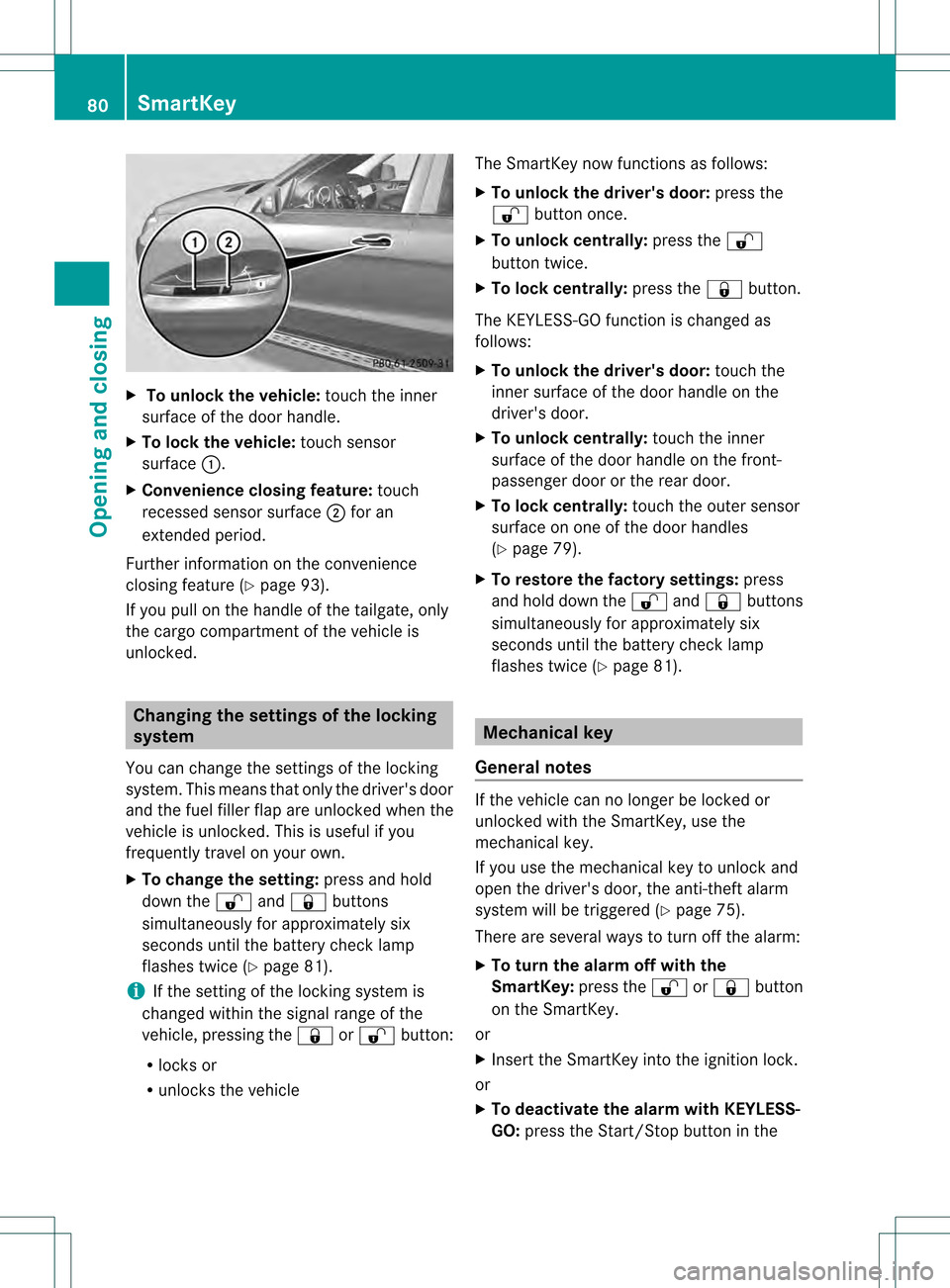
X
To unloc kthe vehicle: touch the inner
surface of the door handle.
X To loc kthe vehicle: touch sensor
surface 0002.
X Convenience closing feature: touch
recessed sensor surface 0003for an
extended period.
Further information on the convenience
closing feature (Y page 93).
If you pull on the handl eofthe tailgate, only
the cargo compartment of the vehicle is
unlocked. Changing the settings of the locking
system
You can change the settings of the locking
system. This means that only the driver's door
and the fuel filler flap are unlocked when the
vehicle is unlocked. This is useful if you
frequently travel on your own.
X To change the setting: press and hold
down the 000Cand000B buttons
simultaneously for approximately six
seconds until the battery check lamp
flashes twice (Y page 81).
i If the setting of the locking system is
changed within the signal range of the
vehicle, pressing the 000Bor000C button:
R locks or
R unlocks the vehicle The SmartKey now functions as follows:
X
To unlock the driver's door: press the
000C button once.
X To unlock centrally: press the000C
button twice.
X To lock centrally: press the000Bbutton.
The KEYLESS-GO function is changed as
follows:
X To unlock the driver's door: touch the
inner surface of the door handle on the
driver's door.
X To unlock centrally: touch the inner
surface of the door handle on the front-
passenger door or the rear door.
X To lock centrally: touch the outer sensor
surface on one of the door handles
(Y page 79).
X To restore the factory settings: press
and hold down the 000Cand000B buttons
simultaneously for approximately six
seconds until the battery check lamp
flashes twice (Y page 81). Mechanical key
General notes If the vehicle can no longer be locked or
unlocked with the SmartKey, use the
mechanical key.
If you use the mechanical key to unlock and
open the driver's door, the anti-theft alarm
system will be triggered (Y
page 75).
There are several ways to turn off the alarm:
X To turn the alarm off with the
SmartKey: press the000Cor000B button
on the SmartKey.
or
X Insert the SmartKey into the ignition lock.
or
X To deactivate the alarm with KEYLESS-
GO: press the Start/Stop button in the 80
SmartKeyOpening and closing
Page 96 of 458
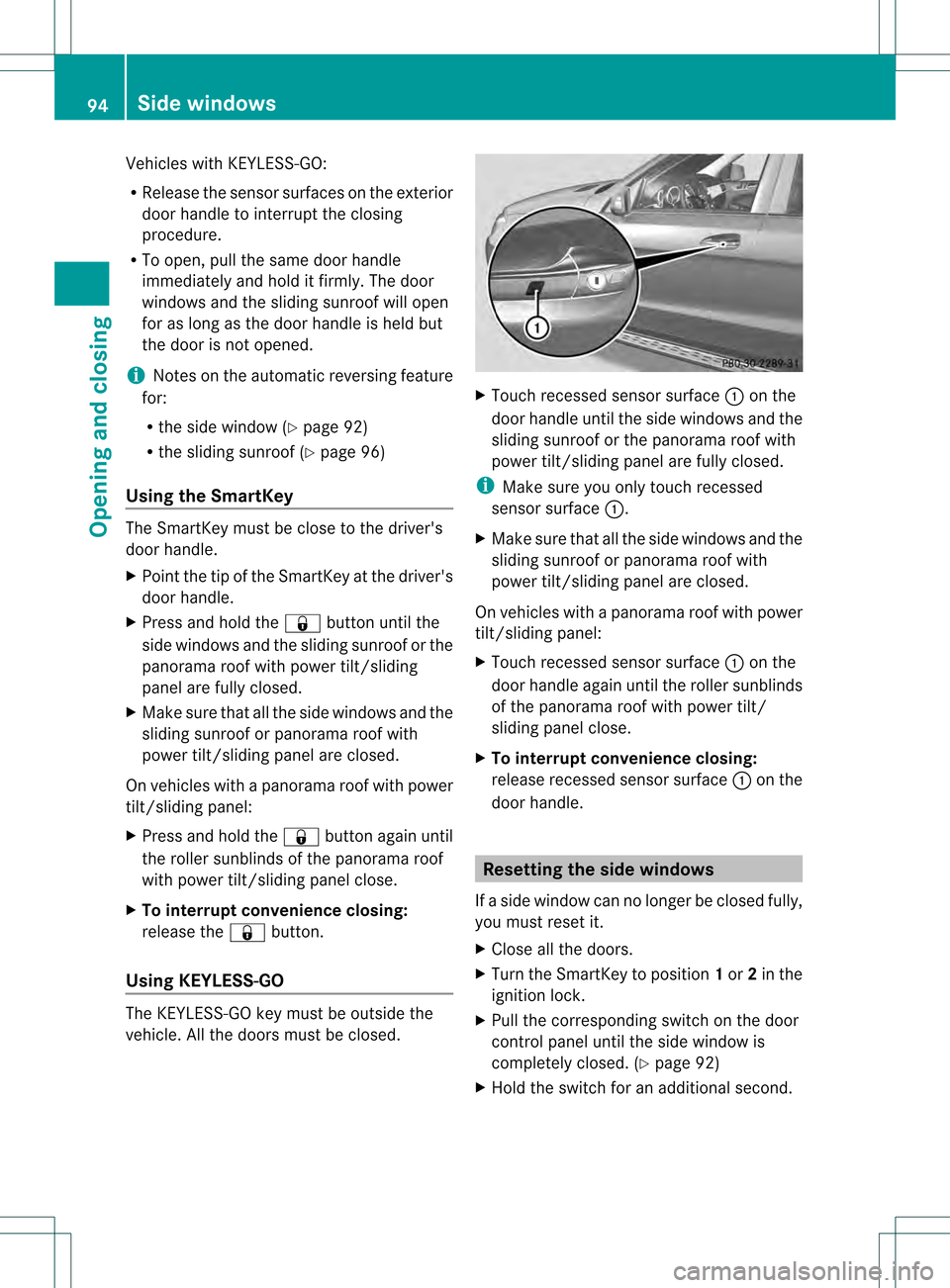
Vehicles with KEYLESS-GO:
R
Release the sensor surfaces on the exterior
door handle to interrupt the closing
procedure.
R To open, pull the same door handle
immediately and hold it firmly. The door
windows and the sliding sunroof will open
for as long as the door handle is held but
the door is not opened.
i Notes on the automatic reversing feature
for:
R the side window (Y page 92)
R the sliding sunroof (Y page 96)
Using the SmartKey The SmartKey must be close to the driver's
door handle.
X
Point the tip of the SmartKey at the driver's
door handle.
X Press and hold the 000Bbutton until the
side windows and the sliding sunroof or the
panorama roof with power tilt/sliding
panel are fully closed.
X Make sure that all the side windows and the
sliding sunroof or panorama roof with
power tilt/sliding panel are closed.
On vehicles with a panorama roof with power
tilt/sliding panel:
X Press and hold the 000Bbutton againu ntil
the rolle rsunblinds of th epanorama roof
with power tilt/sliding panel close.
X To interrup tconvenience closing:
release the 000Bbutton.
Using KEYLESS-GO The KEYLESS-GO key must be outside the
vehicle. All the doors must be closed. X
Touch recessed sensor surface 0002on the
door handle until the side windows and the
sliding sunroof or the panorama roof with
power tilt/sliding panel are fully closed.
i Make sure you only touch recessed
sensor surface 0002.
X Make sure that all the side windows and the
sliding sunroof or panorama roof with
power tilt/sliding panel are closed.
On vehicles with a panorama roof with power
tilt/sliding panel:
X Touch recessed sensor surface 0002on the
door handle again until th eroller sunblinds
of the panorama roof with power tilt/
sliding panel close.
X To interrupt convenience closing:
release recessed sensor surface 0002on the
door handle. Resetting the side windows
If a side window can no longer be closed fully,
you must reset it.
X Close all the doors.
X Turn the SmartKey to position 1or 2in the
ignition lock.
X Pull the corresponding switch on the door
control panel until the side window is
completely closed. (Y page 92)
X Hold the switch for an additional second. 94
Side windowsOpening and closing
Page 116 of 458

Folding the exterior mirrors in or out
electrically
X
Make sure that the SmartKey is in position
1or 2in the ignition lock.
X Briefly press button 0002.
Both exterior mirrors fold in or out.
i Make sure that the exterior mirrors are
always folded out fully while driving .They
could otherwise vibrate.
i If you are driving faster than
30 mph (47 km/h), you can no longer fold
in the exterior mirrors.
Setting the exterior mirrors If the battery has been disconnected or
completely discharged, the exterior mirrors
must be reset. The exterior mirrors will
otherwise not fold in when you select the
"Fold in mirrors when locking" function in the
on-board computer (Y page 277).
X Make sure that the SmartKey is in
position 1in the ignition lock.
X Briefly press button 0002.
Folding the exterior mirrors in or out
automatically If the "Fold in mirrors when locking" function
is activated in the on-board computer:
(Y
page 277) R
the exterior mirrors fold in automatically as
soon as you lock the vehicle from the
outside.
R the exterior mirrors fold out again
automatically as soon as you unlock the
vehicle and then open the driver's or front-
passenger door.
Exterior mirror pushed out of position If an exterior mirror has been pushed out of
position, proceed as follows:
X
Vehicles without electrically folding
exterior mirrors: move the exterior mirror
into the correct position manually.
X Vehicles with electrically folding
exterior mirrors: press and hold button for
folding the mirrors 0002(Ypage 114) until you
hear a click and then the mirror engage in
position.
The mirror housing is engaged again and
you can adjust the exterior mirrors as usual
(Y page 113). Automatic anti-glare mirrors
The rear-view mirror and the exterior mirror
on the driver's side automatically go into anti-
glare mode if the following conditions are met
simultaneously:
R the ignition is switched on and
R incident light from headlamps strikes the
sensor in the rear-view mirror.
i The mirrors do not go into anti-glare mode
if reverse gear is engaged or if the interior
lighting is switched on. 114
MirrorsSeats, steering wheel and mirrors