sensor MERCEDES-BENZ M-Class 2013 W166 Owner's Guide
[x] Cancel search | Manufacturer: MERCEDES-BENZ, Model Year: 2013, Model line: M-Class, Model: MERCEDES-BENZ M-Class 2013 W166Pages: 458, PDF Size: 6.24 MB
Page 122 of 458

Useful information
i This Operator's Manual describes all
models and all standard and optional
equipment of your vehicle available at the
time of publication of the Operator's
Manual. Country-specific differences are
possible. Please note that your vehicle may
not be equipped with all features
described. This also applies to safety-
related systems and functions.
i Read the information on qualified
specialist workshops: (Y page 27).Exterior lighting
General notes
For reasons of safety, Mercedes-Benz
recommends that you drive with the lights
switched on even during the daytime. In some
countries, operation of the headlamps varies
due to legal requirements and self-imposed
obligations. Driving abroad
Conversion to symmetrical low beam Switch the headlamps to symmetrical low
beam in countries in which traffic drives on
the opposite side of the road from the country
where the vehicle is registered. This prevents
glare to oncoming traffic. When using
symmetrical lights, the edge of the road is not
lit as widely and as far ahead as normal.
Have the headlamps converted at a qualified
specialist workshop as close to the border as
possible before driving in these countries.
Conversion to asymmetrical low beam
after returning Have the headlamps converted back to
asymmetrical low-beam headlamps at a
qualified specialist workshop as soon as
possible after crossing the border again. Setting the exterior lighting
Setting options Exterior lighting can be set using:
R
the light switch
R the combination switch (Y page 123)
R the on-board computer (Y page 274)
Light switch Operation
00050011
Left-hand standing lamps
00060013 Right-hand standing lamps
00070016 Parking lamps, license plate and
instrumen tcluste rlighting
000C0006 Automatic headlamp mode,
controlled by the light sensor
000D000D Low-beam/high-beam headlamps
001D0010 Rear fog lamp
If you hear a warning tone when you leave the
vehicle, the lights may still be switched on.
X Turn the light switch to 0006.
The exterior lighting (except the parking/
standing lamps) switches off automatically if
you:
R remove the SmartKey fro mthe ignition lock
R open the driver's door with the SmartKey
in position 0.
Automatic headlamp mode G
WARNING
When the light switch is set to 0006, the low-
beam headlamps may not be switched on 120
Exterior lightingLights and windshield wipers
Page 123 of 458

automatically if there is fog, snow or other
causes of poor visibility due to the weather
conditions such as spray. There is a risk of an
accident.
In such situations, tur nthe light switch to
000D.
The automatic headlamp feature is only an
aid. The driver is responsible for the vehicle's
lighting at all times. 00050011
Left-hand standing lamps
00060013 Right-hand standing lamps
00070016 Parking lamps, license plate and
instrumentc luster lighting
000C0006 Automatic headlamp mode,
controlled by the light sensor
000D000D Low-beam/high-beam headlamps
001D0010 Rear fog lamp
0006 is the favored light switch setting. The
light setting is automatically selected
according to the brightnes softhe ambient
light (exception: poor visibility due to weather
conditions such as fog, snow or spray):
R SmartKey in position 1in the ignition lock:
the parking lamps are switched on or off
automatically depending on the brightness
of the ambient light.
R With the engine running: if you have
activated the daytime running lamps
function via the on-board computer, the
daytime running lamps or the low-beam
headlamps and parking lamps are switched
on or off automatically depending on the
brightness of the ambient light. X
To switch on automatic headlamp
mode: turn the light switch to 0006.
Only for Canada:
The daytime running lamps improve the
visibility of your vehicle during the day. The
daytime running lamps function is required by
law in Canada. It cannot therefore be
deactivated.
When the engine is running and the vehicle is
stationary: if you move the selector lever from
a drive position to P, the daytime running
lamps/low-beam headlamps go out after
three minutes.
When the engine is running, the vehicle is
stationary and in high ambient light: if you
turn the light switch to 0016, you turn on the
daytime running lamps and parking lamps.
If the engine is running and you turn the light
switch to 000D, the manual settings take
precedence over the daytime running lamps.
USA only:
The daytime running lamps improve the
visibility of your vehicle during the day. To do
this, the daytime running lamps function must
be switched on using the on-board computer
(Y page 274).
If the engine is running and you turn the light
switch to 0016or000D, the manual settings
take precedence over the daytime running
lamps.
i In the USA, the daytime running lamps are
deactivated upon delivery from the factory.
Low-beam headlamps G
WARNING
When the light switch is set to 0006, the low-
beam headlamps may not be switched on
automatically if there is fog, snow or other
causes of poor visibility due to the weather
conditions such as spray. There is a risk of an
accident.
In such situations, turn the light switch to
000D. Exterior lighting
121Lights and windshield wipers Z
Page 124 of 458

00050011
Left-hand standing lamps
00060013 Right-hand standing lamps
00070016 Parking lamps, license plate and
instrument cluster lighting
000C0006 Automatic headlamp mode,
controlled by the lights ensor
000D000D Low-beam/high-beam headlamps
001D0010 Rear fog lamp
Even if the light sensor does not detec tthat
it is dark, the parking lamps and low-beam
headlamps switch on when the ignition is
switched on and the light switch is set to the
000D position. This is a particularly useful
function in the event of rain and fog.
X To switch on the low-beam headlamps:
turn the SmartKey in the ignition lock to
position 2or start the engine.
X Turn the light switch to 000D.
The green 000Dindicator lamp in the
instrumentc luster lights up.
Rear fog lamp 00050011
Left-hand standing lamps
00060013 Right-hand standing lamps 00070016
Parking lamps, license plate and
instrumen tcluste rlighting
000C0006 Automatic headlamp mode,
controlled by the light sensor
000D000D Low-beam/high-beam headlamps
001D0010 Rear fog lamp
The rear fog lamp improves visibility of your
vehicle for the traffic behind in the event of
thick fog. Please take note of the country-
specific regulations for the use of rear fog
lamps.
X To switch on the rea rfog lamps: turn the
SmartKey in the ignition lock to position 2
or start the engine.
X Turn the light switch to 000Dor0006.
X Press the 0010button.
The yellow 0010indicator lamp in the
instrumen tcluster lights up.
X To switch off th erear fog lamp: press the
0010 button.
The yellow 0010indicator lamp in the
instrumen tcluster goes out.
Parking lamps
! If the battery has been excessively
discharged, the parking lamps or standing
lamps are automatically switched off to
enable the nex tengine start. Always park
your vehicle safely and sufficiently lit
according to legal standards .Avoid the
continuous use of the 0016parking lamps
for several hours .Ifpossible, switch on the
0013 right or the 0011left standing lamp. 122
Exterior lightingLights and windshiel
dwipers
Page 125 of 458

00050011
Left-hand standing lamps
00060013 Right-hand standing lamps
00070016 Parking lamps, license plate and
instrument cluster lighting
000C0006 Automatic headlamp mode,
controlled by the lights ensor
000D000D Low-beam/high-beam headlamps
001D0010 Rear fog lamp
X To switch on: turn light switch to 0016.
The green 0016indicator lamp in the
instrument cluster lights up.
Standing lamps 00050011
Left-hand standing lamps
00060013 Right-hand standing lamps
00070016 Parking lamps, license plate and
instrument cluster lighting
000C0006 Automatic headlamp mode,
controlled by the light sensor
000D000D Low-beam/high-beam headlamps
001D0010 Rear fog lamp Switching on the standing lamps ensures the
corresponding side of the vehicle is
illuminated.
X
To switch on the standing lamps: the
SmartKey is not in the ignition lock or it is
in position 0.
X Turn the light switch to 0011(left-hand side
of the vehicle) or 0013(right-hand side of
the vehicle). Combination switch
Turn signal 0002
High-beam headlamps
0003 Turn signal, right
001F High-beam flasher
001E Turn signal, left
X To indicate briefly: press the combination
switch briefly to the pressure point in the
direction of arrow 0003or001E.
The corresponding turn signal flashes three
times.
X To indicate: press the combination switch
beyond the pressure point in the direction
of arrow 0003or001E. Exterior lighting
123Lights and windshield wipers Z
Page 128 of 458

In very rare cases, Adaptive Highbea
mAssist
may fail too recognize other road users that
have lights, or may recognize them too late.
In this or similar situations, the automatic
high-beam headlamps will not be deactivated
or activated regardless. There is a risk of an
accident.
Always carefully observe the traffic conditions
and switch off the high-beam headlamps in
good time. You can use this function to set the
headlamps to change between low beam and
high beam automatically. The system
recognizes vehicles with their lights on, either
approaching from the opposite direction or
traveling in front of your vehicle, and
consequently switches the headlamps from
high beam to low beam.
The system automatically adapts the low-
beam headlamp range depending on the
distance to the other vehicle. Once the
system no longer detects any other vehicles,
it reactivates the high-beam headlamps.
The system's optical sensor is located behind
the windshield near the overhead control
panel. Switching Adaptive Highbeam Assist
on/off
0002
High-beam headlamps
0003 Turn signal, right
001F High-beam flasher
001E Turn signal, left
X To activate: activate the Adaptive
Highbeam Assist function using the on-
board computer (Y page 275).
X Turn the light switch to 0006.
X Press the combination switch beyond the
pressure point in the direction of arrow 0002
(Y page 123).
The 0005 indicator lamp in the
multifunction display lights up if it is dark
and the light sensor activates the low-beam
headlamps.
If you are driving at speeds above
approximately 28 mph (45 km/h):
the headlamp range is set automatically
depending on the distance between the
vehicle and other road users.
If you are driving at speeds above
approximately 35 mph (55 km/h) and no
other road users have been detected:
the high-beam headlamps are switched on
automatically. The 000Cindicator lamp in
the instrument cluster also lights up.
If you are driving at speeds below
approximately 30 mph (45 km/h) or other
road users have been detected or the roads
are adequately lit: 126
Exterior lightingLights and windshield wipers
Page 135 of 458

!
Intermittent wiping with rain sensor: due
to optical influences and the windshield
becoming dirty in dry weather conditions,
the windshield wipers may be activated
inadvertently. This could then damage the
windshield wiper blades or scratch the
windshield.
For this reason, you should always switch
off the windshield wipers in dry weather. Combination switch
0005
0008 Windshield wiper off
0006 0001 Intermittent wipe, low (rain sensor
set to low sensitivity)
0007 0002 Intermittent wipe, high (rain sensor
set to high sensitivity)
000C 0018 Continuous wipe, slow
000D 0012 Continuous wipe, fast
001D 0007 Single wipe
0011 0008 To wipe with washer fluid
X Switch on the ignition.
X Turn the combination switch to the
corresponding position.
In the 0001or0002 position, the appropriate
wiping frequency is set automatically
according to the intensity of the rain. In
the 0002 position, the rain sensor is more
sensitive than in the 0001position, causing
the windshield wipers to wipe more
frequently.
If the wiper blades are worn, the windshield
will no longer be wiped properly.T his could
prevent you from observing the traffic
conditions, thereby causing an accident. Replace the wiper blades twice a year, ideally
in spring and fall. Switching the rear window wiper on/
off
Combination switch
0002
0001 Rear window wiper switch
0006 0007 To wipe with washer fluid
0007 ITo switch on intermittent wiping
000C 0To switch off intermittent wiping
000D 000E To wipe with washer fluid
X Turn the SmartKey to position 1or 2in the
ignition lock (Y page 157).
X Turn switch 0002on the combination switch
to the corresponding position.
When the rear window wiper is switched on,
the icon appears in the instrumentc luster. Replacing the wiper blades
Important safety notes G
WARNING
If the windshield wipers begin to move while
you are changing the wiper blades, you could
be trapped by the wiper arm. There is a risk
of injury.
Always switch off the windshield wipers and
ignition before changing the wiper blades.
! Neve ropen the hood/tailgate if a wiper
arm has been folded away from the
windshield/rear window. Windshield wipers
133Lights and windshield wipers Z
Page 197 of 458
braking force is insufficient, DISTRONIC PLUS
warns you visually and audibly. There is a risk
of an accident.
In such cases, apply the brakes yourself and
try to take evasive action.
! If DISTRONIC PLUS or the HOLD function
is activated, the vehicle brakes
automatically in certain situations. To
preven tdamage to the vehicle, deactivate
DISTRONI CPLUS and the HOLD function in
the following or other similar situations:
R when towing the vehicle
R in the car wash
If you fail to adapt yourd riving style,
DISTRONIC PLUS can neither reduce the risk
of accident nor overrid ethe laws of physics.
DISTRONIC PLUS cannot take into account
the road, traffic and weather conditions.
DISTRONIC PLUS is only an aid. You are
responsible for the distance to the vehicle in
front, for vehicle speed, for braking in good
time and for staying in your lane.
Do not use DISTRONIC PLUS:
R in road and traffic conditions which do not
allow you to maintain a constant speed e.g.
in heavy traffic or on winding roads
R on slippery road surfaces. Braking or
accelerating could cause the drive wheels
to lose traction and the vehicle could then
skid
R when there is poor visibility, e.g. due to fog,
heavy rain or snow
DISTRONIC PLUS may not detect narrow
vehicles driving in front, e.g. motorcycles, or
vehicles driving on a different line.
In particular, the detection of obstacles can
be impaired if:
R dirt on the sensors or anything else
covering the sensors
R snow or heavy rain
R interference by other radar sources
R strong radar reflections, for example, in
parking garages If DISTRONIC PLUS no longer detects a
vehicle in front, DISTRONIC PLUS may
unexpectedly accelerate the vehicle to the
stored speed.
This speed may:
R
be too high if you are driving in a filter lane
or an exit lane
R be so high when driving in the right-hand
lane that you overtake vehicles in the left-
hand lane
R be so high when driving in the left-hand lane
that you overtake vehicles in the right-hand
lane
If there is a change of drivers, advise the new
driver of the speed stored.
General notes DISTRONIC PLUS regulates the speed and
automatically helps you maintain the
distance to the vehicle detected in front.
DISTRONIC PLUS brakes automatically so
that the set speed is not exceeded.
On long and steep downhill gradients,
especially if the vehicle is laden or towing a
trailer, you must select shift range
1,2or 3
in good time. By doing so, you will make use
of the braking effect of the engine, This
relieves the load on the brake system and
prevents the brakes from overheating and
wearing too quickly.
If DISTRONIC PLUS detects a slower-moving
vehicle in front, your vehicle is braked in order
to maintain the preset distance to the vehicle
in front.
If DISTRONIC PLUS detects that there is a risk
of a collision, you will be warned visually and
acoustically. DISTRONIC PLUS cannot
prevent a collision without your intervention.
An intermittent warning tone will then sound
and the distance warning lamp will light up in
the instrument cluster. Brake immediately in
order to increase the distance to the vehicle
in front or take evasive action provided it is
safe to do so. Driving systems
195Driving and parking Z
Page 198 of 458

For DISTRONIC PLUS to assist you when
driving, the radar senso
rsystem mus tbe:
R activated (Y page 277)
R operational
If there is no vehicle in front, DISTRONIC
PLUS operates in the same way as cruise
control in the speed range between 20 mph
(Canada: 30 km/h) and120 mph (Canada:
200 km/h). If a vehicle is driving in front of
you, it operates in the speed range between
0 mph (0 km/h) and 120 mph (Canada:
200 km/h).
Do not use DISTRONIC PLUS while driving on
roads with steep gradients.
As DISTRONIC PLUS transmits radar waves,
it can resemble the radar detectors of the
responsible authorities. You can refer to the
relevant chapter in the Operator's Manual if
questions are asked about this.
i USA only:
This device has been approved by the FCC
as a "Vehicular Radar System". The radar
sensor is intended for use in an automotive
radar system only. Removing, tampering
with, or altering the device will void any
warranties, and is not permitted by the
FCC. Do not tamper with, alter, or use in
any non-approved way.
Any unauthorized modification to this
device could void the user’s authority to
operate the equipment.
i Canada only: This device complies with
RSS-210 of Industry Canada. Operation is
subject to the following two conditions:
1. This device may not cause harmful
interference, and
2. this device must accept any interference
received, including interference that may
cause undesired operation of the device.
Removal, tampering, or altering of the
device will void any warranties, and is not
permitted. Do not tamper with, alter, or use
in any non-approved way. Any unauthorized modification to this
device could void the user's authority to
operate the equipment.
Cruise control lever 0002
To activate or increase speed
0003 To activate or reduce speed
001F To deactivate DISTRONIC PLUS
001E To activate at the curren tspeed/last
stored speed
001C To set the specified minimum distance
Activating DISTRONIC PLUS Activation conditions
In order to activate DISTRONIC PLUS, the
following conditions must be fulfilled:
R the engine must be started. It may take up
to two minutes after pulling away before
DISTRONIC PLUS is operational.
R the electric parking brake must be
released.
R ESP ®
must be active, but not intervening.
R the transmission must be in position D.
R the driver's door must be closed when you
shift from Pto Dor your seat belt must be
fastened.
R the front-passenger door and rear doors
must be closed.
R off-road program 2 must be deactivated
(vehicles with the ON&OFFROA Dpackage).
R DSR must be deactivated.
R the vehicle must no tskid. 196
Driving systemsDriving an
d parking
Page 203 of 458

Deactivating DISTRONIC PLUS
There are several ways to deactivate
DISTRONIC PLUS:
X Briefly press the cruise control lever
forwards 0002.
or
X Brake, unless the vehicle is stationary.
Whe nyou deactivate DISTRONIC PLUS, you
will see the DISTRONIC PLUS Off message
in the multifunction display for approximately
five seconds.
i The last speed stored remains stored until
you switch off the engine.
i DISTRONIC PLUS is not deactivated if you
depress the accelerator pedal. If you
accelerate to overtake, DISTRONIC PLUS
adjusts the vehicle's speed to the last
speed stored after you have finished
overtaking.
DISTRONIC PLUS is automatically
deactivated if:
R you engage the electric parking brake or if
the vehicle is automatically secured with
the electric parking brake
R you are driving slower than 15 mph
(25 km/h) and there is no vehicle in front,
or if the vehicle in front is no longer
detected
R ESP ®
intervenes or you deactivate ESP ®
R the transmission is in the P,Ror Nposition
R you switch off the radar sensor system
(Y page 277) R
you pull the cruise control lever towards
you in order to pull away and the front-
passenger door or one of the rear doors is
open
R you activate DSR
R you activate off-road program 2onvehicles
with the ON&OFFROAD package
R the vehicle has skidded
If DISTRONIC PLUS is deactivated, you will
hear a warning tone. You will see the
DISTRONIC PLUS Off message in the
multifunction display for approximately five
seconds.
Displays in the instrument cluster Displays in the speedometer
Example: DISTRONIC PLUS displays in the
speedometer
When DISTRONIC PLUS is activated, one or
two segments
0003in the set speed range light
up.
If DISTRONIC PLUS detects avehicle in front,
segments 0003between speed of the vehicle in
front 0002and stored speed 001Flight up.
i For design reasons, the speed displayed
in the speedometer may differ slightly from
the speed set for DISTRONIC PLUS. Driving systems
201Driving and parking Z
Page 215 of 458
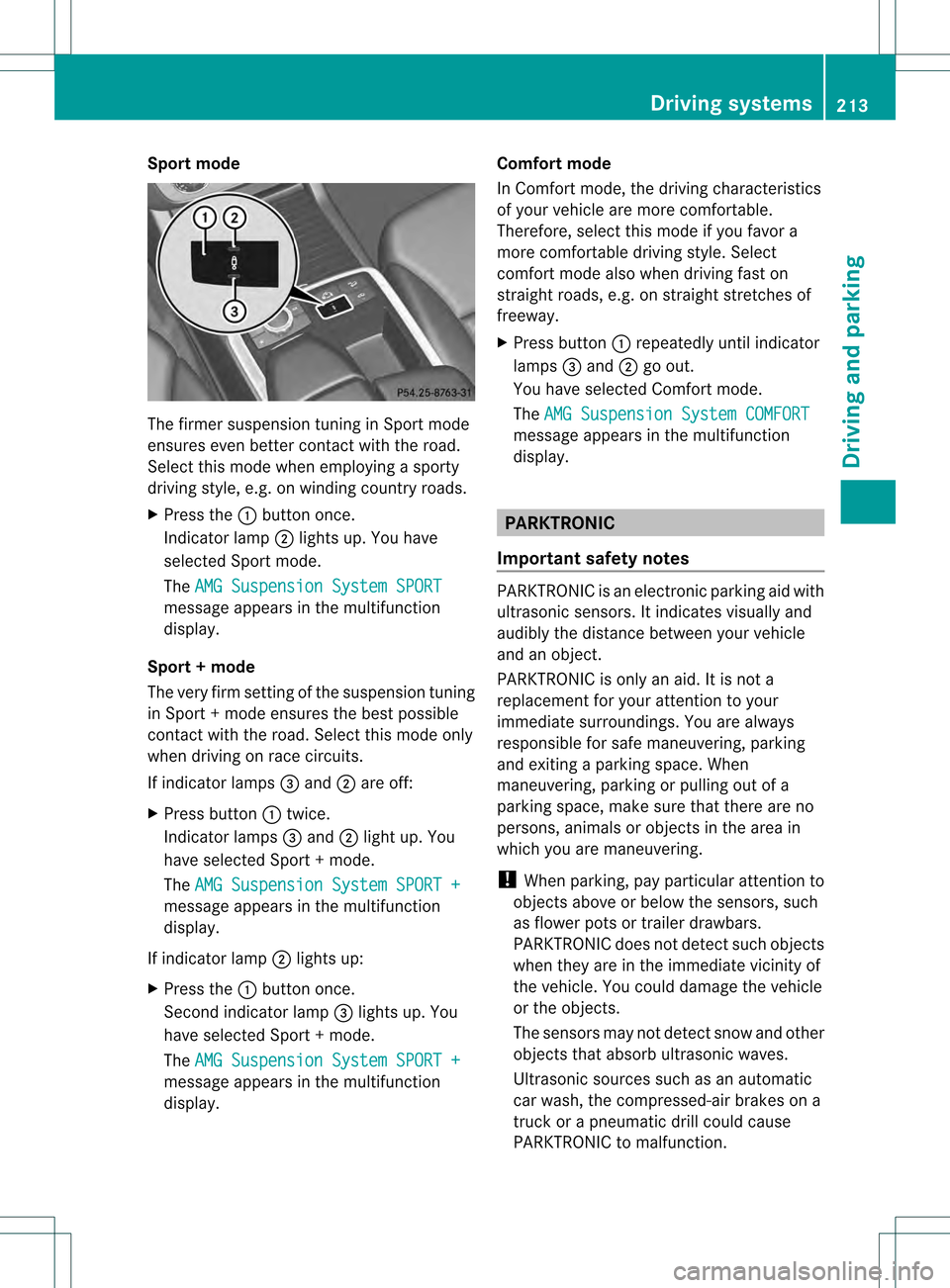
Sport mode
The firmer suspension tuning in Sport mode
ensures even better contact with the road.
Select this mode when employing a sporty
driving style, e.g. on winding country roads.
X Press the 0002button once.
Indicator lamp 0003lights up. You have
selected Sport mode.
The AMG Suspension System SPORT message appears in the multifunction
display.
Sport + mode
The very firm setting of the suspension tuning
in Sport +mode ensures the best possible
contact with the road. Select this mode only
when driving on race circuits.
If indicator lamps 001Fand 0003are off:
X Press button 0002twice.
Indicator lamps 001Fand 0003light up. You
have selected Sport +mode.
The AMG Suspension System SPORT + message appears in the multifunction
display.
If indicator lamp 0003lights up:
X Press the 0002button once.
Second indicator lamp 001Flights up. You
have selected Sport +mode.
The AMG Suspension System SPORT + message appears in the multifunction
display. Comfort mode
In Comfort mode, the driving characteristics
of your vehicle are more comfortable.
Therefore, select this mode if you favor a
more comfortable driving style. Select
comfor
tmode also when driving fast on
straight roads, e.g. on straight stretches of
freeway.
X Press button 0002repeatedly until indicator
lamps 001Fand 0003go out.
You have selected Comfort mode.
The AMG Suspension System COMFORT message appears in the multifunction
display. PARKTRONIC
Important safety notes PARKTRONIC is an electronic parking aid with
ultrasonic sensors. It indicates visually and
audibly the distance between your vehicle
and an object.
PARKTRONIC is only an aid. It is not a
replacement for your attention to your
immediate surroundings. You are always
responsible for safe maneuvering, parking
and exiting a parking space. When
maneuvering, parking or pulling out of a
parking space, make sure that there are no
persons, animals or object
sinthe area in
which you are maneuvering.
! When parking, pay particular attention to
objects above or below the sensors, such
as flower pots or trailer drawbars.
PARKTRONIC does not detect such objects
when they are in the immediate vicinity of
the vehicle. You could damage the vehicle
or the objects.
The sensors may not detect snow and other
objects that absorb ultrasonic waves.
Ultrasonic sources such as an automatic
car wash, the compressed-air brakes on a
truck or a pneumatic drill could cause
PARKTRONIC to malfunction. Driving systems
213Driving and parking Z