reset MERCEDES-BENZ M-Class 2013 W166 Owner's Manual
[x] Cancel search | Manufacturer: MERCEDES-BENZ, Model Year: 2013, Model line: M-Class, Model: MERCEDES-BENZ M-Class 2013 W166Pages: 458, PDF Size: 6.24 MB
Page 7 of 458
Anti-lock braking system
see ABS (Anti-lock Braking System)
Anti-theft alarm system
see ATA (Anti-Theft Alarm system)
Approach/departure angle ..............190
Ashtray ............................................... 346
Assistance menu (on-board
computer) .......................................... 272
ASSYST PLUS Displaying a service message ........369
Hiding a service message ..............369
Notes ............................................. 368
Resetting the service interval
displa y........................................... 369
Service message ............................ 368
Special service requirements ......... 369
ATA (Anti-Theft Alarm system)
Activating/deactivating ...................75
Function .......................................... .75
Switching off the alarm ....................75
ATTENTIO NASSIST
Activating/deactivating .................273
Display message ............................ 302
Function/notes ............................. 230
Audio menu (on-board computer) ....269
Audio system see separate operating instructions
Authorized Centers
see Qualified specialist workshop
Authorized Mercedes-Benz Center
see Qualified specialist workshop
Authorized workshops
see Qualified specialist workshop
AUTO lights
Display message ............................ 298
see Lights
Automatic engine start (ECO start/
stop function) .................................... 162
Automatic engine switch-off (ECO
start/stop function) ..........................162
Automatic headlamp mode ..............120
Automatic transmission Automatic drive program ...............169
Changing gea r............................... 168
DIRECT SELECT leve r..................... 165
Display message ............................ 312
Drive program displa y.................... 165Driving tips
.................................... 168
Emergency running mode ..............173
Engaging drive position .................. 167
Engaging neutra l............................ 166
Engaging par kposition
automatically ................................. 166
Engaging revers egear ................... 166
Engaging the par kposition ............ 165
Kickdow n....................................... 168
Manual drive program ....................171
Overview ........................................ 165
Problem (malfunction) ...................173
Progra mselector button ................169
Pulling away ................................... 160
Shift range s................................... 170
Starting the engine ........................159
Steering wheel paddle shifters ......169
Trailer towing ................................. 168
Transmission position displa y........ 165
Transmissio npositions .................. 167
Automatic transmission
emergency mode ............................... 173
Axle load, permissible (trailer
towing) ............................................... 455 B
Bag hook ............................................ 337
Ball coupling Installing ........................................ 255
Removing ....................................... 259
Storing ........................................... 260
BAS (Brake Assist System) .................67
BAS PLUS (Brake Assist System
PLUS) .................................................... 67
Battery (SmartKey) Checking .......................................... 81
Important safety notes ....................81
Replacing ......................................... 81
Battery (vehicle)
Charging ........................................ 387
Display message ............................ 300
Important safety notes ..................385
Jump starting ................................. 389
Overview ........................................ 385
Blin dSpot Assist
Activating/deactivating .................273
Display message ............................ 306 Index
5
Page 17 of 458
Off-road 4ETS
.................................. 71
Off-road ABS .................................... 66
Off-road ESP ®
.................................. 72
Off-road program (vehicles
without the ON&OFFROAD
package) ........................................ 248
Off-road programs (vehicle swith
the ON&OFFROAD package) ..........248
Oil
see Engine oil
On and Offroad menu (on-board
computer) .......................................... 278
On-board computer AMG menu ..................................... 278
Assistance menu ........................... 272
Audi omenu ................................... 269
Convenience submenu ..................277
Displaying a service message ........369
Display messages ..........................282
DISTRONI CPLUS ........................... 202
Factory settings submenu .............278
Important safety notes ..................262
Instrument cluster submenu ..........274
Lighting submenu .......................... 274
Menu overview .............................. 266
Message memory .......................... 282
Navigation menu ............................ 268
On and Offroa dmenu .................... 278
Operation ....................................... 264
RACETIMER ................................... 279
Service menu ................................. 273
Settings menu ............................... 274
Standard displa y............................ 266
Telephone menu ............................ 270
Trip menu ...................................... 266
Vehicle submenu ........................... 276
Video DVD operatio n..................... 270
On-road programs
AUTO program ............................... 244
Function/notes ............................. 243
Snow program ............................... 245
SPORT program ............................. 244
Trailer program .............................. 245
Opening and closing the side trim
panels ................................................. 132
Operating system see On-board computer
Outside temperature display ...........264Overhead control panel
......................39
Override feature Rea rside windows ........................... 65 P
Pain tcode number ............................ 443
Paintwork (cleaning instructions) ...371
Panic alarm .......................................... 42
Panorama roof with power tilt/
sliding panel
Opening/closing .............................. 98
Opening/closing the roller
sunblind ........................................... 99
Problem (malfunction) ...................100
Resetting ......................................... 99
Panorama sliding sunroof
Important safety notes ....................96
Parking ............................................... 179
Important safety notes ..................179
Parking brake ................................ 180
Position of exterior mirror, front-
passenger side ............................... 115
Rea rview camera .......................... 221
see PARKTRONIC
Parking aid
Active Parking Assist .....................217
see Exterior mirrors
see PARKTRONIC
Parking brake
Display message ............................ 286
Electric parking brake ....................180
Warning lamp ................................. 324
see Parking brake
Parking lamps
Switching on/off ........................... 122
Parking lamps (changing bulbs) ......131
PARKTRONIC Deactivating/activating .................215
Driving system ............................... 213
Function/notes ............................. 213
Important safety notes ..................213
Problem (malfunction) ...................217
Range of the sensors .....................214
Trailer towing ................................. 216
Warning displa y............................. 215
PASSENGE RAIR BAG OFF indicator
lamp ...................................................... 48 Index
15
Page 19 of 458
Route guidance (navigation)
............268 S
Safety Childre ninthe vehicle ..................... 60
Child restraint systems ....................60
Occupant Classification System
(OCS) ............................................... 48
Safety system
see Driving safety systems
Seat belts
Adjusting the driver's and front-
passenger sea tbelt ......................... 57
Adjusting the height ......................... 57
Belt force limiters ............................ 59
Cleaning ......................................... 377
Correct usage .................................. 55
Emergency Tensioning Devices ....... .59
Fastening ......................................... 56
Important safety guidelines .............54
Releasing ......................................... 58
Safety guidelines ............................. 43
Switching belt adjustment on/off
(on-board computer) ......................277
Warning lamp ................................. 317
Warning lamp (function) ................... 58
see Seat belts
Seats
Adjusting (electrically). ..................104
Adjusting the head restraint ..........104
Cleaning the cover .........................376
Correct driver's sea tposition ........102
Folding the rear bench seat
forwards/back ............................... 335
Important safety notes ..................103
Overview ........................................ 103
Seat heating problem ....................109
Seat ventilation problem ................110
Storing settings (memory
function) ........................................ 116
Switching sea theating on/off .......107
Switching seat ventilation on/off ..109
Securing hooks .................................. 338
Selector lever Cleaning ......................................... 376
Sensors (cleaning instructions) .......373
Service menu (on-board computer) .273 Service products
Brake fluid ..................................... 450
Coolant (engine) ............................ 451
DEF special additive s..................... 448
Engine oil ....................................... 449
Fuel ................................................ 445
Important safety notes ..................444
Washer fluid .................................. .452
Settings
Factory (on-board computer) .........278
On-board computer .......................274
Setting the air distribution ...............147
Setting the airflow ............................147
SETUP (on-board computer) .............279
Side impact air bag .............................47
Side marker lamp (display
message) ............................................ 297
Side marker lamps (changing
bulbs) ................................................. 131
Side windows Cleaning ......................................... 372
Convenience closing feature ............93
Convenience opening feature ..........93
Important safety information ...........92
Opening/closing .............................. 92
Overview .......................................... 92
Problem (malfunction) .....................96
Resetting ......................................... 94
Sliding sunroof
Important safety notes ....................96
Opening/closing .............................. 97
Problem (malfunction) ...................100
Resetting ......................................... 98
see Panorama roof with power
tilt/sliding panel
SmartKey
Changing the battery .......................81
Changing the programming .............80
Checking the battery .......................81
Convenience closing feature ............94
Convenience opening feature ..........93
Display message ............................ 314
Door central locking/unlocking .......79
Important safety notes ....................78
Loss ................................................. 83
Mechanical key ................................ 80
Overview .......................................... 78
Positions (ignition lock) .................157 Index
17
Page 23 of 458
Trailer towing
Active Blind Spo tAssist ................. 240
Active Lane Keeping Assist ............243
Blind Spot Assist ............................ 235
PARKTRONI C................................. 216
Permissible trailer loads and
drawba rnoseweights ..................... 259
Transfer case ..................................... 173
Transmission see Automatic transmission
Transmission position display .........165
Transmission position display
(DIRECT SELECTl ever)...................... 165
Transporting the vehicle ..................393
Traveling uphill Brow of hill ..................................... 191
Driving downhill ............................. 191
Maximum gradient-climbing
capability ....................................... 191
Trim pieces (cleaning instructions) .376
Trip computer (on-board
computer) .......................................... 267
Trip odometer Calling up ....................................... 266
Resetting (on-board computer) ......268
see Trip odometer
Trunk
see Tailgate
Turn signals
Display message ............................ 295
Switching on/off ........................... 123
see Turn signals
TWR (Tongue Weight Rating)
(definition) ......................................... 421
Type identification plate see Vehicle identification plate U
Unlocking Emergency unlocking .......................86
From inside the vehicle (central
unlocking button) ............................. 85 V
Vanity mirror (in the sun visor) ........345
Vehicle Correct use ...................................... 27
Data acquisition ............................... 28
Display message ............................ 312
Equipment ....................................... 24
Individua lsettings .......................... 274
Limited Warranty ............................. 28
Loading .......................................... 410
Locking (in an emergency) ...............87
Locking (SmartKey) .......................... 79
Lowering ........................................ 426
Maintenance .................................... 25
Parking for a long period ................ 182
Pulling away ................................... 160
Raising ........................................... 423
Reporting problems .........................28
Securing from rolling away ............422
Towing away .................................. 391
Transporting .................................. 393
Unlocking (in an emergency) ...........86
Unlocking (SmartKey) ......................79
Vehicle data ................................... 452
Vehicle battery
see Battery (vehicle)
Vehicle data ....................................... 452
Vehicle dimensions ...........................452
Vehicle emergency locking ................87
Vehicle identification number see VIN
Vehicle identification plate ..............443
Vehicle level (display message) .......302
Vehicle tool kit .................................. 380
Video Operating the DVD ......................... 270
VIN ...................................................... 443 W
Warning and indicator lamps ABS ................................................ 319
Brakes ........................................... 318
Check Engine ................................. 325
Coolant .......................................... 326
Distance warning ........................... 328
DISTRONI CPLUS ........................... 328 Index
21
Page 29 of 458
qualified maintenance or repair facility for
further inspection or repairs. Declarations of conformity
Vehicle components which receive
and/or transmit radio waves USA:
"The wireless devices of this vehicle
comply with Part 15 of the FCC Rules.
Operation is subjec tto the following two
conditions: 1) These devices may not cause
harmful interference, and 2) These devices
must accept any interference received,
including interference that may cause
undesired operation. Changes or
modifications not expressly approved by the
party responsible for compliance could void
the user’s authority to operate the
equipment."
Canada: "The wireless devices of this vehicle
comply with Industry Canada license-exempt
RSS standard(s). Operation is subject to the
following two conditions: (1) These devices
may not cause interference, and (2) These
devices must accept any interference,
including interference that may cause
undesired operation of the device." Diagnostics connection
G
WARNING
If you connect equipment to the on-board
diagnostics connection, it can affect the
operation of the vehicle systems. This can
impair the operating safety of your vehicle
while driving. There is a risk of an accident.
Do not connect any equipment to the on-
board diagnostics connection. G
WARNING
Loose equipment or equipment cables which
are connected to the on-board diagnostics
connection can obstruct the area around the
pedals. The equipment or the cables could
come between the pedals in the event of sudden braking or acceleration. This may
affect the function of the pedals. There is a
risk of an accident.
Do not attach any equipment or cables in the
driver's footwell.
! If the engine is switched off and
equipment on the diagnostics connection
is used, the starter battery may discharge.
The diagnostics connection is only intended
for the connection of diagnostic equipment at
a qualified specialist workshop.
Connecting equipment to the diagnostics
connection can, for example, lead to
emissions monitoring information being
reset. This may lead to the vehicle failing to
meet the requirements of the next emissions
test during the main inspection. Qualified specialist workshop
An authorized Mercedes-Benz Center is a
qualified specialist workshop. It has the
necessary specialist knowledge, tools and
qualifications to correctly carry out the work
required on your vehicle. This is especially the
case for work relevant to safety.
Observe the notes in the Maintenance
Booklet.
Always have the following work carried out at
an authorized Mercedes-Benz Center:
R work relevant to safety
R service and maintenance work
R repair work
R alterations, installation work and
modifications
R work on electronic components Correct use
G
WARNING
There are various warning stickers affixed to
your vehicle. Their purpose is to alert you and
others to various dangers. Therefore, do not Introduction
27 Z
Page 50 of 458

R
regardless of whethe rthe seat belt on the
driver's seat and the outer seats of the 2nd
row of seats is used
R independently of the front air bags
R independently of the ETDs
If the vehicle rolls over, the side impact air
bags are generally not deployed. side impact
air bags are deployed if the system detects
high vehicle deceleration or acceleration in a
lateral direction, or also if the vehicle rolls
over, and the system determines that side
impact air bag deployment can offer
additional protection to that provided by the
seat belt.
Side impact air bags will not deploy in side
impacts which do not exceed the system's
preset deployment thresholds for lateral
acceleration/deceleration. You will then be
protected by the fastened seat belt.
The side impact air bag on the front-
passenger side is not deployed in the
following situations:
R the OCS system detects that the front-
passenger seat is not occupied, and
R the front-passenger seat belt is not
fastened.
The side impact air bag on the front-
passenger side will deploy if the front-
passenger seat belt is fastened, regardless of
whether the front-passenger seat is occupied
or not.
Window curtain air bags Window curtain air bags
0002enhance the level
of protection for the head, but not chest or
arms, of the vehicle occupants on the side of
the vehicle on which the impact occurs.
The window curtain air bags are integrated
into the side of the roof frame and deploy in
the area from the A-pillar to the C-pillar.
Window curtain air bags are deployed:
R at the start of an accident with a high rate
of lateral vehicle deceleration or
acceleration, e.g. in aside impact
R on the side on which an impac toccurs
R on the driver's side and passenger side, in
the event of a vehicle rollover and if the
system determines that ai rbag deployment
can offer the vehicle occupants additional
protection to that provided by the seat belt
R independently of the use of the seat belt
R regardless of whether the front-passenger
seat is occupied
R independently of the fron tair bags
Window curtain air bags will not deploy in
impacts which do not exceed the system's
prese tdeployment thresholds for lateral
acceleration/deceleration .You will then be
protected by the fastened seat belt. Occupant Classification System
(OCS)
Method of operation G
WARNING
If the 001A001C indicator lamp illuminates
when an adult or someone larger than a small
individual is in the front passenger seat, have
the front passenger reposition himself or
herself in the seat until the 001A001C
indicator lamp goes out.
In the event of a collision, the air bag control
unit will not allow front passenger front air bag
deployment when the OCS has classified the
front passenger seat occupant as weighing as
much as or less than a typical 12-month-old 48
Occupant safetySafety
Page 56 of 458
PRE-SAFE
®
(anticipatory occupant
protection system) G
WARNING
The PRE-SAFE ®
system reduces the impact of
an accident on vehicle occupants, as long as
their seat belts have been fastened correctly.
Although your vehicle is equipped with a PRE-
SAFE ®
system, the possibility of injury in the
event of an accident cannot be ruled out. You
should therefore always drive carefully and
adapt your driving style to the prevailing road,
weather and traffic conditions. G
WARNING
Make sure that nobody can become trapped
as you adjust the seat.
! Make sure that there are no objects in the
footwell or behind the seats when resetting
the seats. There is a risk that the seats
and/or the objects could be damaged.
PRE-SAFE ®
takes preemptive measures to
protect occupants in certain hazardous
situations.
PRE-SAFE ®
intervenes:
R if BAS intervenes, e.g. in emergency
braking situations
R if BAS PLUS intervenes powerfully — on
vehicles with DISTRONIC PLUS
R if, on vehicles with DISTRONIC PLUS, the
radar sensor system detectsani mminent
dange rofcollision in certain situations
R in critical driving situations, e.g. when
physical limits are exceeded and the
vehicle understeers or oversteers severely
PRE-SAFE ®
takes the following measures
depending on the hazardous situation
detected:
R the front seat belts are pre-tensioned.
R vehicles with the memory function: the
front-passenger seat is adjusted if it is in an
unfavorable position. R
vehicles with a multicontour seat: the air
pressure in the side bolsters of the seat
backrest is increased.
R if the vehicle skids, the sliding sunroof/
panorama roof with power tilt/sliding
panel and the side windows are closed so
that only a small gap remains.
If the hazardous situation passes without
resulting in an accident, PRE-SAFE ®
slackens
the belt pretensioning. In vehicles with
multicontour seats, the air pressure in the
side bolsters is reduced again. All settings
made by PRE-SAFE ®
can then be reversed.
If the seat belts are not released:
X Move the backrest or seat back slightly, but
only when the vehicle is stationary.
The belt pretensioning is reduced and the
locking mechanism is released.
More information about seat belt adjustment,
a convenience function integrated into PRE-
SAFE ®
, can be found in the "Seat belt
adjustment" section (Y page 57). Seat belts
Important safety notes G
WARNING
Always fasten your seat belt before driving off.
Always make sure all of your passengers are
properly restrained. You and your passengers
should always wear seat belts.
Failure to wear and properly fasten and
position your seat belt greatly increases your
risk of injuries and their likely severity in an
accident.
If you are ever in an accident, your injuries can
be considerably more severe without your
seat belt properly buckled. Without your seat
belt buckled, you are much more likely to hit
the interior of the vehicle or be ejected from
it. You can be seriously injured or killed.
In the same crash, the possibility of injury or
death is lessened if you are properly wearing
your seat belt. The air bags can only protect 54
Occupant safetySafety
Page 57 of 458
as intended if the occupants are properly
wearing their seat belts.
G
WARNING
Never ride in a moving vehicle with the seat
backres tinanexcessively reclined position as
this can be dangerous. You could slide under
the sea tbelt in a collision. If you slide under
it, the seat belt would apply force at the
abdomen or neck .That could cause serious
or even fatal injuries. The seat backrest and
seat belt provide the best restraint when the
wearer is in a position that is as upright as
possible and the seat belt is properly
positioned on the body. G
WARNING
Never let more people ride in the vehicle than
there are seat belts available. Make sure
everyone riding in the vehicle is correctly
restrained with a separate seat belt. Never
use a seat belt for more than one person at a
time. G
WARNING
Always have damaged seat belts or seat belts
that have been subjected to a load in an
accident replaced and the anchorages
checked.
Only use seat belts that have been approved
by Mercedes-Benz.
Never tamper with seat belts. This can result
in the unintended deployment of the
Emergency Tensioning Devices or the failure
to deploy when necessary.
Do not bleach or dye seat belts, as this may
severely weaken them. In the event of a
collision, they may be unable to provide
adequate protection.
Have all work carried out only by qualified
technicians. Consult a qualified specialist
workshop. The use of seat belts and infant and child
restraint systems is required by law in:
R
all 50 states
R U.S. territories
R the DistrictofC olumbia
R all Canadia nprovinces
Even where this is not required by law, all
vehicle occupants should correctly fasten
their seat belts before starting the journey.
i See "Children in the vehicle"
(Y page 60) for further information on
infants and children traveling in the vehicle
as well as on child restraint systems.
Correct use of the seat belts G
WARNING
USE SEAT BELTS PROPERLY
R Seat belts can only work when used
properly.N ever wear seat belts in any other
way than as described in this section, as
that could result in serious injuries in the
event of an accident.
R Each occupant should wear their seat belt
at all times, because seat belts help reduce
the likelihood of and potential severity of
injuries in accidents, including rollovers.
The integrated restraint system includes
SRS (driver fron tair bag, driver's side knee
bag, front-passenge rfront air bag, side
impact air bags, window curtain air bags for
the side windows), Emergency Tensioning
Devices, seat belt force limiters, and front
seat knee bolsters.
The system is designed to enhance the
protection offered to properly belted
occupants in certain frontal (front air bags,
driver's side knee bag and ETDs) and side
(side impact air bags, windo wcurtain air
bags, and ETDs) impacts which exceed
preset deploymen tthresholds and in
certain rollovers (window curtain air bags
and ETDs).
R Never wear the shoulder belt under your
arm, across your neck or off your shoulder. Occupant safety
55Safety
Z
Page 94 of 458
X
Turn mechanical key 000390° clockwise.
X Push mechanical key 0003in the direction of
the arrow and open the tailgate. Side windows
Important safety notes
G
WARNING
While opening the side windows, body parts
could become trapped between the side
window and the door frame as the side
window moves. There is a risk of injury.
Make sure that nobody touches the side
window during the opening procedure. If
somebody becomes trapped, release the
switch or pull the switch to close the side
window again. G
WARNING
While opening the side windows, body parts
in the closing area could become trapped.
There is a risk of injury.
Make sure that no body parts are in close
proximity during the closing procedure. If
somebody becomes trapped, release the
switch or press the switch to open the side
window again. G
WARNING
If children operate the side windows they
could become trapped, particularly if they are
left unsupervised. There is a risk of injury.
Activate the override feature for the rear side
windows. When leaving the vehicle, always
take the SmartKey with you and lock the
vehicle. Never leave children unsupervised in
the vehicle.
The side windows are equipped with an
automatic reversing feature. If an object
blocks or restricts a side window during the
closing process, the side window opens again
automatically. G
WARNING
The reversing feature does not react:
R to soft, light and thin objects, e.g. small
fingers
R over the last 4mmofthe closing movement
R during resetting
R when closing the side window again
manually immediately after automatic
reversing
This means that the reversing feature cannot
prevent someone being trapped in these
situations. There is a risk of injury.
Make sure that no body parts are in close
proximity during the closing procedure. If
someone becomes trapped, press the switch
to open the side window again. Opening and closing the side
windows
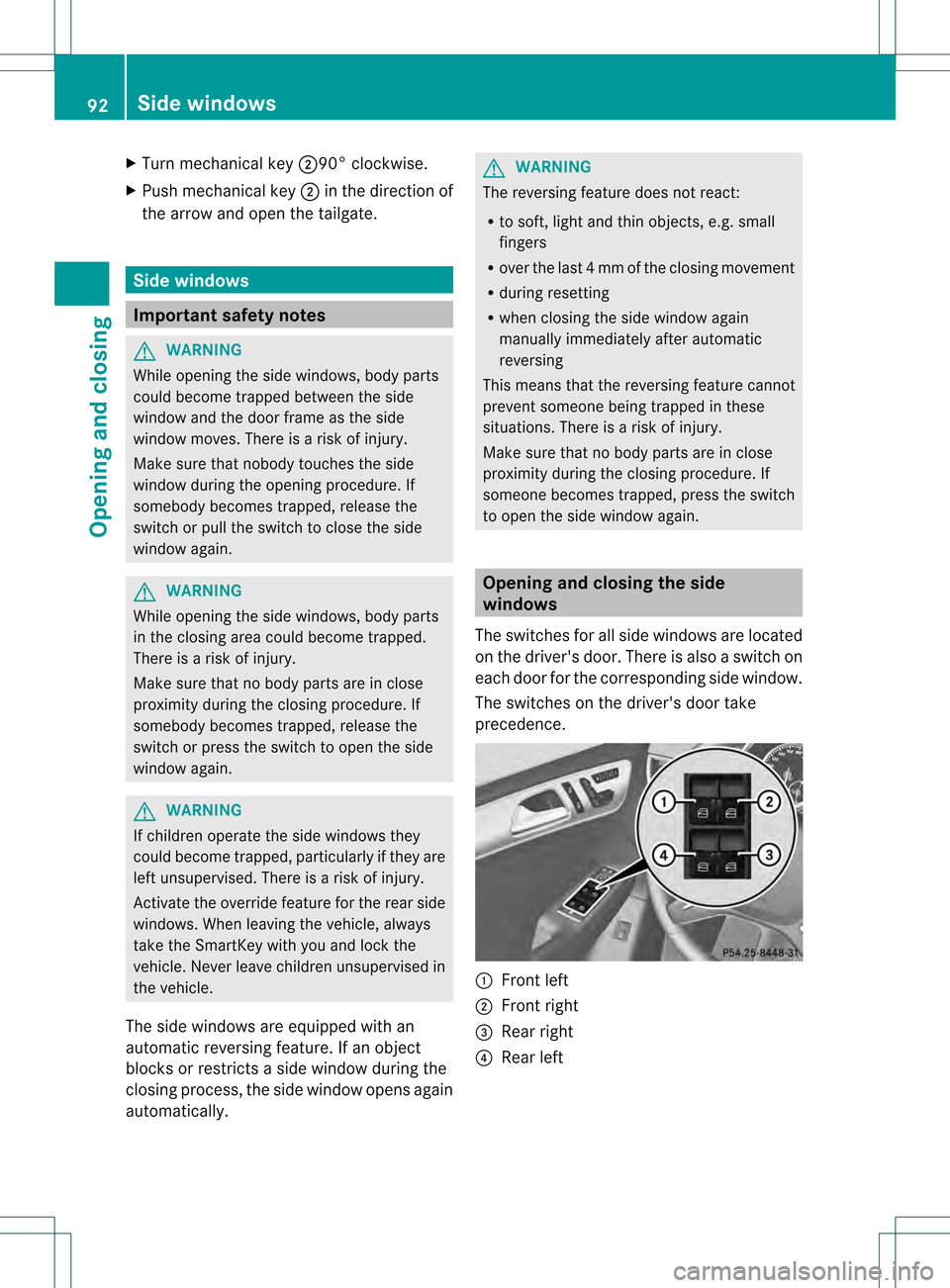
The switches for all side windows are located
on the driver's door. There is also a switch on
each door for the corresponding side window.
The switches on the driver's door take
precedence. 0002
Front left
0003 Front right
001F Rear right
001E Rear left 92
Side windowsOpening and closing
Page 96 of 458
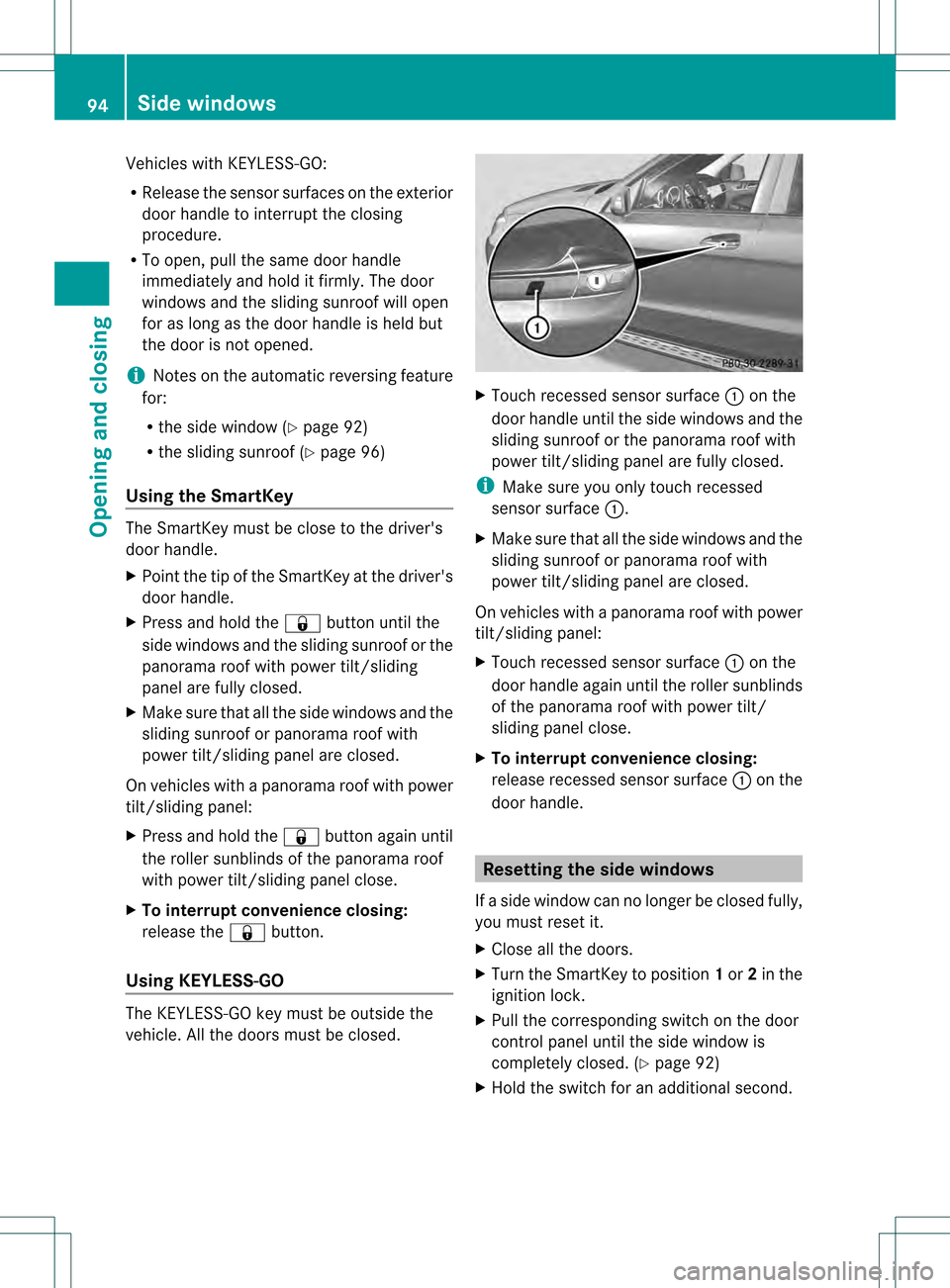
Vehicles with KEYLESS-GO:
R
Release the sensor surfaces on the exterior
door handle to interrupt the closing
procedure.
R To open, pull the same door handle
immediately and hold it firmly. The door
windows and the sliding sunroof will open
for as long as the door handle is held but
the door is not opened.
i Notes on the automatic reversing feature
for:
R the side window (Y page 92)
R the sliding sunroof (Y page 96)
Using the SmartKey The SmartKey must be close to the driver's
door handle.
X
Point the tip of the SmartKey at the driver's
door handle.
X Press and hold the 000Bbutton until the
side windows and the sliding sunroof or the
panorama roof with power tilt/sliding
panel are fully closed.
X Make sure that all the side windows and the
sliding sunroof or panorama roof with
power tilt/sliding panel are closed.
On vehicles with a panorama roof with power
tilt/sliding panel:
X Press and hold the 000Bbutton againu ntil
the rolle rsunblinds of th epanorama roof
with power tilt/sliding panel close.
X To interrup tconvenience closing:
release the 000Bbutton.
Using KEYLESS-GO The KEYLESS-GO key must be outside the
vehicle. All the doors must be closed. X
Touch recessed sensor surface 0002on the
door handle until the side windows and the
sliding sunroof or the panorama roof with
power tilt/sliding panel are fully closed.
i Make sure you only touch recessed
sensor surface 0002.
X Make sure that all the side windows and the
sliding sunroof or panorama roof with
power tilt/sliding panel are closed.
On vehicles with a panorama roof with power
tilt/sliding panel:
X Touch recessed sensor surface 0002on the
door handle again until th eroller sunblinds
of the panorama roof with power tilt/
sliding panel close.
X To interrupt convenience closing:
release recessed sensor surface 0002on the
door handle. Resetting the side windows
If a side window can no longer be closed fully,
you must reset it.
X Close all the doors.
X Turn the SmartKey to position 1or 2in the
ignition lock.
X Pull the corresponding switch on the door
control panel until the side window is
completely closed. (Y page 92)
X Hold the switch for an additional second. 94
Side windowsOpening and closing