displays MERCEDES-BENZ M-Class 2015 W166 Owner's Manual
[x] Cancel search | Manufacturer: MERCEDES-BENZ, Model Year: 2015, Model line: M-Class, Model: MERCEDES-BENZ M-Class 2015 W166Pages: 466, PDF Size: 8.92 MB
Page 5 of 466
Index
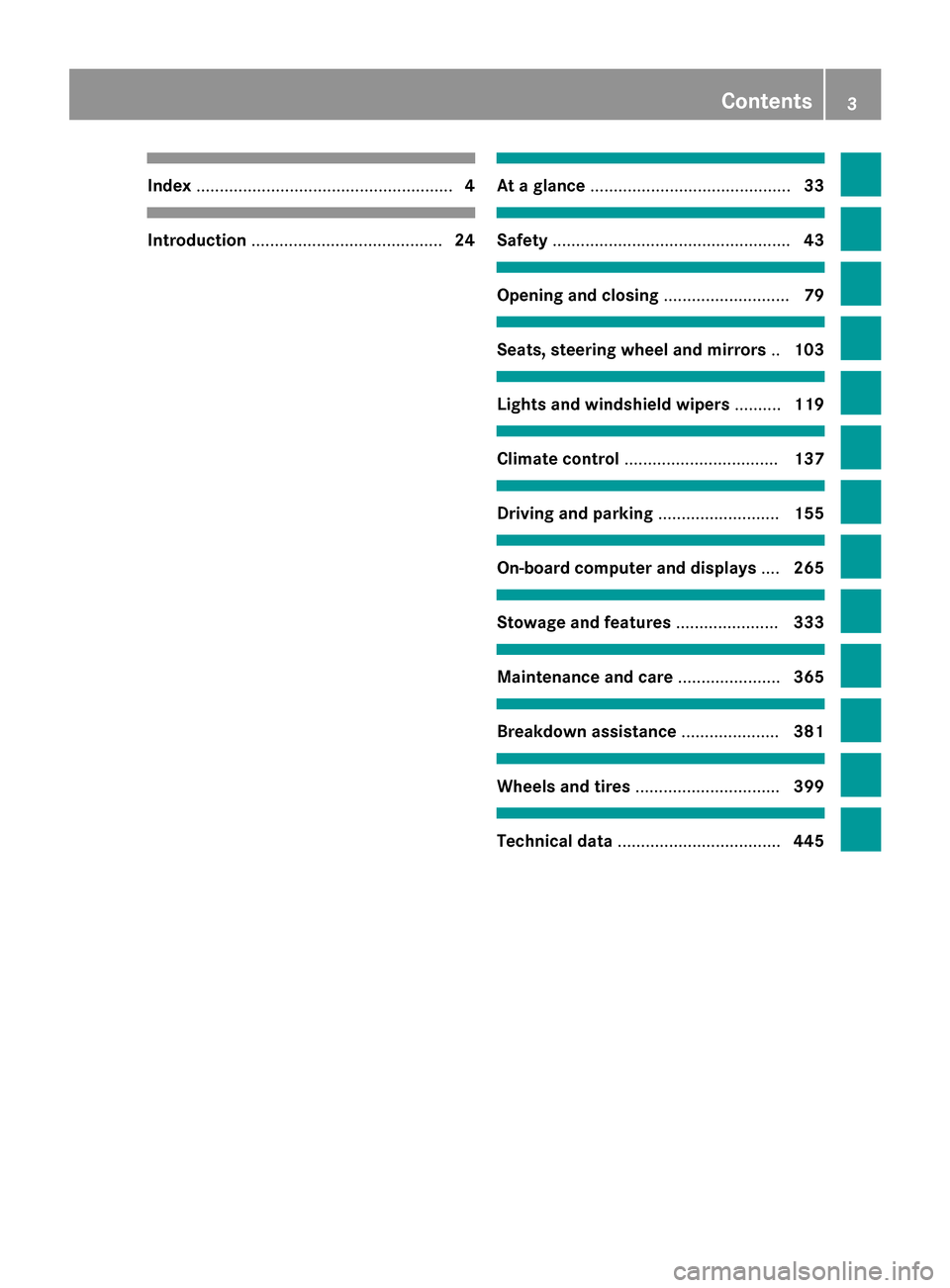
....................................................... 4Introduction
......................................... 24 At a glance
........................................... 33 Safety
................................................... 43 Opening and closing
...........................79 Seats, steering wheel and mirrors
..103 Lights and windshield wipers
..........119 Climate control
................................. 137 Driving and parking
..........................155 On-board computer and displays
....265 Stowage and features
......................333 Maintenance and care
......................365 Breakdown assistance
.....................381 Wheels and tires
............................... 399 Technical data
................................... 445 Contents
3
Page 11 of 466
Distance warning function
Activating/deactivating ................ .275
Function/notes ................................ 70
Warning lamp ................................. 330
DISTRONIC PLUS
Activating ....................................... 200
Activation conditions ..................... 200
Cruise control lever ....................... 200
Deactivating ................................... 204
Display message ............................ 309
Displays in the multifunction dis-
play ................................................ 205
Driving tips ................................... .205
Function/notes ............................ .198
Important safety notes .................. 199
Setting the specified minimum
distance ......................................... 203
Warning lamp ................................. 330
Doors
Automatic locking (on-board com-
puter) ............................................. 279
Automatic locking (switch) .............. .88
Central locking/unlocking
(SmartKey) ...................................... .80
Control panel .................................. .42
Display message ............................ 316
Emergency locking ........................... 88
Emergency unlocking ....................... 88
Important safety note s.................... 86
Opening (from inside) ...................... 87
Overview .......................................... 86
Power closing feature ...................... 88
Downhill speed regulation
see DSR (Downhill Speed Regulation)
Drinking and driving ......................... 186
Drive program Automatic ...................................... 173
Display (DIRECT SELECT lever) ...... 168
Manual ........................................... 173
Manual (AMG vehicles) .................. 174
Manual (vehicles with the
ON&OFFROAD package) ................ 174
Off-road program (vehicles with
the ON&OFFROAD package) .......... 251
SETUP (on-board computer) .......... 281
see On-road programs Driver's door
see Doors
Driving abroad
Mercedes-Benz Service ................. 371
Symmetrical low beam .................. 120
Driving in mountainous terrain
Approach/departure angle ............ 194
Driving lamps
see Daytime running lamps
Driving off-road
see Off-road driving
Driving safety systems
ABS (Anti-lock Braking System) ....... 68
ADAPTIVE BRAK E............................. 75
Adaptive Brake Assist ...................... 71
BAS (Brake Assist System) .............. 68
BAS PLUS (Brake Assist System
PLUS) ............................................... 69
COLLISION PREVENTION ASSIST .... 70
Distance warning function ............... 70
EBD (electronic brake force distri- bution) ............................................. 75
ESP ®
(Electronic Stability Pro-
gram) ............................................... 72
ETS/4ETS (Electronic Traction
System) ........................................... 72
Important safety information ........... 67
Overview .......................................... 67
PRE-SAFE ®
Brake ............................. 75
STEER CONTROL ............................. 77
Driving systems
360°camera .................................. 229
Active Blind Spot Assist ................. 241
Active Curve System ...................... 212
Active Driving Assistance pack-
age ................................................. 241
Active Lane Keeping Assist ............ 244
Active Parking Assist ..................... 220
ADS ............................................... 212
AIRMATIC package ........................ 211
AMG adaptive sport suspension
system ........................................... 215
ATTENTION ASSIST ........................ 233
Blind Spot Assist ............................ 237
Cruise control ................................ 195
Display message ............................ 304
DISTRONIC PLUS ........................... 198 Index
9
Page 17 of 466
N
Navigation Menu (on-board computer) ............ 271
see separate operating instructions
Night View Assist Plus
Activating/deactivating ................. 235
Cleaning ......................................... 377
Problem (malfunction) ................... 237
Notes on breaking-in a new vehi-
cle ....................................................... 156 O
Occupant Classification System
(OCS) Conditions ....................................... 53
Faults ............................................... 57
Operation ......................................... 53
System self-test ............................... 55
Occupant safety
Automatic measures after an acci-
dent ................................................. 60
Children in the vehicle ..................... 61
Important safety note s.................... 45
Pets in the vehicle ........................... 67
PRE-SAFE ®
(anticipatory occu-
pant protection) ............................... 60
OCS
Conditions ....................................... 53
Faults ............................................... 57
Operation ......................................... 53
System self-test ............................... 55
Odometer ........................................... 269
Off-road driving Approach/departure angle ............ 458
Checklist after driving off-road ...... 193
Checklist before driving off-road .... 192
Fording depth ................................ 457
General information ....................... 192
Important safety notes .................. 191
Maximum gradient climbing abil-
ity .................................................. 458
Traveling uphill ............................... 194
Off-road programs (vehicles with
the ON&OFFROAD package)
Displays in the COMAND display ... 255
Function/note s............................. 251 Off-road program 1 ........................ 252
Off-road program 2 ........................ 252
Off-road system
4MATIC .......................................... 249
DSR ............................................... 250
LOW RANGE off-road gear ............. 253
Off-road 4ETS .................................. 73
Off-road ABS .................................... 68
Off-road ESP ®
.................................. 74
Off-road programs (vehicles with
the ON&OFFROAD package) .......... 251
Oil
see Engine oil
On and Offroad menu (on-board
computer) .......................................... 281
On-board computer AMG menu ..................................... 281
Assistance menu ........................... 275
Audio menu ................................... 272
Convenience submenu .................. 279
Displaying a service message ........ 371
Display messages .......................... 284
DISTRONIC PLUS ........................... 205
Factory settings submenu ............. 281
Important safety notes .................. 266
Instrument cluster submenu .......... 277
Lighting submenu .......................... 277
Menu overview .............................. 269
Message memory .......................... 284
Navigation menu ............................ 271
On and Offroad menu .................... 281
Operation ....................................... 267
RACETIMER ................................... 282
Service menu ................................. 276
Settings menu ............................... 277
Standard display ............................ 269
Telephone menu ............................ 273
Trip menu ...................................... 269
Vehicle submenu ........................... 279
Video DVD operation ..................... 273
On-road programs
AUTO program ............................... 247
Function/note s............................. 247
Snow program ............................... 248
SPORT program ............................. 248
Trailer progra m.............................. 249 Index
15
Page 37 of 466
Instrument cluster
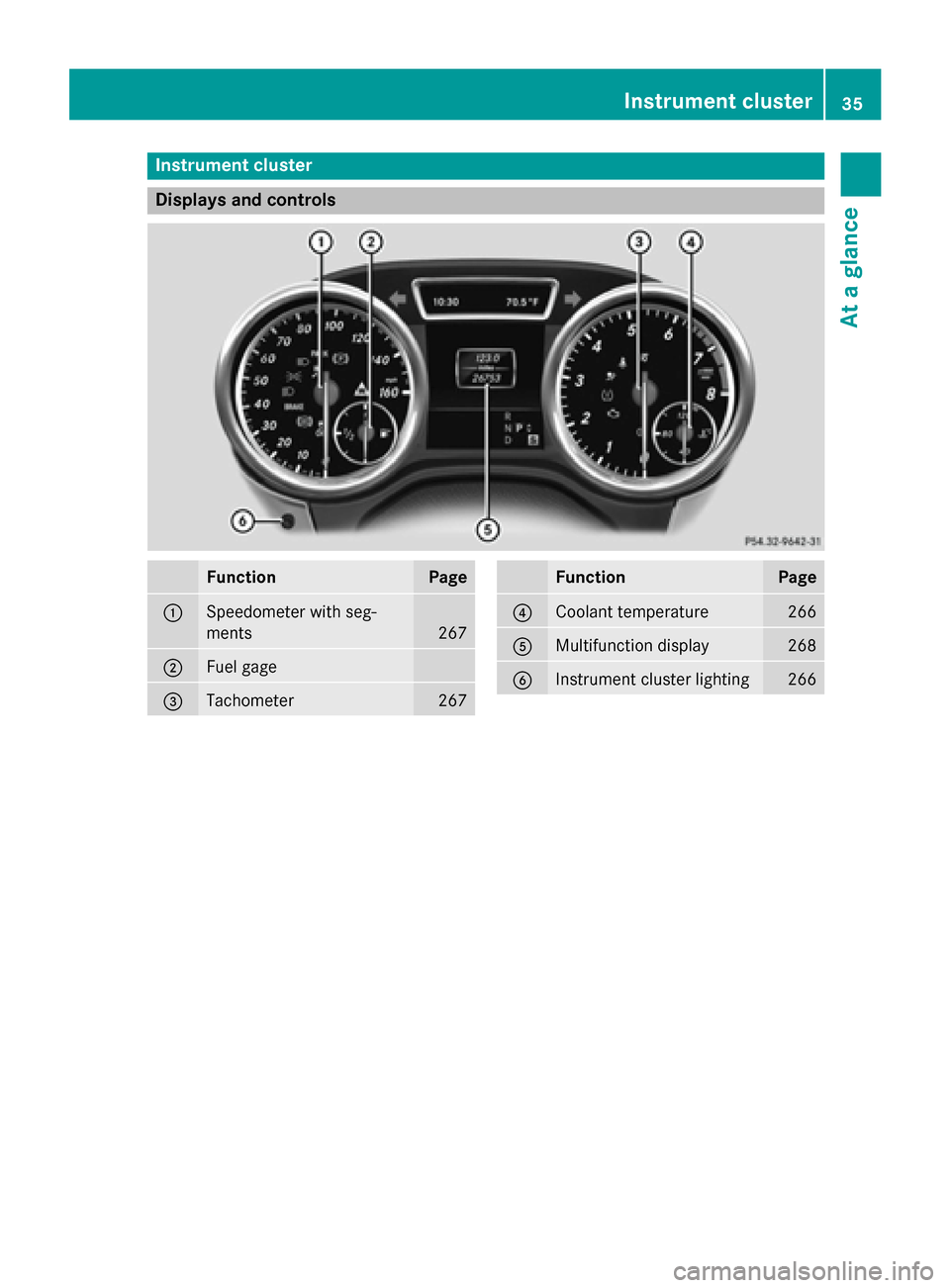
Displays and controls
Function Page
0043
Speedometer with seg-
ments
267
0044
Fuel gage
0087
Tachometer 267 Function Page
0085
Coolant temperature 266
0083
Multifunction display 268
0084
Instrument cluster lighting 266Instrument cluster
35At a glance
Page 56 of 466
ton once or twice on vehicles with KEY-
LESS-GO.
The system carries out a self-diagnosis.
The PASSENGER AIR BAG OFF indicator lamp
must light up for approximately six second s.
The PA SSENGER AIR BAG OFF indicator lamp
then displays the status of the front-
passenger front air bag. If the status of the
front-passenger front air bag changes while
the vehicle is in motion, an air bag display
message may appear in the instrument clus-
ter (Y page 295). When the front-passenger
seat is occupied, always pay attention to the
PASSENGER AIR BAG OFF indicator lamp. Be aware of the status of the front-passenger
front air bag both before and during the jour-ney.
If the PASSENGER AIR BAG OFF indicator
lamp:
R is lit, the front-passenger front air bag is
deactivated. They will then not be deployed in the event of an accident.
R does not light up: the front-passenger
front air bag is enabled. If, in the event of an
accident, all deployment criteria are met,
the front-passenger front air bag is
deployed. G
WARNING
If the PASSENGER AIR BAG OFF indicator
lamp is lit, the front-passenger front air bag is disabled. It will not be deployed in the event of
an accident and cannot perform its intended
protective function. A person in the front-
passenger seat could then, for example, come
into contact with the vehicle's interior, espe-
cially if the person is sitting too close to the
dashboard. This poses an increased risk of
injury or even fatal injury.
When the front-passenger seat is occupied,
always ensure that:
R the classification of the person in the front-
passenger seat is correct and the front-
passenger front air bag is enabled or disa- bled in accordance with the person in the
front-passenger seat
R the front-passenger seat has been moved
back as far back as possible.
R the person is seated correctly.
Make sure, both before and during the jour-
ney, that the status of the front-passenger
front air bag is correct. G
WARNING
If you secure a child in a child restraint system on the front-passenger seat and the
PASSENGER AIR BAG OFF indicator lamp is
off, the front-passenger front air bag can
deploy in the event of an accident. The child
could be struck by the air bag. This poses an
increased risk of injury or even fatal injury.
Make sure that the front-passenger front air
bag has been disabled. The PASSENGER AIR
BAG OFF indicator lamp must be lit. G
WARNING
If you secure a child in a forward-facing child
restraint system on the front-passenger seat
and you position the front-passenger seat too close to the dashboard, the child could, in the
event of an accident:
R come into contact with the vehicle's inte-
rior if the PASSENGER AIR BAG OFF indi-
cator lamp is lit, for example
R be struck by the air bag if the PASSENGER
AIR BAG OFF indicator lamp is off
This poses an increased risk of injury or even
fatal injury.
Move the front-passenger seat as far back as possible. Always make sure that the shoulder
belt strap is correctly routed from the vehicle
belt sash guide to the shoulder belt guide on
the child restraint system. The shoulder belt
strap must be routed forwards and down-
wards from the vehicle belt sash guide. If nec- essary, adjust the vehicle belt sash guide and
the front-passenger seat accordingly. Always
observe the child restraint system manufac-
turer's installation instructions. 54
Occupant safetySafety
Page 58 of 466
G
DANGER
If the PASSENGER AIR BAG OFF indicator
lamp remains lit after the system self-test, the front-passenger front air bag is disabled. It willnot be deployed in the event of an accident. In
this case, the front-passenger front air bag
cannot perform its intended protective func-
tion, e.g. when a person is seated in the front- passenger seat.
That person could, for example, come into
contact with the vehicle's interior, especially
if the person is sitting too close to the dash-
board. This poses an increased risk of injury or even fatal injury.
When the front-passenger seat is occupied,
always ensure that:
R the classification of the person in the front-
passenger seat is correct and the front-
passenger front air bag is enabled or disa-
bled in accordance with the person in the
front-passenger seat
R the person is seated properly with a cor-
rectly fastened seatbelt
R the front-passenger seat has been moved
back as far back as possible
If the PASSENGER AIR BAG OFF indicator
lamp remains lit when it should not, the front- passenger seat may not be used. Do not
install a child restraint system on the front-
passenger seat. Have the Occupant Classifi-
cation System (OCS) checked and repaired
immediately at a qualified specialist work-
shop. G
WARNING
Objects between the seat surface and the
child restraint system could affect OCS oper- ation. This could result in the front-passengerair bag not functioning as intended during an
accident. This poses an increased risk of
injury or even fatal injury.
Do not place any objects between the seat
surface and the child restraint system. The
entire base of the child restraint system must
always rest on the seat cushion of the front-
passenger seat. The backrest of the forwards- facing child restraint system must, as far as
possible, be resting on the backrest of the
front-passenger seat. Always comply with the child restraint system manufacturer's instal-
lation instructions.
After the system self-test, the PASSENGER
AIR BAG OFF indicator lamp displays the sta-
tus of the front-passenger front air bag
(Y page 53).
For more information about the OCS, see
"Problems with the Occupant Classification
System" (Y page 57). 56
Occupant safetySafety
Page 106 of 466
Useful information
i This Operator's Manual describes all
models and all standard and optional equip- ment of your vehicle available at the time of
publication of the Operator's Manual.
Country-specific differences are possible.
Please note that your vehicle may not be
equipped with all features described. This
also applies to safety-related systems and
functions.
i Read the information on qualified special-
ist workshops (Y page 29). Correct driver's seat position
G
WARNING
You could lose control of your vehicle if you do the following while driving:
R adjust the driver's seat, head restraint,
steering wheel or mirrors
R fasten the seat belt
There is a risk of an accident.
Adjust the driver's seat, head restraint, steer-
ing wheel and mirror and fasten your seat belt before starting the engine. X
Observe the safety guidelines on seat
adjustment (Y page 105).
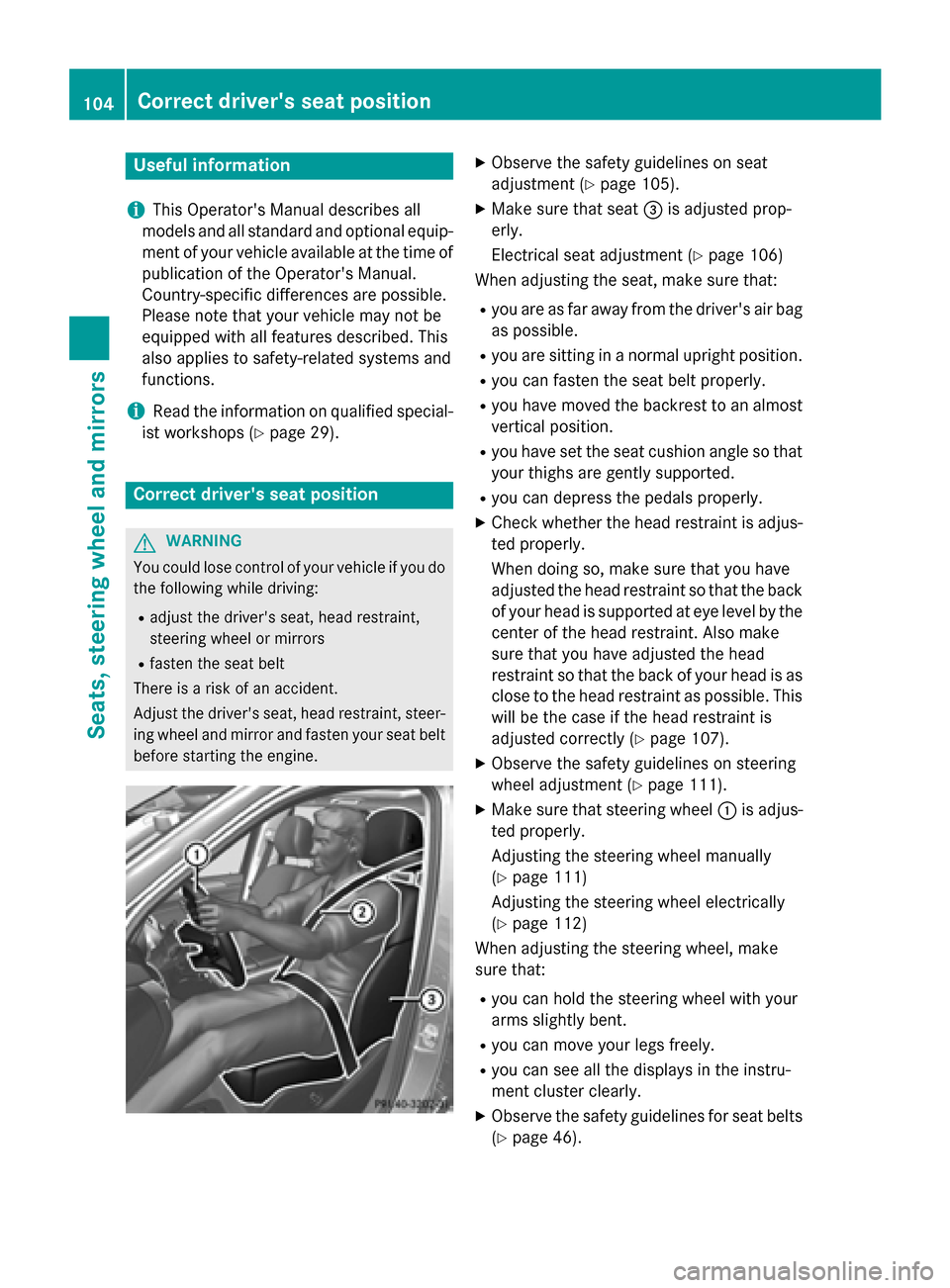
X Make sure that seat 0087is adjusted prop-
erly.
Electrical seat adjustment (Y page 106)
When adjusting the seat, make sure that:
R you are as far away from the driver's air bag
as possible.
R you are sitting in a normal upright position.
R you can fasten the seat belt properly.
R you have moved the backrest to an almost
vertical position.
R you have set the seat cushion angle so that
your thighs are gently supported.
R you can depress the pedals properly.
X Check whether the head restraint is adjus-
ted properly.
When doing so, make sure that you have
adjusted the head restraint so that the back of your head is supported at eye level by the
center of the head restraint. Also make
sure that you have adjusted the head
restraint so that the back of your head is as close to the head restraint as possible. Thiswill be the case if the head restraint is
adjusted correctly (Y page 107).
X Observe the safety guidelines on steering
wheel adjustment (Y page 111).
X Make sure that steering wheel 0043is adjus-
ted properly.
Adjusting the steering wheel manually
(Y page 111)
Adjusting the steering wheel electrically
(Y page 112)
When adjusting the steering wheel, make
sure that:
R you can hold the steering wheel with your
arms slightly bent.
R you can move your legs freely.
R you can see all the displays in the instru-
ment cluster clearly.
X Observe the safety guidelines for seat belts
(Y page 46). 104
Correct driver's seat positionSeats, steering wheel and mirrors
Page 206 of 466
Deactivating DISTRONIC PLUS
There are several ways to deactivate DIS-
TRONIC PLUS:
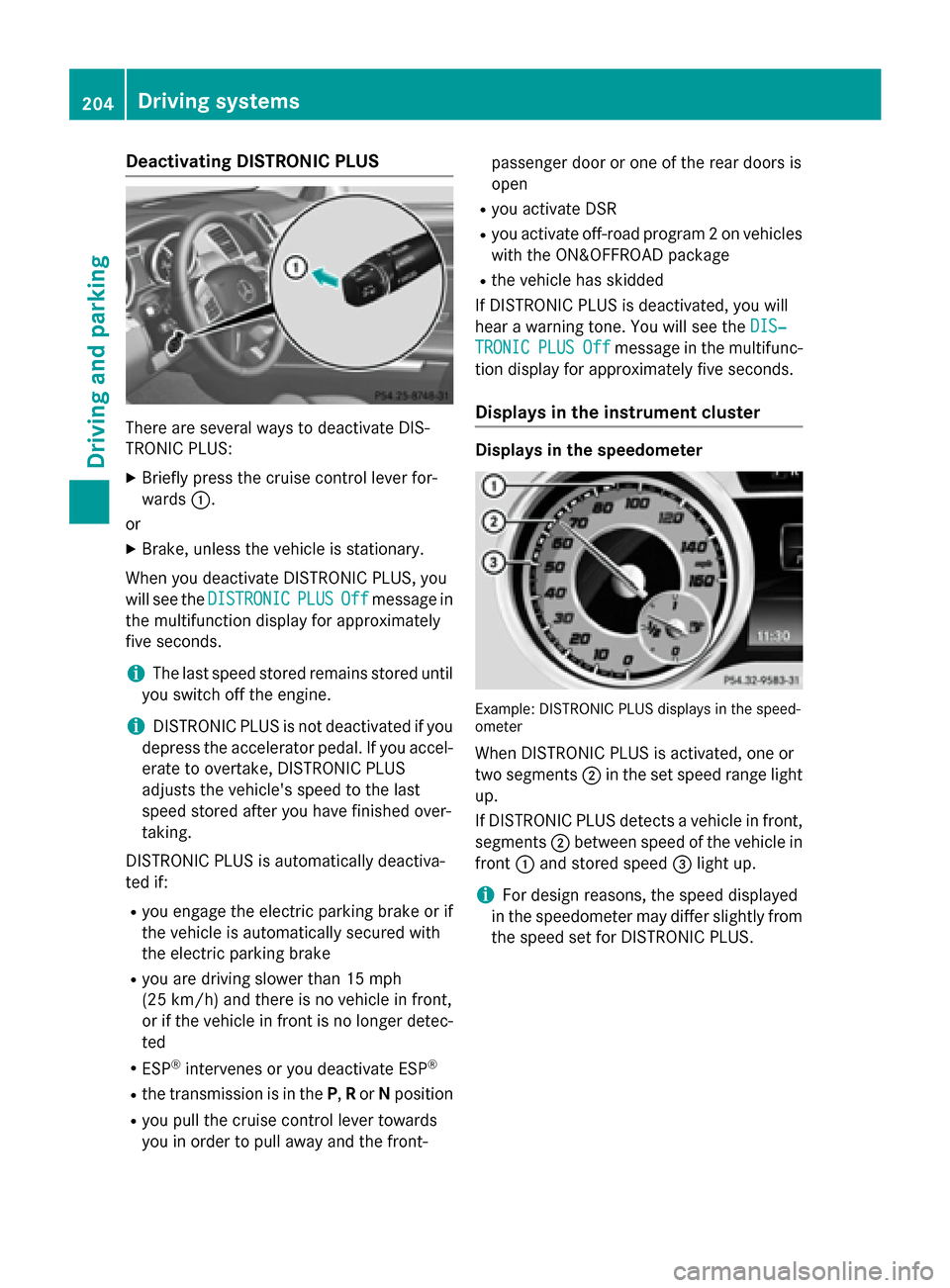
X Briefly press the cruise control lever for-
wards 0043.
or X Brake, unless the vehicle is stationary.
When you deactivate DISTRONIC PLUS, you
will see the DISTRONIC
DISTRONIC PLUS PLUSOff
Offmessage in
the multifunction display for approximately
five seconds.
i The last speed stored remains stored until
you switch off the engine.
i DISTRONIC PLUS is not deactivated if you
depress the accelerator pedal. If you accel-
erate to overtake, DISTRONIC PLUS
adjusts the vehicle's speed to the last
speed stored after you have finished over-
taking.
DISTRONIC PLUS is automatically deactiva-
ted if:
R you engage the electric parking brake or if
the vehicle is automatically secured with
the electric parking brake
R you are driving slower than 15 mph
(25 km/h) and there is no vehicle in front,
or if the vehicle in front is no longer detec-
ted
R ESP ®
intervenes or you deactivate ESP ®
R the transmission is in the P,Ror Nposition
R you pull the cruise control lever towards
you in order to pull away and the front- passenger door or one of the rear doors is
open
R you activate DSR
R you activate off-road program 2 on vehicles
with the ON&OFFROAD package
R the vehicle has skidded
If DISTRONIC PLUS is deactivated, you will
hear a warning tone. You will see the DIS‐
DIS‐
TRONIC TRONIC PLUS
PLUSOff
Offmessage in the multifunc-
tion display for approximately five seconds.
Displays in the instrument cluster Displays in the speedometer
Example: DISTRONIC PLUS displays in the speed-
ometer
When DISTRONIC PLUS is activated, one or
two segments 0044in the set speed range light
up.
If DISTRONIC PLUS detects a vehicle in front, segments 0044between speed of the vehicle in
front 0043and stored speed 0087light up.
i For design reasons, the speed displayed
in the speedometer may differ slightly from
the speed set for DISTRONIC PLUS. 204
Driving syste
msDriving and parking
Page 220 of 466
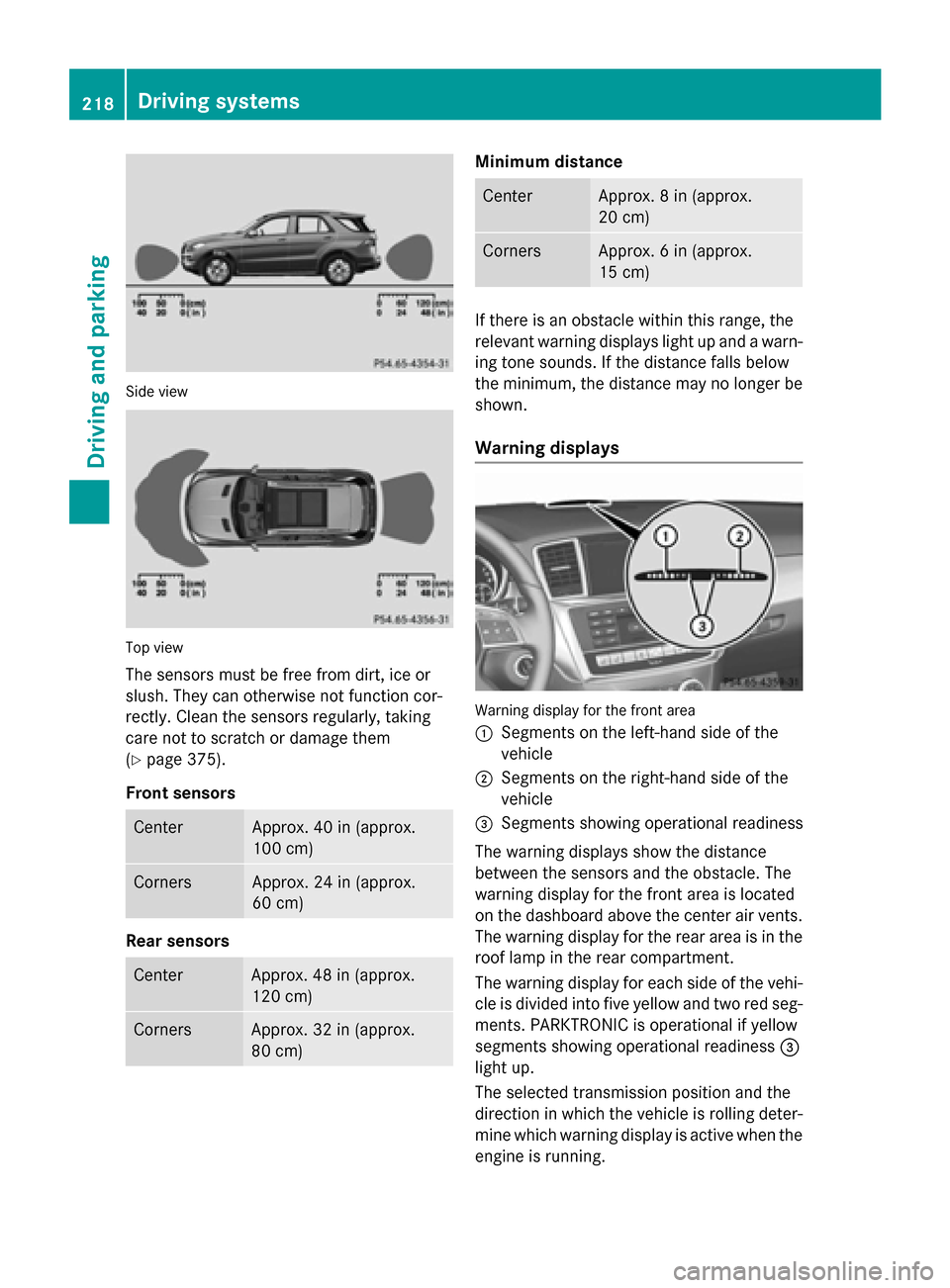
Side view
Top view
The sensors must be free from dirt, ice or
slush. They can otherwise not function cor-
rectly. Clean the sensors regularly, taking
care not to scratch or damage them
(Y page 375).
Front sensors Center Approx. 40 in (approx.
100 cm)
Corners Approx. 24 in (approx.
60 cm)
Rear sensors
Center Approx. 48 in (approx.
120 cm)
Corners Approx. 32 in (approx.
80 cm) Minimum distance
Center Approx. 8 in (approx.
20 cm)
Corners Approx. 6 in (approx.
15 cm)
If there is an obstacle within this range, the
relevant warning displays light up and a warn- ing tone sounds. If the distance falls below
the minimum, the distance may no longer be
shown.
Warning displays Warning display for the front area
0043
Segments on the left-hand side of the
vehicle
0044 Segments on the right-hand side of the
vehicle
0087 Segments showing operational readiness
The warning displays show the distance
between the sensors and the obstacle. The
warning display for the front area is located
on the dashboard above the center air vents.
The warning display for the rear area is in the
roof lamp in the rear compartment.
The warning display for each side of the vehi- cle is divided into five yellow and two red seg-ments. PARKTRONIC is operational if yellow
segments showing operational readiness 0087
light up.
The selected transmission position and the
direction in which the vehicle is rolling deter-
mine which warning display is active when the engine is running. 218
Driving systemsDriving and parking
Page 222 of 466
Problems with PARKTRONIC
Problem
Possible causes/consequences and
0050
0050Solutions Only the red segments
in the PARKTRONIC
warning displays are lit.
You also hear a warning
tone for approximately
two seconds.
PARKTRONIC is deacti-
vated after approx-
imately five seconds,
and the indicator lamp
in the PARKTRONIC
button lights up. PARKTRONIC has malfunctioned and has switched off.
X If problems persist, have PARKTRONIC checked at a qualified
specialist workshop. Only the red segments
in the PARKTRONIC
warning displays are lit.
PARKTRONIC is deacti-
vated after approx-
imately five seconds. The PARKTRONIC sensors are dirty or there is interference.
X Clean the PARKTRONIC sensors (Y page 375).
X Switch the ignition back on. The problem may be caused by an external source of radio or
ultrasound waves.
X See if PARKTRONIC functions in a different location. Active Parking Assist
General notes Active Parking Assist is an electronic parking
aid with ultrasound. It measures the road on
both sides of the vehicle. A parking symbol
indicates a suitable parking space. Active
steering intervention can assist you during
parking.
You may also use PARKTRONIC (Y page 217).
Important safety notes Active Parking Assist is merely an aid. It is not
a replacement for your attention to your
immediate surroundings. You are always
responsible for safe maneuvering, parking
and exiting a parking space. When maneu-
vering, parking or pulling out of a parking
space, make sure that there are no persons,
animals or objects in the area in which you are maneuvering. When PARKTRONIC is switched off, Active
Parking Assist is also unavailable. G
WARNING
While parking or pulling out of a parking
space, the vehicle swings out and can drive
onto areas of the oncoming lane. This could
result in a collision with another road user.
There is a risk of an accident.
Pay attention to other road users. Stop the
vehicle if necessary or cancel the Active Park- ing Assist parking procedure.
! If unavoidable, you should drive over
obstacles such as curbs slowly and not at a sharp angle. Otherwise, you may damage
the wheels or tires. 220
Driving systemsDriving and parking