warning MERCEDES-BENZ M-CLASS SUV 2011 Owners Manual
[x] Cancel search | Manufacturer: MERCEDES-BENZ, Model Year: 2011, Model line: M-CLASS SUV, Model: MERCEDES-BENZ M-CLASS SUV 2011Pages: 389, PDF Size: 9.22 MB
Page 218 of 389
R
the Off-roa dprogra misa ctivate d(vehicles
without th eON&OFFROAD package).
R Off-road progra m1or2isactivated(vehi-
cle sw ith the ON&OFFROAD package).
R the LOW RANGE off-road gear is activated
(vehicles with the ON&OFFROAD package).
R al oss of tyr epressure or adefectiv etyre is
detected.
Activating Active Blind Spot Assist
X On vehicles without anavigation system,
make sure that the Becker ®
MAP PILOT is
connected; see the separate operating
instructions for Audio 20.
X Make sure that the radar senso rsystem
(Y page 249) and Active Blind Spot Assist
(Y page 245) are activated in the on-board
computer.
X Turn the key to position 2in the ignition
lock.
Warning lamps :ligh tupr ed in the exte-
rior mirror sfor approximately 1. 5seconds
and then tur nyellow.
Trailer towing
If you attach atrailer, make sure that yo uhave
correctly established the electrical connec-
tion. This can be accomplished by checking
the trailer lighting .Active Blind Spo tAssist is
then deactivated. The indicator lam plights up
yellow in the exterior mirrors and the ActiveBlind Spot Assist currently unavail‐
able Se
eOwner's Manual message
appe arsint he multifunction display.
Active Lan eKeeping Assist Import
ants afety notes
Active Lane Keeping Assis tmonitors the area
in front of your vehicle by means of acamera
at the top of the windscreen. Active Lane
Keeping Assis tdetect slane markings on the
road and warns you before you leave your
lane unintentionally .Ifyou do not react to the
warning, alane-correcting application of the
brakes can bring the vehicle back into the
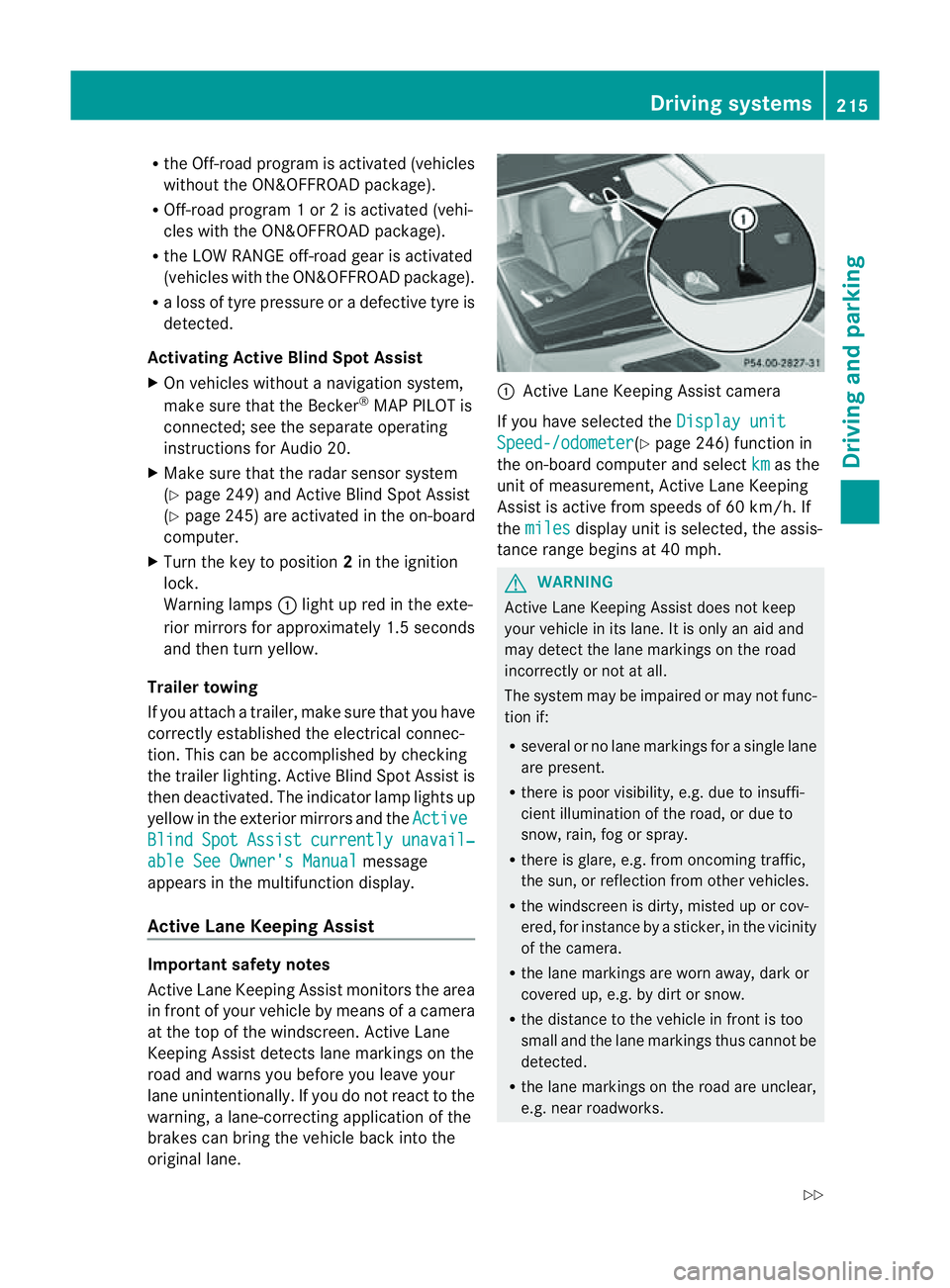
original lane. :
Active Lane Keeping Assis tcamera
If you have selected the Displayunit Speed-/odometer (Y
page 246) function in
th eo n-board compute rand select km as the
unit of measurement, Active Lane Keeping
Assist is active from speeds of 60 km/h. If
the miles display unit is selected
,the assis-
tan ce ra nge begins at 40 mph. G
WARNING
Active Lane Keeping Assist doe snot keep
your vehicle in its lane. It is only an aid and
may detec tthe lan emarkings on the road
incorrectly or not at all.
The system may be impaired or may not func-
tion if:
R several or no lane markings for asingle lane
are present.
R there is poor visibility, e.g. due to insuffi-
cient illumination of the road, or due to
snow, rain, fog or spray.
R there is glare, e.g. from oncoming traffic,
the sun, or reflec tion from other vehicles.
R the windscreen is dirty, misted up or cov-
ered, for insta ncebyasticker, in the vicinity
of the camera.
R the lane markings are worn away ,dark or
covered up, e.g. by dirt or snow.
R the distance to the vehicle in front is too
small and the lane markings thus cannot be
detected.
R the lane markings on the road are unclear,
e.g. near roadworks. Driving systems
215Drivingand park ing
Z
Page 219 of 389
R
the lane markings change quickly, e.g.
lanes branch off, cros sone anothe ror
merge.
R ther oad is narrow and winding.
Active Lane Keeping Assist cannot detect
road and traffic conditions. It is not asubsti-
tute for attentive driving.Y ou are responsible
for the vehicle's speed ,braking in good time,
and steering correctly .Always adapt your
driving style to sui tthe prevailing roa dand
weather conditions. Alway spay attention to
traffic condition sand your surroundings. Oth-
erwise, you may fail to recognise dange rsin
time, cause an accident and injure yourself
and others.
Warning vibra tion in th esteering wheel
Aw arnin gmay be given if afront wheel
passes ove ralane mar king. You will then be
warned by means of an intermittent vibration
in the steering wheel for up to 1. 5seconds.
In order that you are warned only when nec-
essary and in good tim eifyou cross the lane
marking, the system recognises cer tain con-
ditions and warns you accordingly.
The warnin gvibration occur searlier if:
R you approach the outer lane markin gona
bend.
R the road has ver ywide lanes, e.g. amotor-
way.
R the system recognises solid lane markings.
The warnin gvibration occur slater if:
R the road has narrow lanes.
R you cut the corner on abend.
Lane-correcting brak eapplication
If you leave your lane unde rcertain cir cum-
stances, the vehicle will brake briefl yonone
side. Thi sisdesigned to help you brin gthe
vehicle bac kinto the original lane.
Thi sfunction is available in the range between
60 km/ hand 200 km/h.
Al ane-correctin gbrake applicatio ncan only
be made after driving over asolid, recognis-
able lane marking. Befor ethis, awarning must be emitted by means of intermittent
vibration in the steering wheel. In addition, a
lane with lane markings on both sides must
be recognised. The brake application also
slightly reduces driving speed.
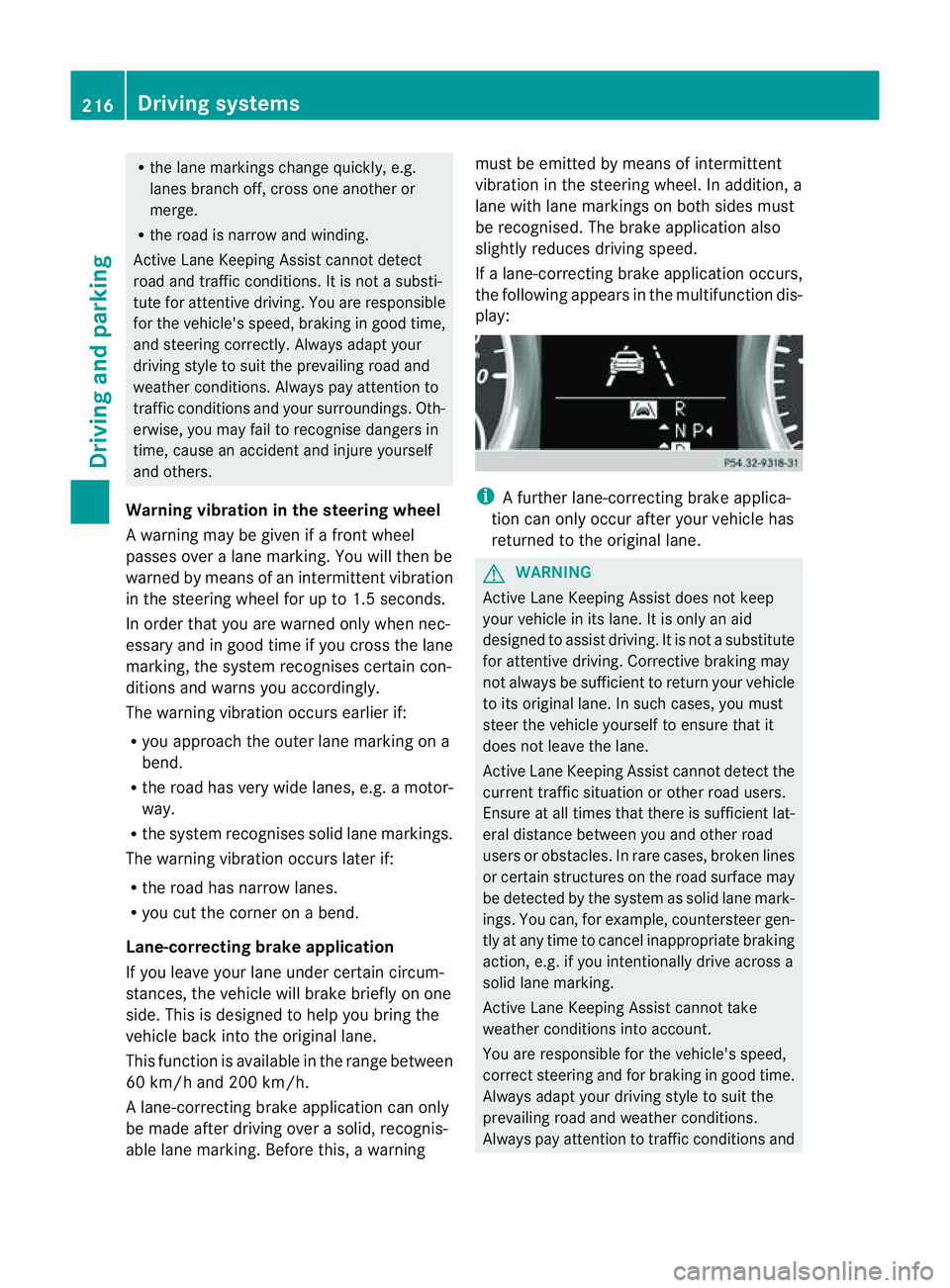
If al ane-correcting brake application occurs,
the following appears in the multifunction dis-
play: i
Afurther lane-correcting brake applica-
tion can only occur after your vehicle has
returned to the original lane. G
WARNING
Active Lane Keeping Assis tdoes not keep
your vehicle in its lane. It is only an aid
designed to assist driving. It is not asubstitute
for attentive driving. Corrective braking may
not always be sufficient to return your vehicle
to its original lane. In such cases, you must
steer the vehicle yourself to ensure that it
does not leave the lane.
Active Lane Keeping Assis tcannot detect the
current traffic situation or other road users.
Ensure at all times that there is sufficient lat-
eral distance between you and other road
users or obstacles .Inrare cases, broken lines
or certain structures on the road surface may
be detected by the system as solid lane mark-
ings. You can, for example, countersteer gen-
tly at any time to cancel inappropriate braking
action, e.g. if you intentionally drive across a
solid lane marking.
Active Lane Keeping Assis tcannot take
weather conditions into account.
You are responsible for the vehicle's speed,
correct steering and for braking in good time.
Always adapt your driving style to suit the
prevailing road and weather conditions.
Always pay attention to traffic conditions and 216
Driving systemsDrivin
gand parking
Page 220 of 389
your surroundings. Otherwise, you may fail to
recognise danger
sintime,cause an accident
and injur eyourself and others.
No lane-correcting brak eapplication occurs
if:
R you clearly and acti vely steer ,brake ,or
accelerate.
R you cut the corner on ashar pbend.
R you have switched on the tur nsignals.
R ad riving safet ysystem intervenes, such as
ESP ®
,P RE-SAFE ®
Brak eorA ctive Blind
Spot Assist.
R you have adopted asport ydriving style with
high cornerin gspeeds or high rates of
acceleration.
R on vehicles with atrailer to whitch, the
electrical connection to the trailer has been
correctly established.
R ESP ®
is deactivated.
R the transmission is not in position D.
R the Off-road program is activated (vehicles
without the ON&OFFROA Dpackage).
R Off-road program 1or2isactivated (vehi-
cles with the ON&OFFROAD package).
R the LOW RANGE off-road gear is activated
(vehicles with the ON&OFFROAD package).
R al oss of tyr epressure or adefective tyre
has been detected and displayed.
Activ eLaneK eeping Assist does no tdetect
road and traffic conditions .Aninappropriate
brake applicatio nmay be interrupted at any
time if:
R you steer slightly in the opposite direction.
R you use aturn signal.
R you clearly brake or accelerate.
Al ane- correcting bra keapplication is inter-
rupted automatically if:
R ad riving safet ysystem intervenes, such as
ESP ®
,P RE-SAFE ®
Brake or Active Blind
Spot Assist.
R lane markings can no longe rberecognised. Activating Active Lane Keeping Assist
X
Switch on Active Lan eKeeping Assist using
the on-boar dcomputer ;todoso, select
Standard or
Adaptive (Y
page 245).
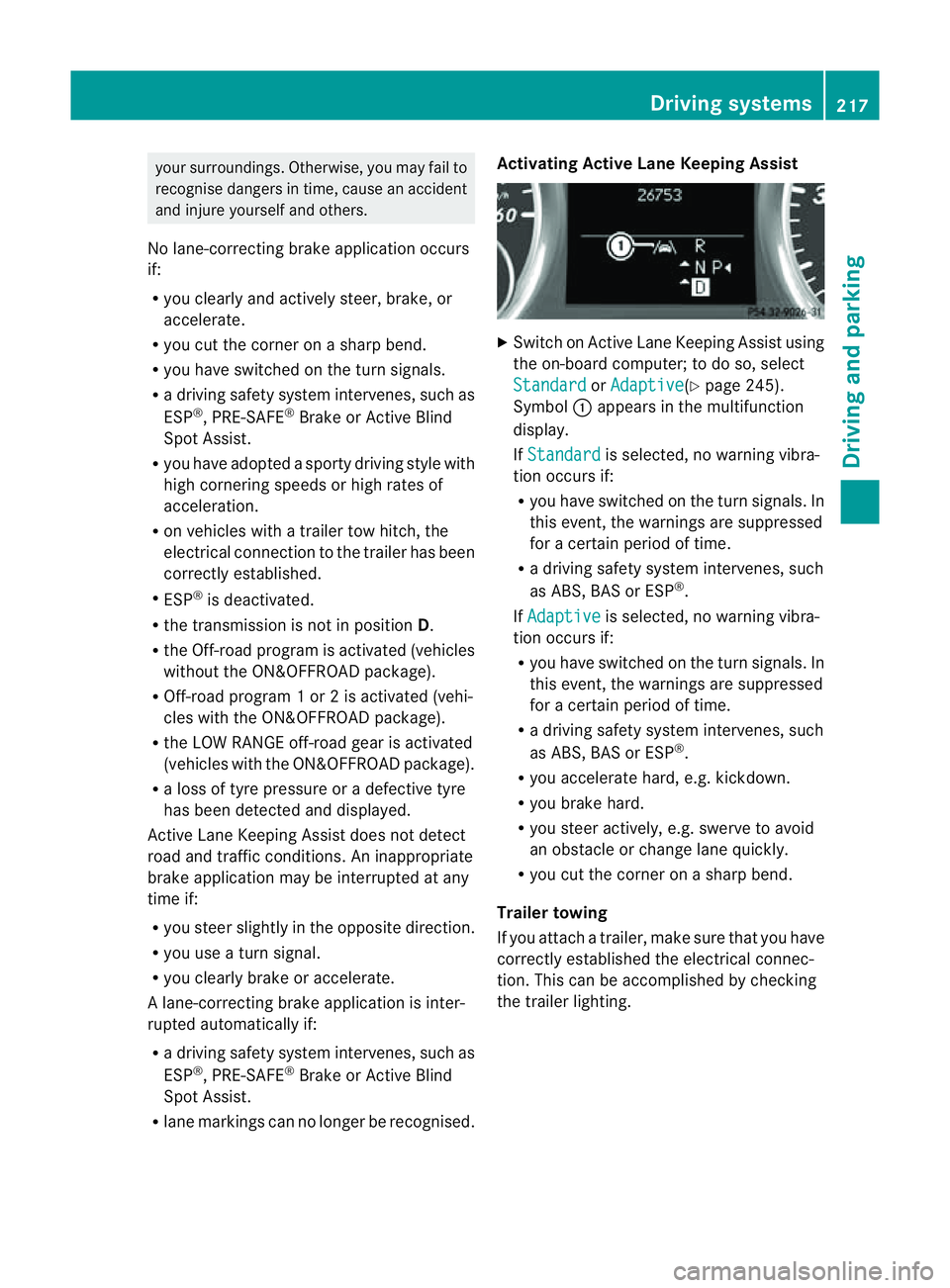
Symbol :appears in the multifunction
display.
If Standard is selected, no warnin
gvibra-
tion occur sif:
R you have switched on th eturn signals .In
this event, the warnings are suppressed
for acertain period of time.
R ad riving safety system intervenes, such
as ABS, BAS or ESP ®
.
If Adaptive is selected, no warning vibra-
tio no ccurs if:
R you have switche donthe tur nsignals. In
this event, the warnings are suppressed
for acertain period of time.
R ad riving safety system intervenes, such
as ABS, BAS or ESP ®
.
R yo ua ccelerate hard ,e.g. kickdown.
R you brake hard.
R you steer actively, e.g. swerve to avoid
an obstacle or chang elane quickly.
R you cut the corner on ashar pbend.
Trailer towing
If you attach atrailer, make sure that yo uhave
correctly established the electrical connec-
tion. This can be accomplished by checking
the trailer lighting. Driving systems
217Drivingand parking Z
Page 223 of 389
R
Hig hway level is set.
R ADS (Adaptive Damping System) adjusts
the comfort damping characteristics to
the current operating and driving condi-
tions.
R The automatic transmission selects the
automatic drive progra mforac omforta-
ble and efficien tdriving style ,and the
shift points are optimally adjusted.
R The differential lock is engaged when
pulling away. Off-road driving systems
4MATIC (permanent all-wheel drive)
4MATIC ensures that all four wheels are per-
manently driven. Togethe rwith ESP ®
and
4ETS, it improves the trac tion of your vehicle
whenever adrive whee lspins due to insuffi-
cient grip. G
WARNING
4MATI Ccannot reduce the risk of an accident
if you drive too fast.
If ad rive whee lspins due to insufficien tgrip:
R onl ydepress the accelerator peda lasfar as
necessary when pulling away.
R accelerate less when driving.
R adapt you rdriving style to su itroa dand
traffic conditions.
! Never tow the vehicle with one axle
raised. Thi smay damage the transfer case.
Damage of this sort is not covered by the
Mercedes-Benz implied warranty. All
wheels must remain either on the ground
or be fully raised. Observe the instructions
for towing the vehicle with all wheels in full
contact with the ground.
i In wintry driving conditions, the maximum
effect of 4MATIC can only be achieved if
you use winter tyres (M+S tyres), with snow
chains if necessary. !
Functio norperformanc etests ma yonly
be performed on a2-axle dynamometer. If
you wis htooperatethe vehicle on such a
dynamometer, pleas econsult aMercedes-
Benz Service Centr ebeforehand. You could
otherwise damage th edrive train or the
bra kesystem.
Fo rinformation abou tdriving off-roa d, see
( Y page 166). DSR (Downhill Speed Regulation)
Important safety notes DSR assists you when driv
ingd ownhill .It
keeps the spee doftravel at th espeed set on
the on-board comp uter. Th esteeper the
downhil lgradient ,the greate rthe DS Rbrak-
ing effect on th evehicle. When driving on flat
stretches of road or on an uphill gradient, the
DSR braking effect is minima lornon-existent. G
WARNING
DSR is only an aid designe dtoassist you when
driving downhill. You ar eresponsible for keep-
ing control of the vehicle and for assessing
whether the downhill gradien tcan be man-
aged.
When activating DSR the vehicle may brake
suddenly due to DSR intervening. This is
dependent on the downhill gradient and the
difference between the current spee dand the
speed set. DSR may not always be able to
keep to the set speed, depending on road sur-
face and tyre conditions .You coul dlose con-
trol of the vehicle and cause an accident.
Selec taset speed suitable for the prevailing
conditions and when necessary, apply the
brakes manually.
DSR con trols the set speed when it is active
and the automatic transmission is in the D,
R or Nposition. By accelerating or braking,
you can always drive at ahigher or alower
speed than that set on the on-boar dcom-
puter. 220
Off-road driving systemsDriving and parking
Page 224 of 389
G
WARNING
If you depress the accelerato rpeda lwith DSR
activated, then the set spee dcan be excee-
ded. Drive downhill with special care and
alway skeep in min dthat DSR brakes the vehi-
cle as soon as you remove your foot from the
accelerator pedal. The vehicle may brake sud-
denly due to DSR intervening, depending on
the downhill gradient and the difference
between the current speed and the set speed.
You could lose control of the vehicle and
cause an accident.
For information about driving off-road, see
(Y page 166).
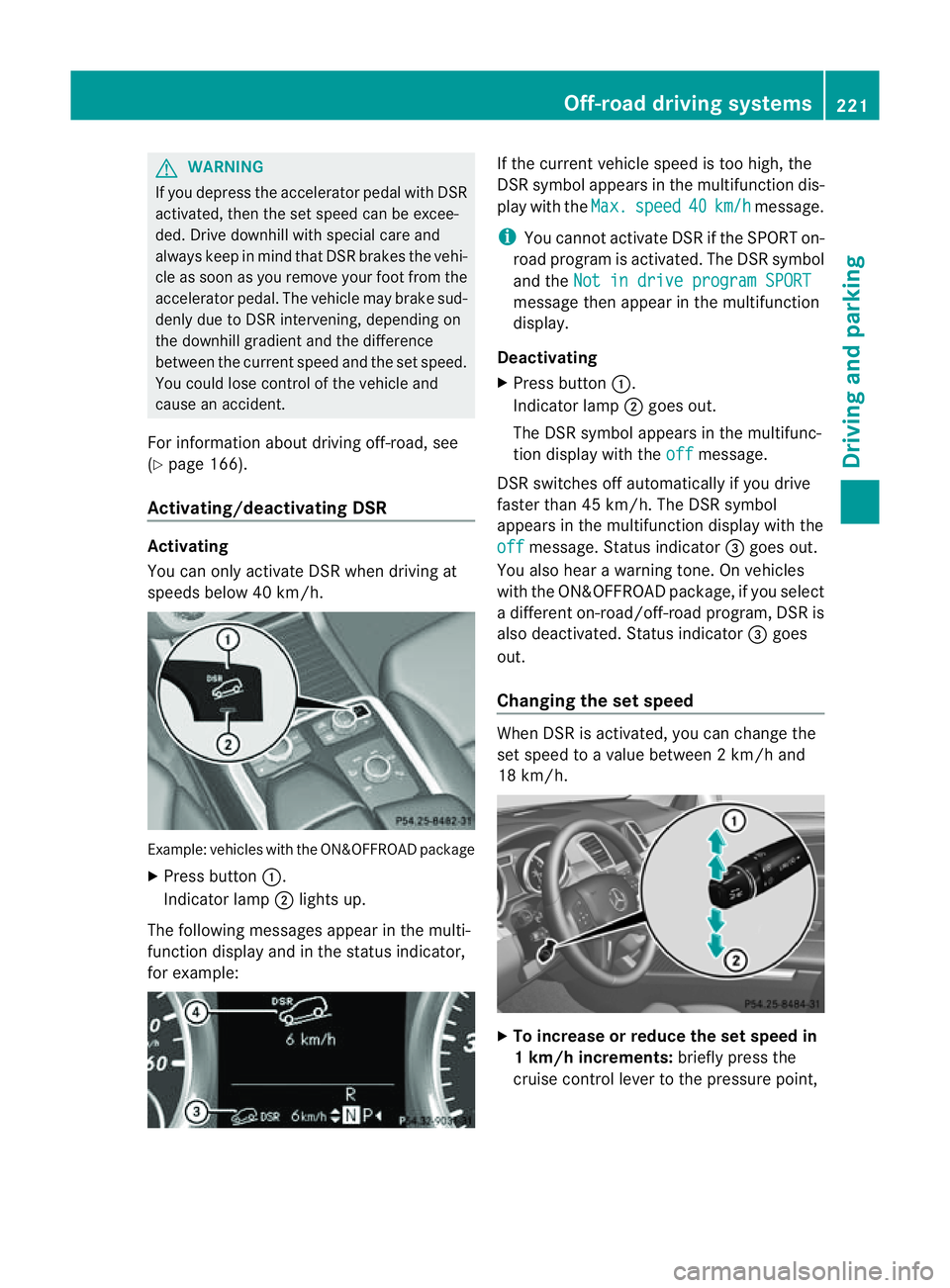
Activating/deactivating DSR Activating
You can only activate DSR when driving at
speeds below 40 km/h. Example: vehicles with the ON&OFFROAD package
X Press button :.
Indicator lamp ;lights up.
The following messages appear in the multi-
func tion display and in the status indicator,
for example: If the curren
tvehicle speed is too high, the
DSR symbol appear sint he multifunc tion dis-
play with the Max. speed 40 km/h message.
i You can notactivate DSR if the SPORT on-
road program is activated. Th eDSR symbol
and the Not in drive progra mSPORT message then appear in th
emultifunction
display.
Deactivating
X Press button :.
Indicator lamp ;goes out.
The DSR symbol appears in the multifunc-
tion display with the off message.
DSR switches off automatically if you drive
faster than 45 km/h. The DSR symbol
appears in the multifunction display with the
off message. Status indicator
=goes out.
You also hear awarning tone. On vehicles
with the ON&OFFROAD package, if you select
ad ifferent on-road/off- road program, DSR is
also deactivated. Status indicator =goes
out.
Changing the set speed When DSR is activated, you can change the
set spee dtoavalue between 2km/h and
18 km/h. X
To in crease or reduce the set speed in
1k m/h increments: briefly press the
cruise control lever to the pressure point, Off-road drivin
gsystems
221Drivingand park ing Z
Page 227 of 389
For information abou
tdriving off-road, see
(Y page 166). Yo uwillf ind information about
driving safety systems in conjunction with
LOW RANGE in the "Saf ety" section
(Y pag e60).
Shift ranges HIGH RANGE
Roa
dposition for all nor-
ma ldriving situations LO
WR ANGE Off-road position for driv-
ing off-road and fording
The transmission ratio
between the engine and
wheels is only approx-
imatel yone third of that in
the HIGH RANGE road
pos ition. The drive torque
is correspondingly higher
as aresult.
Do not use LOW RANGE:
R on slippery road surfa-
ces, e.g. in the case of
slush
R on snow or ice-covered
roads
R if you have snow chains
on your vehicle G
WARNING
Always wait for the gear change process from
HIGH RANGE to LOW RANGE –and from LOW
RANGE to HIGH RANGE –tocomple te.Don ot
tur no ff the engine while changi nggear and
do not switc hthe automatic transmission to
anot hergear.
If you do not wait for the gear change process
to complete, it may not be cor rectly imple-
mented. Th etransfer cas emay then be in
neutral and the connection between the
engine and the drive axles may be disen-
gaged .The vehicle coul dthen mov efreely,
eve nifa gear is engaged, and coul dinadver-
tently start moving, particularly if it is on a
slope. Observe the following description in "Mes-
sages in the multifunction display". From HIGH RANG
EtoLOW RAN GE
! Only carr yout the gear change process if:
R the engine is running
R the transmission is in position N
R you are not driving above 40 km/h
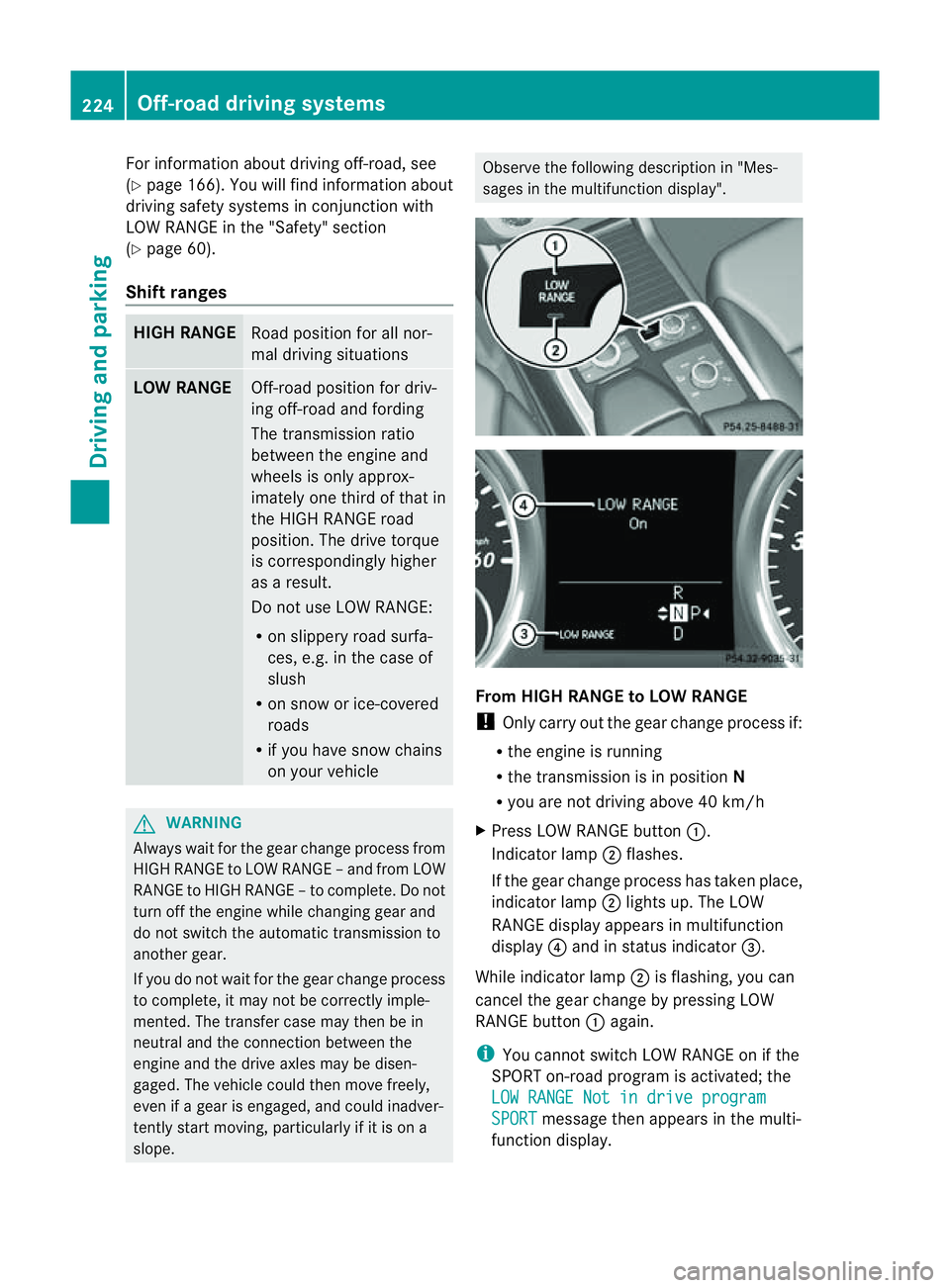
X Press LOW RANGE button :.
Indicator lamp ;flashes.
If the gear change process has taken place,
indicator lamp ;lights up. The LOW
RANGE display appears in multifunction
display ?and in status indicator =.
While indicator lamp ;is flashing, you can
cancel the gear change by pressing LOW
RANGE button :again.
i You cannot switch LOW RANGE on if the
SPORT on-road program is activated; the
LO WR ANGE Not in drive program SPORT message then appears in th
emulti-
function display. 224
Off-road driving systemsDrivin
gand parking
Page 229 of 389
R
cond ition of the LOW RAN GEoff-r oad
gear
R the on-roa dtraile rprogram is selected Tow
inga trailer Note
sont owingatrailer
Important safety notes G
WARNING
When reversing the vehicl etowards the
trailer, make sure there is nobod ybetween
the trailer and the vehicle.
Couple and uncoupl ethe trailer carefully .If
you do not couple the trailer to the towing
vehicle correctly, the trailer coul dbecome
detached.
Make sure that the following values are not
exceeded:
R the permissible trailer drawbar noseweight
R the permissible trailer load
R the permissible rear axle load of the towing
vehicle
R the maximu mpermissible gross vehicle
weight of both the towing vehicle and the
trailer
You will fin dthe applicable permissible val-
ues, whic hmust not be exceeded ,inthe vehi-
cle documen ts.
You will find the values approved by the man-
ufacturer on the vehicle identification plates
and those for the towing vehicle in the "Tech-
nical data" section. G
WARNING
If the Checktrailer hitch locking mechanism message appears in th
emulti-
function display while the vehicle is in motion,
pull over immediately and check whethe rthe
ball coupling is correctly engaged. G
WARNING
When towin gatrailer, you rvehicle' shandling
characteristics will be different in comparison
to when driving without atrailer.
Th ev ehicle/ trailer combination:
R is heavier
R is restricted in its acceleration and gradi-
ent-climbin gcapability
R has an increased braking distance
R is affected more by stron gcrosswinds
R demand smore sensitive steering
R has alarger turnin gcircle
As aresult, the handlin gcharacteristic smay
be impaired and you may lose control of the
vehicle. This could lead to an accident with
serious or even fatal injuries.
When towing atrailer, alway sadjust your
speed to the current road and weather con-
ditions. Do not exceed the maximum permis-
sible speed for your vehicle/trailer combina-
tion. G
WARNING
Never depress the brak epedal continuously
while the vehicle is in motion ,e.g. never cause
the brakes to rub by applying cons tant slight
pedal pressure. Thi scauses the brake system
to overheat, increases the braking distance
and can lead to the brakes failing completely. G
WARNING
On no account shoul dyou attempt to dra wthe
vehicle/ trailer combination out by increasing
speed. G
WARNING
If you exceed the maximum noseweight when
using acarrier system on the ball coupling:
R the carrier system may be thrown around.
R the ball coupling and the carrier system
may become detached from the vehicle.
As aresult, you may injure others or cause an
accident. 226
Towing
atrailerDriving and parking
Page 231 of 389
Driving tips
R
Maintain agreater distanc efrom th evehi-
cle in front than when driv ingw ithou ta
trailer.
R Avoid braking abruptly .Ifpossible, brake
gentl yatfirst to allow the trailer to run on.
Then, increase the brakin gforc erapidly.
R The values given for gradient-climbing
capabilities from astandstill refer to sea
level. Whe ndriving in mountainou sareas,
note that th epower outpu tofthe engine,
and consequen tlyt he vehicle' sgradient-
climbing capability ,decrease with increas-
ing altitude.
If the trailer swings from side to side:
X Do not accelerate.
X Do not coun ter-steer.
X Brake if necessary. Folding ou
tthe bal lcoupling G
WARNING
Make sure that no persons or animals are in
the pivoting range of the ball coupling. Other-
wise, they could be injured.
Before you can tow atrailer wit hyour vehicle,
you must fold out the ball coupling.
X Make sure that the vehicle is stationary.
X Open the tailgate. G
WARNING
Make sur ethat the ball coupling is engaged,
either in its folded-ou torfolded-i nposition.
The indicator lam ponthe release knob is off.
Do not pull the ball coupling release switch
when atrailer is coupled or abicycle rack is
fitted.
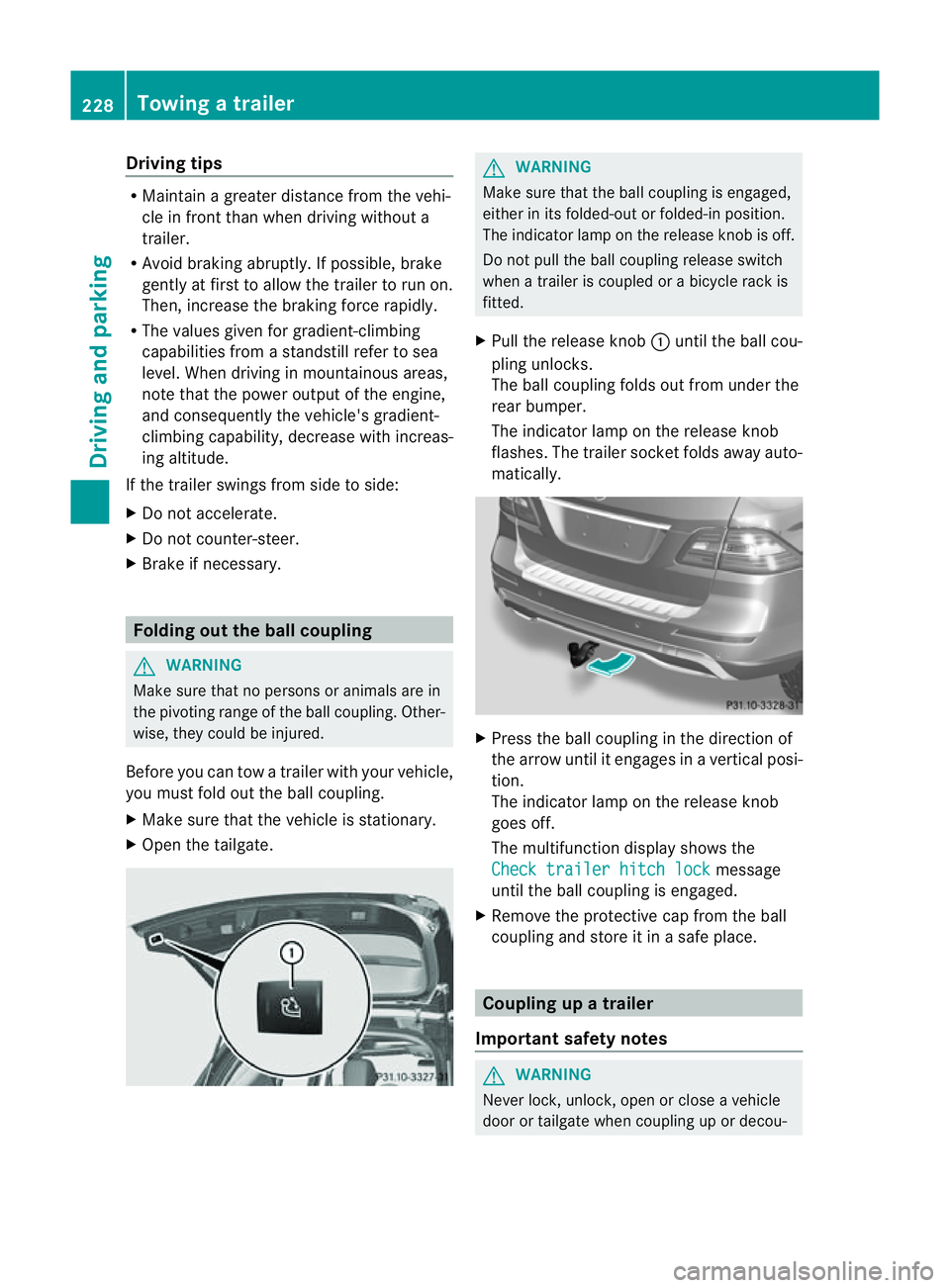
X Pull the release knob :until the ball cou-
pling unlocks.
The ball coupling folds out from under the
rear bumper.
The indicator lamp on the release knob
flashes. The trailer socket folds away auto-
matically. X
Press the ball coupling in the direction of
the arrow until it engages in avertical posi-
tion.
The indicator lam ponthe release knob
goes off.
The multifunc tion display shows the
Chec ktrailer hitch lock message
until th eball coupling is engaged.
X Remove the protective cap from the ball
coupling and store it in asafe place. Coupling up
atrai ler
Impor tant safety notes G
WARNI
NG
Neve rlock, unlock, open or close avehicle
door or tailgat ewhen coupling up or decou- 228
Towing
atrailerDriving and parking
Page 232 of 389
pling
atrailer. Th evehicle level could change
and you could endanger yourself or others.
Never press the ADS button or operate the
leve lcontrol while you are coupling up or
decoupling atrailer.
Steel-spring vehicles X
Make sure that th etransmission is in posi-
tion P.
X Engag ethe electric parkin gbrake.
X Positio nthe trailer level behind the vehicle.
X Coupl eupthe trailer.
X Establish the electrical con nection
betwee nthe vehicle and the trailer.
X Chec kthat the trailer lighting system is
working.
Vehicles wit hthe AIRMATIC package X
Make sure that th etransmission is in posi-
tion P.
X Engag ethe electric parkin gbrake.
X Start th eengine.
X Set the vehicl etohighway level
(Y page 189).
X Set the Adaptive Dampin gSystem (ADS )to
AUTO orCOMF(Y page 188).
X Switch off the engine.
X Close the doors and tailgate.
X Position the trailer level behind the vehicle.
X Couple up the trailer.
X Establish the electrical connection
betwee nthe vehicle and the trailer.
X Chec kthat the trailer lighting system is
working.
i If you hav ecoupled atrailer, th evehicle
will remain at highway level.
The vehicle automatically lowers to high-
way level if you driv efaster than 30 km/h
with atrailer. Th evehicle is not lowered to
high-speed level even if you are travelling
at higher speeds. This also applies when using accessories
that are plugged into the socket of the
trailer tow hitch (e.g. abicycle rack). Decoupling
atrailer
Important safety notes G
WARNING
Do not disconnect atrailer with an engaged
overru nbrake .Otherwise, you rhand could
becom etrapped between th ebumpe rand
drawbar. G
WARNING
As soo nasyou raise the trailer drawbar, the
unladen vehicle rises slightly .The vehicle then
lower stod riving level.
Make sure that nobod yisinthe vicinit yofthe
wheel arch or the underbody. You coul doth-
erwise trap yoursel forothers. G
WARNING
Th ev ehicle is lowered as soo nasyou discon-
nec tthe trailer cable. Make sur ethat nobody
is in the vicinit yofthe wheel arch or the
underbody. You coul dotherwis etrap yourse lf
or othe rs.
As soon as you decoupl ethe trailer ,the unla-
den vehicle rise sslightly. Make sure that you
or others are not injured in the process.
! Do not disconnect atrailer wit han
engaged overrun brake. Otherwise, your
vehicle could be damage dbythe rebound-
ing of the overru nbrake.
Steel-spring vehic les X
Ma ke sure that the transmission is in posi-
tion P.
X Engag ethe electric parkin gbrake.
X Secure th etrailer agains trollin gaway.
X Remove the trailer cable and decouple the
trailer. Towing
atrailer
229Driving andparki ng Z
Page 237 of 389
Usefu
linfor mati on
i This Owner's Manual describes all models
and all standard and optional equipment
available to your vehicle at the time of pub-
lication of the Owner's Manual. Country-
specific deviation sare possible .Please
not ethat your vehicle ma ynot be equipped
with all featur es described. This also
applies to safety-releva ntsystems and
functions.
i Please read the information on qualified
specialist workshops (Y page 24).Important safet
ynotes
You will fin danillustration of th einstrument
cluste rinthe "A taglance "section
(Y page 30). G
WARNING
Only use th eon-bo ardc omputer wh en road
and traffic condition spermit .You would oth-
erwise be distracted and unable to concen-
trate properly on driving, and coul dcause an
accident. G
WARNING
No message swill be displayed if either the
instrument cluster or the multifunction dis-
play is inoperative.
As aresult, you will not be able to see infor-
mation about your driving conditions, such as
speed, outside temperature, warning and indi-
cator lamps, display messages or system fail-
ures. Drivin gcharacteristic smay be impaired.
Adjust your driving style and vehicle speed
accordingly.
Contact aqualified specialist workshop
immediately. G
WARNING
The on-board computer only records and dis-
plays malfunctions and warnings from certain
systems. For this reason, you should always make sure that your vehicle is safe to use. You
could otherwis
ecause an accident by driving
an unsafe vehicle. G
WARNING
The operating safety of your vehicle could be
impaired if maintenance work is carried out
incorrectly. This could cause you to lose con-
trol of your vehicle and cause an accident.
Moreover, the safety systems may no longer
be able to protect you or others as they are
designed to do.
Always have service work carried out at a
qualified specialis tworkshop. Displays and operation
Coolant tempera
tureg auge
Th ec oolant temperatur egauge is in the
instrument cluster on the right-hand side.
Under normal operating conditions and with
the specified coolant level, the coolant tem-
perature may rise to 120 †.
At high outside temperatures and when driv-
ing uphill, the coolant temperature may rise
to the end of the scale. Rev counter
The red band in the rev counter indicates the
engine's overrevvin grange.
! Do not drive in the overrevving range.
Doing so will damage the engine.
The fuel supply is interrupted to protect the
engine when the red band is reached. Outside temperature display
The outside temperature display is in the mul-
tifunction display (Y page 236). G
WARNING
At temperatures just above freezing point, the
street may be icy, especially in wooded areas 234
Displays and operationOn-board computer and displays