fog light MERCEDES-BENZ M-CLASS SUV 2011 User Guide
[x] Cancel search | Manufacturer: MERCEDES-BENZ, Model Year: 2011, Model line: M-CLASS SUV, Model: MERCEDES-BENZ M-CLASS SUV 2011Pages: 389, PDF Size: 9.22 MB
Page 218 of 389
R
the Off-roa dprogra misa ctivate d(vehicles
without th eON&OFFROAD package).
R Off-road progra m1or2isactivated(vehi-
cle sw ith the ON&OFFROAD package).
R the LOW RANGE off-road gear is activated
(vehicles with the ON&OFFROAD package).
R al oss of tyr epressure or adefectiv etyre is
detected.
Activating Active Blind Spot Assist
X On vehicles without anavigation system,
make sure that the Becker ®
MAP PILOT is
connected; see the separate operating
instructions for Audio 20.
X Make sure that the radar senso rsystem
(Y page 249) and Active Blind Spot Assist
(Y page 245) are activated in the on-board
computer.
X Turn the key to position 2in the ignition
lock.
Warning lamps :ligh tupr ed in the exte-
rior mirror sfor approximately 1. 5seconds
and then tur nyellow.
Trailer towing
If you attach atrailer, make sure that yo uhave
correctly established the electrical connec-
tion. This can be accomplished by checking
the trailer lighting .Active Blind Spo tAssist is
then deactivated. The indicator lam plights up
yellow in the exterior mirrors and the ActiveBlind Spot Assist currently unavail‐
able Se
eOwner's Manual message
appe arsint he multifunction display.
Active Lan eKeeping Assist Import
ants afety notes
Active Lane Keeping Assis tmonitors the area
in front of your vehicle by means of acamera
at the top of the windscreen. Active Lane
Keeping Assis tdetect slane markings on the
road and warns you before you leave your
lane unintentionally .Ifyou do not react to the
warning, alane-correcting application of the
brakes can bring the vehicle back into the
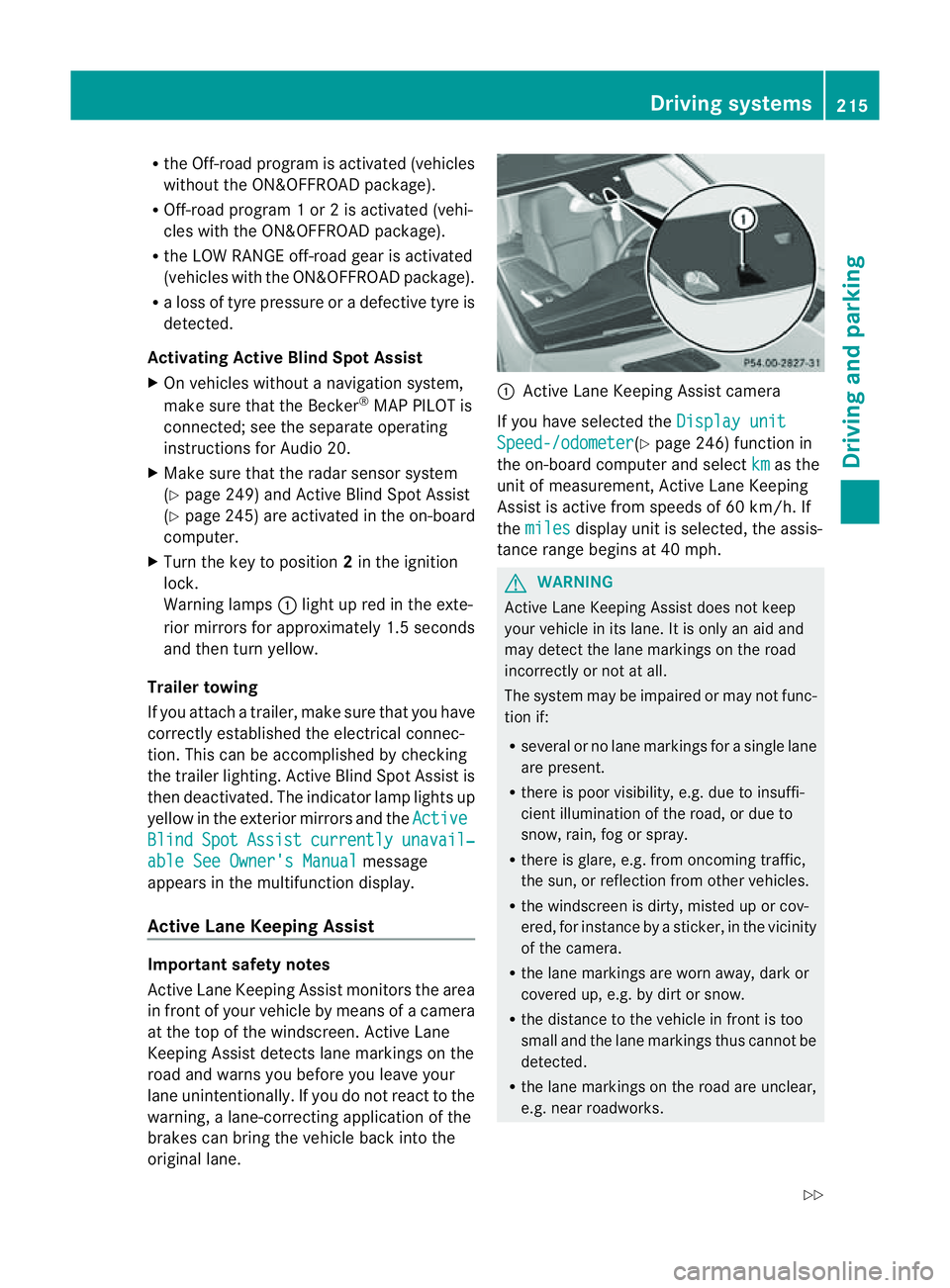
original lane. :
Active Lane Keeping Assis tcamera
If you have selected the Displayunit Speed-/odometer (Y
page 246) function in
th eo n-board compute rand select km as the
unit of measurement, Active Lane Keeping
Assist is active from speeds of 60 km/h. If
the miles display unit is selected
,the assis-
tan ce ra nge begins at 40 mph. G
WARNING
Active Lane Keeping Assist doe snot keep
your vehicle in its lane. It is only an aid and
may detec tthe lan emarkings on the road
incorrectly or not at all.
The system may be impaired or may not func-
tion if:
R several or no lane markings for asingle lane
are present.
R there is poor visibility, e.g. due to insuffi-
cient illumination of the road, or due to
snow, rain, fog or spray.
R there is glare, e.g. from oncoming traffic,
the sun, or reflec tion from other vehicles.
R the windscreen is dirty, misted up or cov-
ered, for insta ncebyasticker, in the vicinity
of the camera.
R the lane markings are worn away ,dark or
covered up, e.g. by dirt or snow.
R the distance to the vehicle in front is too
small and the lane markings thus cannot be
detected.
R the lane markings on the road are unclear,
e.g. near roadworks. Driving systems
215Drivingand park ing
Z
Page 250 of 389
![MERCEDES-BENZ M-CLASS SUV 2011 User Guide X
Press :or9 to select the Perma‐ nent display function.
You will see the selected setting: outsidetemperat
ure or
Dig. speedo m[mph] .
X Press the abuttontos ave the setting.
Lights Switching the d](/img/4/55578/w960_55578-249.png "MERCEDES-BENZ M-CLASS SUV 2011 User Guide X
Press :or9 to select the Perma‐ nent display function.
You will see the selected setting: outsidetemperat
ure or
Dig. speedo m[mph] .
X Press the abuttontos ave the setting.
Lights Switching the d")
X
Press :or9 to select the Perma‐ nent display function.
You will see the selected setting: outsidetemperat
ure or
Dig. speedo m[mph] .
X Press the abuttontos ave the setting.
Lights Switching the day
time drivin glights on/
off
If you have activated the Daytime driving
lights function and the light switch is set to
Ã,t he daytim edriving lights are automat-
icall yswitched on during daylight hours when
the engine is running. When it is dark, the side
lamps and the dipped-beam headlamps are
also switched on automatically.
X Switc hoff th eengine.
X Pres sthe = or; button on the steer-
ing wheel to selec tthe Settings menu.
X Press the :or9 button to selec tthe
Light submenu.
X Press the abutton to con firm.
X Press the :or9 buttontos elect the
Daytim edriving lights function.
Yo uw ill see the selected setting: on or
off .
X Press the abutton to save the setting.
Switching the Intelligent Light System
on/off
If you activat ethe Intell .Light Sys‐ tem: function
,you activa te thefollowing
func tions:
R motorwa ymode
R active light func tion
R cornering light func tion
R exte nded range foglamps
X Press the =or; button on the steer-
ing wheel to select the Settings menu.
X Press the :or9 button to select the
Light submenu.
X Press the abutton to confirm. X
Press :or9 to select the Intell. Ligh
tSys. function.
Yo uw ill see the selected setting: on or
off .
X Press the abutton to save the setting.
If you set the dipped-bea mheadlamps for
driving on the right/left (Y page 247),the
multifunction displa yshows the Intell. Ligh
tSystem: System inoperative Inactiv
efor left-side traffic or
Intell. Light System: System inoper‐
ative Inactiv
efor right-side traf‐ fic displa
ymessage instead of the Intell. Ligh
tSystem: functio
nintheLight sub-
menu.
Setting th edipped-bea mheadlamp sfor
driving on the left/right
This function is only available on vehicles with
the Intelligent Light System.
You can use this function to switch between
symmetrical beam and asymmetrical dipped
beam (Y page 106).
If you set the dipped-beam headlamps for
driving on the right/left, then motorway
mode and the extended range foglamps are
not available.
X Press the =or; button on the steer-
ing wheel to select the Settings menu.
X Press the :or9 buttontos elect the
Light submenu.
X Press the abutton to confirm.
X Press :or9 to select the Dipped beam
sSetting for function.
Yo uw ill see the selected setting: Right- side traffic or
Left-s idet raffic .
X Press the abuttontos ave the setting.
When you change the setting, conversion
does not take place until the nex ttime the
vehicle is stationary.
You can also have the dipped-beam head-
lamps set for drivin gonthe right or lef tata
qualified specialist workshop. Menus and submenus
247On-board comp uter and displays Z
Page 267 of 389
Displa
ymessages Possible causes/consequences and
M Solutions
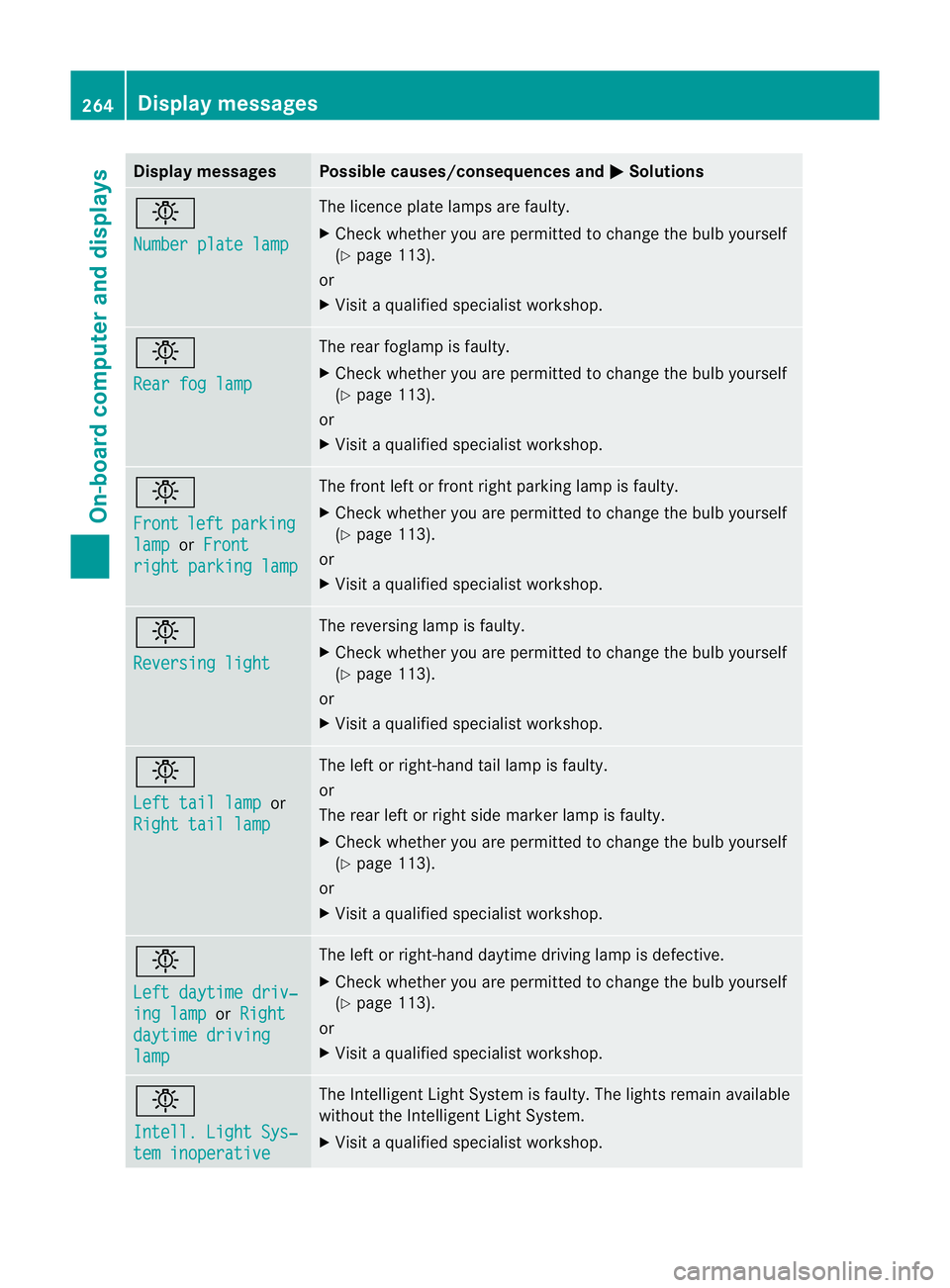
b
Nu
mber plate lamp Th
elicence plat elamp sare faul ty.
X Chec kwhether you ar epermitted to change the bulb yourself
(Y page 113).
or
X Visit aqualified specialist workshop. b
Rear fo
glamp Th
er ear foglam pisfaulty.
X Check whethe ryou ar epermitted to change the bulb yourself
(Y page 113).
or
X Visit aqualified specialist workshop. b
Front
left parking
lamp or
Front righ
tparking lamp Th
ef ront left or fron tright parkin glamp is faulty.
X Check whethe ryou ar epermitted to change the bulb yourself
(Y page 113).
or
X Visit aqualified specialist workshop. b
Reversin
glight Th
er eversing lam pisfaulty.
X Check whethe ryou ar epermitted to change the bulb yourself
(Y page 113).
or
X Visit aqualified specialist workshop. b
Left tail lamp
or
Righ ttail lamp Th
eleft or right-hand tail lam pisfaulty.
or
The rear left or right side marker lamp is faulty.
X Check whethe ryou ar epermitted to change the bulb yourself
(Y page 113).
or
X Visit aqualified specialist workshop. b
Left daytim
edriv‐ ing lamp or
Right daytime driving
lamp Th
eleft or right-hand daytime driving lam pisdefective.
X Check whether you are permitted to change the bulb yourself
(Y page 113).
or
X Visit aqualified specialist workshop. b
Intell
.Light Sys‐ tem inoperative Th
eI ntelligent Light Syste misfaulty. The lights remain available
without the Intelligent Light System.
X Visit aqualified specialist workshop. 264
Display messagesOn-board computer and displays
Page 268 of 389
Displa
ymessages Possible causes/consequences and
M Solutions
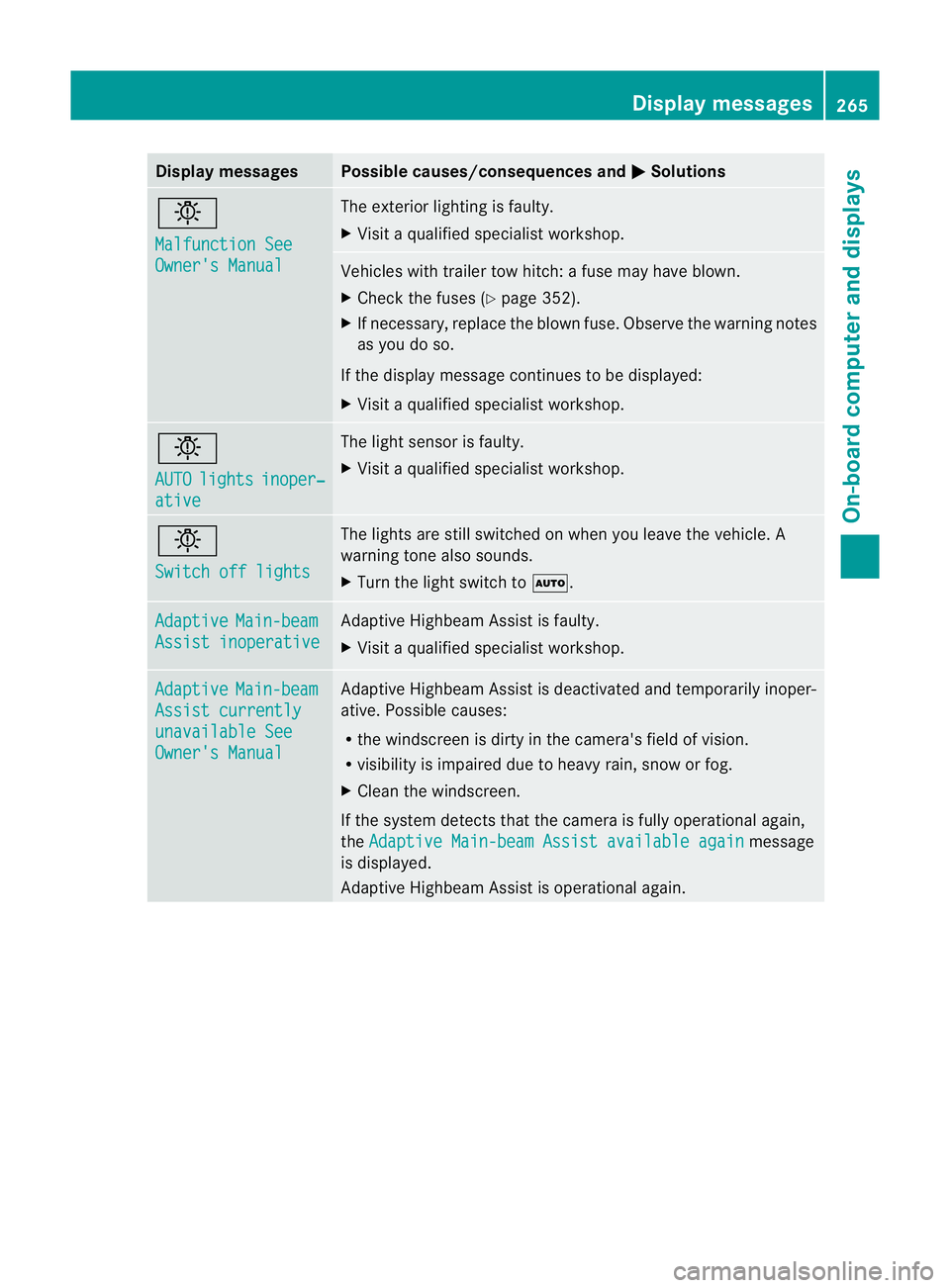
b
Ma
lfunction See Owner'
sManual Th
ee xter ior lighting is faulty.
X Visit aqualified specialist workshop. Vehicles with trailer tow hitch:
afuse may have blown.
X Check the fuses (Y page 352).
X If necessary, replac ethe blown fuse. Observe the warnin gnotes
as you do so.
If the display message continues to be displayed:
X Visit aqualified specialist workshop. b
AUTO
lights inoper‐
ative The light sensor is faulty.
X
Visit aqualified specialist workshop. b
Switch of
flights Th
elights are still switched on when you leave the vehicle. A
warnin gtonea lso sounds.
X Turn the light switc htoÃ. Adaptive Main-beam
Assist inoperative Adap
tive Highbea mAssist is faulty.
X Visit aqualified specialist workshop. Adaptive Main-beam
Assist currently
unavailabl
eSee Owner's Manual Adap
tive Highbea mAssist is deac tivated and temporarily inoper-
ati ve.P ossible causes:
R the windscreen is dir tyinthec amera's field of vision.
R visibility is impaired due to heavy rain, snow or fog.
X Clean the windscreen.
If the system detect sthat the cam era is fullyoperational again,
the Adaptive Main-bea mAssist availabl eagain message
is displayed.
Adap tive Highbea mAssist is operationa lagain. Displa
ymessages
265On-board comp uter and displays Z
Page 275 of 389
Displa
ymessages Possible causes/consequences and
M Solutions
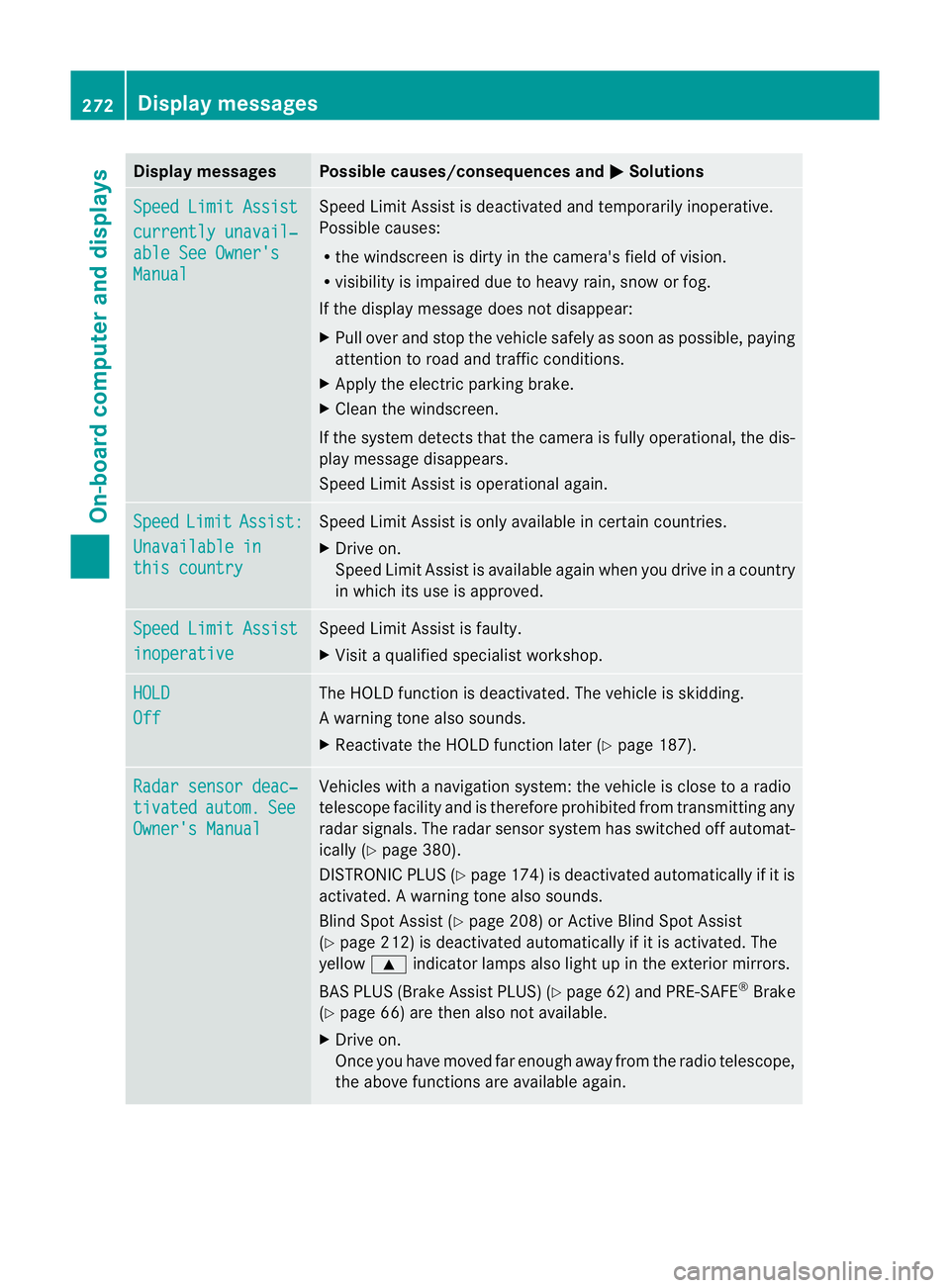
Sp
eedL imit Assist currently unavail‐
abl
eS ee Owner's Manual Spee
dLimit Assist is deactivated an dtemporarily inoperative.
Possible causes:
R the windscreen is dirt yinthe camera's field of vision.
R visibility is impaired due to heav yrain, snow or fog.
If the displ aymessage does not disappear:
X Pull ove rand sto pthe vehicle safely as soon as possible, paying
attention to roa dand traffic conditions.
X Appl ythe electric parkin gbrake.
X Cle anthe windscreen.
If th esystem detects that the camera is fully operational, the dis-
play messag edisappears.
Speed Limit Assist is operational again. Speed Limit Assist:
Unavailabl
ein this country Spee
dLimit Assist is only available in certain countries.
X Driv eon.
Spee dLimit Assist is available again when you drive in acount ry
in which its use is approved. Spee
dLimit Assist inoperative Spee
dLimit Assist is faulty.
X Visit aqualified specialist workshop. HOLD
Off The HOLD function is deactivated. The vehicle is skidding.
Aw arning ton ealso sounds.
X Reactivat ethe HOL Dfunction later (Y page 187). Ra
dars ensor deac‐ tivated autom. See
Owner'
sManual Vehicles with
anavigation system :the vehicl eisclose to aradio
telescope facility and is therefor eprohibited from transmittin gany
radar sig nals. The radar sensor system has switched off automat-
icall y(Ypage 380).
DISTRONI CPLUS (Y page 174) is deactivate dautomaticall yifitis
activated. Awarning ton ealso sounds.
Blin dSpotA ssist (Y page 208) or Ac tiveBlind Spo tAssist
(Y page 212) is deactivate dautomaticall yifitisactivated. The
yellow 9indicator lamps als olight up in the exterior mirrors.
BAS PLU S(Brake Assis tPLUS) (Y page 62) and PRE-SAFE ®
Brake
(Y page 66) are then also no tavailable.
X Drive on.
Once yo uhave moved far enough awa yfrom th eradio telescope,
the above function sare avai lable again. 272
Display messagesOn-board computer and displays