heating MERCEDES-BENZ M-CLASS SUV 2011 User Guide
[x] Cancel search | Manufacturer: MERCEDES-BENZ, Model Year: 2011, Model line: M-CLASS SUV, Model: MERCEDES-BENZ M-CLASS SUV 2011Pages: 389, PDF Size: 9.22 MB
Page 99 of 389
Removi
ngand fitting the rear seat head
restraints G
WARNING
Occupants sh ouldonly travel sit ting on seats
which have the hea drestrain tsinstalled. This
reduces the risk of injury to the passenger sin
the rear in the event of an accident. X
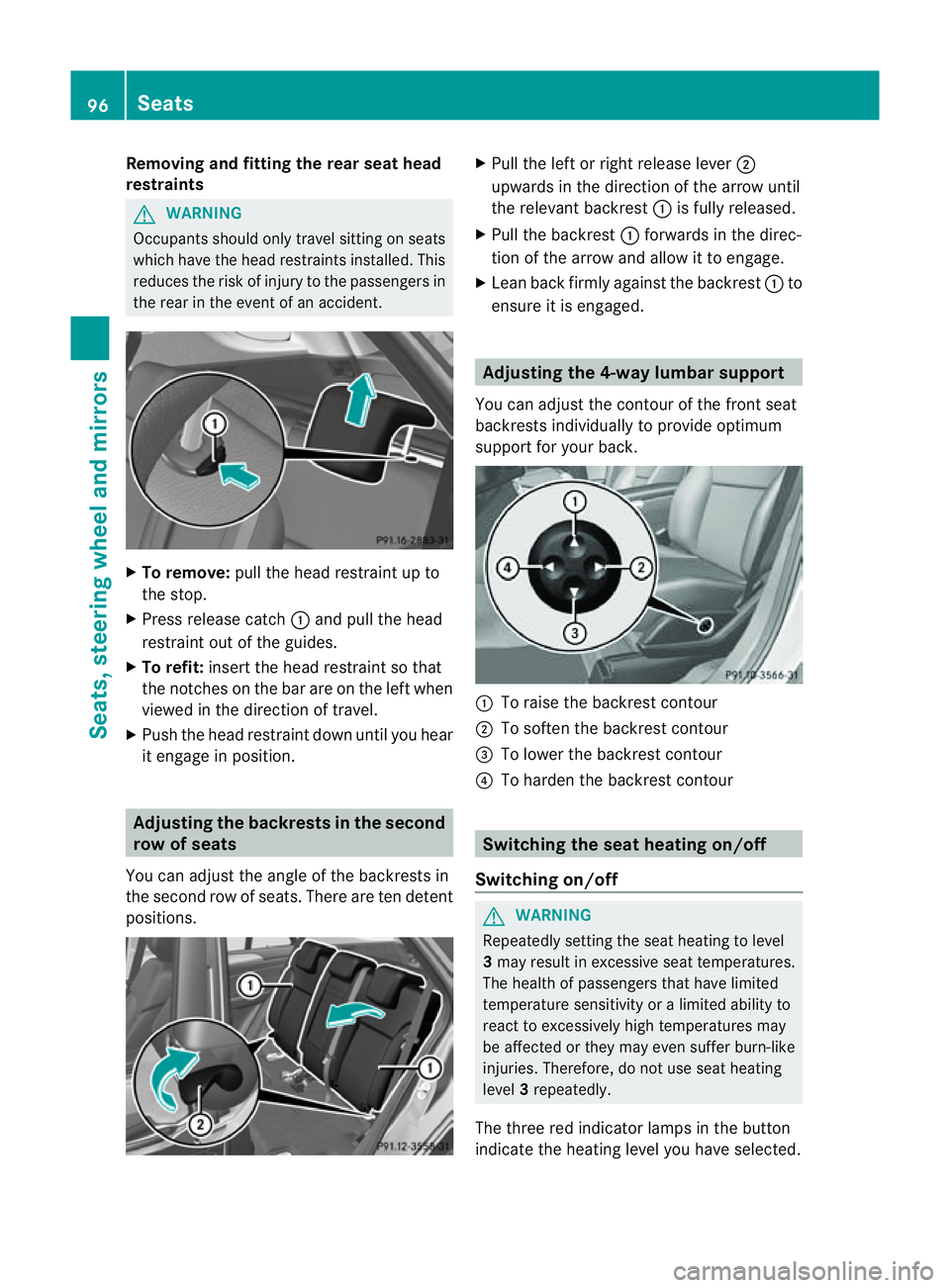
To remove: pull the head restraint up to
the stop.
X Press releas ecatch :and pull the head
restraint out of the guides.
X To refit: insert the head restraint so that
the notches on the bar are on the left when
viewed in the direction of travel.
X Push the head restraint down until you hear
it engage in position. Adjusting th
ebackrests in the second
row of seats
Yo uc an adjust the angle of the backrest sin
the second row of seats. There are ten detent
positions. X
Pull the left or right release lever ;
upwards in the direction of the arrow until
the relevan tbackrest :is fully released.
X Pull the backrest :forwards in the direc-
tion of the arrow and allow it to engage.
X Lean back firmly against the backrest :to
ensure it is engaged. Adjusting the 4-way lumbar support
You can adjust the contour of the front seat
backrests individually to provide optimum
support for your back. :
To raise the backrest contour
; To soften the backrest contour
= To lower the backrest contour
? To harden the backrest contour Switching the seat heating on/off
Switching on/off G
WARNING
Repeatedly setting the seat heating to level
3 may result in excessive seat temperatures.
The health of passengers that have limited
temperatur esensitivity or alimited ability to
react to excessively high temperatures may
be affected or they may even suffer burn-like
injuries. Therefore, do not use seat heating
level 3repeatedly.
The three red indicator lamps in the button
indicate the heating level you have selected. 96
SeatsSeats, steering wheel and mirrors
Page 100 of 389
i
If th ebattery voltage is too low, the seat
heating may switch off. Driver's and front-passenger seat
Rear-compartment seats
The system automaticall
yswitches down
from level 3to level 2after approximately
eight minutes.
The system automaticall yswitches down
from level 2to level 1after approximately ten
minutes.
The system automatically switches off
approximately 35 minutes after it is set to
level 1.
X Make sure that the key is in position 1or
2 in the ignition lock.
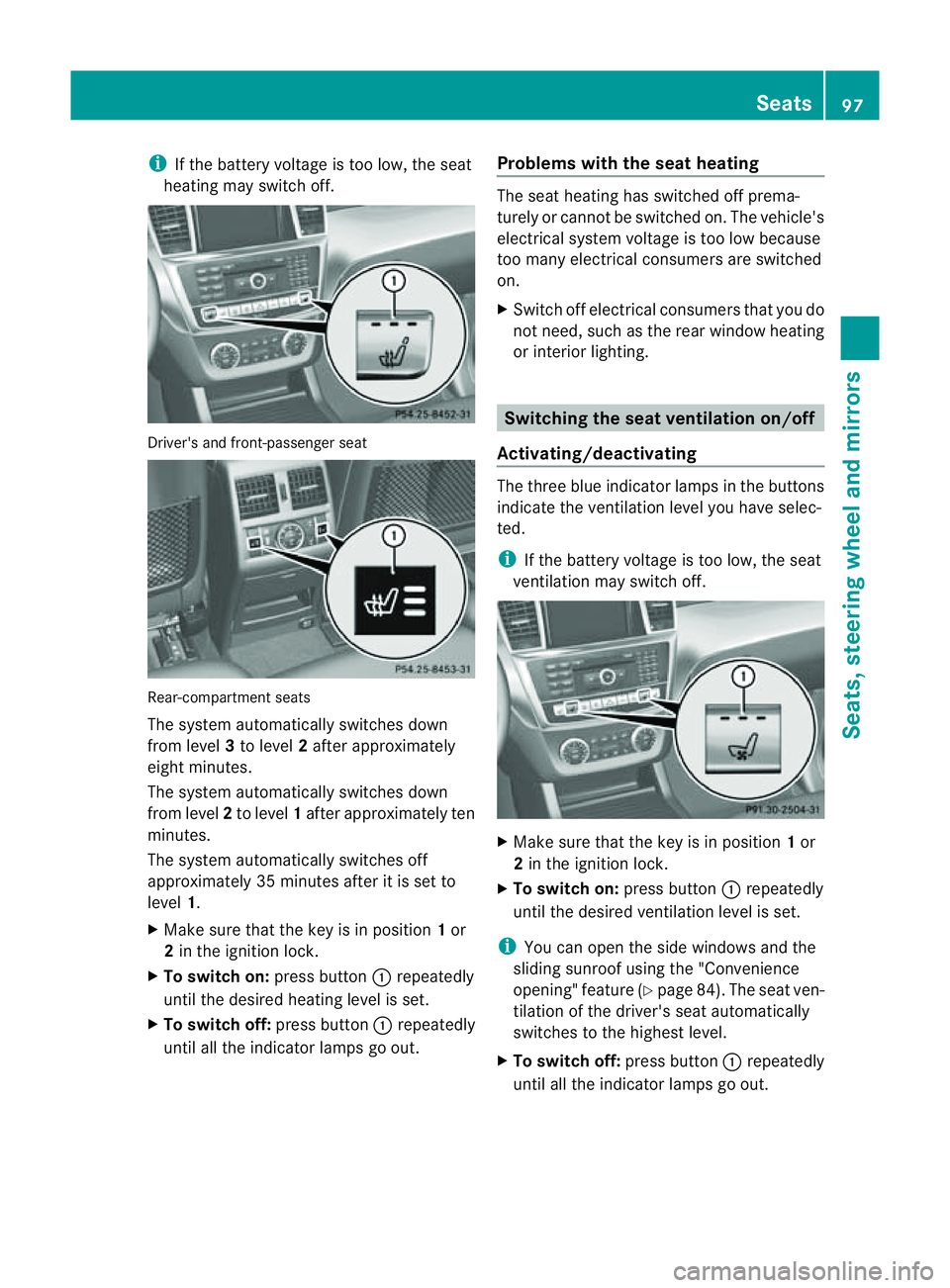
X To switch on: press button:repeatedly
until the desire dheatin glevel is set.
X To switch off: press button:repeatedly
until all the indicator lam psgo out. Problems with th
eseat heating The seat heating has switched off prema-
turely or cannot be switched on. The vehicle's
electrical system voltage is too low because
too many electrical consumer sare switched
on.
X Switch off electrica lconsumers that you do
not need, such as the rea rwindow heating
or interior lighting. Switching the seat ventilation on/off
Activating/deactivating The three blu
eindicato rlamps in the buttons
indicate the ventilation level you have selec-
ted.
i If the battery voltage is too low, the seat
ventilation may switch off. X
Make sure that the key is in position 1or
2 in the ignition lock.
X To switch on: press button:repeatedly
until the desire dventilation level is set.
i You can open the side windows and the
sliding sunroof using the "Convenience
opening" featur e(Ypage 84). The seat ven-
tilation of the driver' sseat automatically
switches to the highest level.
X To switc hoff:press button :repeatedly
until all th eindicato rlamps go out. Seats
97Seats,steeri ngwheel and mirrors Z
Page 102 of 389
i
Related topics:
R EASY-ENTRY/EXI Tfeature
(Y page 99)
R Storing setting s(Ypage 103) Steering whee
lheating
Activating/deactivating X
Mak esuret hat the key is in position 2in
th ei gnition lock.
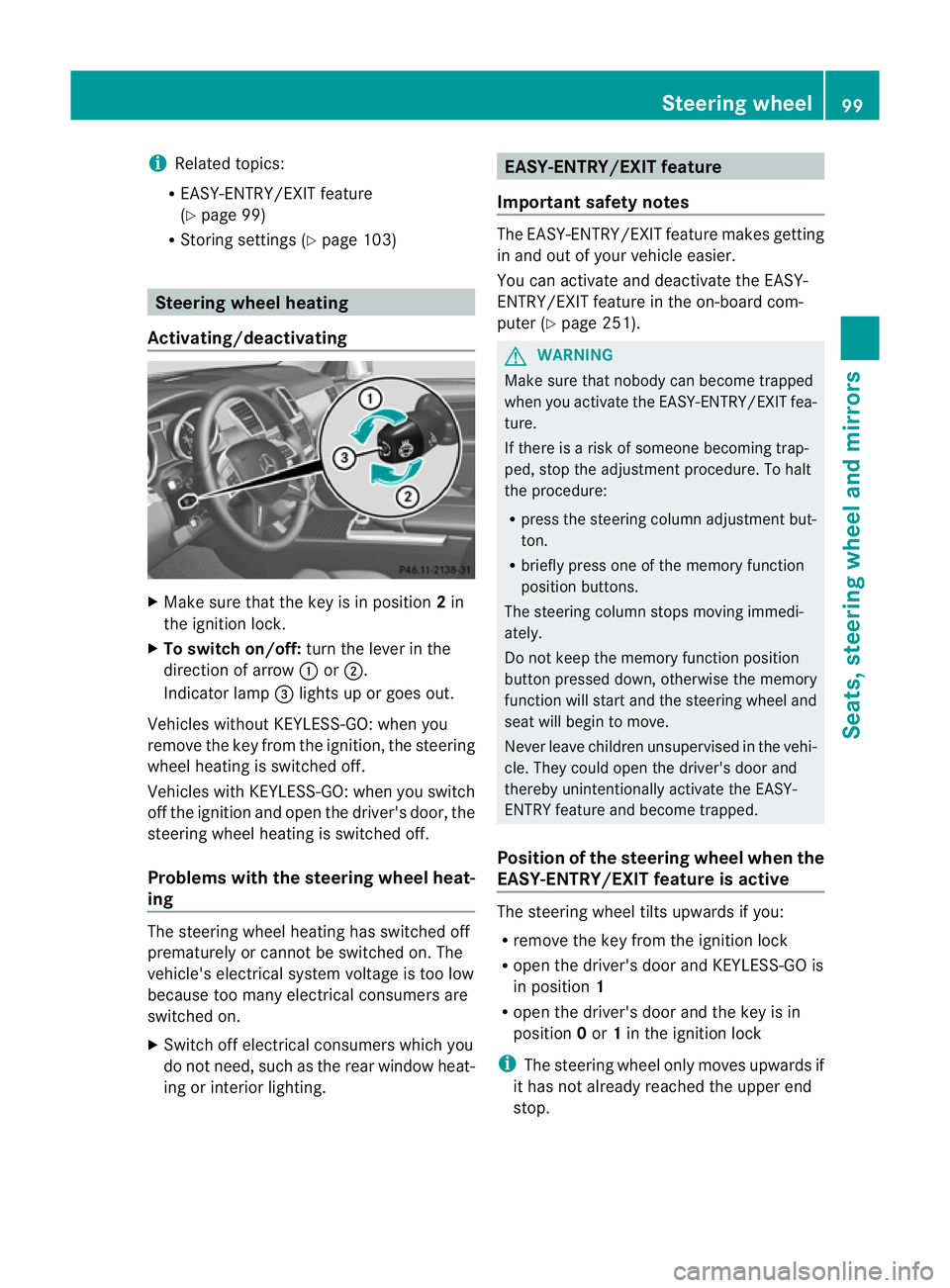
X To switch on/off: turnthe lever in the
direction of arrow :or;.
Indicato rlamp =lights up or goes out.
Vehicles without KEYLESS-GO: when you
remove the key from the ignition ,the steering
wheel heating is switched off.
Vehicles with KEYL ESS-GO:when you switch
off the ignition and open the driver's door, the
steering wheel heating is switched off.
Problems wit hthe steering whee lheat-
ing The steering wheel heating has switched off
prematurely or cannot be switched on. The
vehicle's electrical system voltage is too low
because too many electrical consumer sare
switche don.
X Switch off electrical consumers which you
do not need ,such as the rear window heat-
ing or interior lighting. EASY-ENTRY/EXIT featu
re
Important safety notes The EASY-ENTRY/EXI
Tfeatur emakes getting
in and out of your vehicle easier.
You can activate and deactivate the EASY-
ENTRY/EXIT feature in the on-board com-
puter (Y page 251). G
WARNING
Make sure that nobody can become trapped
when you activate the EASY-ENTRY/EXI Tfea-
ture.
If there is arisk of someone becoming trap-
ped, stop the adjustment procedure. To halt
the procedure:
R press the steering column adjustment but-
ton.
R briefly press one of the memor yfunction
position buttons.
The steering column stops moving immedi-
ately.
Do not keep the memory function position
button presse ddown, otherwise the memory
function will star tand the steering wheel and
sea twill begin to move.
Never leave children unsupervised in the vehi-
cle. They could open the driver's door and
thereby unintentionally activate the EASY-
ENTRY featur eand become trapped.
Positio nofthe steering whee lwhen the
EAS Y-ENTRY/EXIT featur eisactive The steerin
gwheel tilt supwards if you:
R remove the key from the ignition lock
R open the driver' sdoor and KEYLESS -GOis
in position 1
R open the driver's door and the key is in
position 0or 1in the ignition lock
i The steerin gwheel only moves upwards if
it has not already reached the upper end
stop. Steering wheel
99Seats,steering wheeland mirror s Z
Page 103 of 389
Position of th
esteerin gwheel for driv-
ing Th
es teering whee lismoved to the previously
set position if:
R the driver's door is closed.
R you inser tthe key int othe ignition lock.
or
R you press the Star t/Stop butto nonce on
vehicles with KEYLESS-GO.
If you clos ethe driver's door with the key
inserted int othe ignition lock ,the steering
wheel is automatically moved to the previ-
ously set position.
The last position of the steering wheel is
stored when you switc hoff th eignition or
when you stor ethe setti ngwith the memory
function (Y page 103).
Crash-responsive EASY-EXIT fea tureIf th
ecrash-resp onsive EASY-EXIT feature is
trig gere dinana ccident,the steeri ngcolu mn
will mov eupwards when the driv er'sdoor is
opened. This occurs irrespective of the posi-
tion of the key in the ignition lock .This makes
it easier to exit the vehicle and rescue the
occupants.
The crash-responsive EASY-EXIT featur eis
only operational if the EASY-EXIT/ENTRY fea-
tur eisa ctivate dinthe on-boar dcomputer. Mirrors
Rear-view mirror
Rear-view mirror (manua lanti- daz zle) X
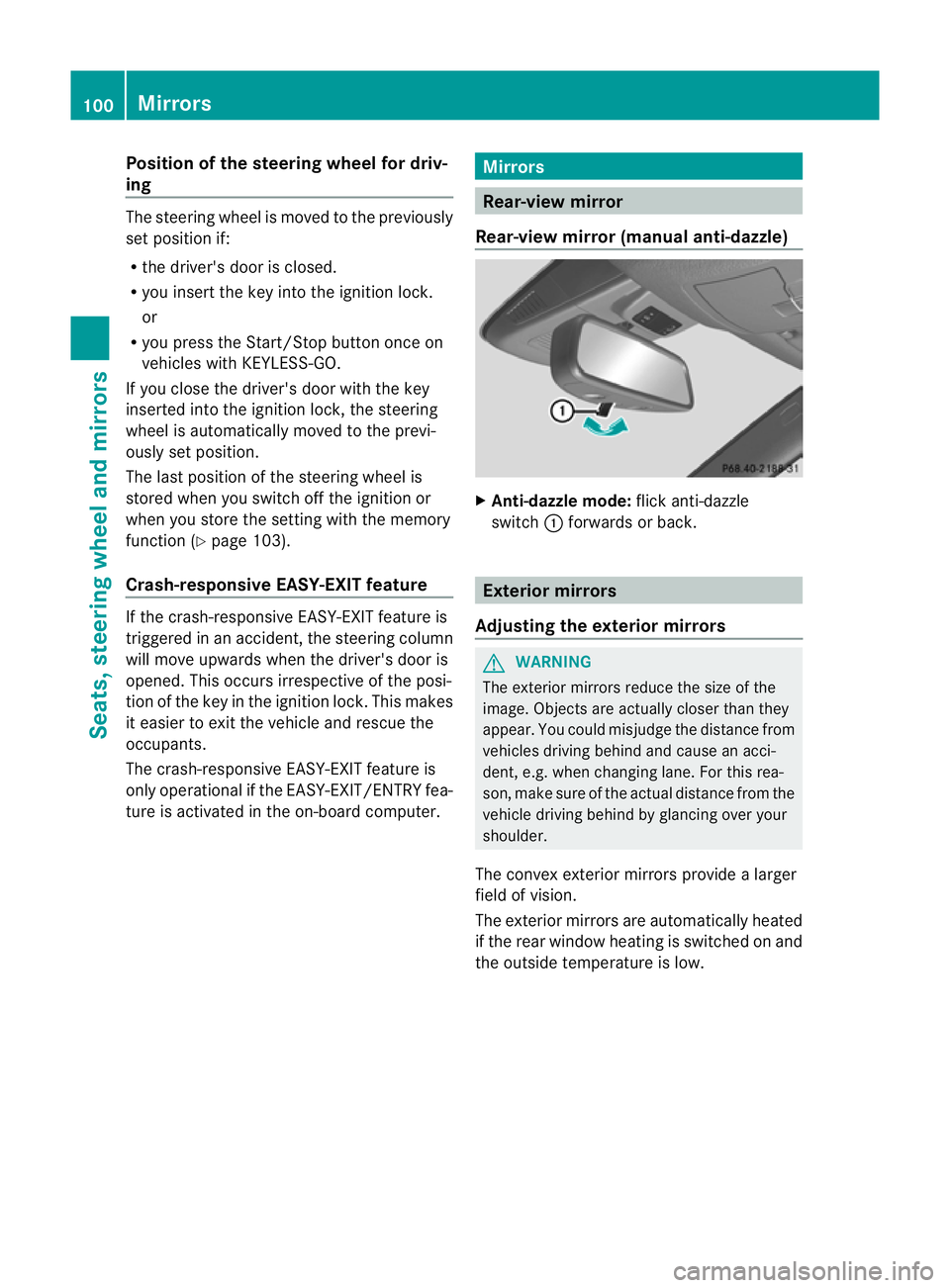
Anti-dazzle mode: flick anti-dazzle
switch :forward sorback. Exterior mirrors
Adjusting the exterior mirrors G
WARNING
The exterior mirrors reduce the size of the
image. Objects are actually closer than they
appear. You could misjudge the distance from
vehicles driving behind and cause an acci-
dent, e.g. when changing lane. For this rea-
son, make sure of the actual distance from the
vehicle driving behind by glancing over your
shoulder.
The convex exterior mirrors provide alarger
field of vision.
The exterior mirrors are automatically heated
if the rear window heating is switched on and
the outside temperature is low. 100
MirrorsSeats
,steering wheel and mirrors
Page 124 of 389
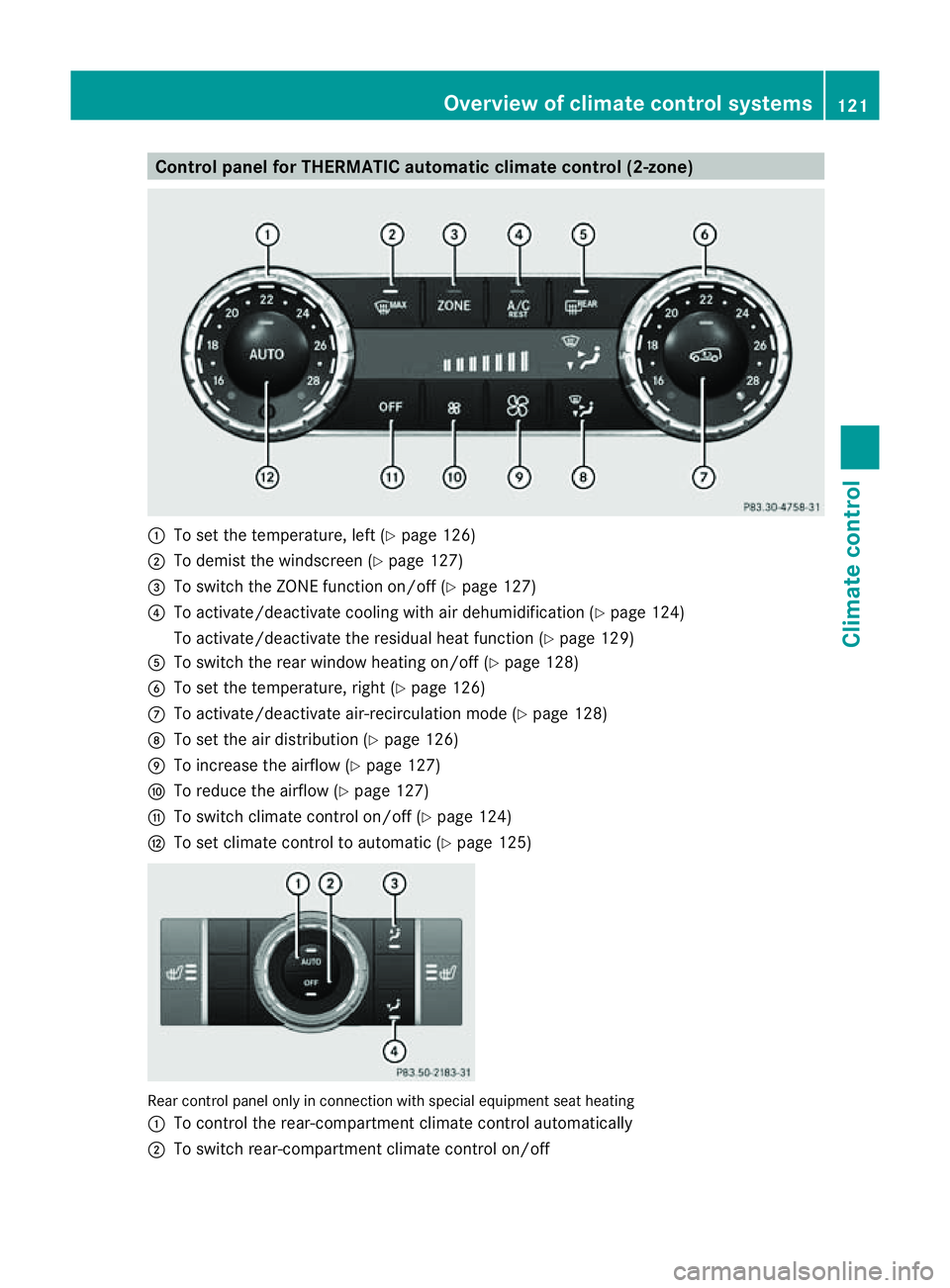
Control panel for THERMATIC automatic clima
tecontrol (2-zone) :
To set the temperature, left (Y page 126)
; To demist the windscreen (Y page 127)
= To switc hthe ZON Efunction on/off (Y page 127)
? To activate/deactivat ecoolin gwith air dehumidifica tion (Y page 12 4)
To activate/deactivat ethe residual heat function (Y page 129)
A To switc hthe rea rwindow heatin gon/off (Y page128)
B To se tthe temperature, right (Y page 126)
C To activate/deactivat eair-recirculation mode (Y page 128)
D To set the air distribution (Y page 126)
E To increase the airflow (Y page 127)
F To reduce the airflow (Y page 127)
G To switc hclimat econtr olon/off (Y page 124)
H To set climat econtr ol to aut omatic (Y page 125) Rear control panel only in connection with special equipment seat heating
: To control the rear-compartment climate control automatically
; To switch rear-compartment climate control on/off Overview of climat
econtrol systems
121Climatecontrol Z
Page 131 of 389
X
Tur ncontrols :orB cloc kwise or anti-
clockwise (Y page 121), (Y page 121).
or
X Press the KorI button. Demisting the windows
Windows misted up on the inside X
Activate the ¿/Ácooling with air
dehumidification func tion.
X Activate automatic mode Ã.
X If the window scontinue to mist up, activa te
the demisting function (Y page 127).
i You should only select this setting until
the windscreen is clear again.
Windows misted up on the outside X
Activate the windscreen wipers.
X Press the _button repeatedly until the
P orO symbol appears in the dis-
play.
i You should only select this setting until
the windscreen is clear again. Rear window heating
Switchin gon/off G
WARNI
NG
Clear all windows of ice or snow before setting
off. Otherwise, impaired visibility could
endanger you and others.
The rear window heating has ahigh cur rent
draw. You should therefore switc hitoff as
soon as th ewindow is clear ,Ito therwise
switches off automatically after several
minutes.
If the battery voltage is too low, the rear win-
dow heati ngmay switch off. X
Turn th ekey to position 2in the ignition
lock.
X Press the ¤button.
The indicator lam pinthe¤ button lights
up or goes out.
Problems wit hthe rea rwindow hea ting The rea
rwindow heatin ghas switched off
prematurely or cannot be activated.
X Switch off any consumers that are not
required, e.g. readin glamps or interior
lighting.
When the battery is sufficiently charged,
the rear window heatin gisactivated again
automatically. Activating/deactivating air-recircula-
tion mode
You can deactivate the flow of fresh air if
unpleasant odours are entering the vehicle
from outside .The air already insid ethe vehi-
cle will then be recirculated.
The operation of air-recirculation mode is the
sam efor all contr ol panels. G
WARNING
Only swit chover to air-recirculation mode
briefly at low outside temperatures. Other-
wise, the window scould mist up, thus impair-
ing visibility and endan geringyoursel fand
othe rs.T his ma ypreve ntyou from observing
the traffic conditions, thereby causing an
accident.
X Turn the key to position 2in the ignition
lock.
X To activate: press thedbutton.
The indicator lam pint he d button lights
up.
i In the even tofhigh pollution levels 12
or at
high outside temperatures, air-recircula-
tion mode is automatically activated. When
air-recirculation mode is activated auto-
12 THERMOTRONIC automatic climate control only. 128
Operating the climate control systemClimate control
Page 132 of 389
matically
,the indicator lam pint he d
button is not lit.
Outside air is added after about 30
minutes.
X To switch off: press thedbutton.
The indicator lam pint he d button goes
out.
i Air-recirculation mode deactivates auto-
matically:
R after approximately fiv eminutes at out-
side temperatures below approximately
5†
R after approximately five minutes if cool-
ing with air dehumidification is deactiva-
ted
R after approximately 30 minutes at out-
sid etemperatures above approximately
5†
R if you press the ¿/Ábutton and
switch on cooling with air dehumidifica-
tion Convenienc
eopening/closin gusing
th ea ir-recirculation button G
WARNING
Make sure that nobody can become trapped
between the side window and the door frame
as the side windows are opened and closed.
Make sure that all object sand bod yparts are
clear of the side windows when they are being
opened or closed. You or the objects could be
drawn in or become trapped between the side
window and the door fram easthe window
moves. If ther eisariskofe ntrapment, oper-
ate the Wswitchto move the side window
in the opposite direction.
Make sure that nobody can become trapped
as the sliding sunroof/panorama sliding sun-
roof is ope neda nd closed. If there is arisk of
entrapment, operat ethe 3 switchtom ove
the sliding sunroof/panorama sliding sunroof
in the opposit edirection. X
Convenience closing feature: press and
hold the dbutton until the side win-
dows and the sliding sunroof/panorama
sliding sunroof are closed.
The indicator lamp in the dbutton lights
up. Air-recirculation mode is activated.
X Convenience opening feature: press and
hold the dbutton until the side win-
dows and the sliding sunroof/panorama
sliding sunroof are opened. The side win-
dows and the sliding sunroof/panorama
sliding sunroof move back to their original
position.
The indicator lamp in the dbutton goes
out. Air-recirculation mode is deactivated.
i If you open the side windows or the sliding
sunroof/panorama sliding sunroof man-
ually after closin gthemw ith the conveni-
enc eclosing feature, they will remain in this
position when opened using the conveni-
enc eopening feature. Activating/deact
ivatingthe residual
heat function
It is possibl etomakeu se of the residual heat
of the engine to continue heatin gthe station-
ar yv ehicle for up to 30 minutes after the
engine has been switched off .The heating
tim edepends on the temperature that has
been set.
i The blower will run at alow speed regard-
less of the airflow setting.
i If you activate the residual heat func tion
at high temperatures, only the ven tilation
will be activated. The blower runs at
medium speed.
X Turn the key to position 0in the ignition
lock or remov eit.
X To activate: press theÌ/Á button.
The indicato rlamp in the Ì/Á but-
ton lights up. Operating the climate control system
129Climate control Z
Page 133 of 389
X
To deactivate: press theÌ/Á but-
ton.
The indicator lamp in the Ì/Ábut-
ton goe sout.
i Residual hea tisdeactivated automati-
cally:
R after about 30 minutes
R when the ignition is switched on
R if the batter yvoltage drops
R if the coolant temperatur eistoo low Auxiliar
yheating
Important safety notes G
WARNING
Exhaust fumes are produced when the auxili-
ary heating is in operation. Inhalin gthese
exhaust fumes can be poisonous. You should
therefor eswitch off the auxiliary heating in
confined spaces without an extraction sys-
tem, e.g. agarage. G
WARNING
When operating the auxiliary heating, parts of
the vehicle may become very hot, and highly
inflammable material such as fuels could be
ignited. Operating the auxiliary heating is thus
prohibited at filling stations or when your vehi-
cle is being refuelled .You must therefore
switc hoff the auxiliary heating at filling sta-
tions.
! Operatin gthe auxiliary heating/ ventila-
tion draws on the vehicl ebattery. After you
have heated or ventilated the vehicle a
maximum of two times, drive for alonger
distance.
i Switch on the auxiliary heatin gregularly,
e.g. for about ten minutes ever ymonth.
The auxiliary heatin gheats the air in the vehi-
cle interior to the set temperature without
using the heat of the runnin gengine .The aux-
iliary heating is operated directly usin gthe
vehicle' sfuel. For this reason, the tank con- tent must be at least at reserve fuel level to
ensure that the auxiliary heating functions.
The auxiliary heating/ventilation automati-
cally adjusts to changes in temperature and
weather conditions. For this reason, the aux-
iliary heating could switch from ventilation
mode to heating mode or from heating mode
to ventilation mode.
The auxiliary heating switches off when the
engine is switched off. The auxiliary ventila-
tion switches off when you turn the key to key
position 2.
The auxiliary heating switches off automati-
cally after 30 minutes. This time limit can be
altered. To do this, visit aqualified specialist
workshop, e.g. aMercedes-Benz Service
Centre.
You can notu se the auxiliary ven tilation to
cool the vehicle interior to atemperature
lower than the outside temperature.
Before switching on X
Turn the key to position 2in the ignition
lock.
X Set the temperature.
The auxiliary heating/ventilation can be acti-
vated even when the climate control is being
controlled manually. Optimum comfor tcan
be attained when the system is set to auto-
matic mode. Set the temperature to 22 †.
The auxiliary heating/ventilation can be acti-
vated or deactivated using the remote control
or the button on the centre console.
The on-board computer can be used to spec-
ify up to three departure times, one of which
may be preselected (Y page 250).130
Operating the climate control systemClimate control
Page 134 of 389
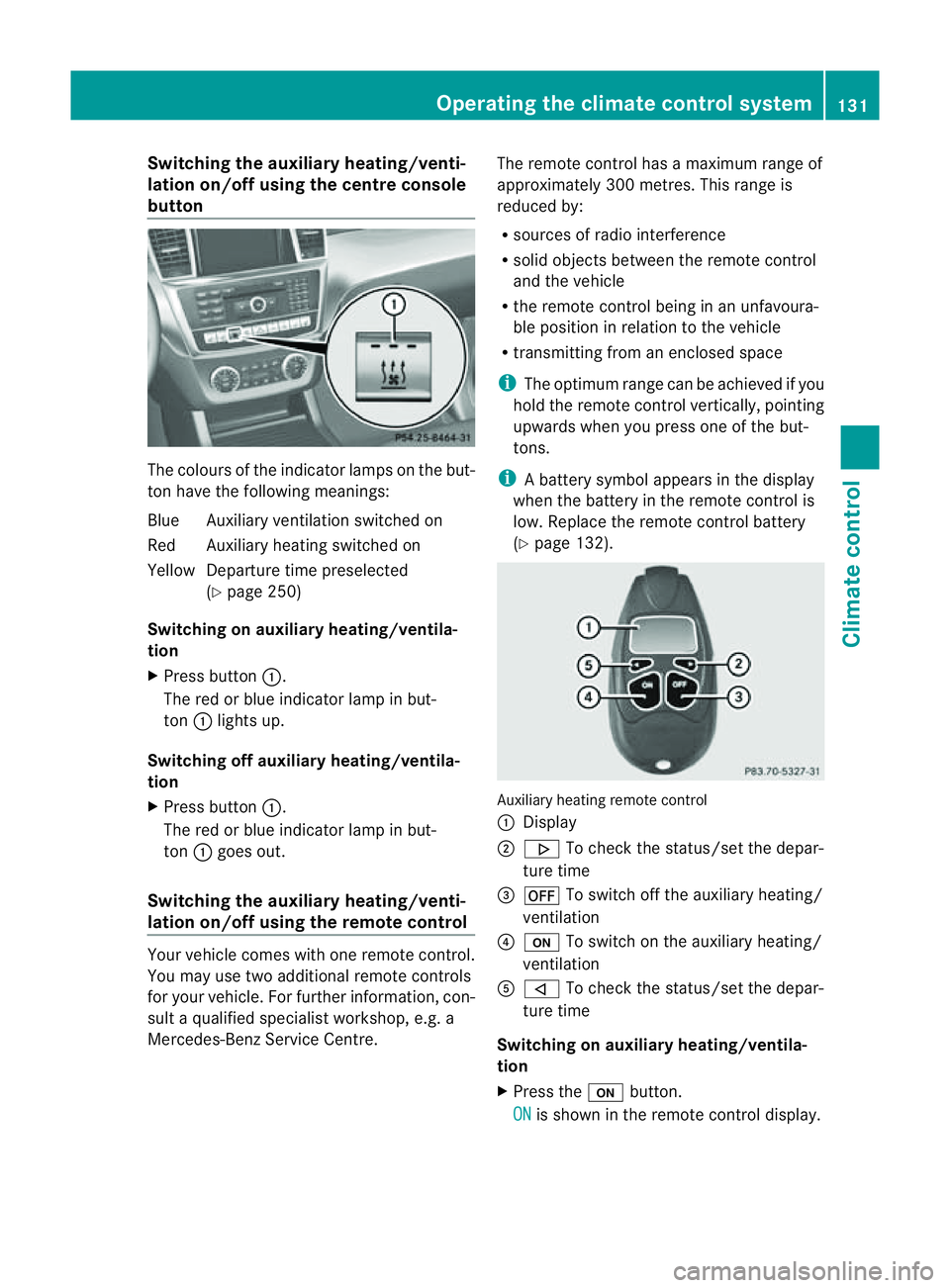
Switching th
eauxiliary heating/venti-
lation on/off using the centre console
button Th
ec olour softhe indicator lamps on the but-
ton hav ethe followin gmeanings:
Blue Auxiliar yventilation switched on
Red Auxiliar yheatin gswitched on
Yellow Departur etime preselected
(Y page 250)
Switching on auxiliary heating/ventila-
tion
X Press button :.
The red or blue indicator lamp in but-
ton :lights up.
Switching off auxiliary heating/ventila-
tion
X Press button :.
The red or blue indicator lamp in but-
ton :goes out.
Switching the auxiliar yheating/venti-
lation on/off using the remote control Your vehicle comes with one remote control.
You may use two additional remote controls
for your vehicle. For further information, con-
sult aqualified specialist workshop, e.g. a
Mercedes-Benz Service Centre. The remote control has
amaximum range of
approximately 300 metres. This range is
reduced by:
R sources of radio interference
R solid objects between the remote control
and the vehicle
R the remote control being in an unfavoura-
ble position in relation to the vehicle
R transmittin gfrom an enclose dspace
i The optimu mrange can be achieved if you
hold the remote control vertically, pointing
upwards when you press one of the but-
tons.
i Abattery symbol appears in th edisplay
when th ebatter yint he remote control is
low. Re placethe remote control battery
(Y page 132). Auxiliar
yheating remot econtrol
: Display
; . To check th estatus/set the depa r-
tur etime
= ^ To switch off th eauxiliar yheating/
ventilation
? u To switch on th eauxiliar yheating/
ventilation
A , To check th estatus/set the depa r-
tur etime
Switching on auxiliary heating/ventila-
tion
X Press the ubutton.
ON is shown in th
eremot econtrol di splay. Operatin
gthe clima tecontrol system
131Climatecontr ol Z
Page 135 of 389
Switching of
fauxiliary heating/ventila-
tion
X Press the ^button.
OFF is show
ninthe remote con troldisplay.
Checking the status of the auxiliary heat-
ing/ventilation
X Press the ,or. button.
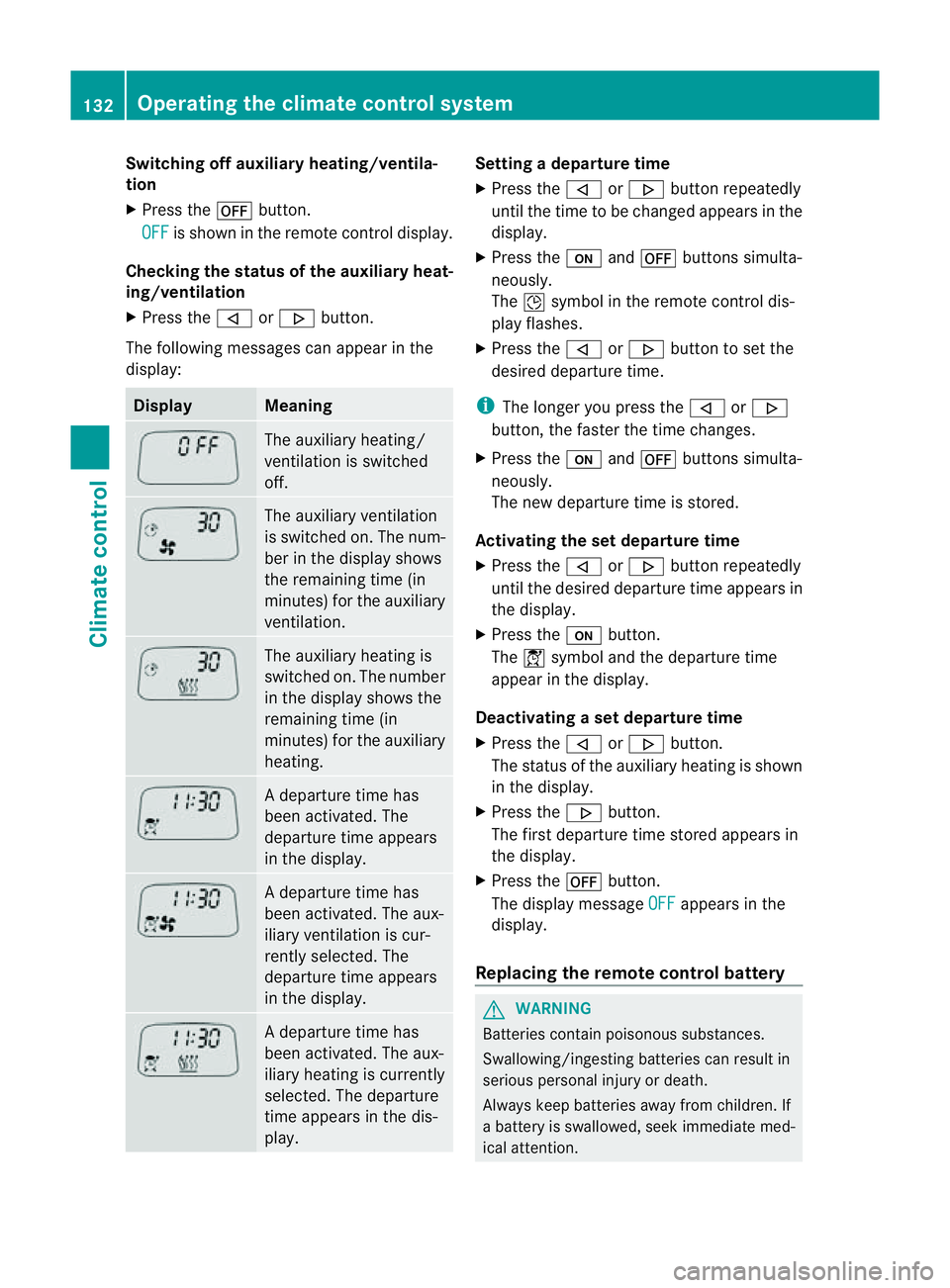
The following messages can appea rinthe
display: Display Meaning
The auxiliary heating/
ven tilation is switched
off. The auxiliary ventilation
is switched on. The num-
ber in the displa yshows
the remaining tim e(in
minutes) for the auxiliary
ventilation. The auxiliary heating is
switched on. The number
in the displa yshows the
remaining tim e(in
minutes) for the auxiliary
heating. Ad
eparture tim ehas
been activated. The
departure time appears
in the display. Ad
eparture tim ehas
been activated. The aux-
iliary ventilation is cur-
rently selected. The
departure time appears
in the display. Ad
eparture tim ehas
been activated. The aux-
iliary heating is currently
selected. The departure
time appears in the dis-
play. Setting
adeparture time
X Press the ,or. button repeatedly
until the time to be changed appears in the
display.
X Press the uand^ button ssimulta-
neously.
The Îsymbol in the remot econtrol dis-
play flashes.
X Press the ,or. button to set the
desire ddeparture time.
i The longer you press the ,or.
button ,the faster the tim echange s.
X Pres sthe u and^ button ssimulta-
neously.
The new departur etime is stored.
Activating the set departure time
X Press the ,or. button repeatedly
until the desired departur etime appears in
the display.
X Press the ubutton.
The Ísymbol and the departur etime
appear in the display.
Deactivating aset departure time
X Press the ,or. button.
The status of the auxiliary heating is shown
in the display.
X Press the .button.
The first departure time stored appears in
the display.
X Press the ^button.
The display message OFF appears in the
display.
Replacing the remote control battery G
WARNING
Batteries contain poisonous substances.
Swallowing/ingestin gbatteries can result in
serious personal injur yordeath.
Alway skeep batteries away from children .If
ab atter yiss wallowed, seek immediat emed-
ical attention. 132
Operating th
eclimate control systemClimate control